
Automatización de estrategias de trading en MQL5 (Parte 16): Ruptura del rango de medianoche con BoS (Break of Structure) basada en la acción del precio
 517
517
 7
7

Introducción
En nuestro artículo anterior (Parte 15), automatizamos una estrategia de trading aprovechando el patrón armónico Cypher para capturar los cambios de tendencia del mercado. Ahora, en la Parte 16, nos centramos en automatizar la estrategia de ruptura de rango de medianoche con ruptura de estructura en MetaQuotes Language 5 (MQL5), desarrollando un Asesor Experto que identifica el rango de precios de la medianoche a las 6 AM, detecta la ruptura de la estructura (Break of Structur, BoS) y ejecuta operaciones. Cubriremos los siguientes temas:
- Entendiendo la estrategia de ruptura del rango de medianoche con ruptura de la estructura
- Implementación en MQL5
- Pruebas retrospectivas
- Conclusión
Al final de este artículo, dispondrá de un programa MQL5 totalmente funcional que visualiza los niveles de precios clave, confirma las rupturas y ejecuta operaciones con parámetros de riesgo definidos. ¡Empecemos!
Entendiendo la estrategia de ruptura del rango de medianoche con ruptura de la estructura
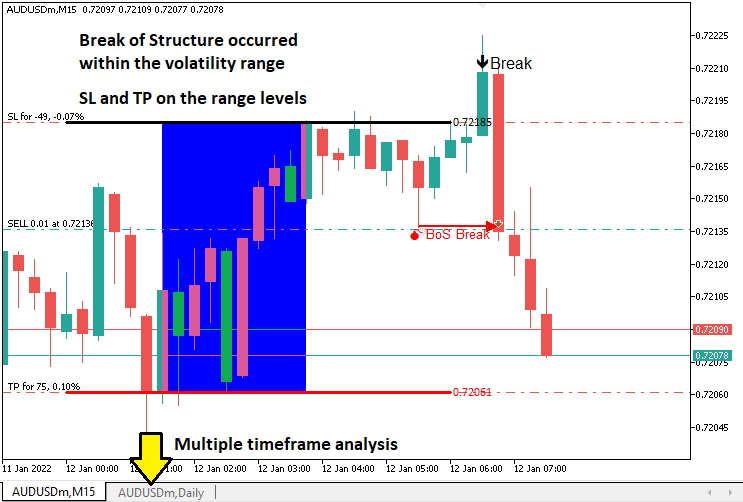
La estrategia de ruptura del rango nocturno con ruptura de estructura aprovecha el rango de precios de baja volatilidad que se forma entre medianoche y las 6 de la mañana, utilizando los precios más altos y más bajos como niveles de ruptura, al tiempo que requiere la confirmación de la ruptura de estructura para validar las señales de trading. La ruptura de la estructura identifica los cambios de tendencia al detectar cuándo el precio supera un máximo oscilante (alcista) o cae por debajo de un mínimo oscilante (bajista), filtrando las rupturas falsas y alineando las operaciones con el impulso del mercado. Este enfoque se adapta a los mercados durante las transiciones entre sesiones, como la apertura de Londres, o cualquier otra que prefiera. Aun así, requiere alinear las zonas horarias y actuar con precaución durante los acontecimientos noticiosos de gran impacto para evitar fluctuaciones bruscas.
Nuestro plan de implementación implicará la creación de un Asesor Experto MQL5 para automatizar la estrategia calculando el rango comprendido entre la medianoche y las 6 de la mañana, supervisando las rupturas dentro de un intervalo de tiempo establecido y confirmándolas con la ruptura de la estructura en un marco temporal específico, normalmente de 5, 10 o 15 minutos, por lo que lo incluiremos en la entrada para que el usuario pueda elegir dinámicamente. El sistema ejecutará operaciones con niveles de stop-loss y take-profit derivados del rango, visualizará los niveles clave en el gráfico para mayor claridad y garantizará una gestión de riesgos sólida para mantener un rendimiento constante en todas las condiciones del mercado. En pocas palabras, esto es lo que queremos decir.
Implementación en MQL5
Para crear el programa en MQL5, abra el MetaEditor, vaya al Navegador, localice la carpeta Indicators, haga clic en la pestaña «Nuevo» y siga las instrucciones para crear el archivo. Una vez creado, en el entorno de programación, tendremos que declarar algunas variables globales que utilizaremos a lo largo del programa.
//+------------------------------------------------------------------+
//|                   Midnight Range Break of Structure Breakout.mq5 |
//|                           Copyright 2025, Allan Munene Mutiiria. |
//|                                   https://t.me/Forex_Algo_Trader |
//+------------------------------------------------------------------+
#property copyright "Copyright 2025, Allan Munene Mutiiria."
#property link      "https://t.me/Forex_Algo_Trader"
#property version   "1.00"

#include <Trade/Trade.mqh> //--- Include the Trade library for handling trade operations
CTrade obj_Trade;          //--- Create an instance of the CTrade class for trade execution

double maximum_price = -DBL_MAX;      //--- Initialize the maximum price variable to negative infinity
double minimum_price = DBL_MAX;       //--- Initialize the minimum price variable to positive infinity
datetime maximum_time, minimum_time;  //--- Declare variables to store the times of maximum and minimum prices
bool isHaveDailyRange_Prices = false; //--- Initialize flag to indicate if daily range prices are calculated
bool isHaveRangeBreak = false;        //--- Initialize flag to indicate if a range breakout has occurred
bool isTakenTrade = false;            //--- Initialize flag to indicate if a trade is taken for the current day

#define RECTANGLE_PREFIX "RANGE RECTANGLE " //--- Define a prefix for rectangle object names
#define UPPER_LINE_PREFIX "UPPER LINE "     //--- Define a prefix for upper line object names
#define LOWER_LINE_PREFIX "LOWER LINE "     //--- Define a prefix for lower line object names

// bos
input ENUM_TIMEFRAMES timeframe_bos = PERIOD_M5; // Input the timeframe for Break of Structure (BoS) analysis
Aquí comenzamos a implementar la estrategia estableciendo los componentes fundamentales del programa. Incluimos la biblioteca <Trade/Trade.mqh> para habilitar las operaciones comerciales e instanciamos la clase «CTrade» como el objeto «obj_Trade», que se encargará de la ejecución de las operaciones, como abrir posiciones de compra o venta con los parámetros especificados.
Definimos varias variables globales para realizar un seguimiento de los datos críticos para la estrategia. Las variables «maximum_price» y «minimum_price», inicializadas en -DBL_MAX y DBL_MAX respectivamente, almacenan los precios más altos y más bajos entre medianoche y las 6 de la mañana, lo que nos permite identificar los límites del rango. Las variables «maximum_time» y «minimum_time», de tipo datetime, registran los momentos en los que se producen estos precios extremos, lo cual es esencial para visualizar el rango en el gráfico.The "maximum_time" and "minimum_time" variables, of type datetime, record the times when these extreme prices occur, which is essential for visualizing the range on the chart. También utilizamos indicadores booleanos: «isHaveDailyRange_Prices» para indicar si se ha calculado el rango diario, «isHaveRangeBreak» para rastrear si se ha producido una ruptura y «isTakenTrade» para garantizar que solo se realice una operación al día, evitando el exceso de operaciones.
Para facilitar la visualización del gráfico, definimos constantes para nombrar los objetos: «RECTANGLE_PREFIX» como «RANGE RECTANGLE », «UPPER_LINE_PREFIX» como «UPPER LINE » y «LOWER_LINE_PREFIX» como «LOWER LINE ». Estos prefijos garantizan nombres únicos para objetos del gráfico, como rectángulos y líneas, que marcarán el rango y los niveles de ruptura, haciendo que las acciones de la estrategia sean visualmente claras. Además, introducimos un parámetro de entrada del usuario, «timeframe_bos», establecido en PERIOD_M5 por defecto, que permite a los operadores especificar el marco temporal para el análisis de ruptura de la estructura, como el gráfico de 5 minutos, con el fin de detectar máximos y mínimos oscilantes. Con eso, ya está todo listo. Lo que hay que hacer es definir dos funciones que nos permitan controlar las instancias de negociación entre nuevos días y nuevas barras.
//+------------------------------------------------------------------+
//| Function to check for a new bar                                  |
//+------------------------------------------------------------------+
bool isNewBar(){ //--- Define a function to detect a new bar on the current timeframe
   static int prevBars = 0;                //--- Store the previous number of bars
   int currBars = iBars(_Symbol,_Period);  //--- Get the current number of bars
   if (prevBars==currBars) return (false); //--- Return false if no new bar has formed
   prevBars = currBars;                    //--- Update the previous bar count
   return (true);                          //--- Return true if a new bar has formed
}

//+------------------------------------------------------------------+
//| Function to check for a new day                                  |
//+------------------------------------------------------------------+
bool isNewDay(){ //--- Define a function to detect a new trading day
   bool newDay = false;  //--- Initialize the new day flag

   MqlDateTime Str_DateTime;                 //--- Declare a structure to hold date and time information
   TimeToStruct(TimeCurrent(),Str_DateTime); //--- Convert the current time to the structure

   static int prevDay = 0;         //--- Store the previous day's date
   int currDay = Str_DateTime.day; //--- Get the current day's date

   if (prevDay == currDay){ //--- Check if the current day is the same as the previous day
      newDay = false;       //--- Set the flag to false (no new day)
   }
   else if (prevDay != currDay){ //--- Check if a new day has started
      Print("WE HAVE A NEW DAY WITH DATE ",currDay); //--- Log the new day
      prevDay = currDay;                             //--- Update the previous day
      newDay = true;                                 //--- Set the flag to true (new day)
   }

   return (newDay); //--- Return the new day status
}
Aquí implementamos las funciones «isNewBar» e «isNewDay» para sincronizar nuestra estrategia de ruptura del rango de medianoche con la estrategia de ruptura de estructura en MQL5 con el momento del mercado. En «isNewBar», hacemos un seguimiento del recuento de barras utilizando una variable estática «prevBars» y la función iBars con _Symbol y _Period, devolviendo verdadero cuando se forma una nueva barra para activar las actualizaciones de precios. En «isNewDay», utilizamos una estructura MqlDateTime, la función TimeToStruct con TimeCurrent y un «prevDay» estático para detectar nuevos días, restableciendo los cálculos de rango cuando cambia «currDay» y registrando mediante Print. Con estas funciones, podemos definir la lógica directamente en el controlador de eventos OnTick.
//+------------------------------------------------------------------+
//| Expert tick function                                             |
//+------------------------------------------------------------------+
void OnTick(){
   //---
   static datetime midnight = iTime(_Symbol,PERIOD_D1,0);            //--- Store the current day's midnight time
   static datetime sixAM = midnight + 6 * 3600;                      //--- Calculate 6 AM time by adding 6 hours to midnight
   static datetime scanBarTime = sixAM + 1 * PeriodSeconds(_Period); //--- Set the time of the next bar after 6 AM for scanning
   static double midnight_price = iClose(_Symbol,PERIOD_D1,0);       //--- Store the closing price at midnight

   static datetime validBreakTime_start = scanBarTime;               //--- Set the start time for valid breakout detection
   static datetime validBreakTime_end = midnight + (6+5) * 3600;     //--- Set the end time for valid breakouts to 11 AM

   if (isNewDay()){ //--- Check if a new trading day has started
      midnight = iTime(_Symbol,PERIOD_D1,0);                          //--- Update midnight time for the new day
      sixAM = midnight + 6 * 3600;                                    //--- Recalculate 6 AM time for the new day
      scanBarTime = sixAM + 1 * PeriodSeconds(_Period);               //--- Update the scan bar time to the next bar after 6 AM
      midnight_price = iClose(_Symbol,PERIOD_D1,0);                   //--- Update the midnight closing price
      Print("Midnight price = ",midnight_price,", Time = ",midnight); //--- Log the midnight price and time

      validBreakTime_start = scanBarTime;           //--- Reset the start time for valid breakouts
      validBreakTime_end = midnight + (6+5) * 3600; //--- Reset the end time for valid breakouts to 11 AM

      maximum_price = -DBL_MAX; //--- Reset the maximum price to negative infinity
      minimum_price = DBL_MAX;  //--- Reset the minimum price to positive infinity

      isHaveDailyRange_Prices = false; //--- Reset the flag indicating daily range calculation
      isHaveRangeBreak = false;        //--- Reset the flag indicating a range breakout
      isTakenTrade = false;            //--- Reset the flag indicating a trade is taken
   }
}
Aquí desarrollamos la lógica central de nuestra estrategia dentro de la función OnTick, el controlador de eventos principal de nuestro programa que se ejecuta con cada variación de precio. Inicializamos variables estáticas para realizar un seguimiento de los momentos críticos: «midnight» almacena la hora de inicio del día actual utilizando la función iTime con _Symbol, PERIOD_D1 y el índice 0; «sixAM» se calcula añadiendo 6 horas (21 600 segundos) a «midnight»; «scanBarTime» establece la hora de la siguiente barra después de las 6 de la mañana utilizando la función PeriodSeconds con «_Period»; y «midnight_price» captura el precio de cierre del día a medianoche mediante la función iClose. También definimos «validBreakTime_start» como «scanBarTime» y «validBreakTime_end» como las 11:00 a. m. (medianoche más 11 horas) para establecer una ventana de tiempo para las rupturas válidas.
Cuando comienza un nuevo día de negociación, detectado por nuestra función «isNewDay», actualizamos estas variables temporales para reflejar los datos del nuevo día, lo que garantiza que nuestros cálculos de rango se mantengan actualizados. Restablecemos «midnight», «sixAM», «scanBarTime» y «midnight_price» utilizando las mismas funciones iTime e iClose, y registramos los detalles de medianoche con la función Print para la depuración. También restablecemos «validBreakTime_start» y «validBreakTime_end» para la nueva ventana de ruptura, y reinicializamos «maximum_price» a «-DBL_MAX», «minimum_price» a «DBL_MAX» y los indicadores «isHaveDailyRange_Prices», «isHaveRangeBreak» e «isTakenTrade» a falso, preparando el EA para calcular el nuevo rango de medianoche a 6 a. m. y supervisar nuevas rupturas. Ahora podemos comprobar el cálculo de los intervalos de tiempo.
if (isNewBar()){ //--- Check if a new bar has formed on the current timeframe
   datetime currentBarTime = iTime(_Symbol,_Period,0); //--- Get the time of the current bar

   if (currentBarTime == scanBarTime && !isHaveDailyRange_Prices){              //--- Check if it's time to scan for daily range and range is not yet calculated
      Print("WE HAVE ENOUGH BARS DATA FOR DOCUMENTATION. MAKE THE EXTRACTION"); //--- Log that the scan for daily range is starting
      int total_bars = int((sixAM - midnight)/PeriodSeconds(_Period))+1;        //--- Calculate the number of bars from midnight to 6 AM
      Print("Total Bars for scan = ",total_bars);                               //--- Log the total number of bars to scan
      int highest_price_bar_index = -1;                                         //--- Initialize the index of the bar with the highest price
      int lowest_price_bar_index = -1;                                          //--- Initialize the index of the bar with the lowest price

      for (int i=1; i<=total_bars ; i++){ //--- Loop through each bar from midnight to 6 AM
         double open_i = open(i);   //--- Get the open price of the i-th bar
         double close_i = close(i); //--- Get the close price of the i-th bar

         double highest_price_i = (open_i > close_i) ? open_i : close_i; //--- Determine the highest price (open or close) of the bar
         double lowest_price_i = (open_i < close_i) ? open_i : close_i;  //--- Determine the lowest price (open or close) of the bar

         if (highest_price_i > maximum_price){ //--- Check if the bar's highest price exceeds the current maximum
            maximum_price = highest_price_i;   //--- Update the maximum price
            highest_price_bar_index = i;       //--- Store the bar index of the maximum price
            maximum_time = time(i);            //--- Store the time of the maximum price
         }
         if (lowest_price_i < minimum_price){ //--- Check if the bar's lowest price is below the current minimum
            minimum_price = lowest_price_i; //--- Update the minimum price
            lowest_price_bar_index = i;     //--- Store the bar index of the minimum price
            minimum_time = time(i);         //--- Store the time of the minimum price
         }
      }
      Print("Maximum Price = ",maximum_price,", Bar index = ",highest_price_bar_index,", Time = ",maximum_time); //--- Log the maximum price, its bar index, and time
      Print("Minimum Price = ",minimum_price,", Bar index = ",lowest_price_bar_index,", Time = ",minimum_time);  //--- Log the minimum price, its bar index, and time

      isHaveDailyRange_Prices = true; //--- Set the flag to indicate that the daily range is calculated
   }
}
Para calcular el rango de precios entre medianoche y las 6 de la mañana cuando se forma una nueva barra, utilizamos la función «isNewBar» para comprobar si hay una nueva barra y, a continuación, recuperamos la hora de la barra con iTime para _Symbol, _Period, índice 0, almacenándola en «currentBarTime». Si «currentBarTime» es igual a «scanBarTime» y «isHaveDailyRange_Prices» es falso, registramos el escaneo del rango comenzando con Print, calculamos «total_bars» utilizando PeriodSeconds para _Period y recorremos las barras para encontrar los precios más altos y más bajos con las funciones «open» y «close», actualizando «maximum_price», «minimum_price», «maximum_time», «minimum_time» y sus índices. Registramos los resultados y establecemos «isHaveDailyRange_Prices» en verdadero, lo que habilita la supervisión de rupturas.
Para simplificar, utilizamos funciones predefinidas para obtener los precios, que son las siguientes.
//+------------------------------------------------------------------+
//| Helper functions for price and time data                         |
//+------------------------------------------------------------------+
double open(int index){return (iOpen(_Symbol,_Period,index));}   //--- Return the open price of the specified bar index on the current timeframe
double high(int index){return (iHigh(_Symbol,_Period,index));}   //--- Return the high price of the specified bar index on the current timeframe
double low(int index){return (iLow(_Symbol,_Period,index));}     //--- Return the low price of the specified bar index on the current timeframe
double close(int index){return (iClose(_Symbol,_Period,index));} //--- Return the close price of the specified bar index on the current timeframe
datetime time(int index){return (iTime(_Symbol,_Period,index));} //--- Return the time of the specified bar index on the current timeframe

double high(int index,ENUM_TIMEFRAMES tf_bos){return (iHigh(_Symbol,tf_bos,index));}   //--- Return the high price of the specified bar index on the BoS timeframe
double low(int index,ENUM_TIMEFRAMES tf_bos){return (iLow(_Symbol,tf_bos,index));}     //--- Return the low price of the specified bar index on the BoS timeframe
datetime time(int index,ENUM_TIMEFRAMES tf_bos){return (iTime(_Symbol,tf_bos,index));} //--- Return the time of the specified bar index on the BoS timeframe
Implementamos funciones auxiliares para recuperar de manera eficiente datos de precios y tiempo definiendo las funciones «open», «high», «low», «close» y «time», cada una de las cuales toma un parámetro «index» para obtener datos del intervalo de tiempo actual utilizando iOpen, «iHigh», «iLow», «iClose» e «iTime», respectivamente, con «_Symbol» y «_Period» como entradas, devolviendo el precio de apertura, el precio máximo, el precio mínimo, el precio de cierre o el tiempo de barra correspondientes para el índice de barra especificado.
Además, sobrecargamos las funciones «high», «low» y «time» para aceptar un parámetro ENUM_TIMEFRAMES «tf_bos», lo que nos permite recuperar el precio alto, el precio bajo o el tiempo de barra para el intervalo de tiempo de ruptura de estructura utilizando «iHigh», «iLow» e «iTime» con _Symbol y «tf_bos». Ya que hemos definido el rango, visualicémoslo en el gráfico. Para ello, también tendremos que definir algunas funciones auxiliares adicionales.
//+------------------------------------------------------------------+
//| Function to create a rectangle object                            |
//+------------------------------------------------------------------+
void create_Rectangle(string objName,datetime time1,double price1,
               datetime time2,double price2,color clr){ //--- Define a function to draw a rectangle on the chart
   if (ObjectFind(0,objName) < 0){                                       //--- Check if the rectangle object does not already exist
      ObjectCreate(0,objName,OBJ_RECTANGLE,0,time1,price1,time2,price2); //--- Create a rectangle object with specified coordinates

      ObjectSetInteger(0,objName,OBJPROP_TIME,0,time1);  //--- Set the first time coordinate of the rectangle
      ObjectSetDouble(0,objName,OBJPROP_PRICE,0,price1); //--- Set the first price coordinate of the rectangle
      ObjectSetInteger(0,objName,OBJPROP_TIME,1,time2);  //--- Set the second time coordinate of the rectangle
      ObjectSetDouble(0,objName,OBJPROP_PRICE,1,price2); //--- Set the second price coordinate of the rectangle
      ObjectSetInteger(0,objName,OBJPROP_FILL,true);     //--- Enable filling the rectangle with color
      ObjectSetInteger(0,objName,OBJPROP_COLOR,clr);     //--- Set the color of the rectangle
      ObjectSetInteger(0,objName,OBJPROP_BACK,false);    //--- Ensure the rectangle is drawn in the foreground

      ChartRedraw(0); //--- Redraw the chart to display the rectangle
   }
}

//+------------------------------------------------------------------+
//| Function to create a line object with text                       |
//+------------------------------------------------------------------+
void create_Line(string objName,datetime time1,double price1,
               datetime time2,double price2,int width,color clr,string text){ //--- Define a function to draw a trend line with text
   if (ObjectFind(0,objName) < 0){                                   //--- Check if the line object does not already exist
      ObjectCreate(0,objName,OBJ_TREND,0,time1,price1,time2,price2); //--- Create a trend line object with specified coordinates

      ObjectSetInteger(0,objName,OBJPROP_TIME,0,time1);  //--- Set the first time coordinate of the line
      ObjectSetDouble(0,objName,OBJPROP_PRICE,0,price1); //--- Set the first price coordinate of the line
      ObjectSetInteger(0,objName,OBJPROP_TIME,1,time2);  //--- Set the second time coordinate of the line
      ObjectSetDouble(0,objName,OBJPROP_PRICE,1,price2); //--- Set the second price coordinate of the line
      ObjectSetInteger(0,objName,OBJPROP_WIDTH,width);   //--- Set the width of the line
      ObjectSetInteger(0,objName,OBJPROP_COLOR,clr);     //--- Set the color of the line
      ObjectSetInteger(0,objName,OBJPROP_BACK,false);    //--- Ensure the line is drawn in the foreground

      long scale = 0; //--- Initialize a variable to store the chart scale
      if(!ChartGetInteger(0,CHART_SCALE,0,scale)){                                   //--- Attempt to get the chart scale
         Print("UNABLE TO GET THE CHART SCALE. DEFAULT OF ",scale," IS CONSIDERED"); //--- Log if the chart scale cannot be retrieved
      }

      int fontsize = 11; //--- Set the default font size for the text
      if (scale==0){fontsize=5;} //--- Adjust font size for minimized chart scale
      else if (scale==1){fontsize=6;}  //--- Adjust font size for scale 1
      else if (scale==2){fontsize=7;}  //--- Adjust font size for scale 2
      else if (scale==3){fontsize=9;}  //--- Adjust font size for scale 3
      else if (scale==4){fontsize=11;} //--- Adjust font size for scale 4
      else if (scale==5){fontsize=13;} //--- Adjust font size for maximized chart scale

      string txt = " Right Price";         //--- Define the text suffix for the price label
      string objNameDescr = objName + txt; //--- Create a unique name for the text object
      ObjectCreate(0,objNameDescr,OBJ_TEXT,0,time2,price2);        //--- Create a text object at the line's end
      ObjectSetInteger(0,objNameDescr,OBJPROP_COLOR,clr);          //--- Set the color of the text
      ObjectSetInteger(0,objNameDescr,OBJPROP_FONTSIZE,fontsize);  //--- Set the font size of the text
      ObjectSetInteger(0,objNameDescr,OBJPROP_ANCHOR,ANCHOR_LEFT); //--- Set the text anchor to the left
      ObjectSetString(0,objNameDescr,OBJPROP_TEXT," "+text);       //--- Set the text content (price value)
      ObjectSetString(0,objNameDescr,OBJPROP_FONT,"Calibri");      //--- Set the font type to Calibri

      ChartRedraw(0); //--- Redraw the chart to display the line and text
   }
}
Para visualizar el rango, definimos dos funciones. En la función «create_Rectangle», dibujamos un rectángulo relleno para representar el rango de precios entre medianoche y las 6 de la mañana, utilizando los parámetros «objName», «time1», «price1», «time2», «price2» y «clr» para la personalización. Primero comprobamos si el objeto no existe utilizando la función ObjectFind con el ID de gráfico 0, asegurándonos de evitar duplicados.
Si no existe, creamos el rectángulo con ObjectCreate utilizando OBJ_RECTANGLE, estableciendo sus coordenadas con ObjectSetInteger para OBJPROP_TIME y ObjectSetDouble para «OBJPROP_PRICE». Habilitamos el relleno de color con «ObjectSetInteger» para «OBJPROP_FILL», establecemos el color del rectángulo y nos aseguramos de que aparezca en primer plano estableciendo «OBJPROP_BACK» en falso, seguido de un ChartRedraw para actualizar la visualización del gráfico.
En la función «create_Line», dibujamos una línea de tendencia con una etiqueta de texto descriptiva para marcar los límites del rango, aceptando los parámetros «objName», «time1», «price1», «time2», «price2», «width», «clr» y «text». Verificamos la ausencia de la línea con «ObjectFind» y, a continuación, la creamos con «ObjectCreate» con OBJ_TREND, configurando las coordenadas, el grosor de la línea y el color mediante «ObjectSetInteger» y «ObjectSetDouble». Para garantizar que el texto sea legible, recuperamos la escala del gráfico con «ChartGetInteger», registramos cualquier error con «Print» y ajustamos el tamaño de la fuente dinámicamente en función de la escala (de 5 a 13).
Creamos un objeto de texto con «ObjectCreate» utilizando «OBJ_TEXT», denominado «objNameDescr», y establecemos sus propiedades con «ObjectSetInteger» para el color, el tamaño de la fuente y el anclaje izquierdo, y ObjectSetString para la fuente «Calibri» y el texto del precio, antes de volver a dibujar el gráfico con «ChartRedraw». Con estas funciones, podemos llamarlas cuando definimos los rangos.
create_Rectangle(RECTANGLE_PREFIX+TimeToString(maximum_time),maximum_time,maximum_price,minimum_time,minimum_price,clrBlue);                       //--- Draw a rectangle to mark the daily range
create_Line(UPPER_LINE_PREFIX+TimeToString(midnight),midnight,maximum_price,sixAM,maximum_price,3,clrBlack,DoubleToString(maximum_price,_Digits)); //--- Draw the upper line for the range
create_Line(LOWER_LINE_PREFIX+TimeToString(midnight),midnight,minimum_price,sixAM,minimum_price,3,clrRed,DoubleToString(minimum_price,_Digits));   //--- Draw the lower line for the range
Completamos la visualización del rango de precios entre medianoche y las 6 de la mañana llamando a «create_Rectangle» con «RECTANGLE_PREFIX+TimeToString(maximum_time)», «maximum_time», «maximum_price», «minimum_time», «minimum_price» y «clrBlue» para dibujar un rectángulo que marque el rango. A continuación, utilizamos «create_Line» dos veces: primero para la línea superior con «UPPER_LINE_PREFIX+TimeToString(midnight)», «midnight», «maximum_price», «sixAM», anchura 3, «clrBlack» y «DoubleToString(maximum_price,_Digits)»; y, en segundo lugar, para la línea inferior con «LOWER_LINE_PREFIX», «minimum_price», «clrRed» y los parámetros correspondientes. Este es el resultado actual.
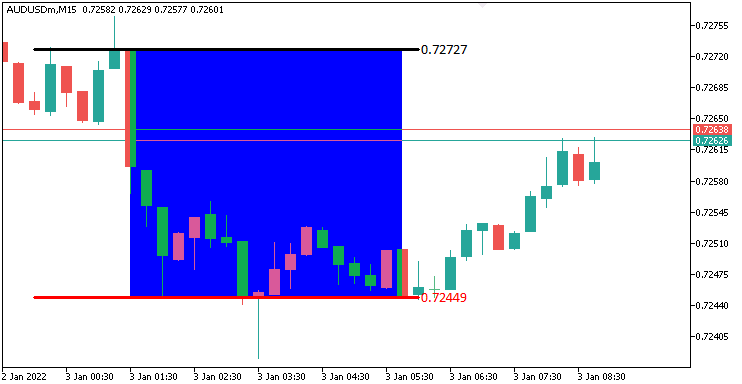
Desde la imagen, podemos ver que hemos visualizado con precisión el rango. Lo siguiente que debemos hacer es rastrear que hay una ruptura dentro de un rango de tiempo predefinido y visualizarlo en el gráfico también. Necesitaremos una función personalizada para mostrar la ruptura en el gráfico.
//+------------------------------------------------------------------+
//| Function to draw a breakpoint marker                             |
//+------------------------------------------------------------------+
void drawBreakPoint(string objName,datetime time,double price,int arrCode,
   color clr,int direction){ //--- Define a function to draw a breakpoint marker
   if (ObjectFind(0,objName) < 0){ //--- Check if the breakpoint object does not already exist
      ObjectCreate(0,objName,OBJ_ARROW,0,time,price);        //--- Create an arrow object at the specified time and price
      ObjectSetInteger(0,objName,OBJPROP_ARROWCODE,arrCode); //--- Set the arrow code for the marker
      ObjectSetInteger(0,objName,OBJPROP_COLOR,clr);         //--- Set the color of the arrow
      ObjectSetInteger(0,objName,OBJPROP_FONTSIZE,12);       //--- Set the font size for the arrow
      if (direction > 0) ObjectSetInteger(0,objName,OBJPROP_ANCHOR,ANCHOR_TOP);    //--- Set the anchor to top for upward breaks
      if (direction < 0) ObjectSetInteger(0,objName,OBJPROP_ANCHOR,ANCHOR_BOTTOM); //--- Set the anchor to bottom for downward breaks

      string txt = " Break"; //--- Define the text suffix for the breakpoint label
      string objNameDescr = objName + txt; //--- Create a unique name for the text object
      ObjectCreate(0,objNameDescr,OBJ_TEXT,0,time,price);   //--- Create a text object at the breakpoint
      ObjectSetInteger(0,objNameDescr,OBJPROP_COLOR,clr);   //--- Set the color of the text
      ObjectSetInteger(0,objNameDescr,OBJPROP_FONTSIZE,12); //--- Set the font size of the text
      if (direction > 0) { //--- Check if the breakout is upward
         ObjectSetInteger(0,objNameDescr,OBJPROP_ANCHOR,ANCHOR_LEFT_UPPER); //--- Set the text anchor to left upper
         ObjectSetString(0,objNameDescr,OBJPROP_TEXT, " " + txt);           //--- Set the text content
      }
      if (direction < 0) { //--- Check if the breakout is downward
         ObjectSetInteger(0,objNameDescr,OBJPROP_ANCHOR,ANCHOR_LEFT_LOWER); //--- Set the text anchor to left lower
         ObjectSetString(0,objNameDescr,OBJPROP_TEXT, " " + txt);           //--- Set the text content
      }
   }
   ChartRedraw(0); //--- Redraw the chart to display the breakpoint
}
Aquí, definimos la función "drawBreakPoint" para marcar visualmente los puntos de ruptura. Utilizando los parámetros «objName», «time», «price», «arrCode», «clr» y «direction», creamos una flecha con ObjectCreate y OBJ_ARROW si no existe mediante ObjectFind, estableciendo su estilo, color y tamaño de fuente 12 con «ObjectSetInteger», anclándola a «ANCHOR_TOP» o «ANCHOR_BOTTOM» en función de «direction».
Añadimos una etiqueta de texto «Break» con «ObjectCreate» y «OBJ_TEXT», con el nombre «objNameDescr», y configuramos el color, el tamaño de la fuente y el anclaje (ANCHOR_LEFT_UPPER o ANCHOR_LEFT_LOWER) utilizando «ObjectSetInteger» y ObjectSetString. Finalizamos con "ChartRedraw" para mostrar estos marcadores, asegurando una visualización clara de la ruptura. Ahora podemos utilizar esta función para visualizar los puntos de interrupción en el gráfico.
double barClose = close(1); //--- Get the closing price of the previous bar
datetime barTime = time(1); //--- Get the time of the previous bar

if (barClose > maximum_price && isHaveDailyRange_Prices && !isHaveRangeBreak
    && barTime >= validBreakTime_start && barTime <= validBreakTime_end
){ //--- Check for a breakout above the maximum price within the valid time window
   Print("CLOSE Price broke the HIGH range. ",barClose," > ",maximum_price); //--- Log the breakout above the high range
   isHaveRangeBreak = true;                                                //--- Set the flag to indicate a range breakout has occurred
   drawBreakPoint(TimeToString(barTime),barTime,barClose,234,clrBlack,-1); //--- Draw a breakpoint marker for the high breakout
}
else if (barClose < minimum_price && isHaveDailyRange_Prices && !isHaveRangeBreak
         && barTime >= validBreakTime_start && barTime <= validBreakTime_end
){ //--- Check for a breakout below the minimum price within the valid time window
   Print("CLOSE Price broke the LOW range. ",barClose," < ",minimum_price); //--- Log the breakout below the low range
   isHaveRangeBreak = true;                                              //--- Set the flag to indicate a range breakout has occurred
   drawBreakPoint(TimeToString(barTime),barTime,barClose,233,clrBlue,1); //--- Draw a breakpoint marker for the low breakout
}
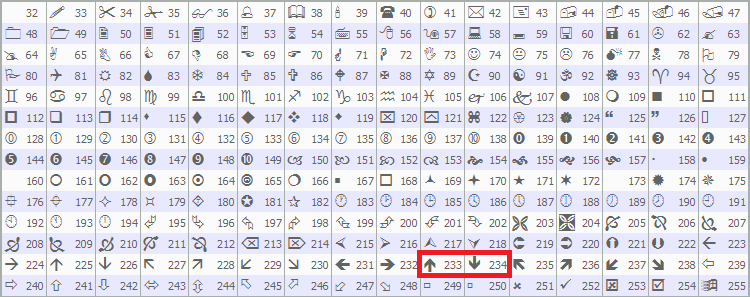
Para detectar y visualizar las rupturas válidas, buscamos el cierre de la barra anterior con "close(1)" en "barClose" y la hora con "time(1)" en "barTime". Si «barClose» supera «maximum_price», «isHaveDailyRange_Prices» es verdadero, «isHaveRangeBreak» es falso y «barTime» está dentro de «validBreakTime_start» a «validBreakTime_end», registramos la ruptura alta con «Print», establecemos «isHaveRangeBreak» como verdadero y llamamos a «drawBreakPoint» con «TimeToString(barTime)», «barClose», flecha 234, «clrBlack» y -1.
Si «barClose» está por debajo de «minimum_price» en las mismas condiciones, registramos la ruptura a la baja, establecemos «isHaveRangeBreak» y llamamos a «drawBreakPoint» con la flecha 233, «clrBlue» y 1. Esto marca rupturas válidas. Utilizamos las flechas predefinidas de MQL5, específicamente 233 y 23 como puedes ver a continuación, pero puedes usar las que prefieras.
Cuando ejecutamos el programa, tenemos la siguiente salida.
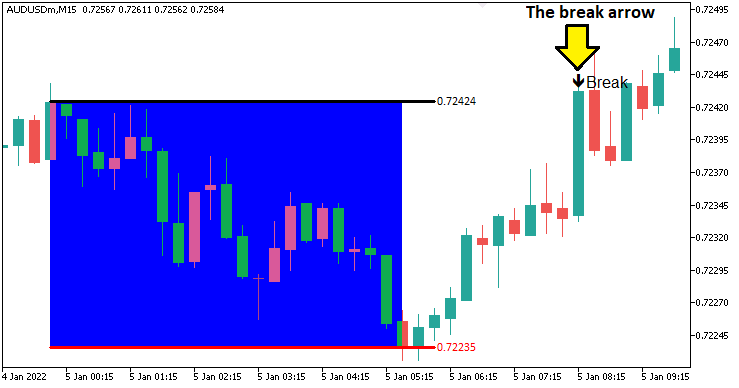
Desde la imagen podemos observar que podemos identificar y visualizar con precisión la rotura. Lo siguiente que debemos hacer es definir el cambio de estructura y su lógica de ruptura. Necesitaremos entonces una función para dibujar el punto de giro identificado.
//+------------------------------------------------------------------+
//| Function to draw a swing point marker                            |
//+------------------------------------------------------------------+
void drawSwingPoint(string objName,datetime time,double price,int arrCode,
   color clr,int direction){ //--- Define a function to draw a swing point marker
   if (ObjectFind(0,objName) < 0){ //--- Check if the swing point object does not already exist
      ObjectCreate(0,objName,OBJ_ARROW,0,time,price);        //--- Create an arrow object at the specified time and price
      ObjectSetInteger(0,objName,OBJPROP_ARROWCODE,arrCode); //--- Set the arrow code for the marker
      ObjectSetInteger(0,objName,OBJPROP_COLOR,clr);         //--- Set the color of the arrow
      ObjectSetInteger(0,objName,OBJPROP_FONTSIZE,10);       //--- Set the font size for the arrow

      if (direction > 0) {ObjectSetInteger(0,objName,OBJPROP_ANCHOR,ANCHOR_TOP);}    //--- Set the anchor to top for swing lows
      if (direction < 0) {ObjectSetInteger(0,objName,OBJPROP_ANCHOR,ANCHOR_BOTTOM);} //--- Set the anchor to bottom for swing highs

      string text = "BoS";                   //--- Define the text label for Break of Structure
      string objName_Descr = objName + text; //--- Create a unique name for the text object
      ObjectCreate(0,objName_Descr,OBJ_TEXT,0,time,price);   //--- Create a text object at the swing point
      ObjectSetInteger(0,objName_Descr,OBJPROP_COLOR,clr);   //--- Set the color of the text
      ObjectSetInteger(0,objName_Descr,OBJPROP_FONTSIZE,10); //--- Set the font size of the text

      if (direction > 0) { //--- Check if the swing is a low
         ObjectSetString(0,objName_Descr,OBJPROP_TEXT,"  "+text);            //--- Set the text content
         ObjectSetInteger(0,objName_Descr,OBJPROP_ANCHOR,ANCHOR_LEFT_UPPER); //--- Set the text anchor to left upper
      }
      if (direction < 0) { //--- Check if the swing is a high
         ObjectSetString(0,objName_Descr,OBJPROP_TEXT,"  "+text);            //--- Set the text content
         ObjectSetInteger(0,objName_Descr,OBJPROP_ANCHOR,ANCHOR_LEFT_LOWER); //--- Set the text anchor to left lower
      }
   }
   ChartRedraw(0); //--- Redraw the chart to display the swing point
}
Implementamos la función "drawSwingPoint" para marcar los máximos y mínimos del swing que se han identificado. Utilizando los parámetros «objName», «time», «price», «arrCode», «clr» y «direction», verificamos la ausencia con ObjectFind, creamos una flecha con ObjectCreate utilizando OBJ_ARROW y establecemos el estilo, el color y el tamaño de fuente 10 a través de ObjectSetInteger, anclando a «ANCHOR_TOP» para los mínimos o «ANCHOR_BOTTOM» para los máximos. Añadimos una etiqueta de texto «BoS» con «ObjectCreate» utilizando «OBJ_TEXT», configurando el color, el tamaño de la fuente y el anclaje (ANCHOR_LEFT_UPPER o ANCHOR_LEFT_LOWER) mediante «ObjectSetInteger» y «ObjectSetString». Llamamos a ChartRedraw para mostrar estos marcadores, resaltando los puntos clave de oscilación. Con esta función continuamos estructurando la lógica para la identificación del punto de giro.
// bos logic
if (isHaveDailyRange_Prices){ //--- Proceed with BoS logic only if the daily range is calculated
   static bool isNewBar_bos = false;            //--- Initialize flag to indicate a new bar on the BoS timeframe
   int currBars = iBars(_Symbol,timeframe_bos); //--- Get the current number of bars on the BoS timeframe
   static int prevBars = currBars;              //--- Store the previous number of bars for comparison

   if (prevBars == currBars){isNewBar_bos = false;}                          //--- Set flag to false if no new bar has formed
   else if (prevBars != currBars){isNewBar_bos = true; prevBars = currBars;} //--- Set flag to true and update prevBars if a new bar has formed

   const int length = 4;                         //--- Define the number of bars to check for swing high/low (must be > 2)
   int right_index, left_index;                  //--- Declare variables to store indices for bars to the right and left
   int curr_bar = length;                        //--- Set the current bar index for swing analysis
   bool isSwingHigh = true, isSwingLow = true;   //--- Initialize flags to determine if the current bar is a swing high or low
   static double swing_H = -1.0, swing_L = -1.0; //--- Initialize variables to store the latest swing high and low prices

   if (isNewBar_bos){ //--- Check if a new bar has formed on the BoS timeframe
      for (int a=1; a<=length; a++){ //--- Loop through the specified number of bars to check for swings
         right_index = curr_bar - a; //--- Calculate the right-side bar index
         left_index = curr_bar + a;  //--- Calculate the left-side bar index
         if ( (high(curr_bar,timeframe_bos) <= high(right_index,timeframe_bos)) || (high(curr_bar,timeframe_bos) < high(left_index,timeframe_bos)) ){ //--- Check if the current bar's high is not the highest
            isSwingHigh = false; //--- Set flag to false if the bar is not a swing high
         }
         if ( (low(curr_bar,timeframe_bos) >= low(right_index,timeframe_bos)) || (low(curr_bar,timeframe_bos) > low(left_index,timeframe_bos)) ){ //--- Check if the current bar's low is not the lowest
            isSwingLow = false; //--- Set flag to false if the bar is not a swing low
         }
      }

      if (isSwingHigh){ //--- Check if the current bar is a swing high
         swing_H = high(curr_bar,timeframe_bos); //--- Store the swing high price
         Print("WE DO HAVE A SWING HIGH @ BAR INDEX ",curr_bar," H: ",high(curr_bar,timeframe_bos)); //--- Log the swing high details
         drawSwingPoint(TimeToString(time(curr_bar,timeframe_bos)),time(curr_bar,timeframe_bos),high(curr_bar,timeframe_bos),77,clrBlue,-1); //--- Draw a marker for the swing high
      }
      if (isSwingLow){ //--- Check if the current bar is a swing low
         swing_L = low(curr_bar,timeframe_bos); //--- Store the swing low price
         Print("WE DO HAVE A SWING LOW @ BAR INDEX ",curr_bar," L: ",low(curr_bar,timeframe_bos)); //--- Log the swing low details
         drawSwingPoint(TimeToString(time(curr_bar,timeframe_bos)),time(curr_bar,timeframe_bos),low(curr_bar,timeframe_bos),77,clrRed,+1); //--- Draw a marker for the swing low
      }
   }
}
Si tenemos los precios diarios, lo que significa que ya tenemos definido el rango diario, rastreamos las nuevas barras en el marco temporal de ruptura de estructura utilizando un indicador estático «isNewBar_bos», comparando el recuento de barras actual de iBars con _Symbol y «timeframe_bos» con un «prevBars» estático, actualizando «isNewBar_bos» a verdadero y «prevBars» cuando se forma una nueva barra.
Cuando «isNewBar_bos» es verdadero, analizamos la barra en el índice «curr_bar» (establecido en «length» = 4) en busca de oscilaciones, comprobando las barras «length» a ambos lados utilizando «right_index» y «left_index». Utilizamos las funciones «high» y «low» con «timeframe_bos» para comparar los máximos y mínimos de la barra actual con las barras vecinas, estableciendo «isSwingHigh» o «isSwingLow» en falso si no son los más altos o los más bajos.
Si «isSwingHigh», almacenamos el precio en «swing_H», lo registramos con «Print» y llamamos a «drawSwingPoint» con «TimeToString», la hora de la barra, el precio, el código de flecha 77, «clrBlue» y -1; si «isSwingLow», actualizamos «swing_L», lo registramos y llamamos a «drawSwingPoint» con «clrRed» y +1. Tras la compilación, obtenemos el siguiente resultado.
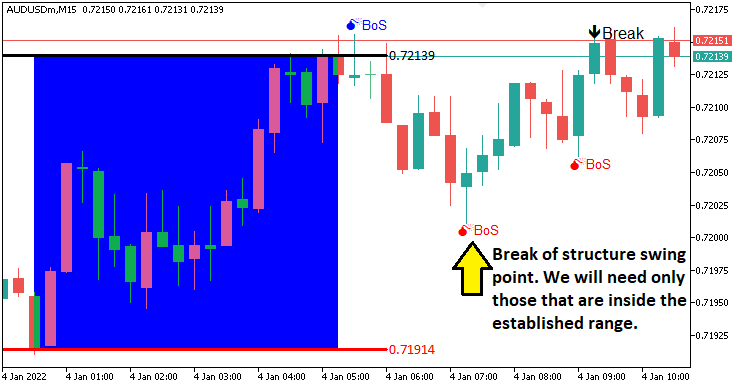
En la imagen se puede observar que dibujamos los puntos de oscilación. Lo siguiente que debemos hacer es rastrear la ruptura de los puntos de oscilación, lo que significa un cambio de estructura y, por lo tanto, una ruptura de la estructura. Para visualizarlos nuevamente, necesitaremos una función personalizada como la siguiente.
//+------------------------------------------------------------------+
//| Function to draw a break level line                              |
//+------------------------------------------------------------------+
void drawBreakLevel(string objName,datetime time1,double price1,
   datetime time2,double price2,color clr,int direction){ //--- Define a function to draw a break level line
   if (ObjectFind(0,objName) < 0){ //--- Check if the break level object does not already exist
      ObjectCreate(0,objName,OBJ_ARROWED_LINE,0,time1,price1,time2,price2); //--- Create an arrowed line object
      ObjectSetInteger(0,objName,OBJPROP_TIME,0,time1);                     //--- Set the first time coordinate of the line
      ObjectSetDouble(0,objName,OBJPROP_PRICE,0,price1);                    //--- Set the first price coordinate of the line
      ObjectSetInteger(0,objName,OBJPROP_TIME,1,time2);                     //--- Set the second time coordinate of the line
      ObjectSetDouble(0,objName,OBJPROP_PRICE,1,price2);                    //--- Set the second price coordinate of the line

      ObjectSetInteger(0,objName,OBJPROP_COLOR,clr); //--- Set the color of the line
      ObjectSetInteger(0,objName,OBJPROP_WIDTH,2);   //--- Set the width of the line

      string text = "Break";                 //--- Define the text label for the break
      string objName_Descr = objName + text; //--- Create a unique name for the text object
      ObjectCreate(0,objName_Descr,OBJ_TEXT,0,time2,price2); //--- Create a text object at the line's end
      ObjectSetInteger(0,objName_Descr,OBJPROP_COLOR,clr);   //--- Set the color of the text
      ObjectSetInteger(0,objName_Descr,OBJPROP_FONTSIZE,10); //--- Set the font size of the text

      if (direction > 0) { //--- Check if the break is upward
         ObjectSetString(0,objName_Descr,OBJPROP_TEXT,text+"  ");             //--- Set the text content
         ObjectSetInteger(0,objName_Descr,OBJPROP_ANCHOR,ANCHOR_RIGHT_UPPER); //--- Set the text anchor to right upper
      }
      if (direction < 0) { //--- Check if the break is downward
         ObjectSetString(0,objName_Descr,OBJPROP_TEXT,text+"  ");             //--- Set the text content
         ObjectSetInteger(0,objName_Descr,OBJPROP_ANCHOR,ANCHOR_RIGHT_LOWER); //--- Set the text anchor to right lower
      }
   }
   ChartRedraw(0); //--- Redraw the chart to display the break level
}
Simplemente definimos la función "drawBreakLevel" para visualizar la ruptura de la estructura. Utilizamos una lógica similar para la visualización tal como la usamos con las funciones de visualización anteriores, por lo que no invertiremos mucho tiempo en explicar qué hace cada cosa. Utilizaremos esta función para visualizar los niveles.
double Ask = NormalizeDouble(SymbolInfoDouble(_Symbol,SYMBOL_ASK),_Digits); //--- Get and normalize the current Ask price
double Bid = NormalizeDouble(SymbolInfoDouble(_Symbol,SYMBOL_BID),_Digits); //--- Get and normalize the current Bid price

if (swing_H > 0 && Ask > swing_H){ //--- Check if the Ask price breaks above the swing high
   Print("$$$$$$$$$ BUY SIGNAL NOW. BREAK OF SWING HIGH"); //--- Log a buy signal due to swing high breakout
   int swing_H_index = 0;                //--- Initialize the index of the swing high bar
   for (int i=0; i<=length*2+1000; i++){ //--- Loop through bars to find the swing high
      double high_sel = high(i,timeframe_bos); //--- Get the high price of the i-th bar
      if (high_sel == swing_H){ //--- Check if the high matches the swing high
         swing_H_index = i;     //--- Store the bar index
         Print("BREAK HIGH FOUND @ BAR INDEX ",swing_H_index); //--- Log the swing high bar index
         break;                 //--- Exit the loop once found
      }
   }
   drawBreakLevel(TimeToString(time(0,timeframe_bos)),time(swing_H_index,timeframe_bos),high(swing_H_index,timeframe_bos),
   time(0,timeframe_bos),high(swing_H_index,timeframe_bos),clrBlue,-1); //--- Draw a line to mark the swing high breakout

   if (isTakenTrade == false){                                     //--- Check if no trade is taken yet
      obj_Trade.Buy(0.01,_Symbol,Ask,minimum_price,maximum_price); //--- Execute a buy trade with 0.01 lots, using minimum price as SL and maximum as TP
      isTakenTrade = true;                                         //--- Set the flag to indicate a trade is taken
   }

   swing_H = -1.0; //--- Reset the swing high price
   return;         //--- Exit the OnTick function to avoid further processing
}
if (swing_L > 0 && Bid < swing_L){ //--- Check if the Bid price breaks below the swing low
   Print("$$$$$$$$$ SELL SIGNAL NOW. BREAK OF SWING LOW"); //--- Log a sell signal due to swing low breakout
   int swing_L_index = 0; //--- Initialize the index of the swing low bar
   for (int i=0; i<=length*2+1000; i++){ //--- Loop through bars to find the swing low
      double low_sel = low(i,timeframe_bos); //--- Get the low price of the i-th bar
      if (low_sel == swing_L){ //--- Check if the low matches the swing low
         swing_L_index = i;    //--- Store the bar index
         Print("BREAK LOW FOUND @ BAR INDEX ",swing_L_index); //--- Log the swing low bar index
         break;                //--- Exit the loop once found
      }
   }
   drawBreakLevel(TimeToString(time(0,timeframe_bos)),time(swing_L_index,timeframe_bos),low(swing_L_index,timeframe_bos),
   time(0,timeframe_bos),low(swing_L_index,timeframe_bos),clrRed,+1); //--- Draw a line to mark the swing low breakout

   if (isTakenTrade == false){ //--- Check if no trade is taken yet
      obj_Trade.Sell(0.01,_Symbol,Bid,maximum_price,minimum_price); //--- Execute a sell trade with 0.01 lots, using maximum price as SL and minimum as TP
      isTakenTrade = true;                                          //--- Set the flag to indicate a trade is taken
   }

   swing_L = -1.0; //--- Reset the swing low price
   return;         //--- Exit the OnTick function to avoid further processing
}
Aquí, implementamos la lógica de ejecución comercial cuando tenemos una ruptura válida. Obtenemos los precios normalizados de «Ask» y «Bid» utilizando SymbolInfoDouble y NormalizeDouble con _Symbol y _Digits.
Si «swing_H» es positivo y «Ask» supera «swing_H», registramos con «Print», buscamos el índice máximo de oscilación con «high» y «timeframe_bos», lo marcamos con «drawBreakLevel» utilizando TimeToString y «time», y llamamos a «obj_Trade. Buy» con 0,01 lotes, «minimum_price» stop-loss y «maximum_price» take-profit si «isTakenTrade» es falso, estableciéndolo como verdadero y restableciendo «swing_H».
Si «swing_L» es positivo y «Bid» cae por debajo de «swing_L», registramos, buscamos el índice mínimo de oscilación con «low», lo marcamos con «drawBreakLevel» y llamamos a «obj_Trade.Sell», restableciendo «swing_L». Salimos con «return» después de cada operación para un trading preciso de ruptura de estructura. Aquí está el resultado.
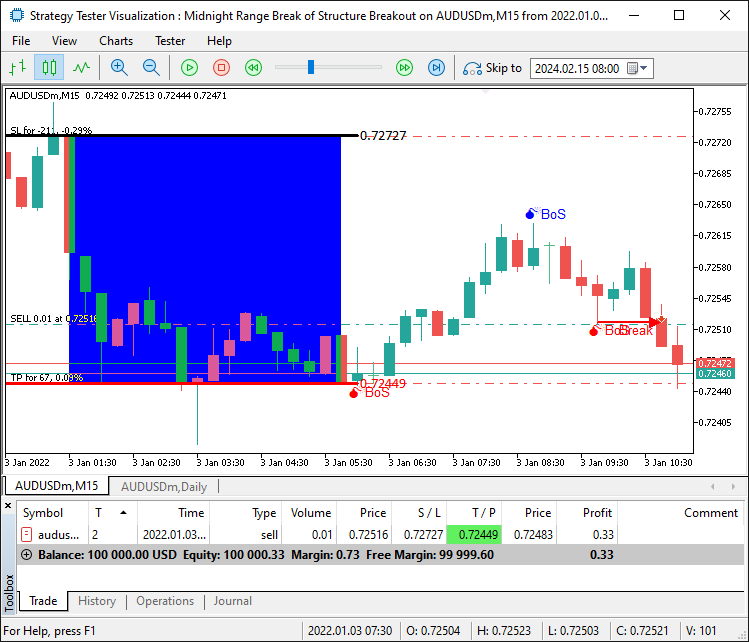
Ahora podemos abrir operaciones para las configuraciones confirmadas. Sin embargo, ¿qué ocurre cuando se produce una ruptura pero no está dentro del rango? Es decir, el precio sube o baja desde los límites del rango. Tenemos que esperar a que el precio vuelva a situarse dentro del rango para considerar válida la ruptura. Para lograrlo, tendremos que obtener los precios máximos y mínimos del rango y sumarlos para obtener una restricción más firme y evitar señales falsas.
if (swing_H > 0 && Ask > swing_H && swing_H <= maximum_price && swing_H >= minimum_price){ //--- Check if the Ask price breaks above the swing high within the range
   Print("$$$$$$$$$ BUY SIGNAL NOW. BREAK OF SWING HIGH WITHIN RANGE"); //--- Log a buy signal due to swing high breakout
   int swing_H_index = 0;                                               //--- Initialize the index of the swing high bar
   for (int i=0; i<=length*2+1000; i++){                                //--- Loop through bars to find the swing high
      double high_sel = high(i,timeframe_bos); //--- Get the high price of the i-th bar
      if (high_sel == swing_H){                //--- Check if the high matches the swing high
         swing_H_index = i; //--- Store the bar index
         Print("BREAK HIGH FOUND @ BAR INDEX ",swing_H_index); //--- Log the swing high bar index
         break;             //--- Exit the loop once found
      }
   }
   drawBreakLevel(TimeToString(time(0,timeframe_bos)),time(swing_H_index,timeframe_bos),high(swing_H_index,timeframe_bos),
   time(0,timeframe_bos),high(swing_H_index,timeframe_bos),clrBlue,-1); //--- Draw a line to mark the swing high breakout

   if (isTakenTrade == false){ //--- Check if no trade is taken yet
      obj_Trade.Buy(0.01,_Symbol,Ask,minimum_price,maximum_price); //--- Execute a buy trade with 0.01 lots, using minimum price as SL and maximum as TP
      isTakenTrade = true;                                         //--- Set the flag to indicate a trade is taken
   }

   swing_H = -1.0; //--- Reset the swing high price
   return;         //--- Exit the OnTick function to avoid further processing
}
if (swing_L > 0 && Bid < swing_L && swing_L <= maximum_price && swing_L >= minimum_price){ //--- Check if the Bid price breaks below the swing low within the range
   Print("$$$$$$$$$ SELL SIGNAL NOW. BREAK OF SWING LOW WITHIN RANGE"); //--- Log a sell signal due to swing low breakout
   int swing_L_index = 0;                //--- Initialize the index of the swing low bar
   for (int i=0; i<=length*2+1000; i++){ //--- Loop through bars to find the swing low
      double low_sel = low(i,timeframe_bos); //--- Get the low price of the i-th bar
      if (low_sel == swing_L){ //--- Check if the low matches the swing low
         swing_L_index = i;    //--- Store the bar index
         Print("BREAK LOW FOUND @ BAR INDEX ",swing_L_index); //--- Log the swing low bar index
         break;                //--- Exit the loop once found
      }
   }
   drawBreakLevel(TimeToString(time(0,timeframe_bos)),time(swing_L_index,timeframe_bos),low(swing_L_index,timeframe_bos),
   time(0,timeframe_bos),low(swing_L_index,timeframe_bos),clrRed,+1); //--- Draw a line to mark the swing low breakout

   if (isTakenTrade == false){ //--- Check if no trade is taken yet
      obj_Trade.Sell(0.01,_Symbol,Bid,maximum_price,minimum_price); //--- Execute a sell trade with 0.01 lots, using maximum price as SL and maximum as TP
      isTakenTrade = true;                                          //--- Set the flag to indicate a trade is taken
   }

   swing_L = -1.0; //--- Reset the swing low price
   return;         //--- Exit the OnTick function to avoid further processing
}
No hay problema en descartar las señales falsas y vemos que podemos abrir operaciones para una configuración confirmada, logrando así nuestro objetivo de identificar, visualizar y operar con la configuración de la estrategia. Lo que queda por hacer es realizar pruebas retrospectivas del programa, lo cual se aborda en la siguiente sección.
Pruebas retrospectivas
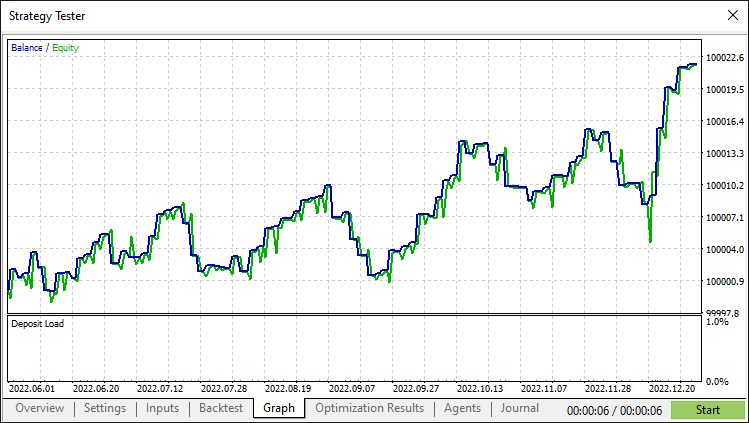
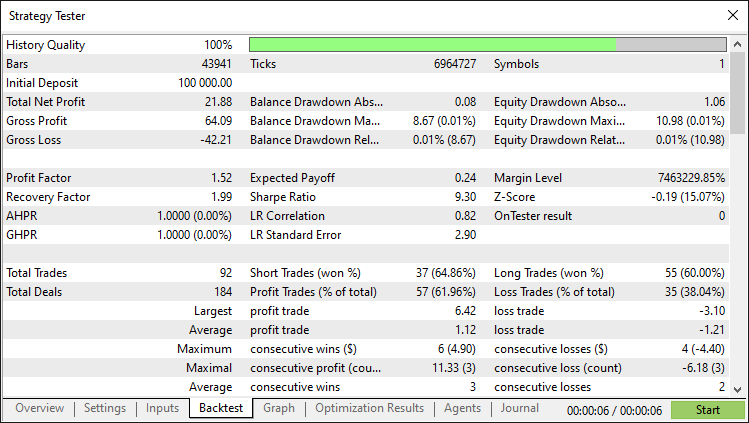
Tras realizar exhaustivas pruebas retrospectivas, hemos obtenido los siguientes resultados.
Gráfico de prueba retrospectiva:
Informe de prueba retrospectiva:
Conclusión
En conclusión, hemos creado un Asesor Experto MQL5 que automatiza la estrategia de ruptura del rango de medianoche con ruptura de estructura, operando con rupturas dentro del rango de medianoche confirmadas por los puntos de oscilación del día actual. Con una detección y visualización precisas del rango, puedes avanzarlo más y definir algunas estrategias adicionales para hacerlo más robusto y adaptado a tu estilo de trading.
Descargo de responsabilidad: Este artículo tiene fines exclusivamente educativos. El trading conlleva riesgos financieros importantes, y la volatilidad del mercado puede provocar pérdidas. Es esencial realizar pruebas retrospectivas exhaustivas y una gestión prudente del riesgo antes de utilizar este Asesor Experto en mercados reales.
Al dominar estas técnicas, podrá mejorar sus habilidades en el trading algorítmico y abordar los mercados con mayor confianza. ¡Mucha suerte en tu aventura en el mundo del trading!
Traducción del inglés realizada por MetaQuotes Ltd.
Artículo original: https://www.mql5.com/en/articles/17876
Advertencia: todos los derechos de estos materiales pertenecen a MetaQuotes Ltd. Queda totalmente prohibido el copiado total o parcial.
Este artículo ha sido escrito por un usuario del sitio web y refleja su punto de vista personal. MetaQuotes Ltd. no se responsabiliza de la exactitud de la información ofrecida, ni de las posibles consecuencias del uso de las soluciones, estrategias o recomendaciones descritas.

 Redes neuronales en el trading: Optimización de LSTM para la predicción de series temporales multivariadas (Final)
 Simulación de mercado (Parte 19): Iniciando SQL (II)
 Del básico al intermedio: Herencia
 Algoritmo de optimización caótica — Chaos optimization algorithm (COA)

- Aplicaciones de trading gratuitas
- 8 000+ señales para copiar
- Noticias económicas para analizar los mercados financieros
Usted acepta la política del sitio web y las condiciones de uso
Hola Allan.
Voy a descargar su sistema y empezar a probar. Curiosamente, el informe de los probadores de estrategia no identifica ni el par de comercio ni el marco de tiempo. A medida que ilustró el AUUSD M15, estoy asumiendo que es lo que utilizó y voy a empezar a probar con. ¿Tiene alguna sensación de usar otros pares o marcos de tiempo. Sospecho que este ea puede funcionar mejor en los pares de comercio de Asia, ¿estoy en lo cierto?
Saludos, CapeCoddah
Probé con AUDUSD, AUDJPY, y USDJPY y todos produjeron pérdidas con Sharpe Ratios de -3.00 a -5.00. Todos excepto USDJPY fueron negativos inmediatamente. El USDJPY tuvo 2 períodos de ganancias positivas, pero finalmente se volvió negativo y nunca regresó.
Adiós
Excelente trabajo. ¡Gracias Allan!
Claro. Bienvenido. Gracias por los amables comentarios.
Gracias Allan, eres el mejor.