 MetaTrader 5
 Experts
 Indicators
 Libraries
 Utilities
 Widgets
 Rules
Rules
Watch the Market tutorial videos on YouTube
How to buy а trading robot or an indicator
Run your EA on
virtual hosting
virtual hosting
Test аn indicator/trading robot before buying
Want to earn in the Market?
How to present a product for a sell-through
Trading utilities for MetaTrader 4
 Below are trading programs simplifying Forex trading in MetaTrader 4. Hover over a utility in the list below to read its description and purpose.
Local Trade Copier EA MT4 is a fast and flexible trade copier for copying and managing trades between multiple MetaTrader 4 accounts on the same Windows computer or Windows VPS. It combines local trade synchronization with Receiver-side controls for lot sizing, risk management, trade filtering, symbol mapping, trade management and account protection. Set up your Transmitter and Receiver terminals in about 1 minute and copy manual or EA trades between accounts at the same or different brokers. U

Trade Manager MT4 is an advanced position size calculator and trade management tool for MetaTrader 4, designed to help traders plan trades faster, control risk more precisely, and manage open positions directly from the chart. It combines order placement, risk based lot calculation, Stop Loss and Take Profit management, Break Even, Trailing Stop, Partial Close, Equity Protection, and external trade management in one panel. Whether you trade forex, indices, metals, commodities, or crypto, Trade M

Professional Trade Copier for MetaTrader 4 Fast, professional, and reliable trade copier for MetaTrader 4 . COPYLOT helps you copy Forex trades between MetaTrader 4 and MetaTrader 5 terminals with flexible synchronization for different account setups. COPYLOT MT4 version supports: MetaTrader 4 to MetaTrader 4 MetaTrader 5 Hedge to MetaTrader 4 MetaTrader 5 Netting to MetaTrader 4 MT5 version Full Description + DEMO + PDF How To Buy How To Install How to get Log Files How To Test and Optimize A

It helps to calculate the risk per trade, the easy installation of a new order, order management with partial closing functions, trailing stop of 7 types and other useful functions.
Additional materials and instructions
Installation instructions - Application instructions
Line function - shows on the chart the Opening line, Stop Loss, Take Profit. With this function it is easy to set a new order and see its additional characteristics before opening. Risk management - The risk calcu

Effortlessly calculate lot sizes and manage trades to save time and avoid costly errors
The Trade Pad Pro EA is a tool for the Metatrader Platform that aims to help traders manage their trades more efficiently and effectively. It has a user-friendly visual interface that allows users to easily place and manage an unlimited number of trades, helping to avoid human errors and enhance their trading activity. [ Installation Guide | Update Guide | Troubleshooting | FAQ | All Products ]
One of the k

This is an Utility to make your trading easier by putting at one click or a few clicks time-consuming tasks as order management and risk management. Contact for a free trial.
Features
Risk Management
Calculates automatically lots based on risk specified in either % or $ in the risk field and let you enter just by placing lines for SL TP etc and display real-time Risk Reward . TrueRisk so it includes commissions when calculating lot size on FX pairs only so you risk 1% with

Multifunctional tool: Lot Calculator, Grid Orders, R/R ratio, Trade Manager, Supply and Demand zones, Price Action and much more Demo version | User manual Trade Assistant doesn't work in the strategy tester: you can download the Demo Version HERE to test the utility . Contact me for any questions / ideas for improvement / in case of a bug found If you need a MT5 version, it is available here
Simplify, speed up and automate your trading process . Expand the standard terminal capabilit

AW Shepherd Safety EA is an Expert Advisor for managing open positions. The trader opens the first order from the panel, and from there the EA runs the basket on its own: it adds recovery orders with a trend filter, closes a side on TakeProfit, trailing or stop, and shows the close levels on the chart. Buys and sells are managed separately, and both sides can be open at the same time. A recovery order opens not just on a price step but once Parabolic SAR, two MAs or candle color show a reversal

Rhino Chart Drawing Tools provides a TradingView-style drawing workflow for MetaTrader 4. It includes 54 drawing tools , a customizable toolbar, Favorites, quick styling, object settings, templates and an object manager. User manual: How to use the product
Free demo version: Download the demo
MetaTrader 5 version: Rhino Drawing Tools for MT5 Drawing Tools Group Object List Lines Trend line, ray, extended line, horizontal line, vertical line, horizontal ray, cross line, trend angle, arrow, path

Trading History - A program for trading and money management on the history of quotes in stratagy tester. It can work with pending and immediate orders, and is equipped with trailing stop, breakeven and take profit functions. Very good for training and testing different strategies.
Manual (Be sure to read before purchasing)
Advantages
1. Allows you to test any trading strategy in the shortest possible time
2. An excellent simulator for trading training. You can gain months of trading experience

Trade Copier is a professional utility designed to copy and synchronize trades between trading accounts. Copying occurs from the account / terminal of the supplier to the account / terminal of the recipient, which are installed on the same computer or VPS . Before buying, you can test the demo version on a demo account. Demo version here . Full instruction here . Main functionality and benefits: Supports copying MT4> MT4, MT4> MT5, MT5> MT4, including MT5 netting accounts. * Supports copying Dem

Multi Account Local Trade Copier is a fast local trade copier for MetaTrader: copy trades between MT4/MT5 terminals running on the same Windows PC or VPS, from one master account to multiple receiver accounts — your own real, demo and prop firm accounts, at the same broker or at different ones. It is event-driven : the master publishes every trade the instant it happens, and the receiver measures and logs the real copy latency of every single trade — typically 50-150 ms . No DLLs, no internet br

Telegram to MT4 Multi-Channel Copier automatically copies trading signals from your Telegram and Discord channels straight to MetaTrader 4. No bots, no browser extensions, no manual copying. A signal arrives in Telegram or Discord and the EA opens the trade in your terminal within seconds. And before you copy a channel, the built-in backtester shows you what that channel would have done in your account. The product has two components: a Windows application that listens to your Telegram channel

Trade Panel is a multi-functional trading assistant. The app contains over 50 trading functions for manual trading and allows you to automate most trading tasks. Application instructions: https://www.mql5.com/en/blogs/post/756482 Trial version of the application for a demo account: https://www.mql5.com/en/blogs/post/750865 How to install the application: https://www.mql5.com/en/blogs/post/756239 How to test the application in visual mode: https://www.mql5.com/en/blogs/post/770277 How to install

The indicator has three main tools: Magnifier (Zoom chart), Ruler ( Time and Price scales ), and Crosshair. You can move it all around with your mouse and customize different formats for displaying , customize size and color of each element.
The Magnifier (zoom chart) allows you to display candles from any time frame and at different scales.
Hotkeys: 'Q' - higher timeframe, 'A' - lower timeframe, 'W' - decrease candle size, 'S' - increase candle size, 'Z' - show/hide zoom chart You can

Telegram to MT4: The Ultimate Signal Copying Solution Streamline your trading with Telegram to MT4 , the cutting-edge utility designed to copy trading signals directly from Telegram channels and chats to your MetaTrader 4 platform—without the need for DLLs. This robust solution ensures seamless execution of signals with unparalleled precision and customization options, saving you time and boosting your efficiency. [ Instructions and DEMO ] [ FAQ ] [ How atach logs properly ] [Settings descrition

Copy Cat More Trade Copier MT4 is not just a simple local trade copier; it is a complete risk management and execution framework designed for today’s trading challenges. From prop firm challenges to personal portfolio management, it adapts to every situation with its blend of robust execution, capital protection, flexible configuration, and advanced trade handling.
Need Support? How to setup? Has questions? Ask here in your language , fast reply: https://www.mql5.com/en/market/product/139089/co

Trade Manager FX – Risk Calculator, Trade Panel and Trade Management for MT4
Trade Manager FX is an all-in-one trade panel for manual traders. Plan your trade on the chart, let the panel calculate the correct lot size for your risk, and send it with one click. After entry, it manages the position for you with break even, trailing stop, partial closes and equity protection.
Additional materials and instructions Installation instructions - User manual - Version MT5
Drag the Entry, Stop Loss a

Trade Indicator Assistant is a powerful MT4 utility designed to turn indicators into automated trading systems. Its main feature is the ability to automatically detect an indicator’s BUY and SELL signal buffers , without requiring you to know the buffer numbers, search through indicator settings, or modify the indicator source code. Bonus Indicator: After purchasing Trade Indicator Assistant, contact me to receive Trade Signal Pro completely free as a bonus indicator.
[Download Demo Version]

Copier->Convenient and fast interface interaction, users can use it right away ->>>> Recommended to use on Windows computers or VPS Windows Features: Diversified and personalized copy trading settings: 1. Different lot modes can be set for different signal sources 2. Different signal sources can be set for forward and reverse copy trading 3. Signals can be set with comments 4. Whether to calibrate the lot according to the contract lot Diversified and personalized copy order settings 2: 1. Dif

DaneTrades Trade Manager is a professional trade panel for MetaTrader 4, designed for fast, accurate execution with built‑in risk control. Place market or pending orders directly from the chart while the panel automatically calculates position size from your chosen risk, helping you stay consistent and avoid emotional decision‑making. The Trade Manager is built for manual traders who want structure: clear risk/reward planning, automation for repeatable management, and safeguards that help reduc

The product will copy all telegram signal to MT4 ( which you are member ) , also it can work as remote copier. Easy to set up, copy order instant, can work with almost signal formats, image signal, s upport to translate other language to English Work with all type of channel or group, even channel have "Restrict Saving Content", work with multi channel, multi MT5 Work as remote copier: with signal have ticket number, it will copy exactly via ticket number. Support to backtest signal. How to

Take a Break pauses your Expert Advisors when trading is a bad idea: before news, after a daily loss, outside your trading hours, or when a rule you wrote yourself says so. When the pause is over, your EAs simply continue. Account protection for all your EAs in one tool: news filter, drawdown and equity protection, time filter and custom rules. One EA on one chart protects the whole account, the free indicator gives every chart its own rules on top. Free demo | What is new in 26.09 | Support Ass

The AlgoKing Lightning Bolt Strategy is a trade manager and has multiple indicators built for a complete trading strategy. Here is a list of indicators built in.
Indicators Auto drawn Support and Resistance signals Auto drawn RSI Divergence signals Auto drawn Fibonacci Retracement signals with buy and sell entry lines. Lightning Bolt reversal signals. Auto drawn trend lines. Trade Management Auto take partials at simple moving average targets. Auto take partial and stop losses at Fibonacci ret

Hi Friends, " FCK Currency Strength Pro " is a auto & semi auto trading expert with direction of pair. Buy-Sell separate or multi currency in one click. The strategy of FCK Currency Strength Pro is a combination of custom indicator, Trendlines, Support & Resistance levels ( Price Action ) and most important secretive trading algorithm mentioned above. Download News Ex4 and csv file You need the following SDSnews.ex4 in MQL4/Libraries and the daylightsavings.csv in MQL4/Files.
Only 4 of 5 copi

News Filter EA: Advanced Algo Trading Assistant News Filter EA is an advanced algo trading assistant designed to enhance your trading experience. By using the News Filter EA , you can integrate a Forex economic news filter into your existing expert advisor, even if you do not have access to its source code. In addition to the news filter, you can also specify trading days and hours for your expert. The News Filter EA also includes risk management and equity protection features

An equity protection EA for MetaTrader that enforces your loss limits and profit target for you: when your account reaches a rule you set, it closes your trades on every symbol, before one bad day turns into a lost account. It suits prop firm challenges and personal accounts alike. Attach it to one chart, answer a few questions in the on-chart setup wizard, and it watches your whole account in the background while you trade by hand or with other EAs. What it protects Daily loss limit: a percenta

Product Title Trade Builder - Interactive Visual Trade Manager & Risk Assistant on Chart Short Description Simplify your trading with Trade Builder , a highly interactive Trade Assistant and Trade Manager . Set up your entry, stop loss, and take profit directly on the chart, with automatic calculation of lot sizes and the risk reward ratio in real-time. Overview Effective Trade Management is essential for long-term trading success. Trade Builder eliminates manual risk calculations by providing
FREE

Trade Dashboard simplifies how you open, manage, and control your trades, with built-in lot size calculation. It allows you to execute trades, manage risk, and control positions directly on the chart, with tools such as partial close, breakeven, and trailing stop. Designed to reduce manual work and help you stay focused on your trading decisions. A demo version is available for testing. Detailed explanations of features are provided within the MQL5 platform. Installation instructions are include

A local trade copier between MetaTrader terminals on one PC or VPS. Copying runs in any direction between MT5 and MT4. The volume of a copy is calculated in percent of equity, in account currency, or by mirroring the master's risk share; trades are selected by filters on symbol, magic number, comment and size. The panel handles the life of an open copy: virtual SL/TP, break even, trailing stop, basket close and a scheduled close. Daily, total and volume limits protect the account and trip early

Easy Trade Executor is a tool for fast position sizing, trade execution, and trade management in MT4. Place Open Price, Stop Loss, and Take Profit levels directly on the chart, get automatic position size calculations, and open trades with controlled risk in just a few clicks.
Why Easy Trade Executor?
Easy Trade Executor is designed for traders who want more than just risk calculations — they want to manage trades quickly and efficiently directly from the chart. The tool combines position sizi

The Trade Manager Interface is a free utility designed to simplify manual trading in MetaTrader. Please leave a review, if you like the trade manager. It allows traders to visualize trades directly on the chart, calculate position size automatically, and manage orders with advanced features such as partial take profits, automatic breakeven, and trailing stops.
This tool focuses on risk control and execution precision, making trade management faster and more efficient. For the advanced trade
FREE

Hello guys Another free! tool for traders. Risk to Reward Ratio: It is useful for every trader to calculate the size of loss concerning the size of profit so that he can judge whether it's a good trade or not. Also, it shows the loss and Profit in pips and percentages. MY NEWEST PRODUCT:
HFT PROP PASSER You can set the colors of each part you want and the position of the texts. What if you can trade with this panel too?! See the link below Trader Assistant Mini MT4 You can see the MT5 version at
FREE

RS Trade Copier - the ultra-fast local trade copier with a real graphical interface. Stop typing account numbers manually. No more 200+ cryptic inputs. A reliable and flexible tool for copying trading operations between multiple MT4 and MT5 terminals. It suits experienced traders, signal providers, and individual investors. It enables trade synchronization from one or multiple Providers to one or multiple Clients with high precision and minimal latency. It supports simple automatic configuration

EchoTrade Telegram Signal Backtester VALIDATE TELEGRAM SIGNALS IN MINUTES - STOP GUESSING, START BACKTESTING Stop blowing accounts on "VIP" signals that don't deliver.
The EchoTrade Telegram Signal Backtester is the professional solution to audit, verify, and optimize any Telegram signal provider's performance on historical data. Most signal providers show you their wins but hide their losses. This tool reveals the naked truth. By combining a powerful Data Manager (included) with an advanced MT4

Trade Copier Global: The name speaks for itself. This copier allows you to copy orders between MT4 terminals even if they are not installed on the same computer.
Features Copying trades between MT4 terminals around the world with a short delay. Automatically recognizes symbol prefixes. Can connect many Slaves to the same Master. Supports pending and market orders. Supports partial order close (with limitations, see below) Can send messages and notifications to the Slaves from the Master Several

Unlimited Trade Copier Pro is a tool to copy trade remotely to multiple MT4, MT5 and cTrader accounts at different computers/locations over internet. This is an ideal solution for you if you are a signal provider and want to copy your trades to other receivers globally on your own rules. One provider can copy trades to multiple receivers and one receiver can get trade from multiple providers as well. The provider can even set the subscription expiry for each receiver, so that receiver will not b

Trade Simulator is not just a trade panel. It allows you to practice realistic trading using historical data, with interactive chart control. You can place trades, adjust stop levels, and monitor results as if trading live. You can also place and manage orders directly in the MT4 Strategy Tester. The same tool and interface can be used directly on live charts for actual trading. For detailed information, visit Setup & User Guide . Also, take a look at the MT5 version and the Advanced edition .
FREE

The Multicharts Crosshair draws a cross hair in any linked chart. The indicator can be used for comparison of symbol price levels in different time frame or to compare candles of different instruments in the same time frame
How it works: It can works from every linked charts where the indicator is installed towards the others or from the chart where is istalled towards the following linked charts . It can be shown just pressing a the key of keyboard. After installing the indicators in the char

MT4 to Telegram Signal Provider turns your trading account into a signal provider. Every trade action, whether manual, by EA or from your phone, is instantly sent as a message to Telegram. You can fully customize the format or use a ready-made template for quick setup.
[ Demo ] [ Manual ] [ MT5 Version ] [ Discord Version ] New: [ Telegram To MT5 ]
Setup
A step by step user guide is available.
Key Features Ability to customize order details sent to subscribers You can create a tiered subs

Trading panel for opening orders in 1 click! To help the trader, sets take profits, stop losses, pending Stop and Limit orders, transfers to breakeven, trails. There is also a partial closing of the order in %
All parameters are customizable. Installed in experts!
Settings
Lots -- 0.02 Lot StopLoss --- 700 Stop Loss TakeProfit --- 400 Take Profit UseBreekeven ---- false Breakeven Off ClosePersent--- 50 Close Percent of the order
FREE

Smart Trend Line Alert is a unique professional Trend Line, Support Line and Resistance Line Touch and Break out Alert with awesome Alert History feature, designed to help traders easily manage many charts and symbols without staring at the monitor.
Features Candle Break Out Alert, Price Touch Alert and Time Line Alert; 1 click for converting any drawn line into an alert line (Trend line and Horizontal line or Trend Line By Angle); Alerts History able to re-open closed charts or re-draw deleted

Equity Protect Pro: Your Comprehensive Account Protection Expert for Worry-Free Trading
If you're looking for features like account protection, equity protection, portfolio protection, multi-strategy protection, profit protection, profit harvesting, trading security, risk control programs, automatic risk control, automatic liquidation, conditional liquidation, scheduled liquidation, dynamic liquidation, trailing stop loss, one-click close, one-click liquidation, and one-click restore, Equity P

King Trade Copier connects MetaTrader terminals that run on the same computer or VPS. Trades opened on one account appear on the others. The file carries both roles, so the same download becomes the sender or a receiver depending on what you set Mode to. On every chart the panel states whether this terminal is sending or receiving, names the account on the other side, counts the receivers that answered, and gives the age of the last signal. An order that was not copied leaves its reason on the

Universal copier of deals from MetaTrader 4 to MetaTrader 4 ( MT5<->MT5 version is available ; with both versions, you can copy MetaTrader 5<->MetaTrader 4, MetaTrader 4<->MetaTrader 5, MetaTrader 5<->MetaTrader 5, MetaTrader 4<->MetaTrader 4). Spread filter. Select the best price (start copying positions with a profit or loss). Configure the lot size, fixed or ratio-based (provider signals can be copied with an increased lot). Configure order copying (include pending orders or copy only open po

IMD TP SL Manager — take profit and stop loss management for a basket of positions Chat for discussing the robots in the team: join
IMD TP SL Manager is an assistant Expert Advisor for traders who hold several positions on one instrument and want to close them at a predefined financial result. You set the target as a percentage of the balance or as an amount in the account currency. The EA calculates a common take profit for the whole group of positions, taking into account the average price,
FREE

The Trade Position and Back-testing Tool: For product questions, setup guidance, or technical support, message me directly here on MQL5. The "Trade Position and Backtesting Tool" aka "Risk Reward Ratio Tool" is a comprehensive and innovative indicator designed to enhance your technical analysis and trading strategies.
The Risk Tool is a comprehensive and user-friendly solution for effective risk management in forex trading. With the ability to preview trade positions, including entry price, st
FREE

MT4 Version : https://www.mql5.com/en/market/product/91169 MT5 Version : https://www.mql5.com/en/market/product/110193 Live Signal : https://www.mql5.com/en/signals/2345410
Introducing the "Smart Trader" trading assistant expert advisor – the ultimate tool trusted by professional traders worldwide for its unparalleled adaptability and cutting-edge risk management strategies.
At the heart of "Smart Trader" lies its revolutionary risk management switching system, meticulously designed to dynamic

Strategy Builder offers an incredible amount of functionality. It combines a trade panel with configurable automation (covert indicators into an EA), real-time statistics (profit & draw down) plus automatic optimization of SL, TP/exit, trading hours, indicator inputs. Multiple indicators can be combined into an single alert/trade signal and can include custom indicators, even if just have ex4 file or purchased from Market. The system is easily configured via a CONFIG button and associated pop-up

Currency strength meter for MetaTrader 4 This currency strength indicator reads up to 28 major pairs and turns them into one number per currency, for the 8 majors: USD, EUR, GBP, JPY, CHF, CAD, AUD and NZD. Instead of opening chart after chart to work out who is leading, you read one panel on your MetaTrader 4 chart and you know which currency is being bought and which one is being sold. What you see on the chart A ranked strength bar for each of the 8 currencies, with its percentage A multi-tim

Break Even Trailing EA | Automated Breakeven & Trailing Stop Manager Break Even Trailing EA is a utility Expert Advisor (EA) for MetaTrader 4/5, designed to automate profit protection for discretionary traders. This tool manages risk and locks in profits automatically after your manual entries, making your trading process more efficient and less stressful.
The EA offers two powerful, selectable logic modes for securing profits, which you can use individually or in combination, depending on your
FREE

Partial Closure EA MT4 allows you to partially close any trade on your account, manually by a chosen percentage of the lot size and/or by trade ticket, or automatically at specified percentages of the TP/SL level, closing a percentage of the initial lot size across up to 10 take profit and 10 stop loss levels. It can manage all or selected trades in your account by specifying or excluding certain magic numbers, comments, or symbols. Tip: Download the free demo version of the Partial Closure E
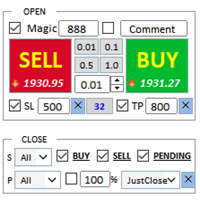
Assistant: Purchase Trade Assistant-MT4 (click to download) Purchase Trade Assistant-MT5 (click to download)
Please read the operating instructions carefully.
Basics: Support language selection and switching (currently supports Chinese and English) Automatic language recognition Support hotkey opening and closing binding, use shortcut keys to quickly open and close positions... shortcut key closing. Support up to 30 hotkeys Unlock supports most function replay operations an
FREE

Title : Trade Assistant Manager for MT4
Trade Assistant Manager — See your risk before you click Trade Assistant Manager is a MetaTrader 4 chart utility for discretionary traders who want a clear, visual way to size positions . Place your Entry, Stop Loss, and Take Profit directly on the chart. The panel shows the lot size, the money at risk, the profit target in money, and the reward-to-risk ratio — updated as you move the lines.
What you gain Faster decisions : - Automatically calcu
FREE

Close If Profit or Loss with Trailing for MetaTrader 4 — automatic closing by total profit or loss A reliable trade-management utility for MetaTrader 4 that automatically closes positions when the total profit or total loss reaches the level you set. The Expert Advisor monitors open trades, calculates floating profit and loss, can trail profit, and helps close positions faster than manual reaction. MetaTrader 4 is still used by many manual traders, grid traders, scalpers, and Expert Advisor use

Trade support and resistance or supply and demand zones automatically once you have identified the key areas you want to trade from. This EA allows you to draw buy and sell zones with a single click and then place them exactly where you expect price to turn. The EA then monitors those zones and will automatically take trades based on price action you specify for the zones. Once the initial trade is taken, the EA will then get out in profit at the opposite zone you place, which becomes the target

如果产品有任何问题或者您需要在此产品上添加功能,请联系我 Contact/message me if you encounter any issue using the product or need extra feature to add on the base version.
Close Button provides you an intuitive, effective, and handy way to close your orders based on their type. The utility provides seven close options: Close All: close all orders, including trading and pending ones. Close Profit: close all orders which are in profit. Close Loss: close all orders which are in loss. Close Stop: close all stop orders. Close L
FREE

X1 Copy MT4 is a simple and reliable solution for fast trade synchronization between MetaTrader terminals on a single computer or Windows VPS. In just one minute, you get a ready-to-use tool that handles the technical routine of copying, allowing you to focus on trading. Whether you are copying signals or managing your own accounts, X1 ensures high speed and execution precision. X1 Copy MT4 is a fully autonomous product that includes all the essential tools for high-quality copying. The program
FREE

AutoSetting stop loss, take profit, trailing stop, breakeven levels, enabling virtual stops.
Exp Assistant will help you organize maintenance of your positions. This Expert Advisor will set all the necessary stop loss and take profit levels for your positions. All the Expert Advisor operation is managed from the control panel on the chart. If you have open positions, but your Expert Advisor cannot set stop loss, take profit, trailing stop or breakeven, and if you trade manually, you can use the
FREE

Trading Panel for trading in 1 click. Working with positions and orders! Trading from the chart or the keyboard. Using our trading panel, you can trade in one click from the chart and perform trading operations 30 times faster than the standard MetaTrader control. Automatic calculations of parameters and functions that make life easier for a trader and help a trader conduct their trading activities much faster and more conveniently. Graphic tips and full information on trade deals on the chart

# Zikiman Risk Panel Standard MT4
**Zikiman Risk Panel Standard MT4 is a lightweight MT4 trade panel and position size calculator for manual traders.** It calculates lot size from your selected money risk in account currency, risk percentage or fixed lot, while allowing you to visually set Stop Loss and Take Profit and place Market, Limit and Stop orders directly from the chart.
Risk Panel Standard is designed for discretionary traders who choose their own entries. It does not generate tradin
FREE

R R Trade Assistant is a utility Expert Advisor for MetaTrader 4 built to help traders visually define trades and manage risk efficiently. This tool combines a graphical risk-reward interface with manual trade execution , allowing traders to easily set trade parameters directly on the chart. Users can define Entry, Stop-Loss, and Take-Profit levels , calculate lot size based on risk percentage, and execute trades directly from the control panel.
If you like the EA, feel free to lea
FREE

The Candle Timer indicator displays an advanced bar countdown timer on a chart. This study indicates the remaining time for the last candle in the chart.
Main features The indicator shows the remaining time for the last bar in the chart. Alert notifications for new bar. Works on every timeframe (M1, M5, M15, M30, H1, H4, D1, W1, MN). Customizable parameters (Colors, Text size, Visibility...). Ideal tool for all kinds of trading (Scalpers, intraday traders...). Very fast calculation. Availa
FREE

This is an automatic parameter optimizer for the Trend Line PRO indicator Easily and quickly you will select the optimal parameters for your favorite Trend Line PRO indicator. Optimization takes only a few seconds. The optimizer allows you to find the best parameters for each pair and period: Amplitude, TP1-TP3, StopLoss, as well as values for Time Filter and HTF Filter on the selected history section (Days) To optimize different timeframes, you need a different range of history:
M5-M15

TPSpro Risk Manager – is a unique system of professional risk control for traders of any level and any capital. Allows you to avoid losses in trading and serious mistakes in transactions.
TPSpro Risk Manager is a must have for risk management and is primarily used by scalpers and day traders, but is successfully used by traders of any trading style. The panel has 3 columns, each of which contains useful information.
The first column displays information about the account as of the beginn

XA Risk Reward Ratio Tool MT4 tool is a professional algorithm, that calculates risk of every transaction before it is finalized. It allows you to precisely estimate gain and possible loss. The professional tool can estimate levels of Take Profit and Stop Loss incredibly precisely, making investments more effective and safer. Using Risk Reward Ratio Tool, you can with one click carry out transactions, cancel position, set position rate, set opening point, TP, SL and many other features. List of
FREE

A simple chart player for replaying historical charts.
You can review market movements by advancing candlesticks one bar at a time. Playback can be paused during operation and resumed at any time.
[Features] Automatic playback from past to future Advances one bar at a fixed interval Pause is available during playback [Playback Specifications] Playback direction: Past → Future Playback speed: Fixed Bars moved: 1 bar per step Pause / Resume playback END to stop playback [Controls] Pause / Restar
FREE
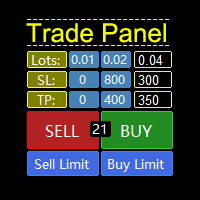
A "Trade Panel" that supports "strategy testing", with excellent compatibility, fast operation, and conforms to the habits of professional traders. At the same time, the design is compact, concise, clear at a glance, and comprehensive in functions. It is a powerful tool for manual operation! Function Description: Click Spread //Delete all arrow Click SL: // Delete stop loss Click TP: // Delete take profit Reverse //Backhand Locked /
FREE

Introduction This powerful MT4 trade mangement EA offers a way potentially to aggressively multiply trade profits in a riskfree manner. Once a trade has been entered with a defined stoploss and take profit target then the EA will add three pyramid add-on trades in order to increase the overall level of profit. The user sets the total combined profit target to be gained if everything works out. This can be specified either as a multiple of the original trade profit or as a total dollar amount. Fo

ATC Candle Timer puts the time left in the current candle and the key symbol information in one small panel.
This tool is also part of All In One Trade Management Panel MT4 , together with the position tool, trade management and performance analytics.
Candle timer: Countdown to the candle close for the chart timeframe or any timeframe you choose, including weekly and monthly.
A progress bar showing how much of the candle has passed.
Optional countdown label next to the current candle, switch
FREE
The MetaTrader Market is a unique store of trading robots and technical indicators.
Read the MQL5.community User Memo to learn more about the unique services that we offer to traders: copying trading signals, custom applications developed by freelancers, automatic payments via the Payment System and the MQL5 Cloud Network.

You are missing trading opportunities:
- Free trading apps
- Over 8,000 signals for copying
- Economic news for exploring financial markets
Registration
Log in
You agree to website policy and terms of use
If you do not have an account, please register