 MetaTrader 5
 Experts
 Indicators
 Libraries
 Utilities
 Widgets
 Rules
Rules
Watch the Market tutorial videos on YouTube
How to buy а trading robot or an indicator
Run your EA on
virtual hosting
virtual hosting
Test аn indicator/trading robot before buying
Want to earn in the Market?
How to present a product for a sell-through
Trading utilities for MetaTrader 4 - 24
 Below are trading programs simplifying Forex trading in MetaTrader 4. Hover over a utility in the list below to read its description and purpose.
Manager Trade is a tool that will help you manage trades in an easy and simple way. It is a panel that on its first tab contains buttons and inputs, beautiful and intuitive, that allow you to place operations much faster. In its second tab, all the orders of the account are listed, leaving them available to close each one with a single click of a button.
Main features Place direct and pending orders with a single click, and in the same screen adjust SL, TP and Lots without having to reload the

This tool allows you to better analyze your chart. With "Crosshair Percent", you can calculate distances in the chart in a percentage way (in a very simple way, when the pointer is attached in the form of a crosshair: CRTL + F). The utility allows to measure and/or calculate the movements of the price NOT only in points, use a measure in professional terms as it is the percentage. The result is shown in two parts of the screen, one of them, next to the position of the pointer and the other in a

This utility records the swap, which allows you to monitor and analyze the changes in the swap. The program writes a file with the swap data for every pair selected in the Market Watch. The data are recorded to a csv file at the specified time, the file is located in <terminal root directory>/MQL4/Files. File format: Date Day Time Currency pair Long-swap Short-swap 16.01.2018 Mon 23:30 EURNOK -34.81 27.14 16.01.2018 Mon 23:30 EURDKK -0.022 -0.032 16.01.2018 Mon 23:30 EURGBP -2.38 0.15 To start r
The utility repeats manual BUY, SELL, BUYLIMIT, SELLLIMIT, BUYSTOP and SELLSTOP trades having Comment = "R" or " r" . Instead of trades closed by Take Profit , the utility sets Limit orders with closed trade parameters.
Purpose The program is useful when applying manual grid strategies when a user sets an order grid in a certain price channel having certain parameters and constantly repeats trades after closing them . The program automates repeating trades.
Operation example There is a BUYSTOP

New opportunities for analyzing cryptocurrency in the usual MetaTrader 4. For example : We select the symbol of the cryptocurrency and attach any indicators, Expert Advisors or scripts.
Startup Mode View cryptocurrency; Data collection.
Capabilities Work as with a standard currency chart; Automatic update of open charts; Selection of individual cryptocurrency for updating; Selection of individual timeframes for updating; Work on the desired timeframes; Open charts do not affect the work of Cry

YPY Trading Aggregator is a universal multifunctional software package for aggregation of trading. This functionality can be useful for multicurrency trading and/or application of multiple experts on a single trading account, as well as for combining automatic and manual trading. Also, anyone can use this utility to estimate the risk of the current online trading on the account (the maximum possible losses in % of the account balance). The utility aggregates the data of the active trade and outp
This utility is the improved version of Trailing stop for advisors. It manages other EAs' orders as well as the ones opened manually. It is capable of trailing the price (trailing stop function), set a stop loss and take profit if they have not been set before. The Pro version features the ability to set trailing stop based on fractals and points of Parabolic SAR. When configuring the utility for an EA having no trailing stop function, place it to the new window with the same currency pair speci

The script creates a brief daily summary report of the weekly trade in a separate window.
Input parameters of the script number of weeks - set the time interval (the number of weeks) for the report. switch for symbols selection - three modes for selecting the instruments to generate the report: All_Symbols - report is generated for deals of all instruments. Current_Symbols_Only - report is generated only for deals of the instrument in the current window. Without_Current_Symbols - report is gene

Spread And Swap Dashboard is a nice tool that lets us know all the minimum and maximum spreads of the instruments that we trade. In addition to the spread information we also find the Bid & Ask values that always are very useful. We also considered it important to include positive and negative swap values so that we can better evaluate possible strategies of Carry Trade. The tool proves useful in times of high volatility to record all the values of spreads and have a better understanding of the

Notify Telegram is a utility that bridge your MetaTrader4 trading activities to your Telegram chat/channel. It will help you to monitor your MetaTrader4 actions such as placing trade, modifying order's TP/SL, closing trades etc and send a notification message to your dedicated Telegram chat/channel. It does not execute any trade on your MetaTrader4 account. It can be useful for monitoring EA performance or providing signal to your Telegram channel/group subscribed.
Parameters Token ="" - enter

"LINKER" is an indicator that links any number of windows of the charts it is running on. A synchronized crosshair is also available, toggled by the (Ctrl) key or the (L) button. The visibility of the trade levels can be toggled on each chart separately using the (Shift) key or the (V) button. The buttons and the crosshair have customizable settings and colors. For instance, you need to analyze a trading instrument on different timeframes, for example, on H1, H4 and D1. Doing this in a single ch
Would you like to have statistics about your trades displayed while you operate? Have you a solid understanding of the symbol you are trading? Do you really know everything you need to about your trading account? Do you need to keep an eye on the local times around the world? Advanced Info Displayer answers to all that. It is the ultimate tool to know all sort of useful information and hidden or hard to find data. It is important if you are serious about trading and you value statistics and mat

Strong Levels — Support & Resistance Indicator Idicator for automatic detection of strong price consolidation levels. Designed to help traders identify important support and resistance zones on the chart.This indicator is intended for market analysis , not for generating trade signals. How it works Strong Levels analyzes price behavior using: 2 Moving Averages 1 MACD a proprietary multi-factor algorithm
The same algorithm is used by the author in personal trading.
The indicator detec

If you need to quickly evaluate the results of trading on a current financial instrument by hypothetical price movement in the chosen direction and up to a certain level, set the indicator on any chart that contains open positions and move the line to the desired level after it appears together with the results tab. This is all you need to understand what happens to your deposit if the price is at this level without taking into account existing stop loss and take profit. Enable considering pendi
Manage your risk and make your trading easier A free version with no restriction, only limited up to 20 trades, is available here . With Fx Easy Trade you can create orders easily and system will calculate automatically the position size, create statistical report, draw supports and resistances on all timeframe you have in one click, create alerts, send notification, scan the market, etc. More details below. Define your risk in euro or dollar (for example, 20€), and the system will calculate pos

Trade Click is a trading panel allowing you to perform trading operations with one click based on your risk preferences. The panel allows trading any financial instrument and provides options for fast changing of symbols or periods. You can choose to enter a trade and automatically calculate your lot size based on how much of your account you want to risk. You can also set a fixed volume for your trades. Set your desired stop loss and take profit levels in points. The "Close For Symbol" button a

SA Assistant is an intuitive tool without complicated settings, designed to facilitate the trading operations in the MetaTrader 4 terminal. SA Assistant is not designed for working in the strategy tester. Please test the EA on a demo account before using it on a live account.
The SA Assistant EA is visually divided into 4 blocks: 1. "Information" - displays in real time: trading account balance leverage spread of the instrument the EA is attached to current account profit account equity account

The algorithm finds the most unprofitable position in your account, then the program determines the profitable positions that can cover the loss. This profit is used to close unprofitable order in automated mode. The system is able to work on the most distant unprofitable orders or select them according to certain tickets with manual selection. That is, the utility closes a losing order using one or a group of winning orders. Opportunities:
Closing orders for the current symbol or for all

The panel shows the relative position of the price and the selected moving averages (MA) for the selected timeframes and symbols.
You can simultaneously control: up to 3 symbols; up to 6 periods; up to 10 different Moving Averages. Version for MetaTrader 4: https://www.mql5.com/ru/market/product/28281 Version for MetaTrader 5: https://www.mql5.com/ru/market/product/28096
Parameters NUM_BAR - number of the bar to analyze (set a value greater than 0 to work on closed bars). timeframe_1....timefr
FREE

This is a utility designed to automatically set the stop loss levels of orders according to the specified condition. Two price levels serve as the condition for setting stop loss: Trigger level - when this level is reached, an order is placed. The stop loss value of an order. It is possible to enable or disable traling stop loss.
Input parameters Order type for execution - type of orders to be processed by the expert. It can either be BUY, SELL or auto-select. Trigger Level Points - level to pl

Range Bar Chart — opens range bar charts for MetaTrader 4. The utility allows you to create charts of range bars on which all candlesticks are the same size and may have shadows. Data on the range bar chart are distributed by the bar size, rather than by the time. Each bar represents the price movement instead of time period. It works simple – the bar is not drawn as long as the price does not move. You can add indicators, EAs and scripts to the resulting chart. You get the completely operationa

This is an individual tool for analyzing the market situation. It is very simple to use. After attaching the indicator to the chart, you will see three vertical lines named "VLine 1", "VLine 2" and "VLine 3", following in this order from left to right. For the utility to operate correctly, this sequence should always be observed. Please note: at the first start, the lines are not bound to specific price levels on the chart. This should be done by user in accordance with the following rule: if li

This is a utility for closing orders or baskets of orders for the total profit or loss. Can work multicurrency, can work with orders opened manually. Has additional trailing profit. Capabilities: Closing an order for the current symbol or for all symbols Closing individual orders or whole baskets of orders Stopping the utility in one click Trailing function for total profit Setting TP and SL in money, in points or as a percentage of the deposit Closing all BUY or SELL orders or closing all orde

It is so very disappointing when the price does not have enough points to achieve Take Profit and makes a reversal. This EA sets virtual levels near the TakeProfit levels. This EA sets virtual levels next to TakeProfit orders. If these levels are reached by price, breakeven or trailing stop is applied for an order.
Features This EA does not set new orders. The aim of this EA is to manage stop losses of existing orders that are set by another EA or manually (magic number equals 0). For correct w

One Click Trader is a tool designed for MetaTrader 4 platform, which enables you to take your trading to the next level. It enables you to open, manage and close your trades in simple an efficient way by just one click of your mouse button. Up arrow minimizes the OCT panel Down arrow maximizes the OCT panel Right arrow displays the next panel with additional features Left arrow hides the panel with additional features Red SELL button enables you to open short market orders Red SELL STOP button e

Stay updated with Multicurrency Overview!! The algorithm of this EA releases an average of the movement percentage of all the Forex currencies linked to a single currency, isolating it, letting us to comprehend its real and specific trend.
Above on the left, a panel show us efficiently the trend of the currency, in the timeframe actually used. The second panel will keep you updated on macroeconomic news.
P.N.:The news time is based on your pc clock time, this way you won't have any problem reg

Manage your risk and make your trading easier This is a free demo of Fx Easy Trade. It works without restrictions, it is only limited to 20 trades. The full version is available here . With Fx Easy Trade you can create orders easily and system will calculate automatically the position size, create statistical report, draw supports and resistances on all timeframe you have in one click, create alerts, send notification, scan the market, etc. More details below. Define your risk in euro or dollar
FREE

Find pairs are good to trade. A demo version, unlimited and with all functionalities, (displays only 3 results max) can be download here . Up to 4 criteria. Candlestick patterns. Create your own screener with OR/AND conditions. Ex: (condition 1 OR condition 2) AND (condition 3 OR condition 4). From the result, simple click on the pair label displays the symbol in all charts you have. Load your own pair list. By default, the program works with: AUDCAD, AUDCHF, AUDJPY, AUDUSD, CADJPY, CADCHF, CHFJ

This software will give you the possibility to do different things (both in live markets and in strategy tester) . You'll have at your disposal 5 operative panels, each one of these have buttons that let you interact easily at market:
1. Opened Orders Manager (screenshot 1): 6 buttons: Close all buy orders. Close all sell orders. Close all orders. Close all profitable buy orders. Close all profitable sell orders. Hedge orders. 2. Stop Orders Manager (screenshot 1): 2 informative sections: Numer

SDX is our latest and most advanced dashboard for manual trading. The app is based on our proven grid platform and offers unique trading opportunities for both experienced and new traders. This unique combination of innovative tools is designed to simplify the trading process and to give you real advantage. The system is ideal for short term trend following, counter-trend trading and scalping on the Forex market.
Main Features Ability to work simultaneously with 10 pairs from one screen. Abilit

Find pairs are good to trade. This demo version is unlimited and can be use with all functionalities, but displays only 3 results max. Up to 4 criteria. Candlestick patterns. Create your own screener with OR/AND conditions. Ex: (condition 1 OR condition 2) AND (condition 3 OR condition 4). From the result, simple click on the pair label displays the symbol in all charts you have. Load your own pair list. By default, the program works with: AUDCAD, AUDCHF, AUDJPY, AUDUSD, CADJPY, CADCHF, CHFJPY,
FREE
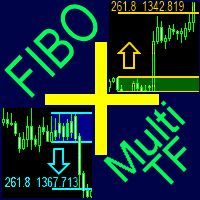
A ready-made multitimeframe trading system based on automatic plotting and tracking of Fibonacci levels for buying and selling any symbol.
Advantages Determines the trend direction based on a complex of 14 indicators ( Cx ), extremums of ZigZag ( Z ), RSI ( R ), Impulse ( I ) Displaying the values of 14 indicators comprising the trend direction ( Cx ) Plotting horizontal levels, support and resistance lines, channels View the plotting option of Fibonacci levels on any timeframe, with the abilit

The Quick trade report separately by symbols script will be useful for simultaneous trading on multiple instruments. It provides the ability to assess the effectiveness of trading on each symbol separately. It is possible to set a time period for making the reports. The report visualizes the changes in the balance for deals on each symbol. Also, the following key trading parameters are calculated for each instrument: Total net profit - the financial result of all trades. This parameter represent

If you want to test the functionality of this tool, you can do it trough a DEMO version, that is restricted to work only on EURUSD and USDJPY currency pairs. To obtain it, please visit the following link: https://www.mql5.com/en/market/product/29594 This EA was originally coded as a back up tool for my personal trades as all of us (Or at least the ones who have left an order open and went to sleep) have experienced the frustration that involves waking up, check the trades and see that in some o

MTSBSPanel is a multifunctional trading panel with an integrated risk manager.
Main features of the trading panel Placement of pending orders directly from the chart with the ability to divide a position into multiple orders Opening by market in one click with the ability to divide a position into multiple orders Risk management: risk per trade and per day Dynamically calculated lot depending on the specified risk per trade Brief information on the account, result of trades for the day, week, m
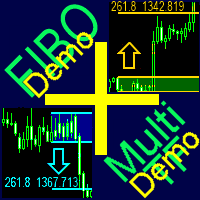
A ready-made multitimeframe trading system based on automatic plotting and tracking of Fibonacci levels for buying and selling any symbol. Demo version - calculation of the last 390 bars is not performed.
Advantages Determines the trend direction based on a complex of 14 indicators ( Cx ), extremums of ZigZag ( Z ), RSI ( R ), Impulse ( I ) Displaying the values of 14 indicators comprising the trend direction ( Cx ) Plotting horizontal levels, support and resistance lines, channels View the plo
FREE

Spread Costs refers to the amount of the loss caused by the spread, and Swap Benefits refers to the amount of the income gained by overnight positions. Spread Costs is an important indicator for short-term traders, especially for scalping traders, and Swap Benefits is an important indicator for long-term traders. Since the spreads and swaps on the MetaTrader 4 platform are all expressed in points, we need to convert it into the amount expressed in the account currency. This tool can display the

Risk controller is a tool allowing you to automatically control orders, losses and emotionally motivated actions.
Main advantages Limitation of the total account loss. When the MinimalDepo value is reached, any trade will be closed. Limitation of losses per day. Limitation of losses in each trade. If a trade is accidentally opened with a large volume, the excessive volume is closed. Set the maximum number of trades opened at a time. Set the number of consecutive unprofitable trades. Set the max

The Easy Strategy Builder (ESB) is a " Do It Yourself " solution that allows you to create a wide range of the automated trading strategies without any line of codes. This is the world’s easiest method to automate your strategies that can be used in STP, ECN and FIFO brokers. No drag and drop is needed. Just by set conditions of your trading strategy and change settings on desired values and let it work in your account. ESB has hundreds of modules to define unlimited possibilities of strategi

- We all want to have the lowest spread and never high, with this utility we can have more information and a clearer idea of when the spread is acceptable or not. The Panel InfoSpread is a utility expert advisor and shows information on different spread options in one or more symbols, can be actual spread, average, minimum, maximum and tick counter. Read and show the symbols that are in the Market Watch window. Also you can put a maximum limit of average spread in every symbol for know when

Value History is a very convenient indicator that returns the movement information both in terms of pips or points and in percentage terms. This indicator is useful for making historical analyzes and verifying previous movements in order to look for recurrences of volatility. Percentage values are returned based on the closing price of the previous movement while the point value can also be calculated on the minimum and maximum of the previous movement. Personally, I use this indicator to evalua

Telegram ChartSnap is an utility tool to bridge your MetaTrader 4 activities to your Telegram chat/group/channel. It will screen shot your MetaTrader 4 chart and send it to your dedicated Telegram chat/group/channel through a Telegram bot. The whole process will keep repeating based on a time cycle that predetermined by the user. It is a convenient tool for those who like to get access to their favorite system/dashboard that only available at MetaTrader Desktop. Beside that, trader can easily s

Risk Manager Pro is a simple utility that calculates the necessary lots with the risk percentage and the pips of stop loss, before opening positions. The web calculators can be useful in some cases but they are not efficient to open operations in real time. In the trading days, there are few opportunities to open positions and when the opportunity arises, the seconds make the difference. This is not possible with conventional web calculators, since to calculate the size of an operation regarding

This is a fully functional evaluation version for working on "CADCHF". Full version - Risk Controller If there are active deals on the account when the robot is launched, then all of them except CADCHF will be closed! Risk controller is a tool allowing you to automatically control orders, losses and emotionally motivated actions.
Main advantages Limitation of the total account loss. When the MinimalDepo value is reached, any trade will be closed. Limitation of losses per day. Limitation of los
FREE

This software will give you the possibility to preset your management strategy (both in live markets and in strategy tester).
You will have at your disposal 8 operative buttons. 4 for Buy positions (from left to right): Buy at market. Buy limit. Buy stop. Set buying time. 4 for Sell positions: Sell at market. Sell limit. Sell stop. Set selling time.
After you have decided one of the 4 options you can easily preset: Lot size. Stop loss, both in points and average volatility (D1 timeframe). Take

Presentation The URL html and xml to csv is designed to get contents from URLs with html or xml content, and to download it to an output format as a txt or as a csv file. It enables to get the whole web sites page, starting with the http protocol, in a document for a further use and in additional with downloading directly on the MetaTrader applications and on the desktop. It is a good advantage for taking the most data from events and economic calendars, and also publications related to the inst

SETTINGS:
Setting 1- Will I act as server or client? : As you see, this setting for choice working mode as client or server. ( server or client )
Setting 2- Will I copy stoploss and takeprofit? : If true they will be copy, if false they will not be copy. ( true or false )
Setting 3- If I am client I multiply lots with this value: Multiplier value for transaction lots on client mode only. ( 0.01 - 100 )
Setting 4- If I am client I don't copy if lots greater than value: It is working on whe

This tool for linking charts in Metatrader 4. Thanks to this tool you have to change symbol only in the main window and all other change automatically. Add this tool to all charts that you want to be linked with each other. Set one chart as a main. Change symbol in the main window and linked windows change automatically to the new symbol.
Input parameter isMainChart - set true only for the main chart window. Set false for all other linked windows.

Utility is designed to monitor and analyze the market conditions for all symbols of the MetaTrader 4 terminal using real-time data from the RSI indicator. Automatically detects all the pairs in your terminal, and also can filter them into groups. Gets the RSI indicator data for all timeframes and all selected pairs. Tracks up to 4 programmable signal patterns and notifies when they appear. Automatically opens a new chart for a given template when you click the desired pair in the table.
Input p

Presentation The URL html and xml to csv is designed to get contents from URLs with html or xml content, and to download it to an output format as a txt or as a csv file. It enables to get the whole web sites page, starting with the http protocol, in a document for a further use and in additional with downloading directly on the MetaTrader applications and on the desktop. It is a good advantage for taking the most data from events and economic calendars, and also publications related to the inst
FREE

The Yellow mouse manual tool is designed for manual trade management based in the 'EA Yellow mouse scalping' strategy. Trading time and direction are selected using on-screen buttons: "Trade" (allow trading), "Buy" (only allow Buy trades), "Sell" (only allow Sell trades) and "Close" (close all trades). After that the utility will trade in the selected direction with specified settings. When orders are close in any way (by take profit, stop loss or for any other reason), the "Trade" button change

This indicator is a utility that can output spreads to CSV file in three formats. In the case of scalping where the spread greatly affects the trade result, the specification of the spread of the FX Broker you use is an important point to be aware of. Since the spread value changes greatly depending on the time zone, the average value of spreads officially announced by FX Broker is not very helpful. It is very important to investigate the spread specification of each FX Brokers by yourself. This
Check Online-Status monitors your terminal. If its connection to the server is interrupted for longer time, you will receive an email and/or a push notification, depending on what your settings. You can find out how long the terminal has been offline and can judge the quality of your brokers and/or the provider of your VPS after some time. Remember, the terminal manages and controls your money. Everything hangs in the air if it has no connection to the server! Check Online-Status displays the th
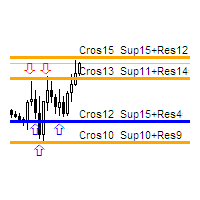
The indicator calculates the number of times the price crossed the levels and bounced off the levels in history. The levels are defined by horizontal lines (Horizontal lines element from the Toolbar). In the free version, the levels are set manually. To calculate the number of crosses and rebounds, the indicator uses the specified tolerance to touching a level. This tolerance is sensitive to the timeframe of the bars. For example: for M5 use a tolerance about 10 pips, for М30 - 30 pips, for D1 -

This utility provides a very intuitive, versatile and helpful visual display of the live trades in a chart window - particularly good if you have a basket of live trades.
How to use The program runs as a Non-Trading Expert Advisor - it is not an indicator. Therefore it should be placed in the Expert Advisors folder and then attached to a separate chart window, maybe stacked in front of your live EA trading window - see screenshots for many variations. Or you could trade manually in the Dynamic

The script allows you to quickly and easily open trades (place orders) on the market.
Features Buy and sell at a market price; Place pending orders: Buy/Sell Limit and Buy/Sell Stop; Open a trade with a custom volume; Calculate and set TakeProfit; Calculate and set StopLoss; Auto defining the number of decimal places; Auto defining a symbol the script has been applied to.
What you get with the script Ability to calculate each trade instantly; Ability not to enter all calculated values manually

This tool simplifies routine trading tasks (like opening market orders, setting up pending orders, closing of all orders and orders by parameter), helps to control losses by use of break even stop and trailing stop, and adds a little bit of cyber punk edge to your trading
Control Elements Left side of the panel includes: order counter (shows the number of orders); connection status sign (notifies if connection is lost); trade permission sign (notifies if autotrading permisiion is turned off); m

The indicator calculates the historic price statistics: the number of intersections of a level and the number of rollbacks. The levels are set as horizontal lines (the 'Horizontal lines' element on the Toolbar) manually, are are drawn automatically by the indicator with the specified step. Only strong levels are drawn in the automated mode. There are two options for the automated mode: 1. Strong levels of intersection and support/resistance; 2. Strong support/resistance levels. The indicator use

Introducing the TPSL Driver Utility , a powerful tool designed to enhance your trading experience by automating Stop Loss and Take Profit management. This utility caters to every trader who desires seamless order management and advanced profit protection techniques. With the TPSL Driver Utility, you have the flexibility to choose between two modes of order management: Hidden and Visual. The Hidden mode allows you to hide the Take Profit and Stop Loss levels, providing a discreet approach to mana
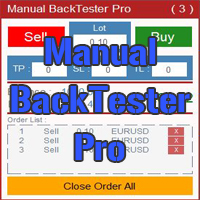
The Manual BackTester Pro utility allows to simulate the manual trading in the MetaTrader 4 strategy tester.
The utility has no parameters at initialization. Time Frame Support: M1, M5, M15, M30, H1, H4, D1, W1, MN1
Panel Description:
The panel has Buy and Sell buttons for placing market orders. It is possible to set the Take Profit, Stop Loss and the Trailing Stop in the TP, SL and TL fields, respectively, measured in points of order opening price. The Lot field sets the lot size. It is pos

This is a demo version of CyberTrader Assistant tool. In demo version you cannot change lots value (it is set to the minimal value for the given symbol) and price rounding function for pending orders is unavailable This tool simplifies routine trading tasks (like opening market orders, setting up pending orders, closing of all orders and orders by parameter), helps to control losses by use of break even stop and trailing stop, and adds a little bit of cyber punk edge to your trading
Control Ele
FREE
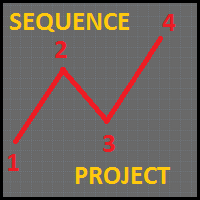
This Expert Advisor is a very advanced sequential tool that gives each user the possibility to program
the order of tasks according to specific conditions.
Everything can be done in a simple and intuitive way.
The sequencing of the EA's programming ensures that each operation is carried out one after another.
I present the method of operation in the attached movie.
EA global settings magic – individual EA number . For each EA attached on the same instrument, a different number must be entered

Some traders don't like expose Take Profit/Stop Loss level in their positions, this Expert Advisor can help them.
Put it to chart and set Take Profit/Stop Loss pips (0 means ignore), it watch the price of the symbol on chart and close the position if price reach Hidden TP/SL level.
It hide user's TP/SL price in effect.
Welcome to contact me.
。。。。。。。。。。。。。。。。。。。。。。。。。。。。。

Easiest Trader is an user friendly and very easy to use algorithmic system. Open the first Order according to your own strategy using the buttons that are available on the left corner of the Chart and continue your personal life instead of continuously monitoring the markets. Easiest Trades will assume to set Take Profit, open more Orders using Grid system if needed, protect the percentage of Balance you have set according to settings doing all the work for you without you. Just eight settings

This scanner is a tool used to support trading. Scanner searches on a wide market, in real time setups, created by mutual arrangements of candles (candles pattern). Its basic features are: 8 implemented trading setups (it is possible to add further setups, additional versions of the scanner), the possibility of simultaneous scanning, all financial instruments available on the platform, the possibility of simultaneous scanning, in all timeframes available on the platform, the ability to manua
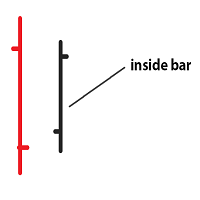
Inside bar price action. Inside bar must be completely engulfed within mother bar (mother bar is indicated as bar 2 in inputs). Stop orders will be placed after the formation of the inside bar at the top and bottom of the mother bar. Inputs: Interval from bar 2 - the distance of placing stop orders from the top and bottom of the mother bar. Lot Size - volume of the trade. Take Profit - multiple of the size of the mother bar. Stop Loss as % of mother bar - adjust the stop loss of the stop orders

JustLineTrader is an EA for trading manually using Graphic Objects that are easy to use. There are 6 lines, namely Buy Line, TP Buy Line, SL Buy Line, Sell Line, TP Sell Line, and SL Sell Line. 6 The line is a trend line chart that we manually installed on the Chart. When the price reaches its Line, it will execute the order on the Panel Line Day Trade. JustLineTrader consists of a panel section for manual trading and part 6 lines for installing trend lines as triggers for order-send and order-c
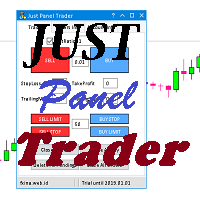
JustPanelTrader is an EA for trading manually using Graphic Objects that is easy to use. Trading is done by clicking the button on the panel Button consists of Sell: To place a Sell order Buy: To place a Sell order SellLimit: To install a Sell order SellStop: To install a Sell Pending Order CloseAll: To close all orders and pending orders ClosePendingOrder: To delete all pending orders CloseSell: To close all Sell orders Close Buy: To close all Buy orders
TextBox consists of LotRatio: to deter
Возможности : 1) Утилита, при поступлении сигнала от индикатора RSI, открывает позицию, и далее следит за этой позицией, если убыток, открывает новые позиции. Пока серия не закрыта все сигналы от индикатора игнорируются. 2) Трейдер открывает первую сделку в ручном режиме, а далее утилита уже следит за ситуацией, если был убыток, то открывает новые ордера. 3) Серия состоит из 22 - х позиций, на каждую позицию лот, TP и SL задаются в настройках утилиты. В случае если первая сделка была закрыта по

ExPad - a trade panel for comfortable trading on financial markets. Suitable for trading any financial instruments. In general, the panel is able to perform the following functions: Open and reverse of deals Operation with visible and hidden StopLoss and TakeProfit Independent management of visible and hidden StopLosses Profit protection due to Breakeven and Trailing Stop Choice of technique for Trailing Stop Distance from market price Moving Average Bolinger Bands Middle Line High and Low pri
The MetaTrader Market is a unique store of trading robots and technical indicators.
Read the MQL5.community User Memo to learn more about the unique services that we offer to traders: copying trading signals, custom applications developed by freelancers, automatic payments via the Payment System and the MQL5 Cloud Network.

You are missing trading opportunities:
- Free trading apps
- Over 8,000 signals for copying
- Economic news for exploring financial markets
Registration
Log in
You agree to website policy and terms of use
If you do not have an account, please register