 MetaTrader 5
 Experts
 Indicators
 Libraries
 Utilities
 Widgets
 Rules
Rules
Watch the Market tutorial videos on YouTube
How to buy а trading robot or an indicator
Run your EA on
virtual hosting
virtual hosting
Test аn indicator/trading robot before buying
Want to earn in the Market?
How to present a product for a sell-through
Trading utilities for MetaTrader 4 - 48
 Below are trading programs simplifying Forex trading in MetaTrader 4. Hover over a utility in the list below to read its description and purpose.
EA Order Manager v2.13 – Smart Management for Any Open Trade EA Order Manager is a universal trade manager for manual or automated orders on MetaTrader 4. It automatically applies advanced protections, trailing stop, break even, cross-closing logic, and global stop loss/take profit , regardless of the trade’s origin. Key Features: Global Stop Loss & Take Profit – Automatically secures your capital.
Smart Trailing Stop – Only activates when real profit is detected.
Global BreakEven –

OvertradeShield – Utility EA to Prevent Overtrading in Discretionary Trading Have you ever regretted making “just one more” trade in discretionary trading? OvertradeShield is a utility-type EA that automatically limits and alerts entries based on realized profit and loss, supporting your trading rules and mental discipline. It is ideal for traders who want to keep daily profits and losses in mind, prevent overtrading, and enforce profit and loss rules systematically. Since entries are discretion
FREE

Template Loader EA : Automate Your Chart Setup with Precision
Automate chart template loading daily at your chosen time with Template Loader EA for MT4. Why Buy Template Loader? Template Loader is a must-have tool for traders who rely on specific chart setups for their strategies. Its straightforward design, reliable performance, and time-saving automation make it a valuable addition to any MT4 trading arsenal. Get started today and streamline your trading workflow! Full Description : Simplify Y

️ Ex-Calibur EA is Professional Trading Robot with Inside Bar Strategy.
Key Features:
Powerful Inside Bar Strategy - Automatic Inside Bar pattern detection for precise entry points - Colored indicator box visualization for easier analysis - Automated entry system with pending orders to capture breakouts
Advanced Risk Management - Flexible Trailing Stop system to secure profits - Automatic Break Even to protect capital - Adaptive Stop Loss and Take Profit based on market vol
Welcome to Positive Grid — the strategy behind our real-time Telegram signals. This video shows how the cycle works from start to finish, including: • Opening Buy/Sell at the same price • Grid expansion every 20 pips • Mini trades every 10 pips • Pending order logic (“5=5”) • Profit target and cycle restart ⸻ Profit Potential (Per Cycle): Most cycles involve 6 to 30 trades, depending on market movement: • 0.01 lot = $4.00 profit target • 0.10 lot = $40.00 profit target • 1.00 lot = $400.00 pr

Smart EA Summary is an advanced and intelligent tool for managing and analyzing profits in MetaTrader 4 , specifically designed to display a clear and dynamic summary of all Expert Advisors (EAs) and manual trades directly on the chart. Click Here for MT5 Version * Introductory Offer : the current price is only 49 USD
After the first 10 purchases, the price will increase to 75 USD , and gradually up to 99 USD with upcoming versions. - Get it now at the discounted price and be
Buy Limit, Sell Limit Pending Orders.
With the Aguias Traders Order, you can set Takeprofit and Stoploss together with the pre-defined Lot as an OCO order, plotting the price of Buy Limit and Sell Limit orders. It has a confirmation function, when clicking on the chart, the first click marks the price, the second click confirms the location, the third click sends the order, with this method, you avoid sending unnecessary orders. A simple and easy way to plot orders quickly.

Market Monitor – Smart Asset Performance Dashboard for MT4
Turn your MetaTrader 4 into a professional trading intelligence center! Market Monitor is a powerful monitoring tool that displays, in real time, the most relevant performance metrics of each symbol being traded — helping you make faster, smarter, and more strategic decisions.
What Does This Indicator Do?
Market Monitor scans all open and historical orders, consolidates the data by symbol, and displays everything in visual pa

Drawdown Detective Overview: Drawdown Detective is a utility script for MetaTrader 4 designed to help traders analyze their open and closed positions. It calculates key metrics including open position risk, potential profit/loss, the number of trades without Stop Loss or Take Profit, as well as monthly performance statistics such as net profit and maximum drawdown. Key Features: Open Trade Analysis: Automatically detects all currently traded instruments. Calculates net lot exposure per symbol. E

Savdo maslahatchisiga yordamchi Ushbu EA assistant sizga order ochganizdan keyin TP, SL va boshqa etaplardagi ishlarni amalga oshirishda yordamchi hsioblanadi Yordamchi EA sizga vaqtingizni tejagan holda, savdo tizimiga to`liq rioya qilgan holda: order masofasi, order hajmi, SL masofasi, TP masofasi, order uchun komment va boshqa turdagi ishlarni avtomatik amalga oshiradi
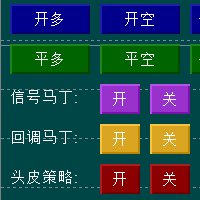
Hello everyone, I would like to introduce an AI intelligent trading control strategy that combines Martin's position adding and opportunistic position adding strategies. The parameters can be changed at any time on the trading interface according to market changes, and a single strategy can also be activated. When the market is shaking, Martin's strategy can be activated, and opportunistic strategies can be activated when there is a possibility of a one-sided market. This greatly helps traders t

Easy Lot Size Calculator – MT4 Risk and Position Size Utility Overview The Easy Lot Size Calculator is an on-chart tool designed for MetaTrader 4. It calculates position size based on a user-defined risk percentage and the stop-loss distance measured from a Fibonacci retracement object. The tool provides a structured way to view risk information directly on the chart and includes optional trade management features. The calculator reads the distance and direction of a Fibonacci retracement object

BreakEven Grid Utility for MT4
BreakEven Grid is a powerful utility for manual trade management on the MetaTrader 4 platform. It provides a convenient on-screen panel with buttons to help you manage your open positions with a single click.
Features:
Set BE+Profit: Automatically sets Take Profit to breakeven + desired profit in pips or money. Close BUY/SELL: Instantly close all Buy or Sell orders for the current symbol. Close +$/-$/Old/New: Close only profitable, losing, oldest or newest tra

Raw Tick Recorder EA for MetaTrader 4 For full setup instructions and demo version that works on chart (not just Strategy Tester), visit: Full User Guide – Raw Tick Recorde r Public channel: CLICK HERE
Raw Tick Recorder EA is a non-trading Expert Advisor that records every incoming market tick with high-precision timestamps. It saves bid/ask data to disk in multiple formats for further analysis, model training, or broker verification. Ideal for traders, analysts, quants, and developers w

Custom Alerts AIO: All-in-One Market Scanner – No Setup Required Overview
Custom Alerts AIO is the fastest and easiest way to monitor multiple markets for real-time trading signals—without any setup or extra licenses. It comes with all required Stein Investments indicators already embedded, making it the perfect plug-and-play solution for traders who value simplicity and performance. Just load it to any chart and start receiving alerts across Forex, Metals, Crypto, and Indices. Shares can be a

Automate Risk Management with Smart Trailing Stop Manager for MetaTrader 4 Looking for MetaTrader 5 version? I t is available separately in the Market: Smart Trailing Stop Manager MT5 Full User Guide – Public channel: CLICK HERE Struggling with manually adjusting stops and securing profits?
Smart Trailing Stop Manager MT4 is an intelligent utility for MetaTrader 4 that automates trailing stops, break-even management, partial closes, and auto SL. Optimized specifically for MT4 users, it e

️ XTRIM CycleGuard Trading Bot – Your Silent Risk Manager ️
XTRIM CycleGuard is your ultimate trading companion , built to complement and protect your primary strategy. It specializes in detecting trade cycles, minimizing exposure, and safeguarding equity through intelligent hedging and cycle-based entries . Whether you're running aggressive bots or complex grids, CycleGuard acts like a seatbelt— quiet, efficient, and life-saving when it matters most . Designed for support,

Break Even Helper for MT4 – Simple SL to Entry Utility Break Even Helper for MetaTrader 4 is a compact and effective tool that helps traders protect their open trades by automatically moving the Stop Loss (SL) to the entry price when a trade reaches a user-defined profit level (in points). Designed for risk-conscious traders, this utility simplifies SL management without relying on complex trailing systems or custom strategies. Looking for MetaTrader 5 version? I t is available separately in the

Si eres un proveedor de señales o simplemente te interesa enviar notificaciones de tus trades a Telegram, entonces este es el EA perfecto para tí. Ha sido probado con MT4 4.00 build 1441 Características principales: Envía alertas automáticas a Telegram cada vez que se abre, cierra o modifica una operación (SL/TP), en tiempo real. Monitorea todas las operaciones de la cuenta , sin importar en qué gráfico esté montado el EA. ️ Captura y envía un screenshot del gráfico correspondiente al sí
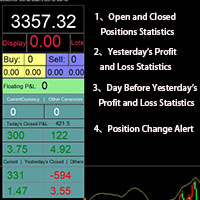
Smart Trading Monitor - Real-Time Position Tracking, P/L Analysis & Alert System Real-Time Monitoring: Automatically tracks open/closed positions, clearly displays yesterday's/previous day's P/L - no more manual calculations!
Smart Alerts (Premium only): Instant push notifications + sound alerts for position changes - never miss a trading opportunity!
Simple & Intuitive: One-click installation with key data displayed directly on charts for faster decision making
High Compatibility: Su

Track Account and All EA’s metrics EA
This EA will record the following account metrics Balance, Equity, Margin, Free Margin, Margin Level, Drawdown And all of the following metrics for each of your trading eas Date and time , Net Profit, Floating Profit (Drawdown),number of open trades, total lots of open trades, magic number and cumulative profit This EA will record all of these metrics at the interval in minutes that you specify from 1 minute , 5 minutes, 15 minutes, 30 minutes, hourly, da

Virtual SL TP Trailing Pro for MT4 – Client-Side Stop Loss / Take Profit and Trade Management Looking for MetaTrader 5 version? I t is available separately in the Market: Virtual SL TP Trailing Pro MT5 Public channel: CLICK HERE
Virtual SL TP Trailing Pro for MT4 is a trade management utility that keeps Stop Loss (SL) and Take Profit (TP) levels on the client side instead of sending them to the trading server. It is designed to help you manage exits in a structured way using a clear on-cha

This expert advisor is particularly beneficial for traders using paid indicators that include built-in backtesting features. This expert advisor does automation and refreshes charts. With this feature, your indicator's built-in backtest function will do a backtest in the time that you put in 'input' settings. You will have a fresh backtest every time with this expert advisor. It's very necessary for indicators like it. You can set the time you want it to refresh the backtest or the time you want

Introduction Copytrade Online is a powerful EA tool that helps you automatically copy trades from a Master account to Slave accounts on MetaTrader 4/5 (MT4/MT5) platforms. The EA ensures fast, secure, and easy trade transmission, suitable for both individuals and trading groups. Copy online via the internet from an MT4/MT5 account on one computer to MT4/MT5 accounts on multiple other computers. Key Features Automatically copy trades from the Master account to multiple Slave accounts. Supports b

Double Top & Bottom Strategy (Manual Trading Plan) Description:
The Double Top & Bottom Strategy is a powerful trend-following manual trading system designed for precision entries during major market reversals. Built on classic price action principles, this strategy helps traders capitalize on high-probability setups with clearly defined rules. Key Features: Trend Confirmation: Uses Daily and 4H charts to identify dominant market direction. Entry Signal: Enter after rejection of the second

User Manual - TradePannelAdvanced v2.00 Table of Contents Introduction Installation and Setup Panel Description Customizable Inputs and Parameters Control Buttons and Functionality Order Management Trailing Stop and Break Even Functions SL/TP Visualization with Labels Profit Display Practical Examples FAQ Support Contacts 1. Introduction TradePannelAdvanced v2.00 is an Expert Advisor for MetaTrader 4 that offers an intuitive graphical panel for quick and easy management of trading orders, includ

Auto SLTP Risk Assistant is an automatic trading tool for MetaTrader 5 designed to help traders set Stop Loss (SL) and Take Profit (TP) accurately based on fixed risk per trade . With a simple and interactive interface, just drag the SL line on your chart and the EA will automatically calculate lot size and TP based on the chosen Risk:Reward ratio , then execute a BUY or SELL order instantly. ️ Key Features: Auto Lot Calculation based on fixed risk (e.g. $10 per trade).

BreakevenBoost automatically sets Take Profit levels for all open orders on the current symbol to the breakeven price plus a specified offset in points. Whenever a new order is opened, the utility recalculates and updates the TP for all positions based on their combined weighted entry price. Key Features Supports Buy and/or Sell orders Filters orders by a specified Magic Number Automatically recalculates and applies TP whenever the number of orders changes Logs success messages and errors to the

THE DEFENSIVE MEASURE OF YOUR PROFIT MAKING STRATEGIES! As said by Master Sun Tzu: Security against defeat implies defensive tactics; ability to defeat the enemy means taking the offensive. Do you want to stop having ridiculous drawdown because of glitches incurred by your Expert Advisors(EA)? Do you want to track your wins and losses and take risk management seriously? Before you purchase your next prop firm account or your next Expert Advisor, hold on. First, Congratulations! I have developed
SAY GOODBYE TO FOREX CALCULATORS!
Risk management is everything. Order Scheduler is the ideal tool to signals channels followers or for those traders who had their own analisys and know exactly where to place their orders, stops and targets. Just type the Entry price, Stop Loss price and Target price, and this EA will schedule the order for you, calculating the Lot Size based on the Risk Percentual you choose for the order. If you decide to cancel the schedule, just set the MaxOrders input to z

Prop Trader's Guardian: The Ultimate Risk Manager
(Product for MetaTrader 4)
Protect your capital and secure your funded account with the Prop Trader's Guardian. This is not just another drawdown checker; it's an account-level circuit breaker designed specifically for the strict rules of proprietary trading firms. When your daily limit is hit, it doesn't just close trades—it locks down your entire terminal to prevent any further activity until the next trading day.
The Prop Firm Trader's Dil

Catégorie : Robot de gestion automatique des profits.
Marché : Tous symboles / Tous timeframes (testé en M1, M5, H1…)
Objectif : Fermer automatiquement tous les trades gagnants à chaque nouvelle bougie et afficher un bilan clair de la bougie précédente. Fonctionnement : À chaque nouvelle bougie détectée, le robot ferme les positions BUY ou SELL en profit si elles dépassent le seuil MinProfit . Il scanne ensuite les trades clôturés durant la bougie précédente . Le pann

Trade Assistance EA – Manual Trade Control Panel for MetaTrader 4 Trade Assistance EA is a lightweight and intuitive manual trading tool designed to give you full control over your trades directly from the chart. It helps traders execute, manage, and exit trades with just a click — no coding or complex setup required. ️ Key Features One-Click Buy/Sell Buttons
Instantly open market buy or sell orders with preset lot size, Stop Loss, and Take Profit. Smart SL & TP Input Boxes
Easily modify and

Utility TimeLs Close Positions is a tool for managing and automating trade closing operations in MetaTrader 5. It provides flexible control over when and how open positions are closed based on time, symbol, direction, magic number, and comment filters. You can disable trading on specific days of the week
You can set a specific time to close all open positions
You can filter closing operations by symbol, direction (Buy/Sell), magic number, or comment
You can execute up to three one-time scheduled

Expert Advisor: Breakout_Recovery_V2 Version: 2.3 Symbol: XAUUSD Timeframe: M15 (recommended) Strategy Type: Breakout + Smart Recovery (Bi-directional Martingale) Platform: MetaTrader 4 (MT4) Description: Breakout_Recovery_V2 is a smart trading system that detects real breakout opportunities and uses a controlled recovery mechanism (martingale) when the market moves against the initial entry. Features: *Real breakout entry logic using a custom supply/demand

Have You Ever Experienced This? You've done the perfect analysis. Your entry is flawless. Your position is showing a significant profit... and then, in an instant, the market reverses and all of your hard-earned gains vanish. The frustration of "giving back profits to the market" is one of the biggest challenges in trading. It's not about a flawed analysis; it's about a lack of optimal post-entry management. Introducing Pro Scaler Panel : a trading panel specifically designed to transform you fr
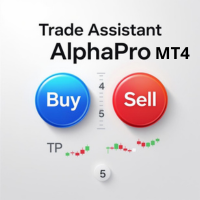
Transform your trading with the ultimate MT4 trade management solution. Trade Assistant AlphaPro EA is an essential tool that eliminates manual trading errors and maximizes your results through intelligent automation. Every trader needs this powerful assistant to achieve consistent, professional-level trade management. Supports: All asset classes ( Forex, Gold, Oil, Indices, Crypto, etc.). The EA can manage orders and positions opened from a mobile terminal (smartphone). - For automated position

Auto Symbol Switcher for MT4 – Watchlist Rotation for Market Watch Symbols Auto Symbol Switcher for MetaTrader 4 is a chart navigation utility that automatically rotates the active chart through a list of symbols. It is designed for discretionary traders, scalpers and analysts who want an organised way to scan markets without manually switching symbols in the Market Watch window. The tool is navigation-only: it does not open, modify or close any orders and it does not change your account in any

Meet GridRepeaTrain — Your Pending Orders Wingman! This EA’s here to back up your trading game with smart, repeatable pending orders.
It’s got two modes : --------------------------------------------------------------------- [1] Single Mode and [2] Double Mode . Think of it like this: · Single Mode = only LONG or only SHORT pending orders (pick one and repeat it). · Double Mode = LIMIT or STOP pending orders (working both sides of the range). [1] Single Mode – The One-Sided

MT4 Hotkeys – Order and Position Management Tool This tool enables users to manage orders and positions on the MetaTrader 4 platform using keyboard shortcuts. It supports order execution, position closure, trailing stop adjustments, and risk management through customizable settings. Key Commands "B": Places a buy order. "S": Places a sell order. "C": Closes all open positions. "X": Closes a specific position (oldest or most recent, based on configuration). "T": Activates a trailing stop, adjust

Who Should Use This EA Manual Traders Perfect for traders who execute trades manually but need automated protection Protects against emotional trading decisions Enforces discipline when under pressure Prevents revenge trading after losses Provides emergency position closure via mobile Prop Firm Traders Essential protection for funded traders with strict rules Automatically enforces daily loss limits Prevents account violations that could result in funding loss Real-time risk monitoring to stay w
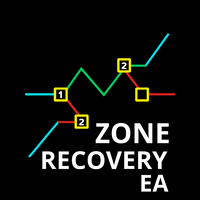
The Zone Recovery Hedge strategy works by creating a price zone between two levels (above and below the current entry price). Instead of closing a losing position at a stop loss, the system opens an opposite (hedging) position when price moves against the trade. This creates a "zone" in which future movements can help recover the loss. Initial Trade : A buy or sell order is placed. Zone Definition : A fixed distance (in pips) from the entry is set to trigger a hedge order in the opposite directi
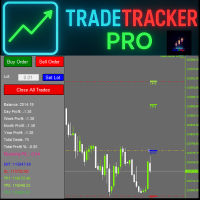
TradeTracker Pro – Smart Trade Tracking & Management Utility Take control of your trading with TradeTracker Pro – the ultimate utility for monitoring, analyzing, and managing your trades in real time . Whether you’re a scalper, day trader, or swing trader, this powerful tool helps you track performance, set smart take profits & stop losses, and visualize every deal directly on your chart . Key Features Real-Time Trade Tracking – Monitor all open and closed trades with full details on profits, lo

Watch your account Protect your capital with precision alerts for Balance, Equity, Margin, Margin level . Introducing: Balance, Equity, Margin, Margin level, Telegram Alerts and more expert advisor, A smart Expert Advisor for Meta Trader 4 that monitors your account in real time and sends instant alerts when critical thresholds are breached. What Makes This EA Different? Balance 1 Alerts: When your balance drops to 75% or 50% or any percent you want. Balance 2 Alerts: When your balance drops t

Drawdown Protector EA is a comprehensive risk management and account protection system designed for MetaTrader 4. This advanced Expert Advisor provides automated monitoring and protection of your trading account through multiple safety mechanisms, profit-taking features, and time-based controls. Whether you're a day trader, swing trader, or algorithmic trader, this EA acts as your ultimate safety net and profit guardian
Core Protection Features Drawdown Protection Max Daily Drawdown %: Automati

本エキスパートアドバイザ(EA)は、以下の条件をすべて満たした注文が決済された場合に、自動的に同一内容の注文を再設定します。 対象となるのは指値注文または逆指値注文で、必ずテイクプロフィット(TP)とストップロス(SL)が設定されているものです。 そして、その注文がTPまたはSLによって決済された際、同じロット数・価格・TP・SL・有効期限などの条件を引き継いだ注文を自動で再発注します。 これにより、一度設定した戦略を継続的に適用でき、裁量判断なしに取引を繰り返すことが可能となります。 ただし、ブローカーによっては再注文時にスリッページが発生する場合がありますので、必ずご利用環境をご確認の上、自己責任でお使いください。

One chart. Total control. Stop wasting time managing objects, colors, and settings on every chart separately. With Chart Sync Manager , you can sync, copy, and control all your MetaTrader charts instantly—using just one panel and a few shortcuts. Draw once, update everywhere. Open and close charts with a single click. Keep your workspace clean with symbol-based object management . And never miss important details with spread display, countdown timers, and candle-close alerts. Save

NEXT price Actions - Order Manager This EA have multiple Order Managements that can be used with FliPA Indicators have a look at Screenshots for more clear understanding of it use. It also includes the Auto BreakEven, Auto BreakEven Trailing, TakeProfit, and StopLoss. All this functionality is Customizable at the EA Setting Parameters. All or order managements can also be adjusted directly at the chart.

Bank Your Profits & Secure Your Trade in One Click The Ultimate "Scale Out" Tool for Professional Traders. Close Partial (MT4 Utility) is designed for traders who want to lock in profits without killing the trend. With a single click, you can bank a percentage of your profit instantly. New Feature (Auto-Secure): Stop wasting time dragging your Stop Loss after taking profit. This manager can now automatically move your Stop Loss to Break-Even the moment you click the "Close Partial" butt

Scalping speed; systematic discipline Decide with Nirvana; calculations and safety brake by us. Don’t be surprised; you’re facing the most advanced and intelligent capital management tool, offering maximum flexibility in financial markets. A winning trade isn’t just “good analysis”; “frictionless execution” and “discipline” are key. Nirvana is your execution assistant: real-time risk/volume calculator, one-click R:R setup, live risk and profit preview, and “daily risk lock” acts as a safety ke

Position EA – User Manual 1. Overview The Position EA is a semi-automatic trade manager for MT4.
It helps you: · Calculate lot size based on risk and stop loss. · Place market, limit, or stop orders quickly. · Manage risk with auto break-even and trailing stop . · Take profits in tiers (TP1, TP2, TP3) with partial closes. · Manually close half or all with a button. 2. Panel Layout 2.1 Top Bar · Type [MARKET/LIMIT/STOP] o Switches order type. o MARKET → entry auto-syncs with

Ping: Ваш незаменимый инструмент для надёжной торговли Ваш интернет-провайдер и VPS обещают стабильное соединение, но действительно ли вы можете им доверять? В мире, где каждая миллисекунда имеет значение, медленное или нестабильное соединение может обернуться упущенной прибылью или убытками. Ping позволяет вам: * Принимать осознанные решения: Наглядно сравнивайте скорость разных VPS-серверов и брокеров, чтобы выбрать самое быстрое и надёжное соединение для вашей стратегии. * Исключить риски: О

Multi Indicator EA – Flexible Signal Confirmation Expert Advisor Multi Indicator EA is a fully automated Expert Advisor designed to trade based on signals from multiple external indicators.
It allows you to combine up to 8 custom indicators , each with its own settings (timeframe, buffer index, signal direction, and threshold).
Once a predefined number of indicators ( MinConfirm ) agree on the same direction, the EA automatically opens a Buy or Sell order. Key Features: Use up to 8 external

Trading Special – 40% OFF
Advanced Trade Manager – The Ultimate All-in-One Solution for Faster, Smarter, and Safer Manual Trading.
Transform your manual trading with NextGen Trade Manager AI – the professional on-chart panel that combines instant execution, visual trade planning, and powerful risk management into one intuitive tool. Execute orders, manage risk, and protect profits faster than ever before, all without leaving your chart. Perfect for all traders looking to enhance their precisi

Automate Your Trading with Intelligence and Control Introducing "OrderManagerV200" , a cutting-edge Expert Advisor (EA) for MetaTrader 4 designed to transform your trading approach. Say goodbye to stressful manual trading and rushed decisions. With OrderManagerV200, you can leverage a fully automated and intelligent order management system combined with unprecedented manual control. Whether you're a novice or an experienced trader, this tool provides the precision and reliability needed to navi

TSC_Pannello_Professionale.mq4 – Documentation Overview This Expert Advisor (EA) is designed for professional order management in MetaTrader 4.
It integrates a graphical panel that allows intuitive control of trading operations and includes automatic functions such as Trailing Stop, Break Even, and Profit Management. The EA is optimized for EUR-based money management (Stop Loss, Take Profit, BE, TS in €) and can be applied to any symbol. Main Features Graphical Control Panel : Buttons for manual
Introduction Loop Pending Trader EA is a professional-grade order management tool for MetaTrader 4 that automates the placement of Buy Limit and Sell Limit orders in a structured “ladder” after every trade closure. It is designed for traders who want precise control over scaling into positions , whether on Forex, Gold, or Bitcoin . With flexible spacing models, risk guardrails, and cycle tracking, this EA gives you the power of advanced order laddering with the safety of exposure management.

Guardian Angel is designed to provide the trader with portfolio-level trailing stop-losses. Users are able to configure the portfolio profit 'trigger' level at which a LockProfit 'floor' gets activated and applied to the portfolio - in the event that portfolio profit falls back to the portfolio LockProfit level, then all open trades in the portfolio will close. In the event that portfolio profit continues to grow, then the portfolio LockProfit will trail the portfolio profit at a rate configur
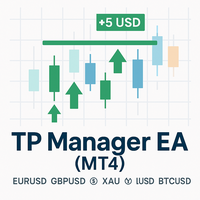
TP Manager EA (MT4)
A simple, no-nonsense trade assistant that sets Take Profit by money (USD), not by pips. Tell the EA how many dollars you want to bank per symbol and per direction (Buy/Sell). It reads your current open positions, computes the weighted average price, and moves TP so that when price hits, your net position closes for approximately that USD target. No strategy curve-fitting, no grid, no martingale—just clean TP management.
---
What it does
USD Target TP per Symbol & Direc
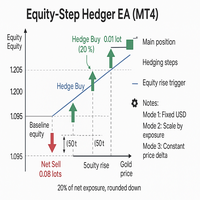
Equity Step Hedger
Equity Step Hedger is a professional Expert Advisor for MetaTrader 4, designed for traders who want intelligent hedging and equity-based step management instead of static grids or martingales.
This EA automatically monitors your account equity or symbol-based profit/loss and places hedge trades in the opposite direction once your profit has advanced by a configurable step. Each hedge can be managed with a USD profit target ladder, ensuring controlled exits and reduced risk

Telegram Ultimate Manager MT4 Use Cases: Manager Order (open, close, modify order) Publish open and close order to Telegram Channel Open trade based on Forex Factory News
Requirement: Telegram Chat ID Telegram Bot API Token Telegram Channel ID
Please read the guide This tools can not be backtested Free n8n workflow template to : 1. Import Forex Factory news to Google Calendar 2. Send chat to Telegram bot about news release. Is it good or bad for the currency Inputs: Telegram Bot Token : your T
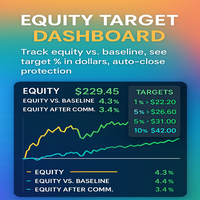
Equity Target Dashboard Your all-in-one equity manager, profit protector, and trading informer. Why Traders Love This Tool Hands-free profit protection → Automatically closes all open trades when your profit target (after commission) is hit. Precision targets → Works with exact % vs Baseline (1%, 3%, 5%, 10% … or custom values). Protects against drawdown → Commission is ignored when below baseline, applied only when equity > baseline. Crystal-clear dashboard → See Equity, Ba

SMARTTARGETLINES – PRECISION TARGET VISUALIZER FOR MT4 The ultimate tool for traders who want to see exactly where price must go to hit their profit or equity targets — for BUY , SELL , and NET positions. KEY BENEFITS ️ Draws dynamic BUY , SELL , and NET TARGET LINES
️ Shows real-time price targets based on your equity or profit goals
️ Displays distance-to-target in points , dollars , or both
️ Includes a glowing corner label that changes color as you approach your goal
️ Clean des

Auto Close Manager EA – Equity & Account Protection Utility Overview Auto Close Manager EA is a risk management utility for MetaTrader 4 designed to automatically close all open positions when a predefined floating profit or floating loss level is reached. This Expert Advisor does NOT open trades.
It only monitors account equity and manages existing positions. The EA works with manual trades and can optionally include trades opened by other Expert Advisors.
How It Works The EA continuously moni

TradePilot Expert Advisor (EA) for MetaTrader 4 TradePilot is a professional and user-friendly Expert Advisor (EA) for MetaTrader 4 (MT4) . It simplifies automated trading , risk management , and trade execution using a smart trading panel . Perfect for beginners and experienced traders looking for a reliable trade manager EA with automated lot size calculation . Key Advantages User-Friendly Trading Panel: Customizable panel with buttons and hotkeys. Smart Risk Management: Supports percen
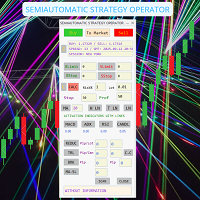
SEMIAUTOMATIC STRATEGY OPERATOR – El copiloto inteligente para tu trading ¿Quieres operar con más precisión, menos errores y mayor control?
SEMIAUTOMATIC STRATEGY OPERATOR es un asistente profesional que combina automatización y control manual, ayudándote a ejecutar tus estrategias semiautomáticas con la máxima eficiencia utilizando Pullback & Breakout a líneas horizontales o tendenciales insertadas en el gráfico, además puede utilizar Pullback a una Media móvil definida por el usuario. Solici

Telegram Alert With Emoji Description and User Manual
EA Description Purpose:The Telegram Alert With Emoji sends real-time trading notifications to a Telegram chat or group for all trading activities in MT4, including new Positions (BUY/SELL), Pending Orders (BUY LIMIT, SELL LIMIT, BUY STOP, SELL STOP), Stop Loss/Take Profit (SL/TP) triggers, and closed Positions with profit/loss details. It includes a Rainbow Display on the chart and uses Global Variables to prevent duplicate notifications. [

Советник представляет собой многофункциональную торговую систему BBMA Oma Ally с интеграцией Telegram для удаленного управления и получения уведомлений. Основная специализация - анализ паттернов ценового действия и автоматическое оповещение о торговых возможностях. Основные функции
1. Система оповещений через Telegram
Управление командами: Отслеживание и выполнение команд из Telegram Уведомления: Мгновенные оповещения о торговых сигналах Удаленное управление: Возможность управления советнико

COPYLATOR – MT4 to MT4 Copier – Trade Copier for MetaTrader 4
COPYLATOR is a local trade copier for MetaTrader 4 that synchronizes trades between multiple MT4 terminals running on the same computer or VPS. The system is designed for traders who manage multiple accounts and require trade replication between accounts. It works in different environments including personal computers and VPS setups, depending on terminal performance and system resources.
Use Cases The system is suitable for multi

BasketCloser — Intelligent basket close by profit or loss
Take control of outcomes: set a money target to close all positions when the basket reaches that profit, and a global loss cap to stop bad streaks early. Works per symbol or across the whole account, with an option to include pending orders. A clean on-chart panel shows orders, total lots, and aggregated P/L in real time. Does not open trades. It only manages exits: fast and consistent.
Why choose it Consistent results: clo
MetaTrader Market - trading robots and technical indicators for traders are available right in your trading terminal.
The MQL5.community payment system is available to all registered users of the MQL5.com site for transactions on MetaTrader Services. You can deposit and withdraw money using WebMoney, PayPal or a bank card.

You are missing trading opportunities:
- Free trading apps
- Over 8,000 signals for copying
- Economic news for exploring financial markets
Registration
Log in
You agree to website policy and terms of use
If you do not have an account, please register