Lorentzian Classification EA
- Experts
-
Michael Prescott Burney
 I am a professional trader and Expert Advisor developer focused on building high-performance, risk-driven systems for MetaTrader 5.
 - Version: 1.0
- Activations: 20
Lorentzian Classification EA is a MetaTrader 5 Expert Advisor designed to evaluate market data and automate trade execution through a configurable, rules-based framework. The EA combines a Lorentzian-distance K-Nearest Neighbors (KNN) classification process with optional kernel-regression confirmation, market filters, and configurable trade-management functions.
The Expert Advisor is intended for traders who want to research, test, and operate an automated system that uses multiple technical measurements rather than one isolated indicator condition. It evaluates a feature-based representation of available historical and current market data, then applies the enabled filters and execution settings before a new order is considered.
Main Features
- Lorentzian-distance KNN classification framework
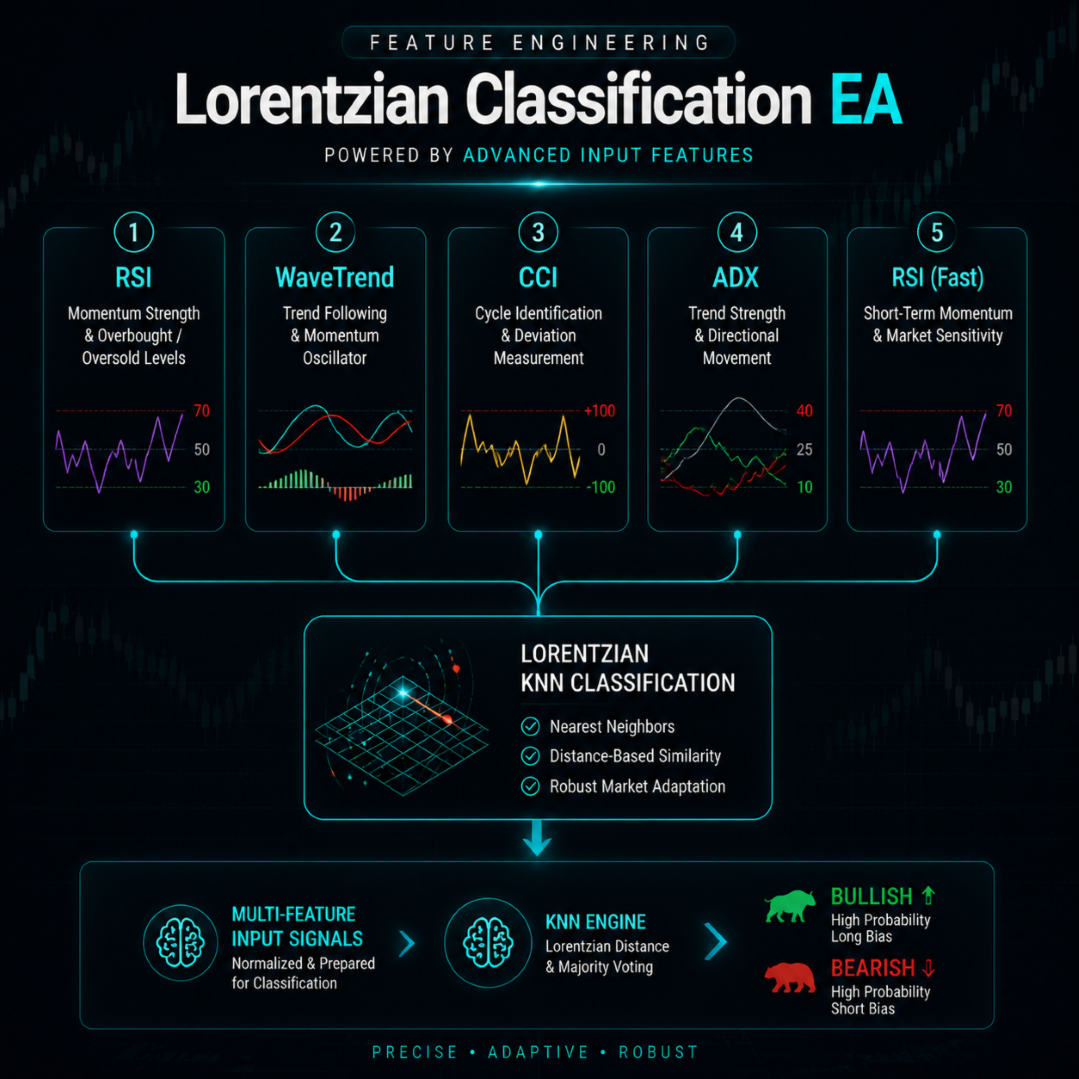
- Configurable feature pipeline using RSI, WaveTrend, CCI, ADX, and additional supported feature settings
- Optional kernel-regression confirmation using Rational Quadratic and Gaussian estimates
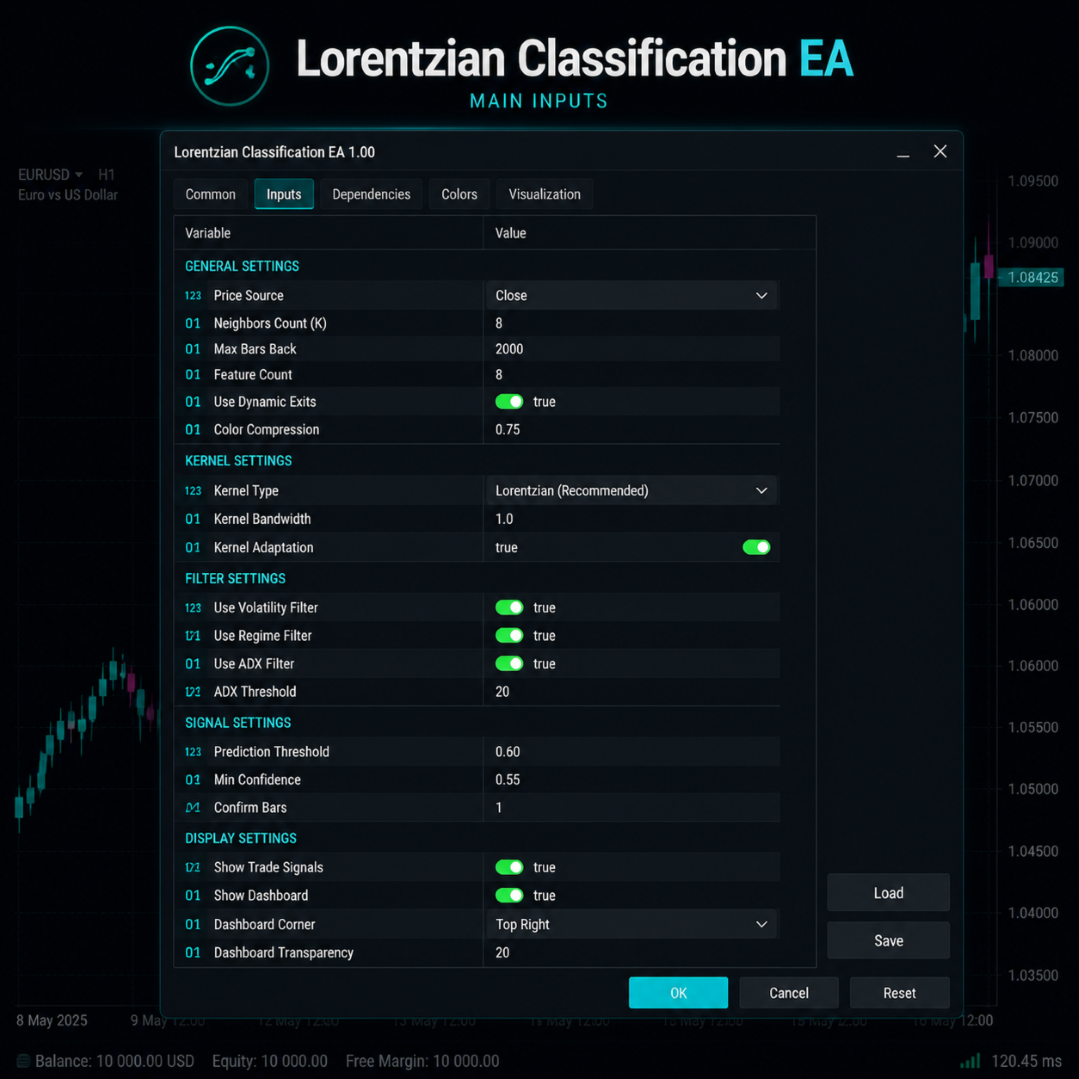
- Configurable volatility, regime, ADX, EMA, SMA, session, spread, and kernel filters
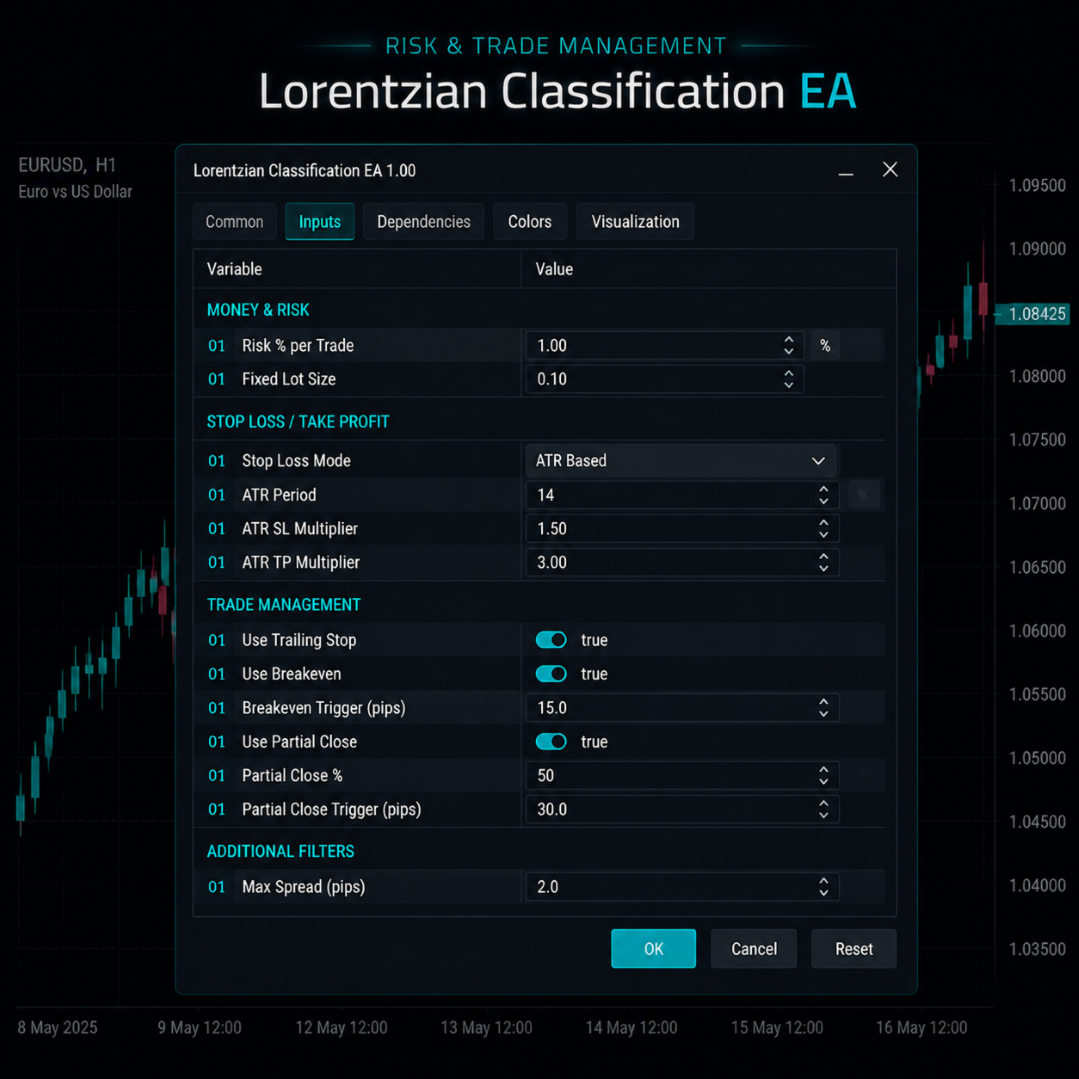
- Fixed-lot and risk-based position-sizing options
- ATR-based or fixed-distance stop-loss and take-profit models
- Optional trailing stop, breakeven, partial-close, and position-limit settings
- Unique magic-number input for separating multiple EA instances
- On-chart dashboard and optional signal markers
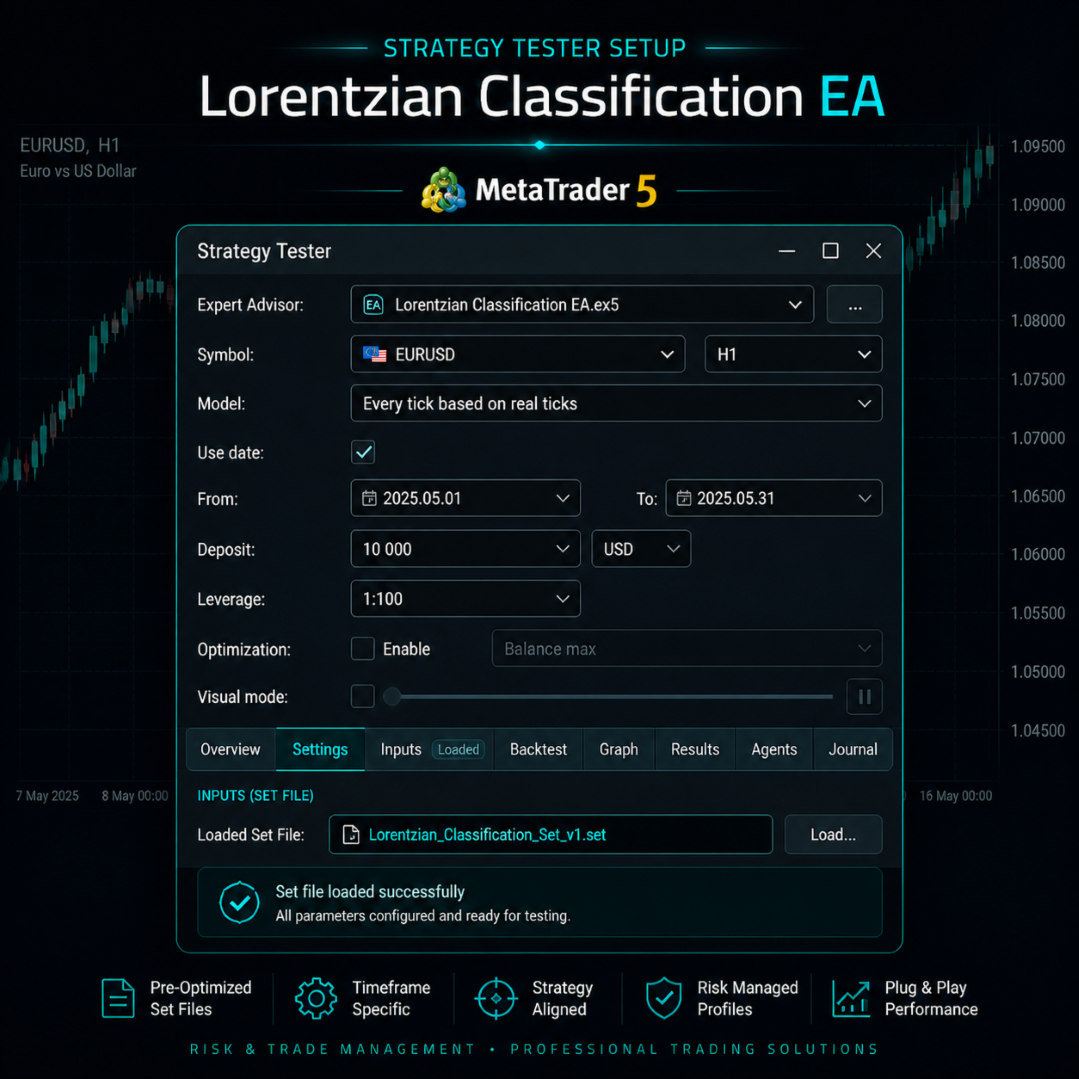
- Seven included set-file profiles as starting configurations
- Designed for MetaTrader 5 Strategy Tester research, parameter testing, and forward validation
Classification Framework
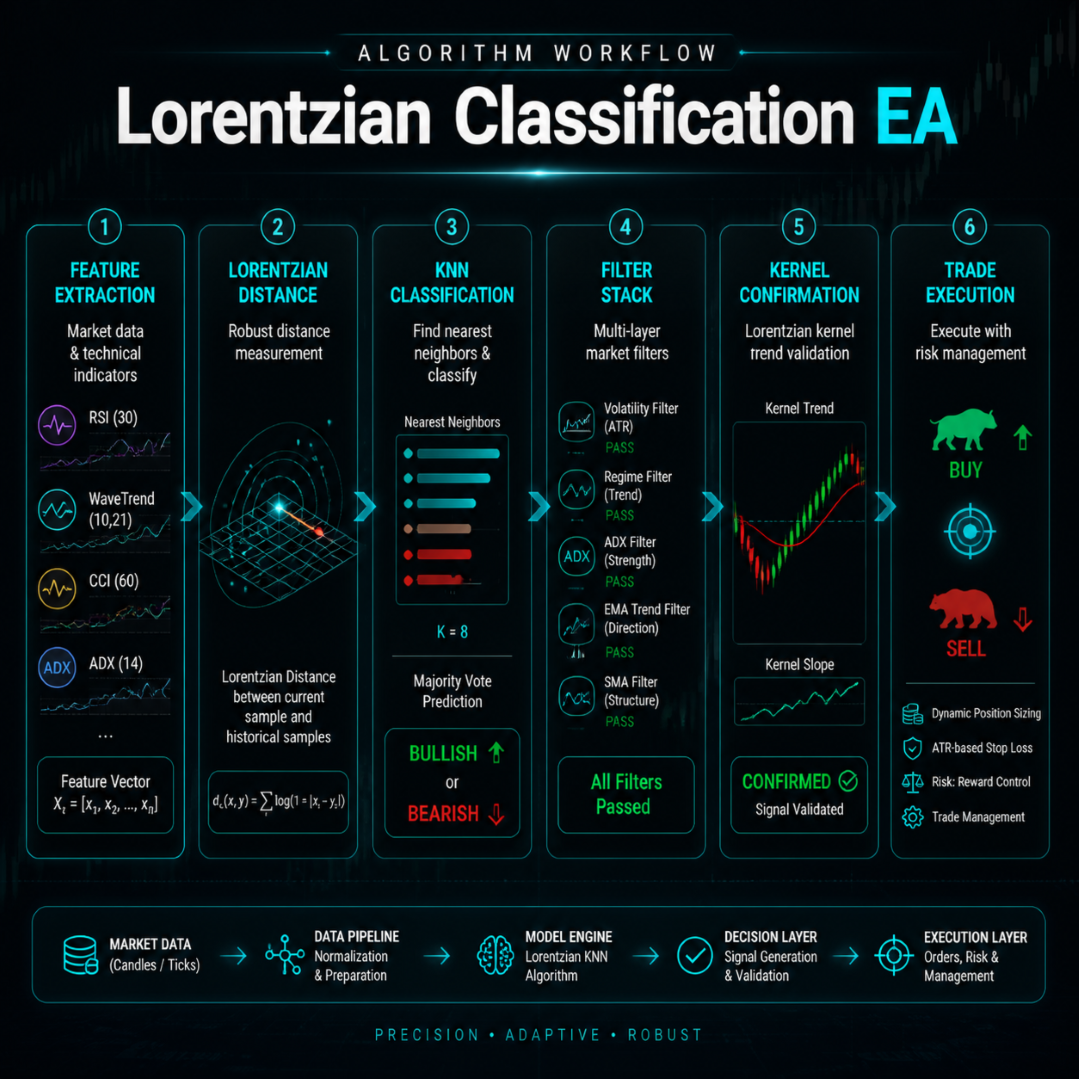
For each eligible closed bar, the EA creates an internal feature representation from the selected technical measurements. Depending on the active configuration, these can include RSI, WaveTrend, CCI, ADX, and a second RSI feature using different parameters. The feature representation is compared with available historical data to identify market states that are mathematically similar under the configured distance calculation.
The KNN process can evaluate a configurable historical sample, up to 2,000 bars where supported by the selected settings and available chart history. It uses Lorentzian-distance calculations to rank historical neighbors and forms an internal directional classification from the selected nearest matches.
Lorentzian distance is used as a mathematical method for comparing feature differences. Compared with a simple Euclidean-distance calculation, it can reduce the relative influence of very large individual feature differences. This is a property of the calculation method, not a guarantee of improved trading results or resistance to all volatility events.
The resulting classification output is an internal analytical value used by the EA's trade-evaluation process. It is not a prediction, investment recommendation, or guarantee of future price direction.
Kernel-Regression Confirmation
The EA can use an optional kernel-regression confirmation layer in addition to the classification output. Rational Quadratic and Gaussian kernel estimates can be used to assess the configured directional context of the market.
When the kernel filter is enabled, the EA can require a classification outcome to align with the configured kernel condition before a new position is considered. For example, the active settings may require bullish alignment for a long evaluation and bearish alignment for a short evaluation.
Kernel-based logic can also be used as one of the available exit-management inputs where enabled. No filter, model, or confirmation method can guarantee that a trade will avoid adverse movement, ranging conditions, losses, or drawdown.
Features and Filters
The classification model supports up to five simultaneous technical features. Feature types and periods are configurable. Changing a feature type or period changes the information used in the similarity calculation and can materially alter the EA's behavior.
After the classification process produces an internal directional condition, the potential entry must satisfy the enabled filter stack. Available filters can include:
- Volatility filter
- Market-regime filter
- ADX filter
- EMA trend filter
- SMA trend filter
- Trading-session filter
- Maximum-spread filter
- Kernel-regression filter
The filters are configurable and may block entries when the active conditions do not meet their requirements. They are intended to apply consistent rules to the entry process; they do not eliminate risk, ensure higher-quality trades, or guarantee performance.
Trade Management
Lorentzian Classification EA includes configurable trade-management functions. Users can choose fixed lot sizing or risk-based sizing and can select ATR-based or fixed-distance stop-loss and take-profit logic, subject to the EA inputs and the broker's symbol requirements.
| Function | Configuration Purpose |
|---|---|
| Position sizing | Allows fixed-lot or configured risk-based volume calculation. |
| Protective stop and target | Allows ATR-based or fixed-distance stop-loss and take-profit settings. |
| Open-position limits | Can restrict the number of positions according to the configured limit. |
| Trailing stop and breakeven | Optional functions for modifying an active position according to the selected rules. |
| Partial close | Optional position-reduction function when the configured criteria are met. |
| Exit logic | May use configured stop loss, take profit, trade-duration, trailing, breakeven, partial-close, or kernel-based conditions where enabled. |
Stop-loss, take-profit, trailing-stop, breakeven, and partial-close functions are subject to terminal operation, broker rules, market liquidity, price changes, and execution conditions. They do not guarantee execution at requested prices.
Included Profiles
The product includes seven set-file profiles intended as structured starting configurations for research and testing. They are not performance recommendations and are not guaranteed to be suitable for any account, broker, symbol, or market condition.
| Profile | Intended Research Starting Point |
|---|---|
| M15 Scalping | Faster intraday evaluation on the M15 timeframe. |
| M30 Intraday | Intraday evaluation on the M30 timeframe. |
| H1 Swing | Intermediate timeframe evaluation on H1. |
| H4 Position | Higher-timeframe position-style evaluation on H4. |
| D1 Long-Term | Longer-term evaluation on the D1 timeframe. |
| H1 XAUUSD Gold Specialist | Starting configuration for research on XAUUSD H1. |
| H4 Conservative / Prop Account | Higher-timeframe starting configuration with more restrictive settings for research purposes. |
Profile names describe intended use cases only. They do not imply suitability, safety, funding-program compliance, a specific risk level, or expected performance. Test every profile with your broker's historical data and perform forward validation before considering live operation.
Entry and Exit Process
A potential buy or sell order is evaluated only when the configured classification condition is present and all enabled filters pass. Depending on the active settings, this may include trend alignment, permitted spread, active session timing, market-regime requirements, and kernel-regression confirmation.
The EA can also be configured to check for new state changes rather than repeatedly acting on an unchanged directional condition. The exact behavior depends on the selected inputs and available market data.
Active positions can be managed through the selected protective-stop, target, duration, trailing, breakeven, partial-close, or kernel-based exit settings. An entry or exit logic configuration does not guarantee that the terminal can transmit an order, that the broker will accept it, or that it will fill at a requested price.
Dashboard and Visual Tools
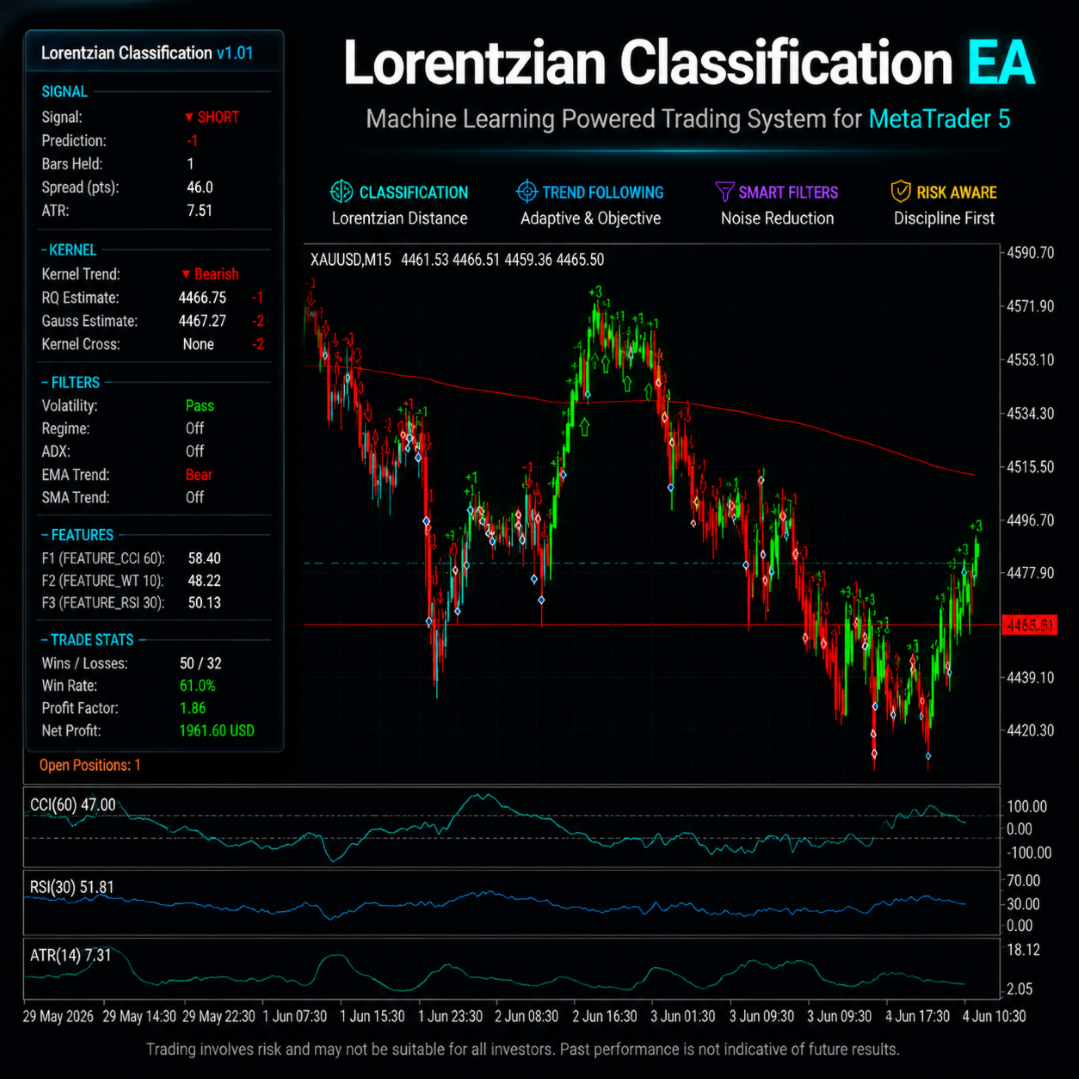
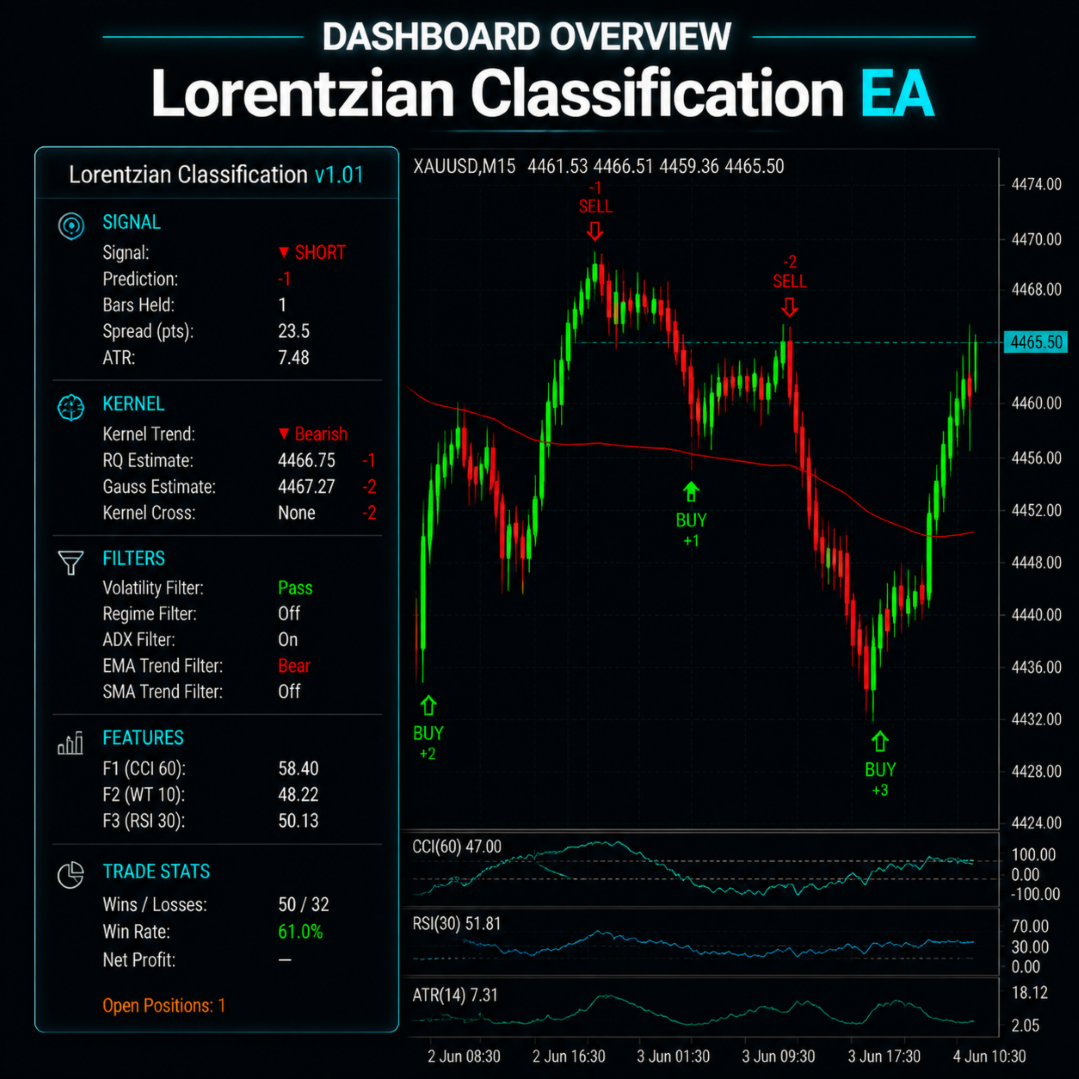
The EA includes an optional on-chart dashboard for operational review. Depending on the active configuration, it can display information such as current internal signal state, classification output, kernel status, filter status, feature values, spread information, position details, and internal statistics tracked since initialization.
Optional chart markers can be used to review historical EA activity visually. Dashboard values and chart displays are informational and do not change the underlying trading logic. The dashboard can be disabled when visual display is not required, including for testing or VPS environments.
Testing and Configuration
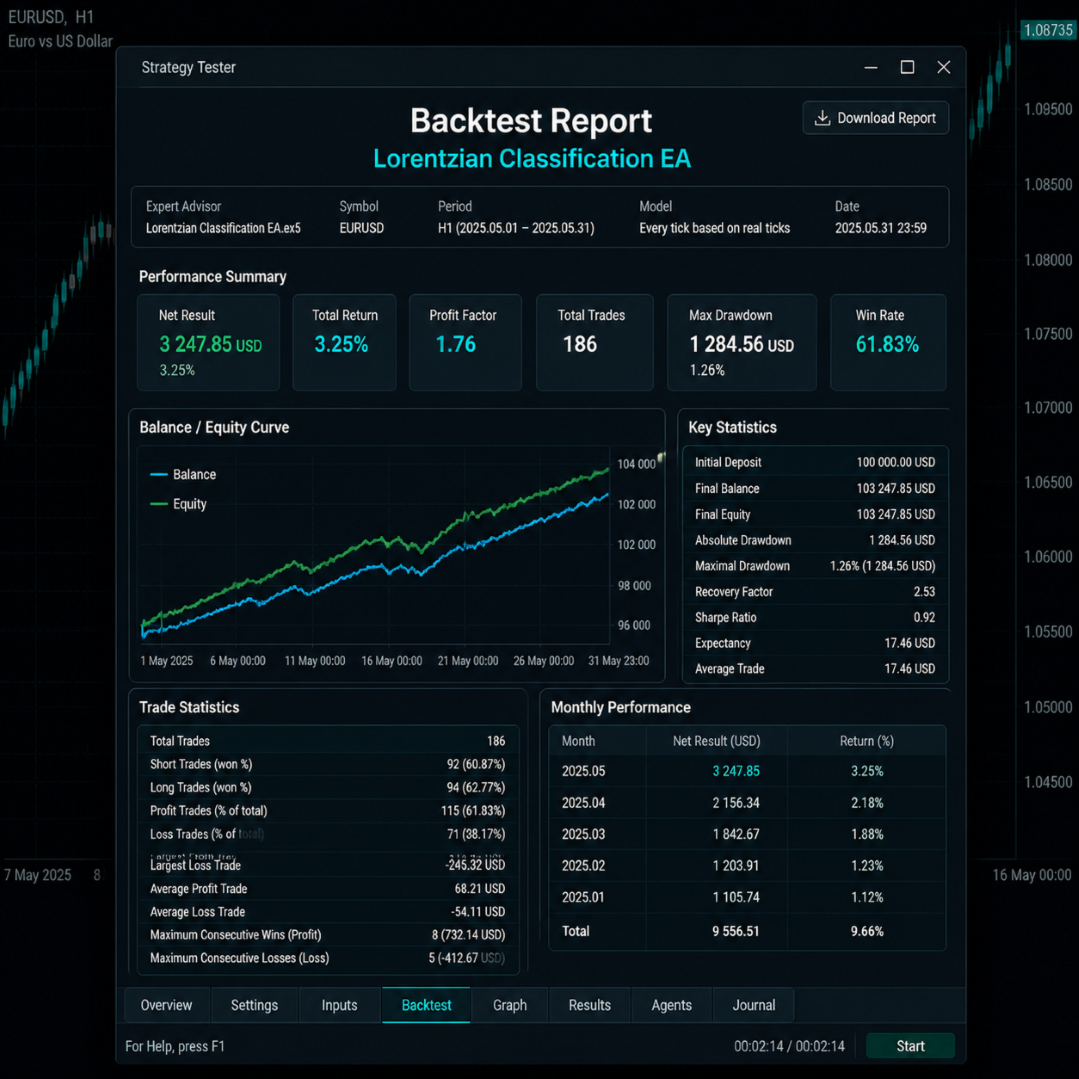
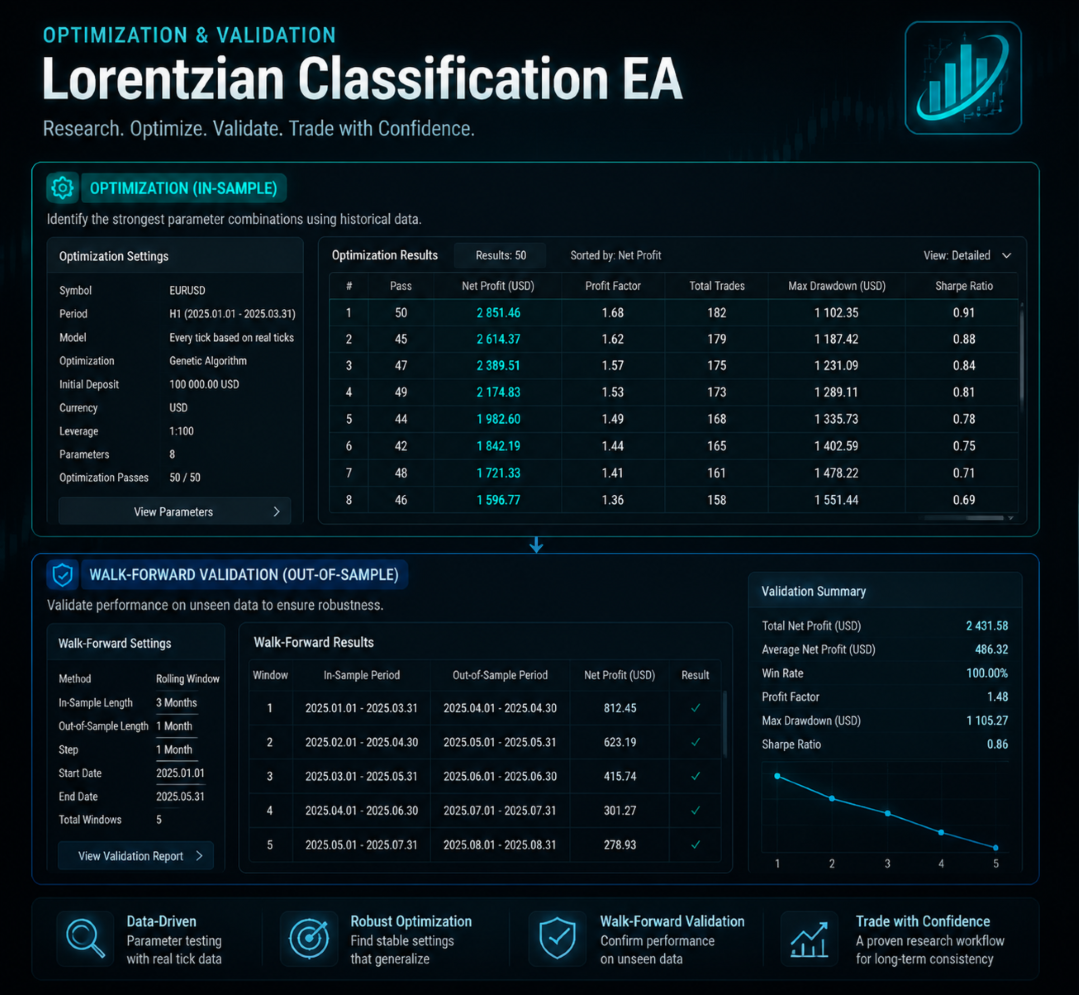
Before live use, test the EA in MetaTrader 5 Strategy Tester using available high-quality broker data. “Every tick based on real ticks” may be used where the required data is available. Tester results are simulations and can differ materially from live results because of changing spreads, commissions, swaps, slippage, liquidity, execution delay, rejected orders, price gaps, broker conditions, and data differences.
When adjusting the configuration, change a limited number of parameters at a time and assess results on separate in-sample and out-of-sample periods. Walk-forward validation can help evaluate whether a configuration remains stable on data not used during selection. Optimization cannot guarantee future performance and can produce settings that are overly fitted to historical data.
Important Operating Notes
- The EA requires adequate historical data before its classification calculations can operate as intended.
- Use a unique magic number when running multiple EA instances on the same account.
- Broker symbol names, suffixes, digits, contract sizes, tick values, minimum volumes, stop levels, leverage, margin requirements, swaps, and trading sessions can differ.
- Lower timeframes and instruments with changing spreads or volatility, including gold, can be especially sensitive to broker execution conditions.
- Historical data, spreads, execution speed, and symbol specifications can cause live behavior to differ from testing results.
- Demo testing and forward validation are recommended before considering live deployment.
- A VPS can help maintain terminal availability but cannot guarantee connectivity, broker service, order execution, or protection during fast markets.
Important Risk Disclosure
Trading foreign exchange, metals, CFDs, cryptocurrencies, and other leveraged products involves substantial risk and may result in the loss of some or all invested capital. Lorentzian Classification EA is an automated trading tool and does not provide investment advice or guarantee profits, accurate classifications, accurate entries, a particular win rate, protection from drawdown, funded-account qualification, or future performance. Machine-learning methods, historical similarity calculations, technical indicators, kernel estimates, filters, and optimization procedures cannot predict future market behavior or eliminate risk. The EA may experience losing trades, losing periods, and drawdowns. Historical testing, optimization results, set-file profiles, demo results, and any past performance information are not reliable indicators of future live results. Market conditions, data quality, spreads, commissions, swaps, slippage, liquidity, price gaps, execution delay, broker specifications, leverage, margin requirements, and account settings can materially affect outcomes. Stop-loss, take-profit, trailing-stop, breakeven, and partial-close functions do not guarantee exact execution prices. Test carefully, use conservative and appropriate risk settings, and trade only with funds you can afford to lose.