

Chaos optimization algorithm (COA): Continued
 2 258
2 258
 2
2

Contents
Introduction
In the previous article, we introduced the chaotic optimization method and analyzed some of the methods included in the algorithm. In this article, we will complete the analysis of the remaining methods and move directly to testing the algorithm on test functions.
In this implementation, the chaotic optimization method uses deterministic chaos to explore the solution space. The key principle is the use of three different chaotic maps (logistic, sinusoidal and tent maps) to generate sequences that have pseudo-randomness and ergodicity properties. The algorithm operates in three phases: an initial chaotic search, a solution refinement using the weighted gradient method, and a final local search with adaptive scope narrowing.
The use of velocity vectors with inertia and stagnation-detection mechanisms helps the algorithm avoid local extremes. Dynamic adaptation of parameters and various types of mutations ensure a balance between global exploration and local exploitation of found solutions. Now let's look at the remaining methods.
Implementation of the algorithm
The ApplyMutation method is used to introduce mutations into the agent. Its main task is to randomly change the parameters of a certain agent.
The method starts by checking the validity of the index of the specified agent. If the index is out of range, the method terminates. Next, information is collected about the size of various arrays associated with the agent, such as the size of its parameters and velocity. This prevents the method from going beyond the bounds of these arrays.
The method calculates the maximum number of coordinates that can be changed based on the sizes of available arrays to ensure the safety of operations. A random number is selected to determine how many coordinates will be mutated. This value ranges from 1 to 30% of the maximum number of available coordinates. An array of indices is formed representing the coordinates that can be changed. This array is shuffled to ensure random selection when applying mutations.
In the loop, coordinates for mutation are selected from the shuffled array. For each selected coordinate, a mutation type is determined based on a random value. Possible types include complete random mutation (where a new value is chosen randomly within a given range), mutation relative to the global best solution, and mutation using chaotic maps.
After changing the value for each coordinate, the agent's velocity is reset so that the new value is not affected by previous velocities. Finally, the new value for the corresponding agent coordinate is set taking into account the ranges and steps, which ensures that the values remain within the acceptable range.
//——————————————————————————————————————————————————————————————————————————————
void C_AO_COA_chaos::ApplyMutation (int agentIdx)
{
  // Determine the number of coordinates for mutation (from 1 to 30% of coordinates)
  int mutationCount = 1 + (int)(u.RNDprobab () * coords * 0.3);
  mutationCount = MathMin (mutationCount, coords);

  // Create an array of indices for mutation without repetitions
  int mutationIndices [];
  ArrayResize (mutationIndices, coords);

  // Fill the array with indices
  for (int i = 0; i < coords; i++)
  {
    mutationIndices [i] = i;
  }

  // Shuffle the indices
  for (int i = coords - 1; i > 0; i--)
  {
    int j = (int)(u.RNDprobab () * (i + 1));
    if (j <= i) // Additional security check
    {
      int temp = mutationIndices [i];
      mutationIndices [i] = mutationIndices [j];
      mutationIndices [j] = temp;
    }
  }

  // Apply mutations to the selected coordinates
  for (int m = 0; m < mutationCount; m++)
  {
    int c = mutationIndices [m];

    // Different types of mutations for variety
    double r = u.RNDprobab ();
    double x;

    if (r < 0.3)
    {
      // Complete random mutation
      x = rangeMin [c] + u.RNDprobab () * (rangeMax [c] - rangeMin [c]);
    }
    else
      if (r < 0.6)
      {
        // Mutation relative to global best
        double offset = (u.RNDprobab () - 0.5) * (rangeMax [c] - rangeMin [c]) * 0.2;
        x = cB [c] + offset;
      }
      else
      {
        // Mutation using chaotic map
        agent [agentIdx].gamma [c] = SelectChaosMap (agent [agentIdx].gamma [c], (epochNow + c) % 3);
        x = rangeMin [c] + agent [agentIdx].gamma [c] * (rangeMax [c] - rangeMin [c]);
      }

    // Reset velocity
    agent [agentIdx].velocity [c] = 0.0;

    // Apply the new value with range check
    a [agentIdx].c [c] = u.SeInDiSp (x, rangeMin [c], rangeMax [c], rangeStep [c]);
  }
}
//——————————————————————————————————————————————————————————————————————————————
The UpdateSigma method in the class is responsible for dynamically adapting the penalty parameter used during the optimization. It regulates the penalty value depending on the number of feasible solutions in the agent population.
If the method is called for the first time (epoch is 1), the current penalty value (currentSigma) is set to half the base value (sigma). The method runs through the entire population of agents and calculates the number of feasible solutions. To do this, an auxiliary function is used to determine whether the agent is valid. Here, iteration is performed over all agents, which allows us to determine how many of them meet the given criteria.
Next, the method calculates the proportion of feasible solutions in the total population by dividing the number of feasible solutions by the total number of agents. This ratio helps in understanding how well our current strategy is working. Based on the calculated ratio of feasible solutions, the method makes decisions about adjusting the penalty: if the proportion of feasible solutions is less than 30%, this indicates that the algorithm is acting too restrictively, so the penalty is increased to alter the search dynamics and promote greater diversity in agent behavior. If the proportion exceeds 70%, this indicates that too many agents find feasible solutions, and the penalty is reduced to avoid premature convergence.
In the end, the method ensures that the value of the current penalty remains within feasible limits. If it becomes too small (less than 10% of the base value), the penalty increases to that level. Similarly, if the penalty exceeds 500% of the base value, it is capped to that level.
//——————————————————————————————————————————————————————————————————————————————
void C_AO_COA_chaos::UpdateSigma ()
{
  // Dynamic adaptation of the penalty parameter
  // Start with a small value and increase it if necessary

  if (epochNow == 1)
  {
    currentSigma = sigma * 0.5;
    return;
  }

  // Calculate the number of feasible solutions
  int feasibleCount = 0;
  for (int i = 0; i < popSize; i++)
  {
    if (IsFeasible (i))
    {
      feasibleCount++;
    }
  }

  double feasibleRatio = (double)feasibleCount / MathMax (1, popSize);

  // Adapt the penalty parameter depending on the proportion of feasible solutions
  if (feasibleRatio < 0.3)
  {
    // Too few feasible solutions - increase the penalty
    currentSigma *= 1.2;
  }
  else
    if (feasibleRatio > 0.7)
    {
      // Too many feasible solutions - reduce the penalty
      currentSigma *= 0.9;
    }

  // Limit the sigma value
  if (currentSigma < sigma * 0.1) currentSigma = sigma * 0.1;
  else
    if (currentSigma > sigma * 5.0) currentSigma = sigma * 5.0;
}
//——————————————————————————————————————————————————————————————————————————————
The IsFeasible method determines whether a particular solution represented by an agent with a given agentIdx index is feasible with respect to the given constraints.
First, the method checks that the given agent index (agentIdx) is within the allowed range, that is, greater than or equal to 0 and less than the population size (popSize). If the index is invalid, the method returns 'false', signaling that the solution is invalid. If the agent index is valid, the method begins checking the constraints for the given solution. It iterates through all the solution's coordinates and calculates the constraint violation value for each coordinate using the CalculateConstraintValue function.
The CalculateConstraintValue function returns a value that reflects the degree of constraint violation for a particular solution coordinate. If after checking all coordinates, no constraint is violated, that is, all violation values are less than or equal to "eps", then the solution is considered feasible, and the method returns "true".
//——————————————————————————————————————————————————————————————————————————————
bool C_AO_COA_chaos::IsFeasible (int agentIdx)
{
  // Check if the solution is within the feasible region
  for (int c = 0; c < coords; c++)
  {
    double violation = CalculateConstraintValue (agentIdx, c);
    if (violation > eps)
    {
      return false;
    }
  }
  return true;
}
//——————————————————————————————————————————————————————————————————————————————
The UpdateBestHistory method stores the current best value in the search history. It takes the new best value and first checks if it is correct or valid. If the value is correct, it is stored in the array storing the history of the best results, at the current indexed position. After this, the index is updated for the next save with a cyclic update using the remainder operation of dividing by the size of the history array, which ensures that the history is always filled with the last 10 values without going beyond the array boundaries.
The method allows tracking search progress and using the history of the best solutions for analysis.
//——————————————————————————————————————————————————————————————————————————————
void C_AO_COA_chaos::UpdateBestHistory (double newBest)
{
  // Protection against invalid values
  if (!MathIsValidNumber (newBest)) return;

  // Update the history of the best values
  globalBestHistory [historyIndex] = newBest;
  historyIndex = (historyIndex + 1) % 10;
}
//——————————————————————————————————————————————————————————————————————————————
The IsConverged method is used to determine whether the algorithm has reached convergence. It analyzes the history of the best global solutions to assess how significantly the solutions improve over time. If the improvements become insignificant, the algorithm is considered to have converged.
The method initializes variables to count the number of allowed (valid) values, the sum of values, the minimum and maximum values from the history of the best global solutions (globalBestHistory). The minVal and maxVal variables are initialized to the maximum and minimum possible double values respectively to correctly determine the minimum and maximum in the future.
The method iterates over the globalBestHistory array and for each value in the history it performs validity, data sufficiency, and diversity checks, calculates the mean and relative difference, and checks for convergence. In general, the IsConverged method provides a way to determine the convergence of an optimization algorithm by analyzing the history of best solutions and assessing how significant the improvements are over time.
//——————————————————————————————————————————————————————————————————————————————
bool C_AO_COA_chaos::IsConverged ()
{
  // Check if there is enough data in the history
  int validValues = 0;
  double sum      = 0.0;
  double minVal   = DBL_MAX;
  double maxVal   = -DBL_MAX;

  // Find min, max, and sum of values in history
  for (int i = 0; i < 10; i++)
  {
    if (globalBestHistory [i] == -DBL_MAX || !MathIsValidNumber (globalBestHistory [i])) continue;

    minVal = MathMin (minVal, globalBestHistory [i]);
    maxVal = MathMax (maxVal, globalBestHistory [i]);
    sum += globalBestHistory [i];
    validValues++;
  }

  // If there is not enough data or all values are the same
  if (validValues < 5 || minVal == maxVal) return false;

  // Calculate the average value
  double average = sum / validValues;

  // Check the case when the mean is close to zero
  if (MathAbs (average) < eps) return MathAbs (maxVal - minVal) < eps * 10.0;

  // Relative difference for convergence testing
  double relDiff = MathAbs (maxVal - minVal) / MathAbs (average);

  return relDiff < 0.001; // Convergence threshold - 0.1%
}
//——————————————————————————————————————————————————————————————————————————————
The ResetStagnatingAgents method is designed to manage agents during the optimization, especially to handle cases where agents stop showing improvement in their results. It monitors the state of stagnation of agents and, if necessary, applies mutation to those of them that are stuck in local extremes.
For each agent, it is checked whether its current fitness function value (a[i].f) has improved compared to its previous value (a[i].fB). If the current value has not improved, or has become worse, the agent's stagnationCounter is incremented, signaling that the agent is in a state of stagnation. If the value has improved, the stagnation counter is reset.
If the agent is stagnant for more than 5 iterations, the method calculates the reset probability (resetProb). This probability is proportional to the current value of the stagnation counter, meaning that the longer the agent stagnates, the higher the probability of it being reset. The equation for calculating the probability takes into account a fixed value (0.2) and the relative value of the stagnation counter. If the randomly generated value is less than the calculated resetProb probability, a mutation is applied to the agent using the ApplyMutation function. After applying a mutation, the agent's stagnation counter is reset and the resetCount counter is increased.
the method finishes after processing all agents that have exceeded the stagnation threshold and met the mutation condition.
//——————————————————————————————————————————————————————————————————————————————
void C_AO_COA_chaos::ResetStagnatingAgents ()
{
  int resetCount = 0;

  for (int i = 0; i < popSize; i++)
  {
    // Increase the stagnation counter if there is no improvement
    if (a [i].f <= a [i].fB)
    {
      agent [i].stagnationCounter++;
    }
    else
    {
      agent [i].stagnationCounter = 0;
    }

    // Reset the agent if it has been stagnating for too long
    if (agent [i].stagnationCounter > 5)
    {
      // Reset only some of the agents with a probability depending on stagnation
      double resetProb = 0.2 * (1.0 + (double)agent [i].stagnationCounter / 10.0);

      if (u.RNDprobab () < resetProb)
      {
        ApplyMutation (i);
        agent [i].stagnationCounter = 0;
        resetCount++;
      }
    }
  }
}
//——————————————————————————————————————————————————————————————————————————————
The CalculateWeightedGradient method is used to estimate the gradient of a constraint for a specific agent and coordinate, taking into account the degree to which those constraints are violated. It helps determine in which direction and to what degree the solution should be adjusted to eliminate the violation, weighting the gradient by the level of the violation.
First, the agent's indices and coordinates are checked to ensure they are within acceptable limits. If the indices are invalid, a null value is returned, meaning there is no direction for adjustment. The method then loops through all coordinates associated with the current agent and calculates the violation value for each. During this process, it looks for the maximum violation among them. If the violation for a given coordinate is greater than the "eps" threshold, it is considered worthwhile to take corrective action; otherwise, zero is returned — movement in this direction is meaningless or not required.
If the violation is significant, the constraint gradient is calculated for the coordinate — a measure of the direction and strength of the change in the constraint relative to changes in that coordinate. The gradient is multiplied by a weight, which is defined as the ratio of the violation of the current coordinate to the maximum violation among all constraints. This ensures that a larger violation has a stronger influence on the direction of the adjustment. The resulting value is a weighted constraint gradient that indicates how much and in what direction the solution needs to be adjusted to eliminate the violation in a given coordinate, proportional to its degree.
//——————————————————————————————————————————————————————————————————————————————
double C_AO_COA_chaos::CalculateWeightedGradient (int agentIdx, int coordIdx)
{
  // Calculate the maximum value of the constraint violation
  double maxViolation = eps;

  for (int c = 0; c < coords; c++)
  {
    double violation = CalculateConstraintValue (agentIdx, c);
    maxViolation = MathMax (maxViolation, violation);
  }

  // Violation for the current coordinate
  double violation = CalculateConstraintValue (agentIdx, coordIdx);

  // If there is no significant violation, return 0
  if (violation <= eps) return 0.0;

  // Calculate the gradient
  double gradient = CalculateConstraintGradient (agentIdx, coordIdx);

  // Normalize the impact depending on the degree of violation
  double weight = violation / maxViolation;

  return gradient * weight;
}
//——————————————————————————————————————————————————————————————————————————————
The CalculateConstraintValue method is used to estimate the degree of constraint violation for a given coordinate of a given agent. It determines how far the current coordinate value is outside the acceptable limits (boundaries) and returns a numerical value reflecting the magnitude of this violation.
First, the method checks the agent indices (agentIdx) and coordinates (coordIdx) for validity. The method gets the current value of the "x" coordinate from the agent's state and also determines the minimum (min) and maximum (max) acceptable bounds for this coordinate, respectively. Next, the method checks whether the "x" value is within the acceptable range (min and max). Finally, the method returns a "violation" value, which is the total amount of constraint violation for the given coordinate of the given agent.
Key features include:
- The method returns a positive value if the constraint is violated and 0 if it is met.
- The magnitude of the violation is proportional to the extent to which the coordinate value goes beyond the acceptable limits.
Ultimately, the CalculateConstraintValue method provides important information about how well each agent in the population satisfies the problem constraints. It measures the magnitude of the violation, which helps the algorithm understand how much the agent's position needs to be adjusted.
//——————————————————————————————————————————————————————————————————————————————
double C_AO_COA_chaos::CalculateConstraintValue (int agentIdx, int coordIdx)
{
  double x = a [agentIdx].c [coordIdx];
  double min = rangeMin [coordIdx];
  double max = rangeMax [coordIdx];

  // Smoothed constraint violation function with a smooth transition at the boundary
  double violation = 0.0;

  // Check the lower bound
  if (x < min)
  {
    violation += min - x;
  }
  // Check the upper bound
  else
    if (x > max)
    {
      violation += x - max;
    }

  return violation;
}
//——————————————————————————————————————————————————————————————————————————————
The CalculateConstraintGradient method calculates the constraint gradient for a given coordinate of a specific agent. This method determines in which direction and to what extent the coordinate value should be changed due to constraint violation.
The method first checks the input agent indices (agentIdx) and coordinates (coordIdx) to ensure they are correct. If at least one of the indices is outside the valid range, the method returns 0.0, which indicates that the gradient cannot be calculated. The method retrieves the current value of the agent's coordinate, as well as the minimum and maximum boundaries set for this coordinate. These values are required for further evaluations. Next, the method checks whether the current value of the "x" coordinate is outside the established boundaries.
The final value returned by the method reflects the direction and necessity of changing the current value of the agent's coordinate, taking into account the specified constraints.
//——————————————————————————————————————————————————————————————————————————————
double C_AO_COA_chaos::CalculateConstraintGradient (int agentIdx, int coordIdx)
{
  double x = a [agentIdx].c [coordIdx];
  double min = rangeMin [coordIdx];
  double max = rangeMax [coordIdx];

  // Smoothed gradient for better stability
  if (x < min) return -1.0; // Need to increase the value
  else
    if (x > max) return 1.0;  // Need to decrease the value

  return 0.0;
}
//——————————————————————————————————————————————————————————————————————————————
The CalculatePenaltyFunction method calculates the values of the objective function taking into account the penalty for violating constraints for a specific agent. It combines a base value of the objective function with a penalty based on the magnitude of constraint violations.
The method starts by checking the validity of the agent index (agentIdx), and if the index is valid, the method gets the base (non-penalized) value of the objective function of this agent (a[agentIdx].f) and stores it in the baseValue variable. The method then loops through all coordinates (coords) of each agent. For each coordinate, the magnitude of the constraint violation is calculated. If the magnitude of the violation exceeds a given small value "eps", then the square of the magnitude of the violation is added to the penaltySum sum of penalties.
A quadratic penalty is used to provide a more "soft" assessment for minor violations and a more "hard" assessment for major ones. After all the penalties for constraint violations are added up, the total 'penalty' is calculated.
Finally, the method calculates the "penalized" value of the objective function by subtracting the 'penalty' from the base value of the baseValue objective function. The penalized value of the objective function is returned.
//——————————————————————————————————————————————————————————————————————————————
double C_AO_COA_chaos::CalculatePenaltyFunction (int agentIdx)
{
  // Base value of the objective function
  double baseValue = a [agentIdx].f;

  // Penalty term
  double penaltySum = 0.0;

  for (int c = 0; c < coords; c++)
  {
    double violation = CalculateConstraintValue (agentIdx, c);

    // Quadratic penalty for better resolution of solutions close to the boundary
    if (violation > eps)
    {
      penaltySum += violation * violation;
    }
  }

  // Apply a dynamic penalty ratio
  double penalty = currentSigma * penaltySum;

  // For the maximization problem: f_penalty = f - penalty
  return baseValue - penalty;
}
//——————————————————————————————————————————————————————————————————————————————
The Moving method is the main control procedure for moving the solution through the optimization. It performs sequential steps aimed at updating the current state of the system, adapting parameters and managing the search phases.
First, the current epoch counter is incremented. On the first call, the method initializes the population and returns. Next, the penalty parameter (sigma) is dynamically updated, which helps regulate the influence of penalty functions during the search process. An important task is to periodically check and reset agents that are stuck or not showing progress, which helps prevent stagnation in local traps.
The current phase of the search is then determined by the value of the epoch counter - at the initial stages, a global search is performed, and then it moves on to a narrower, local search. Depending on the phase, the corresponding search strategies are called, which control the movement of the agents.
//——————————————————————————————————————————————————————————————————————————————
void C_AO_COA_chaos::Moving ()
{
  epochNow++;

  if (!revision)
  {
    InitialPopulation ();

    revision = true;
    return;
  }

  // Dynamically update the penalty parameter
  UpdateSigma ();

  // Reset stagnating agents
  if (epochNow % 5 == 0)
  {
    ResetStagnatingAgents ();
  }

  // Determine the search phase
  if (epochNow <= S1)
  {
    FirstCarrierWaveSearch ();
  }
  else
    if (epochNow <= S1 + S2)
    {
      SecondCarrierWaveSearch ();
    }
}
//——————————————————————————————————————————————————————————————————————————————
The Revision method is responsible for improving solutions and adapting search parameters during the iterative optimization. It re-evaluates the current state of the population, updates the best solutions, and adjusts the search parameters based on the performance of the latest steps.
The method iterates through all solutions in the population, calculating their new "penalty" value using the penalty function, which allows for constraint violations to be taken into account. The resulting value is then validated, and if it is valid, it is stored as the current value of the function. For each agent whose new function value is better than the previous one, its personal data is updated: the new value is saved, and the current coordinates are also copied. This stores each agent's personal best solution. If an agent is found to have a solution better than the current global solution, the global best solution is updated and the corresponding coordinates are remembered. The history of best solutions is also updated.
After the first level of iterations (epochNow > 1), the success of the search is assessed – the proportion of improvements among all agents is determined. Based on this assessment, the parameters are adapted, especially "alpha" (the search scope for each coordinate). Depending on the current search phase (global or local), the rules for adjusting "alpha" may differ: in the global search phase, with a low level of improvement, the search scope increases to expand the possibilities; in the local search phase, with insufficient improvement, the search scope also increases. In case of a significant success, the search scope decreases, which helps localize the optimal solution. The "alpha" parameter is limited by maximum and minimum values, based on the range of acceptable values for the coordinate.
This approach allows for a dynamic balance between exploring new solutions and localizing optimal ones, using information about the performance of past iterations.
//——————————————————————————————————————————————————————————————————————————————
void C_AO_COA_chaos::Revision ()
{
  int    improvementCount = 0;
  double bestImprovement  = 0.0;

  // Evaluate all solutions
  for (int i = 0; i < popSize; i++)
  {
    double newValue = CalculatePenaltyFunction (i);

    // Check the validity of the new value
    if (!MathIsValidNumber (newValue)) continue;

    // Save the current value for the next iteration
    a [i].f = newValue;

    // Update the personal best solution (before a global one for efficiency)
    if (newValue > a [i].fB)
    {
      a [i].fB = newValue;
      ArrayCopy (a [i].cB, a [i].c, 0, 0, WHOLE_ARRAY);
      improvementCount++;
    }

    // Update the global best solution
    if (newValue > fB)
    {
      double improvement = newValue - fB;
      fB = newValue;
      ArrayCopy (cB, a [i].c, 0, 0, WHOLE_ARRAY);

      // Update the history of the best values
      UpdateBestHistory (fB);

      bestImprovement = MathMax (bestImprovement, improvement);
      improvementCount++;
    }
  }

  // Adapt search parameters depending on the phase and success
  if (epochNow > 1)
  {
    // Search success rate (prevention of zero divide)
    double successRate = (double)improvementCount / MathMax (1, 2 * popSize);

    // Adaptation of the alpha parameter
    for (int c = 0; c < coords; c++)
    {
      double oldAlpha = alpha [c];

      if (epochNow <= S1)
      {
        // In the global search phase
        if (successRate < 0.1)
        {
          // Very few improvements - increasing the search scope
          alpha [c] *= t3;
        }
        else
          if (successRate < 0.3)
          {
            // Few improvements - slightly expanding the scope
            alpha [c] *= 1.2;
          }
          else
            if (successRate > 0.7)
            {
              // Many improvements - narrowing the scope
              alpha [c] *= 0.9;
            }
      }
      else
      {
        // In the local search phase
        if (successRate < 0.05)
        {
          // Very few improvements - increasing the search scope
          alpha [c] *= t3;
        }
        else
          if (successRate > 0.2)
          {
            // Enough improvements - narrowing the scope
            alpha [c] *= 0.8;
          }
      }

      // Limits on alpha range with safe bounds verification
      if (c < ArraySize (rangeMax) && c < ArraySize (rangeMin))
      {
        double maxAlpha = 0.2 * (rangeMax [c] - rangeMin [c]);
        double minAlpha = 0.0001 * (rangeMax [c] - rangeMin [c]);

        if (alpha [c] > maxAlpha)
        {
          alpha [c] = maxAlpha;
        }
        else
          if (alpha [c] < minAlpha)
          {
            alpha [c] = minAlpha;
          }
      }
    }
  }
}
//——————————————————————————————————————————————————————————————————————————————
Now that we have examined all the methods, we can move on directly to testing the algorithm.
Test results
The results speak for themselves: the external parameters were slightly optimized, while the internal ones remained unchanged and are presented as described earlier in the methods.COA(CHAOS)|Chaos Optimization Algorithm|50.0|10.0|40.0|2.0|1.2|0.0001|
=============================
5 Hilly's; Func runs: 10000; result: 0.6083668756744218
25 Hilly's; Func runs: 10000; result: 0.4079413401686229
500 Hilly's; Func runs: 10000; result: 0.2678056430575926
=============================
5 Forest's; Func runs: 10000; result: 0.668343763134901
25 Forest's; Func runs: 10000; result: 0.38894787694645416
500 Forest's; Func runs: 10000; result: 0.2198998763835145
=============================
5 Megacity's; Func runs: 10000; result: 0.32307692307692304
25 Megacity's; Func runs: 10000; result: 0.1987692307692308
500 Megacity's; Func runs: 10000; result: 0.10598461538461638
=============================
All score: 3.18914 (35.43%)
I would like to draw attention to the visualization of the algorithm operation: the combination of the variety of search methods used produces an unusual visual effect.
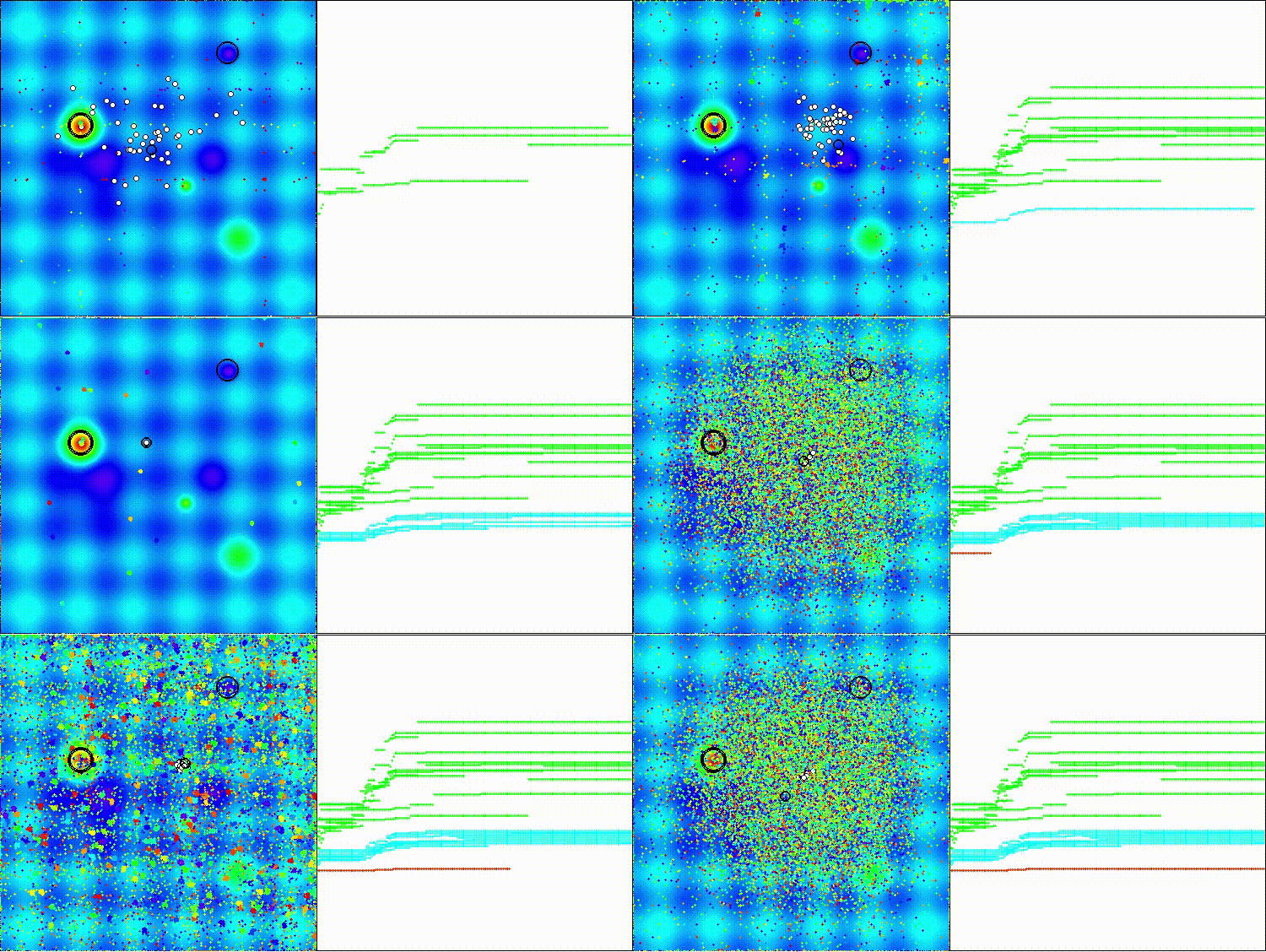
COA(CHAOS) on the Hilly test function
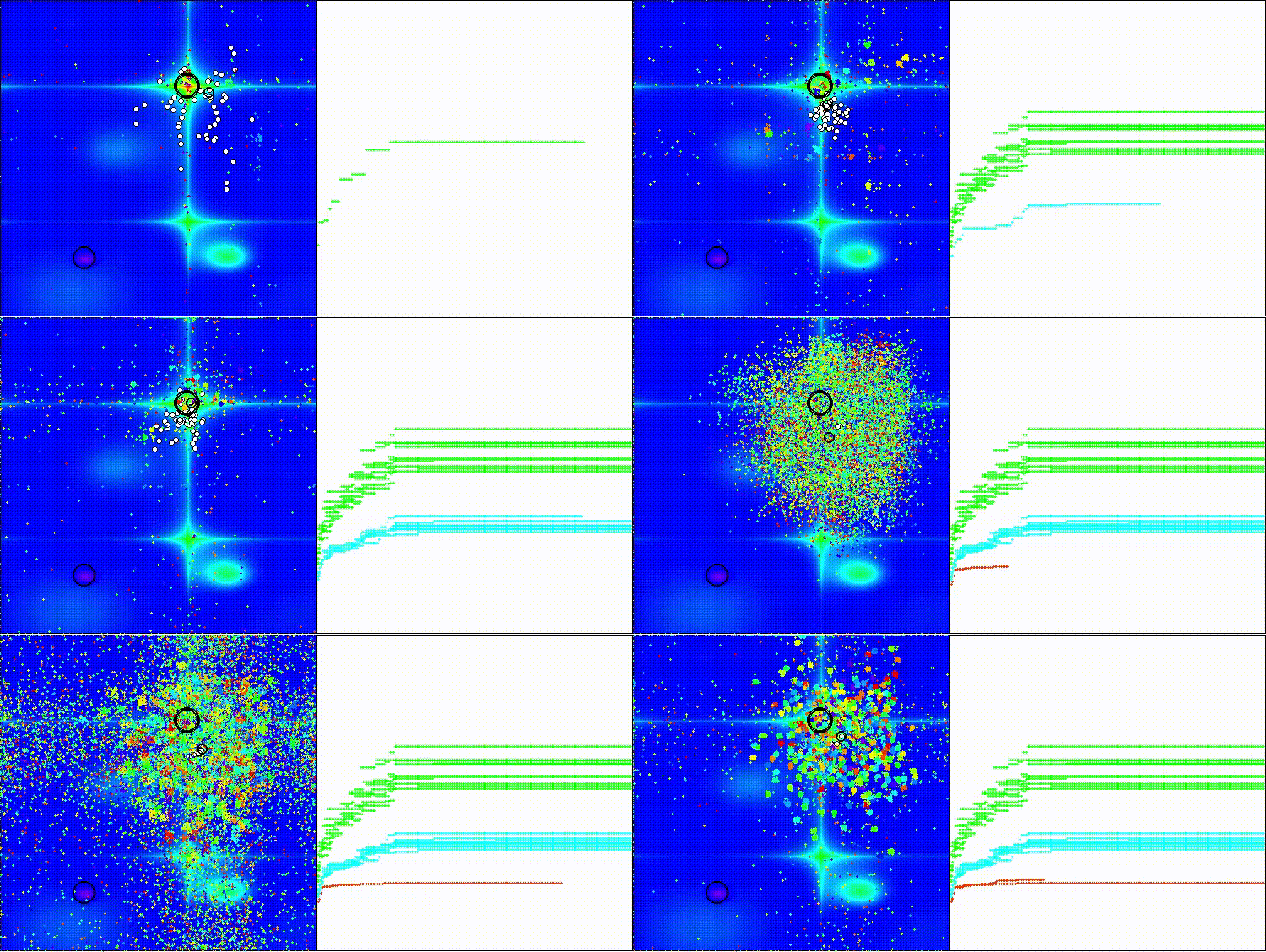
COA(CHAOS) on the Forest test function
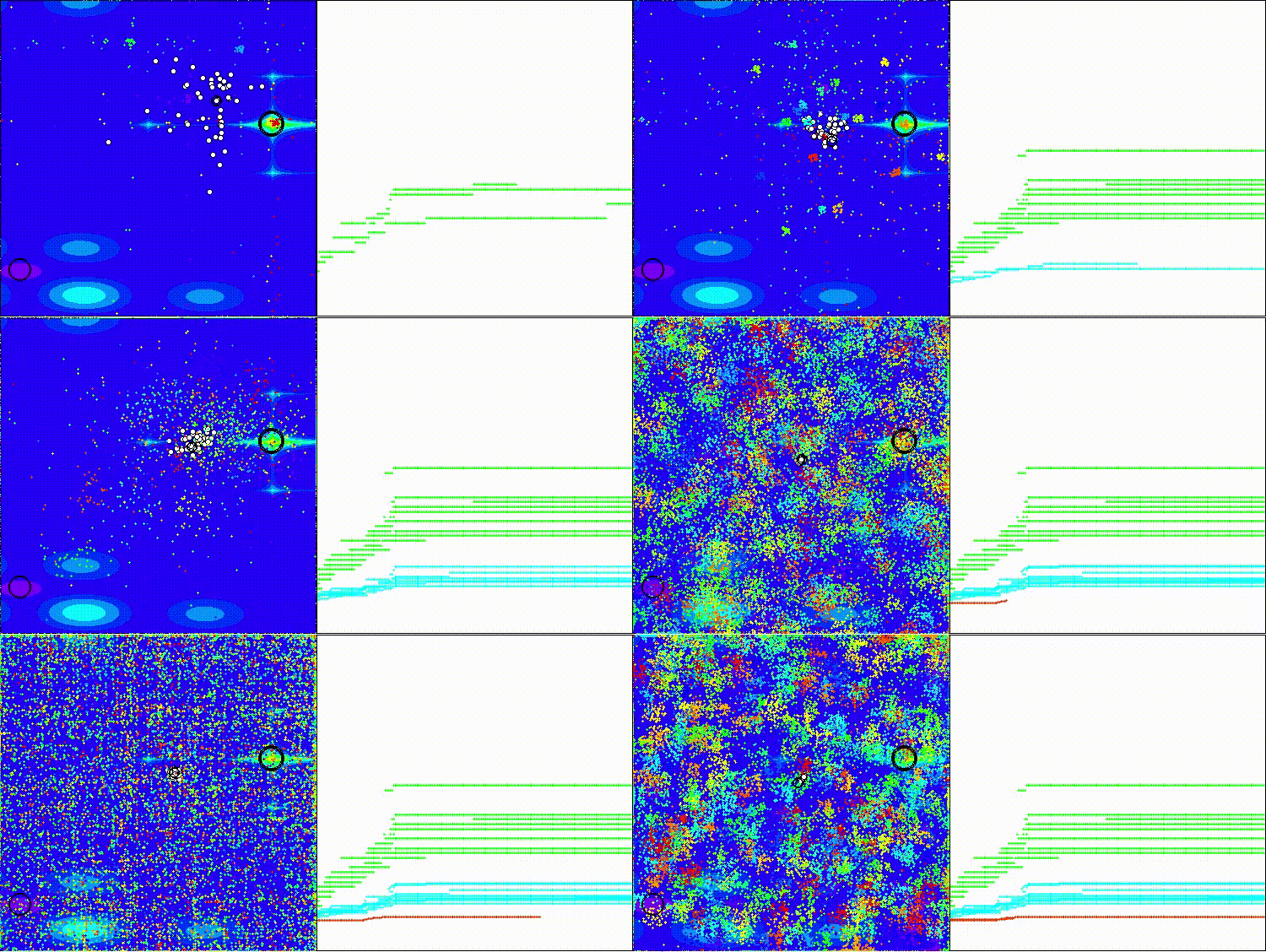
COA(CHAOS) on the Megacity test function
Based on the test results, the COA(CHAOS) algorithm is presented in our rating table.
| # | AO | Description | Hilly | Hilly Final | Forest | Forest Final | Megacity (discrete) | Megacity Final | Final Result | % of MAX | ||||||
| 10 p (5 F) | 50 p (25 F) | 1000 p (500 F) | 10 p (5 F) | 50 p (25 F) | 1000 p (500 F) | 10 p (5 F) | 50 p (25 F) | 1000 p (500 F) | ||||||||
| 1 | ANS | across neighbourhood search | 0.94948 | 0.84776 | 0.43857 | 2.23581 | 1.00000 | 0.92334 | 0.39988 | 2.32323 | 0.70923 | 0.63477 | 0.23091 | 1.57491 | 6.134 | 68.15 |
| 2 | CLA | code lock algorithm (joo) | 0.95345 | 0.87107 | 0.37590 | 2.20042 | 0.98942 | 0.91709 | 0.31642 | 2.22294 | 0.79692 | 0.69385 | 0.19303 | 1.68380 | 6.107 | 67.86 |
| 3 | AMOm | animal migration ptimization M | 0.90358 | 0.84317 | 0.46284 | 2.20959 | 0.99001 | 0.92436 | 0.46598 | 2.38034 | 0.56769 | 0.59132 | 0.23773 | 1.39675 | 5.987 | 66.52 |
| 4 | (P+O)ES | (P+O) evolution strategies | 0.92256 | 0.88101 | 0.40021 | 2.20379 | 0.97750 | 0.87490 | 0.31945 | 2.17185 | 0.67385 | 0.62985 | 0.18634 | 1.49003 | 5.866 | 65.17 |
| 5 | CTA | comet tail algorithm (joo) | 0.95346 | 0.86319 | 0.27770 | 2.09435 | 0.99794 | 0.85740 | 0.33949 | 2.19484 | 0.88769 | 0.56431 | 0.10512 | 1.55712 | 5.846 | 64.96 |
| 6 | TETA | time evolution travel algorithm (joo) | 0.91362 | 0.82349 | 0.31990 | 2.05701 | 0.97096 | 0.89532 | 0.29324 | 2.15952 | 0.73462 | 0.68569 | 0.16021 | 1.58052 | 5.797 | 64.41 |
| 7 | SDSm | stochastic diffusion search M | 0.93066 | 0.85445 | 0.39476 | 2.17988 | 0.99983 | 0.89244 | 0.19619 | 2.08846 | 0.72333 | 0.61100 | 0.10670 | 1.44103 | 5.709 | 63.44 |
| 8 | BOAm | billiards optimization algorithm M | 0.95757 | 0.82599 | 0.25235 | 2.03590 | 1.00000 | 0.90036 | 0.30502 | 2.20538 | 0.73538 | 0.52523 | 0.09563 | 1.35625 | 5.598 | 62.19 |
| 9 | AAm | archery algorithm M | 0.91744 | 0.70876 | 0.42160 | 2.04780 | 0.92527 | 0.75802 | 0.35328 | 2.03657 | 0.67385 | 0.55200 | 0.23738 | 1.46323 | 5.548 | 61.64 |
| 10 | ESG | evolution of social groups (joo) | 0.99906 | 0.79654 | 0.35056 | 2.14616 | 1.00000 | 0.82863 | 0.13102 | 1.95965 | 0.82333 | 0.55300 | 0.04725 | 1.42358 | 5.529 | 61.44 |
| 11 | SIA | simulated isotropic annealing (joo) | 0.95784 | 0.84264 | 0.41465 | 2.21513 | 0.98239 | 0.79586 | 0.20507 | 1.98332 | 0.68667 | 0.49300 | 0.09053 | 1.27020 | 5.469 | 60.76 |
| 12 | ACS | artificial cooperative search | 0.75547 | 0.74744 | 0.30407 | 1.80698 | 1.00000 | 0.88861 | 0.22413 | 2.11274 | 0.69077 | 0.48185 | 0.13322 | 1.30583 | 5.226 | 58.06 |
| 13 | DA | dialectical algorithm | 0.86183 | 0.70033 | 0.33724 | 1.89940 | 0.98163 | 0.72772 | 0.28718 | 1.99653 | 0.70308 | 0.45292 | 0.16367 | 1.31967 | 5.216 | 57.95 |
| 14 | BHAm | black hole algorithm M | 0.75236 | 0.76675 | 0.34583 | 1.86493 | 0.93593 | 0.80152 | 0.27177 | 2.00923 | 0.65077 | 0.51646 | 0.15472 | 1.32195 | 5.196 | 57.73 |
| 15 | ASO | anarchy society optimization | 0.84872 | 0.74646 | 0.31465 | 1.90983 | 0.96148 | 0.79150 | 0.23803 | 1.99101 | 0.57077 | 0.54062 | 0.16614 | 1.27752 | 5.178 | 57.54 |
| 16 | RFO | royal flush optimization (joo) | 0.83361 | 0.73742 | 0.34629 | 1.91733 | 0.89424 | 0.73824 | 0.24098 | 1.87346 | 0.63154 | 0.50292 | 0.16421 | 1.29867 | 5.089 | 56.55 |
| 17 | AOSm | atomic orbital search M | 0.80232 | 0.70449 | 0.31021 | 1.81702 | 0.85660 | 0.69451 | 0.21996 | 1.77107 | 0.74615 | 0.52862 | 0.14358 | 1.41835 | 5.006 | 55.63 |
| 18 | TSEA | turtle shell evolution algorithm (joo) | 0.96798 | 0.64480 | 0.29672 | 1.90949 | 0.99449 | 0.61981 | 0.22708 | 1.84139 | 0.69077 | 0.42646 | 0.13598 | 1.25322 | 5.004 | 55.60 |
| 19 | DE | differential evolution | 0.95044 | 0.61674 | 0.30308 | 1.87026 | 0.95317 | 0.78896 | 0.16652 | 1.90865 | 0.78667 | 0.36033 | 0.02953 | 1.17653 | 4.955 | 55.06 |
| 20 | SRA | successful restaurateur algorithm (joo) | 0.96883 | 0.63455 | 0.29217 | 1.89555 | 0.94637 | 0.55506 | 0.19124 | 1.69267 | 0.74923 | 0.44031 | 0.12526 | 1.31480 | 4.903 | 54.48 |
| 21 | CRO | chemical reaction optimization | 0.94629 | 0.66112 | 0.29853 | 1.90593 | 0.87906 | 0.58422 | 0.21146 | 1.67473 | 0.75846 | 0.42646 | 0.12686 | 1.31178 | 4.892 | 54.36 |
| 22 | BIO | blood inheritance optimization (joo) | 0.81568 | 0.65336 | 0.30877 | 1.77781 | 0.89937 | 0.65319 | 0.21760 | 1.77016 | 0.67846 | 0.47631 | 0.13902 | 1.29378 | 4.842 | 53.80 |
| 23 | BSA | bird swarm algorithm | 0.89306 | 0.64900 | 0.26250 | 1.80455 | 0.92420 | 0.71121 | 0.24939 | 1.88479 | 0.69385 | 0.32615 | 0.10012 | 1.12012 | 4.809 | 53.44 |
| 24 | HS | harmony search | 0.86509 | 0.68782 | 0.32527 | 1.87818 | 0.99999 | 0.68002 | 0.09590 | 1.77592 | 0.62000 | 0.42267 | 0.05458 | 1.09725 | 4.751 | 52.79 |
| 25 | SSG | saplings sowing and growing | 0.77839 | 0.64925 | 0.39543 | 1.82308 | 0.85973 | 0.62467 | 0.17429 | 1.65869 | 0.64667 | 0.44133 | 0.10598 | 1.19398 | 4.676 | 51.95 |
| 26 | BCOm | bacterial chemotaxis optimization M | 0.75953 | 0.62268 | 0.31483 | 1.69704 | 0.89378 | 0.61339 | 0.22542 | 1.73259 | 0.65385 | 0.42092 | 0.14435 | 1.21912 | 4.649 | 51.65 |
| 27 | ABO | african buffalo optimization | 0.83337 | 0.62247 | 0.29964 | 1.75548 | 0.92170 | 0.58618 | 0.19723 | 1.70511 | 0.61000 | 0.43154 | 0.13225 | 1.17378 | 4.634 | 51.49 |
| 28 | (PO)ES | (PO) evolution strategies | 0.79025 | 0.62647 | 0.42935 | 1.84606 | 0.87616 | 0.60943 | 0.19591 | 1.68151 | 0.59000 | 0.37933 | 0.11322 | 1.08255 | 4.610 | 51.22 |
| 29 | TSm | tabu search M | 0.87795 | 0.61431 | 0.29104 | 1.78330 | 0.92885 | 0.51844 | 0.19054 | 1.63783 | 0.61077 | 0.38215 | 0.12157 | 1.11449 | 4.536 | 50.40 |
| 30 | BSO | brain storm optimization | 0.93736 | 0.57616 | 0.29688 | 1.81041 | 0.93131 | 0.55866 | 0.23537 | 1.72534 | 0.55231 | 0.29077 | 0.11914 | 0.96222 | 4.498 | 49.98 |
| 31 | WOAm | wale optimization algorithm M | 0.84521 | 0.56298 | 0.26263 | 1.67081 | 0.93100 | 0.52278 | 0.16365 | 1.61743 | 0.66308 | 0.41138 | 0.11357 | 1.18803 | 4.476 | 49.74 |
| 32 | AEFA | artificial electric field algorithm | 0.87700 | 0.61753 | 0.25235 | 1.74688 | 0.92729 | 0.72698 | 0.18064 | 1.83490 | 0.66615 | 0.11631 | 0.09508 | 0.87754 | 4.459 | 49.55 |
| 33 | AEO | artificial ecosystem-based optimization algorithm | 0.91380 | 0.46713 | 0.26470 | 1.64563 | 0.90223 | 0.43705 | 0.21400 | 1.55327 | 0.66154 | 0.30800 | 0.28563 | 1.25517 | 4.454 | 49.49 |
| 34 | ACOm | ant colony optimization M | 0.88190 | 0.66127 | 0.30377 | 1.84693 | 0.85873 | 0.58680 | 0.15051 | 1.59604 | 0.59667 | 0.37333 | 0.02472 | 0.99472 | 4.438 | 49.31 |
| 35 | BFO-GA | bacterial foraging optimization - ga | 0.89150 | 0.55111 | 0.31529 | 1.75790 | 0.96982 | 0.39612 | 0.06305 | 1.42899 | 0.72667 | 0.27500 | 0.03525 | 1.03692 | 4.224 | 46.93 |
| 36 | SOA | simple optimization algorithm | 0.91520 | 0.46976 | 0.27089 | 1.65585 | 0.89675 | 0.37401 | 0.16984 | 1.44060 | 0.69538 | 0.28031 | 0.10852 | 1.08422 | 4.181 | 46.45 |
| 37 | ABHA | artificial bee hive algorithm | 0.84131 | 0.54227 | 0.26304 | 1.64663 | 0.87858 | 0.47779 | 0.17181 | 1.52818 | 0.50923 | 0.33877 | 0.10397 | 0.95197 | 4.127 | 45.85 |
| 38 | ACMO | atmospheric cloud model optimization | 0.90321 | 0.48546 | 0.30403 | 1.69270 | 0.80268 | 0.37857 | 0.19178 | 1.37303 | 0.62308 | 0.24400 | 0.10795 | 0.97503 | 4.041 | 44.90 |
| 39 | ADAMm | adaptive moment estimation M | 0.88635 | 0.44766 | 0.26613 | 1.60014 | 0.84497 | 0.38493 | 0.16889 | 1.39880 | 0.66154 | 0.27046 | 0.10594 | 1.03794 | 4.037 | 44.85 |
| 40 | CGO | chaos game optimization | 0.57256 | 0.37158 | 0.32018 | 1.26432 | 0.61176 | 0.61931 | 0.62161 | 1.85267 | 0.37538 | 0.21923 | 0.19028 | 0.78490 | 3.902 | 43.35 |
| 41 | ATAm | artificial tribe algorithm M | 0.71771 | 0.55304 | 0.25235 | 1.52310 | 0.82491 | 0.55904 | 0.20473 | 1.58867 | 0.44000 | 0.18615 | 0.09411 | 0.72026 | 3.832 | 42.58 |
| 42 | CROm | coral reefs optimization M | 0.78512 | 0.46032 | 0.25958 | 1.50502 | 0.86688 | 0.35297 | 0.16267 | 1.38252 | 0.63231 | 0.26738 | 0.10734 | 1.00703 | 3.895 | 43.27 |
| 43 | CFO | central force optimization | 0.60961 | 0.54958 | 0.27831 | 1.43750 | 0.63418 | 0.46833 | 0.22541 | 1.32792 | 0.57231 | 0.23477 | 0.09586 | 0.90294 | 3.668 | 40.76 |
| 44 | ASHA | artificial showering algorithm | 0.89686 | 0.40433 | 0.25617 | 1.55737 | 0.80360 | 0.35526 | 0.19160 | 1.35046 | 0.47692 | 0.18123 | 0.09774 | 0.75589 | 3.664 | 40.71 |
| 45 | ASBO | adaptive social behavior optimization | 0.76331 | 0.49253 | 0.32619 | 1.58202 | 0.79546 | 0.40035 | 0.26097 | 1.45677 | 0.26462 | 0.17169 | 0.18200 | 0.61831 | 3.657 | 40.63 |
| CHAOS | chaos optimization algorithm | 0.60837 | 0.40794 | 0.26781 | 1.28412 | 0.66834 | 0.38895 | 0.21990 | 1.27719 | 0.32308 | 0.19877 | 0.10598 | 0.62783 | 3.189 | 35.43 | |
| RW | neuroboids optimization algorithm 2(joo) | 0.48754 | 0.32159 | 0.25781 | 1.06694 | 0.37554 | 0.21944 | 0.15877 | 0.75375 | 0.27969 | 0.14917 | 0.09847 | 0.52734 | 2.348 | 26.09 | |
Summary
The 35% result after testing shows good potential of the COA(CHAOS) algorithm, especially considering its complexity and the number of configurable external parameters, including internal ones that were not optimized. The algorithm simply has not yet demonstrated its maximum performance.
The most interesting and promising aspects of the algorithm are the following: the use of three different maps (logistic, sinusoidal, and tent) for the algorithm's search capabilities; the addition of inertia helps the algorithm maintain momentum while overcoming local traps; dynamic parameter changes, depending on the success and phase of optimization, increase its flexibility; tracking the history of decisions and resetting "stuck" agents allows the algorithm to avoid wasting computing resources on unpromising areas. Furthermore, the use of the Latin hypercube and different approaches to initial agent placement ensures good coverage of the search space from the very beginning. To further improve the algorithm, it would be worthwhile to conduct a more thorough optimization of the internal parameters.
This algorithm provides a rich source of ideas for improving other optimization methods, especially its adaptive mechanisms and stagnation handling methods that could be successfully transferred to other machine learning and optimization algorithms for financial markets.
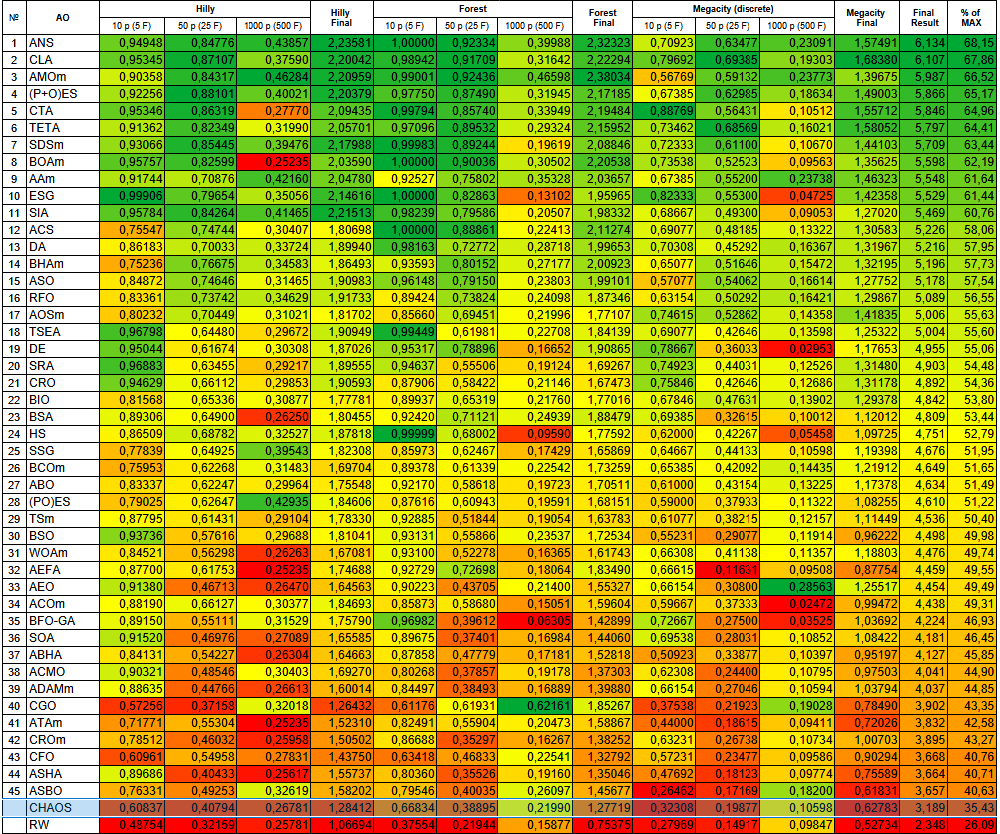
Figure 1. Color gradation of algorithms according to the corresponding tests
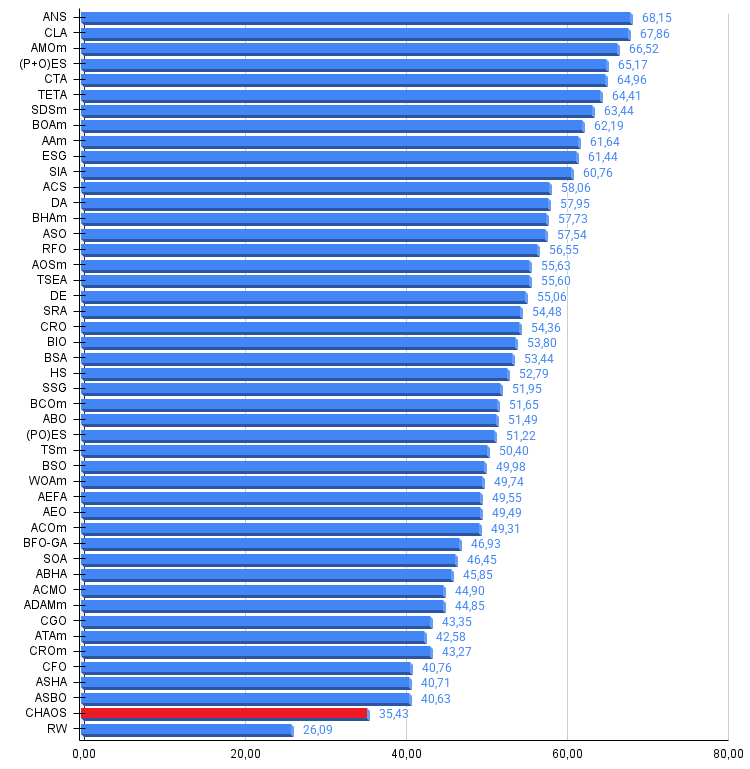
Figure 2. Histogram of algorithm testing results (scale from 0 to 100, the higher the better, where 100 is the maximum possible theoretical result, in the archive there is a script for calculating the rating table)
COA(CHAOS) pros and cons:
Pros:
- A variety of search methods.
- Promising development.
- Stable results.
Cons:
- A large number of external parameters.
- A large number of internal non-optimizable parameters.
The article is accompanied by an archive with the current versions of the algorithm codes. The author of the article is not responsible for the absolute accuracy in the description of canonical algorithms. Changes have been made to many of them to improve search capabilities. The conclusions and judgments presented in the articles are based on the results of the experiments.
Programs used in the article
| # | Name | Type | Description |
|---|---|---|---|
| 1 | #C_AO.mqh | Include | Parent class of population optimization algorithms |
| 2 | #C_AO_enum.mqh | Include | Enumeration of population optimization algorithms |
| 3 | TestFunctions.mqh | Include | Library of test functions |
| 4 | TestStandFunctions.mqh | Include | Test stand function library |
| 5 | Utilities.mqh | Include | Library of auxiliary functions |
| 6 | CalculationTestResults.mqh | Include | Script for calculating results in the comparison table |
| 7 | Testing AOs.mq5 | Script | The unified test stand for all population optimization algorithms |
| 8 | Simple use of population optimization algorithms.mq5 | Script | A simple example of using population optimization algorithms without visualization |
| 9 | Test_AO_COA_chaos.mq5 | Script | COA(CHAOS) test stand |
Translated from Russian by MetaQuotes Ltd.
Original article: https://www.mql5.com/ru/articles/17874
Warning: All rights to these materials are reserved by MetaQuotes Ltd. Copying or reprinting of these materials in whole or in part is prohibited.
This article was written by a user of the site and reflects their personal views. MetaQuotes Ltd is not responsible for the accuracy of the information presented, nor for any consequences resulting from the use of the solutions, strategies or recommendations described.

 Forex Arbitrage Trading: A Matrix Trading System for Return to Fair Value with Risk Control
 Chaos optimization algorithm (COA)
 MetaTrader 5 Machine Learning Blueprint (Part 12): Probability Calibration for Financial Machine Learning
 Can DOOM Run in MetaTrader 5: DLLs, Rendering, and MQL5 Input?

- Free trading apps
- Over 8,000 signals for copying
- Economic news for exploring financial markets
You agree to website policy and terms of use
Published article Chaos optimization algorithm (COA): Continued:
Author: Andrey Dik
...