

Can DOOM Run in MetaTrader 5: DLLs, Rendering, and MQL5 Input?
 2 233
2 233
 5
5

Introduction
There is a beloved tradition in the tech world known as "Can it run DOOM?" Since id Software released the source code to the original 1993 DOOM engine, programmers have ported it to just about everything imaginable: pregnancy tests, ATMs, tractors, digital cameras, and even inside Minecraft. The challenge is simple — if a device has a screen and some form of input, someone will try to run DOOM on it. MetaTrader 5, with its chart window, bitmap rendering capabilities, and DLL integration, is a worthy candidate.
This article is not just about the novelty. Getting DOOM running inside a trading terminal teaches practical MQL5 skills. These include building and integrating custom Windows DLLs, rendering pixels on charts in real time using ResourceCreate, handling keyboard input despite MQL5 limitations, and managing background threads safely from an Expert Advisor. Whether you ever plan to run a game in your terminal or not, the techniques covered here are directly applicable to custom visualization tools, external data bridges, and any project that requires tight integration between MQL5 and native code.
We will cover the following:
- The Challenge — What Does "Run DOOM" Actually Require?
- Architecture Overview
- The DLL Wrapper — Embedding DOOM in a Shared Library
- The Expert Advisor — Rendering and Input
- Building, Deploying, and Running
- Results
- Conclusion
The Challenge — What Does "Run DOOM" Actually Require?
Running DOOM on any non-standard platform requires solving four problems. First, you need the game engine itself — the code that handles game logic, rendering, physics, and AI. The original DOOM engine is open source, but it was designed to be a standalone program that owns its own main loop, creates its own window, and handles its own input. We cannot simply compile it and call it from MQL5. Second, you need a display surface — some way to show the 320x200 pixel framebuffer that DOOM renders each frame.
MetaTrader 5 has no built-in concept of a framebuffer, but it does have bitmap resources that can be drawn on chart objects. Third, you need input handling — keyboard events must flow from the user's keyboard into the game engine. MQL5 provides key-down events but, critically, does not provide key-up events. Finally, you need threading — the game engine must run on its own background thread so it does not block MetaTrader's main UI thread.
None of these problems are insurmountable individually, but solving them all together in a clean architecture requires careful design. The approach we settled on splits the project into two components: a Windows DLL that contains the game engine and runs it on a background thread, and an MQL5 Expert Advisor that acts as the display and input layer.
Architecture Overview
The system has two components connected by a simple function-call interface:
Component 1: doomlib.dll — A Windows DLL written in C. It embeds the DOOM engine using PureDOOM, a single-header, zero-dependency source port specifically designed for embedding DOOM into other applications. PureDOOM provides a clean API: call doom_init() once, call doom_update() each frame, then read the pixel framebuffer with doom_get_framebuffer(). Our DLL wraps this in a background thread and exposes seven exported functions that MQL5 can call.
Component 2: DoomEA.mq5 — An MQL5 Expert Advisor that imports the DLL, creates a bitmap label on the chart, and runs a 30 FPS timer loop. Each tick, it grabs the latest frame from the DLL and pushes it to the chart using ResourceCreate. It captures keyboard input via OnChartEvent and forwards it to the DLL. For key-up detection (which MQL5 does not natively support), it polls key states using GetAsyncKeyState from user32.dll.
The data flow each frame is straightforward: the DLL's background thread ticks the engine and writes pixels into a double-buffered framebuffer. The EA's timer fires, copies the front buffer into an MQL5 array, and calls ResourceCreate to update the bitmap on the chart. Input flows the opposite direction: the EA receives key-down events from the chart, translates Windows virtual key codes to DOOM key codes, and pushes them into the DLL's thread-safe input queue.
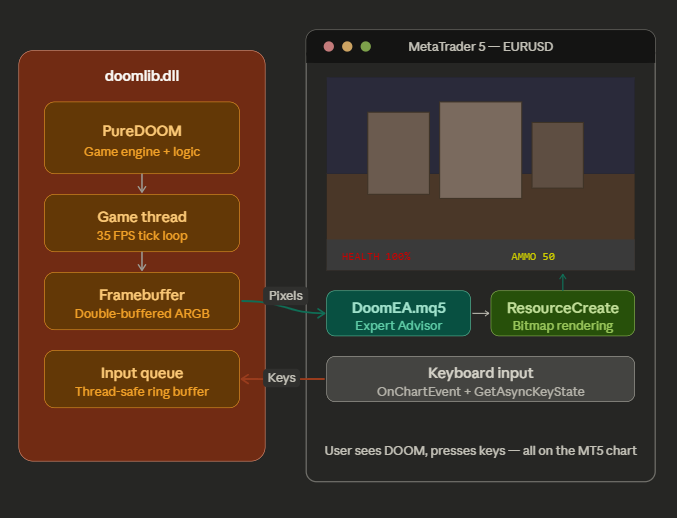
Fig. 1. Architecture diagram showing DLL and EA interaction
The DLL Wrapper — Embedding DOOM in a Shared Library
The DLL is a single C file (doomlib.c) that includes PureDOOM.h and wraps it with threading, double-buffering, and exported functions. PureDOOM is configured with a set of preprocessor flags that enable standard library features like malloc, file I/O, and timing:
/* PureDOOM configuration */
#define DOOM_IMPLEMENTATION
#define DOOM_IMPLEMENT_MALLOC
#define DOOM_IMPLEMENT_FILE_IO
#define DOOM_IMPLEMENT_GETTIME
#define DOOM_IMPLEMENT_EXIT
#define DOOM_IMPLEMENT_PRINT
#include "../PureDOOM.h"
With those flags defined, PureDOOM uses the standard C library for memory allocation, file access, and timing. On platforms where those headers are unavailable (embedded systems, microwaves, and so on), PureDOOM allows you to override each one with custom callbacks. For our purposes, the standard implementations are perfectly fine.
The exported API
The DLL exports seven functions using __stdcall convention for MQL5 compatibility. The core interface is deliberately minimal:
| Function | Purpose |
|---|---|
| DoomInit(wadDir) | Initialize engine, configure defaults, start game thread |
| DoomShutdown() | Stop game thread and clean up resources |
| DoomGetFramebuffer(buf, len) | Copy current frame into caller-provided buffer |
| DoomGetScreenWidth() | Return the scaled output width (960 pixels) |
| DoomGetScreenHeight() | Return the scaled output height (600 pixels) |
| DoomKeyDown(key) | Queue a key-press event |
| DoomKeyUp(key) | Queue a key-release event |
The game thread
The most important piece of the DLL is the background thread. DOOM's engine is not thread-safe and must run on a single dedicated thread. Our game thread runs a tight loop: drain the input queue, tick the engine, grab the framebuffer, convert and scale it, then swap buffers. Here is the core of that loop:
static DWORD WINAPI game_thread(LPVOID param)
{
    (void)param;
    while (g_running)
    {
        DWORD t0 = timeGetTime();
        /* Process pending input */
        drain_input();
        /* Tick the engine */
        doom_update();
        /* Grab framebuffer and convert into back buffer */
        const unsigned char* fb = doom_get_framebuffer(4);
        if (fb)
        {
            convert_and_scale(fb, g_back);
            /* Swap front/back */
            EnterCriticalSection(&g_frame_cs);
            {
                unsigned int* tmp = g_front;
                g_front = g_back;
                g_back  = tmp;
            }
            LeaveCriticalSection(&g_frame_cs);
        }
        /* Sleep to maintain target FPS */
        DWORD elapsed = timeGetTime() - t0;
        if (elapsed < FRAME_MS)
            Sleep(FRAME_MS - elapsed);
    }
    return 0;
}
The call to doom_get_framebuffer(4) requests the frame in RGBA format (4 bytes per pixel). The convert_and_scale function then performs two operations in a single pass: it rearranges bytes from RGBA to ARGB (the format MetaTrader 5 expects for COLOR_FORMAT_ARGB_NORMALIZE), and it applies a 3x nearest-neighbor upscale from the native 320x200 to 960x600. The double-buffering ensures the EA always reads a complete, consistent frame — the game thread writes into the back buffer and only swaps the pointers under a CRITICAL_SECTION lock.
The pixel format conversion
This is a subtle but critical detail. DOOM renders in RGBA byte order, but MetaTrader 5's ResourceCreate with COLOR_FORMAT_ARGB_NORMALIZE expects pixels packed as 0xAARRGGBB in a uint32. The conversion reads each pixel's four bytes and repacks them:
const unsigned char* p = src + (sy * DOOM_WIDTH + sx) * 4;
unsigned int argb = ((unsigned int)p[3] << 24) |
                    ((unsigned int)p[0] << 16) |
                    ((unsigned int)p[1] <<  8) |
                    ((unsigned int)p[2]);
Here p[0] is Red, p[1] is Green, p[2] is Blue, and p[3] is Alpha. The result is packed as Alpha in the highest byte, then Red, Green, Blue — exactly what MetaTrader expects. Getting this byte order wrong is the most common cause of seeing either a black screen or psychedelic garbage, so it is worth getting right.
WAD file loading and MQL5 string handling
One important detail: MQL5 passes strings to DLLs as wide strings (UTF-16, wchar_t*), not as char*. The DoomInit function receives the WAD directory path as a wide string and converts it to multibyte using WideCharToMultiByte before passing it to PureDOOM. The path is then provided to the engine via a custom getenv override — when DOOM internally asks for the DOOMWADDIR environment variable, our custom function returns the path we received from the EA:
static char g_wad_dir[1024] = {0};
static char* custom_getenv(const char* var)
{
    if (strcmp(var, "DOOMWADDIR") == 0)
        return g_wad_dir;
    return getenv(var);
}
This avoids calling SetCurrentDirectory (which is process-wide and would affect all of MetaTrader 5) and keeps the WAD path resolution clean and isolated.
The Expert Advisor — Rendering and Input
The MQL5 side of the project is where things get interesting for MQL5 developers. The Expert Advisor imports functions from two DLLs: our custom doomlib.dll for the game engine, and user32.dll for keyboard state polling.
DLL imports
#import "doomlib.dll"
int  DoomInit(string wadDir);
void DoomShutdown();
int  DoomGetFramebuffer(uint &buf[], int bufLen);
int  DoomGetScreenWidth();
int  DoomGetScreenHeight();
void DoomKeyDown(int doomKey);
void DoomKeyUp(int doomKey);
#import
#import "user32.dll"
short GetAsyncKeyState(int vKey);
#import
Note that the DoomGetFramebuffer function takes a uint array by reference. MQL5 passes dynamic arrays to DLLs as pointers, so on the C side this arrives as an unsigned int* — exactly what our DLL expects. The bufLen parameter tells the DLL how many elements the array holds, providing a safety check against buffer overflows.
Initialization
In OnInit, the EA prepares the chart as a clean display surface, initializes the DLL, and sets up the rendering pipeline:
int OnInit()
{
   // Build key mapping table
   BuildKeyMap();
   // Configure chart — hide all trading UI
   ChartSetInteger(0, CHART_SHOW, false);
   ChartSetInteger(0, CHART_KEYBOARD_CONTROL, false);
   // Initialize DOOM engine
   string wadDir = TerminalInfoString(TERMINAL_DATA_PATH) + "\\MQL5\\Experts\\Doom";
   if(!DoomInit(wadDir))
   {
      Print("DOOM: Failed to initialize engine");
      return INIT_FAILED;
   }
   // Query scaled resolution from DLL
   g_screenW = DoomGetScreenWidth();
   g_screenH = DoomGetScreenHeight();
   g_totalPixels = g_screenW * g_screenH;
   ArrayResize(g_pixels, g_totalPixels);
   // Create bitmap label and resource
   ObjectCreate(0, OBJ_NAME, OBJ_BITMAP_LABEL, 0, 0, 0);
   ObjectSetInteger(0, OBJ_NAME, OBJPROP_XDISTANCE, 0);
   ObjectSetInteger(0, OBJ_NAME, OBJPROP_YDISTANCE, 0);
   ObjectSetInteger(0, OBJ_NAME, OBJPROP_XSIZE, g_screenW);
   ObjectSetInteger(0, OBJ_NAME, OBJPROP_YSIZE, g_screenH);
   ObjectSetString(0, OBJ_NAME, OBJPROP_BMPFILE, RES_NAME);
   ResourceCreate(RES_NAME, g_pixels, g_screenW, g_screenH, 0, 0, g_screenW, COLOR_FORMAT_ARGB_NORMALIZE);
   // Start 30 FPS timer
   EventSetMillisecondTimer(33);
   g_initialized = true;
   return INIT_SUCCEEDED;
}
Two things to note here. First, we set CHART_SHOW to false, which hides all chart elements (candles, grid, price scale, OHLC display) and gives us a clean black canvas. We also disable CHART_KEYBOARD_CONTROL so that MetaTrader does not intercept key presses for its own chart navigation shortcuts. Second, rather than using CCanvas (the MQL5 canvas class), we work directly with ObjectCreate to make a bitmap label and ResourceCreate to push pixel data into it. This is simpler and faster — we are essentially treating the chart as a raw framebuffer.
The rendering loop
The OnTimer handler runs at approximately 30 FPS and is responsible for grabbing the latest frame from the DLL and displaying it on the chart:
void OnTimer()
{
   if(!g_initialized)
      return;
   // Poll for key releases
   PollKeyStates();
   // Grab framebuffer from DLL
   if(DoomGetFramebuffer(g_pixels, g_totalPixels))
   {
      ResourceCreate(RES_NAME, g_pixels, g_screenW, g_screenH, 0, 0, g_screenW, COLOR_FORMAT_ARGB_NORMALIZE);
      ChartRedraw(0);
   }
}
This is the entire rendering pipeline — just three lines of real work. DoomGetFramebuffer copies the latest frame (already scaled and converted to ARGB by the DLL) into our pixel array. ResourceCreate updates the bitmap resource with the new pixel data using COLOR_FORMAT_ARGB_NORMALIZE, which tells MetaTrader the array contains premultiplied ARGB pixels. Finally, ChartRedraw forces an immediate screen refresh.
Solving the key-up problem
This is perhaps the most interesting technical challenge in the whole project. MQL5 fires CHARTEVENT_KEYDOWN when a key is pressed, but there is no corresponding CHARTEVENT_KEYUP event. DOOM needs both — a key-down to start moving forward, and a key-up to stop. Without key-up events, your character would walk forward forever after pressing W once.
The solution is to import GetAsyncKeyState from user32.dll and poll the actual hardware key state on each timer tick. We maintain a table mapping Windows virtual key codes to DOOM key codes, along with a boolean tracking whether each key is currently considered pressed. On each timer tick, PollKeyStates checks every tracked key:
void PollKeyStates()
{
   int count = ArraySize(g_keymap);
   for(int i = 0; i < count; i++)
   {
      short state = GetAsyncKeyState(g_keymap[i].vk);
      bool isDown = (state & 0x8000) != 0;
      if(g_keyStates[i] && !isDown)
      {
         // Key was pressed, now released
         DoomKeyUp(g_keymap[i].doomKey);
         g_keyStates[i] = false;
      }
   }
}
GetAsyncKeyState returns the real-time hardware state of a key. The high bit (0x8000) indicates whether the key is currently held down. When we detect that a key we marked as pressed is no longer being held, we send the corresponding DoomKeyUp event. The polling happens at 30 Hz (every 33 ms), which introduces at most 33 ms of latency on key release — completely imperceptible for DOOM's 35 Hz game tick. This workaround is well established in the MQL5 community and is applicable to any project that needs key-release detection.
Key-down handling
For key-down events, we use the standard OnChartEvent handler. When CHARTEVENT_KEYDOWN fires, we translate the Windows virtual key code to the corresponding DOOM key code and forward it to the DLL:
void OnChartEvent(const int id, const long &lparam,
                   const double &dparam, const string &sparam)
{
   if(!g_initialized) return;
   if(id == CHARTEVENT_KEYDOWN)
   {
      int vk = (int)lparam;
      int doomKey = VkToDoomKey(vk);
      if(doomKey != DOOM_KEY_UNKNOWN)
      {
         int idx = FindKeyIndex(vk);
         if(idx >= 0) g_keyStates[idx] = true;
         DoomKeyDown(doomKey);
      }
   }
}
The VkToDoomKey function performs a lookup through the key mapping table, which maps all letters (A-Z to lowercase a-z), digits (0-9), function keys (F1-F12), arrow keys, and modifiers (Ctrl, Shift, Alt, Space, Enter, Escape, Tab, Backspace). The full mapping table is included in the attached source code.
Building, Deploying, and Running
For security reasons, the precompiled doomlib.dll is not provided. Follow the instructions below to compile the DLL and run DOOM.
Prerequisites:
The DLL is built using CMake and MinGW-w64. You will need the full project structure, which includes PureDOOM.h (the single-header engine), doomlib.c (the wrapper), and CMakeLists.txt. All of these are included in the attached zip. The PureDOOM repository can also be found on GitHub.
You also need a C toolchain to compile the DLL. Install CMake and MinGW-w64. Once both programs are installed, proceed to compiling the DLL.
Build in 5 easy steps:
- Download and extract the zip file.
- Open the "DLL" folder.
- Right-click an empty space and press "Open in Terminal" (This opens PowerShell with the current directory)
- After PowerShell is opened, execute the following commands one by one:
cmake . -G "MinGW Makefiles"
cmake --build . --config Release
This produces doomlib.dll, which you then copy to MQL5\Libraries\. If you prefer Visual Studio, replace the generator with "Visual Studio 17 2022" and add -A x64. The key requirement is that the DLL must be 64-bit if your MetaTrader 5 installation is 64-bit (which is the standard on modern systems).
Obtaining doom1.wad:
This article does not attach doom1.wad. This file is critical for DOOM to work, as it contains the game's data. The file is the freely distributable shareware WAD from DOOM, and you should download your own copy from the PureDOOM repository on GitHub. Open doom1.wad in the PureDOOM repository, then use GitHub's Download raw file option to download the file.
Save the file as doom1.wad and place it in MQL5\Experts\Doom\. The expected full path is MQL5\Experts\Doom\doom1.wad.
Results
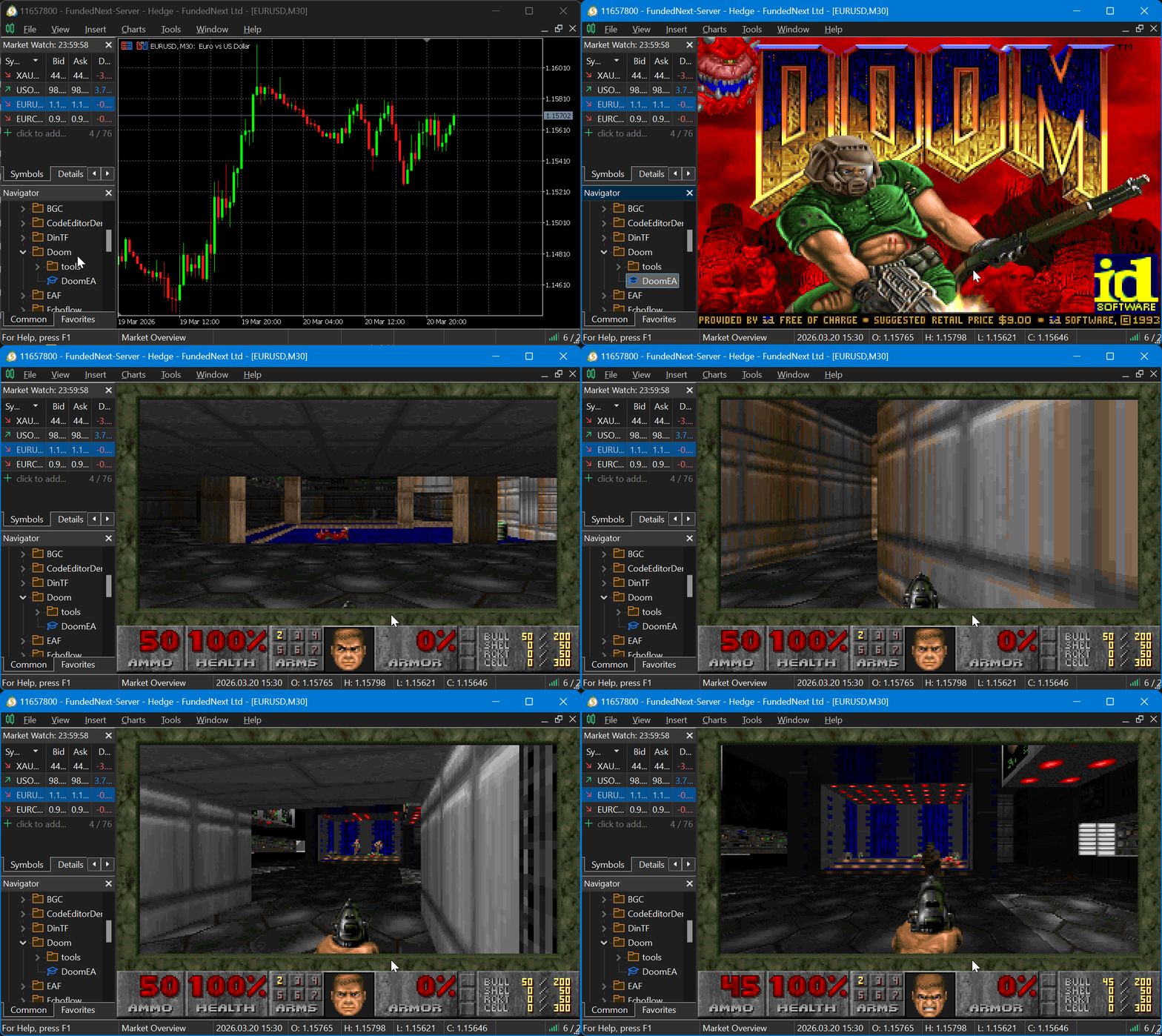
Fig. 2. DOOM gameplay running inside MetaTrader 5
DOOM runs smoothly inside MetaTrader 5 at a full 960x600 resolution (3x upscale from the native 320x200). The game thread maintains a steady 35 FPS on the engine side, and the EA's 30 FPS display refresh produces visibly smooth gameplay. Movement with WASD, firing with Ctrl, opening doors with E (or Space), navigating menus — everything works as expected. The game is fully playable.
There are some limitations worth noting. There is no sound — MetaTrader 5 has no audio output API, so the game runs silently. Mouse support is not implemented in this version, though PureDOOM does expose mouse input functions and it would be possible to capture CHARTEVENT_MOUSE_MOVE events for this purpose. Some key combinations that MetaTrader intercepts (such as Alt+F4) will not reach the EA. These are minor trade-offs for what is fundamentally a proof of concept.
Conclusion
We have successfully demonstrated that MetaTrader 5 can, in fact, run DOOM. Beyond entertainment, this project demonstrates several techniques that are useful in MQL5 development:
- Custom DLL integration. Building a native DLL with exported functions and importing them in MQL5 via #import. This pattern applies to any external library you want to bridge into MetaTrader — machine learning engines, custom data feeds, hardware interfaces, and more.
- Real-time framebuffer rendering. Using OBJ_BITMAP_LABEL and ResourceCreate with COLOR_FORMAT_ARGB_NORMALIZE to push raw pixel data onto a chart at 30 FPS. This is applicable to custom heatmaps, real-time visualization dashboards, or any display that goes beyond standard chart objects.
- Background threading from MQL5. Running a compute-intensive task on a background thread inside a DLL, with thread-safe communication via CRITICAL_SECTION. This is the correct pattern for any long-running computation that must not block MetaTrader's UI thread.
- Key-up detection workaround. Using GetAsyncKeyState from user32.dll to detect key releases, solving a well-known limitation of MQL5's event model. This technique is useful for any interactive EA that needs to respond to both key press and key release events.
Possible improvements for future exploration include adding mouse look support via CHARTEVENT_MOUSE_MOVE, implementing sound output through an external audio library in the DLL, and experimenting with higher upscale factors or bilinear filtering for a smoother visual appearance.
| File name | Description |
|---|---|
| DoomEA.mq5 | Expert Advisor source code — renders DOOM and handles input |
| doomlib.c | DLL wrapper source code |
| CMakeLists.txt | CMake build configuration |
| PureDOOM.h | Single-header DOOM engine by Daivuk |
Warning: All rights to these materials are reserved by MetaQuotes Ltd. Copying or reprinting of these materials in whole or in part is prohibited.
This article was written by a user of the site and reflects their personal views. MetaQuotes Ltd is not responsible for the accuracy of the information presented, nor for any consequences resulting from the use of the solutions, strategies or recommendations described.

 Chaos optimization algorithm (COA)
 From Simple Close Buttons to a Rule-Based Risk Dashboard in MQL5
 Chaos optimization algorithm (COA): Continued
 Building a Volume Bubble Indicator in MQL5 Using Standard Deviation

- Free trading apps
- Over 8,000 signals for copying
- Economic news for exploring financial markets
You agree to website policy and terms of use
This is one of the most fun-interesting articles here in MQL5. :)
bravo. caught your pine converter as well. you're skilled!