

MetaTrader 5: Build a Market to Suit Your Strategy — Renko/Range/Volume, Synthetics, and Stress Tests on Custom Symbols
 4 066
4 066
 4
4

Introduction
The standard MetaTrader 5 chart is a reliable tool, but it is tightly tied to timeframes, the broker's quote feed, and the calendar grid. In modern algorithmic trading, this is often insufficient: so-called volatility noise, gaps in history, and fixed time intervals distort real dynamics. What if the terminal allows you not only to read the market, but also to design its representation to suit the needs of a specific strategy?
With the development of the custom symbols API, MetaTrader 5 has changed its architecture: the trader is no longer just a passive consumer of quotes and becomes a data architect. A custom symbol is not an offline chart for visualization, but a fully-fledged terminal object with its own tick history, contract specification, and native support in the Strategy Tester.
Now you can generate timeless charts (Renko bars, Range bars, equal volume bars), assemble synthetic instruments and baskets, and run stress tests by arbitrarily changing the spread, stop levels, and margin requirements directly in the code.
In this article, we will explore the practical aspects of working with custom instruments: data storage structure, the basic MQL5 API, tick aggregation algorithms, and history modification. Let's look at how to adapt standard EAs to route trading orders from a custom symbol to a real trading instrument.

Fig. 1. Build your market from standard materials
What is a custom symbol: Architecture, storage, and API
A custom symbol in MetaTrader 5 is not an offline chart for visual observation, as was implemented in previous generations of the platform. It is now a fully-fledged terminal object with its own tick history, contract specification, and native support in the strategy tester.
Unlike standard instruments supplied by a broker and dependent on the quality of its quote feed (quote provider), a custom symbol allows the trader to become the data architect. You determine which quotes, in what form, and with what accuracy level will be included in the history. This opens the way to analyzing not only markets that the broker does not have (cryptocurrencies, interbank spreads), but also to transforming existing data (Renko, equal volumes, synthetic indices).
Custom symbols are isolated from the broker's trading servers. Files are stored locally, for example: “AppData\Roaming\MetaQuotes\Terminal\[InstanceID]\bases\Custom”.
This solution has an important advantage: independence. You can change your broker, update your terminal, but your custom symbols and accumulated history will remain in place. In the Market Watch window, they are always located in a separate folder called Custom to visually separate real instruments from your own.
MQL5 API core
Handling custom symbols in the code requires access to specialized API functions. The full list can be found in the documentation, but for the main use cases we will focus on three groups of functions.
Symbol lifecycle management:
- CustomSymbolCreate() — create a custom symbol with a specified name in a specified group,
- CustomSymbolDelete() — remove a user symbol with a specified name,
- SymbolSelect() — add to Market Watch (without this, the symbol will not be visible in the GUI).
Data download management:
- CustomTicksAdd() — add data from the MqlTick[] type array to the price history of a custom symbol. A custom symbol should be selected in the Market Watch window,
- CustomTicksReplace() — completely replace the price history of a custom symbol in a specified time interval with data from the MqlTick[] type array.
- CustomRatesUpdate() — add missing bars to the custom symbol history and/or replace existing ones with data from the MqlRates[] type array.
Property management:
- CustomSymbolSetInteger()/CustomSymbolSetDouble()/CustomSymbolSetString() — set contract properties (spread, precision, margin currency, etc.).
Directly calling API functions requires handling various errors and checking statuses. To speed up development, we use the CiCustomSymbol wrapper class. It encapsulates the logic for creating, cloning real symbol properties, and batch loading ticks. The full code of the CiCustomSymbol class is located in the CiCustomSymbol.mqh file attached below.
Below is an example of initializing a custom symbol - we create a symbol, clone properties from the EURUSD symbol, and check return codes:
#include <CiCustomSymbol.mqh>

//+------------------------------------------------------------------+
//| inputs                                                           |
//+------------------------------------------------------------------+
input string   CustomSymbolName = "EURUSD_Custom"; // new symbol name
input string   OriginSymbol     = "EURUSD";        // source symbol

//+------------------------------------------------------------------+
//| Script program start function                                    |
//+------------------------------------------------------------------+
void OnStart()
  {
   CiCustomSymbol symb;

//--- attempt to create a symbol
//--- return codes: -1 (error), 0 (already exists), 1 (successfully created)
   int res = symb.Create(CustomSymbolName, "", OriginSymbol, 1000000, true);

   if(res == -1)
     {
      Print("Error creating symbol: ", GetLastError());
      return;
     }

   if(res == 0)
     {
      Print("Symbol ", CustomSymbolName, " already exists.");
     }
   else
     {
      Print("Symbol ", CustomSymbolName, " successfully created.");

      //--- set specific properties (for example, fixed spread of 20 points)
      //--- properties are changed BEFORE loading history
      if(!symb.SetProperty(SYMBOL_SPREAD, 20))
         Print("Failed to set spread. Error: ", GetLastError());

      if(!symb.SetProperty(SYMBOL_SPREAD_FLOAT, false))
         Print("Failed to set spread type (fixed). Error: ", GetLastError());
     }

//--- symbol added to Market Watch ('true' parameter to Create)
   Print("Symbol created: ", CustomSymbolName);
  }
Find the full script code in CreateCustomSymbol.mq5 attached below.
Mind several limitations described in the documentation while handling custom symbols:
Disabling MQL5 Cloud Network:
Optimization of strategies on custom symbols via the cloud network is prohibited. The reason is simple: different traders' computers may contain symbols with the same names (for example, EURUSD_Custom), but with completely different histories. Using Cloud Network would lead to synchronization chaos and generation of excess traffic. Testing can only be done locally or through local agents.
Margin calculation logic:
The strategy tester uses cross rates to calculate margin and profit. If you have created and are testing the AUDCAD.custom symbol (based on AUDUSD/USDCAD) and your account is in USD, the tester needs to:
- Find AUDUSD (how much AUD is worth in USD) - to calculate margin
- Find USDCAD (how to convert CAD back to USD) - to calculate profit
It is important to ensure that all required currency pairs are in your Market Watch and that the history is loaded, otherwise the tester will not be able to calculate the financial indicators.
The symbol properties do not change during the test:
Custom symbol properties (for example, SYMBOL_TRADE_STOPS_LEVEL is a minimum distance for stops) are set before starting the test. It is not possible to dynamically change them while the EA is running (for example, to expand the stop level before news) in the current version of the tester. The tester fixes the symbol parameters during initialization.
Analytical digression: The meaning of backtesting
Why is such a complex architecture needed? Using custom symbols changes the approach to testing trading ideas. Instead of tailoring your strategy to a specific broker's possibly flawed data (with gaps in history or abnormal spreads), you construct your own ideal laboratory environment.
You can check how the strategy behaves with a 50 pip spread (to weed out scalping), or how it trades on charts where time does not matter (Range/Renko). This helps isolate the core logic of a strategy from market-noise artifacts.
Time-independent charts: Renko, Range Bars, and Equal-Volume
Standard timeframes are convenient, but they impose an artificial time grid on the market. For example, the M1 candle closes every 60 seconds regardless of the number of ticks. In low liquidity conditions, such a bar conveys little information, and in moments of high volatility, it hides important movements in a single rectangle.
Timeless charts solve this problem by forming a new bar not after time has passed, but when the price or volume reaches a specified threshold. This allows:
- filter out market noise and focus on significant movements;
- automatically adapt the analysis step to the current volatility;
- identify accumulation/distribution zones based on real (or tick) volume, not on a timer.
Let's look at three popular types of these charts — Renko, Range Bars, and Equal-Volume — and show how to generate them in MetaTrader 5 using custom symbols. To begin, let's compare and describe these three types of bars in a table:
| Chart type | New bar formation criteria | Best use cases |
|---|---|---|
| Renko | Price movement by a given number of points | Trend strategies, filtering out sideways movements |
| Range Bars | The bar High-Low range reaches the specified value | Scalping, intraday trading in volatile conditions |
| Equal-Volume | Accumulation of a specified number of ticks or real volume | Liquidity analysis, search for areas of interest of major players |
Note:
All custom symbols in MetaTrader 5 are linked to the M1 timeframe grid. This is an architectural limitation of the platform: even if a bar formed in 2 seconds, it will still receive a timestamp in history with an accuracy of up to a minute. With high volatility, several bars may fall in the same minute (have the same time) - the EA must take this into account.
Technical implementation: aggregation of ticks into bars
In general, the algorithm for generating timeless bars is the same for all three types:
- Reading ticks from history or receiving them online via the CopyTicksRange()/OnTick() functions, respectively;
- Accumulating data in the buffer: tracking Open, High, Low, Close, Volume;
- Checking the conditions for forming a new bar (points/range/volume);
- Saving a bar to the custom symbol database via CustomRatesUpdate();
- Tick emulation via CustomTicksAdd() to activate indicators and expert EAs on MetaTrader 5 charts.
Base class for working with custom symbols: algorithm for all types of bars
//+------------------------------------------------------------------+
//| class-aggregator of ticks into custom bars                       |
//+------------------------------------------------------------------+
class CBarAggregator
  {
private:
   string            symbol_name;
   double            threshold;
   int               bar_type;
   ENUM_VOLUME_MODE  volume_mode;

   MqlRates          rates_buffer[];
   int               buffer_limit;
   int               buffer_idx;

   MqlRates          current_bar;
   double            last_close;
   int               trend;
   bool              is_initialized;
   datetime          last_bar_time;
   int               symbol_digits;

public:
                     CBarAggregator(void);
   bool              Init(const string _symbol_name, double _threshold, int _bar_type, ENUM_VOLUME_MODE _vol_mode = VOLUME_MODE_TICK);
   bool              ProcessTick(const MqlTick &tick);
   void              FlushBuffer(void);
   void              Reset(void);

private:
   void              CreateBar(const MqlTick &tick, double open_price = 0.0);
   void              CloseAndSaveBar(const MqlTick &tick, double forced_close = 0.0);
   void              WriteBatch(void);
  };

//+------------------------------------------------------------------+
//| handle an incoming tick                                          |
//+------------------------------------------------------------------+
bool CBarAggregator::ProcessTick(const MqlTick &tick)
  {
   if(tick.bid <= 0 || tick.ask <= 0)
      return false;
   if(tick.time <= 0)
      return false;  // protection from invalid ticks

   if(!is_initialized)
     {
      CreateBar(tick);
      last_close = tick.bid;
      last_bar_time = tick.time;  // initialize with the first tick time
      is_initialized = true;
      return false;
     }

   bool bar_closed = false;

   if(bar_type == 0) // renko
     {
      double diff = tick.bid - last_close;
      double size = threshold * _Point;
      int req_move = (trend != 0) ? 2 : 1;

      if(diff >= size * req_move)
        {
         int bricks = (int)(diff / size);
         for(int i = 0; i < bricks; i++)
           {
            double target_close = NormalizeDouble(last_close + size, symbol_digits);
            CloseAndSaveBar(tick, target_close);
            last_close = target_close;
            CreateBar(tick, last_close);
            trend = 1;
           }
         bar_closed = true;
        }
      else
         if(diff <= -size * req_move)
           {
            int bricks = (int)(MathAbs(diff) / size);
            for(int i = 0; i < bricks; i++)
              {
               double target_close = NormalizeDouble(last_close - size, symbol_digits);
               CloseAndSaveBar(tick, target_close);
               last_close = target_close;
               CreateBar(tick, last_close);
               trend = -1;
              }
            bar_closed = true;
           }
     }
   else
      if(bar_type == 1) // range bars
        {
         double bid = NormalizeDouble(tick.bid, symbol_digits);
         if(bid > current_bar.high)
            current_bar.high = bid;
         if(bid < current_bar.low)
            current_bar.low = bid;

         if((current_bar.high - current_bar.low) >= threshold * _Point)
           {
            CloseAndSaveBar(tick);
            CreateBar(tick);
            bar_closed = true;
           }
        }
      else
         if(bar_type == 2) // equal volume bars
           {
            if(volume_mode == VOLUME_MODE_REAL)
               current_bar.real_volume += (long)tick.volume_real;
            else
               current_bar.tick_volume++;

            long current_vol = (volume_mode == VOLUME_MODE_REAL) ? current_bar.real_volume : current_bar.tick_volume;
            if(current_vol >= (long)threshold)
              {
               CloseAndSaveBar(tick);
               CreateBar(tick);
               bar_closed = true;
              }
           }

   return bar_closed;
  }

//+------------------------------------------------------------------+
//| close the bar and save to the buffer                             |
//+------------------------------------------------------------------+
void CBarAggregator::CloseAndSaveBar(const MqlTick &tick, double forced_close)
  {
   current_bar.close = (forced_close != 0.0) ? NormalizeDouble(forced_close, symbol_digits) : NormalizeDouble(tick.bid, symbol_digits);

   current_bar.high  = NormalizeDouble(MathMax(current_bar.high, MathMax(current_bar.open, current_bar.close)), symbol_digits);
   current_bar.low   = NormalizeDouble(MathMin(current_bar.low, MathMin(current_bar.open, current_bar.close)), symbol_digits);
   current_bar.spread = MathMax(0, current_bar.spread);

// make sure last_bar_time > 0 (initialized)
   if(last_bar_time > 0 && current_bar.time <= last_bar_time)
     {
      // shift by 1 second instead of 60 to minimize distortion
      current_bar.time = last_bar_time + 1;
     }
   last_bar_time = current_bar.time;

// final validation before the buffer
   if(current_bar.high < current_bar.low ||
      current_bar.high < current_bar.open || current_bar.high < current_bar.close ||
      current_bar.low > current_bar.open || current_bar.low > current_bar.close)
     {
      Print("🟡 Invalid bar skipped: O=", current_bar.open, " H=", current_bar.high, " L=", current_bar.low, " C=", current_bar.close, " Time=", TimeToString(current_bar.time));
      return;
     }

   if(buffer_idx < buffer_limit)
     {
      rates_buffer[buffer_idx] = current_bar;
      buffer_idx++;
     }

   if(buffer_idx >= buffer_limit)
      WriteBatch();
  }

//+------------------------------------------------------------------+
//| save the buffer to the symbol history                            |
//+------------------------------------------------------------------+
void CBarAggregator::WriteBatch(void)
  {
   if(buffer_idx > 0)
     {
      datetime t_from = rates_buffer[0].time;
      datetime t_to   = rates_buffer[buffer_idx - 1].time;

      if(CustomRatesUpdate(symbol_name, rates_buffer) < 1)
         Print("CustomRatesUpdate error: ", GetLastError());

      buffer_idx = 0;
     }
  }
//+------------------------------------------------------------------+
The full code of the CBarAggregator class is in the CBarAggregator.mqh file.
Universal timeless bars indicator
Create a universal indicator for practical application of the CBarAggregator class. It allows you to switch between Renko, Range and Equal Volume Bars modes in the inputs and generates a custom symbol in a given history interval.
Inputs:
input ENUM_CUSTOM_CHART_MODE InputMode = CMT_RENKO;      // generation mode
input double InputBoxSize = 10;                          // bar size (points) for renko/range
input long InputVolLimit = 1000;                         // volume limit for equal-volume
input string InputSuffix = "";                           // symbol name suffix
input datetime InputStartTime  = 0;                      // history start (0 - last 7 days)
Enumerate bar generation modes:
enum ENUM_CUSTOM_CHART_MODE
  {
   CMT_RENKO = 0,       // renko
   CMT_RANGE = 1,       // range bars
   CMT_EQVOL_TICK = 2,  // equal tick volumes
   CMT_EQVOL_REAL = 3   // equal real volumes
  };
Real-time operation — after loading the history, the indicator continues to operate online, processing new ticks:
//+------------------------------------------------------------------+
//| handle a new tick                                                |
//+------------------------------------------------------------------+
void ProcessNewTicks()
  {
   if(last_tick_time_msc==0)
      return;

   MqlTick ticks[];
   int copied=CopyTicksRange(_Symbol,ticks,COPY_TICKS_ALL,last_tick_time_msc,0);

   if(copied>0)
     {
      for(int i=0;i<copied;i++)
        {
         aggregator.ProcessTick(ticks[i]);
         last_tick_time_msc=ticks[i].time_msc;
        }
      aggregator.FlushBuffer();
     }
  }
This indicator does not draw charts on its own. Its purpose is to create and populate a custom symbol with data. To get started, drag the indicator onto any chart (for example, EURUSD) – a properties window will open. Select a mode (e.g. MODE_RENKO), box size (InputBoxSize), and history start.
Indicator application sequence:
- The indicator will start generating bars (messages about generation start and completion will appear in the log),
- Once the message about generation completion appears, open the Market Watch (Ctrl+M),
- Find and select the created instrument in the list of symbols (for example, EURUSD_Renko_10),
- Open a new chart (Ctrl+N),
- Set the timeframe to M1,
The results of the indicator operation in different modes are presented in Fig. 2 — Fig. 4.

Fig. 2. Renko bars
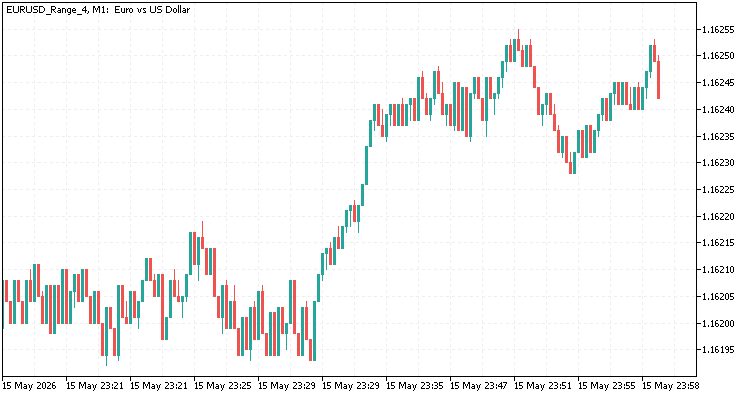
Fig. 3. Range bars

Fig. 4. Equal Volume Bars
Let's briefly consider the features and examples of using timeless bars.
Renko — a new bar is rendered only when the price overcomes the specified bar size in points from the closing price of the previous bar. The direction of the bar (bullish/bearish) is determined by the breakout direction. Shadows are not displayed by default, but can be used if we need to analyze intra-bar volatility. With a strong move, several bars can form in one minute. The bar closing price is the breakout price, not the minute closing price.
Sample Renko-based strategy:
- Entry - intersection of the fast MA(9) and slow MA(21) at the close of the bar,
- Filter - if the ATR(14) value is greater than the specified threshold, filter out false breakouts in the sideways movement,
- Exit - reverse crossing of Moving Averages or fixed stop in points,
- The peculiarity is that trading is conducted at the PRICE_CLOSE price, since the zero (last) renko bar is always incomplete.
Range bars — a new bar opens when the swing between High and Low reaches the specified value in points. Unlike Renko, it takes into account all movement within the bar, not just the close. Instead of a fixed size value, we can use a dynamic bar size (Range) based on ATR.
What does Range size mean? Range size sets the threshold price change value, at which a new bar begins to form. 1 Range is equal to one minimum price change. This value can be represented by the following equation: 1 Range = Tick Size.
Advantages for use in scalping:
- During periods of low volatility, bars form slowly - fewer false signals,
- When volatility spikes, the bars become more frequent, allowing us to catch fast movements,
- Clear support/resistance levels at the bar boundaries.
Equal volume bars — a new bar is created after the accumulation of a specified number of ticks (for Forex) or real volume (for exchange instruments). Bars of equal volume allow us to compare movements on an equal basis:
- Zones with rapid bar formation indicate high activity, and therefore a breakout of the current range is possible.
- Empty areas of the chart indicate a lack of interest, and therefore a reversal is possible.
Remarks:
The Strategy Tester generates ticks for custom symbols according to standard rules: based on the bar configuration (OHLC). However, for timeless bars (especially renko), the bar's closing price is by definition a predictor of the next move. The tester can create an illusion of an ideal entry by looking at the configuration of the zero (unfinished) bar.
Solution:
- Always take signals from the first bar (completed), not from zero;
- Set the tester to work on closed bars;
- Use real symbol order routing (see below) — this will eliminate tick generation artifacts in the tester.
Synthetic instruments: spreads, baskets and intermarket links
Markets rarely move in isolation — instruments are often linked. EURUSD tends to pull GBPUSD with it, oil shapes sentiment in CAD, AUD, and NOK, while the S&P 500 and DAX often move in sync. But what if, instead of passively observing correlations, we create a single tool that mathematically combines these assets? Custom symbols in MetaTrader 5 allow you to go beyond the standard broker tools and build your own analytical system: spreads, baskets, arbitrage pairs, and anti-correlation indices.
Mathematics of synthetics:
The basis of any synthetic instrument is a linear combination:
Synth = k₁·Asset_A ± k₂·Asset_B ± ... ± kₙ·Asset_N.
In practice, a simplified equation for the spread of two assets is most often used:
Spread = Price_A - Ratio · Price_B,
where Ratio is the normalization coefficient that equalizes the volatility or price scale of assets. Without normalization, the spread will be biased towards the more expensive instrument, which will distort oscillator signals and margin requirement calculations.
The main technical task is to synchronize ticks. Asynchronous receipt of quotes from different liquidity pools leads to jagged spreads and false breakouts. In MetaTrader 5, we solve this through a buffering time window and fixing the last known price for each synthetic leg.
Synthetic tick generator:
//+------------------------------------------------------------------+
//| synthetic tick generator based on two assets                     |
//+------------------------------------------------------------------+
class CSyntheticTickGenerator
  {
private:
   string            symbol_a;
   string            symbol_b;
   string            synth_name;
   double            ratio;
   double            last_price_a;
   double            last_price_b;
   int               symbol_digits;
   double            point;

public:
   //+------------------------------------------------------------------+
   //| initializer                                                      |
   //+------------------------------------------------------------------+
   bool              Init(const string _sym_a, const string _sym_b, const string _synth, double _ratio)
     {
      symbol_a=_sym_a;
      symbol_b=_sym_b;
      synth_name=_synth;
      ratio=_ratio;
      symbol_digits=(int)SymbolInfoInteger(_sym_a, SYMBOL_DIGITS);
      point=SymbolInfoDouble(_sym_a, SYMBOL_POINT);
      last_price_a=0.0;
      last_price_b=0.0;
      return true;
     }

   //+------------------------------------------------------------------+
   //| handle an incoming tick                                          |
   //+------------------------------------------------------------------+
   void              ProcessTick(const MqlTick &tick, const string source_symbol)
     {
      if(tick.bid<=0 || tick.ask<=0)
         return;

   //--- update the last known price for the corresponding leg
      if(source_symbol==symbol_a)
        {
         last_price_a=tick.bid;
        }
      else
         if(source_symbol==symbol_b)
           {
            last_price_b=tick.bid;
           }

   //--- waiting for prices to appear for both assets
      if(last_price_a<=0 || last_price_b<=0)
         return;

   //--- calculate synthetic price with normalization
      double synth_bid=NormalizeDouble(last_price_a-ratio*last_price_b, symbol_digits);

      double base_spread=tick.ask-tick.bid;
      double synth_ask=NormalizeDouble(synth_bid+base_spread, symbol_digits);

   //--- tick structure formation
      MqlTick synth_tick={0};
      synth_tick.time=tick.time;
      synth_tick.time_msc=tick.time_msc;
      synth_tick.bid=synth_bid;
      synth_tick.ask=synth_ask;
      synth_tick.flags=TICK_FLAG_BID | TICK_FLAG_ASK;

   //--- writing a custom symbol to the database
      MqlTick batch[1];
      batch[0]=synth_tick;
      CustomTicksAdd(synth_name, batch);
     }
  };
//+------------------------------------------------------------------+
Sample strategy — synthetic spreads are ideal for statistical arbitrage and mean reversion strategies. The traditional approach is to track the deviation of the spread from the moving average in units of standard deviation (z-score).
Signal logic:
- Entry — if |z-score| > 2.0, the spread deviation is statistically abnormal;
- Exit — |z-score| < 0.5, mean reversion occurred, position is closed;
- Risk management – stop loss is linked to the basket volatility (for example, 2.5 × ATR(20)).
The functions for calculating z-score and generating signals are presented below:
//+------------------------------------------------------------------+
//| z-score calculation for synthetic spread                         |
//+------------------------------------------------------------------+
double CalculateSpreadZScore(const string synth_symbol, int ma_period, int std_dev_period)
  {
   static int ma_handle=INVALID_HANDLE;
   static int std_handle=INVALID_HANDLE;

//--- initialize handles on first call
   if(ma_handle == INVALID_HANDLE)
     {
      ma_handle=iMA(synth_symbol, PERIOD_M1, ma_period, 0, MODE_SMA, PRICE_CLOSE);
      if(ma_handle==INVALID_HANDLE)
        {
         Print("Error creating iMA handle: ", GetLastError());
         return 0.0;
        }
     }

   if(std_handle == INVALID_HANDLE)
     {
      std_handle = iStdDev(synth_symbol, PERIOD_M1, std_dev_period, 0, MODE_SMA, PRICE_CLOSE);
      if(std_handle==INVALID_HANDLE)
        {
         Print("Error creating iStdDev handle: ", GetLastError());
         return 0.0;
        }
     }
   double ma_buf[], std_buf[], close_buf[];
   ArraySetAsSeries(ma_buf, true);
   ArraySetAsSeries(std_buf, true);
   ArraySetAsSeries(close_buf, true);

//--- copy data from the 1st completed bar (index 1, quantity 1)
   if(CopyBuffer(ma_handle, 0, 1, 1, ma_buf) != 1)
      return 0.0;
   if(CopyBuffer(std_handle, 0, 1, 1, std_buf) != 1)
      return 0.0;
   if(CopyClose(synth_symbol, PERIOD_M1, 1, 1, close_buf) != 1)
      return 0.0;

   double spread_ma = ma_buf[0];
   double spread_std = std_buf[0];
   double current_spread = close_buf[0];

   if(spread_std == 0.0)
      return 0.0;
   return (current_spread - spread_ma) / spread_std;
  }

//+------------------------------------------------------------------+
//| trading signal generator                                         |
//+------------------------------------------------------------------+
int CheckSpreadSignal(const string synth_symbol)
  {
   double z = CalculateSpreadZScore(synth_symbol, 20, 20);
   if(z>2.0)
      return -1; // spread overbought -> spread short
   if(z<-2.0)
      return 1;  // spread oversold -> spread long
   if(MathAbs(z)<0.5)
      return 0;  // close signal
   return 0;
  }
The direction of the hedge depends on the sign of the z-score: if the deviation is positive, we sell the overbought leg a and buy the oversold leg b; if it is negative, the opposite is true. Margin requirements are calculated automatically by the tester if the corresponding cross rates are available in MarketWatch.
Basket indices and dynamic rebalancing
If a spread is a two-legged instrument, then a basket is a portfolio of N symbols. Weight factors can be:
- Static - equally weighted (k = 1/N) or fixed by capitalization/liquidity of the symbol;
- Dynamic - recalculated based on inverse volatility or moving volume.
Dynamic rebalancing requires periodic recalculation of the k coefficients and adjustment of the symbol properties via CustomSymbolSetDouble(). In the current version of the strategy tester, contract properties are fixed at the start of optimization, so dynamic weighting changes should be emulated by modifying the tick history or using custom indicators to calculate signals without changing the contract specifications.
Analytical digression: The pitfalls of synthetics
Correlation does not equal causation — the historical connection between assets may be broken at the moment of macroeconomic shocks. The EURUSD/GBPUSD synthetic spread, stable for years, can create a gap of 50–80 points on news about the Central Bank rate or geopolitics. The mean reversion strategy does not take into account structural changes in assets (symbols).
Calculating margins and profits in the tester — the strategy tester automatically searches for cross rates to convert the margin and obtain a financial result. If you test SYNTH_EURGBP.custom on a USD account, the terminal searches for pairs in the following order:
- EURUSD.custom / GBPUSD.custom (custom)
- EURUSD.b / GBPUSD.b (with the broker suffix)
- EURUSD / GBPUSD (base pairs)
If they are missing from the Market Watch, the tester will return a margin calculation error or set profit to zero.
Disabling MQL5 Cloud Network — optimization on synthetic symbols via cloud agents is disabled. Since different machines may store user-defined symbols with the same names but different histories or normalization factors, this would lead to desynchronization of results and excess traffic. Therefore, testing is only possible locally or in a local network.
News filtering — statistical spread arbitrage is highly vulnerable to asymmetric macro-events (when the event affects only one issuing country). It is recommended to add the economic calendar or volatility filter that disables the strategy 30-60 minutes before the release of high-impact data.
Workflow integration pipeline
In MQL5 trading system development, an "integration pipeline" is a chain of data and event processing that links an external source to the terminal trading interface.
In other words, it is a pipeline through which raw data (ticks) pass through several processing stages until it is transformed into a ready-to-use trading or analysis tool. In practice, the pipeline structure (from data to trade) consists of four sequential stages:
- When raw ticks are received from the broker, we use the SymbolInfoTick() functions or/and CopyTicksRange() tick history. For example, ticks for EURUSD and GBPUSD come from different servers.
- Class-aggregator (CBarAggregator or CSyntheticTickGenerator) receives these ticks, synchronizes them in time and applies a mathematical equation. For example, it calculates the Price(EUR) - Price(GBP) spread.
- The result is written to the terminal database via the CustomRatesUpdate() or CustomTicksAdd() functions. For example, creating the SPREAD_EURGBP.custom custom symbol. Now the terminal handles this instrument just like a regular currency pair.
- Using the platform standard tools for the created symbol - launching the EA/indicator in the Strategy Tester.
Stress testing through modified history
Standard backtesting often creates the illusion of security. You run an EA on a perfect history, with perfect execution, and get a beautiful picture of the equity curve. But the real market is an environment full of toxic ticks, spread widening during news events, and liquidity issues.
MetaTrader 5 gives you a unique opportunity to become your own broker. You can not only analyze history, but also modify it, deliberately worsening trading conditions to test the strategy for strength. If a robot makes money on ideal data, but loses its deposit when the spread widens by 5 pips, then such a system is not viable.
Let's look at how to use custom symbols to create stress scenarios: from artificially inflating transaction costs to emulating broker restrictions during periods of high volatility.
The philosophy behind stress testing is quite simple: we try to break the system before entering the real market.
We take a symbol base history and modify it to simulate extreme market conditions.
Modification scenarios:
- Spread widening simulates cost hikes that are critical for scalping and day trading.
- Increasing Stop Level/Freeze Level — testing resistance to broker restrictions on setting stop losses and take profits.
- Changing margin requirements - testing resilience to margin calls when changing leverage;
- Toxic tick injection - adding gaps or liquidity breaks.
The main advantage of the custom symbol approach is reproducibility. You can run the same test with different stress parameters and compare metrics (Profit Factor, Maximum Drawdown, Recovery Factor) in a tabular format.
Scenario 1: Artificial widening of the spread
Spread is the main enemy of short-term strategies. In real-world conditions, the spread is not fixed. It fluctuates between zero and, effectively, infinity, and can widen dramatically during important macroeconomic news releases. To test this, we can take the tick history, clone the symbol, and rewrite the ticks, adding a fixed number of pips or a percentage of the current spread to each Ask.
Below is a sample script that creates a stressed version of a symbol with a fixed high spread:
//+------------------------------------------------------------------+
//| inputs                                                           |
//+------------------------------------------------------------------+
input string   SourceSymbol        = "EURUSD";          // Source symbol
input string   TargetSymbol        = "EURUSD_Stress";   // New symbol name
input int      StressSpreadPoints  = 50;                // Fixed spread (in points)
input datetime HistoryFromDate     = D'2023.01.01';     // Start loading history
input bool     DeleteOldData       = true;              // Clear the target symbol's history before writing

CiCustomSymbol stressSymb;

//+------------------------------------------------------------------+
//| Script program start function                                    |
//+------------------------------------------------------------------+
void OnStart()
  {
   double point;
   int    digits;

//--- get the properties of the original symbol for calculations
   point = SymbolInfoDouble(SourceSymbol, SYMBOL_POINT);
   digits = (int)SymbolInfoInteger(SourceSymbol, SYMBOL_DIGITS);

   if(point == 0)
     {
      Print("Error: Failed to get point size for ", SourceSymbol);
      return;
     }

   Print("--- Start generating stress symbol ---");
   PrintFormat("Source: %s | Target: %s | Spread: %d pp", SourceSymbol, TargetSymbol, StressSpreadPoints);

//--- create a custom symbol via a class method
//--- return codes: -1 (error), 0 (already exists), 1 (created)
   int createRes = stressSymb.Create(TargetSymbol, "", SourceSymbol, 1000000, true);

   if(createRes == -1)
     {
      Print("Error creating symbol via CiCustomSymbol.Create()");
      return;
     }

   stressSymb.Select(true);

//--- clone the contract properties (Digits, Point, Mode etc.)
   if(!stressSymb.Clone(SourceSymbol))
     {
      Print("Error cloning symbol properties");
      return;
     }

//--- clear old history
   if(DeleteOldData)
     {
      Print("Clear history using CiCustomSymbol...");
      if(stressSymb.TicksDelete(0, LONG_MAX) < 0)
         Print("Failed to clear ticks: ", GetLastError());
     }

//--- cyclic loading and modification of ticks (in 1-day batches)
   datetime current_date = HistoryFromDate;
   datetime stop_date = TimeCurrent();

   if(current_date >= stop_date)
     {
      Print("Error: Invalid history start date.");
      return;
     }

   int total_ticks_added = 0;
   MqlTick ticks[];

//--- calculate the stress spread value
   double stress_spread_value = StressSpreadPoints * point;

   Print("Starting batch history processing...");

   while(current_date < stop_date && !IsStopped())
     {
      //--- define the boundaries of the day
      datetime day_start = current_date;
      datetime day_end = current_date + PeriodSeconds(PERIOD_D1);

      ulong t1 = (ulong)day_start * 1000;
      ulong t2 = (ulong)day_end * 1000;

      //--- read the original symbol ticks
      int copied = CopyTicksRange(SourceSymbol, ticks, COPY_TICKS_ALL, t1, t2);

      if(copied > 0)
        {
         //--- data stress modification
         for(int i = 0; i < copied; i++)
           {
            //--- set Ask = Bid + Fixed Spread
            ticks[i].ask = ticks[i].bid + stress_spread_value;

            //--- mark that both prices have changed
            ticks[i].flags = TICK_FLAG_BID | TICK_FLAG_ASK;
           }

         //--- write to the database via a class
         int added = stressSymb.TicksReplace(t1, t2, ticks);

         if(added != copied)
           {
            PrintFormat("Error recording ticks for %s via class. Registered: %d of %d",
                        TimeToString(day_start, TIME_DATE), added, copied);
           }
         else
           {
            total_ticks_added += added;
           }
        }

      //--- move on to the next day
      current_date = day_end;
      Sleep(10);
     }

   Print("--- Generation complete ---");
   PrintFormat("Total ticks processed: %d", total_ticks_added);
  }
//+------------------------------------------------------------------+
The script uses the CiCustomSymbol wrapper class to handle custom symbols. The full script code is in the StressTest_SpreadModifier.mq5 file attached to the article.
Scenario 2: Stop Level and Freeze Level
During periods of high volatility (for example, before NFP data in the US), many brokers increase the minimum distance for setting stop losses (Stop Level) and the order freezing level (Freeze Level). If your strategy sets a stop loss at 5 pips, and your broker requires a minimum of 20 at entry, the order will be rejected by the server, or the position will remain without a stop.
How to check this in MetaTrader 5? The contract properties are specified by the CustomSymbolSetInteger() function. You can create a custom symbol where SYMBOL_TRADE_STOPS_LEVEL is set to 5-10 times the normal value.
//--- set an extreme stop level (for example, 500 points)
long huge_stop_level = 500;
if(!CustomSymbolSetInteger(stress_symbol, SYMBOL_TRADE_STOPS_LEVEL, huge_stop_level))
   Print("Error setting stop level");

//--- set the freeze level (so that orders cannot be modified close to the market)
long huge_freeze_level = 500;
if(!CustomSymbolSetInteger(stress_symbol, SYMBOL_TRADE_FREEZE_LEVEL, huge_freeze_level))
   Print("Error setting freeze level");
After running the tester on such a symbol, pay attention to the log. If the strategy tries to place a stop too close, the tester will return "OrderSend error 130" (invalid stops). This will allow you to assess how much the strategy relies on the ability to place tight stops.
Scenario 3: Margin requirements and leverage
Changing margin requirements allows you to test your strategy for resilience to margin calls when your available leverage decreases. This is especially true for grid strategies and martingales, which tend to lose their deposits when there is insufficient free margin. You can artificially inflate SYMBOL_MARGIN_INITIAL (initial margin).
//--- increase the margin requirement 2 times
double normal_margin = SymbolInfoDouble(source_symbol, SYMBOL_MARGIN_INITIAL);
double stress_margin = normal_margin * 2.0;

if(!CustomSymbolSetDouble(stress_symbol, SYMBOL_MARGIN_INITIAL, stress_margin))
   Print("Error setting margin");
Analytical digression: How to distinguish a risk from an artifact
When interpreting stress test results, it is important not to go to extremes:
- Smooth degradation is good. If the equity curve gradually decreases as conditions worsen (spread increases, stops increase), then the strategy has a margin of safety.
- A sharp break is bad. If a strategy shows a positive result on a spread of 20, but a complete loss on a spread of 21, this is the grail adjusted (over-optimized) to narrow conditions. In real trading, such a robot would not survive long.
Data sources
For a correct stress test, the quality of the tick history is important. Built-in minute bars (M1) are not suitable for spread testing, since the spread is built into the closing price or is not present as a separate entity. Use CopyTicks() and custom symbols built on ticks.
Strategy testing stages:
- Data preparation - download high-quality ticks (for example, from Dukascopy) or make sure that the terminal has a full tick history loaded,
- Creating a testing ground - use a script that clones the base symbol (e.g. EURUSD → EURUSD_Stress_50) and applies modifiers (spread, stops, margin),
- Batch run - use the strategy tester optimizer.
Life hack:
Instead of changing the EA code, change the symbol it is tested on. Run optimization for a set of custom symbols: EURUSD_Normal, EURUSD_Spread_30, EURUSD_Spread_50. Combine the results (Net Profit, Drawdown) in a table or database. A strategy that remains profitable in all scenarios can be considered for using on a real account.
Workflow integration: From the tester to live chart
Let's assume we created custom symbols, generated timeless charts based on them (Renko, Range) and tested the strategy in the tester. But here is where the catch lies: your broker's trading server knows nothing about the existence of EURUSD_Renko_10.
If you try to send an order for a custom symbol directly, the terminal will return error 4756 (Unknown Symbol). Custom symbols exist only in the client terminal. How then can we make an EA that makes decisions based on renko bars trade real EURUSD?
To answer this question, we will analyze the structure of trading with order routing. We will create a mechanism that will transparently replace symbols in trading queries, allowing us to analyze one instrument and trade another.
Routing problem and virtual reality
When an EA is placed on a custom symbol chart, the system variable _Symbol returns the name of this custom instrument (e.g. XAGUSD_Range_10), which is not surprising. At the same time, the EA usually uses the _Symbol field or (which is the same) the Symbol() system function for the following operations:
- Sending orders;
- Requesting quotes (SymbolInfoTick());
- Checking open positions (PositionSelect etc.).
To make it trade with the real market, we need to intercept all these calls and replace _Symbol with an actual instrument (for example, XAGUSD). Manually rewriting the code for each EA is not our approach. The solution is simple — CustomOrder wrapper class. Let's create a class that duplicates the key functions of the MQL5 API. Inside these functions, a check is performed: if the current chart symbol (custom) is requested, replace it with the real one.
To avoid changing the EA source code, we will use the #define directive, which will replace the standard calls with ours at the preprocessor stage.
The implementation of the class for handling custom symbols is provided below:
//+------------------------------------------------------------------+
//| class for routing orders                                         |
//| purpose: replacing a custom symbol with a real one               |
//+------------------------------------------------------------------+
class CustomOrder
  {
private:
   static string     workSymbol; // real symbol name

public:
   //--- set a replacement symbol
   static void       setReplacementSymbol(const string replacement)
     {
      workSymbol = replacement;
     }

   //--- send a trade request
   static bool       OrderSend(MqlTradeRequest &request, MqlTradeResult &result)
     {
      //--- replace a request symbol
      if(request.symbol == _Symbol && workSymbol != "")
        {
         request.symbol = workSymbol;

         //--- price adjustment if it is taken from a custom symbol
         if(request.type == ORDER_TYPE_BUY)
            request.price = SymbolInfoDouble(workSymbol, SYMBOL_ASK);
         else
            if(request.type == ORDER_TYPE_SELL)
               request.price = SymbolInfoDouble(workSymbol, SYMBOL_BID);
        }

      //--- call the original function
      return ::OrderSend(request, result);
     }

   //--- calculate profit
   static bool       OrderCalcProfit(ENUM_ORDER_TYPE action, string symbol, double volume,
                                     double price_open, double price_close, double &profit)
     {
      if(symbol == _Symbol && workSymbol != "")
         symbol = workSymbol;

      return ::OrderCalcProfit(action, symbol, volume, price_open, price_close, profit);
     }

   //--- get the position string property
   static string     PositionGetString(ENUM_POSITION_PROPERTY_STRING property_id)
     {
      string res = ::PositionGetString(property_id);
      //--- if a position symbol is requested, return the chart name, not the actual one
      if(property_id == POSITION_SYMBOL && res == workSymbol)
         return _Symbol;
      return res;
     }

   //--- get the order string property
   static string     OrderGetString(ENUM_ORDER_PROPERTY_STRING property_id)
     {
      string res = ::OrderGetString(property_id);
      if(property_id == ORDER_SYMBOL && res == workSymbol)
         return _Symbol;
      return res;
     }

   //--- select position by symbol
   static bool       PositionSelect(string symbol)
     {
      if(symbol == _Symbol && workSymbol != "")
         return ::PositionSelect(workSymbol);
      return ::PositionSelect(symbol);
     }
  };

//+------------------------------------------------------------------+
//| static initialization                                            |
//+------------------------------------------------------------------+
string CustomOrder::workSymbol = "";

//+------------------------------------------------------------------+
//| macros for transparent integration                               |
//+------------------------------------------------------------------+
#define OrderSend(request, result) CustomOrder::OrderSend(request, result)
#define OrderCalcProfit(action, symbol, volume, open, close, profit) CustomOrder::OrderCalcProfit(action, symbol, volume, open, close, profit)
#define PositionGetString(prop) CustomOrder::PositionGetString(prop)
#define OrderGetString(prop) CustomOrder::OrderGetString(prop)
#define PositionSelect(symbol) CustomOrder::PositionSelect(symbol)
//+------------------------------------------------------------------+
One implementation feature is that the macros replace the standard trading functions of the MetaTrader 5 terminal with the same parameters. The full code is in the CustomOrder.mqh file attached to this article.
Sample integration into the EA
Let's imagine that we have a standard TrendFollower EA generated by the MQL5 Wizard. In order for it to be able to trade a real asset while on a Renko chart, we need to do three steps:
1. Including the header — the #include directive should come first, before the standard libraries are included. This ensures that the macros will replace the calls before the library code is compiled.
//+------------------------------------------------------------------+
//|                                               TrendFollower.mq5  |
//+------------------------------------------------------------------+
#include <CustomOrder.mqh>
#include <Expert\Expert.mqh>
#include <Expert\Signal\MySignals\SignalMACD.mqh>
//--- other declarations...
2. Entering an input – we add a parameter to tell the EA which real symbol to send orders to:
input string InpWorkSymbol = "XAGUSD"; // Actual symbol to execute
3. Initialization in OnInit() — in the initialization function we pass the actual symbol to our class. We also use a clever trick for the visual tester: to prevent the chart from freezing, we need to force a request for quotes for the actual symbol:
int OnInit()
  {
//--- configure the router
   if(InpWorkSymbol != "")
     {
      CustomOrder::setReplacementSymbol(InpWorkSymbol);

      //--- we force loading the history of the real symbol, so that the visualization goes smoothly
      MqlRates rates[1];
      CopyRates(InpWorkSymbol, PERIOD_M1, 0, 1, rates);
     }

//--- standard EA initialization...
// ...
   return(INIT_SUCCEEDED);
  }
After these changes, the EA will analyze XAGUSD_Renko_10 charts, but all orders are processed on XAGUSD and the symbol is displayed correctly in the trade journal.
Analytical digression: Eliminating look-ahead bias in the tester
Why do we need all this if we can simply test on real data? Let's recall the section about Renko. We found that the strategy tester generates ticks based on the bar configuration (OHLC) when testing on a custom symbol. For the Renko bar, this creates the illusion of an ideal entry: the EA sees the bar close and immediately enters at the closing price. However, in reality, the brick takes some time to form. The price may fluctuate within the bar formation range.
When you enable routing (using the CustomOrder class), the following happens:
- The EA sees a signal on the chart with a custom symbol (for example, the intersection of MA on Renko),
- It sends a buy or sell request,
- The CustomOrder class replaces a symbol with EURUSD,
- The trade is executed at the current market price of the real EURUSD.
As a result, you get realistic results. The entry price may differ from the price on the Renko chart due to slippage or data asynchrony. The difference between a custom symbol test and a routing test is the cost of your trading hypothesis.
Before you start live trading on custom symbols, please make sure of the following:
- History sync - ensure that the actual symbol has a full history in the terminal. If there is no data, then CustomOrder may incorrectly calculate margin or entry price;
- No errors with code 4756 - check the expert log. If you see Unknown Symbol, it means the macros did not work (perhaps you included CustomOrder.mqh after other libraries);
- slippage - When trading through a wrapper, you get the market price. Make sure that the allowed slippage in the EA settings is set high enough to ensure that orders are executed during fast movements, when Renko signals are generated more frequently than the tick of the real symbol is updated.
If you use custom symbols for analysis, cloud optimization on the MQL5 Cloud Network is not available. Use a local network and/or a local computer.
Conclusion
MetaTrader 5 has undergone a quiet but fundamental evolution: the terminal has ceased to be a passive reader of quotes and has become an engineering laboratory. Now, traders don't have to adapt to what the broker provides, but rather construct their own analytical environment that is optimal for a specific idea.
We have learned to decouple from the calendar grid through Renko, Range, and Equal-Volume charts, synthesize intermarket relationships through spreads and baskets, intentionally break history for stress testing, and finally, link virtual trading to real execution through transparent order routing. Each of these stages addresses a specific problem for the system developer: timeframe noise, lack of necessary tools, the illusion of a perfect backtest, and the gap between the chart and the server.
The main value of custom symbols is in the control over data. You test not only the EA's parameters, but also the resilience of the logic itself to transaction costs, tick asynchrony, and broker restrictions. If a strategy maintains a positive expected value with a fixed spread of 50 pips, artificial gaps, and a dynamic stop level, it is ready for the real market. If not, you save your deposit by discovering a weakness at the simulation stage.
Start small: take any scalping or trend EA, create a chart with equal-volume bars for it, run a stress scenario with an increased spread and connect routing via CustomOrder. Compare metrics.
You might be surprised how the equity curve changes when time-based noise is filtered out and transaction risks are calculated in advance. MQL5 documentation, CodeBase, and the community forum are your main allies in building your own market reality.
Recommended resources for learning how to work with custom symbols in MetaTrader 5:
- Custom symbols documentation,
- Custom Symbols: Practical Basics,
- Creating and Testing Custom Symbols in MetaTrader 5,
- Trading Strategy Stress Testing Using Custom Symbols ,
- MQL5 Custom Symbols: Creating a 3D Bars Symbol.
List of files attached to the article:
| File Name | Description |
|---|---|
| CiCustomSymbol.mqh | File containing the CiCustomSymbol class code |
| CreateCustomSymbol.mq5 | A code for a sample script for creating a custom symbol. |
| CBarAggregator.mqh | CBarAggregator class code |
| CustomChartGenerator.mq5 | A file containing the code of an indicator that generates history and live bars of three types: Renko, Range, and equal-volume |
| CSyntheticTickGenerator.mqh | File containing the CSyntheticTickGenerator class code |
| StressTest_SpreadModifier.mq5 | A file containing the code for a sample script to create a custom symbol for stress testing with a large spread |
| CustomOrder.mqh | File containing the CustomOrder class code |
Translated from Russian by MetaQuotes Ltd.
Original article: https://www.mql5.com/ru/articles/22391
Warning: All rights to these materials are reserved by MetaQuotes Ltd. Copying or reprinting of these materials in whole or in part is prohibited.

 From "Best Pass" to Robust Solutions: Exploring the Optimization Surface in MetaTrader 5
 MQL5 Trading Tools (Part 32): Crosshair, Magnifier, and Measure Mode
 Evaluating the Quality of Forex Spread Trading Based on Seasonal Factors in MetaTrader 5
 The MQL5 Standard Library Explorer (Part 12): Multi-Timeframe Composite-Score Dashboard

- Free trading apps
- Over 8,000 signals for copying
- Economic news for exploring financial markets
You agree to website policy and terms of use
Very interesting article - re-reading it repeatedly....
Has anyone managed to make a renko chart using the indicator from this article?
I don't want this indicator to work for some reason.
Has anyone managed to make a renko chart using the indicator from this article?
I don't want this indicator to work for some reason.
A very big "brick" has been set.
A very large "brick" has been placed.
As it was default in the indicator, that's what I put.
Thanks, indeed, if you make the brick smaller, the graph appears.