Creación de sistemas de trading basados en IA en MQL5 (Parte 4): Cómo superar las limitaciones de la entrada multilínea, garantizar la persistencia del chat y generar señales
 15
 0

Introducción
En nuestro artículo anterior (Parte 3), actualizamos el programa integrado con ChatGPT en MetaQuotes Language 5 (MQL5) con una interfaz de usuario desplazable y orientada a un único chat. Hemos incorporado marcas de tiempo, desplazamiento dinámico y un historial de conversación con múltiples intercambios para ofrecer una experiencia fluida de interacción con la IA en MetaTrader 5. En la parte 4, superamos las limitaciones de la entrada multilínea gracias a un renderizado de texto mejorado. Añadimos una barra lateral para navegar por los historiales de chat persistentes, que se almacenan con cifrado Advanced Encryption Standard (AES256) y compresión ZIP. Además, generamos señales de trading iniciales mediante la integración de datos del gráfico para facilitar un análisis del mercado basado en la IA. Hoy hablaremos de los siguientes temas:
- Comprensión de la gestión de la entrada multilínea, la persistencia del chat y la generación de señales de trading
- Implementación en MQL5
- Backtesting
- Conclusión
Al final, tendrás un asistente de trading con IA en MQL5 con una usabilidad mejorada y funciones que tienen en cuenta el contexto, listo para personalizarlo. ¡Manos a la obra!
Comprensión de la gestión de la entrada multilínea, la persistencia del chat con barra lateral y la generación de señales de trading
La gestión de la entrada multilínea en los sistemas de trading basados en IA es esencial para poder introducir prompts o datos detallados, como descripciones del mercado de varias líneas o fragmentos de código. Esto garantiza que la IA pueda procesar consultas complejas sin truncarlas, algo crucial para obtener respuestas precisas en mercados dinámicos, donde las entradas de una sola línea pueden limitar el contexto. La persistencia del chat aporta valor al almacenar el historial de conversación entre sesiones, lo que nos permite aprovechar los análisis previos de la IA sin repetir información, mientras que la generación de señales de trading utiliza la IA para analizar los datos del mercado y ofrecer recomendaciones de compra o venta que se pueden llevar a la práctica, lo que reduce el análisis manual y nos ayuda a responder más rápidamente a oportunidades como los cambios de tendencia. En conjunto, estas características dan lugar a un sistema más sólido, que mejora la experiencia del usuario al mantener el contexto e integrar la inteligencia artificial en las decisiones de negociación en tiempo real, con el fin de minimizar los errores y aumentar la rentabilidad.
Nuestro plan consiste en mejorar el programa de IA mediante la implementación de un procesamiento de texto avanzado que permita gestionar la entrada multilínea, ya que la lógica actual solo nos permite introducir textos de hasta 63 caracteres sin problemas, lo que nos limita a utilizar únicamente prompts sencillos. Por lo tanto, ampliaremos esa capacidad para poder introducir tantas líneas como sea posible cuando sea necesario, ya que, en algunos casos, puede que tengamos que proporcionar prompts más detallados a la IA para que nos proporcione señales de trading. También incorporaremos mecanismos de almacenamiento seguro para garantizar la persistencia del chat y facilitar la recuperación y la navegación por conversaciones anteriores, de modo que no tengamos que repetirnos cada vez que queramos hacer referencia a algo. Por motivos de seguridad, utilizaremos el modelo Advanced Encryption Standard (AES) para cifrar los chats. Lo hemos elegido simplemente porque es fácil de usar, pero puedes utilizar el que prefieras. No vamos a profundizar en la lógica de protección, pero hemos elaborado una imagen para ilustrar cómo funciona, tal y como se muestra a continuación.

La idea es que, a veces, queremos mantener una conversación en la que se analice un gráfico concreto, como el del XAUUSD, y podemos iniciar otra sobre el GBPUSD. En algún momento, es posible que necesitemos consultar esa conversación, por ejemplo, para revisar respuestas anteriores, hacer correcciones o enviar otro prompt; así, en lugar de tener que repetir toda la conversación, basta con consultar el historial guardado.
Para que todo esto tenga sentido y podamos ver los avances, añadiremos una funcionalidad que permita obtener e integrar datos de gráficos para generar señales de trading iniciales basadas en análisis de IA, lo que nos obligará a redefinir la interfaz para darle un aspecto más acorde con nuestra marca, con iconos y una barra lateral de navegación. Diseñaremos una interfaz con elementos de navegación intuitivos para gestionar los chats y mostrar las señales, garantizando que el sistema sea fácil de usar y eficiente para nosotros, con el objetivo de aprovechar la inteligencia artificial en nuestras estrategias. Echa un vistazo a continuación a lo que vamos a conseguir.

Implementación en MQL5
Para implementar el programa actualizado en MQL5, lo primero que haremos será modularizar el código, de modo que podamos separar los archivos que no necesitamos utilizar en ese momento de los que sí necesitamos. Ya habíamos dicho que separaríamos el archivo JSON, y ha llegado el momento. También definiremos una función adicional para gestionar archivos de mapa de bits, la pondremos en un archivo independiente y lo incluiremos en el programa. Esto facilitará la gestión.
//+------------------------------------------------------------------+
//|                                         AI ChatGPT EA Part 4.mq5 |
//|                           Copyright 2025, Allan Munene Mutiiria. |
//|                                   https://t.me/Forex_Algo_Trader |
//+------------------------------------------------------------------+
#property copyright "Copyright 2025, Allan Munene Mutiiria."
#property link "https://t.me/Forex_Algo_Trader"
#property version "1.00"
#property strict
#property icon "1. Forex Algo-Trader.ico"

#include "AI JSON FILE.mqh"                        //--- Include JSON parsing library
#include "AI CREATE OBJECTS FNS.mqh"               //--- Include object creation functions
Creamos los archivos como archivos de inclusión, como puedes ver, y los incluimos en nuestro programa mediante la directiva #include. Para simplificar, los hemos trasladado a nuestra carpeta principal, donde se encuentra el programa, por lo que hemos utilizado el formato con comillas dobles. De lo contrario, si se encuentran en otra carpeta, tendrás que sustituir las comillas por corchetes angulares («<») y definir la ruta correctamente. Mire más abajo.

Simplemente hemos trasladado los segmentos de código. Necesitaremos una función para gestionar las etiquetas de mapa de bits.
//+------------------------------------------------------------------+
//| Creates a bitmap label object                                    |
//+------------------------------------------------------------------+
bool createBitmapLabel(string objName, int xDistance, int yDistance, int xSize, int ySize,
                       string bitmapPath, color clr, ENUM_BASE_CORNER corner = CORNER_LEFT_UPPER) {
   ResetLastError();                                          //--- Reset error code
   if (!ObjectCreate(0, objName, OBJ_BITMAP_LABEL, 0, 0, 0)) { //--- Create bitmap label
      Print(__FUNCTION__, ": failed to create bitmap label! Error code = ", GetLastError()); //--- Log failure
      return false;                                            //--- Return failure
   }
   ObjectSetInteger(0, objName, OBJPROP_XDISTANCE, xDistance); //--- Set x distance
   ObjectSetInteger(0, objName, OBJPROP_YDISTANCE, yDistance); //--- Set y distance
   ObjectSetInteger(0, objName, OBJPROP_XSIZE, xSize);         //--- Set width
   ObjectSetInteger(0, objName, OBJPROP_YSIZE, ySize);         //--- Set height
   ObjectSetInteger(0, objName, OBJPROP_CORNER, corner);       //--- Set corner
   ObjectSetString(0, objName, OBJPROP_BMPFILE, bitmapPath);   //--- Set bitmap path
   ObjectSetInteger(0, objName, OBJPROP_COLOR, clr);           //--- Set color
   ObjectSetInteger(0, objName, OBJPROP_BACK, false);          //--- Set to foreground
   ObjectSetInteger(0, objName, OBJPROP_STATE, false);         //--- Disable state
   ObjectSetInteger(0, objName, OBJPROP_SELECTABLE, false);    //--- Disable selectability
   ObjectSetInteger(0, objName, OBJPROP_SELECTED, false);      //--- Disable selection
   return true;                                                //--- Return success
}
Implementamos una función para crear etiquetas de mapa de bits, lo que permitirá mostrar iconos e imágenes a escala en la interfaz de usuario, tal y como has podido ver en la descripción. En la función «createBitmapLabel», utilizamos la función ObjectCreate para generar una etiqueta de mapa de bits (OBJ_BITMAP_LABEL) con las coordenadas («xDistance», «yDistance»), el tamaño («xSize», «ySize»), la ruta del mapa de bits, el color y la esquina de referencia especificados (por defecto, CORNER_LEFT_UPPER). Establecemos propiedades como «OBJPROP_BMPFILE» para la imagen y, mediante ObjectSetInteger, nos aseguramos de que el objeto no se pueda seleccionar y se sitúe en primer plano. Si la creación falla, anotamos el error en el registro de eventos con Print. Aquí tienes la implementación completa de ese archivo de creación de objetos.
//+------------------------------------------------------------------+
//|                                        AI CREATE OBJECTS FNS.mqh |
//|                           Copyright 2025, Allan Munene Mutiiria. |
//|                                   https://t.me/Forex_Algo_Trader |
//+------------------------------------------------------------------+
#property copyright "Copyright 2025, Allan Munene Mutiiria."
#property link      "https://t.me/Forex_Algo_Trader"

//+------------------------------------------------------------------+
//| Creates a rectangle label object                                 |
//+------------------------------------------------------------------+
bool createRecLabel(string objName, int xDistance, int yDistance, int xSize, int ySize,
                    color bgColor, int borderWidth, color borderColor = clrNONE,
                    ENUM_BORDER_TYPE borderType = BORDER_FLAT,
                    ENUM_LINE_STYLE borderStyle = STYLE_SOLID,
                    ENUM_BASE_CORNER corner = CORNER_LEFT_UPPER) {   //--- Create rectangle label
   ResetLastError();                                                 //--- Reset previous errors
   if (!ObjectCreate(0, objName, OBJ_RECTANGLE_LABEL, 0, 0, 0)) {    //--- Attempt creation
      Print(__FUNCTION__, ": failed to create rec label! Error code = ", _LastError); //--- Print error
      return (false);                                                //--- Return failure
   }
   ObjectSetInteger(0, objName, OBJPROP_XDISTANCE, xDistance); //--- Set x distance
   ObjectSetInteger(0, objName, OBJPROP_YDISTANCE, yDistance); //--- Set y distance
   ObjectSetInteger(0, objName, OBJPROP_XSIZE, xSize);         //--- Set width
   ObjectSetInteger(0, objName, OBJPROP_YSIZE, ySize);         //--- Set height
   ObjectSetInteger(0, objName, OBJPROP_CORNER, corner);       //--- Set corner
   ObjectSetInteger(0, objName, OBJPROP_BGCOLOR, bgColor);     //--- Set background color
   ObjectSetInteger(0, objName, OBJPROP_BORDER_TYPE, borderType); //--- Set border type
   ObjectSetInteger(0, objName, OBJPROP_STYLE, borderStyle); //--- Set border style
   ObjectSetInteger(0, objName, OBJPROP_WIDTH, borderWidth); //--- Set border width
   ObjectSetInteger(0, objName, OBJPROP_COLOR, borderColor); //--- Set border color
   ObjectSetInteger(0, objName, OBJPROP_BACK, false);        //--- Not background
   ObjectSetInteger(0, objName, OBJPROP_STATE, false);       //--- Not pressed
   ObjectSetInteger(0, objName, OBJPROP_SELECTABLE, false);  //--- Not selectable
   ObjectSetInteger(0, objName, OBJPROP_SELECTED, false);    //--- Not selected
   ChartRedraw(0);                                           //--- Redraw chart
   return (true);                                            //--- Success
}
//+------------------------------------------------------------------+
//| Creates a button object                                          |
//+------------------------------------------------------------------+
bool createButton(string objName, int xDistance, int yDistance, int xSize, int ySize,
                  string text = "", color textColor = clrBlack, int fontSize = 12,
                  color bgColor = clrNONE, color borderColor = clrNONE,
                  string font = "Arial Rounded MT Bold",
                  ENUM_BASE_CORNER corner = CORNER_LEFT_UPPER, bool isBack = false) { //--- Create button
   ResetLastError();                                         //--- Reset errors
   if (!ObjectCreate(0, objName, OBJ_BUTTON, 0, 0, 0)) {     //--- Attempt creation
      Print(__FUNCTION__, ": failed to create the button! Error code = ", _LastError); //--- Print error
      return (false);                                        //--- Failure
   }
   ObjectSetInteger(0, objName, OBJPROP_XDISTANCE, xDistance); //--- Set x distance
   ObjectSetInteger(0, objName, OBJPROP_YDISTANCE, yDistance); //--- Set y distance
   ObjectSetInteger(0, objName, OBJPROP_XSIZE, xSize);       //--- Set width
   ObjectSetInteger(0, objName, OBJPROP_YSIZE, ySize);       //--- Set height
   ObjectSetInteger(0, objName, OBJPROP_CORNER, corner);     //--- Set corner
   ObjectSetString(0, objName, OBJPROP_TEXT, text);          //--- Set text
   ObjectSetInteger(0, objName, OBJPROP_COLOR, textColor);   //--- Set text color
   ObjectSetInteger(0, objName, OBJPROP_FONTSIZE, fontSize); //--- Set font size
   ObjectSetString(0, objName, OBJPROP_FONT, font);          //--- Set font
   ObjectSetInteger(0, objName, OBJPROP_BGCOLOR, bgColor);   //--- Set background
   ObjectSetInteger(0, objName, OBJPROP_BORDER_COLOR, borderColor); //--- Set border color
   ObjectSetInteger(0, objName, OBJPROP_BACK, isBack);       //--- Set back
   ObjectSetInteger(0, objName, OBJPROP_STATE, false);       //--- Not pressed
   ObjectSetInteger(0, objName, OBJPROP_SELECTABLE, false);  //--- Not selectable
   ObjectSetInteger(0, objName, OBJPROP_SELECTED, false);    //--- Not selected
   ChartRedraw(0);                                           //--- Redraw
   return (true);                                            //--- Success
}
//+------------------------------------------------------------------+
//| Creates an edit field object                                     |
//+------------------------------------------------------------------+
bool createEdit(string objName, int xDistance, int yDistance, int xSize, int ySize,
                string text = "", color textColor = clrBlack, int fontSize = 12,
                color bgColor = clrNONE, color borderColor = clrNONE,
                string font = "Arial Rounded MT Bold",
                ENUM_BASE_CORNER corner = CORNER_LEFT_UPPER,
                int align = ALIGN_LEFT, bool readOnly = false) {  //--- Create edit
   ResetLastError();                                         //--- Reset errors
   if (!ObjectCreate(0, objName, OBJ_EDIT, 0, 0, 0)) {      //--- Attempt creation
      Print(__FUNCTION__, ": failed to create the edit! Error code = ", _LastError); //--- Print error
      return (false);                                        //--- Failure
   }
   ObjectSetInteger(0, objName, OBJPROP_XDISTANCE, xDistance); //--- Set x distance
   ObjectSetInteger(0, objName, OBJPROP_YDISTANCE, yDistance); //--- Set y distance
   ObjectSetInteger(0, objName, OBJPROP_XSIZE, xSize);       //--- Set width
   ObjectSetInteger(0, objName, OBJPROP_YSIZE, ySize);       //--- Set height
   ObjectSetInteger(0, objName, OBJPROP_CORNER, corner);     //--- Set corner
   ObjectSetString(0, objName, OBJPROP_TEXT, text);          //--- Set text
   ObjectSetInteger(0, objName, OBJPROP_COLOR, textColor);   //--- Set text color
   ObjectSetInteger(0, objName, OBJPROP_FONTSIZE, fontSize); //--- Set font size
   ObjectSetString(0, objName, OBJPROP_FONT, font);          //--- Set font
   ObjectSetInteger(0, objName, OBJPROP_BGCOLOR, bgColor);   //--- Set background
   ObjectSetInteger(0, objName, OBJPROP_BORDER_COLOR, borderColor); //--- Set border color
   ObjectSetInteger(0, objName, OBJPROP_ALIGN, align);       //--- Set alignment
   ObjectSetInteger(0, objName, OBJPROP_READONLY, readOnly); //--- Set read-only
   ObjectSetInteger(0, objName, OBJPROP_BACK, false);        //--- Not back
   ObjectSetInteger(0, objName, OBJPROP_STATE, false);       //--- Not active
   ObjectSetInteger(0, objName, OBJPROP_SELECTABLE, false);  //--- Not selectable
   ObjectSetInteger(0, objName, OBJPROP_SELECTED, false);    //--- Not selected
   ChartRedraw(0);                                           //--- Redraw
   return (true);                                            //--- Success
}
//+------------------------------------------------------------------+
//| Creates a text label object                                      |
//+------------------------------------------------------------------+
bool createLabel(string objName, int xDistance, int yDistance,
                 string text, color textColor = clrBlack, int fontSize = 12,
                 string font = "Arial Rounded MT Bold",
                 ENUM_BASE_CORNER corner = CORNER_LEFT_UPPER,
                 ENUM_ANCHOR_POINT anchor = ANCHOR_LEFT_UPPER) {   //--- Create label
   ResetLastError();                                         //--- Reset errors
   if (!ObjectCreate(0, objName, OBJ_LABEL, 0, 0, 0)) {     //--- Attempt creation
      Print(__FUNCTION__, ": failed to create the label! Error code = ", _LastError); //--- Print error
      return (false);                                        //--- Failure
   }
   ObjectSetInteger(0, objName, OBJPROP_XDISTANCE, xDistance); //--- Set x distance
   ObjectSetInteger(0, objName, OBJPROP_YDISTANCE, yDistance); //--- Set y distance
   ObjectSetInteger(0, objName, OBJPROP_CORNER, corner);     //--- Set corner
   ObjectSetString(0, objName, OBJPROP_TEXT, text);          //--- Set text
   ObjectSetInteger(0, objName, OBJPROP_COLOR, textColor);   //--- Set color
   ObjectSetInteger(0, objName, OBJPROP_FONTSIZE, fontSize); //--- Set font size
   ObjectSetString(0, objName, OBJPROP_FONT, font);          //--- Set font
   ObjectSetInteger(0, objName, OBJPROP_BACK, false);        //--- Not back
   ObjectSetInteger(0, objName, OBJPROP_STATE, false);       //--- Not active
   ObjectSetInteger(0, objName, OBJPROP_SELECTABLE, false);  //--- Not selectable
   ObjectSetInteger(0, objName, OBJPROP_SELECTED, false);    //--- Not selected
   ObjectSetInteger(0, objName, OBJPROP_ANCHOR, anchor);     //--- Set anchor
   ChartRedraw(0);                                           //--- Redraw
   return (true);                                            //--- Success
}

//+------------------------------------------------------------------+
//| Creates a bitmap label object                                    |
//+------------------------------------------------------------------+
bool createBitmapLabel(string objName, int xDistance, int yDistance, int xSize, int ySize,
                       string bitmapPath, color clr, ENUM_BASE_CORNER corner = CORNER_LEFT_UPPER) {
   ResetLastError();                                          //--- Reset error code
   if (!ObjectCreate(0, objName, OBJ_BITMAP_LABEL, 0, 0, 0)) { //--- Create bitmap label
      Print(__FUNCTION__, ": failed to create bitmap label! Error code = ", GetLastError()); //--- Log failure
      return false;                                            //--- Return failure
   }
   ObjectSetInteger(0, objName, OBJPROP_XDISTANCE, xDistance); //--- Set x distance
   ObjectSetInteger(0, objName, OBJPROP_YDISTANCE, yDistance); //--- Set y distance
   ObjectSetInteger(0, objName, OBJPROP_XSIZE, xSize);         //--- Set width
   ObjectSetInteger(0, objName, OBJPROP_YSIZE, ySize);         //--- Set height
   ObjectSetInteger(0, objName, OBJPROP_CORNER, corner);       //--- Set corner
   ObjectSetString(0, objName, OBJPROP_BMPFILE, bitmapPath);   //--- Set bitmap path
   ObjectSetInteger(0, objName, OBJPROP_COLOR, clr);           //--- Set color
   ObjectSetInteger(0, objName, OBJPROP_BACK, false);          //--- Set to foreground
   ObjectSetInteger(0, objName, OBJPROP_STATE, false);         //--- Disable state
   ObjectSetInteger(0, objName, OBJPROP_SELECTABLE, false);    //--- Disable selectability
   ObjectSetInteger(0, objName, OBJPROP_SELECTED, false);      //--- Disable selection
   return true;                                                //--- Return success
}
En el JSON se utiliza la misma implementación, con una sencilla mejora para gestionar la conversión de cadenas que representan números enteros y de tipo double. Lo siguiente que tendremos que hacer es mejorar la definición e importar los iconos como archivos de mapa de bits. No tienes que preocuparte por el tamaño de las imágenes, ya que las redimensionaremos para simplificar las cosas. Para simplificar, colocaremos las imágenes en el directorio base, de modo que no tengamos que preocuparnos por sus rutas. Es importante tener en cuenta sus formatos, ya que solo podemos trabajar con archivos de mapa de bits. Echa un vistazo a nuestro caso a continuación.

Cuando tengas listos los archivos, tendremos que incorporarlos para poder utilizarlos. Los incorporaremos como recursos para que estén disponibles en el programa final, de modo que el usuario no tenga que conservar los archivos por separado tras la compilación. Este es el enfoque que seguimos para lograrlo.
#resource "AI MQL5.bmp"
#define resourceImg "::AI MQL5.bmp"                //--- Define main image resource
#resource "AI LOGO.bmp"
#define resourceImgLogo "::AI LOGO.bmp"            //--- Define logo image resource
#resource "AI NEW CHAT.bmp"
#define resourceNewChat "::AI NEW CHAT.bmp"        //--- Define new chat icon resource
#resource "AI CLEAR.bmp"
#define resourceClear "::AI CLEAR.bmp"             //--- Define clear icon resource
#resource "AI HISTORY.bmp"
#define resourceHistory "::AI HISTORY.bmp"         //--- Define history icon resource
Mediante la directiva #resource, incluimos cinco archivos de mapa de bits: «AI MQL5.bmp», «AI LOGO.bmp», «AI NEW CHAT.bmp», «AI CLEAR.bmp» y «AI HISTORY.bmp», y los asignamos a las constantes «resourceImg», «resourceImgLogo», «resourceNewChat», «resourceClear» y «resourceHistory» mediante la directiva #define, para poder referenciarlos de forma coherente en todo el programa. Esto permitirá integrar nuestros iconos personalizados para el logotipo del panel de control principal, el logotipo de la barra lateral y los botones de acción, mejorando así la estética y la usabilidad de la interfaz. También tendremos que añadir más parámetros de entrada y variables globales para gestionar los nuevos elementos del panel de control.
#define P_SCROLL_LEADER "ChatGPT_P_Scroll_Leader"  //--- Define prompt scrollbar leader name
#define P_SCROLL_UP_REC "ChatGPT_P_Scroll_Up_Rec"  //--- Define prompt scroll up rectangle name
#define P_SCROLL_UP_LABEL "ChatGPT_P_Scroll_Up_Label" //--- Define prompt scroll up label name
#define P_SCROLL_DOWN_REC "ChatGPT_P_Scroll_Down_Rec" //--- Define prompt scroll down rectangle name
#define P_SCROLL_DOWN_LABEL "ChatGPT_P_Scroll_Down_Label" //--- Define prompt scroll down label name
#define P_SCROLL_SLIDER "ChatGPT_P_Scroll_Slider"  //--- Define prompt scrollbar slider name

input string OpenAI_Model = "gpt-4o";              // OpenAI model for API requests

input int MaxChartBars = 10;                       // Maximum recent bars to fetch details

string conversationHistory = "";                    //--- Store conversation history
string currentPrompt = "";                         //--- Store current user prompt
int logFileHandle = INVALID_HANDLE;                //--- Store log file handle
bool button_hover = false;                         //--- Track submit button hover state
color button_original_bg = clrRoyalBlue;           //--- Set submit button background color
color button_darker_bg;                            //--- Store submit button darker background
bool clear_hover = false;                          //--- Track clear button hover state
bool new_chat_hover = false;                       //--- Track new chat button hover state
color clear_original_bg = clrLightCoral;           //--- Set clear button background color
color clear_darker_bg;                             //--- Store clear button darker background
color new_chat_original_bg = clrLightBlue;         //--- Set new chat button background color
color new_chat_darker_bg;                          //--- Store new chat button darker background
color chart_button_bg = clrLightGreen;             //--- Set chart button background color
color chart_button_darker_bg;                      //--- Store chart button darker background
bool chart_hover = false;                          //--- Track chart button hover state
bool close_hover = false;                          //--- Track close button hover state
color close_original_bg = clrLightGray;            //--- Set close button background color
color close_darker_bg;                             //--- Store close button darker background
int g_sidebarWidth = 150;                         //--- Set sidebar width
int g_dashboardX = 10;                            //--- Set dashboard x position
int g_mainContentX = g_dashboardX + g_sidebarWidth; //--- Calculate main content x position
int g_mainY = 30;                                 //--- Set main content y position
int g_mainWidth = 550;                            //--- Set main content width
int g_dashboardWidth = g_sidebarWidth + g_mainWidth; //--- Calculate total dashboard width
int g_mainHeight = 0;                             //--- Store calculated main height
int g_padding = 10;                               //--- Set general padding
int g_sidePadding = 6;                            //--- Set side padding
int g_textPadding = 10;                           //--- Set text padding
int g_headerHeight = 40;                          //--- Set header height
int g_displayHeight = 280;                        //--- Set display height
int g_footerHeight = 180;                         //--- Set footer height
int g_promptHeight = 130;                         //--- Set prompt area height
int g_margin = 5;                                 //--- Set margin
int g_buttonHeight = 36;                          //--- Set button height
int g_editHeight = 25;                            //--- Set edit field height
int g_lineSpacing = 2;                            //--- Set line spacing
int g_editW = 0;                                  //--- Store edit field width
bool scroll_visible = false;                       //--- Track main scrollbar visibility
bool mouse_in_display = false;                    //--- Track mouse in main display area
int scroll_pos = 0;                               //--- Store main scroll position
int prev_scroll_pos = -1;                         //--- Store previous main scroll position
int slider_height = 20;                           //--- Set main slider height
bool movingStateSlider = false;                   //--- Track main slider drag state
int mlbDownX_Slider = 0;                          //--- Store main slider mouse x position
int mlbDownY_Slider = 0;                          //--- Store main slider mouse y position
int mlbDown_YD_Slider = 0;                        //--- Store main slider y distance
int g_total_height = 0;                           //--- Store total main display height
int g_visible_height = 0;                         //--- Store visible main display height
bool p_scroll_visible = false;                    //--- Track prompt scrollbar visibility
bool mouse_in_prompt = false;                     //--- Track mouse in prompt area
int p_scroll_pos = 0;                             //--- Store prompt scroll position
int p_slider_height = 20;                         //--- Set prompt slider height
bool p_movingStateSlider = false;                 //--- Track prompt slider drag state
int p_mlbDownX_Slider = 0;                        //--- Store prompt slider mouse x position
int p_mlbDownY_Slider = 0;                        //--- Store prompt slider mouse y position
int p_mlbDown_YD_Slider = 0;                      //--- Store prompt slider y distance
int p_total_height = 0;                           //--- Store total prompt height
int p_visible_height = 0;                         //--- Store visible prompt height
color g_promptBg = clrOldLace;                    //--- Set prompt background color
string g_scaled_image_resource = "";               //--- Store scaled main image resource
string g_scaled_sidebar_resource = "";            //--- Store scaled sidebar image resource
string g_scaled_newchat_resource = "";            //--- Store scaled new chat icon resource
string g_scaled_clear_resource = "";              //--- Store scaled clear icon resource
string g_scaled_history_resource = "";            //--- Store scaled history icon resource
bool dashboard_visible = true;                     //--- Track dashboard visibility
string dashboardObjects[20];                      //--- Store dashboard object names
int objCount = 0;                                 //--- Track number of dashboard objects
Aquí, en primer lugar, incluimos las nuevas definiciones de la barra de desplazamiento y, a continuación, cambiamos el modelo de IA por uno más avanzado (gpt-4o), ya que tendremos que gestionar datos más complejos y obtener mejores respuestas, dado que vamos a trabajar con datos sensibles, como señales de trading. No obstante, puedes elegir el modelo que prefieras. También añadimos algunas variables globales más para facilitar la gestión de la nueva lógica que vamos a incorporar. Hemos añadido algunos comentarios para que quede más claro. Ya podemos empezar con la implementación y, para empezar, definiremos algunas funciones auxiliares que nos ayudarán a redimensionar las imágenes.
//+------------------------------------------------------------------+
//| Scale Image Using Bicubic Interpolation                          |
//+------------------------------------------------------------------+
void ScaleImage(uint &pixels[], int original_width, int original_height, int new_width, int new_height) {
   uint scaled_pixels[];                          //--- Declare array for scaled pixels
   ArrayResize(scaled_pixels, new_width * new_height); //--- Resize scaled pixel array
   for (int y = 0; y < new_height; y++) {        //--- Iterate through new height
      for (int x = 0; x < new_width; x++) {      //--- Iterate through new width
         double original_x = (double)x * original_width / new_width; //--- Calculate original x coordinate
         double original_y = (double)y * original_height / new_height; //--- Calculate original y coordinate
         uint pixel = BicubicInterpolate(pixels, original_width, original_height, original_x, original_y); //--- Interpolate pixel color
         scaled_pixels[y * new_width + x] = pixel; //--- Store interpolated pixel
      }
   }
   ArrayResize(pixels, new_width * new_height);   //--- Resize original pixel array
   ArrayCopy(pixels, scaled_pixels);              //--- Copy scaled pixels to original array
}

//+------------------------------------------------------------------+
//| Perform Bicubic Interpolation for a Pixel                        |
//+------------------------------------------------------------------+
uint BicubicInterpolate(uint &pixels[], int width, int height, double x, double y) {
   int x0 = (int)x;                               //--- Get integer x coordinate
   int y0 = (int)y;                               //--- Get integer y coordinate
   double fractional_x = x - x0;                  //--- Calculate fractional x
   double fractional_y = y - y0;                  //--- Calculate fractional y
   int x_indices[4], y_indices[4];                //--- Declare arrays for neighbor indices
   for (int i = -1; i <= 2; i++) {               //--- Iterate to set indices
      x_indices[i + 1] = MathMin(MathMax(x0 + i, 0), width - 1); //--- Clamp x indices
      y_indices[i + 1] = MathMin(MathMax(y0 + i, 0), height - 1); //--- Clamp y indices
   }
   uint neighborhood_pixels[16];                  //--- Declare array for 4x4 pixel neighborhood
   for (int j = 0; j < 4; j++) {                 //--- Iterate through y indices
      for (int i = 0; i < 4; i++) {              //--- Iterate through x indices
         neighborhood_pixels[j * 4 + i] = pixels[y_indices[j] * width + x_indices[i]]; //--- Store neighbor pixel
      }
   }
   uchar alpha_components[16], red_components[16], green_components[16], blue_components[16]; //--- Declare arrays for color components
   for (int i = 0; i < 16; i++) {                //--- Iterate through neighborhood pixels
      GetArgb(neighborhood_pixels[i], alpha_components[i], red_components[i], green_components[i], blue_components[i]); //--- Extract ARGB components
   }
   uchar alpha_out = (uchar)BicubicInterpolateComponent(alpha_components, fractional_x, fractional_y); //--- Interpolate alpha component
   uchar red_out = (uchar)BicubicInterpolateComponent(red_components, fractional_x, fractional_y); //--- Interpolate red component
   uchar green_out = (uchar)BicubicInterpolateComponent(green_components, fractional_x, fractional_y); //--- Interpolate green component
   uchar blue_out = (uchar)BicubicInterpolateComponent(blue_components, fractional_x, fractional_y); //--- Interpolate blue component
   return (alpha_out << 24) | (red_out << 16) | (green_out << 8) | blue_out; //--- Combine components into pixel color
}

//+------------------------------------------------------------------+
//| Perform Bicubic Interpolation for a Color Component              |
//+------------------------------------------------------------------+
double BicubicInterpolateComponent(uchar &components[], double fractional_x, double fractional_y) {
   double weights_x[4];                           //--- Declare x interpolation weights
   double t = fractional_x;                       //--- Set x fraction
   weights_x[0] = (-0.5 * t * t * t + t * t - 0.5 * t); //--- Calculate first x weight
   weights_x[1] = (1.5 * t * t * t - 2.5 * t * t + 1); //--- Calculate second x weight
   weights_x[2] = (-1.5 * t * t * t + 2 * t * t + 0.5 * t); //--- Calculate third x weight
   weights_x[3] = (0.5 * t * t * t - 0.5 * t * t); //--- Calculate fourth x weight
   double y_values[4];                            //--- Declare y interpolation values
   for (int j = 0; j < 4; j++) {                 //--- Iterate through rows
      y_values[j] = weights_x[0] * components[j * 4 + 0] + weights_x[1] * components[j * 4 + 1] +
                    weights_x[2] * components[j * 4 + 2] + weights_x[3] * components[j * 4 + 3]; //--- Calculate row value
   }
   double weights_y[4];                           //--- Declare y interpolation weights
   t = fractional_y;                              //--- Set y fraction
   weights_y[0] = (-0.5 * t * t * t + t * t - 0.5 * t); //--- Calculate first y weight
   weights_y[1] = (1.5 * t * t * t - 2.5 * t * t + 1); //--- Calculate second y weight
   weights_y[2] = (-1.5 * t * t * t + 2 * t * t + 0.5 * t); //--- Calculate third y weight
   weights_y[3] = (0.5 * t * t * t - 0.5 * t * t); //--- Calculate fourth y weight
   double result = weights_y[0] * y_values[0] + weights_y[1] * y_values[1] +
                   weights_y[2] * y_values[2] + weights_y[3] * y_values[3]; //--- Calculate final interpolated value
   return MathMax(0, MathMin(255, result));      //--- Clamp result to valid range
}

//+------------------------------------------------------------------+
//| Extract ARGB Components from a Pixel                             |
//+------------------------------------------------------------------+
void GetArgb(uint pixel, uchar &alpha, uchar &red, uchar &green, uchar &blue) {
   alpha = (uchar)((pixel >> 24) & 0xFF);         //--- Extract alpha component
   red = (uchar)((pixel >> 16) & 0xFF);           //--- Extract red component
   green = (uchar)((pixel >> 8) & 0xFF);          //--- Extract green component
   blue = (uchar)(pixel & 0xFF);                  //--- Extract blue component
}
En este caso, implementamos funciones de redimensionamiento de imágenes para garantizar una imagen de marca de alta calidad en la interfaz de usuario orientada al chat. La función «ScaleImage» redimensiona las imágenes para que se adapten a elementos específicos de la interfaz de usuario creando una nueva matriz de píxeles denominada «scaled_pixels», calculando las coordenadas originales mediante una correspondencia proporcional y aplicando «BicubicInterpolate» para generar colores de píxeles con transiciones suaves; a continuación, copia el resultado de nuevo a la matriz original mediante la función ArrayCopy. La función «BicubicInterpolate» utiliza un vecindario de 4x4 píxeles, extraído mediante «GetArgb» para separar los componentes ARGB, y aplica «BicubicInterpolateComponent» con cálculos de ponderación cúbica para interpolar cada canal de color, lo que garantiza una imagen nítida de los iconos y logotipos de la barra lateral y el panel de control. Ahora tendremos que trabajar en la barra de desplazamiento del prompt siguiendo un enfoque similar al que utilizamos para la lógica de la barra de desplazamiento del área de visualización de respuestas.
//+------------------------------------------------------------------+
//| Create Prompt Scrollbar Elements                                 |
//+------------------------------------------------------------------+
void CreatePromptScrollbar() {
   int promptX = g_mainContentX + g_sidePadding;  //--- Calculate prompt x position
   int footerY = g_mainY + g_headerHeight + g_padding + g_displayHeight + g_padding; //--- Calculate footer y position
   int promptY = footerY + g_margin;              //--- Calculate prompt y position
   int promptW = g_mainWidth - 2 * g_sidePadding; //--- Calculate prompt width
   int scrollbar_x = promptX + promptW - 16;      //--- Calculate prompt scrollbar x position
   int scrollbar_y = promptY + 16;                //--- Set prompt scrollbar y position
   int scrollbar_width = 16;                      //--- Set prompt scrollbar width
   int scrollbar_height = g_promptHeight - 2 * 16; //--- Calculate prompt scrollbar height
   int button_size = 16;                          //--- Set prompt button size
   createRecLabel(P_SCROLL_LEADER, scrollbar_x, scrollbar_y, scrollbar_width, scrollbar_height, C'220,220,220', 1, clrGainsboro, BORDER_FLAT, STYLE_SOLID, CORNER_LEFT_UPPER); //--- Create prompt scrollbar leader rectangle
   createRecLabel(P_SCROLL_UP_REC, scrollbar_x, promptY, scrollbar_width, button_size, clrGainsboro, 1, clrGainsboro, BORDER_FLAT, STYLE_SOLID, CORNER_LEFT_UPPER); //--- Create prompt scroll up button rectangle
   createLabel(P_SCROLL_UP_LABEL, scrollbar_x + 2, promptY + -2, CharToString(0x35), clrDimGray, getFontSizeByDPI(10), "Webdings", CORNER_LEFT_UPPER); //--- Create prompt scroll up arrow label
   createRecLabel(P_SCROLL_DOWN_REC, scrollbar_x, promptY + g_promptHeight - button_size, scrollbar_width, button_size, clrGainsboro, 1, clrGainsboro, BORDER_FLAT, STYLE_SOLID, CORNER_LEFT_UPPER); //--- Create prompt scroll down button rectangle
   createLabel(P_SCROLL_DOWN_LABEL, scrollbar_x + 2, promptY + g_promptHeight - button_size + -2, CharToString(0x36), clrDimGray, getFontSizeByDPI(10), "Webdings", CORNER_LEFT_UPPER); //--- Create prompt scroll down arrow label
   p_slider_height = CalculatePromptSliderHeight(); //--- Calculate prompt slider height
   createRecLabel(P_SCROLL_SLIDER, scrollbar_x, promptY + g_promptHeight - button_size - p_slider_height, scrollbar_width, p_slider_height, clrSilver, 1, clrGainsboro, BORDER_FLAT, STYLE_SOLID, CORNER_LEFT_UPPER); //--- Create prompt scrollbar slider rectangle
}

//+------------------------------------------------------------------+
//| Delete Prompt Scrollbar Elements                                 |
//+------------------------------------------------------------------+
void DeletePromptScrollbar() {
   ObjectDelete(0, P_SCROLL_LEADER);              //--- Delete prompt scrollbar leader
   ObjectDelete(0, P_SCROLL_UP_REC);              //--- Delete prompt scroll up rectangle
   ObjectDelete(0, P_SCROLL_UP_LABEL);            //--- Delete prompt scroll up label
   ObjectDelete(0, P_SCROLL_DOWN_REC);            //--- Delete prompt scroll down rectangle
   ObjectDelete(0, P_SCROLL_DOWN_LABEL);          //--- Delete prompt scroll down label
   ObjectDelete(0, P_SCROLL_SLIDER);              //--- Delete prompt scrollbar slider
}

//+------------------------------------------------------------------+
//| Calculate Prompt Scrollbar Slider Height                         |
//+------------------------------------------------------------------+
int CalculatePromptSliderHeight() {
   int scroll_area_height = g_promptHeight - 2 * 16; //--- Calculate prompt scroll area height
   int slider_min_height = 20;                    //--- Set minimum prompt slider height
   if (p_total_height <= p_visible_height) return scroll_area_height; //--- Return full height if no scroll needed
   double visible_ratio = (double)p_visible_height / p_total_height; //--- Calculate visible prompt height ratio
   int height = (int)MathFloor(scroll_area_height * visible_ratio); //--- Calculate proportional slider height
   return MathMax(slider_min_height, height);     //--- Return minimum or calculated height
}

//+------------------------------------------------------------------+
//| Update Prompt Scrollbar Slider Position                          |
//+------------------------------------------------------------------+
void UpdatePromptSliderPosition() {
   int promptX = g_mainContentX + g_sidePadding;  //--- Calculate prompt x position
   int footerY = g_mainY + g_headerHeight + g_padding + g_displayHeight + g_padding; //--- Calculate footer y position
   int promptY = footerY + g_margin;              //--- Calculate prompt y position
   int scrollbar_x = promptX + (g_mainWidth - 2 * g_sidePadding) - 16; //--- Calculate prompt scrollbar x position
   int scrollbar_y = promptY + 16;                //--- Set prompt scrollbar y position
   int scroll_area_height = g_promptHeight - 2 * 16; //--- Calculate prompt scroll area height
   int max_scroll = MathMax(0, p_total_height - p_visible_height); //--- Calculate maximum prompt scroll distance
   if (max_scroll <= 0) return;                   //--- Exit if no scrolling needed
   double scroll_ratio = (double)p_scroll_pos / max_scroll; //--- Calculate prompt scroll position ratio
   int scroll_area_y_max = scrollbar_y + scroll_area_height - p_slider_height; //--- Calculate maximum prompt slider y position
   int scroll_area_y_min = scrollbar_y;           //--- Set minimum prompt slider y position
   int new_y = scroll_area_y_min + (int)(scroll_ratio * (scroll_area_y_max - scroll_area_y_min)); //--- Calculate new prompt slider y position
   new_y = MathMax(scroll_area_y_min, MathMin(new_y, scroll_area_y_max)); //--- Clamp y position to valid range
   ObjectSetInteger(0, P_SCROLL_SLIDER, OBJPROP_YDISTANCE, new_y); //--- Update prompt slider y position
}

//+------------------------------------------------------------------+
//| Update Prompt Scrollbar Button Colors                            |
//+------------------------------------------------------------------+
void UpdatePromptButtonColors() {
   int max_scroll = MathMax(0, p_total_height - p_visible_height); //--- Calculate maximum prompt scroll distance
   if (p_scroll_pos == 0) {                       //--- Check if at top of prompt display
      ObjectSetInteger(0, P_SCROLL_UP_LABEL, OBJPROP_COLOR, clrSilver); //--- Set prompt scroll up label to disabled color
   } else {                                       //--- Not at top
      ObjectSetInteger(0, P_SCROLL_UP_LABEL, OBJPROP_COLOR, clrDimGray); //--- Set prompt scroll up label to active color
   }
   if (p_scroll_pos == max_scroll) {              //--- Check if at bottom of prompt display
      ObjectSetInteger(0, P_SCROLL_DOWN_LABEL, OBJPROP_COLOR, clrSilver); //--- Set prompt scroll down label to disabled color
   } else {                                       //--- Not at bottom
      ObjectSetInteger(0, P_SCROLL_DOWN_LABEL, OBJPROP_COLOR, clrDimGray); //--- Set prompt scroll down label to active color
   }
}

//+------------------------------------------------------------------+
//| Scroll Up Prompt Display                                         |
//+------------------------------------------------------------------+
void PromptScrollUp() {
   if (p_scroll_pos > 0) {                        //--- Check if prompt scroll position allows scrolling up
      p_scroll_pos = MathMax(0, p_scroll_pos - 30); //--- Decrease prompt scroll position by 30
      UpdatePromptDisplay();                      //--- Update prompt display
      if (p_scroll_visible) {                     //--- Check if prompt scrollbar is visible
         UpdatePromptSliderPosition();            //--- Update prompt slider position
         UpdatePromptButtonColors();              //--- Update prompt scrollbar button colors
      }
   }
}

//+------------------------------------------------------------------+
//| Scroll Down Prompt Display                                       |
//+------------------------------------------------------------------+
void PromptScrollDown() {
   int max_scroll = MathMax(0, p_total_height - p_visible_height); //--- Calculate maximum prompt scroll distance
   if (p_scroll_pos < max_scroll) {               //--- Check if prompt scroll position allows scrolling down
      p_scroll_pos = MathMin(max_scroll, p_scroll_pos + 30); //--- Increase prompt scroll position by 30
      UpdatePromptDisplay();                      //--- Update prompt display
      if (p_scroll_visible) {                     //--- Check if prompt scrollbar is visible
         UpdatePromptSliderPosition();            //--- Update prompt slider position
         UpdatePromptButtonColors();              //--- Update prompt scrollbar button colors
      }
   }
}
Implementamos un área de prompt con desplazamiento para gestionar de forma eficaz la entrada multilínea del usuario y resolver las limitaciones anteriores a la hora de mostrar prompts complejos. La función «CreatePromptScrollbar» crea una barra de desplazamiento para el área del prompt, utilizando «createRecLabel» para dibujar los rectángulos «P_SCROLL_LEADER», «P_SCROLL_UP_REC», «P_SCROLL_DOWN_REC» y «P_SCROLL_SLIDER», y «createLabel» para «P_SCROLL_UP_LABEL» y «P_SCROLL_DOWN_LABEL» con flechas de Webdings, calculando las posiciones en función de «g_mainContentX», «g_sidePadding» y «g_promptHeight».
La función «DeletePromptScrollbar» elimina estos objetos mediante ObjectDelete como parte de la limpieza, mientras que «CalculatePromptSliderHeight» calcula «p_slider_height» de forma proporcional al área visible del prompt utilizando «p_visible_height» y «p_total_height». La función «UpdatePromptSliderPosition» ajusta la posición de «P_SCROLL_SLIDER» mediante ObjectSetInteger en función de la relación «p_scroll_pos», y «UpdatePromptButtonColors» alterna los colores de «P_SCROLL_UP_LABEL» y «P_SCROLL_DOWN_LABEL» entre «clrSilver» y «clrDimGray» para indicar la posibilidad de desplazamiento. Por último, «PromptScrollUp» y «PromptScrollDown» ajustan «p_scroll_pos» en 30 píxeles, llaman a «UpdatePromptDisplay» y actualizan el aspecto de la barra de desplazamiento si «p_scroll_visible» es verdadero, lo que permite navegar con fluidez por el texto de entrada multilínea en la interfaz.
Una vez resuelta la lógica de la barra de desplazamiento, tendremos que crear el contenedor del prompt, dentro del cual queremos colocar el campo de edición. En cuanto al campo de edición, seguiremos teniendo un límite máximo de 63 caracteres, pero podemos superar esta limitación concatenando las secciones. Por eso necesitamos un texto de marcador de posición más grande. El problema, una vez más, es que cuando terminemos de editar, los datos introducidos se añadirán como líneas. Necesitamos que el programa resulte intuitivo, de modo que el texto introducido se perciba como una continuación del párrafo. Podemos hacerlo añadiendo el texto al párrafo anterior. Sin embargo, esto plantea otro problema cuando queremos introducir nuevos párrafos. Para solucionar esto, en lugar de hacer que el usuario introduzca una secuencia como «\n» o «\newLine» para insertar un salto de línea, pensamos que sería más sencillo utilizar una secuencia distintiva, como dos puntos seguidos «..», de modo que, cuando una entrada la contenga, la interpretemos como una instrucción de salto de línea. Se trata simplemente de una combinación arbitraria que se nos ocurrió; puedes cambiarla por lo que quieras sin ningún problema. Ya sabes. Así pues, definamos la lógica para lograrlo.
//+------------------------------------------------------------------+
//| Split String on Delimiter                                        |
//+------------------------------------------------------------------+
int SplitOnString(string inputText, string delim, string &result[]) {
   ArrayResize(result, 0);                        //--- Clear result array
   int pos = 0;                                   //--- Initialize starting position
   int delim_len = StringLen(delim);              //--- Get delimiter length
   while (true) {                                 //--- Loop until string is fully processed
      int found = StringFind(inputText, delim, pos); //--- Find delimiter position
      if (found == -1) {                          //--- Check if no more delimiters
         string part = StringSubstr(inputText, pos); //--- Extract remaining string
         if (StringLen(part) > 0 || ArraySize(result) > 0) { //--- Check if part is non-empty or array not empty
            int size = ArraySize(result);         //--- Get current array size
            ArrayResize(result, size + 1);        //--- Resize result array
            result[size] = part;                  //--- Add remaining part
         }
         break;                                  //--- Exit loop
      }
      string part = StringSubstr(inputText, pos, found - pos); //--- Extract part before delimiter
      int size = ArraySize(result);              //--- Get current array size
      ArrayResize(result, size + 1);             //--- Resize result array
      result[size] = part;                       //--- Add part to array
      pos = found + delim_len;                   //--- Update position past delimiter
   }
   return ArraySize(result);                     //--- Return number of parts
}

//+------------------------------------------------------------------+
//| Replace Exact Double Periods with Newline                        |
//+------------------------------------------------------------------+
string ReplaceExactDoublePeriods(string text) {
   string result = "";                            //--- Initialize result string
   int len = StringLen(text);                     //--- Get text length
   for (int i = 0; i < len; i++) {               //--- Iterate through characters
      if (i + 1 < len && StringGetCharacter(text, i) == '.' && StringGetCharacter(text, i + 1) == '.') { //--- Check for double period
         bool preceded = (i > 0 && StringGetCharacter(text, i - 1) == '.'); //--- Check if preceded by period
         bool followed = (i + 2 < len && StringGetCharacter(text, i + 2) == '.'); //--- Check if followed by period
         if (!preceded && !followed) {            //--- Confirm exact double period
            result += "\n";                       //--- Append newline
            i++;                                  //--- Skip next period
         } else {                                 //--- Not exact double period
            result += ".";                        //--- Append period
         }
      } else {                                    //--- Non-double period character
         result += StringSubstr(text, i, 1);      //--- Append character
      }
   }
   return result;                                //--- Return processed string
}

//+------------------------------------------------------------------+
//| Create Prompt Placeholder Label                                  |
//+------------------------------------------------------------------+
void CreatePlaceholder() {
   if (ObjectFind(0, "ChatGPT_PromptPlaceholder") < 0 && StringLen(currentPrompt) == 0) { //--- Check if placeholder is needed
      int placeholderFontSize = 10;               //--- Set placeholder font size
      string placeholderFont = "Arial";            //--- Set placeholder font
      int lineHeight = TextGetHeight("A", placeholderFont, placeholderFontSize); //--- Calculate line height
      int footerY = g_mainY + g_headerHeight + g_padding + g_displayHeight + g_padding; //--- Calculate footer y position
      int promptY = footerY + g_margin;           //--- Calculate prompt y position
      int editY = promptY + g_promptHeight - g_editHeight - 5; //--- Calculate edit field y position
      int editX = g_mainContentX + g_sidePadding + g_textPadding; //--- Calculate edit field x position
      int labelY = editY + (g_editHeight - lineHeight) / 2; //--- Calculate label y position
      createLabel("ChatGPT_PromptPlaceholder", editX + 2, labelY, "Type your prompt here...", clrGray, placeholderFontSize, placeholderFont, CORNER_LEFT_UPPER, ANCHOR_LEFT_UPPER); //--- Create placeholder label
      ChartRedraw();                              //--- Redraw chart to reflect changes
   }
}

//+------------------------------------------------------------------+
//| Delete Prompt Placeholder Label                                  |
//+------------------------------------------------------------------+
void DeletePlaceholder() {
   if (ObjectFind(0, "ChatGPT_PromptPlaceholder") >= 0) { //--- Check if placeholder exists
      ObjectDelete(0, "ChatGPT_PromptPlaceholder"); //--- Delete placeholder label
      ChartRedraw();                              //--- Redraw chart to reflect changes
   }
}
Para mejorar la gestión de la entrada multilínea, definimos la función «SplitOnString», que divide el texto de entrada en una matriz utilizando un delimitador especificado; para ello, se emplean las funciones StringFind y StringSubstr para extraer segmentos y ArrayResize para almacenarlos, lo que permite un análisis preciso del historial de conversación. La función «ReplaceExactDoublePeriods» convierte las secuencias de dos puntos consecutivos en saltos de línea mediante StringGetCharacter, lo que garantiza un renderizado multilínea preciso al distinguir las secuencias de exactamente dos puntos de otras secuencias y resuelve las limitaciones de visualización anteriores. Elegimos esos caracteres concretos para que, al introducir un solo punto o puntos suspensivos, se interpreten de forma diferente.
La función «CreatePlaceholder» añade una etiqueta «ChatGPT_PromptPlaceholder» con «createLabel» en el área del prompt cuando «currentPrompt» está vacío, utilizando «TextGetHeight» para la alineación, mientras que «DeletePlaceholder» la elimina con ObjectDelete cuando se introduce texto, lo que garantiza una experiencia de introducción de prompts limpia e intuitiva. Es una buena práctica de programación compilar siempre el código y comprobar los resultados a medida que avanzas, para no pasar nada por alto. Así pues, crearemos el panel de control y llamaremos a nuestras funciones para actualizar la pantalla principal y añadir la sección del prompt. Ampliaremos el contenedor principal del fondo para que albergue la barra lateral izquierda.
//+------------------------------------------------------------------+
//| Create Dashboard Elements                                        |
//+------------------------------------------------------------------+
void CreateDashboard() {
   objCount = 0;                             //--- Reset object count
   g_mainHeight = g_headerHeight + 2 * g_padding + g_displayHeight + g_footerHeight; //--- Calculate main dashboard height
   int displayX = g_mainContentX + g_sidePadding; //--- Calculate display x position
   int displayY = g_mainY + g_headerHeight + g_padding; //--- Calculate display y position
   int displayW = g_mainWidth - 2 * g_sidePadding; //--- Calculate display width
   int footerY = displayY + g_displayHeight + g_padding; //--- Calculate footer y position
   int promptY = footerY + g_margin;         //--- Calculate prompt y position
   int buttonsY = promptY + g_promptHeight + g_margin; //--- Calculate buttons y position
   int buttonW = 140;                        //--- Set button width
   int chartX = g_mainContentX + g_sidePadding; //--- Calculate chart button x position
   int sendX = g_mainContentX + g_mainWidth - g_sidePadding - buttonW; //--- Calculate send button x position
   dashboardObjects[objCount++] = "ChatGPT_MainContainer"; //--- Store main container object name
   createRecLabel("ChatGPT_MainContainer", g_mainContentX, g_mainY, g_mainWidth, g_mainHeight, clrWhite, 1, clrLightGray); //--- Create main container rectangle
   dashboardObjects[objCount++] = "ChatGPT_HeaderBg"; //--- Store header background object name
   createRecLabel("ChatGPT_HeaderBg", g_mainContentX, g_mainY, g_mainWidth, g_headerHeight, clrWhiteSmoke, 0, clrNONE); //--- Create header background rectangle
   string logo_resource = (StringLen(g_scaled_image_resource) > 0) ? g_scaled_image_resource : resourceImg; //--- Select header logo resource
   dashboardObjects[objCount++] = "ChatGPT_HeaderLogo"; //--- Store header logo object name
   createBitmapLabel("ChatGPT_HeaderLogo", g_mainContentX + g_sidePadding, g_mainY + (g_headerHeight - 40)/2, 104, 40, logo_resource, clrWhite, CORNER_LEFT_UPPER); //--- Create header logo
   string title = "ChatGPT AI EA";           //--- Set dashboard title
   string titleFont = "Arial Rounded MT Bold"; //--- Set title font
   int titleSize = 14;                       //--- Set title font size
   TextSetFont(titleFont, titleSize);        //--- Set title font
   uint titleWid, titleHei;                  //--- Declare title dimensions
   TextGetSize(title, titleWid, titleHei);   //--- Get title dimensions
   int titleY = g_mainY + (g_headerHeight - (int)titleHei) / 2 - 4; //--- Calculate title y position
   int titleX = g_mainContentX + g_sidePadding + 104 + 5; //--- Calculate title x position
   dashboardObjects[objCount++] = "ChatGPT_TitleLabel"; //--- Store title label object name
   createLabel("ChatGPT_TitleLabel", titleX, titleY, title, clrDarkSlateGray, titleSize, titleFont, CORNER_LEFT_UPPER, ANCHOR_LEFT_UPPER); //--- Create title label
   string dateStr = TimeToString(TimeTradeServer(), TIME_MINUTES); //--- Get current server time
   string dateFont = "Arial";                //--- Set date font
   int dateSize = 12;                        //--- Set date font size
   TextSetFont(dateFont, dateSize);          //--- Set date font
   uint dateWid, dateHei;                    //--- Declare date dimensions
   TextGetSize(dateStr, dateWid, dateHei);   //--- Get date dimensions
   int dateX = g_mainContentX + g_mainWidth / 2 - (int)(dateWid / 2) + 20; //--- Calculate date x position
   int dateY = g_mainY + (g_headerHeight - (int)dateHei) / 2 - 4; //--- Calculate date y position
   dashboardObjects[objCount++] = "ChatGPT_DateLabel"; //--- Store date label object name
   createLabel("ChatGPT_DateLabel", dateX, dateY, dateStr, clrSlateGray, dateSize, dateFont, CORNER_LEFT_UPPER, ANCHOR_LEFT_UPPER); //--- Create date label
   int closeWidth = 100;                     //--- Set close button width
   int closeX = g_mainContentX + g_mainWidth - closeWidth - g_sidePadding; //--- Calculate close button x position
   int closeY = g_mainY + 4;                 //--- Calculate close button y position
   dashboardObjects[objCount++] = "ChatGPT_CloseButton"; //--- Store close button object name
   createButton("ChatGPT_CloseButton", closeX, closeY, closeWidth, g_headerHeight - 8, "Close", clrWhite, 11, close_original_bg, clrGray); //--- Create close button
   dashboardObjects[objCount++] = "ChatGPT_ResponseBg"; //--- Store response background object name
   createRecLabel("ChatGPT_ResponseBg", displayX, displayY, displayW, g_displayHeight, clrWhite, 1, clrGainsboro, BORDER_FLAT, STYLE_SOLID); //--- Create response background rectangle
   dashboardObjects[objCount++] = "ChatGPT_FooterBg"; //--- Store footer background object name
   createRecLabel("ChatGPT_FooterBg", g_mainContentX, footerY, g_mainWidth, g_footerHeight, clrGainsboro, 0, clrNONE); //--- Create footer background rectangle
   dashboardObjects[objCount++] = "ChatGPT_PromptBg"; //--- Store prompt background object name
   createRecLabel("ChatGPT_PromptBg", displayX, promptY, displayW, g_promptHeight, g_promptBg, 1, g_promptBg, BORDER_FLAT, STYLE_SOLID); //--- Create prompt background rectangle
   int editY = promptY + g_promptHeight - g_editHeight - 5; //--- Calculate edit field y position
   int editX = displayX + g_textPadding;     //--- Calculate edit field x position
   g_editW = displayW - 2 * g_textPadding;   //--- Calculate edit field width
   dashboardObjects[objCount++] = "ChatGPT_PromptEdit"; //--- Store prompt edit object name
   createEdit("ChatGPT_PromptEdit", editX, editY, g_editW, g_editHeight, "", clrBlack, 13, DarkenColor(g_promptBg,0.93), DarkenColor(g_promptBg,0.87),"Calibri"); //--- Create prompt edit field
   ObjectSetInteger(0, "ChatGPT_PromptEdit", OBJPROP_BORDER_TYPE, BORDER_FLAT); //--- Set edit field border type
   dashboardObjects[objCount++] = "ChatGPT_GetChartButton"; //--- Store chart button object name
   createButton("ChatGPT_GetChartButton", chartX, buttonsY, buttonW, g_buttonHeight, "Get Chart Data", clrWhite, 11, chart_button_bg, clrDarkGreen); //--- Create chart data button
   dashboardObjects[objCount++] = "ChatGPT_SendPromptButton"; //--- Store send button object name
   createButton("ChatGPT_SendPromptButton", sendX, buttonsY, buttonW, g_buttonHeight, "Send Prompt", clrWhite, 11, button_original_bg, clrDarkBlue); //--- Create send prompt button
   ChartRedraw();                            //--- Redraw chart
}

//+------------------------------------------------------------------+
//| Expert Initialization Function                                   |
//+------------------------------------------------------------------+
int OnInit() {
   button_darker_bg = DarkenColor(button_original_bg); //--- Set darker background for submit button
   clear_darker_bg = DarkenColor(clear_original_bg);  //--- Set darker background for clear button
   new_chat_darker_bg = DarkenColor(new_chat_original_bg); //--- Set darker background for new chat button
   chart_button_darker_bg = DarkenColor(chart_button_bg); //--- Set darker background for chart button
   close_darker_bg = DarkenColor(close_original_bg);  //--- Set darker background for close button
   logFileHandle = FileOpen(LogFileName, FILE_READ | FILE_WRITE | FILE_TXT); //--- Open log file for reading and writing
   if (logFileHandle == INVALID_HANDLE) {             //--- Check if file opening failed
      Print("Failed to open log file: ", GetLastError()); //--- Log error
      return(INIT_FAILED);                            //--- Return initialization failure
   }
   FileSeek(logFileHandle, 0, SEEK_END);             //--- Move file pointer to end
   uint img_pixels[];                                //--- Declare array for main image pixels
   uint orig_width = 0, orig_height = 0;             //--- Initialize main image dimensions
   bool image_loaded = ResourceReadImage(resourceImg, img_pixels, orig_width, orig_height); //--- Load main image resource
   if (image_loaded && orig_width > 0 && orig_height > 0) { //--- Check if main image loaded successfully
      ScaleImage(img_pixels, (int)orig_width, (int)orig_height, 104, 40); //--- Scale main image to 104x40
      g_scaled_image_resource = "::ChatGPT_HeaderImageScaled"; //--- Set scaled main image resource name
      if (ResourceCreate(g_scaled_image_resource, img_pixels, 104, 40, 0, 0, 104, COLOR_FORMAT_ARGB_NORMALIZE)) { //--- Create scaled main image resource
         Print("Scaled image resource created successfully"); //--- Log success
      } else {                                       //--- Handle resource creation failure
         Print("Failed to create scaled image resource"); //--- Log error
      }
   } else {                                          //--- Handle main image load failure
      Print("Failed to load original image resource"); //--- Log error
   }
   uint img_pixels_logo[];                           //--- Declare array for logo image pixels
   uint orig_width_logo = 0, orig_height_logo = 0;   //--- Initialize logo image dimensions
   bool image_loaded_logo = ResourceReadImage(resourceImgLogo, img_pixels_logo, orig_width_logo, orig_height_logo); //--- Load logo image resource
   if (image_loaded_logo && orig_width_logo > 0 && orig_height_logo > 0) { //--- Check if logo image loaded successfully
      ScaleImage(img_pixels_logo, (int)orig_width_logo, (int)orig_height_logo, 81, 81); //--- Scale logo image to 81x81
      g_scaled_sidebar_resource = "::ChatGPT_SidebarImageScaled"; //--- Set scaled logo image resource name
      if (ResourceCreate(g_scaled_sidebar_resource, img_pixels_logo, 81, 81, 0, 0, 81, COLOR_FORMAT_ARGB_NORMALIZE)) { //--- Create scaled logo image resource
         Print("Scaled sidebar image resource created successfully"); //--- Log success
      } else {                                       //--- Handle resource creation failure
         Print("Failed to create scaled sidebar image resource"); //--- Log error
      }
   } else {                                          //--- Handle logo image load failure
      Print("Failed to load sidebar image resource"); //--- Log error
   }
   uint img_pixels_newchat[];                        //--- Declare array for new chat icon pixels
   uint orig_width_newchat = 0, orig_height_newchat = 0; //--- Initialize new chat icon dimensions
   bool image_loaded_newchat = ResourceReadImage(resourceNewChat, img_pixels_newchat, orig_width_newchat, orig_height_newchat); //--- Load new chat icon resource
   if (image_loaded_newchat && orig_width_newchat > 0 && orig_height_newchat > 0) { //--- Check if new chat icon loaded successfully
      ScaleImage(img_pixels_newchat, (int)orig_width_newchat, (int)orig_height_newchat, 30, 30); //--- Scale new chat icon to 30x30
      g_scaled_newchat_resource = "::ChatGPT_NewChatIconScaled"; //--- Set scaled new chat icon resource name
      if (ResourceCreate(g_scaled_newchat_resource, img_pixels_newchat, 30, 30, 0, 0, 30, COLOR_FORMAT_ARGB_NORMALIZE)) { //--- Create scaled new chat icon resource
         Print("Scaled new chat icon resource created successfully"); //--- Log success
      } else {                                       //--- Handle resource creation failure
         Print("Failed to create scaled new chat icon resource"); //--- Log error
      }
   } else {                                          //--- Handle new chat icon load failure
      Print("Failed to load new chat icon resource"); //--- Log error
   }
   uint img_pixels_clear[];                          //--- Declare array for clear icon pixels
   uint orig_width_clear = 0, orig_height_clear = 0; //--- Initialize clear icon dimensions
   bool image_loaded_clear = ResourceReadImage(resourceClear, img_pixels_clear, orig_width_clear, orig_height_clear); //--- Load clear icon resource
   if (image_loaded_clear && orig_width_clear > 0 && orig_height_clear > 0) { //--- Check if clear icon loaded successfully
      ScaleImage(img_pixels_clear, (int)orig_width_clear, (int)orig_height_clear, 30, 30); //--- Scale clear icon to 30x30
      g_scaled_clear_resource = "::ChatGPT_ClearIconScaled"; //--- Set scaled clear icon resource name
      if (ResourceCreate(g_scaled_clear_resource, img_pixels_clear, 30, 30, 0, 0, 30, COLOR_FORMAT_ARGB_NORMALIZE)) { //--- Create scaled clear icon resource
         Print("Scaled clear icon resource created successfully"); //--- Log success
      } else {                                       //--- Handle resource creation failure
         Print("Failed to create scaled clear icon resource"); //--- Log error
      }
   } else {                                          //--- Handle clear icon load failure
      Print("Failed to load clear icon resource"); //--- Log error
   }
   uint img_pixels_history[];                        //--- Declare array for history icon pixels
   uint orig_width_history = 0, orig_height_history = 0; //--- Initialize history icon dimensions
   bool image_loaded_history = ResourceReadImage(resourceHistory, img_pixels_history, orig_width_history, orig_height_history); //--- Load history icon resource
   if (image_loaded_history && orig_width_history > 0 && orig_height_history > 0) { //--- Check if history icon loaded successfully
      ScaleImage(img_pixels_history, (int)orig_width_history, (int)orig_height_history, 30, 30); //--- Scale history icon to 30x30
      g_scaled_history_resource = "::ChatGPT_HistoryIconScaled"; //--- Set scaled history icon resource name
      if (ResourceCreate(g_scaled_history_resource, img_pixels_history, 30, 30, 0, 0, 30, COLOR_FORMAT_ARGB_NORMALIZE)) { //--- Create scaled history icon resource
         Print("Scaled history icon resource created successfully"); //--- Log success
      } else {                                       //--- Handle resource creation failure
         Print("Failed to create scaled history icon resource"); //--- Log error
      }
   } else {                                          //--- Handle history icon load failure
      Print("Failed to load history icon resource"); //--- Log error
   }
   g_mainHeight = g_headerHeight + 2 * g_padding + g_displayHeight + g_footerHeight; //--- Calculate main dashboard height
   createRecLabel("ChatGPT_DashboardBg", g_dashboardX, g_mainY, g_dashboardWidth, g_mainHeight, clrWhite, 1, clrLightGray); //--- Create dashboard background rectangle
   ObjectSetInteger(0, "ChatGPT_DashboardBg", OBJPROP_ZORDER, 0); //--- Set dashboard background z-order
   createRecLabel("ChatGPT_SidebarBg", g_dashboardX+2, g_mainY+2, g_sidebarWidth - 2 - 1, g_mainHeight - 2 - 2, clrGainsboro, 1, clrNONE); //--- Create sidebar background rectangle
   ObjectSetInteger(0, "ChatGPT_SidebarBg", OBJPROP_ZORDER, 0); //--- Set sidebar background z-order
   CreateDashboard();                                //--- Create dashboard elements
   UpdateResponseDisplay();                          //--- Update response display
   CreatePlaceholder();                              //--- Create prompt placeholder
   ChartSetInteger(0, CHART_EVENT_MOUSE_MOVE, true); //--- Enable mouse move events
   ChartSetInteger(0, CHART_EVENT_MOUSE_WHEEL, true); //--- Enable mouse wheel events
   ChartSetInteger(0, CHART_MOUSE_SCROLL, true);     //--- Enable chart mouse scrolling
   return(INIT_SUCCEEDED);                           //--- Return initialization success
}
Empezamos ampliando la función «CreateDashboard», que construye la interfaz principal calculando las dimensiones del diseño mediante «g_mainContentX», «g_sidePadding», «g_headerHeight», «g_displayHeight» y «g_footerHeight», y creando objetos como «ChatGPT_MainContainer», en el que ampliamos el ancho, «ChatGPT_HeaderBg» y «ChatGPT_FooterBg» con «createRecLabel», un logotipo de cabecera escalado «ChatGPT_HeaderLogo» con «createBitmapLabel» utilizando «g_scaled_image_resource» o «resourceImg», así como un título «ChatGPT_TitleLabel» y una marca de tiempo «ChatGPT_DateLabel» con «createLabel» para garantizar una imagen de marca y un contexto claros. Además, añade un campo «ChatGPT_PromptEdit» con «createEdit», un botón «ChatGPT_GetChartButton» para la integración de datos de mercado, un botón «ChatGPT_SendPromptButton» para enviar prompts y un botón «ChatGPT_CloseButton» para ocultar el panel de control, almacenando los nombres de los objetos en «dashboardObjects» para su gestión.
El controlador de eventos OnInit inicializa el programa estableciendo colores más oscuros para los botones con «DarkenColor», abriendo un archivo de registro «ChatGPT_EA_Log.txt» con FileOpen, ajustando el tamaño de los recursos de mapa de bits («AI MQL5.bmp», «AI LOGO.bmp», «AI NEW CHAT.bmp», «AI CLEAR.bmp» y «AI HISTORY.bmp») mediante «ScaleImage» y ResourceCreate para garantizar la coherencia visual, y configurando el panel de control con «CreateDashboard», «UpdateResponseDisplay» y «CreatePlaceholder», al tiempo que se habilitan los eventos del ratón con ChartSetInteger para garantizar la interactividad en el futuro. Tras la compilación, obtenemos el siguiente resultado.

Ahora que ya tenemos la pantalla actualizada, tendremos que ocuparnos de obtener los datos del gráfico, mostrarlos en el área del prompt y enviarlos para su análisis. Dicho esto, tendremos que gestionar mejor la codificación UTF-8, ya que vamos a manejar datos críticos, y también mejorar el registro de eventos, que se podrá eliminar más adelante, para ver exactamente lo que estamos haciendo y poder resolver los problemas que surjan. Empecemos por la función para actualizar la visualización del prompt, que utilizará un enfoque similar al de la visualización de la respuesta.
//+------------------------------------------------------------------+
//| Update Prompt Display                                            |
//+------------------------------------------------------------------+
void UpdatePromptDisplay() {
   int total = ObjectsTotal(0, 0, -1);       //--- Get total number of chart objects
   for (int j = total - 1; j >= 0; j--) {   //--- Iterate through objects in reverse
      string name = ObjectName(0, j, 0, -1); //--- Get object name
      if (StringFind(name, "ChatGPT_PromptLine_") == 0) { //--- Check if object is prompt line
         ObjectDelete(0, name);              //--- Delete prompt line object
      }
   }
   int promptX = g_mainContentX + g_sidePadding; //--- Calculate prompt x position
   int footerY = g_mainY + g_headerHeight + g_padding + g_displayHeight + g_padding; //--- Calculate footer y position
   int promptY = footerY + g_margin;         //--- Calculate prompt y position
   int textX = promptX + g_textPadding;      //--- Calculate text x position
   int textY = promptY + g_textPadding;      //--- Calculate text y position
   int editY = promptY + g_promptHeight - g_editHeight - 5; //--- Calculate edit field y position
   int fullMaxWidth = g_mainWidth - 2 * g_sidePadding - 2 * g_textPadding; //--- Calculate maximum text width
   int visibleHeight = editY - textY - g_textPadding - g_margin; //--- Calculate visible height
   if (currentPrompt == "") {                //--- Check if prompt is empty
      p_total_height = 0;                    //--- Set total prompt height to zero
      p_visible_height = visibleHeight;       //--- Set visible prompt height
      if (p_scroll_visible) {                //--- Check if prompt scrollbar is visible
         DeletePromptScrollbar();            //--- Delete prompt scrollbar
         p_scroll_visible = false;           //--- Set prompt scrollbar visibility to false
      }
      ObjectSetInteger(0, "ChatGPT_PromptEdit", OBJPROP_XSIZE, g_editW); //--- Set edit field width
      ChartRedraw();                         //--- Redraw chart
      return;                                //--- Exit function
   }
   string font = "Arial";                    //--- Set font for prompt
   int fontSize = 10;                        //--- Set font size for prompt
   int lineHeight = TextGetHeight("A", font, fontSize); //--- Calculate line height
   int adjustedLineHeight = lineHeight + g_lineSpacing; //--- Adjust line height with spacing
   p_visible_height = visibleHeight;         //--- Set global visible prompt height
   string wrappedLines[];                    //--- Declare array for wrapped lines
   WrapText(currentPrompt, font, fontSize, fullMaxWidth, wrappedLines); //--- Wrap prompt text
   int totalLines = ArraySize(wrappedLines); //--- Get number of wrapped lines
   int totalHeight = totalLines * adjustedLineHeight; //--- Calculate total height
   bool need_scroll = totalHeight > visibleHeight; //--- Check if scrollbar is needed
   bool should_show_scrollbar = false;       //--- Initialize scrollbar visibility
   int reserved_width = 0;                   //--- Initialize reserved width for scrollbar
   if (ScrollbarMode != SCROLL_WHEEL_ONLY) { //--- Check if scrollbar mode allows display
      should_show_scrollbar = need_scroll && (ScrollbarMode == SCROLL_DYNAMIC_ALWAYS || (ScrollbarMode == SCROLL_DYNAMIC_HOVER && mouse_in_prompt)); //--- Determine if scrollbar should show
      if (should_show_scrollbar) {           //--- Check if scrollbar is visible
         reserved_width = 16;                //--- Reserve width for scrollbar
      }
   }
   if (reserved_width > 0) {                 //--- Check if scrollbar space reserved
      WrapText(currentPrompt, font, fontSize, fullMaxWidth - reserved_width, wrappedLines); //--- Re-wrap text with adjusted width
      totalLines = ArraySize(wrappedLines);  //--- Update number of wrapped lines
      totalHeight = totalLines * adjustedLineHeight; //--- Update total height
   }
   p_total_height = totalHeight;             //--- Set global total prompt height
   bool prev_p_scroll_visible = p_scroll_visible; //--- Store previous prompt scrollbar visibility
   p_scroll_visible = should_show_scrollbar; //--- Update prompt scrollbar visibility
   if (p_scroll_visible != prev_p_scroll_visible) { //--- Check if visibility changed
      if (p_scroll_visible) {                //--- Check if scrollbar should be shown
         CreatePromptScrollbar();            //--- Create prompt scrollbar
      } else {                               //--- Scrollbar not needed
         DeletePromptScrollbar();            //--- Delete prompt scrollbar
      }
   }
   ObjectSetInteger(0, "ChatGPT_PromptEdit", OBJPROP_XSIZE, g_editW - reserved_width); //--- Adjust edit field width
   int max_scroll = MathMax(0, totalHeight - visibleHeight); //--- Calculate maximum scroll distance
   if (p_scroll_pos > max_scroll) p_scroll_pos = max_scroll; //--- Clamp prompt scroll position
   if (p_scroll_pos < 0) p_scroll_pos = 0;   //--- Ensure prompt scroll position is non-negative
   if (p_scroll_visible) {                   //--- Check if prompt scrollbar is visible
      p_slider_height = CalculatePromptSliderHeight(); //--- Calculate prompt slider height
      ObjectSetInteger(0, P_SCROLL_SLIDER, OBJPROP_YSIZE, p_slider_height); //--- Update prompt slider size
      UpdatePromptSliderPosition();          //--- Update prompt slider position
      UpdatePromptButtonColors();            //--- Update prompt scrollbar button colors
   }
   int currentY = textY - p_scroll_pos;      //--- Calculate current y position
   int endY = textY + visibleHeight;         //--- Calculate end y position
   int startLineIndex = 0;                   //--- Initialize start line index
   int currentHeight = 0;                    //--- Initialize current height
   for (int line = 0; line < totalLines; line++) { //--- Iterate through lines
      if (currentHeight >= p_scroll_pos) {   //--- Check if line is in view
         startLineIndex = line;              //--- Set start line index
         currentY = textY + (currentHeight - p_scroll_pos); //--- Update current y position
         break;                              //--- Exit loop
      }
      currentHeight += adjustedLineHeight;   //--- Add line height
   }
   int numVisibleLines = 0;                  //--- Initialize visible lines count
   int visibleHeightUsed = 0;                //--- Initialize used visible height
   for (int line = startLineIndex; line < totalLines; line++) { //--- Iterate from start line
      if (visibleHeightUsed + adjustedLineHeight > visibleHeight) break; //--- Check if exceeds visible height
      visibleHeightUsed += adjustedLineHeight; //--- Add to used height
      numVisibleLines++;                     //--- Increment visible lines
   }
   int textX_pos = textX;                    //--- Set text x position
   int maxTextX = g_mainContentX + g_mainWidth - g_sidePadding - g_textPadding - reserved_width; //--- Calculate maximum text x position
   color textCol = clrBlack;                 //--- Set text color
   for (int li = 0; li < numVisibleLines; li++) { //--- Iterate through visible lines
      int lineIndex = startLineIndex + li;   //--- Calculate line index
      if (lineIndex >= totalLines) break;    //--- Check if index exceeds total lines
      string line = wrappedLines[lineIndex]; //--- Get line text
      string display_line = line;            //--- Initialize display line
      if (line == " ") {                     //--- Check if line is empty
         display_line = " ";                 //--- Set display line to space
         textCol = clrWhite;                 //--- Set text color to white
      }
      string lineName = "ChatGPT_PromptLine_" + IntegerToString(lineIndex); //--- Generate line object name
      if (currentY >= textY && currentY < endY) { //--- Check if line is visible
         createLabel(lineName, textX_pos, currentY, display_line, textCol, fontSize, font, CORNER_LEFT_UPPER, ANCHOR_LEFT_UPPER); //--- Create line label
      }
      currentY += adjustedLineHeight;        //--- Update current y position
   }
   ChartRedraw();                            //--- Redraw chart
}
Aquí implementamos la función «UpdatePromptDisplay» para gestionar la visualización de los prompts multilínea del usuario. Esto garantiza un renderizado y un desplazamiento fluidos. La función borra los objetos «ChatGPT_PromptLine_» existentes mediante las funciones ObjectsTotal y ObjectDelete. A continuación, calcula la disposición del área del prompt mediante «g_mainContentX», «g_sidePadding», «g_promptHeight» y «g_textPadding». Si «currentPrompt» está vacío, la función restablece «p_total_height», establece «p_visible_height», elimina la barra de desplazamiento con «DeletePromptScrollbar» y ajusta el ancho de «ChatGPT_PromptEdit» mediante la función ObjectSetInteger.
En el caso de los prompts que no estén vacíos, divide el texto en líneas mediante la función «WrapText», que ya habíamos definido anteriormente, calcula «p_total_height» a partir de «adjustedLineHeight» y muestra u oculta dinámicamente la barra de desplazamiento en función de «ScrollbarMode» y «mouse_in_prompt», reservando espacio con «reserved_width» si es necesario. A continuación, renderiza las líneas visibles como etiquetas «ChatGPT_PromptLine_» mediante «createLabel», actualiza las posiciones con «p_scroll_pos» y actualiza el gráfico con ChartRedraw para lograr una interacción fluida con los prompts multilínea. Para añadir los datos del gráfico al prompt, implementamos la siguiente función.
//+------------------------------------------------------------------+
//| Convert Timeframe to String                                      |
//+------------------------------------------------------------------+
string PeriodToString(ENUM_TIMEFRAMES period) {
   switch(period) {                          //--- Switch on timeframe
      case PERIOD_M1: return "M1";           //--- Return M1 for 1-minute
      case PERIOD_M5: return "M5";           //--- Return M5 for 5-minute
      case PERIOD_M15: return "M15";         //--- Return M15 for 15-minute
      case PERIOD_M30: return "M30";         //--- Return M30 for 30-minute
      case PERIOD_H1: return "H1";           //--- Return H1 for 1-hour
      case PERIOD_H4: return "H4";           //--- Return H4 for 4-hour
      case PERIOD_D1: return "D1";           //--- Return D1 for daily
      case PERIOD_W1: return "W1";           //--- Return W1 for weekly
      case PERIOD_MN1: return "MN1";         //--- Return MN1 for monthly
      default: return IntegerToString(period); //--- Return period as string for others
   }
}

//+------------------------------------------------------------------+
//| Append Chart Data to Prompt                                      |
//+------------------------------------------------------------------+
void GetAndAppendChartData() {
   string symbol = Symbol();                  //--- Get current chart symbol
   ENUM_TIMEFRAMES tf = (ENUM_TIMEFRAMES)_Period; //--- Get current timeframe
   string timeframe = PeriodToString(tf);     //--- Convert timeframe to string
   long visibleBarsLong = ChartGetInteger(0, CHART_VISIBLE_BARS); //--- Get number of visible bars
   int visibleBars = (int)visibleBarsLong;   //--- Convert visible bars to integer
   MqlRates rates[];                         //--- Declare array for rate data
   int copied = CopyRates(symbol, tf, 0, MaxChartBars, rates); //--- Copy recent bar data
   if (copied != MaxChartBars) {             //--- Check if copy failed
      Print("Failed to copy rates: ", GetLastError()); //--- Log error
      return;                                //--- Exit function
   }
   ArraySetAsSeries(rates, true);            //--- Set rates as time series
   string data = "Chart Details: Symbol=" + symbol + ", Timeframe=" + timeframe + ", Visible Bars=" + IntegerToString(visibleBars) + "\n"; //--- Build chart details string
   data += "Recent Bars Data (Bar 1 is latest):\n"; //--- Add header for bar data
   for (int i = 0; i < copied; i++) {       //--- Iterate through copied bars
      data += "Bar " + IntegerToString(i + 1) + ": Date=" + TimeToString(rates[i].time, TIME_DATE | TIME_MINUTES) + ", Open=" + DoubleToString(rates[i].open, _Digits) + ", High=" + DoubleToString(rates[i].high, _Digits) + ", Low=" + DoubleToString(rates[i].low, _Digits) + ", Close=" + DoubleToString(rates[i].close, _Digits) + ", Volume=" + IntegerToString((int)rates[i].tick_volume) + "\n"; //--- Add bar data
   }
   Print("Chart data appended to prompt: \n" + data); //--- Log chart data
   FileWrite(logFileHandle, "Chart data appended to prompt: \n" + data); //--- Write chart data to log
   string fileName = "candlesticksdata.txt"; //--- Set file name for chart data
   int handle = FileOpen(fileName, FILE_WRITE | FILE_TXT | FILE_ANSI); //--- Open file for writing
   if (handle == INVALID_HANDLE) {           //--- Check if file opening failed
      Print("Failed to open file for writing: ", GetLastError()); //--- Log error
      return;                                //--- Exit function
   }
   FileWriteString(handle, data);            //--- Write chart data to file
   FileClose(handle);                        //--- Close file
   handle = FileOpen(fileName, FILE_READ | FILE_TXT | FILE_ANSI); //--- Open file for reading
   if (handle == INVALID_HANDLE) {           //--- Check if file opening failed
      Print("Failed to open file for reading: ", GetLastError()); //--- Log error
      return;                                //--- Exit function
   }
   string fileContent = "";                  //--- Initialize file content string
   while (!FileIsEnding(handle)) {           //--- Loop until end of file
      fileContent += FileReadString(handle) + "\n"; //--- Read and append line
   }
   FileClose(handle);                        //--- Close file
   if (StringLen(currentPrompt) > 0) {       //--- Check if prompt is non-empty
      currentPrompt += "\n";                 //--- Append newline to prompt
   }
   currentPrompt += fileContent;             //--- Append chart data to prompt
   DeletePlaceholder();                      //--- Delete prompt placeholder
   UpdatePromptDisplay();                    //--- Update prompt display
   p_scroll_pos = MathMax(0, p_total_height - p_visible_height); //--- Set prompt scroll to bottom
   if (p_scroll_visible) {                   //--- Check if prompt scrollbar is visible
      UpdatePromptSliderPosition();          //--- Update prompt slider position
      UpdatePromptButtonColors();            //--- Update prompt scrollbar button colors
   }
   ChartRedraw();                            //--- Redraw chart
}
Para implementar la integración de datos del gráfico, definimos la función «PeriodToString» con el fin de convertir valores enumerados de marcos temporales, como PERIOD_M1 o «PERIOD_H1», en cadenas legibles, tales como «M1» o «H1», mediante una instrucción «switch», lo que permite expresar con claridad los periodos del gráfico. A continuación, definimos la función «GetAndAppendChartData», que recupera el símbolo del gráfico actual con «Symbol», el marco temporal con _Period y las barras visibles con ChartGetInteger. Después, utiliza CopyRates para obtener los datos de las barras recientes en un array de tipo MqlRates y formatea datos como la apertura, el máximo, el mínimo, el cierre y el volumen en una cadena mediante las funciones TimeToString y DoubleToString.
Registramos los datos, los guardamos en «candlesticksdata.txt» mediante «FileWriteString», los leemos de nuevo con «FileReadString», los añadimos a «currentPrompt» para que la IA los procese y los mostramos en el área del prompt llamando a «DeletePlaceholder» y «UpdatePromptDisplay». Además, actualizamos los elementos visuales de la barra de desplazamiento con las funciones «UpdatePromptSliderPosition» y «UpdatePromptButtonColors». De este modo, nos aseguraremos de que, al hacer clic en «Enviar datos del gráfico», primero se descarguen y se guarden, tal y como se muestra a continuación.

Dado que vamos a crear los mensajes a partir del historial que utilizaremos para realizar el seguimiento de la conversación, debemos adaptar nuestra función para que tenga en cuenta los nuevos datos del gráfico que enviamos a la IA, ya que tienen un nuevo formato, de modo que se tenga en cuenta todo el contenido entre los distintos roles.
//+------------------------------------------------------------------+
//| Build JSON Messages from History                                 |
//+------------------------------------------------------------------+
string BuildMessagesFromHistory(string newPrompt) {
   string lines[];                           //--- Declare array for history lines
   int numLines = StringSplit(conversationHistory, '\n', lines); //--- Split history into lines
   string messages = "[";                    //--- Initialize JSON messages array
   string currentRole = "";                  //--- Initialize current role
   string currentContent = "";               //--- Initialize current content
   for (int i = 0; i < numLines; i++) {     //--- Iterate through history lines
      string line = lines[i];                //--- Get current line
      string trimmed = line;                 //--- Copy line for trimming
      StringTrimLeft(trimmed);               //--- Remove leading whitespace
      StringTrimRight(trimmed);              //--- Remove trailing whitespace
      if (StringLen(trimmed) == 0 || IsTimestamp(trimmed)) continue; //--- Skip empty or timestamp lines
      if (StringFind(trimmed, "You: ") == 0) { //--- Check if user message
         if (currentRole != "") {            //--- Check if previous message exists
            string roleJson = (currentRole == "User") ? "user" : "assistant"; //--- Set JSON role
            messages += "{\"role\":\"" + roleJson + "\",\"content\":\"" + JsonEscape(currentContent) + "\"},"; //--- Add message to JSON
         }
         currentRole = "User";              //--- Set role to user
         currentContent = StringSubstr(line, StringFind(line, "You: ") + 5); //--- Extract user message
      } else if (StringFind(trimmed, "AI: ") == 0) { //--- Check if AI message
         if (currentRole != "") {            //--- Check if previous message exists
            string roleJson = (currentRole == "User") ? "user" : "assistant"; //--- Set JSON role
            messages += "{\"role\":\"" + roleJson + "\",\"content\":\"" + JsonEscape(currentContent) + "\"},"; //--- Add message to JSON
         }
         currentRole = "AI";                //--- Set role to AI
         currentContent = StringSubstr(line, StringFind(line, "AI: ") + 4); //--- Extract AI message
      } else if (currentRole != "") {       //--- Handle continuation line
         currentContent += "\n" + line;     //--- Append line to content
      }
   }
   if (currentRole != "") {                  //--- Check if final message exists
      string roleJson = (currentRole == "User") ? "user" : "assistant"; //--- Set JSON role
      messages += "{\"role\":\"" + roleJson + "\",\"content\":\"" + JsonEscape(currentContent) + "\"},"; //--- Add final message to JSON
   }
   messages += "{\"role\":\"user\",\"content\":\"" + JsonEscape(newPrompt) + "\"}]"; //--- Add new prompt to JSON
   return messages;                          //--- Return JSON messages
}
Mejoramos la función «BuildMessagesFromHistory» dando formato a los datos de las conversaciones para las solicitudes a la API de OpenAI. Dividimos la cadena «conversationHistory» en líneas utilizando StringSplit con el salto de línea como delimitador; procesamos cada línea con StringTrimLeft y StringTrimRight para eliminar los espacios en blanco; y omitimos las líneas vacías o las que contienen marcas de tiempo identificadas mediante «IsTimestamp». Identificamos los mensajes del usuario que empiezan por «You: » o los mensajes de la IA que empiezan por «AI: » mediante StringFind, extraemos el contenido con StringSubstr y creamos un array JSON «messages» añadiendo cada mensaje como un objeto JSON con su rol («user» o «assistant») y escapando el contenido con «JsonEscape», asegurándonos de que el nuevo prompt se incluya como el último mensaje del usuario. Ahora vamos a ocuparnos de la barra lateral: la actualizaremos con los elementos necesarios e incorporaremos chats persistentes. Definamos primero la lógica del chat para poder utilizarla a la hora de renderizar la barra de navegación completa.
//+------------------------------------------------------------------+
//| Chat Structure Definition                                        |
//+------------------------------------------------------------------+
struct Chat {
   int id;                                        //--- Store chat ID
   string title;                                  //--- Store chat title
   string history;                                //--- Store chat history
};
Chat chats[];                                     //--- Declare array for chat storage
int current_chat_id = -1;                         //--- Store current chat ID
string current_title = "";                        //--- Store current chat title
string chatsFileName = "ChatGPT_Chats.txt";       //--- Set file name for chat storage

//+------------------------------------------------------------------+
//| Encode Chat ID to Base62                                         |
//+------------------------------------------------------------------+
string EncodeID(int id) {
   string chars = "0123456789abcdefghijklmnopqrstuvwxyzABCDEFGHIJKLMNOPQRSTUVWXYZ"; //--- Define base62 character set
   string res = "";                                //--- Initialize result string
   if (id == 0) return "0";                        //--- Return "0" for zero ID
   while (id > 0) {                                //--- Loop while ID is positive
      res = StringSubstr(chars, id % 62, 1) + res; //--- Prepend base62 character
      id /= 62;                                    //--- Divide ID by 62
   }
   return res;                                     //--- Return encoded ID
}

//+------------------------------------------------------------------+
//| Decode Base62 Chat ID                                            |
//+------------------------------------------------------------------+
int DecodeID(string enc) {
   string chars = "0123456789abcdefghijklmnopqrstuvwxyzABCDEFGHIJKLMNOPQRSTUVWXYZ"; //--- Define base62 character set
   int id = 0;                                     //--- Initialize decoded ID
   for (int i = 0; i < StringLen(enc); i++) {      //--- Iterate through encoded string
      id = id * 62 + StringFind(chars, StringSubstr(enc, i, 1)); //--- Calculate ID value
   }
   return id;                                      //--- Return decoded ID
}

//+------------------------------------------------------------------+
//| Load Chats from File                                             |
//+------------------------------------------------------------------+
void LoadChats() {
   if (!FileIsExist(chatsFileName)) {              //--- Check if chats file exists
      CreateNewChat();                             //--- Create new chat if file not found
      return;                                      //--- Exit function
   }
   int handle = FileOpen(chatsFileName, FILE_READ | FILE_BIN); //--- Open chats file for reading
   if (handle == INVALID_HANDLE) {                 //--- Check if file opening failed
      Print("Failed to load chats: ", GetLastError()); //--- Log error
      CreateNewChat();                             //--- Create new chat
      return;                                      //--- Exit function
   }
   int file_size = (int)FileSize(handle);          //--- Get file size
   uchar encoded_file[];                           //--- Declare array for encoded file data
   ArrayResize(encoded_file, file_size);           //--- Resize array to file size
   FileReadArray(handle, encoded_file, 0, file_size); //--- Read file data into array
   FileClose(handle);                              //--- Close file
   uchar empty_key[];                              //--- Declare empty key array
   uchar key[32];                                  //--- Declare key array for decryption
   uchar api_bytes[];                              //--- Declare array for API key bytes
   StringToCharArray(OpenAI_API_Key, api_bytes);   //--- Convert API key to byte array
   uchar hash[];                                   //--- Declare array for hash
   CryptEncode(CRYPT_HASH_SHA256, api_bytes, empty_key, hash); //--- Generate SHA256 hash of API key
   ArrayCopy(key, hash, 0, 0, 32);                 //--- Copy first 32 bytes of hash to key
   uchar decoded_aes[];                            //--- Declare array for AES-decrypted data
   int res_dec = CryptDecode(CRYPT_AES256, encoded_file, key, decoded_aes); //--- Decrypt file data with AES256
   if (res_dec <= 0) {                             //--- Check if decryption failed
      Print("Failed to decrypt chats: ", GetLastError()); //--- Log error
      CreateNewChat();                             //--- Create new chat
      return;                                      //--- Exit function
   }
   uchar decoded_zip[];                            //--- Declare array for unzipped data
   int res_zip = CryptDecode(CRYPT_ARCH_ZIP, decoded_aes, empty_key, decoded_zip); //--- Decompress decrypted data
   if (res_zip <= 0) {                             //--- Check if decompression failed
      Print("Failed to decompress chats: ", GetLastError()); //--- Log error
      CreateNewChat();                             //--- Create new chat
      return;                                      //--- Exit function
   }
   string jsonStr = CharArrayToString(decoded_zip); //--- Convert decompressed data to string
   char charArray[];                               //--- Declare array for JSON characters
   int len = StringToCharArray(jsonStr, charArray, 0, WHOLE_ARRAY, CP_UTF8); //--- Convert JSON string to char array
   JsonValue json;                                 //--- Declare JSON object
   int index = 0;                                  //--- Initialize JSON parsing index
   if (!json.DeserializeFromArray(charArray, len, index)) { //--- Parse JSON data
      Print("Failed to parse chats JSON");         //--- Log error
      CreateNewChat();                             //--- Create new chat
      return;                                      //--- Exit function
   }
   if (json.m_type != JsonArray) {                 //--- Check if JSON is an array
      Print("Chats JSON not an array");            //--- Log error
      CreateNewChat();                             //--- Create new chat
      return;                                      //--- Exit function
   }
   int size = ArraySize(json.m_children);          //--- Get number of chat objects
   ArrayResize(chats, size);                       //--- Resize chats array
   int max_id = 0;                                 //--- Initialize maximum chat ID
   for (int i = 0; i < size; i++) {                //--- Iterate through chat objects
      JsonValue obj = json.m_children[i];          //--- Get current chat object
      chats[i].id = (int)obj["id"].ToInteger();    //--- Set chat ID
      chats[i].title = obj["title"].ToString();    //--- Set chat title
      chats[i].history = obj["history"].ToString(); //--- Set chat history
      max_id = MathMax(max_id, chats[i].id);       //--- Update maximum chat ID
   }
   if (size > 0) {                                 //--- Check if chats exist
      current_chat_id = chats[size - 1].id;        //--- Set current chat ID to last chat
      current_title = chats[size - 1].title;       //--- Set current chat title
      conversationHistory = chats[size - 1].history; //--- Set current conversation history
   } else {                                        //--- No chats found
      CreateNewChat();                             //--- Create new chat
   }
}

//+------------------------------------------------------------------+
//| Save Chats to File                                               |
//+------------------------------------------------------------------+
void SaveChats() {
   JsonValue jsonArr;                            //--- Declare JSON array
   jsonArr.m_type = JsonArray;                   //--- Set JSON type to array
   for (int i = 0; i < ArraySize(chats); i++) {  //--- Iterate through chats
      JsonValue obj;                             //--- Declare JSON object
      obj.m_type = JsonObject;                   //--- Set JSON type to object
      obj["id"] = chats[i].id;                   //--- Set chat ID in JSON
      obj["title"] = chats[i].title;             //--- Set chat title in JSON
      obj["history"] = chats[i].history;         //--- Set chat history in JSON
      jsonArr.AddChild(obj);                     //--- Add object to JSON array
   }
   string jsonStr = jsonArr.SerializeToString(); //--- Serialize JSON array to string
   uchar data[];                                 //--- Declare array for JSON data
   StringToCharArray(jsonStr, data);             //--- Convert JSON string to byte array
   uchar empty_key[];                            //--- Declare empty key array
   uchar zipped[];                               //--- Declare array for zipped data
   int res_zip = CryptEncode(CRYPT_ARCH_ZIP, data, empty_key, zipped); //--- Compress JSON data
   if (res_zip <= 0) {                           //--- Check if compression failed
      Print("Failed to compress chats: ", GetLastError()); //--- Log error
      return;                                    //--- Exit function
   }
   uchar key[32];                                //--- Declare key array for encryption
   uchar api_bytes[];                            //--- Declare array for API key bytes
   StringToCharArray(OpenAI_API_Key, api_bytes); //--- Convert API key to byte array
   uchar hash[];                                 //--- Declare array for hash
   CryptEncode(CRYPT_HASH_SHA256, api_bytes, empty_key, hash); //--- Generate SHA256 hash of API key
   ArrayCopy(key, hash, 0, 0, 32);               //--- Copy first 32 bytes of hash to key
   uchar encoded[];                              //--- Declare array for encrypted data
   int res_enc = CryptEncode(CRYPT_AES256, zipped, key, encoded); //--- Encrypt compressed data with AES256
   if (res_enc <= 0) {                           //--- Check if encryption failed
      Print("Failed to encrypt chats: ", GetLastError()); //--- Log error
      return;                                    //--- Exit function
   }
   int handle = FileOpen(chatsFileName, FILE_WRITE | FILE_BIN); //--- Open chats file for writing
   if (handle == INVALID_HANDLE) {               //--- Check if file opening failed
      Print("Failed to save chats: ", GetLastError()); //--- Log error
      return;                                    //--- Exit function
   }
   FileWriteArray(handle, encoded, 0, res_enc);  //--- Write encrypted data to file
   FileClose(handle);                            //--- Close file
}

//+------------------------------------------------------------------+
//| Get Chat Index by ID                                             |
//+------------------------------------------------------------------+
int GetChatIndex(int id) {
   for (int i = 0; i < ArraySize(chats); i++) {  //--- Iterate through chats
      if (chats[i].id == id) return i;           //--- Return index if ID matches
   }
   return -1;                                    //--- Return -1 if ID not found
}

//+------------------------------------------------------------------+
//| Create New Chat                                                  |
//+------------------------------------------------------------------+
void CreateNewChat() {
   int max_id = 0;                               //--- Initialize maximum chat ID
   for (int i = 0; i < ArraySize(chats); i++) {  //--- Iterate through chats
      max_id = MathMax(max_id, chats[i].id);     //--- Update maximum chat ID
   }
   int new_id = max_id + 1;                      //--- Calculate new chat ID
   int size = ArraySize(chats);                  //--- Get current chats array size
   ArrayResize(chats, size + 1);                 //--- Resize chats array
   chats[size].id = new_id;                      //--- Set new chat ID
   chats[size].title = "Chat " + IntegerToString(new_id); //--- Set new chat title
   chats[size].history = "";                     //--- Initialize empty chat history
   current_chat_id = new_id;                     //--- Set current chat ID
   current_title = chats[size].title;            //--- Set current chat title
   conversationHistory = "";                     //--- Clear current conversation history
   SaveChats();                                  //--- Save chats to file
   UpdateSidebarDynamic();                       //--- Update sidebar display
   UpdateResponseDisplay();                      //--- Update response display
   UpdatePromptDisplay();                        //--- Update prompt display
   CreatePlaceholder();                          //--- Create prompt placeholder
   ChartRedraw();                                //--- Redraw chart to reflect changes
}

//+------------------------------------------------------------------+
//| Update Current Chat History                                      |
//+------------------------------------------------------------------+
void UpdateCurrentHistory() {
   int idx = GetChatIndex(current_chat_id);      //--- Get index of current chat
   if (idx >= 0) {                               //--- Check if valid index
      chats[idx].history = conversationHistory;  //--- Update chat history
      chats[idx].title = current_title;          //--- Update chat title
      SaveChats();                               //--- Save chats to file
   }
}
En este punto, implementamos funciones de almacenamiento persistente y gestión de chats para conservar el historial de conversación entre sesiones, lo que permite una navegación fluida a través de la barra lateral, que actualizaremos. Definimos una estructura «Chat» para almacenar «id», «title» e «history» de cada chat, junto con un array «chats» y las variables «current_chat_id» y «current_title» para realizar un seguimiento de la sesión activa; además, establecemos «chatsFileName» en «ChatGPT_Chats.txt» para el almacenamiento. Las funciones «EncodeID» y «DecodeID» convierten los ID de chat a «base62» y viceversa utilizando un conjunto de caracteres y la función StringSubstr para permitir una visualización compacta en la barra lateral. Utilizamos «LoadChats» para leer los chats del archivo «ChatGPT_Chats.txt» con FileOpen, descifrándolos con CryptDecode utilizando CRYPT_AES256 y una clave derivada de «OpenAI_API_Key» mediante CryptEncode con CRYPT_HASH_SHA256, descomprimiendo con «CRYPT_ARCH_ZIP» y analizando el JSON con «DeserializeFromArray» para rellenar el array «chats», recurriendo por defecto a «CreateNewChat» si se producen errores.
La función «SaveChats» serializa el array «chats» a JSON con «SerializeToString», lo comprime con «CryptEncode» utilizando «CRYPT_ARCH_ZIP», lo cifra con «CRYPT_AES256» y lo escribe en «ChatGPT_Chats.txt» mediante la función FileWriteArray. Implementamos «GetChatIndex» para buscar un chat por su ID con ArraySize y «CreateNewChat» para inicializar nuevos chats con ID incrementales, actualizando «current_chat_id», «current_title» y «conversationHistory», guardándolos con «SaveChats» y actualizando la interfaz de usuario con «UpdateSidebarDynamic», «UpdateResponseDisplay» y «UpdatePromptDisplay».
La función «UpdateCurrentHistory» actualiza los campos «history» y «title» del chat actual en el array «chats» y guarda los datos en un archivo, lo que garantiza su persistencia y permite navegar por ellos. La elección del método de decodificación y codificación depende totalmente de ti. Simplemente elegimos la opción más fácil para que todo fuera sencillo. Ahora que ya contamos con estas funciones, podemos definir la lógica para actualizar la barra lateral.
//+------------------------------------------------------------------+
//| Update Sidebar Dynamically                                       |
//+------------------------------------------------------------------+
void UpdateSidebarDynamic() {
   int total = ObjectsTotal(0, 0, -1);           //--- Get total number of chart objects
   for (int j = total - 1; j >= 0; j--) {       //--- Iterate through objects in reverse
      string name = ObjectName(0, j, 0, -1);     //--- Get object name
      if (StringFind(name, "ChatGPT_NewChatButton") == 0 || StringFind(name, "ChatGPT_ClearButton") == 0 || StringFind(name, "ChatGPT_HistoryButton") == 0 || StringFind(name, "ChatGPT_ChatLabel_") == 0 || StringFind(name, "ChatGPT_ChatBg_") == 0 || StringFind(name, "ChatGPT_SidebarLogo") == 0 || StringFind(name, "ChatGPT_NewChatIcon") == 0 || StringFind(name, "ChatGPT_NewChatLabel") == 0 || StringFind(name, "ChatGPT_ClearIcon") == 0 || StringFind(name, "ChatGPT_ClearLabel") == 0 || StringFind(name, "ChatGPT_HistoryIcon") == 0 || StringFind(name, "ChatGPT_HistoryLabel") == 0) { //--- Check if object is part of sidebar
         ObjectDelete(0, name);                  //--- Delete sidebar object
      }
   }
   int sidebarX = g_dashboardX;                   //--- Set sidebar x position
   int itemY = g_mainY + 10;                     //--- Set initial item y position
   string sidebar_logo_resource = (StringLen(g_scaled_sidebar_resource) > 0) ? g_scaled_sidebar_resource : resourceImgLogo; //--- Select sidebar logo resource
   createBitmapLabel("ChatGPT_SidebarLogo", sidebarX + (g_sidebarWidth - 81)/2, itemY, 81, 81, sidebar_logo_resource, clrWhite, CORNER_LEFT_UPPER); //--- Create sidebar logo
   ObjectSetInteger(0, "ChatGPT_SidebarLogo", OBJPROP_ZORDER, 1); //--- Set logo z-order
   itemY += 81 + 10;                             //--- Update item y position
   createButton("ChatGPT_NewChatButton", sidebarX + 5, itemY, g_sidebarWidth - 10, g_buttonHeight, "", clrWhite, 11, new_chat_original_bg, clrRoyalBlue); //--- Create new chat button
   ObjectSetInteger(0, "ChatGPT_NewChatButton", OBJPROP_ZORDER, 1); //--- Set new chat button z-order
   string newchat_icon_resource = (StringLen(g_scaled_newchat_resource) > 0) ? g_scaled_newchat_resource : resourceNewChat; //--- Select new chat icon resource
   createBitmapLabel("ChatGPT_NewChatIcon", sidebarX + 5 + 10, itemY + (g_buttonHeight - 30)/2, 30, 30, newchat_icon_resource, clrNONE, CORNER_LEFT_UPPER); //--- Create new chat icon
   ObjectSetInteger(0, "ChatGPT_NewChatIcon", OBJPROP_ZORDER, 2); //--- Set new chat icon z-order
   ObjectSetInteger(0, "ChatGPT_NewChatIcon", OBJPROP_SELECTABLE, false); //--- Disable new chat icon selectability
   createLabel("ChatGPT_NewChatLabel", sidebarX + 5 + 10 + 30 + 5, itemY + (g_buttonHeight - 20)/2, "New Chat", clrWhite, 11, "Arial", CORNER_LEFT_UPPER); //--- Create new chat label
   ObjectSetInteger(0, "ChatGPT_NewChatLabel", OBJPROP_ZORDER, 2); //--- Set new chat label z-order
   ObjectSetInteger(0, "ChatGPT_NewChatLabel", OBJPROP_SELECTABLE, false); //--- Disable new chat label selectability
   itemY += g_buttonHeight + 5;                  //--- Update item y position
   createButton("ChatGPT_ClearButton", sidebarX + 5, itemY, g_sidebarWidth - 10, g_buttonHeight, "", clrWhite, 11, clear_original_bg, clrIndianRed); //--- Create clear button
   ObjectSetInteger(0, "ChatGPT_ClearButton", OBJPROP_ZORDER, 1); //--- Set clear button z-order
   string clear_icon_resource = (StringLen(g_scaled_clear_resource) > 0) ? g_scaled_clear_resource : resourceClear; //--- Select clear icon resource
   createBitmapLabel("ChatGPT_ClearIcon", sidebarX + 5 + 10, itemY + (g_buttonHeight - 30)/2, 30, 30, clear_icon_resource, clrNONE, CORNER_LEFT_UPPER); //--- Create clear icon
   ObjectSetInteger(0, "ChatGPT_ClearIcon", OBJPROP_ZORDER, 2); //--- Set clear icon z-order
   ObjectSetInteger(0, "ChatGPT_ClearIcon", OBJPROP_SELECTABLE, false); //--- Disable clear icon selectability
   createLabel("ChatGPT_ClearLabel", sidebarX + 5 + 10 + 30 + 5, itemY + (g_buttonHeight - 20)/2, "Clear", clrWhite, 11, "Arial", CORNER_LEFT_UPPER); //--- Create clear label
   ObjectSetInteger(0, "ChatGPT_ClearLabel", OBJPROP_ZORDER, 2); //--- Set clear label z-order
   ObjectSetInteger(0, "ChatGPT_ClearLabel", OBJPROP_SELECTABLE, false); //--- Disable clear label selectability
   itemY += g_buttonHeight + 10;                 //--- Update item y position
   createButton("ChatGPT_HistoryButton", sidebarX + 5, itemY, g_sidebarWidth - 10, g_buttonHeight, "", clrBlack, 12, clrWhite, clrGray); //--- Create history button
   ObjectSetInteger(0, "ChatGPT_HistoryButton", OBJPROP_ZORDER, 1); //--- Set history button z-order
   string history_icon_resource = (StringLen(g_scaled_history_resource) > 0) ? g_scaled_history_resource : resourceHistory; //--- Select history icon resource
   createBitmapLabel("ChatGPT_HistoryIcon", sidebarX + 5 + 10, itemY + (g_buttonHeight - 30)/2, 30, 30, history_icon_resource, clrNONE, CORNER_LEFT_UPPER); //--- Create history icon
   ObjectSetInteger(0, "ChatGPT_HistoryIcon", OBJPROP_ZORDER, 2); //--- Set history icon z-order
   ObjectSetInteger(0, "ChatGPT_HistoryIcon", OBJPROP_SELECTABLE, false); //--- Disable history icon selectability
   createLabel("ChatGPT_HistoryLabel", sidebarX + 5 + 10 + 30 + 5, itemY + (g_buttonHeight - 20)/2, "History", clrBlack, 12, "Arial", CORNER_LEFT_UPPER); //--- Create history label
   ObjectSetInteger(0, "ChatGPT_HistoryLabel", OBJPROP_ZORDER, 2); //--- Set history label z-order
   ObjectSetInteger(0, "ChatGPT_HistoryLabel", OBJPROP_SELECTABLE, false); //--- Disable history label selectability
   itemY += g_buttonHeight + 5;                  //--- Update item y position
   int numChats = MathMin(ArraySize(chats), 7);  //--- Limit number of chats to display
   int chatIndices[7];                           //--- Declare array for chat indices
   for (int i = 0; i < numChats; i++) {          //--- Iterate to set chat indices
      chatIndices[i] = ArraySize(chats) - 1 - i; //--- Set index for latest chats first
   }
   for (int i = 0; i < numChats; i++) {          //--- Iterate through chats to display
      int chatIdx = chatIndices[i];              //--- Get chat index
      string hashed_id = EncodeID(chats[chatIdx].id); //--- Encode chat ID to base62
      string fullText = chats[chatIdx].title + " > " + hashed_id; //--- Create full chat title text
      string labelText = fullText;               //--- Initialize label text
      if (StringLen(fullText) > 19) {            //--- Check if text exceeds length limit
         labelText = StringSubstr(fullText, 0, 16) + "..."; //--- Truncate text with ellipsis
      }
      string bgName = "ChatGPT_ChatBg_" + hashed_id; //--- Generate background object name
      string labelName = "ChatGPT_ChatLabel_" + hashed_id; //--- Generate label object name
      color bgColor = clrWhite;                  //--- Set background color
      color borderColor = clrGray;               //--- Set border color
      createRecLabel(bgName, sidebarX + 5 + 10, itemY, g_sidebarWidth - 10 - 10, 25, clrBeige, 1, DarkenColor(clrBeige, 9), BORDER_FLAT, STYLE_SOLID); //--- Create chat background rectangle
      ObjectSetInteger(0, bgName, OBJPROP_ZORDER, 1); //--- Set background z-order
      color textColor = (chats[chatIdx].id == current_chat_id) ? clrBlue : clrBlack; //--- Set text color based on selection
      createLabel(labelName, sidebarX + 10 + 10, itemY + 3, labelText, textColor, 10, "Arial", CORNER_LEFT_UPPER, ANCHOR_LEFT_UPPER); //--- Create chat label
      ObjectSetInteger(0, labelName, OBJPROP_ZORDER, 2); //--- Set label z-order
      itemY += 25 + 5;                           //--- Update item y position
   }
   ChartRedraw();                                //--- Redraw chart to reflect changes
}
Implementamos la función «UpdateSidebarDynamic» para crear una barra lateral dinámica que permita navegar por los historiales de chat persistentes que creamos. En primer lugar, eliminamos los objetos existentes de la barra lateral, como «ChatGPT_NewChatButton», «ChatGPT_ClearButton», «ChatGPT_HistoryButton», «ChatGPT_ChatLabel_» y «ChatGPT_SidebarLogo», utilizando ObjectsTotal, «ObjectName» y «ObjectDelete» en función de las comprobaciones realizadas con StringFind; a continuación, reconstruimos la barra lateral en la posición «g_dashboardX» con un logotipo «ChatGPT_SidebarLogo» mediante «createBitmapLabel», utilizando «g_scaled_sidebar_resource» o «resourceImgLogo».
Añadimos los botones «ChatGPT_NewChatButton», «ChatGPT_ClearButton» y «ChatGPT_HistoryButton» con «createButton», junto con los iconos «ChatGPT_NewChatIcon», «ChatGPT_ClearIcon» y «ChatGPT_HistoryIcon» mediante «createBitmapLabel», así como las etiquetas «ChatGPT_NewChatLabel», «ChatGPT_ClearLabel» y «ChatGPT_HistoryLabel» mediante «createLabel», configurando «OBJPROP_ZORDER» y desactivando la posibilidad de selección con OBJPROP_SELECTABLE. Para un máximo de siete chats recientes del array «chats», codificamos los ID con «EncodeID», creamos los objetos «ChatGPT_ChatBg_» y «ChatGPT_ChatLabel_» con «createRecLabel» y «createLabel», truncamos los títulos con «StringSubstr» si es necesario y resaltamos el chat activo con «clrBlue» utilizando «current_chat_id», actualizando la visualización con ChartRedraw para ofrecer una experiencia fluida en la barra lateral. Cuando llamamos a esta función durante la inicialización, obtenemos el siguiente resultado.

Ahora que la barra lateral está totalmente actualizada, ya está todo en orden. Solo nos queda gestionar, en el controlador de eventos «OnDeinit», los elementos que hemos ido creando según las necesidades.
//+------------------------------------------------------------------+
//| Expert Deinitialization Function                                 |
//+------------------------------------------------------------------+
void OnDeinit(const int reason) {
   UpdateCurrentHistory();                           //--- Update current chat history
   ObjectsDeleteAll(0, "ChatGPT_");                  //--- Delete all ChatGPT objects
   DeleteScrollbar();                                //--- Delete main scrollbar elements
   DeletePromptScrollbar();                          //--- Delete prompt scrollbar elements
   if (StringLen(g_scaled_image_resource) > 0) {     //--- Check if main image resource exists
      ResourceFree(g_scaled_image_resource);         //--- Free main image resource
   }
   if (StringLen(g_scaled_sidebar_resource) > 0) {   //--- Check if sidebar image resource exists
      ResourceFree(g_scaled_sidebar_resource);       //--- Free sidebar image resource
   }
   if (StringLen(g_scaled_newchat_resource) > 0) {   //--- Check if new chat icon resource exists
      ResourceFree(g_scaled_newchat_resource);       //--- Free new chat icon resource
   }
   if (StringLen(g_scaled_clear_resource) > 0) {     //--- Check if clear icon resource exists
      ResourceFree(g_scaled_clear_resource);         //--- Free clear icon resource
   }
   if (StringLen(g_scaled_history_resource) > 0) {   //--- Check if history icon resource exists
      ResourceFree(g_scaled_history_resource);       //--- Free history icon resource
   }
   if (logFileHandle != INVALID_HANDLE) {            //--- Check if log file is open
      FileClose(logFileHandle);                      //--- Close log file
   }
}

//+------------------------------------------------------------------+
//| Expert Tick Function                                             |
//+------------------------------------------------------------------+
void OnTick() {
}

//+------------------------------------------------------------------+
//| Hide Dashboard                                                   |
//+------------------------------------------------------------------+
void HideDashboard() {
   dashboard_visible = false;                        //--- Set dashboard visibility to false
   for (int i = 0; i < objCount; i++) {              //--- Iterate through dashboard objects
      ObjectDelete(0, dashboardObjects[i]);          //--- Delete dashboard object
   }
   DeleteScrollbar();                                //--- Delete main scrollbar elements
   DeletePromptScrollbar();                          //--- Delete prompt scrollbar elements
   ObjectDelete(0, "ChatGPT_DashboardBg");           //--- Delete dashboard background
   ObjectDelete(0, "ChatGPT_SidebarBg");             //--- Delete sidebar background
   ChartRedraw();                                    //--- Redraw chart to reflect changes
}
En la función OnDeinit, llamamos a la función «UpdateCurrentHistory» para guardar el estado actual del chat, eliminamos todos los objetos con el prefijo «ChatGPT_» mediante ObjectsDeleteAll, eliminamos las barras de desplazamiento con «DeleteScrollbar» y «DeletePromptScrollbar», liberamos recursos de imágenes escaladas como «g_scaled_image_resource», «g_scaled_sidebar_resource», «g_scaled_newchat_resource», «g_scaled_clear_resource» y «g_scaled_history_resource» mediante ResourceFree si existen, y cerramos el «logFileHandle» con FileClose para evitar fugas de recursos.
La función OnTick permanece vacía, ya que el programa se basa actualmente en actualizaciones activadas por eventos. Por su parte, la función «HideDashboard» establece «dashboard_visible» en false, elimina todos los objetos de «dashboardObjects» mediante ObjectDelete, elimina «ChatGPT_DashboardBg», «ChatGPT_SidebarBg» y las barras de desplazamiento con «DeleteScrollbar» y «DeletePromptScrollbar», y actualiza el gráfico con ChartRedraw para ocultar la interfaz de usuario de forma fluida. Llamaremos a esta función al hacer clic en el botón de cerrar el chat. Además, tendremos que actualizar la función que envía el prompt al hacer clic en el botón de envío, ya que ahora le añadimos datos del gráfico. Esta es la lógica que hemos utilizado para conseguirlo.
//+------------------------------------------------------------------+
//| Submit User Prompt and Handle Response                           |
//+------------------------------------------------------------------+
void SubmitMessage(string prompt) {
   if (StringLen(prompt) == 0) return;       //--- Exit if prompt is empty
   string timestamp = TimeToString(TimeCurrent(), TIME_MINUTES); //--- Get current time as string
   string response = "";                     //--- Initialize response string
   bool send_to_api = true;                  //--- Set flag to send to API
   if (StringFind(prompt, "set title ") == 0) { //--- Check if prompt is a title change
      string new_title = StringSubstr(prompt, 10); //--- Extract new title
      current_title = new_title;             //--- Set current chat title
      response = "Title set to " + new_title; //--- Set response message
      send_to_api = false;                   //--- Disable API call
      UpdateCurrentHistory();                //--- Update current chat history
      UpdateSidebarDynamic();                //--- Update sidebar display
   }
   if (send_to_api) {                        //--- Check if API call is needed
      Print("Chat ID: " + IntegerToString(current_chat_id) + ", Title: " + current_title); //--- Log chat ID and title
      FileWrite(logFileHandle, "Chat ID: " + IntegerToString(current_chat_id) + ", Title: " + current_title); //--- Write chat ID and title to log
      Print("User: " + prompt);              //--- Log user prompt
      FileWrite(logFileHandle, "User: " + prompt); //--- Write user prompt to log
      response = GetChatGPTResponse(prompt); //--- Get response from ChatGPT API
      Print("AI: " + response);              //--- Log AI response
      FileWrite(logFileHandle, "AI: " + response); //--- Write AI response to log
      if (StringFind(current_title, "Chat ") == 0) { //--- Check if title is default
         current_title = StringSubstr(prompt, 0, 30); //--- Set title to first 30 characters of prompt
         if (StringLen(prompt) > 30) current_title += "..."; //--- Append ellipsis if truncated
         UpdateCurrentHistory();             //--- Update current chat history
         UpdateSidebarDynamic();             //--- Update sidebar display
      }
   }
   conversationHistory += "You: " + prompt + "\n" + timestamp + "\nAI: " + response + "\n" + timestamp + "\n\n"; //--- Append to conversation history
   UpdateCurrentHistory();                   //--- Update current chat history
   UpdateResponseDisplay();                  //--- Update response display
   scroll_pos = MathMax(0, g_total_height - g_visible_height); //--- Set scroll position to bottom
   UpdateResponseDisplay();                  //--- Update response display again
   if (scroll_visible) {                     //--- Check if main scrollbar is visible
      UpdateSliderPosition();                //--- Update main slider position
      UpdateButtonColors();                  //--- Update main scrollbar button colors
   }
   ChartRedraw();                            //--- Redraw chart
}
Actualizamos la función «SubmitMessage» para que gestione los prompts del usuario junto con los datos del gráfico e integre las respuestas de la IA, con soporte para títulos de chat personalizados y persistencia del chat. Comprobamos si el «prompt» está vacío utilizando StringLen para salir si es así; de lo contrario, capturamos la marca de tiempo actual con la función TimeToString. Si comprobamos mediante StringFind que el prompt comienza con «set title », extraemos el nuevo título con StringSubstr, actualizamos «current_title», asignamos un valor a la variable local «response» y llamamos a «UpdateCurrentHistory» y «UpdateSidebarDynamic» sin realizar ninguna llamada a la API; en caso contrario, registramos «current_chat_id» y «current_title» con «Print» y FileWrite, obtenemos la respuesta de la IA con «GetChatGPTResponse», actualizamos el título a partir de los primeros 30 caracteres del prompt si aún tiene el valor predeterminado, añadimos el prompt y la respuesta a «conversationHistory» con marcas de tiempo y actualizamos la interfaz de usuario con «UpdateResponseDisplay», «UpdateSliderPosition» y «UpdateButtonColors» para desplazarnos hasta la parte inferior utilizando «scroll_pos» y volver a dibujar la pantalla.
Ahora podemos actualizar la parte final sobre la interacción con el gráfico, que sigue el mismo formato que la estructura existente. Nos limitaremos a explicar la parte más importante de los historiales de chat que hemos presentado; el resto ya nos resulta familiar.
//+------------------------------------------------------------------+
//| Handle Chart Events                                              |
//+------------------------------------------------------------------+
void OnChartEvent(const int id, const long &lparam, const double &dparam, const string &sparam) {
   int displayX = g_mainContentX + g_sidePadding;   //--- Calculate main display x position
   int displayY = g_mainY + g_headerHeight + g_padding; //--- Calculate main display y position
   int displayW = g_mainWidth - 2 * g_sidePadding;  //--- Calculate main display width
   int displayH = g_displayHeight;                  //--- Set main display height
   int footerY = displayY + g_displayHeight + g_padding; //--- Calculate footer y position
   int promptY = footerY + g_margin;                //--- Calculate prompt y position
   int promptH = g_promptHeight;                    //--- Set prompt height
   int closeX = g_mainContentX + g_mainWidth - 100 - g_sidePadding; //--- Calculate close button x position
   int closeY = g_mainY + 4;                        //--- Calculate close button y position
   int closeW = 100;                                //--- Set close button width
   int closeH = g_headerHeight - 8;                 //--- Calculate close button height
   int buttonsY = promptY + g_promptHeight + g_margin; //--- Calculate buttons y position
   int buttonW = 140;                               //--- Set button width
   int chartX = g_mainContentX + g_sidePadding;     //--- Calculate chart button x position
   int sendX = g_mainContentX + g_mainWidth - g_sidePadding - buttonW; //--- Calculate send button x position
   int editY = promptY + g_promptHeight - g_editHeight - 5; //--- Calculate edit field y position
   int editX = displayX + g_textPadding;            //--- Calculate edit field x position
   bool need_scroll = g_total_height > g_visible_height; //--- Check if main scrollbar is needed
   bool p_need_scroll = p_total_height > p_visible_height; //--- Check if prompt scrollbar is needed
   if (id == CHARTEVENT_OBJECT_CLICK) {             //--- Handle object click event
      if (StringFind(sparam, "ChatGPT_ChatLabel_") == 0) { //--- Check if chat label clicked
         string hashed_id = StringSubstr(sparam, StringLen("ChatGPT_ChatLabel_")); //--- Extract hashed ID
         int new_id = DecodeID(hashed_id);          //--- Decode chat ID
         int idx = GetChatIndex(new_id);            //--- Get chat index
         if (idx >= 0 && new_id != current_chat_id) { //--- Check if valid and different chat
            UpdateCurrentHistory();                 //--- Update current chat history
            current_chat_id = new_id;               //--- Set new chat ID
            current_title = chats[idx].title;       //--- Set new chat title
            conversationHistory = chats[idx].history; //--- Set new conversation history
            UpdateResponseDisplay();                //--- Update response display
            UpdateSidebarDynamic();                 //--- Update sidebar display
            ChartRedraw();                          //--- Redraw chart
         }
         return;                                    //--- Exit function
      }
   }
}
En el controlador de eventos OnChartEvent, calculamos las posiciones de la zona de visualización principal, el área del prompt y los botones utilizando variables como «g_mainContentX», «g_sidePadding», «g_headerHeight», «g_displayHeight», «g_promptHeight» y «g_textPadding», y determinamos si se necesitan barras de desplazamiento con «g_total_height», «g_visible_height», «p_total_height» y «p_visible_height», tal y como hicimos en la versión anterior.
Para los eventos «CHARTEVENT_OBJECT_CLICK», comprobamos si se ha hecho clic en un «ChatGPT_ChatLabel_» mediante StringFind, extraemos el ID hash con StringSubstr, lo decodificamos con «DecodeID» y cambiamos al chat seleccionado actualizando «current_chat_id», «current_title» y «conversationHistory» mediante «GetChatIndex», tras lo cual actualizamos la interfaz de usuario con «UpdateCurrentHistory», «UpdateResponseDisplay», «UpdateSidebarDynamic» y ChartRedraw, lo que garantiza una navegación fluida por los chats en la barra lateral. Al compilar, obtenemos el siguiente resultado.
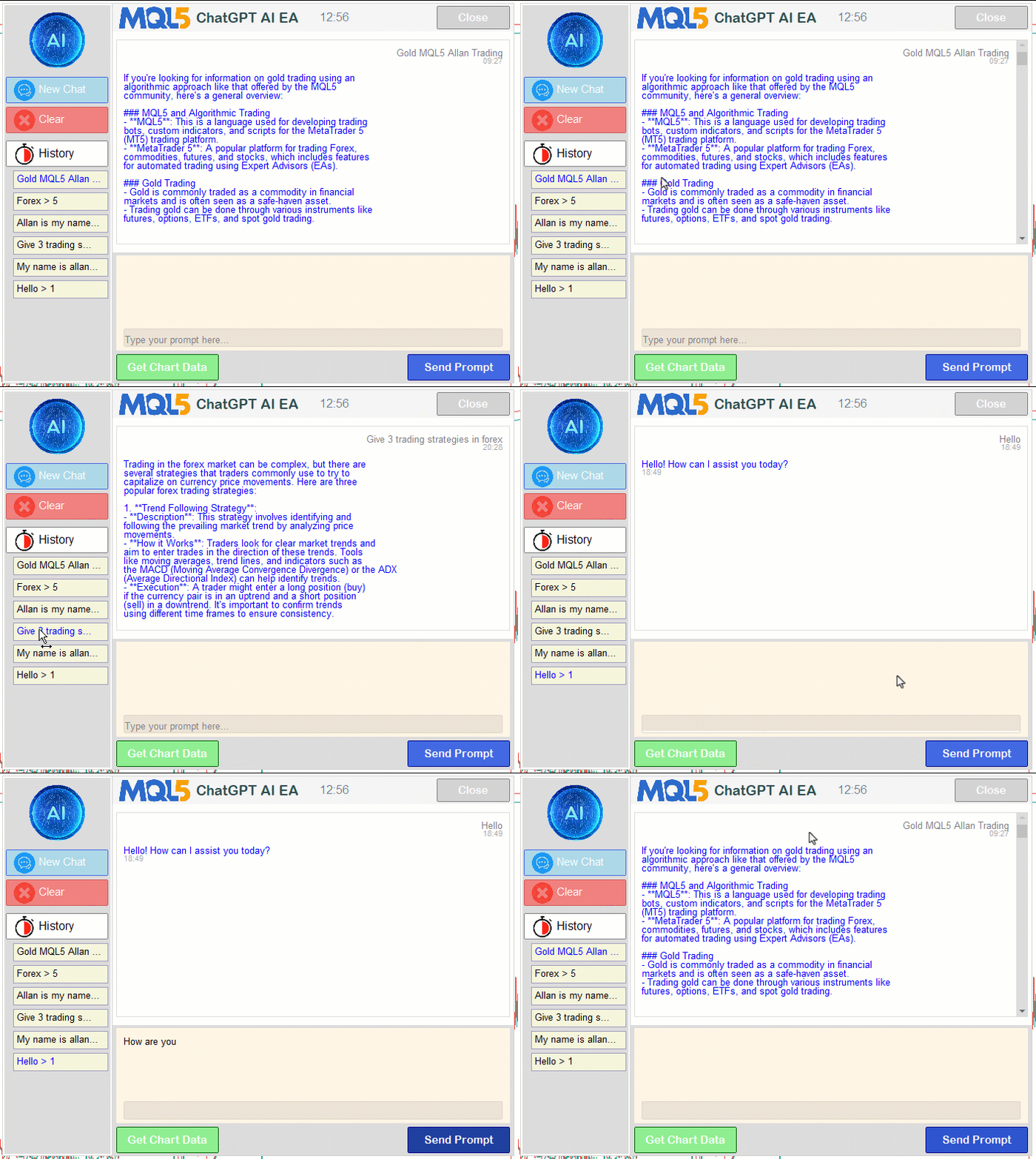
En la visualización se puede observar que los eventos del gráfico funcionan correctamente. En cuanto a los chats, podemos observar que se conservan entre sesiones y que podemos recuperar y enviar respuestas para continuar la conversación. Están cifrados y, cuando intentes acceder al registro, deberías ver algo ilegible para los humanos, como el siguiente ejemplo en nuestro caso.

En la visualización podemos observar que hemos logrado mejorar el programa añadiendo nuevos elementos, mostrando una sección del prompt con desplazamiento y haciendo que la interfaz sea interactiva y cuente con chats persistentes, con lo que hemos alcanzado nuestros objetivos. Solo queda realizar una prueba con datos históricos del programa, que abordaremos en la siguiente sección.
Backtesting
Ya hemos realizado las pruebas y, a continuación, presentamos la visualización recopilada en una única imagen de mapa de bits en formato Graphics Interchange Format (GIF).
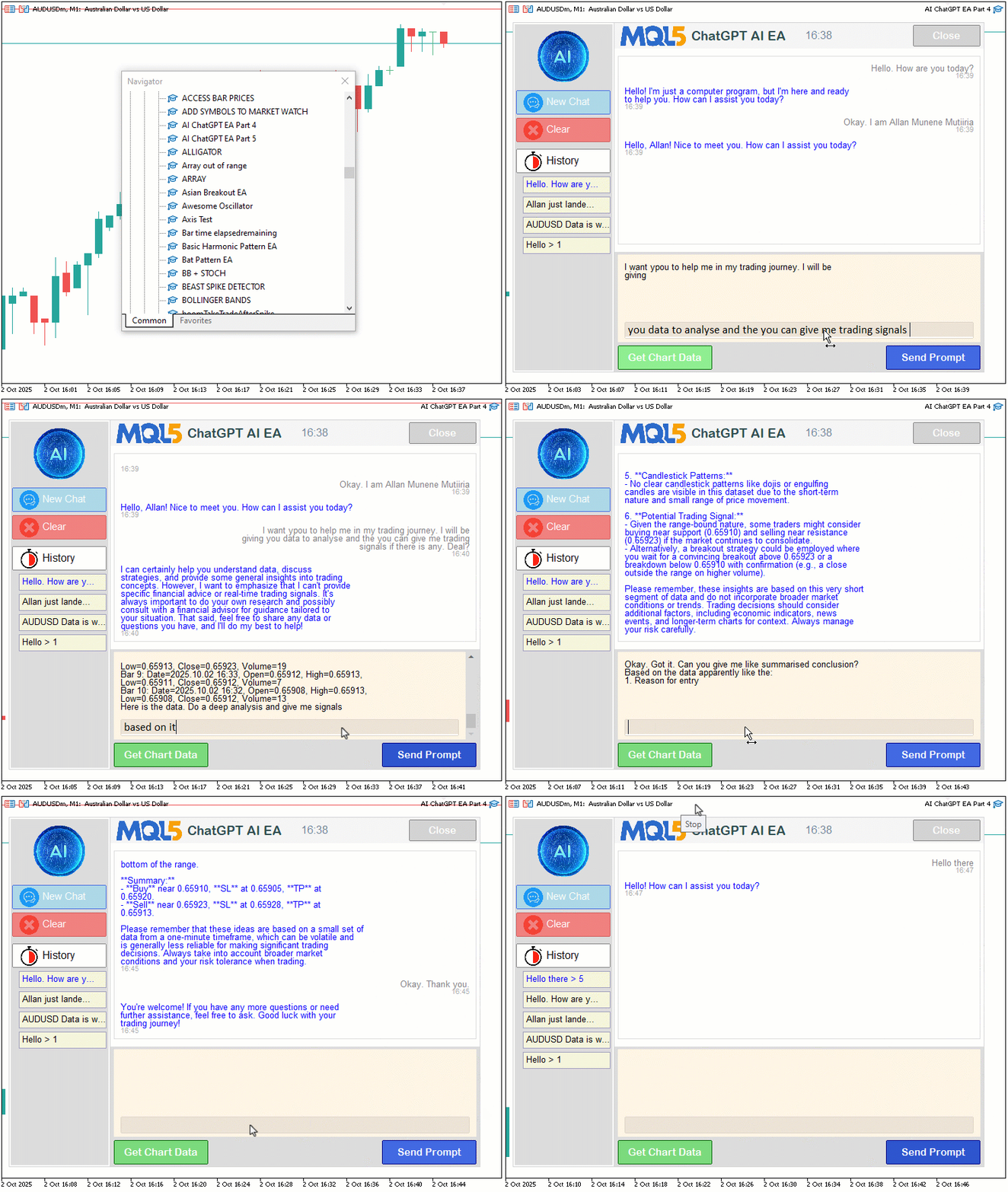
Conclusión
En conclusión, hemos mejorado considerablemente nuestro programa en MQL5, superando las limitaciones de la entrada multilínea gracias a un renderizado de texto robusto, añadiendo una barra lateral dinámica para navegar entre chats persistentes con cifrado seguro CRYPT_AES256 y compresión «CRYPT_ARCH_ZIP», y generando señales de trading iniciales mediante la integración de datos del gráfico. Este sistema nos permite interactuar de forma fluida con los análisis de mercado basados en inteligencia artificial, manteniendo el contexto de la conversación entre sesiones gracias a unos controles intuitivos, todo ello potenciado por una interfaz de usuario con la imagen de marca y dos barras de desplazamiento. En las próximas versiones, perfeccionaremos aún más la generación de señales basada en inteligencia artificial y exploraremos la ejecución automatizada de operaciones para mejorar las capacidades de nuestro asistente de trading. No te lo pierdas.
Archivos adjuntos
| N.º | Nombre | Tipo | Descripción |
|---|---|---|---|
| 1 | AI_JSON_FILE.mqh | Biblioteca de clases JSON | Clase para gestionar la serialización y deserialización de JSON |
| 2 | AI_CREATE_OBJECTS_FNS.mqh | Biblioteca de funciones de objetos | Funciones para crear objetos de visualización, como etiquetas y botones |
| 3 | AI_ChatGPT_EA_Part_4.mq5 | Asesor experto | Asesor experto principal para la gestión de la integración de la inteligencia artificial |
Traducción del inglés realizada por MetaQuotes Ltd.
Artículo original: https://www.mql5.com/en/articles/19782
Advertencia: todos los derechos de estos materiales pertenecen a MetaQuotes Ltd. Queda totalmente prohibido el copiado total o parcial.
Este artículo ha sido escrito por un usuario del sitio web y refleja su punto de vista personal. MetaQuotes Ltd. no se responsabiliza de la exactitud de la información ofrecida, ni de las posibles consecuencias del uso de las soluciones, estrategias o recomendaciones descritas.