
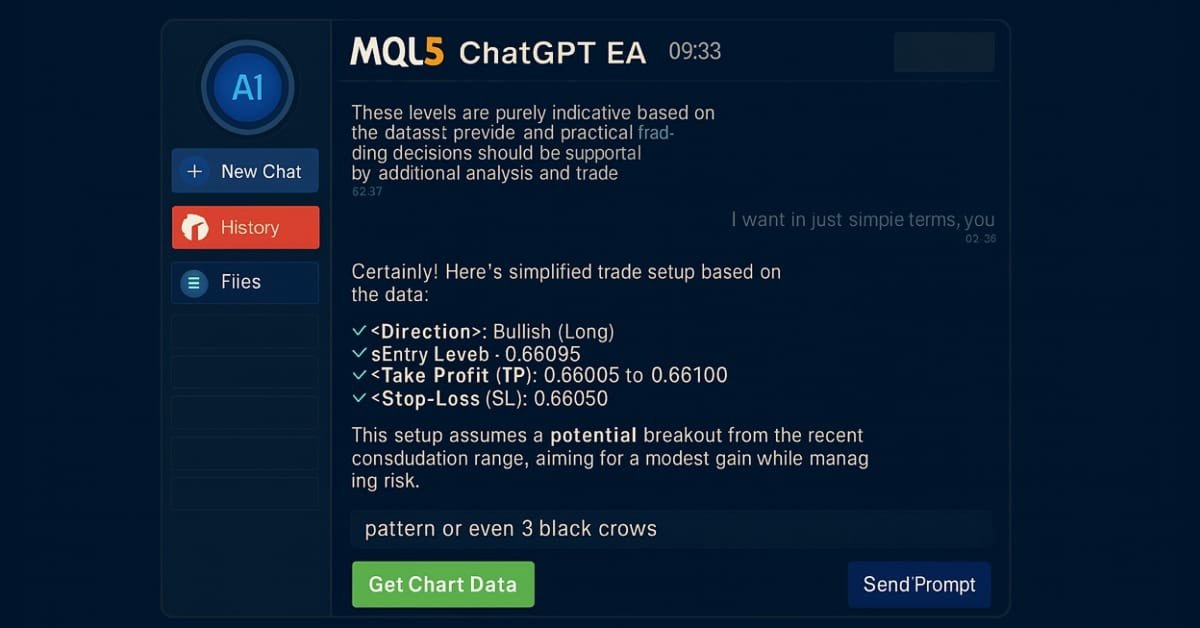
Building AI-Powered Trading Systems in MQL5 (Part 4): Overcoming Multiline Input, Ensuring Chat Persistence, and Generating Signals
 6 131
6 131
 0
0

Introduction
In our previous article (Part 3), we upgraded the ChatGPT-integrated program in MetaQuotes Language 5 (MQL5) with a scrollable, single-chat-oriented UI. We added timestamps, dynamic scrolling, and multi-turn conversation history for a seamless AI interaction experience in MetaTrader 5. In Part 4, we overcome multiline input limitations with refined text rendering. We add a sidebar for navigating persistent chat histories, stored with Advanced Encryption Standard (AES256) encryption and ZIP compression. We also generate initial trade signals through chart data integration to enable AI-driven market insights. We will cover the following topics:
- Understanding Multiline Input Handling, Chat Persistence, and Trade Signal Generation
- Implementation in MQL5
- Backtesting
- Conclusion
By the end, you’ll have an MQL5 AI trading assistant with enhanced usability and context-aware features, ready for customization—let’s dive in!
Understanding Multiline Input Handling, Sidebar Chat Persistence, and Trade Signal Generation
Multiline input handling in AI trading systems is essential for allowing us to enter detailed prompts or data, such as multi-line market descriptions or code snippets, ensuring the AI can process complex queries without truncation, which is crucial for accurate responses in dynamic markets where single-line inputs may limit context. Chat persistence adds value by storing conversation history across sessions, enabling us to build on previous AI insights without repeating information, while trade signal generation uses AI to analyze market data and produce actionable buy or sell recommendations, reducing manual analysis and helping us respond faster to opportunities like trend reversals. Together, these features create a more robust system, improving user experience by maintaining context and integrating AI with real-time trading decisions to minimize errors and enhance profitability.
Our plan is to upgrade the AI program by implementing advanced text processing to handle multiline inputs, since the current logic can allow us to input wording to a maximum of 63 characters seamlessly, which limits us to just simple prompts. So, we will expand that context to allow us to input as many lines as possible when needed, because in some cases, we may need to be more detailed when prompting the AI to give us trading signals. We will also incorporate secure storage mechanisms for chat persistence to allow easy retrieval and navigation of past conversations, so we do not keep repeating ourselves when we want to reference something. We will use Advanced Encryption Standard (AES) model to encrypt the chats for security reasons. We just chose this due to its ease in use but you could use any of your choice. We will not dig deep in the protection logic but we compiled an image to represent how it works as below.

The idea here is that sometimes, we want to have a conversation that analyzes a particular chart like XAUUSD, and we can start another on GBPUSD. At some instance, we might need to reference that conversation, for instance, check previous responses, make corrections, or make another prompt, so instead of having to repeat the whole conversation, you can just reference it to its stored history.
To make this make total sense and see progress, we will add functionality to fetch and integrate chart data for generating initial trade signals based on AI analysis, needing us to redefine the interface to make it more branded with icons and a navigation sidebar. We will design an interface with intuitive navigation elements to manage chats and display signals, ensuring the system is user-friendly and efficient for us, seeking to leverage AI in our strategies. Have a look below at what we will be achieving.

Implementation in MQL5
To implement the upgraded program in MQL5, we will first do code modularization so that we can separate files that we don't actively need from those that we do. We had said we would separate the JSON file earlier on, and this is the time. We will also define an extra function for handling bitmap files and separate it as well, and include it. This will ensure easier management.
//+------------------------------------------------------------------+
//|                                         AI ChatGPT EA Part 4.mq5 |
//|                           Copyright 2025, Allan Munene Mutiiria. |
//|                                   https://t.me/Forex_Algo_Trader |
//+------------------------------------------------------------------+
#property copyright "Copyright 2025, Allan Munene Mutiiria."
#property link "https://t.me/Forex_Algo_Trader"
#property version "1.00"
#property strict
#property icon "1. Forex Algo-Trader.ico"

#include "AI JSON FILE.mqh"                        //--- Include JSON parsing library
#include "AI CREATE OBJECTS FNS.mqh"               //--- Include object creation functions
We create the files as includes, as you can see, and include them in our program using the #include directive. For simplicity, we moved them to our base folder, where the program is, which is why we used the double quotes model. Otherwise, if they are in another folder, you will need to replace the quotes with angle brackets ("<") and define the path correctly. See below.

We just shifted the code segments. We will need to have a function for handling the bitmap labels, so we need a function for that.
//+------------------------------------------------------------------+
//| Creates a bitmap label object                                    |
//+------------------------------------------------------------------+
bool createBitmapLabel(string objName, int xDistance, int yDistance, int xSize, int ySize,
                       string bitmapPath, color clr, ENUM_BASE_CORNER corner = CORNER_LEFT_UPPER) {
   ResetLastError();                                          //--- Reset error code
   if (!ObjectCreate(0, objName, OBJ_BITMAP_LABEL, 0, 0, 0)) { //--- Create bitmap label
      Print(__FUNCTION__, ": failed to create bitmap label! Error code = ", GetLastError()); //--- Log failure
      return false;                                            //--- Return failure
   }
   ObjectSetInteger(0, objName, OBJPROP_XDISTANCE, xDistance); //--- Set x distance
   ObjectSetInteger(0, objName, OBJPROP_YDISTANCE, yDistance); //--- Set y distance
   ObjectSetInteger(0, objName, OBJPROP_XSIZE, xSize);         //--- Set width
   ObjectSetInteger(0, objName, OBJPROP_YSIZE, ySize);         //--- Set height
   ObjectSetInteger(0, objName, OBJPROP_CORNER, corner);       //--- Set corner
   ObjectSetString(0, objName, OBJPROP_BMPFILE, bitmapPath);   //--- Set bitmap path
   ObjectSetInteger(0, objName, OBJPROP_COLOR, clr);           //--- Set color
   ObjectSetInteger(0, objName, OBJPROP_BACK, false);          //--- Set to foreground
   ObjectSetInteger(0, objName, OBJPROP_STATE, false);         //--- Disable state
   ObjectSetInteger(0, objName, OBJPROP_SELECTABLE, false);    //--- Disable selectability
   ObjectSetInteger(0, objName, OBJPROP_SELECTED, false);      //--- Disable selection
   return true;                                                //--- Return success
}
We implement a function to create bitmap labels, which will enable the display of scaled icons and images in the UI, as you did see in the description. In the "createBitmapLabel" function, we use the ObjectCreate function to generate a bitmap label (OBJ_BITMAP_LABEL) with specified coordinates ("xDistance", "yDistance"), size ("xSize", "ySize"), bitmap path, color, and corner alignment (default CORNER_LEFT_UPPER), setting properties like "OBJPROP_BMPFILE" for the image and ensuring it's non-selectable and in the foreground with ObjectSetInteger, logging any failures with Print if creation fails. In general, here is the full implementation of that object creation file.
//+------------------------------------------------------------------+
//|                                        AI CREATE OBJECTS FNS.mqh |
//|                           Copyright 2025, Allan Munene Mutiiria. |
//|                                   https://t.me/Forex_Algo_Trader |
//+------------------------------------------------------------------+
#property copyright "Copyright 2025, Allan Munene Mutiiria."
#property link      "https://t.me/Forex_Algo_Trader"

//+------------------------------------------------------------------+
//| Creates a rectangle label object                                 |
//+------------------------------------------------------------------+
bool createRecLabel(string objName, int xDistance, int yDistance, int xSize, int ySize,
                    color bgColor, int borderWidth, color borderColor = clrNONE,
                    ENUM_BORDER_TYPE borderType = BORDER_FLAT,
                    ENUM_LINE_STYLE borderStyle = STYLE_SOLID,
                    ENUM_BASE_CORNER corner = CORNER_LEFT_UPPER) {   //--- Create rectangle label
   ResetLastError();                                                 //--- Reset previous errors
   if (!ObjectCreate(0, objName, OBJ_RECTANGLE_LABEL, 0, 0, 0)) {    //--- Attempt creation
      Print(__FUNCTION__, ": failed to create rec label! Error code = ", _LastError); //--- Print error
      return (false);                                                //--- Return failure
   }
   ObjectSetInteger(0, objName, OBJPROP_XDISTANCE, xDistance); //--- Set x distance
   ObjectSetInteger(0, objName, OBJPROP_YDISTANCE, yDistance); //--- Set y distance
   ObjectSetInteger(0, objName, OBJPROP_XSIZE, xSize);         //--- Set width
   ObjectSetInteger(0, objName, OBJPROP_YSIZE, ySize);         //--- Set height
   ObjectSetInteger(0, objName, OBJPROP_CORNER, corner);       //--- Set corner
   ObjectSetInteger(0, objName, OBJPROP_BGCOLOR, bgColor);     //--- Set background color
   ObjectSetInteger(0, objName, OBJPROP_BORDER_TYPE, borderType); //--- Set border type
   ObjectSetInteger(0, objName, OBJPROP_STYLE, borderStyle); //--- Set border style
   ObjectSetInteger(0, objName, OBJPROP_WIDTH, borderWidth); //--- Set border width
   ObjectSetInteger(0, objName, OBJPROP_COLOR, borderColor); //--- Set border color
   ObjectSetInteger(0, objName, OBJPROP_BACK, false);        //--- Not background
   ObjectSetInteger(0, objName, OBJPROP_STATE, false);       //--- Not pressed
   ObjectSetInteger(0, objName, OBJPROP_SELECTABLE, false);  //--- Not selectable
   ObjectSetInteger(0, objName, OBJPROP_SELECTED, false);    //--- Not selected
   ChartRedraw(0);                                           //--- Redraw chart
   return (true);                                            //--- Success
}
//+------------------------------------------------------------------+
//| Creates a button object                                          |
//+------------------------------------------------------------------+
bool createButton(string objName, int xDistance, int yDistance, int xSize, int ySize,
                  string text = "", color textColor = clrBlack, int fontSize = 12,
                  color bgColor = clrNONE, color borderColor = clrNONE,
                  string font = "Arial Rounded MT Bold",
                  ENUM_BASE_CORNER corner = CORNER_LEFT_UPPER, bool isBack = false) { //--- Create button
   ResetLastError();                                         //--- Reset errors
   if (!ObjectCreate(0, objName, OBJ_BUTTON, 0, 0, 0)) {     //--- Attempt creation
      Print(__FUNCTION__, ": failed to create the button! Error code = ", _LastError); //--- Print error
      return (false);                                        //--- Failure
   }
   ObjectSetInteger(0, objName, OBJPROP_XDISTANCE, xDistance); //--- Set x distance
   ObjectSetInteger(0, objName, OBJPROP_YDISTANCE, yDistance); //--- Set y distance
   ObjectSetInteger(0, objName, OBJPROP_XSIZE, xSize);       //--- Set width
   ObjectSetInteger(0, objName, OBJPROP_YSIZE, ySize);       //--- Set height
   ObjectSetInteger(0, objName, OBJPROP_CORNER, corner);     //--- Set corner
   ObjectSetString(0, objName, OBJPROP_TEXT, text);          //--- Set text
   ObjectSetInteger(0, objName, OBJPROP_COLOR, textColor);   //--- Set text color
   ObjectSetInteger(0, objName, OBJPROP_FONTSIZE, fontSize); //--- Set font size
   ObjectSetString(0, objName, OBJPROP_FONT, font);          //--- Set font
   ObjectSetInteger(0, objName, OBJPROP_BGCOLOR, bgColor);   //--- Set background
   ObjectSetInteger(0, objName, OBJPROP_BORDER_COLOR, borderColor); //--- Set border color
   ObjectSetInteger(0, objName, OBJPROP_BACK, isBack);       //--- Set back
   ObjectSetInteger(0, objName, OBJPROP_STATE, false);       //--- Not pressed
   ObjectSetInteger(0, objName, OBJPROP_SELECTABLE, false);  //--- Not selectable
   ObjectSetInteger(0, objName, OBJPROP_SELECTED, false);    //--- Not selected
   ChartRedraw(0);                                           //--- Redraw
   return (true);                                            //--- Success
}
//+------------------------------------------------------------------+
//| Creates an edit field object                                     |
//+------------------------------------------------------------------+
bool createEdit(string objName, int xDistance, int yDistance, int xSize, int ySize,
                string text = "", color textColor = clrBlack, int fontSize = 12,
                color bgColor = clrNONE, color borderColor = clrNONE,
                string font = "Arial Rounded MT Bold",
                ENUM_BASE_CORNER corner = CORNER_LEFT_UPPER,
                int align = ALIGN_LEFT, bool readOnly = false) {  //--- Create edit
   ResetLastError();                                         //--- Reset errors
   if (!ObjectCreate(0, objName, OBJ_EDIT, 0, 0, 0)) {      //--- Attempt creation
      Print(__FUNCTION__, ": failed to create the edit! Error code = ", _LastError); //--- Print error
      return (false);                                        //--- Failure
   }
   ObjectSetInteger(0, objName, OBJPROP_XDISTANCE, xDistance); //--- Set x distance
   ObjectSetInteger(0, objName, OBJPROP_YDISTANCE, yDistance); //--- Set y distance
   ObjectSetInteger(0, objName, OBJPROP_XSIZE, xSize);       //--- Set width
   ObjectSetInteger(0, objName, OBJPROP_YSIZE, ySize);       //--- Set height
   ObjectSetInteger(0, objName, OBJPROP_CORNER, corner);     //--- Set corner
   ObjectSetString(0, objName, OBJPROP_TEXT, text);          //--- Set text
   ObjectSetInteger(0, objName, OBJPROP_COLOR, textColor);   //--- Set text color
   ObjectSetInteger(0, objName, OBJPROP_FONTSIZE, fontSize); //--- Set font size
   ObjectSetString(0, objName, OBJPROP_FONT, font);          //--- Set font
   ObjectSetInteger(0, objName, OBJPROP_BGCOLOR, bgColor);   //--- Set background
   ObjectSetInteger(0, objName, OBJPROP_BORDER_COLOR, borderColor); //--- Set border color
   ObjectSetInteger(0, objName, OBJPROP_ALIGN, align);       //--- Set alignment
   ObjectSetInteger(0, objName, OBJPROP_READONLY, readOnly); //--- Set read-only
   ObjectSetInteger(0, objName, OBJPROP_BACK, false);        //--- Not back
   ObjectSetInteger(0, objName, OBJPROP_STATE, false);       //--- Not active
   ObjectSetInteger(0, objName, OBJPROP_SELECTABLE, false);  //--- Not selectable
   ObjectSetInteger(0, objName, OBJPROP_SELECTED, false);    //--- Not selected
   ChartRedraw(0);                                           //--- Redraw
   return (true);                                            //--- Success
}
//+------------------------------------------------------------------+
//| Creates a text label object                                      |
//+------------------------------------------------------------------+
bool createLabel(string objName, int xDistance, int yDistance,
                 string text, color textColor = clrBlack, int fontSize = 12,
                 string font = "Arial Rounded MT Bold",
                 ENUM_BASE_CORNER corner = CORNER_LEFT_UPPER,
                 ENUM_ANCHOR_POINT anchor = ANCHOR_LEFT_UPPER) {   //--- Create label
   ResetLastError();                                         //--- Reset errors
   if (!ObjectCreate(0, objName, OBJ_LABEL, 0, 0, 0)) {     //--- Attempt creation
      Print(__FUNCTION__, ": failed to create the label! Error code = ", _LastError); //--- Print error
      return (false);                                        //--- Failure
   }
   ObjectSetInteger(0, objName, OBJPROP_XDISTANCE, xDistance); //--- Set x distance
   ObjectSetInteger(0, objName, OBJPROP_YDISTANCE, yDistance); //--- Set y distance
   ObjectSetInteger(0, objName, OBJPROP_CORNER, corner);     //--- Set corner
   ObjectSetString(0, objName, OBJPROP_TEXT, text);          //--- Set text
   ObjectSetInteger(0, objName, OBJPROP_COLOR, textColor);   //--- Set color
   ObjectSetInteger(0, objName, OBJPROP_FONTSIZE, fontSize); //--- Set font size
   ObjectSetString(0, objName, OBJPROP_FONT, font);          //--- Set font
   ObjectSetInteger(0, objName, OBJPROP_BACK, false);        //--- Not back
   ObjectSetInteger(0, objName, OBJPROP_STATE, false);       //--- Not active
   ObjectSetInteger(0, objName, OBJPROP_SELECTABLE, false);  //--- Not selectable
   ObjectSetInteger(0, objName, OBJPROP_SELECTED, false);    //--- Not selected
   ObjectSetInteger(0, objName, OBJPROP_ANCHOR, anchor);     //--- Set anchor
   ChartRedraw(0);                                           //--- Redraw
   return (true);                                            //--- Success
}

//+------------------------------------------------------------------+
//| Creates a bitmap label object                                    |
//+------------------------------------------------------------------+
bool createBitmapLabel(string objName, int xDistance, int yDistance, int xSize, int ySize,
                       string bitmapPath, color clr, ENUM_BASE_CORNER corner = CORNER_LEFT_UPPER) {
   ResetLastError();                                          //--- Reset error code
   if (!ObjectCreate(0, objName, OBJ_BITMAP_LABEL, 0, 0, 0)) { //--- Create bitmap label
      Print(__FUNCTION__, ": failed to create bitmap label! Error code = ", GetLastError()); //--- Log failure
      return false;                                            //--- Return failure
   }
   ObjectSetInteger(0, objName, OBJPROP_XDISTANCE, xDistance); //--- Set x distance
   ObjectSetInteger(0, objName, OBJPROP_YDISTANCE, yDistance); //--- Set y distance
   ObjectSetInteger(0, objName, OBJPROP_XSIZE, xSize);         //--- Set width
   ObjectSetInteger(0, objName, OBJPROP_YSIZE, ySize);         //--- Set height
   ObjectSetInteger(0, objName, OBJPROP_CORNER, corner);       //--- Set corner
   ObjectSetString(0, objName, OBJPROP_BMPFILE, bitmapPath);   //--- Set bitmap path
   ObjectSetInteger(0, objName, OBJPROP_COLOR, clr);           //--- Set color
   ObjectSetInteger(0, objName, OBJPROP_BACK, false);          //--- Set to foreground
   ObjectSetInteger(0, objName, OBJPROP_STATE, false);         //--- Disable state
   ObjectSetInteger(0, objName, OBJPROP_SELECTABLE, false);    //--- Disable selectability
   ObjectSetInteger(0, objName, OBJPROP_SELECTED, false);      //--- Disable selection
   return true;                                                //--- Return success
}
The same implementation is used in the JSON, with a simple upgrade to handle the conversion of integer and double strings. The next thing that we will need to do is to improve the definition and import the image icons as bitmap files. You don't have to worry about their sizes since we will resize them to simplify things. For simplicity, we will have the images in the base directory so that we don't have to stress about their paths. It is important to note their formats, as we can only work with bitmap files. Have a look below in our case.

When you are ready with the files, we will need to include them so we can use them. We will create them as resources so that they are available in the final program, so they will not require the user to always have the files after compilation. Here is the approach we take to achieve that.
#resource "AI MQL5.bmp"
#define resourceImg "::AI MQL5.bmp"                //--- Define main image resource
#resource "AI LOGO.bmp"
#define resourceImgLogo "::AI LOGO.bmp"            //--- Define logo image resource
#resource "AI NEW CHAT.bmp"
#define resourceNewChat "::AI NEW CHAT.bmp"        //--- Define new chat icon resource
#resource "AI CLEAR.bmp"
#define resourceClear "::AI CLEAR.bmp"             //--- Define clear icon resource
#resource "AI HISTORY.bmp"
#define resourceHistory "::AI HISTORY.bmp"         //--- Define history icon resource
Using the #resource directive, we include five bitmap files: "AI MQL5.bmp", "AI LOGO.bmp", "AI NEW CHAT.bmp", "AI CLEAR.bmp", and "AI HISTORY.bmp", and assign them to constants "resourceImg", "resourceImgLogo", "resourceNewChat", "resourceClear", and "resourceHistory" with the #define directive for consistent referencing throughout the program. This will enable the integration of our custom icons for the main dashboard logo, sidebar logo, and action buttons, improving the aesthetic and usability of the interface. We will also need to add more inputs and global variables to handle the new dashboard elements.
#define P_SCROLL_LEADER "ChatGPT_P_Scroll_Leader"  //--- Define prompt scrollbar leader name
#define P_SCROLL_UP_REC "ChatGPT_P_Scroll_Up_Rec"  //--- Define prompt scroll up rectangle name
#define P_SCROLL_UP_LABEL "ChatGPT_P_Scroll_Up_Label" //--- Define prompt scroll up label name
#define P_SCROLL_DOWN_REC "ChatGPT_P_Scroll_Down_Rec" //--- Define prompt scroll down rectangle name
#define P_SCROLL_DOWN_LABEL "ChatGPT_P_Scroll_Down_Label" //--- Define prompt scroll down label name
#define P_SCROLL_SLIDER "ChatGPT_P_Scroll_Slider"  //--- Define prompt scrollbar slider name

input string OpenAI_Model = "gpt-4o";              // OpenAI model for API requests

input int MaxChartBars = 10;                       // Maximum recent bars to fetch details

string conversationHistory = "";                    //--- Store conversation history
string currentPrompt = "";                         //--- Store current user prompt
int logFileHandle = INVALID_HANDLE;                //--- Store log file handle
bool button_hover = false;                         //--- Track submit button hover state
color button_original_bg = clrRoyalBlue;           //--- Set submit button background color
color button_darker_bg;                            //--- Store submit button darker background
bool clear_hover = false;                          //--- Track clear button hover state
bool new_chat_hover = false;                       //--- Track new chat button hover state
color clear_original_bg = clrLightCoral;           //--- Set clear button background color
color clear_darker_bg;                             //--- Store clear button darker background
color new_chat_original_bg = clrLightBlue;         //--- Set new chat button background color
color new_chat_darker_bg;                          //--- Store new chat button darker background
color chart_button_bg = clrLightGreen;             //--- Set chart button background color
color chart_button_darker_bg;                      //--- Store chart button darker background
bool chart_hover = false;                          //--- Track chart button hover state
bool close_hover = false;                          //--- Track close button hover state
color close_original_bg = clrLightGray;            //--- Set close button background color
color close_darker_bg;                             //--- Store close button darker background
int g_sidebarWidth = 150;                         //--- Set sidebar width
int g_dashboardX = 10;                            //--- Set dashboard x position
int g_mainContentX = g_dashboardX + g_sidebarWidth; //--- Calculate main content x position
int g_mainY = 30;                                 //--- Set main content y position
int g_mainWidth = 550;                            //--- Set main content width
int g_dashboardWidth = g_sidebarWidth + g_mainWidth; //--- Calculate total dashboard width
int g_mainHeight = 0;                             //--- Store calculated main height
int g_padding = 10;                               //--- Set general padding
int g_sidePadding = 6;                            //--- Set side padding
int g_textPadding = 10;                           //--- Set text padding
int g_headerHeight = 40;                          //--- Set header height
int g_displayHeight = 280;                        //--- Set display height
int g_footerHeight = 180;                         //--- Set footer height
int g_promptHeight = 130;                         //--- Set prompt area height
int g_margin = 5;                                 //--- Set margin
int g_buttonHeight = 36;                          //--- Set button height
int g_editHeight = 25;                            //--- Set edit field height
int g_lineSpacing = 2;                            //--- Set line spacing
int g_editW = 0;                                  //--- Store edit field width
bool scroll_visible = false;                       //--- Track main scrollbar visibility
bool mouse_in_display = false;                    //--- Track mouse in main display area
int scroll_pos = 0;                               //--- Store main scroll position
int prev_scroll_pos = -1;                         //--- Store previous main scroll position
int slider_height = 20;                           //--- Set main slider height
bool movingStateSlider = false;                   //--- Track main slider drag state
int mlbDownX_Slider = 0;                          //--- Store main slider mouse x position
int mlbDownY_Slider = 0;                          //--- Store main slider mouse y position
int mlbDown_YD_Slider = 0;                        //--- Store main slider y distance
int g_total_height = 0;                           //--- Store total main display height
int g_visible_height = 0;                         //--- Store visible main display height
bool p_scroll_visible = false;                    //--- Track prompt scrollbar visibility
bool mouse_in_prompt = false;                     //--- Track mouse in prompt area
int p_scroll_pos = 0;                             //--- Store prompt scroll position
int p_slider_height = 20;                         //--- Set prompt slider height
bool p_movingStateSlider = false;                 //--- Track prompt slider drag state
int p_mlbDownX_Slider = 0;                        //--- Store prompt slider mouse x position
int p_mlbDownY_Slider = 0;                        //--- Store prompt slider mouse y position
int p_mlbDown_YD_Slider = 0;                      //--- Store prompt slider y distance
int p_total_height = 0;                           //--- Store total prompt height
int p_visible_height = 0;                         //--- Store visible prompt height
color g_promptBg = clrOldLace;                    //--- Set prompt background color
string g_scaled_image_resource = "";               //--- Store scaled main image resource
string g_scaled_sidebar_resource = "";            //--- Store scaled sidebar image resource
string g_scaled_newchat_resource = "";            //--- Store scaled new chat icon resource
string g_scaled_clear_resource = "";              //--- Store scaled clear icon resource
string g_scaled_history_resource = "";            //--- Store scaled history icon resource
bool dashboard_visible = true;                     //--- Track dashboard visibility
string dashboardObjects[20];                      //--- Store dashboard object names
int objCount = 0;                                 //--- Track number of dashboard objects
Here, we first include the new scrollbar definitions and then change the AI model to an advanced one (gpt-4o) since we will need to handle more complex data and get better responses as we will be dealing with sensitive data like trading signals. You could have any model of your choosing though. We also add some more global variables to help in handling the new logic that we will be incorporating. We have added comments for clarity. We can now begin the implementation, and first, we will define some helper functions to help scale the images.
//+------------------------------------------------------------------+
//| Scale Image Using Bicubic Interpolation                          |
//+------------------------------------------------------------------+
void ScaleImage(uint &pixels[], int original_width, int original_height, int new_width, int new_height) {
   uint scaled_pixels[];                          //--- Declare array for scaled pixels
   ArrayResize(scaled_pixels, new_width * new_height); //--- Resize scaled pixel array
   for (int y = 0; y < new_height; y++) {        //--- Iterate through new height
      for (int x = 0; x < new_width; x++) {      //--- Iterate through new width
         double original_x = (double)x * original_width / new_width; //--- Calculate original x coordinate
         double original_y = (double)y * original_height / new_height; //--- Calculate original y coordinate
         uint pixel = BicubicInterpolate(pixels, original_width, original_height, original_x, original_y); //--- Interpolate pixel color
         scaled_pixels[y * new_width + x] = pixel; //--- Store interpolated pixel
      }
   }
   ArrayResize(pixels, new_width * new_height);   //--- Resize original pixel array
   ArrayCopy(pixels, scaled_pixels);              //--- Copy scaled pixels to original array
}

//+------------------------------------------------------------------+
//| Perform Bicubic Interpolation for a Pixel                        |
//+------------------------------------------------------------------+
uint BicubicInterpolate(uint &pixels[], int width, int height, double x, double y) {
   int x0 = (int)x;                               //--- Get integer x coordinate
   int y0 = (int)y;                               //--- Get integer y coordinate
   double fractional_x = x - x0;                  //--- Calculate fractional x
   double fractional_y = y - y0;                  //--- Calculate fractional y
   int x_indices[4], y_indices[4];                //--- Declare arrays for neighbor indices
   for (int i = -1; i <= 2; i++) {               //--- Iterate to set indices
      x_indices[i + 1] = MathMin(MathMax(x0 + i, 0), width - 1); //--- Clamp x indices
      y_indices[i + 1] = MathMin(MathMax(y0 + i, 0), height - 1); //--- Clamp y indices
   }
   uint neighborhood_pixels[16];                  //--- Declare array for 4x4 pixel neighborhood
   for (int j = 0; j < 4; j++) {                 //--- Iterate through y indices
      for (int i = 0; i < 4; i++) {              //--- Iterate through x indices
         neighborhood_pixels[j * 4 + i] = pixels[y_indices[j] * width + x_indices[i]]; //--- Store neighbor pixel
      }
   }
   uchar alpha_components[16], red_components[16], green_components[16], blue_components[16]; //--- Declare arrays for color components
   for (int i = 0; i < 16; i++) {                //--- Iterate through neighborhood pixels
      GetArgb(neighborhood_pixels[i], alpha_components[i], red_components[i], green_components[i], blue_components[i]); //--- Extract ARGB components
   }
   uchar alpha_out = (uchar)BicubicInterpolateComponent(alpha_components, fractional_x, fractional_y); //--- Interpolate alpha component
   uchar red_out = (uchar)BicubicInterpolateComponent(red_components, fractional_x, fractional_y); //--- Interpolate red component
   uchar green_out = (uchar)BicubicInterpolateComponent(green_components, fractional_x, fractional_y); //--- Interpolate green component
   uchar blue_out = (uchar)BicubicInterpolateComponent(blue_components, fractional_x, fractional_y); //--- Interpolate blue component
   return (alpha_out << 24) | (red_out << 16) | (green_out << 8) | blue_out; //--- Combine components into pixel color
}

//+------------------------------------------------------------------+
//| Perform Bicubic Interpolation for a Color Component              |
//+------------------------------------------------------------------+
double BicubicInterpolateComponent(uchar &components[], double fractional_x, double fractional_y) {
   double weights_x[4];                           //--- Declare x interpolation weights
   double t = fractional_x;                       //--- Set x fraction
   weights_x[0] = (-0.5 * t * t * t + t * t - 0.5 * t); //--- Calculate first x weight
   weights_x[1] = (1.5 * t * t * t - 2.5 * t * t + 1); //--- Calculate second x weight
   weights_x[2] = (-1.5 * t * t * t + 2 * t * t + 0.5 * t); //--- Calculate third x weight
   weights_x[3] = (0.5 * t * t * t - 0.5 * t * t); //--- Calculate fourth x weight
   double y_values[4];                            //--- Declare y interpolation values
   for (int j = 0; j < 4; j++) {                 //--- Iterate through rows
      y_values[j] = weights_x[0] * components[j * 4 + 0] + weights_x[1] * components[j * 4 + 1] +
                    weights_x[2] * components[j * 4 + 2] + weights_x[3] * components[j * 4 + 3]; //--- Calculate row value
   }
   double weights_y[4];                           //--- Declare y interpolation weights
   t = fractional_y;                              //--- Set y fraction
   weights_y[0] = (-0.5 * t * t * t + t * t - 0.5 * t); //--- Calculate first y weight
   weights_y[1] = (1.5 * t * t * t - 2.5 * t * t + 1); //--- Calculate second y weight
   weights_y[2] = (-1.5 * t * t * t + 2 * t * t + 0.5 * t); //--- Calculate third y weight
   weights_y[3] = (0.5 * t * t * t - 0.5 * t * t); //--- Calculate fourth y weight
   double result = weights_y[0] * y_values[0] + weights_y[1] * y_values[1] +
                   weights_y[2] * y_values[2] + weights_y[3] * y_values[3]; //--- Calculate final interpolated value
   return MathMax(0, MathMin(255, result));      //--- Clamp result to valid range
}

//+------------------------------------------------------------------+
//| Extract ARGB Components from a Pixel                             |
//+------------------------------------------------------------------+
void GetArgb(uint pixel, uchar &alpha, uchar &red, uchar &green, uchar &blue) {
   alpha = (uchar)((pixel >> 24) & 0xFF);         //--- Extract alpha component
   red = (uchar)((pixel >> 16) & 0xFF);           //--- Extract red component
   green = (uchar)((pixel >> 8) & 0xFF);          //--- Extract green component
   blue = (uchar)(pixel & 0xFF);                  //--- Extract blue component
}
Here, we implement image scaling functions to ensure high-quality visual branding in the chat-oriented UI. The "ScaleImage" function resizes images to fit specific UI elements by creating a new pixel array "scaled_pixels", calculating original coordinates with proportional mapping, and applying "BicubicInterpolate" to generate smooth pixel colors, then copying the result back to the original array with the ArrayCopy function. The "BicubicInterpolate" function uses a 4x4 pixel neighborhood, extracted via "GetArgb" to separate ARGB components, and applies "BicubicInterpolateComponent" with cubic weight calculations to interpolate each color channel, ensuring crisp visuals for icons and logos in the sidebar and dashboard. We will now need to work on the prompt scrollbar in a similar format to what we did with the response display scrollbar logic.
//+------------------------------------------------------------------+
//| Create Prompt Scrollbar Elements                                 |
//+------------------------------------------------------------------+
void CreatePromptScrollbar() {
   int promptX = g_mainContentX + g_sidePadding;  //--- Calculate prompt x position
   int footerY = g_mainY + g_headerHeight + g_padding + g_displayHeight + g_padding; //--- Calculate footer y position
   int promptY = footerY + g_margin;              //--- Calculate prompt y position
   int promptW = g_mainWidth - 2 * g_sidePadding; //--- Calculate prompt width
   int scrollbar_x = promptX + promptW - 16;      //--- Calculate prompt scrollbar x position
   int scrollbar_y = promptY + 16;                //--- Set prompt scrollbar y position
   int scrollbar_width = 16;                      //--- Set prompt scrollbar width
   int scrollbar_height = g_promptHeight - 2 * 16; //--- Calculate prompt scrollbar height
   int button_size = 16;                          //--- Set prompt button size
   createRecLabel(P_SCROLL_LEADER, scrollbar_x, scrollbar_y, scrollbar_width, scrollbar_height, C'220,220,220', 1, clrGainsboro, BORDER_FLAT, STYLE_SOLID, CORNER_LEFT_UPPER); //--- Create prompt scrollbar leader rectangle
   createRecLabel(P_SCROLL_UP_REC, scrollbar_x, promptY, scrollbar_width, button_size, clrGainsboro, 1, clrGainsboro, BORDER_FLAT, STYLE_SOLID, CORNER_LEFT_UPPER); //--- Create prompt scroll up button rectangle
   createLabel(P_SCROLL_UP_LABEL, scrollbar_x + 2, promptY + -2, CharToString(0x35), clrDimGray, getFontSizeByDPI(10), "Webdings", CORNER_LEFT_UPPER); //--- Create prompt scroll up arrow label
   createRecLabel(P_SCROLL_DOWN_REC, scrollbar_x, promptY + g_promptHeight - button_size, scrollbar_width, button_size, clrGainsboro, 1, clrGainsboro, BORDER_FLAT, STYLE_SOLID, CORNER_LEFT_UPPER); //--- Create prompt scroll down button rectangle
   createLabel(P_SCROLL_DOWN_LABEL, scrollbar_x + 2, promptY + g_promptHeight - button_size + -2, CharToString(0x36), clrDimGray, getFontSizeByDPI(10), "Webdings", CORNER_LEFT_UPPER); //--- Create prompt scroll down arrow label
   p_slider_height = CalculatePromptSliderHeight(); //--- Calculate prompt slider height
   createRecLabel(P_SCROLL_SLIDER, scrollbar_x, promptY + g_promptHeight - button_size - p_slider_height, scrollbar_width, p_slider_height, clrSilver, 1, clrGainsboro, BORDER_FLAT, STYLE_SOLID, CORNER_LEFT_UPPER); //--- Create prompt scrollbar slider rectangle
}

//+------------------------------------------------------------------+
//| Delete Prompt Scrollbar Elements                                 |
//+------------------------------------------------------------------+
void DeletePromptScrollbar() {
   ObjectDelete(0, P_SCROLL_LEADER);              //--- Delete prompt scrollbar leader
   ObjectDelete(0, P_SCROLL_UP_REC);              //--- Delete prompt scroll up rectangle
   ObjectDelete(0, P_SCROLL_UP_LABEL);            //--- Delete prompt scroll up label
   ObjectDelete(0, P_SCROLL_DOWN_REC);            //--- Delete prompt scroll down rectangle
   ObjectDelete(0, P_SCROLL_DOWN_LABEL);          //--- Delete prompt scroll down label
   ObjectDelete(0, P_SCROLL_SLIDER);              //--- Delete prompt scrollbar slider
}

//+------------------------------------------------------------------+
//| Calculate Prompt Scrollbar Slider Height                         |
//+------------------------------------------------------------------+
int CalculatePromptSliderHeight() {
   int scroll_area_height = g_promptHeight - 2 * 16; //--- Calculate prompt scroll area height
   int slider_min_height = 20;                    //--- Set minimum prompt slider height
   if (p_total_height <= p_visible_height) return scroll_area_height; //--- Return full height if no scroll needed
   double visible_ratio = (double)p_visible_height / p_total_height; //--- Calculate visible prompt height ratio
   int height = (int)MathFloor(scroll_area_height * visible_ratio); //--- Calculate proportional slider height
   return MathMax(slider_min_height, height);     //--- Return minimum or calculated height
}

//+------------------------------------------------------------------+
//| Update Prompt Scrollbar Slider Position                          |
//+------------------------------------------------------------------+
void UpdatePromptSliderPosition() {
   int promptX = g_mainContentX + g_sidePadding;  //--- Calculate prompt x position
   int footerY = g_mainY + g_headerHeight + g_padding + g_displayHeight + g_padding; //--- Calculate footer y position
   int promptY = footerY + g_margin;              //--- Calculate prompt y position
   int scrollbar_x = promptX + (g_mainWidth - 2 * g_sidePadding) - 16; //--- Calculate prompt scrollbar x position
   int scrollbar_y = promptY + 16;                //--- Set prompt scrollbar y position
   int scroll_area_height = g_promptHeight - 2 * 16; //--- Calculate prompt scroll area height
   int max_scroll = MathMax(0, p_total_height - p_visible_height); //--- Calculate maximum prompt scroll distance
   if (max_scroll <= 0) return;                   //--- Exit if no scrolling needed
   double scroll_ratio = (double)p_scroll_pos / max_scroll; //--- Calculate prompt scroll position ratio
   int scroll_area_y_max = scrollbar_y + scroll_area_height - p_slider_height; //--- Calculate maximum prompt slider y position
   int scroll_area_y_min = scrollbar_y;           //--- Set minimum prompt slider y position
   int new_y = scroll_area_y_min + (int)(scroll_ratio * (scroll_area_y_max - scroll_area_y_min)); //--- Calculate new prompt slider y position
   new_y = MathMax(scroll_area_y_min, MathMin(new_y, scroll_area_y_max)); //--- Clamp y position to valid range
   ObjectSetInteger(0, P_SCROLL_SLIDER, OBJPROP_YDISTANCE, new_y); //--- Update prompt slider y position
}

//+------------------------------------------------------------------+
//| Update Prompt Scrollbar Button Colors                            |
//+------------------------------------------------------------------+
void UpdatePromptButtonColors() {
   int max_scroll = MathMax(0, p_total_height - p_visible_height); //--- Calculate maximum prompt scroll distance
   if (p_scroll_pos == 0) {                       //--- Check if at top of prompt display
      ObjectSetInteger(0, P_SCROLL_UP_LABEL, OBJPROP_COLOR, clrSilver); //--- Set prompt scroll up label to disabled color
   } else {                                       //--- Not at top
      ObjectSetInteger(0, P_SCROLL_UP_LABEL, OBJPROP_COLOR, clrDimGray); //--- Set prompt scroll up label to active color
   }
   if (p_scroll_pos == max_scroll) {              //--- Check if at bottom of prompt display
      ObjectSetInteger(0, P_SCROLL_DOWN_LABEL, OBJPROP_COLOR, clrSilver); //--- Set prompt scroll down label to disabled color
   } else {                                       //--- Not at bottom
      ObjectSetInteger(0, P_SCROLL_DOWN_LABEL, OBJPROP_COLOR, clrDimGray); //--- Set prompt scroll down label to active color
   }
}

//+------------------------------------------------------------------+
//| Scroll Up Prompt Display                                         |
//+------------------------------------------------------------------+
void PromptScrollUp() {
   if (p_scroll_pos > 0) {                        //--- Check if prompt scroll position allows scrolling up
      p_scroll_pos = MathMax(0, p_scroll_pos - 30); //--- Decrease prompt scroll position by 30
      UpdatePromptDisplay();                      //--- Update prompt display
      if (p_scroll_visible) {                     //--- Check if prompt scrollbar is visible
         UpdatePromptSliderPosition();            //--- Update prompt slider position
         UpdatePromptButtonColors();              //--- Update prompt scrollbar button colors
      }
   }
}

//+------------------------------------------------------------------+
//| Scroll Down Prompt Display                                       |
//+------------------------------------------------------------------+
void PromptScrollDown() {
   int max_scroll = MathMax(0, p_total_height - p_visible_height); //--- Calculate maximum prompt scroll distance
   if (p_scroll_pos < max_scroll) {               //--- Check if prompt scroll position allows scrolling down
      p_scroll_pos = MathMin(max_scroll, p_scroll_pos + 30); //--- Increase prompt scroll position by 30
      UpdatePromptDisplay();                      //--- Update prompt display
      if (p_scroll_visible) {                     //--- Check if prompt scrollbar is visible
         UpdatePromptSliderPosition();            //--- Update prompt slider position
         UpdatePromptButtonColors();              //--- Update prompt scrollbar button colors
      }
   }
}
We implement a scrollable prompt area to handle multiline user inputs effectively, addressing previous limitations in displaying complex prompts. The "CreatePromptScrollbar" function builds a scrollbar for the prompt area, using "createRecLabel" to draw the "P_SCROLL_LEADER", "P_SCROLL_UP_REC", "P_SCROLL_DOWN_REC", and "P_SCROLL_SLIDER" rectangles, and "createLabel" for "P_SCROLL_UP_LABEL" and "P_SCROLL_DOWN_LABEL" with Webdings arrows, calculating positions based on "g_mainContentX", "g_sidePadding", and "g_promptHeight".
The "DeletePromptScrollbar" function removes these objects with ObjectDelete for cleanup, while "CalculatePromptSliderHeight" computes the "p_slider_height" proportional to the visible prompt area using "p_visible_height" and "p_total_height". The "UpdatePromptSliderPosition" function adjusts the "P_SCROLL_SLIDER" position with ObjectSetInteger based on the "p_scroll_pos" ratio, and "UpdatePromptButtonColors" toggles "P_SCROLL_UP_LABEL" and "P_SCROLL_DOWN_LABEL" colors between "clrSilver" and clrDimGray to indicate scrollability. Finally, "PromptScrollUp" and "PromptScrollDown" adjust "p_scroll_pos" by 30 pixels, calling "UpdatePromptDisplay" and updating scrollbar visuals if "p_scroll_visible" is true, enabling smooth navigation of multiline inputs in the interface.
With the scrollbar logic handled, we will need to create the prompt holder, which we want to have the edit field inside. As for the edit field, we will still have a maximum of 63 characters and we overcome this but we can overcome the length limitation by concatenating the sections. That is why we need a larger placeholder. The issue again here is that when we end editing, the inputs will be appended as lines. We need to achieve an intuitive program so that it feels like a continuation of a paragraph. We can do that by appending to the previous paragraph. However, that raises another issue where we want to have new paragraphs. To overcome this, instead of letting the user add a command line "\n" for a new line or "\newLine", we thought it would be easy to use a unique thing like double periods ".." so that when an input contains them, we interpret that as a new line command. This was just an arbitrary combination we thought; you can absolutely change it to anything you like. You know. So let us have a logic to achieve that.
//+------------------------------------------------------------------+
//| Split String on Delimiter                                        |
//+------------------------------------------------------------------+
int SplitOnString(string inputText, string delim, string &result[]) {
   ArrayResize(result, 0);                        //--- Clear result array
   int pos = 0;                                   //--- Initialize starting position
   int delim_len = StringLen(delim);              //--- Get delimiter length
   while (true) {                                 //--- Loop until string is fully processed
      int found = StringFind(inputText, delim, pos); //--- Find delimiter position
      if (found == -1) {                          //--- Check if no more delimiters
         string part = StringSubstr(inputText, pos); //--- Extract remaining string
         if (StringLen(part) > 0 || ArraySize(result) > 0) { //--- Check if part is non-empty or array not empty
            int size = ArraySize(result);         //--- Get current array size
            ArrayResize(result, size + 1);        //--- Resize result array
            result[size] = part;                  //--- Add remaining part
         }
         break;                                  //--- Exit loop
      }
      string part = StringSubstr(inputText, pos, found - pos); //--- Extract part before delimiter
      int size = ArraySize(result);              //--- Get current array size
      ArrayResize(result, size + 1);             //--- Resize result array
      result[size] = part;                       //--- Add part to array
      pos = found + delim_len;                   //--- Update position past delimiter
   }
   return ArraySize(result);                     //--- Return number of parts
}

//+------------------------------------------------------------------+
//| Replace Exact Double Periods with Newline                        |
//+------------------------------------------------------------------+
string ReplaceExactDoublePeriods(string text) {
   string result = "";                            //--- Initialize result string
   int len = StringLen(text);                     //--- Get text length
   for (int i = 0; i < len; i++) {               //--- Iterate through characters
      if (i + 1 < len && StringGetCharacter(text, i) == '.' && StringGetCharacter(text, i + 1) == '.') { //--- Check for double period
         bool preceded = (i > 0 && StringGetCharacter(text, i - 1) == '.'); //--- Check if preceded by period
         bool followed = (i + 2 < len && StringGetCharacter(text, i + 2) == '.'); //--- Check if followed by period
         if (!preceded && !followed) {            //--- Confirm exact double period
            result += "\n";                       //--- Append newline
            i++;                                  //--- Skip next period
         } else {                                 //--- Not exact double period
            result += ".";                        //--- Append period
         }
      } else {                                    //--- Non-double period character
         result += StringSubstr(text, i, 1);      //--- Append character
      }
   }
   return result;                                //--- Return processed string
}

//+------------------------------------------------------------------+
//| Create Prompt Placeholder Label                                  |
//+------------------------------------------------------------------+
void CreatePlaceholder() {
   if (ObjectFind(0, "ChatGPT_PromptPlaceholder") < 0 && StringLen(currentPrompt) == 0) { //--- Check if placeholder is needed
      int placeholderFontSize = 10;               //--- Set placeholder font size
      string placeholderFont = "Arial";            //--- Set placeholder font
      int lineHeight = TextGetHeight("A", placeholderFont, placeholderFontSize); //--- Calculate line height
      int footerY = g_mainY + g_headerHeight + g_padding + g_displayHeight + g_padding; //--- Calculate footer y position
      int promptY = footerY + g_margin;           //--- Calculate prompt y position
      int editY = promptY + g_promptHeight - g_editHeight - 5; //--- Calculate edit field y position
      int editX = g_mainContentX + g_sidePadding + g_textPadding; //--- Calculate edit field x position
      int labelY = editY + (g_editHeight - lineHeight) / 2; //--- Calculate label y position
      createLabel("ChatGPT_PromptPlaceholder", editX + 2, labelY, "Type your prompt here...", clrGray, placeholderFontSize, placeholderFont, CORNER_LEFT_UPPER, ANCHOR_LEFT_UPPER); //--- Create placeholder label
      ChartRedraw();                              //--- Redraw chart to reflect changes
   }
}

//+------------------------------------------------------------------+
//| Delete Prompt Placeholder Label                                  |
//+------------------------------------------------------------------+
void DeletePlaceholder() {
   if (ObjectFind(0, "ChatGPT_PromptPlaceholder") >= 0) { //--- Check if placeholder exists
      ObjectDelete(0, "ChatGPT_PromptPlaceholder"); //--- Delete placeholder label
      ChartRedraw();                              //--- Redraw chart to reflect changes
   }
}
To enhance the multiline input handling, we define the "SplitOnString" function, which divides input text into an array using a specified delimiter, using StringFind and StringSubstr to extract segments and ArrayResize to store them, enabling precise parsing of conversation history. The "ReplaceExactDoublePeriods" function converts our double periods into newlines with StringGetCharacter, ensuring accurate multiline rendering by distinguishing exact double periods from other sequences, addressing previous display limitations. We chose those specific characters so that when we input a single period or an ellipsis, it is interpreted differently.
The "CreatePlaceholder" function adds a "ChatGPT_PromptPlaceholder" label with "createLabel" in the prompt area when "currentPrompt" is empty, using "TextGetHeight" for alignment, while "DeletePlaceholder" removes it with ObjectDelete when text is entered, ensuring a clean and intuitive prompt input experience. It is a good programming practice to always compile your code and test the progress so you don't miss anything. So, we will create the dashboard and call our functions to update the main display and add the prompt section. We will expand the main background holder so that it houses the left side bar.
//+------------------------------------------------------------------+
//| Create Dashboard Elements                                        |
//+------------------------------------------------------------------+
void CreateDashboard() {
   objCount = 0;                             //--- Reset object count
   g_mainHeight = g_headerHeight + 2 * g_padding + g_displayHeight + g_footerHeight; //--- Calculate main dashboard height
   int displayX = g_mainContentX + g_sidePadding; //--- Calculate display x position
   int displayY = g_mainY + g_headerHeight + g_padding; //--- Calculate display y position
   int displayW = g_mainWidth - 2 * g_sidePadding; //--- Calculate display width
   int footerY = displayY + g_displayHeight + g_padding; //--- Calculate footer y position
   int promptY = footerY + g_margin;         //--- Calculate prompt y position
   int buttonsY = promptY + g_promptHeight + g_margin; //--- Calculate buttons y position
   int buttonW = 140;                        //--- Set button width
   int chartX = g_mainContentX + g_sidePadding; //--- Calculate chart button x position
   int sendX = g_mainContentX + g_mainWidth - g_sidePadding - buttonW; //--- Calculate send button x position
   dashboardObjects[objCount++] = "ChatGPT_MainContainer"; //--- Store main container object name
   createRecLabel("ChatGPT_MainContainer", g_mainContentX, g_mainY, g_mainWidth, g_mainHeight, clrWhite, 1, clrLightGray); //--- Create main container rectangle
   dashboardObjects[objCount++] = "ChatGPT_HeaderBg"; //--- Store header background object name
   createRecLabel("ChatGPT_HeaderBg", g_mainContentX, g_mainY, g_mainWidth, g_headerHeight, clrWhiteSmoke, 0, clrNONE); //--- Create header background rectangle
   string logo_resource = (StringLen(g_scaled_image_resource) > 0) ? g_scaled_image_resource : resourceImg; //--- Select header logo resource
   dashboardObjects[objCount++] = "ChatGPT_HeaderLogo"; //--- Store header logo object name
   createBitmapLabel("ChatGPT_HeaderLogo", g_mainContentX + g_sidePadding, g_mainY + (g_headerHeight - 40)/2, 104, 40, logo_resource, clrWhite, CORNER_LEFT_UPPER); //--- Create header logo
   string title = "ChatGPT AI EA";           //--- Set dashboard title
   string titleFont = "Arial Rounded MT Bold"; //--- Set title font
   int titleSize = 14;                       //--- Set title font size
   TextSetFont(titleFont, titleSize);        //--- Set title font
   uint titleWid, titleHei;                  //--- Declare title dimensions
   TextGetSize(title, titleWid, titleHei);   //--- Get title dimensions
   int titleY = g_mainY + (g_headerHeight - (int)titleHei) / 2 - 4; //--- Calculate title y position
   int titleX = g_mainContentX + g_sidePadding + 104 + 5; //--- Calculate title x position
   dashboardObjects[objCount++] = "ChatGPT_TitleLabel"; //--- Store title label object name
   createLabel("ChatGPT_TitleLabel", titleX, titleY, title, clrDarkSlateGray, titleSize, titleFont, CORNER_LEFT_UPPER, ANCHOR_LEFT_UPPER); //--- Create title label
   string dateStr = TimeToString(TimeTradeServer(), TIME_MINUTES); //--- Get current server time
   string dateFont = "Arial";                //--- Set date font
   int dateSize = 12;                        //--- Set date font size
   TextSetFont(dateFont, dateSize);          //--- Set date font
   uint dateWid, dateHei;                    //--- Declare date dimensions
   TextGetSize(dateStr, dateWid, dateHei);   //--- Get date dimensions
   int dateX = g_mainContentX + g_mainWidth / 2 - (int)(dateWid / 2) + 20; //--- Calculate date x position
   int dateY = g_mainY + (g_headerHeight - (int)dateHei) / 2 - 4; //--- Calculate date y position
   dashboardObjects[objCount++] = "ChatGPT_DateLabel"; //--- Store date label object name
   createLabel("ChatGPT_DateLabel", dateX, dateY, dateStr, clrSlateGray, dateSize, dateFont, CORNER_LEFT_UPPER, ANCHOR_LEFT_UPPER); //--- Create date label
   int closeWidth = 100;                     //--- Set close button width
   int closeX = g_mainContentX + g_mainWidth - closeWidth - g_sidePadding; //--- Calculate close button x position
   int closeY = g_mainY + 4;                 //--- Calculate close button y position
   dashboardObjects[objCount++] = "ChatGPT_CloseButton"; //--- Store close button object name
   createButton("ChatGPT_CloseButton", closeX, closeY, closeWidth, g_headerHeight - 8, "Close", clrWhite, 11, close_original_bg, clrGray); //--- Create close button
   dashboardObjects[objCount++] = "ChatGPT_ResponseBg"; //--- Store response background object name
   createRecLabel("ChatGPT_ResponseBg", displayX, displayY, displayW, g_displayHeight, clrWhite, 1, clrGainsboro, BORDER_FLAT, STYLE_SOLID); //--- Create response background rectangle
   dashboardObjects[objCount++] = "ChatGPT_FooterBg"; //--- Store footer background object name
   createRecLabel("ChatGPT_FooterBg", g_mainContentX, footerY, g_mainWidth, g_footerHeight, clrGainsboro, 0, clrNONE); //--- Create footer background rectangle
   dashboardObjects[objCount++] = "ChatGPT_PromptBg"; //--- Store prompt background object name
   createRecLabel("ChatGPT_PromptBg", displayX, promptY, displayW, g_promptHeight, g_promptBg, 1, g_promptBg, BORDER_FLAT, STYLE_SOLID); //--- Create prompt background rectangle
   int editY = promptY + g_promptHeight - g_editHeight - 5; //--- Calculate edit field y position
   int editX = displayX + g_textPadding;     //--- Calculate edit field x position
   g_editW = displayW - 2 * g_textPadding;   //--- Calculate edit field width
   dashboardObjects[objCount++] = "ChatGPT_PromptEdit"; //--- Store prompt edit object name
   createEdit("ChatGPT_PromptEdit", editX, editY, g_editW, g_editHeight, "", clrBlack, 13, DarkenColor(g_promptBg,0.93), DarkenColor(g_promptBg,0.87),"Calibri"); //--- Create prompt edit field
   ObjectSetInteger(0, "ChatGPT_PromptEdit", OBJPROP_BORDER_TYPE, BORDER_FLAT); //--- Set edit field border type
   dashboardObjects[objCount++] = "ChatGPT_GetChartButton"; //--- Store chart button object name
   createButton("ChatGPT_GetChartButton", chartX, buttonsY, buttonW, g_buttonHeight, "Get Chart Data", clrWhite, 11, chart_button_bg, clrDarkGreen); //--- Create chart data button
   dashboardObjects[objCount++] = "ChatGPT_SendPromptButton"; //--- Store send button object name
   createButton("ChatGPT_SendPromptButton", sendX, buttonsY, buttonW, g_buttonHeight, "Send Prompt", clrWhite, 11, button_original_bg, clrDarkBlue); //--- Create send prompt button
   ChartRedraw();                            //--- Redraw chart
}

//+------------------------------------------------------------------+
//| Expert Initialization Function                                   |
//+------------------------------------------------------------------+
int OnInit() {
   button_darker_bg = DarkenColor(button_original_bg); //--- Set darker background for submit button
   clear_darker_bg = DarkenColor(clear_original_bg);  //--- Set darker background for clear button
   new_chat_darker_bg = DarkenColor(new_chat_original_bg); //--- Set darker background for new chat button
   chart_button_darker_bg = DarkenColor(chart_button_bg); //--- Set darker background for chart button
   close_darker_bg = DarkenColor(close_original_bg);  //--- Set darker background for close button
   logFileHandle = FileOpen(LogFileName, FILE_READ | FILE_WRITE | FILE_TXT); //--- Open log file for reading and writing
   if (logFileHandle == INVALID_HANDLE) {             //--- Check if file opening failed
      Print("Failed to open log file: ", GetLastError()); //--- Log error
      return(INIT_FAILED);                            //--- Return initialization failure
   }
   FileSeek(logFileHandle, 0, SEEK_END);             //--- Move file pointer to end
   uint img_pixels[];                                //--- Declare array for main image pixels
   uint orig_width = 0, orig_height = 0;             //--- Initialize main image dimensions
   bool image_loaded = ResourceReadImage(resourceImg, img_pixels, orig_width, orig_height); //--- Load main image resource
   if (image_loaded && orig_width > 0 && orig_height > 0) { //--- Check if main image loaded successfully
      ScaleImage(img_pixels, (int)orig_width, (int)orig_height, 104, 40); //--- Scale main image to 104x40
      g_scaled_image_resource = "::ChatGPT_HeaderImageScaled"; //--- Set scaled main image resource name
      if (ResourceCreate(g_scaled_image_resource, img_pixels, 104, 40, 0, 0, 104, COLOR_FORMAT_ARGB_NORMALIZE)) { //--- Create scaled main image resource
         Print("Scaled image resource created successfully"); //--- Log success
      } else {                                       //--- Handle resource creation failure
         Print("Failed to create scaled image resource"); //--- Log error
      }
   } else {                                          //--- Handle main image load failure
      Print("Failed to load original image resource"); //--- Log error
   }
   uint img_pixels_logo[];                           //--- Declare array for logo image pixels
   uint orig_width_logo = 0, orig_height_logo = 0;   //--- Initialize logo image dimensions
   bool image_loaded_logo = ResourceReadImage(resourceImgLogo, img_pixels_logo, orig_width_logo, orig_height_logo); //--- Load logo image resource
   if (image_loaded_logo && orig_width_logo > 0 && orig_height_logo > 0) { //--- Check if logo image loaded successfully
      ScaleImage(img_pixels_logo, (int)orig_width_logo, (int)orig_height_logo, 81, 81); //--- Scale logo image to 81x81
      g_scaled_sidebar_resource = "::ChatGPT_SidebarImageScaled"; //--- Set scaled logo image resource name
      if (ResourceCreate(g_scaled_sidebar_resource, img_pixels_logo, 81, 81, 0, 0, 81, COLOR_FORMAT_ARGB_NORMALIZE)) { //--- Create scaled logo image resource
         Print("Scaled sidebar image resource created successfully"); //--- Log success
      } else {                                       //--- Handle resource creation failure
         Print("Failed to create scaled sidebar image resource"); //--- Log error
      }
   } else {                                          //--- Handle logo image load failure
      Print("Failed to load sidebar image resource"); //--- Log error
   }
   uint img_pixels_newchat[];                        //--- Declare array for new chat icon pixels
   uint orig_width_newchat = 0, orig_height_newchat = 0; //--- Initialize new chat icon dimensions
   bool image_loaded_newchat = ResourceReadImage(resourceNewChat, img_pixels_newchat, orig_width_newchat, orig_height_newchat); //--- Load new chat icon resource
   if (image_loaded_newchat && orig_width_newchat > 0 && orig_height_newchat > 0) { //--- Check if new chat icon loaded successfully
      ScaleImage(img_pixels_newchat, (int)orig_width_newchat, (int)orig_height_newchat, 30, 30); //--- Scale new chat icon to 30x30
      g_scaled_newchat_resource = "::ChatGPT_NewChatIconScaled"; //--- Set scaled new chat icon resource name
      if (ResourceCreate(g_scaled_newchat_resource, img_pixels_newchat, 30, 30, 0, 0, 30, COLOR_FORMAT_ARGB_NORMALIZE)) { //--- Create scaled new chat icon resource
         Print("Scaled new chat icon resource created successfully"); //--- Log success
      } else {                                       //--- Handle resource creation failure
         Print("Failed to create scaled new chat icon resource"); //--- Log error
      }
   } else {                                          //--- Handle new chat icon load failure
      Print("Failed to load new chat icon resource"); //--- Log error
   }
   uint img_pixels_clear[];                          //--- Declare array for clear icon pixels
   uint orig_width_clear = 0, orig_height_clear = 0; //--- Initialize clear icon dimensions
   bool image_loaded_clear = ResourceReadImage(resourceClear, img_pixels_clear, orig_width_clear, orig_height_clear); //--- Load clear icon resource
   if (image_loaded_clear && orig_width_clear > 0 && orig_height_clear > 0) { //--- Check if clear icon loaded successfully
      ScaleImage(img_pixels_clear, (int)orig_width_clear, (int)orig_height_clear, 30, 30); //--- Scale clear icon to 30x30
      g_scaled_clear_resource = "::ChatGPT_ClearIconScaled"; //--- Set scaled clear icon resource name
      if (ResourceCreate(g_scaled_clear_resource, img_pixels_clear, 30, 30, 0, 0, 30, COLOR_FORMAT_ARGB_NORMALIZE)) { //--- Create scaled clear icon resource
         Print("Scaled clear icon resource created successfully"); //--- Log success
      } else {                                       //--- Handle resource creation failure
         Print("Failed to create scaled clear icon resource"); //--- Log error
      }
   } else {                                          //--- Handle clear icon load failure
      Print("Failed to load clear icon resource"); //--- Log error
   }
   uint img_pixels_history[];                        //--- Declare array for history icon pixels
   uint orig_width_history = 0, orig_height_history = 0; //--- Initialize history icon dimensions
   bool image_loaded_history = ResourceReadImage(resourceHistory, img_pixels_history, orig_width_history, orig_height_history); //--- Load history icon resource
   if (image_loaded_history && orig_width_history > 0 && orig_height_history > 0) { //--- Check if history icon loaded successfully
      ScaleImage(img_pixels_history, (int)orig_width_history, (int)orig_height_history, 30, 30); //--- Scale history icon to 30x30
      g_scaled_history_resource = "::ChatGPT_HistoryIconScaled"; //--- Set scaled history icon resource name
      if (ResourceCreate(g_scaled_history_resource, img_pixels_history, 30, 30, 0, 0, 30, COLOR_FORMAT_ARGB_NORMALIZE)) { //--- Create scaled history icon resource
         Print("Scaled history icon resource created successfully"); //--- Log success
      } else {                                       //--- Handle resource creation failure
         Print("Failed to create scaled history icon resource"); //--- Log error
      }
   } else {                                          //--- Handle history icon load failure
      Print("Failed to load history icon resource"); //--- Log error
   }
   g_mainHeight = g_headerHeight + 2 * g_padding + g_displayHeight + g_footerHeight; //--- Calculate main dashboard height
   createRecLabel("ChatGPT_DashboardBg", g_dashboardX, g_mainY, g_dashboardWidth, g_mainHeight, clrWhite, 1, clrLightGray); //--- Create dashboard background rectangle
   ObjectSetInteger(0, "ChatGPT_DashboardBg", OBJPROP_ZORDER, 0); //--- Set dashboard background z-order
   createRecLabel("ChatGPT_SidebarBg", g_dashboardX+2, g_mainY+2, g_sidebarWidth - 2 - 1, g_mainHeight - 2 - 2, clrGainsboro, 1, clrNONE); //--- Create sidebar background rectangle
   ObjectSetInteger(0, "ChatGPT_SidebarBg", OBJPROP_ZORDER, 0); //--- Set sidebar background z-order
   CreateDashboard();                                //--- Create dashboard elements
   UpdateResponseDisplay();                          //--- Update response display
   CreatePlaceholder();                              //--- Create prompt placeholder
   ChartSetInteger(0, CHART_EVENT_MOUSE_MOVE, true); //--- Enable mouse move events
   ChartSetInteger(0, CHART_EVENT_MOUSE_WHEEL, true); //--- Enable mouse wheel events
   ChartSetInteger(0, CHART_MOUSE_SCROLL, true);     //--- Enable chart mouse scrolling
   return(INIT_SUCCEEDED);                           //--- Return initialization success
}
We start by expanding the "CreateDashboard" function which constructs the main interface by calculating layout dimensions using "g_mainContentX", "g_sidePadding", "g_headerHeight", "g_displayHeight", and "g_footerHeight", creating objects like "ChatGPT_MainContainer", where we expand the width, "ChatGPT_HeaderBg", and "ChatGPT_FooterBg" with "createRecLabel", a scaled header logo "ChatGPT_HeaderLogo" with "createBitmapLabel" using "g_scaled_image_resource" or "resourceImg", and a title "ChatGPT_TitleLabel" and timestamp "ChatGPT_DateLabel" with "createLabel" for clear branding and context. It also adds a "ChatGPT_PromptEdit" field with "createEdit", a "ChatGPT_GetChartButton" for market data integration, a "ChatGPT_SendPromptButton" for submitting prompts, and a "ChatGPT_CloseButton" for hiding the dashboard, storing object names in "dashboardObjects" for management.
The OnInit event handler initializes the program by setting darker button colors with "DarkenColor", opening a log file "ChatGPT_EA_Log.txt" with FileOpen, scaling bitmap resources ("AI MQL5.bmp", "AI LOGO.bmp", "AI NEW CHAT.bmp", "AI CLEAR.bmp", "AI HISTORY.bmp") using "ScaleImage" and ResourceCreate for consistent visuals, and setting up the dashboard with "CreateDashboard", "UpdateResponseDisplay", and "CreatePlaceholder", while enabling mouse events with ChartSetInteger to ensure interactivity in the future. Upon compilation, we get the following outcome.

Now that we have the updated display, we will need to work on getting the chart data, showing on the prompt display, and sending it for analysis. That being said, we will need to better handle UTF-8 since we will be handling critical data, and also, enhance logging, which can be removed later, just so we can see what we are doing exactly, so in case of issues, we can resolve them. Let us start with the function to update our prompt display, which will use a similar approach to that of the response display.
//+------------------------------------------------------------------+
//| Update Prompt Display                                            |
//+------------------------------------------------------------------+
void UpdatePromptDisplay() {
   int total = ObjectsTotal(0, 0, -1);       //--- Get total number of chart objects
   for (int j = total - 1; j >= 0; j--) {   //--- Iterate through objects in reverse
      string name = ObjectName(0, j, 0, -1); //--- Get object name
      if (StringFind(name, "ChatGPT_PromptLine_") == 0) { //--- Check if object is prompt line
         ObjectDelete(0, name);              //--- Delete prompt line object
      }
   }
   int promptX = g_mainContentX + g_sidePadding; //--- Calculate prompt x position
   int footerY = g_mainY + g_headerHeight + g_padding + g_displayHeight + g_padding; //--- Calculate footer y position
   int promptY = footerY + g_margin;         //--- Calculate prompt y position
   int textX = promptX + g_textPadding;      //--- Calculate text x position
   int textY = promptY + g_textPadding;      //--- Calculate text y position
   int editY = promptY + g_promptHeight - g_editHeight - 5; //--- Calculate edit field y position
   int fullMaxWidth = g_mainWidth - 2 * g_sidePadding - 2 * g_textPadding; //--- Calculate maximum text width
   int visibleHeight = editY - textY - g_textPadding - g_margin; //--- Calculate visible height
   if (currentPrompt == "") {                //--- Check if prompt is empty
      p_total_height = 0;                    //--- Set total prompt height to zero
      p_visible_height = visibleHeight;       //--- Set visible prompt height
      if (p_scroll_visible) {                //--- Check if prompt scrollbar is visible
         DeletePromptScrollbar();            //--- Delete prompt scrollbar
         p_scroll_visible = false;           //--- Set prompt scrollbar visibility to false
      }
      ObjectSetInteger(0, "ChatGPT_PromptEdit", OBJPROP_XSIZE, g_editW); //--- Set edit field width
      ChartRedraw();                         //--- Redraw chart
      return;                                //--- Exit function
   }
   string font = "Arial";                    //--- Set font for prompt
   int fontSize = 10;                        //--- Set font size for prompt
   int lineHeight = TextGetHeight("A", font, fontSize); //--- Calculate line height
   int adjustedLineHeight = lineHeight + g_lineSpacing; //--- Adjust line height with spacing
   p_visible_height = visibleHeight;         //--- Set global visible prompt height
   string wrappedLines[];                    //--- Declare array for wrapped lines
   WrapText(currentPrompt, font, fontSize, fullMaxWidth, wrappedLines); //--- Wrap prompt text
   int totalLines = ArraySize(wrappedLines); //--- Get number of wrapped lines
   int totalHeight = totalLines * adjustedLineHeight; //--- Calculate total height
   bool need_scroll = totalHeight > visibleHeight; //--- Check if scrollbar is needed
   bool should_show_scrollbar = false;       //--- Initialize scrollbar visibility
   int reserved_width = 0;                   //--- Initialize reserved width for scrollbar
   if (ScrollbarMode != SCROLL_WHEEL_ONLY) { //--- Check if scrollbar mode allows display
      should_show_scrollbar = need_scroll && (ScrollbarMode == SCROLL_DYNAMIC_ALWAYS || (ScrollbarMode == SCROLL_DYNAMIC_HOVER && mouse_in_prompt)); //--- Determine if scrollbar should show
      if (should_show_scrollbar) {           //--- Check if scrollbar is visible
         reserved_width = 16;                //--- Reserve width for scrollbar
      }
   }
   if (reserved_width > 0) {                 //--- Check if scrollbar space reserved
      WrapText(currentPrompt, font, fontSize, fullMaxWidth - reserved_width, wrappedLines); //--- Re-wrap text with adjusted width
      totalLines = ArraySize(wrappedLines);  //--- Update number of wrapped lines
      totalHeight = totalLines * adjustedLineHeight; //--- Update total height
   }
   p_total_height = totalHeight;             //--- Set global total prompt height
   bool prev_p_scroll_visible = p_scroll_visible; //--- Store previous prompt scrollbar visibility
   p_scroll_visible = should_show_scrollbar; //--- Update prompt scrollbar visibility
   if (p_scroll_visible != prev_p_scroll_visible) { //--- Check if visibility changed
      if (p_scroll_visible) {                //--- Check if scrollbar should be shown
         CreatePromptScrollbar();            //--- Create prompt scrollbar
      } else {                               //--- Scrollbar not needed
         DeletePromptScrollbar();            //--- Delete prompt scrollbar
      }
   }
   ObjectSetInteger(0, "ChatGPT_PromptEdit", OBJPROP_XSIZE, g_editW - reserved_width); //--- Adjust edit field width
   int max_scroll = MathMax(0, totalHeight - visibleHeight); //--- Calculate maximum scroll distance
   if (p_scroll_pos > max_scroll) p_scroll_pos = max_scroll; //--- Clamp prompt scroll position
   if (p_scroll_pos < 0) p_scroll_pos = 0;   //--- Ensure prompt scroll position is non-negative
   if (p_scroll_visible) {                   //--- Check if prompt scrollbar is visible
      p_slider_height = CalculatePromptSliderHeight(); //--- Calculate prompt slider height
      ObjectSetInteger(0, P_SCROLL_SLIDER, OBJPROP_YSIZE, p_slider_height); //--- Update prompt slider size
      UpdatePromptSliderPosition();          //--- Update prompt slider position
      UpdatePromptButtonColors();            //--- Update prompt scrollbar button colors
   }
   int currentY = textY - p_scroll_pos;      //--- Calculate current y position
   int endY = textY + visibleHeight;         //--- Calculate end y position
   int startLineIndex = 0;                   //--- Initialize start line index
   int currentHeight = 0;                    //--- Initialize current height
   for (int line = 0; line < totalLines; line++) { //--- Iterate through lines
      if (currentHeight >= p_scroll_pos) {   //--- Check if line is in view
         startLineIndex = line;              //--- Set start line index
         currentY = textY + (currentHeight - p_scroll_pos); //--- Update current y position
         break;                              //--- Exit loop
      }
      currentHeight += adjustedLineHeight;   //--- Add line height
   }
   int numVisibleLines = 0;                  //--- Initialize visible lines count
   int visibleHeightUsed = 0;                //--- Initialize used visible height
   for (int line = startLineIndex; line < totalLines; line++) { //--- Iterate from start line
      if (visibleHeightUsed + adjustedLineHeight > visibleHeight) break; //--- Check if exceeds visible height
      visibleHeightUsed += adjustedLineHeight; //--- Add to used height
      numVisibleLines++;                     //--- Increment visible lines
   }
   int textX_pos = textX;                    //--- Set text x position
   int maxTextX = g_mainContentX + g_mainWidth - g_sidePadding - g_textPadding - reserved_width; //--- Calculate maximum text x position
   color textCol = clrBlack;                 //--- Set text color
   for (int li = 0; li < numVisibleLines; li++) { //--- Iterate through visible lines
      int lineIndex = startLineIndex + li;   //--- Calculate line index
      if (lineIndex >= totalLines) break;    //--- Check if index exceeds total lines
      string line = wrappedLines[lineIndex]; //--- Get line text
      string display_line = line;            //--- Initialize display line
      if (line == " ") {                     //--- Check if line is empty
         display_line = " ";                 //--- Set display line to space
         textCol = clrWhite;                 //--- Set text color to white
      }
      string lineName = "ChatGPT_PromptLine_" + IntegerToString(lineIndex); //--- Generate line object name
      if (currentY >= textY && currentY < endY) { //--- Check if line is visible
         createLabel(lineName, textX_pos, currentY, display_line, textCol, fontSize, font, CORNER_LEFT_UPPER, ANCHOR_LEFT_UPPER); //--- Create line label
      }
      currentY += adjustedLineHeight;        //--- Update current y position
   }
   ChartRedraw();                            //--- Redraw chart
}
Here, we implement the "UpdatePromptDisplay" function to manage the display of multiline user prompts. This ensures smooth rendering and scrolling. The function clears existing "ChatGPT_PromptLine_" objects using the ObjectsTotal and ObjectDelete functions. It then calculates the prompt area’s layout with "g_mainContentX", "g_sidePadding", "g_promptHeight", and "g_textPadding". If "currentPrompt" is empty, the function resets "p_total_height", sets "p_visible_height", removes the scrollbar with "DeletePromptScrollbar", and adjusts the "ChatGPT_PromptEdit" width using the ObjectSetInteger function.
For non-empty prompts, it wraps text into lines using the "WrapText" function that we had already defined earlier on, computes "p_total_height" from "adjustedLineHeight", and dynamically shows or hides the scrollbar based on "ScrollbarMode" and "mouse_in_prompt", reserving space with "reserved_width" if needed, then renders visible lines as "ChatGPT_PromptLine_" labels with "createLabel", updating positions with "p_scroll_pos" and refreshing the chart with ChartRedraw for seamless multiline prompt interaction. To append the chart data to the prompt, we implement the following function.
//+------------------------------------------------------------------+
//| Convert Timeframe to String                                      |
//+------------------------------------------------------------------+
string PeriodToString(ENUM_TIMEFRAMES period) {
   switch(period) {                          //--- Switch on timeframe
      case PERIOD_M1: return "M1";           //--- Return M1 for 1-minute
      case PERIOD_M5: return "M5";           //--- Return M5 for 5-minute
      case PERIOD_M15: return "M15";         //--- Return M15 for 15-minute
      case PERIOD_M30: return "M30";         //--- Return M30 for 30-minute
      case PERIOD_H1: return "H1";           //--- Return H1 for 1-hour
      case PERIOD_H4: return "H4";           //--- Return H4 for 4-hour
      case PERIOD_D1: return "D1";           //--- Return D1 for daily
      case PERIOD_W1: return "W1";           //--- Return W1 for weekly
      case PERIOD_MN1: return "MN1";         //--- Return MN1 for monthly
      default: return IntegerToString(period); //--- Return period as string for others
   }
}

//+------------------------------------------------------------------+
//| Append Chart Data to Prompt                                      |
//+------------------------------------------------------------------+
void GetAndAppendChartData() {
   string symbol = Symbol();                  //--- Get current chart symbol
   ENUM_TIMEFRAMES tf = (ENUM_TIMEFRAMES)_Period; //--- Get current timeframe
   string timeframe = PeriodToString(tf);     //--- Convert timeframe to string
   long visibleBarsLong = ChartGetInteger(0, CHART_VISIBLE_BARS); //--- Get number of visible bars
   int visibleBars = (int)visibleBarsLong;   //--- Convert visible bars to integer
   MqlRates rates[];                         //--- Declare array for rate data
   int copied = CopyRates(symbol, tf, 0, MaxChartBars, rates); //--- Copy recent bar data
   if (copied != MaxChartBars) {             //--- Check if copy failed
      Print("Failed to copy rates: ", GetLastError()); //--- Log error
      return;                                //--- Exit function
   }
   ArraySetAsSeries(rates, true);            //--- Set rates as time series
   string data = "Chart Details: Symbol=" + symbol + ", Timeframe=" + timeframe + ", Visible Bars=" + IntegerToString(visibleBars) + "\n"; //--- Build chart details string
   data += "Recent Bars Data (Bar 1 is latest):\n"; //--- Add header for bar data
   for (int i = 0; i < copied; i++) {       //--- Iterate through copied bars
      data += "Bar " + IntegerToString(i + 1) + ": Date=" + TimeToString(rates[i].time, TIME_DATE | TIME_MINUTES) + ", Open=" + DoubleToString(rates[i].open, _Digits) + ", High=" + DoubleToString(rates[i].high, _Digits) + ", Low=" + DoubleToString(rates[i].low, _Digits) + ", Close=" + DoubleToString(rates[i].close, _Digits) + ", Volume=" + IntegerToString((int)rates[i].tick_volume) + "\n"; //--- Add bar data
   }
   Print("Chart data appended to prompt: \n" + data); //--- Log chart data
   FileWrite(logFileHandle, "Chart data appended to prompt: \n" + data); //--- Write chart data to log
   string fileName = "candlesticksdata.txt"; //--- Set file name for chart data
   int handle = FileOpen(fileName, FILE_WRITE | FILE_TXT | FILE_ANSI); //--- Open file for writing
   if (handle == INVALID_HANDLE) {           //--- Check if file opening failed
      Print("Failed to open file for writing: ", GetLastError()); //--- Log error
      return;                                //--- Exit function
   }
   FileWriteString(handle, data);            //--- Write chart data to file
   FileClose(handle);                        //--- Close file
   handle = FileOpen(fileName, FILE_READ | FILE_TXT | FILE_ANSI); //--- Open file for reading
   if (handle == INVALID_HANDLE) {           //--- Check if file opening failed
      Print("Failed to open file for reading: ", GetLastError()); //--- Log error
      return;                                //--- Exit function
   }
   string fileContent = "";                  //--- Initialize file content string
   while (!FileIsEnding(handle)) {           //--- Loop until end of file
      fileContent += FileReadString(handle) + "\n"; //--- Read and append line
   }
   FileClose(handle);                        //--- Close file
   if (StringLen(currentPrompt) > 0) {       //--- Check if prompt is non-empty
      currentPrompt += "\n";                 //--- Append newline to prompt
   }
   currentPrompt += fileContent;             //--- Append chart data to prompt
   DeletePlaceholder();                      //--- Delete prompt placeholder
   UpdatePromptDisplay();                    //--- Update prompt display
   p_scroll_pos = MathMax(0, p_total_height - p_visible_height); //--- Set prompt scroll to bottom
   if (p_scroll_visible) {                   //--- Check if prompt scrollbar is visible
      UpdatePromptSliderPosition();          //--- Update prompt slider position
      UpdatePromptButtonColors();            //--- Update prompt scrollbar button colors
   }
   ChartRedraw();                            //--- Redraw chart
}
To implement chart data integration, we define the "PeriodToString" function to convert timeframe enums like PERIOD_M1 or "PERIOD_H1" into readable strings such as "M1" or "H1" using a switch statement, ensuring clear communication of chart periods. We then define the "GetAndAppendChartData" function, which retrieves the current chart’s symbol with "Symbol", timeframe with _Period, and visible bars with ChartGetInteger, then uses CopyRates to fetch recent bar data into an MqlRates array, formatting details like open, high, low, close, and volume into a string with the TimeToString and DoubleToString functions.
We log the data, save to "candlesticksdata.txt" using "FileWriteString", read back with FileReadString, append to "currentPrompt" for AI processing, and display in the prompt area by calling "DeletePlaceholder", "UpdatePromptDisplay", and update scrollbar visuals with the "UpdatePromptSliderPosition" and "UpdatePromptButtonColors" functions. This will ensure that when we click on send chart data, we download and store it first, as shown below.

Since we will be building the messages from history that we will use to track the conversation, we need to advance our function to consider the new chart data that we send to the AI, since it has a new format, so we consider all content between roles.
//+------------------------------------------------------------------+
//| Build JSON Messages from History                                 |
//+------------------------------------------------------------------+
string BuildMessagesFromHistory(string newPrompt) {
   string lines[];                           //--- Declare array for history lines
   int numLines = StringSplit(conversationHistory, '\n', lines); //--- Split history into lines
   string messages = "[";                    //--- Initialize JSON messages array
   string currentRole = "";                  //--- Initialize current role
   string currentContent = "";               //--- Initialize current content
   for (int i = 0; i < numLines; i++) {     //--- Iterate through history lines
      string line = lines[i];                //--- Get current line
      string trimmed = line;                 //--- Copy line for trimming
      StringTrimLeft(trimmed);               //--- Remove leading whitespace
      StringTrimRight(trimmed);              //--- Remove trailing whitespace
      if (StringLen(trimmed) == 0 || IsTimestamp(trimmed)) continue; //--- Skip empty or timestamp lines
      if (StringFind(trimmed, "You: ") == 0) { //--- Check if user message
         if (currentRole != "") {            //--- Check if previous message exists
            string roleJson = (currentRole == "User") ? "user" : "assistant"; //--- Set JSON role
            messages += "{\"role\":\"" + roleJson + "\",\"content\":\"" + JsonEscape(currentContent) + "\"},"; //--- Add message to JSON
         }
         currentRole = "User";              //--- Set role to user
         currentContent = StringSubstr(line, StringFind(line, "You: ") + 5); //--- Extract user message
      } else if (StringFind(trimmed, "AI: ") == 0) { //--- Check if AI message
         if (currentRole != "") {            //--- Check if previous message exists
            string roleJson = (currentRole == "User") ? "user" : "assistant"; //--- Set JSON role
            messages += "{\"role\":\"" + roleJson + "\",\"content\":\"" + JsonEscape(currentContent) + "\"},"; //--- Add message to JSON
         }
         currentRole = "AI";                //--- Set role to AI
         currentContent = StringSubstr(line, StringFind(line, "AI: ") + 4); //--- Extract AI message
      } else if (currentRole != "") {       //--- Handle continuation line
         currentContent += "\n" + line;     //--- Append line to content
      }
   }
   if (currentRole != "") {                  //--- Check if final message exists
      string roleJson = (currentRole == "User") ? "user" : "assistant"; //--- Set JSON role
      messages += "{\"role\":\"" + roleJson + "\",\"content\":\"" + JsonEscape(currentContent) + "\"},"; //--- Add final message to JSON
   }
   messages += "{\"role\":\"user\",\"content\":\"" + JsonEscape(newPrompt) + "\"}]"; //--- Add new prompt to JSON
   return messages;                          //--- Return JSON messages
}
We enhance the "BuildMessagesFromHistory" function by formatting conversation data for OpenAI API requests. We split the "conversationHistory" string into lines using StringSplit with newline delimiter, process each line with StringTrimLeft and StringTrimRight to remove whitespace, and skip empty or timestamp lines identified by "IsTimestamp". We identify user messages starting with "You: " or AI messages starting with "AI: " using StringFind, extract content with StringSubstr, and builds a JSON array "messages" by appending each message as a JSON object with role ("user" or "assistant") and escape content using "JsonEscape", ensuring the new prompt is included as the final user message. Let us now handle the sidebar by updating it with the elements needed and having persistent chats. Let us first define the chat's logic so that we can use it to render the complete navigation bar.
//+------------------------------------------------------------------+
//| Chat Structure Definition                                        |
//+------------------------------------------------------------------+
struct Chat {
   int id;                                        //--- Store chat ID
   string title;                                  //--- Store chat title
   string history;                                //--- Store chat history
};
Chat chats[];                                     //--- Declare array for chat storage
int current_chat_id = -1;                         //--- Store current chat ID
string current_title = "";                        //--- Store current chat title
string chatsFileName = "ChatGPT_Chats.txt";       //--- Set file name for chat storage

//+------------------------------------------------------------------+
//| Encode Chat ID to Base62                                         |
//+------------------------------------------------------------------+
string EncodeID(int id) {
   string chars = "0123456789abcdefghijklmnopqrstuvwxyzABCDEFGHIJKLMNOPQRSTUVWXYZ"; //--- Define base62 character set
   string res = "";                                //--- Initialize result string
   if (id == 0) return "0";                        //--- Return "0" for zero ID
   while (id > 0) {                                //--- Loop while ID is positive
      res = StringSubstr(chars, id % 62, 1) + res; //--- Prepend base62 character
      id /= 62;                                    //--- Divide ID by 62
   }
   return res;                                     //--- Return encoded ID
}

//+------------------------------------------------------------------+
//| Decode Base62 Chat ID                                            |
//+------------------------------------------------------------------+
int DecodeID(string enc) {
   string chars = "0123456789abcdefghijklmnopqrstuvwxyzABCDEFGHIJKLMNOPQRSTUVWXYZ"; //--- Define base62 character set
   int id = 0;                                     //--- Initialize decoded ID
   for (int i = 0; i < StringLen(enc); i++) {      //--- Iterate through encoded string
      id = id * 62 + StringFind(chars, StringSubstr(enc, i, 1)); //--- Calculate ID value
   }
   return id;                                      //--- Return decoded ID
}

//+------------------------------------------------------------------+
//| Load Chats from File                                             |
//+------------------------------------------------------------------+
void LoadChats() {
   if (!FileIsExist(chatsFileName)) {              //--- Check if chats file exists
      CreateNewChat();                             //--- Create new chat if file not found
      return;                                      //--- Exit function
   }
   int handle = FileOpen(chatsFileName, FILE_READ | FILE_BIN); //--- Open chats file for reading
   if (handle == INVALID_HANDLE) {                 //--- Check if file opening failed
      Print("Failed to load chats: ", GetLastError()); //--- Log error
      CreateNewChat();                             //--- Create new chat
      return;                                      //--- Exit function
   }
   int file_size = (int)FileSize(handle);          //--- Get file size
   uchar encoded_file[];                           //--- Declare array for encoded file data
   ArrayResize(encoded_file, file_size);           //--- Resize array to file size
   FileReadArray(handle, encoded_file, 0, file_size); //--- Read file data into array
   FileClose(handle);                              //--- Close file
   uchar empty_key[];                              //--- Declare empty key array
   uchar key[32];                                  //--- Declare key array for decryption
   uchar api_bytes[];                              //--- Declare array for API key bytes
   StringToCharArray(OpenAI_API_Key, api_bytes);   //--- Convert API key to byte array
   uchar hash[];                                   //--- Declare array for hash
   CryptEncode(CRYPT_HASH_SHA256, api_bytes, empty_key, hash); //--- Generate SHA256 hash of API key
   ArrayCopy(key, hash, 0, 0, 32);                 //--- Copy first 32 bytes of hash to key
   uchar decoded_aes[];                            //--- Declare array for AES-decrypted data
   int res_dec = CryptDecode(CRYPT_AES256, encoded_file, key, decoded_aes); //--- Decrypt file data with AES256
   if (res_dec <= 0) {                             //--- Check if decryption failed
      Print("Failed to decrypt chats: ", GetLastError()); //--- Log error
      CreateNewChat();                             //--- Create new chat
      return;                                      //--- Exit function
   }
   uchar decoded_zip[];                            //--- Declare array for unzipped data
   int res_zip = CryptDecode(CRYPT_ARCH_ZIP, decoded_aes, empty_key, decoded_zip); //--- Decompress decrypted data
   if (res_zip <= 0) {                             //--- Check if decompression failed
      Print("Failed to decompress chats: ", GetLastError()); //--- Log error
      CreateNewChat();                             //--- Create new chat
      return;                                      //--- Exit function
   }
   string jsonStr = CharArrayToString(decoded_zip); //--- Convert decompressed data to string
   char charArray[];                               //--- Declare array for JSON characters
   int len = StringToCharArray(jsonStr, charArray, 0, WHOLE_ARRAY, CP_UTF8); //--- Convert JSON string to char array
   JsonValue json;                                 //--- Declare JSON object
   int index = 0;                                  //--- Initialize JSON parsing index
   if (!json.DeserializeFromArray(charArray, len, index)) { //--- Parse JSON data
      Print("Failed to parse chats JSON");         //--- Log error
      CreateNewChat();                             //--- Create new chat
      return;                                      //--- Exit function
   }
   if (json.m_type != JsonArray) {                 //--- Check if JSON is an array
      Print("Chats JSON not an array");            //--- Log error
      CreateNewChat();                             //--- Create new chat
      return;                                      //--- Exit function
   }
   int size = ArraySize(json.m_children);          //--- Get number of chat objects
   ArrayResize(chats, size);                       //--- Resize chats array
   int max_id = 0;                                 //--- Initialize maximum chat ID
   for (int i = 0; i < size; i++) {                //--- Iterate through chat objects
      JsonValue obj = json.m_children[i];          //--- Get current chat object
      chats[i].id = (int)obj["id"].ToInteger();    //--- Set chat ID
      chats[i].title = obj["title"].ToString();    //--- Set chat title
      chats[i].history = obj["history"].ToString(); //--- Set chat history
      max_id = MathMax(max_id, chats[i].id);       //--- Update maximum chat ID
   }
   if (size > 0) {                                 //--- Check if chats exist
      current_chat_id = chats[size - 1].id;        //--- Set current chat ID to last chat
      current_title = chats[size - 1].title;       //--- Set current chat title
      conversationHistory = chats[size - 1].history; //--- Set current conversation history
   } else {                                        //--- No chats found
      CreateNewChat();                             //--- Create new chat
   }
}

//+------------------------------------------------------------------+
//| Save Chats to File                                               |
//+------------------------------------------------------------------+
void SaveChats() {
   JsonValue jsonArr;                            //--- Declare JSON array
   jsonArr.m_type = JsonArray;                   //--- Set JSON type to array
   for (int i = 0; i < ArraySize(chats); i++) {  //--- Iterate through chats
      JsonValue obj;                             //--- Declare JSON object
      obj.m_type = JsonObject;                   //--- Set JSON type to object
      obj["id"] = chats[i].id;                   //--- Set chat ID in JSON
      obj["title"] = chats[i].title;             //--- Set chat title in JSON
      obj["history"] = chats[i].history;         //--- Set chat history in JSON
      jsonArr.AddChild(obj);                     //--- Add object to JSON array
   }
   string jsonStr = jsonArr.SerializeToString(); //--- Serialize JSON array to string
   uchar data[];                                 //--- Declare array for JSON data
   StringToCharArray(jsonStr, data);             //--- Convert JSON string to byte array
   uchar empty_key[];                            //--- Declare empty key array
   uchar zipped[];                               //--- Declare array for zipped data
   int res_zip = CryptEncode(CRYPT_ARCH_ZIP, data, empty_key, zipped); //--- Compress JSON data
   if (res_zip <= 0) {                           //--- Check if compression failed
      Print("Failed to compress chats: ", GetLastError()); //--- Log error
      return;                                    //--- Exit function
   }
   uchar key[32];                                //--- Declare key array for encryption
   uchar api_bytes[];                            //--- Declare array for API key bytes
   StringToCharArray(OpenAI_API_Key, api_bytes); //--- Convert API key to byte array
   uchar hash[];                                 //--- Declare array for hash
   CryptEncode(CRYPT_HASH_SHA256, api_bytes, empty_key, hash); //--- Generate SHA256 hash of API key
   ArrayCopy(key, hash, 0, 0, 32);               //--- Copy first 32 bytes of hash to key
   uchar encoded[];                              //--- Declare array for encrypted data
   int res_enc = CryptEncode(CRYPT_AES256, zipped, key, encoded); //--- Encrypt compressed data with AES256
   if (res_enc <= 0) {                           //--- Check if encryption failed
      Print("Failed to encrypt chats: ", GetLastError()); //--- Log error
      return;                                    //--- Exit function
   }
   int handle = FileOpen(chatsFileName, FILE_WRITE | FILE_BIN); //--- Open chats file for writing
   if (handle == INVALID_HANDLE) {               //--- Check if file opening failed
      Print("Failed to save chats: ", GetLastError()); //--- Log error
      return;                                    //--- Exit function
   }
   FileWriteArray(handle, encoded, 0, res_enc);  //--- Write encrypted data to file
   FileClose(handle);                            //--- Close file
}

//+------------------------------------------------------------------+
//| Get Chat Index by ID                                             |
//+------------------------------------------------------------------+
int GetChatIndex(int id) {
   for (int i = 0; i < ArraySize(chats); i++) {  //--- Iterate through chats
      if (chats[i].id == id) return i;           //--- Return index if ID matches
   }
   return -1;                                    //--- Return -1 if ID not found
}

//+------------------------------------------------------------------+
//| Create New Chat                                                  |
//+------------------------------------------------------------------+
void CreateNewChat() {
   int max_id = 0;                               //--- Initialize maximum chat ID
   for (int i = 0; i < ArraySize(chats); i++) {  //--- Iterate through chats
      max_id = MathMax(max_id, chats[i].id);     //--- Update maximum chat ID
   }
   int new_id = max_id + 1;                      //--- Calculate new chat ID
   int size = ArraySize(chats);                  //--- Get current chats array size
   ArrayResize(chats, size + 1);                 //--- Resize chats array
   chats[size].id = new_id;                      //--- Set new chat ID
   chats[size].title = "Chat " + IntegerToString(new_id); //--- Set new chat title
   chats[size].history = "";                     //--- Initialize empty chat history
   current_chat_id = new_id;                     //--- Set current chat ID
   current_title = chats[size].title;            //--- Set current chat title
   conversationHistory = "";                     //--- Clear current conversation history
   SaveChats();                                  //--- Save chats to file
   UpdateSidebarDynamic();                       //--- Update sidebar display
   UpdateResponseDisplay();                      //--- Update response display
   UpdatePromptDisplay();                        //--- Update prompt display
   CreatePlaceholder();                          //--- Create prompt placeholder
   ChartRedraw();                                //--- Redraw chart to reflect changes
}

//+------------------------------------------------------------------+
//| Update Current Chat History                                      |
//+------------------------------------------------------------------+
void UpdateCurrentHistory() {
   int idx = GetChatIndex(current_chat_id);      //--- Get index of current chat
   if (idx >= 0) {                               //--- Check if valid index
      chats[idx].history = conversationHistory;  //--- Update chat history
      chats[idx].title = current_title;          //--- Update chat title
      SaveChats();                               //--- Save chats to file
   }
}
Here, we implement persistent chat storage and management functions to maintain conversation history across sessions, enabling seamless navigation via the sidebar, which we will update. We define a "Chat" structure to store "id", "title", and "history" for each chat, with a "chats" array, "current_chat_id", and "current_title" to track the active session, and "chatsFileName" set to "ChatGPT_Chats.txt" for storage. The "EncodeID" and "DecodeID" functions convert chat IDs to and from "base62" using a character set and StringSubstr for compact sidebar display. We use "LoadChats" to read chats from "ChatGPT_Chats.txt" with FileOpen, decrypting with CryptDecode using CRYPT_AES256 and a key derived from "OpenAI_API_Key" via CryptEncode with CRYPT_HASH_SHA256, decompressing with "CRYPT_ARCH_ZIP", and parsing JSON with "DeserializeFromArray" to populate the "chats" array, defaulting to "CreateNewChat" if errors occur.
The "SaveChats" function serializes the "chats" array to JSON with "SerializeToString", compresses it with "CryptEncode" using "CRYPT_ARCH_ZIP", encrypts it with "CRYPT_AES256", and writes to "ChatGPT_Chats.txt" using the FileWriteArray function. We implement "GetChatIndex" to find a chat by ID with ArraySize and "CreateNewChat" to initialize new chats with incremental IDs, updating "current_chat_id", "current_title", and "conversationHistory", saving with "SaveChats", and refreshing the UI with "UpdateSidebarDynamic", "UpdateResponseDisplay", and "UpdatePromptDisplay".
The "UpdateCurrentHistory" function updates the current chat’s "history" and "title" in the "chats" array and saves to file, ensuring persistent, navigable chat data. The choice of the decoding and encoding approach is entirely based on you. We just chose the easiest to keep things simple. Now equipped with these functions, we can define the logic to update the sidebar.
//+------------------------------------------------------------------+
//| Update Sidebar Dynamically                                       |
//+------------------------------------------------------------------+
void UpdateSidebarDynamic() {
   int total = ObjectsTotal(0, 0, -1);           //--- Get total number of chart objects
   for (int j = total - 1; j >= 0; j--) {       //--- Iterate through objects in reverse
      string name = ObjectName(0, j, 0, -1);     //--- Get object name
      if (StringFind(name, "ChatGPT_NewChatButton") == 0 || StringFind(name, "ChatGPT_ClearButton") == 0 || StringFind(name, "ChatGPT_HistoryButton") == 0 || StringFind(name, "ChatGPT_ChatLabel_") == 0 || StringFind(name, "ChatGPT_ChatBg_") == 0 || StringFind(name, "ChatGPT_SidebarLogo") == 0 || StringFind(name, "ChatGPT_NewChatIcon") == 0 || StringFind(name, "ChatGPT_NewChatLabel") == 0 || StringFind(name, "ChatGPT_ClearIcon") == 0 || StringFind(name, "ChatGPT_ClearLabel") == 0 || StringFind(name, "ChatGPT_HistoryIcon") == 0 || StringFind(name, "ChatGPT_HistoryLabel") == 0) { //--- Check if object is part of sidebar
         ObjectDelete(0, name);                  //--- Delete sidebar object
      }
   }
   int sidebarX = g_dashboardX;                   //--- Set sidebar x position
   int itemY = g_mainY + 10;                     //--- Set initial item y position
   string sidebar_logo_resource = (StringLen(g_scaled_sidebar_resource) > 0) ? g_scaled_sidebar_resource : resourceImgLogo; //--- Select sidebar logo resource
   createBitmapLabel("ChatGPT_SidebarLogo", sidebarX + (g_sidebarWidth - 81)/2, itemY, 81, 81, sidebar_logo_resource, clrWhite, CORNER_LEFT_UPPER); //--- Create sidebar logo
   ObjectSetInteger(0, "ChatGPT_SidebarLogo", OBJPROP_ZORDER, 1); //--- Set logo z-order
   itemY += 81 + 10;                             //--- Update item y position
   createButton("ChatGPT_NewChatButton", sidebarX + 5, itemY, g_sidebarWidth - 10, g_buttonHeight, "", clrWhite, 11, new_chat_original_bg, clrRoyalBlue); //--- Create new chat button
   ObjectSetInteger(0, "ChatGPT_NewChatButton", OBJPROP_ZORDER, 1); //--- Set new chat button z-order
   string newchat_icon_resource = (StringLen(g_scaled_newchat_resource) > 0) ? g_scaled_newchat_resource : resourceNewChat; //--- Select new chat icon resource
   createBitmapLabel("ChatGPT_NewChatIcon", sidebarX + 5 + 10, itemY + (g_buttonHeight - 30)/2, 30, 30, newchat_icon_resource, clrNONE, CORNER_LEFT_UPPER); //--- Create new chat icon
   ObjectSetInteger(0, "ChatGPT_NewChatIcon", OBJPROP_ZORDER, 2); //--- Set new chat icon z-order
   ObjectSetInteger(0, "ChatGPT_NewChatIcon", OBJPROP_SELECTABLE, false); //--- Disable new chat icon selectability
   createLabel("ChatGPT_NewChatLabel", sidebarX + 5 + 10 + 30 + 5, itemY + (g_buttonHeight - 20)/2, "New Chat", clrWhite, 11, "Arial", CORNER_LEFT_UPPER); //--- Create new chat label
   ObjectSetInteger(0, "ChatGPT_NewChatLabel", OBJPROP_ZORDER, 2); //--- Set new chat label z-order
   ObjectSetInteger(0, "ChatGPT_NewChatLabel", OBJPROP_SELECTABLE, false); //--- Disable new chat label selectability
   itemY += g_buttonHeight + 5;                  //--- Update item y position
   createButton("ChatGPT_ClearButton", sidebarX + 5, itemY, g_sidebarWidth - 10, g_buttonHeight, "", clrWhite, 11, clear_original_bg, clrIndianRed); //--- Create clear button
   ObjectSetInteger(0, "ChatGPT_ClearButton", OBJPROP_ZORDER, 1); //--- Set clear button z-order
   string clear_icon_resource = (StringLen(g_scaled_clear_resource) > 0) ? g_scaled_clear_resource : resourceClear; //--- Select clear icon resource
   createBitmapLabel("ChatGPT_ClearIcon", sidebarX + 5 + 10, itemY + (g_buttonHeight - 30)/2, 30, 30, clear_icon_resource, clrNONE, CORNER_LEFT_UPPER); //--- Create clear icon
   ObjectSetInteger(0, "ChatGPT_ClearIcon", OBJPROP_ZORDER, 2); //--- Set clear icon z-order
   ObjectSetInteger(0, "ChatGPT_ClearIcon", OBJPROP_SELECTABLE, false); //--- Disable clear icon selectability
   createLabel("ChatGPT_ClearLabel", sidebarX + 5 + 10 + 30 + 5, itemY + (g_buttonHeight - 20)/2, "Clear", clrWhite, 11, "Arial", CORNER_LEFT_UPPER); //--- Create clear label
   ObjectSetInteger(0, "ChatGPT_ClearLabel", OBJPROP_ZORDER, 2); //--- Set clear label z-order
   ObjectSetInteger(0, "ChatGPT_ClearLabel", OBJPROP_SELECTABLE, false); //--- Disable clear label selectability
   itemY += g_buttonHeight + 10;                 //--- Update item y position
   createButton("ChatGPT_HistoryButton", sidebarX + 5, itemY, g_sidebarWidth - 10, g_buttonHeight, "", clrBlack, 12, clrWhite, clrGray); //--- Create history button
   ObjectSetInteger(0, "ChatGPT_HistoryButton", OBJPROP_ZORDER, 1); //--- Set history button z-order
   string history_icon_resource = (StringLen(g_scaled_history_resource) > 0) ? g_scaled_history_resource : resourceHistory; //--- Select history icon resource
   createBitmapLabel("ChatGPT_HistoryIcon", sidebarX + 5 + 10, itemY + (g_buttonHeight - 30)/2, 30, 30, history_icon_resource, clrNONE, CORNER_LEFT_UPPER); //--- Create history icon
   ObjectSetInteger(0, "ChatGPT_HistoryIcon", OBJPROP_ZORDER, 2); //--- Set history icon z-order
   ObjectSetInteger(0, "ChatGPT_HistoryIcon", OBJPROP_SELECTABLE, false); //--- Disable history icon selectability
   createLabel("ChatGPT_HistoryLabel", sidebarX + 5 + 10 + 30 + 5, itemY + (g_buttonHeight - 20)/2, "History", clrBlack, 12, "Arial", CORNER_LEFT_UPPER); //--- Create history label
   ObjectSetInteger(0, "ChatGPT_HistoryLabel", OBJPROP_ZORDER, 2); //--- Set history label z-order
   ObjectSetInteger(0, "ChatGPT_HistoryLabel", OBJPROP_SELECTABLE, false); //--- Disable history label selectability
   itemY += g_buttonHeight + 5;                  //--- Update item y position
   int numChats = MathMin(ArraySize(chats), 7);  //--- Limit number of chats to display
   int chatIndices[7];                           //--- Declare array for chat indices
   for (int i = 0; i < numChats; i++) {          //--- Iterate to set chat indices
      chatIndices[i] = ArraySize(chats) - 1 - i; //--- Set index for latest chats first
   }
   for (int i = 0; i < numChats; i++) {          //--- Iterate through chats to display
      int chatIdx = chatIndices[i];              //--- Get chat index
      string hashed_id = EncodeID(chats[chatIdx].id); //--- Encode chat ID to base62
      string fullText = chats[chatIdx].title + " > " + hashed_id; //--- Create full chat title text
      string labelText = fullText;               //--- Initialize label text
      if (StringLen(fullText) > 19) {            //--- Check if text exceeds length limit
         labelText = StringSubstr(fullText, 0, 16) + "..."; //--- Truncate text with ellipsis
      }
      string bgName = "ChatGPT_ChatBg_" + hashed_id; //--- Generate background object name
      string labelName = "ChatGPT_ChatLabel_" + hashed_id; //--- Generate label object name
      color bgColor = clrWhite;                  //--- Set background color
      color borderColor = clrGray;               //--- Set border color
      createRecLabel(bgName, sidebarX + 5 + 10, itemY, g_sidebarWidth - 10 - 10, 25, clrBeige, 1, DarkenColor(clrBeige, 9), BORDER_FLAT, STYLE_SOLID); //--- Create chat background rectangle
      ObjectSetInteger(0, bgName, OBJPROP_ZORDER, 1); //--- Set background z-order
      color textColor = (chats[chatIdx].id == current_chat_id) ? clrBlue : clrBlack; //--- Set text color based on selection
      createLabel(labelName, sidebarX + 10 + 10, itemY + 3, labelText, textColor, 10, "Arial", CORNER_LEFT_UPPER, ANCHOR_LEFT_UPPER); //--- Create chat label
      ObjectSetInteger(0, labelName, OBJPROP_ZORDER, 2); //--- Set label z-order
      itemY += 25 + 5;                           //--- Update item y position
   }
   ChartRedraw();                                //--- Redraw chart to reflect changes
}
We implement the "UpdateSidebarDynamic" function to create a dynamic sidebar for navigating the persistent chat histories we create. First, we clear existing sidebar objects like "ChatGPT_NewChatButton", "ChatGPT_ClearButton", "ChatGPT_HistoryButton", "ChatGPT_ChatLabel_", and "ChatGPT_SidebarLogo" using ObjectsTotal, "ObjectName", and "ObjectDelete" based on StringFind checks, then rebuild the sidebar at position "g_dashboardX" with a logo "ChatGPT_SidebarLogo" via "createBitmapLabel" using "g_scaled_sidebar_resource" or "resourceImgLogo".
We add buttons "ChatGPT_NewChatButton", "ChatGPT_ClearButton", and "ChatGPT_HistoryButton" with "createButton", paired with icons "ChatGPT_NewChatIcon", "ChatGPT_ClearIcon", and "ChatGPT_HistoryIcon" using "createBitmapLabel" and labels "ChatGPT_NewChatLabel", "ChatGPT_ClearLabel", and "ChatGPT_HistoryLabel" using "createLabel", setting "OBJPROP_ZORDER" and disabling selectability with OBJPROP_SELECTABLE. For up to seven recent chats from the "chats" array, we encode IDs with "EncodeID", create "ChatGPT_ChatBg_" and "ChatGPT_ChatLabel_" objects with "createRecLabel" and "createLabel", truncate titles with "StringSubstr" if needed, and highlight the active chat with "clrBlue" using "current_chat_id", updating the display with ChartRedraw for a seamless sidebar experience. When we call this function in the initialization, we get the following outcome.

With the sidebar fully updated, we are now all good. We just need to take care of the elements that we did create when needed to in the "OnDeinit" event handler.
//+------------------------------------------------------------------+
//| Expert Deinitialization Function                                 |
//+------------------------------------------------------------------+
void OnDeinit(const int reason) {
   UpdateCurrentHistory();                           //--- Update current chat history
   ObjectsDeleteAll(0, "ChatGPT_");                  //--- Delete all ChatGPT objects
   DeleteScrollbar();                                //--- Delete main scrollbar elements
   DeletePromptScrollbar();                          //--- Delete prompt scrollbar elements
   if (StringLen(g_scaled_image_resource) > 0) {     //--- Check if main image resource exists
      ResourceFree(g_scaled_image_resource);         //--- Free main image resource
   }
   if (StringLen(g_scaled_sidebar_resource) > 0) {   //--- Check if sidebar image resource exists
      ResourceFree(g_scaled_sidebar_resource);       //--- Free sidebar image resource
   }
   if (StringLen(g_scaled_newchat_resource) > 0) {   //--- Check if new chat icon resource exists
      ResourceFree(g_scaled_newchat_resource);       //--- Free new chat icon resource
   }
   if (StringLen(g_scaled_clear_resource) > 0) {     //--- Check if clear icon resource exists
      ResourceFree(g_scaled_clear_resource);         //--- Free clear icon resource
   }
   if (StringLen(g_scaled_history_resource) > 0) {   //--- Check if history icon resource exists
      ResourceFree(g_scaled_history_resource);       //--- Free history icon resource
   }
   if (logFileHandle != INVALID_HANDLE) {            //--- Check if log file is open
      FileClose(logFileHandle);                      //--- Close log file
   }
}

//+------------------------------------------------------------------+
//| Expert Tick Function                                             |
//+------------------------------------------------------------------+
void OnTick() {
}

//+------------------------------------------------------------------+
//| Hide Dashboard                                                   |
//+------------------------------------------------------------------+
void HideDashboard() {
   dashboard_visible = false;                        //--- Set dashboard visibility to false
   for (int i = 0; i < objCount; i++) {              //--- Iterate through dashboard objects
      ObjectDelete(0, dashboardObjects[i]);          //--- Delete dashboard object
   }
   DeleteScrollbar();                                //--- Delete main scrollbar elements
   DeletePromptScrollbar();                          //--- Delete prompt scrollbar elements
   ObjectDelete(0, "ChatGPT_DashboardBg");           //--- Delete dashboard background
   ObjectDelete(0, "ChatGPT_SidebarBg");             //--- Delete sidebar background
   ChartRedraw();                                    //--- Redraw chart to reflect changes
}
In the OnDeinit function, we call the "UpdateCurrentHistory" function to save the current chat state, remove all "ChatGPT_" prefixed objects with ObjectsDeleteAll, deleting scrollbars with "DeleteScrollbar" and "DeletePromptScrollbar", freeing scaled image resources like "g_scaled_image_resource", "g_scaled_sidebar_resource", "g_scaled_newchat_resource", "g_scaled_clear_resource", and "g_scaled_history_resource" using ResourceFree if they exist, and closing the "logFileHandle" with FileClose to prevent resource leaks.
The OnTick function remains empty as the program relies on event-driven updates currently, while the "HideDashboard" function sets "dashboard_visible" to false, deletes all objects in "dashboardObjects" using ObjectDelete, removes "ChatGPT_DashboardBg", "ChatGPT_SidebarBg", and scrollbars with "DeleteScrollbar" and "DeletePromptScrollbar", and refreshes the chart with ChartRedraw to toggle the UI off seamlessly, which we will call when we click on the close chat button. Also, when we click on the submit prompt, we will need to update the function that sends the prompt message since we now append chart data to it. Here is the logic we used to achieve that.
//+------------------------------------------------------------------+
//| Submit User Prompt and Handle Response                           |
//+------------------------------------------------------------------+
void SubmitMessage(string prompt) {
   if (StringLen(prompt) == 0) return;       //--- Exit if prompt is empty
   string timestamp = TimeToString(TimeCurrent(), TIME_MINUTES); //--- Get current time as string
   string response = "";                     //--- Initialize response string
   bool send_to_api = true;                  //--- Set flag to send to API
   if (StringFind(prompt, "set title ") == 0) { //--- Check if prompt is a title change
      string new_title = StringSubstr(prompt, 10); //--- Extract new title
      current_title = new_title;             //--- Set current chat title
      response = "Title set to " + new_title; //--- Set response message
      send_to_api = false;                   //--- Disable API call
      UpdateCurrentHistory();                //--- Update current chat history
      UpdateSidebarDynamic();                //--- Update sidebar display
   }
   if (send_to_api) {                        //--- Check if API call is needed
      Print("Chat ID: " + IntegerToString(current_chat_id) + ", Title: " + current_title); //--- Log chat ID and title
      FileWrite(logFileHandle, "Chat ID: " + IntegerToString(current_chat_id) + ", Title: " + current_title); //--- Write chat ID and title to log
      Print("User: " + prompt);              //--- Log user prompt
      FileWrite(logFileHandle, "User: " + prompt); //--- Write user prompt to log
      response = GetChatGPTResponse(prompt); //--- Get response from ChatGPT API
      Print("AI: " + response);              //--- Log AI response
      FileWrite(logFileHandle, "AI: " + response); //--- Write AI response to log
      if (StringFind(current_title, "Chat ") == 0) { //--- Check if title is default
         current_title = StringSubstr(prompt, 0, 30); //--- Set title to first 30 characters of prompt
         if (StringLen(prompt) > 30) current_title += "..."; //--- Append ellipsis if truncated
         UpdateCurrentHistory();             //--- Update current chat history
         UpdateSidebarDynamic();             //--- Update sidebar display
      }
   }
   conversationHistory += "You: " + prompt + "\n" + timestamp + "\nAI: " + response + "\n" + timestamp + "\n\n"; //--- Append to conversation history
   UpdateCurrentHistory();                   //--- Update current chat history
   UpdateResponseDisplay();                  //--- Update response display
   scroll_pos = MathMax(0, g_total_height - g_visible_height); //--- Set scroll position to bottom
   UpdateResponseDisplay();                  //--- Update response display again
   if (scroll_visible) {                     //--- Check if main scrollbar is visible
      UpdateSliderPosition();                //--- Update main slider position
      UpdateButtonColors();                  //--- Update main scrollbar button colors
   }
   ChartRedraw();                            //--- Redraw chart
}
In the "SubmitMessage" function, we update it to handle user prompts with the chart data and integrate AI responses, supporting custom chat titles and conversation persistence. We check if the "prompt" is empty using StringLen to exit if so, otherwise capturing the current timestamp with the TimeToString function. If the prompt starts with "set title " using StringFind, we extract the new title with StringSubstr, update "current_title", set a local "response", and call "UpdateCurrentHistory" and "UpdateSidebarDynamic" without an API call; otherwise, we log "current_chat_id" and "current_title" with "Print" and FileWrite, fetch the AI response with "GetChatGPTResponse", update the title from the first 30 characters of the prompt if default, append the prompt and response to "conversationHistory" with timestamps, and refresh the UI with "UpdateResponseDisplay", "UpdateSliderPosition", and "UpdateButtonColors" to scroll to the bottom using "scroll_pos" and redraw.
We can now update the final part on chart interaction, which takes the same format as the existing structure. We will just explain the most critical part of the chat histories that we introduced; the rest is not new to us now.
//+------------------------------------------------------------------+
//| Handle Chart Events                                              |
//+------------------------------------------------------------------+
void OnChartEvent(const int id, const long &lparam, const double &dparam, const string &sparam) {
   int displayX = g_mainContentX + g_sidePadding;   //--- Calculate main display x position
   int displayY = g_mainY + g_headerHeight + g_padding; //--- Calculate main display y position
   int displayW = g_mainWidth - 2 * g_sidePadding;  //--- Calculate main display width
   int displayH = g_displayHeight;                  //--- Set main display height
   int footerY = displayY + g_displayHeight + g_padding; //--- Calculate footer y position
   int promptY = footerY + g_margin;                //--- Calculate prompt y position
   int promptH = g_promptHeight;                    //--- Set prompt height
   int closeX = g_mainContentX + g_mainWidth - 100 - g_sidePadding; //--- Calculate close button x position
   int closeY = g_mainY + 4;                        //--- Calculate close button y position
   int closeW = 100;                                //--- Set close button width
   int closeH = g_headerHeight - 8;                 //--- Calculate close button height
   int buttonsY = promptY + g_promptHeight + g_margin; //--- Calculate buttons y position
   int buttonW = 140;                               //--- Set button width
   int chartX = g_mainContentX + g_sidePadding;     //--- Calculate chart button x position
   int sendX = g_mainContentX + g_mainWidth - g_sidePadding - buttonW; //--- Calculate send button x position
   int editY = promptY + g_promptHeight - g_editHeight - 5; //--- Calculate edit field y position
   int editX = displayX + g_textPadding;            //--- Calculate edit field x position
   bool need_scroll = g_total_height > g_visible_height; //--- Check if main scrollbar is needed
   bool p_need_scroll = p_total_height > p_visible_height; //--- Check if prompt scrollbar is needed
   if (id == CHARTEVENT_OBJECT_CLICK) {             //--- Handle object click event
      if (StringFind(sparam, "ChatGPT_ChatLabel_") == 0) { //--- Check if chat label clicked
         string hashed_id = StringSubstr(sparam, StringLen("ChatGPT_ChatLabel_")); //--- Extract hashed ID
         int new_id = DecodeID(hashed_id);          //--- Decode chat ID
         int idx = GetChatIndex(new_id);            //--- Get chat index
         if (idx >= 0 && new_id != current_chat_id) { //--- Check if valid and different chat
            UpdateCurrentHistory();                 //--- Update current chat history
            current_chat_id = new_id;               //--- Set new chat ID
            current_title = chats[idx].title;       //--- Set new chat title
            conversationHistory = chats[idx].history; //--- Set new conversation history
            UpdateResponseDisplay();                //--- Update response display
            UpdateSidebarDynamic();                 //--- Update sidebar display
            ChartRedraw();                          //--- Redraw chart
         }
         return;                                    //--- Exit function
      }
   }
}
In the OnChartEvent event handler, we calculate layout positions for the main display, prompt area, and buttons using variables like "g_mainContentX", "g_sidePadding", "g_headerHeight", "g_displayHeight", "g_promptHeight", and "g_textPadding", and determine scrollbar needs with "g_total_height", "g_visible_height", "p_total_height", and "p_visible_height" like we did in the previous version.
For "CHARTEVENT_OBJECT_CLICK" events, we check if a "ChatGPT_ChatLabel_" is clicked using StringFind, extract the hashed ID with StringSubstr, decode it with "DecodeID", and switch to the selected chat by updating "current_chat_id", "current_title", and "conversationHistory" via "GetChatIndex", followed by refreshing the UI with "UpdateCurrentHistory", "UpdateResponseDisplay", "UpdateSidebarDynamic", and ChartRedraw, ensuring seamless chat navigation in the sidebar. When we compile, we get the following outcome.
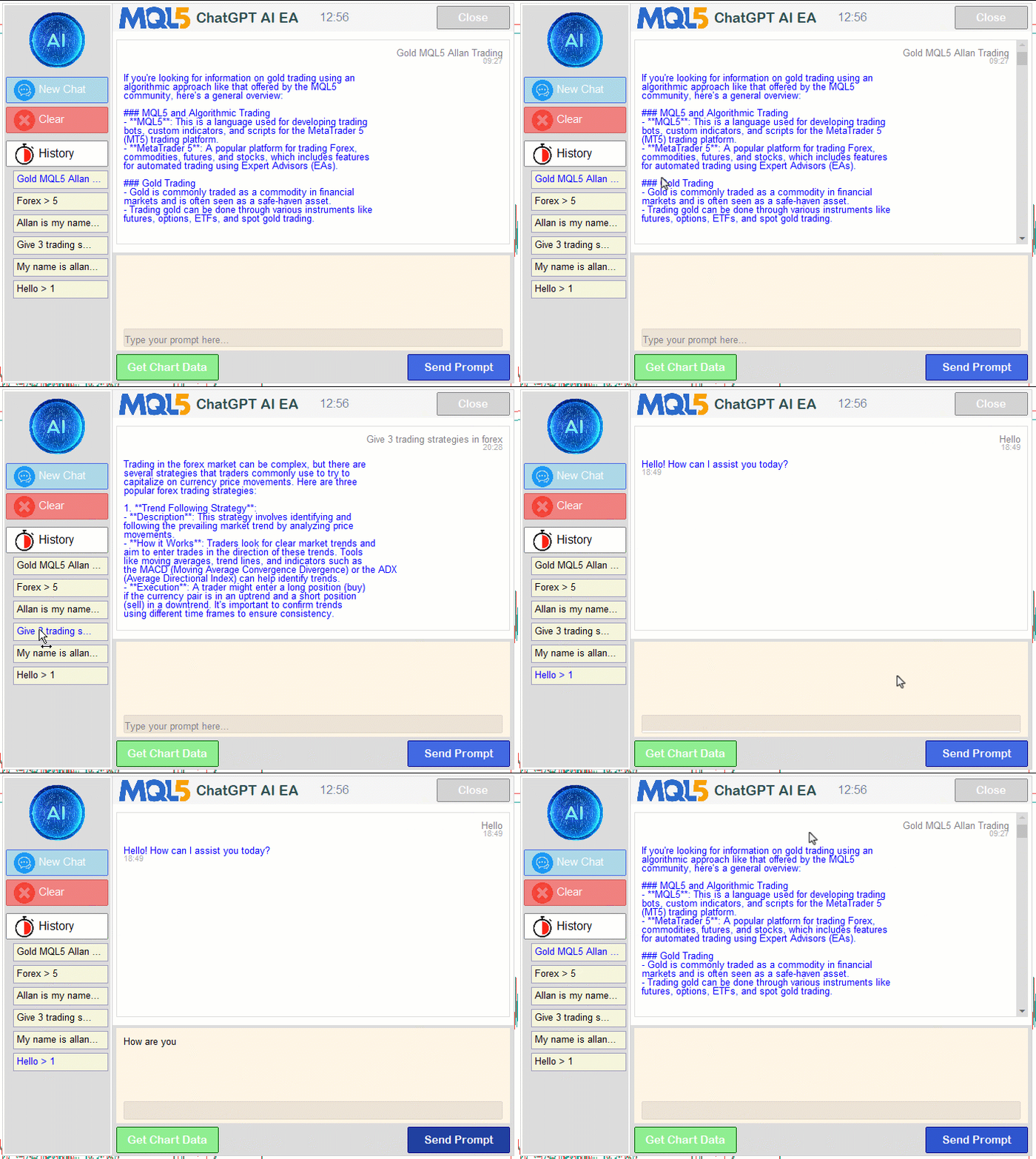
From the visualization, we can see that the chart events are working well. For the chats, we can see they are persistent between session calls, and we can retrieve and send continued responses. They are encrypted, and when you try to access the log, you should get something unreadable by humans, like the following sample in our case.

From the visualization, we can see that we are able to upgrade the program by adding new elements, displaying a scrollable prompt section, and making the interface interactable with persistent chats, hence achieving our objectives. The thing that remains is backtesting the program, and that is handled in the next section.
Backtesting
We did the testing, and below is the compiled visualization in a single Graphics Interchange Format (GIF) bitmap image format.
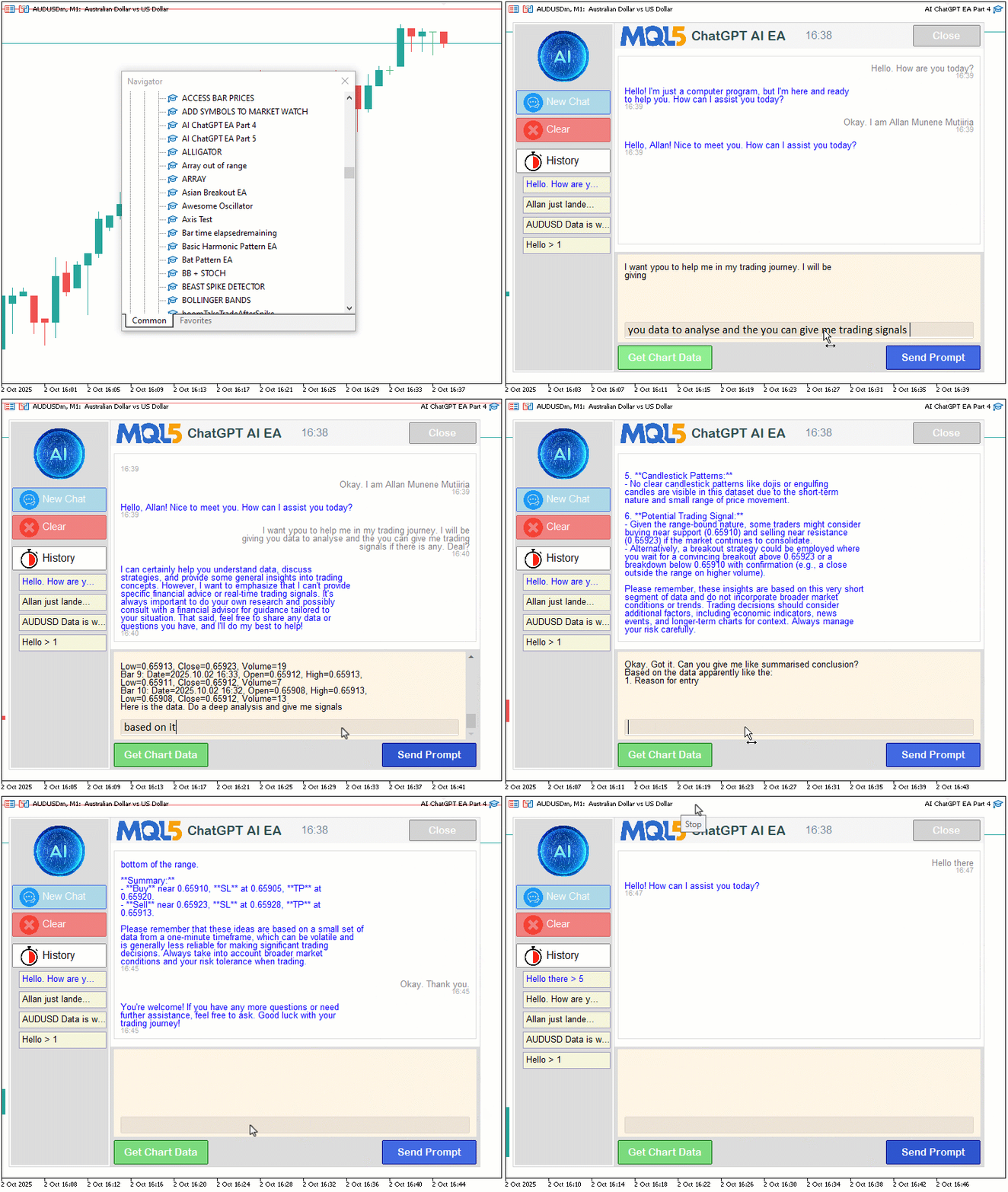
Conclusion
In conclusion, we’ve significantly enhanced our program in MQL5, overcoming multiline input limitations with robust text rendering, adding a dynamic sidebar for persistent chat navigation with secure CRYPT_AES256 encryption and "CRYPT_ARCH_ZIP" compression, and generating initial trade signals through chart data integration. This system empowers us to interact seamlessly with AI-driven market insights, maintaining conversation context across sessions with intuitive controls, all enhanced by a visually branded UI with dual scrollbars. In the next versions, we will further refine AI-driven signal generation and explore automated trade execution to elevate our trading assistant’s capabilities. Stay tuned.
Attachments
| S/N | Name | Type | Description |
|---|---|---|---|
| 1 | AI_JSON_FILE.mqh | JSON Class Library | Class for handling JSON serialization and deserialization |
| 2 | AI_CREATE_OBJECTS_FNS.mqh | Object Functions Library | Functions for creating visualization objects like labels and buttons |
| 3 | AI_ChatGPT_EA_Part_4.mq5 | Expert Advisor | Main Expert Advisor for handling AI integration |
Warning: All rights to these materials are reserved by MetaQuotes Ltd. Copying or reprinting of these materials in whole or in part is prohibited.
This article was written by a user of the site and reflects their personal views. MetaQuotes Ltd is not responsible for the accuracy of the information presented, nor for any consequences resulting from the use of the solutions, strategies or recommendations described.

 Price Action Analysis Toolkit Development (Part 44): Building a VWMA Crossover Signal EA in MQL5
 Time Evolution Travel Algorithm (TETA)
 How to publish code to CodeBase: A practical guide
 Neural Networks in Trading: Models Using Wavelet Transform and Multi-Task Attention (Final Part)

- Free trading apps
- Over 8,000 signals for copying
- Economic news for exploring financial markets
You agree to website policy and terms of use