Creación de sistemas de trading basados en IA en MQL5 (Parte 3): Actualización a una interfaz de usuario orientada a un único chat con desplazamiento
 22
 0

Introducción
En nuestro artículo anterior (Parte 2), creamos un programa interactivo basado en ChatGPT con una interfaz de usuario (UI) en MetaQuotes Language 5 (MQL5). La herramienta nos permitía enviar prompts a la API de OpenAI y ver las respuestas al instante directamente en el gráfico. Ahora, en la tercera parte, iremos un paso más allá: prepárese para un panel de control con desplazamiento, al estilo de un chat, que incluye marcas de tiempo, un desplazamiento dinámico fluido y un historial de conversaciones completo para mantener chats interactivos de varios turnos. Esto es lo que abarcaremos:
- Comprensión del framework del programa ChatGPT actualizado
- Implementación en MQL5
- Prueba del programa ChatGPT
- Conclusión
Al final, tendrá un programa MQL5 mejorado para realizar consultas interactivas con IA, listo para personalizarlo. ¡Vamos a ello!
Comprensión del framework del programa ChatGPT actualizado
El framework del programa ChatGPT actualizado mejora nuestra interfaz de trading basada en IA al incorporar una interfaz de usuario con desplazamiento y orientada al chat que admite conversaciones de varios turnos, marcas de tiempo y gestión dinámica de mensajes, lo que nos permite mantener el contexto de las consultas entre sesiones. Su función consiste en ofrecer una experiencia conversacional fluida, mejorando la usabilidad al permitirnos revisar el historial y basarnos en respuestas anteriores de la IA, lo cual resulta fundamental para perfeccionar las estrategias de negociación sin perder la información obtenida en interacciones anteriores. Pensamos que, si nos ceñimos a una sola conversación a la que la IA pueda recurrir, siempre podremos volver atrás para perfeccionar los prompts y hacer correcciones cuando sea necesario.
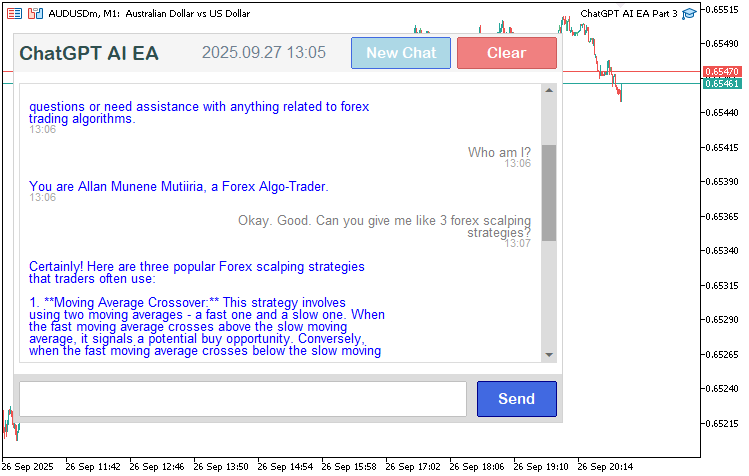
Nuestro enfoque consiste en crear un panel de control centrado en un único chat, con texto desplazable, efectos al pasar el cursor y generación de mensajes para las solicitudes a la API, garantizando que la interfaz se adapte a la longitud de la conversación y a las preferencias del usuario en cuanto a la visibilidad de la barra de desplazamiento. Así que implementaremos una lógica para analizar el historial y gestionar consultas de varios turnos, añadiremos marcas de tiempo para mayor claridad y habilitaremos funciones como borrar conversaciones o iniciar nuevos chats, creando así una herramienta que facilite la asistencia continua de la IA en la toma de decisiones de negociación con una nueva interfaz mejorada. Eche un vistazo a lo que vamos a conseguir.
Implementación en MQL5
Para implementar el programa actualizado en MQL5, primero modificaremos la sección de parámetros de entrada para incorporar un nuevo parámetro que controle el modo de la barra de desplazamiento, de modo que podamos mostrarla al pasar el cursor por encima o mantenerla siempre visible. Añadiremos una enumeración para ello y también aumentaremos el límite de tokens de respuesta a 3000, ya que ahora podemos mantener una conversación más completa para la que este límite resulta suficiente, aunque usted puede aumentarlo si es necesario.
//+------------------------------------------------------------------+
//|                                         ChatGPT AI EA Part 3.mq5 |
//|                           Copyright 2025, Allan Munene Mutiiria. |
//|                                   https://t.me/Forex_Algo_Trader |
//+------------------------------------------------------------------+
#property copyright "Copyright 2025, Allan Munene Mutiiria."
#property link "https://t.me/Forex_Algo_Trader"
#property version "1.00"
#property strict

//--- Input parameters
enum ENUM_SCROLLBAR_MODE
{
   SCROLL_DYNAMIC_ALWAYS, // Show when needed
   SCROLL_DYNAMIC_HOVER,  // Show on hover when needed
   SCROLL_WHEEL_ONLY      // No scrollbar, wheel scroll only
};
input ENUM_SCROLLBAR_MODE ScrollbarMode = SCROLL_DYNAMIC_HOVER;            // Scrollbar Behavior
//--- Scrollbar object names
#define SCROLL_LEADER "ChatGPT_Scroll_Leader"
#define SCROLL_UP_REC "ChatGPT_Scroll_Up_Rec"
#define SCROLL_UP_LABEL "ChatGPT_Scroll_Up_Label"
#define SCROLL_DOWN_REC "ChatGPT_Scroll_Down_Rec"
#define SCROLL_DOWN_LABEL "ChatGPT_Scroll_Down_Label"
#define SCROLL_SLIDER "ChatGPT_Scroll_Slider"

//--- Input parameters
input string OpenAI_Model = "gpt-3.5-turbo";                                 // OpenAI Model
input string OpenAI_Endpoint = "https://api.openai.com/v1/chat/completions"; // OpenAI API Endpoint
input int MaxResponseLength = 3000;                                          // Max length of ChatGPT response to display
input string LogFileName = "ChatGPT_EA_Log.txt";                             // Log file name
Comenzaremos la implementación de la actualización definiendo los parámetros de configuración y las constantes que controlan el comportamiento del desplazamiento y los ajustes de la API. En primer lugar, vamos a crear la enumeración «ENUM_SCROLLBAR_MODE» con las opciones «SCROLL_DYNAMIC_ALWAYS» (mostrar la barra de desplazamiento cuando sea necesario), «SCROLL_DYNAMIC_HOVER» (mostrarla al pasar el cursor por encima cuando sea necesario) y «SCROLL_WHEEL_ONLY» (sin barra de desplazamiento, solo desplazamiento con la rueda), estableciendo el parámetro de entrada «ScrollbarMode» en «SCROLL_DYNAMIC_HOVER» según las preferencias del usuario.
A continuación, definimos constantes para los nombres de los objetos de la barra de desplazamiento, como «SCROLL_LEADER», «SCROLL_UP_REC», «SCROLL_UP_LABEL», «SCROLL_DOWN_REC», «SCROLL_DOWN_LABEL» y «SCROLL_SLIDER», para que las referencias sean coherentes en la interfaz de usuario. Luego establecemos el parámetro de entrada «MaxResponseLength» en 3000 para limitar el texto de la respuesta que se muestra, lo que nos permite obtener conversaciones más largas. Lo siguiente que tenemos que hacer es modificar la clase JSON para que también pueda gestionar valores de tipo double; se trata solo de una pequeña mejora.
bool DeserializeFromArray(char &jsonCharacterArray[], int arrayLength, int ¤tIndex) { //--- Deserialize from array string validNumericCharacters = "0123456789+-.eE"; //--- Valid number chars int startPosition = currentIndex; //--- Start position for(; currentIndex < arrayLength; currentIndex++) { //--- Loop array char currentCharacter = jsonCharacterArray[currentIndex]; //--- Current char if(currentCharacter == 0) break; //--- Break on null switch(currentCharacter) { //--- Switch on char case '\t': case '\r': case '\n': case ' ': startPosition = currentIndex + 1; break; //--- Skip whitespace case '[': { //--- Array start startPosition = currentIndex + 1; //--- Update start if(m_type != JsonUndefined) return false; //--- Type check m_type = JsonArray; //--- Set array currentIndex++; //--- Increment JsonValue childValue(GetPointer(this), JsonUndefined); //--- Child value while(childValue.DeserializeFromArray(jsonCharacterArray, arrayLength, currentIndex)) { //--- Loop children if(childValue.m_type != JsonUndefined) AddChild(childValue); //--- Add if defined if(childValue.m_type == JsonInteger || childValue.m_type == JsonDouble || childValue.m_type == JsonArray) currentIndex++; //--- Adjust index childValue.Reset(); //--- Reset child childValue.m_parent = GetPointer(this); //--- Set parent if(jsonCharacterArray[currentIndex] == ']') break; //--- End array currentIndex++; //--- Increment if(currentIndex >= arrayLength) return false; //--- Bounds check } return (jsonCharacterArray[currentIndex] == ']' || jsonCharacterArray[currentIndex] == 0); //--- Valid end } //--- End array case case ']': return (m_parent && m_parent.m_type == JsonArray); //--- Array end case ':': { //--- Key separator if(m_temporaryKey == "") return false; //--- Key check JsonValue childValue(GetPointer(this), JsonUndefined); //--- New child JsonValue *addedChild = AddChild(childValue); //--- Add addedChild.m_key = m_temporaryKey; //--- Set key m_temporaryKey = ""; //--- Clear temp currentIndex++; //--- Increment if(!addedChild.DeserializeFromArray(jsonCharacterArray, arrayLength, currentIndex)) return false; //--- Recurse } break; //--- End key case case ',': { //--- Value separator startPosition = currentIndex + 1; //--- Update start if(!m_parent && m_type != JsonObject) return false; //--- Check context if(m_parent && m_parent.m_type != JsonArray && m_parent.m_type != JsonObject) return false; //--- Parent type if(m_parent && m_parent.m_type == JsonArray && m_type == JsonUndefined) return true; //--- Undefined in array } break; //--- End separator case '{': { //--- Object start startPosition = currentIndex + 1; //--- Update start if(m_type != JsonUndefined) return false; //--- Type check m_type = JsonObject; //--- Set object currentIndex++; //--- Increment if(!DeserializeFromArray(jsonCharacterArray, arrayLength, currentIndex)) return false; //--- Recurse return (jsonCharacterArray[currentIndex] == '}' || jsonCharacterArray[currentIndex] == 0); //--- Valid end } break; //--- End object case case '}': return (m_type == JsonObject); //--- Object end case 't': case 'T': case 'f': case 'F': { //--- Boolean start if(m_type != JsonUndefined) return false; //--- Type check m_type = JsonBoolean; //--- Set boolean if(currentIndex + 3 < arrayLength && StringCompare(GetSubstringFromArray(jsonCharacterArray, currentIndex, 4), "true", false) == 0) { //--- True check m_booleanValue = true; currentIndex += 3; return true; //--- Set true } if(currentIndex + 4 < arrayLength && StringCompare(GetSubstringFromArray(jsonCharacterArray, currentIndex, 5), "false", false) == 0) { //--- False check m_booleanValue = false; currentIndex += 4; return true; //--- Set false } return false; //--- Invalid boolean } break; //--- End boolean case 'n': case 'N': { //--- Null start if(m_type != JsonUndefined) return false; //--- Type check m_type = JsonNull; //--- Set null if(currentIndex + 3 < arrayLength && StringCompare(GetSubstringFromArray(jsonCharacterArray, currentIndex, 4), "null", false) == 0) { //--- Null check currentIndex += 3; return true; //--- Valid null } return false; //--- Invalid null } break; //--- End null case '0': case '1': case '2': case '3': case '4': case '5': case '6': case '7': case '8': case '9': case '-': case '+': case '.': { //--- Number start if(m_type != JsonUndefined) return false; //--- Type check bool isDouble = false; //--- Double flag int startOfNumber = currentIndex; //--- Number start while(jsonCharacterArray[currentIndex] != 0 && currentIndex < arrayLength) { //--- Parse number currentIndex++; //--- Increment if(StringFind(validNumericCharacters, GetSubstringFromArray(jsonCharacterArray, currentIndex, 1)) < 0) break; //--- Invalid char if(!isDouble) isDouble = (jsonCharacterArray[currentIndex] == '.' || jsonCharacterArray[currentIndex] == 'e' || jsonCharacterArray[currentIndex] == 'E'); //--- Set double } m_stringValue = GetSubstringFromArray(jsonCharacterArray, startOfNumber, currentIndex - startOfNumber); //--- Get string if(isDouble) { //--- Double handling m_type = JsonDouble; //--- Set type m_doubleValue = StringToDouble(m_stringValue); //--- Convert double m_integerValue = (long)m_doubleValue; //--- Set integer m_booleanValue = m_integerValue != 0; //--- Set boolean } else { //--- Integer handling m_type = JsonInteger; //--- Set type m_integerValue = StringToInteger(m_stringValue); //--- Convert integer m_doubleValue = (double)m_integerValue; //--- Set double m_booleanValue = m_integerValue != 0; //--- Set boolean } currentIndex--; //--- Adjust index return true; //--- Success } break; //--- End number case '\"': { //--- String or key start if(m_type == JsonObject) { //--- Key in object currentIndex++; //--- Increment int startOfString = currentIndex; //--- String start if(!ExtractStringFromArray(jsonCharacterArray, arrayLength, currentIndex)) return false; //--- Extract m_temporaryKey = GetSubstringFromArray(jsonCharacterArray, startOfString, currentIndex - startOfString); //--- Set temp key } else { //--- Value string if(m_type != JsonUndefined) return false; //--- Type check m_type = JsonString; //--- Set string currentIndex++; //--- Increment int startOfString = currentIndex; //--- String start if(!ExtractStringFromArray(jsonCharacterArray, arrayLength, currentIndex)) return false; //--- Extract SetFromString(JsonString, GetSubstringFromArray(jsonCharacterArray, startOfString, currentIndex - startOfString)); //--- Set value return true; //--- Success } } break; //--- End string } } return true; //--- Default success }
En la función de deserialización, simplemente añadimos el tratamiento de los valores de tipo double, que no habíamos tenido en cuenta en las versiones anteriores. Hemos resaltado la sección concreta para que quede más claro. Ahora tenemos que añadir nuevas variables globales para el diseño de la interfaz de usuario, el desplazamiento, los estados del cursor sobre los elementos y los colores, con el fin de poder crear un panel de control más complejo que incluya un encabezado, un pie de página, botones y una barra de desplazamiento.
bool clear_hover = false;
bool new_chat_hover = false;

color clear_original_bg = clrLightCoral;
color clear_darker_bg;
color new_chat_original_bg = clrLightBlue;
color new_chat_darker_bg;
int g_mainX = 10;
int g_mainY = 30;
int g_mainWidth = 550;
int g_mainHeight = 0;
int g_padding = 10;
int g_sidePadding = 6;
int g_textPadding = 10;
int g_headerHeight = 40;
int g_displayHeight = 280;
int g_footerHeight = 50;
int g_lineSpacing = 2;
bool scroll_visible = false;
bool mouse_in_display = false;
int scroll_pos = 0;
int prev_scroll_pos = -1;
int slider_height = 20;
bool movingStateSlider = false;
int mlbDownX_Slider = 0;
int mlbDownY_Slider = 0;
int mlbDown_YD_Slider = 0;
int g_total_height = 0;
int g_visible_height = 0;
Aquí inicializamos algunas variables globales más y esquemas de color para el programa actualizado, con el fin de que admita efectos dinámicos al pasar el cursor y la gestión del diseño. Así, establecemos los indicadores de estado del cursor sobre el elemento «clear_hover» y «new_chat_hover» en «false» para los botones de borrar y de nuevo chat, y definimos los colores de fondo originales «clear_original_bg» como «clrLightCoral» y «new_chat_original_bg» como «clrLightBlue», con versiones más oscuras «clear_darker_bg» y «new_chat_darker_bg» para los estados del cursor sobre los elementos. A continuación, configuramos las dimensiones del panel de control: «g_mainX» en 10, «g_mainY» en 30, «g_mainWidth» en 550, «g_mainHeight» en 0 (se calculará), valores de relleno como «g_padding» en 10, «g_sidePadding» en 6 y «g_textPadding» en 10, las alturas del encabezado («g_headerHeight» en 40), del área de visualización («g_displayHeight» en 280) y del pie de página («g_footerHeight» en 50), y el interlineado («g_lineSpacing» en 2).
Por último, inicializamos las variables de desplazamiento: «scroll_visible» y «mouse_in_display» en «false», «scroll_pos» y «prev_scroll_pos» en 0 y -1, respectivamente, «slider_height» en 20, el estado de arrastre «movingStateSlider» en «false», las posiciones «mlbDownX_Slider», «mlbDownY_Slider» y «mlbDown_YD_Slider» en 0, y los indicadores de altura «g_total_height» y «g_visible_height» en 0. Luego debemos definir la barra de desplazamiento antes de actualizar la visualización, ya que será dinámica. Definamos, pues, las funciones de la barra de desplazamiento.
//+------------------------------------------------------------------+
//| Calculate font size based on screen DPI                          |
//+------------------------------------------------------------------+
int getFontSizeByDPI(int baseFontSize, int baseDPI = 96) {
   int currentDPI = (int)TerminalInfoInteger(TERMINAL_SCREEN_DPI);          //--- Retrieve current screen DPI
   int scaledFontSize = (int)(baseFontSize * (double)baseDPI / currentDPI); //--- Calculate scaled font size
   return MathMax(scaledFontSize, 8);                                       //--- Ensure minimum font size of 8
}

//+------------------------------------------------------------------+
//| Create scrollbar elements                                        |
//+------------------------------------------------------------------+
void CreateScrollbar() {
   int displayX = g_mainX + g_sidePadding;          //--- Calculate display x position
   int displayY = g_mainY + g_headerHeight + g_padding; //--- Calculate display y position
   int displayW = g_mainWidth - 2 * g_sidePadding;  //--- Calculate display width
   int scrollbar_x = displayX + displayW - 16;      //--- Set scrollbar x position
   int scrollbar_y = displayY + 16;                 //--- Set scrollbar y position
   int scrollbar_width = 16;                        //--- Set scrollbar width
   int scrollbar_height = g_displayHeight - 2 * 16; //--- Calculate scrollbar height
   int button_size = 16;                            //--- Set button size
   if (!createRecLabel(SCROLL_LEADER, scrollbar_x, scrollbar_y, scrollbar_width, scrollbar_height, C'220,220,220', 1, clrGainsboro, BORDER_FLAT, STYLE_SOLID, CORNER_LEFT_UPPER)) { //--- Create scrollbar leader
      FileWriteString(logFileHandle, "Failed to create scrollbar leader\n"); //--- Log failure
   }
   if (!createRecLabel(SCROLL_UP_REC, scrollbar_x, displayY, scrollbar_width, button_size, clrGainsboro, 1, clrGainsboro, BORDER_FLAT, STYLE_SOLID, CORNER_LEFT_UPPER)) { //--- Create scroll up button
      FileWriteString(logFileHandle, "Failed to create scrollbar up button\n"); //--- Log failure
   }
   if (!createLabel(SCROLL_UP_LABEL, scrollbar_x + 2, displayY + -2, CharToString(0x35), clrDimGray, getFontSizeByDPI(10), "Webdings", CORNER_LEFT_UPPER)) { //--- Create scroll up label
      FileWriteString(logFileHandle, "Failed to create scrollbar up label\n"); //--- Log failure
   }
   if (!createRecLabel(SCROLL_DOWN_REC, scrollbar_x, displayY + g_displayHeight - button_size, scrollbar_width, button_size, clrGainsboro, 1, clrGainsboro, BORDER_FLAT, STYLE_SOLID, CORNER_LEFT_UPPER)) { //--- Create scroll down button
      FileWriteString(logFileHandle, "Failed to create scrollbar down button\n"); //--- Log failure
   }
   if (!createLabel(SCROLL_DOWN_LABEL, scrollbar_x + 2, displayY + g_displayHeight - button_size + -2, CharToString(0x36), clrDimGray, getFontSizeByDPI(10), "Webdings", CORNER_LEFT_UPPER)) { //--- Create scroll down label
      FileWriteString(logFileHandle, "Failed to create scrollbar down label\n"); //--- Log failure
   }
   slider_height = CalculateSliderHeight();         //--- Calculate slider height
   if (!createRecLabel(SCROLL_SLIDER, scrollbar_x, displayY + g_displayHeight - button_size - slider_height, scrollbar_width, slider_height, clrSilver, 1, clrGainsboro, BORDER_FLAT, STYLE_SOLID, CORNER_LEFT_UPPER)) { //--- Create scrollbar slider
      FileWriteString(logFileHandle, "Failed to create scrollbar slider\n"); //--- Log failure
   }
   FileWriteString(logFileHandle, "Scrollbar created: x=" + IntegerToString(scrollbar_x) + ", y=" + IntegerToString(scrollbar_y) + ", height=" + IntegerToString(scrollbar_height) + ", slider_height=" + IntegerToString(slider_height) + "\n"); //--- Log scrollbar creation
}

//+------------------------------------------------------------------+
//| Delete scrollbar elements                                        |
//+------------------------------------------------------------------+
void DeleteScrollbar() {
   ObjectDelete(0, SCROLL_LEADER);                  //--- Remove scrollbar leader
   ObjectDelete(0, SCROLL_UP_REC);                  //--- Remove scroll up rectangle
   ObjectDelete(0, SCROLL_UP_LABEL);                //--- Remove scroll up label
   ObjectDelete(0, SCROLL_DOWN_REC);                //--- Remove scroll down rectangle
   ObjectDelete(0, SCROLL_DOWN_LABEL);              //--- Remove scroll down label
   ObjectDelete(0, SCROLL_SLIDER);                  //--- Remove scrollbar slider
}

//+------------------------------------------------------------------+
//| Calculate scrollbar slider height                                |
//+------------------------------------------------------------------+
int CalculateSliderHeight() {
   int scroll_area_height = g_displayHeight - 2 * 16;                 //--- Calculate scroll area height
   int slider_min_height = 20;                                        //--- Set minimum slider height
   if (g_total_height <= g_visible_height) return scroll_area_height; //--- Return full height if no scroll
   double visible_ratio = (double)g_visible_height / g_total_height;  //--- Calculate visible ratio
   int height = (int)MathFloor(scroll_area_height * visible_ratio);   //--- Calculate slider height
   return MathMax(slider_min_height, height);                         //--- Return minimum or calculated height
}

//+------------------------------------------------------------------+
//| Update scrollbar slider position                                 |
//+------------------------------------------------------------------+
void UpdateSliderPosition() {
   int displayX = g_mainX + g_sidePadding;                              //--- Calculate display x position
   int displayY = g_mainY + g_headerHeight + g_padding;                 //--- Calculate display y position
   int scrollbar_x = displayX + (g_mainWidth - 2 * g_sidePadding) - 16; //--- Set scrollbar x position
   int scrollbar_y = displayY + 16;                                     //--- Set scrollbar y position
   int scroll_area_height = g_displayHeight - 2 * 16;                   //--- Calculate scroll area height
   int max_scroll = MathMax(0, g_total_height - g_visible_height);      //--- Calculate maximum scroll
   if (max_scroll <= 0) return;                                         //--- Exit if no scroll needed
   double scroll_ratio = (double)scroll_pos / max_scroll;               //--- Calculate scroll ratio
   int scroll_area_y_max = scrollbar_y + scroll_area_height - slider_height; //--- Calculate max slider y
   int scroll_area_y_min = scrollbar_y;                                 //--- Set min slider y
   int new_y = scroll_area_y_min + (int)(scroll_ratio * (scroll_area_y_max - scroll_area_y_min)); //--- Calculate new y position
   new_y = MathMax(scroll_area_y_min, MathMin(new_y, scroll_area_y_max)); //--- Clamp y position
   ObjectSetInteger(0, SCROLL_SLIDER, OBJPROP_YDISTANCE, new_y);        //--- Update slider y position
   FileWriteString(logFileHandle, "Slider position updated: scroll_pos=" + IntegerToString(scroll_pos) + ", max_scroll=" + IntegerToString(max_scroll) + ", new_y=" + IntegerToString(new_y) + "\n"); //--- Log slider update
}

//+------------------------------------------------------------------+
//| Update scrollbar button colors                                   |
//+------------------------------------------------------------------+
void UpdateButtonColors() {
   int max_scroll = MathMax(0, g_total_height - g_visible_height);      //--- Calculate maximum scroll
   if (scroll_pos == 0) {                                               //--- Check if at top
      ObjectSetInteger(0, SCROLL_UP_LABEL, OBJPROP_COLOR, clrSilver);   //--- Set scroll up label to disabled color
   } else {                                                             //--- Not at top
      ObjectSetInteger(0, SCROLL_UP_LABEL, OBJPROP_COLOR, clrDimGray);  //--- Set scroll up label to active color
   }
   if (scroll_pos == max_scroll) {                                      //--- Check if at bottom
      ObjectSetInteger(0, SCROLL_DOWN_LABEL, OBJPROP_COLOR, clrSilver); //--- Set scroll down label to disabled color
   } else {                                                             //--- Not at bottom
      ObjectSetInteger(0, SCROLL_DOWN_LABEL, OBJPROP_COLOR, clrDimGray); //--- Set scroll down label to active color
   }
   FileWriteString(logFileHandle, "Button colors updated: scroll_pos=" + IntegerToString(scroll_pos) + ", max_scroll=" + IntegerToString(max_scroll) + "\n"); //--- Log button color update
}

//+------------------------------------------------------------------+
//| Scroll up (show earlier messages)                                |
//+------------------------------------------------------------------+
void ScrollUp() {
   if (scroll_pos > 0) {                            //--- Check if scroll possible
      scroll_pos = MathMax(0, scroll_pos - 30);     //--- Decrease scroll position
      UpdateResponseDisplay();                      //--- Update response display
      if (scroll_visible) {                         //--- Check if scrollbar visible
         UpdateSliderPosition();                    //--- Update slider position
         UpdateButtonColors();                      //--- Update button colors
      }
      FileWriteString(logFileHandle, "Scrolled up: scroll_pos=" + IntegerToString(scroll_pos) + "\n"); //--- Log scroll up
   }
}

//+------------------------------------------------------------------+
//| Scroll down (show later messages)                                |
//+------------------------------------------------------------------+
void ScrollDown() {
   int max_scroll = MathMax(0, g_total_height - g_visible_height); //--- Calculate maximum scroll
   if (scroll_pos < max_scroll) {                   //--- Check if scroll possible
      scroll_pos = MathMin(max_scroll, scroll_pos + 30); //--- Increase scroll position
      UpdateResponseDisplay();                      //--- Update response display
      if (scroll_visible) {                         //--- Check if scrollbar visible
         UpdateSliderPosition();                    //--- Update slider position
         UpdateButtonColors();                      //--- Update button colors
      }
      FileWriteString(logFileHandle, "Scrolled down: scroll_pos=" + IntegerToString(scroll_pos) + "\n"); //--- Log scroll down
   }
}
Para garantizar una interfaz orientada al chat que sea ágil y adaptable, en la función «getFontSizeByDPI» obtenemos los DPI (puntos por pulgada) de la pantalla mediante TerminalInfoInteger con TERMINAL_SCREEN_DPI, escalamos un tamaño de fuente base tomando como referencia una densidad estándar de 96 DPI y aplicamos un tamaño mínimo de 8 con MathMax para garantizar una legibilidad del texto uniforme en todas las pantallas. En la función «CreateScrollbar», calculamos las posiciones («displayX», «displayY») y las dimensiones de la barra de desplazamiento y creamos un rectángulo de referencia («SCROLL_LEADER») con un fondo gris claro (C'220,220,220'), los botones de subir y bajar («SCROLL_UP_REC», «SCROLL_DOWN_REC») en color clrGainsboro y sus etiquetas («SCROLL_UP_LABEL», «SCROLL_DOWN_LABEL») con flechas de Webdings (0x35, 0x36) y tamaños de fuente ajustados a los DPI mediante «createLabel» y «createRecLabel». Luego registramos los fallos en nuestro archivo con FileWriteString.
La función «DeleteScrollbar» elimina todos los objetos de la barra de desplazamiento mediante ObjectDelete para realizar la limpieza de los objetos de la interfaz. En «CalculateSliderHeight», calculamos la altura del control deslizante de la barra de desplazamiento en función de la proporción de texto visible, asegurándonos de que sea de al menos 20 píxeles. Esto garantiza que el control deslizante no sea demasiado pequeño para usarlo cuando la conversación se alargue. La función «UpdateSliderPosition» ajusta la posición en el eje Y del control deslizante utilizando una relación de desplazamiento calculada a partir de «scroll_pos» y «max_scroll», manteniéndola dentro de los límites y registrando las actualizaciones. En «UpdateButtonColors», establecemos los colores de los botones de desplazamiento en «clrSilver» cuando están desactivados (en la parte superior o inferior) o en «clrDimGray» cuando están activos, y registramos los cambios. Las funciones «ScrollUp» y «ScrollDown» ajustan «scroll_pos» en 30 píxeles, llaman a «UpdateResponseDisplay», actualizan la barra de desplazamiento si está visible y registran las acciones, creando así un sistema para una interfaz de usuario dinámica y desplazable, con ajuste adaptativo del tamaño del texto y registro de acciones para la interfaz de chat.
Ahora bien, como vamos a aplicar el ajuste de líneas a conversaciones complejas con párrafos más largos, tendremos que gestionar las líneas en blanco para que el texto resulte más claro. Esta es la lógica que usamos para mejorar la función «WrapText» y conseguirlo.
//+------------------------------------------------------------------+
//| Wrap text respecting newlines and max width                      |
//+------------------------------------------------------------------+
void WrapText(const string inputText, const string font, const int fontSize, const int maxWidth, string &wrappedLines[], int offset = 0) {
   const int maxChars = 60;                         //--- Set maximum characters per line
   ArrayResize(wrappedLines, 0);                    //--- Clear wrapped lines array
   TextSetFont(font, fontSize);                     //--- Set font
   string paragraphs[];                             //--- Declare paragraphs array
   int numParagraphs = StringSplit(inputText, '\n', paragraphs); //--- Split text into paragraphs
   for (int p = 0; p < numParagraphs; p++) {        //--- Iterate through paragraphs
      string para = paragraphs[p];                  //--- Get current paragraph
      if (StringLen(para) == 0) {                   //--- Check empty paragraph
         int size = ArraySize(wrappedLines);        //--- Get current size
         ArrayResize(wrappedLines, size + 1);       //--- Resize lines array
         wrappedLines[size] = " ";                  //--- Add empty line
         continue;                                  //--- Skip to next
      }
      string words[];                               //--- Declare words array
      int numWords = StringSplit(para, ' ', words); //--- Split paragraph into words
      string currentLine = "";                      //--- Initialize current line
      for (int w = 0; w < numWords; w++) {          //--- Iterate through words
         string testLine = currentLine + (StringLen(currentLine) > 0 ? " " : "") + words[w]; //--- Build test line
         uint wid, hei;                             //--- Declare width and height
         TextGetSize(testLine, wid, hei);           //--- Get test line size
         int textWidth = (int)wid;                  //--- Get text width
         if (textWidth + offset <= maxWidth && StringLen(testLine) <= maxChars) { //--- Check line fits
            currentLine = testLine;                 //--- Update current line
         } else {                                   //--- Line exceeds limits
            if (StringLen(currentLine) > 0) {       //--- Check non-empty line
               int size = ArraySize(wrappedLines);  //--- Get current size
               ArrayResize(wrappedLines, size + 1); //--- Resize lines array
               wrappedLines[size] = currentLine;    //--- Add line
            }
            currentLine = words[w];                 //--- Start new line
            TextGetSize(currentLine, wid, hei);     //--- Get new line size
            textWidth = (int)wid;                   //--- Update text width
            if (textWidth + offset > maxWidth || StringLen(currentLine) > maxChars) { //--- Check word too long
               string wrappedWord = "";             //--- Initialize wrapped word
               for (int c = 0; c < StringLen(words[w]); c++) { //--- Iterate through characters
                  string testWord = wrappedWord + StringSubstr(words[w], c, 1); //--- Build test word
                  TextGetSize(testWord, wid, hei);  //--- Get test word size
                  int wordWidth = (int)wid;         //--- Get word width
                  if (wordWidth + offset > maxWidth || StringLen(testWord) > maxChars) { //--- Check word fits
                     if (StringLen(wrappedWord) > 0) {       //--- Check non-empty word
                        int size = ArraySize(wrappedLines);  //--- Get current size
                        ArrayResize(wrappedLines, size + 1); //--- Resize lines array
                        wrappedLines[size] = wrappedWord;    //--- Add wrapped word
                     }
                     wrappedWord = StringSubstr(words[w], c, 1); //--- Start new word
                  } else {                          //--- Word fits
                     wrappedWord = testWord;        //--- Update wrapped word
                  }
               }
               currentLine = wrappedWord;           //--- Set current line to wrapped word
            }
         }
      }
      if (StringLen(currentLine) > 0) {             //--- Check remaining line
         int size = ArraySize(wrappedLines);        //--- Get current size
         ArrayResize(wrappedLines, size + 1);       //--- Resize lines array
         wrappedLines[size] = currentLine;          //--- Add line
      }
   }
}
No es la primera vez que nos encontramos con esta función, así que la repasaremos, centrándonos en la lógica de las mejoras más importantes. En la función «WrapText», establecemos un máximo de 60 caracteres por línea («maxChars») y vaciamos la matriz de salida «wrappedLines» con ArrayResize, tal y como hicimos con la función anterior. Después configuramos la fuente y el tamaño con TextSetFont y dividimos el texto de entrada en párrafos utilizando StringSplit con los saltos de línea como separadores. Recorremos cada párrafo y, si alguno está vacío, añadimos un espacio a «wrappedLines» y pasamos al siguiente.
Los párrafos que no están vacíos se dividen en palabras con «StringSplit», y creamos líneas añadiendo palabras si caben dentro de «maxWidth» (ajustado por «offset») y del límite de caracteres, usando «TextGetSize» para comprobar la anchura. Si una línea supera los límites, añadimos la línea actual a «wrappedLines» y comenzamos una nueva línea con la palabra actual; en el caso de las palabras demasiado largas, las dividimos carácter por carácter, añadiendo los segmentos a nuevas líneas cuando se superan los límites de anchura o de caracteres, asegurándonos de que cada segmento se almacene en «wrappedLines». Cualquier línea restante se añade a la salida. Durante la inicialización, tendremos que configurar los colores de los elementos y eliminar los nuevos elementos al retirar el programa del gráfico.
//+------------------------------------------------------------------+
//| Expert initialization function                                   |
//+------------------------------------------------------------------+
int OnInit() {
   button_darker_bg = DarkenColor(button_original_bg);     //--- Set darker button background
   clear_darker_bg = DarkenColor(clear_original_bg);       //--- Set darker clear button background
   new_chat_darker_bg = DarkenColor(new_chat_original_bg); //--- Set darker new chat button background
   logFileHandle = FileOpen(LogFileName, FILE_READ | FILE_WRITE | FILE_TXT); //--- Open log file
   if (logFileHandle == INVALID_HANDLE) {                  //--- Check file open failure
      Print("Failed to open log file: ", GetLastError());  //--- Log failure
      return(INIT_FAILED);                                 //--- Return initialization failure
   }
   FileSeek(logFileHandle, 0, SEEK_END);                   //--- Move to end of log file
   FileWriteString(logFileHandle, "EA Initialized at " + TimeToString(TimeCurrent()) + "\n"); //--- Log initialization
   CreateDashboard();                                      //--- Create dashboard UI
   UpdateResponseDisplay();                                //--- Update response display
   ChartSetInteger(0, CHART_EVENT_MOUSE_MOVE, true);       //--- Enable mouse move events
   ChartSetInteger(0, CHART_EVENT_MOUSE_WHEEL, true);      //--- Enable mouse wheel events
   ChartSetInteger(0, CHART_MOUSE_SCROLL, true);           //--- Enable chart scrolling
   return(INIT_SUCCEEDED);                                 //--- Return initialization success
}

//+------------------------------------------------------------------+
//| Expert deinitialization function                                 |
//+------------------------------------------------------------------+
void OnDeinit(const int reason) {
   ObjectsDeleteAll(0, "ChatGPT_");                        //--- Remove all ChatGPT objects
   DeleteScrollbar();                                      //--- Delete scrollbar elements
   if (logFileHandle != INVALID_HANDLE) {                  //--- Check if log file open
      FileClose(logFileHandle);                            //--- Close log file
   }
}
Una vez completada la inicialización, definimos los nuevos elementos y los añadimos a la pantalla para que podamos ver qué hito hemos alcanzado.
//+------------------------------------------------------------------+
//| Create dashboard UI                                              |
//+------------------------------------------------------------------+
void CreateDashboard() {
   g_mainHeight = g_headerHeight + 2 * g_padding + g_displayHeight + g_footerHeight; //--- Calculate main height
   int displayX = g_mainX + g_sidePadding;          //--- Calculate display x
   int displayY = g_mainY + g_headerHeight + g_padding; //--- Calculate display y
   int displayW = g_mainWidth - 2 * g_sidePadding;  //--- Calculate display width
   int footerY = displayY + g_displayHeight + g_padding; //--- Calculate footer y
   int inputWidth = 448;                            //--- Set input field width
   int sendWidth = 80;                              //--- Set send button width
   int gap = 10;                                    //--- Set gap between elements
   int totalW = inputWidth + gap + sendWidth;       //--- Calculate total width
   int centerX = g_mainX + (g_mainWidth - totalW) / 2; //--- Calculate center x
   int inputX = centerX;                            //--- Set input field x
   int sendX = inputX + inputWidth + gap;           //--- Calculate send button x
   int elemHeight = 36;                             //--- Set element height
   int elemY = footerY + 8;                         //--- Calculate element y
   createRecLabel("ChatGPT_MainContainer", g_mainX, g_mainY, g_mainWidth, g_mainHeight, clrWhite, 1, clrLightGray); //--- Create main container
   createRecLabel("ChatGPT_HeaderBg", g_mainX, g_mainY, g_mainWidth, g_headerHeight, clrWhiteSmoke, 0, clrNONE); //--- Create header background
   string title = "ChatGPT AI EA";                  //--- Set title
   string titleFont = "Arial Rounded MT Bold";      //--- Set title font
   int titleSize = 14;                              //--- Set title font size
   TextSetFont(titleFont, titleSize);               //--- Set title font
   uint titleWid, titleHei;                         //--- Declare title dimensions
   TextGetSize(title, titleWid, titleHei);          //--- Get title size
   int titleY = g_mainY + (g_headerHeight - (int)titleHei) / 2 - 4; //--- Calculate title y
   int titleX = g_mainX + g_sidePadding;            //--- Set title x
   createLabel("ChatGPT_TitleLabel", titleX, titleY, title, clrDarkSlateGray, titleSize, titleFont, CORNER_LEFT_UPPER, ANCHOR_LEFT_UPPER); //--- Create title label
   string dateStr = TimeToString(TimeTradeServer(), TIME_DATE|TIME_MINUTES); //--- Get current date
   string dateFont = "Arial";                       //--- Set date font
   int dateSize = 12;                               //--- Set date font size
   TextSetFont(dateFont, dateSize);                 //--- Set date font
   uint dateWid, dateHei;                           //--- Declare date dimensions
   TextGetSize(dateStr, dateWid, dateHei);          //--- Get date size
   int dateX = g_mainX + g_mainWidth / 2 - (int)(dateWid / 2) - 50; //--- Calculate date x
   int dateY = g_mainY + (g_headerHeight - (int)dateHei) / 2 - 4; //--- Calculate date y
   createLabel("ChatGPT_DateLabel", dateX, dateY, dateStr, clrSlateGray, dateSize, dateFont, CORNER_LEFT_UPPER, ANCHOR_LEFT_UPPER); //--- Create date label
   int clearWidth = 100;                            //--- Set clear button width
   int clearX = g_mainX + g_mainWidth - clearWidth - g_sidePadding; //--- Calculate clear button x
   int clearY = g_mainY + 4;                        //--- Set clear button y
   createButton("ChatGPT_ClearButton", clearX, clearY, clearWidth, g_headerHeight - 8, "Clear", clrWhite, 11, clear_original_bg, clrIndianRed); //--- Create clear button
   int new_chat_width = 100;                        //--- Set new chat button width
   int new_chat_x = clearX - new_chat_width - g_sidePadding; //--- Calculate new chat button x
   createButton("ChatGPT_NewChatButton", new_chat_x, clearY, new_chat_width, g_headerHeight - 8, "New Chat", clrWhite, 11, new_chat_original_bg, clrRoyalBlue); //--- Create new chat button
   createRecLabel("ChatGPT_ResponseBg", displayX, displayY, displayW, g_displayHeight, clrWhite, 1, clrGainsboro, BORDER_FLAT, STYLE_SOLID); //--- Create response background
   createRecLabel("ChatGPT_FooterBg", g_mainX, footerY, g_mainWidth, g_footerHeight, clrGainsboro, 0, clrNONE); //--- Create footer background
   createEdit("ChatGPT_InputEdit", inputX, elemY, inputWidth, elemHeight, "", clrBlack, 11, clrWhite, clrSilver); //--- Create input field
   createButton("ChatGPT_SubmitButton", sendX, elemY, sendWidth, elemHeight, "Send", clrWhite, 11, button_original_bg, clrDarkBlue); //--- Create send button
   ChartRedraw();                                   //--- Redraw chart
}
En la función principal de diseño del panel de control, calculamos la altura del contenedor principal («g_mainHeight») como la suma de «g_headerHeight», «g_displayHeight», «g_footerHeight» y el doble de «g_padding», y determinamos las posiciones del área de visualización («displayX», «displayY») y del pie de página («footerY») utilizando los valores de relleno, ya que queremos que nuestro panel de control sea dinámico y no estático, como en la versión anterior. Después creamos el contenedor principal («ChatGPT_MainContainer») y el fondo del encabezado («ChatGPT_HeaderBg») con «createRecLabel», utilizando los colores blanco y gris claro, y añadimos una etiqueta de título («ChatGPT_TitleLabel») con el texto «ChatGPT AI EA» en la fuente «Arial Rounded MT Bold» de tamaño 14, y la alineamos con TextGetSize. Se crea una etiqueta de fecha («ChatGPT_DateLabel») con la hora actual del servidor, obtenida de TimeTradeServer, en la fuente «Arial», tamaño 12, y centrada horizontalmente.
Luego añadimos los botones «Clear» («ChatGPT_ClearButton») y «New chat» («ChatGPT_NewChatButton») en el encabezado con «createButton», utilizando colores distintos («clrLightCoral», «clrLightBlue») y un tamaño de fuente más pequeño, de 11. El área de respuesta («ChatGPT_ResponseBg») y el pie de página («ChatGPT_FooterBg») se crean con «createRecLabel» para la sección de visualización del chat y la de entrada. Un campo de entrada («ChatGPT_InputEdit») de 448 píxeles de ancho y un botón «Send» («ChatGPT_SubmitButton») de 80 píxeles de ancho se centran en el pie de página mediante «createEdit» y «createButton», con un espacio de 10 píxeles entre ellos. Por último, volvemos a dibujar el gráfico con la función ChartRedraw. Tras la compilación, obtenemos el siguiente resultado.
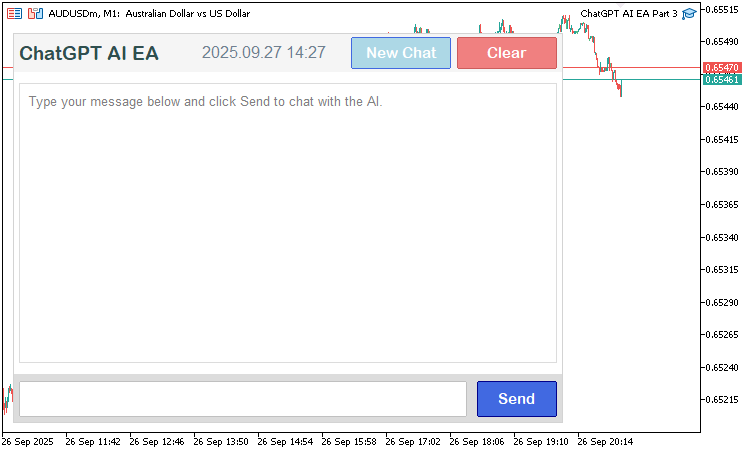
Ahora que ya tenemos la interfaz con todos los elementos, podemos pasar a actualizar la pantalla con el nuevo historial de la conversación. No obstante, necesitaremos algunas funciones auxiliares para obtener las líneas de los mensajes y sus alturas, con el fin de garantizar que la conversación quepa dentro del área de visualización sin desbordarse, así como para gestionar las líneas de las marcas de tiempo que vamos a incorporar.
//+------------------------------------------------------------------+
//| Check if string is a timestamp in HH:MM format                   |
//+------------------------------------------------------------------+
bool IsTimestamp(string line) {
   StringTrimLeft(line);                                 //--- Trim left whitespace
   StringTrimRight(line);                                //--- Trim right whitespace
   if (StringLen(line) != 5) return false;               //--- Check length
   if (StringGetCharacter(line, 2) != ':') return false; //--- Check colon
   string hh = StringSubstr(line, 0, 2);                 //--- Extract hours
   string mm = StringSubstr(line, 3, 2);                 //--- Extract minutes
   int h = (int)StringToInteger(hh);                     //--- Convert hours to integer
   int m = (int)StringToInteger(mm);                     //--- Convert minutes to integer
   if (h < 0 || h > 23 || m < 0 || m > 59) return false; //--- Validate time
   return true;                                          //--- Confirm valid timestamp
}

//+------------------------------------------------------------------+
//| Compute lines and height for messages                            |
//+------------------------------------------------------------------+
void ComputeLinesAndHeight(const string &font, const int fontSize, const int timestampFontSize,
                           const int adjustedLineHeight, const int adjustedTimestampHeight,
                           const int messageMargin, const int maxTextWidth,
                           const string &msgRoles[], const string &msgContents[], const string &msgTimestamps[],
                           const int numMessages, int &totalHeight_out, int &totalLines_out,
                           string &allLines_out[], string &lineRoles_out[], int &lineHeights_out[]) {
   ArrayResize(allLines_out, 0);                    //--- Clear lines array
   ArrayResize(lineRoles_out, 0);                   //--- Clear roles array
   ArrayResize(lineHeights_out, 0);                 //--- Clear heights array
   totalLines_out = 0;                              //--- Initialize total lines
   totalHeight_out = 0;                             //--- Initialize total height
   for (int m = 0; m < numMessages; m++) {          //--- Iterate through messages
      string wrappedLines[];                        //--- Declare wrapped lines
      WrapText(msgContents[m], font, fontSize, maxTextWidth, wrappedLines); //--- Wrap message content
      int numLines = ArraySize(wrappedLines);       //--- Get number of lines
      int currSize = ArraySize(allLines_out);       //--- Get current size
      ArrayResize(allLines_out, currSize + numLines + 1); //--- Resize lines array
      ArrayResize(lineRoles_out, currSize + numLines + 1); //--- Resize roles array
      ArrayResize(lineHeights_out, currSize + numLines + 1); //--- Resize heights array
      for (int l = 0; l < numLines; l++) {          //--- Iterate through wrapped lines
         allLines_out[currSize + l] = wrappedLines[l]; //--- Add line
         lineRoles_out[currSize + l] = msgRoles[m]; //--- Add role
         lineHeights_out[currSize + l] = adjustedLineHeight; //--- Set line height
         totalHeight_out += adjustedLineHeight;     //--- Update total height
      }
      allLines_out[currSize + numLines] = msgTimestamps[m]; //--- Add timestamp
      lineRoles_out[currSize + numLines] = msgRoles[m] + "_timestamp"; //--- Add timestamp role
      lineHeights_out[currSize + numLines] = adjustedTimestampHeight; //--- Set timestamp height
      totalHeight_out += adjustedTimestampHeight;   //--- Update total height
      totalLines_out += numLines + 1;               //--- Update total lines
      if (m < numMessages - 1) {                    //--- Check for margin
         totalHeight_out += messageMargin;          //--- Add message margin
      }
   }
}
Aquí implementamos funciones auxiliares para validar las marcas de tiempo y calcular las propiedades de visualización de los mensajes. En la función «IsTimestamp», eliminamos los espacios en blanco al principio y al final de la cadena de entrada usando StringTrimLeft y StringTrimRight, comprobamos si su longitud es exactamente de 5 caracteres, verificamos que haya dos puntos en la posición 2 con StringGetCharacter, extraemos las horas y los minutos con StringSubstr, los convertimos en números enteros con StringToInteger y devolvemos «true» si las horas (0-23) y los minutos (0-59) forman una hora válida, lo que garantiza una detección precisa de las marcas de tiempo en el historial de la conversación. Si opta por un enfoque diferente, tendrá que definir sus propias reglas.
En la función «ComputeLinesAndHeight», vaciamos las matrices de salida («allLines_out», «lineRoles_out» y «lineHeights_out») con ArrayResize e inicializamos «totalLines_out» y «totalHeight_out» a cero. Para cada mensaje, aplicamos el ajuste de líneas a su contenido mediante «WrapText» con la fuente, el tamaño de fuente y el ancho máximo especificados; a continuación, redimensionamos las matrices de salida para que quepan las líneas resultantes más una marca de tiempo, asignamos el texto, el rol («User» o «AI») y la altura de cada línea («adjustedLineHeight» para el contenido y «adjustedTimestampHeight» para las marcas de tiempo) a «allLines_out», «lineRoles_out» y «lineHeights_out», respectivamente, y actualizamos «totalHeight_out» y «totalLines_out». Añadimos un margen («messageMargin») después de cada mensaje, excepto del último, para garantizar una separación visual; así, validamos las marcas de tiempo y organizamos el texto de los mensajes para su visualización en nuestra interfaz de chat con desplazamiento.
Con estas funciones, ahora podemos actualizar la función de visualización para desglosar el historial en roles, contenidos y marcas de tiempo, alinear los mensajes según su rol, añadir márgenes, gestionar el desplazamiento y el recorte, y mostrar la barra de desplazamiento de forma dinámica.
//+------------------------------------------------------------------+
//| Update response display with scrolling                           |
//+------------------------------------------------------------------+
void UpdateResponseDisplay() {
   int total = ObjectsTotal(0, 0, -1);              //--- Get total objects
   for (int j = total - 1; j >= 0; j--) {           //--- Iterate through objects
      string name = ObjectName(0, j, 0, -1);        //--- Get object name
      if (StringFind(name, "ChatGPT_ResponseLine_") == 0 ||
          StringFind(name, "ChatGPT_MessageBg_") == 0 ||
          StringFind(name, "ChatGPT_MessageText_") == 0 ||
          StringFind(name, "ChatGPT_Timestamp_") == 0) { //--- Check for message objects
         ObjectDelete(0, name);                     //--- Delete object
      }
   }
   string displayText = conversationHistory;        //--- Get conversation history
   int textX = g_mainX + g_sidePadding + g_textPadding; //--- Calculate text x position
   int textY = g_mainY + g_headerHeight + g_padding + g_textPadding; //--- Calculate text y position
   int fullMaxWidth = g_mainWidth - 2 * g_sidePadding - 2 * g_textPadding; //--- Calculate max text width
   if (displayText == "") {                         //--- Check empty history
      string objName = "ChatGPT_ResponseLine_0";    //--- Set default label name
      createLabel(objName, textX, textY, "Type your message below and click Send to chat with the AI.", clrGray, 10, "Arial", CORNER_LEFT_UPPER, ANCHOR_LEFT_UPPER); //--- Create default label
      g_total_height = 0;                           //--- Reset total height
      g_visible_height = g_displayHeight - 2 * g_textPadding; //--- Set visible height
      if (scroll_visible) {                         //--- Check scrollbar visible
         DeleteScrollbar();                         //--- Delete scrollbar
         scroll_visible = false;                    //--- Reset scrollbar visibility
      }
      ChartRedraw();                                //--- Redraw chart
      return;                                       //--- Exit function
   }
   string parts[];                                  //--- Declare parts array
   int numParts = StringSplit(displayText, '\n', parts); //--- Split history into parts
   string msgRoles[];                               //--- Declare roles array
   string msgContents[];                            //--- Declare contents array
   string msgTimestamps[];                          //--- Declare timestamps array
   string currentRole = "";                         //--- Initialize current role
   string currentContent = "";                      //--- Initialize current content
   string currentTimestamp = "";                    //--- Initialize current timestamp
   for (int p = 0; p < numParts; p++) {             //--- Iterate through parts
      string line = parts[p];                       //--- Get current line
      StringTrimLeft(line);                         //--- Trim left whitespace
      StringTrimRight(line);                        //--- Trim right whitespace
      if (StringLen(line) == 0) {                   //--- Check empty line
         if (currentRole != "") currentContent += "\n"; //--- Append newline
         continue;                                  //--- Skip to next
      }
      if (StringFind(line, "You: ") == 0) {         //--- Check user message
         if (currentRole != "") {                   //--- Check existing message
            int size = ArraySize(msgRoles);         //--- Get current size
            ArrayResize(msgRoles, size + 1);        //--- Resize roles array
            ArrayResize(msgContents, size + 1);     //--- Resize contents array
            ArrayResize(msgTimestamps, size + 1);   //--- Resize timestamps array
            msgRoles[size] = currentRole;           //--- Add role
            msgContents[size] = currentContent;     //--- Add content
            msgTimestamps[size] = currentTimestamp; //--- Add timestamp
         }
         currentRole = "User";                      //--- Set role to User
         currentContent = StringSubstr(line, 5);    //--- Extract user content
         currentTimestamp = "";                     //--- Reset timestamp
         continue;                                  //--- Skip to next
      } else if (StringFind(line, "AI: ") == 0) {   //--- Check AI message
         if (currentRole != "") {                   //--- Check existing message
            int size = ArraySize(msgRoles);         //--- Get current size
            ArrayResize(msgRoles, size + 1);        //--- Resize roles array
            ArrayResize(msgContents, size + 1);     //--- Resize contents array
            ArrayResize(msgTimestamps, size + 1);   //--- Resize timestamps array
            msgRoles[size] = currentRole;           //--- Add role
            msgContents[size] = currentContent;     //--- Add content
            msgTimestamps[size] = currentTimestamp; //--- Add timestamp
         }
         currentRole = "AI";                        //--- Set role to AI
         currentContent = StringSubstr(line, 4);    //--- Extract AI content
         currentTimestamp = "";                     //--- Reset timestamp
         continue;                                  //--- Skip to next
      } else if (IsTimestamp(line)) {               //--- Check timestamp
         if (currentRole != "") {                   //--- Check existing message
            currentTimestamp = line;                //--- Set timestamp
            int size = ArraySize(msgRoles);         //--- Get current size
            ArrayResize(msgRoles, size + 1);        //--- Resize roles array
            ArrayResize(msgContents, size + 1);     //--- Resize contents array
            ArrayResize(msgTimestamps, size + 1);   //--- Resize timestamps array
            msgRoles[size] = currentRole;           //--- Add role
            msgContents[size] = currentContent;     //--- Add content
            msgTimestamps[size] = currentTimestamp; //--- Add timestamp
            currentRole = "";                       //--- Reset role
         }
      } else {                                      //--- Append to content
         if (currentRole != "") {                   //--- Check active message
            currentContent += "\n" + line;          //--- Append line
         }
      }
   }
   if (currentRole != "") {                         //--- Check final message
      int size = ArraySize(msgRoles);               //--- Get current size
      ArrayResize(msgRoles, size + 1);              //--- Resize roles array
      ArrayResize(msgContents, size + 1);           //--- Resize contents array
      ArrayResize(msgTimestamps, size + 1);         //--- Resize timestamps array
      msgRoles[size] = currentRole;                 //--- Add role
      msgContents[size] = currentContent;           //--- Add content
      msgTimestamps[size] = currentTimestamp;       //--- Add timestamp
   }
   int numMessages = ArraySize(msgRoles);           //--- Get number of messages
   if (numMessages == 0) {                          //--- Check no messages
      string objName = "ChatGPT_ResponseLine_0";    //--- Set default label name
      createLabel(objName, textX, textY, "Type your message below and click Send to chat with the AI.", clrGray, 10, "Arial", CORNER_LEFT_UPPER, ANCHOR_LEFT_UPPER); //--- Create default label
      g_total_height = 0;                           //--- Reset total height
      g_visible_height = g_displayHeight - 2 * g_textPadding; //--- Set visible height
      if (scroll_visible) {                         //--- Check scrollbar visible
         DeleteScrollbar();                         //--- Delete scrollbar
         scroll_visible = false;                    //--- Reset scrollbar visibility
      }
      ChartRedraw();                                //--- Redraw chart
      return;                                       //--- Exit function
   }
   string font = "Arial";                           //--- Set font
   int fontSize = 10;                               //--- Set font size
   int timestampFontSize = 8;                       //--- Set timestamp font size
   int lineHeight = TextGetHeight("A", font, fontSize); //--- Get line height
   int timestampHeight = TextGetHeight("A", font, timestampFontSize); //--- Get timestamp height
   int adjustedLineHeight = lineHeight + g_lineSpacing; //--- Calculate adjusted line height
   int adjustedTimestampHeight = timestampHeight + g_lineSpacing; //--- Calculate adjusted timestamp height
   int messageMargin = 12;                          //--- Set message margin
   int visibleHeight = g_displayHeight - 2 * g_textPadding; //--- Calculate visible height
   g_visible_height = visibleHeight;                //--- Set visible height
   string tentativeAllLines[];                      //--- Declare tentative lines
   string tentativeLineRoles[];                     //--- Declare tentative roles
   int tentativeLineHeights[];                      //--- Declare tentative heights
   int tentativeTotalHeight, tentativeTotalLines;   //--- Declare tentative totals
   ComputeLinesAndHeight(font, fontSize, timestampFontSize, adjustedLineHeight, adjustedTimestampHeight,
                         messageMargin, fullMaxWidth, msgRoles, msgContents, msgTimestamps, numMessages,
                         tentativeTotalHeight, tentativeTotalLines, tentativeAllLines, tentativeLineRoles, tentativeLineHeights); //--- Compute tentative lines
   bool need_scroll = tentativeTotalHeight > visibleHeight; //--- Check if scrolling needed
   bool should_show_scrollbar = false;              //--- Initialize scrollbar visibility
   int reserved_width = 0;                          //--- Initialize reserved width
   if (ScrollbarMode != SCROLL_WHEEL_ONLY) {        //--- Check scrollbar mode
      should_show_scrollbar = need_scroll && (ScrollbarMode == SCROLL_DYNAMIC_ALWAYS || (ScrollbarMode == SCROLL_DYNAMIC_HOVER && mouse_in_display)); //--- Determine scrollbar visibility
      if (should_show_scrollbar) {                  //--- Check if scrollbar needed
         reserved_width = 16;                       //--- Reserve scrollbar width
      }
   }
   string allLines[];                               //--- Declare final lines
   string lineRoles[];                              //--- Declare final roles
   int lineHeights[];                               //--- Declare final heights
   int totalHeight, totalLines;                     //--- Declare final totals
   int maxTextWidth = fullMaxWidth - reserved_width; //--- Calculate max text width
   if (reserved_width > 0) {                        //--- Check if scrollbar reserved
      ComputeLinesAndHeight(font, fontSize, timestampFontSize, adjustedLineHeight, adjustedTimestampHeight,
                            messageMargin, maxTextWidth, msgRoles, msgContents, msgTimestamps, numMessages,
                            totalHeight, totalLines, allLines, lineRoles, lineHeights); //--- Compute lines with reduced width
   } else {                                         //--- Use tentative values
      totalHeight = tentativeTotalHeight;           //--- Set total height
      totalLines = tentativeTotalLines;             //--- Set total lines
      ArrayCopy(allLines, tentativeAllLines);       //--- Copy lines
      ArrayCopy(lineRoles, tentativeLineRoles);     //--- Copy roles
      ArrayCopy(lineHeights, tentativeLineHeights); //--- Copy heights
   }
   FileWriteString(logFileHandle, "UpdateResponseDisplay: totalHeight=" + IntegerToString(totalHeight) + ", visibleHeight=" + IntegerToString(visibleHeight) + ", totalLines=" + IntegerToString(totalLines) + ", reserved_width=" + IntegerToString(reserved_width) + "\n"); //--- Log display update
   g_total_height = totalHeight;                    //--- Set total height
   bool prev_scroll_visible = scroll_visible;       //--- Store previous scrollbar state
   scroll_visible = should_show_scrollbar;          //--- Update scrollbar visibility
   if (scroll_visible != prev_scroll_visible) {     //--- Check scrollbar state change
      if (scroll_visible) {                         //--- Show scrollbar
         CreateScrollbar();                         //--- Create scrollbar
      } else {                                      //--- Hide scrollbar
         DeleteScrollbar();                         //--- Delete scrollbar
      }
   }
   int max_scroll = MathMax(0, totalHeight - visibleHeight); //--- Calculate max scroll
   if (scroll_pos > max_scroll) scroll_pos = max_scroll; //--- Clamp scroll position
   if (scroll_pos < 0) scroll_pos = 0;              //--- Ensure non-negative scroll
   if (totalHeight > visibleHeight && scroll_pos == prev_scroll_pos && prev_scroll_pos == -1) { //--- Check initial scroll
      scroll_pos = max_scroll;                      //--- Set to bottom
   }
   if (scroll_visible) {                            //--- Update scrollbar
      slider_height = CalculateSliderHeight();      //--- Calculate slider height
      ObjectSetInteger(0, SCROLL_SLIDER, OBJPROP_YSIZE, slider_height); //--- Set slider height
      UpdateSliderPosition();                       //--- Update slider position
      UpdateButtonColors();                         //--- Update button colors
   }
   int currentY = textY - scroll_pos;               //--- Calculate current y position
   int endY = textY + visibleHeight;                //--- Calculate end y position
   int startLineIndex = 0;                          //--- Initialize start line index
   int currentHeight = 0;                           //--- Initialize current height
   for (int line = 0; line < totalLines; line++) {  //--- Find start line
      if (currentHeight >= scroll_pos) {            //--- Check if at scroll position
         startLineIndex = line;                     //--- Set start line
         currentY = textY + (currentHeight - scroll_pos); //--- Set current y
         break;                                     //--- Exit loop
      }
      currentHeight += lineHeights[line];           //--- Add line height
      if (line < totalLines - 1 && StringFind(lineRoles[line], "_timestamp") >= 0 && StringFind(lineRoles[line + 1], "_timestamp") < 0) { //--- Check message gap
         currentHeight += messageMargin;            //--- Add message margin
      }
   }
   int numVisibleLines = 0;                         //--- Initialize visible lines
   int visibleHeightUsed = 0;                       //--- Initialize used height
   for (int line = startLineIndex; line < totalLines; line++) { //--- Count visible lines
      int lineHeight = lineHeights[line];           //--- Get line height
      if (visibleHeightUsed + lineHeight > visibleHeight) break; //--- Check height limit
      visibleHeightUsed += lineHeight;              //--- Add line height
      numVisibleLines++;                            //--- Increment visible lines
      if (line < totalLines - 1 && StringFind(lineRoles[line], "_timestamp") >= 0 && StringFind(lineRoles[line + 1], "_timestamp") < 0) { //--- Check message gap
         if (visibleHeightUsed + messageMargin > visibleHeight) break; //--- Check margin limit
         visibleHeightUsed += messageMargin;        //--- Add message margin
      }
   }
   FileWriteString(logFileHandle, "Visible lines: startLineIndex=" + IntegerToString(startLineIndex) + ", numVisibleLines=" + IntegerToString(numVisibleLines) + ", scroll_pos=" + IntegerToString(scroll_pos) + ", currentY=" + IntegerToString(currentY) + "\n"); //--- Log visible lines
   int leftX = g_mainX + g_sidePadding + g_textPadding; //--- Set left text x
   int rightX = g_mainX + g_mainWidth - g_sidePadding - g_textPadding - reserved_width; //--- Set right text x
   color userColor = clrGray;                       //--- Set user text color
   color aiColor = clrBlue;                         //--- Set AI text color
   color timestampColor = clrDarkGray;              //--- Set timestamp color
   for (int li = 0; li < numVisibleLines; li++) {   //--- Display visible lines
      int lineIndex = startLineIndex + li;          //--- Calculate line index
      if (lineIndex >= totalLines) break;           //--- Check valid index
      string line = allLines[lineIndex];            //--- Get line text
      string role = lineRoles[lineIndex];           //--- Get line role
      bool isTimestamp = StringFind(role, "_timestamp") >= 0; //--- Check if timestamp
      int currFontSize = isTimestamp ? timestampFontSize : fontSize; //--- Set font size
      color textCol = isTimestamp ? timestampColor : (StringFind(role, "User") >= 0 ? userColor : aiColor); //--- Set text color
      string display_line = line;                   //--- Set display line
      if (line == " ") {                            //--- Check empty line
         display_line = " ";                        //--- Set to space
         textCol = clrWhite;                        //--- Set to white
      }
      int textX_pos = (StringFind(role, "User") >= 0) ? rightX : leftX; //--- Set text x position
      ENUM_ANCHOR_POINT textAnchor = (StringFind(role, "User") >= 0) ? ANCHOR_RIGHT_UPPER : ANCHOR_LEFT_UPPER; //--- Set text anchor
      string lineName = "ChatGPT_MessageText_" + IntegerToString(lineIndex); //--- Generate line name
      if (currentY >= textY && currentY < endY) {   //--- Check if visible
         createLabel(lineName, textX_pos, currentY, display_line, textCol, currFontSize, font, CORNER_LEFT_UPPER, textAnchor); //--- Create label
      }
      currentY += lineHeights[lineIndex];           //--- Increment y position
      if (lineIndex < totalLines - 1 && StringFind(lineRoles[lineIndex], "_timestamp") >= 0 && StringFind(lineRoles[lineIndex + 1], "_timestamp") < 0) { //--- Check message gap
         currentY += messageMargin;                 //--- Add message margin
      }
   }
   ChartRedraw();                                   //--- Redraw chart
}
En la función «UpdateResponseDisplay», primero borramos los objetos existentes relacionados con los mensajes («ChatGPT_ResponseLine_», «ChatGPT_MessageBg_», «ChatGPT_MessageText_», «ChatGPT_Timestamp_») mediante ObjectsTotal y ObjectDelete para actualizar la visualización. Si el historial de la conversación («conversationHistory») está vacío, creamos una etiqueta predeterminada con «createLabel» que solicita al usuario que escriba un mensaje, restablecemos «g_total_height» a 0, establecemos «g_visible_height» en la altura de visualización menos el relleno, eliminamos la barra de desplazamiento con «DeleteScrollbar» si está visible y volvemos a dibujar el gráfico con la función ChartRedraw. De lo contrario, dividimos el historial en partes mediante StringSplit, usando los saltos de línea como separadores, y analizamos las líneas para extraer los datos en «msgRoles», «msgContents» y «msgTimestamps»: identificamos «You: » y «AI: », detectamos las marcas de tiempo con «IsTimestamp», acumulamos el contenido de las distintas líneas y almacenamos los mensajes completos.
Calculamos la posición del texto («textX», «textY») y la anchura máxima («fullMaxWidth»), establecemos los tamaños de fuente (10 para los mensajes, 8 para las marcas de tiempo) y calculamos la altura de las líneas con «TextGetHeight» más «g_lineSpacing». Mediante «ComputeLinesAndHeight», generamos matrices de líneas y calculamos alturas provisionales, comprobamos si es necesario el desplazamiento y determinamos la visibilidad de la barra de desplazamiento en función de «ScrollbarMode» y «mouse_in_display», reservando 16 píxeles para la barra de desplazamiento si se muestra. Volvemos a calcular las líneas con el ancho ajustado si es necesario, actualizamos «g_total_height», gestionamos la visibilidad de la barra de desplazamiento con «CreateScrollbar» o «DeleteScrollbar», limitamos «scroll_pos» al rango permitido por «max_scroll» y lo ajustamos para desplazarnos hasta el final cuando hay mensajes nuevos.
Calculamos la línea inicial y la posición en el eje Y basándonos en «scroll_pos», determinamos las líneas visibles dentro de «g_visible_height», y representamos cada línea con «createLabel», utilizando mensajes de la IA alineados a la izquierda («clrBlue») y mensajes de usuario alineados a la derecha («clrGray») con marcas de tiempo («clrDarkGray»), aplicando un margen de 12 píxeles a los mensajes. Por último, registramos los detalles de la visualización con FileWriteString y volvemos a dibujar el gráfico. De este modo, se garantizará que el área de visualización se rellene con el historial de conversación disponible. Ahora tenemos que asegurarnos de que, al pulsar «Send», se envíe el prompt. Dividiremos la función actual en varias funciones para facilitar su gestión en futuras versiones.
//+------------------------------------------------------------------+
//| Build messages array from history                                |
//+------------------------------------------------------------------+
string BuildMessagesFromHistory(string newPrompt) {
   string messages = "[";                          //--- Start JSON array
   string temp = conversationHistory;              //--- Copy conversation history
   while (StringLen(temp) > 0) {                   //--- Process history
      int you_pos = StringFind(temp, "You: ");     //--- Find user message
      if (you_pos != 0) break;                     //--- Exit if no user message
      temp = StringSubstr(temp, 5);                //--- Extract after "You: "
      int end_user = StringFind(temp, "\n");       //--- Find end of user message
      string user_content = StringSubstr(temp, 0, end_user); //--- Get user content
      temp = StringSubstr(temp, end_user + 1);     //--- Move past user message
      int end_ts1 = StringFind(temp, "\n");        //--- Find end of timestamp
      temp = StringSubstr(temp, end_ts1 + 1);      //--- Move past timestamp
      int ai_pos = StringFind(temp, "AI: ");       //--- Find AI message
      if (ai_pos != 0) break;                      //--- Exit if no AI message
      temp = StringSubstr(temp, 4);                //--- Extract after "AI: "
      int end_ai = StringFind(temp, "\n");         //--- Find end of AI message
      string ai_content = StringSubstr(temp, 0, end_ai); //--- Get AI content
      temp = StringSubstr(temp, end_ai + 1);       //--- Move past AI message
      int end_ts2 = StringFind(temp, "\n\n");      //--- Find end of conversation block
      temp = StringSubstr(temp, end_ts2 + 2);      //--- Move past block
      messages += "{\"role\":\"user\",\"content\":\"" + JsonEscape(user_content) + "\"},"; //--- Add user message
      messages += "{\"role\":\"assistant\",\"content\":\"" + JsonEscape(ai_content) + "\"},"; //--- Add AI message
   }
   messages += "{\"role\":\"user\",\"content\":\"" + JsonEscape(newPrompt) + "\"}]"; //--- Add new prompt
   return messages;                                //--- Return JSON messages
}

//+------------------------------------------------------------------+
//| Get ChatGPT response via API                                     |
//+------------------------------------------------------------------+
string GetChatGPTResponse(string prompt) {
   string messages = BuildMessagesFromHistory(prompt); //--- Build JSON messages
   string requestData = "{\"model\":\"" + OpenAI_Model + "\",\"messages\":" + messages + ",\"max_tokens\":" + IntegerToString(MaxResponseLength) + "}"; //--- Create request JSON
   FileWriteString(logFileHandle, "Request Data: " + requestData + "\n"); //--- Log request data
   char postData[];                                    //--- Declare post data array
   int dataLen = StringToCharArray(requestData, postData, 0, WHOLE_ARRAY, CP_UTF8); //--- Convert request to char array
   ArrayResize(postData, dataLen - 1);                 //--- Remove null terminator
   FileWriteString(logFileHandle, "Raw Post Data (Hex): " + LogCharArray(postData) + "\n"); //--- Log raw data
   string headers = "Authorization: Bearer " + OpenAI_API_Key + "\r\n" +
                    "Content-Type: application/json; charset=UTF-8\r\n" +
                    "Content-Length: " + IntegerToString(dataLen - 1) + "\r\n\r\n"; //--- Set request headers
   FileWriteString(logFileHandle, "Request Headers: " + headers + "\n"); //--- Log headers
   char result[];                                     //--- Declare result array
   string resultHeaders;                              //--- Declare result headers
   int res = WebRequest("POST", OpenAI_Endpoint, headers, 10000, postData, result, resultHeaders); //--- Send API request
   if (res != 200) {                                  //--- Check request failure
      string response = CharArrayToString(result, 0, WHOLE_ARRAY, CP_UTF8); //--- Convert result to string
      string errMsg = "API request failed: HTTP Code " + IntegerToString(res) + ", Error: " + IntegerToString(GetLastError()) + ", Response: " + response; //--- Create error message
      Print(errMsg);                                  //--- Print error
      FileWriteString(logFileHandle, errMsg + "\n");  //--- Log error
      FileWriteString(logFileHandle, "Raw Response Data (Hex): " + LogCharArray(result) + "\n"); //--- Log raw response
      return errMsg;                                  //--- Return error message
   }
   string response = CharArrayToString(result, 0, WHOLE_ARRAY, CP_UTF8); //--- Convert response to string
   FileWriteString(logFileHandle, "API Response: " + response + "\n"); //--- Log response
   JsonValue jsonObject;                              //--- Declare JSON object
   int index = 0;                                     //--- Initialize parse index
   char charArray[];                                  //--- Declare char array
   int arrayLength = StringToCharArray(response, charArray, 0, WHOLE_ARRAY, CP_UTF8); //--- Convert response to char array
   if (!jsonObject.DeserializeFromArray(charArray, arrayLength, index)) { //--- Parse JSON
      string errMsg = "Error: Failed to parse API response JSON: " + response; //--- Create error message
      Print(errMsg);                                  //--- Print error
      FileWriteString(logFileHandle, errMsg + "\n");  //--- Log error
      return errMsg;                                  //--- Return error message
   }
   JsonValue *error = jsonObject.FindChildByKey("error"); //--- Check for error
   if (error != NULL) {                               //--- Check error exists
      string errMsg = "API Error: " + error["message"].ToString(); //--- Get error message
      Print(errMsg);                                  //--- Print error
      FileWriteString(logFileHandle, errMsg + "\n");  //--- Log error
      return errMsg;                                  //--- Return error message
   }
   string content = jsonObject["choices"][0]["message"]["content"].ToString(); //--- Extract response content
   if (StringLen(content) > 0) {                      //--- Check non-empty content
      StringReplace(content, "\\n", "\n");            //--- Replace escaped newlines
      StringTrimLeft(content);                        //--- Trim left whitespace
      StringTrimRight(content);                       //--- Trim right whitespace
      return content;                                 //--- Return content
   }
   string errMsg = "Error: No content in API response: " + response; //--- Create error message
   Print(errMsg);                                     //--- Print error
   FileWriteString(logFileHandle, errMsg + "\n");     //--- Log error
   return errMsg;                                     //--- Return error message
}

//+------------------------------------------------------------------+
//| Submit user message to ChatGPT                                   |
//+------------------------------------------------------------------+
void SubmitMessage() {
   string prompt = (string)ObjectGetString(0, "ChatGPT_InputEdit", OBJPROP_TEXT); //--- Get user input
   if (StringLen(prompt) > 0) {                      //--- Check non-empty input
      string response = GetChatGPTResponse(prompt);  //--- Get AI response
      Print("User: " + prompt);                      //--- Log user prompt
      Print("AI: " + response);                      //--- Log AI response
      string timestamp = TimeToString(TimeCurrent(), TIME_MINUTES); //--- Get current timestamp
      conversationHistory += "You: " + prompt + "\n" + timestamp + "\nAI: " + response + "\n" + timestamp + "\n\n"; //--- Append to history
      ObjectSetString(0, "ChatGPT_InputEdit", OBJPROP_TEXT, ""); //--- Clear input field
      UpdateResponseDisplay();                       //--- Update display with new content
      scroll_pos = MathMax(0, g_total_height - g_visible_height); //--- Scroll to bottom
      UpdateResponseDisplay();                       //--- Redraw display
      if (scroll_visible) {                          //--- Check scrollbar visible
         UpdateSliderPosition();                     //--- Update slider position
         UpdateButtonColors();                       //--- Update button colors
      }
      FileWriteString(logFileHandle, "Prompt: " + prompt + " | Response: " + response + " | Time: " + timestamp + "\n"); //--- Log interaction
      ChartRedraw();                                 //--- Redraw chart
   }
}
Aquí implementamos las funciones básicas de interacción con la API y de gestión de mensajes. En primer lugar, definimos la función «BuildMessagesFromHistory», en la que construimos una matriz JSON para las solicitudes a la API a partir del análisis de «conversationHistory». Recorremos este historial para extraer los mensajes del usuario («You: ») y de la IA («AI: ») con StringFind y StringSubstr, omitiendo las marcas de tiempo y las líneas vacías. Utilizamos «JsonEscape» para dar formato al contenido en objetos JSON con roles («user» o «assistant») y añadimos además la nueva consulta del usuario como mensaje final, lo que da como resultado una matriz con el formato adecuado para conversaciones de varios turnos.
En la función «GetChatGPTResponse», creamos una solicitud JSON con «BuildMessagesFromHistory», «OpenAI_Model» y «MaxResponseLength», la convertimos en una matriz de caracteres con StringToCharArray, configuramos los encabezados con «OpenAI_API_Key» y enviamos una solicitud POST a «OpenAI_Endpoint» utilizando la función WebRequest. Gestionamos las respuestas comprobando si hay errores HTTP (código de estado distinto de 200), registrando los datos sin procesar y los errores con FileWriteString en «logFileHandle», analizando la respuesta JSON con «JsonValue::DeserializeFromArray», comprobando si hay errores de la API y extrayendo el contenido de «choices[0][message][content]». Antes de devolverlo, convertimos las secuencias de escape de salto de línea en saltos de línea y eliminamos los espacios en blanco de los extremos, tal y como hicimos con la versión anterior.
En la función «SubmitMessage», recuperamos la entrada del usuario de «ChatGPT_InputEdit» con ObjectGetString, llamamos a «GetChatGPTResponse» si no está vacía, registramos el prompt y la respuesta con Print, añadimos ambos a «conversationHistory» con las marcas de tiempo de TimeCurrent, borramos el campo de entrada con ObjectSetString, actualizamos la visualización con «UpdateResponseDisplay», nos desplazamos hasta el final ajustando «scroll_pos» y actualizamos los elementos visuales de la barra de desplazamiento si es necesario, registrando la interacción. Esto crea un sistema para gestionar las conversaciones con la IA, la comunicación con la API y la actualización dinámica de la interfaz de usuario del chat. Podemos llamar a esta función al hacer clic en el botón «Send» de la siguiente manera.
//+------------------------------------------------------------------+
//| Chart event handler for ChatGPT UI                               |
//+------------------------------------------------------------------+
void OnChartEvent(const int id, const long &lparam, const double &dparam, const string &sparam) {
   if (id == CHARTEVENT_OBJECT_CLICK && sparam == "ChatGPT_SubmitButton") { //--- Handle submit button click
      SubmitMessage();                              //--- Submit user message
   }
}
Para gestionar las interacciones con el gráfico, usamos el controlador de eventos «OnChartEvent» como nuestro detector de eventos. Cuando el evento es un clic en nuestro botón, llamamos a nuestra función para enviar el prompt. Aquí tiene una representación de lo que obtenemos.
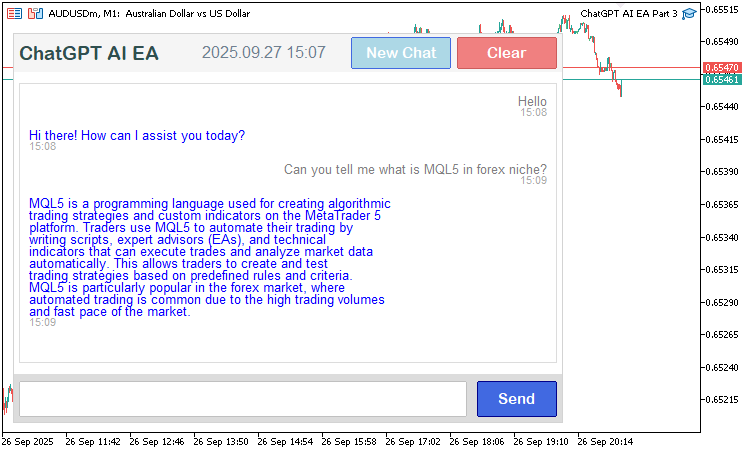
En la imagen podemos ver que la conversación es más larga y se presenta de forma intuitiva: los mensajes del usuario aparecen a la derecha y los de la IA a la izquierda, todos con marcas de tiempo. Ahora solo queda garantizar que la interfaz sea interactiva, de modo que se pueda arrastrar el control deslizante de la barra de desplazamiento y que los botones que hemos añadido muestren los estados al pasar el cursor por encima. A continuación le mostramos toda la lógica que utilizamos para lograrlo.
//+------------------------------------------------------------------+
//| Chart event handler for ChatGPT UI                               |
//+------------------------------------------------------------------+
void OnChartEvent(const int id, const long &lparam, const double &dparam, const string &sparam) {
   int displayX = g_mainX + g_sidePadding;          //--- Calculate display x position
   int displayY = g_mainY + g_headerHeight + g_padding; //--- Calculate display y position
   int displayW = g_mainWidth - 2 * g_sidePadding;  //--- Calculate display width
   int displayH = g_displayHeight;                  //--- Set display height
   int clearX = g_mainX + g_mainWidth - 100 - g_sidePadding; //--- Calculate clear button x
   int clearY = g_mainY + 4;                        //--- Set clear button y
   int clearW = 100;                                //--- Set clear button width
   int clearH = g_headerHeight - 8;                 //--- Calculate clear button height
   int new_chat_x = clearX - 100 - g_sidePadding;   //--- Calculate new chat button x
   int new_chat_w = 100;                            //--- Set new chat button width
   int new_chat_h = clearH;                         //--- Set new chat button height
   int sendX = g_mainX + (g_mainWidth - 448 - 10 - 80) / 2 + 448 + 10; //--- Calculate send button x
   int sendY = g_mainY + g_headerHeight + g_padding + g_displayHeight + g_padding; //--- Calculate send button y
   int sendW = 80;                                  //--- Set send button width
   int sendH = g_footerHeight;                      //--- Set send button height
   bool need_scroll = g_total_height > g_visible_height; //--- Check if scrolling needed
   if (id == CHARTEVENT_OBJECT_CLICK && sparam == "ChatGPT_SubmitButton") { //--- Handle submit button click
      SubmitMessage();                              //--- Submit user message
   } else if (id == CHARTEVENT_OBJECT_CLICK && sparam == "ChatGPT_ClearButton") { //--- Handle clear button click
      conversationHistory = "";                     //--- Clear conversation history
      scroll_pos = 0;                               //--- Reset scroll position
      prev_scroll_pos = -1;                         //--- Reset previous scroll position
      UpdateResponseDisplay();                      //--- Update response display
      ObjectSetString(0, "ChatGPT_InputEdit", OBJPROP_TEXT, ""); //--- Clear input field
      ChartRedraw();                                //--- Redraw chart
   } else if (id == CHARTEVENT_OBJECT_CLICK && sparam == "ChatGPT_NewChatButton") { //--- Handle new chat button click
      conversationHistory = "";                     //--- Clear conversation history
      scroll_pos = 0;                               //--- Reset scroll position
      prev_scroll_pos = -1;                         //--- Reset previous scroll position
      UpdateResponseDisplay();                      //--- Update response display
      ObjectSetString(0, "ChatGPT_InputEdit", OBJPROP_TEXT, ""); //--- Clear input field
      ChartRedraw();                                //--- Redraw chart
   } else if (id == CHARTEVENT_OBJECT_CLICK && (sparam == SCROLL_UP_REC || sparam == SCROLL_UP_LABEL)) { //--- Handle scroll up click
      ScrollUp();                                   //--- Scroll up
   } else if (id == CHARTEVENT_OBJECT_CLICK && (sparam == SCROLL_DOWN_REC || sparam == SCROLL_DOWN_LABEL)) { //--- Handle scroll down click
      ScrollDown();                                 //--- Scroll down
   } else if (id == CHARTEVENT_MOUSE_MOVE) {        //--- Handle mouse move events
      int mouseX = (int)lparam;                     //--- Get mouse x coordinate
      int mouseY = (int)dparam;                     //--- Get mouse y coordinate
      bool isOverSend = (mouseX >= sendX && mouseX <= sendX + sendW && mouseY >= sendY && mouseY <= sendY + sendH); //--- Check send button hover
      if (isOverSend && !button_hover) {            //--- Check send button hover start
         ObjectSetInteger(0, "ChatGPT_SubmitButton", OBJPROP_BGCOLOR, button_darker_bg); //--- Set hover background
         button_hover = true;                       //--- Set hover flag
         ChartRedraw();                             //--- Redraw chart
      } else if (!isOverSend && button_hover) {     //--- Check send button hover end
         ObjectSetInteger(0, "ChatGPT_SubmitButton", OBJPROP_BGCOLOR, button_original_bg); //--- Reset background
         button_hover = false;                      //--- Reset hover flag
         ChartRedraw();                             //--- Redraw chart
      }
      bool isOverClear = (mouseX >= clearX && mouseX <= clearX + clearW && mouseY >= clearY && mouseY <= clearY + clearH); //--- Check clear button hover
      if (isOverClear && !clear_hover) {            //--- Check clear button hover start
         ObjectSetInteger(0, "ChatGPT_ClearButton", OBJPROP_BGCOLOR, clear_darker_bg); //--- Set hover background
         clear_hover = true;                        //--- Set hover flag
         ChartRedraw();                             //--- Redraw chart
      } else if (!isOverClear && clear_hover) {     //--- Check clear button hover end
         ObjectSetInteger(0, "ChatGPT_ClearButton", OBJPROP_BGCOLOR, clear_original_bg); //--- Reset background
         clear_hover = false;                       //--- Reset hover flag
         ChartRedraw();                             //--- Redraw chart
      }
      bool isOverNewChat = (mouseX >= new_chat_x && mouseX <= new_chat_x + new_chat_w && mouseY >= clearY && mouseY <= clearY + new_chat_h); //--- Check new chat button hover
      if (isOverNewChat && !new_chat_hover) {       //--- Check new chat button hover start
         ObjectSetInteger(0, "ChatGPT_NewChatButton", OBJPROP_BGCOLOR, new_chat_darker_bg); //--- Set hover background
         new_chat_hover = true;                     //--- Set hover flag
         ChartRedraw();                             //--- Redraw chart
      } else if (!isOverNewChat && new_chat_hover) { //--- Check new chat button hover end
         ObjectSetInteger(0, "ChatGPT_NewChatButton", OBJPROP_BGCOLOR, new_chat_original_bg); //--- Reset background
         new_chat_hover = false;                    //--- Reset hover flag
         ChartRedraw();                             //--- Redraw chart
      }
      bool is_in = (mouseX >= displayX && mouseX <= displayX + displayW &&
                    mouseY >= displayY && mouseY <= displayY + displayH); //--- Check if mouse in display
      if (is_in != mouse_in_display) {              //--- Check display hover change
         mouse_in_display = is_in;                  //--- Update display hover status
         ChartSetInteger(0, CHART_MOUSE_SCROLL, !(mouse_in_display && need_scroll)); //--- Update chart scroll
         if (ScrollbarMode == SCROLL_DYNAMIC_HOVER) { //--- Check dynamic hover mode
            UpdateResponseDisplay();                //--- Update response display
         }
      }
      static int prevMouseState = 0;                //--- Store previous mouse state
      int MouseState = (int)sparam;                 //--- Get current mouse state
      if (prevMouseState == 0 && MouseState == 1 && scroll_visible) { //--- Check slider drag start
         int scrollbar_x = displayX + displayW - 16; //--- Calculate scrollbar x
         int xd_slider = (int)ObjectGetInteger(0, SCROLL_SLIDER, OBJPROP_XDISTANCE); //--- Get slider x
         int yd_slider = (int)ObjectGetInteger(0, SCROLL_SLIDER, OBJPROP_YDISTANCE); //--- Get slider y
         int xs_slider = (int)ObjectGetInteger(0, SCROLL_SLIDER, OBJPROP_XSIZE); //--- Get slider width
         int ys_slider = (int)ObjectGetInteger(0, SCROLL_SLIDER, OBJPROP_YSIZE); //--- Get slider height
         if (mouseX >= xd_slider && mouseX <= xd_slider + xs_slider &&
             mouseY >= yd_slider && mouseY <= yd_slider + ys_slider) { //--- Check slider click
            movingStateSlider = true;              //--- Set drag state
            mlbDownX_Slider = mouseX;              //--- Store mouse x
            mlbDownY_Slider = mouseY;              //--- Store mouse y
            mlbDown_YD_Slider = yd_slider;         //--- Store slider y
            ObjectSetInteger(0, SCROLL_SLIDER, OBJPROP_BGCOLOR, clrDimGray); //--- Set drag color
            ObjectSetInteger(0, SCROLL_SLIDER, OBJPROP_YSIZE, slider_height); //--- Set slider height
            ChartSetInteger(0, CHART_MOUSE_SCROLL, false); //--- Disable chart scroll
            FileWriteString(logFileHandle, "Slider drag started: x=" + IntegerToString(mouseX) + ", y=" + IntegerToString(mouseY) + "\n"); //--- Log drag start
         }
      }
      if (movingStateSlider) {                     //--- Handle slider drag
         int delta_y = mouseY - mlbDownY_Slider;   //--- Calculate y displacement
         int new_y = mlbDown_YD_Slider + delta_y;  //--- Calculate new y position
         int scroll_area_y_min = (g_mainY + g_headerHeight + g_padding) + 16; //--- Set min slider y
         int scroll_area_y_max = (g_mainY + g_headerHeight + g_padding + g_displayHeight - 16 - slider_height); //--- Set max slider y
         new_y = MathMax(scroll_area_y_min, MathMin(new_y, scroll_area_y_max)); //--- Clamp y position
         ObjectSetInteger(0, SCROLL_SLIDER, OBJPROP_YDISTANCE, new_y); //--- Update slider y
         int max_scroll = MathMax(0, g_total_height - g_visible_height); //--- Calculate max scroll
         double scroll_ratio = (double)(new_y - scroll_area_y_min) / (scroll_area_y_max - scroll_area_y_min); //--- Calculate scroll ratio
         int new_scroll_pos = (int)MathRound(scroll_ratio * max_scroll); //--- Calculate new scroll position
         if (new_scroll_pos != scroll_pos) {       //--- Check if scroll changed
            scroll_pos = new_scroll_pos;           //--- Update scroll position
            UpdateResponseDisplay();               //--- Update response display
            if (scroll_visible) {                  //--- Check scrollbar visible
               UpdateSliderPosition();             //--- Update slider position
               UpdateButtonColors();               //--- Update button colors
            }
            FileWriteString(logFileHandle, "Slider dragged: new_scroll_pos=" + IntegerToString(new_scroll_pos) + "\n"); //--- Log drag
         }
         ChartRedraw();                            //--- Redraw chart
      }
      if (MouseState == 0) {                       //--- Handle mouse release
         if (movingStateSlider) {                  //--- Check if dragging
            movingStateSlider = false;             //--- Reset drag state
            if (scroll_visible) {                  //--- Check scrollbar visible
               ObjectSetInteger(0, SCROLL_SLIDER, OBJPROP_BGCOLOR, clrGray); //--- Reset slider color
            }
            ChartSetInteger(0, CHART_MOUSE_SCROLL, !(mouse_in_display && need_scroll)); //--- Restore chart scroll
            FileWriteString(logFileHandle, "Slider drag ended\n"); //--- Log drag end
         }
      }
      prevMouseState = MouseState;                   //--- Update previous mouse state
      static bool prevMouseInsideScrollUp = false;   //--- Track previous scroll up hover
      static bool prevMouseInsideScrollDown = false; //--- Track previous scroll down hover
      static bool prevMouseInsideSlider = false;     //--- Track previous slider hover
      if (scroll_visible) {                          //--- Check scrollbar visible
         int scrollbar_x = displayX + displayW - 16; //--- Calculate scrollbar x
         int button_size = 16;                       //--- Set button size
         int xd_slider = (int)ObjectGetInteger(0, SCROLL_SLIDER, OBJPROP_XDISTANCE); //--- Get slider x
         int yd_slider = (int)ObjectGetInteger(0, SCROLL_SLIDER, OBJPROP_YDISTANCE); //--- Get slider y
         int xs_slider = (int)ObjectGetInteger(0, SCROLL_SLIDER, OBJPROP_XSIZE); //--- Get slider width
         int ys_slider = (int)ObjectGetInteger(0, SCROLL_SLIDER, OBJPROP_YSIZE); //--- Get slider height
         bool isMouseInsideUp = (mouseX >= scrollbar_x && mouseX <= scrollbar_x + 16 &&
                                 mouseY >= displayY &&
                                 mouseY <= displayY + button_size); //--- Check scroll up hover
         bool isMouseInsideDown = (mouseX >= scrollbar_x && mouseX <= scrollbar_x + 16 &&
                                   mouseY >= displayY + g_displayHeight - button_size &&
                                   mouseY <= displayY + g_displayHeight); //--- Check scroll down hover
         bool isMouseInsideSlider = (mouseX >= xd_slider && mouseX <= xd_slider + xs_slider &&
                                     mouseY >= yd_slider && mouseY <= yd_slider + ys_slider); //--- Check slider hover
         if (isMouseInsideUp != prevMouseInsideScrollUp) { //--- Check scroll up hover change
            ObjectSetInteger(0, SCROLL_UP_REC, OBJPROP_BGCOLOR, isMouseInsideUp ? clrSilver : clrGainsboro); //--- Update scroll up color
            prevMouseInsideScrollUp = isMouseInsideUp; //--- Update hover state
            ChartRedraw();                         //--- Redraw chart
         }
         if (isMouseInsideDown != prevMouseInsideScrollDown) { //--- Check scroll down hover change
            ObjectSetInteger(0, SCROLL_DOWN_REC, OBJPROP_BGCOLOR, isMouseInsideDown ? clrSilver : clrGainsboro); //--- Update scroll down color
            prevMouseInsideScrollDown = isMouseInsideDown; //--- Update hover state
            ChartRedraw();                         //--- Redraw chart
         }
         if (isMouseInsideSlider != prevMouseInsideSlider && !movingStateSlider) { //--- Check slider hover change
            ObjectSetInteger(0, SCROLL_SLIDER, OBJPROP_BGCOLOR, isMouseInsideSlider ? clrDarkGray : clrSilver); //--- Update slider color
            prevMouseInsideSlider = isMouseInsideSlider; //--- Update hover state
            ChartRedraw();                         //--- Redraw chart
         }
      }
   } else if (id == CHARTEVENT_MOUSE_WHEEL) {      //--- Handle mouse wheel events
      int mouseX = (int)lparam;                    //--- Get mouse x coordinate
      int mouseY = (int)dparam;                    //--- Get mouse y coordinate
      int delta = (int)sparam;                     //--- Get wheel delta
      bool in_display = (mouseX >= displayX && mouseX <= displayX + displayW &&
                         mouseY >= displayY && mouseY <= displayY + displayH); //--- Check if mouse in display
      if (in_display != mouse_in_display) {        //--- Check display hover change
         mouse_in_display = in_display;            //--- Update display hover
         ChartSetInteger(0, CHART_MOUSE_SCROLL, !(mouse_in_display && need_scroll)); //--- Update chart scroll
         if (ScrollbarMode == SCROLL_DYNAMIC_HOVER) { //--- Check dynamic hover mode
            UpdateResponseDisplay();               //--- Update response display
         }
      }
      if (in_display && need_scroll) {             //--- Check scroll conditions
         int scroll_amount = 30 * (delta > 0 ? -1 : 1); //--- Calculate scroll amount
         scroll_pos = MathMax(0, MathMin(MathMax(0, g_total_height - g_visible_height), scroll_pos + scroll_amount)); //--- Update scroll position
         UpdateResponseDisplay();                  //--- Update response display
         if (scroll_visible) {                     //--- Check scrollbar visible
            UpdateSliderPosition();                //--- Update slider position
            UpdateButtonColors();                  //--- Update button colors
         }
         ChartRedraw();                            //--- Redraw chart
      }
   }
}
Para lograr una interactividad total, en la función OnChartEvent calculamos las posiciones del área de visualización («displayX», «displayY», «displayW», «displayH»), del botón de borrado («clearX», «clearY», «clearW», «clearH»), del botón de nuevo chat («new_chat_x», «new_chat_w», «new_chat_h») y del botón de enviar («sendX», «sendY», «sendW», «sendH») utilizando variables globales de diseño. En el caso de los eventos de clic (CHARTEVENT_OBJECT_CLICK), gestionamos los botones «ChatGPT_ClearButton» y «ChatGPT_NewChatButton» borrando «conversationHistory», restableciendo «scroll_pos» y «prev_scroll_pos», borrando el campo de entrada con ObjectSetString y actualizando la visualización con «UpdateResponseDisplay», así como los botones de desplazamiento («SCROLL_UP_REC», «SCROLL_UP_LABEL», «SCROLL_DOWN_REC», «SCROLL_DOWN_LABEL») llamando a las funciones «ScrollUp» o «ScrollDown».
En el caso de los eventos de movimiento del ratón (CHARTEVENT_MOUSE_MOVE), detectamos si el cursor se sitúa sobre los botones «Send», «Clear» y «New chat» y, cuando esto ocurre, actualizamos sus fondos («button_darker_bg», «clear_darker_bg», «new_chat_darker_bg») con «ObjectSetInteger». También comprobamos si el cursor se encuentra en el área de visualización para activar o desactivar «mouse_in_display» y actualizar el desplazamiento del gráfico con «ChartSetInteger», actualizando la visualización en modo «SCROLL_DYNAMIC_HOVER».
Luego gestionamos el arrastre del control deslizante detectando los clics en «SCROLL_SLIDER», estableciendo «movingStateSlider», actualizando la coordenada y del control deslizante con ObjectSetInteger en función del movimiento del ratón, calculando «scroll_pos» mediante la relación de desplazamiento y registrando los datos con la función FileWriteString. Al soltar el botón del ratón, restablecemos el estado de arrastre y el color del control deslizante. En el caso de los eventos de la rueda del ratón (CHARTEVENT_MOUSE_WHEEL), ajustamos «scroll_pos» en 30 píxeles según la dirección de la rueda, actualizamos la visualización y, si la barra de desplazamiento está visible, actualizamos también su aspecto. También gestionamos los efectos al pasar el cursor por la barra de desplazamiento, actualizando los colores de los botones de subir y bajar y del control deslizante. Cada acción activa ChartRedraw para realizar actualizaciones visuales. De este modo, nos aseguramos de que nuestro programa admita clics, estados del cursor sobre los elementos, arrastres y desplazamiento. Este es el resultado final.
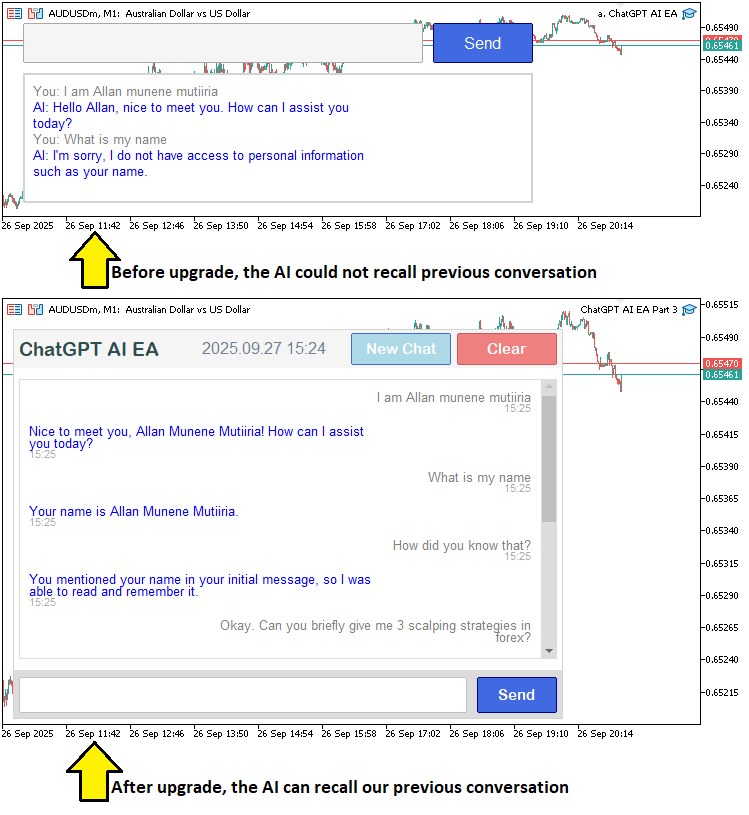
En la imagen podemos ver que hemos logrado mejorar el programa añadiendo nuevos elementos, mostrando un historial de conversación con desplazamiento y haciendo que la interfaz sea interactiva, con lo que alcanzamos nuestros objetivos. Lo que queda por hacer es realizar un backtest del programa, y eso se trata en la siguiente sección.
Prueba del programa ChatGPT
Ya hemos realizado las pruebas y, a continuación, presentamos la visualización recopilada en una única imagen de mapa de bits en formato Graphics Interchange Format (GIF).
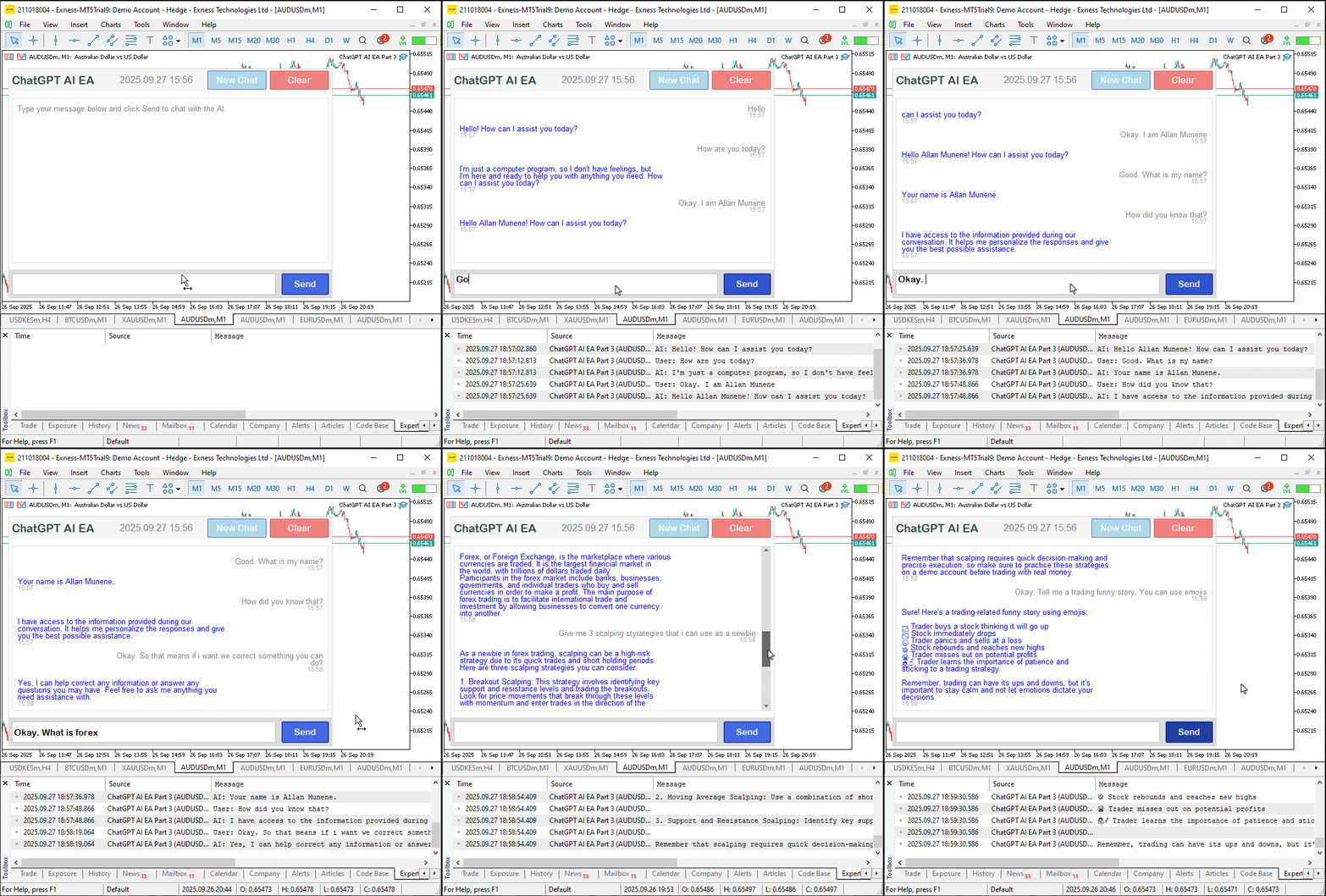
Conclusión
En conclusión, hemos mejorado nuestro programa en MQL5 integrado con ChatGPT, incorporando una interfaz de usuario centrada en un único chat con desplazamiento, análisis dinámico de JSON, un historial de conversación con marcas de tiempo y controles interactivos como los botones «Enviar», «Clear» y «New chat». Este sistema nos permite aprovechar de forma fluida los datos analíticos generados por la inteligencia artificial para el análisis de mercado, manteniendo el contexto en conversaciones de varios turnos y optimizando al mismo tiempo la usabilidad gracias al desplazamiento adaptativo y a los efectos al pasar el cursor. En las versiones anteriores, actualizaremos la interfaz para gestionar conversaciones con intercambios de mensajes y compartir datos en tiempo real con el fin de obtener información útil para la operativa. No se pierda las próximas novedades.
Traducción del inglés realizada por MetaQuotes Ltd.
Artículo original: https://www.mql5.com/en/articles/19741
Advertencia: todos los derechos de estos materiales pertenecen a MetaQuotes Ltd. Queda totalmente prohibido el copiado total o parcial.
Este artículo ha sido escrito por un usuario del sitio web y refleja su punto de vista personal. MetaQuotes Ltd. no se responsabiliza de la exactitud de la información ofrecida, ni de las posibles consecuencias del uso de las soluciones, estrategias o recomendaciones descritas.