

Crypto Exchange Integration with MQL5 (Part 1): Connecting to MEXC Futures
 27
27
 0
0

Introduction
In this series, we will explore how to build an exchange integration with MQL5, using MEXC Futures as an example and communicating with the exchange through its REST API and WebSocket connections. In this first article, we will focus on the common components required to communicate with the MEXC Futures REST API: how to configure the MetaTrader 5 terminal to perform requests using WebRequest(), how to use and adapt a JSON library to process API responses, and how to convert the received data into native MQL5 types. These components will then be used in some practical examples covering two public MEXC Futures endpoints: server time and transferable currencies.
Rather than creating a separate implementation for each endpoint, we will build on the components described in the sections below and extend them with the additional parsing functions required by the new endpoints.
This article is provided for educational purposes only. The code examples are intended to demonstrate how to interact with the MEXC Futures API using MQL5 and should be tested thoroughly before being used in a live trading environment. The author is not responsible for any losses or damages resulting from the use of the code provided.
MEXC Futures API
The MEXC Futures API provides programmatic access to the information and functionality available on the MEXC Futures platform. It allows external applications to retrieve market and contract information, access account data, and interact with the trading system without relying on the exchange's web interface.
The API provides two communication mechanisms for interacting with the exchange: the REST API and the WebSocket API. This article introduces the REST API and uses the MQL5 WebRequest() function to communicate with a MEXC Futures endpoint.
The REST API is divided into public and private endpoints. Public endpoints provide information that does not require authentication, such as contract details, market data, order book information, or funding data. Private endpoints, on the other hand, require authenticated requests and provide access to account information and trading operations.
The REST API uses JSON format to structure the information returned by its endpoints. This format allows the exchange to represent different types of data, such as numbers, strings, boolean values, JSON objects, and arrays, in a structured way.
Since our MQL5 application needs to read and process these responses, we first need to prepare the tools required to work with JSON reliably. In the next section, we will see the tools we will use to handle the JSON data returned by the REST API.
The JSON Library
We will now focus on what we need to process the JSON responses returned by the MEXC API. For this purpose, we will use the JSON library "JSON Serialization and Deserialization (native MQL)" by sergeev, published in the MQL5 CodeBase (version 1.12, the one included with this article's source files). The library already provides the functionality required to deserialize JSON data and access its contents from MQL5, giving us a solid foundation for working with the API responses.
Throughout this series, we will use the CJAVal class to process the JSON responses received from the REST API. The following methods and properties are mainly used to access and work with JSON data in this class:
- Deserialize(): Deserializes a JSON string into a CJAVal object.
- Serialize(): Serializes a CJAVal object into a JSON string. We will use it later in the series, but it is not required in this article.
- HasKey(): Checks whether a field exists and, optionally, whether it has a specific type.
- FindKey(): Searches for a field within a JSON object.
- operator[]: Accesses object fields and array elements.
- Size(): Returns the number of elements in an array.
- ToInt(): Converts the value to a long integer.
- ToDbl(): Converts the value to a double.
- ToBool(): Converts the value to a boolean.
- ToStr(): Converts the value to a string.
- m_type: Contains the internal type of the JSON value.
The CJAVal class uses the enJAType_ enumeration to identify the type of each JSON value. The types we will use throughout the series are:
- jtUNDEF_: Undefined value.
- jtNULL_: JSON null value.
- jtBOOL_: Boolean value.
- jtINT_: Integer value.
- jtDBL_: Double-precision numeric value.
- jtSTR_: String value.
- jtARRAY_: JSON array.
- jtOBJ_: JSON object.
These methods and types provide the functionality we need to work with the JSON responses returned by the MEXC API. Before moving on to the REST API implementation, however, we will make a small addition to the CJAVal class to make type conversions more reliable.
Making Some AdaptationsThe CJAVal class provides these four methods to retrieve the value stored in a JSON element:
These methods return the corresponding internal value stored by the CJAVal object, but they do not verify that the JSON element actually has the expected type.
long ToInt() const { return m_iv; }
double ToDbl() const { return m_dv; }
bool ToBool() const { return m_bv; }
string ToStr() { return m_sv; }
This can become a problem when processing API responses. For example, if a field is missing, accessing it through operator[] returns a CJAVal object whose type is jtUNDEF_ and whose internal values have already been initialized. Calling ToInt() on such an object can therefore return 0, making it impossible to distinguish between a missing field and a valid integer value of zero.
We will distinguish between ToInt() and ToLong() using the existing conversion methods. This keeps the return types consistent with the names of the methods and with the overloaded versions that we will add later.
We will replace the existing method:
long ToInt() const { return m_iv; }
with:
int      ToInt() const { return (m_iv < INT_MIN || m_iv > INT_MAX) ? 0 : (int)m_iv; }
long     ToLong() const { return m_iv; }
Returning 0 when the value falls outside the range of int prevents an invalid narrowing conversion. This changes the behavior of the original direct conversion method, which returned the full long value regardless of whether it could be represented as an int. However, the behavior for undefined values remains unchanged: when the CJAVal object does not contain a defined value, its internal integer member is already initialized to 0, so the direct method also returns 0 in that case. The direct conversion therefore remains unable to distinguish between an undefined value and a valid integer value of 0; the overloaded version introduced later addresses this ambiguity by returning false when the stored type is not compatible with the requested type.
The ToDbl() method requires an additional consideration because a JSON numeric value can be stored internally as either an integer (jtINT_) or a floating-point value (jtDBL_). Therefore, when retrieving a numeric value as a double, both types can be valid sources. For a jtDBL_ value, no conversion is required because the value is already stored as a double. For a jtINT_ value, however, the stored value is a long and must be converted to double.
Although double can represent a much larger numerical range than long, this does not mean that every long value can be represented exactly as a double. A double has a 53-bit significand, so integers beyond the exact integer representation limit may lose precision when converted to double.
To prevent this loss of integer precision when converting an integer value to double, we define the following constant:
#define DBL_EXACT_INT_LIMIT ((long)MathPow(2,DBL_MANT_DIG))
DBL_MANT_DIG specifies the number of bits in the significand of a double. Using this value, DBL_EXACT_INT_LIMIT represents the boundary up to which every integer value can be represented exactly as a double.
The ToDbl() method can then safely handle both numeric representations:
double ToDbl() const { return m_type == jtDBL_ ? m_dv : (m_type == jtINT_ && m_iv >= -DBL_EXACT_INT_LIMIT && m_iv <= DBL_EXACT_INT_LIMIT) ? (double)m_iv : 0; }
If the value is already a double, m_dv is returned directly. If it is an integer, the conversion is only performed when the value falls within the exact integer representation range of double. Otherwise, the method returns 0, preserving the behavior of the direct conversion methods when a valid value cannot be returned.
JSON Safe Type ConversionWith these modifications in place, we can now add overloaded versions of the conversion methods. These overloads will allow us to verify that the CJAVal object contains a value of a type compatible with the requested output type before retrieving it.
//+------------------------------------------------------------------+
//| ToInt() overload method                                          |
//+------------------------------------------------------------------+
bool CJAVal::ToInt(int &value)
  {
   if(m_type != jtINT_)
      return false;

   if(m_iv < INT_MIN || m_iv > INT_MAX)
      return false;

   value = (int)m_iv;
   return true;
  }

//+------------------------------------------------------------------+
//| ToLong() overload method                                         |
//+------------------------------------------------------------------+
bool CJAVal::ToLong(long &value)
  {
   if(m_type != jtINT_)
      return false;

   value = m_iv;
   return true;
  }

//+------------------------------------------------------------------+
//| ToDbl() overload method                                          |
//+------------------------------------------------------------------+
bool CJAVal::ToDbl(double &value)
  {
   if(m_type != jtINT_ && m_type != jtDBL_)
      return false;

   if(m_type == jtINT_)
     {
      if(m_iv < -DBL_EXACT_INT_LIMIT || m_iv > DBL_EXACT_INT_LIMIT)
         return false;
     }

   value = m_type == jtDBL_ ? m_dv : (double)m_iv;
   return true;
  }

//+------------------------------------------------------------------+
//| ToBool() overload method                                         |
//+------------------------------------------------------------------+
bool CJAVal::ToBool(bool &value)
  {
   if(m_type != jtBOOL_)
      return false;

   value = m_bv;
   return true;
  }

//+------------------------------------------------------------------+
//| ToStr() overload method                                          |
//+------------------------------------------------------------------+
bool CJAVal::ToStr(string &value)
  {
   if(m_type != jtSTR_)
      return false;

   value = m_sv;
   return true;
  }
Each overloaded method first verifies that the CJAVal object contains a value of a type compatible with the requested output type before assigning its internal value to the output variable. The required type does not have to be identical in every case. For example, ToInt(int&) and ToLong(long&) require a JSON integer (jtINT_), while ToDbl(double&) accepts both jtINT_ and jtDBL_. In the latter case, an integer value is converted to double only when it can be represented exactly.
If the requested field does not contain a compatible value, the type check fails, the method returns false, and no value is assigned to the output variable.
For example, when accessing a field that does not exist, operator[] returns a CJAVal object whose type is jtUNDEF_. Since this is not a compatible type, such as jtINT_ when calling ToInt(int&), the method safely rejects the conversion instead of copying one of the object's default internal values to the output variable. The CJAVal object and its internal default values still exist; what is prevented is their propagation to the output variable. This allows the caller to distinguish an undefined or incompatible value from a valid value of zero.
The modified CJAVal class, including these modifications, is also provided in the downloadable source files accompanying this article.
MEXC Futures REST API
With the JSON handling prepared, we can now move on to the REST API and start working directly with the MEXC Futures endpoints. We will begin by reviewing the API documentation and identifying the information required to build and process our requests.
API Documentation OverviewBefore making our first request, we have to take a brief look at the MEXC Futures API documentation. The documentation is organized into different categories, each providing access to a specific type of data or functionality. Each category contains multiple endpoints, and the documentation provides the URL used to access each resource, the request method, the parameters required to obtain the requested information, and the structure of the response returned by the exchange.
In addition to the information required to construct a request, the documentation also describes the limitations that apply to API access. For example, REST API endpoints may be subject to rate limits that restrict the number of requests that can be made within a given period. These limitations are important when designing an integration, since exceeding the allowed request rate may result in rejected requests or temporary restrictions. The applicable limits should therefore be checked in the documentation before implementing repeated or automated requests.
Another useful part of the documentation is the Change Log section. API integrations depend directly on the structure and behavior documented by the exchange, so changes to endpoints, parameters, response fields, or deprecated functionality may require modifications to the client implementation. Reviewing the Change Log helps identify these changes and is an important part of maintaining an integration over time. The documentation pages linked throughout this article were reviewed on 2026-10-20, and the endpoints, response formats and rate limits quoted here are those published on that date. Since the API is subject to change, always verify the current documentation before relying on these examples.
Allowing the MEXC API domain
As we can see in the Introduction section of the MEXC Futures API documentation, MEXC provides the base URL "https://api.mexc.com" for accessing its API. The Change Log records the update that produced this address, where the futures API base domain was changed to "https://api.mexc.com". Both pages were verified on 2026-10-20. The address is not written directly in the request code: it is held, together with the request timeout, in defines.mqh:
#define MEXC_REST_API_BASE_URL   "https://api.mexc.com"  // Base URL for requests
#define MEXC_REQUEST_TIMEOUT     5000                    // Standard timeout for API requests
We will use this URL as the base address for the REST API requests made throughout this article. Before sending requests from MetaTrader 5, however, we need to add this URL to the list of allowed URLs for WebRequest().
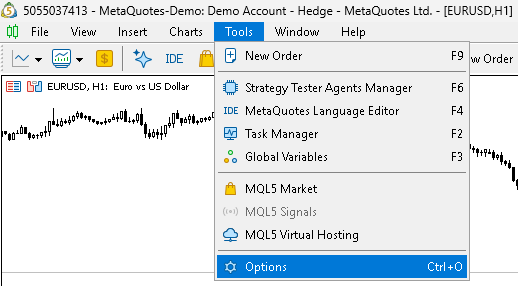
Figure 1. Accessing the MetaTrader 5 Options panel.
Once the Options panel is open, we need to go to the Expert Advisors tab. In this tab, we can add "https://api.mexc.com" to the list of URLs allowed for WebRequest().
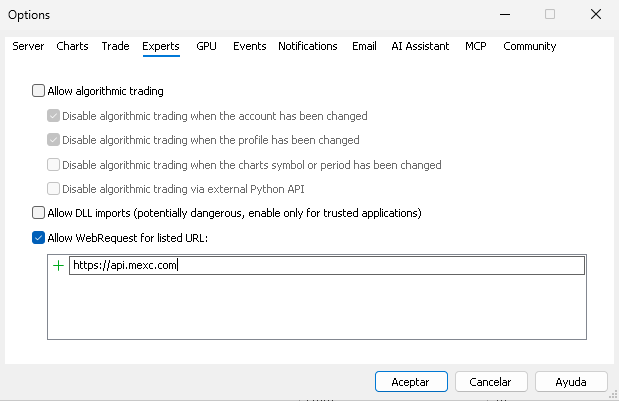
Figure 2. Adding the MEXC API URL to the allowed WebRequest URLs.
Now the MetaTrader 5 terminal is ready to communicate with the MEXC Futures API.
Request FunctionThe MEXC Futures API uses a common JSON response structure for its endpoints. JSON responses from the API use the success and code fields to indicate whether the request was processed successfully and to provide the corresponding application response code. When the request is successful, success is set to true and code is set to 0. Depending on the endpoint, the response may also contain a data field with the requested information. When an error occurs, success is set to false, code contains the corresponding error code, and a message field provides a description of the error.
In this part of the series, we will focus on the public REST API endpoints. The public endpoints used in this article do not require authentication or request signatures, and the requests do not require any additional headers. The endpoints used in our examples are accessed through HTTP GET requests, with parameters passed as request parameters in the URL.
Since all of these requests follow the same general process, it would be unnecessary to repeat the WebRequest() call, processing of the HTTP response, JSON deserialization, and common response validation in every example. Instead, we will encapsulate this functionality in a reusable Request() function for these public endpoints.
//+------------------------------------------------------------------+
//| Request function                                                 |
//+------------------------------------------------------------------+
bool Request(const string endpoint, const string query, CJAVal &data)
  {
   ResetLastError();

//--- Create a temp data object
   CJAVal tempData;

//--- Set the request URL
   string url = query == "" ? MEXC_REST_API_BASE_URL + endpoint : MEXC_REST_API_BASE_URL + endpoint + "?" + query;

//--- Set the request parameters
   string method         = "GET";
   string headers        = "";
   char   parameters[];
   char   result[];
   string result_headers = "";

//--- Send the request
   int httpResponseCode = WebRequest(method, url, headers, MEXC_REQUEST_TIMEOUT, parameters, result, result_headers);

//--- Handle a failed WebRequest call
   if(httpResponseCode == -1)
     {
      Print("WebRequest failed. Error: ", GetLastError());
      return false;
     }

//--- Deserialize the response
   string stringResult = CharArrayToString(result, 0, WHOLE_ARRAY, CP_UTF8);
   CJAVal jsonResponse;
   if(!jsonResponse.Deserialize(stringResult, CP_UTF8))
     {
      Print("MEXC response deserialization failed. HTTP status: ", httpResponseCode);
      return false;
     }

//--- Check that the response is a JSON object
   if(jsonResponse.m_type != jtOBJ_)
     {
      Print("Invalid MEXC response: JSON root must be an object. HTTP status: ", httpResponseCode);
      return false;
     }

//--- Check the existence and type of the success field
   bool success;
   if(!jsonResponse["success"].ToBool(success))
     {
      Print("Invalid MEXC response: success field is missing or has an invalid type. HTTP status: ", httpResponseCode);
      return false;
     }

//--- Check the existence and type of the response code
   long code;
   if(!jsonResponse["code"].ToLong(code))
     {
      Print("Invalid MEXC response: code field is missing or has an invalid type. HTTP status: ", httpResponseCode);
      return false;
     }

//--- Check the HTTP and application responses
   if(httpResponseCode != 200 || code != 0 || !success)
     {
      string message;
      if(jsonResponse["message"].ToStr(message))
         Print("MEXC Futures error. HTTP status: ", httpResponseCode,
               ", code: ", code, ", message: ", message);
      else
         Print("MEXC Futures error. HTTP status: ", httpResponseCode,
               ", code: ", code, ", message field is missing");
      return false;
     }

//--- Copy the response data to the output parameter if it exists
   if(jsonResponse.HasKey("data") != NULL)
     {
      tempData = jsonResponse["data"];
     }

   data = tempData;

   return true;
  }
The Request() function encapsulates the common operations required to communicate with the MEXC Futures REST API. It receives the endpoint and query parameters when needed, sends the HTTP request, processes the returned HTTP response, deserializes the returned JSON, and verifies the common MEXC response fields.
If an error occurs during the request, JSON deserialization, response validation, or application-level checks, the function reports the corresponding problem and returns false. When the response contains a valid MEXC error code and a message field, the function also prints the error code and message returned by the exchange. When the request is successful, the contents of the data field are copied to the CJAVal reference parameter if the field exists. The function then returns true, even if the response does not contain a data field.
The function does not attempt to interpret the type or structure of the data field. This responsibility remains with the caller, since different endpoints can return different types of data. Endpoints that require response data can therefore validate its presence and structure after the request has been completed successfully.
The MEXC Futures API documentation also provides a complete list of the application error codes that can be returned by the API. These codes can be used to identify the reason for an unsuccessful request, together with the error message returned in the message field.
Get Server Time
Following the order of the Market endpoints in the MEXC Futures API documentation, we will start with the Get Server Time endpoint. This endpoint is available at "/api/v1/contract/ping" and does not require any parameters.
The endpoint provides the current MEXC Futures server time as a Unix timestamp expressed in milliseconds. This information can be used in an MQL5 integration when operations need to be based on the exchange server time rather than the local terminal time. It can also be used to compare both clocks and account for differences between the MetaTrader 5 terminal time and the time used by the MEXC Futures API. This endpoint also provides a simple example of retrieving and processing a value returned by the API through the Request() function.
//+------------------------------------------------------------------+
//| Script program start function                                    |
//+------------------------------------------------------------------+
void OnStart()
  {
//--- Set the endpoint
   string endpoint = "/api/v1/contract/ping";

//--- Send the request
   CJAVal data;
   if(!Request(endpoint, "", data))
      return;

//--- Parse the server time
   long serverTime;
   if(!ParseServerTime(data, serverTime))
      return;

//--- Display the server time
   Print("MEXC Futures server time (milliseconds): ", serverTime);
   Print("MEXC Futures server time (datetime): ", TimeToString((datetime)(serverTime / 1000)), ".", StringFormat("%03d", (int)(serverTime % 1000)));
  }

Figure 3. Server time retrieved from MEXC Futures.
As described above, when the request is successful, the data field contains the current MEXC Futures server time as a Unix timestamp expressed in milliseconds. The Request() function returns this value through the CJAVal output parameter, while the ParseServerTime() function checks that the value has the expected JSON type and converts it to a long value that can be used directly by the MQL5 program.
The parsing logic is kept in a separate function so that the Request() function remains independent of the structure and type of data returned by individual endpoints. This separation also allows each endpoint to define its own type checking and conversion logic according to the data it returns.
//+------------------------------------------------------------------+
//| Parse Server Time function                                       |
//+------------------------------------------------------------------+
bool ParseServerTime(CJAVal &data, long &serverTime)
  {
   if(!data.ToLong(serverTime))
     {
      Print("Invalid MEXC response: data field has an invalid type");
      return false;
     }

   return true;
  }
The ParseServerTime() function uses the safe ToLong() conversion provided by the modified JSON library. If the data value is not an integer JSON value, the conversion fails and the function returns false. Otherwise, the converted value is stored in serverTime and the function returns true.
The MEXC Futures API documentation specifies rate limits for its endpoints, which may vary depending on the operation being performed. For the Get Server Time endpoint covered in this section, the documented rate limit is 20 requests every 2 seconds, as verified on 2026-10-20. These limits must be taken into account when making repeated requests to the API. We will not implement rate-limit management in these initial examples, as each script is designed to demonstrate an individual API operation with a single request. In the next article, we will address this aspect in detail, implementing request frequency management and handling rate-limit responses appropriately.
Get Transferable Currencies
Following the order of the Market endpoints in the MEXC Futures API documentation, the next endpoint is Get Transferable Currencies. This endpoint is available at "/api/v1/contract/support_currencies" and does not require any parameters.
The endpoint returns a list of currencies supported by the MEXC Futures transfer system. The returned information does not describe a specific transfer or provide information about the balances available in an account. Within an MQL5 integration, the list can therefore be used as a reference when working with the transfer functionality provided by the Futures API.
Transferable Currencies Parsing functionThe data field returned by this endpoint contains an array of currency names. We therefore need a parsing function that checks that the returned data is a JSON array and converts each element into a string stored in an MQL5 array.
//+------------------------------------------------------------------+ //| ParseTransferableCurrencies function | //+------------------------------------------------------------------+ bool ParseTransferableCurrencies(CJAVal &jsonCurrencies, string ¤cies[]) { ResetLastError(); //--- Check the data type if(jsonCurrencies.m_type != jtARRAY_) { Print("Invalid MEXC response: data field has an invalid type"); return false; } //--- Resize the temporary currencies array string tempCurrencies[]; int totalCurrencies = jsonCurrencies.Size(); if(ArrayResize(tempCurrencies, totalCurrencies) == -1) { Print("Failed to resize currencies array. Error: ", GetLastError()); return false; } //--- Parse each currency for(int i = 0; i < totalCurrencies; i++) { if(!jsonCurrencies[i].ToStr(tempCurrencies[i])) { Print("Failed to parse currency at index ", i); return false; } } //--- Commit the parsed currencies if(!ArraySwap(currencies, tempCurrencies)) { Print("Failed to swap currencies array. Error: ", GetLastError()); return false; } return true; }
The ParseTransferableCurrencies() function first checks that the received data is a JSON array and determines the number of currencies it contains. A temporary MQL5 array is then resized to accommodate all elements, and each currency is safely converted to a string using the ToStr() method.
The parsed values are stored in the temporary array until all elements have been processed successfully. Once the array has been parsed, ArraySwap() is used to transfer its contents to the output parameter. This prevents the output array from being partially modified if an error occurs while parsing one of the elements. An empty array is not an error: when the endpoint returns an empty list, the parsing function succeeds and produces an empty output array. This applies to every parsing function in the article, which report failure only when the received data does not match the expected structure, never merely because it is empty.
Retrieving Transferable CurrenciesWith the parsing function defined, we can now retrieve the transferable currencies from the MEXC Futures API. The OnStart() function sends the request and passes the returned data field to ParseTransferableCurrencies(). If the parsing succeeds, the resulting array contains all currencies returned by the endpoint.
//+------------------------------------------------------------------+
//| Includes                                                         |
//+------------------------------------------------------------------+
#include "../../Include/CEIW-MQL5-01/functions.mqh"

//+------------------------------------------------------------------+
//| Script program start function                                    |
//+------------------------------------------------------------------+
void OnStart()
  {
//--- Set the endpoint
   string endpoint = "/api/v1/contract/support_currencies";

//--- Send the request
   CJAVal data;
   if(!Request(endpoint, "", data))
      return;

//--- Parse the currencies
   string currencies[];
   if(!ParseTransferableCurrencies(data, currencies))
      return;

//--- Display the first currencies in the list
   int size = MathMin(10, ArraySize(currencies));
   for(int i = 0; i < size; i++)
     {
      Print("Transferable currency [", i + 1, "]: ", currencies[i]);
     }
  }

Figure 4. Transferable currencies retrieved from MEXC Futures.
For demonstration purposes, the example displays the first ten currencies from the resulting array. The complete list remains available in the currencies array and can be used by the application as required.
Although this endpoint is not required by our current integration, we will implement it as part of the public REST API library. The fact that a particular endpoint is not required by our own implementation does not mean that it cannot be useful in another MQL5 project. Keeping the endpoint available in the library allows other applications to use the same functionality when working with MEXC Futures transfers.
Conclusion
In this article, we configured the MetaTrader 5 terminal to communicate with the MEXC Futures REST API and established the common components required to retrieve and process data from the exchange. We also selected an existing JSON library as the code base for the integration and made the necessary modifications to adapt it to our requirements. These modifications provide the type checking and deserialization mechanisms needed to safely process the API responses and convert them into native MQL5 types. Using these components, we created the parsing functions required by the public endpoints implemented in this article: server time and transferable currencies.
This article further expands the range of MEXC Futures market data available to our MQL5 applications. However, the public REST API offers more endpoints than the ones implemented here.
The following articles of the series continue in that direction: the components introduced here will be consolidated into a reusable, class-based infrastructure that centralizes the requests and their handling of HTTP errors and rate limits, and the endpoints will then be used to create and maintain MetaTrader 5 custom symbols, kept up to date by a service program, so that MEXC Futures market data can be used directly from MQL5.
These improvements will move the implementation beyond the introductory examples and provide a more robust foundation for working with the public MEXC Futures REST API from MQL5.
| File | Type | Description |
|---|---|---|
| MQL5\Include\CEIW-MQL5-01\JSON.mqh | Include | JSON parsing utilities |
| MQL5\Include\CEIW-MQL5-01\defines.mqh | Include | MEXC Futures defines and constants used by the integration. |
| MQL5\Include\CEIW-MQL5-01\functions.mqh | Include | MEXC Futures REST API request and response handling. |
| MQL5\Scripts\CEIW-MQL5-01\GetServerTime.mq5 | Script | Example of retrieving the MEXC Futures server time. |
| MQL5\Scripts\CEIW-MQL5-01\GetTransferableCurrencies.mq5 | Script | Example of retrieving transferable currencies. |
| CEIW-MQL5-01.zip | ZIP | Archive with all files that can be unpacked into the terminal data folder, and all files will be located in the required places. |
Advertencia: todos los derechos de estos materiales pertenecen a MetaQuotes Ltd. Queda totalmente prohibido el copiado total o parcial.
Este artículo ha sido escrito por un usuario del sitio web y refleja su punto de vista personal. MetaQuotes Ltd. no se responsabiliza de la exactitud de la información ofrecida, ni de las posibles consecuencias del uso de las soluciones, estrategias o recomendaciones descritas.

 Herramientas de trading de MQL5 (Parte 9): Desarrollo de un asistente de configuración inicial del usuario para asesores expertos (EAs) con una guía desplazable
 Automatización de estrategias de trading en MQL5 (Parte 33): Creación de un sistema basado en el patrón armónico Shark y la acción del precio
 Particularidades del trabajo con números del tipo double en MQL4
 Redes neuronales en el trading: De los Transformer a las neuronas de impulsos (SpikingBrain)

- Aplicaciones de trading gratuitas
- 8 000+ señales para copiar
- Noticias económicas para analizar los mercados financieros
Usted acepta la política del sitio web y las condiciones de uso