Door
- Indicators
-
Iurii Tokman
 Veda http://ytg.com.ua resource - the author works for automation of trade on the forex market - advisers, experts will, trading robots, indicators, trading strategies, scripts, functions and libraries.
 - Version: 1.0
- Activations: 5
"Trend Navigator": The Indicator That Unlocks the Secrets of Market Dynamics
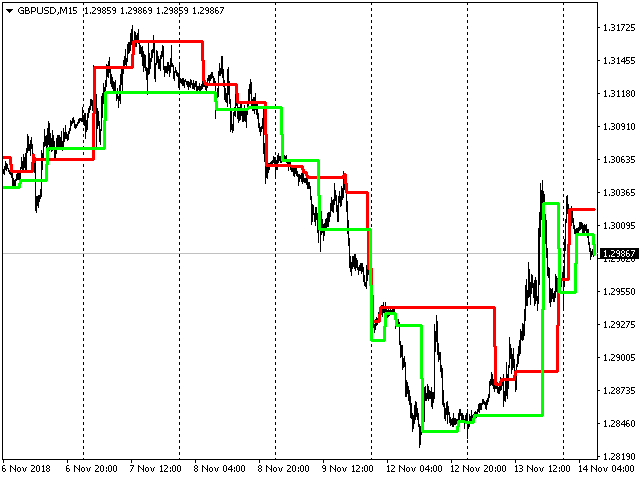
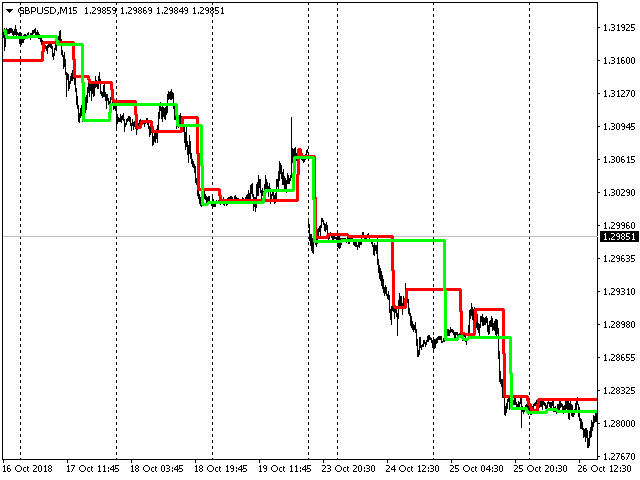
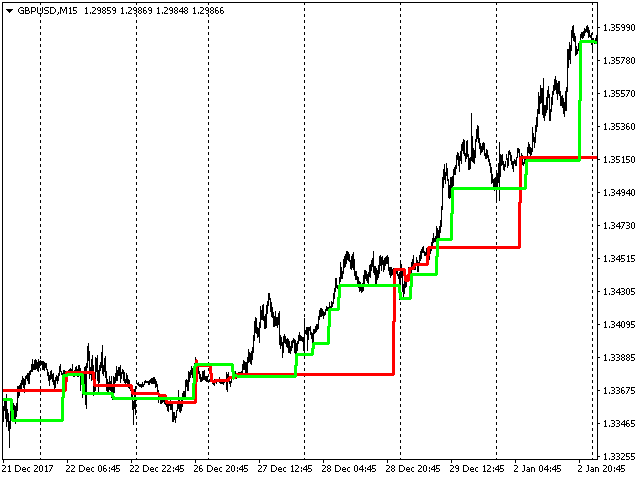
Forget wandering through the labyrinths of price fluctuations! The "Trend Navigator" indicator is your personal compass in the world of financial markets. It clearly visualizes the three fundamental directions of price movement: a rapid surge upwards, an unstoppable fall downwards, and a calm sideways drift.
This tool is your faithful assistant in determining the dominant trend direction. In simple terms, it makes invisible market currents crystal clear. From now on, you can always sail with the tailwind of the trend, maximizing your chances of success.
But that's not all! "Trend Navigator" opens up new horizons of analysis for you. It masterfully identifies price channels and key levels of support and resistance, providing you with strategically important benchmarks for making informed trading decisions. Imagine how easily you can identify profitable entry and exit points from the market!
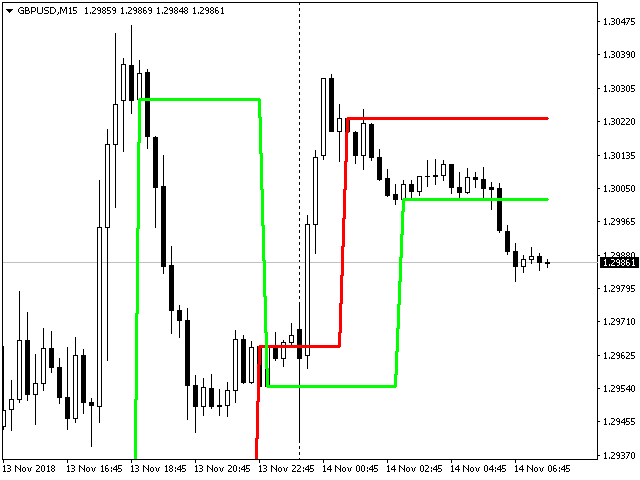
To achieve optimal accuracy and timeliness of signals, we strongly recommend using the indicator on a chart with the M15 period. This timeframe provides the perfect balance between detail and filtering out market noise.
Customizable Flexibility for Your Style:
The indicator is equipped with a convenient bar_limit setting. You yourself determine the depth of the analysis by specifying the number of recent bars to display the indicator. Want to see the entire price history? Simply set the value to 0, and the full picture of market movements will unfold before you.
"Trend Navigator" is not just an indicator; it's your reliable partner in the world of trading, helping you see the market clearly, trade confidently, and reach new financial heights!
"Trend Navigator": Your Key to Understanding and Conquering Market Trends
The "Trend Navigator" indicator is not just a visualization of price movements; it's a powerful tool for in-depth analysis of market dynamics and the development of profitable trading strategies. It reveals the three main trends – upward, downward, and sideways – making them obvious for your trading decisions.
Trading and Market Analysis Methods with "Trend Navigator":
-
Trend Following:
- Identifying the main trend: The indicator clearly shows the prevailing direction of price movement. Use this to determine the main trend on higher timeframes (e.g., H1, H4).
- Finding entry points along the trend: On lower timeframes (e.g., M15, M30), look for moments when the price corrects against the main trend, but the indicator still confirms its direction. Open positions in the direction of the main trend after the correction is complete.
-
Identifying Channels and Support/Resistance Levels:
- Visualizing channels: The indicator can help visualize the price channels within which the price moves. Trade from the channel boundaries in the direction of the main trend or on a channel breakout with confirmation from other indicators.
- Identifying levels: Horizontal areas where the indicator shows consolidation or a change in direction may indicate important support and resistance levels. Use these levels to set stop-losses and take-profits, as well as to look for reversal points.
-
Analyzing Trend Strength:
- Duration and stability: The duration and stability of a particular direction displayed by the indicator can indicate the strength of the trend. Long and clear sections of one color indicate a strong trend.
- Color change: A change in the indicator's color may be an early signal of a weakening trend or a possible reversal. However, this signal requires confirmation.
Building a Trading Strategy Based on "Trend Navigator":
-
Simple Trend Following Strategy (for beginners):
- Entry rule: On the M15 timeframe, if the indicator shows an upward trend (e.g., changes color to green), open a long position after a small downward correction. If the indicator shows a downward trend (changes color to red), open a short position after a small upward correction.
- Exit rule: Set the stop-loss at the level of the last local low (for long positions) or high (for short positions). Set the take-profit at a level twice the size of the stop-loss (risk/reward ratio 1:2).
- Filter: Consider for trading only those signals that correspond to the main trend determined on a higher timeframe (e.g., H1).
-
Channel Breakout Strategy:
- Channel identification: On the M15 timeframe, identify the price channel using the indicator's visualization.
- Entry rule: Open a position on a breakout of the channel boundary (upper for buys, lower for sells) with confirmation of increased volume or another confirming indicator.
- Exit rule: Set the stop-loss beyond the broken channel boundary. Set the take-profit at a distance equal to the width of the channel.
Recommendations for Use with Other Indicators:
To increase the reliability of "Trend Navigator" signals, it is recommended to use it in combination with other indicators:
- Moving Averages: Use moving averages to confirm the direction of the main trend. Trade only in the direction of the trend confirmed by both moving averages and "Trend Navigator."
- Oscillators (RSI, Stochastic): Help identify overbought and oversold zones, especially useful when trading from support/resistance levels identified by "Trend Navigator."
- Volume Indicators: An increase in volume during a channel breakout or trend continuation confirmed by "Trend Navigator" can strengthen the trading signal.
- Volatility Indicators (ATR, Bollinger Bands): Help determine optimal stop-loss and take-profit sizes, taking into account the current market volatility.
Using "Trend Navigator" in Automated Trading:
The "Trend Navigator" indicator can be successfully integrated into trading robots (algorithmic trading systems) to automate the trading process:
- Clearly define the conditions for opening and closing positions based on the indicator's color change or its position relative to defined levels (e.g., level breakout).
- Program the trading robot according to the developed rules, taking into account filters and confirmation conditions from other indicators.
- Conduct thorough testing and optimization of the robot on historical data to identify optimal parameters and evaluate its profitability.
- Consider the risks associated with automated trading, such as slippage and order execution delays.
"Trend Navigator" is your reliable tool for navigating the complex world of trading. By mastering its capabilities and combining it with other analysis methods, you can significantly increase your trading efficiency and move closer to financial success!