Panel of signals MT4

5

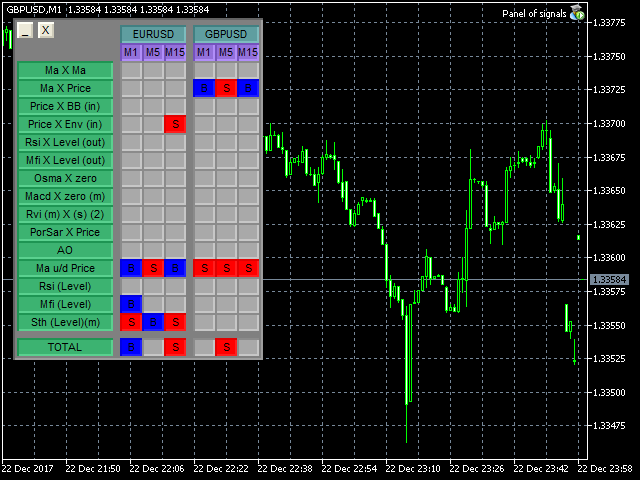
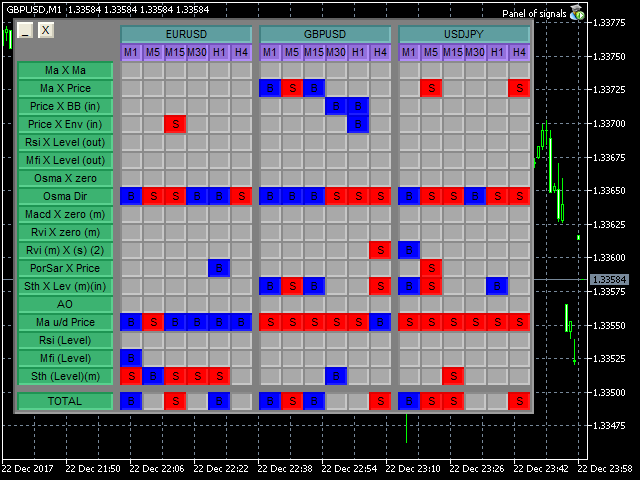
"All in One" panel.

You can simultaneously control:

  • up to 3 symbols;
  • up to 6 periods;
  • up to 31 popular signals.

You can see the sum for all signals taking into account the weight of the signal


Parameters

  • NUM_BAR - number of the bar to analyze (set a value greater than 0 to work on closed bars).
  • timeframe_1....timeframe_6 - working timeframes (if set to "current", the timeframe will not be used).
  • symbol_1....symbol_3 - names of used symbols (if the field is left blank, the symbol will not be used).
  • separate parameters for each signal.
  • a separate weight for each signal (if weight = 0, then the signal is not used).
  • weight_MIN_for_total - the "TOTAL" field shows the sum of the signals for each timeframe, for each symbol, with the signal weight taken into account. This parameter sets the minimum value for outputting the result to "TOTAL".


Description of the signals

  1. "Ma X Ma" - intersection of 2 MA.
  2. "Ma X Price" - intersection of MA and the price.
  3. "Price X BB (out)" - price exceeds the bounds of the Bollinger Bands.
  4. "Price X BB (in)" - price returns within the bounds of the Bollinger Bands.
  5. "Price X Env (out)" - price exceeds the bounds of the Envelope.
  6. "Price X Env (in)" - price returns within the bounds of the Envelope.
  7. "Rsi X Level (out)" - Rsi exceeds the bounds of buy out/sell out.
  8. "Rsi X Level (in)" - Rsi returns to bounds of buy out/sell out.
  9. "Mfi X Level (out)" - Mfi exceeds the bounds of buy out/sell out.
  10. "Mfi X Level (in)" - Mfi returns to the bounds of buy out/sell out.
  11. "Osma X zero" - OsMA crosses the "0" line.
  12. "Osma Dir" - OsMA direction (inclination of the histogram from the NUM_BAR bar to the NUM_BAR+1 bar).
  13. "Macd X zero (m)" - Macd histogram crosses the "0" line.
  14. "Macd X zero (s)" - Macd signal line crosses the "0" line.
  15. "Macd (m) X (s)" - Macd signal line crosses the histogram.
  16. "Rvi X zero (m)" - Rvi main line crosses the "0" line.
  17. "Rvi X zero (s)" - Rvi signal line crosses the "0" line.
  18. "Rvi (m) X (s) (1)" - Rvi main line crosses the signal line in any zone.
  19. "Rvi (m) X (s) (2)" - Rvi main line crosses the signal line, for the BUY signal in the negative zone, for the SELL signal in the positive zone.
  20. "PorSar X Price" - change in the direction of the PorSAR indicator.
  21. "Sth X Lev (m)(in)" - stochastic returns to the bounds of buy out/sell out (main line).
  22. "Sth X Lev (m)(out)" - stochastic exceeds the bounds of buy out/sell out (main line).
  23. "Sth X Lev (s)(in)" - stochastic returns to the bounds of buy out/sell out (signal line).
  24. "Sth X Lev (s)(out)" - stochastic exceeds the bounds of buy out/sell out (signal line).
  25. "Sth (m) X (s)" - stochastic mail line crosses the signal line.
  26. "AO" - Awesome Oscillator: 2 green bars in the "+" zone followed by 2 red bars - buy; 2 green bars in the "-" zone followed by 2 red bars - sell.
  27. "Ma u/d Price" - Ma above of below the price.
  28. "Rsi (Level)" - Rsi is beyond the bounds of buy out/sell out.
  29. "Mfi (Level)" - Mfi is beyond the bounds of buy out/sell out.
  30. "Sth (Level)(m)" - stochastic is beyond the bounds of buy out/sell out (main line).
  31. "Sth (Level)(s)" - stochastic is beyond the bounds of buy out/sell out (signal line).

The number of signals will increase. You can leave requests for adding signals in the comments.
Reviews 1
FxFunpo
70
FxFunpo 2026.02.05 23:00 
 

Hello, thank you for sharing this EA — it’s a very interesting concept and I’m currently backtesting and forward-testing it. I wanted to ask if you have any recommended signal combinations / setfile examples for common use cases, such as: 1) Trend-continuation trading (e.g. MA + MACD / OSMA type logic) 2) Mean-reversion trading (e.g. BB / RSI / Stochastic extremes) 3) FX majors vs higher-volatility symbols like XAUUSD Specifically, I’m trying to understand: Which signals are intended as trend filters vs entry triggers Whether some signals are redundant when used together (e.g. MACD + OSMA, BB + Envelope) If you recommend separate setfiles for trend and mean-reversion rather than mixing them How NUM_BAR and weight_MIN_for_total are best used when combining multiple signals Any guidance or example combinations would be greatly appreciated. Thank you for your work.

Recommended products
Trade Panel Pro by RunwiseFX
Runwise Limited
4.86 (35)
Fully functional manual trade panel with risk/reward, auto SL, lot size calculation, one-click trading, hidden (virtual) stop loss/take profit and pending orders, scale in and out of trades (partial close), news events and more. Works with all symbols not just currency pairs. Brings an incredible amount of functionality to MetaTrader for free and for both demo and live accounts. Features Lot size calculation - based on % of account to risk, fixed amount or dynamic lots Automatic take profit base
FREE
Lot Calculate
Maksim Neimerik
This simple but useful script calculates the lot in % of the deposit. It is indispensable for risk management. There is only one customizable parameter: MaxRisk - risk in % for lot calculation. The product works as a standard script. Launch it once on an appropriate chart and start trading using the calculated lot value. Genious is simplicity! Happy trading!
FREE
PZ Trade Pad EA
PZ TRADING SLU
4.29 (31)
This simple visual expert advisor allows you to trade easily from the chart. It handles risk management for you and can perform several useful tasks with your existing trades, saving time and making risk-management for each individual trade easier.  [ Installation Guide | Update Guide | Troubleshooting | FAQ | All Products   |  Get Help ] Trade easily from the chart Trade with precise risk management, hassle free Trade pending order with drag and drop price selection Set SL and TP levels with
FREE
MQLTA Auto Close Demo
MQL4 Trading Automation
Auto Close is an expert advisor that can assist you with your money and risk management rules. The EA can monitor your Balance, Equity, Margin, Global Profit and Global Loss and alert you in case any of these reaches a specified threshold. This Demo Version has Notification and Close features disabled, full version can be found https://www.mql5.com/en/market/product/29141 How does it work? Load the Auto Close EA in the chart and set the parameters you want to keep monitored. If any of the risk
FREE
Account Info EA It is a tool that presents on the graph all the positions of the account, and specific information concerning the positions, but also the account. It enables the user to have an image of his account at a glance. Use like any expert advisor. You can't attach it in the same chart with other expert advisor. It does not have the ability to open or manage positions. You can attach it on any chart and any timeframe.
FREE
Lot by Risk
Sergey Vasilev
4.83 (23)
The Lot by Risk trading panel is designed for manual trading. This is an alternative means for sending orders. The first feature of the panel is convenient placing of orders using control lines. The second feature is the calculation of the order volume for a given risk in the presence of a stop loss line.   Control lines are set using hot keys: take profit – T key by default; price – P key by default; stop loss – S key by default; You can configure the keys in the settings of the trading panel.
FREE
Scalping Day Trading Support Utility Scalping One MT4 free One position is displayed with one button. View P & L, Lot, and Point in real time. It is possible to switch the display of positions of only chart currencies and all currency pairs.  (The free version has only 3 positions) Supports automatic identification in Japanese and English   Account currency notation corresponds to dollar, euro, pound, yen (automatic identification) The timeline drawing function can be linked with the clock disp
FREE
Countdown Bar Timer
Makarii Gubaydullin
Countdown timer till the bar closure, + % Progress status:  #1 multifunctional utility :   66+ features, including this tool  |   Contact me  if you have any questions   |    MT5 version In the settings of the indicator, you can configure: Timeframe for Calulculation; true / false: Higher TimeFrame option (next from the currently used: M15->M30, H4->D1...) Position: 1 = Bottom Left corner; 2 = Bottom Right corner; 3 = Top Left corner; 4 = Top Right corner; Font Size; Color; Font Style;
FREE
HMA Trend
Pavel Zamoshnikov
4.55 (71)
A trend indicator based on the Hull Moving Average (HMA) with two periods. The Hull Moving Average is an improved variant of the moving average, which shows the moment of trend reversal quite accurately. It is often used as a signal filter. Combination of two types of Hull Moving Averages makes a better use of these advantages: HMA with a slow period identifies the trend, while HMA with a fast period determines the short-term movements and signals in the trend direction. Features The movement d
FREE
Safety
Sergey Ermolov
5 (2)
I think everyone knows such a rule of money management as "Safe". For those who are not aware, the safe assumes closing half of the position after the profit on the transaction has equaled the size of the stop. Thus, even if the price reverses and catches the stop, you will not lose money, because exactly the same amount of profit was received when closing part of the position earlier. The Safety Expert Advisor has only one setting – the closing lot. Leaving it at position 0, the adviser will
FREE
Levels and risk calculator for the Antimartingale (or Antimartingala) technique Totally visual, setup everything from control panel Decide your risk and margin, it will calculate and show trading lavels on the chart Free version of the orginal Antimartingale EA:  https://www.mql5.com/en/market/product/53653 Public Signals using the Antimartingale's technique: https://www.mql5.com/en/signals/1016250 https://www.mql5.com/en/signals/1018964 This EA does not open trades, it only shows the trading le
FREE
Shadow Flare MT4
Kestutis Balciunas
Shadow Flare Indicator is a non-repainting trend & liquidity tool for MetaTrader 4. It runs a configurable moving-average baseline (HMA, EMA, SMA, or RMA) wrapped in an Average True Range envelope and produces a sticky trend state that only flips when price closes through the upper or lower band. The same trend engine drives an automatic supply/demand zone module that detects pivot highs and pivot lows, draws coloured boxes around them, and mitigates each zone the moment price closes through it.
FREE
Utility for order reversal. Closes orders on the chart on which it is launched and opens orders with the opposite direction instead of them. Has a simple and intuitive graphical interface. It is also possible to automatically reverse newly opened orders. MT5 version of the utility -  https://www.mql5.com/en/market/product/74770 If you like this utility, take a look at my other products -   https://www.mql5.com/en/users/nina_yermolenko/seller
FREE
FFx Fractals
Eric Venturi-Bloxs
4.5 (2)
The purpose of this new version of the MT4 standard indicator provided in your platform is to display in a sub-window multiple timeframes of the same indicator. See the example shown in the picture below. But the display isn’t like a simple MTF indicator. This is the real display of the indicator on its timeframe. Here's the options available in the FFx indicator: Select the timeframes to be displayed (M1 to Monthly) Define the width (number of bars) for each timeframe box Alert pop up/sound/ema
FREE
InnovaDash Smart Sync is the official data connector designed to bridge your MetaTrader terminal directly to your InnovaDash Analytics dashboard. Built for professional traders, this lightweight utility runs silently in the background, automatically pushing your live equity updates, open positions, and historical trading data to InnovaDash. Why InnovaDash? InnovaDash is a premium, cloud-based quantitative analytics suite that transforms your raw trade data into actionable insights to improve
FREE
Pips Meter ADR
Christianiel Robles Faustino
Objective: To show on the chart the current pip sizes of ADR, Spread, Bars, Day, Risk Reward and Shift Candle. Inputs: Select in which corner it will be displayed Set the X position of the indicator Set the Y position of the indicator Set the Font Style Set the Font Size Set the font color of current and last bar size Set the ADR font color Set the Spread color Set the day color Show/Hide the normal maximum spread on some symbols, suggested risk reward ration and last shift candle size in p
FREE
MacdScalper
Roman Yablonskiy
4 (1)
MacdScapler   is an automatic expert advisor with two section of martingale strateges with automation takeprofit. The MACD indicator with adjustable parameters is used as inputs. If parameters of the entry points goes wrong, the EA changes them automaticly. General recommendation The minimum recommended deposit is 1000 cents for 0.01 lot. Spread is recommended less then 2 points. The martingale parameter can be set from 0.1 to any value in two steps - the first for the four trades and the second
FREE
FFx ParabolicSAR
Eric Venturi-Bloxs
4.67 (3)
The purpose of this new version of the MT4 standard indicator provided in your platform is to display in a sub-window multiple timeframes of the same indicator. See the example shown in the picture below. But the display isn’t like a simple MTF indicator. This is the real display of the indicator on its timeframe. Here's the options available in the FFx indicator: Select the timeframes to be displayed (M1 to Monthly) Define the width (number of bars) for each timeframe box Alert pop up/sound/ema
FREE
Trading Panel - Smart Stop Management A free professional trading panel for MT4, built to make manual execution faster, cleaner, and smarter. Trading Panel - Smart Stop Management helps you place Market, Limit, and Stop orders directly from the chart, manage position size, calculate TP/SL from volatility, and protect your execution from temporary spread widening during news, rollovers, or thin market conditions. The panel uses local smart stop logic based on the middle price, helping reduce
FREE
Raven
Dmitriy Prigodich
5 (1)
"Raven" is an expert scalper who does not use dangerous strategies in his work. It trades at the extremes of the pullback, according to the trend. Channel scalping means confidence, reliability and minimal risks. The Expert Advisor implements all types of stops from the percentage of the balance to the signal stop, so you can always control your balance and not worry. It is recommended to use a signal stop - this will optimize losses and increase profits. The first 10 copies are priced at $ 10
FREE
Grid Assistant Pro
Alessandro De Cristofaro
Grid Assistant Pro – Utility for Managing Grid Strategies on MetaTrader 4 Grid Assistant Pro is a professional utility that helps traders manage and monitor unidirectional grid strategies directly from the MT4 chart. It provides a visual dashboard , clear controls, and automated risk protection features for precise and efficient grid operation. Key Features Visual Dashboard Real-time metrics: Balance, Equity, Floating P/L, Drawdown %, Free Margin Grid status: active and pending or
FREE
Rainbow MT4
Jamal El Alama
Rainbow MT4 is a technical indicator based on Moving average with period 34 and very easy to use. When price crosses above MA and MA changes color to green, it’s a signal to buy. When price crosses below MA and MA changes color to red, it’s a signal to sell. The Expert advisor ( Rainbow EA MT4) based on Rainbow MT4 indicator, as you can see in the short video below is now available here .
FREE
Vr Trade Panel
Vladimir Pastushak
4.75 (20)
VR Trade Panel is a professional solution for trading, which allows you to effectively manage positions using trend lines. Unique functionality allows you to install Stop Loss and Take Profit both at dynamic levels (inclined lines) and fixed values. This provides maximum flexibility and convenience in trade. Thanks to the simplicity of the interface and the detailed [ management ], it will be easier for beginners to master the basics of trade and begin to practice. The ability to automate many p
FREE
IceFX TradeInfo
Norbert Mereg
4.77 (44)
IceFX’s TradeInfo is an utility indicator which displays the most important information of the current account and position. Displayed information: Information about the current account (Balance, Equity, Free Margin). Current spread, current drawdown (DD), planned profit, expected losses, etc. Number of open position(s), volume (LOT), profit. Today’s and yesterday’s range. Remaining time to the next candle. Last day profit information (with integrated IceFX ProfitInfo indicator). Risk-based LOT
FREE
Period Change Button
Rainer Albrecht
3 (1)
Fastest way to change the period. Suitable for traders who use many charts and timeframes. Size, shape and color can be customized. Inputs Parameters Corner — Choose corner placement Standart is "Right lower chart corner" Color — Background color of the button ColorText — Text color of the button ColorOn — Background color of the button for the current period ColorOnText — Text color of the button for the current period Font — Arial, Verdana... FontSize — Size of the font in pixels DistanceX —
FREE
SL and TP Setter
Giacomo Barone
4 (1)
You can manually open a trade (one click), and this EA will take care of setting the SL and TP. SL and TP are set based on the number of pips you specify in the input screen. You can also choose monetary SL and TP. SL and TP are determined based on the weighted average price (WAP), so if you open a new trade, SL and TP will be updated according to the new WAP. The WAP is not unique but differentiated between buy and sell trades (this is useful only if you open opposite trades on the same chart)
FREE
Profitstat free
Tonny Obare
4 (2)
Profitstat is a free indicator that scans your history and displays it on the chart. The free version shows the number of trades and profit made on the current and previous day. The data is updated instantly as soon as a trade closes. Simply attach it to any chart and it gives the account data irrespective of the chart currency nor timeframe.
FREE
Macd Martin
Roman Yablonskiy
2.5 (2)
Double Breakout   is an automatic expert advisor with two separate strateges that uses martingale. The MACD indicator with adjustable parameters is used as inputs for each flow of orders. The specified takeprofit and stoploss levels are used to exit the position.  General recommendation The minimum recommended deposit is 1000 cents. Spread is recommended not more than 3 points. It is better to use trend currency pairs. The martingale parameter can be set from 0.1 to any value. When martingale i
FREE
FFx Volumes
Eric Venturi-Bloxs
3.5 (2)
The purpose of this new version of the MT4 standard indicator provided in your platform is to display in a sub-window multiple timeframes of the same indicator. See the example shown in the picture below. But the display isn’t like a simple MTF indicator. This is the real display of the indicator on its timeframe. Here's the options available in the FFx indicator: Select the timeframes to be displayed (M1 to Monthly) Define the width (number of bars) for each timeframe box Alert pop up/sound/ema
FREE
Smoothed Supertrend Indicator - Volatility-Based Trend Indicator with Smoothing Function The Smoothed Supertrend Indicator is an enhanced variant of the classic Supertrend indicator for MetaTrader 4 . By integrating an additional smoothing function, market noise is reduced and the quality of trend signals is improved. Technical Description: The indicator is based on the Average True Range (ATR) for measuring market volatility and combines it with Moving Average smoothing of price data. The resul
FREE
Buyers of this product also purchase
Forex Trade Manager MT4
InvestSoft
4.98 (439)
Welcome to Trade Manager MT4 - the ultimate   risk management tool   designed to make trading more intuitive, precise, and efficient. This is not just an order placement tool; it's a comprehensive solution for seamless trade planning, position management, and enhanced control over risk. Whether you're a beginner taking your first steps, an advanced trader, or a scalper needing rapid executions, Trade Manager MT4 adapts to your needs, offering flexibility across all markets, from forex and indice
Trade Assistant MT4
Evgeniy Kravchenko
4.43 (196)
It helps to calculate the risk per trade, the easy installation of a new order, order management with partial closing functions, trailing stop of 7 types and other useful functions. Additional materials and instructions Installation instructions   -   Application instructions   -   Trial version of the application for a demo account Line function -   shows on the chart the Opening line, Stop Loss, Take Profit. With this function it is easy to set a new order and see its additional characteris
Local Trade Copier EA MT4
Juvenille Emperor Limited
4.96 (110)
Experience exceptionally  fast trade copying with the Local Trade Copier EA MT4 . With its easy 1-minute setup, this trade copier allows you to copy trades between multiple MetaTrader terminals on the same Windows computer or Windows VPS with lightning-fast copying speeds of under 0.5 seconds. Whether you're a beginner or a professional trader, the Local Trade Copier EA MT4 offers a wide range of options to customize it to your specific needs. It's the ultimate solution for anyone looking to inc
VirtualTradePad PRO SE MT4 — advanced trading panel and chart workspace for MetaTrader 4 VirtualTradePad PRO SE is a professional trading panel and trade-management workspace for MetaTrader 4 . It helps traders open, manage, protect, close and analyze trades faster from one chart-based interface. The product was created for active manual traders who need more than a simple set of buttons. PRO SE combines one-click execution, pending orders, position control, partial close, basket profit/loss log
Exp COPYLOT CLIENT for MT4
Vladislav Andruschenko
4.69 (65)
Professional Trade Copier for MetaTrader 4 Fast, professional, and reliable trade copier for MetaTrader 4 . COPYLOT helps you copy Forex trades between MetaTrader 4 and MetaTrader 5 terminals with flexible synchronization for different account setups. COPYLOT MT4 version supports: MetaTrader 4 to MetaTrader 4 MetaTrader 5 Hedge to MetaTrader 4 MetaTrader 5 Netting to MetaTrader 4   MT5 version Full Description + DEMO + PDF How To Buy How To Install How to get Log Files How To Test and Optimize A
Telegram to MT4 Coppy
Sergey Batudayev
4 (10)
Telegram to MT4: The Ultimate Signal Copying Solution Streamline your trading with Telegram to MT4 , the cutting-edge utility designed to copy trading signals directly from Telegram channels and chats to your MetaTrader 4 platform—without the need for DLLs. This robust solution ensures seamless execution of signals with unparalleled precision and customization options, saving you time and boosting your efficiency. [ Instructions and DEMO ] [ FAQ ] [ How atach logs properly ] [Settings descrition
Custom Alerts AIO: All-in-One Market Scanner – No Setup Required Overview Custom Alerts AIO is the fastest and easiest way to monitor multiple markets for real-time trading signals—without any setup or extra licenses. It comes with all required Stein Investments indicators already embedded, making it the perfect plug-and-play solution for traders who value simplicity and performance. Just load it to any chart and start receiving alerts across Forex, Metals, Crypto, and Indices. Shares can be a
TradePanel MT4
Alfiya Fazylova
4.84 (95)
Trade Panel is a multi-functional trading assistant. The app contains over 50 trading functions for manual trading and allows you to automate most trading tasks. Before making a purchase, you can test the demo version on a demo account. Download the trial version of the application for a demonstration account: https://www.mql5.com/en/blogs/post/750865 . Full instructions here . Trade. Allows you to perform trading operations in one click: Open pending orders and positions with automatic risk cal
ManHedger MT4
Peter Mueller
5 (2)
THIS EA IS A SEMI-AUTO EA, IT NEEDS USER INPUT. Manual & Test Version Please TEST this product before   BUYING  and watch my video about it. Contact me for user support or bug reports, or if you want the MT5 version! MT5 Version I do not guarantee any profits or financial success using this EA. With this Expert Advisor, you can: Implement your own   Zone Recovery   strategy to capitalize on trending markets. Create   Grid   trading strategies, to profit from ranging markets. Place orders easil
The product will copy all telegram signal to MT4   ( which you are member  ) , also it can work as remote copier.  Easy to set up, copy order instant, can work with almost signal formats, image signal, s upport to translate other language to English Work with all type of channel or group, even channel have "Restrict Saving Content", work with  multi channel, multi MT5 Work as remote copier: with signal have ticket number, it will copy exactly via ticket number. Support to backtest signal. How to
Copy Cat More Trade Copier MT4 is not just a simple local trade copier; it is a complete risk management and execution framework designed for today’s trading challenges. From prop firm challenges to personal portfolio management, it adapts to every situation with its blend of robust execution, capital protection, flexible configuration, and advanced trade handling. The copier works in both   Master (sender) and Slave (receiver)   modes, with real-time synchronization of market and pending orders
News Filter EA MT4
Rashed Samir
5 (9)
News Filter EA: Advanced Algo Trading Assistant News Filter EA is an advanced algo trading assistant designed to enhance your trading experience. By using the   News Filter EA , you can integrate a Forex economic news filter into your existing expert advisor, even if you do not have access to its source code. In addition to the news filter, you can also specify   trading days   and   hours   for your expert. The News Filter EA also includes   risk management   and   equity protection   features
LAUNCH OFFER 30% OFF! $49 instead of $69! The Risk/Reward Tool is a professional-grade Expert Advisor designed to revolutionise the way you plan, visualise, and execute trades in MetaTrader 4. Whether you're a discretionary trader who values precise risk management or a strategy developer who needs to test trade setups visually, this tool provides everything you need in one elegant, intuitive interface. Unlike basic position calculators, the Risk/Reward Tool combines visual trade planning with
Partial Closure EA MT4
Juvenille Emperor Limited
5 (3)
Partial Closure EA MT4   allows you to partially close any trade on your account, manually by a chosen percentage of the lot size and/or by trade ticket, or automatically at specified percentages of the TP/SL level, closing a percentage of the initial lot size across up to 10 take profit and 10 stop loss levels.  It can manage all or selected trades in your account by specifying or excluding certain magic numbers, comments, or symbols. Tip: Download the free demo version of the Partial Closure E
Unlimited Trade Copier Pro is a tool to copy trade remotely to multiple MT4, MT5 and cTrader accounts at different computers/locations over internet. This is an ideal solution for you if you are a signal provider and want to copy your trades to other receivers globally on your own rules. One provider can copy trades to multiple receivers and one receiver can get trade from multiple providers as well. The provider can even set the subscription expiry for each receiver, so that receiver will not b
MT4 to Telegram Signal Provider   turns your trading account into a signal provider. Every trade action, whether manual, by EA or from your phone, is instantly sent as a message to Telegram. You can fully customize the format or use a ready-made template for quick setup. [ Demo ] [ Manual ] [ MT5 Version ] [ Discord Version ]  New: [ Telegram To MT5 ] Setup A step by step user guide is available. Key Features Ability to customize order details sent to subscribers You can create a tiered subs
Equity Protect Pro: Your Comprehensive Account Protection Expert for Worry-Free Trading If you're looking for features like account protection, equity protection, portfolio protection, multi-strategy protection, profit protection, profit harvesting, trading security, risk control programs, automatic risk control, automatic liquidation, conditional liquidation, scheduled liquidation, dynamic liquidation, trailing stop loss, one-click close, one-click liquidation, and one-click restore, Equity P
The Expert Advisor will help you forward all pop-up alert with screenshot from  MetaTrader 4 to Telegram channel/ group, also forward all notifications to Telegram. Parameters  -  Telegram Bot Token - create bot on Telegram and get token.  -  Telegram Chat ID  - input your Telegram user ID,  group / channel ID  -  Forward Alert - default true, to forward alert.  -  Send message as caption of Screenshot - default false, set true to send message below Screenshot  How to setup and guide  - Telegram
Trade copier MT4
Alfiya Fazylova
4.58 (33)
Trade Copier is a professional utility designed to copy and synchronize trades between trading accounts. Copying occurs from the account / terminal of the supplier to the account / terminal of the recipient, which are installed on the same computer or VPS . PROMOTION - If you have already purchased the "Trade Copier MT5," you can receive the "Trade Copier MT4" for free (for copying MT4 > MT5 and MT4 < MT5). For more detailed information about the conditions, please contact us via private message
AW Grids Maker
AW Trading Software Limited
4.33 (3)
AW Grids Maker is used to build grids from pending orders. The utility is universal, has flexible settings and an intuitive panel interface. The program builds networks from STOP and LIMIT orders with the necessary step, uses the position volume multiplier. MT5 version ->  HERE  / Problem solving ->  HERE Advantages: Uses pending orders of all types. Simple and flexible configuration. A well-designed and multifunctional utility panel. A well-thought-out information module Features of work: Suit
CloseIfProfitorLoss with Trailing
Vladislav Andruschenko
4.87 (31)
Close If Profit or Loss with Trailing for MetaTrader 4 — automatic closing by total profit or loss A reliable trade-management utility for MetaTrader 4 that automatically closes positions when the total profit or total loss reaches the level you set. The Expert Advisor monitors open trades, calculates floating profit and loss, can trail profit, and helps close positions faster than manual reaction. MetaTrader 4 is still used by many manual traders, grid traders, scalpers, and Expert Advisor use
Short Description: FTMO Protector PRO MT4 is an EA designed to protect your funded account by managing risk and ensuring compliance with the Prop Firm's trading rules. This EA automatically monitors equity levels, closes trades when profit targets or drawdown limits are reached, and provides a visual display of key account metrics. EA w orks with all different Prop Firm service providers. Overview: FTMO Protector PRO MT4 is an Drawdown Safeguard Expert Advisor meticulously crafted for traders
Scalper Pal MT4
Yahia Mohamed Hassan Mohamed
Scalper Pal - Your Ultimate Scalping Assistant.  Scalper Pal is a powerful yet easy-to-use trading tool designed to supercharge your manual trading with lightning-fast execution, flexible risk management, and intelligent automation features. Perfect for scalpers, day traders, and anyone who values speed and precision in their trading. MT5 Version: Click here Why Scalper Pal? Trading manually can be challenging when you need to: Execute trades quickly during fast market movements Calculate stop
The MT4 to Discord Signal Provider is a user-friendly, fully customizable utility designed for sending trading signals directly to Discord. This tool transforms your trading account into an efficient signal provider. Customize message formats to suit your style! For ease of use, select from pre-designed templates and choose which message elements to include or exclude. [ Demo ] [ Manual ] [ MT5 Version ] [ Telegram Version ]  New: [ Telegram To MT5 ] Setup Follow our detailed user guide for eas
Trade Dashboard MT4
Fatemeh Ameri
4.96 (53)
Trade Dashboard simplifies how you open, manage, and control your trades, with built-in lot size calculation. It allows you to execute trades, manage risk, and control positions directly on the chart, with tools such as partial close, breakeven, and trailing stop. Designed to reduce manual work and help you stay focused on your trading decisions. A demo version is available for testing. Detailed explanations of features are provided within the MQL5 platform. Installation instructions are include
The News Filter
Leolouiski Gan
5 (25)
This product filters all expert advisors and manual charts during news time. It is able to remove any of your EA during news and automatically reattach them after news ends. This product also comes with a complete  order management system that can handle your open positions and pending orders before the release of any news. Once you purchase The News Filter , you will no longer need to rely on built-in news filters for future expert advisors, as this product can filter them all from here onwards
Smart Channel M4
Vahidreza Heidar Gholami
The trend in the market can be predicted using trend lines but the problem is you don’t know where exactly the price is going to touch the trend line where you can put your pending orders on. Smart Channel Expert Advisor makes it possible to put an advanced channel around the price data, which can be configured to handle placing orders, opening and closing positions, managing risk per trade, spread, slippage, and trailing stop-loss and take-profit automatically. Features Money Management (Calcul
Ultimate Trailing Stop EA
BLAKE STEVEN RODGER
4.33 (15)
This EA Utility allows you to manage (with advanced filtering) unlimited open orders (manual or EA) with 16 trailing stop methods: fixed, percent, ATR Exit, Chandelier Exit, Moving Average, Candle High Low Exit, Bollinger Bands, Parabolic, Envelope, Fractal, Ichimoku Kijun-Sen, Alligator, Exit After X Minutes or Bars, RSI and Stochastic. The trailing stop can be either real or virtual, and you can exit fully or with a partial close percent on touch or bar close.  Moreover, you can add (overrid
Telegram to MT4 Multi-Channel Copier automatically copies trading signals from your Telegram channels directly into MetaTrader 4. No bots, no browser extensions, no manual copying. You receive a signal on Telegram and the EA opens the trade on your terminal in a few seconds. The product includes two components: a Windows application that listens to your Telegram channels, and this Expert Advisor that executes the signals on your MT4 terminal. An MT5 version is also available. Setup guide and app
Trading History MT4
Siarhei Vashchylka
5 (9)
Trading History - A program for trading and money management on the history of quotes in stratagy tester. It can work with pending and immediate orders, and is equipped with trailing stop, breakeven and take profit functions. Very good for training and testing different strategies. Manual (Be sure to read before purchasing) Advantages 1. Allows you to test any trading strategy in the shortest possible time 2. An excellent simulator for trading training. You can gain months of trading experience
More from author
Excellent dashboard for analytics. The panel helps to analyze the values of the   Momentum  indicator and its signals. With this panel you can: watch the current signal from  Momentum  on all timeframes; watch the current signal from  Momentum  for different symbols; watch the current Momentum   value; several types of signals for analytics. Values in a table cell: value of Momentum Signal type: Momentum crosses "100" line Momentum upper/lower "100" line Momentum direction Work option: all
Why use virtual SL / TP? Broker stop/freeze level limitations Hidden exits for scalping strategies Advanced trailing logic not available in standard MT tools Additional safety layer for EAs and manual trading Stop Loss modes (4 types): Fixed Stop Loss -  Classic fixed SL defined in points. Trailing Stop Loss -  Standard trailing following the price. Trailing to Breakeven -  Stop Loss moves to the trade open price once profit conditions are met. Trailing by jumps (advanced mode) -  A multi-step t
Lusaka mt5
Mikhail Mitin
4 (3)
Main: Not martingale, not a grid; Working on all symbols; Signals: There is a good rational algorithm. Work of two indicators: Envelopes and Moving Average (you can set a separate Timeframe for each indicator) Stop Loss/Take Profit: There is a good money management system (there are several type for trailing stop loss); There is virtual levels of Stop Loss / Take Profit; There is smart lot (percent by risk) or fix lot Important: EA can work on closed candles, and on current candles; Quickly
FREE
Jakarta mt5
Mikhail Mitin
3 (2)
Main: Not martingale, not a grid; Working on all symbols; Signals: There is a good rational algorithm. Work of two indicators:  Stochastic   and  OsMA  (you can set a separate Timeframe for each indicator) Stop Loss/Take Profit: There is a good money management system (there are several type for trailing stop loss); There is virtual levels of Stop Loss / Take Profit; There is smart lot (percent by risk) or fix lot Important: EA can work on closed candles, and on current candles; Quickly opti
FREE
Lusaka
Mikhail Mitin
4.5 (2)
Main: Not martingale, not a grid; Working on all symbols; Signals: There is a good rational algorithm. Work of two indicators: Envelopes and Moving Average (you can set a separate Timeframe for each indicator) Stop Loss/Take Profit: There is a good money management system (there are several type for trailing stop loss); There is virtual levels of Stop Loss / Take Profit; There is smart lot (percent by risk) or fix lot Important: EA can work on closed candles, and on current candles; Quickly
FREE
Great   smart dashboard   for market analytics. Using this dashboard you can: find signals from different indicators from   all timeframes ; find signals from the Moving Average from   all symbols ; Include: 9 indicators (10 in Mt5 version); 27 signals (29 in Mt5 version); "Total" page. Indicators and signals: MOVING AVERAGE MA cross Price  - MA crosses Price; MA more/less Price  - MA higher/lower Price; BOLLINGER BANDS BB crosses Price (in) - Price crosses Bollinger (upper/lower line) insid
Dashboard Signals Mt5
Mikhail Mitin
4.5 (2)
Great   smart dashboard   for market analytics. Using this dashboard you can: find signals from different indicators from     all timeframes ; find signals from the Moving Average from     all symbols ; Include: 9 indicators (10 in Mt5 version); 27 signals (29 in Mt5 version); "Total" page. Indicators and signals: MOVING AVERAGE MA cross Price  - MA crosses Price; MA more/less Price  - MA higher/lower Price; BOLLINGER BANDS BB crosses Price (in) - Price crosses Bollinger (upper/lower line) i
Great dashboard for market analytics. Help you to analyze the values ​​of the Moving Average indicator and prices. Using this dashboard you can: find signals from the Moving Average from all timeframes; find signals from the Moving Average from all symbols; check - how far the Moving Average is from the price; check - the Moving Average value has changed; 2 types of signal. Modes of operation (switched by a button on the graph): current value of Moving Average; the difference between the curr
FREE
Cape Town
Mikhail Mitin
3 (1)
Genaral: Not martingale, not a grid; Use on EURUSD Use on M5 Signals: There is a good rational algorithm. Work of two indicators:   CCI and OsMA (from 2 timeframes)   (you can set a separate Timeframe for each indicator) Stop Loss/Take Profit: There is a good money management system (there are several type for trailing stop loss); There is virtual levels of Stop Loss / Take Profit; There is smart lot (percent by risk) or fix lot Important: EA can work on closed candles, and on current candle
FREE
Jakarta
Mikhail Mitin
4.5 (2)
Main: Not martingale, not a grid; Working on all symbols; Signals: There is a good rational algorithm. Work of two indicators:  Stochastic   and  OsMA  (you can set a separate Timeframe for each indicator) Stop Loss/Take Profit: There is a good money management system (there are several type for trailing stop loss); There is virtual levels of Stop Loss / Take Profit; There is smart lot (percent by risk) or fix lot Important: EA can work on closed candles, and on current candles; Quickly opti
FREE
You can: observe the price chart inside the chart of a different price evaluate correlation and relationships observe the difference in charts in the form of a histogram Opportunities: "Auto" mode - auto-adjust the chart for another chart "multiplier" - you can multiply the chart by any number shift up / down the chart by value shift the chart to the left "invert" - mirror flip of the chart Important: only charts added to MarketWatch are used Version for MetaTrader 4 -  https://www.mql5.com/e
Great dashboard for market analytics. Help you to analyze the values ​​of the   Moving Average   indicator and prices. Using this dashboard you can: find signals from the Moving Average from all timeframes; find signals from the Moving Average from all symbols; check - how far the Moving Average is from the price; check - the Moving Average value has changed; 2 types of signal. Modes of operation (switched by a button on the graph): current value of Moving Average; the difference between the
FREE
Panel of signals MT5
Mikhail Mitin
5 (2)
"All in One" panel. You can simultaneously control: up to 3 symbols; up to 6 periods; up to 31 popular signals. You can see the sum for all signals taking into account the weight of the signal Version for MetaTrader 4: https://www.mql5.com/ru/market/product/27880 Version for MetaTrader 5: https://www.mql5.com/ru/market/product/27830 Parameters NUM_BAR - number of the bar to analyze (set a value greater than 0 to work on closed bars). timeframe_1....timeframe_6 - working timeframes (if set to "c
FREE
Excellent dashboard for market analytics. The panel helps to analyze the values of the  RSI  indicator and its signals. With this panel you can: watch the current signal from RSI on all timeframes; watch the current signal from  RSI   by different symbols; watch the current   RSI   value; several types of signals for analytics. Values in a table cell: RIS value. Signal type: RSI crosses level buy out/level sell out (outside); RSI crosses level buy out/level sell out (inside);   RSI is upper
Great dashboard for market analytics. The panel helps to analyze the values of the   Envelopes   indicator and prices. Using this panel you can: watch the current signal from Envelopes for all time frames; watch the current signal from Envelopes by different symbols; look at how far Envelopes is from the price; look at how much the value of Envelopes has changed; several types of signals for analytics. Values in the table cell: Envelopes value upper line; Envelopes value lower line; "the cor
Medellin
Mikhail Mitin
4 (1)
Genaral: Not martingale, not a grid; Use on EURUSD Use on M5 Signals: There is a good rational algorithm. Work of two indicators:   2 DeMarker (from 2 timeframes)   (you can set a separate Timeframe for each indicator) Stop Loss/Take Profit: There is a good money management system (there are several type for trailing stop loss); There is virtual levels of Stop Loss / Take Profit; There is smart lot (percent by risk) or fix lot Important: EA can work on closed candles, and on current candles;
FREE
Conversion of ".set" files created in the MT5 terminal for use in the MT4 terminal. The script is great for cross platform experts. How to work: place the source files ".set" in the local terminal folder\MQL5\Files run the script the ".set" files for the MT4 terminal appeared in the local terminal folder (the end of the file name "* -MT4.set") Created on MT5 build 1755 from 18/01/18 Please leave your feedback after using.
FREE
Panel of MA Mt5
Mikhail Mitin
5 (1)
This panel shows the price position and the selected MAs for the selected timeframes and symbols. You can control up to 3 symbols; up to 6 timeframes; up to 10 different Moving Averages. Version for MetaTrader 4: https://www.mql5.com/ru/market/product/28281 Version for MetaTrader 5: https://www.mql5.com/ru/market/product/28096 Parameters NUM_BAR - bar number for analysis; timeframe_1....timeframe_6 - names of used timeframes (if set to "current", the timeframe will not be used); symbol_1 ....
FREE
"All in One" Expert Advisor. The EA collects information from different signals (listed below) on the selected timeframes. Each signal has its own weight. The weight of all signals is summed. If the total weight of signals for a timeframe is greater than the minimum weight, a deal is opened. Operation on each selected timeframe is performed independently. After that, the deal is managed according to the Money Management conditions. It can work simultaneously on: up to 6 periods; up to 31 popula
FREE
The panel shows the relative position of the price and the selected moving averages (MA) for the selected timeframes and symbols. You can simultaneously control: up to 3 symbols; up to 6 periods; up to 10 different Moving Averages. Version for MetaTrader 4: https://www.mql5.com/ru/market/product/28281 Version for MetaTrader 5: https://www.mql5.com/ru/market/product/28096 Parameters NUM_BAR - number of the bar to analyze (set a value greater than 0 to work on closed bars). timeframe_1....timefr
FREE
Why use virtual SL / TP? Broker stop/freeze level limitations Hidden exits for scalping strategies Advanced trailing logic not available in standard MT tools Additional safety layer for EAs and manual trading Stop Loss modes (4 types): Fixed Stop Loss -  Classic fixed SL defined in points. Trailing Stop Loss -  Standard trailing following the price. Trailing to Breakeven -  Stop Loss moves to the trade open price once profit conditions are met. Trailing by jumps (advanced mode) -  A multi-step
Raptor MT4
Mikhail Mitin
use on EURUSD use on M5 price and indicator analysis. Deals is in the direction of the trend. analysis 4 TimeFrame. Price and MovingAvarage (MA) are analyzed at TF EA. Market conditions in each TF are analyzed separately, then the overall picture. The algorithm shown in the screenshot below Sets is in Comments Advantages Advisor is optimized well for any instrument Can work on accounts with any spread, commissions, delays in the execution of orders Flexible settings specifically for your needs
How the EA works (simple explanation) Trades on   M5   timeframe Uses   H1 timeframe   to analyze global market context Analyzes   2 or 3 timeframes simultaneously On each timeframe: Checks price position relative to one or two Moving Averages Evaluates MA angle and distance between price and MA Entry logic is based on   trend + volatility conditions , not on random signals The full algorithm is illustrated in the screenshots. Recommended usage Symbol:   EURUSD Timeframe:   M5 Trading
Strong Levels — Support & Resistance Indicator Idicator for automatic detection of strong price consolidation levels. Designed to help traders identify important   support and resistance zones   on the chart.This indicator is intended for   market analysis , not for generating trade signals. How it works Strong Levels analyzes price behavior using: 2 Moving Averages 1 MACD a proprietary multi-factor algorithm The same algorithm is used by the author in personal trading. The indicator detec
Main: Not martingale, not a grid, working on all symbols; a good rational algorithm; Work of two indicators:  Parabolic Sar  and  Moving Average  (you can set a separate Timeframe for each indicator); There is a good money management system (there are several type for trailing stop loss); EA can work on closed candles, and on current candles; Quickly optimized (the work is maximally accelerated). Very well optimized for  EURUSD . Current sets after optimization are in comments. was optimized on

Main: Not martingale, not a grid, working on all symbols; a good rational algorithm; Work of two indicators:  RSI (from older timeframe - it works as a signal filter) and RSI (from junior timeframe - it works as a signal) ; There is a good money management system (there are several type for trailing stop loss); EA can work on closed candles, and on current candles; Quickly optimized (the work is maximally accelerated). Current sets after optimization are in comments. MetaTrader 4:  https://www.m

Create your own trading expert without programming skills! It is easy and simple. This panel is a    designer of Expert Advisors (like Wizard). This Wizard contains: 57 signals (regularly add new) several Trailing Stop systems (including Trailing by Bollinger Bands) How create EA easy: Choose 1 signal Choose no more than 3 filters Choose the Trailing system Save the ".set" file - by one button Ready. Run this expert with the desired set. Interesting: "invisible" (virtual) levels StopLoss and

You can: observe the price chart inside the chart of a different price evaluate correlation and relationships observe the difference in charts in the form of a histogram Opportunities: "Auto" mode - auto-adjust the chart for another chart "multiplier" - you can multiply the chart by any number shift up / down the chart by value shift the chart to the left "invert" - mirror flip of the chart Important: only charts added to MarketWatch are used Version for MetaTrader 5 -  https://www.mql5.com/e
Nairobi
Mikhail Mitin
Main: Not martingale, not a grid; Working on all symbols; Use on EURUSD Use on M5 Signals: There is a good rational algorithm. Work of two indicators: Bollinger Bands and Moving Average (you can set a separate Timeframe for each indicator) Stop Loss/Take Profit: There is a good money management system (there are several type for trailing stop loss); There is virtual levels of Stop Loss / Take Profit; There is smart lot (percent by risk) or fix lot Important: EA can work on closed candles, an
Makkasar
Mikhail Mitin
Main: Not martingale, not a grid; Use on EURUSD; Use on M5. Signals: There is a good rational algorithm. Work of two indicators: Moving Avarage and Parabolic SAR (you can set a separate Timeframe for each indicator) Stop Loss/Take Profit: There is a good money management system (there are several type for trailing stop loss); There is virtual levels of Stop Loss / Take Profit; There is smart lot (percent by risk) or fix lot Important: EA can work on closed candles, and on current candles; Qu
Filter:
FxFunpo
70
FxFunpo 2026.02.05 23:00 
 

Hello, thank you for sharing this EA — it’s a very interesting concept and I’m currently backtesting and forward-testing it. I wanted to ask if you have any recommended signal combinations / setfile examples for common use cases, such as: 1) Trend-continuation trading (e.g. MA + MACD / OSMA type logic) 2) Mean-reversion trading (e.g. BB / RSI / Stochastic extremes) 3) FX majors vs higher-volatility symbols like XAUUSD Specifically, I’m trying to understand: Which signals are intended as trend filters vs entry triggers Whether some signals are redundant when used together (e.g. MACD + OSMA, BB + Envelope) If you recommend separate setfiles for trend and mean-reversion rather than mixing them How NUM_BAR and weight_MIN_for_total are best used when combining multiple signals Any guidance or example combinations would be greatly appreciated. Thank you for your work.

Reply to review