KT EA Manager MT4

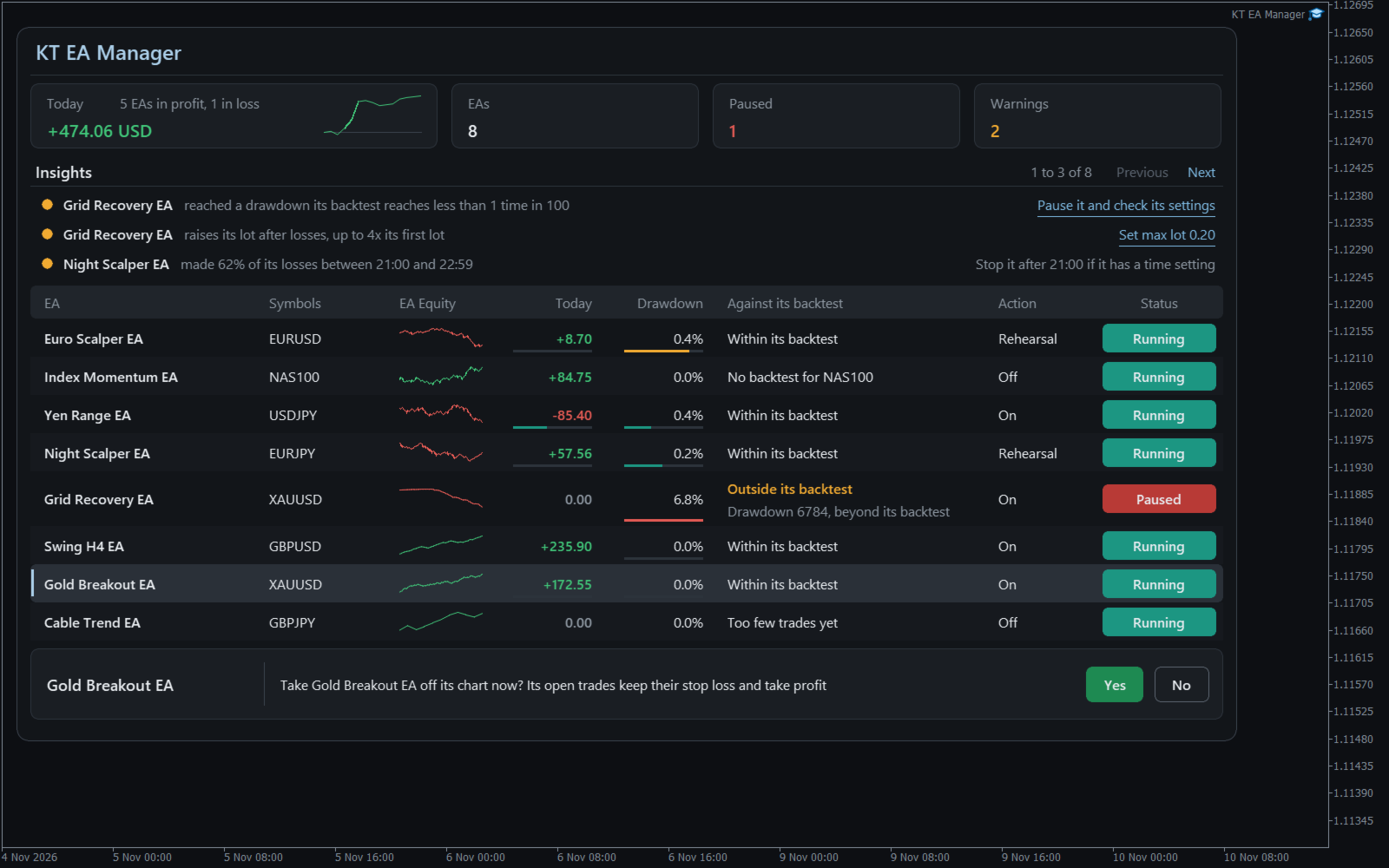
Utility EA that gives each of your EAs its own results, its own limits and its own stop button. One chart watches them all, tells you if each one still behaves like its backtest, and can take a single EA off its chart while the rest keep trading.

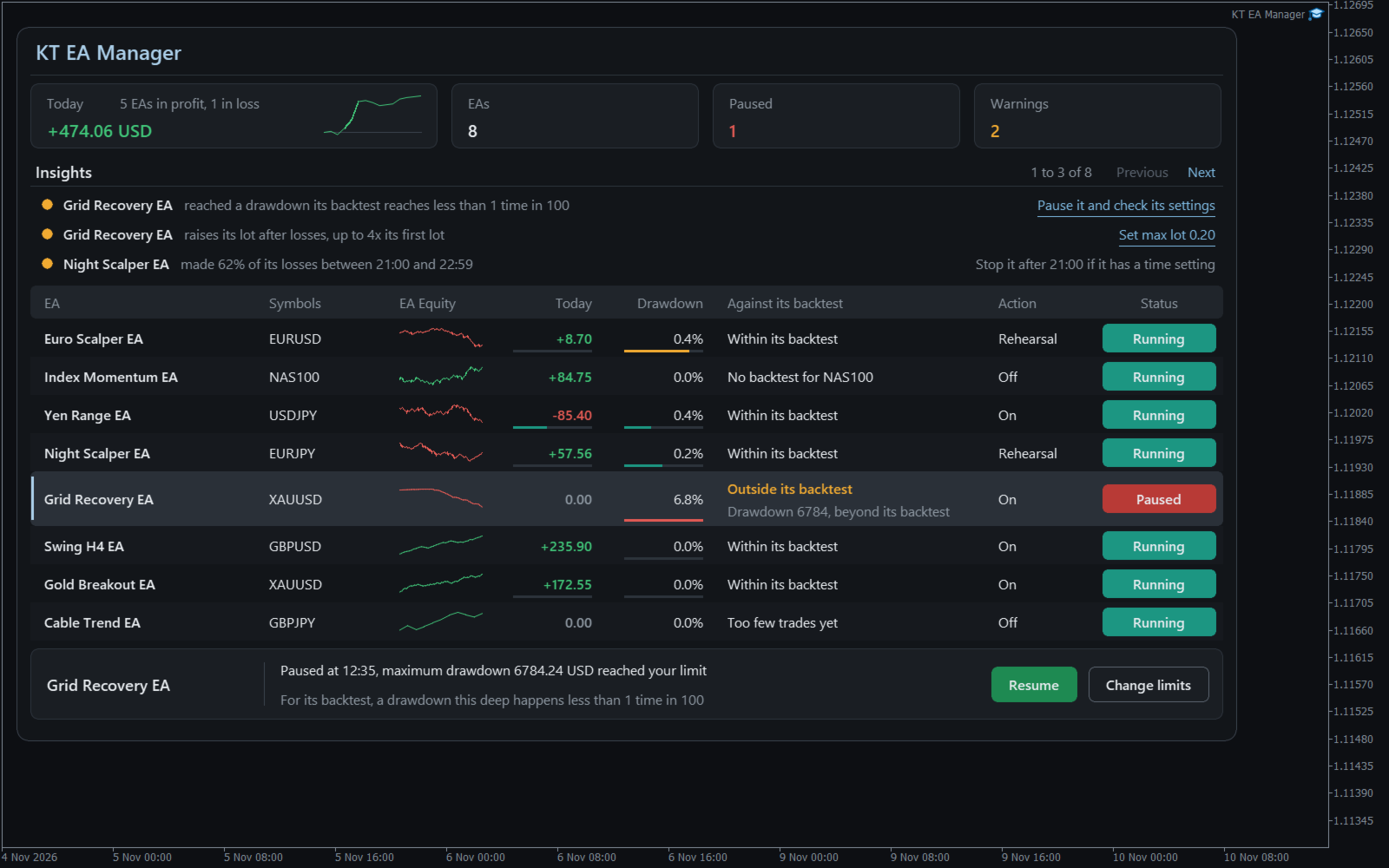
Your balance falls and you cannot say which EA did it, or whether that loss is normal for it. KT EA Manager settles that: every magic number becomes a row, and nothing happens to any EA until you allow it for that EA.

What you control

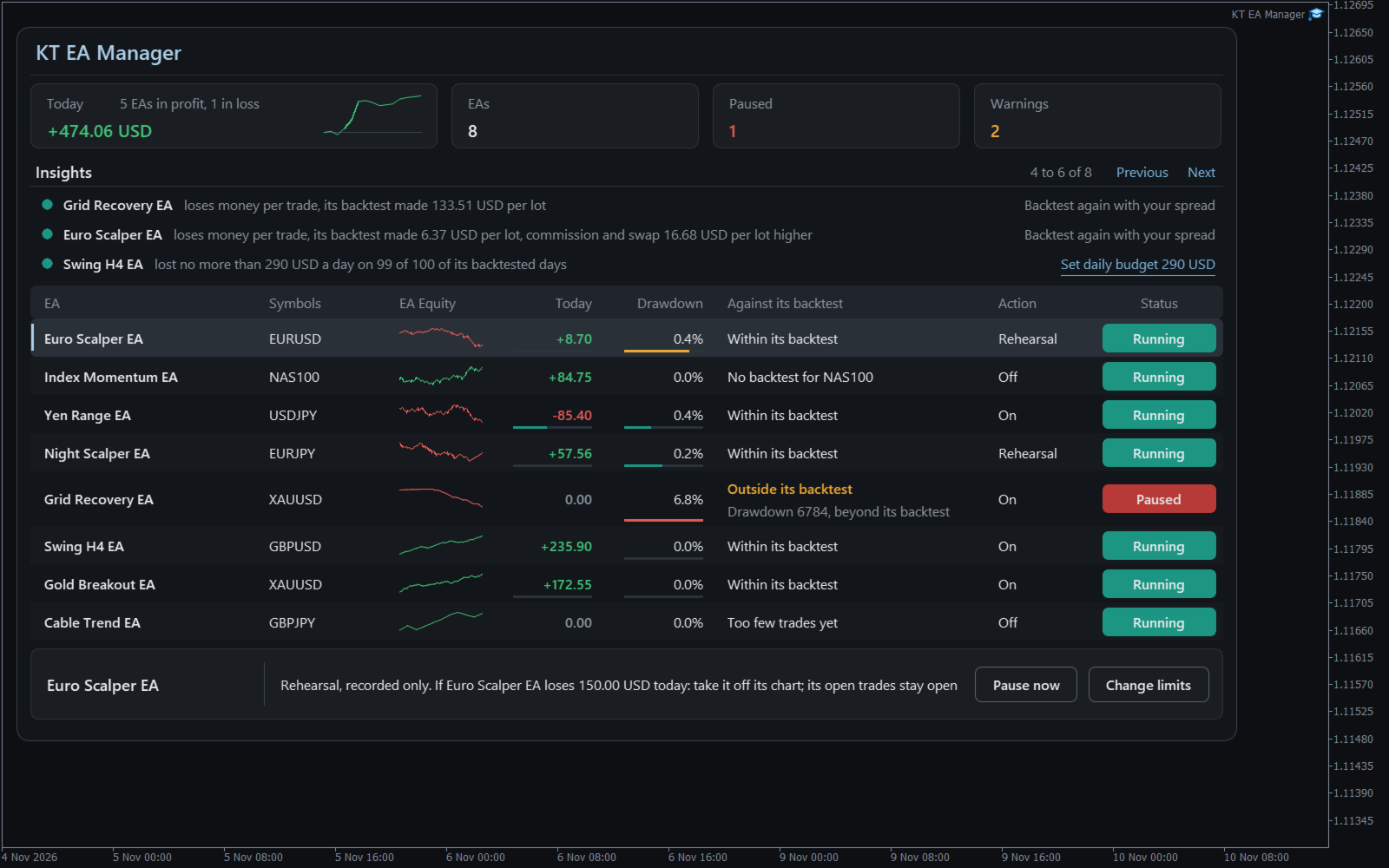
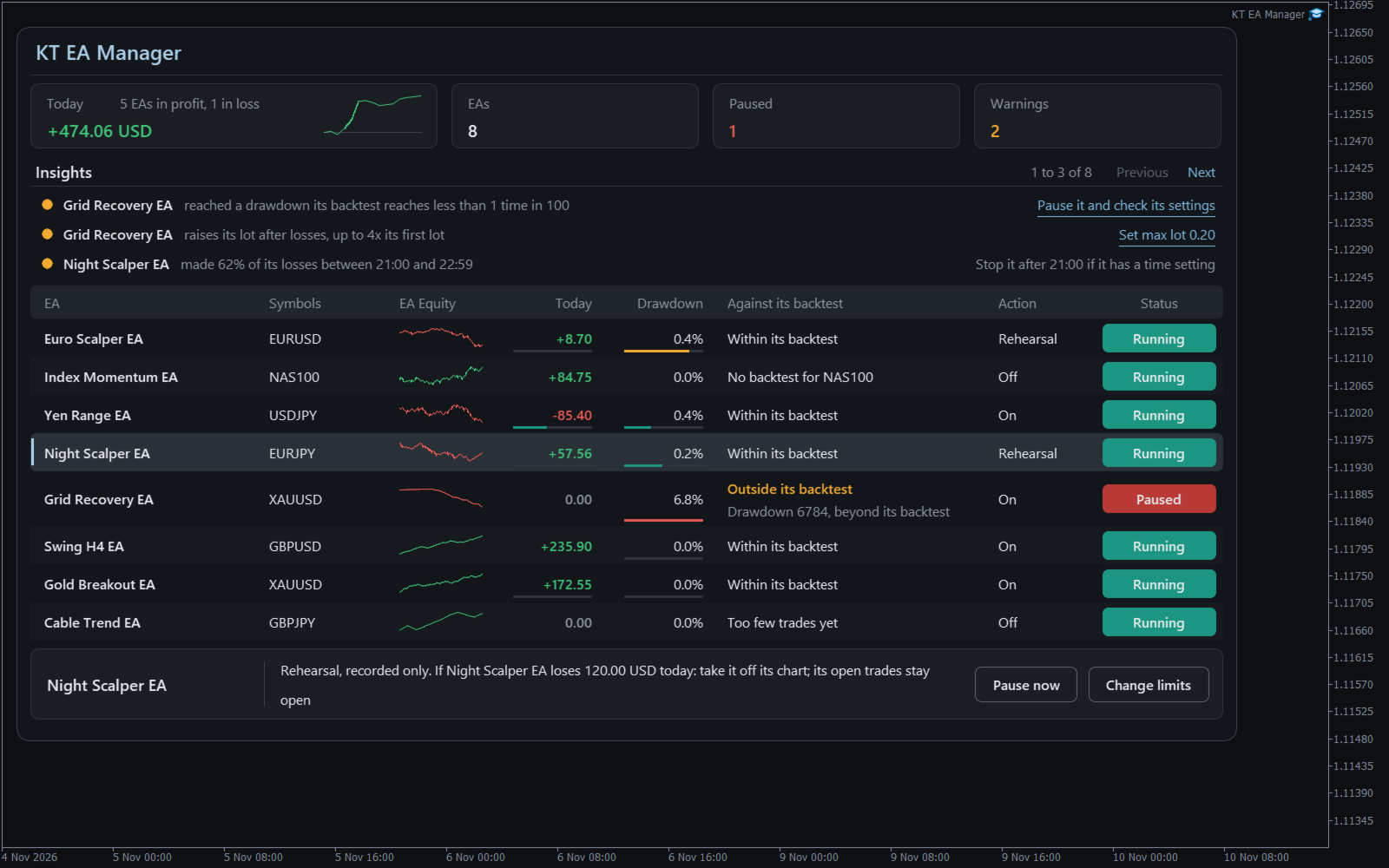
  • A verdict for each EA: Within its backtest or Outside its backtest, with the reason written out. It warns and never acts.
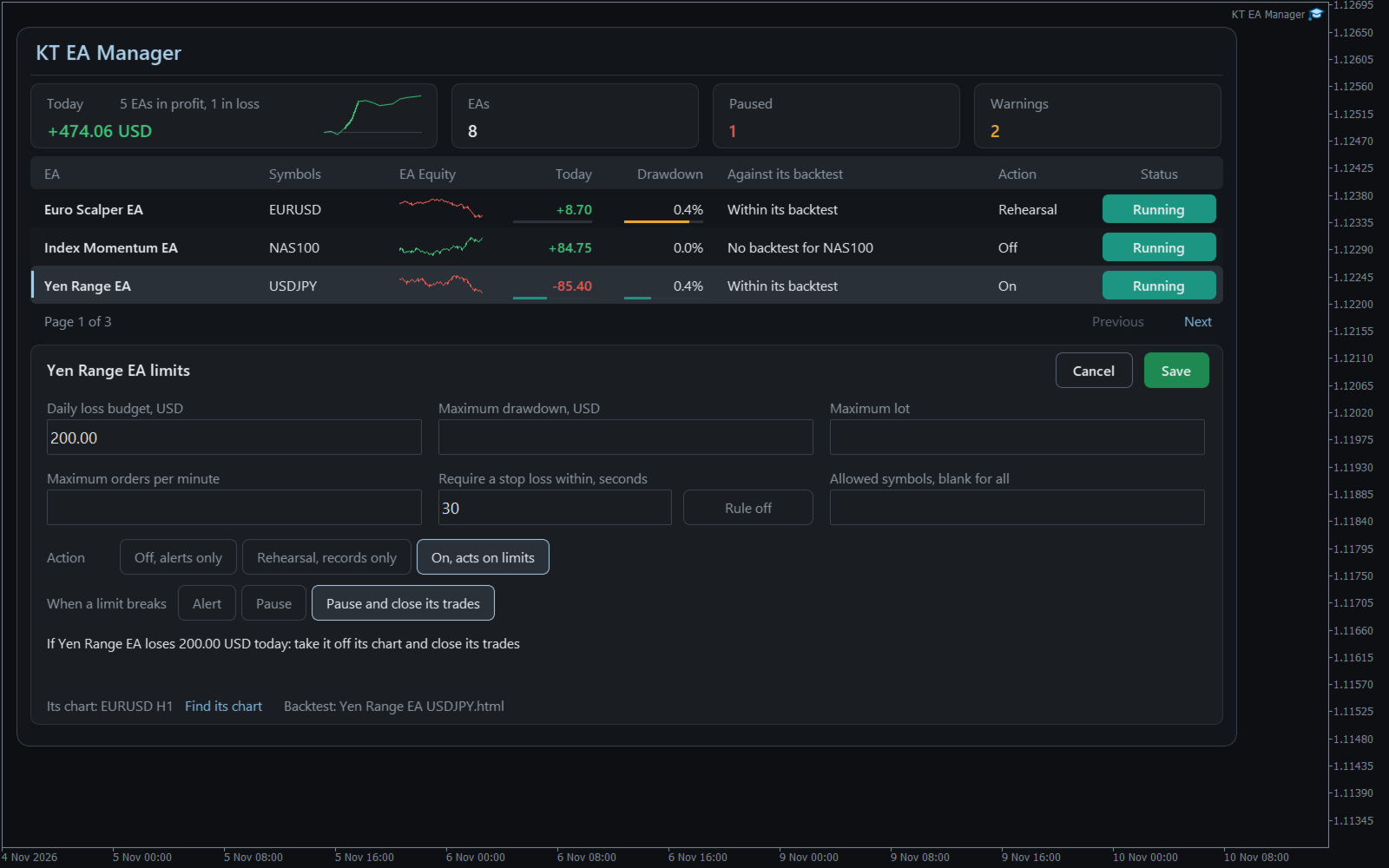
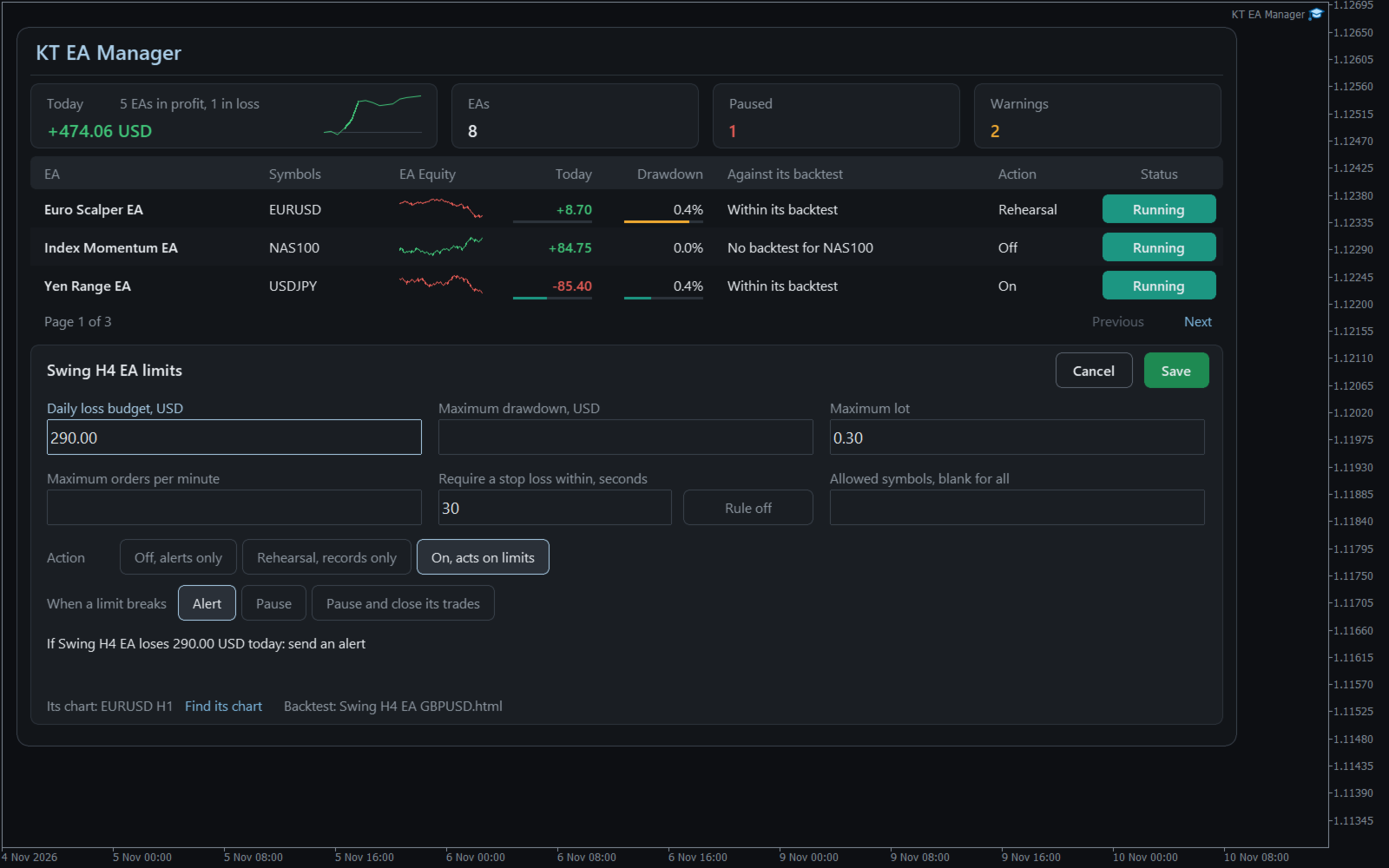
  • Six limits per EA: daily loss budget, maximum drawdown, maximum lot, stop loss required, orders per minute and allowed symbols.
  • Three steps per EA: Off sends alerts, Rehearsal records what would have happened, On acts on your limits.
  • Your choice of action: Alert, Pause, or Pause and close that EA's trades. Other EAs and your manual trades are left alone.
  • Findings in words: an EA that raises its lot after losses, two EAs losing on the same days, costs higher than in the backtest.
  • A daily budget from the EA's own past: a suggestion you can apply with one click and then confirm.
  • A record of everything: each alert, rehearsal and action saved with its result.


How to use it

Open one chart for KT EA Manager and tick Allow Algo Trading. Your EAs appear by themselves. Save each EA's backtest HTML report in the Backtests folder to start the comparison; a report counts only for its own symbol.

Select an EA, type a limit, and read the plain sentence the panel shows before anything can happen. A paused EA comes back only when you press Resume and confirm, with the settings it had.

Recommendations

Works with any EA that trades with a magic number, on any symbol. Give each EA its own number, keep the terminal running on a computer that stays on or a VPS, and try Rehearsal for a week before you choose On.

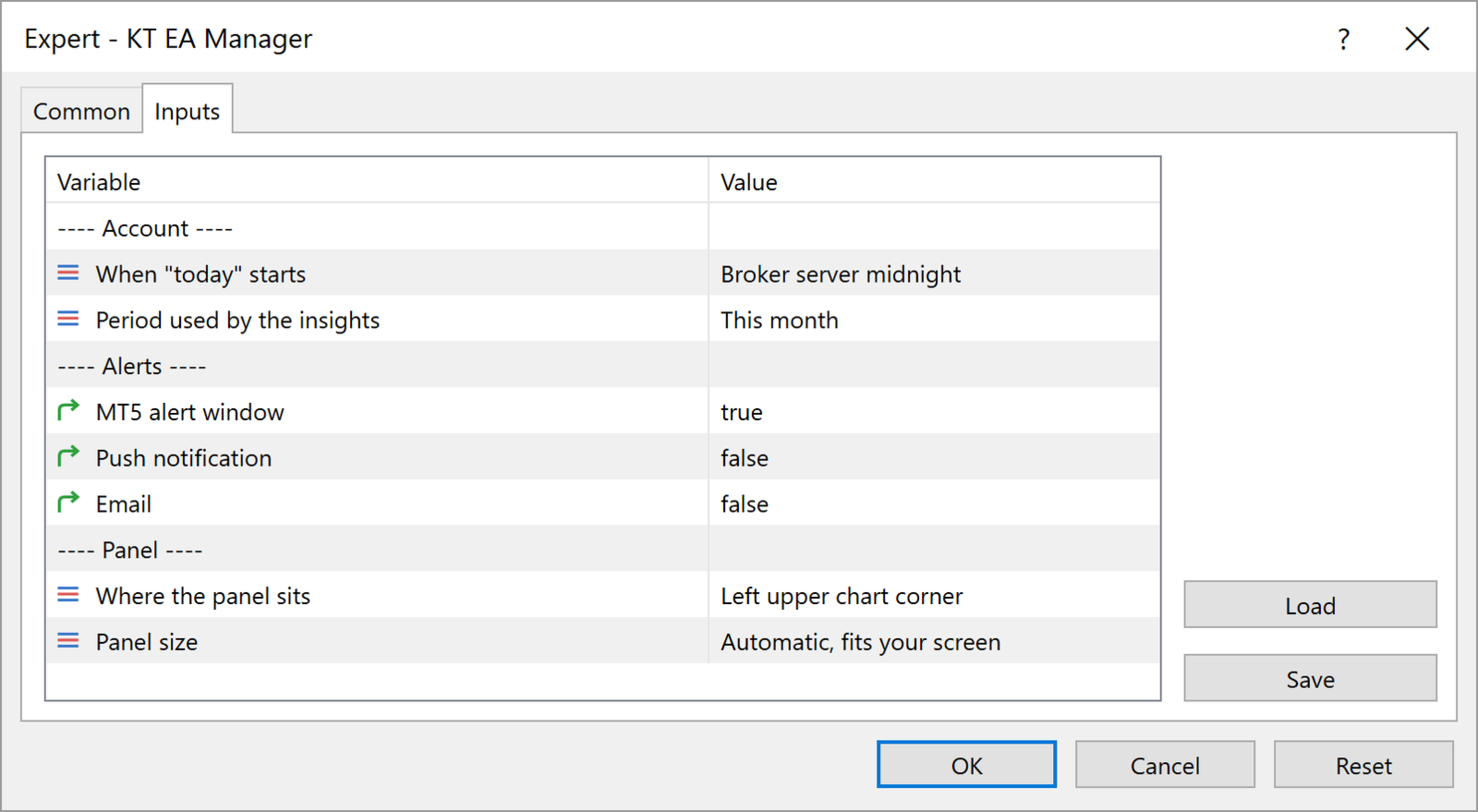
Input parameters

  • When "today" starts: when the day and the daily budgets restart.
  • Period used by the insights: the period the findings look at.
  • Alert window, Push notification, Email: where alerts arrive.
  • Where the panel sits and Panel size: the corner and the size of the panel.


All limits are set on the panel, for each EA.

Keep the EAs that work

You see each EA for what it is, and one bad day from one EA no longer decides the day for the others. KT EA Manager stops only what you told it to stop.
Recommended products
EA211 Reversal Scalp
Jose Francisco Flores Rojas
Clear Reversal Scalper EA This Expert Advisor is designed to identify sharp market reversal opportunities by detecting a predefined number of consecutive bullish or bearish candles, signaling potential exhaustion of the current trend. Once the reversal pattern is detected, the EA enters a trade in the direction of the large reversal candle, capitalizing on momentum for a quick scalp. This strategy works best in volatile sessions. Key Features: Reversal Pattern Detection: Customizable setting to
We present our totally unique Expert Advisor "Expert trend one point": the EA trades within a trend, it contains a complex strategy (named "one point profit"), does not use stop loss, does not use an adjustable take profit, it adjusts the take profit per one point of profit. The EA works with four or five-digit prices. You can use the Expert Advisor on any currency pairs, however it is recommended to choose symbols with low spread and low stop levels. The EA can work on timeframes M1 , M5, M15,
торговая система с риском 1% чем больше денег на счете тем больше лот но риск 1% Начальный депозит 50.00 Спред 10 Чистая прибыль 6.71 Общая прибыль 51.97 Общий убыток -45.26 Прибыльность 1.15 Матожидание выигрыша 0.02 Абсолютная просадка 26.79 Максимальная просадка 29.21 (55.47%) Относительная просадка 55.47% (29.21) Всего сделок 427 Короткие позиции (% выигравших) 219 (72.60%) Длинные позиции (% выигравших) 208 (72.12%) Прибыльные сделки (% от всех) 309 (72.37%) Убыточные сделки (% от все
MACD trading strategy is the most popular among traders. Is it profitable? You can download the demo and beckets the mechanical trading system on your own. With the Expert Adviser you have the opportunity for testing the MACD mechanical trading system, in a accurate and  efficient way. MACD universal  is a fully automated EA designed to trade  all currency pairs and all timeframes.   It opens trades on MACD-main and MACD-signal line crossover. Features: Automated risk management as percent of ba
Bar Boss
Iurii Tokman
5 (1)
The Expert Advisor uses the FletBoxPush indicator for market analysis and for determining trading signals. The indicator is built into the Expert Advisor, there is no need to additionally run it on a chart. The EA trades breakouts of certain levels determined as flat borders. The EA uses Stop Loss. Description of EA Parameters TimeFrames chart period required for the indicator colour - the color of the price zone defined as flat, a setting for the indicator Rectangle - show price zones defined
ExIndiRobot
Vedran Brkic
L'Expert Advisor ExIndiRobot (v1.0) è un sistema di trading automatizzato per MetaTrader 4 progettato per eseguire ordini a mercato partendo dai segnali generati da un indicatore esterno. La sua architettura si divide in quattro aree funzionali principali. 1. Rilevamento dei Segnali (Input) L'EA offre due modalità alternative per leggere i segnali di acquisto (Buy) o vendita (Sell) dell'indicatore: Modalità Buffer ( USA_BUFFER ): Interroga direttamente i buffer interni dell'indicatore tramite
This EA combines two built-in combined indicators (Bollinger Bands breakout and EMA Cross) to check the trends before performing any trading action. It is provided with: trailing Stop Loss; bad time to trade filter for each day of the week; define in minutes the profitable orders duration; define in currency values the profit to be taken; enable and disable martingale mode; define the maximum spread value to trade; define the minimum equity percentage to allow trading; the input values are alre
Fibonacci System
Maksim Neimerik
The system applies Fibo levels. Apart from basic Fibo levels (23.6; 38.2; 50.0; 61.8; 100.0;), the EA features custom levels (34.0; 36.0; 64.0; 66.0;). You can decide the levels trading is to be performed from. Sample trade: when the market is bullish and the price rolls back to the levels (as we remember, we select the levels on our own), the EA opens buy orders. The opposite is true for sell orders. The EA can work in three modes. Each of the modes is a separate Fibo levels construction method
CrownFVG EA
Mazhar Ul Hassan Noorul Hassan Noor Ul Hassan
CrownFVG EA is a precision-engineered Breakout + Fair Value Gap (FVG) trading system designed to deliver consistent profits on the M5 timeframe . Built with a multi-group scalping architecture, this EA combines institutional trading concepts with algorithmic speed to identify and trade market inefficiencies where price is most likely to react — the Fair Value Gaps. Developed for traders who value accuracy, control, and capital protection , CrownFVG EA avoids risky techniques like Martingale or
Yggdrasil MT4
Marc Despalins
Yggdrasil is a fully automated hedging system . The EA opens orders in both direction on the chosen pairs by the user. Currency pairs aren't traded individually, all trades opened are part of the system. The algorithm will close the unprofitable orders with the available profit. It prevents drawdown to increase if a big trend occurs on a currency pair. The EA is designed to be efficient with minimal settings . No need fine tuning parameters, it's a long term "set & forget" expert advisor. As t
Trion Miner EA
Msyaikhul Umam
Trion Miner EA is built based on smart grid averaging hedging system, which has been perfected. If these strategies run individually without any combination of other strategies, it will be very risky. And it will end up blowing out your account. By combining these three strategies and adding a systematic system, we can cover the weakness of each strategy and build a very profitable EA. Trion Miner use multi-currency hedging system that will make the trade always profitable wherever the market g
Algorithmic trading is a scalping bot for trading major currency pairs. Recommended timeframes for trading M1, M5, M15, M30, H1. The robot automatically analyzes the market with each arrival of a new tick and determines the places of sharp price changes. When a sharp large jump in price appears on the chart, the robot opens a trade. If the price rises sharply, the robot opens a buy trade. If the price drops sharply, the robot opens a sell trade. Due to the fact that the robot analyzes the marke
RSI Double Cross Robot   is a fully automated expert advisor based on a classic yet powerful momentum concept — the crossover of two RSI indicators with different periods. The robot identifies trend changes and market momentum shifts by tracking the interaction between fast and slow RSI values. Trades are opened only when clear directional signals appear, while a built-in volatility filter helps avoid flat and low-activity market conditions. RSI Double Cross Robot applies strict risk management,
Nucleus Atom
Tran Thanh Tuyen
I am glad to welcome you on the page of my product The trading system is suitable for both experienced traders and beginners.  Nucleus Atom   is an automated professional multi-currency expert advisor that designed for long-term profitable trading. The EA continuously controls price movements and makes accurate trades based on market patterns, trend and technical indicators. The Ea contains a flexible news filter, high spread protection, separate time and days trading filters and allows to work
TheWinnerTurtle
Rijalalaina Rasolofonirina
THEWINNERTURTLE EXPERT ADVISOR MT4 This EA is based on price action and RSI indicator to trade EURUSD currency pair on M15 timeframe. THEWINNERTURTLE is a price action swing system working for a long-term profit as showed by backtesting. THEWINNERTURTLE identifies price movement to easily find buy and sell opportunities and places automatically trades based on defined parameters. THEWINNERTURTLE does not use neither martingale nor averaging of losing positions. SETTINGS THEWINNERTURTLE is a long
Smart Grid Pro
Erik Shahazizyan
The advisor is based on a grid strategy and order averaging, is universal and can work on any currency pairs, depending on the settings, it is important to find out the range of price fluctuations for a specific currency bet over the last 2-3 months. During important news, it is recommended to set a high timeframe. The advisor has clear and easily manageable settings; you can configure the accuracy of averaging, the number of orders after which the martingale will work, and limit the number of
PoundYen Trend Follower PoundYen Trend Follower  is a fully automated expert Advisor that trades on trend rollbacks. In its analysis, the expert Advisor uses certain formations of price behavior and indicator values on different time ranges. Upon reaching certain conditions for the opening and closing of positions the EA trails the trade entry and exit. The expert Advisor automatically calculates the volume of the transaction to enter depending on the free Deposit funds, but it is also possible
Simply System Trend Line
Szymon Palczynski
5 (1)
I personally love trading robots, but there are many situations where semi-auto trading is superior to automation. The system is very simple and effective.  Trend lines are typically used with price charts, however they can also be used with a range of technical analysis charts such as CCI and RSI.  What is the trend line?  Trend line is a bounding line for the price movement. It is formed when a diagonal line can be drawn between a minimum of three or more price pivot points. A line can be
Eagle Crest Gold
Giovanni Bengalis
Eagle Crest Gold — Fractal Breakout System for XAUUSD Eagle Crest Gold is a professional Expert Advisor for Gold (XAUUSD) built entirely on fractal breakout logic. No indicators, no guesswork — the EA places BuyStop and SellStop pending orders at key D1 fractal highs and lows , letting the market come to the entry rather than chasing price. This is the exact system used on live accounts, validated across years of historical Gold data. Live Signal IC Markets : Click Here How It Works At the start
Smart Grid FX
Natalya Sopina
Smart Grid FX – is counter-trend trade multicurrency EA for automated Forex trading. EA uses principle of Martingale. EA work algorithm: At cycle start the pair of opposite order opens with initial lots. Further grid of orders is being built with variable step and lot volume at the price movement direction. Wherein every time at the next order opening the all grid orders close level is being changed with regard to parameters of TakeProfit. The EA does not use such function as locking, trailing,
Demidov
Andrey Kozak
Demidov is a fully automatic scalping robot in the forex markets. The default settings are for the GBPUSD currency pair. The robot automatically determines the direction of the trend and the most effective points for opening deals. After opening deals, the robot begins to accompany them to get the maximum effect. In the robot settings there is a Risk parameter, with which a trader can adjust the initial trading volume. In this robot, the volume is defined as% of the deposit. Accordingly, when y
This Expert Advisor is based on the Williams percent range strategy . It was developed by Larry Williams and it compares a closing price to the high-low range over a specific period. Williams percent range can be used in various capacities that can help us determine momentum confirmations, overbought and oversold readings, strength of the trend and potential buy and sell signals. Key Features Timeframe: H4 Currency pairs: GBPUSD Use only five-digit accounts Minimum deposit: $ 100  It is recom
Robin Hood EA is an automatic forex scalping robot for the GBPUSD pair, period M5. This robot opens an average of 15 to 30 trades every day. It depends on market activity. The robot can work with almost all well-known brokers whose GBPUSD pair has quotes with 5 digits after the dot. After adding the robot to the chart of a currency pair, it automatically analyzes the market, automatically opens and closes transactions. Transactions are supported using Take Profit, Stop Loss and Trailing Stop.

Our "Trending Topik" Forex Expert Advisor works based on several non-lagging Forex indicators and combined with Supply Demand on RBR/DBD, Support Resisten , Fibonacci, OrderBlock/ICT, ADR Daily and support on timeframe M15 - Daily, searching current major trends with filter EMA 200 on Timeframe H1, H4,Daily, and looking for the best momentum with built-in Hidden Profit Fibo0/Support and Fibo100/Resisten,  Hidden Profit change trend EMA200, StopLoss, BreakEvent and Trailling. It works on multi pa
IRobot Alligators
Paranchai Tensit
IRobot Alligators is an Expert Advisor based on the chaos theory and the Alligator technical indicator. This expert advisor consists of three lines, overlaid on a price chart, that represent the jaw, the teeth and the lips of the Alligator. It was designed to help confirm that a trend is in effect and in what direction. As with all moving averages, the shortest one (green) moves first, followed by the middle (red) and then longer average (blue). If the three lines are entwined, then the Alligato
Scalpotronic professional  - A professional trading robot that trades in a fully automatic mode. The default settings are for the GBPUSD pair. The robot automatically analyzes the market, determines the opening points of orders, opens and closes trade transactions. A trader needs to start a robot on a chart of a currency pair and you can go do your own thing. Then the robot will do all the necessary work itself. For trading, the robot does not require additional settings; it has no restrictions
Bob EA V2
Joel Brito De Mesquita
B.o.B V2 — Automação, Análise Técnica e Gerenciamento O B.o.B V2 é um Expert Advisor desenvolvido para o MetaTrader 4 , com foco em análise de tendência, confirmação técnica e gerenciamento automatizado das operações. O robô combina diferentes ferramentas e parâmetros técnicos para identificar possíveis condições de compra e venda e executar a estratégia de acordo com as configurações definidas pelo usuário. Principais recursos • Análise de tendência utilizando EMA 14, SMA 50 e SMA 200. • Con
Alligator Trade X is an EA based on Alligator. Alligator parameters such as BuyJawsperiod1, BuyJawsshift1, BuyTeethsperiod1, BuyTeethsshift1,   BuyLipssperiod1, BuyLipssshift1, BuyShift1, BuyCandlestickShift1, BuyJawsperiod2, BuyJawsshift2, BuyTeethsperiod2, BuyTeethsshift2,   BuyLipssperiod2, BuyLipssshift2, BuyShift2, BuyCandlestickShift2, BuyJawsperiod3, BuyJawsshift3, BuyTeethsperiod3, BuyTeethsshift3,   BuyLipssperiod3, BuyLipssshift3, BuyShift3, BuyCandlestickShift3, SellJawsperiod1, Sell
Trade Pulse Pro
Serhii Homelko
Trade Pulse Pro — Advanced Grid Expert Advisor for EUR/USD Description: Trade Pulse Pro is an automated trading expert advisor designed specifically for trading the EUR/USD pair, taking into account the trend based on the Ichimoku Cloud on the H4 timeframe. The advisor employs strict filters that allow opening orders only in the direction of the trend and uses a martingale system with distance control between orders. Key Features: The trend is determined strictly by the price position relative t
XD FlashScalp EA for MT4
Nguyen Xuan Danh Tran
XD FlashScalp EA is a lightweight and fast scalping Expert Advisor designed for precision trading at key market levels. It automatically detects overbought and oversold zones to SELL at local highs and BUY at local lows, using an adaptive flash-scalping logic. The EA is fully optimized for accounts with bonus lots and supports flexible lot scaling based on balance and risk. Main Features Intelligent flash-scalping algorithm with price-level recognition Works on all major currency pairs (
Buyers of this product also purchase
Forex Trade Manager MT4
InvestSoft
4.98 (447)
Trade Manager MT4 is an advanced position size calculator and trade management tool for MetaTrader 4, designed to help traders plan trades faster, control risk more precisely, and manage open positions directly from the chart. It combines order placement, risk based lot calculation, Stop Loss and Take Profit management, Break Even, Trailing Stop, Partial Close, Equity Protection, and external trade management in one panel. Whether you trade forex, indices, metals, commodities, or crypto, Trade M
Grid Manual MT4
Alfiya Fazylova
4.71 (17)
Grid Manual is a trading panel for working with grid strategies. The utility is universal, has flexible settings and an intuitive interface. It works with a grid of orders not only in the direction of averaging losses, but also in the direction of increasing profits. The trader does not need to create and maintain a grid of orders, the utility will do it. It is enough to open an order and the Grid manual will automatically create a grid of orders for it and will accompany it until the close. Ful
TradePanel MT4
Alfiya Fazylova
4.84 (95)
Trade Panel is a multi-functional trading assistant. The app contains over 50 trading functions for manual trading and allows you to automate most trading tasks. Application instructions: https://www.mql5.com/en/blogs/post/756482 Trial version of the application for a demo account: https://www.mql5.com/en/blogs/post/750865 How to install the application: https://www.mql5.com/en/blogs/post/756239 How to test the application in visual mode: https://www.mql5.com/en/blogs/post/770277 How to install
Trade Indicator Assistant is a powerful MT4 utility designed to turn indicators into automated trading systems. Its main feature is the ability to automatically detect an indicator’s   BUY and SELL signal buffers , without requiring you to know the buffer numbers, search through indicator settings, or modify the indicator source code. Bonus Indicator: After purchasing Trade Indicator Assistant, contact me to receive Trade Signal Pro completely free as a bonus indicator. [Download Demo Version]
Drawdown Minimizer for MetaTrader 4 - your EAs pay in, old losers get paid off. This utility runs next to your other Expert Advisors and never opens a trade. It keeps a savings book of the net realized profit of your whole account and uses it to close the oldest losing positions of the EAs you choose - slice by slice, oldest first. WHY IT EXISTS Made by traders, for traders. One of our grid EAs got stuck in drawdown for months. The old positions did not come back, and they paid swap every single
The product will copy all telegram signal to MT4   ( which you are member  ) , also it can work as remote copier.  Easy to set up, copy order instant, can work with almost signal formats, image signal, s upport to translate other language to English Work with all type of channel or group, even channel have "Restrict Saving Content", work with  multi channel, multi MT5 Work as remote copier: with signal have ticket number, it will copy exactly via ticket number. Support to backtest signal. How to
RiskManager
Roman Zhitnik
5 (4)
Risk Manager MT4   is an account protection Expert Advisor for traders who want strict risk control inside MetaTrader 4. The utility monitors your account equity, daily and weekly results, drawdown, open positions, trade count, consecutive losses, and trading hours. When a configured limit is reached, it can automatically close positions, cancel pending orders, stop other EAs, send notifications, or close the terminal. Instead of relying on discipline during a stressful trading session, you defi
Trade Manager Pro MT4
Bryan Djoufack Nguessong
This is an Utility to make your trading easier by putting at   one click or a few clicks   time-consuming tasks as order management and risk management. Contact for a free trial. Features Risk Management   Calculates automatically lots based on risk specified in either   % or $  in the risk field and let you enter just   by placing lines for SL TP   etc and display   real-time Risk Reward . TrueRisk   so   it includes commissions when calculating lot size on FX pairs only so you risk 1% with
Price Action DashBoard
Chantal Sala
4.17 (6)
The Price Action Dashboard is an innovative tool to help the trader to control a large number of financial instruments. This tool is designed to automatically suggest signals and price conditions. The Dashboard analyzes all major Time Frame suggesting price action conditions with graphic elements. The Dashboard can suggest you the strength of the trend identifying directional movement, it is an indispensable tool for those who want to open position themselves using market trends identifiers. The
Telegram to MT4 Multi-Channel Copier   automatically copies trading signals from your Telegram and Discord channels straight to MetaTrader 4. No bots, no browser extensions, no manual copying. A signal arrives in Telegram or Discord and the EA opens the trade in your terminal within seconds. And before you copy a channel, the built-in backtester shows you what that channel would have done in your account. The product has two components: a Windows application that listens to your Telegram channel
MT4 to Telegram Signal Provider   turns your trading account into a signal provider. Every trade action, whether manual, by EA or from your phone, is instantly sent as a message to Telegram. You can fully customize the format or use a ready-made template for quick setup. [ Demo ] [ Manual ] [ MT5 Version ] [ Discord Version ]  New: [ Telegram To MT5 ] Setup A step by step user guide is available. Key Features Ability to customize order details sent to subscribers You can create a tiered subs
TradeMirror is a trade copier EA for MT4/MT5 platform. Tutorial Please click the Trademirror Tutorial link to view more tutorials. Why TradeMirror We understand the importance of security, stability and privacy for financial software, so we've gone the extra mile to harden these three elements in detail: Provides a user-friendly graphical interface that is easy to operate Focus on privacy and security, suitable for various financial scenarios with privacy requirements for order distribution Prec
Unlimited Trade Copier Pro is a tool to copy trade remotely to multiple MT4, MT5 and cTrader accounts at different computers/locations over internet. This is an ideal solution for you if you are a signal provider and want to copy your trades to other receivers globally on your own rules. One provider can copy trades to multiple receivers and one receiver can get trade from multiple providers as well. The provider can even set the subscription expiry for each receiver, so that receiver will not b
Take a Break
Eric Emmrich
5 (31)
Take a Break pauses your Expert Advisors when trading is a bad idea: before news, after a daily loss, outside your trading hours, or when a rule you wrote yourself says so. When the pause is over, your EAs simply continue. Account protection for all your EAs in one tool: news filter, drawdown and equity protection, time filter and custom rules. One EA on one chart protects the whole account, the free indicator gives every chart its own rules on top. Free demo | What is new in 26.09 | Support Ass
Copier->Convenient and fast interface interaction, users can use it right away   ->>>> Recommended to use on Windows computers or VPS Windows Features: Diversified and personalized copy trading settings: 1. Different lot modes can be set for different signal sources 2. Different signal sources can be set for forward and reverse copy trading 3. Signals can be set with comments 4. Whether to calibrate the lot according to the contract lot Diversified and personalized copy order settings 2: 1. Dif
Trade Manager MT4 DaneTrades
Levi Dane Benjamin
4.09 (11)
DaneTrades Trade Manager is a professional trade panel for MetaTrader 4, designed for fast, accurate execution with built‑in risk control. Place market or pending orders directly from the chart while the panel automatically calculates position size from your chosen risk, helping you stay consistent and avoid emotional decision‑making. The Trade Manager is built for manual traders who want structure: clear risk/reward planning, automation for repeatable management, and safeguards that help reduc
Zone Trader MT4
Lee Samson
5 (1)
Trade support and resistance or supply and demand zones automatically once you have identified the key areas you want to trade from. This EA allows you to draw buy and sell zones with a single click and then place them exactly where you expect price to turn. The EA then monitors those zones and will automatically take trades based on price action you specify for the zones. Once the initial trade is taken, the EA will then get out in profit at the opposite zone you place, which becomes the target
PZ Trade Pad Pro MT4
PZ TRADING SLU
3.67 (3)
Effortlessly calculate lot sizes and manage trades to save time and avoid costly errors The Trade Pad Pro EA is a tool for the Metatrader Platform that aims to help traders manage their trades more efficiently and effectively. It has a user-friendly visual interface that allows users to easily place and manage an unlimited number of trades, helping to avoid human errors and enhance their trading activity. [ Installation Guide | Update Guide | Troubleshooting | FAQ | All Products ] One of the k
Riskless Pyramid
Snapdragon Systems Ltd
5 (1)
Introduction This powerful MT4 trade mangement EA offers a way potentially to aggressively multiply trade profits in a riskfree manner. Once a trade has been entered with a defined stoploss and take profit target then the EA will add three pyramid add-on trades in order to increase the overall level of profit. The user sets the total combined profit target to be gained if everything works out. This can be specified either as a multiple of the original trade profit or as a total dollar amount. Fo
The News Filter
Leolouiski Gan
5 (25)
This product filters all expert advisors and manual charts during news time. It is able to remove any of your EA during news and automatically reattach them after news ends. This product also comes with a complete  order management system that can handle your open positions and pending orders before the release of any news. Once you purchase The News Filter , you will no longer need to rely on built-in news filters for future expert advisors, as this product can filter them all from here onwards
Prop Guardian Risk Manager MT4 – Drawdown, Risk & Hedge Protection for Prop Firm and Managed Accounts Prop Guardian Risk Manager is a professional risk-control utility for MetaTrader 4, designed for prop firm traders, money managers and anyone who wants strict account-level risk protection. It does not generate trading signals, strategy entries or trading decisions. Instead, it runs in the background, monitors your account risk and can automatically block new exposure, close managed trades or ac
FCK CurrencyStrength Pro
Patel Hitendrakumar Mahendrabhai
Hi Friends, " FCK Currency Strength Pro " is a auto & semi auto trading expert with direction of pair. Buy-Sell separate or multi currency in one click. The strategy of  FCK Currency Strength Pro  is a combination of custom indicator, Trendlines, Support & Resistance levels ( Price Action ) and most important secretive trading algorithm mentioned above. Download News Ex4 and csv file You need the following SDSnews.ex4 in MQL4/Libraries and the daylightsavings.csv in MQL4/Files. Only 4 of 5 copi
Trade Assistant Pro 36 in 1
Makarii Gubaydullin
4.76 (21)
Multifunctional tool: Lot Calculator, Grid Orders, R/R ratio, Trade Manager, Supply and Demand zones, Price Action and much more Demo version   |   User manual Trade Assistant   doesn't work in the strategy tester: you can download the Demo Version HERE  to test the utility . Contact me for any questions  / ideas for improvement / in case of a bug found If you need a MT5 version, it is available   here Simplify, speed up and automate your trading process . Expand the standard terminal capabilit
Risk manager Risk manager - it will simplify the tracking of drawdown and will notify you (alert) when the specified risk is reached, and close/lock orders when the critical DD risk level is reached. If the specified drawdown is exceeded, you can choose two options for actions: All orders will be closed that mean loss will be fixed on depo. The terminal also closes. Instead of fixing the loss on depo, the opposite order will be opened - orders locking will occure. Not a single order will be c
VirtualTradePad PRO SE MT4 — advanced trading panel and chart workspace for MetaTrader 4 VirtualTradePad PRO SE is a professional trading panel and trade-management workspace for MetaTrader 4 . It helps traders open, manage, protect, close and analyze trades faster from one chart-based interface. The product was created for active manual traders who need more than a simple set of buttons. PRO SE combines one-click execution, pending orders, position control, partial close, basket profit/loss log
Ultimate Partial Profit EA
BLAKE STEVEN RODGER
4.67 (3)
This EA Utility delivers a robust solution for managing an unlimited array of open orders, both manual and automated. It enables customizable partial profit levels utilizing metrics such as pips, ratios, ATR (Average True Range), and profit amounts for precise trade management. The utility features an advanced on-screen display, offering clear visualization of all orders and their profit levels to enhance strategic decision-making and control. To evaluate its performance and interface, the EA s
The Risk to Reward Ratio Manager is a visual order management tool and position size calculator designed to support disciplined trading and professional risk management. It allows traders to visually set entry, stop-loss, and take-profit levels directly on the chart, while automatically calculating the lot size and risk-to-reward ratio before sending an order. The tool helps standardize trade preparation and ensures that each position is opened with a predefined and controlled level of risk. Thi
Ziwox Trade Assistant for MT4 Ziwox Trade Assistant is a trading panel that works like an application inside your MetaTrader chart. It brings together trade planning, position sizing, order execution, trade management, account protection and performance review in one workspace. The panel also provides fundamental market data directly on the chart, including currency bias, institutional positioning (COT), retail sentiment and the economic calendar. It is designed for manual traders who need pre
Trade Copier Global
Laszlo Tormasi
5 (15)
Trade Copier Global: The name speaks for itself. This copier allows you to copy orders between MT4 terminals even if they are not installed on the same computer. Features Copying trades between MT4 terminals around the world with a short delay. Automatically recognizes symbol prefixes. Can connect many Slaves to the same Master. Supports pending and market orders. Supports partial order close (with limitations, see below) Can send messages and notifications to the Slaves from the Master Several
Trade Signal Pro (MT4) — Telegram Signal Provider (Utility) A lightweight utility that sends trade notifications from your MT4 account to Telegram. It does NOT open/close trades. It only reads positions/deals and sends messages. What it sends Entry signal (BUY/SELL) with Entry, SL, TP, pips + Risk:Reward   Updates when SL/TP is modified (reply/tag to the original signal)   Close notifications: TP hit / SL hit / Breakeven / Manual close   Optional Daily & Weekly performance summary (win
More from author
KT Support and Resistance Levels MT5
KEENBASE SOFTWARE SOLUTIONS
5 (1)
KT Auto Support Resistance Levels: Multi-Timeframe S&R, Smart Zones and Levels Dashboard for MetaTrader 4/5 Swing highs. Pivots. Order blocks. Previous highs and lows. Every trader marks the market a little differently, and the chart pays the price. Stack enough methods on one screen and it stops being a map. It becomes noise. KT Auto Support Resistance Levels fixes that. It scans the monthly, weekly, daily, and your current timeframe at once, then draws the levels that actually matter directly

KT Stoch Divergence MT4
KEENBASE SOFTWARE SOLUTIONS
If you have ever watched price make a new high while Stochastic failed to confirm it, you already know why traders pay attention to divergence. KT Stoch Divergence marks these disagreements directly on the chart, so you can spot possible reversals and trend continuation setups without drawing every line by hand. The indicator finds both regular and hidden divergence between price and the Stochastic oscillator. It gives you context, not an automatic trade. You still decide whether the setup makes
ACB Breakout Arrows
KEENBASE SOFTWARE SOLUTIONS
4.15 (34)
Breakout Signals With Trade Context ACB Breakout Arrows detects a settling phase in price followed by a directional breakout and marks the setup with a buy or sell arrow. The arrow identifies a breakout pattern. It is not a promise that every signal will become a major move. A buy arrow highlights a bullish breakout setup, while a sell arrow highlights a bearish breakout setup. Because price can retest the breakout area or return inside the previous range, check the surrounding market structure,

ACB Trade Filter MT4
KEENBASE SOFTWARE SOLUTIONS
5 (1)
ACB Trade Filter answers one practical question before you place an order: is the market supporting this trade, or are you trying to force a signal through mixed conditions? The indicator reads market sentiment and trend, then presents the result through a color histogram and trend direction. Use it after your normal entry signal, not instead of one. Three market states at a glance Green histogram with bullish trend: conditions support looking for long setups from your strategy. Red histogram wi
KT Momentum Arrows
KEENBASE SOFTWARE SOLUTIONS
KT Momentum Arrows marks bullish and bearish momentum breakouts with arrows when a candle closes beyond its adaptive price bands. The bands respond to price deviation and changing volatility. A blue upward arrow confirms a close above the upper band, while a red downward arrow confirms a close below the lower band. The signal is fixed after the candle closes, so the arrow does not shift to another bar when you review the chart later. What the arrow is showing The arrow identifies the candle wher
KT COG Advanced MT4
KEENBASE SOFTWARE SOLUTIONS
1 (1)
KT COG is an advanced implementation of the center of gravity indicator presented by John F. Ehlers in the May 2002 edition of Technical Analysis of Stocks & Commodities magazine. It's a leading indicator which can be used to identify the potential reversal points with the minimum lag. The COG oscillator catches the price swings quite effectively. MT5 version of the same indicator is available here KT COG Advanced MT5 Calculation of COG The COG indicator is consist of the two lines. The main l
KT Pin Bar
KEENBASE SOFTWARE SOLUTIONS
KT Pin Bar identifies the pin bar formation which is a type of price action pattern which depicts a sign of reversal or rejection of the trend. When combined with support and resistance, BRN and other significant levels, Pin Bar pattern proved to be a very strong sign of reversal. Basically, a pin bar is characterized by a small body relative to the bar length which is closed either in upper or lower 50% part of its length. They have very large wicks and small candle body. A pin bar candlestic
KT Trend Magic
KEENBASE SOFTWARE SOLUTIONS
Read Trend Direction Directly on the Chart KT Trend Magic combines momentum and volatility into a color-coded line that follows price. The line gives you a continuous view of the active trend state and changes color when the calculated direction changes. Green line: shows a bullish trend state. Red line: shows a bearish trend state. Color change: marks a new directional transition on the chart. During a sustained move, the line can also serve as a dynamic chart reference for pullbacks and contin
KT Auto Fibo
KEENBASE SOFTWARE SOLUTIONS
Auto Fibonacci indicator that draws the Fibonacci retracement on the swing you are looking at, and redraws it the moment you zoom or scroll the chart. Zoom in on a pullback and the levels measure that pullback. Zoom out and they measure the whole trend. There are no anchor points to drag and no levels to redraw after every new high. Key features Measures the highest high and the lowest low on your screen, the current candle included. Follows zoom, scroll and window size at once, even when the ma
KT Psar Arrows
KEENBASE SOFTWARE SOLUTIONS
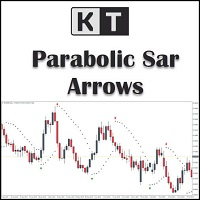
KT Psar Arrows plots the arrows on chart using the standard Parabolic SAR indicator. A bullish arrow is plotted when the candle's high touch the SAR. A bearish arrow is plotted when the candle's low touch the SAR. The signals are generated in the real-time without waiting for the bar close.  Features A beneficial tool for traders who want to experiment with the trading strategies that include the use of Parabolic Sar indicator.  Can be used to find turning points in the market. Use custom PSAR
KT Ichimoku Trader
KEENBASE SOFTWARE SOLUTIONS
1 (1)
Five Ichimoku strategies, traded automatically KT Ichimoku Trader is an Expert Advisor that opens and closes trades automatically with five classic Ichimoku Kinko Hyo strategies. You switch on the strategies you want, and each one trades on its own: its own entry rules, its own exit rules, and at most one open trade per strategy at a time. Every entry is checked on a closed candle. When a new candle opens, the EA reads the candle that just closed and opens a trade only when every entry rule of t
KT Volatility Oscillator
KEENBASE SOFTWARE SOLUTIONS
KT Volatility oscillator analyze the past and current market data with a mathematical formula to display the result in a form of an oscillator. The growing and deteriorating waves are equivalent to high and low volatility in the asset.  In a nutshell, volatility is simply a measurement of the price fluctuation of an asset over a certain period of time. Without volatility, there would not much movement in the market and traders would not be able to profit from the price movements. Use of Volatil
KT COG Robot
KEENBASE SOFTWARE SOLUTIONS
KT COG Robot is a fully automated Expert Advisor based on the KT COG Indicator . The COG indicator was originally presented by John F. Ehlers in the May 2002 edition of Technical Analysis of Stocks & Commodities magazine. The EA fires a long trade when COG line cross above the signal line and a short trade is fired when the COG line cross below the signal line.  Adaptive Filtration Our adaptive filtration algorithm combines the original COG formula with the major trend direction and market acce
ACB Breakout Arrows EA
KEENBASE SOFTWARE SOLUTIONS
Automate the ACB Breakout Workflow ACB Breakout Arrows EA evaluates breakout signals on the attached chart and manages trades with the built-in ACB Breakout Arrows and ACB Trade Filter logic. Attach the EA to the symbol and timeframe you want it to monitor, enable automated trading, then choose the position, session, filter and exit rules that fit your test plan. The required indicators and dependencies are embedded in the EA, so no separate download is needed. Their panels are not displayed on
KT Asian Breakout
KEENBASE SOFTWARE SOLUTIONS
4 (1)
KT Asian Breakout carefully analyzes the range-bound market during the Asian session and then fires a long or short trade after doing some preassessment based on its inbuilt technical analysis module. The executed orders are closed within a day before the completion of the next day session. The inbuilt technical analysis module checks for the session range and compares it with the last 20 days price movement. If it finds any erratic price movement within the session, the orders are not executed
KT London Breakout
KEENBASE SOFTWARE SOLUTIONS
First thirty minutes are essential for a trading session. The early reaction of traders and market players sets a path for the rest of the day. KT London Breakout EA takes advantage of this phenomenon, and after analyzing the first thirty minutes of London session, it places two bidirectional pending orders. One of pending order is eventually canceled after realizing the market direction with certainty. It has been strictly tested and developed for EUR/JPY using 30-Min Time Frame. You can expe
KT Auto Support Resistance Levels: Multi-Timeframe S&R, Smart Zones and Levels Dashboard for MetaTrader 4/5 Swing highs. Pivots. Order blocks. Previous highs and lows. Every trader marks the market a little differently, and the chart pays the price. Stack enough methods on one screen and it stops being a map. It becomes noise. KT Auto Support Resistance Levels fixes that. It scans the monthly, weekly, daily, and your current timeframe at once, then draws the levels that actually matter directly
Currency strength and pair correlation in one indicator KT Currency Strength and Correlation ranks the eight major currencies from strongest to weakest and shows, in a colored matrix, how closely ten currency pairs of your choice move together. Before you open a trade from your own strategy, you can check whether the two currencies of the pair are really moving apart, and whether the new trade adds risk to a trade you already hold. What you see on the chart Strength lines: a separate window belo
MACD Divergence Seeker
KEENBASE SOFTWARE SOLUTIONS
KT MACD Divergence Seeker trades the regular and hidden divergence signals generated by our free indicator named KT MACD Divergence indicator. Trading the standalone divergences can be a risky affair that's why the KT MACD Divergence Seeker combines the standard divergence signals with an advanced analysis module to exploit the price inefficiencies on some FX pairs. What is the Divergence exactly? As a general conception if the price is making higher highs, then macd should also be making hig
KT Asian Breakout Indicator
KEENBASE SOFTWARE SOLUTIONS
Map the Asian Session Range KT Asian Breakout Indicator marks the high and low of a four-hour Asian-session window and watches price after the range is complete. The GMT Offset setting aligns the session with your broker's server time, while Draw Session Box controls the visible range. See the Breakout and Trade Levels Together A bullish arrow appears when price closes above the session high. A bearish arrow appears when price closes below the session low. When Draw Stoploss and Profit Targets i
MACD Divergence MT4
KEENBASE SOFTWARE SOLUTIONS
KT MACD Divergence shows the regular and hidden divergences build between the price and oscillator. If your trading strategy anticipates the trend reversal, you can include the MACD regular divergence to speculate the potential turning points. And if your trading strategy based on the trend continuation, MACD hidden divergence would be a good fit. Limitations of KT MACD Divergence Using the macd divergence as a standalone entry signal can be a risky affair. Every divergence can't be interprete
KT Bollinger Bands Trader MT4
KEENBASE SOFTWARE SOLUTIONS
KT Bollinger Bands Trader is a 100% automated expert advisor that's incorporated a mean reversion trading strategy using the Bollinger bands during the period of low volatility. Price often reacts at the upper or lower line of Bollinger bands, but a reversal not always occurs. However, there is more chance of price reversal during the time of low volatility. Entries A buy trade is activated when price correctly aligns below the bottom line of Bollinger bands. A sell trade is activated when pric
KT CCI Divergence MT4
KEENBASE SOFTWARE SOLUTIONS
KT CCI Divergence shows the regular and hidden divergence created between the price and CCI oscillator. Divergence is one of the vital signals that depicts the upcoming price reversal in the market. Manually spotting the divergence between price and CCI can be a hectic and ambiguous task. Limitations of KT CCI Divergence   Using the CCI divergence as a standalone entry signal can be risky. Every divergence can't be interpreted as a strong reversal signal. For better results, try to combine it w
KT Heiken Ashi Smoothed MT4
KEENBASE SOFTWARE SOLUTIONS
Follow the Smoothed Heiken Ashi State KT Heiken Ashi Smoothed turns price movement into smoothed blue and red candles. It adds a blue up arrow when the state changes from bearish to bullish and a red down arrow when the state changes from bullish to bearish, making directional transitions easy to see on the chart. The smoothing period and smoothing method control how strongly the candles are smoothed. This provides a steadier view than standard Heiken Ashi while letting you choose the response t
KT MA Crossover MT4
KEENBASE SOFTWARE SOLUTIONS
KT MA Crossover draws the buy and sell arrows based on the crossover of chosen moving averages. Moreover, it also generates the appropriate alerts and displays the MFE (Most Favorable Excursion) for each successive signal. The moving average crossover is one of the primary strategies followed by traders around the world. Usually, it consists of a fast and slow moving average to find a buy and sell entry signal according to the crossover direction. Buy signal - when fast MA crosses above the slo
KT Round Numbers MT4
KEENBASE SOFTWARE SOLUTIONS
KT Round Numbers plots the round number levels which are also commonly known as psychological levels in the Forex world. In the context of Forex trading, round number levels are those levels in which there are two or more zeroes at the end. They are named as 00 levels on the chart. Some traders also consider the halfway points as a valid round number level. They are named as 50 levels on the chart. Use of round number levels in trading Round number levels work as strong support and resistance
KT Inside Bar Advanced MT4
KEENBASE SOFTWARE SOLUTIONS
Despite the popularity of inside bar pattern among the traders, using it as a standalone signal doesn't provide any edge in the market. KT Inside Bar Advanced indicator solves this problem by combining the classic inside bar pattern with the "ECE" cycle and Fibonacci extensions. Using this indicator in place of our classic inside bar indicator will provide a tremendous advantage and edge in the market. What is the ECE cycle? In financial markets, the price never moves in a straight line but u
KT Inside Bar Hunter MT4
KEENBASE SOFTWARE SOLUTIONS
Despite the popularity of inside bar pattern among traders, using it as a standalone entry signal doesn't provide any evidentiary advantage. KT Inside Bar Hunter trades only selected inside bar patterns using some preassessment and ECE price action cycle. Trading Strategy On successful detection of the required pattern, EA places a pending order in the direction of the forecasted price expansion phase. Pending orders are canceled if they are not triggered within the next bar. Once triggered, ac
KT CCI Surfer MT4
KEENBASE SOFTWARE SOLUTIONS
KT CCI Surfer uses a mean reversion trading strategy with a combination of extreme overbought/oversold zone detection using the Commodity Channel Index (CCI). Developed by Donald Lambert in 1980, CCI is a leading indicator that helps to identify the overbought/oversold region in the market without any lag. Obviously, not every overbought/oversold signal turns out into a price reversal. However, when combined with a well-planned mean reversion strategy, it produces excellent results. Recommend
KT RSI Divergence Robot MT4
KEENBASE SOFTWARE SOLUTIONS
Trade Confirmed RSI Divergence KT RSI Divergence Robot monitors regular and hidden divergence between price and the Relative Strength Index on the symbol and timeframe of the chart. It evaluates new signals after a bar is complete. A bullish divergence can open a buy position, while a bearish divergence can open a sell position. When an opposite signal appears, the EA can close positions in the other direction before evaluating a new entry. Choose the Entry Conditions The strategy can be adjuste
Filter:
No reviews
Reply to review