KT EA Manager MT4

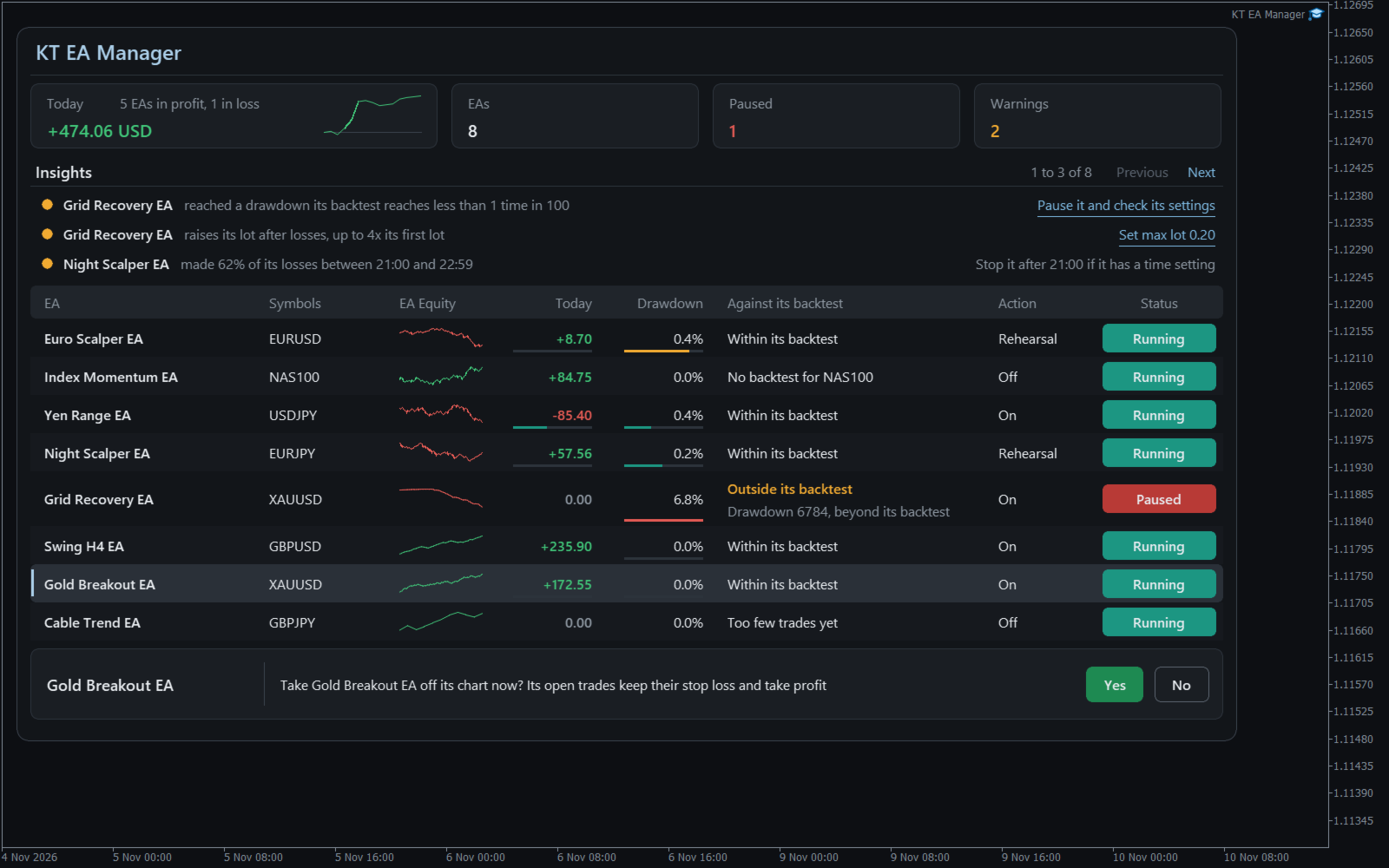
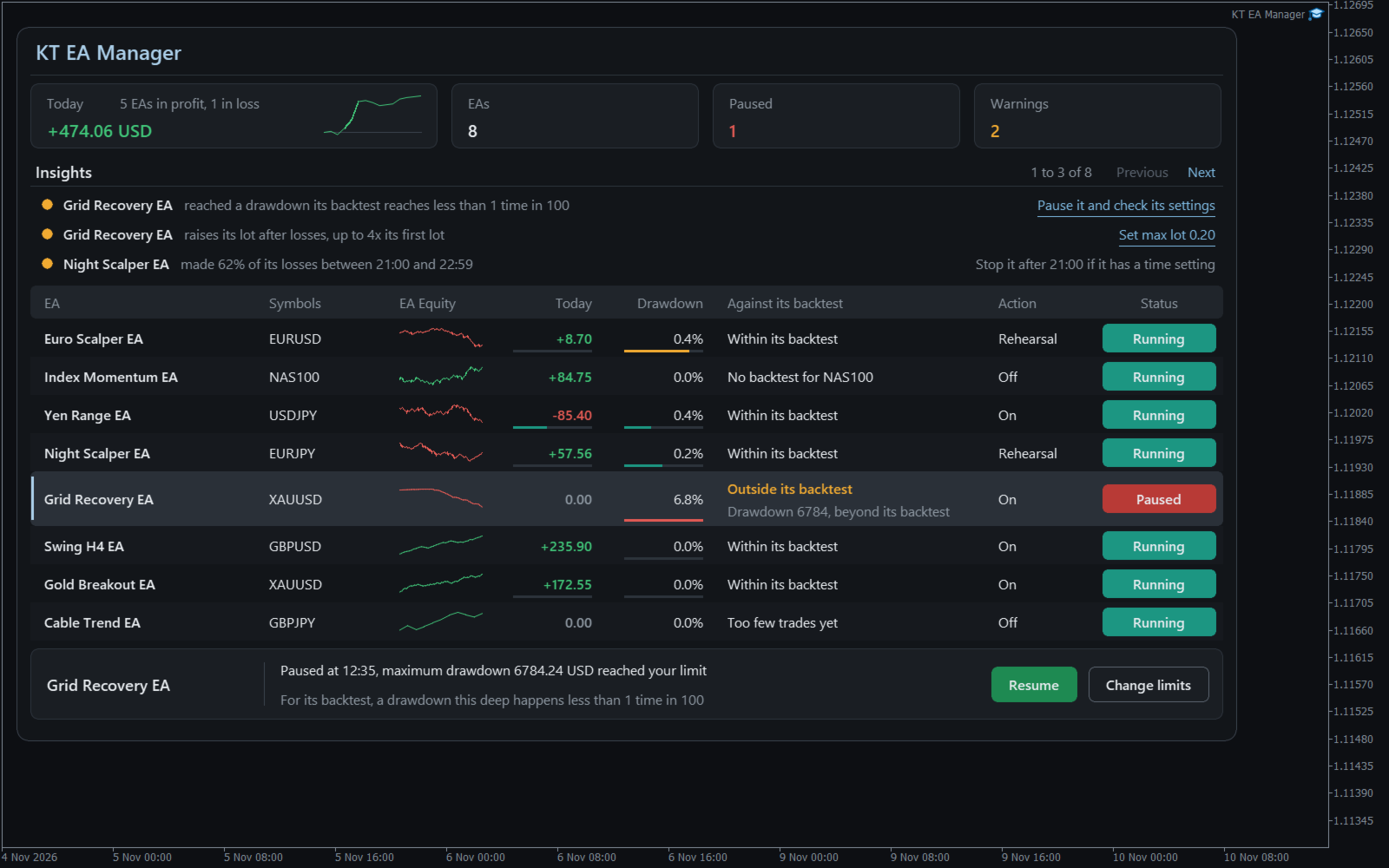
Utility EA that gives each of your EAs its own results, its own limits and its own stop button. One chart watches them all, tells you if each one still behaves like its backtest, and can take a single EA off its chart while the rest keep trading.

Your balance falls and you cannot say which EA did it, or whether that loss is normal for it. KT EA Manager settles that: every magic number becomes a row, and nothing happens to any EA until you allow it for that EA.

What you control

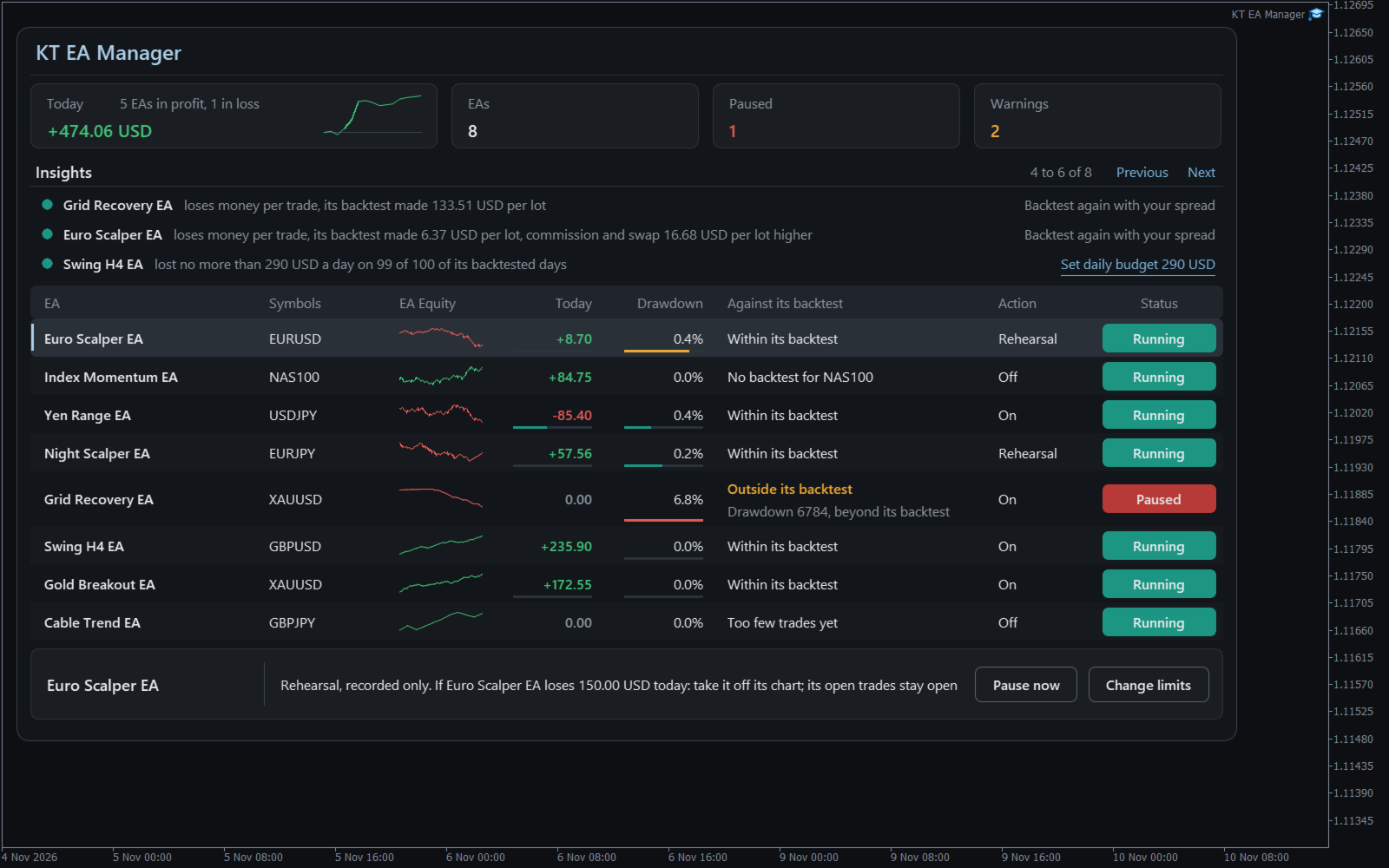
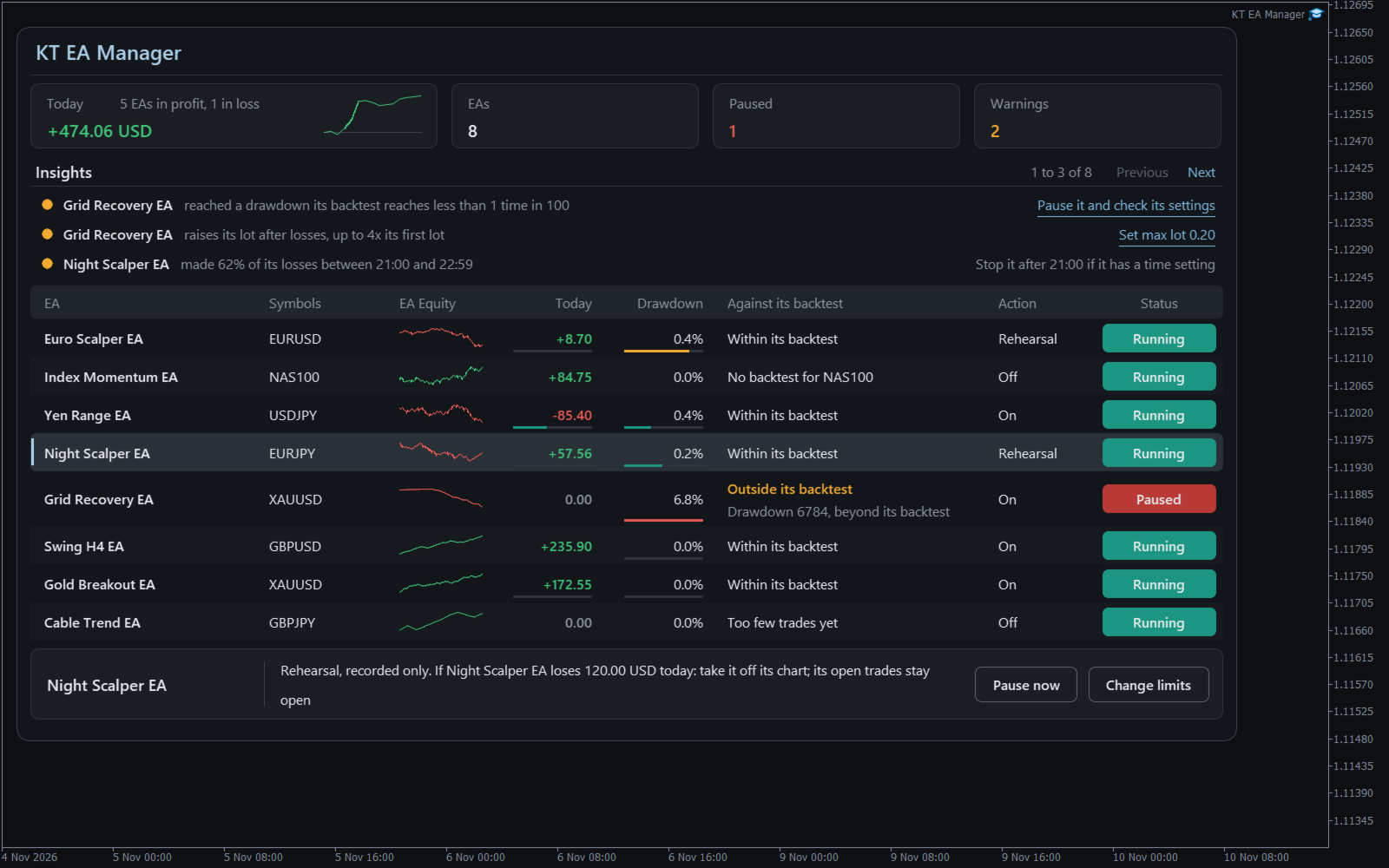
  • A verdict for each EA: Within its backtest or Outside its backtest, with the reason written out. It warns and never acts.
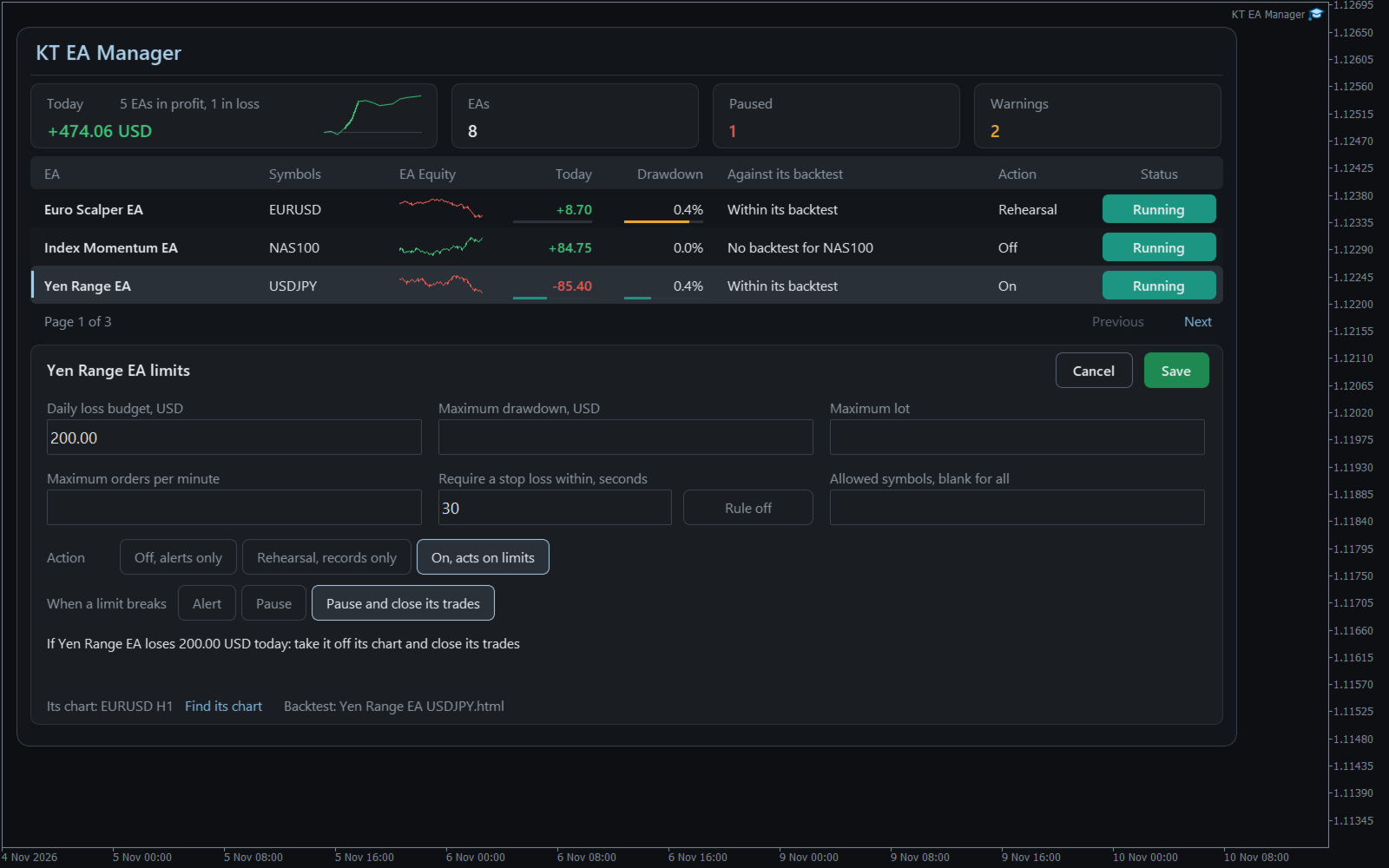
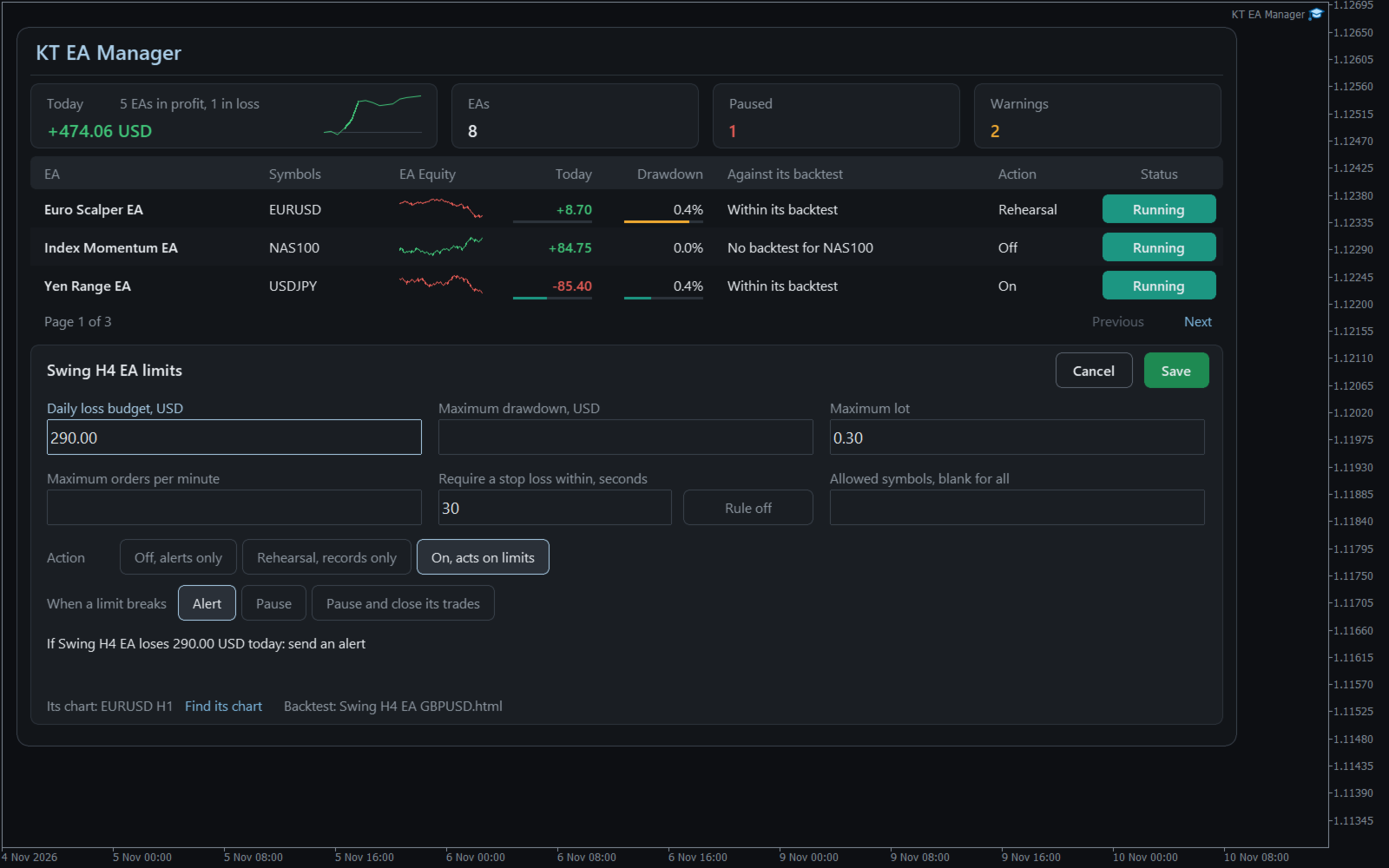
  • Six limits per EA: daily loss budget, maximum drawdown, maximum lot, stop loss required, orders per minute and allowed symbols.
  • Three steps per EA: Off sends alerts, Rehearsal records what would have happened, On acts on your limits.
  • Your choice of action: Alert, Pause, or Pause and close that EA's trades. Other EAs and your manual trades are left alone.
  • Findings in words: an EA that raises its lot after losses, two EAs losing on the same days, costs higher than in the backtest.
  • A daily budget from the EA's own past: a suggestion you can apply with one click and then confirm.
  • A record of everything: each alert, rehearsal and action saved with its result.


How to use it

Open one chart for KT EA Manager and tick Allow Algo Trading. Your EAs appear by themselves. Save each EA's backtest HTML report in the Backtests folder to start the comparison; a report counts only for its own symbol.

Select an EA, type a limit, and read the plain sentence the panel shows before anything can happen. A paused EA comes back only when you press Resume and confirm, with the settings it had.

Recommendations

Works with any EA that trades with a magic number, on any symbol. Give each EA its own number, keep the terminal running on a computer that stays on or a VPS, and try Rehearsal for a week before you choose On.

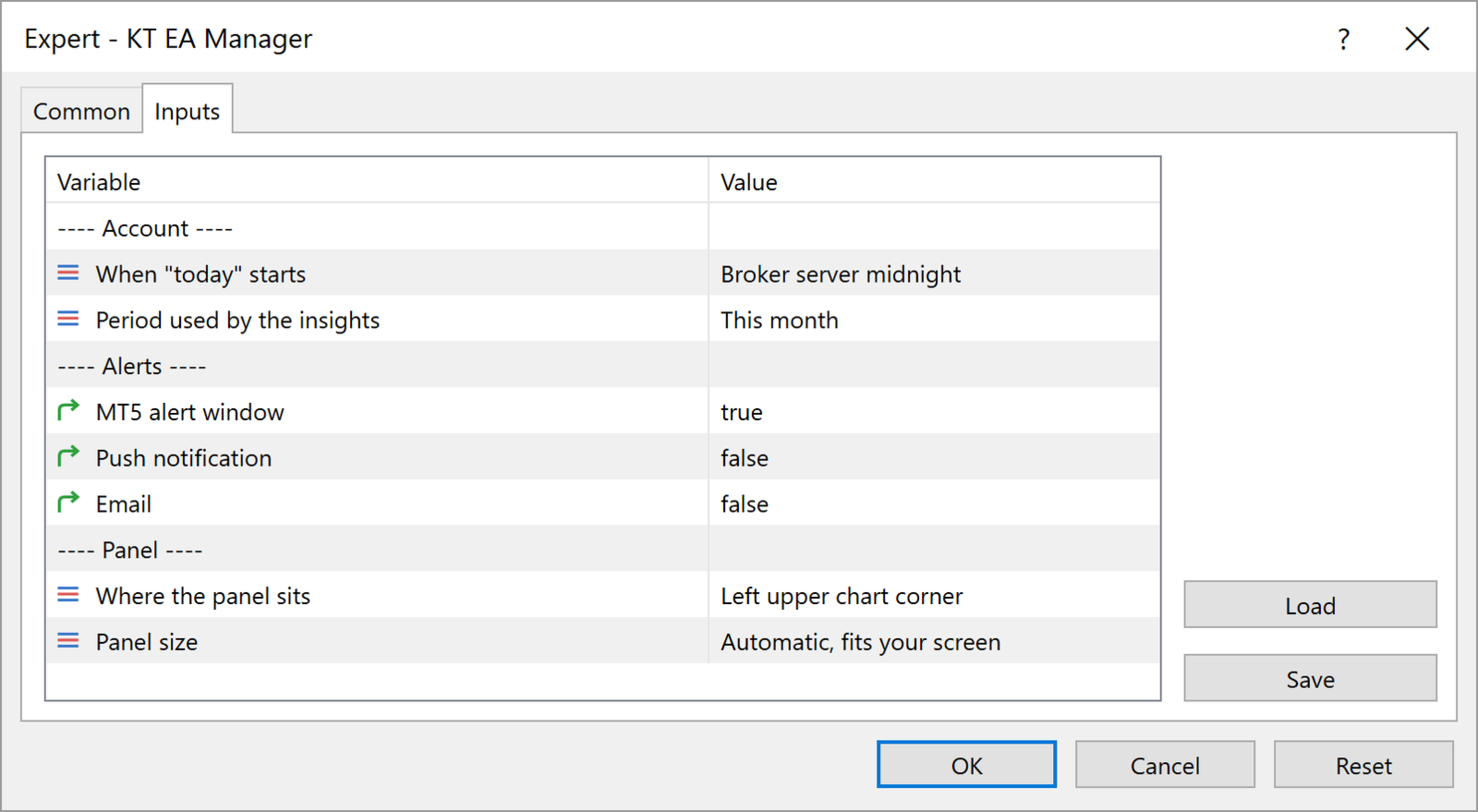
Input parameters

  • When "today" starts: when the day and the daily budgets restart.
  • Period used by the insights: the period the findings look at.
  • Alert window, Push notification, Email: where alerts arrive.
  • Where the panel sits and Panel size: the corner and the size of the panel.


All limits are set on the panel, for each EA.

Keep the EAs that work

You see each EA for what it is, and one bad day from one EA no longer decides the day for the others. KT EA Manager stops only what you told it to stop.
推荐产品
EA211 Reversal Scalp
Jose Francisco Flores Rojas
Clear Reversal Scalper EA This Expert Advisor is designed to identify sharp market reversal opportunities by detecting a predefined number of consecutive bullish or bearish candles, signaling potential exhaustion of the current trend. Once the reversal pattern is detected, the EA enters a trade in the direction of the large reversal candle, capitalizing on momentum for a quick scalp. This strategy works best in volatile sessions. Key Features: Reversal Pattern Detection: Customizable setting to
We present our totally unique Expert Advisor "Expert trend one point": the EA trades within a trend, it contains a complex strategy (named "one point profit"), does not use stop loss, does not use an adjustable take profit, it adjusts the take profit per one point of profit. The EA works with four or five-digit prices. You can use the Expert Advisor on any currency pairs, however it is recommended to choose symbols with low spread and low stop levels. The EA can work on timeframes M1 , M5, M15,
торговая система с риском 1% чем больше денег на счете тем больше лот но риск 1% Начальный депозит 50.00 Спред 10 Чистая прибыль 6.71 Общая прибыль 51.97 Общий убыток -45.26 Прибыльность 1.15 Матожидание выигрыша 0.02 Абсолютная просадка 26.79 Максимальная просадка 29.21 (55.47%) Относительная просадка 55.47% (29.21) Всего сделок 427 Короткие позиции (% выигравших) 219 (72.60%) Длинные позиции (% выигравших) 208 (72.12%) Прибыльные сделки (% от всех) 309 (72.37%) Убыточные сделки (% от все
MACD trading strategy is the most popular among traders. Is it profitable? You can download the demo and beckets the mechanical trading system on your own. With the Expert Adviser you have the opportunity for testing the MACD mechanical trading system, in a accurate and  efficient way. MACD universal  is a fully automated EA designed to trade  all currency pairs and all timeframes.   It opens trades on MACD-main and MACD-signal line crossover. Features: Automated risk management as percent of ba
Bar Boss
Iurii Tokman
5 (1)
Bar Boss   Expert   Advisor 使用 FletBoxPush 指标来分析市场并确定交易信号。该指标内置于“EA 交易”中,不需要在图表上额外安装。交易发生在定义为平台边界的水平上。使用损失限制。 顾问设置说明 TimeFrames - 图表周期,指标设置 颜色 - 定义为平面的价格区域的颜色,为指标设置 矩形 - 显示定义为平坦的价格区域,为指标设置 手数 - 起始交易量 MagicNumber - 订单的幻数 Count_LOSS - 连续亏损交易的数量,之后将设置为零利润(退出为零) FlatPips - 以点为单位确定平台,设置指标 FlatBars - 用于确定平面的柱数限制,为指标设置 MinBarsClosedOutside - 收盘价固定在特定平面水平之上/之下的柱数 CoefficientLot - 亏损后后续交易手数的乘数 CoefficientTakeProfit - 根据确定的平台的通道宽度计算的利润乘数 PercentLoss - 损失百分比,如果顾问带来的总损失低于此值,交易停止,该值必须设置为负数,例如:-33.3 顾问如何工作
ExIndiRobot
Vedran Brkic
L'Expert Advisor ExIndiRobot (v1.0) è un sistema di trading automatizzato per MetaTrader 4 progettato per eseguire ordini a mercato partendo dai segnali generati da un indicatore esterno. La sua architettura si divide in quattro aree funzionali principali. 1. Rilevamento dei Segnali (Input) L'EA offre due modalità alternative per leggere i segnali di acquisto (Buy) o vendita (Sell) dell'indicatore: Modalità Buffer ( USA_BUFFER ): Interroga direttamente i buffer interni dell'indicatore tramite
This EA combines two built-in combined indicators (Bollinger Bands breakout and EMA Cross) to check the trends before performing any trading action. It is provided with: trailing Stop Loss; bad time to trade filter for each day of the week; define in minutes the profitable orders duration; define in currency values the profit to be taken; enable and disable martingale mode; define the maximum spread value to trade; define the minimum equity percentage to allow trading; the input values are alre
Fibonacci System
Maksim Neimerik
The system applies Fibo levels. Apart from basic Fibo levels (23.6; 38.2; 50.0; 61.8; 100.0;), the EA features custom levels (34.0; 36.0; 64.0; 66.0;). You can decide the levels trading is to be performed from. Sample trade: when the market is bullish and the price rolls back to the levels (as we remember, we select the levels on our own), the EA opens buy orders. The opposite is true for sell orders. The EA can work in three modes. Each of the modes is a separate Fibo levels construction method
CrownFVG EA
Mazhar Ul Hassan Noorul Hassan Noor Ul Hassan
CrownFVG EA is a precision-engineered Breakout + Fair Value Gap (FVG) trading system designed to deliver consistent profits on the M5 timeframe . Built with a multi-group scalping architecture, this EA combines institutional trading concepts with algorithmic speed to identify and trade market inefficiencies where price is most likely to react — the Fair Value Gaps. Developed for traders who value accuracy, control, and capital protection , CrownFVG EA avoids risky techniques like Martingale or
Yggdrasil MT4
Marc Despalins
Yggdrasil is a fully automated hedging system . The EA opens orders in both direction on the chosen pairs by the user. Currency pairs aren't traded individually, all trades opened are part of the system. The algorithm will close the unprofitable orders with the available profit. It prevents drawdown to increase if a big trend occurs on a currency pair. The EA is designed to be efficient with minimal settings . No need fine tuning parameters, it's a long term "set & forget" expert advisor. As t
Trion Miner EA
Msyaikhul Umam
Trion Miner EA is built based on smart grid averaging hedging system, which has been perfected. If these strategies run individually without any combination of other strategies, it will be very risky. And it will end up blowing out your account. By combining these three strategies and adding a systematic system, we can cover the weakness of each strategy and build a very profitable EA. Trion Miner use multi-currency hedging system that will make the trade always profitable wherever the market g
Algorithmic trading is a scalping bot for trading major currency pairs. Recommended timeframes for trading M1, M5, M15, M30, H1. The robot automatically analyzes the market with each arrival of a new tick and determines the places of sharp price changes. When a sharp large jump in price appears on the chart, the robot opens a trade. If the price rises sharply, the robot opens a buy trade. If the price drops sharply, the robot opens a sell trade. Due to the fact that the robot analyzes the marke
RSI Double Cross Robot   is a fully automated expert advisor based on a classic yet powerful momentum concept — the crossover of two RSI indicators with different periods. The robot identifies trend changes and market momentum shifts by tracking the interaction between fast and slow RSI values. Trades are opened only when clear directional signals appear, while a built-in volatility filter helps avoid flat and low-activity market conditions. RSI Double Cross Robot applies strict risk management,
Nucleus Atom
Tran Thanh Tuyen
I am glad to welcome you on the page of my product The trading system is suitable for both experienced traders and beginners.  Nucleus Atom   is an automated professional multi-currency expert advisor that designed for long-term profitable trading. The EA continuously controls price movements and makes accurate trades based on market patterns, trend and technical indicators. The Ea contains a flexible news filter, high spread protection, separate time and days trading filters and allows to work
TheWinnerTurtle
Rijalalaina Rasolofonirina
THEWINNERTURTLE EXPERT ADVISOR MT4 This EA is based on price action and RSI indicator to trade EURUSD currency pair on M15 timeframe. THEWINNERTURTLE is a price action swing system working for a long-term profit as showed by backtesting. THEWINNERTURTLE identifies price movement to easily find buy and sell opportunities and places automatically trades based on defined parameters. THEWINNERTURTLE does not use neither martingale nor averaging of losing positions. SETTINGS THEWINNERTURTLE is a long
Smart Grid Pro
Erik Shahazizyan
The advisor is based on a grid strategy and order averaging, is universal and can work on any currency pairs, depending on the settings, it is important to find out the range of price fluctuations for a specific currency bet over the last 2-3 months. During important news, it is recommended to set a high timeframe. The advisor has clear and easily manageable settings; you can configure the accuracy of averaging, the number of orders after which the martingale will work, and limit the number of
PoundYen Trend Follower PoundYen Trend Follower  is a fully automated expert Advisor that trades on trend rollbacks. In its analysis, the expert Advisor uses certain formations of price behavior and indicator values on different time ranges. Upon reaching certain conditions for the opening and closing of positions the EA trails the trade entry and exit. The expert Advisor automatically calculates the volume of the transaction to enter depending on the free Deposit funds, but it is also possible
Simply System Trend Line
Szymon Palczynski
5 (1)
I personally love trading robots, but there are many situations where semi-auto trading is superior to automation. The system is very simple and effective.  Trend lines are typically used with price charts, however they can also be used with a range of technical analysis charts such as CCI and RSI.  What is the trend line?  Trend line is a bounding line for the price movement. It is formed when a diagonal line can be drawn between a minimum of three or more price pivot points. A line can be
Eagle Crest Gold
Giovanni Bengalis
Eagle Crest Gold — Fractal Breakout System for XAUUSD Eagle Crest Gold is a professional Expert Advisor for Gold (XAUUSD) built entirely on fractal breakout logic. No indicators, no guesswork — the EA places BuyStop and SellStop pending orders at key D1 fractal highs and lows , letting the market come to the entry rather than chasing price. This is the exact system used on live accounts, validated across years of historical Gold data. Live Signal IC Markets : Click Here How It Works At the start
Smart Grid FX
Natalya Sopina
Smart Grid FX – is counter-trend trade multicurrency EA for automated Forex trading. EA uses principle of Martingale. EA work algorithm: At cycle start the pair of opposite order opens with initial lots. Further grid of orders is being built with variable step and lot volume at the price movement direction. Wherein every time at the next order opening the all grid orders close level is being changed with regard to parameters of TakeProfit. The EA does not use such function as locking, trailing,
Demidov
Andrey Kozak
Demidov is a fully automatic scalping robot in the forex markets. The default settings are for the GBPUSD currency pair. The robot automatically determines the direction of the trend and the most effective points for opening deals. After opening deals, the robot begins to accompany them to get the maximum effect. In the robot settings there is a Risk parameter, with which a trader can adjust the initial trading volume. In this robot, the volume is defined as% of the deposit. Accordingly, when y
This Expert Advisor is based on the Williams percent range strategy . It was developed by Larry Williams and it compares a closing price to the high-low range over a specific period. Williams percent range can be used in various capacities that can help us determine momentum confirmations, overbought and oversold readings, strength of the trend and potential buy and sell signals. Key Features Timeframe: H4 Currency pairs: GBPUSD Use only five-digit accounts Minimum deposit: $ 100  It is recom
Robin Hood EA 是针对 GBPUSD 货币对的自动外汇倒卖机器人,周期为 M5。 该机器人平均每天打开 15 至 30 笔交易。 这取决于市场活动。 该机器人可以与几乎所有英镑美元货币对报价点后有 5 位数字的知名经纪商合作。 将机器人添加到货币对图表后,它会自动分析市场,自动打开和关闭交易。 支持使用止盈、止损和追踪止损进行交易。 机器人的优点: 机器人不使用 Martingale 或网格。 机器人在大多数时间范围内进行交易。 机器人在 GBPUSD 货币对上进行交易 机器人交易存款从 1000 美元起 在机器人设置中,您可以指定机器人可以交易的具体时间。 M5 时间表 机器人操作要求: 最小点差。 机器人必须安装在 VPS 上或在 PC 上全天候进行交易。 建议使用 ECN 经纪商。 机器人参数: Volume_tics - 信号滤波器参数。 机器人收集有关价格变动突然变化的信息。 信息以刻度数收集。 如果价格急剧变化达该参数中指定的价格变动数量,机器人将开立订单。 根据价格变动的方向,机器人将向该方向开立订单。 Volume_increase - 价格变化值的
Our "Trending Topik" Forex Expert Advisor works based on several non-lagging Forex indicators and combined with Supply Demand on RBR/DBD, Support Resisten , Fibonacci, OrderBlock/ICT, ADR Daily and support on timeframe M15 - Daily, searching current major trends with filter EMA 200 on Timeframe H1, H4,Daily, and looking for the best momentum with built-in Hidden Profit Fibo0/Support and Fibo100/Resisten,  Hidden Profit change trend EMA200, StopLoss, BreakEvent and Trailling. It works on multi pa
IRobot Alligators
Paranchai Tensit
IRobot Alligators is an Expert Advisor based on the chaos theory and the Alligator technical indicator. This expert advisor consists of three lines, overlaid on a price chart, that represent the jaw, the teeth and the lips of the Alligator. It was designed to help confirm that a trend is in effect and in what direction. As with all moving averages, the shortest one (green) moves first, followed by the middle (red) and then longer average (blue). If the three lines are entwined, then the Alligato
Scalpotronic professional  - A professional trading robot that trades in a fully automatic mode. The default settings are for the GBPUSD pair. The robot automatically analyzes the market, determines the opening points of orders, opens and closes trade transactions. A trader needs to start a robot on a chart of a currency pair and you can go do your own thing. Then the robot will do all the necessary work itself. For trading, the robot does not require additional settings; it has no restrictions
Bob EA V2
Joel Brito De Mesquita
B.o.B V2 — Automação, Análise Técnica e Gerenciamento O B.o.B V2 é um Expert Advisor desenvolvido para o MetaTrader 4 , com foco em análise de tendência, confirmação técnica e gerenciamento automatizado das operações. O robô combina diferentes ferramentas e parâmetros técnicos para identificar possíveis condições de compra e venda e executar a estratégia de acordo com as configurações definidas pelo usuário. Principais recursos • Análise de tendência utilizando EMA 14, SMA 50 e SMA 200. • Con
10册149美元!下一个价格将是499美元。 悉尼贸易X采用BTN技术的最新智能技术,可帮助您为交易创造最佳结果。 特别是,完美模式可让您交易100%的胜利(但必须保证有足够的资金)。 如果“完美模式”适用于高级用户,则初学者或偏爱安全交易的用户可以使用“安全模式”。 安全模式每天在指定的时间进行结算,并自动在您设置的损失范围内进行结算。 所有这些功能都是基于收入的,因此按“保护钱”功能指定的金额不会造成任何损失。哇! 每次激活EA时,Protect Money都会自动更新,以保证本金并支持安全交易。 愿您的梦想通过SYDNEY TRADE X实现。 祝你好运。 BTN FX推出了一系列20个城市,以支持您最好的交易环境。 它使用20种不同的逻辑为每种贸易环境提供优化的结果。 特别是,BTN FX的独特功能,例如完美模式,安全模式,资金保护和交易条件功能 我们在最佳交易环境中为您提供支持。我们希望您不再担心失去本金,享受交易和获利。 ====功能说明==== 交易设置 您可以设置幻数,交易订单数量,最大订单编号,最大购买订单编号,最大出售
Trade Pulse Pro
Serhii Homelko
Trade Pulse Pro — EUR/USD 进阶网格专家顾问 简介: Trade Pulse Pro 是一款专为EUR/USD货币对交易设计的自动化交易专家顾问,基于H4时间框架的Ichimoku云图趋势进行交易。该顾问采用严格的过滤器,仅允许按照趋势方向开仓,同时使用带有订单间距离控制的马丁格尔系统。 主要特点: 趋势严格依据价格相对于H4时间框架Ichimoku云的位置确定。 仅当满足DropPoints条件时允许开仓——即距离最近DropHours小时内的局部极值一定距离。 严格控制网格订单之间的距离(Step),避免订单过于接近。 未关闭所有之前订单前,禁止开设相反方向的订单。 根据H4时间框架Ichimoku云宽度进行区间震荡过滤,云图过窄时禁止开设首单。 通过美元计价的总止盈(TakeProfit)实现风险管理。 按照马丁格尔方案自动调整手数和乘数。 内置关键事件日志,确保交易透明。 使用建议: 交易货币对:仅限EUR/USD。 推荐账户资金:300–500美元。 推荐DropPoints值:650,以降低风险。 重要提示:降低DropPoints值会增加订单开仓频
XD FlashScalp EA for MT4
Nguyen Xuan Danh Tran
XD FlashScalp EA is a lightweight and fast scalping Expert Advisor designed for precision trading at key market levels. It automatically detects overbought and oversold zones to SELL at local highs and BUY at local lows, using an adaptive flash-scalping logic. The EA is fully optimized for accounts with bonus lots and supports flexible lot scaling based on balance and risk. Main Features Intelligent flash-scalping algorithm with price-level recognition Works on all major currency pairs (
该产品的买家也购买
欢迎来到 Trade Manager EA——这是一个终极风险管理工具,旨在使交易变得更直观、精准和高效。它不仅仅是一个下单工具,而是一个用于无缝交易计划、仓位管理和风险控制的全面解决方案。不论您是新手交易员、资深交易员,还是需要快速执行的剥头皮交易员,Trade Manager EA 都可以满足您的需求,适用于外汇、指数、大宗商品、加密货币等各种市场。 借助 Trade Manager EA,复杂的计算已成过去。只需分析市场,在图表上用水平线标记入场、止损和止盈,设置您的风险水平,Trade Manager 就会立即计算出理想的头寸规模,并实时显示以点、账户货币计价的止损和止盈。每笔交易都得以轻松管理。 主要功能: 头寸规模计算器 :根据定义的风险瞬间确定交易规模。 简单的交易计划 :在图表上用可拖动的水平线直接计划交易,设置入场、止损和止盈。 实时显示 SL 和 TP :以账户货币、点或分显示止损和止盈,便于分析。 高级保护工具 盈亏平衡选项 : 基本盈亏平衡 :当您的交易达到设定水平时自动保护利润。 多级盈亏平衡 :设置多达 4 个级别以逐步保护利润。 尾随止损选项 : 基本尾随
Grid Manual MT4
Alfiya Fazylova
4.71 (17)
Grid Manual是一个交易面板,用于处理订单网格。 该实用程序是通用的,具有灵活的设置和直观的界面。 它不仅可以在亏损方向上设置订单网格,还可以在盈利方向上设置订单网格。 交易者不需要创建和维护订单网格,实用程序会这样做。 打开一个订单就足够了,Grid manual会自动为它创建一个订单网格,并伴随它直到非常关闭。 完整说明和演示版 此處 。 该实用程序的主要特性和功能: 伴隨以任何方式打開的訂單,包括從移動終端打開的訂單。 適用於兩種類型的網格:“限制”和“停止”。 使用兩種方法計算網格間距:固定和動態(基於 ATR 指標)。 允許您更改未結訂單網格的設置。 顯示圖表上每個網格的盈虧平衡水平。 顯示每個網格的利潤率。 允許您一鍵關閉網格中的盈利訂單。 讓您一鍵關閉每個訂單網格。 允許您對訂單網格應用追踪止損功能。 允許您在訂單網格上應用將訂單網格的止損轉移到盈虧平衡水平的功能。 相對於訂單網格的盈虧平衡水平自動重新排列止盈(僅在限價網格模式下,距離取決於所選的計算類型:“保守”或“激進”)。 最多可管理 20 個訂單網格,每個網格最多可包含 100 個訂單。
TradePanel MT4
Alfiya Fazylova
4.84 (95)
交易面板是一款多功能交易助手。该应用包含超过50种手动交易功能,并允许您自动执行大多数交易任务。 应用程序说明 : https://www.mql5.com/zh/blogs/post/761102 用于模拟账户的应用程序试用版: https://www.mql5.com/zh/blogs/post/762579 如何安装应用程序: https://www.mql5.com/zh/blogs/post/762580 如何在可视化模式下测试应用程序: https://www.mql5.com/zh/blogs/post/770278 如何在VPS MetaTrader上安装应用程序: https://www.mql5.com/zh/blogs/post/770196 贸易. 只需单击一下即可执行交易操作: 打開掛單和頭寸,並自動計算風險。 一鍵打開多個訂單和頭寸。 打開訂單網格。 按組別關閉掛單和頭寸。 反轉頭寸方向(關閉買入>打開賣出,關閉賣出>打開買入)。 鎖定頭寸(通過開啟缺少的頭寸,使買入和賣出頭寸的數量相等)。 一鍵部分關閉所有頭寸。 將所有頭寸的止盈和止損設置在同一價格水平。
Trade Indicator Assistant is a powerful MT4 utility designed to turn indicators into automated trading systems. Its main feature is the ability to automatically detect an indicator’s   BUY and SELL signal buffers , without requiring you to know the buffer numbers, search through indicator settings, or modify the indicator source code. Bonus Indicator: After purchasing Trade Indicator Assistant, contact me to receive Trade Signal Pro completely free as a bonus indicator. [Download Demo Version]
Drawdown Minimizer for MetaTrader 4 - your EAs pay in, old losers get paid off. This utility runs next to your other Expert Advisors and never opens a trade. It keeps a savings book of the net realized profit of your whole account and uses it to close the oldest losing positions of the EAs you choose - slice by slice, oldest first. WHY IT EXISTS Made by traders, for traders. One of our grid EAs got stuck in drawdown for months. The old positions did not come back, and they paid swap every single
The product will copy all telegram signal to MT4   ( which you are member  ) , also it can work as remote copier.  Easy to set up, copy order instant, can work with almost signal formats, image signal, s upport to translate other language to English Work with all type of channel or group, even channel have "Restrict Saving Content", work with  multi channel, multi MT5 Work as remote copier: with signal have ticket number, it will copy exactly via ticket number. Support to backtest signal. How to
RiskManager
Roman Zhitnik
5 (4)
Risk Manager MT4   is an account protection Expert Advisor for traders who want strict risk control inside MetaTrader 4. The utility monitors your account equity, daily and weekly results, drawdown, open positions, trade count, consecutive losses, and trading hours. When a configured limit is reached, it can automatically close positions, cancel pending orders, stop other EAs, send notifications, or close the terminal. Instead of relying on discipline during a stressful trading session, you defi
Trade Manager Pro MT4
Bryan Djoufack Nguessong
这是一个使你的交易更容易的工具,它将耗时的任务如订单管理和风险管理放在一个或几个点击上。 功能介绍 风险管理  根据风险字段中指定的%或$的风险自动计算手数,并让您通过放置SL TP等线来输入,并显示实时风险回报。 TrueRisk,所以在计算外汇对的手数时,它包括了佣金,所以当你指定1%时,你的风险是1%,所有的交易费用是1%,或者不是,你自己选择。 大宗交易处理程序,让你在一次点击中输入超过一个符号每个头寸最大交易量的10倍,而不是自己慢慢打开每个头寸。(必须不超过符号规格中提到的交易量限制或超过显示的每个头寸最大交易量的10倍)。 输入指数或其他资产,即使自动计算的手数不尊重四舍五入的手数。(1, 0.1 和 0.01 手的步数处理) 交易管理  只需点击一下 ,你就可以。 设置收支平衡的开仓,包括佣金和点差或不包括,由您选择。 通过在文本字段中指定SL或TP的新价格来批量改变已建仓位的SL或TP,并根据输入的新SL和TP价格来设置买入或卖出。 批量关闭头寸,而不是单独缓慢地关闭它们。 批量删除限价单。 AUTO BE功能,让您设置AUTO BREAKEV
The Price Action Dashboard is an innovative tool to help the trader to control a large number of financial instruments. This tool is designed to automatically suggest signals and price conditions. The Dashboard analyzes all major Time Frame suggesting price action conditions with graphic elements. The Dashboard can suggest you the strength of the trend identifying directional movement, it is an indispensable tool for those who want to open position themselves using market trends identifiers. The
Telegram to MT4 Multi-Channel Copier   可将您 Telegram 和 Discord 频道中的交易信号自动复制到 MetaTrader 4。无需机器人、无需浏览器扩展、无需手动复制。信号一到 Telegram 或 Discord,EA 几秒内就在您的终端开仓。 在复制某个频道之前,内置回测器还能告诉您该频道在您的账户上会有怎样的表现。 产品包含两个组件:一个监听您 Telegram 频道的 Windows 应用程序,以及在 MT4 终端执行信号的本 EA。同时提供 MT5 版本   点此 . 购买前先试用:   应用程序可免费下载。连接您自己的频道,查看每条信号的读取结果。Backtest 选项卡和实际交易需要已购买或已租用的 EA。本页面的免费演示版只能在策略测试器中运行,而策略测试器无法读取 Telegram 和 Discord。 设置指南与应用下载:   https://www.mql5.com/zh/blogs/post/779480 了解如何 回测任何 Telegram 信号频道 。 当前价格将来会上调。 工作原理 应用通过您自己的 Te
MT4 至 Telegram 信号提供者 是一款易用、可完全自定义的工具,它使发送信号到 Telegram 成为可能,将您的账户变成信号提供者。 消息的格式 可以完全自定义! 但是,为了简便使用,您也可以选择一个预设模板,并能够启用或禁用消息的特定部分。 [ 演示 ]  [ 手册 ] [ MT5 版本 ] [ Discord 版本 ] [ Telegram 频道 ]  New: [ Telegram To MT5 ] 设置 可通过 用户指南 获取逐步说明。 无需了解 Telegram API;开发者提供所需的一切。 主要特性 自定义发送给订阅者的订单详情的能力 您可以创建分层订阅模型,例如铜牌、银牌、金牌。金牌订阅可获得所有信号等。 按订单号、符号或备注过滤订单 包括执行订单的图表的屏幕截图 在发送的屏幕截图上绘制已关闭的订单,以便额外验证 推迟发送新订单消息的可能性,以便在发送前对位置进行调整 订单详情的全透明度: 新的市场订单 *附带屏幕截图 订单修改(止损、获利点) 已关闭订单 *附带屏幕截图 部分关闭订单 ** 新的挂起订单 修改的挂起订单(进场价格) 挂起订单激活(
神速EA跟单(TradeMirror)是一款MT4/MT5平台的订单复制软件。 使用教程 请点击 神速EA跟单使用教程 链接以查看更多使用教程 为什么选择神速EA跟单 我们深知对于金融软件而言安全、稳定和隐私的重要性,因此我们在细节处对这三大要素进行了额外的加固: 提供用户友好的图形界面,操作简单易用 注重隐私安全,适合对订单分发有隐私要求各种金融场景 精准复制订单,毫秒级分发 支持全平台,MT4/MT5全面覆盖 智能感知系统状态,邮件通知守护交易安全 核心功能列表 对于跟单软件而言,功能并不是越多越好的,因此经过严谨的需求分析,我们对程序进行了精简,并最终保留了如下核心功能: 多重连接 邮件通知 手数缩放 信号过滤 反向跟单 重置止盈/止损 免费演示 在购买Trademirror之前,你总是可以尝试免费演示。 点击本页面上的免费演示按钮 点击是的,我有Metatrader 4/5 允许浏览器打开Mt4/5 在Mt4/5中,找到专家顾问/市场/TradeMirror,打开它并点击测试 启用复盘显示(否则你将看不到GUI界面)。 点击开始 现在你可以在可视化图表上看到TradeMirro
Unlimited Trade Copier Pro is a tool to copy trade remotely to multiple MT4, MT5 and cTrader accounts at different computers/locations over internet. This is an ideal solution for you if you are a signal provider and want to copy your trades to other receivers globally on your own rules. One provider can copy trades to multiple receivers and one receiver can get trade from multiple providers as well. The provider can even set the subscription expiry for each receiver, so that receiver will not b
Take a Break
Eric Emmrich
5 (31)
Take a Break pauses your Expert Advisors when trading is a bad idea: before news, after a daily loss, outside your trading hours, or when a rule you wrote yourself says so. When the pause is over, your EAs simply continue. Account protection for all your EAs in one tool: news filter, drawdown and equity protection, time filter and custom rules. One EA on one chart protects the whole account, the free indicator gives every chart its own rules on top. Free demo | What is new in 26.09 | Support Ass

跟单->方便快捷的界面交互,用户上手即用       ->>>> 推荐在windows电脑,或者VPS Windows上使用 特色功能: 多样化个性跟单设置: 1.对不同的信号源可以设置不同的手数模式 2.不同的信号源分别设置正向反向跟单 3.信号分别设置注释 4.是否根据合约手数校准手数 多样化个性跟单设置2: 1.对不同的品种可以设置不同的手数模式 2.不同的品种分别设置正向反向跟单 3.信号分别设置注释 4.是否根据合约手数校准手数 注释过滤,MAGIC过滤,信号手数过滤,本地品种过滤 净持仓模式(该模式下手数计算仅支持倍率) 工作时间设置 反向同步接收端的平仓 订单绑定功能:任意订单可以绑定到设置信号源订单上 (双击表格更改) 账户风险控制  基本功能: 跟单正常交互速度0.5s以下 自动检测信号源,并显示信号源账号列表 自动匹配品种,不同平台常用交易品种(后缀不同等特殊情况)95%自动匹配,基本无需手动设置,品种映射表可随意双击更改对应品种.(映射表具有快速搜索品种功能) 4种手数计算模式(1.倍率 2.固定手数 3.自适应资金风险 4.源账户资金比例风险) 特殊手数模式
Trade Manager MT4 DaneTrades
Levi Dane Benjamin
4.09 (11)
交易管理器可帮助您快速进入和退出交易,同时自动计算风险。 包括帮助您防止过度交易、报复性交易和情绪化交易的功能。 交易可以自动管理,账户绩效指标可以在图表中可视化。 这些功能使该面板成为所有手动交易者的理想选择,并有助于增强 MetaTrader 4 平台。多语言支持。 MT5版本  |  用户指南+演示 交易经理在策略测试器中不起作用。 如需演示,请参阅用户指南 风险管理 根据%或$自动调整风险 可选择使用固定手数或根据交易量和点自动计算手数 使用 RR、点数或价格设置盈亏平衡止损 追踪止损设置 最大每日损失百分比,在达到目标时自动平仓所有交易。 保护账户免遭过多提款并阻止您过度交易 最大每日损失(以美元为单位)在达到目标时自动关闭所有交易。 保护账户免遭过多提款并阻止您过度交易 一键实现所有交易的盈亏平衡 自动计算从手机/电话发送的交易的风险 OCO 在设置中可用 交易和头寸管理 通过设置每月、每周、每天、每小时或每分钟的最大交易次数,停止过度交易和报复性交易。 高级挂单管理。 调整何时关闭挂单的规则 追踪挂单 支持市价订单和挂单 每日最大利润目标(以美元为单位)以确保头寸并停止
一旦您確定了要進行交易的關鍵區域,就會自動交易支撐和阻力或供需區域。該 EA 允許您只需單擊即可繪製買入和賣出區域,然後將它們準確地放置在您預期價格轉向的位置。然後,EA 會監控這些區域,並根據您為這些區域指定的價格行為自動進行交易。一旦進行初始交易,EA 就會在您放置的相反區域(即目標區域)獲利。然後,您有兩種選擇,要么關閉交易並繪製新的區域進入,要么獲利退出並立即反向反向交易,創建「始終在」的市場風格策略。 包含輸入和策略的完整手冊位於: https://www.mql5.com/en/blogs/post/760256 該 EA 專為在市場上不使用固定或硬止損的頭寸交易者或美元成本平均交易策略而設計。相反,它的目的是透過在下一個可用支撐或阻力區域以相同方向進行新交易來縮小不正確的交易,並調整您在市場中頭寸的平​​均價格。如果需要的話,還有備用退出標準,形式為每筆交易的最大損失金額或基於時間的退出。 只需按下按鈕即可繪製準備放置在感興趣等級的區域。 關閉按鈕和關閉最舊的按鈕可退出所有交易,或僅退出舊交易(如果它們跌幅過大而無法立即調整您的平均頭寸)。 適用於任何時間範圍內的
PZ Trade Pad Pro MT4
PZ TRADING SLU
3.67 (3)
这是一个可视化的交易面板,可帮助您轻松进行交易管理,避免人为错误并增强交易活动。它结合了易于使用的视觉界面以及完善的风险和位置管理方法。 [ 安装指南 | 更新指南 | 故障排除 | 常见问题 | 所有产品 ] 易于使用 从图表轻松交易 精确的风险管理交易,无忧 保本是重中之重 让利润不受您的关注 尽快享受无风险交易 所有已开通交易的自动追踪止损 交易开始后立即设置初始止损 进行交易后,EA将执行以下任务: 初始止损/获利被自动放置 它会尽快锁定自由行(可选) 它将止损首次移动到盈亏平衡点(可选) 它使用您所需的方法跟踪止损,直到止损为止 其他很酷的功能是: 出色的终端活动报告 单一但功能强大的尾随止损方法 干净的图表界面 没有输入参数 我进行交易后会怎样? 这是您进行交易后EA的操作: 它放置初始止损并获利订单。 尽快搭便车并确保保本。默认情况下,这是通过在达到盈亏平衡点时关闭50%的交易来完成的,默认情况下为5点。这意味着,如果您日后被淘汰,您将一无所获(可选)。 盈亏平衡后,跟踪止损开始运行。 它跟踪止损,直到止损为止,让利润运行。 尾随止损如何运作? 追踪止损表示为所管
Riskless Pyramid
Snapdragon Systems Ltd
5 (1)
Introduction This powerful MT4 trade mangement EA offers a way potentially to aggressively multiply trade profits in a riskfree manner. Once a trade has been entered with a defined stoploss and take profit target then the EA will add three pyramid add-on trades in order to increase the overall level of profit. The user sets the total combined profit target to be gained if everything works out. This can be specified either as a multiple of the original trade profit or as a total dollar amount. Fo
The News Filter
Leolouiski Gan
5 (25)
这个产品在新闻时间过滤所有的专家顾问和手动图表,因此您不必担心突然的价格波动会破坏您的手动交易设置或其他专家顾问输入的交易。此产品还带有完整的订单管理系统,可在任何新闻发布前处理您的持仓和挂单。一旦您购买了 The News Filter ,您将不再需要依赖以后的专家顾问内置的新闻过滤器,因为这个产品可以从此过滤它们所有。 新闻选择 新闻来源于Forex Factory的经济日历。 选择可以基于任何一种货币,如USD,EUR,GBP,JPY,AUD,CAD,CHF,NZD和CNY等。 选择也可以基于关键识别,例如Non-Farm (NFP),FOMC,CPI等。 能够选择新闻影响级别的筛选,从低、中、到高影响。 自动模式只选择与图表相关的新闻。 新闻来源每小时自动刷新,以确保最新的新闻数据。 为每个新闻影响级别提供单独的输入,以确定您要过滤掉的新闻发布前后的分钟数。 订单管理选项 在新闻发布前关闭未平仓头寸的选项,并在新闻发布后恢复它们。 在新闻发布前删除挂单的选项,并在新闻发布后恢复它们。 在新闻发布前移除止损和止盈水平的选项,并在新闻发布后恢复它们。 在新闻发布前移动止损和止盈
Prop Guardian Risk Manager MT4 – Drawdown, Risk & Hedge Protection for Prop Firm and Managed Accounts Prop Guardian Risk Manager is a professional risk-control utility for MetaTrader 4, designed for prop firm traders, money managers and anyone who wants strict account-level risk protection. It does not generate trading signals, strategy entries or trading decisions. Instead, it runs in the background, monitors your account risk and can automatically block new exposure, close managed trades or ac
FCK CurrencyStrength Pro
Patel Hitendrakumar Mahendrabhai
Hi Friends, " FCK Currency Strength Pro " is a auto & semi auto trading expert with direction of pair. Buy-Sell separate or multi currency in one click. The strategy of  FCK Currency Strength Pro  is a combination of custom indicator, Trendlines, Support & Resistance levels ( Price Action ) and most important secretive trading algorithm mentioned above. Download News Ex4 and csv file You need the following SDSnews.ex4 in MQL4/Libraries and the daylightsavings.csv in MQL4/Files. Only 4 of 5 copi
Trade Assistant Pro 36 in 1
Makarii Gubaydullin
4.76 (21)
多功能交易工具:手数计算器、网格订单、风险回报比、交易管理、供需区、价格行为分析等 演示版   |   用户手册 交易助手 不能在策略测试器中运行:您可以下载 演示版 来测试此 实用工具 。 如有任何问题 /改进想法/发现错误 ,请 联系我 如需MT5版本,请点击 此处 简化、加速并自动化您的交易 流程 。通过此 仪表板 扩展标准终端功能。 交易面板 适用于任何交易品种:外汇、股票、指数、加密货币等。 1. 开立新交易 :手数/风险/风险回报比计算:手动交易的风险管理 手数计算器(基于风险规模计算交易量) 风险计算器(基于手数计算风险金额) 风险回报比 网格订单: + 动态间距选项和分割手数选项 订单激活触发器,+ 买入止损限价/卖出止损限价:MT4也可用 虚拟止损,虚拟止盈(隐藏止损,隐藏止盈:经纪商不可见) 智能止损/入场价位:如果K线收盘价超越此价位(避免错误触发) 隐藏订单(虚拟订单) 计划订单:即使市场休市也可下单(周末计划器) 附加多级止盈(多重获利了结) OCO订单(一单取消另一单),具有不同ID 交易可视化 + 图表上调整 以买入价(Bid)设置的止损/入场价位:避
Risk manager Risk manager - it will simplify the tracking of drawdown and will notify you (alert) when the specified risk is reached, and close/lock orders when the critical DD risk level is reached. If the specified drawdown is exceeded, you can choose two options for actions: All orders will be closed that mean loss will be fixed on depo. The terminal also closes. Instead of fixing the loss on depo, the opposite order will be opened - orders locking will occure. Not a single order will be c
VirtualTradePad PRO SE MT4 — MetaTrader 4 高级交易面板和图表工作区 VirtualTradePad PRO SE 是一款适用于 MetaTrader 4 的专业交易面板和交易管理工作区。它帮助交易者通过一个基于图表的界面,更快速地开仓、管理、保护、平仓和分析交易。 该产品专为需要的不只是简单按钮集合的活跃手动交易者而创建。PRO SE 将一键执行、挂单、持仓控制、部分平仓、篮子利润/亏损逻辑、加仓均价层级、ATM 规则、信号监控、市场信息、策略测试器流程和面向 VPS 的准备整合到一个结构化工作区中。 MT5 版本 | 完整说明和截图 | 如何购买 | 如何安装 | 如何获取日志文件 | 如何测试与优化 | Expforex 的所有产品 为什么交易者会选择这套面板 图表一键交易 ,并支持键盘快速操作 快速完成开仓、平仓、修改、反转、锁仓与部分平仓 深度控制仓位、挂单、总利润与风控逻辑 自动参数计算,减少手动输入与重复劳动 相对于普通手动交易的优势 一个工作区替代多个窗口 — 交易执行、持仓控制、风险信息和管理工具都保留在图表上。 更快处理交易
Ultimate Partial Profit EA
BLAKE STEVEN RODGER
4.67 (3)
This EA Utility delivers a robust solution for managing an unlimited array of open orders, both manual and automated. It enables customizable partial profit levels utilizing metrics such as pips, ratios, ATR (Average True Range), and profit amounts for precise trade management. The utility features an advanced on-screen display, offering clear visualization of all orders and their profit levels to enhance strategic decision-making and control. To evaluate its performance and interface, the EA s
风险回报率管理器是一款可视化订单管理工具和头寸规模计算器,旨在支持严谨的交易和专业的风险管理。它允许交易者直接在图表上直观地设置入场、止损和止盈水平,并在下单前自动计算交易手数和风险回报率。该工具有助于标准化交易准备,并确保每个仓位都以预先设定且可控的风险水平开仓。 该工具适用于多种交易工具,包括货币对、指数、金属、大宗商品和加密货币。它既适合手动交易者,也适合注重策略、对每个仓位都应用风险管理规则的交易者。通过减少计算时间并避免手动错误,该工具可帮助交易者在执行过程中保持一致性和清晰度。 风险回报率经理   安装和输入指南 如果您想获取有关 EA 的通知,请添加 URL (       http://www.betasoft.dev   ) MT4/MT5 终端(见截图)。 MT4版本 https://www.mql5.com/en/market/product/110797 MT5版本 https://www.mql5.com/en/market/product/110798 主要特点 可视化交易规划:该工具在图表上显示入场点、止损点和止盈点。这种可视化方法可帮助交易者在执行前查看
Ziwox Trade Assistant MT4 MetaTrader 4 交易计划、执行与管理面板。 产品介绍 Ziwox Trade Assistant 是一款面向手动交易者的辅助工具,集风险计算、订单下单、持仓管理、账户保护、交易提醒、交易日志以及 Ziwox 基本面分析于一体。 本软件不会自动开仓,所有交易决策均由用户自行决定。 主要功能 订单规划 根据设定的风险计算交易手数,并直接在图表上设置市价单和挂单。 交易管理 在图表上调整入场价、止损和止盈,并管理已开仓位。 Exit Plan 支持分批止盈、保本止损、七种移动止损方式以及按时间退出。 Protect 设置每日亏损限额、每日交易次数限制,并在达到预设条件时保护交易账户。 Alerts 接收交易事件和重要市场变化提醒。 Journal 记录交易历史,查看统计数据、资金曲线、R 值、MFE 和 MAE,并支持 CSV 导出。 Ziwox 基本面分析 提供 COT、散户持仓情绪、货币强弱、经济日历、季节性分析和价格趋势分析。Pair Bias 以 -100 至 +100 的范围进行评估。 个性化设置 支持独立的交易品种配置
Trade Copier Global
Laszlo Tormasi
5 (15)
Trade Copier Global: The name speaks for itself. This copier allows you to copy orders between MT4 terminals even if they are not installed on the same computer. Features Copying trades between MT4 terminals around the world with a short delay. Automatically recognizes symbol prefixes. Can connect many Slaves to the same Master. Supports pending and market orders. Supports partial order close (with limitations, see below) Can send messages and notifications to the Slaves from the Master Several
Trade Signal Pro (MT4) — Telegram Signal Provider (Utility) A lightweight utility that sends trade notifications from your MT4 account to Telegram. It does NOT open/close trades. It only reads positions/deals and sends messages. What it sends Entry signal (BUY/SELL) with Entry, SL, TP, pips + Risk:Reward   Updates when SL/TP is modified (reply/tag to the original signal)   Close notifications: TP hit / SL hit / Breakeven / Manual close   Optional Daily & Weekly performance summary (win
作者的更多信息
KT Support and Resistance Levels MT5
KEENBASE SOFTWARE SOLUTIONS
5 (1)
KT Auto Support Resistance Levels:适用于 MetaTrader 4/5 的多周期支撑阻力、智能区域与水平仪表盘 摆动高点、Pivot 枢轴点、订单块、前期高低点。每个交易者标记市场的方式都不太一样,最后承受代价的往往是图表本身。把太多方法堆在同一张图上,它就不再是一张清晰的地图,而会变成噪音。 KT Auto Support Resistance Levels 正是为了解决这个问题而设计。它会同时扫描月线、周线、日线以及当前周期,然后自动把真正重要的水平直接绘制到您的 MetaTrader 图表上。当图表开始变得拥挤时,只需点击一次,就可以把这些水平合并成干净的 Smart Zones。实时面板还会持续显示价格上方和下方最近的水平,让您不必在图表上来回寻找。 可以把它看作一位永远不会疲惫的图表分析师,始终帮您标记关键位置。 它能为您做什么 从多个经过验证的来源寻找并绘制水平:摆动点、Pivot 枢轴点、前期价格以及订单块中点,覆盖多个时间周期。 当您想要更简洁的图表时,可以把彼此接近的水平合并成清晰的 Smart Zones。 保持一个实时面板,显示
KT Stoch Divergence MT4
KEENBASE SOFTWARE SOLUTIONS
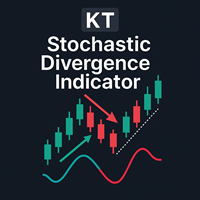
如果你见过价格创出新高,但随机指标没有同步确认,那么你已经明白为什么交易者会关注背离。KT Stoch Divergence 会把这种价格与指标之间的不一致直接标记在图表上,帮助你发现潜在反转和趋势延续机会,无需手动画出每一条背离线。 该指标识别价格与随机指标之间的常规背离和隐藏背离。它提供的是交易背景,而不是自动下单信号。你仍然需要根据自己的图表判断这个机会是否合理。 交易者如何使用 当价格接近支撑位且卖压可能减弱时,关注常规看涨背离。 当价格接近阻力位且买盘力量可能减弱时,关注常规看跌背离。 利用隐藏背离寻找可能顺着当前趋势继续运行的回调机会。 把背离作为入场过滤条件、离场参考,或自己交易策略的额外确认。 主要功能 标记常规和隐藏的看涨与看跌背离。 适用于反转和趋势延续分析。 过滤不对称背离,让图表更清晰。 包含 MetaTrader 提供的预警方式。 可辅助入场和离场决策。 Expert Advisor 可以读取指标数据,用于自动化策略。 如何理解信号 常规看涨背离: 价格形成更低的低点,而随机指标形成更高的低点。 常规看跌背离: 价格形成更高的高点,而随机指标形成更低的高点。
ACB Breakout Arrows
KEENBASE SOFTWARE SOLUTIONS
4.15 (34)
结合交易环境的突破信号 ACB Breakout Arrows 识别价格进入平稳阶段后出现的方向性突破,并用买入或卖出箭头标记该形态。箭头代表检测到的突破形态,并不保证每个信号都会发展成大幅行情。 买入箭头表示看涨突破形态,卖出箭头表示看跌突破形态。价格可能回测突破区域,也可能重新回到原有区间,因此入场前应检查周围的市场结构、趋势方向以及附近的支撑或阻力。 在图表上规划交易 指标可以围绕每个信号绘制实用的参考价位: Stop Loss: 根据所选 K 线数量计算的保护价位。 Quick Profit: 较近的目标,可用于提前离场、部分止盈或决定是否移动到保本位置。 Take Profit: 为选择继续持有突破行情的交易者提供更远的目标价位。 这些价位有助于建立一致的交易计划,但仓位大小和最终的交易管理仍由交易者负责。 确认突破 多周期面板可帮助您比较不同可用图表周期上的突破信号。如需更多背景信息,可以使用 ACB Trade Filter 检查市场情绪和趋势方向。绿色配合看涨趋势支持多头形态,红色配合看跌趋势支持空头形态,灰色配合横盘趋势则表示市场条件混合。 您还可以检查买入信号是否直
ACB Trade Filter MT4
KEENBASE SOFTWARE SOLUTIONS
5 (1)
在下单之前,ACB Trade Filter 可以帮助你回答一个实际问题:当前市场是否支持这笔交易,还是你正在混乱的条件下勉强接受一个信号? 该指标分析市场情绪和趋势,然后通过彩色柱状图与趋势方向显示结果。请在正常进场信号出现后使用它,而不是用它代替进场系统。 一眼看懂三种市场状态 绿色柱状图并且趋势看涨: 当前条件支持按照你的策略寻找做多机会。 红色柱状图并且趋势看跌: 当前条件支持按照你的策略寻找做空机会。 灰色柱状图或横盘趋势: 方向不明确,因此更适合放弃这次机会。 它在交易策略中的位置 当你的进场指标产生信号时,可以先检查 ACB Trade Filter 再决定是否行动。如果柱状图和趋势与交易方向一致,就继续进行正常分析。如果两者与信号冲突,你就有明确的理由暂停,而不是接受每一个信号。 它可以自然地配合 ACB Breakout Arrows,但并不局限于这一款指标。你也可以将它用于动量交易、回调进场、突破方法,或者任何需要第二个市场方向判断的手动策略。 它的目的不是制造更多交易,而是帮助你减少质量较低的决定,避免逆着整体方向进场,并在震荡行情中保持选择性。 选择适合你的过滤
KT Momentum Arrows
KEENBASE SOFTWARE SOLUTIONS
KT Momentum Arrows 会在K线收于自适应价格带之外时,用箭头标出看涨或看跌的动量突破。 价格带会随价格偏离程度和波动率变化而调整。蓝色向上箭头确认收盘价突破上轨,红色向下箭头确认收盘价跌破下轨。信号在K线收盘后固定,因此以后复盘时箭头不会移到其他K线上。 箭头告诉你什么 箭头标出动量推动价格越过价格带的那根K线。你可以把它作为入场触发信号,也可以结合自己的趋势、支撑阻力或价格行为方法进行确认。价格带会继续显示在价格周围,方便判断突破是在延续,还是后续动能正在减弱。 在同一张图表上比较信号 可选的表现统计面板会汇总所选历史范围内出现的箭头,并显示信号总数、成功与失败次数、成功率以及平均点数波动。结果线还可以连接各个信号之间测量到的行情变化。这个视图最适合在相同图表条件下,对同一品种和周期的不同设置进行比较。 影响结果的关键设置 历史K线数量: 决定参与计算和表现统计的图表历史范围。 幅度系数: 调整价格带偏离程度与波动率的组合方式。请根据实际交易的品种和周期进行测试。 表现分析: 显示或隐藏统计数据,并可分别设置结果线的颜色、宽度和样式。 提醒: 可为新的已确认信号启用声
KT COG Advanced MT4
KEENBASE SOFTWARE SOLUTIONS
1 (1)
KT COG is an advanced implementation of the center of gravity indicator presented by John F. Ehlers in the May 2002 edition of Technical Analysis of Stocks & Commodities magazine. It's a leading indicator which can be used to identify the potential reversal points with the minimum lag. The COG oscillator catches the price swings quite effectively. MT5 version of the same indicator is available here KT COG Advanced MT5 Calculation of COG The COG indicator is consist of the two lines. The main l
KT Pin Bar
KEENBASE SOFTWARE SOLUTIONS
KT Pin Bar identifies the pin bar formation which is a type of price action pattern which depicts a sign of reversal or rejection of the trend. When combined with support and resistance, BRN and other significant levels, Pin Bar pattern proved to be a very strong sign of reversal. Basically, a pin bar is characterized by a small body relative to the bar length which is closed either in upper or lower 50% part of its length. They have very large wicks and small candle body. A pin bar candlestic
KT Trend Magic
KEENBASE SOFTWARE SOLUTIONS
直接在图表上读取趋势方向 KT Trend Magic 将动量与波动率结合为一条跟随价格的彩色趋势线。趋势线持续显示当前趋势状态,并在计算方向发生变化时切换颜色。 绿色趋势线: 表示看涨趋势状态。 红色趋势线: 表示看跌趋势状态。 颜色变化: 标记图表上新的方向转换。 在持续走势中,趋势线也可作为观察回调和延续的动态图表参考。可将每次方向转换与当前价格走势及您自己的入场规则进行比较。 比较九个时间周期的信号 多时间周期扫描器显示 M1、M5、M15、M30、H1、H4、D1、W1 和 MN1 的看涨或看跌 Trend Magic 读数。无需为每个周期分别打开图表,即可比较当前图表与更短及更长时间周期的方向。 利用扫描器可以查看多个时间周期是否指向同一方向,或者当前图表是否正在逆着更广泛的趋势背景运行。图表趋势线提供详细的局部视图,扫描器则提供更广泛的方向比较。 调整趋势响应 Trend Period 控制用于评估方向和动量的计算窗口。Smoothing Coefficient 控制趋势线过滤短期噪声的程度。将两项设置结合调整,可选择适合交易品种、时间周期和图表风格的响应速度。 Hist
KT Auto Fibo
KEENBASE SOFTWARE SOLUTIONS
Auto Fibonacci indicator that draws the Fibonacci retracement on the swing you are looking at, and redraws it the moment you zoom or scroll the chart. Zoom in on a pullback and the levels measure that pullback. Zoom out and they measure the whole trend. There are no anchor points to drag and no levels to redraw after every new high. Key features Measures the highest high and the lowest low on your screen, the current candle included. Follows zoom, scroll and window size at once, even when the ma
KT Psar Arrows
KEENBASE SOFTWARE SOLUTIONS
KT Psar Arrows使用标准的抛物线转向指标(Parabolic SAR)在图表上绘制箭头。当蜡烛的最高点触及SAR时绘制看涨箭头;当蜡烛的最低点触及SAR时绘制看跌箭头。信号在实时生成,无需等待K线收盘。  特点 对于想要基于抛物线SAR指标开发交易策略的交易者来说,这是一个非常有用的工具。  可以用于寻找市场中的转折点。 支持自定义PSAR参数输入。 提供所有MT4的提醒功能。 注意事项:抛物线SAR是一个滞后且严格机械化的指标。每一笔潜在交易都应该通过明确定义的规则进行筛选。     输入参数 PSAR步长:输入步长值。 PSAR最大值:输入最大值。 显示PSAR点:显示/隐藏PSAR点。即使不显示PSAR点,箭头功能也能正常工作。 其余输入项均为直观设置,无需特别说明。
KT Ichimoku Trader
KEENBASE SOFTWARE SOLUTIONS
1 (1)
五种一目均衡表策略,全自动交易 KT Ichimoku Trader 是一款 Expert Advisor(智能交易系统),使用五种经典的 Ichimoku Kinko Hyo(一目均衡表)策略自动开仓和平仓。您开启想要的策略,每种策略都独立交易:有自己的入场规则、自己的出场规则,并且每种策略同一时间最多只有一笔持仓。 每次入场都在已收盘的K线上检查。新K线开盘时,EA 读取刚刚收盘的那根K线,只有当该策略的所有入场规则都满足、并且您开启的所有过滤器都同意时,才会开仓。只要缺少一条规则,就不会开仓,即使图表看起来已经接近信号。 每种策略何时开仓和平仓 Tenkan-Kijun Cross。 当 Tenkan-sen(转换线)向上穿过 Kijun-sen(基准线)时买入,反向交叉时卖出。在 Advanced 模式下,买入还需要交叉发生在 Kumo 云层上方、未来云层为看涨,并且 Chikou Span(延迟线)位于过去价格之上;卖出则需要相反的条件。当 Tenkan-sen 反向穿回 Kijun-sen 时平仓。 Kumo Cloud Breakout。 当前一根K线仍位于云层顶部下方,
KT Volatility Oscillator
KEENBASE SOFTWARE SOLUTIONS
KT波动率振荡器通过数学公式分析过去和当前的市场数据,以振荡器的形式显示结果。振荡器中波浪的增长和减弱分别对应于资产的高波动性和低波动性。  简单来说,波动率就是衡量资产在一定时间内价格波动幅度的指标。没有波动性,市场上的价格变化将非常有限,交易者也将难以从价格波动中获利。 外汇市场中波动率的应用 在外汇市场中利用波动率,可以帮助你更有效地进行交易,同时让你的预期更加符合实际情况。  高波动性 基于趋势的交易系统在高波动市场中表现出色,因为价格波动幅度大,趋势持续时间长,直到出现趋势反转。 如果突破发生在高波动期间,突破系统可以从市场中获得更多的点数收益。 低波动性 均值回归系统在低波动性环境下表现良好,因为市场有回归均值的特性。 基于通道的系统在市场盘整期,即低波动阶段,能够更加有效地发挥作用。 非方向性指标 KT波动率振荡器是一种非方向性指标,不与市场的牛市或熊市趋势直接相关。波动性的上升可能出现在牛市或熊市两种情形下。  输入参数 波动率周期:   一个整数值,用于设定计算的周期。 文本信息:   在图表上显示或隐藏信息文本。 ----- 警报设置 ----- 声音警报
KT COG Robot
KEENBASE SOFTWARE SOLUTIONS
KT COG Robot is a fully automated Expert Advisor based on the KT COG Indicator . The COG indicator was originally presented by John F. Ehlers in the May 2002 edition of Technical Analysis of Stocks & Commodities magazine. The EA fires a long trade when COG line cross above the signal line and a short trade is fired when the COG line cross below the signal line.  Adaptive Filtration Our adaptive filtration algorithm combines the original COG formula with the major trend direction and market acce
ACB Breakout Arrows EA
KEENBASE SOFTWARE SOLUTIONS
自动执行 ACB 突破交易流程 ACB Breakout Arrows EA 会分析当前图表上的突破信号,并通过内置的 ACB Breakout Arrows 和 ACB Trade Filter 逻辑管理交易。将 EA 加载到需要监控的品种和时间周期图表,启用自动交易,然后根据测试计划设置仓位、交易时段、筛选器和退出规则。 所需指标和依赖项已经嵌入 EA,无需另行下载。这些指标面板不会显示在图表上。EA 会显示自己的交易操作,并在启用 Logging 后把运行信息记录到平台 Journal 中。 在开仓前确认入场条件 Signal Sensitivity 控制突破需要达到的强度,只有满足条件时箭头逻辑才会接受信号。Bars for SL 控制在止损方法使用指标价位时所参考的 K 线数量。 启用 ACB Trade Filter 后,EA 可以要求箭头、柱状图和趋势状态保持一致: 买入确认: 向上箭头、绿色柱状图和看涨趋势。 卖出确认: 向下箭头、红色柱状图和看跌趋势。 混合状态: 灰色柱状图和横盘趋势会阻止新的入场。 控制仓位大小和退出方式 仓位大小: 选择固定手数,或根据 Risk
KT Asian Breakout
KEENBASE SOFTWARE SOLUTIONS
4 (1)
KT Asian Breakout carefully analyzes the range-bound market during the Asian session and then fires a long or short trade after doing some preassessment based on its inbuilt technical analysis module. The executed orders are closed within a day before the completion of the next day session. The inbuilt technical analysis module checks for the session range and compares it with the last 20 days price movement. If it finds any erratic price movement within the session, the orders are not executed
KT London Breakout
KEENBASE SOFTWARE SOLUTIONS
First thirty minutes are essential for a trading session. The early reaction of traders and market players sets a path for the rest of the day. KT London Breakout EA takes advantage of this phenomenon, and after analyzing the first thirty minutes of London session, it places two bidirectional pending orders. One of pending order is eventually canceled after realizing the market direction with certainty. It has been strictly tested and developed for EUR/JPY using 30-Min Time Frame. You can expe
KT Support and Resistance Levels
KEENBASE SOFTWARE SOLUTIONS
KT Auto Support Resistance Levels:适用于 MetaTrader 4/5 的多周期支撑阻力、智能区域与水平仪表盘 摆动高点、Pivot 枢轴点、订单块、前期高低点。每个交易者标记市场的方式都不太一样,最后承受代价的往往是图表本身。把太多方法堆在同一张图上,它就不再是一张清晰的地图,而会变成噪音。 KT Auto Support Resistance Levels 正是为了解决这个问题而设计。它会同时扫描月线、周线、日线以及当前周期,然后自动把真正重要的水平直接绘制到您的 MetaTrader 图表上。当图表开始变得拥挤时,只需点击一次,就可以把这些水平合并成干净的 Smart Zones。实时面板还会持续显示价格上方和下方最近的水平,让您不必在图表上来回寻找。 可以把它看作一位永远不会疲惫的图表分析师,始终帮您标记关键位置。 它能为您做什么 从多个经过验证的来源寻找并绘制水平:摆动点、Pivot 枢轴点、前期价格以及订单块中点,覆盖多个时间周期。 当您想要更简洁的图表时,可以把彼此接近的水平合并成清晰的 Smart Zones。 保持一个实时面板,显示
Currency strength and pair correlation in one indicator KT Currency Strength and Correlation ranks the eight major currencies from strongest to weakest and shows, in a colored matrix, how closely ten currency pairs of your choice move together. Before you open a trade from your own strategy, you can check whether the two currencies of the pair are really moving apart, and whether the new trade adds risk to a trade you already hold. What you see on the chart Strength lines: a separate window belo
MACD Divergence Seeker
KEENBASE SOFTWARE SOLUTIONS
KT MACD Divergence Seeker trades the regular and hidden divergence signals generated by our free indicator named KT MACD Divergence indicator. Trading the standalone divergences can be a risky affair that's why the KT MACD Divergence Seeker combines the standard divergence signals with an advanced analysis module to exploit the price inefficiencies on some FX pairs. What is the Divergence exactly? As a general conception if the price is making higher highs, then macd should also be making hig
KT Asian Breakout Indicator
KEENBASE SOFTWARE SOLUTIONS
标记亚洲时段区间 KT Asian Breakout Indicator 标记四小时亚洲交易时段窗口的最高价和最低价,并在区间完成后继续监测价格。GMT Offset 用于使时段与经纪商服务器时间保持一致,Draw Session Box 用于控制是否在图表上显示该区间。 同时查看突破与交易水平 当价格收盘于时段最高价上方时,指标显示看涨箭头。当价格收盘于时段最低价下方时,指标显示看跌箭头。启用 Draw Stoploss and Profit Targets 后,图表会添加入场线、位于区间另一侧的 Stop Loss,以及三个计算得出的目标水平。 看涨突破: 使用时段最低价作为保护水平。 看跌突破: 使用时段最高价作为保护水平。 目标 1、2 和 3: 根据区间大小和当前波动率提供分阶段参考水平。 突破状态: 识别突破蜡烛相对于时段区间明显偏大的情况。 查看历史信号表现 Performance Analysis 分析已加载图表中的已完成信号,并可显示 Total Signals、Win/Loss、Success Rate、以点数表示的 Average Profit,以及当前突破状态。
MACD Divergence MT4
KEENBASE SOFTWARE SOLUTIONS
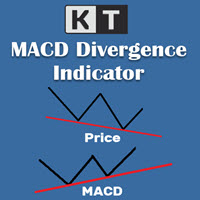
KT MACD 背离指标显示价格与振荡器之间的常规背离和隐藏背离。如果你的交易策略是基于趋势反转,可以使用 MACD 的常规背离来捕捉潜在的转折点。而如果你的策略是基于趋势延续,MACD 的隐藏背离将是一个不错的选择。 KT MACD 背离的局限性 将 MACD 背离作为单独的入场信号可能存在一定风险。并非所有的背离都能解释为反转信号。为了获得更好的效果,建议将其与价格行为分析和其他交易方法结合使用。 功能特点 标记价格与振荡器之间的常规和隐藏背离。 为提高准确率并减少图表杂乱,会自动忽略不对称的背离。 支持趋势反转和趋势延续两种交易策略。 完全支持嵌入到智能交易系统中使用。 可用于入场信号和出场信号。 支持所有 MetaTrader 警报功能。 什么是背离? 一般来说,如果价格创出更高高点,那么振荡器也应创出更高高点;如果价格创出更低低点,那么振荡器也应同步走低。当这种正常的行为没有出现时,就表示价格和振荡器之间出现了背离。背离主要分为两种类型: 常规背离 常规看涨背离:当价格创出更低低点,但振荡器却创出更高低点。 常规看跌背离:当价格创出更高高点,但振荡器却创出更低高点。
KT Bollinger Bands Trader MT4
KEENBASE SOFTWARE SOLUTIONS
KT Bollinger Bands Trader 是一款 100% 自动化的智能交易顾问(EA),基于布林带在低波动时期的均值回归交易策略构建。价格经常在布林带的上轨或下轨附近产生反应,但并非每次都会发生反转。然而,在低波动期间,价格反转的可能性更高。 入场规则 当价格正确下穿布林带下轨时,开启买入交易。 当价格正确上破布林带上轨时,开启卖出交易。 出场规则 在低波动阶段结束时自动平仓。 也可在达到止损或止盈时平仓。 本 EA 在经典布林带策略基础上进行了诸多改进,允许用户通过内置的趋势过滤器、波动率过滤器、Vortex、MMI 和星期过滤器等工具,对策略进行细致调节。 输入参数 ----- 策略设置 ----- 布林带周期、带移位、带偏差 开始时间(Start Hour) 结束时间(End Hour) GMT 时区偏移(GMT offset) ----- 交易设置 ----- 手数类型:固定手数 | 自动手数 每单风险百分比(Risk Per Trade) ----- 出场设置 ----- 止损方式:无止损 | 基于波动率 | 固定点数 止盈方式:无止盈 | 基于波动率 |
KT CCI Divergence MT4
KEENBASE SOFTWARE SOLUTIONS
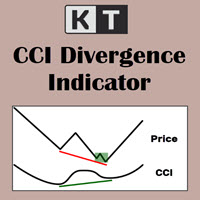
KT CCI Divergence shows the regular and hidden divergence created between the price and CCI oscillator. Divergence is one of the vital signals that depicts the upcoming price reversal in the market. Manually spotting the divergence between price and CCI can be a hectic and ambiguous task. Limitations of KT CCI Divergence   Using the CCI divergence as a standalone entry signal can be risky. Every divergence can't be interpreted as a strong reversal signal. For better results, try to combine it w
KT Heiken Ashi Smoothed MT4
KEENBASE SOFTWARE SOLUTIONS
跟踪平滑 Heiken Ashi 状态 KT Heiken Ashi Smoothed 将价格走势显示为平滑的蓝色和红色蜡烛。当状态从看跌转为看涨时,它会绘制蓝色向上箭头;当状态从看涨转为看跌时,它会绘制红色向下箭头,让图表上的方向转换清晰可见。 平滑周期和平滑方法决定蜡烛的平滑程度。与标准 Heiken Ashi 相比,它提供更稳定的走势视图,同时可根据图表选择合适的响应速度。 蓝色蜡烛: 表示看涨状态。 红色蜡烛: 表示看跌状态。 蓝色向上箭头: 标记从看跌转为看涨。 红色向下箭头: 标记从看涨转为看跌。 一眼比较多个时间周期 紧凑的 MTF Scanner 显示从 M1 到 Monthly 各时间周期的看涨或看跌状态。无需切换图表,即可将当前图表与更短和更长的时间周期进行比较。 解读蜡烛形态并调整显示 没有下影线的蓝色蜡烛 可能伴随强劲的看涨走势,而 没有上影线的红色蜡烛 可能伴随强劲的看跌走势。带有上下影线的小实体蜡烛可能出现在方向变化时。 您可以调整平滑周期和平滑方法,也可以设置看涨和看跌箭头的颜色、大小及符号代码,使其符合您的图表布局。 在方向变化时接收提醒 可选择适合您工
KT MA Crossover MT4
KEENBASE SOFTWARE SOLUTIONS
KT MA Crossover 指标根据所选的移动平均线交叉绘制买入和卖出箭头。此外,它还会生成相应的提醒通知,并为每个连续信号显示 MFE(最大有利偏移)值,帮助交易者更好地了解潜在利润区域。 移动平均交叉策略是全球交易者广泛采用的一种经典技术分析方法。通常包含一条快速和一条慢速的移动平均线,根据交叉的方向来确定买入或卖出的交易信号。 买入信号 - 快速均线向上穿越慢速均线。 卖出信号 - 快速均线向下穿越慢速均线。 功能特点 每项均线参数都可完全自定义设置。 每个连续信号都会显示对应的 MFE 值。 代码轻量,占用系统资源极少。 包含所有 MetaTrader 系统提示和警报。 缺点  移动平均线是一种滞后性指标,主要依赖历史数据。在盘整行情中,均线交叉信号可能显得较为随机,容易产生假信号。因此,交易者在实际应用中需要根据自身判断灵活处理这些信号。 输入参数 历史K线数量:  用于计算信号的历史K线数量。 ----- 选择用于计算快慢移动平均的周期和方法 ----- 显示均线:  在图表上显示或隐藏移动平均线(不影响交叉信号)。 绘制利润线: 显示或隐藏 MFE 曲线。 
KT Round Numbers MT4
KEENBASE SOFTWARE SOLUTIONS
KT Round Numbers plots the round number levels which are also commonly known as psychological levels in the Forex world. In the context of Forex trading, round number levels are those levels in which there are two or more zeroes at the end. They are named as 00 levels on the chart. Some traders also consider the halfway points as a valid round number level. They are named as 50 levels on the chart. Use of round number levels in trading Round number levels work as strong support and resistance
KT Inside Bar Advanced MT4
KEENBASE SOFTWARE SOLUTIONS
Despite the popularity of inside bar pattern among the traders, using it as a standalone signal doesn't provide any edge in the market. KT Inside Bar Advanced indicator solves this problem by combining the classic inside bar pattern with the "ECE" cycle and Fibonacci extensions. Using this indicator in place of our classic inside bar indicator will provide a tremendous advantage and edge in the market. What is the ECE cycle? In financial markets, the price never moves in a straight line but u
KT Inside Bar Hunter MT4
KEENBASE SOFTWARE SOLUTIONS
Despite the popularity of inside bar pattern among traders, using it as a standalone entry signal doesn't provide any evidentiary advantage. KT Inside Bar Hunter trades only selected inside bar patterns using some preassessment and ECE price action cycle. Trading Strategy On successful detection of the required pattern, EA places a pending order in the direction of the forecasted price expansion phase. Pending orders are canceled if they are not triggered within the next bar. Once triggered, ac
KT CCI Surfer MT4
KEENBASE SOFTWARE SOLUTIONS
KT CCI Surfer uses a mean reversion trading strategy with a combination of extreme overbought/oversold zone detection using the Commodity Channel Index (CCI). Developed by Donald Lambert in 1980, CCI is a leading indicator that helps to identify the overbought/oversold region in the market without any lag. Obviously, not every overbought/oversold signal turns out into a price reversal. However, when combined with a well-planned mean reversion strategy, it produces excellent results. Recommend
KT RSI Divergence Robot MT4
KEENBASE SOFTWARE SOLUTIONS
交易已确认的 RSI 背离 KT RSI Divergence Robot 监控当前图表品种和周期中价格与相对强弱指数之间的常规背离和隐藏背离。程序在一根 K 线完成后评估新信号。看涨背离可以触发买入持仓,看跌背离可以触发卖出持仓。出现反向信号时,EA 可以先关闭相反方向的持仓,再评估新的入场机会。 选择入场条件 您可以在不改变核心背离逻辑的情况下调整策略: Regular Divergence 和 Hidden Divergence: 启用一种信号,或同时使用两种信号。 Overbought 和 Oversold 限制: 要求背离在您设定的 RSI 水平之外形成。 Trading Session 和 Day Filter: 只允许在选定的 GMT 交易时段和工作日建立新仓位。 Trend、Volatility、Vortex 和 MMI 过滤器: 在信号开仓前加入可选确认条件。 控制仓位大小和出场 Max Active Positions 限制 EA 在同一方向可持有的仓位数量。仓位大小可使用固定手数,或根据 Risk Per Trade 自动计算。Stop Loss、Take Pro
筛选:
无评论
回复评论