Drawdown Minimizer MT4

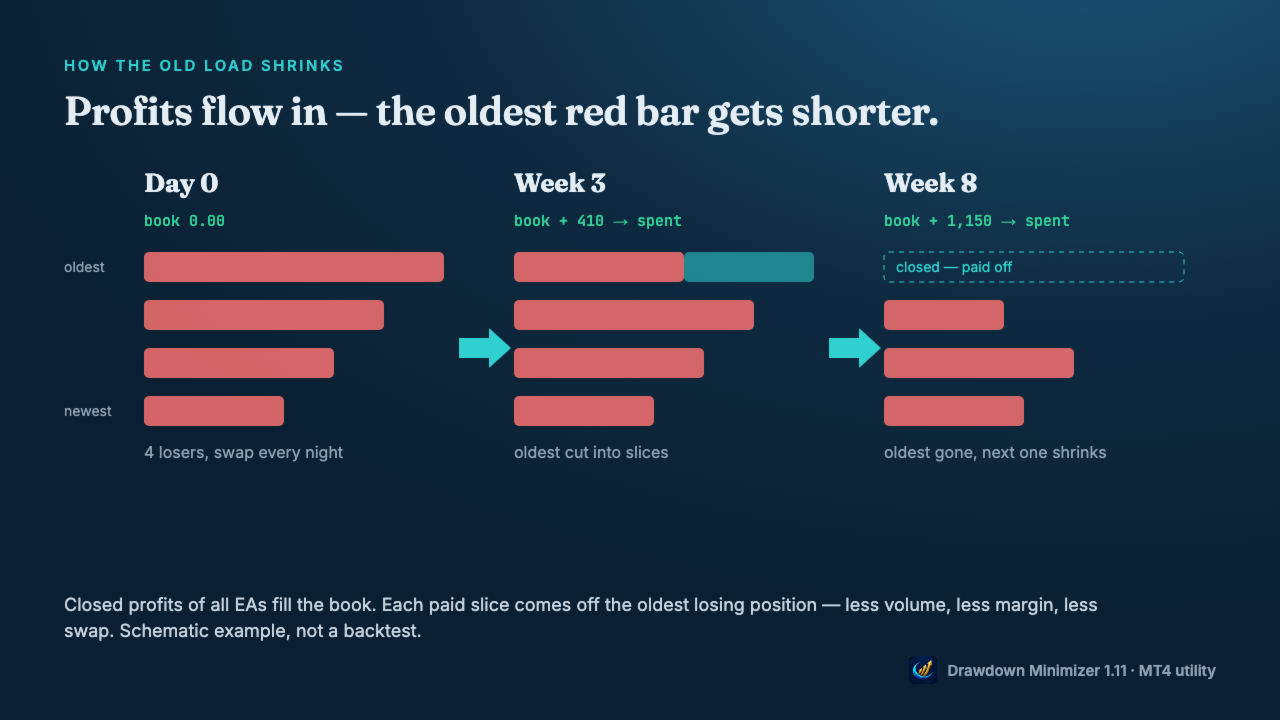
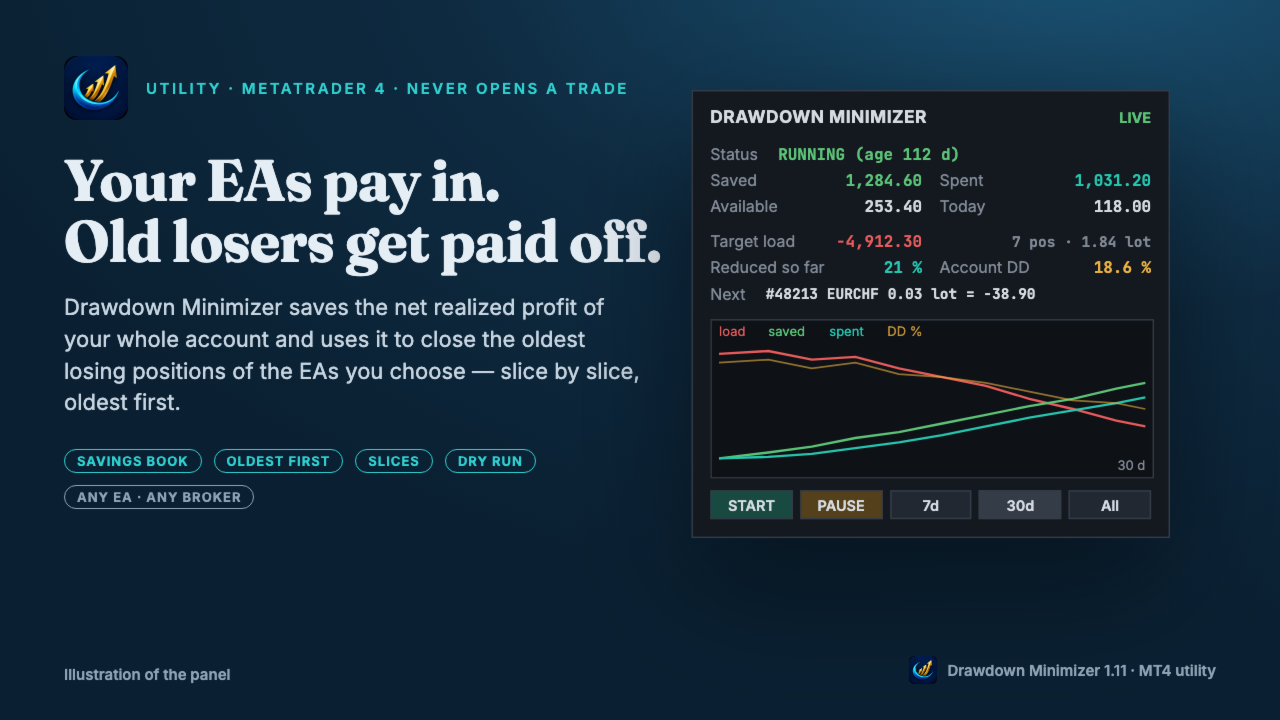
Drawdown Minimizer for MetaTrader 4 - your EAs pay in, old losers get paid off. This utility runs next to your other Expert Advisors and never opens a trade. It keeps a savings book of the net realized profit of your whole account and uses it to close the oldest losing positions of the EAs you choose - slice by slice, oldest first.

WHY IT EXISTS

Made by traders, for traders. One of our grid EAs got stuck in drawdown for months. The old positions did not come back, and they paid swap every single night. At the same time the account kept booking profits that just sat on the balance. Drawdown Minimizer connects the two.

THE SAVINGS BOOK

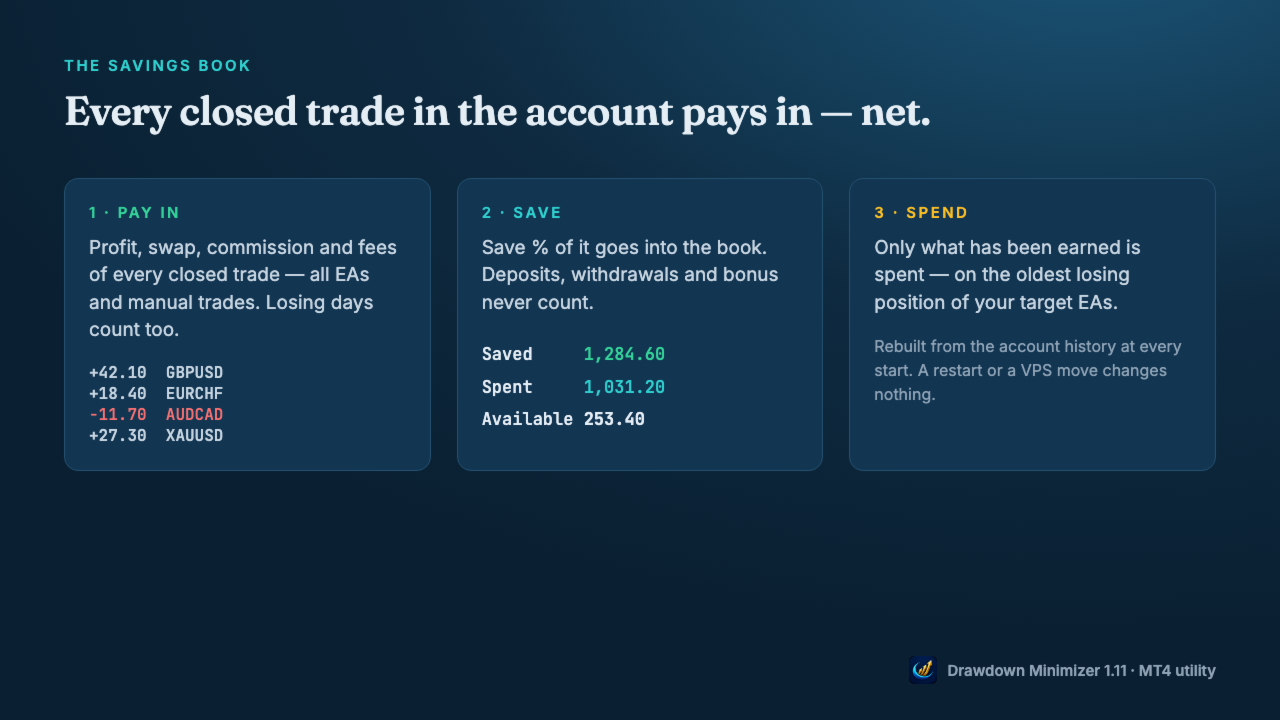
  • Every closed trade in the account pays in: profit, swap and commission - all EAs and manual trades. Losing days count too.
  • Save % decides how much of the net result goes into the book (default 100 %).
  • Deposits, withdrawals, credit and bonus never count, and neither do the tool's own closes.
  • Only what has been earned is spent. If the book drops below what was already spent, the reduction waits until money has been earned again.
  • The book is rebuilt from the account history at every start, so a restart changes nothing. In MT4 the tool recognises its own closes by a ticket list in the terminal's MQL4\Files folder - copy the DDMin_* files from there when you move to another terminal or VPS. Without them the book starts again from zero.
  • The savings book is a counter, not a separate account - the money stays on your balance and stays at risk.

OLDEST FIRST, IN SLICES

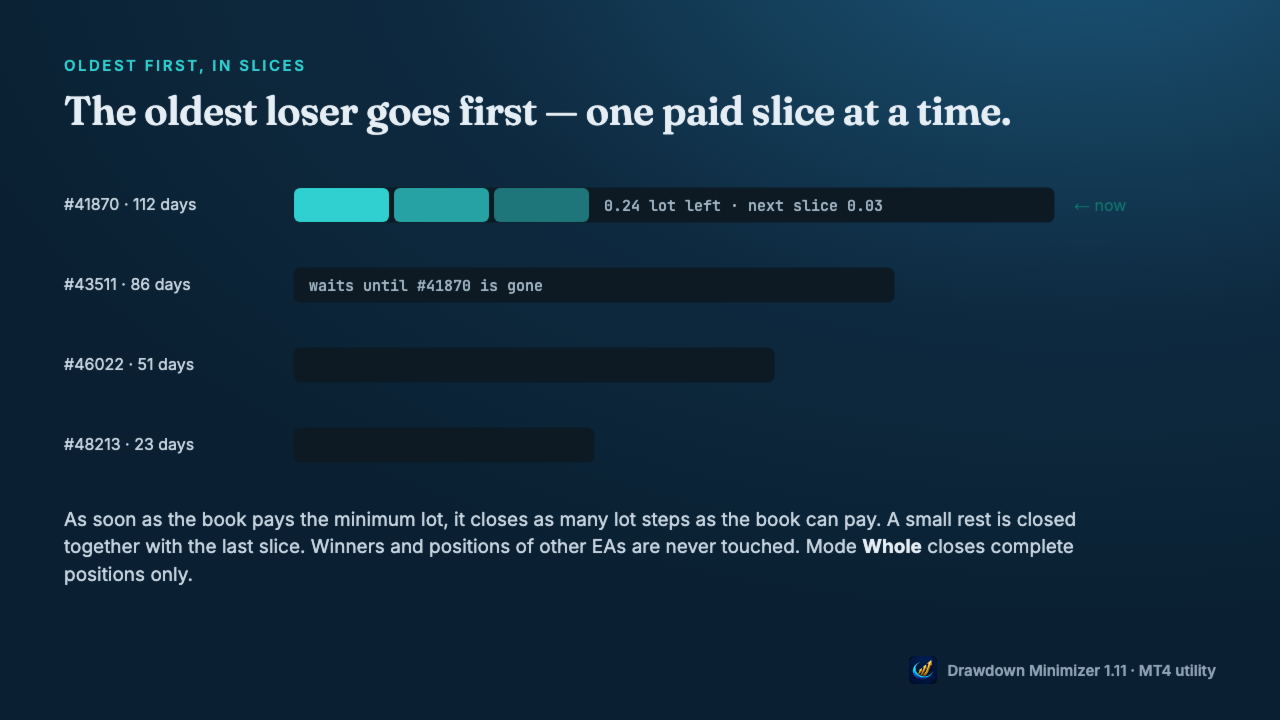
  • Only losing positions of the EAs you choose are reduced - by magic number, by a magic range like 1000-1999 (for EAs that give every grid level its own magic) or by a text in the trade comment. Winners and all other positions are never touched.
  • The oldest losing position goes first. A younger one is never preferred because it is cheaper. If the oldest one is blocked (spread, closed market, broker error), the next one in line is used.
  • As soon as the book pays the minimum lot, the tool closes as many lot steps as the book can pay. With a large book, the first close can be a big part of the position, or all of it. A small rest is closed together with the last slice.
  • Mode Whole closes complete positions only.
  • At most one close per set interval, optional spread limit, retry with pause on broker errors.

YOU DECIDE WHEN

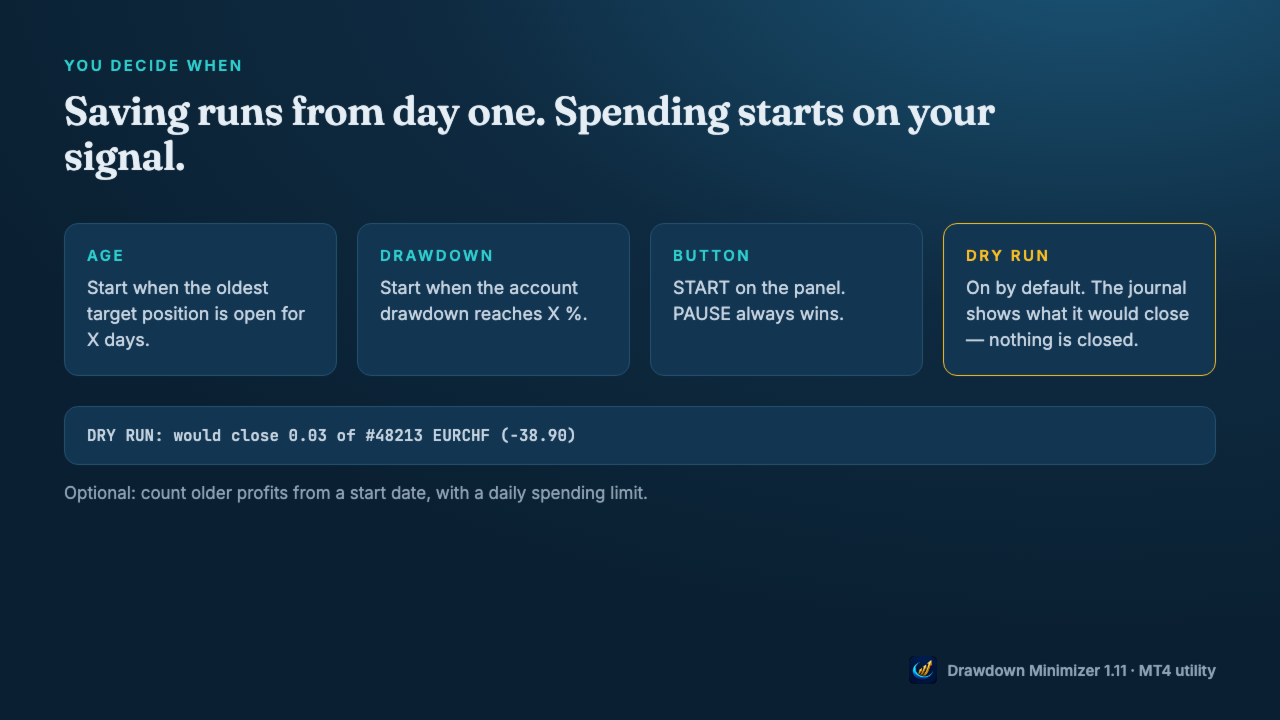
  • Saving runs from the moment the tool is attached. Spending starts when the oldest target position reaches an age, when the account drawdown reaches a level, or when you press START.
  • Once a trigger has fired, spending goes on even if the drawdown recovers (Keep running), until you press PAUSE or no target position is left. PAUSE always wins.
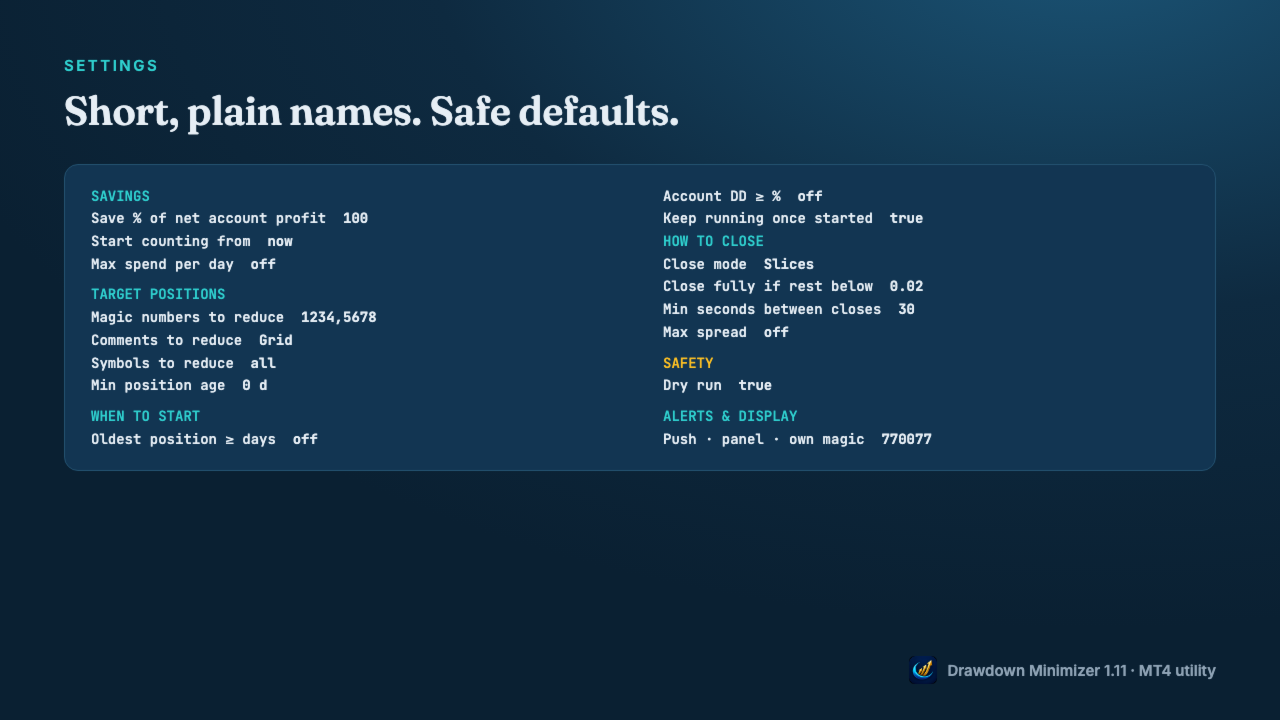
  • Dry run is on by default: the journal shows what it would close, nothing is closed.
  • Optional: count older profits from a start date, with a daily spending limit.

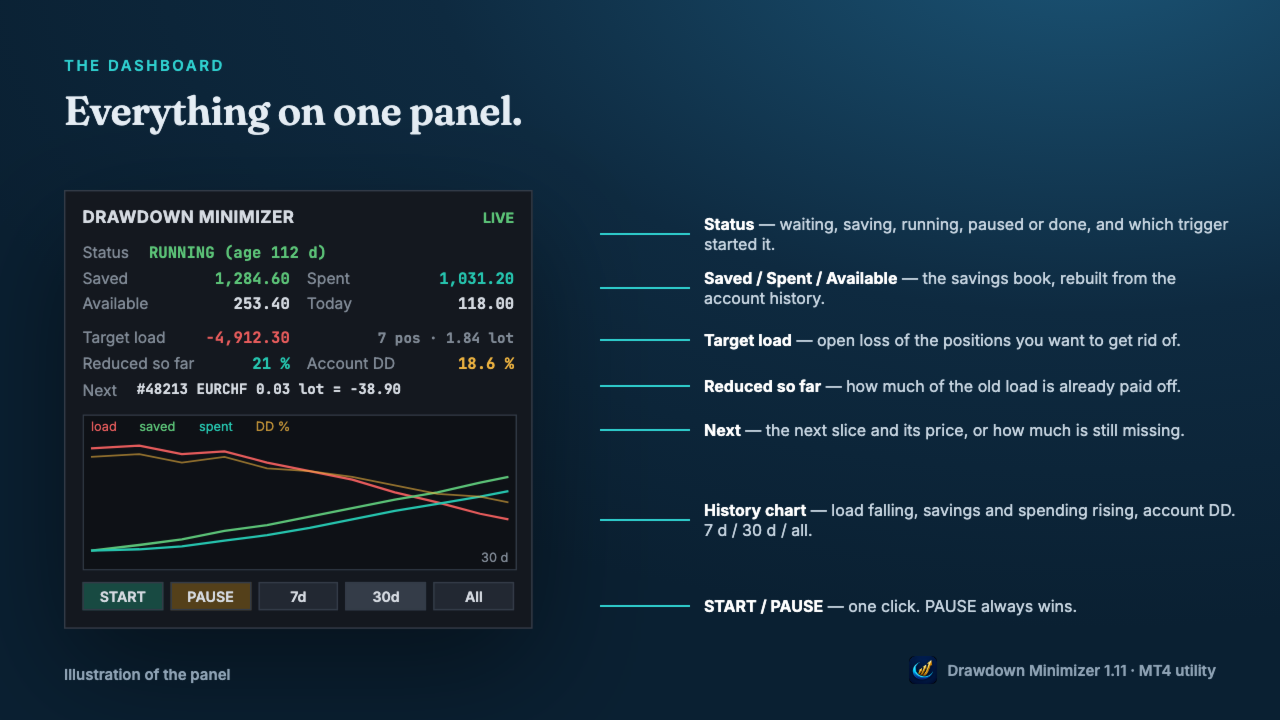
DASHBOARD

  • Status, Saved, Spent, Available and today's spending.
  • Open loss of the target positions and how much of it is already reduced.
  • The next slice and its price, or how much is still missing.
  • History chart: target load, savings, spending and account drawdown over 7 days, 30 days or all.
  • Push notifications for full closes, start and pause, a daily summary, and an alert when a close fails repeatedly.

WHAT IT CHANGES - AND WHAT IT DOES NOT

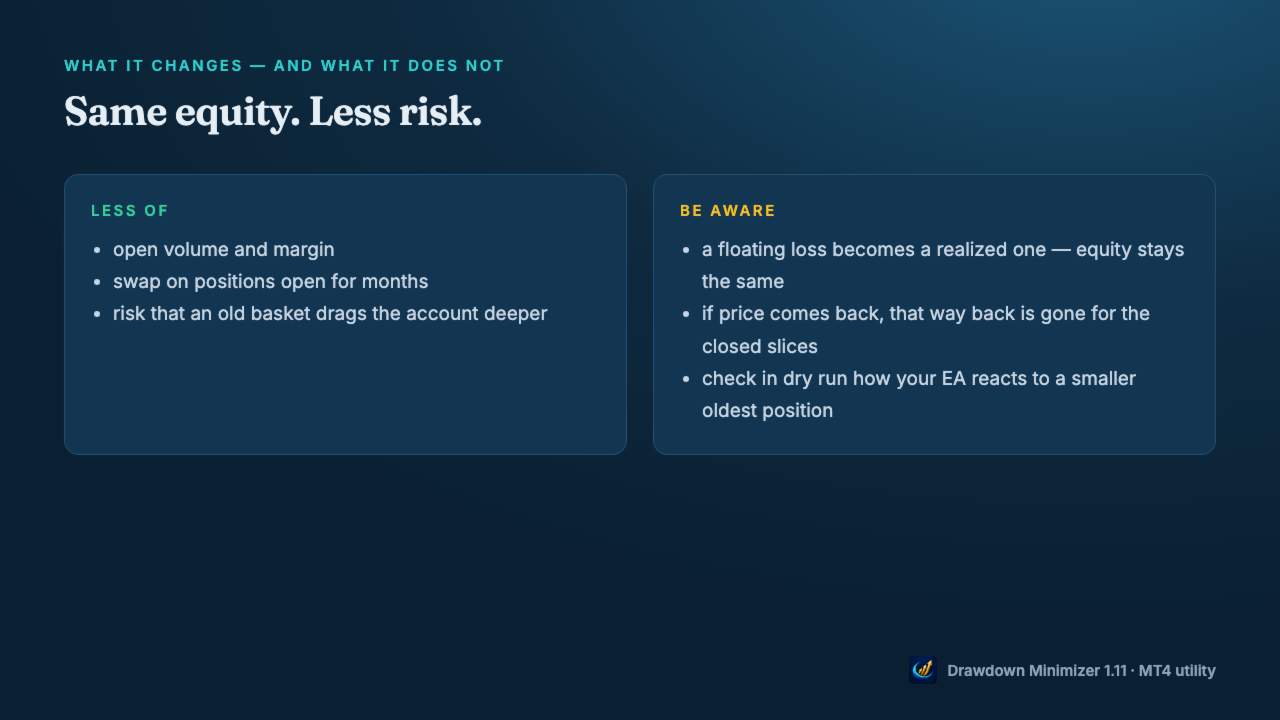
  • Closing a loser with saved profit does not change your equity, apart from slippage. A floating loss becomes a realized one.
  • What changes is the risk: less open volume, less margin, no more swap on the closed volume, and a smaller chance that an old basket drags the account deeper.
  • The price: if the market would have come back, that way back is gone for the closed slices.
  • Check in dry run how your EA reacts when part of its oldest position is closed - some grid EAs size the next level from the open volume.

MT4: PARTIAL CLOSES

  • When a slice is closed, MetaTrader 4 gives the rest of the position a new ticket with the comment "from #<old ticket>". The open time and the magic number stay the same.
  • Drawdown Minimizer follows this chain: the rest stays the oldest position, and a comment target like Waka still matches after the comment has become "from #...".
  • Your EA may not: grid EAs that identify their basket by trade comment or ticket may no longer recognise the rest. EAs that find their trades by magic number usually still see the rest, but with less volume. EAs that store ticket numbers may lose track of it. Test in dry run first, then start with Close mode Whole or a single slice.

GETTING STARTED

  • Attach the utility to a separate chart (any symbol, any timeframe) - not to the chart of the EA you want to reduce.
  • Enter the magic number(s), a magic range or a comment text of that EA, allow algo trading and press START.
  • Watch the journal in dry run, then set Dry run to false.
  • One instance per account. Hedging accounts only - not for FIFO accounts (US brokers). Set the Account History tab to All History - otherwise the book counts only the part of the history the tab shows.

Trading involves risk. Drawdown Minimizer does not predict the market and does not turn a loss into a profit - it pays old losses off with money the account has already earned.
Recommended products
| Fully-automated Smart Money Concept (ICT) inspired trading solution with multi-strategy capabilities | Built by a grid trader >> for grid traders.  This is MT4 version, click  here  for  Blue CARA MT5  (settings and logics are same in both versions)     Real monitoring signal  -->  Cara Gold Intro Blue CARA EA   ('CARA') - short for  C omprehensive  A lgorithmic R esponsive A dvisor is a next-gen  multi-currency    multi-timeframe  EA base on the widely known (and perhapse most popular) Inn
Vizzion
Joel Protusada
Vizzion is a fully automated scalping Expert Advisor that can be run successfully using GBPJPY currency pair at H1 timeframe. Very Important This Expert Advisor can not run with any EAs in the same account. As part of the money management plan, it calculates and monitors the Margin Level % and assumes that all open trades are created by it. If you want an Expert Advisor that trades in a daily basis, this EA is not for you because using this requires a patience to wait for a few days or weeks on
Harvest GOLD
Sayan Vandenhout
Harvest GOLD USES THE TREND WAVE INDICATOR AND IT CAN IDENTIFY THE BEGINNING AND THE END OF A NEW WAVE TREND MOVEMENT. AS AN OSCILLATOR, THE INDICATOR IDENTIFIES THE OVERBOUGHT AND OVERSOLD ZONES. IT WORKS GREAT TO CATCH THE SHORT TERM PRICE REVERSALS AND USES A MARTINGALE STRATEGY TO CLOSE ALL TRADES IN PROFIT. USE DEFAULT SETTINGS ON H1 OR HIGHER TIME FRAME ON ANY PAIR FOR MORE ACCURATE TRADES WHY THIS EA : Smart entries calculated by 3 great strategies The EA can be run on even a $30000
H4 GBPUSD Trend Scalper is a trend signal scalper The EA trades according to the trend strategy using original built-in indicator for opening and closing orders. The external inputs for limiting trading on Fridays and Mondays are available. The purpose of the strategy is to use the current trend with the most benefit. According to the results of testing and working on demo and real accounts, the best results achieved by using the Н4 timeframe on the GBP/USD pair Works on MetaTrader 4 Build 971+
How the EA works (simple explanation) Trades on   M5   timeframe Uses   H1 timeframe   to analyze global market context Analyzes   2 or 3 timeframes simultaneously On each timeframe: Checks price position relative to one or two Moving Averages Evaluates MA angle and distance between price and MA Entry logic is based on   trend + volatility conditions , not on random signals The full algorithm is illustrated in the screenshots. Recommended usage Symbol:   EURUSD Timeframe:   M5 Trading
Gold Label
Tran Thanh Tuyen
Gold Label  is an Expert Advisor designed specifically for trading gold.  This EA is specifically designed for   XAUUSD  with low risk and can grow your account from small capital. It is based on machine learning cluster analysis and genetic algorithms. EA contains self-adaptive market algorithm, which uses price action patterns and standard trading indicators. Expert showed stable results on XAU in 2011-2020 period. No dangerous methods of money managment used. Suitable for any broker conditi

Market Maestro: Your Ideal Partner for Automated Forex Trading If you're looking for a reliable assistant for trading in the currency market, Market Maestro is exactly what you need. This modern Forex bot is built using the latest technologies and algorithms, allowing it to effectively analyze market data and make informed trading decisions in real-time. Key Features of Market Maestro 1. Multicurrency Capability for Broad Opportunities Market Maestro can work with a wide range of currency pairs,

Magic EA MT4
Kyra Nickaline Watson-gordon
3 (1)
Magic EA is an Expert Advisor based on Scalping, Elliot Waves and with filters such as RSI, Stochastic and 3 other strategies managed and decided with the robot smartly. Large number of inputs and settings are tested and optimized and embedded in the program thus inputs are limited and very simple. Using EA doesn't need any professional information or Forex Trading Knowledge. EA can trade on all symbols and all time frames, using special and unique strategies developed by the author. The EA wo
Gyroscopes
Nadiya Mirosh
Gyroscope        professional forex expert   (for EURUSD, GBPUSD, USDJPY, AUDUSD, USDCHF, EURGBP, EURJPY, NZDUSD, USDCAD, EURCHF, AUDJPY, CADJPY pairs)   alyzing the market using the Elliot Wave Index. Elliott wave theory is the interpretation of processes in financial markets through a system of visual models (waves) on price charts. The author of the theory, Ralph Elliott, identified eight variants of alternating waves (of which five are in the trend and three are against the trend). The mov
Goal Time
Mourad Ezzaki
GOAL TIME is an expert advisor based on the notion of time, it studies the change of price according to time, and it finally detects the best time to execute a good order. The EA is based on an indicator that draws a price curve in relation to time, this curve is deduced by an algorithm that analyzes old data. Then, the EA exploits the generated curve and executes the correct order. In case of incorrect choice, the EA has the mission to limit the losses. After a thorough study of this strategy o
The Arrow Scalper
Fawwaz Abdulmantaser Salim Albaker
1 (2)
Dear Friend..  I share with you this simple Expert Adviser .. it is full automatic  this Expert Adviser following the trend of the pair you install on or any stocks or indices , it is works like that: - when the trend on H4 chart show a start of up trend the expert will wait till the 15M & 1H charts show an up trend the EA will open a buy order directly , and do the same for down trend and open a sell order the buy or sell  order lot size and take profit and stop loss will measured manually  by
FREE
The Infinity Expert Advisor is a scalper. When the resistance and support levels are broken, trades are opened in the direction of the price movement. Open positions are managed by several algorithms based on the current market situation (fixed stop loss and take profit, trailing stop, holding positions in case of trend indication, etc.). Requirements for the broker The EA is sensitive to spread, slippages and execution quality. It is strongly recommended not to use the EA for currencies with s
Reversepro Smartsma ea mt4
AL MOOSAWI ABDULLAH JAFFER BAQER
ReversePro SmartSMA EA – A Fully Customizable Moving Average Strategy ReversePro SmartSMA EA is an advanced yet fully customizable trading tool designed for traders who prefer to fine-tune their strategies. This Expert Advisor (EA) is not pre-optimized, allowing you the flexibility to adjust its settings to fit your trading style, risk management preferences, and market conditions. How It Works This EA is based on the well-known Simple Moving Average (SMA) crossover strategy, enhanced with addi
Jet Punch
Didit Haryadi Saputra
Jet Punch is another best expert advisor for MT4,  can help you make money while you sleep by automatically entering and exiting trades. It trades by opening trades every day and closing them at the right time to ensure you always earn a profit. The software is very simple and can be used by both beginner and experienced traders.  Jet Punch was tested and has successfully passed the stress test with slippage and commission approximate to the real market condition. Recommendations: Currency pair:
KT Renko Patterns Robot MT4
KEENBASE SOFTWARE SOLUTIONS
Renko chart pattern EA: 14 patterns, a stop loss on every trade, half banked at the first target. KT Renko Patterns EA trades the patterns of KT Renko Patterns, which is built in, from double tops to break and retest. What it does for you Enters only when a brick closes through the pattern's breakout, never on a forming brick. Places the stop loss beyond the pattern and measures three targets from its height. Closes half at the first target, moves the stop loss to the entry and holds the rest un
Expert Grid rsi Pro
Mykhailo Zakervashevych
General Description Grid RSI Pro v3.1 is an advanced trading Expert Advisor for MetaTrader 4 that uses a grid strategy with RSI indicator filtering. The EA automatically opens orders at specified levels, creating a grid of orders to capture market fluctuations. Version 3.1 includes enhanced risk management features and improved signal filtering systems. Key Features 1. Trading Strategies RSI Strategy : Position opening when RSI reaches overbought (80) or oversold (20) levels Fixed Points : Posit
RiskGuardian Pro (MT4 Edition) - The Ultimate Prop Firm Account Saver Are you tired of failing your Prop Firm challenges (FTMO, MFF, etc.) due to a single emotional trade or a momentary lapse in risk management? RiskGuardian Pro is your Mandatory Discipline System designed to help you pass evaluations and protect your funded account. Core Pain Points Solved: * Anti-Tilt Hard Lock: Instantly closes all trades and locks the terminal the moment your defined maximum daily drawdown (e.g., 4%)
VandoraFX Gold
Sayan Vandenhout
VANDORA FX USES THE TREND WAVE INDICATOR AND IT CAN IDENTIFY THE BEGINNING AND THE END OF A NEW WAVE TREND MOVEMENT. AS AN OSCILLATOR, THE INDICATOR IDENTIFIES THE OVERBOUGHT AND OVERSOLD ZONES. IT WORKS GREAT TO CATCH THE SHORT TERM PRICE REVERSALS AND USES A MARTINGALE STRATEGY TO CLOSE ALL TRADES IN PROFIT. USE DEFAULT SETTINGS ON H1 OR HIGHER TIME FRAME ON ANY PAIR FOR MORE ACCURATE TRADES WHY THIS EA : Smart entries calculated by 5 great strategies The EA can be run on even a $20000 a
Special Launch Promotion: $30 (Limited Time Only!) To celebrate our new launch on MQL5, we are offering an exclusive introductory price of $39  for a limited time. Please note that this is a special promotion for our early supporters. The price will be adjusted back to its original retail price of $39  effective from July 31, 2026 . Don’t miss this opportunity to get our professional-grade EA at this special price before it reverts to the standard rate! CAPITAL-BASED TRADING APPROACH When pro
GoldenGrid Scalping Pro EA - Technical Description GoldenGrid Scalping Pro is an automated Expert Advisor designed for trading XAUUSD (Gold) on lower timeframes (primarily M5). The system integrates short-term momentum scalping with a controlled Dollar-Cost Averaging (DCA) position management mechanism. Strategy & Algorithm Overview Signal Confirmation Filters: Uses Average True Range (ATR) to measure volatility and Volume analysis to confirm short-term momentum before initiating entry signals.
Project Oro
Giacomo Donati
Follow us on Instagram: https://www.instagram.com/project_oro_ea Project Oro is a trading algorithm project that I began approximately six years ago. After countless painful and excruciating hours of coding, it is finally ready to be released to the public. The Expert Advisor (EA) is built on a proprietary and unique technique that analyzes the behavior and movement of candlesticks and the price action within the gold market. It searches for short windows of opportunity to strike and exits tr
Gold Coin M5
Andrey Kozak
2.33 (9)
Gold Coin M5 is an automated trading robot designed to trade the gold market (XAUUSD) using the M5 period. This robot is designed for traders who want to trade automatically on short-term time intervals (scalping). Peculiarities: Scalping strategy: The robot uses a scalping strategy based on instant entry and exit from positions based on short-term price movements. Optimized for XAUUSD on M5: The XAUUSD Scalper is specifically tuned to trade the XAUUSD pair on the M5 time frame, allowing it to
The algorithm of the adviser's work: When the Expert Advisor is launched at a specified distance from the price (first_step), BuyStop and SellStop orders are placed. Further, depending on which way the price went, one of them becomes market, and the other begins to crawl after the price. When the price rolls back, it also becomes market. If we have reached a set profit in some direction, the order is closed and a creeping pending order of the same direction is placed again. If the profit is no
The Super scalper universal is a fully automated scalping Expert Advisor, which uses five indicators. Each open position is protected by a hidden stop order managed by an advanced modification algorithm. When searching for the suitable signals, the EA uses the integrated indicator in conjunction with the trend and time filters, as well as the volatility filter. It use dynamic position closure, which considers the location where the order had been opened and the subsequent price action. Profit is
Santa Scalping
Morten Kruse
2.84 (19)
Santa Scalping is a fully automated Expert Advisor with no use of martingale. Night scalping strategy. The SMA indicator filter are used for entries. This EA can be run from very small accounts. As small as 50 EUR. General Recommendations The minimum deposit is 50 USD,  default settings reccomend for eurusd m5 gmt +2 . Please use max spread 10 if you will not have orders change it to -1. Use a broker with good execution and with a spread of 2-5 points. A very fast VPS is required, preferably w
Open Momentum Scalper
Bernard Ndirangu Kago
Open Momentum Scalper Trade the move. Skip the chop. Most scalpers lose money in the same place: sideways markets, where they open trade after trade and give back the week's profit in an afternoon. Open Momentum Scalper is built around one rule: trade only when the market is really moving, and press hard when it is. It runs fully automatically on MetaTrader 4. It's built for Gold (XAUUSD) and index CFDs , with full protection on every trade. Why traders choose it It sits out flat markets. A mult
This Expert Advisor trades based on trend lines, as well as on the basis of volume analysis. Volumes are calculated using minute bars, in order to determine if they were ascending or descending. The trend lines are drawn based on High and Lows in the trade history. There are also additional indicators. Buy or sell signals depend on all those factors. This allows the EA to enter the market with more accuracy and to perform more deals. Input parameters Lots - lot size (if 0, a lot is calculated b
MMM Zig Zag Strategy: The Expert Advisors uses its built-in Zig Zag indicator to determine the prices trends and calculates the signal to decide to open buy or sell positions. It sends an order, closes or moves the Trailing Stop loss position as the indicator works. You can define the time period of each day of the week the EA should not trade (the bad time to trade). Usually the period of day when the impact news are published. General Inputs: Closes orders with any profit of value (currency):
EA211 Reversal Scalp
Jose Francisco Flores Rojas
Clear Reversal Scalper EA This Expert Advisor is designed to identify sharp market reversal opportunities by detecting a predefined number of consecutive bullish or bearish candles, signaling potential exhaustion of the current trend. Once the reversal pattern is detected, the EA enters a trade in the direction of the large reversal candle, capitalizing on momentum for a quick scalp. This strategy works best in volatile sessions. Key Features: Reversal Pattern Detection: Customizable setting to
Classic Market Surfer EA - A Timeless, Proven Strategy for Gold Trading For years, this powerful trading strategy has been hidden from the public-reserved for a select few. Now, for the first time, the Classic Market Surfer EA is available to traders like you.   Built on pure, time-tested trading principles, this EA doesn't rely on trendy gimmicks like AI or machine learning. Instead, it harnesses a classic, robust strategy that has consistently delivered results over the years. This is not a "g
Buyers of this product also purchase
Forex Trade Manager MT4
InvestSoft
4.98 (447)
Trade Manager MT4 is an advanced position size calculator and trade management tool for MetaTrader 4, designed to help traders plan trades faster, control risk more precisely, and manage open positions directly from the chart. It combines order placement, risk based lot calculation, Stop Loss and Take Profit management, Break Even, Trailing Stop, Partial Close, Equity Protection, and external trade management in one panel. Whether you trade forex, indices, metals, commodities, or crypto, Trade M
Exp COPYLOT CLIENT for MT4
Vladislav Andruschenko
4.69 (65)
Professional Trade Copier for MetaTrader 4 Fast, professional, and reliable trade copier for MetaTrader 4 . COPYLOT helps you copy Forex trades between MetaTrader 4 and MetaTrader 5 terminals with flexible synchronization for different account setups. COPYLOT MT4 version supports: MetaTrader 4 to MetaTrader 4 MetaTrader 5 Hedge to MetaTrader 4 MetaTrader 5 Netting to MetaTrader 4   MT5 version Full Description + DEMO + PDF How To Buy How To Install How to get Log Files How To Test and Optimize A
Local Trade Copier EA MT4
Juvenille Emperor Limited
4.96 (111)
Local Trade Copier EA MT4 is a fast and flexible trade copier for copying and managing trades between multiple MetaTrader 4 accounts on the same Windows computer or Windows VPS. It combines local trade synchronization with Receiver-side controls for lot sizing, risk management, trade filtering, symbol mapping, trade management and account protection. Set up your Transmitter and Receiver terminals in about 1 minute and copy manual or EA trades between accounts at the same or different brokers. U
Grid Manual MT4
Alfiya Fazylova
4.71 (17)
Grid Manual is a trading panel for working with grid strategies. The utility is universal, has flexible settings and an intuitive interface. It works with a grid of orders not only in the direction of averaging losses, but also in the direction of increasing profits. The trader does not need to create and maintain a grid of orders, the utility will do it. It is enough to open an order and the Grid manual will automatically create a grid of orders for it and will accompany it until the close. Ful
Trade Indicator Assistant is a powerful MT4 utility designed to turn indicators into automated trading systems. Its main feature is the ability to automatically detect an indicator’s   BUY and SELL signal buffers , without requiring you to know the buffer numbers, search through indicator settings, or modify the indicator source code. Bonus Indicator: After purchasing Trade Indicator Assistant, contact me to receive Trade Signal Pro completely free as a bonus indicator. [Download Demo Version]
TradePanel MT4
Alfiya Fazylova
4.84 (95)
Trade Panel is a multi-functional trading assistant. The app contains over 50 trading functions for manual trading and allows you to automate most trading tasks. Application instructions: https://www.mql5.com/en/blogs/post/756482 Trial version of the application for a demo account: https://www.mql5.com/en/blogs/post/750865 How to install the application: https://www.mql5.com/en/blogs/post/756239 How to test the application in visual mode: https://www.mql5.com/en/blogs/post/770277 How to install
Trade Assistant MT4
Evgeniy Kravchenko
4.43 (197)
It helps to calculate the risk per trade, the easy installation of a new order, order management with partial closing functions, trailing stop of 7 types and other useful functions. Additional materials and instructions Installation instructions   -   Application instructions   Line function -   shows on the chart the Opening line, Stop Loss, Take Profit. With this function it is easy to set a new order and see its additional characteristics before opening.   Risk management  - The risk calcu
News Filter EA MT4
Rashed Samir
5 (10)
News Filter EA: Advanced Algo Trading Assistant News Filter EA is an advanced algo trading assistant designed to enhance your trading experience. By using the   News Filter EA , you can integrate a Forex economic news filter into your existing expert advisor, even if you do not have access to its source code. In addition to the news filter, you can also specify   trading days   and   hours   for your expert. The News Filter EA also includes   risk management   and   equity protection   features
The product will copy all telegram signal to MT4   ( which you are member  ) , also it can work as remote copier.  Easy to set up, copy order instant, can work with almost signal formats, image signal, s upport to translate other language to English Work with all type of channel or group, even channel have "Restrict Saving Content", work with  multi channel, multi MT5 Work as remote copier: with signal have ticket number, it will copy exactly via ticket number. Support to backtest signal. How to
RiskManager
Roman Zhitnik
5 (4)
Risk Manager MT4   is an account protection Expert Advisor for traders who want strict risk control inside MetaTrader 4. The utility monitors your account equity, daily and weekly results, drawdown, open positions, trade count, consecutive losses, and trading hours. When a configured limit is reached, it can automatically close positions, cancel pending orders, stop other EAs, send notifications, or close the terminal. Instead of relying on discipline during a stressful trading session, you defi
PZ Trade Pad Pro MT4
PZ TRADING SLU
3.67 (3)
Effortlessly calculate lot sizes and manage trades to save time and avoid costly errors The Trade Pad Pro EA is a tool for the Metatrader Platform that aims to help traders manage their trades more efficiently and effectively. It has a user-friendly visual interface that allows users to easily place and manage an unlimited number of trades, helping to avoid human errors and enhance their trading activity. [ Installation Guide | Update Guide | Troubleshooting | FAQ | All Products ] One of the k
Trade Manager Pro MT4
Bryan Djoufack Nguessong
This is an Utility to make your trading easier by putting at   one click or a few clicks   time-consuming tasks as order management and risk management. Contact for a free trial. Features Risk Management   Calculates automatically lots based on risk specified in either   % or $  in the risk field and let you enter just   by placing lines for SL TP   etc and display   real-time Risk Reward . TrueRisk   so   it includes commissions when calculating lot size on FX pairs only so you risk 1% with
Price Action DashBoard
Chantal Sala
4.17 (6)
The Price Action Dashboard is an innovative tool to help the trader to control a large number of financial instruments. This tool is designed to automatically suggest signals and price conditions. The Dashboard analyzes all major Time Frame suggesting price action conditions with graphic elements. The Dashboard can suggest you the strength of the trend identifying directional movement, it is an indispensable tool for those who want to open position themselves using market trends identifiers. The
Trading History MT4
Siarhei Vashchylka
5 (9)
Trading History - A program for trading and money management on the history of quotes in stratagy tester. It can work with pending and immediate orders, and is equipped with trailing stop, breakeven and take profit functions. Very good for training and testing different strategies. Manual (Be sure to read before purchasing) Advantages 1. Allows you to test any trading strategy in the shortest possible time 2. An excellent simulator for trading training. You can gain months of trading experience
Shepherd Safety EA
AW Trading Software Limited
4.92 (13)
AW Shepherd Safety EA is an Expert Advisor for managing open positions. The trader opens the first order from the panel, and from there the EA runs the basket on its own: it adds recovery orders with a trend filter, closes a side on TakeProfit, trailing or stop, and shows the close levels on the chart. Buys and sells are managed separately, and both sides can be open at the same time. A recovery order opens not just on a price step but once Parabolic SAR, two MAs or candle color show a reversal
Trade Assistant Pro 36 in 1
Makarii Gubaydullin
4.76 (21)
Multifunctional tool: Lot Calculator, Grid Orders, R/R ratio, Trade Manager, Supply and Demand zones, Price Action and much more Demo version   |   User manual Trade Assistant   doesn't work in the strategy tester: you can download the Demo Version HERE  to test the utility . Contact me for any questions  / ideas for improvement / in case of a bug found If you need a MT5 version, it is available   here Simplify, speed up and automate your trading process . Expand the standard terminal capabilit
RS Trade Copier
Boris Sedov
5 (1)
RS Trade Copier - the ultra-fast local trade copier with a real graphical interface. Stop typing account numbers manually. No more 200+ cryptic inputs. A reliable and flexible tool for copying trading operations between multiple MT4 and MT5 terminals. It suits experienced traders, signal providers, and individual investors. It enables trade synchronization from one or multiple Providers to one or multiple Clients with high precision and minimal latency. It supports simple automatic configuration
Telegram to MT4 Multi-Channel Copier   automatically copies trading signals from your Telegram and Discord channels straight to MetaTrader 4. No bots, no browser extensions, no manual copying. A signal arrives in Telegram or Discord and the EA opens the trade in your terminal within seconds. And before you copy a channel, the built-in backtester shows you what that channel would have done in your account. The product has two components: a Windows application that listens to your Telegram channel
MT4 to Telegram Signal Provider   turns your trading account into a signal provider. Every trade action, whether manual, by EA or from your phone, is instantly sent as a message to Telegram. You can fully customize the format or use a ready-made template for quick setup. [ Demo ] [ Manual ] [ MT5 Version ] [ Discord Version ]  New: [ Telegram To MT5 ] Setup A step by step user guide is available. Key Features Ability to customize order details sent to subscribers You can create a tiered subs
Exit Manager
Victor Christiaanse
5 (2)
Close every trade at the right moment, automatically. Most traders spend their energy on the entry and then close too early, too late, or on a feeling. Exit Manager takes the exit off your hands. Open a trade the way you always do, by hand or with any Expert Advisor, and Exit Manager watches it and closes it, fully or partly, when the indicator signal you chose appears. You can see it working on the chart. A clean panel on your chart shows, for every open trade, which rule will close it next, ho
TradeMirror is a trade copier EA for MT4/MT5 platform. Tutorial Please click the Trademirror Tutorial link to view more tutorials. Why TradeMirror We understand the importance of security, stability and privacy for financial software, so we've gone the extra mile to harden these three elements in detail: Provides a user-friendly graphical interface that is easy to operate Focus on privacy and security, suitable for various financial scenarios with privacy requirements for order distribution Prec
Unlimited Trade Copier Pro is a tool to copy trade remotely to multiple MT4, MT5 and cTrader accounts at different computers/locations over internet. This is an ideal solution for you if you are a signal provider and want to copy your trades to other receivers globally on your own rules. One provider can copy trades to multiple receivers and one receiver can get trade from multiple providers as well. The provider can even set the subscription expiry for each receiver, so that receiver will not b
Take a Break
Eric Emmrich
5 (31)
Take a Break pauses your Expert Advisors when trading is a bad idea: before news, after a daily loss, outside your trading hours, or when a rule you wrote yourself says so. When the pause is over, your EAs simply continue. Account protection for all your EAs in one tool: news filter, drawdown and equity protection, time filter and custom rules. One EA on one chart protects the whole account, the free indicator gives every chart its own rules on top. Free demo | What is new in 26.09 | Support Ass
Copier->Convenient and fast interface interaction, users can use it right away   ->>>> Recommended to use on Windows computers or VPS Windows Features: Diversified and personalized copy trading settings: 1. Different lot modes can be set for different signal sources 2. Different signal sources can be set for forward and reverse copy trading 3. Signals can be set with comments 4. Whether to calibrate the lot according to the contract lot Diversified and personalized copy order settings 2: 1. Dif
Trade Manager MT4 DaneTrades
Levi Dane Benjamin
4.09 (11)
DaneTrades Trade Manager is a professional trade panel for MetaTrader 4, designed for fast, accurate execution with built‑in risk control. Place market or pending orders directly from the chart while the panel automatically calculates position size from your chosen risk, helping you stay consistent and avoid emotional decision‑making. The Trade Manager is built for manual traders who want structure: clear risk/reward planning, automation for repeatable management, and safeguards that help reduc
Trade Dashboard MT4
Fatemeh Ameri
4.96 (55)
Trade Dashboard simplifies how you open, manage, and control your trades, with built-in lot size calculation. It allows you to execute trades, manage risk, and control positions directly on the chart, with tools such as partial close, breakeven, and trailing stop. Designed to reduce manual work and help you stay focused on your trading decisions. A demo version is available for testing. Detailed explanations of features are provided within the MQL5 platform. Installation instructions are include
Zone Trader MT4
Lee Samson
5 (1)
Trade support and resistance or supply and demand zones automatically once you have identified the key areas you want to trade from. This EA allows you to draw buy and sell zones with a single click and then place them exactly where you expect price to turn. The EA then monitors those zones and will automatically take trades based on price action you specify for the zones. Once the initial trade is taken, the EA will then get out in profit at the opposite zone you place, which becomes the target
King Trade Copier MT4
Mohammed Maher Al-sayed Mohammed Ahmed Saleh
5 (1)
King Trade Copier connects MetaTrader terminals that run on the same computer or VPS. Trades opened on one account appear on the others. The file carries both roles, so the same download becomes the sender or a receiver depending on what you set Mode to. On every chart the panel states whether this terminal is sending or receiving, names the account on the other side, counts the receivers that answered, and gives the age of the last signal. An order that was not copied leaves its reason on the
VirtualTradePad mt4 Extra
Vladislav Andruschenko
4.85 (61)
Trading Panel for trading in 1 click.  Working with positions and orders!  Trading from the chart or the keyboard. Using our trading panel, you can trade in one click from the chart and perform trading operations 30 times faster than the standard MetaTrader control. Automatic calculations of parameters and functions that make life easier for a trader and help a trader conduct their trading activities much faster and more conveniently. Graphic tips and full information on trade deals on the chart
KT Equity Protector MT4
KEENBASE SOFTWARE SOLUTIONS
3.75 (4)
An equity protection EA for MetaTrader that enforces your loss limits and profit target for you: when your account reaches a rule you set, it closes your trades on every symbol, before one bad day turns into a lost account. It suits prop firm challenges and personal accounts alike. Attach it to one chart, answer a few questions in the on-chart setup wizard, and it watches your whole account in the background while you trade by hand or with other EAs. What it protects Daily loss limit: a percenta
More from author
Bonus: buy Dawnbreak and get LongRunner or Second Wind for free. Send me a private message after your purchase. Dawnbreak trades the breakout of a fixed session range on MetaTrader 5. One trade per day and chart, a stop loss on every trade, no grid, no martingale, no averaging. Recommended for gold (XAUUSD) and the DAX (DE40) . Updates are free for every buyer. Not sure yet? Download the free demo and run it in the Strategy Tester on your own broker's data. Full guide with all set files: mql5.co
Drawdown Minimizer for MetaTrader 5 - your EAs pay in, old losers get paid off. This utility runs next to your other Expert Advisors and never opens a trade. It keeps a savings book of the net realized profit of your whole account and uses it to close the oldest losing positions of the EAs you choose - slice by slice, oldest first. WHY IT EXISTS Made by traders, for traders. One of our grid EAs got stuck in drawdown for months. The old positions did not come back, and they paid swap every single
Recovery EA for MetaTrader 5 - Partial Recovery, Grid and Zone. RecoveryPilot works a losing position back instead of hoping for a reversal. Its main mode, Partial Recovery , locks the losing trade, splits it into small parts and pays the loss off part by part with small trend-following recovery orders. The auto profile sets step, lot and order count for each symbol. Grid averaging and zone recovery are included as alternative methods. Before a cycle starts, the EA calculates what it can lose; i
You run several EAs on one account, plus a few trades by hand. The balance shows the total. It doesn't show which EA earns the money and which one gives it back. Magic Stats reads the deal history of your MT5 account and shows one row per magic number : how each EA has actually performed, in any period you choose. It is an indicator, so it sits on a chart next to any EA. It never opens, changes or closes a trade. What you see for every EA (magic number) Name and symbols traded Trades , win % , n
FREE
High-impact news such as Non-Farm Payrolls, CPI or a central-bank rate decision can move a market in seconds: spreads widen, prices gap, pending orders fill far from where you placed them. News Filter reads the economic calendar that is built into MetaTrader 5 and tells you when a news window is coming. If you switch it on, it also clears pending orders, closes positions and publishes a pause flag that your own EAs can read. Free, fully working, no time limit. No nag screens, no upgrade prompts
FREE
A daily loss limit only helps if it is enforced, also on the day you would rather ignore it. Daily Loss Limit enforces it: you set one line for the day, and when equity reaches it, Daily Loss Limit closes everything and keeps the account flat until the next daily reset. Free, fully working, no time limit. No nag screens, no upgrade prompts inside the program. It never opens a trade on your account. What it does Daily loss limit in money or in % of the day reference (default: 5 %). The day refere
FREE
Complete guide (every setting, set files): https://www.mql5.com/en/blogs/post/778433 Live account (my own, same strategy, since Feb 2026)*: mql5.com/en/signals/2372831 LongRunner buys a stock index once a day and sells it again before the broker's daily rollover. Stock indices have risen over the long run, but holding them as a CFD costs financing (swap) at every rollover. LongRunner takes the daily move and leaves that cost out: a new long position at a fixed server time, closed at a fixed time
Complete guide (every setting): https://www.mql5.com/en/blogs/post/778504 Launch price: 39 USD for the first 10 copies. Then 59 USD, final price 79 USD. Early buyers keep every future update. Trade Panel Sextant for MetaTrader 5 – every trade sized from your risk. You set how much you want to risk, place the stop where the chart says, and Sextant calculates the lot size, sends the order and manages the trade. An account guard with a daily loss limit, a daily target and trade caps keeps a bad day
FREE
Complete guide (every setting, set files): https://www.mql5.com/en/blogs/post/778434 Second Wind trades the Turnaround Tuesday strategy, one of the oldest and best documented calendar effects in stock indices. Weekend news often pushes indices lower on Monday. When that happens while the index is already in a pullback, Tuesday has tended to recover. Second Wind buys on Monday while price is below its moving average and sells at a fixed time on Tuesday. At most one trade per week and symbol. Long
Relay EA
Pitt Petruschke
Complete guide (every setting): https://www.mql5.com/en/blogs/post/778503 Relay runs three strategies as one Expert Advisor: Dawnbreak (morning range breakout), LongRunner (daily index long without swap) and Second Wind (Turnaround Tuesday). You attach Relay to a single chart. It opens one chart per slot with that strategy's own dashboard and shows the whole portfolio on one overview panel. One strategy on one symbol is a slot . Relay has 13 slots built in. Each slot has its own magic number and
Snapback Pro EA
Pitt Petruschke
Complete guide (every setting, set files): mql5.com/en/blogs/post/778006 Recommended brokers: mql5.com/en/blogs/post/778007 Live signal (real money since Oct 2026): mql5.com/en/signals/2397731 Snapback waits for a day on which price stretches far beyond the previous day's range – by default more than four times half of that range. Moves like that rarely last. Snapback lets the first real pullback show, then enters against the stretch and works the trade as a linear grid until the whole basket
Fairway
Pitt Petruschke
Complete guide (every setting, set file): https://www.mql5.com/en/blogs/post/778374 Fairway trades AUDCAD on M5 back to its mean. AUDCAD spends most of its time moving sideways, and stretched moves tend to swing back. Fairway opens a basket when the price is stretched beyond an Envelopes band on H1, adds orders at a growing distance while the price keeps running, and closes them in profitable pairs on the way back. Grid EAs usually have one weak spot: a long trend against an open basket. Fairway
Filter:
No reviews
Reply to review