

Step-by-Step Implementation of a Local Stop Loss System in MQL5
 2 952
2 952
 0
0

Introduction
A stop loss is an advanced order that closes an open position at a predetermined price to limit losses and protect funds. This predetermined price is called the stop price (or stop trigger price). When the market reaches it, the stop order becomes a market order and is executed at the best available price. Stop losses serve as an essential risk management tool, particularly in forex and CFD trading, as the high-leverage nature of these derivatives can otherwise cause a rapid loss of capital. They are the key retail risk management strategy, widely adopted by intraday, swing, as well as long-term traders. Stop losses can also be used to lock in profits. As the position becomes profitable, the stop-loss level can be moved without partially closing the position. This way, a trader can maintain full exposure of the open position while being protected on the downside.
However, the absolute contribution of the stop loss to retail trading lies in its impact on trading psychology. Stop losses are fully automated, requiring no manual execution or constant market monitoring; this greatly removes the stress of managing multiple positions. By pre-defining trade exits, a stop loss removes the emotional bias and impulsive decision-making that can creep in when a position goes against the trader.
A stop loss is a critical risk-management tool. However, a traditional stop-loss order is placed on the exchange and is visible to market participants, including broker-dealers and market makers. It is a public commitment regarding your view on the position. There are severe drawbacks to the traditional stop-loss order, such as
- Stop Hunting
Stop hunting (also known as a stop run or liquidity sweep) occurs when the market price moves towards stop-loss orders, mainly when they cluster around a particular level. Many times, traders see the price move to their stop price and then continue along the original direction they had traded for, as though nothing had happened. The presence of stop orders signals to larger players the availability of liquidity, which is crucial for them to fulfill their position size requirements. As Dr. David Paul says, "I want to put my entries where the masses put their stops."
- Minimum Stop Distances
Many brokers often require a minimum stop distance between the current market price and the stop price. This means that the trader does not have the liberty to place the stop exactly where he/she likes; any stop-loss order within the minimum stop distance will be simply rejected by the broker. In a leveraged market like CFDs, such distances can have real trading implications, as the trader will have to calculate his position size to account for the losses he would have to face due to this necessary distance, thereby losing the ability to make the best out of the trading opportunity.
- Quote Widening
CFD markets are quote-driven, with a bid and ask quote for each trading instrument at every moment, and it is expected for these prices to somewhat widen at times of news due to the drying up of trading activity. However, even under normal circumstances, a dishonest broker-dealer could, at any time, widen the spread against your pending orders, as the broker would be aware of your stop price when you placed the traditional stop order. This type of spread manipulation is distinct from stop hunting, as the market continues to operate normally, but the trader would be forced out of his position.
Is there a way to address the drawbacks of the traditional stop order while still preserving the benefits of a stop loss?
Absolutely! The solution is a local stop-loss system. The key feature of a local stop-loss system is that the stop price is set and maintained locally on the trader's terminal and is not disclosed to any broker or exchange. The local stop loss looks and behaves like a traditional stop order without the disadvantages of disclosing the stop price. It can be set, moved, and dragged to reduce losses and protect gains. When the market price reaches this local stop price, it is executed by the terminal as a regular market order to close the position. This prevents stop hunting and quote widening, as the stop price is never disclosed to anyone, be it the broker-dealer, market-maker, or the exchange. A local stop loss can also be placed arbitrarily close to the opening price of a position, giving the trader complete freedom over his trading choices.
To implement a local stop-loss system, you must store each position's stop price locally and automate the stop-condition monitoring. The tools provided by the MQL5 language make this an ideal candidate for an Expert Advisor, hence called EA. This article provides a step-by-step tutorial to implement a local stop-loss system using an MQL5 EA along with an explanation of the design process. This tutorial will follow modern object-oriented programming techniques. We will use object functions to create stop-loss objects. Trade execution will be handled via CTrade, and open-position access via CPositionInfo. We will also see why the choice of data structures such as CHashMap can provide significant performance improvements in the tracking and monitoring of our positions. No prerequisites are needed; the necessary concepts will be explained along with links for further reading. The tutorial will begin with an understanding of stop-loss execution, followed by the definition and testing of the main algorithm. We will then improve upon our code to make it easy to handle multiple positions with visual labeling. All in all, this will serve as an EA development guide from input definition to production-ready practical trading utility. Let's begin!
Understanding Stop Loss Execution
Forex and CFD markets are quote-driven markets, meaning at every moment, for each instrument, the prices are determined from bid and ask quotations made by a quote provider. Depending upon the broker arrangement, this quote provider could be banks, market makers, liquidity providers, specialists, or even the broker itself acting as a dealer. These market participants fulfill the opposite side of your trade from their own inventory and thus quote the
- Ask—the lowest price at which the participant is willing to sell to a trader.
- Bid—the highest price at which the participant is willing to buy from a trader.
The key relation between the two prices is
Ask ≥ Bid
With zero spread markets having both prices equal. For our intents and purposes, a good way to look at it is that the ask and bid prices represent the prices that a market order executes for a buy and sell position, respectively. Thus, at any moment, for a market order, the ask price is the opening price for a buy position, and the bid price is the opening price for a sell position, as shown in the figure below. The difference between the two prices is the spread, and it is the cost the trader incurs for entering the position.
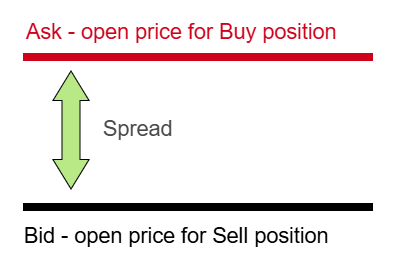
Bid-ask spread of a typical price quote.
A stop loss is an order to close an existing position at a predetermined price. The question is, which of these two prices should we track? A position is closed by taking a trade opposite to that of the existing side with the same quantity. Thus, a buy position of 0.5 lots is closed by taking a sell position of 0.5 lots. The trading terminal implicitly matches the two orders to close the position, particularly in hedging accounts where a new sell position does not automatically close an existing buy. Since the stop loss executes as a market order, it follows that, to close a buy position, we need to execute a sell market order of similar quantity, and since the bid price is the opening price for a market sell position, we get the stop condition as
Bid ≤ SL price
Similarly, we can deduce for sell positions that the ask price will be the opening price of the corresponding buy position; therefore, we get the stop condition.
Ask ≥ SL price
The figures below illustrate the stop conditions for the two types of positions. The CTrade class handles all the order matching for us, and all we need to do is call the PositionClose function on the corresponding position.
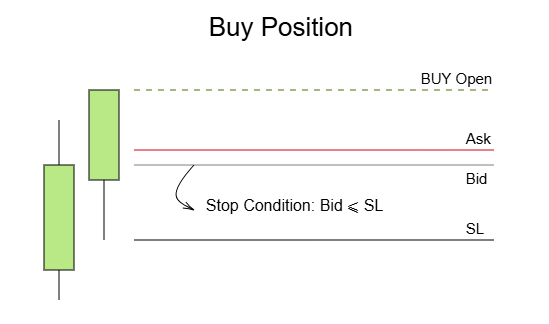
Stop-execution mechanism for buy positions.
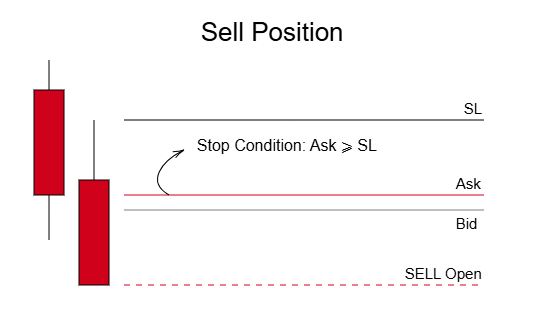
Stop-execution mechanism for sell positions.
A simple trick to deduce which price we need to track is to observe which of the two prices is closest to our stop price. As seen in the figures above, for a buy position, the bid price is nearest to the stop-loss level, and so the condition applies to the bid price; likewise, for the sell position, the ask price being nearest to the stop price line means it is this price that our code must track for the position exit. Now that we understand the mechanics of stop-loss execution, let us look at the core algorithm of our local stop loss.
Core Algorithm
Having understood the stop-loss mechanics, the core algorithm for our stop-loss system is as follows:
- Scan the current open positions for the chart symbol and loop through them one by one
- If a new position is detected, process the position by creating a local stop loss at a user-input stop distance and mark that position as processed
- If the position is already marked as processed, check whether the stop condition is met by getting the current value of the local stop loss and comparing it to the appropriate price of the quote based on the conditions described in Understanding Stop Loss Execution
- If the stop condition is met, close the position, remove the corresponding local stop-loss objects, and unmark it from the processed list
- Repeat 1 to 4 on every tick of the symbol.
HashMap
A HashMap is a data structure that stores data in key-value pairs, using a hash function to map keys to specific indices in underlying buckets for efficient retrieval. The main feature of the hashmap is that it allows an average O(1) time complexity (constant time) for insertion, deletion, and, most importantly, lookups. That is, we can instantly check whether a unique key belongs to the hashmap or not. MQL5 provides us with CHashMap, a generic data collection that we can use to store key-value pairs. Concretely, by storing the position ticket as the key and the stop price as a value, we can use the properties of the hashmap to efficiently check whether a position has been previously processed or not.
#include <Generic\HashMap.mqh>
CHashMap<ulong, double> OpenPositions;
Alternatively, you could store tickets in an array or list. However, each lookup would take O(n), repeated for n positions. The total complexity would then be O(n^2). In a primary risk management tool such as a local stop loss, we want to minimize any form of unnecessary compute, and by choosing a hashmap, we can reduce the total time complexity from O(n^2) to O(n), a significant efficiency boost. The CHashMap documentation provides a detailed description of the available methods; the ones relevant to us are as follows: Add—to add key-value pairs; Remove—to remove a key-value pair; ContainsKey—to determine whether the hashmap contains a specified key; TryGetValue—to get the value mapped to a specified key; TrySetValue—to change the value mapped to a specified key; Count—to get the number of elements in the hashmap; CopyTo—to iterate over the keys and values.
Getting Started
We now have all the elements to begin our development process. Get started by opening your MetaEditor for creating a new document as shown below.
Create a new document.
Select Expert Advisor (template), which will auto-generate the core functions of the Expert Advisor for us, and click on next.

Selection of expert template from the MQL5 wizard.
The MQL Wizard for general properties should appear. Give your file a descriptive name; we will call it Local Stop Loss for this tutorial. MQL5 source code files are saved with an .mq5 file extension. Properties in MQL5 are specific parameters that define the configuration, appearance, and behavior of programs through attributes such as author, copyright, description, version, and so on. In the MQL Wizard, mention the author's name and links, if any, and click on next.
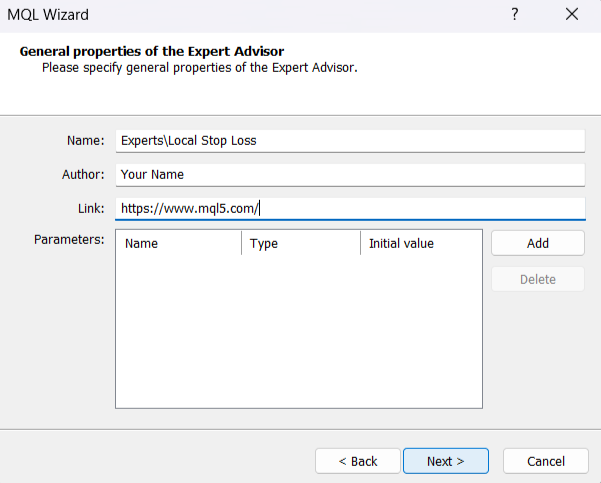
Specifying general properties
Expert Advisor Template
The Expert Advisor template should appear as below. Lines that begin with // are comments in MQL5 and are ignored by the compiler. We can use comments to provide short descriptions about functions, mark to-dos, or provide any further clarification regarding the code or design choice. MQL5, which is based on C++, also offers multi-line comments that start and end with /* and */, respectively. These are useful for longer comments or for selectively blocking code during development. Comments can also be paired with properties to make our input fields more descriptive for the users, as we shall see soon.
#property copyright "Your Name"
#property link      "https://www.mql5.com/"
#property version   "1.00"
//+------------------------------------------------------------------+
//| Expert initialization function                                   |
//+------------------------------------------------------------------+
int OnInit()
  {
//---
//---
   return(INIT_SUCCEEDED);
  }
//+------------------------------------------------------------------+
//| Expert deinitialization function                                 |
//+------------------------------------------------------------------+
void OnDeinit(const int reason)
  {
//---
  }
//+------------------------------------------------------------------+
//| Expert tick function                                             |
//+------------------------------------------------------------------+
void OnTick()
  {
//---
  }
//+------------------------------------------------------------------+
The EA template consists of the OnInit, OnDeinit and OnTick functions, which correspond to the lifecycle of the EA. The lifecycle of an EA begins when it is attached to the chart and ends when it is removed—externally or through code. In between, the EA handles the smallest unit of price updates known as a tick. Understanding the execution pattern of the three functions enables us to assign responsibilities to them.
- OnInit
The OnInit is the initialization function that runs once at the start of each EA lifecycle. For our purposes, we need to know that it will run once each time we attach the EA to the chart, compile the code, and/or change any of the input parameters. This function provides us the ability to carry out initializing operations that need to be executed at the start of our EA. The OnInit documentation also describes the values that we can return to denote the initialization status. We will use the OnInit function for validating our inputs, setting the values of our global variables, and attaching a local stop loss for the positions that were opened before the EA was attached.
- OnDeinit
The OnDeinit is the de-initialization function, and it too runs once—at the end of the EA lifecycle. The OnDeinit documentation provides a detailed description of the reasons for terminating an EA, but for us, knowing that it will run once when the EA is removed from the chart is sufficient. This function is mainly used for cleanup tasks such as freeing handles and releasing resources. We will use it to clean our local stop-loss objects on EA termination.
- OnTick
The OnTick is where our algorithmic logic lives. It runs every time our symbol has a price update known as a tick. The NewTick documentation provides additional details about the tick event. We will implement the core local stop-loss algorithm and its main functions inside OnTick.
Properties
We have already come across properties and their uses in the Getting Started section. MQL5 allows us to specify additional program properties to enhance source code readability and development. Properties belong to a special class of programs known as the preprocessor, intended for preparation of the program source code before compilation. We can include properties in the source code with a preprocessor directive that begins with #. Of the complete list of program properties in the documentation, we will include description—to provide a brief description of the EA that can be viewed from the Input wizard; script_show_inputs—to provide descriptive names for our inputs. In addition to the properties generated above, our complete properties section should look as follows:
#property copyright   "Your Name"
#property link        "https://www.mql5.com/"
#property version     "1.00"
#property description "Local Stop Loss EA"
#property script_show_inputs
Headers
We are using the OOP paradigm to build our local stop-loss system. Object-Oriented Programming provides a deep dive into OOP in MQL5 and its advantages. Briefly, the OOP paradigm is based on the creation of objects to model real-world entities. Each object is an instantiation of a class, which is a self-contained blueprint bundling data (in the form of attributes or fields) and behavior (in the form of methods or functions) pertaining to the entity. MQL5 provides us with predefined classes to aid in our development. We will be using:
- CTrade—For easy access to trade functions
- CPositionInfo—For easy access to open position properties
- CHashSet—For working with sets and handling additional cleanup edge cases
- CHashMap—For storing key/value pairs in a dynamic hash table
These classes are declared in header files, which we first need to import into our EA source to be able to instantiate their objects. We use the preprocessor directive #include, followed by the header file name in angle brackets. Alternatively, you can copy the relevant header file inclusion line from the documentation page of the class. We include the necessary header files as follows:
#include <Trade\Trade.mqh>
#include <Trade\PositionInfo.mqh>
#include <Generic\HashSet.mqh>
#include <Generic\HashMap.mqh>
Inputs Definition
We are now ready to define our inputs. For the local stop-loss system, we need to know from the user the initial distance from the open line to draw our stop loss—the stop distance. We would like to provide the user the option to mention the stop distance in the type of their choice. Enumerations are the perfect tool for this; they enable us to confine data to belong to a certain limited set. We can define our enumeration StoplossType as follows:
enum StoplossType
  {
   stoploss_pips,     // Pips - non Yen pairs
   stoploss_pips_yen, // Pips - Yen pairs
   stoploss_points    // Points
  };
Now the user can select their preferred stop-loss type. To define an input, we use the input modifier, followed by its data type. Each variable in MQL5 has an associated data type. The Data Types documentation provides a complete list of the natively available MQL5 data types and their selection. We can group associated inputs with the group identifier. We now define our inputs as follows:
//--- Inputs
input group        "Stoploss Settings"
input StoplossType InpSlType = stoploss_points;   // Stoploss Type
input double       InpPriceRange = 0;             // Stop distance
input group        "Colors"
input color        InpLongColor = clrOrange;      // Buy Positions
input color        InpShortColor = clrPink;       // Sell Positions
input group        "EA Identification Parameters"
input ulong        InpMagicNumber = 12345;        // Magic Number
Our above-defined enumeration, grouped along with a double value, gives us the input stop distance. We use the Color Type to enable the user to select colors for long and short positions. Additionally, the magic number input is provided to uniquely identify the trades placed by this EA for extensibility. We prefix each of our inputs with Inp to make them self-documenting. The values assigned to the inputs above become the default values at the time of initialization.
The comments at the end of each line serve a purpose. The property script_show_inputs that we have included displays this comment description instead of the source code name in the input dialog box, that is, "Stoploss Type" instead of "InpSlType." These descriptive names make our EA more accessible. Click on Compile at the top. Compilation takes our source .mq5 file and produces an executable binary .ex5 file. The article Editing, Compiling, and Running Programs provides a deep dive into the compilation procedure.
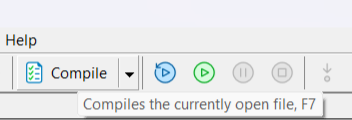
Compiling the EA
The expert should now appear in the Navigator of your MetaTrader 5 terminal. Click and drag to apply the EA to the chart. We can view the description from our properties in the common tab of the input dialog box along with the author name and link. Enable algorithmic trading.
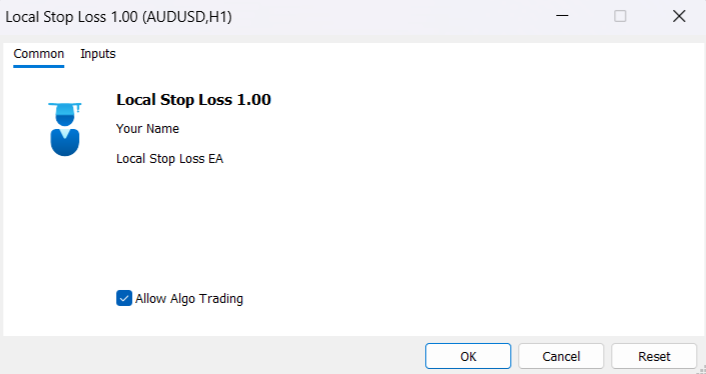
Common EA Description
The inputs tab of the dialog box shows our inputs neatly grouped along with their descriptive names from the comments.
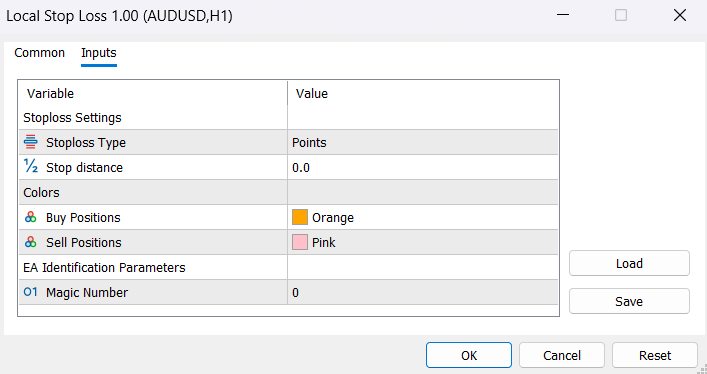
EA Inputs
Input Validation
The inputs defined above are available throughout our program code. We can reference them by their names anywhere in the program; they are said to be global to the program. Likewise, we can also define variables that can be accessed from anywhere in the program; we call these values global variables. To declare a global variable, we need to define it outside the scope of any function, similar to our inputs.
We have our input stop-loss type and the corresponding input stop-loss distance; let us define our first custom function to calculate the actual stop distance from these inputs. Functions are reusable blocks of code that perform a specific task. By giving useful names to these functions, we can make our code read in a declarative way while abstracting away the implementation details. Functions can optionally accept arguments and return values. Function documentation provides various examples of functions.
Our function should return the stop-loss distance, which, according to Data Type documentation, is a double value. We code the return type first, followed by the function name GetStopDistance(). Since the inputs are already accessible as global values, we keep the parentheses empty, indicating that our function does not take any arguments. We use the switch statement to match the InpSlType with each case of our enumeration StoplossType. Depending upon the case, multiply InpPriceRange with the corresponding pip value and return the result.
//+------------------------------------------------------------------+
//| Returns the stop distance for the input stop loss type           |
//+------------------------------------------------------------------+
double GetStopDistance()
  {
   switch(InpSlType)
     {
      case stoploss_pips:
         return InpPriceRange * 0.0001;

      case stoploss_pips_yen:
         return InpPriceRange * 0.01;

      case stoploss_points:
         return InpPriceRange;
     }
   return InpPriceRange;
  }
Since we have covered all the cases of the enumeration, the last return statement outside the switch is technically not reachable; however, the compiler expects every path of the code to return a value, and without this line, the compilation would fail.
We want our calculated stop-loss distance value to be accessible throughout the program without having to repeatedly call the GetStopDistance(). That is, we want this value to be a global variable whose value we can set at initialization. In addition, we need to set the Magic Number for our EA that will be visible throughout the program using the CTrade class we have already imported. We will instantiate our first object, also in global scope.
//--- Global variables
CTrade Trade;
double StoplossDistance;
As can be seen, there isn't much difference between declaring a variable and an object in MQL5.
Input validation refers to checking if our inputs hold a valid state in the OnInit function. InpSlType, InpLongColor, and InpShortColor can only take on a limited set of predefined values; we need not validate them. InpMagicNumber likewise takes on a ulong or unsigned long value with the minimum 0, identifying manual and EA trades identically. The InpPriceRange, however, cannot be 0 or negative; a negative or zero stop distance is not a valid state. Therefore, we use the if statement to check for 0 or negative values using operations of relation and notify the user using the MessageBox function. Out of the return values available from the OnInit documentation, we return INIT_PARAMETERS_INCORRECT when the inputs fail to validate and INIT_SUCCEEDED to indicate successful initialization.
Once our inputs are validated, we can populate our global variables inside OnInit. To set the Expert Magic Number, we access the SetExpertMagicNumber method of our CTrade object using the "." operator and pass the InpMagicNumber as the argument.
Trade.SetExpertMagicNumber(InpMagicNumber);
To set the value of the StopLossDistance, we assign it the value of the GetStopDistance() function.
StoplossDistance = GetStopDistance();
Putting it all together, we have our OnInit function.
//--- Global variables
CTrade Trade;
double StoplossDistance;
//+------------------------------------------------------------------+
//| Expert initialization function                                   |
//+------------------------------------------------------------------+
int OnInit()
  {
   if(InpPriceRange <= 0)
     {
      MessageBox("Stop Distance value cannot be 0 or negative");
      return INIT_PARAMETERS_INCORRECT;
     }
   Trade.SetExpertMagicNumber(InpMagicNumber);
   StoplossDistance = GetStopDistance();
   return(INIT_SUCCEEDED);
  }
Looping Through Positions
In this section, we will define our PositionsCheck function. This function will loop through all the open positions, check if the symbol matches our chart symbol, and decide a course of action based on whether the position is processed or not. It does not return any value, which will be denoted by the void return type in the function declaration.
Let us start by declaring our CHashMap as a global object to keep track of our processed open positions. The first data type of the declaration in angle brackets refers to the data type of the key, and the second is the data type of the value that we wish to map to our key. We will use the position ticket, which is a unique ulong for every position, and map it to the double value of the local stop loss for that position.
//--- Global variable
CHashMap<ulong, double> gblOpenPositions;
To stay consistent with our theme of self-documenting code, we prefix gbl to our global variables whose value is expected to change after OnInit. Unlike StoplossDistance, whose value remains constant after initialization, the gbl prefix will indicate that these variables are involved in state management.
The for loop enables us to execute a block of code repeatedly using three statements:
- Initialization—A one-time initialization of our counter variable
- Condition—The condition determining whether to repeat the code
- Update Expression—The expression to update our counter variable at the end of each iteration
We will use the for loop to loop through our open positions. The general structure will look like this:
for(int i = PositionsTotal()-1; i >= 0; i--)
  {

  }
The PositionsTotal function, which returns the total number of open positions, initializes the counter variable i. Our code will execute as long as the condition i ≥ 0 holds true, and we use the decrement operator i-- to update the counter variable by decreasing its value by 1 at the end of each iteration.
MQL5, which is based on C++, uses a zero-index system—positions are indexed from 0. Hence, we write
int i = PositionsTotal()-1;
at initialization, and use 0 instead of 1 in the condition,
i >= 0; Finally, we do a backward loop instead of the corresponding forward loop.
for(int i = 0; i < PositionsTotal(); i++)
This avoids the repeated calculation of PositionsTotal() in the condition i<PositionsTotal() at the end of each iteration. The backward loop calculates PositionsTotal() only once—at initialization, which is more efficient.
With the loop structure in place, we will use a CPositionInfo object, posInfo, to access the properties of open positions. The SelectByIndex method selects the position at index i of the counter variable. This method returns a bool type denoting the success or failure of the operation, which we can test using the if statement and logical operations. In case the selection fails, we can skip that particular iteration using the continue statement.
//--- Local variable
CPositionInfo posInfo;
if(!posInfo.SelectByIndex(i))
   continue;
Once we have a position successfully selected, all further methods called on the posInfo object will correspond to that specific position. We only want to work with the positions that correspond to our chart symbol. We can call the Symbol method of our posInfo object and compare it to the Symbol function, which returns the current chart symbol. If they do not match, we skip that iteration using continue.
if(posInfo.Symbol() != Symbol())
   continue;
The above two checks are also known as guard clauses—they enable us to skip paths that are not relevant to us. MQL5 automatically handles the destruction of the local posInfo object whenever it goes out of scope, following the C++ principles of RAII. The C++ reference on RAII provides a description of this programming technique, but for our use case, we simply declare and use the object; MQL5 takes care of the rest.
We now have an open position matching our chart symbol selected in the posInfo object. To verify whether we have previously processed this position, we check if our gblOpenPositions hash map contains the corresponding position ticket as a key. We do this by calling the ContainsKey method and passing the position ticket as an argument.
- If true, pass posInfo to CheckProcessedPosition.
- If false, process the position by passing posInfo to ProcessPosition.
if(gblOpenPositions.ContainsKey(posInfo.Ticket()))
   {
    CheckProcessedPosition(posInfo); // Not yet implemented
   }
else
   {
    ProcessPosition(posInfo);        // Not yet implemented
   }
We will implement ProcessPosition and CheckProcessedPosition in the following sections. At last, we will declare an int variable posCount to keep a count of the number of positions matching our symbol.
int posCount = 0;
We will increment the value of this count, posCount += 1, inside our loop at the end. We will use this variable later when we manage multiple positions. Gathering it all together, we get our PositionsCheck function.
//+------------------------------------------------------------------+
//| Scans and processes new positions, manages already processed ones|
//+------------------------------------------------------------------+
void PositionsCheck()
  {
   int posCount = 0;
   for(int i = PositionsTotal()-1; i >= 0; i--)
     {
      CPositionInfo posInfo;
      if(!posInfo.SelectByIndex(i))
         continue;
      if(posInfo.Symbol() != Symbol())
         continue;

      if(gblOpenPositions.ContainsKey(posInfo.Ticket()))
        {
         CheckProcessedPosition(posInfo);
        }
      else
        {
         ProcessPosition(posInfo);
        }
      posCount += 1;
     }
  }
Creating Stop Loss Objects
In this section, we will define the ProcessPosition function. This function contains the logic for creating our local stop loss. It accepts a CPositionInfo object posInfo containing the properties of the open position we wish to process and does not return any value. Once a position is processed, its ticket is added to the gblOpenPositions hash map to mark the position as processed. The function signature is
void ProcessPosition(CPositionInfo &posInfo) Note the & before the posInfo parameter. In MQL5, we can only pass objects by reference. The & denotes that the parameter is a reference to the CPositionInfo object. C++ reference provides a detailed explanation of references to objects and function parameters. For our purpose, since we do not modify the posInfo object, it is sufficient to know that references are an efficient way to pass objects as arguments to functions.
MQL5 provides object functions for working with graphical objects (different from OOP objects). We will utilize them to create the open and stop-loss lines for our positions.
Every graphical object needs to have a unique name within a chart. Additionally, we are also responsible for cleaning up the graphical objects we create. All names belong to the string type. Let us define a common prefix for the names of all the objects we will create.
//--- Global variable
string CslPrefix = "csl_"; // Csl here stands for custom stop loss
This prefix enables us to easily identify our graphical objects and aids in the cleanup process.
With the prefix defined, we can use the position ticket to generate unique names with the help of IntegerToString and the string concatenation operator +. We will append _open for the open line and _line for the stop-loss line. This gives us two helper functions to generate the names.
//+------------------------------------------------------------------+
//| Returns the name of the open line for the input position ticket  |
//+------------------------------------------------------------------+
string GetOpenName(ulong ticket)
  {
   return CslPrefix + IntegerToString(ticket) + "_open";
  }

//+------------------------------------------------------------------+
//| Returns the name for the local stop loss line                    |
//+------------------------------------------------------------------+
string GetCslName(ulong ticket)
  {
   return CslPrefix + IntegerToString(ticket) + "_line";
  }
Similarly, we generate a label for the open line using DoubleToString to convert double values such as volume and price to string type. We will use the ternary operator on the ENUM_POSITION_TYPE to prefix BUY or SELL based on the trade direction (the same could be achieved with an if or switch statement).
//+------------------------------------------------------------------+
//| Returns the display label for the open line                      |
//+------------------------------------------------------------------+
string GetOpenLabel(ENUM_POSITION_TYPE posType, double volume, double price)
  {
   string priceString = DoubleToString(volume,2) + " at " +DoubleToString(price, Digits()); // Volume normalized to 2 decimal places, price normalized to chart symbol Digits()
   return posType == POSITION_TYPE_BUY? " BUY " + priceString : " SELL " + priceString;
  }
Let us create one last helper to get the stop-loss price from the open price. The use of the ternary operator is similar to the above function; this time we will subtract StoplossDistance from the open for buy position and add StoplossDistance to the open price for sell position to get the stop loss price and return the result.
//+------------------------------------------------------------------+
//| Returns the price at which to create the local stop loss         |
//+------------------------------------------------------------------+
double GetCslPrice(double openPrice, ENUM_POSITION_TYPE posType)
  {
   return posType == POSITION_TYPE_BUY? openPrice - StoplossDistance : openPrice + StoplossDistance; // For buy: stop is below open price; for sell: stop is above open price
  }
The process of creating our open and stop-loss line consists of two steps: first, using ObjectCreate to create an OBJ_HLINE; second, setting the values of the object properties. We will use the ChartID function to identify our chart while working with objects. Let us obtain the names and values we require from our helpers.
double   openPrice = posInfo.PriceOpen();
double   cslPrice  = GetCslPrice(openPrice, posInfo.PositionType());
color    lineColor = posInfo.PositionType() == POSITION_TYPE_BUY? InpLongColor : InpShortColor;
string   openName  = GetOpenName(posInfo.Ticket());
string   openLabel = GetOpenLabel(posInfo.PositionType(), posInfo.Volume(), openPrice);
string   cslName   = GetCslName(posInfo.Ticket());
int      subWindow = 0; // Main chart
datetime time      = 0; // OBJ_HLINE has no time coordinate
The Object Properties documentation provides the complete list of object properties and their values. For our open line, we will use the ObjectSetInteger to set the OBJPROP_COLOR and OBJPROP_STYLE line style to STYLE_DASHDOT. For the label, we will use the ObjectSetString function to set the OBJPROP_TEXT property.
//--- Create the open line
ObjectCreate(ChartID(), openName, OBJ_HLINE, subWindow, time, openPrice);
ObjectSetInteger(ChartID(), openName, OBJPROP_COLOR, lineColor);
ObjectSetInteger(ChartID(), openName, OBJPROP_STYLE, STYLE_DASHDOT);
ObjectSetString(ChartID(), openName, OBJPROP_TEXT, openLabel);
Our stop-loss line needs to be selectable and draggable; we can do this by setting the values of the OBJPROP_SELECTABLE and OBJPROP_SELECTED properties to true using ObjectSetInteger. Likewise, for OBJPROP_COLOR.
//--- Create the stop loss line
ObjectCreate(ChartID(), cslName, OBJ_HLINE, subWindow, time, cslPrice);
ObjectSetInteger(ChartID(), cslName, OBJPROP_COLOR, lineColor);
ObjectSetInteger(ChartID(), cslName, OBJPROP_SELECTABLE, true);
ObjectSetInteger(ChartID(), cslName, OBJPROP_SELECTED, true);
In the end, we will call the Add method of gblOpenPositions to add the position ticket and stop-loss price to our hash map and mark the position ticket as processed.
//--- Add position ticket to hashmap along with the stop price to mark as processed
gblOpenPositions.Add(posInfo.Ticket(), cslPrice);
Putting it all together, we have our ProcessPosition function.
//+------------------------------------------------------------------+
//| Creates the objects for the open and local stop loss line        |
//+------------------------------------------------------------------+
void ProcessPosition(CPositionInfo &posInfo)
  {
   double   openPrice = posInfo.PriceOpen();
   double   cslPrice  = GetCslPrice(openPrice, posInfo.PositionType());
   color    lineColor = posInfo.PositionType() == POSITION_TYPE_BUY? InpLongColor : InpShortColor;
   string   openName  = GetOpenName(posInfo.Ticket());
   string   openLabel = GetOpenLabel(posInfo.PositionType(), posInfo.Volume(), openPrice);
   string   cslName   = GetCslName(posInfo.Ticket());
   int      subWindow = 0; // Main chart
   datetime time      = 0; // OBJ_HLINE has no time coordinate

//--- Create the open line
   ObjectCreate(ChartID(), openName, OBJ_HLINE, subWindow, time, openPrice);
   ObjectSetInteger(ChartID(), openName, OBJPROP_COLOR, lineColor);
   ObjectSetInteger(ChartID(), openName, OBJPROP_STYLE, STYLE_DASHDOT);
   ObjectSetString(ChartID(), openName, OBJPROP_TEXT, openLabel);

//--- Create the stop loss line
   ObjectCreate(ChartID(), cslName, OBJ_HLINE, subWindow, time, cslPrice);
   ObjectSetInteger(ChartID(), cslName, OBJPROP_COLOR, lineColor);
   ObjectSetInteger(ChartID(), cslName, OBJPROP_SELECTABLE, true);
   ObjectSetInteger(ChartID(), cslName, OBJPROP_SELECTED, true);

//--- Add position ticket to hashmap along with the stop price to mark as processed
   gblOpenPositions.Add(posInfo.Ticket(), cslPrice);
  }
Cleanup
Object creation and cleanup go hand in hand. There are two instances where we have to clean up our objects: first, removing the objects related to a particular position; second, when the EA is removed from the chart or terminated. To delete the objects of a specific position, we can pass the object name to the ObjectDelete function. Using our helpers defined in Creating Stop Loss Objects, we can delete a position's objects using its ticket.
//+------------------------------------------------------------------+
//| Deletes objects related to the input ticket                      |
//+------------------------------------------------------------------+
void CleanupPositionObjects(ulong ticket)
  {
   ObjectDelete(ChartID(), GetOpenName(ticket));
   ObjectDelete(ChartID(), GetCslName(ticket));
  }
At deinitialization, we want to delete all objects created by our EA to not clutter our chart. We can pass our CslPrefix (which is common to all our created objects) to the ObjectsDeleteAll function to achieve this.
//+------------------------------------------------------------------+
//| Expert deinitialization function                                 |
//+------------------------------------------------------------------+
void OnDeinit(const int reason)
  {
   ObjectsDeleteAll(ChartID(), CslPrefix);
  }
Checking Stop Condition
In this section, we will define the CheckProcessedPosition function. It is responsible for checking the stop condition of the local stop loss for a previously processed position. If the stop condition is met, the function will close that particular position, delete its associated objects, and remove its ticket from gblOpenPositions. If not, it will update the gblOpenPositions hash map with the most recent value of the local stop loss.
The function accepts a reference to a CPositionInfo object posInfo containing the properties of the open position we wish to check and does not return any value. The function signature is
void CheckProcessedPosition(CPositionInfo &posInfo) When we close a position, we need to delete its associated objects and then call the Remove method of gblOpenPositions to remove its ticket. We have already defined the object cleanup function in Cleanup; let us write a helper that will achieve both.
//+------------------------------------------------------------------+
//| Deletes objects related to the input ticket and updates hashmap  |
//+------------------------------------------------------------------+
void CleanupPosition(ulong ticket)
  {
   CleanupPositionObjects(ticket);
   gblOpenPositions.Remove(ticket);
  }
This gathers all position cleanup logic in one place, which we can call repeatedly.
The local stop-loss line is draggable, and its value may have changed since we last stored it. We need to use object functions to retrieve the most recent value of the stop loss directly from the chart object. To avoid errors while getting the stop loss value, we will first check for the existence of the stop loss line. The line could have been accidentally deleted by some user. The ObjectFind function searches for an object with the specified name. It returns an int instead of a bool, so we check for a negative value instead.
//--- Checking if the stop loss line object exists
string cslName = GetCslName(posInfo.Ticket());
if(ObjectFind(ChartID(), cslName) < 0)
  {
   CleanupPosition(posInfo.Ticket());
   ProcessPosition(posInfo);
   return;
  }
If we cannot find the local stop-loss line on the chart, we should redraw it by treating this position as unprocessed. We call CleanupPosition first to start with a clean slate, then call ProcessPosition on the position.
With the existence of the stop loss line confirmed, we can use ObjectGetDouble to retrieve the OBJPROP_PRICE property of the stop loss line. This will give us the current value of the stop loss.
double cslPrice = ObjectGetDouble(ChartID(), cslName, OBJPROP_PRICE);
We will use the MqlTick structure to get the bid and ask quotes of the current tick. A structure is a data type that groups logically related variables of different data types. The MqlTick structure groups all the essential variables of a tick into a single data structure. It is designed for fast information retrieval using the SymbolInfoTick function.
From the documentation, SymbolInfoTick accepts a reference to the MqlTick structure. The reference allows the function to modify the input structure directly by populating it with values pertaining to the most recent tick. References not only provide an efficient way to pass data to functions but also allow for speedy modification. C++ reference contains more information on references.
MqlTick curTick;
SymbolInfoTick(Symbol(), curTick);
We can access the fields of the curTick structure using the . operator, similar to our objects—curTick.bid and curTick.ask will give us the latest bid and ask prices, respectively.
We can now express our stop condition using ENUM_POSITION_TYPE and logical operations as follows:
(posInfo.PositionType() == POSITION_TYPE_BUY  && curTick.bid <= cslPrice) ||
(posInfo.PositionType() == POSITION_TYPE_SELL && curTick.ask >= cslPrice)
- For buy positions, we check if curTick.bid ≤ cslPrice.
- For sell positions, we check if curTick.ask ≥ cslPrice.
By clubbing both conditions with ||, we can carry out the cleanup operation in a single if statement. To close the position, we pass its ticket to the PositionClose method of our Trade object, then call CleanupPosition and return to exit the function.
//--- Evaluate stop condition
if((posInfo.PositionType() == POSITION_TYPE_BUY  && curTick.bid <= cslPrice) ||
   (posInfo.PositionType() == POSITION_TYPE_SELL && curTick.ask >= cslPrice))
  {
   Trade.PositionClose(posInfo.Ticket());
   CleanupPosition(posInfo.Ticket());
   return;
  }
If the stop condition is not met, we update gblOpenPositions with the most recent value of the stop loss. The TryGetValue method retrieves the value currently mapped to the position ticket. If this value differs from the stop-loss price obtained from the chart, we will use TrySetValue to update it.
//--- Updating the value of the local stop loss in the hashmap
double lastCsl;
gblOpenPositions.TryGetValue(posInfo.Ticket(), lastCsl);

if(lastCsl != cslPrice)
  {
   gblOpenPositions.TrySetValue(posInfo.Ticket(), cslPrice);
  }
Putting it all together, we have the CheckProcessedPosition function.
//+------------------------------------------------------------------+
//| Checks for stop condition and closes the position if met         |
//+------------------------------------------------------------------+
void CheckProcessedPosition(CPositionInfo &posInfo)
  {
//--- Checking if the stop loss line object exists
   string cslName = GetCslName(posInfo.Ticket());
   if(ObjectFind(ChartID(), cslName) < 0)
     {
      CleanupPosition(posInfo.Ticket());
      ProcessPosition(posInfo);
      return;
     }

//--- Evaluating the stop condition
   MqlTick curTick;
   SymbolInfoTick(Symbol(), curTick);

   double cslPrice = ObjectGetDouble(ChartID(), cslName, OBJPROP_PRICE);
   if((posInfo.PositionType() == POSITION_TYPE_BUY  && curTick.bid <= cslPrice) ||
      (posInfo.PositionType() == POSITION_TYPE_SELL && curTick.ask >= cslPrice))
     {
      Trade.PositionClose(posInfo.Ticket());
      CleanupPosition(posInfo.Ticket());
      return;
     }

//--- Updating the value of the local stop loss in the hashmap
   double lastCsl;
   gblOpenPositions.TryGetValue(posInfo.Ticket(), lastCsl);

   if(lastCsl != cslPrice)
     {
      gblOpenPositions.TrySetValue(posInfo.Ticket(), cslPrice);
     }
  }
Testing Stop Functionality
We have now defined all the core functions of the local stop-loss algorithm. To test our logic and the functionality of the EA, add the PositionsCheck function to both OnInit and OnTick.
//+------------------------------------------------------------------+
//| Expert initialization function                                   |
//+------------------------------------------------------------------+
int OnInit()
  {
//--- Input validation
   if(InpPriceRange <= 0)
     {
      MessageBox("Stop Distance value cannot be 0 or negative");
      return INIT_PARAMETERS_INCORRECT;
     }
   Trade.SetExpertMagicNumber(InpMagicNumber);
   StoplossDistance = GetStopDistance();

//--- Running PositionsCheck() for the existing open positions
   PositionsCheck();
   return(INIT_SUCCEEDED);
  }

//+------------------------------------------------------------------+
//| Expert tick function                                             |
//+------------------------------------------------------------------+
void OnTick()
  {
   PositionsCheck();
  }
We run PositionsCheck once inside OnInit to process any existing open positions. Since PositionsCheck calls ProcessPosition and CheckProcessedPosition internally, the body of our OnTick function consists of a single PositionsCheck function call.
Compile the program. Once compilation succeeds without errors, attach the EA to a chart and observe its behavior. Click on the GIF to see the stop-loss system in action.
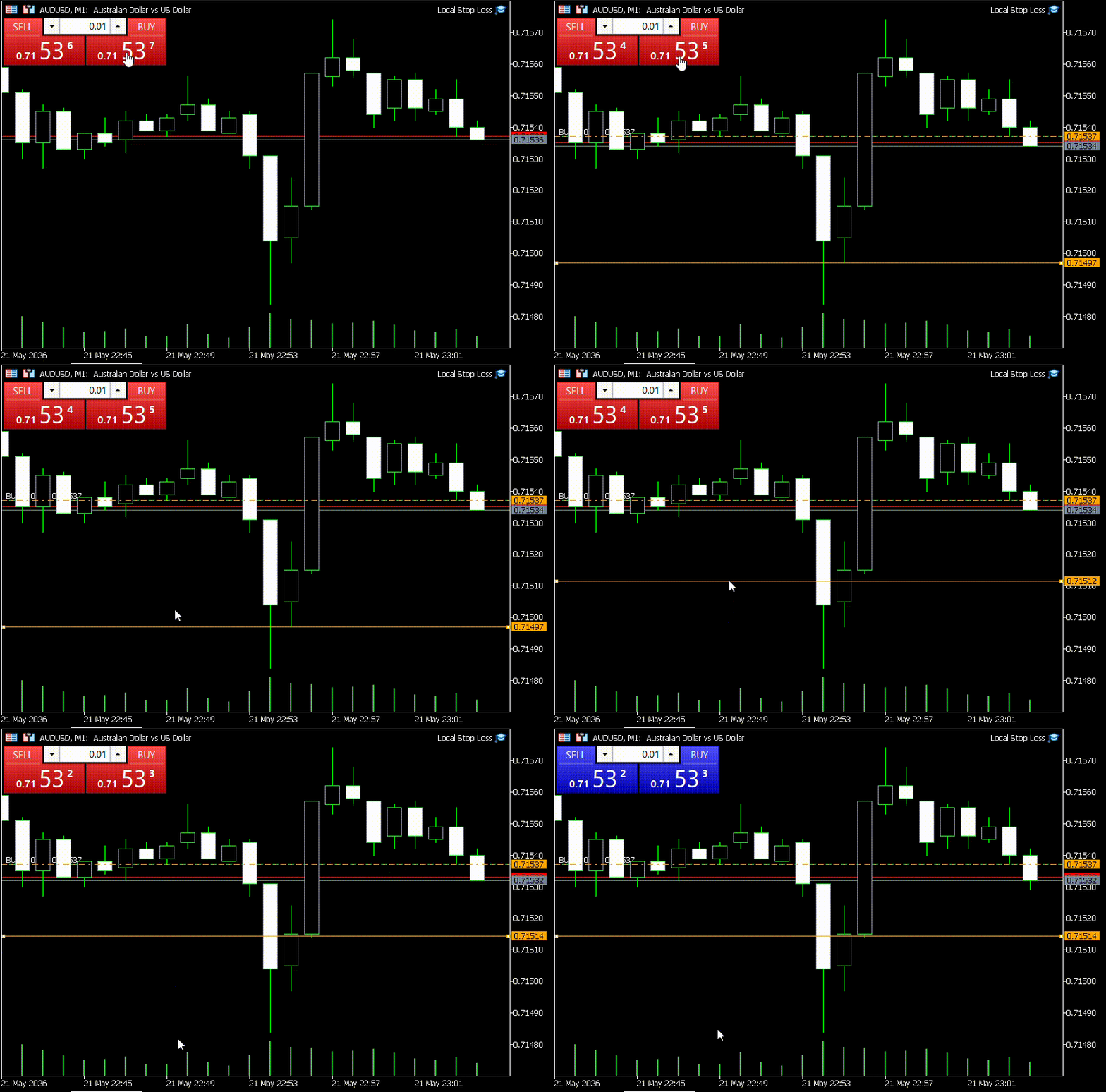
Testing local stop-loss functionality
More Cleanup
We now have a working stop-loss system. In the next few sections, we will add refinements that make it easier to work with multiple positions and trade labeling.
But first, we have an object cleanup edge case to consider. CheckProcessedPosition calls CleanupPosition when the stop condition is met. What if a position is closed externally (by the user or the broker)? The position would not show up in PositionsCheck, and subsequently, CleanupPosition would never be called on its objects until deinitialization. We will use CHashSet to fix this.
A hash set is a data structure that stores unique elements in an unordered manner, utilizing a hashing algorithm to map each element to a specific index (bucket) for rapid access. They are quite similar to hash maps in that they provide an average O(1) time complexity (constant time) for operations such as add, remove, and lookups. The key difference between the two is that a hash set does not map keys to values—it stores only unique keys.
Let us modify the PositionsCheck function to handle cleanup for positions closed externally. Using a hash set, we will track the position tickets we come across in the for loop. We can then iterate through the tickets stored in gblOpenPositions and clean up the positions that are not present in the hash set.
Begin by declaring a CHashSet object inside PositionsCheck to store position tickets of the ulong type.
//--- Declare inside PositionsCheck
CHashSet<ulong> curPositions;
Inside the loop, call the Add method of curPositions to add the ticket to the hash set.
for(int i = PositionsTotal()-1; i >= 0; i--)
  {
   CPositionInfo posInfo;
   if(!posInfo.SelectByIndex(i))
      continue;
   if(posInfo.Symbol() != Symbol())
      continue;

   if(gblOpenPositions.ContainsKey(posInfo.Ticket()))
     {
      CheckProcessedPosition(posInfo);
     }
   else
     {
      ProcessPosition(posInfo);
     }
//--- Add the ticket of the current open position to hash set
   curPositions.Add(posInfo.Ticket());
   posCount += 1;
  }
To iterate through the keys in gblOpenPositions, we will first need to copy its keys to an array using the CopyTo method of gblOpenPositions. CopyTo accepts two arrays for copying both keys and values of the hash map.
We first declare two empty arrays using [] that match the data types of the keys and values of gblOpenPositions, respectively, then use ArrayResize to resize the arrays to the number of key/value pairs obtained using the Count method of gblOpenPositions.
ulong openPos[]; // Array to store keys
double csl[];    // Array to store values
ArrayResize(openPos, gblOpenPositions.Count());
ArrayResize(csl, gblOpenPositions.Count());
CopyTo returns the number of key/value pairs successfully copied. We can use this to initialize our counter variable in the for loop. Individual array values can be accessed using [] and the counter variable.
We will loop through the keys (openPos) and, for each position, check if it is present in the curPositions hash set using its Contains method. If we cannot find the position ticket in curPositions, it is not currently open and needs to be cleaned up using CleanupPosition.
int numPos = gblOpenPositions.CopyTo(openPos, csl);
for(int i = numPos-1; i >= 0; i--)
  {
   if(!curPositions.Contains(openPos[i]))
     {
      CleanupPosition(openPos[i]);
     }
  }
We now have our PositionsCheck function with more robust cleanup.
//+------------------------------------------------------------------+
//| Scans and processes new positions, manages already processed ones|
//+------------------------------------------------------------------+
void PositionsCheck()
  {
   CHashSet<ulong> curPositions;
   int posCount = 0;
   for(int i = PositionsTotal()-1; i >= 0; i--)
     {
      CPositionInfo posInfo;
      if(!posInfo.SelectByIndex(i))
         continue;
      if(posInfo.Symbol() != Symbol())
         continue;

      if(gblOpenPositions.ContainsKey(posInfo.Ticket()))
        {
         CheckProcessedPosition(posInfo);
        }
      else
        {
         ProcessPosition(posInfo);
        }
      curPositions.Add(posInfo.Ticket());
      posCount += 1;
     }

//--- Closed positions object cleanup
   ulong openPos[];
   double csl[];
   ArrayResize(openPos, gblOpenPositions.Count());
   ArrayResize(csl, gblOpenPositions.Count());
   int numPos = gblOpenPositions.CopyTo(openPos, csl);
   for(int i = numPos-1; i >= 0; i--)
     {
      if(!curPositions.Contains(openPos[i]))
        {
         CleanupPosition(openPos[i]);
        }
     }
  }
Managing Multiple Positions
In this section, we will implement spacers to help visually distinguish stop losses of multiple positions. Our EA logic handles stop-loss execution for multiple positions seamlessly. However, with multiple positions opened in proximity, it can be visually difficult to deduce which position a stop-loss line belongs to. The image below illustrates this problem.
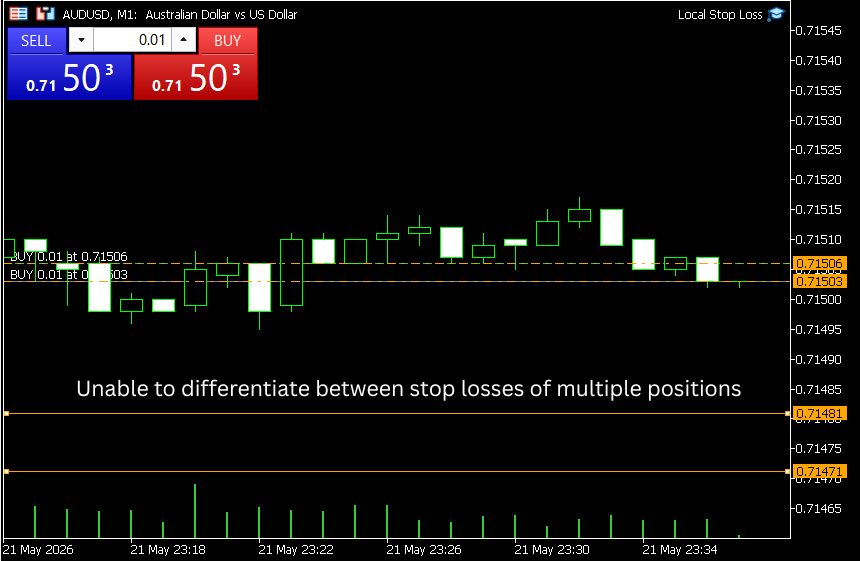
Difficulty differentiating between local stops of multiple positions.
We can draw spacers, which are vertically oriented bars spaced horizontally on the left-hand side of the chart that connect a position's stop-loss line with its entry. These spacers are dynamic and adapt in length as the stop loss is dragged and moved. With spacers, we can provide clean visual separation between multiple positions as shown below.
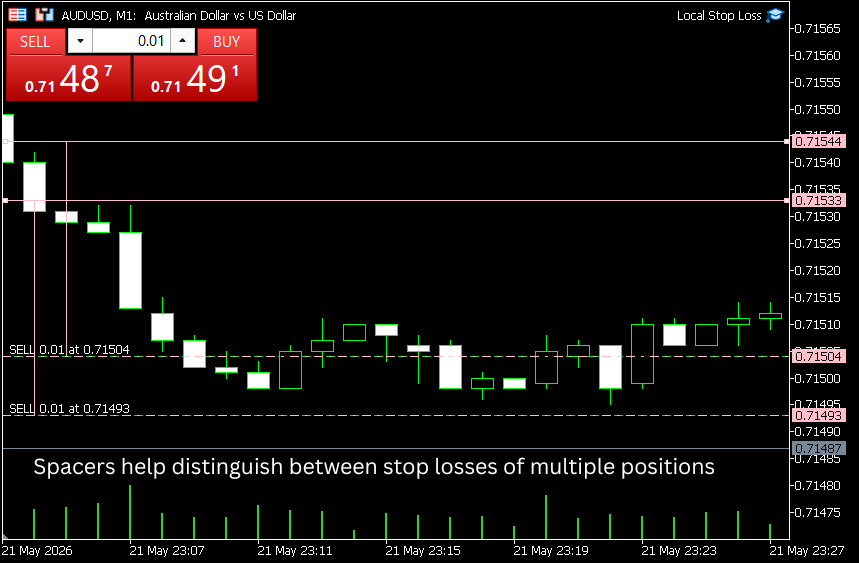
Spacers solve the problem
Let us implement this into our EA.
To draw the spacers, we will get the CHART_FIRST_VISIBLE_BAR chart property using the ChartGetInteger function. This returns the index (starting from the right) of the leftmost visible bar on the chart. We would also like to offset our spacer from the leftmost bar for better visual placement. Let us create a global variable for the offset.
//--- Global variable
int LeftOffset = 1; // Shift from the leftmost bar to draw the spacer
We can get the index of the leftmost bar using ChartGetInteger. By default, ChartGetInteger returns a ulong value. We will typecast it to an int.
int curLeftBar = (int) ChartGetInteger(ChartID(), CHART_FIRST_VISIBLE_BAR);
We will include this in our PositionsCheck function once we define the spacer drawing logic. Let us start by writing a helper to get the name of the spacer line for a position.
//+------------------------------------------------------------------+
//| Returns the name of spacer line for the input position ticket    |
//+------------------------------------------------------------------+
string GetSpacerName(ulong ticket)
  {
   return CslPrefix + IntegerToString(ticket) + "_spacer";
  }
The posCount variable of the PositionsCheck function maintains a running count of the open positions for the chart symbol. We can use it as an index to determine the overall offset of the spacer line for each position.
The spacer line is an OBJ_TREND object, which requires two anchor points at creation using ObjectCreate. Since the line is vertical, the time coordinates of the two points will be the same. The price coordinates are the open line price and the stop line price.
To get the time coordinate of the bar measured relative to the leftmost bar for a given index idx, we will use the iTime function along with the current chart period.
datetime time = iTime(Symbol(), Period(), curLeftBar-idx-LeftOffset); // idx is the index of the current open position obtained from posCount, curLeftBar is the index of the leftmost bar
The last parameter of iTime is the shift from the current forming bar. Since bar indices also start from the current forming bar, we subtract the position index idx and LeftOffset from curLeftBar as we move rightward.
We will create two function overloads for the DrawSpacer function. These are functions with the same name but different parameter counts or return types. The compiler will choose the appropriate function call that matches the arguments passed.
The first overload creates the spacer object for a new position. This function requires both openPrice and cslPrice as inputs to draw the spacer. Note that for the two anchors required by ObjectCreate, the open price anchor has index 0 and the stop price anchor has index 1. We will need these indices when updating spacers for existing positions.
//+------------------------------------------------------------------+
//| Draws the spacer line for a newly detected position              |
//+------------------------------------------------------------------+
void DrawSpacer(ulong ticket, double openPrice, double cslPrice, color clr, int curLeftBar, int idx)
  {
   string spacerName = GetSpacerName(ticket);
   datetime time = iTime(Symbol(), Period(), curLeftBar-idx-LeftOffset);
   int subWindow = 0;
   ObjectCreate(ChartID(), spacerName, OBJ_TREND, subWindow, time, openPrice, time, cslPrice);
   ObjectSetInteger(ChartID(), spacerName, OBJPROP_COLOR, clr);
  }
The second overload draws the spacer for an existing open position. In this function, we do not need the open price because it never changes. We use ObjectSetInteger to set the time coordinate of the open price anchor (index 0) and ObjectMove to change both the time and price coordinates of the stop price anchor (index 1).
//+------------------------------------------------------------------+
//| Draws the spacer line for an existing open position              |
//+------------------------------------------------------------------+
void DrawSpacer(ulong ticket, double cslPrice, int curLeftBar, int idx)
  {
   string spacerName = GetSpacerName(ticket);
   datetime newTime = iTime(Symbol(), Period(), curLeftBar-idx-LeftOffset);
   ObjectSetInteger(ChartID(), spacerName, OBJPROP_TIME, newTime);
   ObjectMove(ChartID(), spacerName, 1, newTime, cslPrice);
  }
Staying consistent with our theme of keeping object creation and deletion together, let us update CleanupPositionObjects to include spacer object deletion.
//+------------------------------------------------------------------+
//| Deletes objects related to the input ticket                      |
//+------------------------------------------------------------------+
void CleanupPositionObjects(ulong ticket)
  {
   ObjectDelete(ChartID(), GetOpenName(ticket));
   ObjectDelete(ChartID(), GetCslName(ticket));
   ObjectDelete(ChartID(), GetSpacerName(ticket));
  }
To call DrawSpacer from ProcessPosition, we will need to expand the function signature to accept the curLeftBar and idx parameters.
void ProcessPosition(CPositionInfo &posInfo, int curLeftBar, int idx)
These arguments can then be passed to the DrawSpacer function call. Since ProcessPosition processes a new position, we call the first overload of DrawSpacer. The updated ProcessPosition with spacers.
//+------------------------------------------------------------------+
//| Creates the objects for the open and local stop loss line        |
//+------------------------------------------------------------------+
void ProcessPosition(CPositionInfo &posInfo, int curLeftBar, int idx)
  {
   double   openPrice = posInfo.PriceOpen();
   double   cslPrice  = GetCslPrice(openPrice, posInfo.PositionType());
   color    lineColor = posInfo.PositionType() == POSITION_TYPE_BUY? InpLongColor : InpShortColor;
   string   openName  = GetOpenName(posInfo.Ticket());
   string   openLabel = GetOpenLabel(posInfo.PositionType(), posInfo.Volume(), openPrice);
   string   cslName   = GetCslName(posInfo.Ticket());
   int      subWindow = 0; // Main chart
   datetime time      = 0; // OBJ_HLINE has no time coordinate

//--- Create the open line
   ObjectCreate(ChartID(), openName, OBJ_HLINE, subWindow, time, openPrice);
   ObjectSetInteger(ChartID(), openName, OBJPROP_COLOR, lineColor);
   ObjectSetInteger(ChartID(), openName, OBJPROP_STYLE, STYLE_DASHDOT);
   ObjectSetString(ChartID(), openName, OBJPROP_TEXT, openLabel);

//--- Create the stop loss line
   ObjectCreate(ChartID(), cslName, OBJ_HLINE, subWindow, time, cslPrice);
   ObjectSetInteger(ChartID(), cslName, OBJPROP_COLOR, lineColor);
   ObjectSetInteger(ChartID(), cslName, OBJPROP_SELECTABLE, true);
   ObjectSetInteger(ChartID(), cslName, OBJPROP_SELECTED, true);

//--- Draw the spacer line for the new position
   DrawSpacer(posInfo.Ticket(), openPrice, cslPrice, lineColor, curLeftBar, idx);

//--- Add position ticket to hashmap along with the stop price to mark as processed
   gblOpenPositions.Add(posInfo.Ticket(), cslPrice);
  }
Similarly, the signature of CheckProcessedPosition is expanded to accept the curLeftBar and idx parameters.
void CheckProcessedPosition(CPositionInfo &posInfo, int curLeftBar, int idx)
For processed positions, we call the second overload of DrawSpacer. We also update the ProcessPosition function call to handle the additional arguments in the case where we fail to find the stop-loss line.
The updated CheckProcessedPosition with spacers,
//+------------------------------------------------------------------+
//| Checks for stop condition and closes the position if met         |
//+------------------------------------------------------------------+
void CheckProcessedPosition(CPositionInfo &posInfo, int curLeftBar, int idx)
  {
//--- Check if the stop loss line object exists
   string cslName = GetCslName(posInfo.Ticket());
   if(ObjectFind(ChartID(), cslName) < 0)
     {
      CleanupPosition(posInfo.Ticket());
      ProcessPosition(posInfo, curLeftBar, idx);
      return;
     }

//--- Evaluate the stop condition
   MqlTick curTick;
   SymbolInfoTick(Symbol(), curTick);

   double cslPrice = ObjectGetDouble(ChartID(), cslName, OBJPROP_PRICE);
   if((posInfo.PositionType() == POSITION_TYPE_BUY  && curTick.bid <= cslPrice) ||
      (posInfo.PositionType() == POSITION_TYPE_SELL && curTick.ask >= cslPrice))
     {
      Trade.PositionClose(posInfo.Ticket());
      CleanupPosition(posInfo.Ticket());
      return;
     }

//--- Draw the spacer line for an existing position
   DrawSpacer(posInfo.Ticket(), cslPrice, curLeftBar, idx);

//--- Update the value of the local stop loss in the hashmap
   double lastCsl;
   gblOpenPositions.TryGetValue(posInfo.Ticket(), lastCsl);

   if(lastCsl != cslPrice)
     {
      gblOpenPositions.TrySetValue(posInfo.Ticket(), cslPrice);
     }
  }
Finally, we update PositionsCheck to retrieve the leftmost bar value and pass it, along with posCount as idx, to ProcessPosition and CheckProcessedPosition. This completes the spacer implementation. The updated PositionsCheck with spacers.
//+------------------------------------------------------------------+
//| Scans and processes new positions, manages already processed ones|
//+------------------------------------------------------------------+
void PositionsCheck()
  {
   int curLeftBar = (int) ChartGetInteger(ChartID(), CHART_FIRST_VISIBLE_BAR);
   CHashSet<ulong> curPositions;
   int posCount = 0;
   for(int i = PositionsTotal()-1; i >= 0; i--)
     {
      CPositionInfo posInfo;
      if(!posInfo.SelectByIndex(i))
         continue;
      if(posInfo.Symbol() != Symbol())
         continue;

      if(gblOpenPositions.ContainsKey(posInfo.Ticket()))
        {
         CheckProcessedPosition(posInfo, curLeftBar, posCount);
        }
      else
        {
         ProcessPosition(posInfo, curLeftBar, posCount);
        }
      curPositions.Add(posInfo.Ticket());
      posCount += 1;
     }

//--- Closed positions object cleanup
   ulong openPos[];
   double csl[];
   ArrayResize(openPos, gblOpenPositions.Count());
   ArrayResize(csl, gblOpenPositions.Count());
   int numPos = gblOpenPositions.CopyTo(openPos, csl);
   for(int i = numPos-1; i >= 0; i--)
     {
      if(!curPositions.Contains(openPos[i]))
        {
         CleanupPosition(openPos[i]);
        }
     }
  }
Trade Labeling
In this section, we will implement consistent trade labeling for our positions. We have already set the label for the open line using the OBJPROP_TEXT property. However, the chart property, CHART_SHOW_OBJECT_DESCR, which displays this label, is not enabled by default. The labels displaying the trade direction and volume of the position so far are part of the chart property, CHART_SHOW_TRADE_LEVELS. Users can enable or disable this property from the main chart interface.
It is reasonable to expect that a user of the local stop-loss system would prefer to disable CHART_SHOW_TRADE_LEVELS to avoid interference with the stop-loss system's graphical objects. With both CHART_SHOW_TRADE_LEVELS and CHART_SHOW_OBJECT_DESCR disabled, the position would appear without any label, making it difficult to deduce the volume and trade direction.
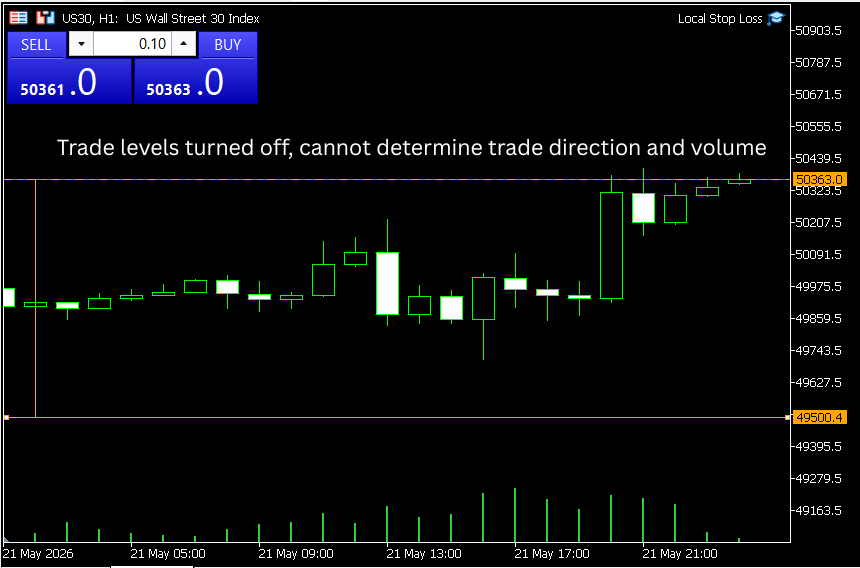
A trade label is needed to indicate direction when chart trade levels are turned off.
We also wish to avoid overwriting caused by both labels being enabled at the same time. Therefore, we have to enable CHART_SHOW_OBJECT_DESCR when CHART_SHOW_TRADE_LEVELS is disabled and vice versa.
Since the user could change CHART_SHOW_TRADE_LEVELS at any time, its state will be maintained in a global variable gblLastShowLevels to track changes.
//--- Global variable
bool gblLastShowLevels;
We can retrieve its value using ChartGetInteger.
//--- Fetching the show trade levels chart property
gblLastShowLevels = ChartGetInteger(ChartID(), CHART_SHOW_TRADE_LEVELS);
To set the value of CHART_SHOW_OBJECT_DESCR, use ChartSetInteger.
ChartSetInteger(ChartID(), CHART_SHOW_OBJECT_DESCR, true);  // To enable object description
ChartSetInteger(ChartID(), CHART_SHOW_OBJECT_DESCR, false); // To disable object description
Let us define a function that sets CHART_SHOW_OBJECT_DESCR based on the current state of CHART_SHOW_TRADE_LEVELS.
//+------------------------------------------------------------------+
//| Sets the value of the object show description property           |
//+------------------------------------------------------------------+
void SetTradeLabels(bool isChartShowLevels)
  {
   if(!isChartShowLevels)
     {
      ChartSetInteger(ChartID(),CHART_SHOW_OBJECT_DESCR,true);
     }
   else
     {
      ChartSetInteger(ChartID(),CHART_SHOW_OBJECT_DESCR,false);
     }
  }
We can initialize gblLastShowLevels in OnInit and run SetTradeLabels once at initialization.
//+------------------------------------------------------------------+
//| Expert initialization function                                   |
//+------------------------------------------------------------------+
int OnInit()
  {
//--- Input validation
   if(InpPriceRange <= 0)
     {
      MessageBox("Stop Distance value cannot be 0 or negative");
      return INIT_PARAMETERS_INCORRECT;
     }
   Trade.SetExpertMagicNumber(InpMagicNumber);
   StoplossDistance = GetStopDistance();

//--- Fetching the show trade levels chart property
   gblLastShowLevels = ChartGetInteger(ChartID(), CHART_SHOW_TRADE_LEVELS);

//--- Setting the value of the object description property
   SetTradeLabels(gblLastShowLevels);

//--- Running PositionsCheck() for the existing open positions
   PositionsCheck();
   return(INIT_SUCCEEDED);
  }
In OnTick, scan for changes and update gblLastShowLevels, calling SetTradeLabels whenever the value of CHART_SHOW_TRADE_LEVELS changes.
//+------------------------------------------------------------------+
//| Expert tick function                                             |
//+------------------------------------------------------------------+
void OnTick()
  {
   bool curShowLevels = ChartGetInteger(ChartID(), CHART_SHOW_TRADE_LEVELS);
   if(gblLastShowLevels != curShowLevels)
     {
      SetTradeLabels(curShowLevels);
      //--- Updating the show trade levels chart property
      gblLastShowLevels = curShowLevels;
     }
   PositionsCheck();
  }
With this, we complete the development of the EA. Once compiled, attach it to the chart. Our positions should be neatly labeled as shown below, regardless of whether trade levels are enabled or not.
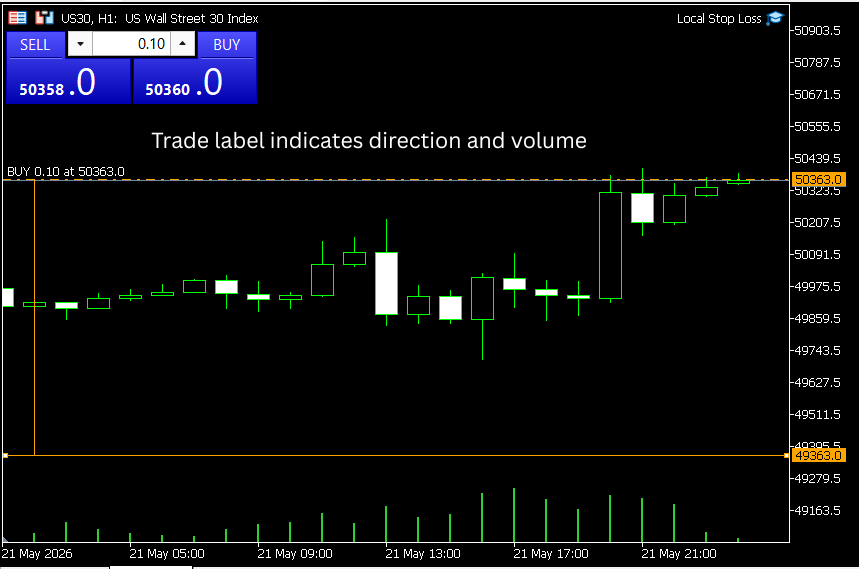
Managing Disconnections
The local stop loss runs on the MQL5 terminal and requires an active session with persistent connectivity for successful operation. To manage disconnections, we can leverage the built-in MQL5 event handling mechanism.
The OnDeinit documentation lists the reasons that trigger deinitialization. Notably, disconnection does not trigger OnDeinit. This means that our objects will not disappear due to a lost connection. The EA will simply wait for the next tick as usual and resume operation when the connection gets re-established. The same applies to our graphical objects. They will maintain the state they were in when the disconnection occurred. The stop-loss line can still be moved during this time, but its value will be processed on the next call to OnTick. Therefore, there is no need to implement any extra code for disconnection handling. To ensure smooth operation of the local stop loss, an uninterrupted internet connection should be maintained whenever the EA is attached to a chart.
Putting It All Together
We have reached the end of the tutorial. The complete code for the local stop-loss system, including our refinements, is attached below along with the .mq5 file.
//+------------------------------------------------------------------+
//|                                                      ProjectName |
//|                                      Copyright 2026, CompanyName |
//|                                       http://www.companyname.net |
//+------------------------------------------------------------------+
#property copyright   "Your Name"
#property link        "https://www.mql5.com/"
#property version     "1.00"
#property description "Local Stop Loss EA"
#property script_show_inputs

#include <Trade\Trade.mqh>
#include <Trade\PositionInfo.mqh>
#include <Generic\HashSet.mqh>
#include <Generic\HashMap.mqh>

//--- Enums
enum StoplossType
  {
   stoploss_pips,     // Pips - non Yen pairs
   stoploss_pips_yen, // Pips - Yen pairs
   stoploss_points    // Points
  };

//--- Inputs
input group        "Stoploss Settings"
input StoplossType InpSlType = stoploss_points;   // Stoploss Type
input double       InpPriceRange = 0;             // Stop distance
input group        "Colors"
input color        InpLongColor = clrOrange;      // Buy Positions
input color        InpShortColor = clrPink;       // Sell Positions
input group        "EA Identification Parameters"
input ulong        InpMagicNumber = 12345;        // Magic Number

//--- Global variables
CTrade Trade;
double StoplossDistance;
CHashMap<ulong, double> gblOpenPositions;
int LeftOffset = 1;
bool gblLastShowLevels;
string CslPrefix = "csl_";

//+------------------------------------------------------------------+
//| Expert initialization function                                   |
//+------------------------------------------------------------------+
int OnInit()
  {
//--- Input validation
   if(InpPriceRange <= 0)
     {
      MessageBox("Stop Distance value cannot be 0 or negative");
      return INIT_PARAMETERS_INCORRECT;
     }
   Trade.SetExpertMagicNumber(InpMagicNumber);
   StoplossDistance = GetStopDistance();

//--- Fetching the show trade levels chart property
   gblLastShowLevels = ChartGetInteger(ChartID(), CHART_SHOW_TRADE_LEVELS);

//--- Setting the value of the object description property
   SetTradeLabels(gblLastShowLevels);

//--- Running PositionsCheck() for the existing open positions
   PositionsCheck();
   return(INIT_SUCCEEDED);
  }

//+------------------------------------------------------------------+
//| Expert deinitialization function                                 |
//+------------------------------------------------------------------+
void OnDeinit(const int reason)
  {
   ObjectsDeleteAll(ChartID(), CslPrefix);
  }

//+------------------------------------------------------------------+
//| Expert tick function                                             |
//+------------------------------------------------------------------+
void OnTick()
  {
   bool curShowLevels = ChartGetInteger(ChartID(), CHART_SHOW_TRADE_LEVELS);
   if(gblLastShowLevels != curShowLevels)
     {
      SetTradeLabels(curShowLevels);
      //--- Updating the show trade levels chart property
      gblLastShowLevels = curShowLevels;
     }
   PositionsCheck();
  }

//+------------------------------------------------------------------+
//| Scans and processes new positions, manages already processed ones|
//+------------------------------------------------------------------+
void PositionsCheck()
  {
   int curLeftBar = (int) ChartGetInteger(ChartID(), CHART_FIRST_VISIBLE_BAR);
   CHashSet<ulong> curPositions;
   int posCount = 0;
   for(int i = PositionsTotal()-1; i >= 0; i--)
     {
      CPositionInfo posInfo;
      if(!posInfo.SelectByIndex(i))
         continue;
      if(posInfo.Symbol() != Symbol())
         continue;

      if(gblOpenPositions.ContainsKey(posInfo.Ticket()))
        {
         CheckProcessedPosition(posInfo, curLeftBar, posCount);
        }
      else
        {
         ProcessPosition(posInfo, curLeftBar, posCount);
        }
      curPositions.Add(posInfo.Ticket());
      posCount += 1;
     }

//--- Closed positions object cleanup
   ulong openPos[];
   double csl[];
   ArrayResize(openPos, gblOpenPositions.Count());
   ArrayResize(csl, gblOpenPositions.Count());
   int numPos = gblOpenPositions.CopyTo(openPos, csl);
   for(int i = numPos-1; i >= 0; i--)
     {
      if(!curPositions.Contains(openPos[i]))
        {
         CleanupPosition(openPos[i]);
        }
     }
  }

//+------------------------------------------------------------------+
//| Creates the objects for the open and local stop loss line        |
//+------------------------------------------------------------------+
void ProcessPosition(CPositionInfo &posInfo, int curLeftBar, int idx)
  {
   double   openPrice = posInfo.PriceOpen();
   double   cslPrice  = GetCslPrice(openPrice, posInfo.PositionType());
   color    lineColor = posInfo.PositionType() == POSITION_TYPE_BUY? InpLongColor : InpShortColor;
   string   openName  = GetOpenName(posInfo.Ticket());
   string   openLabel = GetOpenLabel(posInfo.PositionType(), posInfo.Volume(), openPrice);
   string   cslName   = GetCslName(posInfo.Ticket());
   int      subWindow = 0; // Main chart
   datetime time      = 0; // OBJ_HLINE has no time coordinate

//--- Create the open line
   ObjectCreate(ChartID(), openName, OBJ_HLINE, subWindow, time, openPrice);
   ObjectSetInteger(ChartID(), openName, OBJPROP_COLOR, lineColor);
   ObjectSetInteger(ChartID(), openName, OBJPROP_STYLE, STYLE_DASHDOT);
   ObjectSetString(ChartID(), openName, OBJPROP_TEXT, openLabel);

//--- Create the stop loss line
   ObjectCreate(ChartID(), cslName, OBJ_HLINE, subWindow, time, cslPrice);
   ObjectSetInteger(ChartID(), cslName, OBJPROP_COLOR, lineColor);
   ObjectSetInteger(ChartID(), cslName, OBJPROP_SELECTABLE, true);
   ObjectSetInteger(ChartID(), cslName, OBJPROP_SELECTED, true);

//--- Draw the spacer line for the new position
   DrawSpacer(posInfo.Ticket(), openPrice, cslPrice, lineColor, curLeftBar, idx);

//--- Add position ticket to hashmap along with the stop price to mark as processed
   gblOpenPositions.Add(posInfo.Ticket(), cslPrice);
  }

//+------------------------------------------------------------------+
//| Checks for stop condition and closes the position if met         |
//+------------------------------------------------------------------+
void CheckProcessedPosition(CPositionInfo &posInfo, int curLeftBar, int idx)
  {
//--- Check if the stop loss line object exists
   string cslName = GetCslName(posInfo.Ticket());
   if(ObjectFind(ChartID(), cslName) < 0)
     {
      CleanupPosition(posInfo.Ticket());
      ProcessPosition(posInfo, curLeftBar, idx);
      return;
     }

//--- Evaluate the stop condition
   MqlTick curTick;
   SymbolInfoTick(Symbol(), curTick);

   double cslPrice = ObjectGetDouble(ChartID(), cslName, OBJPROP_PRICE);
   if((posInfo.PositionType() == POSITION_TYPE_BUY  && curTick.bid <= cslPrice) ||
      (posInfo.PositionType() == POSITION_TYPE_SELL && curTick.ask >= cslPrice))
     {
      Trade.PositionClose(posInfo.Ticket());
      CleanupPosition(posInfo.Ticket());
      return;
     }

//--- Draw the spacer line for an existing position
   DrawSpacer(posInfo.Ticket(), cslPrice, curLeftBar, idx);

//--- Update the value of the local stop loss in the hashmap
   double lastCsl;
   gblOpenPositions.TryGetValue(posInfo.Ticket(), lastCsl);

   if(lastCsl != cslPrice)
     {
      gblOpenPositions.TrySetValue(posInfo.Ticket(), cslPrice);
     }
  }

//+------------------------------------------------------------------+
//| Returns the stop distance for the input stop loss type           |
//+------------------------------------------------------------------+
double GetStopDistance()
  {
   switch(InpSlType)
     {
      case stoploss_pips:
         return InpPriceRange * 0.0001;

      case stoploss_pips_yen:
         return InpPriceRange * 0.01;

      case stoploss_points:
         return InpPriceRange;
     }
   return InpPriceRange; // This line is not really necessary as we have covered all the cases of the enumeration
  }

//+------------------------------------------------------------------+
//| Draws the spacer line for a newly detected position              |
//+------------------------------------------------------------------+
void DrawSpacer(ulong ticket, double openPrice, double cslPrice, color clr, int curLeftBar, int idx)
  {
   string spacerName = GetSpacerName(ticket);
   datetime time = iTime(Symbol(), Period(), curLeftBar-idx-LeftOffset);
   int subWindow = 0;
   ObjectCreate(ChartID(), spacerName, OBJ_TREND, subWindow, time, openPrice, time, cslPrice);
   ObjectSetInteger(ChartID(), spacerName, OBJPROP_COLOR, clr);
  }

//+------------------------------------------------------------------+
//| Draws the spacer line for an existing open position              |
//+------------------------------------------------------------------+
void DrawSpacer(ulong ticket, double cslPrice, int curLeftBar, int idx)
  {
   string spacerName = GetSpacerName(ticket);
   datetime newTime = iTime(Symbol(), Period(), curLeftBar-idx-LeftOffset);
   ObjectSetInteger(ChartID(), spacerName, OBJPROP_TIME, newTime);
   ObjectMove(ChartID(), spacerName, 1, newTime, cslPrice);
  }

//+------------------------------------------------------------------+
//| Deletes objects related to the input ticket                      |
//+------------------------------------------------------------------+
void CleanupPositionObjects(ulong ticket)
  {
   ObjectDelete(ChartID(), GetOpenName(ticket));
   ObjectDelete(ChartID(), GetCslName(ticket));
   ObjectDelete(ChartID(), GetSpacerName(ticket));
  }

//+------------------------------------------------------------------+
//| Deletes objects related to the input ticket and updates hashmap  |
//+------------------------------------------------------------------+
void CleanupPosition(ulong ticket)
  {
   CleanupPositionObjects(ticket);
   gblOpenPositions.Remove(ticket);
  }

//+------------------------------------------------------------------+
//| Sets the value of the object show description property           |
//+------------------------------------------------------------------+
void SetTradeLabels(bool isChartShowLevels)
  {
   if(!isChartShowLevels)
     {
      ChartSetInteger(ChartID(),CHART_SHOW_OBJECT_DESCR,true);
     }
   else
     {
      ChartSetInteger(ChartID(),CHART_SHOW_OBJECT_DESCR,false);
     }
  }

//+------------------------------------------------------------------+
//| Returns the price at which to create the local stop loss         |
//+------------------------------------------------------------------+
double GetCslPrice(double openPrice, ENUM_POSITION_TYPE posType)
  {
   return posType == POSITION_TYPE_BUY? openPrice - StoplossDistance : openPrice + StoplossDistance; // For buy: stop is below open price; for sell: stop is above open price
  }

//+------------------------------------------------------------------+
//| Returns the name of the open line for the input position ticket  |
//+------------------------------------------------------------------+
string GetOpenName(ulong ticket)
  {
   return CslPrefix + IntegerToString(ticket) + "_open";
  }

//+------------------------------------------------------------------+
//| Returns the display label for the open line                      |
//+------------------------------------------------------------------+
string GetOpenLabel(ENUM_POSITION_TYPE posType, double volume, double price)
  {
   string priceString = DoubleToString(volume,2) + " at " +DoubleToString(price, Digits()); // Volume normalized to 2 decimal places, price normalized to chart symbol Digits()
   return posType == POSITION_TYPE_BUY? " BUY " + priceString : " SELL " + priceString;
  }

//+------------------------------------------------------------------+
//| Returns the name for the local stop loss line                    |
//+------------------------------------------------------------------+
string GetCslName(ulong ticket)
  {
   return CslPrefix + IntegerToString(ticket) + "_line";
  }

//+------------------------------------------------------------------+
//| Returns the name of spacer line for the input position ticket    |
//+------------------------------------------------------------------+
string GetSpacerName(ulong ticket)
  {
   return CslPrefix + IntegerToString(ticket) + "_spacer";
  }
//+------------------------------------------------------------------+
Conclusion
Following a concise analysis of bid/ask stop execution and the public-stop problem, this tutorial developed a production-oriented local stop-loss EA for MetaTrader 5. The article covered the full pipeline: how stop triggers map to bid/ask for each side, a tick-driven algorithm for monitoring and execution, efficient O(n) state management with CHashMap/CHashSet, graphical object management (open line, draggable SL line, vertical spacers), and robust cleanup for externally closed positions and EA deinitialization. Trade execution is handled through CTrade and position data via CPositionInfo; chart labeling and CHART_SHOW_OBJECT_DESCR/CHART_SHOW_TRADE_LEVELS coordination were added for usability. Disconnection handling is documented (the EA resumes on next tick; objects persist on the chart).
Deliverable: a ready-to-use MQL5 EA that
Use this EA as a secure, precise local risk-management layer; extend it further for logging, backtesting hooks, or integration with centralized risk services as needed.
Warning: All rights to these materials are reserved by MetaQuotes Ltd. Copying or reprinting of these materials in whole or in part is prohibited.
This article was written by a user of the site and reflects their personal views. MetaQuotes Ltd is not responsible for the accuracy of the information presented, nor for any consequences resulting from the use of the solutions, strategies or recommendations described.

 MQL5 Wizard Techniques you should know (Part 94): Using Reservoir Sampling and Linear Regression in a Custom Trailing Stop Class
 CSV Data Analysis (Part 2): Building a Production-Grade CSV Export and Parsing Pipeline for Quantitative Strategy Analysis
 Quantum Neural Network in MQL5 (Part I): Creating the Include File
 MQL5 Custom Symbols: Creating a 3D Bars Symbol

- Free trading apps
- Over 8,000 signals for copying
- Economic news for exploring financial markets
You agree to website policy and terms of use