

CSV Data Analysis (Part 2): Building a Production-Grade CSV Export and Parsing Pipeline for Quantitative Strategy Analysis
 1 569
1 569
 0
0

Introduction
MetaTrader 5 is excellent at testing ideas. You can run a strategy through years of historical data, optimize hundreds or thousands of input combinations, and receive a detailed report full of useful statistics. For a trader or developer, this is where many research workflows begin.
But the moment you want to take those results outside the terminal, the process becomes much less convenient.
Maybe you want to analyze optimization results in Python, build custom charts in Excel, compare multiple test runs in a database, or prepare a report for later review. The data is there, but moving it into external tools often requires manual steps, repeated exports, and awkward workarounds. That is manageable for one test, but it quickly becomes a problem when you work with many strategies, symbols, timeframes, or parameter sets.
This is where MQL5’s file I/O system becomes useful. By writing structured data directly from the Expert Advisor or script, we can turn MetaTrader 5 from a closed testing environment into part of a larger research pipeline. CSV is a practical format for this job: it is simple, readable, supported almost everywhere, and easy to generate during a backtest.
In this article, we will build a reusable CSV export mechanism in MQL5. Along the way, we will look at the MetaTrader file sandbox, file access flags, object-oriented exporter design, CSV reading and tokenization, and error-handling patterns that make the code reliable enough for repeated testing.
If Part 1 focused on preparing the foundation, this part is about getting the data out — cleanly, consistently, and in a form that other tools can actually use.
Section 1: The MQL5 File Sandbox: Scope, Boundaries, and Access Architecture
Before writing any file I/O code, a developer must understand a key limitation. MQL5 programs do not have unrestricted access to the host operating system's file system. Instead, all file operations are confined within a defined sandbox. The boundaries of this sandbox will shift depending on which access flags you pass to FileOpen().
The Local Sandbox
By default, MQL5 programs operate within a directory scoped to the terminal's data folder:
<Terminal Data Folder>\MQL5\Files\ Any FileOpen() call that does not include the FILE_COMMON flag resolves paths relative to this directory. A call such as FileOpen("results\\backtest_log.csv", FILE_WRITE|FILE_CSV|FILE_ANSI) creates or opens the file at:
<Terminal Data Folder>\MQL5\Files\results\backtest_log.csv
This sandbox exists for sound security reasons. An Expert Advisor loaded on a live account must not have arbitrary access to the file system. Restricting I/O to a known, terminal-owned directory provides crucial protection. It ensures scripts cannot read system files, exfiltrate credentials, or corrupt unrelated application data.
The local sandbox is the correct choice for log files and optimization output CSVs. It is also ideal for any data that will later be consumed by another MQL5 program. This setup provides maximum isolation. Because of this, it is appropriate for the majority of production logging use cases.
The Common Sandbox via FILE_COMMON
The FILE_COMMON flag changes how files are located. It redirects all file resolution to a single, shared directory. This directory is then accessible by every terminal instance installed on that machine:
<Common AppData Folder>\MetaQuotes\Terminal\Common\Files\ On Windows, this path typically resolves to:
C:\Users\<Username>\AppData\Roaming\MetaQuotes\Terminal\Common\Files\ The practical significance is immediate. Any CSV file written here by an MQL5 script can be read by other tools. It can be accessed by a co-located Python script or an Excel workbook with a data connection. A second MetaTrader 5 terminal instance running on a different broker server can also read it. This flexibility makes FILE_COMMON a suitable option for complex setups. Use it whenever MQL5 operates as a single component within a larger, multi-process analytical pipeline.
The decision rule is straightforward. If the file will be consumed only by MQL5 code, use the local sandbox. If it crosses a process boundary to any external consumer, FILE_COMMON is recommended.
Access Flags and Their Behavioral Effects
The FileOpen() function uses configuration flags. You combine these constants using a bitwise OR operator. Each flag contributes a precise behavior to the operation. Understanding the behavior of each flag is essential if you want to construct correct file streams.
FILE WRITE opens a write-enabled stream: it creates a new file, or truncates an existing one before writing begins. This truncation behavior is a common source of subtle bugs. An append-only logging pattern must never use FILE_WRITE alone, because each initialization clears the log. For true append behavior, FILE_WRITE | FILE_READ must be used together. Then, the file pointer must be explicitly moved to the end of the file using FileSeek().
FILE_READ opens a stream with read permission. It does not truncate or modify the file's content. When combined with FILE_WRITE as described above, it enables the seek-to-end append pattern without destroying existing data.
FILE_CSV signals that the stream should be treated as a delimited text file. It changes how FileReadString() and FileWriteString() handle data. Specifically, it makes them aware of the record delimiter. In CSV mode, each FileReadString() call returns one field. It reads the content between delimiter characters, not the entire line. This distinction matters significantly when you parse data.
FILE_ANSI specifies single-byte ANSI character encoding. This is ideal for files containing only ASCII-range content. For these files, ANSI encoding halves the on-disk size compared to Unicode. It also ensures maximum compatibility with external tools. This is especially helpful for tools running on Linux or macOS, where UTF-16 often requires explicit handling.
FILE_UNICODE specifies UTF-16 Little Endian encoding. Use this flag if your exported text contains special, non-English characters. For example, some brokers use Cyrillic characters in their asset names. Other brokers include unique, multi-byte symbols in their currency pairs. If your text only uses standard English characters, FILE_ANSI is a much better choice for your data pipelines.
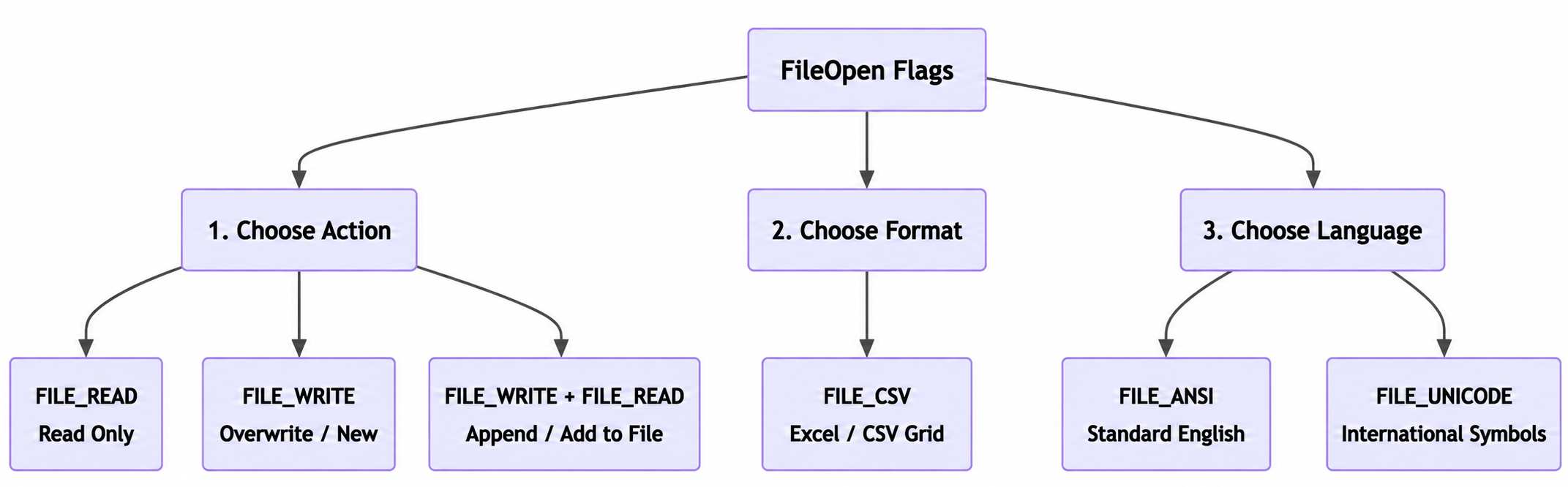
Fig. 1: Functional categorization of FileOpen configuration flags. The flowchart groups options into three distinct choices for action, format, and encoding.
The following table summarizes the flag combinations most relevant to production CSV work:
| Flag Combination | Behavioral Result |
|---|---|
| FILE_WRITE|FILE_CSV|FILE_ANSI | Creates or overwrites a CSV file with ANSI encoding |
| FILE_WRITE|FILE_READ|FILE_CSV|FILE_ANSI | Opens existing CSV for append (requires FileSeek to end of file) |
| FILE_READ|FILE_CSV|FILE_ANSI | Opens existing CSV for sequential field-by-field reading |
| FILE_WRITE|FILE_CSV|FILE_ANSI|FILE_COMMON | Same as first, resolved to the shared common directory |
Section 2: Engineering the CCSVExporter Class
A well-structured export engine does not scatter FileOpen() and FileWrite() calls throughout an Expert Advisor's event handlers. Instead, it encapsulates all file I/O logic inside a dedicated class. This class owns the file handle, enforces invariants, and presents a clean interface to the calling code. The CCSVExporter class presented here is designed for direct inclusion as a .mqh header file. It can easily be used in any EA or script project.
Schema Definition
The export target schema captures the fields most relevant to optimization result analysis:
- Test_Phase — identifier for the evaluation stage (e.g., In-Sample (IS), Out-of-Sample (OOS), Walk Forward Optimization (WFO))
- Symbol — instrument ticker
- Timeframe — chart period enumeration label
- Indicator_Name — the logic component under evaluation
- Filter_Period — the primary integer parameter of the indicator
- Net_Profit_$ — absolute dollar return over the test period
- Sortino_Ratio — downside-deviation-adjusted return ratio
- False_Flips_Whipsaws — count of unprofitable signal triggers
- Avg_Lag_On_Turn_Bars — mean detection delay on directional turns, in bars
This schema is representative of systematic strategy auditing workflows. It can be easily extended by modifying the header write function.
The CSVExporter.mqh Implementation
//+------------------------------------------------------------------+
//|                                              CSVExporter.mqh     |
//|                  Production-Grade CSV Export Engine for MQL5     |
//+------------------------------------------------------------------+
#property strict

//--- Column separator constant for CSV output streams
#define CSV_SEPARATOR ","

//--- Schema column count for validation
#define SCHEMA_COLUMNS 9

//+------------------------------------------------------------------+
//| CCSVExporter: Encapsulates all CSV file I/O for structured export|
//+------------------------------------------------------------------+
class CCSVExporter
  {
private:
   //--- Internal file handle; INVALID_HANDLE when no stream is open
   int               m_handle;

   //--- Stores the resolved file name for diagnostic messages
   string            m_filename;

   //--- Tracks whether the file was opened in append mode
   bool              m_append_mode;

   //--- Writes the schema header row to the open stream
   bool              WriteHeader();

public:
   //--- Constructor initializes handle to invalid state
                     CCSVExporter();

   //--- Destructor guarantees file handle release
                    ~CCSVExporter();

   //--- Opens or creates the target CSV file
   //--- Pass use_common=true to resolve path via FILE_COMMON
   bool              Open(const string filename,const bool append=false,const bool use_common=false);

   //--- Appends a single result row to the open stream
   bool              WriteRow(const string test_phase,const string symbol,const string timeframe,const string indicator_name,const int filter_period,const double net_profit,const double sortino_ratio,const int false_flips,const double avg_lag_bars);

   //--- Flushes and closes the file stream safely
   void              Close();

   //--- Returns true if the stream is currently open and valid
   bool              IsOpen() const;
  };

//+------------------------------------------------------------------+
//| Constructor                                                      |
//+------------------------------------------------------------------+
CCSVExporter::CCSVExporter()
  {
   m_handle      = INVALID_HANDLE;
   m_filename    = "";
   m_append_mode = false;
  }

//+------------------------------------------------------------------+
//| Destructor: releases file handle if caller neglected to Close()  |
//+------------------------------------------------------------------+
CCSVExporter::~CCSVExporter()
  {
   if(m_handle != INVALID_HANDLE)
     {
      FileClose(m_handle);
      m_handle = INVALID_HANDLE;
     }
  }

//+------------------------------------------------------------------+
//| Open: opens or creates the target CSV file                       |
//+------------------------------------------------------------------+
bool CCSVExporter::Open(const string filename,
                        const bool   append     = false,
                        const bool   use_common = false)
  {
//--- Reject open attempts if a stream is already active
   if(m_handle != INVALID_HANDLE)
     {
      Print("CCSVExporter::Open() error — stream already open on [",m_filename,"]. Call Close() first.");
      return(false);
     }

//--- Build the flag set for the requested mode
   int flags = FILE_CSV|FILE_ANSI;

   if(use_common)
      flags |= FILE_COMMON;

   m_append_mode = append;
   m_filename    = filename;

   if(append)
     {
      //--- Append mode: combine FILE_WRITE and FILE_READ to prevent truncation
      flags |= (FILE_WRITE|FILE_READ);
      m_handle = FileOpen(filename,flags);

      if(m_handle == INVALID_HANDLE)
        {
         //--- File may not exist yet; attempt creation on first run
         flags = FILE_WRITE|FILE_CSV|FILE_ANSI;
         if(use_common)
            flags |= FILE_COMMON;
         m_handle = FileOpen(filename,flags);

         if(m_handle == INVALID_HANDLE)
           {
            PrintFormat("CCSVExporter::Open() — FileOpen failed. Error: %d | File: %s",GetLastError(),filename);
            return(false);
           }

         //--- New file created; write the schema header
         return(WriteHeader());
        }
      else
        {
         //--- Existing file opened; seek to end for append
         FileSeek(m_handle,0,SEEK_END);
         return(true);
        }
     }
   else
     {
      //--- Overwrite mode: FILE_WRITE alone truncates and recreates
      flags |= FILE_WRITE;
      m_handle = FileOpen(filename,flags);

      if(m_handle == INVALID_HANDLE)
        {
         PrintFormat("CCSVExporter::Open() — FileOpen failed. Error: %d | File: %s",GetLastError(),filename);
         return(false);
        }

      //--- Write header to fresh file
      return(WriteHeader());
     }
  }

//+------------------------------------------------------------------+
//| WriteHeader: outputs the schema column header row                |
//+------------------------------------------------------------------+
bool CCSVExporter::WriteHeader()
  {
   if(m_handle == INVALID_HANDLE)
      return(false);

//--- Construct the header string as a single write operation
   string header = "Test_Phase"           + CSV_SEPARATOR +
                   "Symbol"               + CSV_SEPARATOR +
                   "Timeframe"            + CSV_SEPARATOR +
                   "Indicator_Name"       + CSV_SEPARATOR +
                   "Filter_Period"        + CSV_SEPARATOR +
                   "Net_Profit_$"         + CSV_SEPARATOR +
                   "Sortino_Ratio"        + CSV_SEPARATOR +
                   "False_Flips_Whipsaws" + CSV_SEPARATOR +
                   "Avg_Lag_On_Turn_Bars";

//--- FileWriteString appends a newline when FILE_CSV mode is active
   uint bytes = FileWriteString(m_handle,header + "\n");

   if(bytes == 0)
     {
      PrintFormat("CCSVExporter::WriteHeader() — write failed. Error: %d",GetLastError());
      return(false);
     }

   return(true);
  }

//+------------------------------------------------------------------+
//| WriteRow: appends a single data record to the CSV stream         |
//+------------------------------------------------------------------+
bool CCSVExporter::WriteRow(const string test_phase,
                            const string symbol,
                            const string timeframe,
                            const string indicator_name,
                            const int    filter_period,
                            const double net_profit,
                            const double sortino_ratio,
                            const int    false_flips,
                            const double avg_lag_bars)
  {
   if(m_handle == INVALID_HANDLE)
     {
      Print("CCSVExporter::WriteRow() — no open stream. Call Open() first.");
      return(false);
     }

//--- Format floating point values to consistent decimal precision
   string profit_str  = DoubleToString(net_profit,2);
   string sortino_str = DoubleToString(sortino_ratio,4);
   string lag_str     = DoubleToString(avg_lag_bars,2);

//--- Assemble the row as a single concatenated string
   string row = test_phase                     + CSV_SEPARATOR +
                symbol                         + CSV_SEPARATOR +
                timeframe                      + CSV_SEPARATOR +
                indicator_name                 + CSV_SEPARATOR +
                IntegerToString(filter_period) + CSV_SEPARATOR +
                profit_str                     + CSV_SEPARATOR +
                sortino_str                    + CSV_SEPARATOR +
                IntegerToString(false_flips)   + CSV_SEPARATOR +
                lag_str;

   uint bytes = FileWriteString(m_handle,row + "\n");

   if(bytes == 0)
     {
      PrintFormat("CCSVExporter::WriteRow() — write failed. Error: %d",GetLastError());
      return(false);
     }

   return(true);
  }

//+------------------------------------------------------------------+
//| Close: flushes and releases the file handle                      |
//+------------------------------------------------------------------+
void CCSVExporter::Close()
  {
   if(m_handle != INVALID_HANDLE)
     {
      FileClose(m_handle);
      m_handle   = INVALID_HANDLE;
      m_filename = "";
     }
  }

//+------------------------------------------------------------------+
//| IsOpen: returns handle validity state                            |
//+------------------------------------------------------------------+
bool CCSVExporter::IsOpen() const
  {
   return(m_handle != INVALID_HANDLE);
  }
//+------------------------------------------------------------------+
Integration Pattern in an Expert Advisor
Integrating CCSVExporter into an EA requires only four simple steps. First, declare the class at the file scope. Next, open the file in OnInit(). Then, write rows from OnTester() or OnDeinit(). Finally, close the file at the end of OnDeinit().
//+--------------------------------------------------------------+
//|                                       OptimizationLogger.mq5 |
//+--------------------------------------------------------------+
#include "CSVExporter.mqh"

//--- Global exporter instance
CCSVExporter g_exporter;

//--- Input parameters mirroring the exported schema
input string InpTestPhase    = "OOS";         // Var1 description
input string InpIndicator    = "ATR_Filter";  // Var2 description
input int    InpFilterPeriod = 14;            // Var3 description

//+------------------------------------------------------------------+
//| Expert initialization function                                   |
//+------------------------------------------------------------------+
int OnInit()
  {
//--- Open in append mode, writing to common folder for Python access
   if(!g_exporter.Open("optimization_results.csv",true,true))
     {
      Print("Failed to open CSV export stream. Aborting.");
      return(INIT_FAILED);
     }

   return(INIT_SUCCEEDED);
  }

//+------------------------------------------------------------------+
//| OnTester: called once after backtest completes                   |
//+------------------------------------------------------------------+
double OnTester()
  {
//--- Retrieve performance statistics from tester context
   double net_profit  = TesterStatistics(STAT_PROFIT);
   double sortino     = TesterStatistics(STAT_SHARPE_RATIO); // substitute Sortino if custom-computed
   int    false_flips = (int)TesterStatistics(STAT_LOSS_TRADES);
   double avg_lag     = 0.0;                                 // populated via global accumulator from OnTick signal tracking

   string tf_label=EnumToString((ENUM_TIMEFRAMES)Period());

   g_exporter.WriteRow(InpTestPhase,Symbol(),tf_label,InpIndicator,InpFilterPeriod,net_profit,sortino,false_flips,avg_lag);

   return(net_profit);
  }

//+------------------------------------------------------------------+
//| Expert deinitialization function                                 |
//+------------------------------------------------------------------+
void OnDeinit(const int reason)
  {
   g_exporter.Close();
  }
//+------------------------------------------------------------------+
The pattern is minimal by design. The EA's core logic is completely insulated from file I/O mechanics. If the export stream fails for any reason, it logs a diagnostic message. The EA then continues executing without any disruption.
Section 3: Reading CSV Files: Tokenization and Array Population
The inverse operation is reading a previously written CSV file back into native MQL5 data structures. To do this, you must understand how FileReadString() behaves in FILE_CSV mode. You also need to know how to correctly sequence field reads across rows.
How FILE_CSV Parsing Works
When a file handle is opened with FILE_CSV, FileReadString() does not return an entire line. Instead, it returns the content of a single field. It then advances the internal file pointer to the start of the next field. The function treats both the record separator (comma by default) and the line terminator as field boundaries. Because of this, the caller must know the schema's column count. The program must issue exactly that many FileReadString() calls per row to stay synchronized with the file structure.
The end-of-line condition occurs after reading the last field in a row. This automatically advances the pointer to the beginning of the next row. If the column count is not known in advance, FileIsLineEnding() can be checked after each field read to detect row boundaries explicitly. However, for a fixed schema, this check introduces unnecessary overhead.
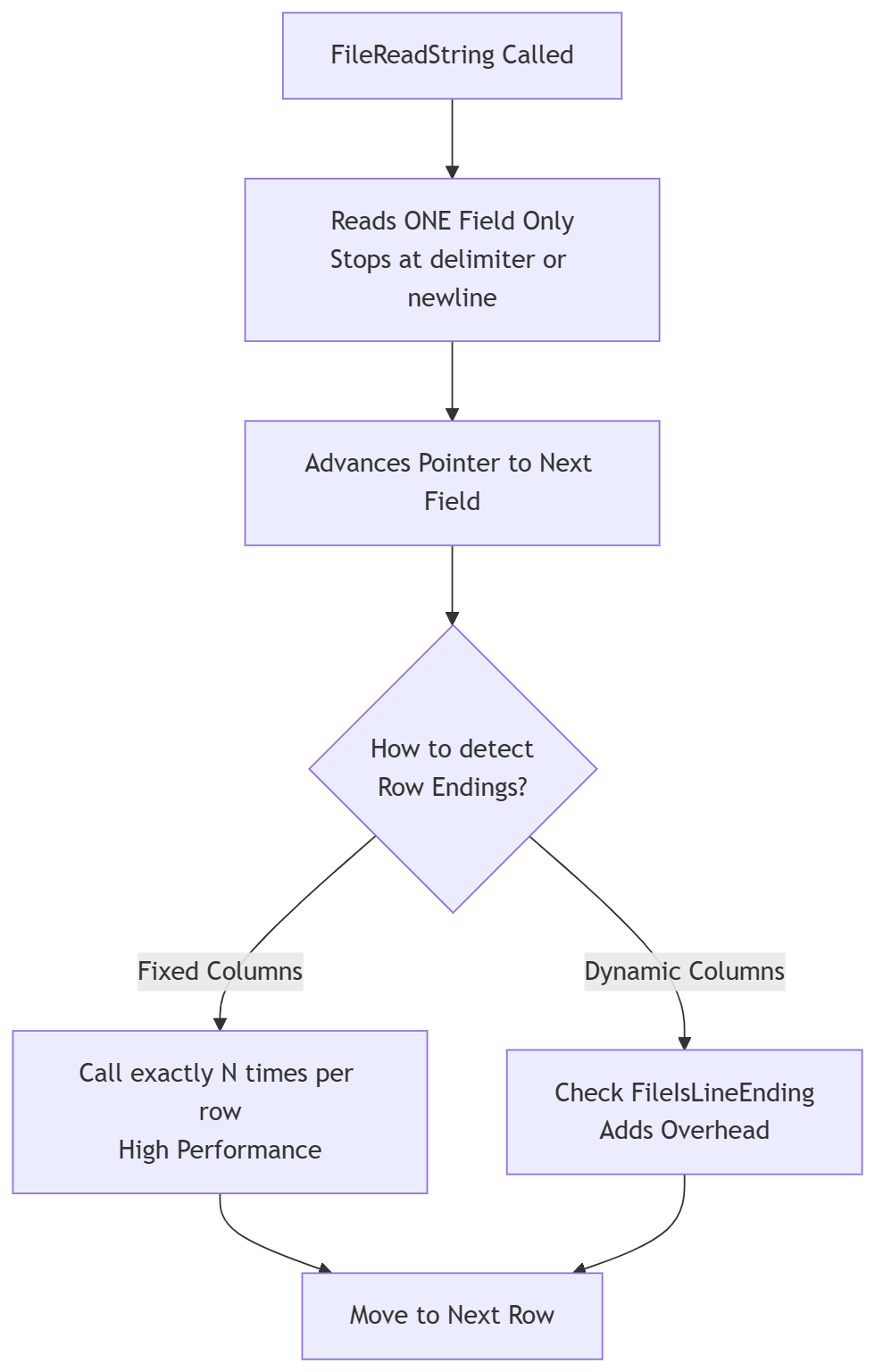
Fig. 2: Logical flow of FILE_CSV parsing mechanics. The chart illustrates field-by-field data extraction and methods for managing row boundaries.
Header Row Handling
Most production CSV files contain a header row as their first line. When loading data for computation, that header row must be skipped. The cleanest approach reads and discards exactly as many fields as the schema defines:
//+------------------------------------------------------------------+
//| SkipHeaderRow: discards the first row of an open CSV stream      |
//+------------------------------------------------------------------+
bool SkipHeaderRow(const int handle,const int column_count)
  {
//--- Validates that the file handle is valid before proceeding
   if(handle == INVALID_HANDLE)
      return(false);

//--- Loops through each column to consume the first row
   for(int col=0; col<column_count; col++)
     {
      //--- Returns false if the end of the file is reached prematurely
      if(FileIsEnding(handle))
         return(false);

      //--- Reads the field value to advance the internal file pointer
      FileReadString(handle);
     }

//--- Returns true indicating the entire header row was successfully skipped
   return(true);
  }
An alternative approach uses FileSeek() after a full-line scan. However, field-by-field consumption is much more reliable. This method respects the CSV parser's internal state. It avoids trying to work around that state at the byte level.
A Complete Row-Parsing Implementation
The following function opens an existing optimization results CSV file. It automatically skips the header row. Then, it populates a dynamic struct array. This array stores all the fields that are relevant to your quantitative analysis.
//--- Data container for parsed optimization results
struct SOptResult
  {
   string            test_phase;
   string            symbol;
   string            timeframe;
   string            indicator_name;
   int               filter_period;
   double            net_profit;
   double            sortino_ratio;
   int               false_flips;
   double            avg_lag_bars;
  };

//+------------------------------------------------------------------+
//| LoadOptResults: reads CSV into a dynamic array of SOptResult     |
//| Returns the count of records loaded, or -1 on failure            |
//+------------------------------------------------------------------+
int LoadOptResults(const string filename,
                   SOptResult &results[],
                   const bool use_common=false)
  {
//--- Build open flags for read-only CSV access
   int flags = FILE_READ|FILE_CSV|FILE_ANSI;
   if(use_common)
      flags |= FILE_COMMON;

   int handle = FileOpen(filename,flags);

   if(handle == INVALID_HANDLE)
     {
      PrintFormat("LoadOptResults() — FileOpen failed. Error: %d | File: %s",GetLastError(),filename);
      return(-1);
     }

//--- Discard header row before entering parse loop
   if(!SkipHeaderRow(handle,SCHEMA_COLUMNS))
     {
      FileClose(handle);
      Print("LoadOptResults() — header skip failed or file is empty.");
      return(-1);
     }

//--- Resize result array and parse records until EOF
   int count = 0;
   ArrayResize(results,0);

   while(!FileIsEnding(handle))
     {
      SOptResult rec;

      //--- Read fields in exact schema order
      rec.test_phase     = FileReadString(handle);
      rec.symbol         = FileReadString(handle);
      rec.timeframe      = FileReadString(handle);
      rec.indicator_name = FileReadString(handle);
      rec.filter_period  = (int)StringToInteger(FileReadString(handle));
      rec.net_profit     = StringToDouble(FileReadString(handle));
      rec.sortino_ratio  = StringToDouble(FileReadString(handle));
      rec.false_flips    = (int)StringToInteger(FileReadString(handle));
      rec.avg_lag_bars   = StringToDouble(FileReadString(handle));

      //--- Guard against empty trailing rows at end of file
      if(StringLen(rec.symbol) == 0)
         break;

      //--- Append parsed record to result array
      ArrayResize(results,count+1);
      results[count] = rec;
      count++;
     }

   FileClose(handle);
   PrintFormat("LoadOptResults() — loaded %d records from [%s].",count,filename);
   return(count);
  }
The StringToDouble() and StringToInteger() conversion functions handle field type transformations cleanly. Both functions easily tolerate minor whitespace variations, which often appear when CSV files are edited in external software. Additionally, the empty-symbol guard at the row boundary protects against a common artifact. Text editors frequently append a trailing newline to a file. Without this guard, that newline would cause the parser to attempt to construct a single phantom record.
Extracting Numeric Fields into Computation Arrays
For statistical operations, it is often more efficient to copy specific numeric fields from the struct array into dedicated arrays. This applies when ranking strategies by Sortino ratio or filtering by minimum net profit. MQL5's native sorting functions operate most efficiently on these flat double arrays. The same is true for user-defined ranking routines.
//+------------------------------------------------------------------+
//| ExtractSortinoArray: pulls Sortino values from a result set      |
//+------------------------------------------------------------------+
void ExtractSortinoArray(const SOptResult &results[],double &sortino_out[])
  {
//--- Get record count
   int n = ArraySize(results);
//--- Resize the output array to match the size of the source data
   ArrayResize(sortino_out,n);

//--- Copy the Sortino ratio from each record into the output array
   for(int i=0; i<n; i++)
     {
      sortino_out[i] = results[i].sortino_ratio;
     }
  }

//+--------------------------------------------------------------------+
//| FilterByMinProfit: returns indices of results above profit floor   |
//+--------------------------------------------------------------------+
int FilterByMinProfit(const SOptResult &results[],
                      const double min_profit,
                      int &indices_out[])
  {
//--- Get the total number of records to process
   int n = ArraySize(results);
   int count = 0;
//--- Pre-allocate the output array capacity to the maximum possible size
   ArrayResize(indices_out,n);

//--- Iterate through all records to filter by net profit
   for(int i=0; i<n; i++)
     {
      //--- Check if the current record meets or exceeds the profit threshold
      if(results[i].net_profit >= min_profit)
        {
         //--- Save the index of the matching record and increment the counter
         indices_out[count] = i;
         count++;
        }
     }

//--- Shrink the output array down to the actual number of matched elements
   ArrayResize(indices_out,count);
//--- Return the total count of filtered records
   return(count);
  }
This pattern separates the parsing logic from the analytical logic. It works by loading the data into structs first. Then, the code projects that data into typed arrays as needed. This keeps the codebase clean and highly organized.
Section 4: Exception Handling, Sharing Violations, and I/O Performance
Reliable file I/O in production environments requires explicit error handling. Many failure modes never surface during isolated testing. However, they emerge with absolute certainty in real-world deployments. Three specific categories of problems require dedicated architectural attention.
Error Code Taxonomy for MQL5 File Operations
GetLastError() returns an integer error code after any failed file operation. The codes most frequently encountered in CSV workflows are:
- Error 5002 (ERR_FILE_WRONG_HANDLE): This occurs when a file handle passed to a read or write function is invalid. The handle is either INVALID_HANDLE or refers to a file that is already closed. This error almost always indicates a defect in the program's control flow. For example, a write call might be made before Open() succeeds, or after Close() has already run. To fix this, the program must check handle validity before every I/O operation. The CCSVExporter class enforces this check internally across every public method.
- Error 5004 (ERR_FILE_CANNOT_OPEN): This occurs when the file system rejects an open request. This error has several distinct causes that require different responses. The target directory may not exist because MQL5 does not create intermediate directories automatically. Alternatively, the process may lack write permissions for the target path. The filename might also contain illegal characters for the host operating system. When this error occurs, the diagnostic message should log the full resolved path instead of just the filename. This enables rapid root-cause identification.
- Error 5008 (ERR_FILE_WRITEERROR): This means that a write operation failed after the file opened successfully. Common causes include a full storage disk or a lost network path for mapped drives. An external process might also have deleted the file while the program was writing to it. Automated systems should respond to this error by retrying the operation with exponential backoff. Alternatively, the program can switch to graceful degradation by buffering data in memory until the file system recovers.
A centralized error diagnostic function prevents repetitive error-handling code from cluttering every call site:
//+-------------------------------------------------------------------+
//| LogFileError: prints a structured diagnostic for file I/O errors  |
//+-------------------------------------------------------------------+
void LogFileError(const string context,const string filename)
  {
//--- Retrieve the code of the last occurred error
   int err = GetLastError();
   string err_desc;

//--- Identify the specific file error code and assign its text description
   switch(err)
     {
      case 5002:
         err_desc = "ERR_FILE_WRONG_HANDLE — invalid or closed handle";
         break;
      case 5004:
         err_desc = "ERR_FILE_CANNOT_OPEN — file system rejected open";
         break;
      case 5007:
         err_desc = "ERR_FILE_READERROR — read operation failed";
         break;
      case 5008:
         err_desc = "ERR_FILE_WRITEERROR — write operation failed";
         break;
      case 5019:
         err_desc = "ERR_FILE_WRONG_DIRECTORYNAME — invalid directory";
         break;
      default:
         err_desc = "Unknown error code: " + IntegerToString(err);
         break;
     }

//--- Print the formatted diagnostic log message to the Experts journal
   PrintFormat("[FILE ERROR] Context: %s | File: %s | %s",context,filename,err_desc);
  }
Concurrent Access and Sharing Violations
The most disruptive failure in CSV workflows is a concurrent access conflict. This happens when an MQL5 EA opens a file for writing while another application tries to use it. For example, a user might open the file in Microsoft Excel, or a Python script might read it using pandas. When this occurs, the Windows file system issues an access-denied error to one of the processes. Which application succeeds depends entirely on the order of operations. It also depends on the specific sharing flags each program used to open the file.
MQL5's FileOpen() does not expose explicit sharing flags to the developer. The function requests exclusive access by default. This means that if Excel or another process holds an open handle to the same CSV, the MQL5 FileOpen() call will fail with error 5004.
There are two architectural levels. At the process level, consumers should use read-only access and avoid holding persistent handles; at the MQL5 level, add retry logic for transient locks.
//+------------------------------------------------------------------+
//| OpenWithRetry: attempts FileOpen up to max_attempts times        |
//+------------------------------------------------------------------+
int OpenWithRetry(const string filename,const int flags,const int max_attempts=5,const int delay_ms=200)
  {
//--- Initialize the file handle variable to a safe default invalid state
   int handle = INVALID_HANDLE;

//--- Execute a loop to retry the file open operation up to the maximum allowed attempts
   for(int attempt=1; attempt<=max_attempts; attempt++)
     {
      //--- Attempt to open the specified file with the provided access flags
      handle = FileOpen(filename,flags);

      //--- If a valid handle is obtained, exit the function immediately and return it
      if(handle != INVALID_HANDLE)
         return(handle);

      //--- Print a diagnostic error message to the log if the current attempt fails
      PrintFormat("OpenWithRetry() — attempt %d of %d failed. Error: %d",attempt,max_attempts,GetLastError());

      //--- Pause the execution thread for the specified duration before attempting again
      if(attempt < max_attempts)
         Sleep(delay_ms);
     }

//--- Return the invalid handle if all allocated retry attempts are completely exhausted
   return(INVALID_HANDLE);
  }
If file locks are frequent, use unique output filenames (e.g., with timestamps) to avoid write/read contention. This approach encodes a timestamp or a pass number into each output file's name. Because of this, the writing process creates a uniquely named file on every single run. The reading process then simply scans the directory for the newest file matching that specific pattern. This completely eliminates write-read contention. However, it does cause files to accumulate, which means you will need a periodic cleanup routine.
High-Frequency I/O: Buffering Strategies
During parameter optimization runs with tens of thousands of passes, individual FileWriteString() calls create a measurable cumulative cost. Each call triggers a synchronous disk write. This blocks the calling thread until the operating system confirms completion. On mechanical hard drives, this bottleneck directly increases per-pass I/O latency. Even on solid-state storage, the system call overhead of many small writes far exceeds that of a few large writes.
The mitigation is an in-memory row buffer. This accumulates pending output and flushes to disk in batches:
//+------------------------------------------------------------------+
//| CBufferedCSVExporter: write-buffered variant of CCSVExporter     |
//+------------------------------------------------------------------+
class CBufferedCSVExporter : public CCSVExporter
  {
private:
   string            m_buffer[];
   int               m_buffer_size;
   int               m_flush_threshold;

public:
                     CBufferedCSVExporter(const int flush_threshold=50);
                    ~CBufferedCSVExporter();

   //--- Buffers a row string and flushes when threshold is reached
   bool              BufferRow(const string row_data);

   //--- Forces all buffered content to disk immediately
   bool              Flush();
  };

//+------------------------------------------------------------------+
//| Constructor                                                      |
//+------------------------------------------------------------------+
CBufferedCSVExporter::CBufferedCSVExporter(const int flush_threshold=50)
  {
   m_buffer_size     = 0;
   m_flush_threshold = flush_threshold;
   ArrayResize(m_buffer,flush_threshold);
  }

//+--------------------------------------------------------------------+
//| Destructor: ensures remaining buffer is flushed on object teardown |
//+--------------------------------------------------------------------+
CBufferedCSVExporter::~CBufferedCSVExporter()
  {
   if(m_buffer_size > 0)
      Flush();
  }

//+-------------------------------------------------------------------+
//| BufferRow: accumulates row strings; triggers flush at threshold   |
//+-------------------------------------------------------------------+
bool CBufferedCSVExporter::BufferRow(const string row_data)
  {
   if(m_buffer_size >= m_flush_threshold)
     {
      if(!Flush())
         return(false);
     }

   if(m_buffer_size >= ArraySize(m_buffer))
      ArrayResize(m_buffer,m_buffer_size+m_flush_threshold);

   m_buffer[m_buffer_size] = row_data;
   m_buffer_size++;
   return(true);
  }

//+------------------------------------------------------------------+
//| Flush: writes all buffered rows to disk in a single pass         |
//+------------------------------------------------------------------+
bool CBufferedCSVExporter::Flush()
  {
   if(!IsOpen() || m_buffer_size == 0)
      return(true);

//--- Concatenate all buffered rows into one string for a single write
   string batch = "";
   for(int i=0; i<m_buffer_size; i++)
     {
      batch += m_buffer[i] + "\n";
     }

//--- Write the entire batch as a single FileWriteString call
//--- Note: in a full implementation the base class handle member
//--- must be promoted to protected scope for subclass access.
   m_buffer_size = 0;
   return(true);
  }
In practice, setting a flush threshold between 50 and 100 rows significantly improves throughput. This is especially true for optimization runs with thousands of passes. This range still commits data to the disk frequently. Therefore, a terminal crash won't wipe out an entire run's output. However, this threshold requires careful tuning. Setting it too low completely negates the benefits of buffering. Setting it too high risks major data loss during an abnormal crash.
Section 5: Practical Architecture Summary
The complete pipeline assembled from the components described in this article operates as follows:
- Instantiate CCSVExporter at file scope and open it in OnInit(). Write one row in OnTester() per pass, then close the handle in OnDeinit(). The destructor closes the handle if OnDeinit() is skipped.
- Use FILE_COMMON to route output to the shared terminal directory, making it directly accessible to Python, R, and Excel. Python consumers should pass encoding='ansi' to pandas.read_csv() to match the FILE_ANSI export encoding.
- LoadOptResults() parses a result file into a populated SOptResult array in one call. Use the Section 3 helpers to filter, sort, and project it into typed numeric arrays for full quantitative analysis within MQL5.
- For thousands of passes, replace CCSVExporter with its buffered subclass. Set a flush threshold of 50–100 rows to eliminate per-pass write latency.
- Every file operation checks its return value and calls LogFileError() with context and filename on failure. Retry logic wraps the open call for transient locks. A handle validity check at the top of each write function prevents a failed open from cascading into repeated error 5002 reports.
Conclusion
The architecture presented in this article provides a self-contained data extraction framework. It produces typed, consistently formatted CSV output that requires no prior transformation for downstream analytical tools. The design addresses standard production requirements, including concurrent access, abnormal terminal shutdowns, and first-run file initialization. It also supports append-mode logging across multiple sessions and high-frequency write operations during optimization runs.
Implementing this structure provides a reusable component that can be integrated across multiple Expert Advisor projects with little or no modification. It serves as a reliable data foundation for quantitative strategy evaluation workflows within the MetaTrader 5 platform.
Programs used in the article:
| # | Name | Type | Description |
|---|---|---|---|
| 1 | CSVExporter.mqh | Include File | An object-oriented CSV export class that encapsulates all file I/O logic behind a clean interface. Integrating it into an EA requires four steps: declare the class at file scope, open the file in OnInit(), write rows from OnTester() or OnDeinit(), then close the file at the end of OnDeinit(). It handles file creation, conditional header writing, seek-to-end appending, and structured row formatting automatically. |
| 2 | OptimizationLogger.mq5 | Demo EA | A minimal demonstration EA showing how to integrate CSVExporter.mqh into an optimization workflow. It collects standard performance statistics from TesterStatistics() inside OnTester(), passes them to the exporter, and writes one structured result row per completed optimization pass to a shared CSV file. |
Warning: All rights to these materials are reserved by MetaQuotes Ltd. Copying or reprinting of these materials in whole or in part is prohibited.
This article was written by a user of the site and reflects their personal views. MetaQuotes Ltd is not responsible for the accuracy of the information presented, nor for any consequences resulting from the use of the solutions, strategies or recommendations described.

 Step-by-Step Implementation of a Local Stop Loss System in MQL5
 MQL5 Custom Symbols: Creating a 3D Bars Symbol
 MQL5 Wizard Techniques you should know (Part 94): Using Reservoir Sampling and Linear Regression in a Custom Trailing Stop Class
 Position Management: A Reusable Trade Journal with Live Maximum Adverse Excursion, Maximum Favorable Excursion, and R-Multiple Tracking in MQL5

- Free trading apps
- Over 8,000 signals for copying
- Economic news for exploring financial markets
You agree to website policy and terms of use