

Broker Reality Check (Part 1): Why Your EA Works on a Demo and Breaks on a Client's Broker
 1 918
1 918
 0
0

Introduction
If you build EAs in MQL5, this has probably happened to you. You finish an Expert Advisor, it runs clean on your own account for weeks, you hand it to a client or move it to a different broker — and there it throws errors on every trade, or worse, it silently stops opening positions and you only notice days later. I have been there more than once. My first reaction used to be to dig through my own code hunting for the bug. Very often there is no bug: the code is fine. What changed is the broker. The log fills with return codes like 10030 (invalid order filling type), or rejections like invalid stops and invalid volume — and none of them are your logic.
Every broker imposes its own set of trading conditions on each symbol — the order filling policy it accepts, how far your stop-loss must sit from the price, the lot step it demands, whether it even lets you open both directions. Your terminal knows all of them, but they stay invisible until an OrderSend quietly fails against one. The Strategy Tester never warns you either, because it trades against your own broker's specs — the same ones your EA was written for. Move to another broker and the ground shifts under your feet.
In this article, the first of a series I'm calling Broker Reality Check, I build a small diagnostic EA that reads those conditions for you and flags the ones that break EAs, in plain language, before they cost you a trade. It is a tool, not a strategy. Later parts will measure the cost side of the broker (swap, spread); this one maps the rulebook.
The conditions that quietly break an EA
Before I audit anything, let me name the specs that actually cause failures. These are the ones I've watched break real EAs on real accounts.
1. Filling policy. This is the one that has cost me the most trades. When you send a market order you must tell the server how to fill it — Fill-or-Kill (FOK), Immediate-or-Cancel (IOC), or Return. The broker only accepts some of these, exposed in SYMBOL_FILLING_MODE. If your EA hardcodes, say, FOK and the symbol only allows IOC, every OrderSend comes back with 10030 - invalid order filling type and not a single trade opens. It compiles, it runs, it just never trades. One nuance the tool reflects: if a symbol lists neither FOK nor IOC, that only truly bites under Market execution — for Instant, Request or Exchange execution the Return policy is always available, so market orders still fill even with neither bit set. The amber flag there is a prompt to check your execution mode, not proof the symbol is broken.
2. Stops level. SYMBOL_TRADE_STOPS_LEVEL is the minimum distance, in points, that your stop-loss and take-profit must keep from the current price. A quick unit note, since I lean on gold figures below: a point is SYMBOL_POINT for the symbol — 0.01 on a 2-digit XAUUSD, 0.00001 on a 5-digit FX pair — so a stops level of 70 points on gold means SL/TP must sit at least 0.70 in price away. Some brokers publish a fixed figure — 50, 100 points or more — but many report zero, and that is the trap: zero does not mean "no minimum". It means the level is floating — the broker computes it live from the current spread (commonly two to three times it), so the real distance moves tick by tick and can't be read as a fixed number. Either way, if your scalper puts a 20-point stop where the broker demands 60, the order is rejected as an invalid stop, and your backtest on a friendlier feed never saw it.
3. Freeze level. SYMBOL_TRADE_FREEZE_LEVEL is the zone around the price where you cannot modify or close an order at all. If price is inside the freeze distance, your trailing-stop update or your close request is refused. A grid or trailing EA that assumes it can always manage its orders will hang here.
4. Trade mode. SYMBOL_TRADE_MODE tells you whether the symbol is fully tradable, long-only, short-only, close-only or disabled. Hand your EA a close-only symbol (common near contract expiry or on certain CFDs) and it will try to open and fail forever.
5. Volume min and step. The broker sets a minimum lot and a lot step (SYMBOL_VOLUME_MIN, SYMBOL_VOLUME_STEP). Send 0.015 where the step is 0.01 and you get an invalid volume. Position-sizing code that doesn't round to the step breaks the moment a broker uses a coarser step than yours.
6. Swap and the triple-swap day. Not a hard breaker, but a silent one: SYMBOL_SWAP_LONG / SYMBOL_SWAP_SHORT and the weekday when the broker charges three times the swap (SYMBOL_SWAP_ROLLOVER3DAYS). A multi-day strategy that ignores this bleeds on rollover. I'll dig into the full cost of this in Part 2; here I just surface it.
Let me make it concrete. I once shipped a gold scalper that ran fine for me. A client mounted it on a broker whose XAUUSD had a stops level of 70 points and only allowed IOC filling. My EA used a 40-point stop and FOK. Result on his side: zero trades, a log full of 10030 and invalid stops, and a message asking me if the robot was broken. It wasn't. His broker's rulebook simply didn't match mine, and I had no quick way to see that.
The approach: audit the rulebook, don't guess
After that client email I stopped treating this as a bug hunt. The fix was never in my code — it is to read the broker's conditions up front and get told, in plain words, which ones will bite. That is the whole job of this tool: for a symbol, it queries every relevant SymbolInfoInteger / SymbolInfoDouble property, decides whether each is harmless (OK), worth watching (warning) or an outright breaker, and shows the verdict on a panel and in the log. It can also sweep every symbol in your Market Watch and dump the whole thing to CSV, so you find the problem symbols before your EA does.
The inputs are deliberately minimal:
input int    InpFontSize      = 10;                 // Panel font size
input color  InpTextColor     = clrBlack;       // Panel base text color
input bool   InpAuditAll      = false;              // Also audit every Market Watch symbol (to log)
input bool   InpWriteCsv      = false;              // Write the audit to a CSV file
input string InpCsvName        = "BrokerAudit.csv"; // CSV file name (MQL5\Files)
Building the auditor
Status levels and helpers
Every line of the report carries a status. They are just small constants:
#define ST_HEAD 3
#define ST_INFO 4
#define ST_OK   0
#define ST_WARN 1
#define ST_BAD  2
#define MAX_LABELS 48
I map each one to a color and a text tag, so the panel reads at a glance — green for OK, amber for a warning, red for a breaker:
//+------------------------------------------------------------------+
//| Map a report status level to its panel color                     |
//+------------------------------------------------------------------+
color StatusColor(const int s)
  {
   switch(s)
     {
      case ST_OK:   return(clrSeaGreen);
      case ST_WARN: return(clrDarkGoldenrod);
      case ST_BAD:  return(clrCrimson);
      case ST_HEAD: return(clrNavy);
      default:      return(InpTextColor);
     }
  }

//+------------------------------------------------------------------+
//| Map a report status level to its text tag                        |
//+------------------------------------------------------------------+
string StatusTag(const int s)
  {
   switch(s)
     {
      case ST_OK:   return("[ok] ");
      case ST_WARN: return("[!]  ");
      case ST_BAD:  return("[X]  ");
      default:      return("     ");
     }
  }

//+------------------------------------------------------------------+
//| Append a report line and its status to the parallel arrays       |
//+------------------------------------------------------------------+
void Add(string &txt[], int &st[], const int status, const string line)
  {
   int n = ArraySize(txt);
   ArrayResize(txt, n+1);
   ArrayResize(st,  n+1);
   txt[n] = line;
   st[n]  = status;
  }
Add just pushes a line and its status onto two parallel arrays. Building the report is then a straight sequence of Add calls — one per condition — so when Part 2 bolts on swap and spread cost I just drop new lines in, nothing to rewire.
The audit itself
This is the heart of the tool. For the given symbol it reads each property, forms a plain-language line, and tags it with the right status. Notice that the judgement lives here. One rule of thumb the tool follows: red — a breaker — is reserved for a condition where the symbol itself refuses to trade, like a non-FULL trade mode. Everything that depends on how your EA is written — a non-zero stops or freeze level, a coarse lot step, a missing FOK/IOC — is amber, a warning to check your code against, not red. So the gold account from my story earlier would light up all amber with zero breakers: the symbol trades fine; it was my hardcoded 40-point stop and FOK that didn't fit it.
//+------------------------------------------------------------------+
//| Build the full trading-conditions audit for one symbol           |
//+------------------------------------------------------------------+
void AuditSymbol(const string sym, string &txt[], int &st[])
  {
   ArrayResize(txt, 0);
   ArrayResize(st,  0);

   int    digits  = (int)SymbolInfoInteger(sym, SYMBOL_DIGITS);
   double point   = SymbolInfoDouble(sym, SYMBOL_POINT);

   Add(txt, st, ST_HEAD, "=== Broker Reality Check - " + sym + " ===");
   Add(txt, st, ST_INFO, "server: " + AccountInfoString(ACCOUNT_SERVER));

   //--- 1) trade mode: can we even trade both sides?
   long tmode = SymbolInfoInteger(sym, SYMBOL_TRADE_MODE);
   int  tst   = (tmode == SYMBOL_TRADE_MODE_FULL) ? ST_OK : ST_BAD;
   Add(txt, st, tst, "trade mode      : " + TradeModeStr(tmode) +
       (tst==ST_BAD ? "  <- cannot open freely" : ""));

   //--- 2) filling policy: the #1 OrderSend killer
   long fill = SymbolInfoInteger(sym, SYMBOL_FILLING_MODE);
   bool hasMarketFill = ((fill & SYMBOL_FILLING_FOK)!=0 || (fill & SYMBOL_FILLING_IOC)!=0);
   Add(txt, st, hasMarketFill ? ST_OK : ST_WARN,
       "filling policy  : " + FillingStr(fill) +
       (hasMarketFill ? "" : "  <- no FOK/IOC: market orders need care"));

   //--- 3) execution mode
   Add(txt, st, ST_INFO, "execution mode  : " + ExeModeStr(SymbolInfoInteger(sym, SYMBOL_TRADE_EXEMODE)));

   //--- 4) stops level (min distance for SL/TP).
   //        IMPORTANT: 0 does NOT mean "no limit". It means the level is FLOATING -
   //        the broker derives the real minimum live from the spread (commonly 2-3x it),
   //        so it changes tick by tick and cannot be read as a fixed number here.
   long stops = SymbolInfoInteger(sym, SYMBOL_TRADE_STOPS_LEVEL);
   if(stops > 0)
      Add(txt, st, ST_OK,
          "stops level     : " + (string)stops + " pts (fixed)  <- min SL/TP distance");
   else
     {
      long spr = SymbolInfoInteger(sym, SYMBOL_SPREAD);
      string note = (spr>0)
                    ? "  (~" + (string)(spr*2) + "-" + (string)(spr*3) + " pts now)"
                    : " (spread-based)";
      Add(txt, st, ST_WARN, "stops level     : 0 = FLOATING" + note);
     }

   //--- 5) freeze level (no modify/close near price)
   long freeze = SymbolInfoInteger(sym, SYMBOL_TRADE_FREEZE_LEVEL);
   Add(txt, st, freeze>0 ? ST_WARN : ST_OK,
       "freeze level    : " + (string)freeze + " pts" +
       (freeze>0 ? "  <- cannot modify/close within this" : ""));

   //--- 6) volume min / step (lot rounding bugs)
   double vmin  = SymbolInfoDouble(sym, SYMBOL_VOLUME_MIN);
   double vstep = SymbolInfoDouble(sym, SYMBOL_VOLUME_STEP);
   double vmax  = SymbolInfoDouble(sym, SYMBOL_VOLUME_MAX);
   Add(txt, st, ST_INFO, "volume min/step : " + DoubleToString(vmin,2) + " / " +
       DoubleToString(vstep,2) + "   (max " + DoubleToString(vmax,2) + ")");
   if(vstep > vmin + e-9)
      Add(txt, st, ST_WARN, "                : step > min -> round every lot to the step");

   //--- 7) contract size + tick value
   Add(txt, st, ST_INFO, "contract size   : " + DoubleToString(SymbolInfoDouble(sym, SYMBOL_TRADE_CONTRACT_SIZE),2));
   Add(txt, st, ST_INFO, "tick size/value : " + DoubleToString(SymbolInfoDouble(sym, SYMBOL_TRADE_TICK_SIZE),digits) +
       " / " + DoubleToString(SymbolInfoDouble(sym, SYMBOL_TRADE_TICK_VALUE),2));

   //--- 8) order modes (is market allowed?)
   long omode = SymbolInfoInteger(sym, SYMBOL_ORDER_MODE);
   bool market = (omode & SYMBOL_ORDER_MARKET) != 0;
   Add(txt, st, market ? ST_OK : ST_WARN,
       "market orders   : " + (market ? "allowed" : "NOT allowed  <- pending only"));

   //--- 9) spread (floating vs fixed, current)
   bool sfloat = (bool)SymbolInfoInteger(sym, SYMBOL_SPREAD_FLOAT);
   long spread = SymbolInfoInteger(sym, SYMBOL_SPREAD);
   Add(txt, st, ST_INFO, "spread          : " + (string)spread + " pts (" +
       (sfloat ? "floating" : "fixed") + ")");

   //--- 10) swap + triple-swap day
   double sl = SymbolInfoDouble(sym, SYMBOL_SWAP_LONG);
   double ss = SymbolInfoDouble(sym, SYMBOL_SWAP_SHORT);
   Add(txt, st, (sl<0 || ss<0) ? ST_WARN : ST_INFO,
       "swap long/short : " + DoubleToString(sl,2) + " / " + DoubleToString(ss,2) +
       "   3x on " + DayStr(SymbolInfoInteger(sym, SYMBOL_SWAP_ROLLOVER3DAYS)));

   //--- summary
   int warn=0, bad=0;
   for(int i=0; i<ArraySize(st); i++)
     {
      if(st[i]==ST_WARN) warn++;
      if(st[i]==ST_BAD)  bad++;
     }
   Add(txt, st, ST_INFO, "-------------------------------------------");
   Add(txt, st, bad>0 ? ST_BAD : (warn>0 ? ST_WARN : ST_OK),
       "verdict         : " + (string)bad + " breaker(s), " + (string)warn + " warning(s)");
  }
The readable-string helpers TradeModeStr, ExeModeStr and DayStr just turn raw enums into words and live in the attached source. One deserves a place in the body, though, because the property behind it trips up more EAs than any other — FillingStr, which decodes SYMBOL_FILLING_MODE:
//+------------------------------------------------------------------+
//| Return a readable list of the symbol's allowed filling modes     |
//+------------------------------------------------------------------+
string FillingStr(const long mask)
  {
   string s = "";
   if((mask & SYMBOL_FILLING_FOK) != 0) s += "FOK ";
   if((mask & SYMBOL_FILLING_IOC) != 0) s += "IOC ";
   if(s == "") s = "Return only";
   return(s);
  }
The point is that SYMBOL_FILLING_MODE is a bitmask, not a single value: a symbol can allow several policies at once, so I test each bit with & rather than comparing the whole mask to one constant. That distinction is not just cosmetic — comparing the raw mask directly against SYMBOL_FILLING_FOK is itself a classic way to send the wrong filling type and earn a 10030. Every other snippet in this article is likewise an excerpt of that one file, BrokerConditionsAuditor.mq5, which compiles with 0 errors and 0 warnings.
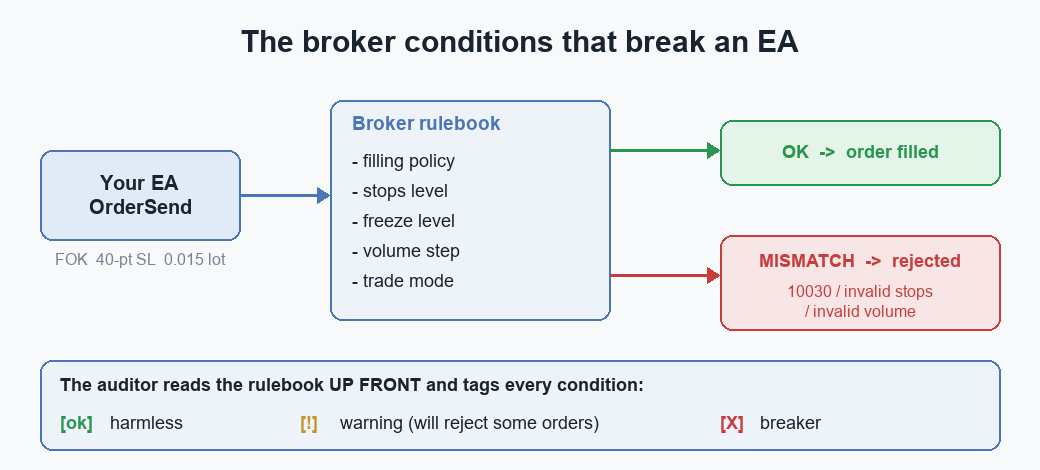
The auditor reads the broker's rulebook up front and grades each condition — OK, warning, or breaker — before a single order goes out.
The panel, Walter house style
I draw the report as a stack of monospace labels in the upper-left corner — one OBJ_LABEL per line, colored by status. Same panel style I've used across this account, so the family of tools reads consistently:
//+------------------------------------------------------------------+
//| Create or update a single text label of the panel                |
//+------------------------------------------------------------------+
void SetLabel(const string name, const int x, const int y, const string text, const int fs, const color clr)
  {
   if(ObjectFind(0, name) < 0)
     {
      ObjectCreate(0, name, OBJ_LABEL, 0, 0, 0);
      ObjectSetInteger(0, name, OBJPROP_CORNER, CORNER_LEFT_UPPER);
      ObjectSetInteger(0, name, OBJPROP_ANCHOR, ANCHOR_LEFT_UPPER);
      ObjectSetString(0, name, OBJPROP_FONT, "Consolas");
      ObjectSetInteger(0, name, OBJPROP_SELECTABLE, false);
      ObjectSetInteger(0, name, OBJPROP_HIDDEN, true);
     }
   ObjectSetInteger(0, name, OBJPROP_XDISTANCE, x);
   ObjectSetInteger(0, name, OBJPROP_YDISTANCE, y);
   ObjectSetInteger(0, name, OBJPROP_FONTSIZE, fs);
   ObjectSetInteger(0, name, OBJPROP_COLOR, clr);
   ObjectSetString(0, name, OBJPROP_TEXT, text);
  }
UpdatePanel just runs the audit and lays the lines out with StatusTag(status) + text, deleting any leftover labels when the report shrinks. I run it from a two-second timer, because some of these conditions are not static: a broker can widen the stops level or the spread during news or thin liquidity, and I want the panel to show that the moment it happens — not the value from when you attached the EA.
Running it
Drop BrokerConditionsAuditor on any chart. On start it prints the full report to the Experts log and paints the panel; from then on the panel refreshes every couple of seconds. A clean broker shows all green and 0 breaker(s); a hostile symbol lights up amber and red with the exact reasons.
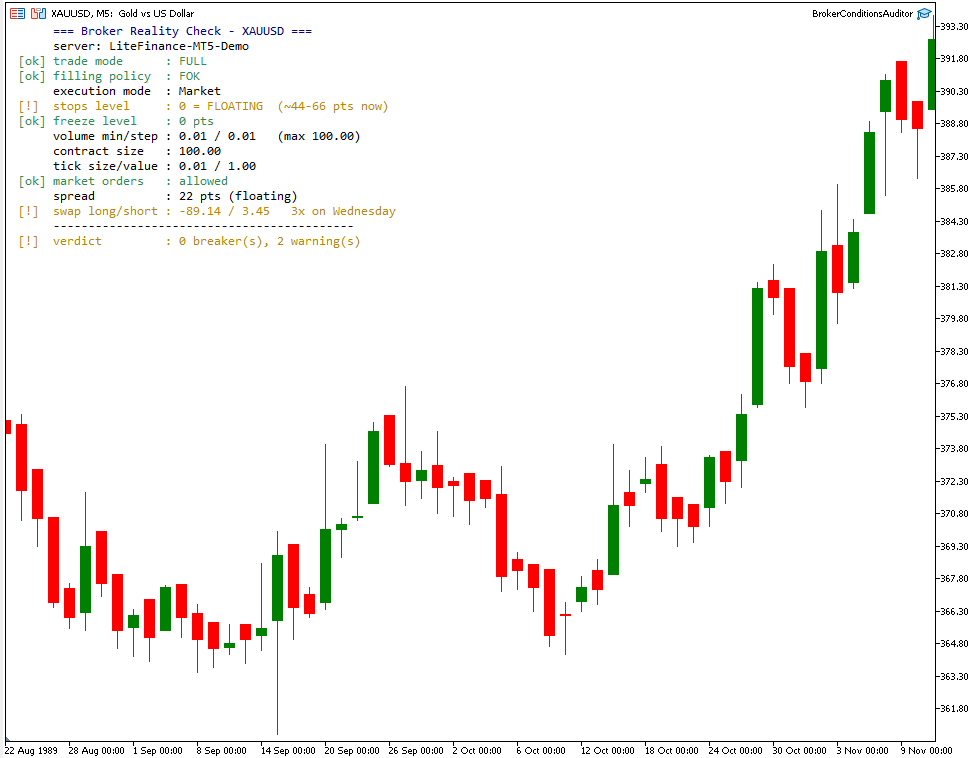
The auditor panel on a live chart: green for OK, amber for warnings, red for breakers, with the verdict line at the bottom.
Flip InpAuditAll to true and it sweeps the whole Market Watch, printing only the symbols that have breakers and, with InpWriteCsv, writing every symbol's conditions to MQL5\Files\BrokerAudit.csv. That CSV is the fastest way I know to compare two brokers side by side, or to check a new one before you trust an EA to it — you see the stops levels, filling policies and lot steps of every instrument in one sheet.
Here are the two XAUUSD rulebooks from my story, the way the auditor grades them — the same row it produces for every symbol:
| Condition | Broker A (mine) | Broker B (client) |
|---|---|---|
| Trade mode | FULL — ok | FULL — ok |
| Filling policy | FOK, IOC — ok | IOC only — ok |
| Stops level | 0 = floating — warning | 70 pts (fixed) — warning |
| Volume min/step | 0.01 / 0.01 — ok | 0.01 / 0.10 — warning |
| Verdict | 0 breakers, 1 warning | 0 breakers, 2 warnings |
Look closely at the filling row: the auditor calls Broker B ok, because IOC is a valid market fill — the symbol itself is fine. The breakage in my story came from my EA hardcoding FOK against a symbol that only offered IOC; the tool grades the broker, and it is on me to make my code match. What it flags on Broker B — the 70-point stops level and the coarse lot step — are exactly the two conditions that rejected my 40-point-stop, fixed-lot orders. And it doesn't wave my broker through clean either: its zero stops level is floating, so it earns an amber flag too — a reminder that a minimum you can't read in advance still has to be respected. Nothing is red on either side, yet the same EA lives on one broker and dies on the other.
That is how I now onboard any account I don't already know: attach the auditor to a chart, read the verdict, flip InpAuditAll to dump the CSV, and skim the flagged symbols — two minutes, before a single order goes out. It replaced a workflow I am not proud of: deploy the EA, watch it fail on the client's terminal, trade guesses over email for a couple of days, and only then discover it was the stops level all along.
Acting on each flag
The panel is only half the job; what matters is what you change once you have seen it. Taking the flags in the order they bite:
Filling with no FOK/IOC. Don't hardcode a filling type. Read SYMBOL_FILLING_MODE at init and choose one the symbol supports; under Market execution, fall back to ORDER_FILLING_RETURN. CTrade handles this for you unless you override it — the bug is almost always a manual ORDER_FILLING_FOK carried over from another broker.
A stops level (fixed or floating) or a freeze level above zero. Clamp every SL and TP to at least the stops level away from price before you send. When that level reads zero it is floating, so derive your minimum from the live spread — two to three times it — instead of trusting the zero. Never modify or close inside the freeze zone; measure the distance first. A hardcoded 20-point stop is not portable — derive it from the broker's own number.
A volume step coarser than the minimum. Round every lot to the step with MathFloor(lots/step)*step, then re-check it against min and max. Risk-based sizing that divides by stop distance produces uneven lots that a coarse step will reject.
Trade mode not FULL — the red one. This is the flag you cannot code around: the symbol won't let you open freely. Don't deploy there; pick another symbol or another broker.
Heavy or asymmetric swap. Bias toward the cheaper side, or keep holds clear of the triple-swap day. Part 2 turns this flag into an actual money figure.
None of this is exotic — it is the checklist I now run before I trust any account with an automated system. The auditor just turns it into a ten-second read instead of a client email three days later.
What's next
This part mapped the broker's rulebook — the conditions that make an OrderSend succeed or fail. What it deliberately did not do is measure what those conditions cost you. The most underestimated of them is the swap: the overnight financing the broker charges, tripled one day a week, that quietly erodes any position held for more than a session.
In Part 2 of Broker Reality Check I'll build a tool that measures the real swap and rollover cost per symbol on your account — including the triple-swap day — and shows how much it takes out of a multi-day strategy: the kind of XAUUSD position that looks profitable on the chart but quietly gives back a third of its gain to swap over a week. Same idea, different hidden cost.
The complete BrokerConditionsAuditor.mq5 is attached. Mount it on the broker you're about to trust with an EA, and let it tell you where the rulebook disagrees with your code before a single order does.
Warning: All rights to these materials are reserved by MetaQuotes Ltd. Copying or reprinting of these materials in whole or in part is prohibited.
This article was written by a user of the site and reflects their personal views. MetaQuotes Ltd is not responsible for the accuracy of the information presented, nor for any consequences resulting from the use of the solutions, strategies or recommendations described.

 A Symbol Metadata and Trading Hours Cache in MQL5: Eliminating Redundant SymbolInfo Calls in Multi-Symbol EAs
 The MQL5 Standard Library Explorer (Part 14): Building a Dynamic Hedge EA with the ALGLIB Port (ap.mqh)
 Multi-Threaded Trading Robot with Machine Learning: From Concept to Implementation
 Mapping Dealer Gamma Exposure (GEX) in MetaTrader 5: Walls, the Zero-Gamma Flip, and a Chart Overlay

- Free trading apps
- Over 8,000 signals for copying
- Economic news for exploring financial markets
You agree to website policy and terms of use