

Price Action Analysis Toolkit Development (Part 75): Building a Modular Multi-Symbol Trading Panel in MQL5
 6 046
6 046
 0
0

Contents
Introduction
Managing multiple instruments becomes difficult when each operation requires switching charts. Opening a trade on another symbol typically involves locating its chart first. In contrast, routine tasks such as closing all positions, closing only winning or losing trades, or modifying Stop Loss and Take Profit levels often require navigating several context menus for each position. As the number of monitored symbols and open trades increases, these repetitive actions become increasingly time-consuming and interrupt the trading workflow.
To improve efficiency, we need a centralized trading interface that consolidates all trading operations into a single panel. This eliminates the need to switch between multiple charts to manage positions.
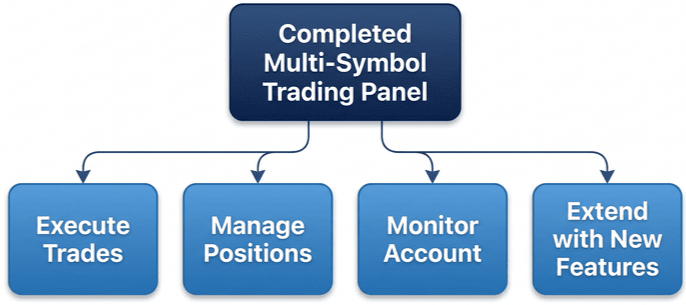
In this article, we build a modular multi-symbol trading panel for MQL5. It centralizes trading operations by separating responsibilities. By the end of this article, you will have a reusable multi-symbol trading panel capable of:
- Opening Buy and Sell positions for multiple symbols from a single chart;
- closing positions by symbol or across the entire portfolio;
- closing only profitable or losing positions with one click;
- Modifying Stop Loss and Take Profit levels directly from the panel;
- monitoring account statistics and floating profit in real time; and
- Providing a modular architecture that can be extended with additional trading and risk management features.
Application Architecture and Project Structure
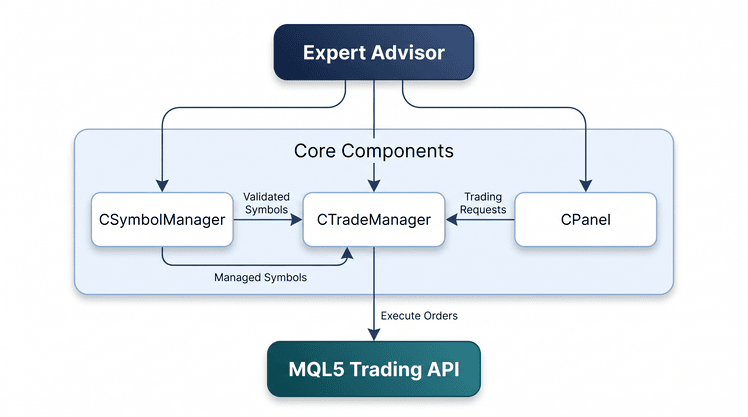
Before implementing the individual components, we first organize the application into a modular architecture. Instead of placing every responsibility inside a single Expert Advisor, we separate symbol management, trade execution, and the graphical interface into independent components. This makes the application easier to understand, maintain, test, and extend as new functionality is introduced.
The table below summarizes the four main components of the application.
| Component | Responsibility |
|---|---|
| CSymbolManager | Parses the user-defined symbol list, validates each symbol, ensures it is available in Market Watch, and provides controlled access to the collection throughout the application. |
| CTradeManager | Encapsulates all trading operations, including opening and closing positions, modifying Stop Loss and Take Profit levels, and calculating symbol-specific and portfolio-wide statistics. |
| CPanel | Builds the graphical dashboard, displays account and position information, and processes user interactions before delegating trading requests to the Trade Manager. |
| MultiSymbolPanelEA.mq5 | Acts as the application's entry point by creating the required objects, coordinating communication between the modules, processing terminal events, and managing the application's lifecycle. |
The relationship between these components is illustrated below.
The project is organized as follows:
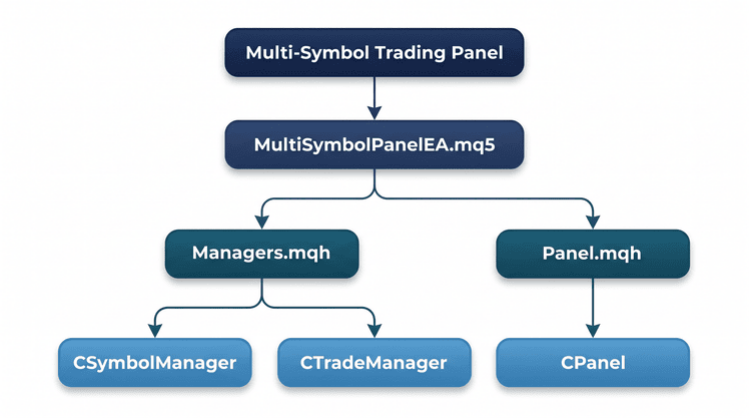
The Managers.mqh file contains the CSymbolManager and CTradeManager classes, while Panel.mqh contains the complete implementation of CPanel. The Expert Advisor coordinates these components by handling initialization, event forwarding, periodic updates, and resource cleanup.
With the architecture in place, we can now move on to the implementation. We'll build each component individually before bringing everything together into the complete trading panel.
MQL5 Implementation
#include <Trade/Trade.mqh>
#include <Trade/PositionInfo.mqh>
To simplify object management, every graphical object created by the panel uses the "MSP_" prefix. This allows the Expert Advisor to identify, update, and remove only the panel objects without affecting any other objects on the chart.
We start by implementing CSymbolManager, which validates the configured symbol list and provides the managed symbol collection to the remaining components.
CSymbolManager
Before the trading panel can execute any operation, it requires a validated symbol collection. CSymbolManager is responsible for parsing the configured symbol list, validating each symbol against the connected trading server, ensuring it is available in Market Watch, and exposing the managed symbol collection to the remaining application components.
Constructing the Symbol Collection
We begin by constructing the initial symbol collection from the comma-separated input supplied by the Expert Advisor. The constructor focuses solely on parsing the input string, trimming whitespace, removing empty entries, and storing the resulting symbols internally. We deliberately defer validation to Init(), keeping object construction and symbol validation as separate responsibilities.
//+------------------------------------------------------------------+
//| Constructor: parses a comma‑separated string into an array       |
//+------------------------------------------------------------------+
CSymbolManager::CSymbolManager(string symbolsList)
  {
//--- The input string (e.g., "EURUSD,GBPUSD") is split by commas
   m_count = 0;
   string temp[];
   int n = StringSplit(symbolsList, ',', temp);
   if(n > 0)
     {
      //--- Reserve space and copy each token after trimming whitespace
      ArrayResize(m_symbols, n);
      for(int i = 0; i < n; i++)
        {
         StringTrimLeft(temp[i]);
         StringTrimRight(temp[i]);
         if(StringLen(temp[i]) > 0)
           {
            m_symbols[m_count] = temp[i];
            m_count++;
           }
        }
      //--- Shrink the array to the exact number of valid symbols
      ArrayResize(m_symbols, m_count);
     }
  }
The parsing process starts with StringSplit(), which separates the comma-separated input into individual entries. Before storing each symbol, we remove any leading or trailing whitespace to prevent formatting inconsistencies from affecting later processing. Empty entries are ignored, and once parsing is complete, the internal array is resized to contain only the valid elements. At this point, we have a clean symbol collection, but we have not yet confirmed that the symbols actually exist on the trading server.
Validating Tradable Symbols
With the initial collection in place, the next question is whether these symbols can actually be traded. This responsibility belongs to Init(), which validates every configured symbol before the rest of the application is allowed to use it.
//+------------------------------------------------------------------+
//| Initializes the symbol list – skips invalid symbols              |
//+------------------------------------------------------------------+
bool CSymbolManager::Init()
  {
//--- No symbols from the input string – nothing to do
   if(m_count == 0)
     {
      Print("No symbols provided in input.");
      return(false);
     }

   string validSymbols[];
   int validCount = 0;

   for(int i = 0; i < m_count; i++)
     {
      string sym = m_symbols[i];
      //--- Check if the symbol actually exists in the broker's list
      if(SymbolInfoInteger(sym, SYMBOL_EXIST) == 0)
        {
         Print("Symbol ", sym, " not found – skipping.");
         continue;
        }
      //--- Make sure the symbol is visible in Market Watch (required for trading)
      if(!SymbolSelect(sym, true))
        {
         Print("Failed to select symbol ", sym, " – skipping.");
         continue;
        }
      //--- Build a temporary array of only valid symbols
      ArrayResize(validSymbols, validCount + 1);
      validSymbols[validCount] = sym;
      validCount++;
     }

//--- If no symbols are valid, the EA cannot trade anything
   if(validCount == 0)
     {
      Print("No valid symbols found. Please check symbol names.");
      m_count = 0;
      ArrayResize(m_symbols, 0);
      return(false);
     }

//--- Replace the original array with the validated one
   ArrayResize(m_symbols, validCount);
   for(int i = 0; i < validCount; i++)
      m_symbols[i] = validSymbols[i];
   m_count = validCount;

   Print("Symbol Manager initialized with ", m_count, " valid symbol(s).");
   return(true);
  }
Validation begins by checking whether any symbols were supplied. Each configured symbol is then verified with SymbolInfoInteger() using SYMBOL_EXIST, and any symbols that do not exist on the connected trading server are skipped.
For every valid symbol, SymbolSelect() makes it available in Market Watch so the application can retrieve market data and execute trading operations.
Verified symbols are first stored in a temporary array before replacing the original collection. This ensures that only valid, tradable symbols remain available for the rest of the application.
Accessing the Managed Collection
With initialization complete, we expose a small public interface that allows other components to retrieve symbols and verify whether a symbol belongs to the managed collection. This preserves encapsulation while keeping CSymbolManager responsible for symbol management.
//+------------------------------------------------------------------+
//| Returns symbol name at given index                               |
//+------------------------------------------------------------------+
string CSymbolManager::GetSymbol(int index) const
  {
   if(index >= 0 && index < m_count)
      return(m_symbols[index]);
   return("");
  }

//+------------------------------------------------------------------+
//| Checks if a symbol is in the monitored list                      |
//+------------------------------------------------------------------+
bool CSymbolManager::IsSymbolValid(string symbol) const
  {
   for(int i = 0; i < m_count; i++)
     {
      if(m_symbols[i] == symbol)
         return(true);
     }
   return(false);
  }
We begin with GetSymbol(), which returns the symbol stored at the requested index without exposing the internal array. This provides controlled access to the managed collection.
Next, IsSymbolValid() checks whether a symbol belongs to the managed collection before trading or management operations are performed. Keeping this verification inside CSymbolManager centralizes the validation logic and avoids duplication.
With symbol management complete, we can move on to implementing CTradeManager, where the validated symbols are used for trade execution and position management.
CTradeManager
We now turn our attention to CTradeManager, which handles trade execution and position management. By centralizing these operations in one class, the remaining components no longer need to interact directly with the MQL5 trading API.
Before any operation, the class validates the symbol via CSymbolManager. It also filters positions by the configured magic number so only this Expert Advisor's trades are managed.
Initializing the Trade Manager
We begin by storing the dependencies required for trading. The constructor receives a reference to CSymbolManager, stores the Expert Advisor's magic number, and initializes a default trading volume that can later be overridden through the input parameters.
//+------------------------------------------------------------------+
//| Constructor: stores symbol manager and magic number              |
//+------------------------------------------------------------------+
CTradeManager::CTradeManager(CSymbolManager *sm, int magic)
   : m_symbolManager(sm), m_magic(magic), m_lotSize(0.01)
  {
//--- The default lot size will be overridden by the EA's input later
  }
The constructor prepares the class for trading by initializing its required dependencies.
Executing Market Orders
We begin by implementing OpenBuy() and OpenSell(). Both functions validate the requested symbol, determine the trading volume, retrieve the current market price, and submit the order through the shared CTrade object.
//+------------------------------------------------------------------+
//| Opens a Buy market order                                         |
//+------------------------------------------------------------------+
bool CTradeManager::OpenBuy(string symbol, double lot)
  {
//--- Protect against trading on symbols not listed in the manager
   if(!m_symbolManager->IsSymbolValid(symbol))
     {
      Print("Symbol ", symbol, " not in monitored list.");
      return(false);
     }

//--- Use the provided lot or fall back to the default
   double volume = (lot > 0) ? lot : m_lotSize;

//--- For a Buy order we must use the ASK price (the price we pay)
   double price = SymbolInfoDouble(symbol, SYMBOL_ASK);
   if(price <= 0)
     {
      Print("Failed to get ASK for ", symbol);
      return(false);
     }

//--- g_Trade is a global CTrade object provided by the main EA
   return(g_Trade.Buy(volume, symbol, price, 0, 0, "Buy from panel"));
  }

//+------------------------------------------------------------------+
//| Opens a Sell market order                                        |
//+------------------------------------------------------------------+
bool CTradeManager::OpenSell(string symbol, double lot)
  {
//--- Protect against trading on symbols not listed in the manager
   if(!m_symbolManager->IsSymbolValid(symbol))
     {
      Print("Symbol ", symbol, " not in monitored list.");
      return(false);
     }

//--- Use the provided lot or fall back to the default
   double volume = (lot > 0) ? lot : m_lotSize;

//--- For a Sell order we must use the BID price (the price we receive)
   double price = SymbolInfoDouble(symbol, SYMBOL_BID);
   if(price <= 0)
     {
      Print("Failed to get BID for ", symbol);
      return(false);
     }

   return(g_Trade.Sell(volume, symbol, price, 0, 0, "Sell from panel"));
  }
Before submitting an order, IsSymbolValid() verifies that the requested symbol belongs to the managed collection. If no custom volume is provided, the default lot size is used.
The two functions differ only in the execution price. OpenBuy() uses SYMBOL_ASK, while OpenSell() uses SYMBOL_BID. Once a valid price is retrieved, the order is submitted through the shared CTrade object.
Managing Open Positions
Next, we implement the functions responsible for managing open positions. These allow the panel to close positions for a selected symbol or perform portfolio-wide actions, such as closing all positions, only profitable positions, or only losing positions. Each operation filters by the magic number, so only this Expert Advisor's trades are affected.
We begin by traversing the terminal's open positions using PositionsTotal() and CPositionInfo::SelectByIndex(). The positions are processed in reverse order because closing a position changes the terminal's position list, and iterating backwards prevents entries from being skipped.
Each function then applies its own filtering criteria. CloseAllPositions(string) closes positions for the selected symbol, CloseAllPositions() processes every position managed by the Expert Advisor, while CloseWinners() and CloseLosers() filter positions by their floating profit before calling CTrade::PositionClose().
Updating Position Protection
Next, we implement SetTakeProfit() and SetStopLoss(), allowing the panel to update the protection levels of every managed position for a selected symbol.
//+------------------------------------------------------------------+
//| Sets Take Profit for all positions of a symbol                   |
//+------------------------------------------------------------------+
bool CTradeManager::SetTakeProfit(string symbol, double tpPrice)
  {
   if(!m_symbolManager->IsSymbolValid(symbol))
     {
      Print("Symbol ", symbol, " not in monitored list.");
      return(false);
     }
   bool result = true;
   for(int i = PositionsTotal() - 1; i >= 0; i--)
     {
      if(g_PositionInfo.SelectByIndex(i))
        {
         if(g_PositionInfo.Symbol() == symbol && g_PositionInfo.Magic() == m_magic)
           {
            //--- PositionModify requires the ticket, new SL, and new TP. We keep the current SL.
            if(!g_Trade.PositionModify(g_PositionInfo.Ticket(), g_PositionInfo.StopLoss(), tpPrice))
              {
               Print("Failed to modify TP for ", g_PositionInfo.Ticket(), " error: ", GetLastError());
               result = false;
              }
           }
        }
     }
   return(result);
  }

//+------------------------------------------------------------------+
//| Sets Stop Loss for all positions of a symbol                     |
//+------------------------------------------------------------------+
bool CTradeManager::SetStopLoss(string symbol, double slPrice)
  {
   if(!m_symbolManager->IsSymbolValid(symbol))
     {
      Print("Symbol ", symbol, " not in monitored list.");
      return(false);
     }
   bool result = true;
   for(int i = PositionsTotal() - 1; i >= 0; i--)
     {
      if(g_PositionInfo.SelectByIndex(i))
        {
         if(g_PositionInfo.Symbol() == symbol && g_PositionInfo.Magic() == m_magic)
           {
            //--- Keep the current TP and only update the SL
            if(!g_Trade.PositionModify(g_PositionInfo.Ticket(), slPrice, g_PositionInfo.TakeProfit()))
              {
               Print("Failed to modify SL for ", g_PositionInfo.Ticket(), " error: ", GetLastError());
               result = false;
              }
           }
        }
     }
   return(result);
  }
Both functions first validate the requested symbol before locating the corresponding positions. They then update the protection levels using CTrade::PositionModify(), which requires both the Stop Loss and Take Profit values, even if only one is being modified.
SetTakeProfit() updates TP and keeps the current SL. SetStopLoss() updates SL and keeps the current TP.
Retrieving Trading Statistics
The dashboard also needs access to real-time trading information. Rather than allowing the interface to query the trading API directly, we implement a small set of accessor functions that return the required statistics, including GetSymbolProfit(), GetTotalProfit(), GetSymbolPositionsCount(), and GetTotalPositions().
This keeps the interface focused on displaying information, while CTradeManager remains responsible for collecting and aggregating trading data from the terminal.
//+------------------------------------------------------------------+
//| Returns total floating profit for a symbol                       |
//+------------------------------------------------------------------+
double CTradeManager::GetSymbolProfit(string symbol) const
  {
   double profit = 0.0;
   //--- Loop backward through all open positions (safer if positions change)
   for(int i = PositionsTotal() - 1; i >= 0; i--)
     {
      //--- Attempt to select the position at index i into g_PositionInfo
      if(g_PositionInfo.SelectByIndex(i))
        {
         //--- Check if this position belongs to the requested symbol and our EA's magic number
         if(g_PositionInfo.Symbol() == symbol && g_PositionInfo.Magic() == m_magic)
            //--- Add the position's current floating profit/loss to the running total
            profit += g_PositionInfo.Profit();
        }
     }
   //--- Return the accumulated profit (can be negative if overall loss)
   return(profit);
  }

//+------------------------------------------------------------------+
//| Returns number of open positions for a symbol                    |
//+------------------------------------------------------------------+
int CTradeManager::GetSymbolPositionsCount(string symbol) const
  {
   int count = 0;
   //--- Iterate through all positions from last to first
   for(int i = PositionsTotal() - 1; i >= 0; i--)
     {
      //--- Select the position to access its properties
      if(g_PositionInfo.SelectByIndex(i))
        {
         //--- Increment counter only if symbol and magic match
         if(g_PositionInfo.Symbol() == symbol && g_PositionInfo.Magic() == m_magic)
            count++;
        }
     }
   //--- Return the total number of positions for that symbol
   return(count);
  }

//+------------------------------------------------------------------+
//| Returns total floating profit across all managed positions       |
//+------------------------------------------------------------------+
double CTradeManager::GetTotalProfit() const
  {
   double profit = 0.0;
   //--- Scan all open positions in reverse order
   for(int i = PositionsTotal() - 1; i >= 0; i--)
     {
      //--- Select position i into the position info object
      if(g_PositionInfo.SelectByIndex(i))
        {
         //--- Only consider positions belonging to this EA (magic number check)
         if(g_PositionInfo.Magic() == m_magic)
            //--- Accumulate floating P&L of all managed positions
            profit += g_PositionInfo.Profit();
        }
     }
   //--- Return the net unrealized profit of the whole portfolio
   return(profit);
  }

//+------------------------------------------------------------------+
//| Returns total number of open positions managed by this EA        |
//+------------------------------------------------------------------+
int CTradeManager::GetTotalPositions() const
  {
   int count = 0;
   //--- Loop backwards through the global positions list
   for(int i = PositionsTotal() - 1; i >= 0; i--)
     {
      //--- Select the i‑th position for reading its data
      if(g_PositionInfo.SelectByIndex(i))
        {
         //--- Count only positions that were opened by this EA (magic match)
         if(g_PositionInfo.Magic() == m_magic)
            count++;
        }
     }
   //--- Return the total count of active positions controlled by this instance
   return(count);
  }
Each function traverses the terminal's open positions, filters them by the configured magic number, and returns the requested statistic. Depending on the function, this may be the floating profit or the number of open positions for a specific symbol or the entire portfolio.
With the trading layer complete, we can now implement CPanel, which builds the graphical interface and forwards user actions to CTradeManager.
CPanel
In this section, we implement the application's graphical interface. CPanel brings together the symbol and trade managers by constructing the dashboard, updating the displayed information, and translating user interactions into requests handled by CTradeManager. This keeps the Expert Advisor focused on coordination rather than managing graphical objects directly.
//+------------------------------------------------------------------+
//| CPanel – builds and manages the graphical user interface         |
//+------------------------------------------------------------------+
class CPanel
  {
private:
   //--- Each row in the panel corresponds to one trading symbol
   struct RowData
     {
      string         symbol;
      string         labelName;
      string         buyBtnName;
      string         sellBtnName;
      string         closeBtnName;
      string         profitLabelName;
      string         tpEditName;
      string         slEditName;
      string         bgRectName;
     };

   CSymbolManager    *m_symbolManager;
   CTradeManager     *m_tradeManager;

   string            m_prefix;
   int               m_xOffset;
   int               m_yOffset;
   color             m_bgColor;
   color             m_rowEvenColor;
   color             m_rowOddColor;

   int               m_rowHeight;
   int               m_headerHeight;
   int               m_infoRowHeight;
   int               m_buttonRowHeight;
   int               m_marginLeft;
   int               m_marginTop;
   int               m_spacing;

   int               m_colWidths[7];
   int               m_colOffsets[7];

   RowData           m_rows[];
   bool              m_created;

   //--- Global control names (account info and top buttons)
   string            m_bgName;
   string            m_balanceLabel;
   string            m_equityLabel;
   string            m_marginLabel;
   string            m_floatPLabel;
   string            m_posCountLabel;
   string            m_closeAllBtn;
   string            m_closeWinnersBtn;
   string            m_closeLosersBtn;
   string            m_refreshBtn;

   bool              CreateGlobalControls();
   bool              CreateHeader();
   bool              CreateRows();
   void              UpdateGlobalInfo();
   void              UpdateRow(int rowIndex);
   bool              IsButtonClick(string objName);
   bool              IsEditEnd(string objName);
   string            ExtractSymbolFromObject(string objName);

public:
                     CPanel(CSymbolManager *sm, CTradeManager *tm,
          int xOffset, int yOffset, color bgColor);
                    ~CPanel();

   bool              CreatePanel();
   void              DestroyPanel();
   void              UpdatePanel();
   void              OnChartEvent(const int id, const long &lparam,
                                  const double &dparam, const string &sparam);
  };
We organize CPanel around three responsibilities:
- constructing the dashboard and its controls;
- updating account and trading information; and
- processing user interactions before forwarding requests to CTradeManager.
Every graphical object uses the "MSP_" prefix, allowing the panel to identify and manage only its own objects without affecting anything else on the chart.
Calculating the Panel Layout
The constructor initializes the required dependencies and defines the panel layout. Instead of calculating coordinates whenever a control is created, it computes the column offsets once and reuses them throughout the interface when positioning labels, buttons, and edit fields.
//+------------------------------------------------------------------+
//| Constructor                                                      |
//+------------------------------------------------------------------+
CPanel::CPanel(CSymbolManager *sm, CTradeManager *tm,
               int xOffset, int yOffset, color bgColor)
   : m_symbolManager(sm),
     m_tradeManager(tm),
     m_created(false)
  {
   m_prefix = "MSP_";
   m_xOffset = xOffset;
   m_yOffset = yOffset;

//--- The background colour is a light grey to stand out on the chart
   m_bgColor = clrWhiteSmoke;
   m_rowEvenColor = C'245,245,245';
   m_rowOddColor  = C'235,235,235';

//--- Layout dimensions (tuned for readability)
   m_rowHeight       = 36;
   m_headerHeight    = 28;
   m_infoRowHeight   = 30;
   m_buttonRowHeight = 34;
   m_marginLeft      = 12;
   m_marginTop       = 8;
   m_spacing         = 6;

//--- Column widths: symbol label, buttons, P/L display, and edit fields
   m_colWidths[0] = 90;
   m_colWidths[1] = 60;
   m_colWidths[2] = 60;
   m_colWidths[3] = 65;
   m_colWidths[4] = 80;
   m_colWidths[5] = 75;
   m_colWidths[6] = 75;

//--- Pre‑calculate column offsets to simplify object placement
   int x = m_marginLeft;
   for(int i = 0; i < 7; i++)
     {
      m_colOffsets[i] = x;
      x += m_colWidths[i] + m_spacing;
     }
  }
The layout is driven by predefined column widths, while the corresponding horizontal offsets are calculated once during construction. Centralizing these calculations keeps the layout consistent and makes it easy to resize or reposition an entire column by changing a single value.
Creating the Panel
We build the interface using a set of helper functions, each responsible for a specific part of the panel. This keeps the implementation organized, reduces function complexity, and makes future modifications easier.
//+------------------------------------------------------------------+
//| Creates all graphical objects                                    |
//+------------------------------------------------------------------+
bool CPanel::CreatePanel()
  {
   if(m_created)
      return(true);

//--- Calculate total panel size based on the number of symbols
   int totalWidth = m_colOffsets[6] + m_colWidths[6] + 20;
   int rowCount = m_symbolManager->Count();
   int totalHeight = m_marginTop + m_infoRowHeight + 8 +
                     m_buttonRowHeight + 8 +
                     m_headerHeight + 4 +
                     rowCount * m_rowHeight + 8;

//--- First, create the main background rectangle (serves as the panel container)
   string bgName = m_prefix + "bg";
   if(ObjectCreate(0, bgName, OBJ_RECTANGLE_LABEL, 0, 0, 0))
     {
      ObjectSetInteger(0, bgName, OBJPROP_XDISTANCE, m_xOffset);
      ObjectSetInteger(0, bgName, OBJPROP_YDISTANCE, m_yOffset);
      ObjectSetInteger(0, bgName, OBJPROP_XSIZE, totalWidth);
      ObjectSetInteger(0, bgName, OBJPROP_YSIZE, totalHeight);
      ObjectSetInteger(0, bgName, OBJPROP_BACK, false);
      ObjectSetInteger(0, bgName, OBJPROP_COLOR, m_bgColor);
      ObjectSetInteger(0, bgName, OBJPROP_STYLE, STYLE_SOLID);
      ObjectSetInteger(0, bgName, OBJPROP_WIDTH, 1);
      ObjectSetInteger(0, bgName, OBJPROP_BORDER_COLOR, clrGray);
      m_bgName = bgName;
     }
   else
     {
      Print("Failed to create panel background");
      return(false);
     }

//--- Now create all child controls (labels, buttons, edit fields)
   if(!CreateGlobalControls())
      return(false);
   if(!CreateHeader())
      return(false);
   if(!CreateRows())
      return(false);

   m_created = true;
   UpdatePanel();
   return(true);
  }
CreatePanel() begins by calculating the panel dimensions from the number of managed symbols before creating the background container with ObjectCreate(). It then delegates the remaining work to CreateGlobalControls(), CreateHeader(), and CreateRows(). Once all interface objects have been created, it calls UpdatePanel() to populate the dashboard with the current account and trading information.
Creating the Global Controls
CreateGlobalControls() builds the top section of the dashboard in two stages. It first creates the account information labels, then creates a second row of OBJ_BUTTON controls for portfolio-wide actions. Separating these controls into a dedicated function keeps the panel construction organized and simplifies future modifications.
//+------------------------------------------------------------------+
//| Creates account info labels and global buttons                   |
//+------------------------------------------------------------------+
bool CPanel::CreateGlobalControls()
  {
   int y = m_yOffset + m_marginTop;
   int x = m_xOffset + m_marginLeft;
   int infoSpacing = 35;

//--- Account balance
   m_balanceLabel = m_prefix + "balance";
   if(ObjectCreate(0, m_balanceLabel, OBJ_LABEL, 0, 0, 0))
     {
      ObjectSetInteger(0, m_balanceLabel, OBJPROP_XDISTANCE, x);
      ObjectSetInteger(0, m_balanceLabel, OBJPROP_YDISTANCE, y);
      ObjectSetString(0, m_balanceLabel, OBJPROP_TEXT, "Bal: 0.00");
      ObjectSetInteger(0, m_balanceLabel, OBJPROP_FONTSIZE, 12);
      ObjectSetInteger(0, m_balanceLabel, OBJPROP_COLOR, clrBlack);
      x += 90 + infoSpacing;
     }

//--- Equity
   m_equityLabel = m_prefix + "equity";
   if(ObjectCreate(0, m_equityLabel, OBJ_LABEL, 0, 0, 0))
     {
      ObjectSetInteger(0, m_equityLabel, OBJPROP_XDISTANCE, x);
      ObjectSetInteger(0, m_equityLabel, OBJPROP_YDISTANCE, y);
      ObjectSetString(0, m_equityLabel, OBJPROP_TEXT, "Eq: 0.00");
      ObjectSetInteger(0, m_equityLabel, OBJPROP_FONTSIZE, 12);
      ObjectSetInteger(0, m_equityLabel, OBJPROP_COLOR, clrBlack);
      x += 90 + infoSpacing;
     }

//--- Free margin
   m_marginLabel = m_prefix + "margin";
   if(ObjectCreate(0, m_marginLabel, OBJ_LABEL, 0, 0, 0))
     {
      ObjectSetInteger(0, m_marginLabel, OBJPROP_XDISTANCE, x);
      ObjectSetInteger(0, m_marginLabel, OBJPROP_YDISTANCE, y);
      ObjectSetString(0, m_marginLabel, OBJPROP_TEXT, "Mgn: 0.00");
      ObjectSetInteger(0, m_marginLabel, OBJPROP_FONTSIZE, 12);
      ObjectSetInteger(0, m_marginLabel, OBJPROP_COLOR, clrBlack);
      x += 90 + infoSpacing;
     }

//--- Total floating P/L (colour‑coded later in Update)
   m_floatPLabel = m_prefix + "floatpl";
   if(ObjectCreate(0, m_floatPLabel, OBJ_LABEL, 0, 0, 0))
     {
      ObjectSetInteger(0, m_floatPLabel, OBJPROP_XDISTANCE, x);
      ObjectSetInteger(0, m_floatPLabel, OBJPROP_YDISTANCE, y);
      ObjectSetString(0, m_floatPLabel, OBJPROP_TEXT, "P/L: 0.00");
      ObjectSetInteger(0, m_floatPLabel, OBJPROP_FONTSIZE, 12);
      ObjectSetInteger(0, m_floatPLabel, OBJPROP_COLOR, clrBlack);
      x += 90 + infoSpacing;
     }

//--- Total open positions count
   m_posCountLabel = m_prefix + "poscount";
   if(ObjectCreate(0, m_posCountLabel, OBJ_LABEL, 0, 0, 0))
     {
      ObjectSetInteger(0, m_posCountLabel, OBJPROP_XDISTANCE, x);
      ObjectSetInteger(0, m_posCountLabel, OBJPROP_YDISTANCE, y);
      ObjectSetString(0, m_posCountLabel, OBJPROP_TEXT, "Pos: 0");
      ObjectSetInteger(0, m_posCountLabel, OBJPROP_FONTSIZE, 12);
      ObjectSetInteger(0, m_posCountLabel, OBJPROP_COLOR, clrBlack);
     }

//--- Second row: action buttons (Close All, Winners, Losers, Refresh)
   y += m_infoRowHeight + 8;
   x = m_xOffset + m_marginLeft;
   int btnW = 80;
   int btnH = m_buttonRowHeight;
   int btnSpacing = 10;

   m_closeAllBtn = m_prefix + "closeAll";
   if(ObjectCreate(0, m_closeAllBtn, OBJ_BUTTON, 0, 0, 0))
     {
      ObjectSetInteger(0, m_closeAllBtn, OBJPROP_XDISTANCE, x);
      ObjectSetInteger(0, m_closeAllBtn, OBJPROP_YDISTANCE, y);
      ObjectSetInteger(0, m_closeAllBtn, OBJPROP_XSIZE, btnW);
      ObjectSetInteger(0, m_closeAllBtn, OBJPROP_YSIZE, btnH);
      ObjectSetString(0, m_closeAllBtn, OBJPROP_TEXT, "Close All");
      ObjectSetInteger(0, m_closeAllBtn, OBJPROP_COLOR, clrWhite);
      ObjectSetInteger(0, m_closeAllBtn, OBJPROP_BGCOLOR, clrRed);
      x += btnW + btnSpacing;
     }

   m_closeWinnersBtn = m_prefix + "closeWinners";
   if(ObjectCreate(0, m_closeWinnersBtn, OBJ_BUTTON, 0, 0, 0))
     {
      ObjectSetInteger(0, m_closeWinnersBtn, OBJPROP_XDISTANCE, x);
      ObjectSetInteger(0, m_closeWinnersBtn, OBJPROP_YDISTANCE, y);
      ObjectSetInteger(0, m_closeWinnersBtn, OBJPROP_XSIZE, btnW);
      ObjectSetInteger(0, m_closeWinnersBtn, OBJPROP_YSIZE, btnH);
      ObjectSetString(0, m_closeWinnersBtn, OBJPROP_TEXT, "Winners");
      ObjectSetInteger(0, m_closeWinnersBtn, OBJPROP_COLOR, clrWhite);
      ObjectSetInteger(0, m_closeWinnersBtn, OBJPROP_BGCOLOR, clrGreen);
      x += btnW + btnSpacing;
     }

   m_closeLosersBtn = m_prefix + "closeLosers";
   if(ObjectCreate(0, m_closeLosersBtn, OBJ_BUTTON, 0, 0, 0))
     {
      ObjectSetInteger(0, m_closeLosersBtn, OBJPROP_XDISTANCE, x);
      ObjectSetInteger(0, m_closeLosersBtn, OBJPROP_YDISTANCE, y);
      ObjectSetInteger(0, m_closeLosersBtn, OBJPROP_XSIZE, btnW);
      ObjectSetInteger(0, m_closeLosersBtn, OBJPROP_YSIZE, btnH);
      ObjectSetString(0, m_closeLosersBtn, OBJPROP_TEXT, "Losers");
      ObjectSetInteger(0, m_closeLosersBtn, OBJPROP_COLOR, clrWhite);
      ObjectSetInteger(0, m_closeLosersBtn, OBJPROP_BGCOLOR, clrRed);
      x += btnW + btnSpacing;
     }

   m_refreshBtn = m_prefix + "refresh";
   if(ObjectCreate(0, m_refreshBtn, OBJ_BUTTON, 0, 0, 0))
     {
      ObjectSetInteger(0, m_refreshBtn, OBJPROP_XDISTANCE, x);
      ObjectSetInteger(0, m_refreshBtn, OBJPROP_YDISTANCE, y);
      ObjectSetInteger(0, m_refreshBtn, OBJPROP_XSIZE, btnW);
      ObjectSetInteger(0, m_refreshBtn, OBJPROP_YSIZE, btnH);
      ObjectSetString(0, m_refreshBtn, OBJPROP_TEXT, "Refresh");
      ObjectSetInteger(0, m_refreshBtn, OBJPROP_COLOR, clrWhite);
      ObjectSetInteger(0, m_refreshBtn, OBJPROP_BGCOLOR, clrDodgerBlue);
     }

   return(true);
  }
User interactions are handled later by OnChartEvent(), which identifies the selected control and forwards the corresponding request to CTradeManager. This keeps CPanel responsible for the interface while CTradeManager remains responsible for trade execution.
Creating Symbol Rows
CreateRows() iterates through the managed symbol collection and constructs one interface row for each symbol. Because the rows are generated dynamically from CSymbolManager, the dashboard automatically adapts to changes in the configured symbol list without requiring any layout changes.
//+------------------------------------------------------------------+
//| Creates rows with alternating backgrounds                        |
//+------------------------------------------------------------------+
bool CPanel::CreateRows()
  {
   int count = m_symbolManager->Count();
   ArrayResize(m_rows, count);

   int headerY = m_yOffset + m_marginTop + m_infoRowHeight + 8 + m_buttonRowHeight + 8;
   int y = headerY + m_headerHeight + 4;

   for(int r = 0; r < count; r++)
     {
      string symbol = m_symbolManager->GetSymbol(r);
      RowData row;
      row.symbol = symbol;

      int x = m_xOffset + m_marginLeft;

      //--- Row background (alternating colours make it easier to read)
      row.bgRectName = m_prefix + "rowbg_" + symbol;
      if(ObjectCreate(0, row.bgRectName, OBJ_RECTANGLE_LABEL, 0, 0, 0))
        {
         int rectWidth = m_colOffsets[6] + m_colWidths[6] + 10;
         int rectHeight = m_rowHeight;
         ObjectSetInteger(0, row.bgRectName, OBJPROP_XDISTANCE, m_xOffset + m_marginLeft - 4);
         ObjectSetInteger(0, row.bgRectName, OBJPROP_YDISTANCE, y);
         ObjectSetInteger(0, row.bgRectName, OBJPROP_XSIZE, rectWidth);
         ObjectSetInteger(0, row.bgRectName, OBJPROP_YSIZE, rectHeight);
         ObjectSetInteger(0, row.bgRectName, OBJPROP_BACK, false);
         color bgColor = (r % 2 == 0) ? m_rowEvenColor : m_rowOddColor;
         ObjectSetInteger(0, row.bgRectName, OBJPROP_COLOR, bgColor);
         ObjectSetInteger(0, row.bgRectName, OBJPROP_STYLE, STYLE_SOLID);
         ObjectSetInteger(0, row.bgRectName, OBJPROP_WIDTH, 0);
        }
      else
        {
         Print("Failed to create row background");
         return(false);
        }

      //--- Symbol name label
      row.labelName = m_prefix + "sym_" + symbol;
      if(ObjectCreate(0, row.labelName, OBJ_LABEL, 0, 0, 0))
        {
         ObjectSetInteger(0, row.labelName, OBJPROP_XDISTANCE, x + m_colOffsets[0]);
         ObjectSetInteger(0, row.labelName, OBJPROP_YDISTANCE, y + 8);
         ObjectSetString(0, row.labelName, OBJPROP_TEXT, symbol);
         ObjectSetInteger(0, row.labelName, OBJPROP_FONTSIZE, 11);
         ObjectSetInteger(0, row.labelName, OBJPROP_COLOR, clrBlack);
        }
      else
        {
         Print("Failed to create symbol label");
         return(false);
        }

      //--- Buy button (green)
      row.buyBtnName = m_prefix + "buy_" + symbol;
      if(ObjectCreate(0, row.buyBtnName, OBJ_BUTTON, 0, 0, 0))
        {
         int btnW = m_colWidths[1] - 4;
         int btnH = m_rowHeight - 6;
         ObjectSetInteger(0, row.buyBtnName, OBJPROP_XDISTANCE, x + m_colOffsets[1] + 2);
         ObjectSetInteger(0, row.buyBtnName, OBJPROP_YDISTANCE, y + 2);
         ObjectSetInteger(0, row.buyBtnName, OBJPROP_XSIZE, btnW);
         ObjectSetInteger(0, row.buyBtnName, OBJPROP_YSIZE, btnH);
         ObjectSetString(0, row.buyBtnName, OBJPROP_TEXT, "Buy");
         ObjectSetInteger(0, row.buyBtnName, OBJPROP_COLOR, clrWhite);
         ObjectSetInteger(0, row.buyBtnName, OBJPROP_BGCOLOR, clrGreen);
        }
      else
        {
         Print("Failed to create Buy button");
         return(false);
        }

      //--- Sell button (red)
      row.sellBtnName = m_prefix + "sell_" + symbol;
      if(ObjectCreate(0, row.sellBtnName, OBJ_BUTTON, 0, 0, 0))
        {
         int btnW = m_colWidths[2] - 4;
         int btnH = m_rowHeight - 6;
         ObjectSetInteger(0, row.sellBtnName, OBJPROP_XDISTANCE, x + m_colOffsets[2] + 2);
         ObjectSetInteger(0, row.sellBtnName, OBJPROP_YDISTANCE, y + 2);
         ObjectSetInteger(0, row.sellBtnName, OBJPROP_XSIZE, btnW);
         ObjectSetInteger(0, row.sellBtnName, OBJPROP_YSIZE, btnH);
         ObjectSetString(0, row.sellBtnName, OBJPROP_TEXT, "Sell");
         ObjectSetInteger(0, row.sellBtnName, OBJPROP_COLOR, clrWhite);
         ObjectSetInteger(0, row.sellBtnName, OBJPROP_BGCOLOR, clrRed);
        }
      else
        {
         Print("Failed to create Sell button");
         return(false);
        }

      //--- Close button (grey) – closes all positions for this symbol
      row.closeBtnName = m_prefix + "close_" + symbol;
      if(ObjectCreate(0, row.closeBtnName, OBJ_BUTTON, 0, 0, 0))
        {
         int btnW = m_colWidths[3] - 4;
         int btnH = m_rowHeight - 6;
         ObjectSetInteger(0, row.closeBtnName, OBJPROP_XDISTANCE, x + m_colOffsets[3] + 2);
         ObjectSetInteger(0, row.closeBtnName, OBJPROP_YDISTANCE, y + 2);
         ObjectSetInteger(0, row.closeBtnName, OBJPROP_XSIZE, btnW);
         ObjectSetInteger(0, row.closeBtnName, OBJPROP_YSIZE, btnH);
         ObjectSetString(0, row.closeBtnName, OBJPROP_TEXT, "Close");
         ObjectSetInteger(0, row.closeBtnName, OBJPROP_COLOR, clrWhite);
         ObjectSetInteger(0, row.closeBtnName, OBJPROP_BGCOLOR, clrGray);
        }
      else
        {
         Print("Failed to create Close button");
         return(false);
        }

      //--- Floating P/L label (color‑coded)
      row.profitLabelName = m_prefix + "pl_" + symbol;
      if(ObjectCreate(0, row.profitLabelName, OBJ_LABEL, 0, 0, 0))
        {
         ObjectSetInteger(0, row.profitLabelName, OBJPROP_XDISTANCE, x + m_colOffsets[4]);
         ObjectSetInteger(0, row.profitLabelName, OBJPROP_YDISTANCE, y + 8);
         ObjectSetString(0, row.profitLabelName, OBJPROP_TEXT, "0.00");
         ObjectSetInteger(0, row.profitLabelName, OBJPROP_FONTSIZE, 11);
         ObjectSetInteger(0, row.profitLabelName, OBJPROP_COLOR, clrBlack);
        }
      else
        {
         Print("Failed to create P/L label");
         return(false);
        }

      //--- Take Profit edit field (user enters a price level)
      row.tpEditName = m_prefix + "tp_" + symbol;
      if(ObjectCreate(0, row.tpEditName, OBJ_EDIT, 0, 0, 0))
        {
         int editW = m_colWidths[5] - 4;
         int editH = m_rowHeight - 8;
         ObjectSetInteger(0, row.tpEditName, OBJPROP_XDISTANCE, x + m_colOffsets[5] + 2);
         ObjectSetInteger(0, row.tpEditName, OBJPROP_YDISTANCE, y + 2);
         ObjectSetInteger(0, row.tpEditName, OBJPROP_XSIZE, editW);
         ObjectSetInteger(0, row.tpEditName, OBJPROP_YSIZE, editH);
         ObjectSetString(0, row.tpEditName, OBJPROP_TEXT, "0");
         ObjectSetInteger(0, row.tpEditName, OBJPROP_COLOR, clrBlack);
         ObjectSetInteger(0, row.tpEditName, OBJPROP_BGCOLOR, clrWhite);
        }
      else
        {
         Print("Failed to create TP edit");
         return(false);
        }

      //--- Stop Loss edit field
      row.slEditName = m_prefix + "sl_" + symbol;
      if(ObjectCreate(0, row.slEditName, OBJ_EDIT, 0, 0, 0))
        {
         int editW = m_colWidths[6] - 4;
         int editH = m_rowHeight - 8;
         ObjectSetInteger(0, row.slEditName, OBJPROP_XDISTANCE, x + m_colOffsets[6] + 2);
         ObjectSetInteger(0, row.slEditName, OBJPROP_YDISTANCE, y + 2);
         ObjectSetInteger(0, row.slEditName, OBJPROP_XSIZE, editW);
         ObjectSetInteger(0, row.slEditName, OBJPROP_YSIZE, editH);
         ObjectSetString(0, row.slEditName, OBJPROP_TEXT, "0");
         ObjectSetInteger(0, row.slEditName, OBJPROP_COLOR, clrBlack);
         ObjectSetInteger(0, row.slEditName, OBJPROP_BGCOLOR, clrWhite);
        }
      else
        {
         Print("Failed to create SL edit");
         return(false);
        }

      m_rows[r] = row;
      y += m_rowHeight;
     }
   return(true);
  }
Each row contains the controls required to manage a single symbol: its label, Buy, Sell, and Close buttons, a floating profit display, and Stop Loss and Take Profit input fields. The generated object names are stored in the RowData structure, allowing the panel to update or identify each control without searching the chart.
Updating the Interface
UpdatePanel() refreshes the dashboard in two stages. UpdateGlobalInfo() updates the account statistics, while UpdateRow() refreshes the information for each managed symbol. After all values have been updated, ChartRedraw() repaints the interface.
//+------------------------------------------------------------------+
//| Updates the panel                                                |
//+------------------------------------------------------------------+
void CPanel::UpdatePanel()
  {
   if(!m_created)
      return;

//--- Update the global account info row
   UpdateGlobalInfo();

//--- Then update each symbol row
   int count = m_symbolManager->Count();
   for(int r = 0; r < count; r++)
     {
      UpdateRow(r);
     }

   ChartRedraw(0);
  }

//+------------------------------------------------------------------+
//| Updates global info                                              |
//+------------------------------------------------------------------+
void CPanel::UpdateGlobalInfo()
  {
   double balance = AccountInfoDouble(ACCOUNT_BALANCE);
   double equity = AccountInfoDouble(ACCOUNT_EQUITY);
   double margin = AccountInfoDouble(ACCOUNT_MARGIN_FREE);
   double totalPL = m_tradeManager->GetTotalProfit();
   int totalPos = m_tradeManager->GetTotalPositions();

   ObjectSetString(0, m_balanceLabel, OBJPROP_TEXT, StringFormat("Bal: %.2f", balance));
   ObjectSetString(0, m_equityLabel, OBJPROP_TEXT, StringFormat("Eq: %.2f", equity));
   ObjectSetString(0, m_marginLabel, OBJPROP_TEXT, StringFormat("Mgn: %.2f", margin));

//--- Format the total P/L with a '+' sign for positive values
   string plText = (totalPL >= 0) ? StringFormat("P/L: +%.2f", totalPL)
                   : StringFormat("P/L: %.2f", totalPL);
   ObjectSetString(0, m_floatPLabel, OBJPROP_TEXT, plText);
   color plColor = (totalPL > 0) ? clrLimeGreen : (totalPL < 0) ? clrRed : clrBlack;
   ObjectSetInteger(0, m_floatPLabel, OBJPROP_COLOR, plColor);

   ObjectSetString(0, m_posCountLabel, OBJPROP_TEXT, StringFormat("Pos: %d", totalPos));
  }

//+------------------------------------------------------------------+
//| Updates a single row                                             |
//+------------------------------------------------------------------+
void CPanel::UpdateRow(int rowIndex)
  {
   RowData row = m_rows[rowIndex];
   string symbol = row.symbol;

   double profit = m_tradeManager->GetSymbolProfit(symbol);
   color profitColor = (profit > 0) ? clrLimeGreen : (profit < 0) ? clrRed : clrBlack;
   string profitText = (profit > 0) ? StringFormat("+%.2f", profit)
                       : StringFormat("%.2f", profit);
   if(profit == 0)
      profitText = "0.00";

   ObjectSetString(0, row.profitLabelName, OBJPROP_TEXT, profitText);
   ObjectSetInteger(0, row.profitLabelName, OBJPROP_COLOR, profitColor);
  }
Separating the refresh into global and per-symbol updates keeps the update logic organized. The interface objects are created only once during initialization, while subsequent refreshes simply update their displayed values.
Processing User Events
OnChartEvent() acts as the panel's event dispatcher. It identifies the selected control, determines the requested action, and forwards the corresponding request to CTradeManager. Global controls perform portfolio-wide operations, while row controls execute Buy, Sell, Close, Stop Loss, or Take Profit operations for the selected symbol.
//+------------------------------------------------------------------+
//| Chart event handler                                              |
//+------------------------------------------------------------------+
void CPanel::OnChartEvent(const int id, const long &lparam,
                          const double &dparam, const string &sparam)
  {
//--- Handle button clicks (CHARTEVENT_OBJECT_CLICK)
   if(id == CHARTEVENT_OBJECT_CLICK)
     {
      if(IsButtonClick(sparam))
        {
         //--- Global buttons (top row)
         if(sparam == m_closeAllBtn)
           {
            m_tradeManager->CloseAllPositions();
            UpdatePanel();
            return;
           }
         else
            if(sparam == m_closeWinnersBtn)
              {
               m_tradeManager->CloseWinners();
               UpdatePanel();
               return;
              }
            else
               if(sparam == m_closeLosersBtn)
                 {
                  m_tradeManager->CloseLosers();
                  UpdatePanel();
                  return;
                 }
               else
                  if(sparam == m_refreshBtn)
                    {
                     UpdatePanel();
                     return;
                    }

         //--- Row‑specific buttons (Buy, Sell, Close) – extract the symbol
         string symbol = ExtractSymbolFromObject(sparam);
         if(symbol != "")
           {
            if(StringFind(sparam, "buy_") != -1)
              {
               m_tradeManager->OpenBuy(symbol);
               UpdatePanel();
              }
            else
               if(StringFind(sparam, "sell_") != -1)
                 {
                  m_tradeManager->OpenSell(symbol);
                  UpdatePanel();
                 }
               else
                  if(StringFind(sparam, "close_") != -1)
                    {
                     m_tradeManager->CloseAllPositions(symbol);
                     UpdatePanel();
                    }
           }
        }
     }
//--- Handle edit field completion (CHARTEVENT_OBJECT_ENDEDIT)
   else
      if(id == CHARTEVENT_OBJECT_ENDEDIT)
        {
         if(IsEditEnd(sparam))
           {
            string symbol = ExtractSymbolFromObject(sparam);
            if(symbol != "")
              {
               string text = ObjectGetString(0, sparam, OBJPROP_TEXT);
               double price = StringToDouble(text);
               if(price <= 0)
                 {
                  Print("Invalid price entered: ", text);
                  return;
                 }

               //--- Apply the entered price as TP or SL for all positions of that symbol
               if(StringFind(sparam, "tp_") != -1)
                  m_tradeManager->SetTakeProfit(symbol, price);
               else
                  if(StringFind(sparam, "sl_") != -1)
                     m_tradeManager->SetStopLoss(symbol, price);
               UpdatePanel();
              }
           }
        }
  }
Throughout this process, CPanel never communicates directly with the trading API. Its responsibility is limited to interpreting user actions and delegating the corresponding requests to CTradeManager.
Supporting Event Routing
Rather than embedding object parsing inside OnChartEvent(), we delegate it to a few small helper functions. IsButtonClick() identifies button controls, IsEditEnd() detects completed edits, and ExtractSymbolFromObject() recovers the symbol encoded in the object's name.
//+------------------------------------------------------------------+
//| Checks if object is a clickable button                           |
//+------------------------------------------------------------------+
bool CPanel::IsButtonClick(string objName)
  {
   return (StringFind(objName, m_prefix) != -1 &&
           (StringFind(objName, "buy_") != -1 ||
            StringFind(objName, "sell_") != -1 ||
            StringFind(objName, "close_") != -1 ||
            objName == m_closeAllBtn ||
            objName == m_closeWinnersBtn ||
            objName == m_closeLosersBtn ||
            objName == m_refreshBtn));
  }

//+------------------------------------------------------------------+
//| Checks if object is an edit field ended                          |
//+------------------------------------------------------------------+
bool CPanel::IsEditEnd(string objName)
  {
   return (StringFind(objName, m_prefix) != -1 &&
           (StringFind(objName, "tp_") != -1 ||
            StringFind(objName, "sl_") != -1));
  }

//+------------------------------------------------------------------+
//| Extracts symbol name from object name                            |
//+------------------------------------------------------------------+
string CPanel::ExtractSymbolFromObject(string objName)
  {
//--- The symbol is the part after the last underscore prefix (tp_, sl_, buy_, sell_, close_)
   int pos = StringFind(objName, "tp_");
   if(pos != -1)
      return(StringSubstr(objName, pos + 3));
   pos = StringFind(objName, "sl_");
   if(pos != -1)
      return(StringSubstr(objName, pos + 3));
   pos = StringFind(objName, "buy_");
   if(pos != -1)
      return(StringSubstr(objName, pos + 4));
   pos = StringFind(objName, "sell_");
   if(pos != -1)
      return(StringSubstr(objName, pos + 5));
   pos = StringFind(objName, "close_");
   if(pos != -1)
      return(StringSubstr(objName, pos + 6));
   return("");
  }
This keeps the event handler focused on processing user actions while the helper functions handle object identification. As additional controls are introduced, the routing logic can be extended without increasing the complexity of OnChartEvent().
Expert Advisor Integration
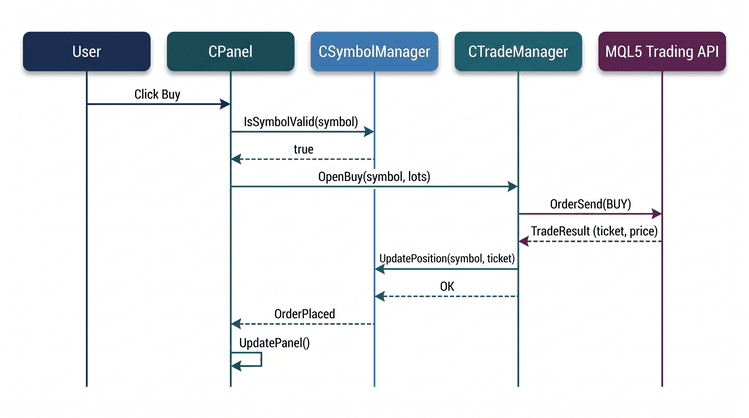
Cleaning Existing Panel Objects
Before creating the panel, we remove any graphical objects left behind by a previous instance. This can happen after recompiling the Expert Advisor or if it terminates unexpectedly before completing its cleanup routine.
//+------------------------------------------------------------------+
//| Deletes all objects with the panel prefix                        |
//+------------------------------------------------------------------+
void CleanupPanelObjects()
  {
   string prefix = "MSP_";
   for(int i = ObjectsTotal(0) - 1; i >= 0; i--)
     {
      string name = ObjectName(0, i);
      if(StringFind(name, prefix) == 0)
         ObjectDelete(0, name);
     }
  }
Because every panel object uses the "MSP_" prefix, CleanupPanelObjects() can safely remove only the dashboard objects while leaving unrelated chart objects untouched. This prevents duplicate controls when the Expert Advisor is reloaded.
Initializing the Application
Initialization follows a defined sequence. We first clear the chart of existing panel objects and configure the trading environment before constructing CSymbolManager, CTradeManager, and CPanel. This ensures that each component is available before it is used by the next.
//+------------------------------------------------------------------+
//| Expert initialization function                                   |
//+------------------------------------------------------------------+
int OnInit()
  {
//--- Remove any stray panel objects from a previous EA run (prevents duplicates)
   CleanupPanelObjects();

//--- Warn the user if automated trading is not enabled in the terminal
   if(!TerminalInfoInteger(TERMINAL_TRADE_ALLOWED))
     {
      Print("╔══════════════════════════════════════════════════════════════╗");
      Print("║  WARNING: Automated Trading is DISABLED in MetaTrader 5!   ║");
      Print("║  To enable it:                                             ║");
      Print("║  1. Click the 'AutoTrading' button on the toolbar          ║");
      Print("║  2. Or go to Tools → Options → Expert Advisors →           ║");
      Print("║     Check 'Allow Automated Trading'                        ║");
      Print("║  The panel will display, but trades will NOT be executed.  ║");
      Print("╚══════════════════════════════════════════════════════════════╝");
     }

//--- Set up the trading object: magic number, slippage, and order filling policy
   g_Trade.SetExpertMagicNumber(MagicNumber);
   g_Trade.SetDeviationInPoints(10);
   g_Trade.SetTypeFilling(ORDER_FILLING_IOC);

//--- Create the symbol manager, which validates the input list
   g_SymbolManager = new CSymbolManager(SymbolsInput);
   if(!g_SymbolManager->Init())
     {
      Print("Failed to initialize Symbol Manager");
      return(INIT_FAILED);
     }

//--- Create the trade manager (uses the symbol manager for validation)
   g_TradeManager = new CTradeManager(g_SymbolManager, MagicNumber);
   g_TradeManager->SetLotSize(DefaultLotSize);

//--- Create the panel (even if trading is disabled, the panel still works for viewing)
   g_Panel = new CPanel(g_SymbolManager, g_TradeManager,
                        PanelXOffset, PanelYOffset, PanelColor);
   if(!g_Panel->CreatePanel())
     {
      Print("Failed to create panel");
      return(INIT_FAILED);
     }

//--- Start a timer to refresh the panel automatically (instead of relying on ticks)
   EventSetMillisecondTimer(RefreshInterval);
   RefreshAll();

//--- Log the final status
   if(TerminalInfoInteger(TERMINAL_TRADE_ALLOWED))
      Print("EA initialized successfully. Automated trading is ENABLED.");
   else
      Print("EA initialized, but automated trading is DISABLED – trades will fail.");

   return(INIT_SUCCEEDED);
  }
Initialization follows this sequence:
- remove any existing panel objects;
- verify the trading environment;
- configure the shared CTrade object;
- create and initialize CSymbolManager;
- create CTradeManager;
- create CPanel; and
- start the refresh timer.
By following this order, the panel is created only after the symbol collection has been validated and the trading services are ready.
At this point, all application components have been initialized and are ready to work together. The Expert Advisor coordinates the application, while CSymbolManager, CTradeManager, and CPanel each handle their own responsibility.
Releasing Resources
When the Expert Advisor is removed, the allocated resources must also be released.
//+------------------------------------------------------------------+
//| Expert deinitialization function                                 |
//+------------------------------------------------------------------+
void OnDeinit(const int reason)
  {
//--- Clean up objects in reverse order (panel → trade manager → symbol manager)
   if(g_Panel != NULL)
     {
      g_Panel->DestroyPanel();
      delete g_Panel;
      g_Panel = NULL;
     }
   if(g_TradeManager != NULL)
     {
      delete g_TradeManager;
      g_TradeManager = NULL;
     }
   if(g_SymbolManager != NULL)
     {
      delete g_SymbolManager;
      g_SymbolManager = NULL;
     }
   EventKillTimer();

//--- Extra safety: delete any objects that might have been missed
   CleanupPanelObjects();
  }
OnDeinit() releases the components in the reverse order of their creation, stops the refresh timer, and performs a final cleanup of the panel objects. The chart is refreshed by CPanel::DestroyPanel(), ensuring that the panel disappears immediately after the Expert Advisor is removed.
Forwarding Chart Events
User interactions generate chart events, which the Expert Advisor forwards to CPanel. This keeps event processing centralized within the interface component.
//+------------------------------------------------------------------+
//| Chart event handler                                              |
//+------------------------------------------------------------------+
void OnChartEvent(const int id,
                  const long &lparam,
                  const double &dparam,
                  const string &sparam)
  {
//--- Delegate all UI events to the panel object
   if(g_Panel != NULL)
      g_Panel->OnChartEvent(id, lparam, dparam, sparam);
  }
This keeps OnChartEvent() concise while allowing the panel to handle all interface interactions and delegate trading requests to CTradeManager.
Refreshing the Interface
Instead of updating the dashboard on every market tick, we refresh it using a timer.
//+------------------------------------------------------------------+
//| Expert tick function                                             |
//+------------------------------------------------------------------+
void OnTick()
  {
//--- Updates are timer‑driven to avoid performance overhead from every tick
  }

//+------------------------------------------------------------------+
//| Timer function                                                   |
//+------------------------------------------------------------------+
void OnTimer()
  {
//--- Called every RefreshInterval milliseconds to keep the UI current
   RefreshAll();
  }
OnTick() intentionally remains empty, while OnTimer() calls RefreshAll() at the configured interval. This keeps the interface responsive during quiet market conditions while avoiding unnecessary redraws when ticks arrive rapidly.
Coordinating Runtime Updates
The final step is coordinating the periodic updates performed while the Expert Advisor is running.
//+------------------------------------------------------------------+
//| Refreshes all data and updates the panel                         |
//+------------------------------------------------------------------+
void RefreshAll()
  {
//--- First, let the trade manager refresh its internal state (if needed)
   if(g_TradeManager != NULL)
      g_TradeManager->UpdatePositions();
//--- Then ask the panel to redraw itself with the latest data
   if(g_Panel != NULL)
      g_Panel->UpdatePanel();
  }
RefreshAll() first refreshes the trade manager's position data before updating the panel. This ensures the interface always displays the latest account and trading information during each refresh cycle.
The implementation is now complete. The following section validates the application through practical testing.
Testing
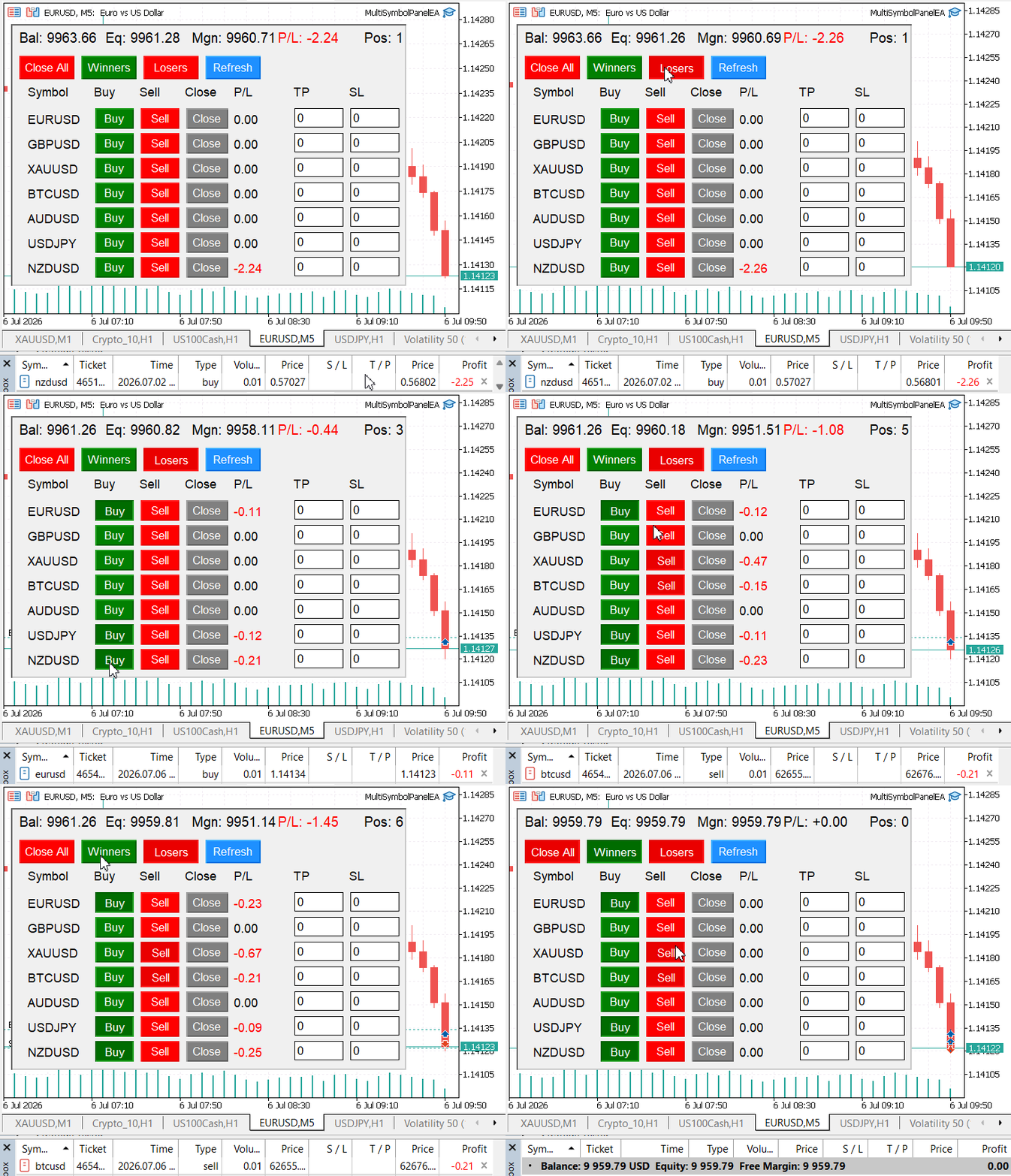
The account summary displayed the current balance, equity, free margin, floating profit, and open positions. Each symbol row provided Buy, Sell, Close, Take Profit, and Stop Loss controls, while the displayed information refreshed automatically at the configured timer interval.
I then tested the panel by executing market orders and portfolio-wide actions. Orders appeared immediately in the MetaTrader 5 Toolbox, confirming that requests were correctly forwarded from CPanel to CTradeManager. All controls behaved as expected, and the dashboard reflected the updated trading state after each refresh cycle.
Conclusion
We developed a modular multi-symbol trading panel that enables traders to manage multiple configured symbols from a single MetaTrader 5 chart. The application validates configured symbols, executes Buy and Sell market orders, manages open positions, updates Stop Loss and Take Profit levels, displays real-time account and portfolio information, and provides a centralized graphical interface for performing these operations.
The application is organized into three source files:
- Managers.mqh – Implements CSymbolManager and CTradeManager, responsible for symbol validation, trade execution, position management, and trading statistics.
- Panel.mqh – Implements CPanel, which builds the graphical interface, updates the displayed information, and processes user interactions.
- MultiSymbolPanelEA.mq5 – Integrates the application by initializing the components, forwarding runtime events, coordinating periodic updates, and releasing resources during shutdown.
By separating these responsibilities into independent modules, the application becomes easier to understand, maintain, test, and extend with additional functionality in the future.
Attachments
The table below summarizes the project files, their installation locations, and their respective responsibilities.
| File | Location | Description |
|---|---|---|
| MultiSymbolPanelEA.mq5 | MQL5\Experts\MultiSymbolPanel\ | Main Expert Advisor that initializes the application, creates and coordinates the core components, forwards chart events, and manages periodic interface updates and shutdown. |
| Managers.mqh | MQL5\Include\MultiSymbolPanel\ | Implements CSymbolManager for symbol validation and management, and CTradeManager for market order execution, position management, and trading statistics. |
| Panel.mqh | MQL5\Include\MultiSymbolPanel\ | Implements CPanel, which creates the graphical trading interface, updates account and symbol information, and processes user interactions. |
| MQL5.zip | Root archive | Complete project archive containing all source files arranged in the required MetaTrader 5 directory structure. Extract the archive into the terminal's Data Folder so all files are placed automatically in their correct locations. |
Warning: All rights to these materials are reserved by MetaQuotes Ltd. Copying or reprinting of these materials in whole or in part is prohibited.
This article was written by a user of the site and reflects their personal views. MetaQuotes Ltd is not responsible for the accuracy of the information presented, nor for any consequences resulting from the use of the solutions, strategies or recommendations described.

 Building a Correlation-Aware Portfolio Risk Monitor in MQL5
 Digital Signal Processing for Traders (Part 2): The Dominant Cycle, MAMA, and a Regime-Switching Expert Advisor
 Dingo Optimization Algorithm Modification (DOAm)
 Execution Cost and Slippage Sensitivity Analyzer

- Free trading apps
- Over 8,000 signals for copying
- Economic news for exploring financial markets
You agree to website policy and terms of use