

Creating Custom Indicators in MQL5 (Part 7): Hybrid Time Price Opportunity (TPO) Market Profiles for Session Analysis
 3 056
3 056
 0
0

Introduction
In our previous article (Part 6), we developed an evolved Relative Strength Index calculation system in MetaQuotes Language 5 (MQL5) that incorporated smoothing techniques, hue shifts for visual enhancements, and multi-timeframe support for comprehensive market analysis. In Part 7, we develop a hybrid Time Price Opportunity (TPO) market profile indicator that supports various session timeframes, including intraday, daily, weekly, monthly, and fixed periods with timezone adjustments. This indicator quantizes prices into a grid, manages session data for highs, lows, opens, and closes, calculates the point of control and value area from TPO counts, and provides visual rendering on the chart with customizable colors for detailed session analysis. We will cover the following topics:
- Exploring the Hybrid Time Price Opportunity Market Profile Concept
- Implementation in MQL5
- Backtesting
- Conclusion
By the end, you’ll have a functional MQL5 indicator for hybrid Time Price Opportunity market profiles, ready for customization—let’s dive in!
Exploring the Hybrid Time Price Opportunity Market Profile Concept
The hybrid Time Price Opportunity (TPO) market profile is a visualization tool that maps price distribution over time within defined trading sessions, using letters, rectangle markers, or just dots to represent time intervals at specific price levels, revealing areas of high activity like the value area and point of control where most trading occurred. This approach helps us identify support, resistance, and fair value zones by aggregating price action into a profile histogram, where denser TPO stacks indicate balanced trading and thinner ones suggest potential breakouts or imbalances. We typically apply it across sessions to gauge market sentiment, entering positions near value area edges or monitoring shifts in the point of control for trend continuations.
Our plan is to define sessions based on selected time frames with time zone adjustments. We will quantize prices into a grid for TPO assignment and track session metrics, such as highs and lows. We will also compute the point of control as the level with the highest TPO count. Next, we derive the value area covering a set percentage of total TPOs. Finally, we visualize the profile with color-coded labels, dots, and squares for enhanced chart analysis. In brief, here is a visual representation of our objectives.

Implementation in MQL5
To create the indicator in MQL5, just open the MetaEditor, go to the Navigator, locate the Indicators folder, click on the "New" tab, and follow the prompts to create the file. Once it is created, in the coding environment, we will define the indicator properties and settings, such as the number of buffers and plots.
//+------------------------------------------------------------------+
//|                             Hybrid TPO Market Profile PART 1.mq5 |
//|                           Copyright 2026, Allan Munene Mutiiria. |
//|                                   https://t.me/Forex_Algo_Trader |
//+------------------------------------------------------------------+
#property copyright "Copyright 2026, Allan Munene Mutiiria."
#property link "https://t.me/Forex_Algo_Trader"
#property version "1.00"
#property strict

#property indicator_chart_window
#property indicator_buffers 0
#property indicator_plots 0

//+------------------------------------------------------------------+
//| Enums                                                            |
//+------------------------------------------------------------------+
enum MarketProfileTimeframe { // Define market profile timeframe enum
   INTRADAY,                  // Intraday
   DAILY,                     // Daily
   WEEKLY,                    // Weekly
   MONTHLY,                   // Monthly
   FIXED                      // Fixed
};

//+------------------------------------------------------------------+
//| Inputs                                                           |
//+------------------------------------------------------------------+
sinput group "Settings"
input double ticksPerTpoLetter = 10;             // Ticks per letter
input int valueAreaPercent = 70;                 // Value Area Percent

sinput group "Time"
input MarketProfileTimeframe profileTimeframe = DAILY;    // Timeframe
input string timezone = "Exchange";              // Timezone
input string dailySessionRange = "0830-1500";    // Daily session
input int intradayProfileLengthMinutes = 60;     // Profile length in minutes (Intraday)
input datetime fixedTimeRangeStart = D'2026.02.01 08:30'; // From (Fixed)
input datetime fixedTimeRangeEnd = D'2026.02.02 15:00';   // Till (Fixed)

sinput group "Rendering"
input int labelFontSize = 10;                   // Font size

sinput group "Colors"
input color defaultTpoColor = clrGray;          // Default
input color singlePrintColor = 0xd56a6a;        // Single Print
input color valueAreaColor = clrBlack;          // Value Area
input color pointOfControlColor = 0x3f7cff;     // POC
input color closeColor = clrRed;                // Close

//+------------------------------------------------------------------+
//| Constants                                                        |
//+------------------------------------------------------------------+
#define MAX_BARS_BACK 5000
#define TPO_CHARACTERS_STRING "ABCDEFGHIJKLMNOPQRSTUVWXYZabcdefghijklmnopqrstuvwxyz"

//+------------------------------------------------------------------+
//| Structures                                                       |
//+------------------------------------------------------------------+
struct TpoPriceLevel {       // Define TPO price level structure
   double price;             // Store price level
   string tpoString;         // Store TPO string
   int tpoCount;             // Store TPO count
};

struct ProfileSessionData {  // Define profile session data structure
   datetime startTime;       // Store start time
   datetime endTime;         // Store end time
   double sessionOpen;       // Store session open price
   double sessionClose;      // Store session close price
   double sessionHigh;       // Store session high price
   double sessionLow;        // Store session low price
   TpoPriceLevel levels[];   // Store array of price levels
   int periodCount;          // Store period count
   double periodOpens[];     // Store array of period opens
   int pointOfControlIndex;  // Store point of control index
};

//+------------------------------------------------------------------+
//| Global Variables                                                 |
//+------------------------------------------------------------------+
string objectPrefix = "HTMP_";     //--- Set object prefix
ProfileSessionData sessions[];     //--- Declare sessions array
int activeSessionIndex = -1;       //--- Initialize active session index
double tpoPriceGridStep = 0;       //--- Initialize TPO price grid step
string tpoCharacterSet[];          //--- Declare TPO character set array
datetime previousBarTime = 0;      //--- Initialize previous bar time
datetime lastCompletedBarTime = 0; //--- Initialize last completed bar time
int maxSessionHistory = 20;        //--- Set maximum session history
int timezoneOffsetSeconds = 0;     //--- Initialize timezone offset in seconds
We begin the implementation by configuring the indicator properties with the #property directives, setting it to display in the main chart window using indicator_chart_window and specifying zero buffers and plots since this indicator focuses on custom object rendering rather than plotted lines or histograms. Next, we define the "MarketProfileTimeframe" enumeration to allow selection of profile periods, including options like "INTRADAY" for short-term sessions, "DAILY" for standard trading days, "WEEKLY", "MONTHLY", and "FIXED" for custom ranges, providing flexibility in session analysis.
We then declare user input parameters grouped under sections with string input group, starting with settings for "ticksPerTpoLetter" to control the price granularity per Time Price Opportunity letter and "valueAreaPercent" to set the percentage of total Time Price Opportunities that define the value area. In the time group, inputs include the profile timeframe selection, timezone string for offset adjustments, daily session range as a string like "0830-1500", intraday profile length in minutes, and datetime values for fixed range start and end. The rendering group adds "labelFontSize" for text display, while the colors group defines customizable colors such as "defaultTpoColor" for standard letters, "singlePrintColor" for isolated prints, "valueAreaColor", "pointOfControlColor", and "closeColor" to visually distinguish profile elements.
To support consistent operations, we introduce constants via #define, including "MAX_BARS_BACK" to limit historical bar processing and "TPO_CHARACTERS_STRING" as the alphabet sequence for assigning letters to Time Price Opportunity periods. We create two structures for data organization: "TpoPriceLevel" to hold individual price level details with fields for price, a string of Time Price Opportunity characters, and count; and "ProfileSessionData" to manage session-wide information, including start and end times, open, close, high, and low prices, an array of price levels, period count, array of period opens, and index for the point of control.
Finally, we initialize global variables essential for runtime management, such as "objectPrefix" for naming chart objects, an array of "sessions" to store profile data, "activeSessionIndex" starting at -1 to track the current session, "tpoPriceGridStep" for price quantization, "tpoCharacterSet" array for letter assignments, timestamps like "previousBarTime" and "lastCompletedBarTime", "maxSessionHistory" to cap stored sessions at 20, and "timezoneOffsetSeconds" for time adjustments. With that done, we can initialize the indicator.
//+------------------------------------------------------------------+
//| Initialize custom indicator                                      |
//+------------------------------------------------------------------+
int OnInit() {
   IndicatorSetString(INDICATOR_SHORTNAME, "Hybrid TPO Market Profile - Part 1"); //--- Set indicator short name

   tpoPriceGridStep = ticksPerTpoLetter * _Point;  //--- Calculate TPO price grid step

   ArrayResize(tpoCharacterSet, 52);               //--- Resize TPO character set array
   for(int i = 0; i < 52; i++) {                   //--- Loop through characters
      tpoCharacterSet[i] = StringSubstr(TPO_CHARACTERS_STRING, i, 1); //--- Assign character to array
   }

   if(timezone != "Exchange") {                    //--- Check if timezone is not exchange
      string tzString = StringSubstr(timezone, 3); //--- Extract timezone string
      int offset = (int)StringToInteger(tzString); //--- Convert offset to integer
      timezoneOffsetSeconds = offset * 3600;       //--- Calculate timezone offset in seconds
   }

   ArrayResize(sessions, 0);                       //--- Resize sessions array to zero

   return(INIT_SUCCEEDED);                         //--- Return initialization success
}
We continue the implementation with the OnInit event handler, which runs when the indicator is attached to a chart, setting up essential configurations for the hybrid Time Price Opportunity market profile. First, we assign a short name to the indicator using the IndicatorSetString function with INDICATOR_SHORTNAME to display "Hybrid TPO Market Profile - Part 1" in the platform interface.
Next, we compute the price grid step by multiplying the user-input "ticksPerTpoLetter" by the symbol's point value _Point, storing it in "tpoPriceGridStep" to determine the vertical spacing for Time Price Opportunity letters based on price increments. We then prepare the character set for labeling Time Price Opportunities by resizing the "tpoCharacterSet" array to 52 elements and populating it in a loop, extracting each letter from the "TPO_CHARACTERS_STRING" constant via StringSubstr to handle both uppercase and lowercase alphabets for period identification.
To account for time adjustments, we check if the "timezone" input differs from "Exchange"; if so, we extract the offset portion starting from the fourth character using "StringSubstr", convert it to an integer with StringToInteger, and calculate the "timezoneOffsetSeconds" by multiplying the offset by 3600 to represent hours in seconds. We reset the "sessions" array by resizing it to zero with ArrayResize, clearing any prior data to start fresh for new profile sessions. Finally, we return INIT_SUCCEEDED to signal successful initialization to the platform. We will need to do the indicator computations per tick now. To make our code modular and easy to maintain, we will organize the logic in helper functions. Let us start by creating the session and parsing the session ranges.
//+------------------------------------------------------------------+
//| Create new session                                               |
//+------------------------------------------------------------------+
int CreateNewSession() {
   int size = ArraySize(sessions);                //--- Get size of sessions array

   if(size >= maxSessionHistory) {                //--- Check if size exceeds history limit
      for(int i = 0; i < size - 1; i++) {         //--- Loop to shift sessions
         sessions[i] = sessions[i + 1];           //--- Copy next session to current
      }
      ArrayResize(sessions, size - 1);            //--- Resize sessions array
      size = size - 1;                            //--- Update size
   }

   ArrayResize(sessions, size + 1);               //--- Resize sessions array for new session
   int newIndex = size;                           //--- Set new index

   sessions[newIndex].startTime = 0;              //--- Initialize start time
   sessions[newIndex].endTime = 0;                //--- Initialize end time
   sessions[newIndex].sessionOpen = 0;            //--- Initialize session open
   sessions[newIndex].sessionClose = 0;           //--- Initialize session close
   sessions[newIndex].sessionHigh = 0;            //--- Initialize session high
   sessions[newIndex].sessionLow = 0;             //--- Initialize session low
   sessions[newIndex].periodCount = 0;            //--- Initialize period count
   sessions[newIndex].pointOfControlIndex = -1;   //--- Initialize point of control index
   ArrayResize(sessions[newIndex].levels, 0);     //--- Resize levels array
   ArrayResize(sessions[newIndex].periodOpens, 0);//--- Resize period opens array

   return newIndex;                               //--- Return new index
}

//+------------------------------------------------------------------+
//| Quantize price to grid                                           |
//+------------------------------------------------------------------+
double QuantizePriceToGrid(double price) {
   return MathRound(price / tpoPriceGridStep) * tpoPriceGridStep;   //--- Calculate and return quantized price
}

//+------------------------------------------------------------------+
//| Parse daily session time range                                   |
//+------------------------------------------------------------------+
bool ParseDailySessionTimeRange(int &startHour, int &startMinute, int &endHour, int &endMinute) {
   string parts[];                                                   //--- Declare parts array
   int count = StringSplit(dailySessionRange, '-', parts);           //--- Split daily session range
   if(count != 2) return false;                                      //--- Return false if invalid count

   startHour = (int)StringToInteger(StringSubstr(parts[0], 0, 2));   //--- Parse start hour
   startMinute = (int)StringToInteger(StringSubstr(parts[0], 2, 2)); //--- Parse start minute
   endHour = (int)StringToInteger(StringSubstr(parts[1], 0, 2));     //--- Parse end hour
   endMinute = (int)StringToInteger(StringSubstr(parts[1], 2, 2));   //--- Parse end minute

   return true;                                                      //--- Return true
}
First, we define the "CreateNewSession" function to add a new profile session to the array, starting by retrieving the current size with the ArraySize function. If it meets or exceeds the maximum history limit, we shift existing sessions forward in a loop to remove the oldest one and then resize the array downward using ArrayResize before updating the size. Next, we expand the array by one to accommodate the new session, set its index, and initialize all fields to default values like zero or -1, including resizing the levels and period opens arrays to empty. To ensure prices align with the Time Price Opportunity grid, we implement the "QuantizePriceToGrid" function, which divides the input price by the grid step, rounds it via the MathRound function, and multiplies back to snap it to the nearest grid point.
For handling daily sessions, the "ParseDailySessionTimeRange" function breaks down the input range string using the StringSplit function with a hyphen delimiter into parts. If exactly two parts are found, we extract and convert hours and minutes from each using "StringSubstr" and StringToInteger, assigning them to the reference parameters; otherwise, it returns false to indicate parsing failure. The next thing we will need is functions to filter the session bars and manage price levels within a session.
//+------------------------------------------------------------------+
//| Check if bar is within daily session                             |
//+------------------------------------------------------------------+
bool IsBarWithinDailySession(datetime barTime) {
   if(profileTimeframe != DAILY) return true;                       //--- Return true if not daily timeframe

   int startHour, startMinute, endHour, endMinute;                  //--- Declare time variables
   if(!ParseDailySessionTimeRange(startHour, startMinute, endHour, endMinute)) return true; //--- Parse and return true if fail

   MqlDateTime dateTimeStruct;                                      //--- Declare date time struct
   TimeToStruct(barTime + timezoneOffsetSeconds, dateTimeStruct);   //--- Convert time to struct

   int barMinutes = dateTimeStruct.hour * 60 + dateTimeStruct.min;  //--- Calculate bar minutes
   int startMinutes = startHour * 60 + startMinute;                 //--- Calculate start minutes
   int endMinutes = endHour * 60 + endMinute;                       //--- Calculate end minutes

   if(endMinutes > startMinutes) {                                   //--- Check if end after start
      return barMinutes >= startMinutes && barMinutes <= endMinutes; //--- Return if within range
   } else {                                       //--- Handle overnight case
      return barMinutes >= startMinutes || barMinutes <= endMinutes; //--- Return if within range
   }
}

//+------------------------------------------------------------------+
//| Check if new session started                                     |
//+------------------------------------------------------------------+
bool IsNewSessionStarted(datetime currentTime, datetime previousTime) {
   if(previousTime == 0) return true;                                 //--- Return true if no previous time

   datetime adjustedCurrent = currentTime + timezoneOffsetSeconds;    //--- Adjust current time
   datetime adjustedPrevious = previousTime + timezoneOffsetSeconds;  //--- Adjust previous time

   MqlDateTime currentDateTime, previousDateTime;                     //--- Declare date time structs
   TimeToStruct(adjustedCurrent, currentDateTime);                    //--- Convert current to struct
   TimeToStruct(adjustedPrevious, previousDateTime);                  //--- Convert previous to struct

   switch(profileTimeframe) {                                         //--- Switch on profile timeframe
      case DAILY: {                                                   //--- Handle daily case
         int startHour, startMinute, endHour, endMinute;              //--- Declare time variables
         if(!ParseDailySessionTimeRange(startHour, startMinute, endHour, endMinute)) return false; //--- Parse and return false if fail

         datetime sessionStart = StringToTime(TimeToString(adjustedCurrent, TIME_DATE) + " " +
                                              IntegerToString(startHour, 2, '0') + ":" +
                                              IntegerToString(startMinute, 2, '0')); //--- Calculate session start
         datetime prevSessionStart = StringToTime(TimeToString(adjustedPrevious, TIME_DATE) + " " +
                                                   IntegerToString(startHour, 2, '0') + ":" +
                                                   IntegerToString(startMinute, 2, '0')); //--- Calculate previous session start

         return adjustedCurrent >= sessionStart && adjustedPrevious < prevSessionStart; //--- Return if new session
      }

      case WEEKLY:                                                     //--- Handle weekly case
         return currentDateTime.day_of_week < previousDateTime.day_of_week ||
                currentDateTime.day_of_year < previousDateTime.day_of_year; //--- Return if new week

      case MONTHLY:                                                    //--- Handle monthly case
         return currentDateTime.mon != previousDateTime.mon;           //--- Return if new month

      case FIXED:                                                      //--- Handle fixed case
         return currentTime >= fixedTimeRangeStart && previousTime < fixedTimeRangeStart; //--- Return if new fixed range

      case INTRADAY: {                                                 //--- Handle intraday case
         long currentMinute = (adjustedCurrent / 60) * 60;             //--- Calculate current minute
         long prevMinute = (adjustedPrevious / 60) * 60;               //--- Calculate previous minute
         return (currentMinute % (intradayProfileLengthMinutes * 60)) == 0 &&
                currentMinute != prevMinute;                           //--- Return if new intraday profile
      }
   }

   return false;                                                       //--- Return false
}

//+------------------------------------------------------------------+
//| Check if bar is eligible for processing                          |
//+------------------------------------------------------------------+
bool IsBarEligibleForProcessing(datetime barTime) {
   if(profileTimeframe == FIXED) {                                    //--- Check fixed timeframe
      return barTime >= fixedTimeRangeStart && barTime <= fixedTimeRangeEnd; //--- Return if within fixed range
   }

   if(profileTimeframe == DAILY) {                                   //--- Check daily timeframe
      return IsBarWithinDailySession(barTime);                       //--- Return if within daily session
   }

   return true;                                                      //--- Return true
}

//+------------------------------------------------------------------+
//| Get or create price level                                        |
//+------------------------------------------------------------------+
int GetOrCreatePriceLevel(int sessionIndex, double price) {
   if(sessionIndex < 0 || sessionIndex >= ArraySize(sessions)) return -1; //--- Return invalid if index out of range

   int size = ArraySize(sessions[sessionIndex].levels);              //--- Get levels size

   for(int i = 0; i < size; i++) {                                   //--- Loop through levels
      if(MathAbs(sessions[sessionIndex].levels[i].price - price) < _Point / 2) //--- Check if price matches
         return i;                                                   //--- Return index
   }

   ArrayResize(sessions[sessionIndex].levels, size + 1);             //--- Resize levels array
   sessions[sessionIndex].levels[size].price = price;                //--- Set new price
   sessions[sessionIndex].levels[size].tpoString = "";               //--- Initialize TPO string
   sessions[sessionIndex].levels[size].tpoCount = 0;                 //--- Initialize TPO count

   return size;                                                      //--- Return new index
}
We proceed by implementing the "IsBarWithinDailySession" function to determine if a given bar falls within the specified daily trading hours, immediately returning true for non-daily timeframes. If parsing the session range fails via the "ParseDailySessionTimeRange" function, it defaults to true; otherwise, we convert the adjusted bar time to an MqlDateTime structure using TimeToStruct, compute total minutes for the bar, start, and end times, and check if the bar minutes lie within the range, handling both standard and overnight sessions with conditional logic.
Next, the "IsNewSessionStarted" function checks for the beginning of a new profile session by comparing adjusted current and previous times, returning true if no previous time exists. We adjust timestamps for timezone offset, convert them to "MqlDateTime" structures, and use a switch statement on the profile timeframe: for daily, it parses the session range and constructs start times with StringToTime, "TimeToString", and "IntegerToString" to verify crossing into a new day; for weekly, it compares day of week and year; monthly checks month differences; fixed compares against the start input; and intraday verifies if the current minute aligns with the profile length modulus without matching the previous.
To filter bars for inclusion, we define the "IsBarEligibleForProcessing" function, which, for fixed timeframes, checks if the bar time is between the start and end inputs, for daily calls "IsBarWithinDailySession", and otherwise returns true for all bars. Finally, the "GetOrCreatePriceLevel" function manages price levels within a session by validating the session index against the sessions array size with ArraySize, returning -1 if invalid. It loops through existing levels to find a close match using MathAbs with a tolerance of half a point, returning the index if found; if not, it resizes the levels array, initializes the new level's price, empty Time Price Opportunity string, and sets the count to zero, then returns the new index. Since we first want to render the letters for the profiles in a specific order, we will need to define a bubble sort algorithm to arrange the letters appropriately before rendering them.
//+------------------------------------------------------------------+
//| Add TPO character to level                                       |
//+------------------------------------------------------------------+
void AddTpoCharacterToLevel(int sessionIndex, int levelIndex, int periodIndex) {
   if(sessionIndex < 0 || sessionIndex >= ArraySize(sessions)) return;                  //--- Return if session index invalid
   if(levelIndex < 0 || levelIndex >= ArraySize(sessions[sessionIndex].levels)) return; //--- Return if level index invalid

   string tpoCharacter = tpoCharacterSet[periodIndex % 52];                             //--- Get TPO character

   sessions[sessionIndex].levels[levelIndex].tpoString += tpoCharacter;                 //--- Append character to TPO string
   sessions[sessionIndex].levels[levelIndex].tpoCount++;                                //--- Increment TPO count
}

//+------------------------------------------------------------------+
//| Sort price levels descending                                     |
//+------------------------------------------------------------------+
void SortPriceLevelsDescending(int sessionIndex) {
   if(sessionIndex < 0 || sessionIndex >= ArraySize(sessions)) return;                 //--- Return if index invalid

   int size = ArraySize(sessions[sessionIndex].levels);                                //--- Get levels size

   for(int i = 0; i < size - 1; i++) {                                                 //--- Outer loop for sorting
      for(int j = 0; j < size - i - 1; j++) {                                          //--- Inner loop for comparison
         if(sessions[sessionIndex].levels[j].price < sessions[sessionIndex].levels[j + 1].price) { //--- Check if swap needed
            TpoPriceLevel temp = sessions[sessionIndex].levels[j];                     //--- Store temporary level
            sessions[sessionIndex].levels[j] = sessions[sessionIndex].levels[j + 1];   //--- Swap levels
            sessions[sessionIndex].levels[j + 1] = temp;                               //--- Assign temporary back
         }
      }
   }
}

//+------------------------------------------------------------------+
//| Calculate point of control                                       |
//+------------------------------------------------------------------+
void CalculatePointOfControl(int sessionIndex) {
   if(sessionIndex < 0 || sessionIndex >= ArraySize(sessions)) return;                 //--- Return if index invalid

   int size = ArraySize(sessions[sessionIndex].levels);                                //--- Get levels size
   if(size == 0) return;                                                               //--- Return if no levels

   int maxTpoCount = 0;                                                                //--- Initialize max TPO count
   int pointOfControlIndex = 0;                                                        //--- Initialize POC index

   for(int i = 0; i < size; i++) {                                                     //--- Loop through levels
      if(sessions[sessionIndex].levels[i].tpoCount > maxTpoCount) {                    //--- Check if higher TPO count
         maxTpoCount = sessions[sessionIndex].levels[i].tpoCount;                      //--- Update max TPO count
         pointOfControlIndex = i;                                                      //--- Update POC index
      }
   }

   sessions[sessionIndex].pointOfControlIndex = pointOfControlIndex;                   //--- Set POC index
}

//+------------------------------------------------------------------+
//| Get total TPO count                                              |
//+------------------------------------------------------------------+
int GetTotalTpoCount(int sessionIndex) {
   if(sessionIndex < 0 || sessionIndex >= ArraySize(sessions)) return 0;               //--- Return zero if index invalid

   int total = 0;                                                                      //--- Initialize total
   int size = ArraySize(sessions[sessionIndex].levels);                                //--- Get levels size

   for(int i = 0; i < size; i++) {                                                     //--- Loop through levels
      total += sessions[sessionIndex].levels[i].tpoCount;                              //--- Accumulate TPO count
   }

   return total;                                                                       //--- Return total
}
First, we implement the "AddTpoCharacterToLevel" function to assign Time Price Opportunity letters to specific price levels, first validating the session and level indices against array sizes with "ArraySize" to avoid errors, returning early if invalid. We retrieve the appropriate character from the set using modulo 52 on the period index, append it to the level's string, and increment the count to track activity at that price. To organize levels from highest to lowest price, the "SortPriceLevelsDescending" function checks the session index validity, gets the levels' size, and applies a bubble sort algorithm in nested loops, swapping adjacent elements if the current price is lower than the next by using a temporary "TpoPriceLevel" structure for the exchange.
The "CalculatePointOfControl" function identifies the price level with the most Time Price Opportunities by validating the session, initializing max count and index to zero, and iterating through levels to update them whenever a higher count is found, finally storing the index in the session data. We add the "GetTotalTpoCount" function to sum all Time Price Opportunity counts across a session's levels, returning zero on invalid index, otherwise initializing a total and accumulating counts in a loop before returning the aggregate for value area calculations. We can now begin the visual rendering logic for these components of the market profile. We will first define the logic to render the close to TPO highlight and the open-close markers.
//+------------------------------------------------------------------+
//| Render close TPO highlight                                       |
//+------------------------------------------------------------------+
void RenderCloseTpoHighlight(int sessionIndex, int closeLevelIndex, string &displayStrings[]) {
   if(sessionIndex < 0 || sessionIndex >= ArraySize(sessions)) return;                              //--- Return if session invalid
   if(closeLevelIndex < 0 || closeLevelIndex >= ArraySize(sessions[sessionIndex].levels)) return;   //--- Return if level invalid

   string fullString = displayStrings[closeLevelIndex];                                             //--- Get full display string
   int stringLength = StringLen(fullString);                                                        //--- Get string length
   if(stringLength == 0) return;                                                                    //--- Return if empty string

   string closeCharacter = StringSubstr(fullString, stringLength - 1, 1);                           //--- Extract close character
   string remainingCharacters = StringSubstr(fullString, 0, stringLength - 1);                      //--- Extract remaining characters

   string objectName = objectPrefix + "CloseTPO_" + IntegerToString(sessions[sessionIndex].startTime); //--- Create object name
   int barIndex = iBarShift(_Symbol, _Period, sessions[sessionIndex].startTime);                    //--- Get bar index
   if(barIndex < 0) return;                                                                         //--- Return if invalid bar index

   datetime labelTime = iTime(_Symbol, _Period, barIndex);                                          //--- Get label time
   int x, y;                                                                                        //--- Declare coordinates
   ChartTimePriceToXY(0, 0, labelTime, sessions[sessionIndex].levels[closeLevelIndex].price, x, y); //--- Convert to XY

   int characterWidth = 8;                                                                          //--- Set character width
   int offsetX = (stringLength - 1) * characterWidth;                                               //--- Calculate offset X

   if(ObjectFind(0, objectName) < 0) {                                                              //--- Check if object not found
      ObjectCreate(0, objectName, OBJ_LABEL, 0, 0, 0);                                              //--- Create label object
   }

   ObjectSetInteger(0, objectName, OBJPROP_XDISTANCE, x + offsetX);                                 //--- Set X distance
   ObjectSetInteger(0, objectName, OBJPROP_YDISTANCE, y);                                           //--- Set Y distance
   ObjectSetInteger(0, objectName, OBJPROP_CORNER, CORNER_LEFT_UPPER);                              //--- Set corner
   ObjectSetInteger(0, objectName, OBJPROP_ANCHOR, ANCHOR_LEFT);                                    //--- Set anchor
   ObjectSetInteger(0, objectName, OBJPROP_COLOR, closeColor);                                      //--- Set color
   ObjectSetInteger(0, objectName, OBJPROP_FONTSIZE, labelFontSize);                                //--- Set font size
   ObjectSetString(0, objectName, OBJPROP_FONT, "Arial");                                           //--- Set font
   ObjectSetString(0, objectName, OBJPROP_TEXT, closeCharacter + "◄");                              //--- Set text
   ObjectSetInteger(0, objectName, OBJPROP_SELECTABLE, false);                                      //--- Set selectable false
   ObjectSetInteger(0, objectName, OBJPROP_HIDDEN, true);                                           //--- Set hidden true

   displayStrings[closeLevelIndex] = remainingCharacters;                                           //--- Update display string
}

//+------------------------------------------------------------------+
//| Render open close markers                                        |
//+------------------------------------------------------------------+
void RenderOpenCloseMarkers(int sessionIndex, int barIndex) {
   if(sessionIndex < 0 || sessionIndex >= ArraySize(sessions)) return;                              //--- Return if index invalid
   if(sessions[sessionIndex].sessionOpen == 0) return;                                              //--- Return if no open

   datetime startTime = iTime(_Symbol, _Period, barIndex);                                          //--- Get start time

   string openObjectName = objectPrefix + "Open_" + IntegerToString(sessions[sessionIndex].startTime); //--- Create open object name
   if(ObjectFind(0, openObjectName) < 0) {                                                          //--- Check if not found
      ObjectCreate(0, openObjectName, OBJ_TREND, 0, startTime, sessions[sessionIndex].sessionOpen,
                   startTime, sessions[sessionIndex].sessionOpen);                                  //--- Create trend object
      ObjectSetInteger(0, openObjectName, OBJPROP_RAY_RIGHT, false);                                //--- Set ray right false
      ObjectSetInteger(0, openObjectName, OBJPROP_SELECTABLE, false);                               //--- Set selectable false
      ObjectSetInteger(0, openObjectName, OBJPROP_HIDDEN, true);                                    //--- Set hidden true
   }
   ObjectSetInteger(0, openObjectName, OBJPROP_COLOR, clrDodgerBlue);                               //--- Set color
   ObjectSetInteger(0, openObjectName, OBJPROP_WIDTH, 2);                                           //--- Set width

   string closeObjectName = objectPrefix + "Close_" + IntegerToString(sessions[sessionIndex].startTime); //--- Create close object name
   if(ObjectFind(0, closeObjectName) < 0) {                                                         //--- Check if not found
      ObjectCreate(0, closeObjectName, OBJ_TREND, 0, startTime, sessions[sessionIndex].sessionClose,
                   startTime, sessions[sessionIndex].sessionClose);                                 //--- Create trend object
      ObjectSetInteger(0, closeObjectName, OBJPROP_RAY_RIGHT, false);                               //--- Set ray right false
      ObjectSetInteger(0, closeObjectName, OBJPROP_SELECTABLE, false);                              //--- Set selectable false
      ObjectSetInteger(0, closeObjectName, OBJPROP_HIDDEN, true);                                   //--- Set hidden true
   }
   ObjectSetInteger(0, closeObjectName, OBJPROP_COLOR, closeColor);                                 //--- Set color
   ObjectSetInteger(0, closeObjectName, OBJPROP_WIDTH, 2);                                          //--- Set width
}
We define the "RenderCloseTpoHighlight" function to emphasize the closing Time Price Opportunity character in the profile display, beginning with index validations for the session and level using ArraySize to skip invalid cases. We retrieve the display string at the close level, calculate its length with StringLen, and if non-empty, extract the last character via StringSubstr for highlighting while saving the rest.
An object name is constructed by combining the prefix with the session start time converted through IntegerToString, and we obtain the bar index with iBarShift; if invalid, the function exits early. Next, we fetch the label time using iTime, convert the price and time to chart coordinates with ChartTimePriceToXY, and compute an X offset based on character width and string length. If the object does not exist per ObjectFind, we create a label via ObjectCreate with OBJ_LABEL, then set its position, corner, anchor, color, font size, font, text (appending a marker), and non-selectable/hidden properties using ObjectSetInteger and "ObjectSetString", before updating the display string to exclude the highlighted character.
To visualize session boundaries, we implement the "RenderOpenCloseMarkers" function, which validates the session index and skips if no open price is set. We retrieve the start time with iTime based on the bar index, then build names for open and close objects similarly. For the open marker, if not found via "ObjectFind", we create a trend line object with "ObjectCreate" using OBJ_TREND at the open price, disable right ray extension, make it non-selectable and hidden, and apply a blue color with width 2. Similarly, for the close marker, we create or update a trend line at the close price, setting it to the input close color and the same width, ensuring both appear as short horizontal lines on the chart at the session start bar. We can now combine all this logic to render the full, complete market profile.
//+------------------------------------------------------------------+
//| Render session profile                                           |
//+------------------------------------------------------------------+
void RenderSessionProfile(int sessionIndex) {
   if(sessionIndex < 0 || sessionIndex >= ArraySize(sessions)) return;           //--- Return if index invalid

   int size = ArraySize(sessions[sessionIndex].levels);                          //--- Get levels size
   if(size == 0 || sessions[sessionIndex].startTime == 0) return;                //--- Return if no levels or no start time

   int barIndex = iBarShift(_Symbol, _Period, sessions[sessionIndex].startTime); //--- Get bar index
   if(barIndex < 0) return;                                                      //--- Return if invalid

   SortPriceLevelsDescending(sessionIndex);                                      //--- Sort levels descending
   CalculatePointOfControl(sessionIndex);                                        //--- Calculate POC

   int totalTpoCount = GetTotalTpoCount(sessionIndex);                           //--- Get total TPO count
   int pointOfControlIndex = sessions[sessionIndex].pointOfControlIndex;         //--- Get POC index

   int valueAreaUpperIndex = pointOfControlIndex; //--- Initialize value area upper index
   int valueAreaLowerIndex = pointOfControlIndex; //--- Initialize value area lower index

   if(pointOfControlIndex >= 0) {                 //--- Check valid POC index
      int targetTpoCount = (int)(totalTpoCount * valueAreaPercent / 100.0);      //--- Calculate target TPO count
      int currentTpoCount = sessions[sessionIndex].levels[pointOfControlIndex].tpoCount; //--- Set current TPO count

      while(currentTpoCount < targetTpoCount && (valueAreaUpperIndex > 0 || valueAreaLowerIndex < size - 1)) { //--- Loop to expand value area
         int upperTpoCount = (valueAreaUpperIndex > 0) ? sessions[sessionIndex].levels[valueAreaUpperIndex - 1].tpoCount : 0; //--- Get upper TPO count
         int lowerTpoCount = (valueAreaLowerIndex < size - 1) ? sessions[sessionIndex].levels[valueAreaLowerIndex + 1].tpoCount : 0; //--- Get lower TPO count

         if(upperTpoCount >= lowerTpoCount && valueAreaUpperIndex > 0) {         //--- Check upper expansion
            valueAreaUpperIndex--;                //--- Decrement upper index
            currentTpoCount += upperTpoCount;     //--- Add upper TPO
         } else if(valueAreaLowerIndex < size - 1) { //--- Check lower expansion
            valueAreaLowerIndex++;                //--- Increment lower index
            currentTpoCount += lowerTpoCount;     //--- Add lower TPO
         } else if(valueAreaUpperIndex > 0) {     //--- Fallback upper expansion
            valueAreaUpperIndex--;                //--- Decrement upper index
            currentTpoCount += upperTpoCount;     //--- Add upper TPO
         } else {                                 //--- Break if no more
            break;                                //--- Exit loop
         }
      }
   }

   string displayStrings[];                       //--- Declare display strings array
   ArrayResize(displayStrings, size);             //--- Resize display strings
   for(int i = 0; i < size; i++) {                //--- Loop through levels
      displayStrings[i] = sessions[sessionIndex].levels[i].tpoString; //--- Copy TPO string
   }

   int closeLevelIndex = -1;                      //--- Initialize close level index
   double closePrice = sessions[sessionIndex].sessionClose; //--- Get close price

   for(int i = 0; i < size; i++) {                //--- Loop to find close level
      if(MathAbs(sessions[sessionIndex].levels[i].price - closePrice) < tpoPriceGridStep / 2) { //--- Check price match
         closeLevelIndex = i;                     //--- Set close level index
         break;                                   //--- Exit loop
      }
   }

   RenderCloseTpoHighlight(sessionIndex, closeLevelIndex, displayStrings); //--- Render close highlight

   for(int i = 0; i < size; i++) {                                        //--- Loop to render levels
      string objectName = objectPrefix + "TPO_" + IntegerToString(sessions[sessionIndex].startTime) + "_" + IntegerToString(i); //--- Create object name

      color textColor = defaultTpoColor;                                  //--- Set default color

      if(sessions[sessionIndex].levels[i].tpoCount == 1) {                //--- Check single print
         textColor = singlePrintColor;                                    //--- Set single print color
      }

      if(i >= valueAreaUpperIndex && i <= valueAreaLowerIndex) {          //--- Check value area
         textColor = valueAreaColor;                                      //--- Set value area color
      }

      if(i == sessions[sessionIndex].pointOfControlIndex) {               //--- Check POC
         textColor = pointOfControlColor;                                 //--- Set POC color
      }

      if(ObjectFind(0, objectName) < 0) {                                 //--- Check if object not found
         ObjectCreate(0, objectName, OBJ_LABEL, 0, 0, 0);                 //--- Create label
         ObjectSetInteger(0, objectName, OBJPROP_XDISTANCE, 0);           //--- Set X distance
         ObjectSetInteger(0, objectName, OBJPROP_YDISTANCE, 0);           //--- Set Y distance
      }

      datetime labelTime = iTime(_Symbol, _Period, barIndex);             //--- Get label time
      int x, y;                                                           //--- Declare coordinates
      ChartTimePriceToXY(0, 0, labelTime, sessions[sessionIndex].levels[i].price, x, y); //--- Convert to XY

      ObjectSetInteger(0, objectName, OBJPROP_XDISTANCE, x);              //--- Set X distance
      ObjectSetInteger(0, objectName, OBJPROP_YDISTANCE, y);              //--- Set Y distance
      ObjectSetInteger(0, objectName, OBJPROP_CORNER, CORNER_LEFT_UPPER); //--- Set corner
      ObjectSetInteger(0, objectName, OBJPROP_ANCHOR, ANCHOR_LEFT);       //--- Set anchor
      ObjectSetInteger(0, objectName, OBJPROP_COLOR, textColor);          //--- Set color
      ObjectSetInteger(0, objectName, OBJPROP_FONTSIZE, labelFontSize);   //--- Set font size
      ObjectSetString(0, objectName, OBJPROP_FONT, "Arial");              //--- Set font
      ObjectSetString(0, objectName, OBJPROP_TEXT, displayStrings[i]);    //--- Set text
      ObjectSetInteger(0, objectName, OBJPROP_SELECTABLE, false);         //--- Set selectable false
      ObjectSetInteger(0, objectName, OBJPROP_HIDDEN, true);              //--- Set hidden true
   }

   RenderOpenCloseMarkers(sessionIndex, barIndex);                        //--- Render open close markers
}
Here, we implement the "RenderSessionProfile" function to draw the complete market profile for a given session on the chart, starting with index validation against the sessions array size using ArraySize to exit early if invalid, and further checking for non-empty levels and a valid start time. We retrieve the starting bar index with iBarShift based on the symbol, period, and session start time, returning if invalid, then call "SortPriceLevelsDescending" to order the price levels from high to low and "CalculatePointOfControl" to identify the level with the highest Time Price Opportunity count.
Next, we fetch the total Time Price Opportunity count via "GetTotalTpoCount" and the point of control index, initializing the value area upper and lower indices to it. If the point of control is valid, we calculate a target count as a percentage of the total using the input value area percent, starting from the current count at that level, and expand the value area in a while loop by comparing and adding counts from adjacent upper or lower levels preferentially based on which has more Time Price Opportunities, decrementing or incrementing indices until reaching the target or boundaries.
To prepare for rendering, we declare and resize a display string array to match the level's size with ArrayResize, copying each level's Time Price Opportunity string into it via a loop. We then search for the close level index by iterating through levels and using MathAbs to find the closest match to the session close price within half the grid step tolerance, breaking once found.
After calling "RenderCloseTpoHighlight" with the session index, close level index, and display strings to handle the close emphasis, we loop through each level to create or update label objects: constructing a unique name with the prefix, start time, and level index via IntegerToString; setting a default text color, overriding it for single prints, value area range, or point of control based on input colors; checking existence with ObjectFind and creating via "ObjectCreate" with OBJ_LABEL if needed, initially setting zero distances; obtaining the label time through "iTime" and converting time-price to coordinates using "ChartTimePriceToXY"; and applying position, corner, anchor, color, font size, font, text from the display string, and non-selectable/hidden properties with the "ObjectSetInteger" and ObjectSetString functions.
Finally, we invoke "RenderOpenCloseMarkers" with the session index and bar index to add the open and close visual indicators on the chart. We can now call this function in the tick calculation event handler to do the heavy lifting conditionally.
//+------------------------------------------------------------------+
//| Calculate custom indicator                                       |
//+------------------------------------------------------------------+
int OnCalculate(const int rates_total,
                const int prev_calculated,
                const datetime &time[],
                const double &open[],
                const double &high[],
                const double &low[],
                const double &close[],
                const long &tick_volume[],
                const long &volume[],
                const int &spread[]) {

   if(rates_total < 2) return 0;                                 //--- Return if insufficient rates

   datetime currentBarTime = time[rates_total - 1];              //--- Get current bar time
   bool isNewBar = (currentBarTime != lastCompletedBarTime);     //--- Check if new bar

   if(IsNewSessionStarted(currentBarTime, previousBarTime) || previousBarTime == 0) { //--- Check new session
      if(activeSessionIndex >= 0 && activeSessionIndex < ArraySize(sessions)) { //--- Check active session
         sessions[activeSessionIndex].endTime = previousBarTime; //--- Set end time
         RenderSessionProfile(activeSessionIndex);               //--- Render session profile
      }

      activeSessionIndex = CreateNewSession();                  //--- Create new session
      sessions[activeSessionIndex].startTime = currentBarTime;  //--- Set start time
      sessions[activeSessionIndex].sessionOpen = open[rates_total - 1]; //--- Set session open
      sessions[activeSessionIndex].sessionHigh = high[rates_total - 1]; //--- Set session high
      sessions[activeSessionIndex].sessionLow = low[rates_total - 1];   //--- Set session low
      lastCompletedBarTime = currentBarTime;                    //--- Update last completed bar time
   }

   previousBarTime = currentBarTime;                            //--- Update previous bar time

   if(isNewBar && IsBarEligibleForProcessing(currentBarTime) && activeSessionIndex >= 0) { //--- Check if process bar
      sessions[activeSessionIndex].sessionHigh = MathMax(sessions[activeSessionIndex].sessionHigh, high[rates_total - 1]); //--- Update session high
      sessions[activeSessionIndex].sessionLow = MathMin(sessions[activeSessionIndex].sessionLow, low[rates_total - 1]); //--- Update session low
      sessions[activeSessionIndex].sessionClose = close[rates_total - 1]; //--- Update session close

      int periodIndex = sessions[activeSessionIndex].periodCount; //--- Get period index
      ArrayResize(sessions[activeSessionIndex].periodOpens, periodIndex + 1); //--- Resize period opens

      sessions[activeSessionIndex].periodOpens[periodIndex] = open[rates_total - 1]; //--- Set period open
      sessions[activeSessionIndex].periodCount++;                 //--- Increment period count

      double quantizedHigh = QuantizePriceToGrid(high[rates_total - 1]); //--- Quantize high
      double quantizedLow = QuantizePriceToGrid(low[rates_total - 1]);   //--- Quantize low

      for(double price = quantizedLow; price <= quantizedHigh; price += tpoPriceGridStep) { //--- Loop through prices
         int levelIndex = GetOrCreatePriceLevel(activeSessionIndex, price); //--- Get or create level
         if(levelIndex >= 0) {                                    //--- Check valid level
            AddTpoCharacterToLevel(activeSessionIndex, levelIndex, periodIndex); //--- Add TPO character
         }
      }

      lastCompletedBarTime = currentBarTime;                      //--- Update last completed bar time
   }

   if(IsBarEligibleForProcessing(currentBarTime) && activeSessionIndex >= 0) { //--- Check if update session
      sessions[activeSessionIndex].sessionClose = close[rates_total - 1]; //--- Update close
      sessions[activeSessionIndex].sessionHigh = MathMax(sessions[activeSessionIndex].sessionHigh, high[rates_total - 1]); //--- Update high
      sessions[activeSessionIndex].sessionLow = MathMin(sessions[activeSessionIndex].sessionLow, low[rates_total - 1]); //--- Update low
   }

   for(int i = 0; i < ArraySize(sessions); i++) {                 //--- Loop through sessions
      RenderSessionProfile(i);                                    //--- Render profile
   }

   return rates_total;                                            //--- Return rates total
}
We handle the main computation in the OnCalculate event handler, which processes price data arrays for the custom indicator on each update, starting by returning zero if fewer than two rates are available to ensure sufficient data. We extract the current bar time from the time array at the last index and determine if it's a new bar by comparing against the last completed time. If a new session is detected via "IsNewSessionStarted" or no previous time exists, we finalize the active session by setting its end time and rendering it with "RenderSessionProfile" if valid per ArraySize bounds, then create a new session using "CreateNewSession", initialize its start time, open, high, and low from the current bar's data, and update the last completed time.
After updating the previous bar time, if it's a new bar eligible for processing through "IsBarEligibleForProcessing" and an active session exists, we refresh the session's high and low using MathMax and MathMin with the current bar values, set the close, increment the period count after resizing and storing the period open in the array, quantize the bar's high and low via "QuantizePriceToGrid", and loop from low to high in grid steps to get or create levels with "GetOrCreatePriceLevel" before adding Time Price Opportunity characters using "AddTpoCharacterToLevel", finishing by updating the last completed time. Additionally, if the current bar is eligible and the session is active, we continuously update the close, high, and low to reflect live changes.
Finally, we iterate through all sessions to render each profile and return the total rates to indicate full processing. What remains is handling the manual resize of the chart for rerendering the levels so they don't look hanging, and deleting our objects on de-initialization of the indicator. We used the following approach to achieve that.
//+------------------------------------------------------------------+
//| Handle chart event                                               |
//+------------------------------------------------------------------+
void OnChartEvent(const int id,
                  const long &lparam,
                  const double &dparam,
                  const string &sparam) {
   if(id == CHARTEVENT_CHART_CHANGE) {               //--- Check chart change event
      for(int i = 0; i < ArraySize(sessions); i++) { //--- Loop through sessions
         RenderSessionProfile(i);                    //--- Render profile
      }
   }
}

//+------------------------------------------------------------------+
//| Deinitialize custom indicator                                    |
//+------------------------------------------------------------------+
void OnDeinit(const int reason) {
   DeleteAllIndicatorObjects();                      //--- Delete all indicator objects
}

//+------------------------------------------------------------------+
//| Delete all indicator objects                                     |
//+------------------------------------------------------------------+
void DeleteAllIndicatorObjects() {
   int total = ObjectsTotal(0, 0, -1);            //--- Get total number of objects
   for(int i = total - 1; i >= 0; i--) {          //--- Loop through objects in reverse
      string name = ObjectName(0, i, 0, -1);      //--- Get object name
      if(StringFind(name, objectPrefix) == 0)     //--- Check if name starts with prefix
         ObjectDelete(0, name);                   //--- Delete object
   }
}
We handle chart interactions in the OnChartEvent event handler, which activates on various chart events, checking if the event ID matches CHARTEVENT_CHART_CHANGE to detect modifications like timeframe switches or resizes; if so, we loop through all sessions using ArraySize to get the count and re-render each profile with "RenderSessionProfile" to update visuals accordingly.
Upon indicator removal, the OnDeinit event handler executes, invoking "DeleteAllIndicatorObjects" to clean up all custom chart elements and prevent leftover objects.
In "DeleteAllIndicatorObjects", we retrieve the total number of chart objects via the ObjectsTotal function across all windows and types, then iterate backward from the last index to zero, fetching each object's name with ObjectName, and if it begins with the prefix per StringFind returning zero, we remove it using ObjectDelete to ensure a complete cleanup. When we run the indicator, we get the following outcome.

From the image, we can see that we calculate the indicator and draw the market profile with text labels, hence achieving our objectives. The thing that remains is backtesting the program, and that is handled in the next section.
Backtesting
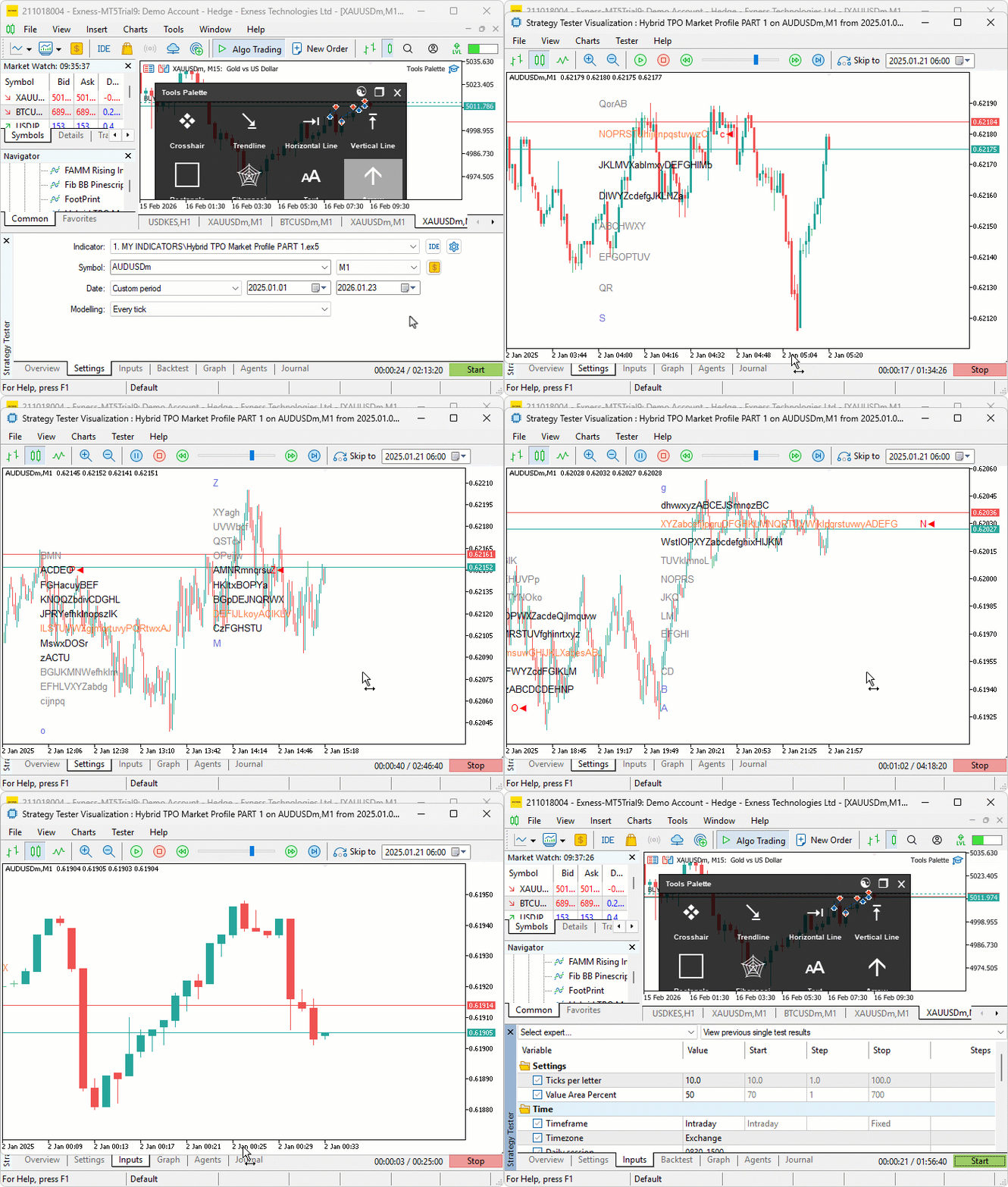
We did the testing, and below is the compiled visualization in a single Graphics Interchange Format (GIF) bitmap image format.
Conclusion
In conclusion, we’ve developed a custom indicator in MQL5 for hybrid Time Price Opportunity (TPO) market profiles that supports multiple session timeframes, including intraday, daily, weekly, monthly, and fixed periods with timezone adjustments. The indicator quantizes prices into a grid, tracks session data for highs, lows, opens, and closes, calculates the point of control and value area from TPO counts, and renders profiles on the chart with customizable colors for TPO letters, single prints, value areas, point of control, and close markers. In the preceding part, we will include the rendering of the square and dot bubbles to mark the market profile with all the labels. Keep tuned!
Warning: All rights to these materials are reserved by MetaQuotes Ltd. Copying or reprinting of these materials in whole or in part is prohibited.
This article was written by a user of the site and reflects their personal views. MetaQuotes Ltd is not responsible for the accuracy of the information presented, nor for any consequences resulting from the use of the solutions, strategies or recommendations described.

 Market Simulation (Part 16): Sockets (X)
 MQL5 Trading Tools (Part 19): Building an Interactive Tools Palette for Chart Drawing
 From Novice to Expert: Automating Intraday Strategies
 Market Simulation (Part 15): Sockets (IX)

- Free trading apps
- Over 8,000 signals for copying
- Economic news for exploring financial markets
You agree to website policy and terms of use