

MQL5 Trading Tools (Part 19): Building an Interactive Tools Palette for Chart Drawing
 6 891
6 891
 0
0

Introduction
In our previous article (Part 18), we combined vector-based rectangles and triangles to create rounded speech bubbles/balloons with orientation control in MetaQuotes Language 5 (MQL5), enabling dynamic UI elements for trading interfaces. In Part 19, we develop an interactive tools palette for chart drawing, featuring draggable panels, resizing, theme switching, and buttons for tools like crosshairs, lines, and shapes. This customizable system enhances analysis with real-time interactions and instructions. We will cover the following topics:
By the end, you’ll have a functional palette ready for expanding trading workflows—let’s dive in!
Designing Interactive Tools Palettes for Charts
The interactive tools palette for chart drawing centralizes buttons for essential functions like crosshairs, trendlines, lines, rectangles, Fibonacci, text, and arrows, enabling quick selection and application on trading charts with real-time feedback. It supports dragging, resizing, theme switching between dark and light modes, and minimizing to optimize the workspace, while providing instructions and status updates for intuitive use. This design streamlines analysis by offering a customizable, responsive UI that adapts to user interactions without cluttering the chart. We plan to use canvas objects for the header and panel, manage mouse events for interactivity, define enumerations for resize modes and tools, and handle drawing logic with object creation on charts. In brief, here is a visual representation of our objectives.

Implementation in MQL5
To create the program in MQL5, open the MetaEditor, go to the Navigator, locate the Experts folder, click on the "New" tab, and follow the prompts to create the file. Once it is made, in the coding environment, we will need to declare some input parameters and global variables that we will use throughout the program.
//+------------------------------------------------------------------+
//|                                                Tools Palette.mq5 |
//|                           Copyright 2026, Allan Munene Mutiiria. |
//|                                   https://t.me/Forex_Algo_Trader |
//+------------------------------------------------------------------+
#property copyright "Copyright 2026, Allan Munene Mutiiria."
#property link      "https://t.me/Forex_Algo_Trader"
#property version   "1.00"
#property strict

#include <Canvas/Canvas.mqh>

//+------------------------------------------------------------------+
//| Global Variables                                                 |
//+------------------------------------------------------------------+
CCanvas canvasHeader;                                   //--- Declare header canvas
CCanvas canvasTools;                                    //--- Declare tools canvas

string canvasHeaderName = "HeaderCanvas";               //--- Set header canvas name
string canvasToolsName = "ToolsCanvas";                 //--- Set tools canvas name

input int CanvasX = 20;                                 // Panel X position
input int CanvasY = 30;                                 // Panel Y position
input int CanvasWidth = 350;                            // Panel width
input int CanvasHeight = 200;                           // Panel height
input double BackgroundOpacity = 0.8;                   // Background opacity

bool is_dark_theme = true;                              //--- Set initial dark theme flag
color DarkHeaderColor = C'60,60,60';                    //--- Set dark header color
color DarkHeaderHoverColor = clrRed;                    //--- Set dark header hover color
color DarkHeaderDragColor = clrMediumBlue;              //--- Set dark header drag color
color DarkHeaderTextColor = clrWhite;                   //--- Set dark header text color
color DarkBorderColor = clrBlack;                       //--- Set dark border color
color DarkTopColor = clrBlack;                          //--- Set dark top color
color DarkIconColor = clrWhite;                         //--- Set dark icon color
color LightHeaderColor = clrSilver;                     //--- Set light header color
color LightHeaderHoverColor = clrRed;                   //--- Set light header hover color
color LightHeaderDragColor = clrMediumBlue;             //--- Set light header drag color
color LightHeaderTextColor = clrBlack;                  //--- Set light header text color
color LightBorderColor = clrBlack;                      //--- Set light border color
color LightTopColor = clrWhite;                         //--- Set light top color
color LightIconColor = clrBlack;                        //--- Set light icon color
color DarkInstructionColor = clrLime;                   //--- Set dark instruction color
color LightInstructionColor = clrGreen;                 //--- Set light instruction color
color DarkStatusColor = clrMagenta;                     //--- Set dark status color
color LightStatusColor = clrPurple;                     //--- Set light status color
color DarkActiveBtnColor = clrGreen;                    //--- Set dark active button color
color LightActiveBtnColor = clrDarkGreen;               //--- Set light active button color
color DarkHoverBtnColor = clrDarkGray;                  //--- Set dark hover button color
color LightHoverBtnColor = clrLightGray;                //--- Set light hover button color

int currentCanvasX = CanvasX;                           //--- Initialize current X position
int currentCanvasY = CanvasY;                           //--- Initialize current Y position
int currentWidth = CanvasWidth;                         //--- Initialize current width
int currentHeight = CanvasHeight;                       //--- Initialize current height
bool panel_dragging = false;                            //--- Initialize panel dragging flag
int panel_drag_x = 0, panel_drag_y = 0;                 //--- Initialize drag coordinates
int panel_start_x = 0, panel_start_y = 0;               //--- Initialize start coordinates
bool resizing = false;                                  //--- Initialize resizing flag

enum ENUM_RESIZE_MODE {
   NONE,                                                // No resize
   BOTTOM,                                              // Bottom resize
   RIGHT,                                               // Right resize
   BOTTOM_RIGHT                                         // Bottom-right resize
};

ENUM_RESIZE_MODE resize_mode = NONE;                    //--- Initialize resize mode
ENUM_RESIZE_MODE hover_mode = NONE;                     //--- Initialize hover mode
int resize_start_x = 0, resize_start_y = 0;             //--- Initialize resize start coordinates
int start_width = 0, start_height = 0;                  //--- Initialize start dimensions
const int resize_thickness = 5;                         //--- Set resize thickness
const int min_width = 150;                              //--- Set minimum width
const int min_height = 200;                             //--- Set minimum height
int hover_mouse_local_x = 0;                            //--- Initialize local hover X
int hover_mouse_local_y = 0;                            //--- Initialize local hover Y
bool header_hovered = false;                            //--- Initialize header hover flag
bool minimize_hovered = false;                          //--- Initialize minimize hover flag
bool close_hovered = false;                             //--- Initialize close hover flag
bool theme_hovered = false;                             //--- Initialize theme hover flag
bool resize_hovered = false;                            //--- Initialize resize hover flag
int prev_mouse_state = 0;                               //--- Initialize previous mouse state
int header_height = 27;                                 //--- Set header height
int button_size = 25;                                   //--- Set button size
int theme_x_offset = -75;                               //--- Set theme X offset
int minimize_x_offset = -50;                            //--- Set minimize X offset
int close_x_offset = -25;                               //--- Set close X offset
bool panel_minimized = false;                           //--- Initialize minimized flag

enum TOOL_TYPE {
   TOOL_NONE,                                           // No tool
   TOOL_CROSSHAIR,                                      // Crosshair tool
   TOOL_TRENDLINE,                                      // Trendline tool
   TOOL_HLINE,                                          // Horizontal line tool
   TOOL_VLINE,                                          // Vertical line tool
   TOOL_RECTANGLE,                                      // Rectangle tool
   TOOL_FIBO,                                           // Fibonacci tool
   TOOL_TEXT,                                           // Text tool
   TOOL_ARROW                                           // Arrow tool
};

TOOL_TYPE active_tool = TOOL_NONE;                      //--- Initialize active tool
bool drawing_first_click = false;                       //--- Initialize first click flag
datetime draw_time1 = 0;                                //--- Initialize draw time 1
double draw_price1 = 0.0;                               //--- Initialize draw price 1
long local_chart_id = 0;                                //--- Initialize local chart ID
string current_instruction = "";                        //--- Initialize current instruction

struct ToolButton {                                     // Define tool button structure
   string symbol;                                       // Store symbol
   string font;                                         // Store font
   TOOL_TYPE type;                                      // Store type
   string tooltip;                                      // Store tooltip
};

ToolButton buttons[8];                                  //--- Declare buttons array
int hovered_tool_index = -1;                            //--- Initialize hovered tool index

bool measuring = false;                                 //--- Initialize measuring flag
datetime fixed_time = 0;                                //--- Initialize fixed time
double fixed_price = 0.0;                               //--- Initialize fixed price
ulong last_click_time = 0;                              //--- Initialize last click time

const int tools_y_offset = -1;                          //--- Set tools Y offset
We begin the implementation by including the Canvas library with "#include <Canvas/Canvas.mqh>" to access core graphical functionalities for building the palette. Next, we declare global canvas objects "canvasHeader" and "canvasTools" for the panel's header and main area, assigning names like "HeaderCanvas" and "ToolsCanvas" for reference, along with user inputs for position, size, and background opacity to allow customization. To support themes, we initialize "is_dark_theme" to true and define color constants for dark and light modes, covering headers, borders, icons, instructions, status, and buttons, enabling visual consistency across switches.
We track panel state with variables for current position and dimensions, dragging flags, resize modes via the "ENUM_RESIZE_MODE" enumeration (NONE, BOTTOM, RIGHT, BOTTOM_RIGHT), hover states, and constants like minimum sizes and thicknesses for usability limits. For tools, we define the "TOOL_TYPE" enumeration listing options from NONE to ARROW, initialize "active_tool" to NONE, and manage drawing flags like "drawing_first_click", along with a "ToolButton" structure holding symbol, font, type, and tooltip, creating an array "buttons[8]" for the palette items. Finally, we set up variables for measuring mode, fixed points, click timing, hovered indices, and a y-offset for tools alignment, preparing for interactive features. We will then need some helper functions to make the code modular.
//+------------------------------------------------------------------+
//| Get theme-aware colors                                           |
//+------------------------------------------------------------------+
color GetHeaderColor() { return is_dark_theme ? DarkHeaderColor : LightHeaderColor; }                //--- Return header color based on theme
color GetHeaderHoverColor() { return is_dark_theme ? DarkHeaderHoverColor : LightHeaderHoverColor; } //--- Return header hover color based on theme
color GetHeaderDragColor() { return is_dark_theme ? DarkHeaderDragColor : LightHeaderDragColor; }    //--- Return header drag color based on theme
color GetHeaderTextColor() { return is_dark_theme ? DarkHeaderTextColor : LightHeaderTextColor; }    //--- Return header text color based on theme
color GetBorderColor() { return is_dark_theme ? DarkBorderColor : LightBorderColor; }                //--- Return border color based on theme
color GetTopColor() { return is_dark_theme ? DarkTopColor : LightTopColor; }                         //--- Return top color based on theme
color GetIconColor() { return is_dark_theme ? DarkIconColor : LightIconColor; }                      //--- Return icon color based on theme
color GetInstructionColor() { return is_dark_theme ? DarkInstructionColor : LightInstructionColor; } //--- Return instruction color based on theme
color GetStatusColor() { return is_dark_theme ? DarkStatusColor : LightStatusColor; }                //--- Return status color based on theme
color GetActiveBtnColor() { return is_dark_theme ? DarkActiveBtnColor : LightActiveBtnColor; }       //--- Return active button color based on theme
color GetHoverBtnColor() { return is_dark_theme ? DarkHoverBtnColor : LightHoverBtnColor; }          //--- Return hover button color based on theme

//+------------------------------------------------------------------+
//| Get tool name from type                                          |
//+------------------------------------------------------------------+
string GetToolName(TOOL_TYPE t) {
   for (int i = 0; i < 8; i++) {                                //--- Loop over buttons
      if (buttons[i].type == t) {                               //--- Check if type matches
         return StringSubstr(buttons[i].tooltip, 0, StringFind(buttons[i].tooltip, " Tool")); //--- Return tool name
      }
   }
   return "None";                                               //--- Return default if no match
}

//+------------------------------------------------------------------+
//| Check if tool is single-click                                    |
//+------------------------------------------------------------------+
bool IsSingleClickTool(TOOL_TYPE t) {
   switch(t) {                                                  //--- Switch on tool type
      case TOOL_HLINE:                                          //--- Handle horizontal line
      case TOOL_VLINE:                                          //--- Handle vertical line
      case TOOL_TEXT:                                           //--- Handle text
      case TOOL_ARROW:                                          //--- Handle arrow
         return true;                                           //--- Return true for single-click tools
      default:                                                  //--- Handle default
         return false;                                          //--- Return false otherwise
   }
}
We continue by defining a series of getter functions like "GetHeaderColor" to retrieve theme-aware colors, each returning the dark or light variant based on the "is_dark_theme" flag, ensuring consistent styling for headers, hovers, drags, texts, borders, icons, instructions, status, active buttons, and hovers without redundant checks. Next, the "GetToolName" function extracts the name of a tool from its type by looping through the "buttons" array, matching the type, and substringing the tooltip up to " Tool" for clean output, defaulting to "None" if no match. To classify tools, we implement "IsSingleClickTool" using a switch statement on the tool type, returning true for horizontal/vertical lines, text, and arrows that require only one click, and false otherwise for precise event handling. With that done, we can initialize the creation of the header and the palette body.
//+------------------------------------------------------------------+
//| Draw header                                                      |
//+------------------------------------------------------------------+
void DrawHeader() {
   canvasHeader.Erase(0);                                       //--- Erase header canvas

   color header_bg = panel_dragging ? GetHeaderDragColor() : (header_hovered ? GetHeaderHoverColor() : GetHeaderColor()); //--- Get header background color
   canvasHeader.FillRectangle(0, 0, currentWidth - 1, header_height - 1, ColorToARGB(header_bg, 255)); //--- Fill header rectangle

   uint argbBorder = ColorToARGB(GetBorderColor(), 255);        //--- Get border ARGB
   canvasHeader.Rectangle(0, 0, currentWidth - 1, header_height - 1, argbBorder); //--- Draw border rectangle

   canvasHeader.FontSet("Arial Bold", 13);                      //--- Set font for title
   canvasHeader.TextOut(10, (header_height - 13)/2, "Tools Palette", ColorToARGB(GetHeaderTextColor(), 255)); //--- Draw title text

   int button_y = (header_height - 20)/2;                       //--- Compute button Y position

   int theme_button_x = currentWidth + theme_x_offset;          //--- Compute theme button X
   canvasHeader.FontSet("Wingdings", 20);                       //--- Set font for theme symbol
   string theme_symbol = CharToString(91);                      //--- Set theme symbol
   int theme_w = canvasHeader.TextWidth(theme_symbol);          //--- Get theme symbol width
   int theme_x = theme_button_x + (button_size - theme_w) / 2;  //--- Compute theme X position
   color theme_color = theme_hovered ? clrYellow : GetHeaderTextColor(); //--- Get theme color
   canvasHeader.TextOut(theme_x, button_y, theme_symbol, ColorToARGB(theme_color, 255)); //--- Draw theme symbol

   int min_button_x = currentWidth + minimize_x_offset;         //--- Compute minimize button X
   string min_symbol = panel_minimized ? CharToString(111) : CharToString(114); //--- Set minimize symbol
   int min_w = canvasHeader.TextWidth(min_symbol);              //--- Get minimize symbol width
   int min_x = min_button_x + (button_size - min_w) / 2;        //--- Compute minimize X position
   color min_color = minimize_hovered ? clrYellow : GetHeaderTextColor(); //--- Get minimize color
   canvasHeader.TextOut(min_x, button_y, min_symbol, ColorToARGB(min_color, 255)); //--- Draw minimize symbol

   int close_button_x = currentWidth + close_x_offset;          //--- Compute close button X
   canvasHeader.FontSet("Webdings", 20);                        //--- Set font for close symbol
   string close_symbol = CharToString(114);                     //--- Set close symbol
   int close_w = canvasHeader.TextWidth(close_symbol);          //--- Get close symbol width
   int close_x = close_button_x + (button_size - close_w) / 2;  //--- Compute close X position
   color close_color = close_hovered ? clrRed : GetHeaderTextColor(); //--- Get close color
   canvasHeader.TextOut(close_x, button_y, close_symbol, ColorToARGB(close_color, 255)); //--- Draw close symbol

   canvasHeader.Update();                                       //--- Update header canvas
}

//+------------------------------------------------------------------+
//| Draw tools panel                                                 |
//+------------------------------------------------------------------+
void DrawToolsPanel() {
   canvasTools.Erase(0);                                        //--- Erase tools canvas

   uint argb_fill = ColorToARGB(GetTopColor(), (uchar)(255 * BackgroundOpacity)); //--- Get fill ARGB
   canvasTools.FillRectangle(0, 0, currentWidth - 1, currentHeight - 1, argb_fill); //--- Fill background rectangle

   uint argb_border = ColorToARGB(GetBorderColor(), 255);       //--- Get border ARGB
   canvasTools.Rectangle(0, 0, currentWidth - 1, currentHeight - 1, argb_border); //--- Draw border rectangle

   int columns = 4;                                             //--- Set number of columns
   int padding = 5;                                             //--- Set padding
   int button_width = (currentWidth - (columns + 1) * padding) / columns; //--- Compute button width
   int button_height = 70;                                      //--- Set button height
   int start_x = padding;                                       //--- Set start X
   int start_y = padding;                                       //--- Set start Y

   for (int i = 0; i < 8; i++) {                                //--- Loop over buttons
      int col = i % columns;                                    //--- Compute column
      int row = i / columns;                                    //--- Compute row
      int x = start_x + col * (button_width + padding);         //--- Compute X position
      int y = start_y + row * (button_height + padding);        //--- Compute Y position

      color btn_bg = (active_tool == buttons[i].type) ? GetActiveBtnColor() : ((i == hovered_tool_index) ? GetHoverBtnColor() : clrNONE); //--- Get button background
      if (btn_bg != clrNONE) canvasTools.FillRectangle(x, y, x + button_width - 1, y + button_height - 1, ColorToARGB(btn_bg, 255)); //--- Fill button rectangle if needed

      canvasTools.FontSet(buttons[i].font, 35);                 //--- Set font for icon
      int text_w = canvasTools.TextWidth(buttons[i].symbol);    //--- Get icon width
      int text_h = canvasTools.TextHeight(buttons[i].symbol);   //--- Get icon height
      int icon_x = x + (button_width - text_w) / 2;             //--- Compute icon X
      int icon_y = y + 5;                                       //--- Set icon Y
      canvasTools.TextOut(icon_x, icon_y, buttons[i].symbol, ColorToARGB(GetIconColor(), 255)); //--- Draw icon

      string tool_name = StringSubstr(buttons[i].tooltip, 0, StringFind(buttons[i].tooltip, " Tool")); //--- Get tool name
      canvasTools.FontSet("Arial Bold", 12);                    //--- Set font for name
      int name_w = canvasTools.TextWidth(tool_name);            //--- Get name width
      canvasTools.TextOut(x + (button_width - name_w) / 2, y + button_height - 20, tool_name, ColorToARGB(GetIconColor(), 255)); //--- Draw tool name
   }

   if (StringLen(current_instruction) > 0) {                    //--- Check if instruction exists
      canvasTools.FontSet("Arial", 14);                         //--- Set font for instruction
      int instr_w = canvasTools.TextWidth(current_instruction); //--- Get instruction width
      int instr_x = (currentWidth - instr_w) / 2;               //--- Compute instruction X
      canvasTools.TextOut(instr_x, currentHeight - 30, current_instruction, ColorToARGB(GetInstructionColor(), 255)); //--- Draw instruction
   }

   string status_text = "Active: " + GetToolName(active_tool);  //--- Set status text
   canvasTools.FontSet("Arial Bold", 14);                       //--- Set font for status
   int status_w = canvasTools.TextWidth(status_text);           //--- Get status width
   int status_x = (currentWidth - status_w) / 2;                //--- Compute status X
   canvasTools.TextOut(status_x, currentHeight - 15, status_text, ColorToARGB(GetStatusColor(), 255)); //--- Draw status

   if (resize_hovered || resizing) {                            //--- Check if resize hovered or resizing
      string icon_font = "Wingdings 3";                         //--- Set icon font
      int icon_size = 25;                                       //--- Set icon size
      uchar icon_code = 0;                                      //--- Initialize icon code
      int angle = 0;                                            //--- Initialize angle
      switch (hover_mode) {                                     //--- Switch on hover mode
         case BOTTOM: icon_code = (uchar)'2'; angle = 0; break; //--- Set for bottom
         case RIGHT: icon_code = (uchar)'1'; angle = 0; break;  //--- Set for right
         case BOTTOM_RIGHT: icon_code = (uchar)'2'; angle = 450; break; //--- Set for bottom-right
      }
      if (icon_code != 0) {                                     //--- Check if icon code set
         canvasTools.FontSet(icon_font, icon_size);             //--- Set font for icon
         canvasTools.FontAngleSet(angle);                       //--- Set font angle
         color icon_color = (resize_hovered || resizing) ? clrRed : GetIconColor(); //--- Get icon color
         int icon_x = (hover_mode == BOTTOM) ? MathMin(MathMax(hover_mouse_local_x - icon_size/2, 0), currentWidth - icon_size) : currentWidth - icon_size - 2; //--- Compute icon X
         int icon_y = (hover_mode == RIGHT) ? MathMin(MathMax(hover_mouse_local_y - icon_size/2, 0), currentHeight - icon_size) : currentHeight - icon_size - 2; //--- Compute icon Y
         if (hover_mode == BOTTOM_RIGHT) { icon_x = currentWidth - icon_size - 10; icon_y = currentHeight - icon_size; } //--- Adjust for bottom-right
         canvasTools.TextOut(icon_x, icon_y, CharToString(icon_code), ColorToARGB(icon_color, 255)); //--- Draw icon
         canvasTools.FontAngleSet(0);                           //--- Reset font angle
      }
   }

   canvasTools.Update();                                        //--- Update tools canvas
}
To create the initial rendering, we implement the "DrawHeader" function to render the palette's header on the canvas, starting by erasing it with Erase set to 0, then filling a rectangle with dynamic background color from getters like "GetHeaderDragColor" if dragging, "GetHeaderHoverColor" if hovered, or standard otherwise, converted to ARGB. Next, we draw the border using Rectangle with ARGB from "GetBorderColor", set bold "Arial" font for the title "Tools Palette" with FontSet and TextOut in the theme text color. To add controls, we compute button Y centering, then for theme, set Wingdings font, position and color the '[' symbol based on hover, and draw with "TextOut"; similarly for minimize (toggle 'o' or 'r' symbol) and close ('X' in Webdings), adjusting colors for hover states like yellow or red. Finally, we update the canvas with Update to display changes. You can customize the icons using your own characters if needed. See a set of the font characters you can use.
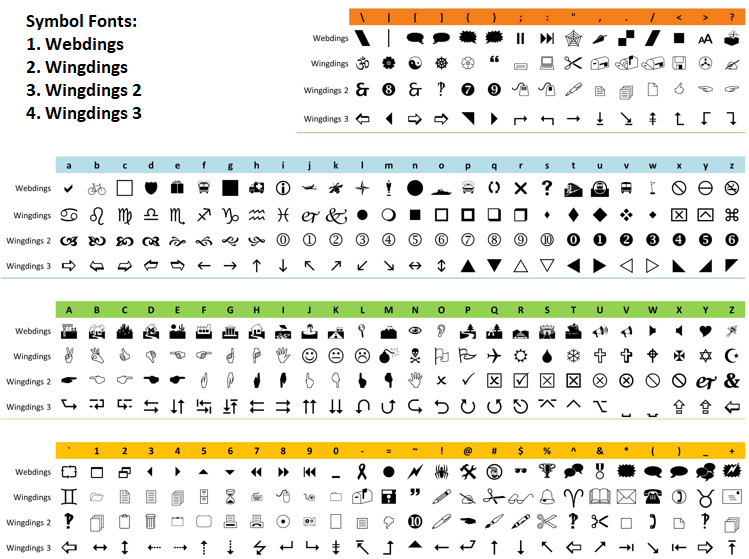
In the "DrawToolsPanel" function, we erase the tools canvas, fill it with the top color ARGB adjusted for "BackgroundOpacity", and draw the border rectangle. We lay out buttons in 4 columns with padding, loop to fill backgrounds if active or hovered using "GetActiveBtnColor" or "GetHoverBtnColor", set custom fonts for icons like 'v' in "Wingdings", center and draw them with TextOut in icon color, then add bold tool names below. If there's an instruction in "current_instruction", we draw it centered near the bottom with "GetInstructionColor"; add active tool status similarly. To indicate resizing, if "resize_hovered" or "resizing", we set "Wingdings 3" font, determine arrow code and angle per "hover_mode" (e.g., '2' at 450 for bottom-right), position dynamically, draw in red or icon color, and reset angle. We conclude by updating the canvas with "Update". We can now initialize this by drawing it using the following logic.
//+------------------------------------------------------------------+
//| Expert initialization function                                   |
//+------------------------------------------------------------------+
int OnInit() {
   currentCanvasX = CanvasX;                                    //--- Set current X from input
   currentCanvasY = CanvasY;                                    //--- Set current Y from input
   currentWidth = CanvasWidth;                                  //--- Set current width from input
   currentHeight = CanvasHeight;                                //--- Set current height from input

   if (!canvasHeader.CreateBitmapLabel(0, 0, canvasHeaderName, currentCanvasX, currentCanvasY, currentWidth, header_height, COLOR_FORMAT_ARGB_NORMALIZE)) { //--- Create header canvas
      Print("Failed to create Header Canvas");                  //--- Print failure message
      return(INIT_FAILED);                                      //--- Return initialization failure
   }

   if (!canvasTools.CreateBitmapLabel(0, 0, canvasToolsName, currentCanvasX, currentCanvasY + header_height + tools_y_offset, currentWidth, currentHeight, COLOR_FORMAT_ARGB_NORMALIZE)) { //--- Create tools canvas
      Print("Failed to create Tools Canvas");                   //--- Print failure message
      return(INIT_FAILED);                                      //--- Return initialization failure
   }

   buttons[0].symbol = CharToString('v'); buttons[0].font = "Wingdings"; buttons[0].type = TOOL_CROSSHAIR; buttons[0].tooltip = "Crosshair Tool"; //--- Initialize button 0
   buttons[1].symbol = CharToString('.'); buttons[1].font = "Wingdings 3"; buttons[1].type = TOOL_TRENDLINE; buttons[1].tooltip = "Trendline Tool"; //--- Initialize button 1
   buttons[2].symbol = CharToString('*'); buttons[2].font = "Wingdings 3"; buttons[2].type = TOOL_HLINE; buttons[2].tooltip = "Horizontal Line Tool"; //--- Initialize button 2
   buttons[3].symbol = CharToString('+'); buttons[3].font = "Wingdings 3"; buttons[3].type = TOOL_VLINE; buttons[3].tooltip = "Vertical Line Tool"; //--- Initialize button 3
   buttons[4].symbol = CharToString('c'); buttons[4].font = "Webdings"; buttons[4].type = TOOL_RECTANGLE; buttons[4].tooltip = "Rectangle Tool"; //--- Initialize button 4
   buttons[5].symbol = CharToString('"'); buttons[5].font = "Webdings"; buttons[5].type = TOOL_FIBO; buttons[5].tooltip = "Fibonacci Tool"; //--- Initialize button 5
   buttons[6].symbol = CharToString('>'); buttons[6].font = "Webdings"; buttons[6].type = TOOL_TEXT; buttons[6].tooltip = "Text Tool"; //--- Initialize button 6
   buttons[7].symbol = CharToString(225); buttons[7].font = "Wingdings"; buttons[7].type = TOOL_ARROW; buttons[7].tooltip = "Arrow Tool"; //--- Initialize button 7

   DrawHeader();                                                //--- Draw header
   DrawToolsPanel();                                            //--- Draw tools panel

   ChartSetInteger(0, CHART_EVENT_MOUSE_MOVE, true);            //--- Enable mouse move events
   ChartRedraw();                                               //--- Redraw chart
   local_chart_id = ChartID();                                  //--- Set local chart ID
   return(INIT_SUCCEEDED);                                      //--- Return initialization success
}
We proceed in the OnInit event handler by initializing current panel positions and dimensions from user inputs, ensuring alignment with configured values. Next, we create the header canvas using CreateBitmapLabel with ARGB normalize for transparency, logging failures, and returning INIT_FAILED if unsuccessful, and similarly for the tools canvas positioned below the header with a y-offset. To populate the palette, we initialize the "buttons" array entries with specific symbols (e.g., 'v' for crosshair), fonts like Wingdings, tool types from the enumeration, and tooltips for hover info. We then draw the header and tools panel via their respective functions, enable mouse move events with ChartSetInteger to capture interactions, redraw the chart, store the local chart ID for object management, and return INIT_SUCCEEDED. Upon compilation, we get the following outcome.

We can see the panel is initialised correctly. What we now need to do is breathe life into the panel to handle interactivity and theme changes. We will define some more helper functions to get that done easily.
//+------------------------------------------------------------------+
//| Toggle theme                                                     |
//+------------------------------------------------------------------+
void ToggleTheme() {
   is_dark_theme = !is_dark_theme;                              //--- Toggle theme flag
   DrawHeader();                                                //--- Redraw header
   DrawToolsPanel();                                            //--- Redraw tools panel
   ChartRedraw();                                               //--- Redraw chart
}

//+------------------------------------------------------------------+
//| Toggle minimize                                                  |
//+------------------------------------------------------------------+
void ToggleMinimize() {
   panel_minimized = !panel_minimized;                          //--- Toggle minimized flag
   if (panel_minimized) {                                       //--- Check if minimized
      canvasTools.Destroy();                                    //--- Destroy tools canvas
   } else {                                                     //--- Handle restored
      canvasTools.CreateBitmapLabel(0, 0, canvasToolsName, currentCanvasX, currentCanvasY + header_height + tools_y_offset, currentWidth, currentHeight, COLOR_FORMAT_ARGB_NORMALIZE); //--- Recreate tools canvas
      DrawToolsPanel();                                         //--- Redraw tools panel
   }
   DrawHeader();                                                //--- Redraw header
   ChartRedraw();                                               //--- Redraw chart
}

//+------------------------------------------------------------------+
//| Is mouse over header excluding buttons                           |
//+------------------------------------------------------------------+
bool IsMouseOverHeader(int mx, int my) {
   if (mx < currentCanvasX || mx > currentCanvasX + currentWidth || my < currentCanvasY || my > currentCanvasY + header_height) return false; //--- Check outside header
   int btn_left = currentCanvasX + currentWidth + theme_x_offset; //--- Compute buttons left
   if (mx >= btn_left && mx <= btn_left + button_size * 3) return false; //--- Check over buttons
   return true;                                                 //--- Return true if over header
}

//+------------------------------------------------------------------+
//| Is mouse over specific button                                    |
//+------------------------------------------------------------------+
bool IsMouseOverButton(int mx, int my, int offset) {
   int btn_left = currentCanvasX + currentWidth + offset;       //--- Compute button left
   return (mx >= btn_left && mx <= btn_left + button_size && my >= currentCanvasY && my <= currentCanvasY + header_height); //--- Return if over button
}

//+------------------------------------------------------------------+
//| Is mouse over resize area                                        |
//+------------------------------------------------------------------+
bool IsMouseOverResize(int mx, int my, ENUM_RESIZE_MODE &rm) {
   if (panel_minimized) return false;                           //--- Return false if minimized
   int tx = currentCanvasX;                                     //--- Set tools X
   int ty = currentCanvasY + header_height + tools_y_offset;    //--- Set tools Y
   int tr = tx + currentWidth;                                  //--- Set right
   int tb = ty + currentHeight;                                 //--- Set bottom
   bool over_right = mx >= tr - resize_thickness && mx <= tr && my >= ty && my <= tb; //--- Check over right
   bool over_bottom = my >= tb - resize_thickness && my <= tb && mx >= tx && mx <= tr; //--- Check over bottom
   if (over_bottom && over_right) { rm = BOTTOM_RIGHT; return true; } //--- Set and return bottom-right
   if (over_bottom) { rm = BOTTOM; return true; }               //--- Set and return bottom
   if (over_right) { rm = RIGHT; return true; }                 //--- Set and return right
   return false;                                                //--- Return false otherwise
}

//+------------------------------------------------------------------+
//| Get hovered tool                                                 |
//+------------------------------------------------------------------+
int GetHoveredTool(int mx, int my) {
   int lx = mx - currentCanvasX;                                //--- Compute local X
   int ly = my - (currentCanvasY + header_height + tools_y_offset); //--- Compute local Y
   if (lx < 0 || lx > currentWidth || ly < 0 || ly > currentHeight) return -1; //--- Return -1 if outside

   int columns = 4;                                             //--- Set columns
   int padding = 5;                                             //--- Set padding
   int button_width = (currentWidth - (columns + 1) * padding) / columns; //--- Compute button width
   int button_height = 70;                                      //--- Set button height

   for (int i = 0; i < 8; i++) {                                //--- Loop over buttons
      int col = i % columns;                                    //--- Compute column
      int row = i / columns;                                    //--- Compute row
      int x = padding + col * (button_width + padding);         //--- Compute X
      int y = padding + row * (button_height + padding);        //--- Compute Y
      if (lx >= x && lx < x + button_width && ly >= y && ly < y + button_height) return i; //--- Return index if over
   }
   return -1;                                                   //--- Return -1 if none
}

//+------------------------------------------------------------------+
//| Toggle tool activation                                           |
//+------------------------------------------------------------------+
void ToggleTool(TOOL_TYPE type) {
   if (active_tool == type) {                                   //--- Check if already active
      if (active_tool == TOOL_CROSSHAIR) {                      //--- Handle crosshair deactivation
         DeleteCrosshair();                                     //--- Delete crosshair
         measuring = false;                                     //--- Reset measuring
         ChartSetInteger(0, CHART_MOUSE_SCROLL, true);          //--- Enable scroll
      }
      active_tool = TOOL_NONE;                                  //--- Deactivate tool
      drawing_first_click = false;                              //--- Reset first click
      current_instruction = "";                                 //--- Clear instruction
   } else {                                                     //--- Handle activation
      if (active_tool == TOOL_CROSSHAIR) {                      //--- Deactivate previous crosshair
         DeleteCrosshair();                                     //--- Delete crosshair
         measuring = false;                                     //--- Reset measuring
         ChartSetInteger(0, CHART_MOUSE_SCROLL, true);          //--- Enable scroll
      }
      active_tool = type;                                       //--- Set active tool
      drawing_first_click = false;                              //--- Reset first click
      if (active_tool == TOOL_CROSSHAIR) {                      //--- Handle crosshair instruction
         current_instruction = "Move mouse for crosshair. Double-click to start measuring."; //--- Set instruction
      } else {                                                  //--- Handle other tools
         current_instruction = "Click on chart to draw.";       //--- Set instruction
      }
   }
   DrawToolsPanel();                                            //--- Redraw tools panel
   ChartRedraw();                                               //--- Redraw chart
}

//+------------------------------------------------------------------+
//| Deactivate current tool on Escape                                |
//+------------------------------------------------------------------+
void DeactivateTool() {
   if (active_tool == TOOL_CROSSHAIR) {                         //--- Check if crosshair active
      DeleteCrosshair();                                        //--- Delete crosshair
      measuring = false;                                        //--- Reset measuring
      ChartSetInteger(0, CHART_MOUSE_SCROLL, true);             //--- Enable scroll
   }
   active_tool = TOOL_NONE;                                     //--- Deactivate tool
   drawing_first_click = false;                                 //--- Reset first click
   current_instruction = "";                                    //--- Clear instruction
   DrawToolsPanel();                                            //--- Redraw tools panel
   ChartRedraw();                                               //--- Redraw chart
}

//+------------------------------------------------------------------+
//| Delete measure objects                                           |
//+------------------------------------------------------------------+
void DeleteMeasureObjects() {
   ObjectDelete(local_chart_id, "Cross_HF");                    //--- Delete fixed horizontal
   ObjectDelete(local_chart_id, "Cross_VF");                    //--- Delete fixed vertical
   ObjectDelete(local_chart_id, "Measure_Line");                //--- Delete measure line
   ObjectDelete(local_chart_id, "Measure_Label");               //--- Delete measure label
}

//+------------------------------------------------------------------+
//| Delete crosshair                                                 |
//+------------------------------------------------------------------+
void DeleteCrosshair() {
   ObjectDelete(local_chart_id, "Cross_H");                     //--- Delete moving horizontal
   ObjectDelete(local_chart_id, "Cross_V");                     //--- Delete moving vertical
   DeleteMeasureObjects();                                      //--- Delete measure objects
   ChartRedraw();                                               //--- Redraw chart
}
Here, we implement the "ToggleTheme" function to switch between dark and light modes by inverting the "is_dark_theme" flag, then redrawing the header and tools panel to apply new colors, and refreshing the chart for immediate visibility. Next, we create "ToggleMinimize" to alternate the panel state with "panel_minimized", destroying the tools canvas when minimizing to save space or recreating it when restoring, followed by header redraw and chart update. To detect interactions, we define "IsMouseOverHeader," which checks if the mouse is within the header bounds but excludes the button area starting from the theme offset, returning true only for draggable regions.
Similarly, "IsMouseOverButton" verifies mouse position over a specific button by calculating its left edge from offset and comparing it to the button size and header height. For resizing, "IsMouseOverResize" evaluates if the mouse is near the bottom, right, or corner edges of the tools panel (ignoring if minimized), updating the reference mode like "BOTTOM_RIGHT" and returning true if detected. We add "GetHoveredTool" to identify the button under the mouse by converting to local coordinates, iterating a 4-column grid with padding, and returning the index if within a button's bounds, or -1 otherwise.
To manage tools, "ToggleTool" activates or deactivates based on type, handling crosshair cleanup if switching, resetting drawing flags, and setting appropriate instructions like "Click on chart to draw" before redrawing the panel. "DeactivateTool" fully resets the active tool, particularly clearing crosshair elements and enabling scroll, then updates instructions and redraws. Finally, we provide cleanup with "DeleteMeasureObjects" removing fixed crosshair and measure line/label, and "DeleteCrosshair" deleting moving crosshair plus calling the measure delete function, followed by chart redraw. We will now handle the objects' functions and their creation.
//+------------------------------------------------------------------+
//| Handle chart drawing for tools                                   |
//+------------------------------------------------------------------+
void HandleDrawing(int mx, int my) {
   datetime time;                                               //--- Declare time
   double price;                                                //--- Declare price
   int sw;                                                      //--- Declare subwindow
   if (!ChartXYToTimePrice(local_chart_id, mx, my, sw, time, price)) return; //--- Convert XY to time/price or return

   string name = "Tool_" + TimeToString(TimeCurrent(), TIME_SECONDS); //--- Set object name
   color col = clrBlue;                                         //--- Set color
   ENUM_OBJECT obj_type = OBJ_VLINE;                            //--- Initialize object type
   datetime time1 = time;                                       //--- Set time1
   double price1 = price;                                       //--- Set price1
   datetime time2 = 0;                                          //--- Set time2
   double price2 = 0.0;                                         //--- Set price2
   bool create = true;                                          //--- Set create flag
   bool valid_obj = false;                                      //--- Set valid object flag

   string tool_name = GetToolName(active_tool);                 //--- Get tool name

   if (IsSingleClickTool(active_tool)) {                        //--- Check if single-click tool
      switch (active_tool) {                                    //--- Switch on tool
         case TOOL_HLINE:                                       //--- Handle horizontal line
            obj_type = OBJ_HLINE;                               //--- Set type
            time1 = 0;                                          //--- Set time1
            price1 = price;                                     //--- Set price1
            time2 = 0;                                          //--- Set time2
            price2 = 0;                                         //--- Set price2
            valid_obj = true;                                   //--- Set valid
            break;                                              //--- Break
         case TOOL_VLINE:                                       //--- Handle vertical line
            obj_type = OBJ_VLINE;                               //--- Set type
            time1 = time;                                       //--- Set time1
            price1 = 0;                                         //--- Set price1
            time2 = 0;                                          //--- Set time2
            price2 = 0;                                         //--- Set price2
            valid_obj = true;                                   //--- Set valid
            break;                                              //--- Break
         case TOOL_TEXT:                                        //--- Handle text
            obj_type = OBJ_TEXT;                                //--- Set type
            time2 = 0;                                          //--- Set time2
            price2 = 0;                                         //--- Set price2
            valid_obj = true;                                   //--- Set valid
            break;                                              //--- Break
         case TOOL_ARROW:                                       //--- Handle arrow
            obj_type = OBJ_ARROW;                               //--- Set type
            time2 = 0;                                          //--- Set time2
            price2 = 0;                                         //--- Set price2
            valid_obj = true;                                   //--- Set valid
            break;                                              //--- Break
      }
   } else {                                                     //--- Handle two-click tools
      if (!drawing_first_click) {                               //--- Check if first click
         draw_time1 = time;                                     //--- Set draw time1
         draw_price1 = price;                                   //--- Set draw price1
         drawing_first_click = true;                            //--- Set first click flag
         create = false;                                        //--- Set no create
         current_instruction = "Click second point for " + tool_name + "."; //--- Set instruction
      } else {                                                  //--- Handle second click
         ChartXYToTimePrice(local_chart_id, mx, my, sw, time2, price2); //--- Get time2/price2
         drawing_first_click = false;                           //--- Reset first click
         time1 = draw_time1;                                    //--- Set time1
         price1 = draw_price1;                                  //--- Set price1
         current_instruction = "Click on chart to draw.";       //--- Set instruction
      }
      switch (active_tool) {                                    //--- Switch on tool
         case TOOL_TRENDLINE: obj_type = OBJ_TREND; valid_obj = true; break; //--- Set trendline
         case TOOL_RECTANGLE: obj_type = OBJ_RECTANGLE; valid_obj = true; break; //--- Set rectangle
         case TOOL_FIBO: obj_type = OBJ_FIBO; valid_obj = true; break; //--- Set fibo
      }
   }

   if (create && valid_obj) {                                   //--- Check if create and valid
      if (ObjectCreate(local_chart_id, name, obj_type, sw, time1, price1, time2, price2)) { //--- Create object
         ObjectSetInteger(local_chart_id, name, OBJPROP_COLOR, col); //--- Set color
         ObjectSetInteger(local_chart_id, name, OBJPROP_STYLE, STYLE_SOLID); //--- Set style
         ObjectSetInteger(local_chart_id, name, OBJPROP_WIDTH, 1); //--- Set width
         if (obj_type == OBJ_TEXT) ObjectSetString(local_chart_id, name, OBJPROP_TEXT, "Text"); //--- Set text
         if (obj_type == OBJ_ARROW) ObjectSetInteger(local_chart_id, name, OBJPROP_ARROWCODE, 233); //--- Set arrow code
         if (obj_type == OBJ_HLINE || obj_type == OBJ_VLINE) ObjectSetInteger(local_chart_id, name, OBJPROP_STYLE, STYLE_DASH); //--- Set dash for lines
         ObjectSetInteger(local_chart_id, name, OBJPROP_SELECTABLE, true); //--- Set selectable
         ObjectSetInteger(local_chart_id, name, OBJPROP_SELECTED, true); //--- Set selected
         ChartRedraw(local_chart_id);                           //--- Redraw chart
         active_tool = TOOL_NONE;                               //--- Deactivate tool
         current_instruction = "";                              //--- Clear instruction
      }
   }
   DrawToolsPanel();                                            //--- Redraw tools panel
}
To handle chart drawing, we implement the "HandleDrawing" function to manage the creation of chart objects based on the active tool and mouse position, beginning by converting coordinates to time and price with ChartXYToTimePrice, returning early if unsuccessful. Next, we generate a unique object name using current time, set default blue color and vertical line type, then branch for single-click tools via "IsSingleClickTool", switching to configure types like OBJ_HLINE for horizontal (resetting times), OBJ_VLINE for vertical (resetting prices), OBJ_TEXT or OBJ_ARROW, marking valid and setting create flag.
For two-click tools, we capture the first point if "drawing_first_click" is false, updating globals and instruction without creation; on the second click, retrieve the end point, reset the flag, and configure types such as OBJ_TREND for trendline, OBJ_RECTANGLE, or OBJ_FIBO, validating the object. If creation is flagged and valid, we use ObjectCreate with parameters, set properties like color, style, width, text, or arrow code if applicable, dash for lines, selectable and selected states, then redraw the chart with ChartRedraw and deactivate the tool, clearing instructions. Finally, we refresh the tools panel with "DrawToolsPanel" to reflect changes. Let us now handle the crosshair; the others are straightforward.
//+------------------------------------------------------------------+
//| Update moving crosshair                                          |
//+------------------------------------------------------------------+
void UpdateMovingCrosshair(datetime time, double price) {
   string h_name = "Cross_H";                                   //--- Set horizontal name
   string v_name = "Cross_V";                                   //--- Set vertical name

   if (ObjectFind(local_chart_id, h_name) < 0) {                //--- Check if horizontal exists
      ObjectCreate(local_chart_id, h_name, OBJ_HLINE, 0, 0, price); //--- Create horizontal line
      ObjectSetInteger(local_chart_id, h_name, OBJPROP_COLOR, clrRed); //--- Set color
      ObjectSetInteger(local_chart_id, h_name, OBJPROP_STYLE, STYLE_SOLID); //--- Set style
   } else {                                                     //--- Handle existing
      ObjectMove(local_chart_id, h_name, 0, 0, price);          //--- Move horizontal
   }

   if (ObjectFind(local_chart_id, v_name) < 0) {                //--- Check if vertical exists
      ObjectCreate(local_chart_id, v_name, OBJ_VLINE, 0, time, 0); //--- Create vertical line
      ObjectSetInteger(local_chart_id, v_name, OBJPROP_COLOR, clrRed); //--- Set color
      ObjectSetInteger(local_chart_id, v_name, OBJPROP_STYLE, STYLE_SOLID); //--- Set style
   } else {                                                     //--- Handle existing
      ObjectMove(local_chart_id, v_name, 0, time, 0);           //--- Move vertical
   }
}

//+------------------------------------------------------------------+
//| Update fixed crosshair                                           |
//+------------------------------------------------------------------+
void UpdateFixedCrosshair() {
   string hf_name = "Cross_HF";                                 //--- Set fixed horizontal name
   string vf_name = "Cross_VF";                                 //--- Set fixed vertical name

   if (ObjectFind(local_chart_id, hf_name) < 0) {               //--- Check if fixed horizontal exists
      ObjectCreate(local_chart_id, hf_name, OBJ_HLINE, 0, 0, fixed_price); //--- Create fixed horizontal
      ObjectSetInteger(local_chart_id, hf_name, OBJPROP_COLOR, clrGreen); //--- Set color
      ObjectSetInteger(local_chart_id, hf_name, OBJPROP_STYLE, STYLE_SOLID); //--- Set style
   } else {                                                     //--- Handle existing
      ObjectMove(local_chart_id, hf_name, 0, 0, fixed_price);   //--- Move fixed horizontal
   }

   if (ObjectFind(local_chart_id, vf_name) < 0) {               //--- Check if fixed vertical exists
      ObjectCreate(local_chart_id, vf_name, OBJ_VLINE, 0, fixed_time, 0); //--- Create fixed vertical
      ObjectSetInteger(local_chart_id, vf_name, OBJPROP_COLOR, clrGreen); //--- Set color
      ObjectSetInteger(local_chart_id, vf_name, OBJPROP_STYLE, STYLE_SOLID); //--- Set style
   } else {                                                     //--- Handle existing
      ObjectMove(local_chart_id, vf_name, 0, fixed_time, 0);    //--- Move fixed vertical
   }
}
We implement the "UpdateMovingCrosshair" function to manage a dynamic crosshair on the chart, defining names for horizontal "Cross_H" and vertical "Cross_V" lines, checking if each exists with ObjectFind (negative return if not), creating them via "ObjectCreate" as OBJ_HLINE or "OBJ_VLINE" with red solid style if absent, or moving them with ObjectMove to the current time and price if present, providing real-time cursor tracking. Next, we create the "UpdateFixedCrosshair" function for a static reference crosshair, using names "Cross_HF" and "Cross_VF", similarly checking existence, creating with green solid style at fixed_time and fixed_price, or updating positions, enabling persistent markers during measuring mode for comparisons. Now, we will handle its click.
//+------------------------------------------------------------------+
//| Handle crosshair click                                           |
//+------------------------------------------------------------------+
void HandleCrosshairClick(datetime time, double price) {
   ulong now = GetMicrosecondCount();                           //--- Get current microseconds
   if (now - last_click_time < 500000) {                        //--- Check for double-click
      if (!measuring) {                                         //--- Check not measuring
         fixed_time = time;                                     //--- Set fixed time
         fixed_price = price;                                   //--- Set fixed price
         measuring = true;                                      //--- Set measuring flag
         ChartSetInteger(0, CHART_MOUSE_SCROLL, false);         //--- Disable scroll
         current_instruction = "Measuring. Double-click to exit."; //--- Set instruction
      } else {                                                  //--- Handle exit measuring
         measuring = false;                                     //--- Reset measuring
         DeleteMeasureObjects();                                //--- Delete objects
         ChartSetInteger(0, CHART_MOUSE_SCROLL, true);          //--- Enable scroll
         current_instruction = "Move mouse for crosshair. Double-click to start measuring."; //--- Set instruction
      }
      DrawToolsPanel();                                         //--- Redraw tools panel
      last_click_time = 0;                                      //--- Reset click time
   } else {                                                     //--- Handle single click
      last_click_time = now;                                    //--- Update click time
   }
}
We implement the "HandleCrosshairClick" function to process clicks during crosshair mode, retrieving current microseconds with GetMicrosecondCount to detect double-clicks within 500 ms of "last_click_time". If double-click, we toggle measuring: if not active, set fixed point to current time and price, enable measuring, disable chart scroll with ChartSetInteger, update instruction; if active, reset measuring, delete objects via "DeleteMeasureObjects", re-enable scroll, and restore default instruction, then redraw the tools panel and reset click time. For single clicks, we update "last_click_time" to now, allowing detection of subsequent clicks as doubles. Let us now define a logic to update the measuring line between the crosshairs.
//+------------------------------------------------------------------+
//| Update measure line                                              |
//+------------------------------------------------------------------+
void UpdateMeasureLine(datetime time, double price) {
   string line_name = "Measure_Line";                           //--- Set measure line name
   if (ObjectFind(local_chart_id, line_name) < 0) {             //--- Check if line exists
      ObjectCreate(local_chart_id, line_name, OBJ_TREND, 0, fixed_time, fixed_price, time, price); //--- Create trend line
      ObjectSetInteger(local_chart_id, line_name, OBJPROP_COLOR, clrBlue); //--- Set color
      ObjectSetInteger(local_chart_id, line_name, OBJPROP_STYLE, STYLE_DASHDOT); //--- Set style
      ObjectSetInteger(local_chart_id, line_name, OBJPROP_WIDTH, 1); //--- Set width
      ObjectSetInteger(local_chart_id, line_name, OBJPROP_RAY, false); //--- Disable ray
   } else {                                                     //--- Handle existing
      ObjectMove(local_chart_id, line_name, 0, fixed_time, fixed_price); //--- Move point 0
      ObjectMove(local_chart_id, line_name, 1, time, price);    //--- Move point 1
   }
}

//+------------------------------------------------------------------+
//| Update measure label                                             |
//+------------------------------------------------------------------+
void UpdateMeasureLabel(int mx, int my, datetime time, double price) {
   string label_name = "Measure_Label";                         //--- Set measure label name
   long period_sec = PeriodSeconds(_Period);                    //--- Get period seconds
   long virtual_fixed = fixed_time / period_sec;                //--- Compute virtual fixed
   long virtual_time = time / period_sec;                       //--- Compute virtual time
   int bars_diff = (int)MathAbs(virtual_fixed - virtual_time);  //--- Compute bars difference
   double point = SymbolInfoDouble(_Symbol, SYMBOL_POINT);      //--- Get point value
   long digits = SymbolInfoInteger(_Symbol, SYMBOL_DIGITS);     //--- Get digits
   double pip_size = (digits == 3 || digits == 5) ? point * 10 : point; //--- Compute pip size
   double pips = MathAbs(price - fixed_price) / pip_size;       //--- Compute pips
   string price_diff = DoubleToString(MathAbs(price - fixed_price), (int)digits); //--- Format price diff
   string text = StringFormat("%d bars, %.1f pips, Price Diff: %s", bars_diff, pips, price_diff); //--- Format text

   if (ObjectFind(local_chart_id, label_name) < 0) {            //--- Check if label exists
      ObjectCreate(local_chart_id, label_name, OBJ_LABEL, 0, 0, 0); //--- Create label
      ObjectSetInteger(local_chart_id, label_name, OBJPROP_CORNER, CORNER_LEFT_UPPER); //--- Set corner
      ObjectSetInteger(local_chart_id, label_name, OBJPROP_XDISTANCE, mx + 20); //--- Set X distance
      ObjectSetInteger(local_chart_id, label_name, OBJPROP_YDISTANCE, my); //--- Set Y distance
      ObjectSetString(local_chart_id, label_name, OBJPROP_TEXT, text); //--- Set text
      ObjectSetInteger(local_chart_id, label_name, OBJPROP_FONTSIZE, 9); //--- Set font size
      ObjectSetString(local_chart_id, label_name, OBJPROP_FONT, "Arial"); //--- Set font
      ObjectSetInteger(local_chart_id, label_name, OBJPROP_COLOR, clrBlue); //--- Set color
   } else {                                                     //--- Handle existing
      ObjectSetInteger(local_chart_id, label_name, OBJPROP_XDISTANCE, mx + 20); //--- Update X distance
      ObjectSetInteger(local_chart_id, label_name, OBJPROP_YDISTANCE, my); //--- Update Y distance
      ObjectSetString(local_chart_id, label_name, OBJPROP_TEXT, text); //--- Update text
   }
}
For the measuring line, we implement the "UpdateMeasureLine" function to display a connecting line during measuring mode, defining a name "Measure_Line", checking existence with ObjectFind, creating it as OBJ_TREND from fixed to current time/price with blue dash-dot style, width 1, and no ray if absent, or moving its points with ObjectMove if present, providing visual linkage between points. We create the "UpdateMeasureLabel" function to show dynamic metrics near the mouse, calculating bars difference by dividing times by period seconds from PeriodSeconds to get virtual bars and taking absolute with MathAbs, then pips using symbol point from SymbolInfoDouble adjusted for 3 or 5 digits (multiplying by 10), absolute price diff formatted to digits from the SymbolInfoInteger function.
To format the text with StringFormat including bars, pips, rounded to 1 decimal, and price diff, we check label existence, create as OBJ_LABEL at the upper-left corner with mouse-offset position, "Arial" font size 9, blue color if new, or update position and text if existing, enhancing user feedback on measurements. This label computation is crucial as it accurately quantifies time and price spans across varying symbol precisions and periods, aiding precise analysis without manual calculations. To bring the palette to life, we will handle chart events in the event handler for intuitive interactions.
//+------------------------------------------------------------------+
//| Chart event handler                                              |
//+------------------------------------------------------------------+
void OnChartEvent(const int id, const long &lparam, const double &dparam, const string &sparam) {
   if (id == CHARTEVENT_KEYDOWN) {                              //--- Check key down event
      if (lparam == 27) {                                       //--- Check escape key
         DeactivateTool();                                      //--- Deactivate tool
      }
      return;                                                   //--- Return
   }
   if (id != CHARTEVENT_MOUSE_MOVE) return;                     //--- Return if not mouse move
   int mx = (int)lparam;                                        //--- Set mouse X
   int my = (int)dparam;                                        //--- Set mouse Y
   int ms = (int)sparam;                                        //--- Set mouse state

   bool prev_hh = header_hovered;                               //--- Store previous header hover
   bool prev_th = theme_hovered;                                //--- Store previous theme hover
   bool prev_mh = minimize_hovered;                             //--- Store previous minimize hover
   bool prev_ch = close_hovered;                                //--- Store previous close hover
   bool prev_rh = resize_hovered;                               //--- Store previous resize hover

   header_hovered = IsMouseOverHeader(mx, my);                  //--- Update header hover
   theme_hovered = IsMouseOverButton(mx, my, theme_x_offset);   //--- Update theme hover
   minimize_hovered = IsMouseOverButton(mx, my, minimize_x_offset); //--- Update minimize hover
   close_hovered = IsMouseOverButton(mx, my, close_x_offset);   //--- Update close hover
   resize_hovered = IsMouseOverResize(mx, my, hover_mode);      //--- Update resize hover

   string resize_tooltip = "";                                  //--- Initialize resize tooltip
   if (resize_hovered) {                                        //--- Check resize hovered
      switch (hover_mode) {                                     //--- Switch on hover mode
         case BOTTOM: resize_tooltip = "Resize Bottom"; break;  //--- Set bottom tooltip
         case RIGHT: resize_tooltip = "Resize Right"; break;    //--- Set right tooltip
         case BOTTOM_RIGHT: resize_tooltip = "Resize Bottom-Right"; break; //--- Set bottom-right tooltip
      }
      ObjectSetString(0, canvasToolsName, OBJPROP_TOOLTIP, resize_tooltip); //--- Set tooltip
   } else if (!panel_minimized && hovered_tool_index >= 0) {    //--- Check tool hovered
      ObjectSetString(0, canvasToolsName, OBJPROP_TOOLTIP, buttons[hovered_tool_index].tooltip); //--- Set tool tooltip
   } else {                                                     //--- Handle no hover
      ObjectSetString(0, canvasToolsName, OBJPROP_TOOLTIP, ""); //--- Clear tooltip
   }

   if (prev_hh != header_hovered || prev_th != theme_hovered || prev_mh != minimize_hovered || prev_ch != close_hovered || prev_rh != resize_hovered) { //--- Check if hovers changed
      DrawHeader();                                             //--- Redraw header
      if (!panel_minimized) DrawToolsPanel();                   //--- Redraw tools if not minimized
      ChartRedraw();                                            //--- Redraw chart
   }

   if (!panel_minimized) {                                      //--- Check not minimized
      int ht = GetHoveredTool(mx, my);                          //--- Get hovered tool
      if (ht != hovered_tool_index) {                           //--- Check if changed
         hovered_tool_index = ht;                               //--- Update index
         DrawToolsPanel();                                      //--- Redraw tools
         ChartRedraw();                                         //--- Redraw chart
      }
   }

   if (resize_hovered || resizing) {                            //--- Check resize hovered or resizing
      hover_mouse_local_x = mx - currentCanvasX;                //--- Update local X
      hover_mouse_local_y = my - (currentCanvasY + header_height + tools_y_offset); //--- Update local Y
      DrawToolsPanel();                                         //--- Redraw tools
      ChartRedraw();                                            //--- Redraw chart
   }

   if (ms == 1 && prev_mouse_state == 0) {                      //--- Check mouse down
      if (header_hovered) {                                     //--- Check header hovered
         panel_dragging = true;                                 //--- Set dragging flag
         panel_drag_x = mx;                                     //--- Set drag X
         panel_drag_y = my;                                     //--- Set drag Y
         panel_start_x = currentCanvasX;                        //--- Set start X
         panel_start_y = currentCanvasY;                        //--- Set start Y
         ChartSetInteger(0, CHART_MOUSE_SCROLL, false);         //--- Disable scroll
         DrawHeader();                                          //--- Redraw header
         ChartRedraw();                                         //--- Redraw chart
      } else if (theme_hovered) {                               //--- Check theme hovered
         ToggleTheme();                                         //--- Toggle theme
      } else if (minimize_hovered) {                            //--- Check minimize hovered
         ToggleMinimize();                                      //--- Toggle minimize
      } else if (close_hovered) {                               //--- Check close hovered
         OnDeinit(0);                                           //--- Call deinit
      } else if (!panel_minimized) {                            //--- Check not minimized
         int ht = GetHoveredTool(mx, my);                       //--- Get hovered tool
         if (ht >= 0) {                                         //--- Check valid tool
            ToggleTool(buttons[ht].type);                       //--- Toggle tool
         } else if (active_tool != TOOL_NONE && active_tool != TOOL_CROSSHAIR) { //--- Check active tool
            HandleDrawing(mx, my);                              //--- Handle drawing
         } else if (IsMouseOverResize(mx, my, resize_mode)) {   //--- Check resize area
            resizing = true;                                    //--- Set resizing flag
            resize_start_x = mx;                                //--- Set start X
            resize_start_y = my;                                //--- Set start Y
            start_width = currentWidth;                         //--- Set start width
            start_height = currentHeight;                       //--- Set start height
            ChartSetInteger(0, CHART_MOUSE_SCROLL, false);      //--- Disable scroll
            DrawToolsPanel();                                   //--- Redraw tools
            ChartRedraw();                                      //--- Redraw chart
         }
      }
   }

   if (panel_dragging && ms == 1) {                             //--- Check dragging
      int dx = mx - panel_drag_x;                               //--- Compute delta X
      int dy = my - panel_drag_y;                               //--- Compute delta Y
      currentCanvasX = MathMax(0, MathMin((int)ChartGetInteger(0, CHART_WIDTH_IN_PIXELS) - currentWidth, panel_start_x + dx)); //--- Update X
      currentCanvasY = MathMax(0, MathMin((int)ChartGetInteger(0, CHART_HEIGHT_IN_PIXELS) - header_height - (panel_minimized ? 0 : currentHeight) - tools_y_offset, panel_start_y + dy)); //--- Update Y
      ObjectSetInteger(0, canvasHeaderName, OBJPROP_XDISTANCE, currentCanvasX); //--- Set header X
      ObjectSetInteger(0, canvasHeaderName, OBJPROP_YDISTANCE, currentCanvasY); //--- Set header Y
      if (!panel_minimized) {                                   //--- Check not minimized
         ObjectSetInteger(0, canvasToolsName, OBJPROP_XDISTANCE, currentCanvasX); //--- Set tools X
         ObjectSetInteger(0, canvasToolsName, OBJPROP_YDISTANCE, currentCanvasY + header_height + tools_y_offset); //--- Set tools Y
      }
      ChartRedraw();                                            //--- Redraw chart
   }

   if (resizing && ms == 1) {                                   //--- Check resizing
      int dx = mx - resize_start_x;                             //--- Compute delta X
      int dy = my - resize_start_y;                             //--- Compute delta Y
      int nw = MathMax(min_width, start_width + (resize_mode == RIGHT || resize_mode == BOTTOM_RIGHT ? dx : 0)); //--- Compute new width
      int nh = MathMax(min_height, start_height + (resize_mode == BOTTOM || resize_mode == BOTTOM_RIGHT ? dy : 0)); //--- Compute new height
      nw = MathMin(nw, (int)ChartGetInteger(0, CHART_WIDTH_IN_PIXELS) - currentCanvasX); //--- Clamp width
      nh = MathMin(nh, (int)ChartGetInteger(0, CHART_HEIGHT_IN_PIXELS) - currentCanvasY - header_height - tools_y_offset); //--- Clamp height
      currentWidth = nw;                                        //--- Update width
      currentHeight = nh;                                       //--- Update height
      canvasTools.Resize(currentWidth, currentHeight);          //--- Resize tools canvas
      ObjectSetInteger(0, canvasToolsName, OBJPROP_XSIZE, currentWidth); //--- Set tools X size
      ObjectSetInteger(0, canvasToolsName, OBJPROP_YSIZE, currentHeight); //--- Set tools Y size
      canvasHeader.Resize(currentWidth, header_height);         //--- Resize header canvas
      ObjectSetInteger(0, canvasHeaderName, OBJPROP_XSIZE, currentWidth); //--- Set header X size
      ObjectSetInteger(0, canvasHeaderName, OBJPROP_YSIZE, header_height); //--- Set header Y size
      DrawHeader();                                             //--- Redraw header
      DrawToolsPanel();                                         //--- Redraw tools
      ChartRedraw();                                            //--- Redraw chart
   }

   if (ms == 0 && prev_mouse_state == 1) {                      //--- Check mouse up
      panel_dragging = false;                                   //--- Reset dragging
      resizing = false;                                         //--- Reset resizing
      ChartSetInteger(0, CHART_MOUSE_SCROLL, true);             //--- Enable scroll
      DrawHeader();                                             //--- Redraw header
      DrawToolsPanel();                                         //--- Redraw tools
      ChartRedraw();                                            //--- Redraw chart
   }

   datetime time = 0;                                           //--- Initialize time
   double price = 0.0;                                          //--- Initialize price
   int sw = 0;                                                  //--- Initialize subwindow
   if (ChartXYToTimePrice(local_chart_id, mx, my, sw, time, price)) { //--- Convert XY to time/price
      if (active_tool == TOOL_CROSSHAIR) {                      //--- Check crosshair active
         UpdateMovingCrosshair(time, price);                    //--- Update moving crosshair
         if (measuring) {                                       //--- Check measuring
            UpdateFixedCrosshair();                             //--- Update fixed crosshair
            UpdateMeasureLine(time, price);                     //--- Update measure line
            UpdateMeasureLabel(mx, my, time, price);            //--- Update measure label
         }
         ChartRedraw();                                         //--- Redraw chart
      }
      if (ms == 1 && prev_mouse_state == 0 && active_tool == TOOL_CROSSHAIR &&
          !header_hovered && !theme_hovered && !minimize_hovered && !close_hovered && !resize_hovered &&
          (panel_minimized || GetHoveredTool(mx, my) == -1)) {   //--- Check crosshair click conditions
         HandleCrosshairClick(time, price);                      //--- Handle click
         ChartRedraw();                                          //--- Redraw chart
      }
   }

   prev_mouse_state = ms;                                       //--- Update previous state
}
We use the OnChartEvent event handler to manage all user interactions with the palette and tools, starting by checking for CHARTEVENT_KEYDOWN to detect the escape key (lparam 27) and deactivate the current tool with "DeactivateTool", then returning early. In case you are wondering, the escape character is code 27 in the ASCII table. See below.

Next, if not a CHARTEVENT_MOUSE_MOVE, we exit; otherwise, extract mouse X, Y, and state from parameters, store previous hover flags, and update them using functions like "IsMouseOverHeader", "IsMouseOverButton" for theme/minimize/close, and "IsMouseOverResize", which sets "hover_mode". Next, we set tooltips on the tools canvas with ObjectSetString for resize modes or hovered tool buttons, clearing if none; if any hover changed, redraw header and tools (if not minimized), followed by the ChartRedraw function. If not minimized, we detect hovered tool index with "GetHoveredTool" and redraw if changed; for resize states, update local hover coordinates and redraw tools.
On mouse down (ms 1, prev 0), we initiate dragging if header hovered by setting flags, disabling scroll, and redrawing header; toggle theme or minimize if respective buttons hovered; call deinit if close; or if a tool button hovered, toggle its type; handle non-crosshair drawing with "HandleDrawing"; start resizing if over resize area by setting flags, starts, and disabling scroll before redrawing tools. During drag (ms 1), we calculate deltas, clamp new positions to chart bounds with the MathMax and MathMin functions, update globals, and set object distances for header and tools (if visible), then redraw the chart. For resizing (ms 1), compute and clamp new dimensions based on mode, update globals, resize canvases with Resize and set sizes via ObjectSetInteger, then redraw header, tools, and chart.
On mouse up (ms 0, prev 1), reset dragging and resizing flags, re-enable scroll, redraw header and tools, and refresh chart. We convert mouse to time/price with ChartXYToTimePrice, and if crosshair is active, update moving crosshair; if measuring, also update fixed, measure line, and label; on qualifying down click outside palette, handle with "HandleCrosshairClick" and redraw. Finally, update "prev_mouse_state" to the current for next events, ensuring responsive, stateful interactivity. Finally, we need to delete our objects when not needed.
//+------------------------------------------------------------------+
//| Expert deinitialization function                                 |
//+------------------------------------------------------------------+
void OnDeinit(const int reason) {
   canvasHeader.Destroy();                                      //--- Destroy header canvas
   canvasTools.Destroy();                                       //--- Destroy tools canvas
   DeleteCrosshair();                                           //--- Delete crosshair
   measuring = false;                                           //--- Reset measuring flag
   ChartSetInteger(0, CHART_MOUSE_SCROLL, true);                //--- Enable mouse scroll

   int total = ObjectsTotal(local_chart_id);                    //--- Get total objects
   for (int i = total - 1; i >= 0; i--) {                       //--- Loop over objects backward
      string obj_name = ObjectName(local_chart_id, i);          //--- Get object name
      if (StringFind(obj_name, "Tool_") == 0) {                 //--- Check if our tool
         ObjectDelete(local_chart_id, obj_name);                //--- Delete object
      }
   }

   ChartRedraw();                                               //--- Redraw chart
}
In the OnDeinit event handler, we perform cleanup by destroying the header and tools canvases with the Destroy method, removing any active crosshair through "DeleteCrosshair", resetting the measuring flag to false, and re-enabling mouse scroll via the ChartSetInteger function. To ensure no leftover objects, we retrieve the total count with ObjectsTotal on the local chart, loop backward for safe deletion, fetch names using ObjectName, and remove those prefixed "Tool_" with the ObjectDelete function. Finally, we invoke ChartRedraw to update the chart, completing resource release upon program exit. Upon compilation, we get the following outcome.

From the visualization, we can see that we have created an interactive tools palette, hence achieving our objectives. In the upcoming parts, we will expand this into a more detailed palette with better-organized tools.
Backtesting
We did the testing, and below is the compiled visualization in a single Graphics Interchange Format (GIF) bitmap image format.
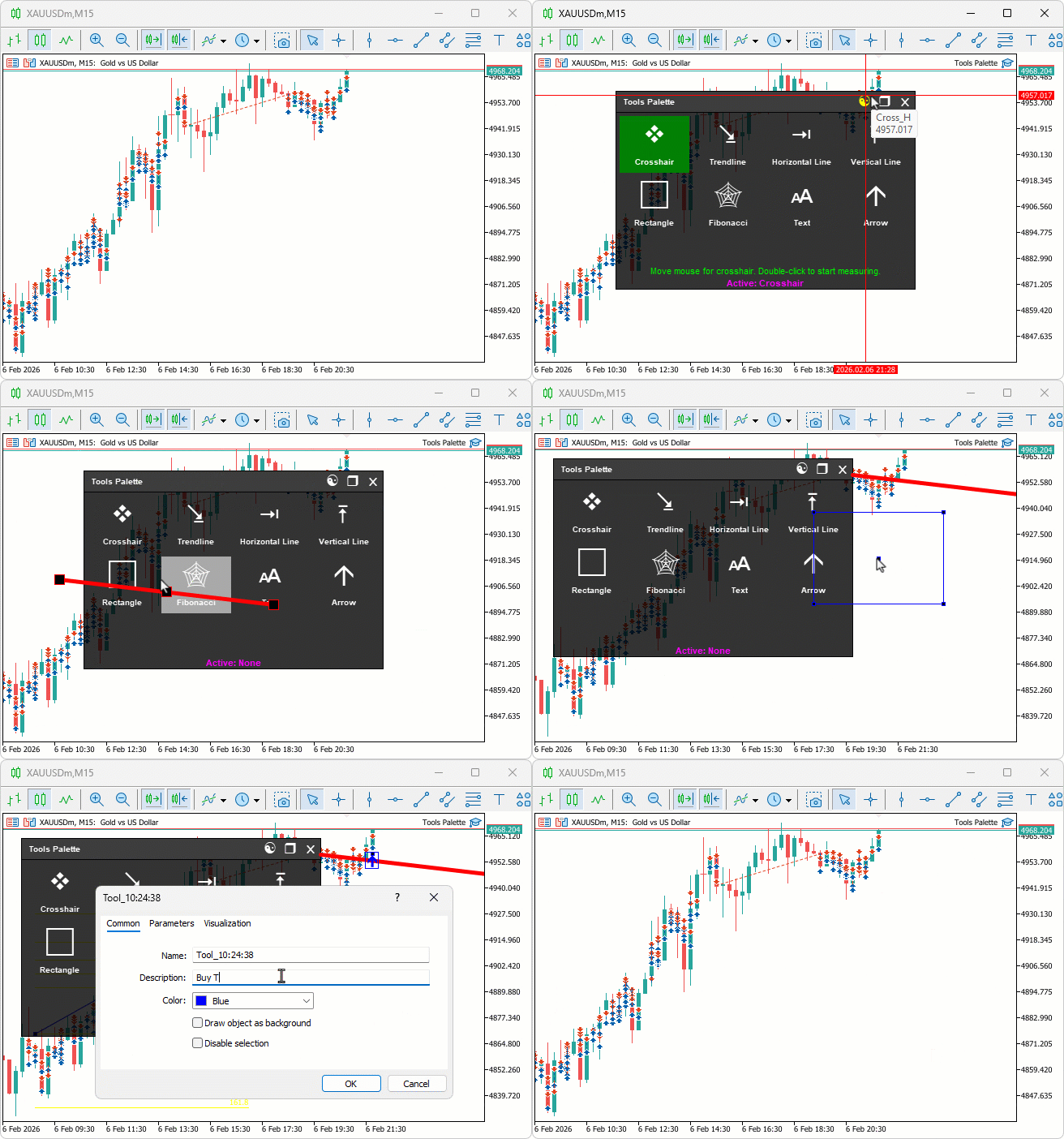
Conclusion
In conclusion, we’ve built an interactive tools palette in MQL5 for chart drawing, featuring draggable and resizable panels with theme switching between dark and light modes. We incorporated buttons for various tools like crosshairs, trendlines, lines, rectangles, Fibonacci retracements, text, and arrows, managing mouse events for seamless activation and on-chart interactions. This customizable system enhances trading analysis with real-time feedback and instructions, providing a versatile UI for efficient workflows. With this interactive tools palette, you’re equipped to streamline chart annotations and measurements, ready for integration into advanced trading strategies. In the preceding parts, we will upscale to a more detailed palette with more organized tools. Keep tuned!
Warning: All rights to these materials are reserved by MetaQuotes Ltd. Copying or reprinting of these materials in whole or in part is prohibited.
This article was written by a user of the site and reflects their personal views. MetaQuotes Ltd is not responsible for the accuracy of the information presented, nor for any consequences resulting from the use of the solutions, strategies or recommendations described.

 Creating Custom Indicators in MQL5 (Part 7): Hybrid Time Price Opportunity (TPO) Market Profiles for Session Analysis
 Market Simulation (Part 15): Sockets (IX)
 Market Simulation (Part 16): Sockets (X)
 Introduction to MQL5 (Part 41): Beginner Guide to File Handling in MQL5 (III)

- Free trading apps
- Over 8,000 signals for copying
- Economic news for exploring financial markets
You agree to website policy and terms of use