

MQL5 Trading Tools (Part 20): Canvas Graphing with Statistical Correlation and Regression Analysis
 4 603
4 603
 0
0

Introduction
In our previous article (Part 19), we built an interactive tools palette in MetaQuotes Language 5 (MQL5) for chart drawing, featuring draggable panels, resizing, theme switching, and buttons for various analysis tools. In Part 20, we create a canvas-based graphing tool for statistical correlation and linear regression between two variables, featuring draggable/resizable elements, dynamic ticks, and statistical display. This visualization supports pair trading insights through regression lines, data points, and metrics like slope and R-squared. We will cover the following topics:
- Exploring Statistical Correlation and Regression in Canvas Graphs
- Implementation in MQL5
- Backtesting
- Conclusion
By the end, you’ll have an interactive regression chart ready for market analysis—let’s dive in!
Exploring Statistical Correlation and Regression in Canvas Graphs
Statistical correlation measures the strength and direction of the relationship between two variables, such as symbol prices, using metrics like Pearson's coefficient, ranging from -1 (inverse) to 1 (direct), while linear regression fits a line to data points to predict trends via slope and intercept. In canvas graphs, these are visualized with scatter points for correlations and regression lines for predictions, enhanced by R-squared to indicate fit quality, aiding us in identifying pair dependencies or divergences. This graphical representation on draggable canvases allows interactive exploration of market relationships, with statistics panels for quick insights. Our plan is to load symbol data, compute regression using ALGLIB, render plots with dynamic ticks and anti-aliased points/lines, and display stats like slope and R-squared on overlays. In brief, here is a visual representation of our objectives.

Implementation in MQL5
To create the program in MQL5, open the MetaEditor, go to the Navigator, locate the Experts folder, click on the "New" tab, and follow the prompts to create the file. Once it is made, in the coding environment, we will need to declare some input parameters and global variables that we will use throughout the program.
//+------------------------------------------------------------------+
//|              Canvas Graphing PART 1 - Statistical Regression.mq5 |
//|                           Copyright 2026, Allan Munene Mutiiria. |
//|                                   https://t.me/Forex_Algo_Trader |
//+------------------------------------------------------------------+
#property copyright "Copyright 2026, Allan Munene Mutiiria."
#property link      "https://t.me/Forex_Algo_Trader"
#property version   "1.00"
#property strict

#include <Math\Alglib\alglib.mqh>
#include <Canvas\Canvas.mqh>

//+------------------------------------------------------------------+
//| Enumerations                                                     |
//+------------------------------------------------------------------+
enum ResizeDirection {
   NO_RESIZE,                                           // No resize
   RESIZE_BOTTOM_EDGE,                                  // Resize bottom edge
   RESIZE_RIGHT_EDGE,                                   // Resize right edge
   RESIZE_CORNER                                        // Resize corner
};

//+------------------------------------------------------------------+
//| Inputs                                                           |
//+------------------------------------------------------------------+
sinput group "=== REGRESSION SETTINGS ==="
input int                maxHistoryBars = 200;          // Maximum History Bars
input ENUM_TIMEFRAMES    chartTimeframe = PERIOD_CURRENT; // Chart Timeframe
input string             primarySymbol = "AUDUSDm";     // Primary Symbol (X-axis)
input string             secondarySymbol = "EURUSDm";   // Secondary Symbol (Y-axis)

sinput group "=== CANVAS DISPLAY SETTINGS ==="
input int                initialCanvasX = 20;           // Initial Canvas X Position
input int                initialCanvasY = 30;           // Initial Canvas Y Position
input int                initialCanvasWidth = 600;      // Initial Canvas Width
input int                initialCanvasHeight = 400;     // Initial Canvas Height
input int                plotPadding = 10;              // Plot Area Internal Padding (px)

sinput group "=== THEME COLOR (SINGLE CONTROL!) ==="
input color              themeColor = clrDodgerBlue;    // Master Theme Color
input bool               showBorderFrame = true;        // Show Border Frame

sinput group "=== REGRESSION LINE SETTINGS ==="
input color              regressionLineColor = clrBlue; // Regression Line Color
input int                regressionLineWidth = 2;       // Regression Line Width
input color              dataPointsColor = clrRed;      // Data Points Color
input int                dataPointSize = 3;             // Data Point Size

sinput group "=== BACKGROUND SETTINGS ==="
input bool               enableBackgroundFill = true;   // Enable Background Fill
input color              backgroundTopColor = clrWhite; // Background Top Color
input double             backgroundOpacityLevel = 0.95; // Background Opacity (0-1)

sinput group "=== TEXT AND LABELS ==="
input int                titleFontSize = 14;            // Title Font Size
input color              titleTextColor = clrBlack;     // Title Text Color
input int                labelFontSize = 11;            // Label Font Size
input color              labelTextColor = clrBlack;     // Label Text Color
input int                axisLabelFontSize = 12;        // Axis Labels Font Size
input bool               showStatistics = true;         // Show Statistics & Legend

sinput group "=== STATS & LEGEND PANEL SETTINGS ==="
input int                statsPanelX = 70;              // Stats Panel X Position
input int                statsPanelY = 10;              // Stats Panel Y Offset (from header)
input int                statsPanelWidth = 130;         // Stats Panel Width
input int                statsPanelHeight = 65;         // Stats Panel Height
input int                panelFontSize = 13;            // Stats & Legend Font Size
input int                legendHeight = 35;             // Legend Panel Height

sinput group "=== INTERACTION SETTINGS ==="
input bool               enableDragging = true;         // Enable Canvas Dragging
input bool               enableResizing = true;         // Enable Canvas Resizing
input int                resizeGripSize = 8;            // Resize Grip Size (pixels)

//+------------------------------------------------------------------+
//| Global Variables                                                 |
//+------------------------------------------------------------------+
CCanvas mainCanvas;                                     //--- Declare main canvas
string canvasObjectName = "RegressionCanvas_Main";      //--- Set canvas object name

int currentPositionX = initialCanvasX;                  //--- Initialize current X position
int currentPositionY = initialCanvasY;                  //--- Initialize current Y position
int currentWidthPixels = initialCanvasWidth;            //--- Initialize current width
int currentHeightPixels = initialCanvasHeight;          //--- Initialize current height

bool isDraggingCanvas = false;                          //--- Initialize dragging flag
bool isResizingCanvas = false;                          //--- Initialize resizing flag
int dragStartX = 0, dragStartY = 0;                     //--- Initialize drag start coordinates
int canvasStartX = 0, canvasStartY = 0;                 //--- Initialize canvas start coordinates

int resizeStartX = 0, resizeStartY = 0;                 //--- Initialize resize start coordinates
int resizeInitialWidth = 0, resizeInitialHeight = 0;    //--- Initialize resize initial dimensions
ResizeDirection activeResizeMode = NO_RESIZE;           //--- Initialize active resize mode
ResizeDirection hoverResizeMode = NO_RESIZE;            //--- Initialize hover resize mode

bool isHoveringCanvas = false;                          //--- Initialize canvas hover flag
bool isHoveringHeader = false;                          //--- Initialize header hover flag
bool isHoveringResizeZone = false;                      //--- Initialize resize hover flag
int lastMouseX = 0, lastMouseY = 0;                     //--- Initialize last mouse coordinates
int previousMouseButtonState = 0;                       //--- Initialize previous mouse state

const int MIN_CANVAS_WIDTH = 300;                       //--- Set minimum canvas width
const int MIN_CANVAS_HEIGHT = 200;                      //--- Set minimum canvas height
const int HEADER_BAR_HEIGHT = 35;                       //--- Set header bar height

double regressionSlope = 0.0;                           //--- Initialize regression slope
double regressionIntercept = 0.0;                       //--- Initialize regression intercept
double correlationCoefficient = 0.0;                    //--- Initialize correlation coefficient
double rSquared = 0.0;                                  //--- Initialize R-squared

double primaryClosePrices[];                            //--- Declare primary close prices array
double secondaryClosePrices[];                          //--- Declare secondary close prices array
bool dataLoadedSuccessfully = false;                    //--- Initialize data loaded flag
We begin the implementation by including the ALGLIB library with "#include <Math\Alglib\alglib.mqh>" for advanced statistical computations like linear regression, and the Canvas library via "#include <Canvas\Canvas.mqh>" to handle graphical rendering on the chart. Next, we define the "ResizeDirection" enumeration with options for no resize, bottom edge, right edge, and corner, providing structured control for interactive resizing. Under input groups, we organize parameters for regression settings like maximum bars, timeframe, and primary/secondary symbols; canvas display with initial position, size, and padding; a master theme color and border toggle; line and point styles; background fill with top color and opacity; text elements including fonts, colors, and stats visibility; panel positions and sizes for stats/legend; and interaction toggles for dragging, resizing, with grip size.
Global variables include the main canvas "mainCanvas" with name "RegressionCanvas_Main"; track current position and dimensions; flags and coordinates for dragging/resizing; hover states and mouse tracking; constants for min sizes and header height; regression metrics like slope and R-squared; price arrays for symbols; and a data load flag. Next, we will define some color theme helper functions to aid in color mapping.
//+------------------------------------------------------------------+
//| Theme Color Helper Functions                                     |
//+------------------------------------------------------------------+
color LightenColor(color baseColor, double factor) {
   uchar r = (uchar)((baseColor >> 16) & 0xFF);                //--- Extract red component
   uchar g = (uchar)((baseColor >> 8) & 0xFF);                 //--- Extract green component
   uchar b = (uchar)(baseColor & 0xFF);                        //--- Extract blue component

   r = (uchar)MathMin(255, r + (255 - r) * factor);            //--- Lighten red
   g = (uchar)MathMin(255, g + (255 - g) * factor);            //--- Lighten green
   b = (uchar)MathMin(255, b + (255 - b) * factor);            //--- Lighten blue

   return (r << 16) | (g << 8) | b;                            //--- Return lightened color
}

color DarkenColor(color baseColor, double factor) {
   uchar r = (uchar)((baseColor >> 16) & 0xFF);                //--- Extract red component
   uchar g = (uchar)((baseColor >> 8) & 0xFF);                 //--- Extract green component
   uchar b = (uchar)(baseColor & 0xFF);                        //--- Extract blue component

   r = (uchar)(r * (1.0 - factor));                            //--- Darken red
   g = (uchar)(g * (1.0 - factor));                            //--- Darken green
   b = (uchar)(b * (1.0 - factor));                            //--- Darken blue

   return (r << 16) | (g << 8) | b;                            //--- Return darkened color
}
Here, we implement two helper functions, "LightenColor" and "DarkenColor", to dynamically adjust the master theme color for visual effects like gradients and hovers in the regression graph. In "LightenColor", we extract RGB components from the base color using bit shifts, then lighten each by adding a factor-scaled portion of the remaining intensity to 255, clamping with MathMin to avoid overflow, and recombine into a color value.
Similarly, "DarkenColor" extracts components and multiplies each by (1 - factor) to reduce intensity, achieving shades for borders or backgrounds. These functions are essential for theme consistency, as they derive variations from a single input color, enabling subtle gradients and responsive UI elements without hardcoding multiple colors. To proceed, we will initialize the canvas and load the symbol data that we will use for analysis. We will be using functions to make our code modular and organized for future expansion. To achieve that, here is the approach we used.
//+------------------------------------------------------------------+
//| Create Regression Canvas                                         |
//+------------------------------------------------------------------+
bool CreateCanvas() {
   if (!mainCanvas.CreateBitmapLabel(0, 0, canvasObjectName,
       currentPositionX, currentPositionY, currentWidthPixels, currentHeightPixels,
       COLOR_FORMAT_ARGB_NORMALIZE)) {                          //--- Create bitmap label
      return false;                                             //--- Return failure
   }
   return true;                                                 //--- Return success
}

//+------------------------------------------------------------------+
//| Load Price Data for Regression Analysis                          |
//+------------------------------------------------------------------+
bool loadSymbolClosePrices() {
   if (!SymbolSelect(primarySymbol, true)) {                     //--- Select primary symbol
      Print("ERROR: Primary symbol not found: ", primarySymbol); //--- Print error
      return false;                                              //--- Return failure
   }

   if (!SymbolSelect(secondarySymbol, true)) {                   //--- Select secondary symbol
      Print("ERROR: Secondary symbol not found: ", secondarySymbol); //--- Print error
      return false;                                              //--- Return failure
   }

   int copiedPrimary = CopyClose(primarySymbol, chartTimeframe, 1, maxHistoryBars, primaryClosePrices); //--- Copy primary closes
   if (copiedPrimary <= 0) {                                     //--- Check copy success
      Print("ERROR: Failed to copy data for ", primarySymbol, ". Error: ", GetLastError()); //--- Print error
      return false;                                              //--- Return failure
   }

   int copiedSecondary = CopyClose(secondarySymbol, chartTimeframe, 1, maxHistoryBars, secondaryClosePrices); //--- Copy secondary closes
   if (copiedSecondary <= 0) {                                   //--- Check copy success
      Print("ERROR: Failed to copy data for ", secondarySymbol, ". Error: ", GetLastError()); //--- Print error
      return false;                                              //--- Return failure
   }

   int actualBars = MathMin(copiedPrimary, copiedSecondary);     //--- Get min bars
   ArrayResize(primaryClosePrices, actualBars);                  //--- Resize primary array
   ArrayResize(secondaryClosePrices, actualBars);                //--- Resize secondary array

   dataLoadedSuccessfully = true;                                //--- Set loaded flag
   Print("SUCCESS: Loaded ", actualBars, " bars for both symbols"); //--- Print success
   return true;                                                  //--- Return success
}
First, we implement the "CreateCanvas" function to set up the main graphical area for the regression plot, using the CreateBitmapLabel method on the "mainCanvas" with current position, dimensions, and COLOR_FORMAT_ARGB_NORMALIZE for alpha support, returning false on failure or true on success, which we will call during initialization to establish the visual base.
Next, we create the "loadSymbolClosePrices" function to fetch historical data for analysis, first selecting symbols with SymbolSelect and logging errors if not found, then copying close prices via CopyClose for primary and secondary into arrays, checking for positive counts, and handling failures with GetLastError. To ensure consistency, we take the minimum bars between copies, resize arrays accordingly, set the "dataLoadedSuccessfully" flag, print success with loaded bars, and return true, enabling regression computations only with valid data. We can now call this in the initialization event handler to set up the pace.
//+------------------------------------------------------------------+
//| Expert initialization function                                   |
//+------------------------------------------------------------------+
int OnInit() {
   currentPositionX = initialCanvasX;                           //--- Set current X from input
   currentPositionY = initialCanvasY;                           //--- Set current Y from input
   currentWidthPixels = initialCanvasWidth;                     //--- Set current width from input
   currentHeightPixels = initialCanvasHeight;                   //--- Set current height from input

   if (!CreateCanvas()) {                                       //--- Create canvas or fail
      Print("ERROR: Failed to create regression canvas");       //--- Print error
      return(INIT_FAILED);                                      //--- Return failure
   }

   if (!loadSymbolClosePrices()) {                              //--- Load prices or fail
      Print("ERROR: Failed to load price data for symbols");    //--- Print error
      return(INIT_FAILED);                                      //--- Return failure
   }

   ChartRedraw();                                               //--- Redraw chart

   return(INIT_SUCCEEDED);                                      //--- Return success
}
We proceed in the OnInit event handler by setting the current position and dimensions from initial inputs, ensuring the canvas starts at the user-specified location and size. Next, we call "CreateCanvas" to initialize the main graphical area, logging an error and returning INIT_FAILED if unsuccessful, followed by loading price data with "loadSymbolClosePrices", handling failures similarly to prevent proceeding without valid inputs. Finally, we redraw the chart to show the graph and return INIT_SUCCEEDED, completing setup for interactive regression analysis. We can now define the regression line computation equation so that we will use it in visualization.
//+------------------------------------------------------------------+
//| Calculate Linear Regression Parameters                           |
//+------------------------------------------------------------------+
bool computeLinearRegression() {
   int dataSize = ArraySize(primaryClosePrices);                //--- Get data size
   if (dataSize <= 0 || ArraySize(secondaryClosePrices) != dataSize) { //--- Check valid size
      return false;                                             //--- Return failure
   }

   double tempPrimary[], tempSecondary[];                       //--- Declare temp arrays
   ArraySetAsSeries(tempPrimary, true);                         //--- Set primary as series
   ArraySetAsSeries(tempSecondary, true);                       //--- Set secondary as series
   ArrayCopy(tempPrimary, primaryClosePrices);                  //--- Copy primary
   ArrayCopy(tempSecondary, secondaryClosePrices);              //--- Copy secondary

   CMatrixDouble regressionMatrix(dataSize, 2);                 //--- Create regression matrix

   for (int i = 0; i < dataSize; i++) {                         //--- Loop over data
      regressionMatrix.Set(i, 0, tempPrimary[i]);               //--- Set X value
      regressionMatrix.Set(i, 1, tempSecondary[i]);             //--- Set Y value
   }

   CLinReg linearRegression;                                    //--- Declare linear regression
   CLinearModel linearModel;                                    //--- Declare linear model
   CLRReport regressionReport;                                  //--- Declare report
   int returnCode;                                              //--- Declare return code

   linearRegression.LRBuild(regressionMatrix, dataSize, 1, returnCode, linearModel, regressionReport); //--- Build regression

   if (returnCode != 1) {                                       //--- Check success
      Print("ERROR: Linear regression calculation failed with code: ", returnCode); //--- Print error
      return false;                                             //--- Return failure
   }

   int numberOfVars;                                            //--- Declare vars count
   double coefficientsArray[];                                  //--- Declare coefficients
   linearRegression.LRUnpack(linearModel, coefficientsArray, numberOfVars); //--- Unpack model

   regressionSlope = coefficientsArray[0];                      //--- Set slope
   regressionIntercept = coefficientsArray[1];                  //--- Set intercept

   computeStatistics();                                         //--- Compute statistics

   PrintFormat("Regression Equation: Y = %.6f + %.6f * X", regressionIntercept, regressionSlope); //--- Print equation
   PrintFormat("Correlation: %.4f | R-Squared: %.4f", correlationCoefficient, rSquared); //--- Print stats

   return true;                                                 //--- Return success
}

//+------------------------------------------------------------------+
//| Calculate Regression Statistics                                  |
//+------------------------------------------------------------------+
void computeStatistics() {
   int n = ArraySize(primaryClosePrices);                       //--- Get size
   if (n <= 0) return;                                          //--- Return if empty

   double sumX = 0, sumY = 0, sumXY = 0, sumX2 = 0, sumY2 = 0; //--- Initialize sums

   for (int i = 0; i < n; i++) {                                //--- Loop over data
      double x = primaryClosePrices[i];                         //--- Get X
      double y = secondaryClosePrices[i];                       //--- Get Y

      sumX += x;                                                //--- Accumulate X
      sumY += y;                                                //--- Accumulate Y
      sumXY += x * y;                                           //--- Accumulate XY
      sumX2 += x * x;                                           //--- Accumulate X2
      sumY2 += y * y;                                           //--- Accumulate Y2
   }

   double meanX = sumX / n;                                     //--- Compute mean X
   double meanY = sumY / n;                                     //--- Compute mean Y

   double numerator = n * sumXY - sumX * sumY;                  //--- Compute numerator
   double denominatorX = MathSqrt(n * sumX2 - sumX * sumX);     //--- Compute denominator X
   double denominatorY = MathSqrt(n * sumY2 - sumY * sumY);     //--- Compute denominator Y

   if (denominatorX != 0 && denominatorY != 0) {                //--- Check denominators
      correlationCoefficient = numerator / (denominatorX * denominatorY); //--- Compute correlation
      rSquared = correlationCoefficient * correlationCoefficient; //--- Compute R-squared
   } else {                                                     //--- Handle zero denominators
      correlationCoefficient = 0;                               //--- Set correlation to 0
      rSquared = 0;                                             //--- Set R-squared to 0
   }
}
We implement the "computeLinearRegression" function to perform linear regression analysis using the ALGLIB library, first retrieving the data size from "primaryClosePrices" and validating it matches "secondaryClosePrices", returning false if invalid or empty to prevent errors. Next, we prepare temporary arrays "tempPrimary" and "tempSecondary" set as series with ArraySetAsSeries for proper ordering, copy the price data, and construct a "CMatrixDouble" regression matrix of size dataSize x 2, populating column 0 with primary prices (X) and column 1 with secondary (Y) in a loop.
We declare ALGLIB objects including "CLinReg" for regression, "CLinearModel" for the model, "CLRReport" for results, and a return code, then call "linearRegression.LRBuild" with the matrix, size, and 1 variable, checking if returnCode is 1 for success; if not, print an error and return false. Upon success, we unpack the model with "linearRegression.LRUnpack" into "coefficientsArray", assigning slope to "regressionSlope" (index 0) and intercept to "regressionIntercept" (index 1), invoke "computeStatistics" to calculate additional metrics, print the regression equation and stats using PrintFormat, and return true.
The "computeStatistics" function computes correlation and R-squared manually for verification, getting n from the array size and initializing sums for X, Y, XY, X2, Y2, then looping to accumulate these values from the price arrays. We calculate means "meanX" and "meanY" as sums divided by n, then the numerator as nsumXY - sumXsumY, and denominators as square roots of (n*sumX2 - sumX^2) and similarly for Y, setting "correlationCoefficient" to numerator over product of denominators if non-zero (Pearson's r, measuring linear relationship strength from -1 to 1), else 0; R-squared as its square indicates variance explained by the model. This statistical computation is critical for quantifying pair relationships, where a high positive correlation suggests similar movements, aiding in strategies like hedging, while a low R-squared warns of a poor fit. We can actually call it in initialization to do the computation in the backend as follows.
if (!computeLinearRegression()) {                            //--- Compute regression or fail
   Print("ERROR: Failed to calculate regression parameters"); //--- Print error
   return(INIT_FAILED);                                      //--- Return failure
}
This gives us the following outcome.

We can see that the regression is calculated correctly. We can now proceed to render the data on the chart. Let us now render the canvas where we will visualize the plots.
//+------------------------------------------------------------------+
//| Render Regression Visualization                                  |
//+------------------------------------------------------------------+
void renderVisualization() {
   mainCanvas.Erase(0);                                         //--- Erase canvas

   if (enableBackgroundFill) {                                  //--- Check background fill
      drawGradientBackground();                                 //--- Draw gradient background
   }

   drawCanvasBorder();                                          //--- Draw border
   drawHeaderBar();                                             //--- Draw header bar

   mainCanvas.Update();                                         //--- Update canvas
}

//+------------------------------------------------------------------+
//| Draw Gradient Background                                         |
//+------------------------------------------------------------------+
void drawGradientBackground() {
   color bottomColor = LightenColor(themeColor, 0.85);          //--- Compute bottom color

   for (int y = HEADER_BAR_HEIGHT; y < currentHeightPixels; y++) { //--- Loop over rows
      double gradientFactor = (double)(y - HEADER_BAR_HEIGHT) / (currentHeightPixels - HEADER_BAR_HEIGHT); //--- Compute factor
      color currentRowColor = InterpolateColors(backgroundTopColor, bottomColor, gradientFactor); //--- Interpolate color
      uchar alphaChannel = (uchar)(255 * backgroundOpacityLevel); //--- Compute alpha
      uint argbColor = ColorToARGB(currentRowColor, alphaChannel); //--- Get ARGB

      for (int x = 0; x < currentWidthPixels; x++) {            //--- Loop over columns
         mainCanvas.PixelSet(x, y, argbColor);                  //--- Set pixel
      }
   }
}

//+------------------------------------------------------------------+
//| Draw Canvas Border                                               |
//+------------------------------------------------------------------+
void drawCanvasBorder() {
   if (!showBorderFrame) return;                                //--- Return if no border

   color borderColor = isHoveringResizeZone ? DarkenColor(themeColor, 0.2) : themeColor; //--- Get border color
   uint argbBorder = ColorToARGB(borderColor, 255);             //--- Get ARGB border

   mainCanvas.Rectangle(0, 0, currentWidthPixels - 1, currentHeightPixels - 1, argbBorder); //--- Draw outer border
   mainCanvas.Rectangle(1, 1, currentWidthPixels - 2, currentHeightPixels - 2, argbBorder); //--- Draw inner border
}

//+------------------------------------------------------------------+
//| Draw Header Bar                                                  |
//+------------------------------------------------------------------+
void drawHeaderBar() {
   color headerColor;                                           //--- Declare header color
   if (isDraggingCanvas) {                                      //--- Check dragging
      headerColor = DarkenColor(themeColor, 0.1);               //--- Set darker color
   } else if (isHoveringHeader) {                               //--- Check hovering
      headerColor = LightenColor(themeColor, 0.4);              //--- Set medium light
   } else {                                                     //--- Default
      headerColor = LightenColor(themeColor, 0.7);              //--- Set very light
   }
   uint argbHeader = ColorToARGB(headerColor, 255);             //--- Get ARGB header

   mainCanvas.FillRectangle(0, 0, currentWidthPixels - 1, HEADER_BAR_HEIGHT, argbHeader); //--- Fill header

   if (showBorderFrame) {                                       //--- Check show border
      uint argbBorder = ColorToARGB(themeColor, 255);           //--- Get ARGB border
      mainCanvas.Rectangle(0, 0, currentWidthPixels - 1, HEADER_BAR_HEIGHT, argbBorder); //--- Draw outer
      mainCanvas.Rectangle(1, 1, currentWidthPixels - 2, HEADER_BAR_HEIGHT - 1, argbBorder); //--- Draw inner
   }

   mainCanvas.FontSet("Arial Bold", titleFontSize);             //--- Set title font
   uint argbText = ColorToARGB(titleTextColor, 255);            //--- Get ARGB text

   string titleText = StringFormat("%s vs %s - Linear Regression", secondarySymbol, primarySymbol); //--- Format title
   mainCanvas.TextOut(currentWidthPixels / 2, (HEADER_BAR_HEIGHT - titleFontSize) / 2,
                                titleText, argbText, TA_CENTER); //--- Draw title
}


//--- We call the visualization function in the initialization event

//+------------------------------------------------------------------+
//| Expert initialization function                                   |
//+------------------------------------------------------------------+
int OnInit() {
   currentPositionX = initialCanvasX;                           //--- Set current X from input
   currentPositionY = initialCanvasY;                           //--- Set current Y from input
   currentWidthPixels = initialCanvasWidth;                     //--- Set current width from input
   currentHeightPixels = initialCanvasHeight;                   //--- Set current height from input

   if (!CreateCanvas()) {                                       //--- Create canvas or fail
      Print("ERROR: Failed to create regression canvas");       //--- Print error
      return(INIT_FAILED);                                      //--- Return failure
   }

   if (!loadSymbolClosePrices()) {                              //--- Load prices or fail
      Print("ERROR: Failed to load price data for symbols");    //--- Print error
      return(INIT_FAILED);                                      //--- Return failure
   }

   if (!computeLinearRegression()) {                            //--- Compute regression or fail
      Print("ERROR: Failed to calculate regression parameters"); //--- Print error
      return(INIT_FAILED);                                      //--- Return failure
   }

   renderVisualization();                                       //--- Render visualization

   ChartSetInteger(0, CHART_EVENT_MOUSE_MOVE, true);            //--- Enable mouse events
   ChartRedraw();                                               //--- Redraw chart

   return(INIT_SUCCEEDED);                                      //--- Return success
}
Here, we implement the "renderVisualization" function to compose the entire graph on the canvas, starting by erasing it with Erase set to 0 for a clean slate, then conditionally drawing a gradient background if "enableBackgroundFill" is true, followed by the border and header bar, and concluding with Update to display the content. You can use any of your preferred border styles or coloring; we just thought of an arbitrary way of doing the demonstration.
Next, the "drawGradientBackground" function creates a vertical gradient from the header down, lightening the theme color for the bottom using "LightenColor", looping over rows to compute interpolation factors, blending colors with "InterpolateColors", applying opacity to ARGB, and setting each pixel row-wise with PixelSet for smooth transitions. To frame the canvas, "drawCanvasBorder" checks "showBorderFrame" and returns early if false, otherwise darkens the theme color if hovering resize with "DarkenColor", converts to ARGB, and draws outer and inner rectangles using Rectangle for a bordered effect.
For the top section, "drawHeaderBar" selects the fill color based on dragging (darkened), hovering (medium lightened), or default (very lightened) via "DarkenColor" or "LightenColor", fills the bar rectangle, adds borders if enabled, sets bold "Arial" font, formats the title with symbols, and centers it with TextOut in text color ARGB. In the OnInit handler, after setup and data processing, we call "renderVisualization" to generate the initial graph, enable mouse move events with ChartSetInteger, and redraw the chart for immediate viewing. It is always a good programming practice to compile and test your progress on every milestone. Upon compilation, we get the following outcome.

We can now proceed to do our plot visualization, where we will draw the line and the data points.
//+------------------------------------------------------------------+
//| Calculate optimal ticks with AGGRESSIVE spacing (fills space!)   |
//+------------------------------------------------------------------+
int calculateOptimalTicks(double minValue, double maxValue, int pixelRange, double &tickValues[]) {
   double range = maxValue - minValue;                          //--- Compute range
   if (range == 0 || pixelRange <= 0) {                         //--- Check invalid
      ArrayResize(tickValues, 1);                               //--- Resize to 1
      tickValues[0] = minValue;                                 //--- Set single tick
      return 1;                                                 //--- Return 1
   }

   int targetTickCount = (int)(pixelRange / 50.0);              //--- Compute target count
   if (targetTickCount < 3) targetTickCount = 3;                //--- Min 3
   if (targetTickCount > 20) targetTickCount = 20;              //--- Max 20

   double roughStep = range / (double)(targetTickCount - 1);    //--- Compute rough step

   double magnitude = MathPow(10.0, MathFloor(MathLog10(roughStep))); //--- Compute magnitude

   double normalized = roughStep / magnitude;                   //--- Normalize

   double niceNormalized;                                       //--- Declare nice normalized
   if (normalized <= 1.0) niceNormalized = 1.0;                 //--- Set 1.0
   else if (normalized <= 1.5) niceNormalized = 1.0;            //--- Set 1.0
   else if (normalized <= 2.0) niceNormalized = 2.0;            //--- Set 2.0
   else if (normalized <= 2.5) niceNormalized = 2.0;            //--- Set 2.0
   else if (normalized <= 3.0) niceNormalized = 2.5;            //--- Set 2.5
   else if (normalized <= 4.0) niceNormalized = 4.0;            //--- Set 4.0
   else if (normalized <= 5.0) niceNormalized = 5.0;            //--- Set 5.0
   else if (normalized <= 7.5) niceNormalized = 5.0;            //--- Set 5.0
   else niceNormalized = 10.0;                                  //--- Set 10.0

   double step = niceNormalized * magnitude;                    //--- Compute step

   double tickMin = MathFloor(minValue / step) * step;          //--- Compute tick min
   double tickMax = MathCeil(maxValue / step) * step;           //--- Compute tick max

   int numTicks = (int)MathRound((tickMax - tickMin) / step) + 1; //--- Compute num ticks

   if (numTicks > 25) {                                         //--- Check too many
      step *= 2.0;                                              //--- Double step
      tickMin = MathFloor(minValue / step) * step;              //--- Recalc min
      tickMax = MathCeil(maxValue / step) * step;               //--- Recalc max
      numTicks = (int)MathRound((tickMax - tickMin) / step) + 1; //--- Recalc num
   }

   if (numTicks < 3) {                                          //--- Check too few
      step /= 2.0;                                              //--- Halve step
      tickMin = MathFloor(minValue / step) * step;              //--- Recalc min
      tickMax = MathCeil(maxValue / step) * step;               //--- Recalc max
      numTicks = (int)MathRound((tickMax - tickMin) / step) + 1; //--- Recalc num
   }

   ArrayResize(tickValues, numTicks);                           //--- Resize array
   for (int i = 0; i < numTicks; i++) {                         //--- Loop to set ticks
      tickValues[i] = tickMin + i * step;                       //--- Set tick value
   }

   return numTicks;                                             //--- Return count
}

//+------------------------------------------------------------------+
//| Format tick label with appropriate precision                     |
//+------------------------------------------------------------------+
string formatTickLabel(double value, double range) {
   if (range > 100) return DoubleToString(value, 0);            //--- Format no decimals
   else if (range > 10) return DoubleToString(value, 1);        //--- Format 1 decimal
   else if (range > 1) return DoubleToString(value, 2);         //--- Format 2 decimals
   else if (range > 0.1) return DoubleToString(value, 3);       //--- Format 3 decimals
   else return DoubleToString(value, 4);                        //--- Format 4 decimals
}

//+------------------------------------------------------------------+
//| Draw Regression Plot WITH CUSTOMIZABLE INTERNAL PADDING          |
//+------------------------------------------------------------------+
void drawRegressionPlot() {
   if (!dataLoadedSuccessfully) return;                         //--- Return if no data

   int plotAreaLeft = 60;                                       //--- Set plot left
   int plotAreaRight = currentWidthPixels - 40;                 //--- Set plot right
   int plotAreaTop = HEADER_BAR_HEIGHT + 10;                    //--- Set plot top
   int plotAreaBottom = currentHeightPixels - 50;               //--- Set plot bottom

   int drawAreaLeft = plotAreaLeft + plotPadding;               //--- Set draw left
   int drawAreaRight = plotAreaRight - plotPadding;             //--- Set draw right
   int drawAreaTop = plotAreaTop + plotPadding;                 //--- Set draw top
   int drawAreaBottom = plotAreaBottom - plotPadding;           //--- Set draw bottom

   int plotWidth = drawAreaRight - drawAreaLeft;                //--- Compute plot width
   int plotHeight = drawAreaBottom - drawAreaTop;               //--- Compute plot height

   if (plotWidth <= 0 || plotHeight <= 0) return;               //--- Return if invalid

   double minX = primaryClosePrices[0];                         //--- Init min X
   double maxX = primaryClosePrices[0];                         //--- Init max X
   double minY = secondaryClosePrices[0];                       //--- Init min Y
   double maxY = secondaryClosePrices[0];                       //--- Init max Y

   int dataPoints = ArraySize(primaryClosePrices);              //--- Get data points
   for (int i = 1; i < dataPoints; i++) {                       //--- Loop over points
      if (primaryClosePrices[i] < minX) minX = primaryClosePrices[i]; //--- Update min X
      if (primaryClosePrices[i] > maxX) maxX = primaryClosePrices[i]; //--- Update max X
      if (secondaryClosePrices[i] < minY) minY = secondaryClosePrices[i]; //--- Update min Y
      if (secondaryClosePrices[i] > maxY) maxY = secondaryClosePrices[i]; //--- Update max Y
   }

   double rangeX = maxX - minX;                                 //--- Compute range X
   double rangeY = maxY - minY;                                 //--- Compute range Y

   if (rangeX == 0) rangeX = 1;                                 //--- Set min range X
   if (rangeY == 0) rangeY = 1;                                 //--- Set min range Y

   uint argbAxisColor = ColorToARGB(clrBlack, 255);             //--- Get axis ARGB

   for (int thick = 0; thick < 2; thick++) {                    //--- Loop for thick Y-axis
      mainCanvas.Line(plotAreaLeft - thick, plotAreaTop, plotAreaLeft - thick, plotAreaBottom, argbAxisColor); //--- Draw Y-axis line
   }

   for (int thick = 0; thick < 2; thick++) {                    //--- Loop for thick X-axis
      mainCanvas.Line(plotAreaLeft, plotAreaBottom + thick, plotAreaRight, plotAreaBottom + thick, argbAxisColor); //--- Draw X-axis line
   }

   mainCanvas.FontSet("Arial", axisLabelFontSize);              //--- Set tick font
   uint argbTickLabel = ColorToARGB(clrBlack, 255);             //--- Get tick label ARGB

   double yTickValues[];                                        //--- Declare Y ticks
   int numYTicks = calculateOptimalTicks(minY, maxY, plotHeight, yTickValues); //--- Compute Y ticks

   for (int i = 0; i < numYTicks; i++) {                        //--- Loop over Y ticks
      double yValue = yTickValues[i];                           //--- Get Y value
      if (yValue < minY || yValue > maxY) continue;             //--- Skip out of range

      int yPos = drawAreaBottom - (int)((yValue - minY) / rangeY * plotHeight); //--- Compute Y pos

      mainCanvas.Line(plotAreaLeft - 5, yPos, plotAreaLeft, yPos, argbAxisColor); //--- Draw tick

      string yLabel = formatTickLabel(yValue, rangeY);          //--- Format label
      mainCanvas.TextOut(plotAreaLeft - 8, yPos - axisLabelFontSize/2, yLabel, argbTickLabel, TA_RIGHT); //--- Draw label
   }

   double xTickValues[];                                        //--- Declare X ticks
   int numXTicks = calculateOptimalTicks(minX, maxX, plotWidth, xTickValues); //--- Compute X ticks

   for (int i = 0; i < numXTicks; i++) {                        //--- Loop over X ticks
      double xValue = xTickValues[i];                           //--- Get X value
      if (xValue < minX || xValue > maxX) continue;             //--- Skip out of range

      int xPos = drawAreaLeft + (int)((xValue - minX) / rangeX * plotWidth); //--- Compute X pos

      mainCanvas.Line(xPos, plotAreaBottom, xPos, plotAreaBottom + 5, argbAxisColor); //--- Draw tick

      string xLabel = formatTickLabel(xValue, rangeX);          //--- Format label
      mainCanvas.TextOut(xPos, plotAreaBottom + 7, xLabel, argbTickLabel, TA_CENTER); //--- Draw label
   }

   uint argbPoints = ColorToARGB(dataPointsColor, 255);         //--- Get points ARGB

   for (int i = 0; i < dataPoints; i++) {                       //--- Loop over points
      int screenX = drawAreaLeft + (int)((primaryClosePrices[i] - minX) / rangeX * plotWidth); //--- Compute screen X
      int screenY = drawAreaBottom - (int)((secondaryClosePrices[i] - minY) / rangeY * plotHeight); //--- Compute screen Y

      drawCirclePoint(screenX, screenY, dataPointSize, argbPoints); //--- Draw point
   }

   double lineStartY = regressionIntercept + regressionSlope * minX; //--- Compute start Y
   double lineEndY = regressionIntercept + regressionSlope * maxX; //--- Compute end Y

   int lineStartScreenX = drawAreaLeft;                         //--- Set start screen X
   int lineStartScreenY = drawAreaBottom - (int)((lineStartY - minY) / rangeY * plotHeight); //--- Compute start screen Y
   int lineEndScreenX = drawAreaRight;                          //--- Set end screen X
   int lineEndScreenY = drawAreaBottom - (int)((lineEndY - minY) / rangeY * plotHeight); //--- Compute end screen Y

   uint argbLine = ColorToARGB(regressionLineColor, 255);       //--- Get line ARGB

   for (int w = 0; w < regressionLineWidth; w++) {              //--- Loop for width
      mainCanvas.LineAA(lineStartScreenX, lineStartScreenY + w,
                                  lineEndScreenX, lineEndScreenY + w, argbLine); //--- Draw line
   }

   mainCanvas.FontSet("Arial Bold", labelFontSize);             //--- Set axis label font
   uint argbAxisLabel = ColorToARGB(clrBlack, 255);             //--- Get axis label ARGB

   string xAxisLabel = primarySymbol + " (X-axis)";             //--- Set X label
   mainCanvas.TextOut(currentWidthPixels / 2, currentHeightPixels - 20, xAxisLabel, argbAxisLabel, TA_CENTER); //--- Draw X label

   string yAxisLabel = secondarySymbol + " (Y-axis)";           //--- Set Y label
   mainCanvas.FontAngleSet(900);                                //--- Set vertical angle
   mainCanvas.TextOut(12, currentHeightPixels / 2, yAxisLabel, argbAxisLabel, TA_CENTER); //--- Draw Y label
   mainCanvas.FontAngleSet(0);                                  //--- Reset angle
}

//+------------------------------------------------------------------+
//| Draw Circle Point with Anti-Aliasing (smooth like CGraphic)      |
//+------------------------------------------------------------------+
void drawCirclePoint(int centerX, int centerY, int radius, uint argbColor) {
   uchar srcAlpha = (uchar)((argbColor >> 24) & 0xFF);          //--- Extract source alpha
   uchar srcRed = (uchar)((argbColor >> 16) & 0xFF);            //--- Extract source red
   uchar srcGreen = (uchar)((argbColor >> 8) & 0xFF);           //--- Extract source green
   uchar srcBlue = (uchar)(argbColor & 0xFF);                   //--- Extract source blue

   double radiusDouble = (double)radius + 0.5;                  //--- Adjust radius
   int extent = radius + 2;                                     //--- Compute extent

   for (int dy = -extent; dy <= extent; dy++) {                 //--- Loop over dy
      for (int dx = -extent; dx <= extent; dx++) {              //--- Loop over dx
         double distance = MathSqrt((double)(dx * dx + dy * dy)); //--- Compute distance

         if (distance <= radiusDouble) {                        //--- Check within radius
            double coverage = 1.0;                              //--- Set full coverage
            if (distance > radiusDouble - 1.0) {                //--- Check edge
               coverage = radiusDouble - distance;              //--- Compute coverage
               if (coverage < 0) coverage = 0;                  //--- Clamp min
               if (coverage > 1.0) coverage = 1.0;              //--- Clamp max
            }

            uchar finalAlpha = (uchar)(srcAlpha * coverage);    //--- Compute final alpha
            if (finalAlpha == 0) continue;                      //--- Skip if transparent

            uint pixelColor = ((uint)finalAlpha << 24) | ((uint)srcRed << 16) |
                             ((uint)srcGreen << 8) | (uint)srcBlue; //--- Compose color

            int px = centerX + dx;                              //--- Compute pixel X
            int py = centerY + dy;                              //--- Compute pixel Y
            if (px >= 0 && px < currentWidthPixels && py >= 0 && py < currentHeightPixels) { //--- Check bounds
               blendPixelSet(mainCanvas, px, py, pixelColor);   //--- Blend pixel
            }
         }
      }
   }
}
For the plot, we implement the "drawRegressionPlot" function to visualize the regression analysis on the canvas, first returning early if data isn't loaded, then defining plot area bounds with fixed margins and applying "plotPadding" for internal spacing, computing effective draw dimensions, and exiting if invalid. Next, we find min/max for X (primary prices) and Y (secondary) by looping through arrays, adjust zero ranges to 1 for scaling, convert black to ARGB for axes, and draw thickened Y and X lines using Line in loops for double width.
To label axes, we set "Arial" font with FontSet, prepare ARGB for ticks, compute Y ticks via "calculateOptimalTicks" into "yTickValues", loop to position each, draw short ticks with "Line", and add right-aligned labels using "formatTickLabel" based on range; similarly for X ticks with bottom-centered labels. We plot data points by converting prices to screen coordinates scaled by ranges and dimensions, calling "drawCirclePoint" with radius and ARGB from inputs for each.
For the regression line, we calculate start/end Y using intercept and slope over min/max X, map to screen positions, prepare ARGB, and draw anti-aliased segments with LineAA looped for width. Finally, we add a bold X-axis label centered at the bottom and a Y-axis label vertically rotated 90 degrees with FontAngleSet at left center, resetting the angle after. In the "drawCirclePoint" function, we extract ARGB components, adjust radius for anti-aliasing, loop over an extended extent, compute distances with MathSqrt, set full or edge coverage (fading at boundary), compute final alpha and pixel color, and blend bounded pixels using "blendPixelSet" to create smooth circles mimicking CGraphic quality. When we call this function in the render base function, we get the following outcome.

We can see that we have successfully rendered the regression analysis plot. What now remains is visualizing the summary data in panels on the upper left corner of the canvas, but you can feel free to render them anywhere else. We could render them in a separate canvas below or on the right of the main canvas, but rendering it above the main canvas felt more modern and intuitive since we wanted to also explore the possibility of canvas in canvas, or an overlay. Your choice, though. To achieve that, here is the logic we used. Let's start with the statistics panel.
//+------------------------------------------------------------------+
//| Draw Statistics Panel AS OVERLAY                                 |
//+------------------------------------------------------------------+
void drawStatisticsPanel() {
   int panelX = statsPanelX;                                    //--- Set panel X
   int panelY = HEADER_BAR_HEIGHT + statsPanelY;                //--- Set panel Y
   int panelWidth = statsPanelWidth;                            //--- Set panel width
   int panelHeight = statsPanelHeight;                          //--- Set panel height

   color panelBgColor = LightenColor(themeColor, 0.9);          //--- Compute bg color
   uchar bgAlpha = 153;                                         //--- Set alpha
   uint argbPanelBg = ColorToARGB(panelBgColor, bgAlpha);       //--- Get panel bg ARGB
   uint argbBorder = ColorToARGB(themeColor, 255);              //--- Get border ARGB
   uint argbText = ColorToARGB(clrBlack, 255);                  //--- Get text ARGB

   for (int y = panelY; y <= panelY + panelHeight; y++) {       //--- Loop over rows
      for (int x = panelX; x <= panelX + panelWidth; x++) {     //--- Loop over columns
         blendPixelSet(mainCanvas, x, y, argbPanelBg);          //--- Blend bg pixel
      }
   }

   for (int x = panelX; x <= panelX + panelWidth; x++) {        //--- Draw top border
      blendPixelSet(mainCanvas, x, panelY, argbBorder);         //--- Blend border pixel
   }
   for (int y = panelY; y <= panelY + panelHeight; y++) {       //--- Draw right border
      blendPixelSet(mainCanvas, panelX + panelWidth, y, argbBorder); //--- Blend border pixel
   }
   for (int y = panelY; y <= panelY + panelHeight; y++) {       //--- Draw left border
      blendPixelSet(mainCanvas, panelX, y, argbBorder);         //--- Blend border pixel
   }

   mainCanvas.FontSet("Arial", panelFontSize);                  //--- Set stats font

   int textY = panelY + 8;                                      //--- Set text Y
   int lineSpacing = panelFontSize;                             //--- Set line spacing

   string equationText = StringFormat("Y = %.3f + %.3f * X", regressionIntercept, regressionSlope); //--- Format equation
   mainCanvas.TextOut(panelX + 8, textY, equationText, argbText, TA_LEFT); //--- Draw equation
   textY += lineSpacing;                                        //--- Update Y

   string correlationText = StringFormat("Correlation: %.4f", correlationCoefficient); //--- Format correlation
   mainCanvas.TextOut(panelX + 8, textY, correlationText, argbText, TA_LEFT); //--- Draw correlation
   textY += lineSpacing;                                        //--- Update Y

   string rSquaredText = StringFormat("R-Squared: %.4f", rSquared); //--- Format R-squared
   mainCanvas.TextOut(panelX + 8, textY, rSquaredText, argbText, TA_LEFT); //--- Draw R-squared
   textY += lineSpacing;                                        //--- Update Y

   string dataPointsText = StringFormat("Points: %d", ArraySize(primaryClosePrices)); //--- Format points
   mainCanvas.TextOut(panelX + 8, textY, dataPointsText, argbText, TA_LEFT); //--- Draw points
}
We implement the "drawStatisticsPanel" function to overlay a semi-transparent panel displaying regression metrics on the canvas, positioning it from inputs like "statsPanelX" and offset from the header height, with fixed width and height. Next, we lighten the theme color for the background with "LightenColor", set alpha to 153 for subtlety, convert to ARGB, and fill the panel area pixel-by-pixel using nested loops and "blendPixelSet" for smooth integration over existing content.
To frame it, we draw top, right, left, and bottom borders by blending border pixels with the theme ARGB in loops, creating a simple outline without full rectangles. We set "Arial" font at "panelFontSize", initialize text Y with padding and line spacing from font size, then format and draw equation using StringFormat and TextOut left-aligned, updating Y; similarly for correlation, R-squared, and data points count from array size. This panel provides key stats like "Y = intercept + slope * X" compactly, enhancing interpretability without cluttering the main plot. For the legend panel, we used a similar approach.
//+------------------------------------------------------------------+
//| Draw Legend                                                      |
//+------------------------------------------------------------------+
void drawLegend() {
   int legendX = statsPanelX;                                   //--- Set legend X
   int legendY = HEADER_BAR_HEIGHT + statsPanelY + statsPanelHeight; //--- Set legend Y
   int legendWidth = statsPanelWidth;                           //--- Set legend width
   int legendHeightThis = legendHeight;                         //--- Set legend height

   color legendBgColor = LightenColor(themeColor, 0.9);         //--- Compute bg color
   uchar bgAlpha = 153;                                         //--- Set alpha
   uint argbLegendBg = ColorToARGB(legendBgColor, bgAlpha);     //--- Get legend bg ARGB
   uint argbBorder = ColorToARGB(themeColor, 255);              //--- Get border ARGB
   uint argbText = ColorToARGB(clrBlack, 255);                  //--- Get text ARGB

   for (int y = legendY; y <= legendY + legendHeightThis; y++) { //--- Loop over rows
      for (int x = legendX; x <= legendX + legendWidth; x++) {  //--- Loop over columns
         blendPixelSet(mainCanvas, x, y, argbLegendBg);         //--- Blend bg pixel
      }
   }

   for (int x = legendX; x <= legendX + legendWidth; x++) {     //--- Draw top border
      blendPixelSet(mainCanvas, x, legendY, argbBorder);        //--- Blend border pixel
   }
   for (int y = legendY; y <= legendY + legendHeightThis; y++) { //--- Draw right border
      blendPixelSet(mainCanvas, legendX + legendWidth, y, argbBorder); //--- Blend border pixel
   }
   for (int x = legendX; x <= legendX + legendWidth; x++) {     //--- Draw bottom border
      blendPixelSet(mainCanvas, x, legendY + legendHeightThis, argbBorder); //--- Blend border pixel
   }
   for (int y = legendY; y <= legendY + legendHeightThis; y++) { //--- Draw left border
      blendPixelSet(mainCanvas, legendX, y, argbBorder);        //--- Blend border pixel
   }

   mainCanvas.FontSet("Arial", panelFontSize);                  //--- Set legend font

   int itemY = legendY + 10;                                    //--- Set item Y
   int lineSpacing = panelFontSize;                             //--- Set line spacing

   uint argbRedDot = ColorToARGB(dataPointsColor, 255);         //--- Get red dot ARGB
   drawCirclePoint(legendX + 12, itemY, dataPointSize, argbRedDot); //--- Draw data point
   mainCanvas.TextOut(legendX + 22, itemY - 4, "Data Points", argbText, TA_LEFT); //--- Draw data label
   itemY += lineSpacing;                                        //--- Update Y

   uint argbBlueLine = ColorToARGB(regressionLineColor, 255);   //--- Get blue line ARGB
   for (int i = 0; i < 15; i++) {                               //--- Loop to draw line
      blendPixelSet(mainCanvas, legendX + 7 + i, itemY, argbBlueLine); //--- Blend line pixel
      blendPixelSet(mainCanvas, legendX + 7 + i, itemY + 1, argbBlueLine); //--- Blend below pixel
   }
   mainCanvas.TextOut(legendX + 27, itemY - 4, "Regression Line", argbText, TA_LEFT); //--- Draw line label
}
We implement the "drawLegend" function to add a semi-transparent overlay panel below the stats for visual keys, positioning it from "statsPanelX" and calculating Y after stats height, with matching width and input legend height. Next, we lighten the theme color for the background with "LightenColor", set alpha to 153, convert to ARGB, and fill the area using nested loops with "blendPixelSet" for integration; draw top, right, bottom, and left borders similarly with theme ARGB, just like the statistics panel.
We set "Arial" font at "panelFontSize", initialize item Y with padding and line spacing from font size, then draw a red data point icon using "drawCirclePoint" at adjusted position, followed by "Data Points" label with TextOut left-aligned, updating Y. To represent the line, we create a short blue segment by blending 15 pixels horizontally with ARGB from regression color, including a below row for thickness, and add "Regression Line" label similarly, providing clear visual references. When we call these functions, we get the following outcome.

With the statistics and legend panel added, we will now move on to handling the resize indicators, which will highlight when we hover over the bottom or right border, and the bottom right corner. In the previous tools that we have created in this series, we have been using icons but for this panel, we will use a different approach, blending the indicators without external assist. This will need we handle chart events. Let's, in fact, handle all the chart events at once.
//+------------------------------------------------------------------+
//| Draw Resize Indicator                                            |
//+------------------------------------------------------------------+
void drawResizeIndicator() {
   uint argbIndicator = ColorToARGB(themeColor, 255);           //--- Get indicator ARGB

   if (hoverResizeMode == RESIZE_CORNER || activeResizeMode == RESIZE_CORNER) { //--- Check corner
      int cornerX = currentWidthPixels - resizeGripSize;        //--- Compute corner X
      int cornerY = currentHeightPixels - resizeGripSize;       //--- Compute corner Y

      mainCanvas.FillRectangle(cornerX, cornerY, currentWidthPixels - 1, currentHeightPixels - 1, argbIndicator); //--- Fill corner

      for (int i = 0; i < 3; i++) {                             //--- Loop for lines
         int offset = i * 3;                                    //--- Compute offset
         mainCanvas.Line(cornerX + offset, currentHeightPixels - 1,
                                  currentWidthPixels - 1, cornerY + offset, argbIndicator); //--- Draw diagonal
      }
   }

   if (hoverResizeMode == RESIZE_RIGHT_EDGE || activeResizeMode == RESIZE_RIGHT_EDGE) { //--- Check right
      int indicatorY = currentHeightPixels / 2 - 15;            //--- Compute indicator Y
      mainCanvas.FillRectangle(currentWidthPixels - 3, indicatorY,
                                        currentWidthPixels - 1, indicatorY + 30, argbIndicator); //--- Fill right
   }

   if (hoverResizeMode == RESIZE_BOTTOM_EDGE || activeResizeMode == RESIZE_BOTTOM_EDGE) { //--- Check bottom
      int indicatorX = currentWidthPixels / 2 - 15;             //--- Compute indicator X
      mainCanvas.FillRectangle(indicatorX, currentHeightPixels - 3,
                                        indicatorX + 30, currentHeightPixels - 1, argbIndicator); //--- Fill bottom
   }
}

//+------------------------------------------------------------------+
//| Check if Mouse is Over Header                                    |
//+------------------------------------------------------------------+
bool isMouseOverHeaderBar(int mouseX, int mouseY) {
   return (mouseX >= currentPositionX && mouseX <= currentPositionX + currentWidthPixels &&
           mouseY >= currentPositionY && mouseY <= currentPositionY + HEADER_BAR_HEIGHT); //--- Return if over header
}

//+------------------------------------------------------------------+
//| Check if Mouse is in Resize Zone                                 |
//+------------------------------------------------------------------+
bool isMouseInResizeZone(int mouseX, int mouseY, ResizeDirection &resizeMode) {
   if (!enableResizing) return false;                           //--- Return false if disabled

   int relativeX = mouseX - currentPositionX;                   //--- Compute relative X
   int relativeY = mouseY - currentPositionY;                   //--- Compute relative Y

   bool nearRightEdge = (relativeX >= currentWidthPixels - resizeGripSize &&
                         relativeX <= currentWidthPixels &&
                         relativeY >= HEADER_BAR_HEIGHT &&
                         relativeY <= currentHeightPixels);     //--- Check right edge

   bool nearBottomEdge = (relativeY >= currentHeightPixels - resizeGripSize &&
                          relativeY <= currentHeightPixels &&
                          relativeX >= 0 &&
                          relativeX <= currentWidthPixels);     //--- Check bottom edge

   bool nearCorner = (relativeX >= currentWidthPixels - resizeGripSize &&
                      relativeX <= currentWidthPixels &&
                      relativeY >= currentHeightPixels - resizeGripSize &&
                      relativeY <= currentHeightPixels);      //--- Check corner

   if (nearCorner) {                                            //--- Set corner
      resizeMode = RESIZE_CORNER;                               //--- Set mode
      return true;                                              //--- Return true
   } else if (nearRightEdge) {                                  //--- Set right
      resizeMode = RESIZE_RIGHT_EDGE;                           //--- Set mode
      return true;                                              //--- Return true
   } else if (nearBottomEdge) {                                 //--- Set bottom
      resizeMode = RESIZE_BOTTOM_EDGE;                          //--- Set mode
      return true;                                              //--- Return true
   }

   resizeMode = NO_RESIZE;                                      //--- Set no resize
   return false;                                                //--- Return false
}

//+------------------------------------------------------------------+
//| Handle Canvas Resizing                                           |
//+------------------------------------------------------------------+
void handleCanvasResize(int mouseX, int mouseY) {
   int deltaX = mouseX - resizeStartX;                          //--- Compute delta X
   int deltaY = mouseY - resizeStartY;                          //--- Compute delta Y

   int newWidth = currentWidthPixels;                           //--- Init new width
   int newHeight = currentHeightPixels;                         //--- Init new height

   if (activeResizeMode == RESIZE_RIGHT_EDGE || activeResizeMode == RESIZE_CORNER) { //--- Check right or corner
      newWidth = MathMax(MIN_CANVAS_WIDTH, resizeInitialWidth + deltaX); //--- Compute new width
   }

   if (activeResizeMode == RESIZE_BOTTOM_EDGE || activeResizeMode == RESIZE_CORNER) { //--- Check bottom or corner
      newHeight = MathMax(MIN_CANVAS_HEIGHT, resizeInitialHeight + deltaY); //--- Compute new height
   }

   int chartWidth = (int)ChartGetInteger(0, CHART_WIDTH_IN_PIXELS); //--- Get chart width
   int chartHeight = (int)ChartGetInteger(0, CHART_HEIGHT_IN_PIXELS); //--- Get chart height

   newWidth = MathMin(newWidth, chartWidth - currentPositionX - 10); //--- Clamp width
   newHeight = MathMin(newHeight, chartHeight - currentPositionY - 10); //--- Clamp height

   if (newWidth != currentWidthPixels || newHeight != currentHeightPixels) { //--- Check changed
      currentWidthPixels = newWidth;                            //--- Update width
      currentHeightPixels = newHeight;                          //--- Update height

      mainCanvas.Resize(currentWidthPixels, currentHeightPixels); //--- Resize canvas
      ObjectSetInteger(0, canvasObjectName, OBJPROP_XSIZE, currentWidthPixels); //--- Set X size
      ObjectSetInteger(0, canvasObjectName, OBJPROP_YSIZE, currentHeightPixels); //--- Set Y size

      renderVisualization();                                     //--- Render again
      ChartRedraw();                                             //--- Redraw chart
   }
}

//+------------------------------------------------------------------+
//| Handle Canvas Dragging                                           |
//+------------------------------------------------------------------+
void handleCanvasDrag(int mouseX, int mouseY) {
   int deltaX = mouseX - dragStartX;                            //--- Compute delta X
   int deltaY = mouseY - dragStartY;                            //--- Compute delta Y

   int newX = canvasStartX + deltaX;                            //--- Compute new X
   int newY = canvasStartY + deltaY;                            //--- Compute new Y

   int chartWidth = (int)ChartGetInteger(0, CHART_WIDTH_IN_PIXELS); //--- Get chart width
   int chartHeight = (int)ChartGetInteger(0, CHART_HEIGHT_IN_PIXELS); //--- Get chart height

   newX = MathMax(0, MathMin(chartWidth - currentWidthPixels, newX)); //--- Clamp X
   newY = MathMax(0, MathMin(chartHeight - currentHeightPixels, newY)); //--- Clamp Y

   currentPositionX = newX;                                     //--- Update X
   currentPositionY = newY;                                     //--- Update Y

   ObjectSetInteger(0, canvasObjectName, OBJPROP_XDISTANCE, currentPositionX); //--- Set X distance
   ObjectSetInteger(0, canvasObjectName, OBJPROP_YDISTANCE, currentPositionY); //--- Set Y distance

   ChartRedraw();                                               //--- Redraw chart
}

//+------------------------------------------------------------------+
//| Interpolate Between Two Colors                                   |
//+------------------------------------------------------------------+
color InterpolateColors(color startColor, color endColor, double factor) {
   uchar r1 = (uchar)((startColor >> 16) & 0xFF);              //--- Extract start red
   uchar g1 = (uchar)((startColor >> 8) & 0xFF);               //--- Extract start green
   uchar b1 = (uchar)(startColor & 0xFF);                      //--- Extract start blue

   uchar r2 = (uchar)((endColor >> 16) & 0xFF);                //--- Extract end red
   uchar g2 = (uchar)((endColor >> 8) & 0xFF);                 //--- Extract end green
   uchar b2 = (uchar)(endColor & 0xFF);                        //--- Extract end blue

   uchar r = (uchar)(r1 + factor * (r2 - r1));                 //--- Interpolate red
   uchar g = (uchar)(g1 + factor * (g2 - g1));                 //--- Interpolate green
   uchar b = (uchar)(b1 + factor * (b2 - b1));                 //--- Interpolate blue

   return (r << 16) | (g << 8) | b;                            //--- Return interpolated color
}

//+------------------------------------------------------------------+
//| Blend pixel with proper alpha blending                           |
//+------------------------------------------------------------------+
void blendPixelSet(CCanvas &canvas, int x, int y, uint src) {
   if (x < 0 || x >= canvas.Width() || y < 0 || y >= canvas.Height()) return; //--- Return if out of bounds

   uint dst = canvas.PixelGet(x, y);                            //--- Get destination pixel

   double sa = ((src >> 24) & 0xFF) / 255.0;                    //--- Compute source alpha
   double sr = ((src >> 16) & 0xFF) / 255.0;                    //--- Compute source red
   double sg = ((src >> 8) & 0xFF) / 255.0;                     //--- Compute source green
   double sb = (src & 0xFF) / 255.0;                            //--- Compute source blue

   double da = ((dst >> 24) & 0xFF) / 255.0;                    //--- Compute dest alpha
   double dr = ((dst >> 16) & 0xFF) / 255.0;                    //--- Compute dest red
   double dg = ((dst >> 8) & 0xFF) / 255.0;                     //--- Compute dest green
   double db = (dst & 0xFF) / 255.0;                            //--- Compute dest blue

   double out_a = sa + da * (1 - sa);                           //--- Compute out alpha
   if (out_a == 0) {                                            //--- Check transparent
      canvas.PixelSet(x, y, 0);                                 //--- Set transparent
      return;                                                   //--- Return
   }

   double out_r = (sr * sa + dr * da * (1 - sa)) / out_a;       //--- Compute out red
   double out_g = (sg * sa + dg * da * (1 - sa)) / out_a;       //--- Compute out green
   double out_b = (sb * sa + db * da * (1 - sa)) / out_a;       //--- Compute out blue

   uchar oa = (uchar)(out_a * 255 + 0.5);                       //--- Compute final alpha
   uchar or_ = (uchar)(out_r * 255 + 0.5);                      //--- Compute final red
   uchar og = (uchar)(out_g * 255 + 0.5);                       //--- Compute final green
   uchar ob = (uchar)(out_b * 255 + 0.5);                       //--- Compute final blue

   uint out_col = ((uint)oa << 24) | ((uint)or_ << 16) | ((uint)og << 8) | (uint)ob; //--- Compose color
   canvas.PixelSet(x, y, out_col);                              //--- Set blended pixel
}
First, we implement the "drawResizeIndicator" function to visually cue resizing interactions on the canvas, converting the theme color to ARGB. Then, for corner mode (hover or active), we fill a small bottom-right square with FillRectangle and draw three diagonal lines offset by 3 pixels each using "Line" for a grip effect. For the right edge, we fill a vertical rectangle centered on the edge with "FillRectangle"; similarly, for the bottom, a horizontal one, providing intuitive feedback without clutter. Next, "isMouseOverHeaderBar" checks if the mouse is within the header bounds, returning true for dragging eligibility.
To detect resize areas, "isMouseInResizeZone" verifies if resizing is enabled, computes relative coordinates, and evaluates near right, bottom, or corner based on "resizeGripSize", updating the mode like "RESIZE_CORNER" and returning true if matched, else "NO_RESIZE" and false. In "handleCanvasResize", we calculate deltas from start, adjust new width/height per active mode (right/bottom/corner) with MathMax for mins, clamp to chart dimensions minus margins using ChartGetInteger, and if changed, update globals, resize canvas with Resize, set object sizes via ObjectSetInteger, re-render visualization, and redraw chart.
For dragging, "handleCanvasDrag" computes deltas and new positions. It clamps these within chart bounds from "ChartGetInteger" to prevent overflow. We then update globals and set object distances using "ObjectSetInteger," followed by a chart redraw. We define "InterpolateColors" to blend two colors. It extracts RGB, linearly interpolates each channel, and recombines for gradients. Finally, "blendPixelSet" enables alpha blending for overlays, performing bounding checks, and extracting source/dest components. It computes output alpha and premultiplied RGB, clamps to unsigned characters, composes the color, and sets it with the PixelSet method. This allows smooth compositing, such as in panels. To handle resize indicators, we first call the function in the main render routine.
//+------------------------------------------------------------------+
//| Render Regression Visualization                                  |
//+------------------------------------------------------------------+
void renderVisualization() {
   mainCanvas.Erase(0);                                         //--- Erase canvas

   if (enableBackgroundFill) {                                  //--- Check background fill
      drawGradientBackground();                                 //--- Draw gradient background
   }

   drawCanvasBorder();                                          //--- Draw border
   drawHeaderBar();                                             //--- Draw header bar
   drawRegressionPlot();                                        //--- Draw plot

   if (showStatistics) {                                        //--- Check show statistics
      drawStatisticsPanel();                                    //--- Draw stats panel
      drawLegend();                                             //--- Draw legend
   }

   if (isHoveringResizeZone && enableResizing) {                //--- Check resize hover
      drawResizeIndicator();                                    //--- Draw resize indicator
   }

   mainCanvas.Update();                                         //--- Update canvas
}
Upon running the program, we get the following outcome.

From the image, we can see that the resize indicators now blend in perfectly. We can now handle the actual interactions, like resizing and dragging, on the chart event handler.
//+------------------------------------------------------------------+
//| Chart Event Handler                                              |
//+------------------------------------------------------------------+
void OnChartEvent(const int id, const long &lparam, const double &dparam, const string &sparam) {
   if (id == CHARTEVENT_MOUSE_MOVE) {                           //--- Check mouse move
      int mouseX = (int)lparam;                                 //--- Set mouse X
      int mouseY = (int)dparam;                                 //--- Set mouse Y
      int mouseState = (int)sparam;                             //--- Set mouse state

      bool previousHoverState = isHoveringCanvas;               //--- Store prev canvas hover
      bool previousHeaderHoverState = isHoveringHeader;         //--- Store prev header hover
      bool previousResizeHoverState = isHoveringResizeZone;     //--- Store prev resize hover

      isHoveringCanvas = (mouseX >= currentPositionX && mouseX <= currentPositionX + currentWidthPixels &&
                         mouseY >= currentPositionY && mouseY <= currentPositionY + currentHeightPixels); //--- Update canvas hover

      isHoveringHeader = isMouseOverHeaderBar(mouseX, mouseY);  //--- Update header hover

      isHoveringResizeZone = isMouseInResizeZone(mouseX, mouseY, hoverResizeMode); //--- Update resize hover

      bool needRedraw = (previousHoverState != isHoveringCanvas ||
                        previousHeaderHoverState != isHoveringHeader ||
                        previousResizeHoverState != isHoveringResizeZone); //--- Check if redraw needed

      if (mouseState == 1 && previousMouseButtonState == 0) {   //--- Check button press
         if (enableDragging && isHoveringHeader && !isHoveringResizeZone) { //--- Check drag start
            isDraggingCanvas = true;                            //--- Set dragging
            dragStartX = mouseX;                               //--- Set start X
            dragStartY = mouseY;                               //--- Set start Y
            canvasStartX = currentPositionX;                   //--- Set canvas X
            canvasStartY = currentPositionY;                   //--- Set canvas Y
            ChartSetInteger(0, CHART_MOUSE_SCROLL, false);     //--- Disable scroll
            needRedraw = true;                                 //--- Set redraw
         } else if (isHoveringResizeZone) {                    //--- Check resize start
            isResizingCanvas = true;                           //--- Set resizing
            activeResizeMode = hoverResizeMode;                //--- Set active mode
            resizeStartX = mouseX;                             //--- Set start X
            resizeStartY = mouseY;                             //--- Set start Y
            resizeInitialWidth = currentWidthPixels;           //--- Set initial width
            resizeInitialHeight = currentHeightPixels;         //--- Set initial height
            ChartSetInteger(0, CHART_MOUSE_SCROLL, false);     //--- Disable scroll
            needRedraw = true;                                 //--- Set redraw
         }
      }
      else if (mouseState == 1 && previousMouseButtonState == 1) { //--- Check drag
         if (isDraggingCanvas) {                               //--- Handle drag
            handleCanvasDrag(mouseX, mouseY);                  //--- Handle drag
         } else if (isResizingCanvas) {                        //--- Handle resize
            handleCanvasResize(mouseX, mouseY);                //--- Handle resize
         }
      }
      else if (mouseState == 0 && previousMouseButtonState == 1) { //--- Check button release
         if (isDraggingCanvas || isResizingCanvas) {           //--- Check active
            isDraggingCanvas = false;                          //--- Reset dragging
            isResizingCanvas = false;                          //--- Reset resizing
            activeResizeMode = NO_RESIZE;                      //--- Reset mode
            ChartSetInteger(0, CHART_MOUSE_SCROLL, true);      //--- Enable scroll
            needRedraw = true;                                 //--- Set redraw
         }
      }

      if (needRedraw) {                                         //--- Check redraw
         renderVisualization();                                 //--- Render
         ChartRedraw();                                         //--- Redraw chart
      }

      lastMouseX = mouseX;                                      //--- Update last X
      lastMouseY = mouseY;                                      //--- Update last Y
      previousMouseButtonState = mouseState;                    //--- Update prev state
   }
}
We use the OnChartEvent event handler to manage interactive features like dragging and resizing, first checking if the event is CHARTEVENT_MOUSE_MOVE, then extracting mouse coordinates and state from parameters. Next, we store previous hover states and update flags for canvas hovering (full bounds), header with "isMouseOverHeaderBar", and resize zone via "isMouseInResizeZone", which sets "hoverResizeMode", determining if redraw is needed from changes.
On mouse down (state 1, prev 0), if dragging is enabled and hovering header without resize, we set "isDraggingCanvas", capture starts, disable scroll with ChartSetInteger, and flag redraw; if resize zone, set "isResizingCanvas", active mode, initials, and disable scroll. While held (state 1, prev 1), we call "handleCanvasDrag" if dragging or "handleCanvasResize" if resizing. On release (state 0, prev 1), reset flags and mode, enable scroll, flag redraw. If redraw needed, invoke "renderVisualization" and ChartRedraw. Finally, update the last mouse positions and the previous state for continuity. We will need to remove the canvas as well when we don't need it.
//+------------------------------------------------------------------+
//| Expert deinitialization function                                 |
//+------------------------------------------------------------------+
void OnDeinit(const int reason) {
   mainCanvas.Destroy();                                        //--- Destroy canvas
   ChartRedraw();                                               //--- Redraw chart
}

//+------------------------------------------------------------------+
//| Expert tick function                                             |
//+------------------------------------------------------------------+
void OnTick() {
   static datetime lastBarTimestamp = 0;                        //--- Store last bar time
   datetime currentBarTimestamp = iTime(_Symbol, chartTimeframe, 0); //--- Get current bar time

   if (currentBarTimestamp > lastBarTimestamp) {                //--- Check new bar
      if (loadSymbolClosePrices()) {                            //--- Reload prices
         if (computeLinearRegression()) {                       //--- Recalculate regression
            renderVisualization();                              //--- Update visualization
            ChartRedraw();                                      //--- Redraw chart
         }
      }
      lastBarTimestamp = currentBarTimestamp;                   //--- Update last time
   }
}
In the OnDeinit event handler, we clean up by destroying the main canvas with Destroy to release resources, then redraw the chart using "ChartRedraw" to remove any visual remnants. In the OnTick event handler, we use a static variable "lastBarTimestamp" to track the previous bar time, compare it with the current bar's time from iTime on the symbol and timeframe, and if a new bar has formed, reload prices via "loadSymbolClosePrices", recompute regression with "computeLinearRegression", re-render the visualization, and redraw the chart, before updating the timestamp for the next tick. That marks the whole implementation of our objectives. What now remains is testing the workability of the system, and that is handled in the preceding section.
Backtesting
We did the testing, and below is the compiled visualization in a single Graphics Interchange Format (GIF) bitmap image format.
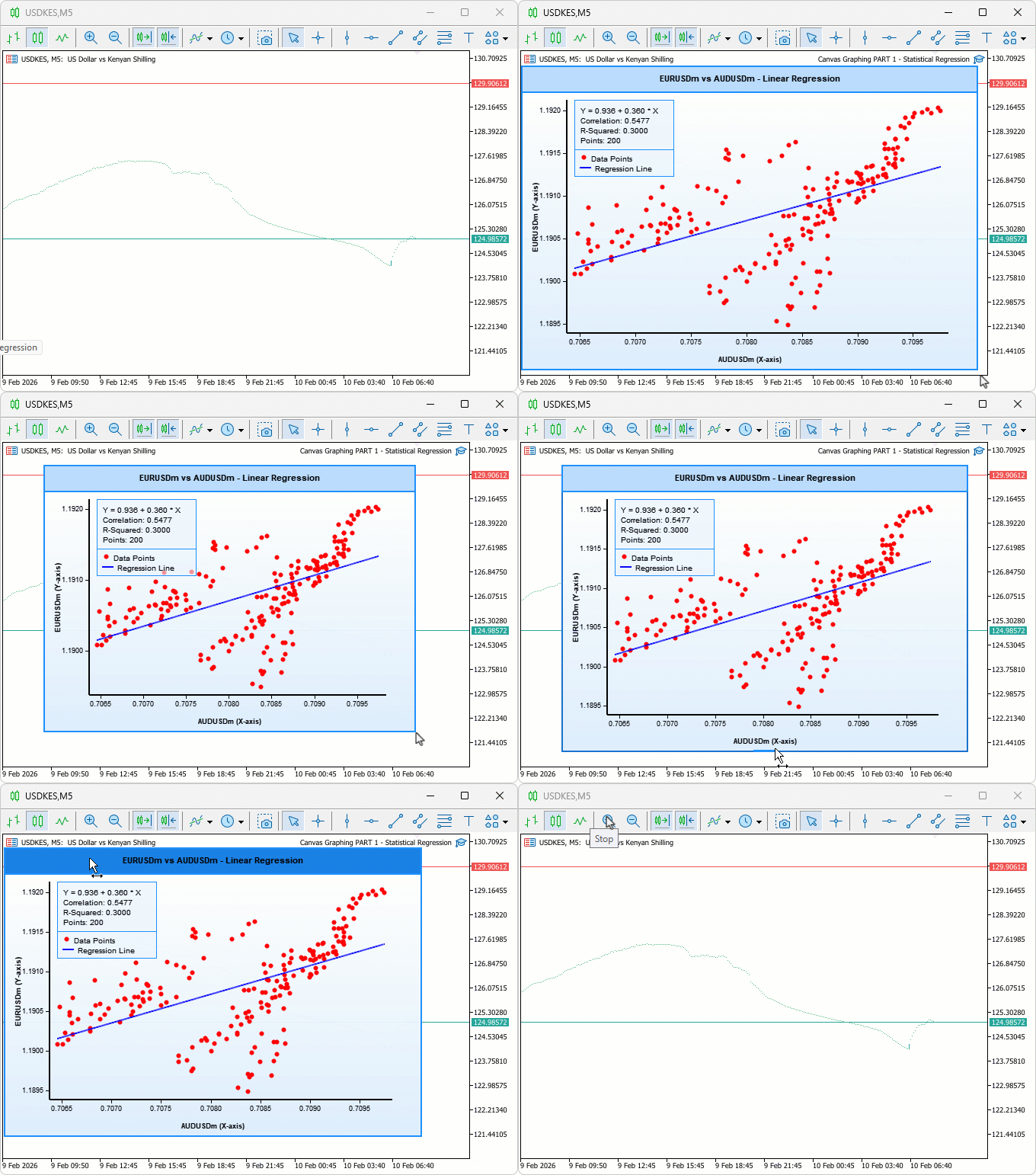
Conclusion
In conclusion, we’ve created a canvas-based graphing tool in MQL5 for statistical correlation and linear regression analysis between two symbols, with draggable and resizable features. We incorporated ALGLIB for regression calculations, dynamic tick labels, data points, and a stats panel displaying slope, intercept, correlation, and R-squared. This interactive visualization aids in pair trading insights, supporting customizable themes, borders, and real-time updates on new bars. In the preceding part, we will add a cyberpunk theme mode and live animations to the plot to make it modern and intuitive. Keep tuned!
Warning: All rights to these materials are reserved by MetaQuotes Ltd. Copying or reprinting of these materials in whole or in part is prohibited.
This article was written by a user of the site and reflects their personal views. MetaQuotes Ltd is not responsible for the accuracy of the information presented, nor for any consequences resulting from the use of the solutions, strategies or recommendations described.

 Creating Custom Indicators in MQL5 (Part 8): Adding Volume Integration for Deeper Market Profile Analysis
 MetaTrader 5 Machine Learning Blueprint (Part 7): From Scattered Experiments to Reproducible Results
 Swing Extremes and Pullbacks in MQL5 (Part 1): Developing a Multi-Timeframe Indicator
 Engineering Trading Discipline into Code (Part 1): Creating Structural Discipline in Live Trading with MQL5

- Free trading apps
- Over 8,000 signals for copying
- Economic news for exploring financial markets
You agree to website policy and terms of use