

MQL5 Trading Tools (Part 17): Exploring Vector-Based Rounded Rectangles and Triangles
 2 273
2 273
 1
1

Introduction
In our previous article (Part 16), we enhanced the canvas dashboard in MetaQuotes Language 5 (MQL5) by incorporating anti-aliasing techniques and high-resolution rendering through supersampling, resulting in smoother graphics, borders, and elements. In Part 17, we explore vector-based methods for drawing rounded rectangles and triangles using canvas, incorporating supersampling for anti-aliased results. This lays the foundation for creating modern canvas objects in future tools by handling geometric precomputations, scanline filling, and precise borders. We will cover the following topics:
- Understanding Vector-Based Rounded Rectangles and Triangles
- Implementation in MQL5
- Backtesting
- Conclusion
By the end, you’ll have reusable functions for smooth, rounded shapes, ready for integration into advanced UI elements—let’s dive in!
Understanding Vector-Based Rounded Rectangles and Triangles
The vector-based approach to rendering rounded rectangles and triangles uses mathematical descriptions of shapes—points, lines, and curves—rather than pixel grids, enabling scalable, resolution-independent graphics that remain sharp at any size. Unlike raster methods, which can produce jagged edges (aliasing) when scaled, vector techniques calculate precise boundaries and fills using equations for arcs and tangents, making them ideal for UI elements in MQL5, where smooth visuals enhance usability without performance loss. Rounded corners are achieved by replacing sharp vertices with circular arcs, whose radii control the curvature. Borders involve offset paths or thickened edges, and supersampling further refines the output by rendering at higher resolutions before downsampling to eliminate artifacts.
We plan to implement high-resolution canvases with supersampling, precompute geometries for arcs and tangents in triangles, use scanline filling for both shapes to ensure precise interiors, and add customizable borders with vector-based straight edges and corner arcs. We will handle user inputs for dimensions, radii, opacities, and colors to create flexible, anti-aliased shapes suitable for modern trading interfaces. In brief, here is a visual representation of our objectives.

Implementation in MQL5
To create the program in MQL5, open the MetaEditor, go to the Navigator, locate the Experts folder, click on the "New" tab, and follow the prompts to create the file. Once it is made, in the coding environment, we will need to declare some input parameters and global variables that we will use throughout the program.
//+------------------------------------------------------------------+
//|                           Rounded Rectangle & Triangle PART1.mq5 |
//|                           Copyright 2026, Allan Munene Mutiiria. |
//|                                   https://t.me/Forex_Algo_Trader |
//+------------------------------------------------------------------+
#property copyright "Copyright 2026, Allan Munene Mutiiria."
#property link      "https://t.me/Forex_Algo_Trader"
#property version   "1.00"
#property strict

#include <Canvas\Canvas.mqh>

//+------------------------------------------------------------------+
//| Inputs                                                           |
//+------------------------------------------------------------------+
input group "Position"
input int    shapesPositionX                  = 20;    // Shapes X position
input int    shapesPositionY                  = 20;    // Shapes Y position
input int    shapesGapPixels                  = 15;    // Gap between shapes (pixels)

input group "Rectangle"
input int    rectangleWidthPixels             = 250;   // Rectangle width
input int    rectangleHeightPixels            = 100;   // Rectangle height
input int    rectangleCornerRadiusPixels      = 5;     // Rectangle corner radius
input bool   rectangleShowBorder              = true;  // Show rectangle border
input int    rectangleBorderThicknessPixels   = 1;     // Rectangle border thickness
input color  rectangleBorderColor             = clrBlue; // Rectangle border color
input int    rectangleBorderOpacityPercent    = 80;      // Rectangle border opacity (0-100%)
input color  rectangleBackgroundColor         = clrBlue; // Rectangle background color
input int    rectangleBackgroundOpacityPercent= 30;      // Rectangle background opacity (0-100%)

input group "Triangle"
input int    triangleBaseWidthPixels          = 250;     // Triangle base width (pixels)
input double triangleHeightAsPercentOfWidth   = 86.6;    // Height as % of width (86.6=equilateral, <86.6=flat, >86.6=tall)
input int    triangleCornerRadiusPixels       = 12;      // Triangle corner radius
input bool   triangleShowBorder               = true;    // Show triangle border
input int    triangleBorderThicknessPixels    = 1;       // Triangle border thickness
input color  triangleBorderColor              = clrRed;  // Triangle border color
input int    triangleBorderOpacityPercent     = 80;      // Triangle border opacity (0-100%)
input color  triangleBackgroundColor          = clrRed;  // Triangle background color
input int    triangleBackgroundOpacityPercent = 30;      // Triangle background opacity (0-100%)

input group "General"
input int    supersamplingLevel               = 4;       // Supersampling level (1=off, 2=2x, 4=4x)

//+------------------------------------------------------------------+
//| Global Variables                                                 |
//+------------------------------------------------------------------+
CCanvas rectangleCanvas, rectangleHighResCanvas;                //--- Declare rectangle canvas objects
CCanvas triangleCanvas,  triangleHighResCanvas;                 //--- Declare triangle canvas objects
string  rectangleCanvasName = "RoundedRectCanvas";              //--- Set rectangle canvas name
string  triangleCanvasName  = "RoundedTriCanvas";               //--- Set triangle canvas name
int     supersamplingFactor;                                    //--- Store supersampling factor
int     computedTriangleHeightPixels;                           //--- Store computed triangle height in pixels
double triangleSharpVerticesX[3], triangleSharpVerticesY[3];    //--- Store sharp vertices for triangle
double triangleArcCentersX[3], triangleArcCentersY[3];          //--- Store arc centers for triangle
double triangleTangentPointsX[3][2], triangleTangentPointsY[3][2]; //--- Store tangent points for triangle
double triangleArcStartAngles[3], triangleArcEndAngles[3];      //--- Store arc sweep angles in radians
int    triangleHighResWidth, triangleHighResHeight;             //--- Store high-res dimensions for triangle
We begin the implementation by including the Canvas library using the macro "#include <Canvas\Canvas.mqh>", which provides essential classes and methods for creating and manipulating graphical canvases in MQL5, enabling us to draw custom shapes like rectangles and triangles directly on the chart.
Next, we organize user inputs into logical groups for better configuration: the "Position" group with parameters for shapes' X and Y coordinates and gap between them; the "Rectangle" group defining width, height, corner radius, border options including visibility, thickness, color, and opacity, plus background color and opacity; the "Triangle" group similarly specifying base width, height as a percentage of width (defaulting to 86.6 for equilateral proportions), corner radius, and matching border and background settings; and the "General" group with supersampling level to control anti-aliasing quality (1 for none, higher values like 4 for enhanced smoothness).
To support rendering, we declare global canvas objects for both standard and high-resolution versions of the rectangle and triangle, assigning names like "RoundedRectCanvas" and "RoundedTriCanvas" for identification. Finally, we set up variables to store the supersampling factor, computed triangle height, and arrays for triangle geometry, including sharp vertices, arc centers, tangent points (as 3x2 arrays per corner), start and end angles in radians, plus high-res dimensions for the triangle canvas. With the globals set, we will need to declare some helper functions that will use throughout the program as well.
//+------------------------------------------------------------------+
//| Shared Utilities                                                 |
//+------------------------------------------------------------------+
uint ColorToARGBWithOpacity(color clr, int opacityPercent) {
   uchar redComponent = (uchar)((clr >> 0)  & 0xFF);             //--- Extract red component
   uchar greenComponent = (uchar)((clr >> 8)  & 0xFF);           //--- Extract green component
   uchar blueComponent = (uchar)((clr >> 16) & 0xFF);            //--- Extract blue component
   uchar alphaComponent = (uchar)((opacityPercent * 255) / 100); //--- Calculate alpha component from opacity
   return ((uint)alphaComponent << 24) | ((uint)redComponent << 16) | ((uint)greenComponent << 8) | (uint)blueComponent; //--- Combine into ARGB value
}

void BicubicDownsample(CCanvas &targetCanvas, CCanvas &highResCanvas) {
   int targetWidth  = targetCanvas.Width();                      //--- Get target canvas width
   int targetHeight = targetCanvas.Height();                     //--- Get target canvas height

   for(int pixelY = 0; pixelY < targetHeight; pixelY++) {        //--- Loop over target height pixels
      for(int pixelX = 0; pixelX < targetWidth; pixelX++) {      //--- Loop over target width pixels
         double sourceX = pixelX * supersamplingFactor;          //--- Calculate source X position
         double sourceY = pixelY * supersamplingFactor;          //--- Calculate source Y position

         double sumAlpha = 0, sumRed = 0, sumGreen = 0, sumBlue = 0; //--- Initialize sum variables
         double weightSum = 0;                                   //--- Initialize weight sum

         for(int deltaY = 0; deltaY < supersamplingFactor; deltaY++) { //--- Loop over delta Y for supersampling
            for(int deltaX = 0; deltaX < supersamplingFactor; deltaX++) { //--- Loop over delta X for supersampling
               int sourcePixelX = (int)(sourceX + deltaX);       //--- Compute source pixel X
               int sourcePixelY = (int)(sourceY + deltaY);       //--- Compute source pixel Y

               if(sourcePixelX >= 0 && sourcePixelX < highResCanvas.Width() && sourcePixelY >= 0 && sourcePixelY < highResCanvas.Height()) { //--- Check if within high-res bounds
                  uint pixelValue = highResCanvas.PixelGet(sourcePixelX, sourcePixelY); //--- Get pixel value from high-res canvas

                  uchar alpha = (uchar)((pixelValue >> 24) & 0xFF); //--- Extract alpha component
                  uchar red = (uchar)((pixelValue >> 16) & 0xFF);   //--- Extract red component
                  uchar green = (uchar)((pixelValue >> 8)  & 0xFF); //--- Extract green component
                  uchar blue = (uchar)(pixelValue         & 0xFF);  //--- Extract blue component

                  double weight = 1.0;                           //--- Set weight to 1.0
                  sumAlpha += alpha * weight;                    //--- Accumulate weighted alpha
                  sumRed += red * weight;                        //--- Accumulate weighted red
                  sumGreen += green * weight;                    //--- Accumulate weighted green
                  sumBlue += blue * weight;                      //--- Accumulate weighted blue
                  weightSum += weight;                           //--- Accumulate total weight
               }
            }
         }

         if(weightSum > 0) {                                       //--- Check if weight sum is positive
            uchar finalAlpha = (uchar)(sumAlpha / weightSum);      //--- Compute final alpha
            uchar finalRed = (uchar)(sumRed / weightSum);          //--- Compute final red
            uchar finalGreen = (uchar)(sumGreen / weightSum);      //--- Compute final green
            uchar finalBlue = (uchar)(sumBlue / weightSum);        //--- Compute final blue

            uint finalColor = ((uint)finalAlpha << 24) | ((uint)finalRed << 16) |
                              ((uint)finalGreen << 8)  | (uint)finalBlue; //--- Combine into final color
            targetCanvas.PixelSet(pixelX, pixelY, finalColor);     //--- Set pixel on target canvas
         }
      }
   }
}

double NormalizeAngle(double angle) {
   double twoPi = 2.0 * M_PI;                                   //--- Define two pi constant
   angle = MathMod(angle, twoPi);                               //--- Modulo angle by two pi
   if(angle < 0) angle += twoPi;                                //--- Adjust if angle is negative
   return angle;                                                //--- Return normalized angle
}

bool IsAngleBetween(double angle, double startAngle, double endAngle) {
   angle = NormalizeAngle(angle);                               //--- Normalize angle
   startAngle = NormalizeAngle(startAngle);                     //--- Normalize start angle
   endAngle = NormalizeAngle(endAngle);                         //--- Normalize end angle

   double span = NormalizeAngle(endAngle - startAngle);         //--- Compute span
   double relativeAngle = NormalizeAngle(angle - startAngle);   //--- Compute relative angle

   return relativeAngle <= span;                                //--- Return if within span
}
We begin by creating the "ColorToARGBWithOpacity" function, which converts a color to ARGB format while incorporating a specified opacity percentage. We extract the red, green, and blue components using bit shifts, calculate the alpha channel by scaling the opacity to a 0-255 range, and combine them into a single uint value, enabling transparent fills and borders in our shapes. Next, we implement the "BicubicDownsample" function to perform anti-aliasing during downsampling from high-res to the target canvas. We retrieve target dimensions, loop over each pixel, map to the supersampled source area, accumulate weighted sums of ARGB components from the subpixels (with uniform weight for averaging), and if samples exist, compute final values before setting the pixel, which smooths edges by blending details from the higher resolution.
To handle angular calculations consistently, we define the "NormalizeAngle" function, using a two-pi constant to modulo the angle and adjust negatives, ensuring all angles fall within 0 to 2 pi for reliable comparisons in arc rendering. Following this, we add the "IsAngleBetween" function to check if an angle lies within a start-end range, normalizing inputs, computing the normalized span and relative position, and returning true if contained, which is crucial for precise pixel inclusion in curved borders without overdraw or gaps. In addition to these angular operations, we will also need a function to fill a quadrilateral shape.
void FillQuadrilateral(CCanvas &canvas, double &verticesX[], double &verticesY[], uint fillColor) {
   double minY = verticesY[0], maxY = verticesY[0];             //--- Initialize min and max Y
   for(int i = 1; i < 4; i++) {                                 //--- Loop over vertices
      if(verticesY[i] < minY) minY = verticesY[i];              //--- Update min Y
      if(verticesY[i] > maxY) maxY = verticesY[i];              //--- Update max Y
   }

   int yStart = (int)MathCeil(minY);                            //--- Compute start Y
   int yEnd   = (int)MathFloor(maxY);                           //--- Compute end Y

   for(int y = yStart; y <= yEnd; y++) {                        //--- Loop over scanlines
      double scanlineY = (double)y + 0.5;                       //--- Set scanline Y position
      double xIntersections[8];                                 //--- Declare intersections array
      int intersectionCount = 0;                                //--- Initialize intersection count

      for(int i = 0; i < 4; i++) {                              //--- Loop over edges
         int nextIndex = (i + 1) % 4;                           //--- Get next index
         double x0 = verticesX[i],    y0 = verticesY[i];        //--- Get start coordinates
         double x1 = verticesX[nextIndex], y1 = verticesY[nextIndex]; //--- Get end coordinates

         double edgeMinY = (y0 < y1) ? y0 : y1;                 //--- Compute edge min Y
         double edgeMaxY = (y0 > y1) ? y0 : y1;                 //--- Compute edge max Y

         if(scanlineY < edgeMinY || scanlineY > edgeMaxY) continue; //--- Skip if outside edge Y range
         if(MathAbs(y1 - y0) < 1e-12) continue;                     //--- Skip if horizontal edge

         double interpolationFactor = (scanlineY - y0) / (y1 - y0); //--- Compute interpolation factor
         if(interpolationFactor < 0.0 || interpolationFactor > 1.0) continue; //--- Skip if outside segment

         xIntersections[intersectionCount++] = x0 + interpolationFactor * (x1 - x0); //--- Add intersection X
      }

      for(int a = 0; a < intersectionCount - 1; a++)             //--- Sort intersections (bubble sort)
         for(int b = a + 1; b < intersectionCount; b++)          //--- Inner loop for sorting
            if(xIntersections[a] > xIntersections[b]) {          //--- Check if swap needed
               double temp = xIntersections[a];                  //--- Temporary store
               xIntersections[a] = xIntersections[b];            //--- Swap values
               xIntersections[b] = temp;                         //--- Complete swap
            }

      for(int pairIndex = 0; pairIndex + 1 < intersectionCount; pairIndex += 2) { //--- Loop over pairs
         int xLeft  = (int)MathCeil(xIntersections[pairIndex]);  //--- Compute left X
         int xRight = (int)MathFloor(xIntersections[pairIndex + 1]); //--- Compute right X
         for(int x = xLeft; x <= xRight; x++)                   //--- Loop over horizontal span
            canvas.PixelSet(x, y, fillColor);                   //--- Set pixel with fill color
      }
   }
}
We implement the "FillQuadrilateral" function to render filled quadrilaterals on the canvas using a scanline algorithm, which ensures precise, vector-based filling for shapes like borders or bodies without relying on built-in methods that might lack control. To achieve this, we first determine the vertical bounds by finding the minimum and maximum Y coordinates from the input vertices "verticesY", then compute the start and end scanline integers with ceiling and floor for full coverage. For each scanline y, we offset to half-pixel "scanlineY" for subpixel accuracy, aiding anti-aliasing, and collect up to 8 x-intersections by interpolating along each of the four edges (using modulo for cyclical closure) if the scanline intersects the edge vertically, skipping horizontals or out-of-range factors.
We sort these intersections with a bubble sort for small arrays, then fill horizontal spans between paired x-values by setting pixels from ceiling left to floor right with the "fillColor" using the PixelSet method. This method is crucial for handling non-convex or irregular quadrilaterals in high-res rendering, as it computes exact fills pixel-by-pixel, enabling smooth borders in rounded shapes by filling thickened edge strips without overlaps or gaps.
If you are wondering what this scanline algorithm thing is, let us explain a bit what it is, so you have some clue. This algorithm processes the image from left to right, scanning one horizontal line at a time rather than operating on individual pixels. It records all edge intersection points along each scan line and fills the polygon by coloring the regions between pairs of intersections.
You can think of it like drawing a straight line across a shape on paper with a single pen: starting from the left boundary and moving to the right, you draw continuously, but whenever you encounter an intersection with the polygon boundary, you stop or resume drawing accordingly. The algorithm follows this same principle. In the figure below, this behavior is illustrated: the red dots represent the polygon’s vertices, while the blue dots indicate the intersection points along the scan line.

With that done, we can use these functions to create the rounded shapes. We will start with a rectangle. We will need to have some helper functions for this, too, to make our code modular.
void FillRoundedRectangleHiRes(int positionX, int positionY, int width, int height, int radius, uint fillColor) {
   rectangleHighResCanvas.FillRectangle(positionX + radius, positionY,          positionX + width - radius, positionY + height,          fillColor); //--- Fill central rectangle
   rectangleHighResCanvas.FillRectangle(positionX,          positionY + radius, positionX + radius,         positionY + height - radius, fillColor); //--- Fill left strip
   rectangleHighResCanvas.FillRectangle(positionX + width - radius, positionY + radius, positionX + width, positionY + height - radius, fillColor); //--- Fill right strip

   FillCircleQuadrant(positionX + radius,         positionY + radius,          radius, fillColor, 2); //--- Fill top-left quadrant
   FillCircleQuadrant(positionX + width - radius, positionY + radius,          radius, fillColor, 1); //--- Fill top-right quadrant
   FillCircleQuadrant(positionX + radius,         positionY + height - radius, radius, fillColor, 3); //--- Fill bottom-left quadrant
   FillCircleQuadrant(positionX + width - radius, positionY + height - radius, radius, fillColor, 4); //--- Fill bottom-right quadrant
}

void FillCircleQuadrant(int centerX, int centerY, int radius, uint fillColor, int quadrant) {
   double radiusDouble = (double)radius;                        //--- Convert radius to double

   for(int deltaY = -radius - 1; deltaY <= radius + 1; deltaY++) { //--- Loop over delta Y
      for(int deltaX = -radius - 1; deltaX <= radius + 1; deltaX++) { //--- Loop over delta X
         bool inQuadrant = false;                               //--- Initialize quadrant flag
         if(quadrant == 1 && deltaX >= 0 && deltaY <= 0) inQuadrant = true; //--- Check top-right
         else if(quadrant == 2 && deltaX <= 0 && deltaY <= 0) inQuadrant = true; //--- Check top-left
         else if(quadrant == 3 && deltaX <= 0 && deltaY >= 0) inQuadrant = true; //--- Check bottom-left
         else if(quadrant == 4 && deltaX >= 0 && deltaY >= 0) inQuadrant = true; //--- Check bottom-right

         if(!inQuadrant) continue;                              //--- Skip if not in quadrant

         double distance = MathSqrt(deltaX * deltaX + deltaY * deltaY); //--- Compute distance
         if(distance <= radiusDouble)                           //--- Check if within radius
            rectangleHighResCanvas.PixelSet(centerX + deltaX, centerY + deltaY, fillColor); //--- Set pixel
      }
   }
}

void DrawRoundedRectangleBorderHiRes(int positionX, int positionY, int width, int height, int radius, uint borderColorARGB) {
   int scaledThickness = rectangleBorderThicknessPixels * supersamplingFactor; //--- Scale border thickness

   DrawRectStraightEdge(positionX + radius, positionY, positionX + width - radius, positionY, scaledThickness, borderColorARGB); //--- Draw top edge
   DrawRectStraightEdge(positionX + width - radius, positionY + height - 1, positionX + radius, positionY + height - 1, scaledThickness, borderColorARGB); //--- Draw bottom edge
   DrawRectStraightEdge(positionX, positionY + height - radius, positionX, positionY + radius, scaledThickness, borderColorARGB); //--- Draw left edge
   DrawRectStraightEdge(positionX + width - 1, positionY + radius, positionX + width - 1, positionY + height - radius, scaledThickness, borderColorARGB); //--- Draw right edge

   DrawRectCornerArcPrecise(positionX + radius, positionY + radius, radius, scaledThickness, borderColorARGB,
                            M_PI, M_PI * 1.5);                  //--- Draw top-left arc
   DrawRectCornerArcPrecise(positionX + width - radius, positionY + radius, radius, scaledThickness, borderColorARGB,
                            M_PI * 1.5, M_PI * 2.0);            //--- Draw top-right arc
   DrawRectCornerArcPrecise(positionX + radius, positionY + height - radius, radius, scaledThickness, borderColorARGB,
                            M_PI * 0.5, M_PI);                  //--- Draw bottom-left arc
   DrawRectCornerArcPrecise(positionX + width - radius, positionY + height - radius, radius, scaledThickness, borderColorARGB,
                            0.0, M_PI * 0.5);                   //--- Draw bottom-right arc
}

void DrawRectStraightEdge(double startX, double startY, double endX, double endY, int thickness, uint borderColor) {
   double deltaX = endX - startX;                               //--- Compute delta X
   double deltaY = endY - startY;                               //--- Compute delta Y
   double edgeLength = MathSqrt(deltaX*deltaX + deltaY*deltaY); //--- Compute edge length
   if(edgeLength < 1e-6) return;                                //--- Return if length too small

   double perpendicularX = -deltaY / edgeLength;                //--- Compute perpendicular X
   double perpendicularY = deltaX / edgeLength;                 //--- Compute perpendicular Y

   double edgeDirectionX = deltaX / edgeLength;                 //--- Compute edge direction X
   double edgeDirectionY = deltaY / edgeLength;                 //--- Compute edge direction Y

   double halfThickness = (double)thickness / 2.0;              //--- Compute half thickness

   double extensionLength = 1.5;                                //--- Set extension length
   double extendedStartX = startX - edgeDirectionX * extensionLength; //--- Extend start X
   double extendedStartY = startY - edgeDirectionY * extensionLength; //--- Extend start Y
   double extendedEndX = endX + edgeDirectionX * extensionLength; //--- Extend end X
   double extendedEndY = endY + edgeDirectionY * extensionLength; //--- Extend end Y

   double verticesX[4], verticesY[4];                             //--- Declare vertices arrays
   verticesX[0] = extendedStartX - perpendicularX * halfThickness;  verticesY[0] = extendedStartY - perpendicularY * halfThickness; //--- Set vertex 0
   verticesX[1] = extendedStartX + perpendicularX * halfThickness;  verticesY[1] = extendedStartY + perpendicularY * halfThickness; //--- Set vertex 1
   verticesX[2] = extendedEndX + perpendicularX * halfThickness;  verticesY[2] = extendedEndY + perpendicularY * halfThickness; //--- Set vertex 2
   verticesX[3] = extendedEndX - perpendicularX * halfThickness;  verticesY[3] = extendedEndY - perpendicularY * halfThickness; //--- Set vertex 3

   FillQuadrilateral(rectangleHighResCanvas, verticesX, verticesY, borderColor); //--- Fill quadrilateral for edge
}

void DrawRectCornerArcPrecise(int centerX, int centerY, int radius, int thickness, uint borderColor,
                              double startAngle, double endAngle) {
   int halfThickness = thickness / 2;                           //--- Compute half thickness
   double outerRadius = (double)radius + halfThickness;         //--- Compute outer radius
   double innerRadius = (double)radius - halfThickness;         //--- Compute inner radius
   if(innerRadius < 0) innerRadius = 0;                         //--- Set inner radius to zero if negative

   int pixelRange = (int)(outerRadius + 2);                     //--- Compute pixel range

   for(int deltaY = -pixelRange; deltaY <= pixelRange; deltaY++) {      //--- Loop over delta Y
      for(int deltaX = -pixelRange; deltaX <= pixelRange; deltaX++) {   //--- Loop over delta X
         double distance = MathSqrt(deltaX * deltaX + deltaY * deltaY); //--- Compute distance
         if(distance < innerRadius || distance > outerRadius) continue; //--- Skip if outside radii

         double angle = MathArctan2((double)deltaY, (double)deltaX);    //--- Compute angle

         if(IsAngleBetween(angle, startAngle, endAngle))                //--- Check if angle within range
            rectangleHighResCanvas.PixelSet(centerX + deltaX, centerY + deltaY, borderColor); //--- Set pixel
      }
   }
}
We begin by implementing the "FillRoundedRectangleHiRes" function to render the filled body of a rounded rectangle on the high-resolution canvas. First, we fill the central rectangular area, excluding the corners. Next, we add vertical strips on the left and right to connect the straight sides. This approach ensures seamless coverage without overlaps. To complete the rounded corners, we call "FillCircleQuadrant" for each quadrant. We pass the appropriate center, radius, fill color, and quadrant number (1 for top-right, 2 for top-left, etc.). This function iterates over a slightly oversized pixel range, checks if points are within the quadrant and radius using distance calculation, and sets qualifying pixels. This provides precise quarter-circle fills that blend smoothly with the strips.
Next, we create the "DrawRoundedRectangleBorderHiRes" function to handle borders, scaling thickness with supersampling, drawing the four straight edges via "DrawRectStraightEdge" for top, bottom, left, and right, and rendering corner arcs with "DrawRectCornerArcPrecise" using predefined angles in radians (e.g., pi to 1.5 pi for top-left), which ensures consistent curvature and anti-aliased edges. In "DrawRectStraightEdge", we compute vector directions and perpendiculars from start to end points, extend the line slightly for better corner joins, define a quadrilateral strip with half-thickness offsets, and fill it using the previously defined quadrilateral function, creating thick, smooth, straight borders that align perfectly with arcs.
Finally, "DrawRectCornerArcPrecise" forms a ring between inner and outer radii by looping over pixels, verifying distances and angles with "IsAngleBetween", and setting border color pixels only within the specified arc sweep, which is vital for high-quality, jagged-free curved borders in scaled renderings. We can now use these functions to draw a rounded rectangle.
//+------------------------------------------------------------------+
//| Rounded Rectangle                                                |
//+------------------------------------------------------------------+
void DrawRoundedRectangle() {
   int positionX      = 10 * supersamplingFactor;                     //--- Set X position scaled
   int positionY      = 10 * supersamplingFactor;                     //--- Set Y position scaled
   int scaledWidth  = rectangleWidthPixels  * supersamplingFactor;    //--- Scale width
   int scaledHeight = rectangleHeightPixels * supersamplingFactor;    //--- Scale height
   int scaledRadius = rectangleCornerRadiusPixels * supersamplingFactor; //--- Scale radius

   uint backgroundColorARGB     = ColorToARGBWithOpacity(rectangleBackgroundColor,     rectangleBackgroundOpacityPercent); //--- Get background ARGB
   uint borderColorARGB = ColorToARGBWithOpacity(rectangleBorderColor, rectangleBorderOpacityPercent); //--- Get border ARGB

   FillRoundedRectangleHiRes(positionX, positionY, scaledWidth, scaledHeight, scaledRadius, backgroundColorARGB); //--- Fill high-res rectangle

   if(rectangleShowBorder && rectangleBorderThicknessPixels > 0)      //--- Check if border should be shown
      DrawRoundedRectangleBorderHiRes(positionX, positionY, scaledWidth, scaledHeight, scaledRadius, borderColorARGB); //--- Draw border on high-res

   BicubicDownsample(rectangleCanvas, rectangleHighResCanvas);        //--- Downsample to display canvas

   rectangleCanvas.FontSet("Arial", 13, FW_NORMAL);                   //--- Set font for text
   string displayText = "Rounded Rectangle";                          //--- Set display text
   int textWidth, textHeight;                                         //--- Declare text dimensions
   rectangleCanvas.TextSize(displayText, textWidth, textHeight);      //--- Get text size
   int textPositionX = 10 + (rectangleWidthPixels  - textWidth)  / 2; //--- Compute text X position
   int textPositionY = 10 + (rectangleHeightPixels - textHeight) / 2; //--- Compute text Y position
   rectangleCanvas.TextOut(textPositionX, textPositionY, displayText, (uint)0xFF000000, TA_LEFT); //--- Draw text on canvas
}
Here, we define the "DrawRoundedRectangle" function to orchestrate the rendering of a rounded rectangle on the canvas, beginning by scaling the position offsets, width, height, and radius with the supersampling factor to ensure high-resolution precision and anti-aliasing readiness. Next, we convert background and border colors to ARGB format, incorporating opacity using the "ColorToARGBWithOpacity" function, which allows for semi-transparent effects that enhance visual depth without full opacity. To build the shape, we call "FillRoundedRectangleHiRes" with these scaled parameters and background color to fill the interior on the high-res canvas, and if borders are enabled via "rectangleShowBorder" and thickness is positive, invoke "DrawRoundedRectangleBorderHiRes" to add the outline with the border color.
We then downsample the high-res canvas to the standard one using "BicubicDownsample", blending details for smooth output. Finally, on the standard canvas, we set the font with FontSet using "Arial" at size 13 and FW_NORMAL weight, compute centered positions for the label "Rounded Rectangle" via TextSize to get dimensions, and draw it with TextOut in opaque black (0xFF000000) aligned left, providing a descriptive overlay for clarity. We can now call this function in the initialization event handler to render the rounded rectangle.
//+------------------------------------------------------------------+
//| Expert initialization function                                   |
//+------------------------------------------------------------------+
int OnInit() {
   supersamplingFactor = supersamplingLevel;                    //--- Assign supersampling factor from input
   if(supersamplingFactor < 1) {                                //--- Check if supersampling factor is less than 1
      Print("Warning: supersamplingLevel must be at least 1. Setting to 1."); //--- Print warning message
      supersamplingFactor = 1;                                  //--- Set supersampling factor to minimum value
   }


   int rectangleCanvasWidth = rectangleWidthPixels  + 40;       //--- Compute rectangle canvas width with padding
   int rectangleCanvasHeight = rectangleHeightPixels + 40;      //--- Compute rectangle canvas height with padding
   int rectanglePositionY       = shapesPositionY;              //--- Set rectangle Y position

   if(!rectangleCanvas.CreateBitmapLabel(0, 0, rectangleCanvasName, shapesPositionX, rectanglePositionY,
                                    rectangleCanvasWidth, rectangleCanvasHeight, COLOR_FORMAT_ARGB_NORMALIZE)) { //--- Create rectangle canvas bitmap label
      Print("Error creating rectangle canvas: ", GetLastError()); //--- Print error message if creation fails
      return(INIT_FAILED);                                        //--- Return initialization failure
   }

   if(!rectangleHighResCanvas.Create(rectangleCanvasName + "_hires",
                        rectangleCanvasWidth * supersamplingFactor,
                        rectangleCanvasHeight * supersamplingFactor, COLOR_FORMAT_ARGB_NORMALIZE)) { //--- Create high-res rectangle canvas
      Print("Error creating rectangle hi-res canvas: ", GetLastError()); //--- Print error message if creation fails
      return(INIT_FAILED);                                        //--- Return initialization failure
   }


   rectangleCanvas.Erase(ColorToARGB(clrNONE, 0));                //--- Clear rectangle canvas
   rectangleHighResCanvas.Erase(ColorToARGB(clrNONE, 0));         //--- Clear high-res rectangle canvas

   DrawRoundedRectangle();                                        //--- Draw rounded rectangle

   rectangleCanvas.Update();                                      //--- Update rectangle canvas display

   return(INIT_SUCCEEDED);                                        //--- Return initialization success
}
In the OnInit event handler, we initialize the program by assigning the user-input "supersamplingLevel" to the global "supersamplingFactor", checking if it's below 1, and resetting it to the minimum with a printed warning for valid anti-aliasing. Next, we calculate the rectangle canvas dimensions by adding padding to the input width and height, set its Y position from "shapesPositionY", and create the standard canvas with CreateBitmapLabel specifying chart ID, subwindow, name, position, size, and COLOR_FORMAT_ARGB_NORMALIZE for transparency support, logging errors via GetLastError and returning INIT_FAILED if unsuccessful.
We then create the high-resolution canvas using Create with a suffixed name, scaled dimensions multiplied by "supersamplingFactor", and the same color format, again handling failures similarly. To prepare for drawing, we clear both canvases with Erase, passing a transparent ARGB color from clrNONE. Finally, we invoke "DrawRoundedRectangle" to perform the actual rendering, update the standard canvas display with "Update", and return INIT_SUCCEEDED to confirm successful setup. Upon compilation, we get the following outcome.

From the visualization, we can see that we have rendered the rounded rectangle. What now remains is using a similar approach to render a rounded triangle. We use the following logic to achieve that. We will start by creating a helper function to precompute the triangle geometry.
//+------------------------------------------------------------------+
//| Rounded Triangle                                                 |
//+------------------------------------------------------------------+
void PrecomputeTriangleGeometry() {
   int scalingFactor = supersamplingFactor;                     //--- Set scaling factor

   double basePositionX = 10.0 * scalingFactor;                 //--- Set base X position scaled
   double basePositionY = 10.0 * scalingFactor;                 //--- Set base Y position scaled
   double baseWidth = (double)triangleBaseWidthPixels   * scalingFactor; //--- Scale base width
   double baseHeight = (double)computedTriangleHeightPixels * scalingFactor; //--- Scale base height

   triangleSharpVerticesX[0] = basePositionX + baseWidth / 2.0; triangleSharpVerticesY[0] = basePositionY; //--- Set top vertex
   triangleSharpVerticesX[1] = basePositionX;               triangleSharpVerticesY[1] = basePositionY + baseHeight; //--- Set bottom-left vertex
   triangleSharpVerticesX[2] = basePositionX + baseWidth;          triangleSharpVerticesY[2] = basePositionY + baseHeight; //--- Set bottom-right vertex

   double scaledRadius = (double)triangleCornerRadiusPixels * scalingFactor; //--- Scale radius

   for(int cornerIndex = 0; cornerIndex < 3; cornerIndex++) {   //--- Loop over corners
      int previousIndex = (cornerIndex + 2) % 3;                //--- Get previous index
      int nextIndex = (cornerIndex + 1) % 3;                    //--- Get next index

      double edgeA_X = triangleSharpVerticesX[cornerIndex] - triangleSharpVerticesX[previousIndex],  edgeA_Y = triangleSharpVerticesY[cornerIndex] - triangleSharpVerticesY[previousIndex]; //--- Compute edge A vector
      double edgeA_Length = MathSqrt(edgeA_X*edgeA_X + edgeA_Y*edgeA_Y); //--- Compute edge A length
      edgeA_X /= edgeA_Length;  edgeA_Y /= edgeA_Length;          //--- Normalize edge A

      double edgeB_X = triangleSharpVerticesX[nextIndex] - triangleSharpVerticesX[cornerIndex],  edgeB_Y = triangleSharpVerticesY[nextIndex] - triangleSharpVerticesY[cornerIndex]; //--- Compute edge B vector
      double edgeB_Length = MathSqrt(edgeB_X*edgeB_X + edgeB_Y*edgeB_Y); //--- Compute edge B length
      edgeB_X /= edgeB_Length;  edgeB_Y /= edgeB_Length;          //--- Normalize edge B

      double normalA_X =  edgeA_Y,  normalA_Y = -edgeA_X;        //--- Compute normal A
      double normalB_X =  edgeB_Y,  normalB_Y = -edgeB_X;        //--- Compute normal B

      double bisectorX = normalA_X + normalB_X,  bisectorY = normalA_Y + normalB_Y; //--- Compute bisector
      double bisectorLength = MathSqrt(bisectorX*bisectorX + bisectorY*bisectorY); //--- Compute bisector length
      if(bisectorLength < 1e-12) { bisectorX = normalA_X; bisectorY = normalA_Y; bisectorLength = MathSqrt(bisectorX*bisectorX + bisectorY*bisectorY); } //--- Handle small bisector
      bisectorX /= bisectorLength;  bisectorY /= bisectorLength; //--- Normalize bisector

      double cosInteriorAngle = (-edgeA_X)*edgeB_X + (-edgeA_Y)*edgeB_Y; //--- Compute cosine of interior angle
      if(cosInteriorAngle >  1.0) cosInteriorAngle =  1.0;      //--- Clamp cosine upper
      if(cosInteriorAngle < -1.0) cosInteriorAngle = -1.0;      //--- Clamp cosine lower
      double halfAngle = MathArccos(cosInteriorAngle) / 2.0;    //--- Compute half angle
      double sinHalfAngle   = MathSin(halfAngle);               //--- Compute sine of half angle
      if(sinHalfAngle < 1e-12) sinHalfAngle = 1e-12;            //--- Set minimum sine value

      double distanceToCenter = scaledRadius / sinHalfAngle;    //--- Compute distance to arc center
      triangleArcCentersX[cornerIndex] = triangleSharpVerticesX[cornerIndex] + bisectorX * distanceToCenter; //--- Set arc center X
      triangleArcCentersY[cornerIndex] = triangleSharpVerticesY[cornerIndex] + bisectorY * distanceToCenter; //--- Set arc center Y

      double deltaX_A = triangleSharpVerticesX[cornerIndex] - triangleSharpVerticesX[previousIndex],  deltaY_A = triangleSharpVerticesY[cornerIndex] - triangleSharpVerticesY[previousIndex]; //--- Compute delta A
      double lengthSquared_A = deltaX_A*deltaX_A + deltaY_A*deltaY_A; //--- Compute length squared A
      double interpolationFactor_A = ((triangleArcCentersX[cornerIndex] - triangleSharpVerticesX[previousIndex])*deltaX_A + (triangleArcCentersY[cornerIndex] - triangleSharpVerticesY[previousIndex])*deltaY_A) / lengthSquared_A; //--- Compute factor A
      triangleTangentPointsX[cornerIndex][1] = triangleSharpVerticesX[previousIndex] + interpolationFactor_A * deltaX_A; //--- Set tangent point X arriving
      triangleTangentPointsY[cornerIndex][1] = triangleSharpVerticesY[previousIndex] + interpolationFactor_A * deltaY_A; //--- Set tangent point Y arriving

      double deltaX_B = triangleSharpVerticesX[nextIndex] - triangleSharpVerticesX[cornerIndex],  deltaY_B = triangleSharpVerticesY[nextIndex] - triangleSharpVerticesY[cornerIndex]; //--- Compute delta B
      double lengthSquared_B = deltaX_B*deltaX_B + deltaY_B*deltaY_B; //--- Compute length squared B
      double interpolationFactor_B = ((triangleArcCentersX[cornerIndex] - triangleSharpVerticesX[cornerIndex])*deltaX_B + (triangleArcCentersY[cornerIndex] - triangleSharpVerticesY[cornerIndex])*deltaY_B) / lengthSquared_B; //--- Compute factor B
      triangleTangentPointsX[cornerIndex][0] = triangleSharpVerticesX[cornerIndex] + interpolationFactor_B * deltaX_B; //--- Set tangent point X leaving
      triangleTangentPointsY[cornerIndex][0] = triangleSharpVerticesY[cornerIndex] + interpolationFactor_B * deltaY_B; //--- Set tangent point Y leaving

      triangleArcStartAngles[cornerIndex] = MathArctan2(triangleTangentPointsY[cornerIndex][1] - triangleArcCentersY[cornerIndex], triangleTangentPointsX[cornerIndex][1] - triangleArcCentersX[cornerIndex]); //--- Set start angle
      triangleArcEndAngles[cornerIndex]   = MathArctan2(triangleTangentPointsY[cornerIndex][0] - triangleArcCentersY[cornerIndex], triangleTangentPointsX[cornerIndex][0] - triangleArcCentersX[cornerIndex]); //--- Set end angle
   }
}

bool AngleInArcSweep(int cornerIndex, double angle) {
   double twoPi  = 2.0 * M_PI;                                  //--- Define two pi constant
   double startAngleMod  = MathMod(triangleArcStartAngles[cornerIndex] + twoPi, twoPi); //--- Modulo start angle
   double endAngleMod  = MathMod(triangleArcEndAngles[cornerIndex]   + twoPi, twoPi); //--- Modulo end angle
   angle      = MathMod(angle             + twoPi, twoPi);      //--- Modulo angle

   double ccwSpan = MathMod(endAngleMod - startAngleMod + twoPi, twoPi); //--- Compute CCW span

   if(ccwSpan <= M_PI) {                                        //--- Check if short way is CCW
      double relativeAngle    = MathMod(angle - startAngleMod + twoPi, twoPi); //--- Compute relative angle
      return(relativeAngle <= ccwSpan + 1e-6);                  //--- Return if within CCW span
   } else {                                                     //--- Else short way is CW
      double cwSpan = twoPi - ccwSpan;                          //--- Compute CW span
      double relativeAngle    = MathMod(angle - endAngleMod + twoPi, twoPi); //--- Compute relative angle
      return(relativeAngle <= cwSpan + 1e-6);                   //--- Return if within CW span
   }
}
We start with the "PrecomputeTriangleGeometry" function to prepare the geometric data for rendering a rounded triangle on the high-res canvas, assigning the supersampling factor to a local variable, scaling base positions, width, and height from inputs to maintain proportion in high resolution, and defining the three sharp vertices: the top at the center base X with base Y, bottom-left at base X with added height, and bottom-right at base X plus width with the same height. Next, we scale the corner radius and loop over each of the three corners using "cornerIndex", calculating previous and next indices modulo 3 for cyclical processing, computing and normalizing edge vectors A (from previous to current) and B (from current to next), deriving outward normals by 90-degree rotation, and forming the angle bisector by summing and normalizing normals, with a fallback to one normal if length is near zero to avoid division errors.
To position the arc center, we calculate the cosine of the interior angle from the negated edge dot product, clamp it, find the half-angle and its sine (with minimum to prevent zero), compute the distance along the bisector as radius over sine, and set the arc centers by offsetting from the vertex. We then project the arc center onto each adjacent edge to find tangent points: for the arriving edge (A), using vector projection to store in index 1 of tangent arrays, and for the leaving edge (B), in index 0, ensuring smooth transitions between straight sides and arcs. Finally, we set the start and end angles for each arc sweep using MathArctan2 on tangent offsets from the center, which defines the precise angular range for later pixel checks during filling and bordering, making this precomputation essential for accurate, vector-driven rounding without distortions.
In the "AngleInArcSweep" function, we normalize the start, end, and input angles to 0-2 pi using MathMod and additions, compute the counterclockwise span, and if it's pi or less (short arc), check the relative angle from start; otherwise, use the clockwise span and check from end, adding a small epsilon for floating-point tolerance, allowing robust determination of whether a point's angle falls within the arc regardless of direction. Next, we will create the parametric computational functions.
void FillRoundedTriangleHiRes(uint fillColor) {
   double minY = triangleSharpVerticesY[0], maxY = triangleSharpVerticesY[0]; //--- Initialize min and max Y
   for(int i = 1; i < 3; i++) {                                 //--- Loop over vertices
      if(triangleSharpVerticesY[i] < minY) minY = triangleSharpVerticesY[i]; //--- Update min Y
      if(triangleSharpVerticesY[i] > maxY) maxY = triangleSharpVerticesY[i]; //--- Update max Y
   }

   int yStart = (int)MathCeil(minY);                            //--- Compute start Y
   int yEnd   = (int)MathFloor(maxY);                           //--- Compute end Y

   for(int y = yStart; y <= yEnd; y++) {                        //--- Loop over scanlines
      double scanlineY = (double)y + 0.5;                       //--- Set scanline Y position

      double xIntersections[12];                                //--- Declare intersections array
      int    intersectionCount = 0;                             //--- Initialize intersection count

      for(int edgeIndex = 0; edgeIndex < 3; edgeIndex++) {      //--- Loop over straight edges
         int nextIndex = (edgeIndex + 1) % 3;                   //--- Get next index
         double startX = triangleTangentPointsX[edgeIndex][0],    startY = triangleTangentPointsY[edgeIndex][0]; //--- Get start tangent
         double endX = triangleTangentPointsX[nextIndex][1], endY = triangleTangentPointsY[nextIndex][1]; //--- Get end tangent

         double edgeMinY = (startY < endY) ? startY : endY;     //--- Compute edge min Y
         double edgeMaxY = (startY > endY) ? startY : endY;     //--- Compute edge max Y

         if(scanlineY < edgeMinY || scanlineY > edgeMaxY) continue; //--- Skip if outside edge Y
         if(MathAbs(endY - startY) < 1e-12)      continue;      //--- Skip if horizontal

         double interpolationFactor = (scanlineY - startY) / (endY - startY); //--- Compute factor
         if(interpolationFactor < 0.0 || interpolationFactor > 1.0) continue; //--- Skip if outside segment

         xIntersections[intersectionCount++] = startX + interpolationFactor * (endX - startX); //--- Add intersection X
      }

      for(int cornerIndex = 0; cornerIndex < 3; cornerIndex++) { //--- Loop over corner arcs
         double centerX = triangleArcCentersX[cornerIndex],  centerY = triangleArcCentersY[cornerIndex]; //--- Get arc center
         double radius  = (double)triangleCornerRadiusPixels * supersamplingFactor; //--- Get scaled radius
         double deltaY = scanlineY - centerY;                   //--- Compute delta Y

         if(MathAbs(deltaY) > radius) continue;                 //--- Skip if outside radius

         double deltaX = MathSqrt(radius*radius - deltaY*deltaY); //--- Compute delta X

         double candidates[2];                                  //--- Declare candidates array
         candidates[0] = centerX - deltaX;                      //--- Set left candidate
         candidates[1] = centerX + deltaX;                      //--- Set right candidate

         for(int candidateIndex = 0; candidateIndex < 2; candidateIndex++) { //--- Loop over candidates
            double angle = MathArctan2(scanlineY - centerY, candidates[candidateIndex] - centerX); //--- Compute angle
            if(AngleInArcSweep(cornerIndex, angle))             //--- Check if in arc sweep
               xIntersections[intersectionCount++] = candidates[candidateIndex]; //--- Add intersection
         }
      }

      for(int a = 0; a < intersectionCount - 1; a++)             //--- Sort intersections (bubble sort)
         for(int b = a + 1; b < intersectionCount; b++)          //--- Inner loop for sorting
            if(xIntersections[a] > xIntersections[b]) {          //--- Check if swap needed
               double temp = xIntersections[a];                  //--- Temporary store
               xIntersections[a]   = xIntersections[b];          //--- Swap values
               xIntersections[b]   = temp;                       //--- Complete swap
            }

      for(int pairIndex = 0; pairIndex + 1 < intersectionCount; pairIndex += 2) { //--- Loop over pairs
         int xLeft  = (int)MathCeil(xIntersections[pairIndex]);  //--- Compute left X
         int xRight = (int)MathFloor(xIntersections[pairIndex + 1]); //--- Compute right X
         for(int x = xLeft; x <= xRight; x++)                    //--- Loop over horizontal span
            triangleHighResCanvas.PixelSet(x, y, fillColor);     //--- Set pixel with fill color
      }
   }
}

void DrawRoundedTriangleBorderHiRes(uint borderColor) {
   int scaledThickness = triangleBorderThicknessPixels * supersamplingFactor; //--- Scale border thickness

   for(int edgeIndex = 0; edgeIndex < 3; edgeIndex++) {         //--- Loop over edges
      int nextIndex = (edgeIndex + 1) % 3;                      //--- Get next index
      double startX = triangleTangentPointsX[edgeIndex][0],    startY = triangleTangentPointsY[edgeIndex][0]; //--- Get start tangent
      double endX = triangleTangentPointsX[nextIndex][1], endY = triangleTangentPointsY[nextIndex][1]; //--- Get end tangent

      DrawTriStraightEdge(startX, startY, endX, endY, scaledThickness, borderColor); //--- Draw straight edge
   }

   for(int cornerIndex = 0; cornerIndex < 3; cornerIndex++)     //--- Loop over corners
      DrawTriCornerArcPrecise(cornerIndex, scaledThickness, borderColor); //--- Draw corner arc
}

void DrawTriStraightEdge(double startX, double startY, double endX, double endY, int thickness, uint borderColor) {
   double deltaX = endX - startX;                               //--- Compute delta X
   double deltaY = endY - startY;                               //--- Compute delta Y
   double edgeLength = MathSqrt(deltaX*deltaX + deltaY*deltaY); //--- Compute edge length
   if(edgeLength < 1e-6) return;                                //--- Return if length too small

   double perpendicularX = -deltaY / edgeLength;                //--- Compute perpendicular X
   double perpendicularY = deltaX / edgeLength;                 //--- Compute perpendicular Y

   double edgeDirectionX = deltaX / edgeLength;                 //--- Compute edge direction X
   double edgeDirectionY = deltaY / edgeLength;                 //--- Compute edge direction Y

   double halfThickness = (double)thickness / 2.0;              //--- Compute half thickness

   double extensionLength = 1.5;                                //--- Set extension length
   double extendedStartX = startX - edgeDirectionX * extensionLength; //--- Extend start X
   double extendedStartY = startY - edgeDirectionY * extensionLength; //--- Extend start Y
   double extendedEndX = endX + edgeDirectionX * extensionLength;     //--- Extend end X
   double extendedEndY = endY + edgeDirectionY * extensionLength;     //--- Extend end Y

   double verticesX[4], verticesY[4];                                 //--- Declare vertices arrays
   verticesX[0] = extendedStartX - perpendicularX * halfThickness;  verticesY[0] = extendedStartY - perpendicularY * halfThickness; //--- Set vertex 0
   verticesX[1] = extendedStartX + perpendicularX * halfThickness;  verticesY[1] = extendedStartY + perpendicularY * halfThickness; //--- Set vertex 1
   verticesX[2] = extendedEndX + perpendicularX * halfThickness;  verticesY[2] = extendedEndY + perpendicularY * halfThickness; //--- Set vertex 2
   verticesX[3] = extendedEndX - perpendicularX * halfThickness;  verticesY[3] = extendedEndY - perpendicularY * halfThickness; //--- Set vertex 3

   FillQuadrilateral(triangleHighResCanvas, verticesX, verticesY, borderColor); //--- Fill quadrilateral for edge
}

void DrawTriCornerArcPrecise(int cornerIndex, int thickness, uint borderColor) {
   double centerX = triangleArcCentersX[cornerIndex],  centerY = triangleArcCentersY[cornerIndex]; //--- Get arc center
   double radius  = (double)triangleCornerRadiusPixels * supersamplingFactor; //--- Get scaled radius

   int    halfThickness = thickness / 2;                        //--- Compute half thickness
   double outerRadius = radius + halfThickness;                 //--- Compute outer radius
   double innerRadius = radius - halfThickness;                 //--- Compute inner radius
   if(innerRadius < 0) innerRadius = 0;                         //--- Set inner radius to zero if negative

   int pixelRange = (int)(outerRadius + 2);                     //--- Compute pixel range

   for(int deltaY = -pixelRange; deltaY <= pixelRange; deltaY++) { //--- Loop over delta Y
      for(int deltaX = -pixelRange; deltaX <= pixelRange; deltaX++) { //--- Loop over delta X
         double distance = MathSqrt((double)(deltaX*deltaX + deltaY*deltaY)); //--- Compute distance
         if(distance < innerRadius || distance > outerRadius) continue; //--- Skip if outside radii

         double angle = MathArctan2((double)deltaY, (double)deltaX); //--- Compute angle

         if(AngleInArcSweep(cornerIndex, angle)) {              //--- Check if in arc sweep
            int pixelX = (int)MathRound(centerX + deltaX);      //--- Round to pixel X
            int pixelY = (int)MathRound(centerY + deltaY);      //--- Round to pixel Y
            if(pixelX >= 0 && pixelX < triangleHighResWidth && pixelY >= 0 && pixelY < triangleHighResHeight) //--- Check if within bounds
               triangleHighResCanvas.PixelSet(pixelX, pixelY, borderColor); //--- Set pixel
         }
      }
   }
}
Here, we implement the "FillRoundedTriangleHiRes" function to render the filled interior of a rounded triangle on the high-resolution canvas using a scanline algorithm, first determining vertical bounds from sharp vertices with min and max Y, then looping over each integer y with a half-pixel offset for improved accuracy. For each scanline, we collect x-intersections from the three tangent edges by linear interpolation if within range, and from corner arcs by solving the circle equation for deltaX at the given deltaY, adding candidates only if their angles pass "AngleInArcSweep" to ensure arc confinement. We sort intersections with bubble sort, then fill spans between pairs using PixelSet with the fillColor, providing precise, anti-aliased coverage that leverages precomputed geometry for smooth curves.
Next, in the "DrawRoundedTriangleBorderHiRes" function, we scale border thickness and loop over edges to draw straight segments via "DrawTriStraightEdge", followed by corner arcs with "DrawTriCornerArcPrecise", creating a complete, thickened outline. To draw each straight edge in "DrawTriStraightEdge", we compute direction and perpendicular vectors from tangent points, extend endpoints slightly for seamless joins, define a quadrilateral strip offset by half-thickness, and fill it using "FillQuadrilateral" for uniform border width.
Finally, "DrawTriCornerArcPrecise" forms the curved border ring per corner by calculating inner and outer radii, iterating over an expanded pixel grid, and setting pixels if distances fall within the ring and angles satisfy "AngleInArcSweep", with bounds checks to avoid overflows, ensuring high-quality, jagged-free borders in scaled renders. We can now use these functions to compute the function we will use to create the rounded triangle, like bringing everything together.
void DrawRoundedTriangle() {
   uint backgroundColorARGB     = ColorToARGBWithOpacity(triangleBackgroundColor,     triangleBackgroundOpacityPercent); //--- Get background ARGB
   uint borderColorARGB = ColorToARGBWithOpacity(triangleBorderColor, triangleBorderOpacityPercent); //--- Get border ARGB

   FillRoundedTriangleHiRes(backgroundColorARGB);               //--- Fill high-res triangle

   if(triangleShowBorder && triangleBorderThicknessPixels > 0)  //--- Check if border should be shown
      DrawRoundedTriangleBorderHiRes(borderColorARGB);          //--- Draw border on high-res

   BicubicDownsample(triangleCanvas, triangleHighResCanvas);    //--- Downsample to display canvas

   triangleCanvas.FontSet("Arial", 13, FW_NORMAL);              //--- Set font for text
   string displayText = "Rounded Triangle";                     //--- Set display text
   int textWidth, textHeight;                                   //--- Declare text dimensions
   triangleCanvas.TextSize(displayText, textWidth, textHeight); //--- Get text size
   int textPositionX = 10 + (triangleBaseWidthPixels   - textWidth)  / 2; //--- Compute text X position
   int textPositionY = 10 + (computedTriangleHeightPixels - textHeight) / 2; //--- Compute text Y position
   triangleCanvas.TextOut(textPositionX, textPositionY, displayText, (uint)0xFF000000, TA_LEFT); //--- Draw text on canvas
}
We define the "DrawRoundedTriangle" function to manage the rendering of a rounded triangle on the canvas, starting by converting background and border colors to ARGB with opacity integration via "ColorToARGBWithOpacity", allowing for customizable transparency that adds depth to the shape. To construct the interior, we invoke "FillRoundedTriangleHiRes" with the background ARGB to fill the high-res canvas using precomputed geometry. If borders are activated through "triangleShowBorder" and thickness is positive, we call "DrawRoundedTriangleBorderHiRes" to add the outline with the border ARGB. We then downsample from high-res to standard canvas using "BicubicDownsample" for anti-aliased smoothness.
Finally, on the standard canvas, we configure the font with "FontSet" to "Arial" size 13 and FW_NORMAL, measure and center the label "Rounded Triangle" via TextSize, and draw it with "TextOut" in solid black (0xFF000000) aligned left, enhancing identification. You can use any color format of your choosing, though. We will now use the same logic to render the triangle on the chart as we did with the rectangle, and now the whole initialization code snippet looks as follows.
//+------------------------------------------------------------------+
//| Expert initialization function                                   |
//+------------------------------------------------------------------+
int OnInit() {
   supersamplingFactor = supersamplingLevel;                    //--- Assign supersampling factor from input
   if(supersamplingFactor < 1) {                                //--- Check if supersampling factor is less than 1
      Print("Warning: supersamplingLevel must be at least 1. Setting to 1."); //--- Print warning message
      supersamplingFactor = 1;                                  //--- Set supersampling factor to minimum value
   }

   computedTriangleHeightPixels = (int)MathRound((double)triangleBaseWidthPixels * triangleHeightAsPercentOfWidth / 100.0); //--- Calculate triangle height based on width and percentage
   if(computedTriangleHeightPixels < 10) {                      //--- Check if computed height is too small
      Print("Warning: Computed triangle height too small (" + string(computedTriangleHeightPixels) + "px). Minimum set to 10."); //--- Print warning message
      computedTriangleHeightPixels = 10;                        //--- Set minimum height value
   }

   int rectangleCanvasWidth = rectangleWidthPixels  + 40;       //--- Compute rectangle canvas width with padding
   int rectangleCanvasHeight = rectangleHeightPixels + 40;      //--- Compute rectangle canvas height with padding
   int rectanglePositionY       = shapesPositionY;              //--- Set rectangle Y position

   if(!rectangleCanvas.CreateBitmapLabel(0, 0, rectangleCanvasName, shapesPositionX, rectanglePositionY,
                                    rectangleCanvasWidth, rectangleCanvasHeight, COLOR_FORMAT_ARGB_NORMALIZE)) { //--- Create rectangle canvas bitmap label
      Print("Error creating rectangle canvas: ", GetLastError()); //--- Print error message if creation fails
      return(INIT_FAILED);                                        //--- Return initialization failure
   }

   if(!rectangleHighResCanvas.Create(rectangleCanvasName + "_hires",
                        rectangleCanvasWidth * supersamplingFactor,
                        rectangleCanvasHeight * supersamplingFactor, COLOR_FORMAT_ARGB_NORMALIZE)) { //--- Create high-res rectangle canvas
      Print("Error creating rectangle hi-res canvas: ", GetLastError()); //--- Print error message if creation fails
      return(INIT_FAILED);                                        //--- Return initialization failure
   }

   int triangleCanvasWidth  = triangleBaseWidthPixels   + 40;     //--- Compute triangle canvas width with padding
   int triangleCanvasHeight  = computedTriangleHeightPixels + 40; //--- Compute triangle canvas height with padding
   int trianglePositionY        = rectanglePositionY + rectangleCanvasHeight + shapesGapPixels; //--- Set triangle Y position below rectangle

   triangleHighResWidth = triangleCanvasWidth  * supersamplingFactor;    //--- Compute high-res triangle width
   triangleHighResHeight  = triangleCanvasHeight  * supersamplingFactor; //--- Compute high-res triangle height

   if(!triangleCanvas.CreateBitmapLabel(0, 0, triangleCanvasName, shapesPositionX, trianglePositionY,
                                   triangleCanvasWidth, triangleCanvasHeight, COLOR_FORMAT_ARGB_NORMALIZE)) { //--- Create triangle canvas bitmap label
      Print("Error creating triangle canvas: ", GetLastError());  //--- Print error message if creation fails
      return(INIT_FAILED);                                        //--- Return initialization failure
   }

   if(!triangleHighResCanvas.Create(triangleCanvasName + "_hires",
                       triangleHighResWidth, triangleHighResHeight, COLOR_FORMAT_ARGB_NORMALIZE)) { //--- Create high-res triangle canvas
      Print("Error creating triangle hi-res canvas: ", GetLastError()); //--- Print error message if creation fails
      return(INIT_FAILED);                                      //--- Return initialization failure
   }

   rectangleCanvas.Erase(ColorToARGB(clrNONE, 0));              //--- Clear rectangle canvas
   rectangleHighResCanvas.Erase(ColorToARGB(clrNONE, 0));       //--- Clear high-res rectangle canvas
   triangleCanvas.Erase(ColorToARGB(clrNONE, 0));               //--- Clear triangle canvas
   triangleHighResCanvas.Erase(ColorToARGB(clrNONE, 0));        //--- Clear high-res triangle canvas

   PrecomputeTriangleGeometry();                                //--- Precompute triangle geometry
   DrawRoundedRectangle();                                      //--- Draw rounded rectangle
   DrawRoundedTriangle();                                       //--- Draw rounded triangle

   rectangleCanvas.Update();                                    //--- Update rectangle canvas display
   triangleCanvas.Update();                                     //--- Update triangle canvas display

   return(INIT_SUCCEEDED);                                      //--- Return initialization success
}
Here, we just use the same logic as we did with the rectangle to render the triangle. The next thing we will need to do is get rid of the objects on de-initialization and handle chart change events as follows by redrawing the shapes.
//+------------------------------------------------------------------+
//| Expert deinitialization function                                 |
//+------------------------------------------------------------------+
void OnDeinit(const int reason) {
   rectangleHighResCanvas.Destroy();                            //--- Destroy high-res rectangle canvas
   rectangleCanvas.Destroy();                                   //--- Destroy rectangle canvas
   ObjectDelete(0, rectangleCanvasName);                        //--- Delete rectangle canvas object

   triangleHighResCanvas.Destroy();                             //--- Destroy high-res triangle canvas
   triangleCanvas.Destroy();                                    //--- Destroy triangle canvas
   ObjectDelete(0, triangleCanvasName);                         //--- Delete triangle canvas object

   ChartRedraw();                                               //--- Redraw chart
}

//+------------------------------------------------------------------+
//| Chart event function                                             |
//+------------------------------------------------------------------+
void OnChartEvent(const int id,
                  const long &lparam,
                  const double &dparam,
                  const string &sparam) {
   if(id == CHARTEVENT_CHART_CHANGE) {                          //--- Check for chart change event
      rectangleCanvas.Erase(ColorToARGB(clrNONE, 0));           //--- Clear rectangle canvas
      rectangleHighResCanvas.Erase(ColorToARGB(clrNONE, 0));    //--- Clear high-res rectangle canvas
      DrawRoundedRectangle();                                   //--- Redraw rounded rectangle
      rectangleCanvas.Update();                                 //--- Update rectangle canvas display

      triangleCanvas.Erase(ColorToARGB(clrNONE, 0));            //--- Clear triangle canvas
      triangleHighResCanvas.Erase(ColorToARGB(clrNONE, 0));     //--- Clear high-res triangle canvas
      DrawRoundedTriangle();                                    //--- Redraw rounded triangle
      triangleCanvas.Update();                                  //--- Update triangle canvas display
   }
}
In the OnDeinit event handler, we clean up resources upon program removal by destroying the high-resolution and standard canvases for both rectangle and triangle using the Destroy method, followed by deleting their chart objects with ObjectDelete to free memory and remove visual remnants. We then call ChartRedraw to refresh the chart, ensuring no leftover artifacts remain visible.
Next, in the OnChartEvent handler, we respond to the CHARTEVENT_CHART_CHANGE event—triggered by chart resizing or property changes—by clearing both rectangle canvases with "Erase" using transparent ARGB from "clrNONE", redrawing the rounded rectangle via "DrawRoundedRectangle", and updating the display with the Update method. Similarly, we clear the triangle canvases, redraw with "DrawRoundedTriangle", and update, maintaining responsive visuals across chart modifications. Upon compilation, we get the following outcome.

From the visualization, we can see that we have created a rounded triangle and rectangle, hence achieving our objectives. What now remains is testing the workability of the system, and that is handled in the preceding section.
Backtesting
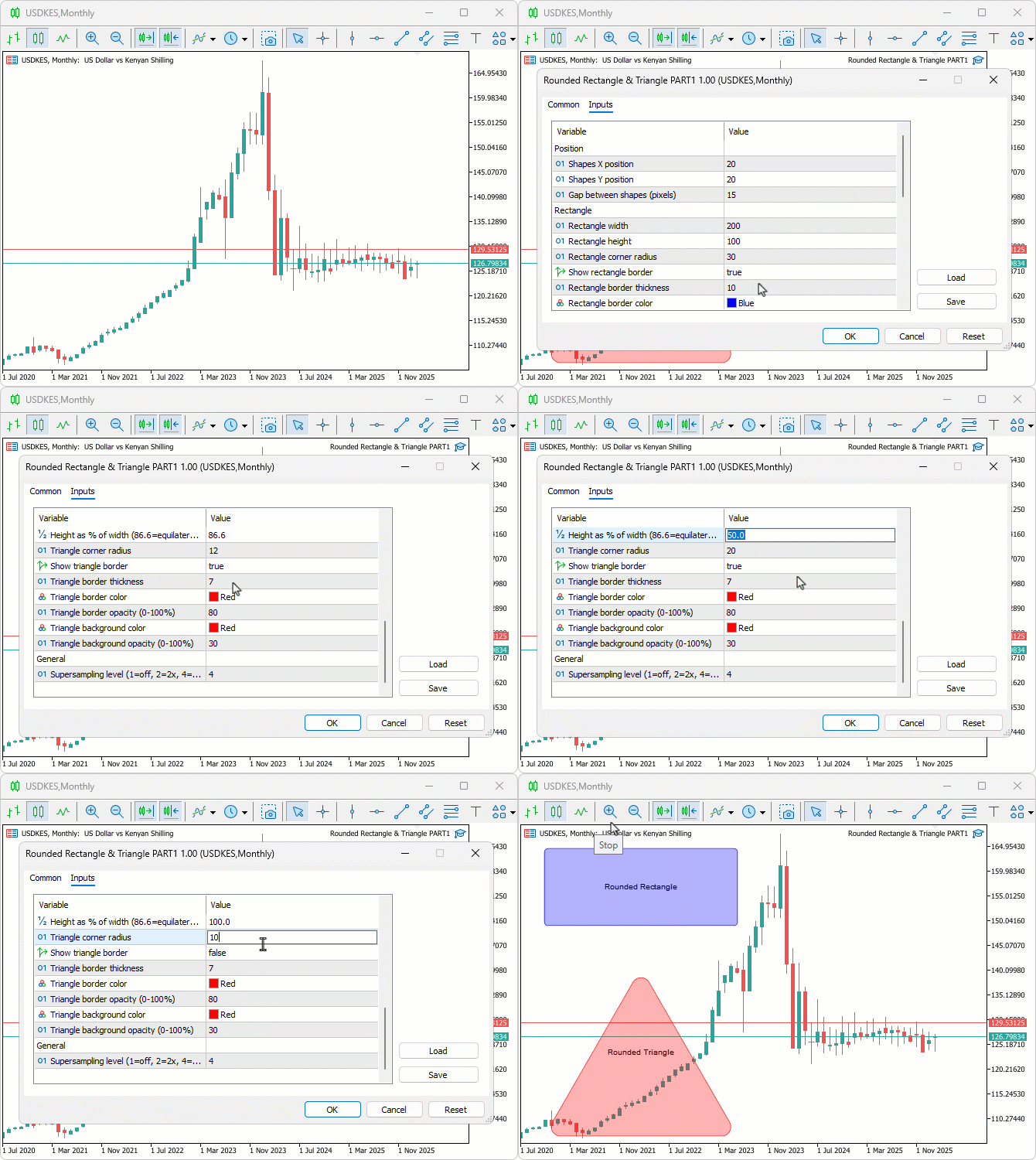
We did the testing, and below is the compiled visualization in a single Graphics Interchange Format (GIF) bitmap image format.
Conclusion
In conclusion, we’ve explored vector-based methods for drawing rounded rectangles and triangles in MQL5 using canvas, incorporating supersampling for anti-aliased rendering. We implemented scanline filling, geometric precomputations for arcs and tangents, and border drawing to create smooth, customizable shapes. This approach lays the groundwork for modern UI elements in our future trading tools, supporting inputs for sizes, radii, borders, and opacities. In the next part, we will explore how we can integrate the two shapes to form a modern bubble with a pointer that can be used in various utilities. Keep tuned!
Warning: All rights to these materials are reserved by MetaQuotes Ltd. Copying or reprinting of these materials in whole or in part is prohibited.
This article was written by a user of the site and reflects their personal views. MetaQuotes Ltd is not responsible for the accuracy of the information presented, nor for any consequences resulting from the use of the solutions, strategies or recommendations described.

 Optimizing Liquidity Raids: Mastering the Difference Between Liquidity Raids and Market Structure Shifts
 From Basic to Intermediate: Struct (VI)
 Quantitative Analysis of Trends: Collecting Statistics in Python
 From Basic to Intermediate: Struct (V)

- Free trading apps
- Over 8,000 signals for copying
- Economic news for exploring financial markets
You agree to website policy and terms of use
I'm trying to add a beveled edges effect (3D lighting - white on top/left, black on bottom/right) to my rounded rectangle.
I've successfully implemented the beveled effect on straight edges, but I'm having trouble connecting them at the corners.
See the red circles in the image below where lines meet.
Any suggestions?
P.S. - Article ideas for future:
Drop shadow & Glow effects - how to add depth to UI elements
Gradient fills - creating 3D appearance with color transitions
Anti-aliasing techniques - smoothing edges for professional look
Inner shadows - enhancing 3D beveled effects
Texture & noise patterns - adding realism to flat shapes