

Battle Royale Optimizer (BRO)
 2 291
2 291
 1
1

Contents
Introduction
In metaheuristic optimization, where algorithms often draw inspiration from natural processes, physical phenomena, and evolutionary mechanisms, a fundamentally new source of inspiration has emerged - video games. Battle Royale Optimizer (BRO), developed by Taymaz Rahkar Farshi, is an innovative optimization algorithm based on the mechanics of popular battle royale games such as PlayerUnknown's Battlegrounds (PUBG).
The BRO algorithm opens a new category of optimization methods — "game-based" ones — complementing the established three-sided landscape of optimization algorithms, including evolutionary algorithms, swarm intelligence algorithms, and algorithms based on physical phenomena, which belong to the broad group of population-based optimization algorithms. Unlike swarm intelligence algorithms, where agents cooperate to achieve a common goal, in BRO, individuals compete with each other, striving to survive and occupy the best position in the search space.
A key feature of BRO is its unique mechanism of competition and "damage" of solutions. Each solution is compared to its nearest neighbor, and the loser takes "damage" the winner starts with a clean slate. Solutions that have accumulated too much damage are removed from the population and replaced with new random solutions, just like how players in PUBG are eliminated from a match after receiving critical damage. This provides a mechanism for exploring the search space.
Implementation of the algorithm
The Battle Royale Optimizer (BRO) algorithm figuratively represents a virtual world where many players land on the battlefield and only one must survive. This is the essence of the prototype game. Now let's transfer this concept to solving optimization problems.
At the beginning of the algorithm, we create a population of solutions randomly distributed over the search space. Each solution is a unique "player" that has a certain position and the quality (fitness) of this position. Then the main competition cycle begins, where each solution is compared to its nearest neighbor, much like players pitted against each other in a battle.
When two solutions "meet", they are compared for their quality. The best solution is declared the winner and takes zero damage, while the worst solution is declared the loser and takes one damage. This damage counter is a key feature of the algorithm. The losing solution not only suffers damage, it also tries to improve its position by moving towards the best known solution in the population. This movement simulates the desire to survive by finding a safer and more advantageous place.
If a solution accumulates too much damage (exceeds a given threshold), it is "eliminated from the game" - removed from the population and replaced by a new random solution. It is like a player being eliminated in a battle royale and a new one appearing in the next match. This mechanism ensures constant renewal of the population and supports the diversity of solutions.
Periodically, the algorithm narrows the search space — analogous to a shrinking play area in a battle royale, which forces players to move closer together. The search boundaries narrow around the best solution found, which forces the population to concentrate in more promising areas.
Thanks to this approach, the BRO algorithm balances between exploring new areas and using good solutions that have already been found. Losing solutions are gravitated towards better ones, maintaining the trend of improvement, and complete losers are replaced by new ones, providing a fresh look at the search space. At the same time, the periodic narrowing of boundaries intensifies the local search for promising solutions.
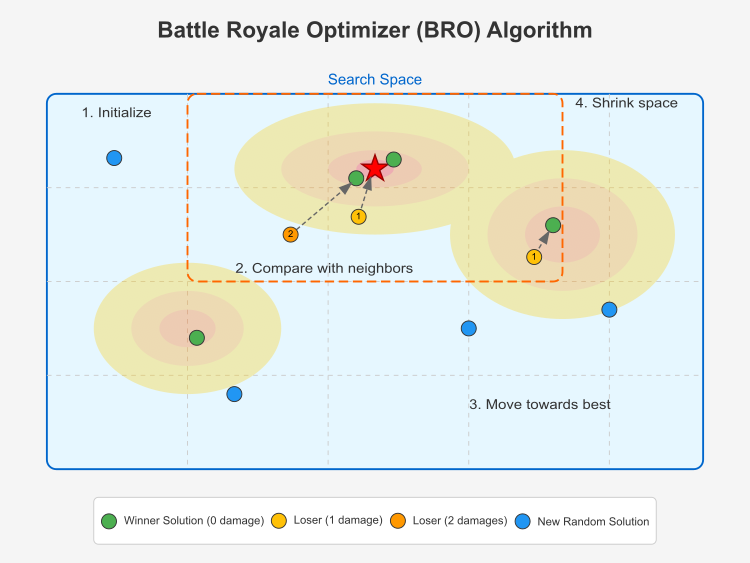
Figure 1. BRO algorithm in action
This illustration shows the main components of the Battle Royale Optimizer (BRO) algorithm. The search space is represented as a 2D region with contours symbolizing the optimization function (brighter regions represent better solutions). The global best solution is marked with a red star at the center of the highest "mountain". Winning solutions are marked with green dots — these are solutions with zero damage (winners compared to their neighbors). Losing solutions are represented by yellow (with 1 damage) and orange (with 2 damage) dots. New random solutions are represented by blue dots, which appear when a solution accumulates too much damage. Losing solutions are moved toward the best solution (shown by the dashed arrows). The narrowing of the search space is depicted by the orange dotted box centered around the best solution.
The key stages of the algorithm are initialization, comparison with neighbors, moving towards a better solution and narrowing the search space.Solutions in the BRO algorithm compete with each other, and the losers are "damaged". Solutions with too much damage are replaced with new random ones. Now that the principle of the algorithm is clear, we can move on to writing pseudocode.
Initialization:
- Create a population of popSize
- For each solution, set the damage counter to 0
- Set the maxDamage maximum damage threshold
- Determine the number of epochs
- Calculate the initial delta for periodically narrowing the search space
Basic algorithm:
- Create the initial population:
- For each solution in the population:
- Generate random coordinates within a given search space
- For each solution in the population:
- For each epoch:
- Update global best solution if a better one is found
- Conducting "battles" between solutions:
- For each solution in the population:
- Find the nearest neighbor (minimum distance solution)
- Compare the quality of the current solution with its neighbor:
- If the current solution is better:
- Reset the damage counter of the current solution
- Increase the neighbor's damage counter
- The loser (neighbor) moves toward the best solution
- Else:
- Increase the damage counter of the current solution
- Reset neighbor's damage counter
- The loser (current solution) moves towards the best solution
- If the current solution is better:
- For each solution in the population:
- Handle heavily damaged solutions:
- For each solution in the population:
- If damage counter ≥ maxDamage :
- Reset the damage counter
- Replace the solution with a new random one
- If damage counter ≥ maxDamage :
- For each solution in the population:
- Periodic narrowing of the search space:
- If the current epoch number is divisible by delta :
- Calculate the standard deviations of coordinates for the entire population
- Narrow the search space around the best solution
- Update delta
- If the current epoch number is divisible by delta :
- Return the best solution found
The algorithm uses the following equations:
- Calculate the initial delta value to narrow the search space: delta = ⌊epochs / log₁₀(epochs)⌋
- Calculate the Euclidean distance between solutions: distance = √(∑(a[idx1][c] - a[idx2][c])²)
- Move of a losing solution towards a global better one: a[i][c] = a[i][c] + r × (cB[c] - a[i][c])
- Calculate the average value for each coordinate: mean[c] = (∑a[i][c]) / popSize
- Calculate the standard deviation for each coordinate: sdValues[c] = √(∑(a[i][c] - mean[c])² / popSize)
- Equations for narrowing the search space: newMin[c] = cB[c] - sdValues[c] newMax[c] = cB[c] + sdValues[c]
- Update the delta parameter after narrowing the space: delta = delta + ⌊delta / 2⌉
The author proposes the following equation to periodically narrow the search space: Δ (delta) = maxEpochs / log₁₀(maxEpochs). The graph is provided below:
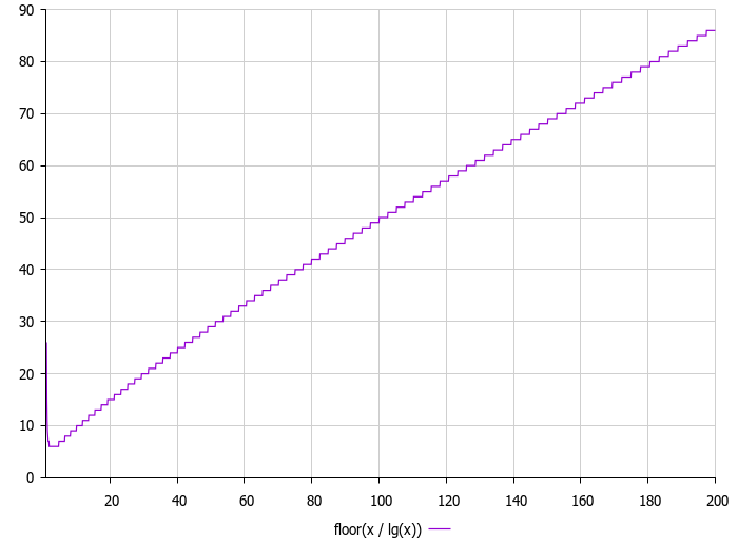
Figure 2. Delta parameter dependence on the number of epochs
The graph of delta = epochs/log₁₀(epochs) is important in the operation of the BRO algorithm, since it determines after how many iterations the search space is narrowed. As can be seen from the graph, the delta value increases with the number of epochs, but not as fast as the epochs themselves, due to the division by the logarithm. This creates a non-linear relationship that provides the following advantages: in the early stages of optimization (with a small number of epochs), narrowing occurs relatively frequently, which helps the algorithm quickly focus on promising areas, and in the later stages (with a large number of epochs), narrowing occurs less frequently, which allows for a more thorough exploration of already identified promising areas.
In my experiments, I modified the equation for the delta parameter by applying the logarithm twice. This version performed better.
// Calculate the initial delta to narrow the search space
  delta = (int)MathFloor(epochs / MathLog(MathLog(epochs)));
Let's move on to coding. We will implement a custom class (C_AO_BRO), that inherits from the base class (C_AO), meaning it inherits all public and protected members of the C_AO class and can override their behavior. This class will be the implementation of the optimization algorithm based on the Battle Royale concept.
1. Public class members:
- popSize — set the population size.
- maxDamage — set the maximum damage threshold, how many "hits" the solution can withstand before being eliminated.
- SetParams () — setParams() method updates the popSize and maxDamage values based on the values stored in the params array, allowing you to change the algorithm parameters at runtime.
- Init () — algorithm initialization method. Accepted parameters:
- rangeMinP [] — minimum values of the search range for each variable.
- rangeMaxP [] — maximum search range values.
- rangeStepP [] — search step for each variable.
- epochsP — number of algorithm epochs (iterations). The default is 0.
- Moving () — basic logic of moving or updating solutions in the search space.
- Revision () — logic of revising current decisions; here, the "damage" incurred by each solution is assessed.
- maxDamage — public member that stores the maximum damage threshold.
2. Class private fields:
- delta — interval for shrinking the search space. Used to adapt the search step size during the optimization.
- damages [] — the number of "damages" for each solution in the population.
- epoch — algorithm current epoch (iteration number).
- epochs — maximum number of epochs (iterations) of the algorithm.
3. Auxiliary methods:
- FindNearestNeighbor () — find the nearest neighbor for a solution at a given index. Used for interactions between solutions.
- CalculateDistance () — distance between two solutions identified by their indices.
- CalculateStandardDeviations () — calculate standard deviations of population solution values, used to estimate population diversity and adapt search parameters.
- ShrinkSearchSpace () — method narrows the search space. This is a standard technique for converging an algorithm to an optimal solution.
General idea:
C_AO_BRO is a class for the Battle Royale optimization algorithm and the basic idea of the algorithm, in short, is as follows:
- Initialization - a population of random solutions is created in a given search space.
- Evaluation - each solution is evaluated using an objective function (fitness function).
- Battle Royale - solutions "compete" with each other (are compared by the values of the objective function).
- Damage - some decisions receive "damage" depending on the results of "battles".
- Elimination - solutions that receive 'damage' value greater than maxDamage are removed from the population.
- Reproduction/replacement - removed solutions are replaced by new random solutions.
- Narrowing the search space - the search space can be narrowed to focus on the most promising areas.
- Repetition - steps 2-7 are repeated for a specified number of epochs.
//——————————————————————————————————————————————————————————————————————————————
class C_AO_BRO : public C_AO
{
  public: //--------------------------------------------------------------------
  ~C_AO_BRO () { }
  C_AO_BRO ()
  {
    ao_name = "BRO";
    ao_desc = "Battle Royale Optimizer";
    ao_link = "https://www.mql5.com/en/articles/17688";

    popSize   = 100;    // population size
    maxDamage = 3;      // maximum damage threshold

    ArrayResize (params, 2);

    params [0].name = "popSize";   params [0].val = popSize;
    params [1].name = "maxDamage"; params [1].val = maxDamage;
  }

  void SetParams ()
  {
    popSize   = (int)params [0].val;
    maxDamage = (int)params [1].val;
  }

  bool Init (constdouble &rangeMinP [],// minimum search range
             const double &rangeMaxP [],  // maximum search range
             const double &rangeStepP [], // search step
             const int     epochsP = 0);  // number of epochs

  void Moving ();
  void Revision ();

  //----------------------------------------------------------------------------
  int maxDamage;    // maximum damage threshold

  private: //-------------------------------------------------------------------
  int    delta;      // interval for shrinking the search space
  int    damages []; // amount of damage for each solution
  int    epoch;      // current epoch
  int    epochs;     // maximum number of epochs

  // Auxiliary methods
  int    FindNearestNeighbor (int index);
  double CalculateDistance (int idx1, int idx2);
  void   CalculateStandardDeviations (double &sdValues []);
  void   ShrinkSearchSpace ();
};
//——————————————————————————————————————————————————————————————————————————————
The Init() method initializes the BRO algorithm, calling StandardInit() for standard initialization using the passed search ranges and steps. If StandardInit returns 'false', the Init() method also returns 'false', signaling an initialization error. It initializes the 'damages' array by allocating memory for each solution in the popSize population and setting the initial 'damage' count of each solution to 0. The total number of 'epochs' is set and the current 'epoch' is reset to 0.
The 'delta' value is calculated based on the total number of epochs so that the search space is narrowed gradually. If 'delta' is less than or equal to 0, the value is set to 1. In general, this method prepares the algorithm for operation by initializing its basic parameters and data structures.
//——————————————————————————————————————————————————————————————————————————————
bool C_AO_BRO::Init (const double &rangeMinP  [],  // minimum search range
                     const double &rangeMaxP  [],  // maximum search range
                     const double &rangeStepP [],  // search step
                     const int     epochsP = 0)    // number of epochs
{
  if (!StandardInit (rangeMinP, rangeMaxP, rangeStepP)) return false;

  //----------------------------------------------------------------------------
  // Initialize damage counters for each solution
  ArrayResize (damages, popSize);
  ArrayInitialize (damages, 0);

  // Set epochs
  epochs = epochsP;
  epoch  = 0;

  // Calculate the initial 'delta' to narrow the search space
  delta = (int)MathFloor (epochs / MathLog10 (epochs));
  if (delta <= 0) delta = 1;

  return true;
}
//——————————————————————————————————————————————————————————————————————————————
The Moving() method implements the logic for initializing the solution population, where each coordinate of each solution is generated randomly between the specified minimum and maximum rangeMin and rangeMax ranges and discretized with a certain rangeStep. The method ensures that the population is initialized only once.
/——————————————————————————————————————————————————————————————————————————————
void C_AO_BRO::Moving ()
{
  if (!revision)
  {
    // Initialize the population with random decisions
    for (int i = 0; i < popSize; i++)
    {
      for (int c = 0; c < coords; c++)
      {
        double coordinate = u.RNDfromCI (rangeMin [c], rangeMax [c]);
        a [i].c [c] = u.SeInDiSp (coordinate, rangeMin [c], rangeMax [c], rangeStep [c]);
      }
    }

    revision = true;
  }
}
//——————————————————————————————————————————————————————————————————————————————
The Revision() method is a key step in the BRO optimization algorithm. Each iteration of the method updates the best solution: if some solution in the current population is better than the current best global solution, then the best global solution is updated.
The method compares solutions with their neighbors: for each solution, a nearest neighbor is found in the population. Then their function values are compared. The best solution in the pair is "rewarded" by resetting its damage counter, while the worst solution's damage counter increases. The worst solution in the pair is shifted toward the globally best solution.
Next, the "damaged" solutions are replaced: if any solution has accumulated enough "damage" (reached the maxDamage value), it is replaced by a new, randomly generated one. Periodically, the search area is narrowed depending on the "delta" variable. The process is repeated over several algorithm iterations. Solutions are moved to more favorable search areas by comparing with neighbors.
//——————————————————————————————————————————————————————————————————————————————
void C_AO_BRO::Revision ()
{
  epoch++;

  // Update the global best solution
  for (int i = 0; i < popSize; i++)
  {
    if (a [i].f > fB)
    {
      fB = a [i].f;
      ArrayCopy (cB, a [i].c, 0, 0, WHOLE_ARRAY);
    }
  }

  // Compare each solution with its nearest neighbor and update damage counters
  for (int i = 0; i < popSize; i++)
  {
    int neighbor = FindNearestNeighbor (i);

    if (neighbor != -1)
    {
      if (a [i].f >= a [neighbor].f)
      {
        // Solution i wins
        damages [i] = 0;
        damages [neighbor]++;

        // The loser (neighbor) moves toward the best solution
        for (int c = 0; c < coords; c++)
        {
          double r = u.RNDfromCI (0, 1);
          a [neighbor].c [c] = a [neighbor].c [c] + r * (cB [c] - a [neighbor].c [c]);
          a [neighbor].c [c] = u.SeInDiSp (a [neighbor].c [c], rangeMin [c], rangeMax [c], rangeStep [c]);
        }
      }
      else
      {
        // Solution i loses
        damages [i]++;
        damages [neighbor] = 0;

        // The loser (i) moves to the best solution
        for (int c = 0; c < coords; c++)
        {
          double r = u.RNDfromCI (0, 1);
          a [i].c [c] = a [i].c [c] + r * (cB [c] - a [i].c [c]);
          a [i].c [c] = u.SeInDiSp (a [i].c [c], rangeMin [c], rangeMax [c], rangeStep [c]);
        }
      }
    }
  }

  // Check if any solution has reached maximum damage and replace it
  for (int i = 0; i < popSize; i++)
  {
    if (damages [i] >= maxDamage)
    {
      // Reset the damage counter
      damages [i] = 0;

      // Generate a new random solution
      for (int c = 0; c < coords; c++)
      {
        double coordinate = u.RNDfromCI (rangeMin [c], rangeMax [c]);
        a [i].c [c] = u.SeInDiSp (coordinate, rangeMin [c], rangeMax [c], rangeStep [c]);
      }
    }
  }

  // Periodic narrowing of the search space
  if (epochs > 0 && epoch % delta == 0)
  {
    ShrinkSearchSpace ();
    // Update delta
    delta = delta + (int)MathRound (delta / 2);
  }
}
//——————————————————————————————————————————————————————————————————————————————
The FindNearestNeighbor() method finds the index of the nearest neighbor for the solution with 'index' in the population. It iterates over all solutions, calculates the distance to each of them (excluding the 'index' solution itself), and returns the index of the solution with the minimum distance. If the nearest neighbor could not be found (for example, there is only one solution in the population), then it returns -1. In a nutshell, the method finds the nearest neighbor for a given solution.
//——————————————————————————————————————————————————————————————————————————————
int C_AO_BRO::FindNearestNeighbor (int index)
{
  double minDistance = DBL_MAX;
  int nearestIndex = -1;

  for (int i = 0; i < popSize; i++)
  {
    if (i == index) continue;

    double distance = CalculateDistance (index, i);
    if (distance < minDistance)
    {
      minDistance = distance;
      nearestIndex = i;
    }
  }

  return nearestIndex;
}
//——————————————————————————————————————————————————————————————————————————————
The CalculateDistance() method calculates the Euclidean distance between two solutions in the population set by their idx1 and idx2 indices. It starts by initializing the distanceSum variable to zero. This variable will accumulate the sum of the squares of the coordinate differences. The 'for' loop iterates over all solution coordinates. At each iteration of the loop, the difference between the corresponding coordinates of the idx1 and idx2 solutions is calculated. The square of this difference is added to distanceSum.
After the loop completes, the method returns the square root of distanceSum, which is the Euclidean distance between the two solutions. Ultimately, the method returns a numerical value reflecting the "distance" between two solutions in the search space. The larger this value, the further apart the solutions are.
//——————————————————————————————————————————————————————————————————————————————
double C_AO_BRO::CalculateDistance (int idx1, int idx2)
{
  double distanceSum = 0.0;

  for (int c = 0; c < coords; c++)
  {
    double diff = a [idx1].c [c] - a [idx2].c [c];
    distanceSum += diff * diff;
  }

  return MathSqrt (distanceSum);
}
//——————————————————————————————————————————————————————————————————————————————
The CalculateStandardDeviations() method calculates the standard deviation for each solution coordinate in the population and stores the results in the sdValues array. The sdValues input array is resized so that it can store the standard deviation for each of the "coords" coordinates. Next, the loop iterates over each solution coordinate and the standard deviation is calculated. The method resets the sum of squared deviations for the current coordinate, then also resets its mean value. The loop sums the values of the c current coordinate for all solutions in the population. Then, it calculates the average value of the coordinate.
Calculating the sum of squared deviations: The loop iterates over all solutions in the population and calculates the sum of squared deviations from the mean for the current coordinate. It calculates the difference between the value of c coordinate for i solution and its mean value. The square of the difference is added to the sum of the deviation squares. The standard deviation is calculated as the square root of the sum of the deviation squares of the deviations, divided by the population size. The result is stored in the corresponding element of the sdValues array.
Ultimately, the method calculates a measure of the dispersion of values for each solution coordinate in the population and stores it in the passed sdValues array, and the standard deviation shows how much the coordinate values vary around the mean.
//——————————————————————————————————————————————————————————————————————————————
void C_AO_BRO::CalculateStandardDeviations (double &sdValues [])
{
  ArrayResize (sdValues, coords);

  for (int c = 0; c < coords; c++)
  {
    double sum = 0.0;
    double mean = 0.0;

    // Calculate the average
    for (int i = 0; i < popSize; i++) mean += a [i].c [c];

    mean /= popSize;

    // Calculate the sum of squared deviations
    for (int i = 0; i < popSize; i++)
    {
      double diff = a [i].c [c] - mean;
      sum += diff * diff;
    }

    sdValues [c] = MathSqrt (sum / popSize);
  }
}
//——————————————————————————————————————————————————————————————————————————————
The ShrinkSearchSpace() method shrinks the search space based on the standard deviations of the coordinates and the location of the best solution found. Figuratively speaking, it focuses the search in a more promising area where a good solution already exists.
First, standard deviations are calculated. This is done by calling the CalculateStandardDeviations() method, which calculates the standard deviations for each solution coordinate in the population and stores them in the sdValues array. This indicates how much the values of each coordinate vary across the population. Calculating new boundaries: New boundaries are centered around the best solution found, and their width is determined by the standard deviation. If the standard deviation is small, the search narrows around the best solution. If the standard deviation is large, the search remains broader. Validity check: the search will not go beyond the original feasible solution space.
//——————————————————————————————————————————————————————————————————————————————
void C_AO_BRO::ShrinkSearchSpace ()
{
  double sdValues [];
  CalculateStandardDeviations (sdValues);

  for (int c = 0; c < coords; c++)
  {
    // The new boundaries are centered around the best solution with a standard deviation width
    double newMin = cB [c] - sdValues [c];
    double newMax = cB [c] + sdValues [c];

    // Make sure the new bounds are within the original constraints
    if (newMin < rangeMin [c]) newMin = rangeMin [c];
    if (newMax > rangeMax [c]) newMax = rangeMax [c];

    // Update the boundaries
    rangeMin [c] = newMin;
    rangeMax [c] = newMax;
  }
}
//——————————————————————————————————————————————————————————————————————————————
Test results
After conducting tests, it is clear that the algorithm works quite well on Hilly and Forest functions, however, on discrete Megacity the convergence rates are much weaker.
BRO|Battle Royale Optimizer|50.0|3.0|
=============================
5 Hilly's; Func runs: 10000; result: 0.7494493002235458
25 Hilly's; Func runs: 10000; result: 0.4983307394255448
500 Hilly's; Func runs: 10000; result: 0.27994639979348446
=============================
5 Forest's; Func runs: 10000; result: 0.6962444245506945
25 Forest's; Func runs: 10000; result: 0.3845619185097379
500 Forest's; Func runs: 10000; result: 0.20427058729050862
=============================
5 Megacity's; Func runs: 10000; result: 0.3815384615384616
25 Megacity's; Func runs: 10000; result: 0.21107692307692308
500 Megacity's; Func runs: 10000; result: 0.10607692307692404
=============================
All score: 3.51150 (39.02%)
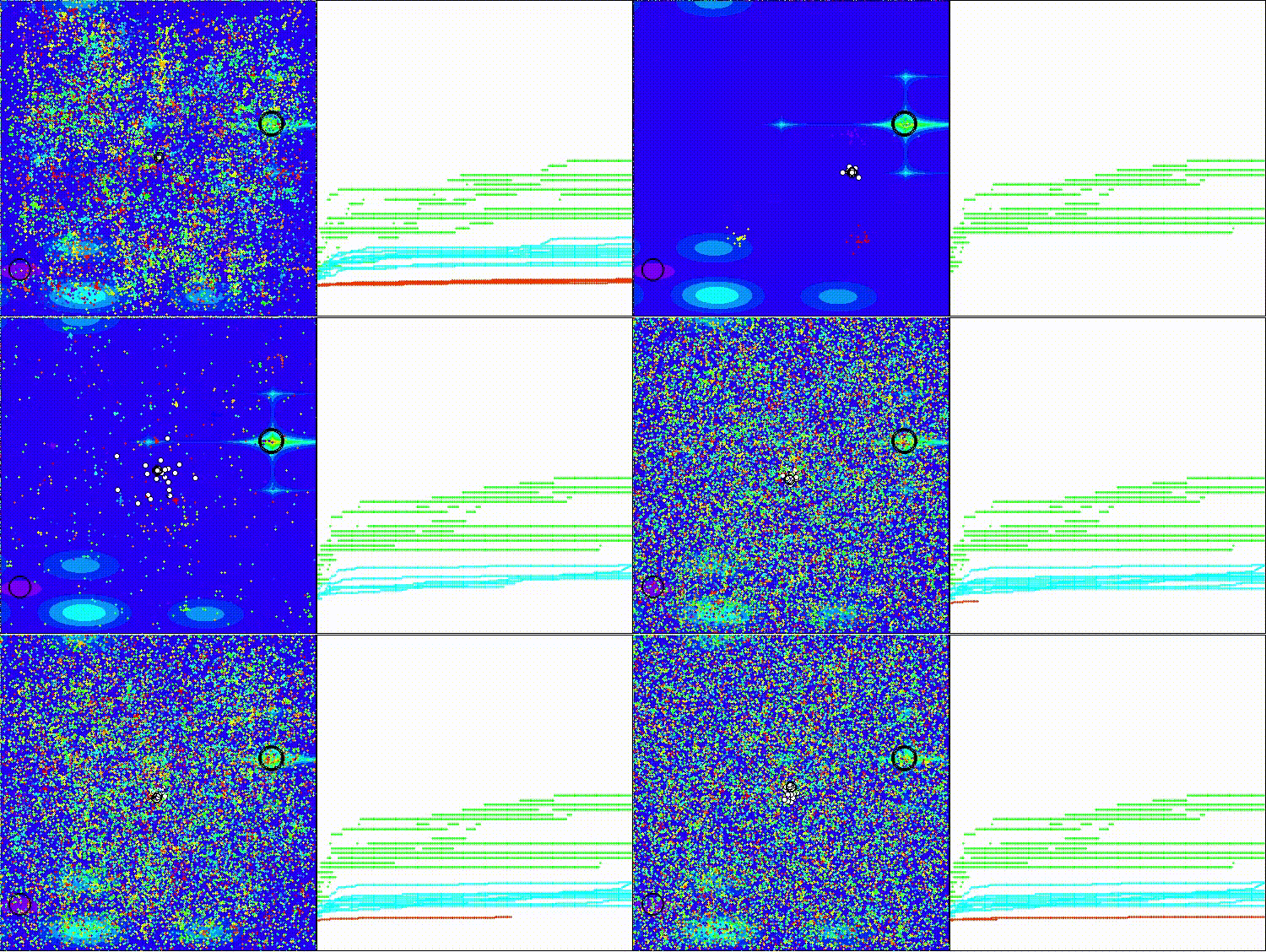
The visualization shows the scatter of result values and weaker search capabilities on the last discrete Megacity function.
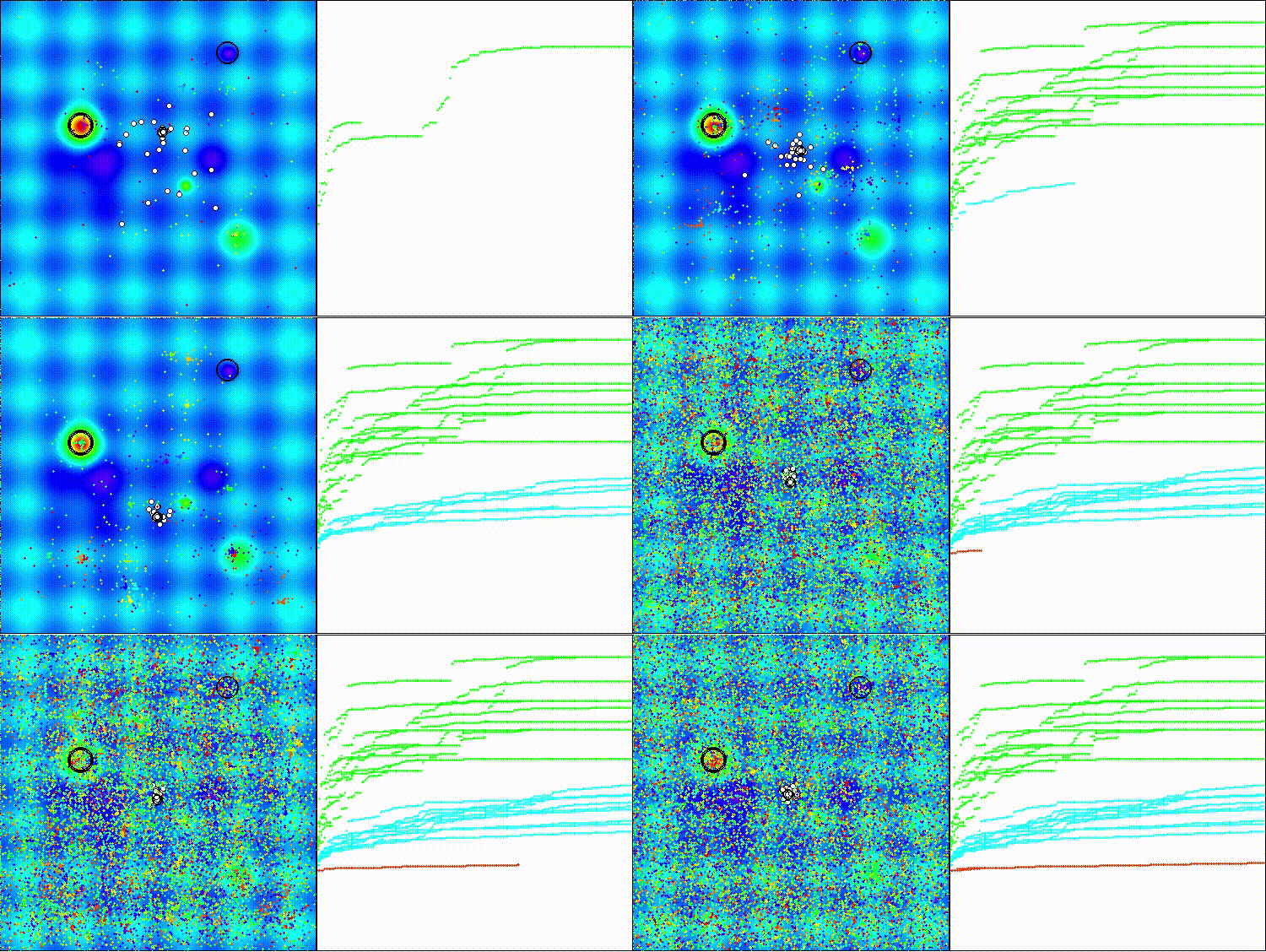
BRO on the Hilly test function
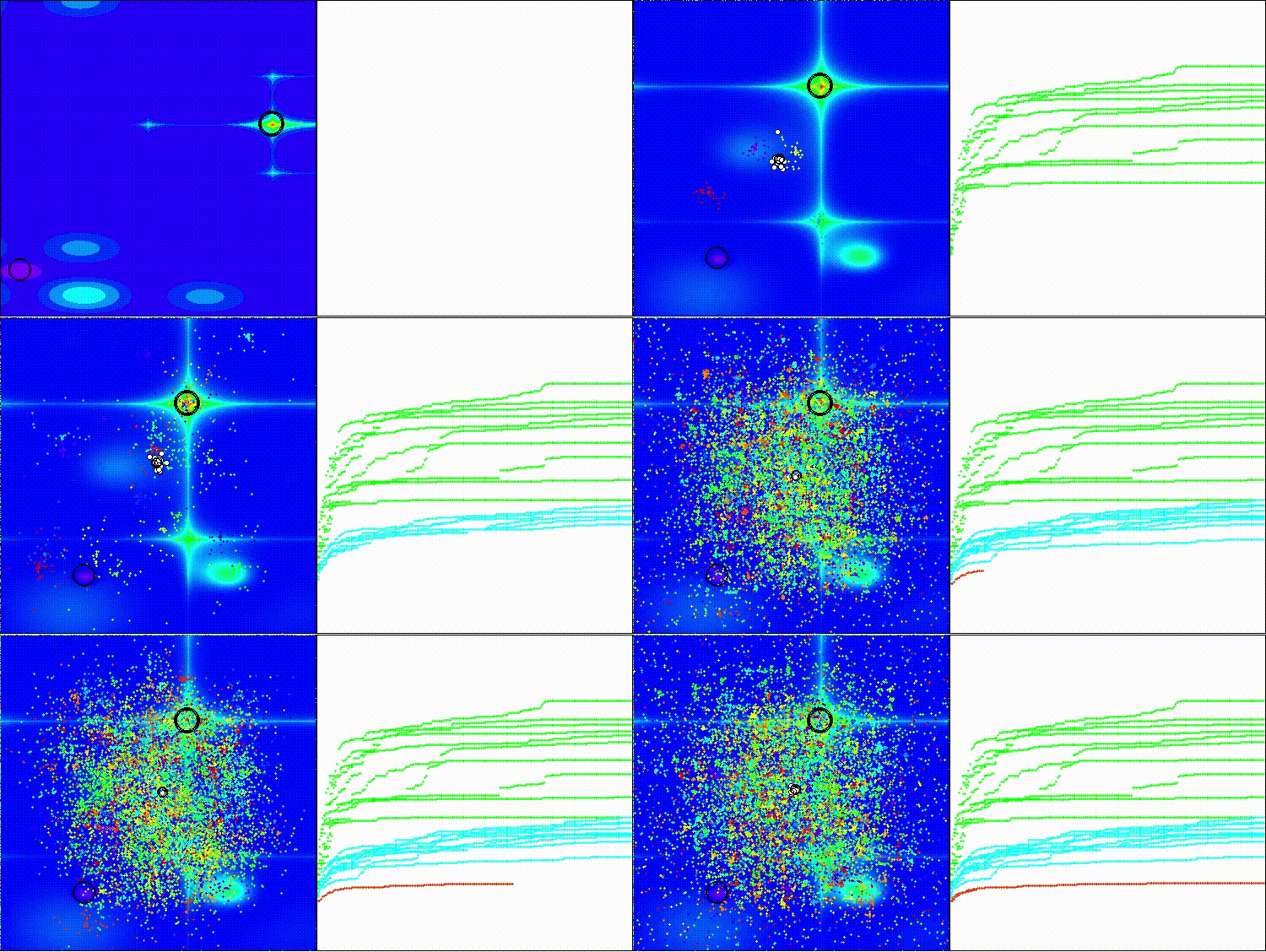
BRO on the Forest test function
BRO on the Megacity test function
Based on the test results, the BRO algorithm ranks last in the ranking table of population-based optimization algorithms.
| # | AO | Description | Hilly | Hilly Final | Forest | Forest Final | Megacity (discrete) | Megacity Final | Final Result | % of MAX | ||||||
| 10 p (5 F) | 50 p (25 F) | 1000 p (500 F) | 10 p (5 F) | 50 p (25 F) | 1000 p (500 F) | 10 p (5 F) | 50 p (25 F) | 1000 p (500 F) | ||||||||
| 1 | ANS | across neighbourhood search | 0.94948 | 0.84776 | 0.43857 | 2.23581 | 1.00000 | 0.92334 | 0.39988 | 2.32323 | 0.70923 | 0.63477 | 0.23091 | 1.57491 | 6.134 | 68.15 |
| 2 | CLA | code lock algorithm (joo) | 0.95345 | 0.87107 | 0.37590 | 2.20042 | 0.98942 | 0.91709 | 0.31642 | 2.22294 | 0.79692 | 0.69385 | 0.19303 | 1.68380 | 6.107 | 67.86 |
| 3 | AMOm | animal migration ptimization M | 0.90358 | 0.84317 | 0.46284 | 2.20959 | 0.99001 | 0.92436 | 0.46598 | 2.38034 | 0.56769 | 0.59132 | 0.23773 | 1.39675 | 5.987 | 66.52 |
| 4 | (P+O)ES | (P+O) evolution strategies | 0.92256 | 0.88101 | 0.40021 | 2.20379 | 0.97750 | 0.87490 | 0.31945 | 2.17185 | 0.67385 | 0.62985 | 0.18634 | 1.49003 | 5.866 | 65.17 |
| 5 | CTA | comet tail algorithm (joo) | 0.95346 | 0.86319 | 0.27770 | 2.09435 | 0.99794 | 0.85740 | 0.33949 | 2.19484 | 0.88769 | 0.56431 | 0.10512 | 1.55712 | 5.846 | 64.96 |
| 6 | TETA | time evolution travel algorithm (joo) | 0.91362 | 0.82349 | 0.31990 | 2.05701 | 0.97096 | 0.89532 | 0.29324 | 2.15952 | 0.73462 | 0.68569 | 0.16021 | 1.58052 | 5.797 | 64.41 |
| 7 | SDSm | stochastic diffusion search M | 0.93066 | 0.85445 | 0.39476 | 2.17988 | 0.99983 | 0.89244 | 0.19619 | 2.08846 | 0.72333 | 0.61100 | 0.10670 | 1.44103 | 5.709 | 63.44 |
| 8 | BOAm | billiards optimization algorithm M | 0.95757 | 0.82599 | 0.25235 | 2.03590 | 1.00000 | 0.90036 | 0.30502 | 2.20538 | 0.73538 | 0.52523 | 0.09563 | 1.35625 | 5.598 | 62.19 |
| 9 | AAm | archery algorithm M | 0.91744 | 0.70876 | 0.42160 | 2.04780 | 0.92527 | 0.75802 | 0.35328 | 2.03657 | 0.67385 | 0.55200 | 0.23738 | 1.46323 | 5.548 | 61.64 |
| 10 | ESG | evolution of social groups (joo) | 0.99906 | 0.79654 | 0.35056 | 2.14616 | 1.00000 | 0.82863 | 0.13102 | 1.95965 | 0.82333 | 0.55300 | 0.04725 | 1.42358 | 5.529 | 61.44 |
| 11 | SIA | simulated isotropic annealing (joo) | 0.95784 | 0.84264 | 0.41465 | 2.21513 | 0.98239 | 0.79586 | 0.20507 | 1.98332 | 0.68667 | 0.49300 | 0.09053 | 1.27020 | 5.469 | 60.76 |
| 12 | ACS | artificial cooperative search | 0.75547 | 0.74744 | 0.30407 | 1.80698 | 1.00000 | 0.88861 | 0.22413 | 2.11274 | 0.69077 | 0.48185 | 0.13322 | 1.30583 | 5.226 | 58.06 |
| 13 | DA | dialectical algorithm | 0.86183 | 0.70033 | 0.33724 | 1.89940 | 0.98163 | 0.72772 | 0.28718 | 1.99653 | 0.70308 | 0.45292 | 0.16367 | 1.31967 | 5.216 | 57.95 |
| 14 | BHAm | black hole algorithm M | 0.75236 | 0.76675 | 0.34583 | 1.86493 | 0.93593 | 0.80152 | 0.27177 | 2.00923 | 0.65077 | 0.51646 | 0.15472 | 1.32195 | 5.196 | 57.73 |
| 15 | ASO | anarchy society optimization | 0.84872 | 0.74646 | 0.31465 | 1.90983 | 0.96148 | 0.79150 | 0.23803 | 1.99101 | 0.57077 | 0.54062 | 0.16614 | 1.27752 | 5.178 | 57.54 |
| 16 | RFO | royal flush optimization (joo) | 0.83361 | 0.73742 | 0.34629 | 1.91733 | 0.89424 | 0.73824 | 0.24098 | 1.87346 | 0.63154 | 0.50292 | 0.16421 | 1.29867 | 5.089 | 56.55 |
| 17 | AOSm | atomic orbital search M | 0.80232 | 0.70449 | 0.31021 | 1.81702 | 0.85660 | 0.69451 | 0.21996 | 1.77107 | 0.74615 | 0.52862 | 0.14358 | 1.41835 | 5.006 | 55.63 |
| 18 | TSEA | turtle shell evolution algorithm (joo) | 0.96798 | 0.64480 | 0.29672 | 1.90949 | 0.99449 | 0.61981 | 0.22708 | 1.84139 | 0.69077 | 0.42646 | 0.13598 | 1.25322 | 5.004 | 55.60 |
| 19 | DE | differential evolution | 0.95044 | 0.61674 | 0.30308 | 1.87026 | 0.95317 | 0.78896 | 0.16652 | 1.90865 | 0.78667 | 0.36033 | 0.02953 | 1.17653 | 4.955 | 55.06 |
| 20 | SRA | successful restaurateur algorithm (joo) | 0.96883 | 0.63455 | 0.29217 | 1.89555 | 0.94637 | 0.55506 | 0.19124 | 1.69267 | 0.74923 | 0.44031 | 0.12526 | 1.31480 | 4.903 | 54.48 |
| 21 | CRO | chemical reaction optimization | 0.94629 | 0.66112 | 0.29853 | 1.90593 | 0.87906 | 0.58422 | 0.21146 | 1.67473 | 0.75846 | 0.42646 | 0.12686 | 1.31178 | 4.892 | 54.36 |
| 22 | BIO | blood inheritance optimization (joo) | 0.81568 | 0.65336 | 0.30877 | 1.77781 | 0.89937 | 0.65319 | 0.21760 | 1.77016 | 0.67846 | 0.47631 | 0.13902 | 1.29378 | 4.842 | 53.80 |
| 23 | BSA | bird swarm algorithm | 0.89306 | 0.64900 | 0.26250 | 1.80455 | 0.92420 | 0.71121 | 0.24939 | 1.88479 | 0.69385 | 0.32615 | 0.10012 | 1.12012 | 4.809 | 53.44 |
| 24 | HS | harmony search | 0.86509 | 0.68782 | 0.32527 | 1.87818 | 0.99999 | 0.68002 | 0.09590 | 1.77592 | 0.62000 | 0.42267 | 0.05458 | 1.09725 | 4.751 | 52.79 |
| 25 | SSG | saplings sowing and growing | 0.77839 | 0.64925 | 0.39543 | 1.82308 | 0.85973 | 0.62467 | 0.17429 | 1.65869 | 0.64667 | 0.44133 | 0.10598 | 1.19398 | 4.676 | 51.95 |
| 26 | BCOm | bacterial chemotaxis optimization M | 0.75953 | 0.62268 | 0.31483 | 1.69704 | 0.89378 | 0.61339 | 0.22542 | 1.73259 | 0.65385 | 0.42092 | 0.14435 | 1.21912 | 4.649 | 51.65 |
| 27 | ABO | african buffalo optimization | 0.83337 | 0.62247 | 0.29964 | 1.75548 | 0.92170 | 0.58618 | 0.19723 | 1.70511 | 0.61000 | 0.43154 | 0.13225 | 1.17378 | 4.634 | 51.49 |
| 28 | (PO)ES | (PO) evolution strategies | 0.79025 | 0.62647 | 0.42935 | 1.84606 | 0.87616 | 0.60943 | 0.19591 | 1.68151 | 0.59000 | 0.37933 | 0.11322 | 1.08255 | 4.610 | 51.22 |
| 29 | TSm | tabu search M | 0.87795 | 0.61431 | 0.29104 | 1.78330 | 0.92885 | 0.51844 | 0.19054 | 1.63783 | 0.61077 | 0.38215 | 0.12157 | 1.11449 | 4.536 | 50.40 |
| 30 | BSO | brain storm optimization | 0.93736 | 0.57616 | 0.29688 | 1.81041 | 0.93131 | 0.55866 | 0.23537 | 1.72534 | 0.55231 | 0.29077 | 0.11914 | 0.96222 | 4.498 | 49.98 |
| 31 | WOAm | wale optimization algorithm M | 0.84521 | 0.56298 | 0.26263 | 1.67081 | 0.93100 | 0.52278 | 0.16365 | 1.61743 | 0.66308 | 0.41138 | 0.11357 | 1.18803 | 4.476 | 49.74 |
| 32 | AEFA | artificial electric field algorithm | 0.87700 | 0.61753 | 0.25235 | 1.74688 | 0.92729 | 0.72698 | 0.18064 | 1.83490 | 0.66615 | 0.11631 | 0.09508 | 0.87754 | 4.459 | 49.55 |
| 33 | AEO | artificial ecosystem-based optimization algorithm | 0.91380 | 0.46713 | 0.26470 | 1.64563 | 0.90223 | 0.43705 | 0.21400 | 1.55327 | 0.66154 | 0.30800 | 0.28563 | 1.25517 | 4.454 | 49.49 |
| 34 | ACOm | ant colony optimization M | 0.88190 | 0.66127 | 0.30377 | 1.84693 | 0.85873 | 0.58680 | 0.15051 | 1.59604 | 0.59667 | 0.37333 | 0.02472 | 0.99472 | 4.438 | 49.31 |
| 35 | BFO-GA | bacterial foraging optimization - ga | 0.89150 | 0.55111 | 0.31529 | 1.75790 | 0.96982 | 0.39612 | 0.06305 | 1.42899 | 0.72667 | 0.27500 | 0.03525 | 1.03692 | 4.224 | 46.93 |
| 36 | SOA | simple optimization algorithm | 0.91520 | 0.46976 | 0.27089 | 1.65585 | 0.89675 | 0.37401 | 0.16984 | 1.44060 | 0.69538 | 0.28031 | 0.10852 | 1.08422 | 4.181 | 46.45 |
| 37 | ABHA | artificial bee hive algorithm | 0.84131 | 0.54227 | 0.26304 | 1.64663 | 0.87858 | 0.47779 | 0.17181 | 1.52818 | 0.50923 | 0.33877 | 0.10397 | 0.95197 | 4.127 | 45.85 |
| 38 | ACMO | atmospheric cloud model optimization | 0.90321 | 0.48546 | 0.30403 | 1.69270 | 0.80268 | 0.37857 | 0.19178 | 1.37303 | 0.62308 | 0.24400 | 0.10795 | 0.97503 | 4.041 | 44.90 |
| 39 | ADAMm | adaptive moment estimation M | 0.88635 | 0.44766 | 0.26613 | 1.60014 | 0.84497 | 0.38493 | 0.16889 | 1.39880 | 0.66154 | 0.27046 | 0.10594 | 1.03794 | 4.037 | 44.85 |
| 40 | CGO | chaos game optimization | 0.57256 | 0.37158 | 0.32018 | 1.26432 | 0.61176 | 0.61931 | 0.62161 | 1.85267 | 0.37538 | 0.21923 | 0.19028 | 0.78490 | 3.902 | 43.35 |
| 41 | ATAm | artificial tribe algorithm M | 0.71771 | 0.55304 | 0.25235 | 1.52310 | 0.82491 | 0.55904 | 0.20473 | 1.58867 | 0.44000 | 0.18615 | 0.09411 | 0.72026 | 3.832 | 42.58 |
| 42 | CFO | central force optimization | 0.60961 | 0.54958 | 0.27831 | 1.43750 | 0.63418 | 0.46833 | 0.22541 | 1.32792 | 0.57231 | 0.23477 | 0.09586 | 0.90294 | 3.668 | 40.76 |
| 43 | ASHA | artificial showering algorithm | 0.89686 | 0.40433 | 0.25617 | 1.55737 | 0.80360 | 0.35526 | 0.19160 | 1.35046 | 0.47692 | 0.18123 | 0.09774 | 0.75589 | 3.664 | 40.71 |
| 44 | ASBO | adaptive social behavior optimization | 0.76331 | 0.49253 | 0.32619 | 1.58202 | 0.79546 | 0.40035 | 0.26097 | 1.45677 | 0.26462 | 0.17169 | 0.18200 | 0.61831 | 3.657 | 40.63 |
| 45 | BRO | battle royale optimizer | 0.74945 | 0.49833 | 0.27995 | 1.52773 | 0.69624 | 0.38456 | 0.20427 | 1.28507 | 0.38154 | 0.21108 | 0.10608 | 0.69870 | 3.512 | 39.02 |
| RW | neuroboids optimization algorithm 2(joo) | 0.48754 | 0.32159 | 0.25781 | 1.06694 | 0.37554 | 0.21944 | 0.15877 | 0.75375 | 0.27969 | 0.14917 | 0.09847 | 0.52734 | 2.348 | 26.09 | |
Summary
The BRO algorithm demonstrates an interesting approach to metaheuristic optimization, opening the way to "game-based" methods using the Battle Royale metaphor, where solutions compete with each other. The strengths of the algorithm are conceptual simplicity, intuitiveness, relative ease of implementation, automatic narrowing of the search space based on statistical characteristics of the population, and the use of the nearest neighbor concept for local competitions. The BRO algorithm is a very promising optimization method whose potential is far from being realized.
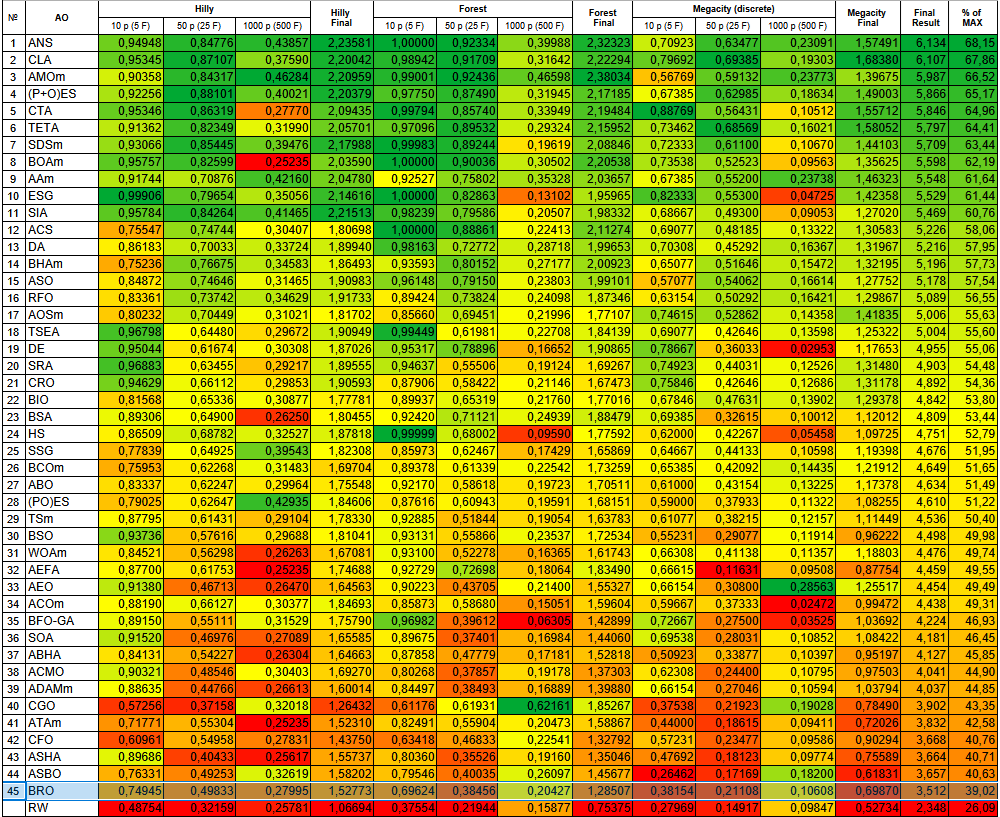
Figure 3. Color gradation of algorithms according to the corresponding tests
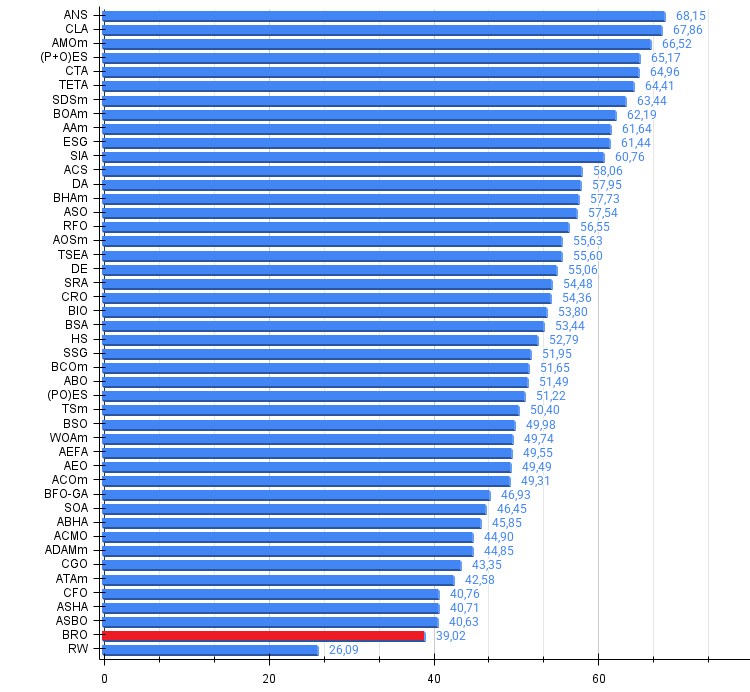
Figure 4. Histogram of algorithm testing results (scale from 0 to 100, the higher the better, where 100 is the maximum possible theoretical result, in the archive there is a script for calculating the rating table)
BRO pros and cons:
Pros:
- Interesting idea.
- Simple implementation.
- Promising development.
Cons:
- Weak results on discrete functions.
The article is accompanied by an archive with the current versions of the algorithm codes. The author of the article is not responsible for the absolute accuracy in the description of canonical algorithms. Changes have been made to many of them to improve search capabilities. The conclusions and judgments presented in the articles are based on the results of the experiments.
Programs used in the article
| # | Name | Type | Description |
|---|---|---|---|
| 1 | #C_AO.mqh | Include | Parent class of population optimization algorithms |
| 2 | #C_AO_enum.mqh | Include | Enumeration of population optimization algorithms |
| 3 | TestFunctions.mqh | Include | Library of test functions |
| 4 | TestStandFunctions.mqh | Include | Test stand function library |
| 5 | Utilities.mqh | Include | Library of auxiliary functions |
| 6 | CalculationTestResults.mqh | Include | Script for calculating results in the comparison table |
| 7 | Testing AOs.mq5 | Script | The unified test stand for all population optimization algorithms |
| 8 | Simple use of population optimization algorithms.mq5 | Script | A simple example of using population optimization algorithms without visualization |
| 9 | Test_AO_BRO.mq5 | Script | BRO test stand |
Translated from Russian by MetaQuotes Ltd.
Original article: https://www.mql5.com/ru/articles/17688
Warning: All rights to these materials are reserved by MetaQuotes Ltd. Copying or reprinting of these materials in whole or in part is prohibited.
This article was written by a user of the site and reflects their personal views. MetaQuotes Ltd is not responsible for the accuracy of the information presented, nor for any consequences resulting from the use of the solutions, strategies or recommendations described.


 MetaTrader 5 Machine Learning Blueprint (Part 9): Integrating Bayesian HPO into the Production Pipeline
 Creating Custom Indicators in MQL5 (Part 9): Order Flow Footprint Chart with Price Level Volume Tracking
 Neural Networks in Trading: Adaptive Detection of Market Anomalies (DADA)
 From Novice to Expert: Detecting Liquidity Zone Flips Using MQL5

- Free trading apps
- Over 8,000 signals for copying
- Economic news for exploring financial markets
You agree to website policy and terms of use