

From Novice to Expert: Detecting Liquidity Zone Flips Using MQL5
 4 756
4 756
 0
0

Contents
Introduction
Every trader who relies on support and resistance levels eventually encounters the same recurring challenge. A price level that has repeatedly acted as resistance—often confirmed by long upper wicks or bearish engulfing candles—is suddenly broken by a strong bullish move. The intuitive expectation is that the price will continue to rise, confirming the breakout. However, the market often behaves differently: price returns to the same level and treats it as new support, bouncing upward as though the level has changed its role.
What once acted as a barrier now appears to attract price. For many traders who treat support and resistance as fixed objects on the chart, this behavior can be confusing. In reality, this phenomenon is well known in technical analysis and is commonly referred to as role reversal (zone flip). Check the illustrations below. In Fig. 1, the zone is a demand zone (support), and the indicator has colored it green to represent support. In contrast, Fig. 2 shows that after price breaks below the zone, it begins to act as resistance. At this point, the system automatically transforms it and flips the color to red.
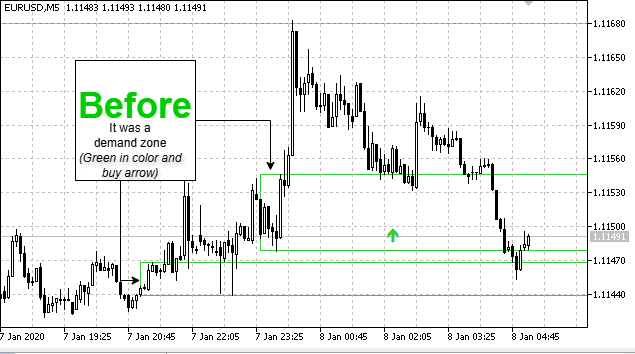
Fig. 1. Before Liquidity Flip
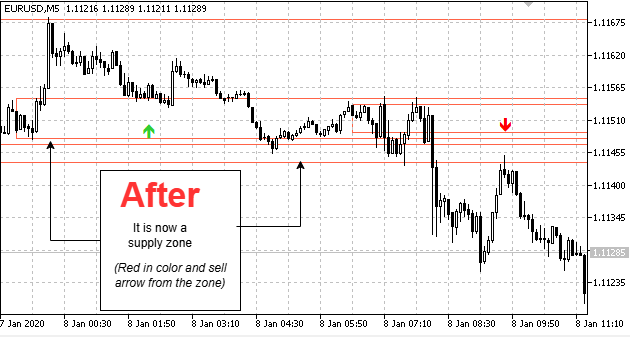
Fig. 2. After Liquidity Flip
A zone flip occurs when a previously respected support level becomes resistance after being broken, or when a previously respected resistance level becomes support after being broken. Although this concept is widely discussed in discretionary trading, it is rarely implemented in automated trading tools. Most indicators draw support and resistance zones as static objects that remain unchanged until they are manually modified or removed.
This limitation creates a major analytical gap. Markets are dynamic systems where liquidity is constantly redistributed. When a supply zone is decisively broken, it often becomes a demand zone. Likewise, a violated demand zone may transform into a future supply area. Static tools fail to capture this structural evolution, forcing traders to manually reinterpret chart levels after each breakout. This process is subjective, time-consuming, and prone to bias.
In this article, we address this problem by developing an intelligent indicator in MQL5 that automatically detects and manages liquidity zone flips. The indicator identifies supply and demand zones using higher-timeframe impulse movements and continuously monitors price action for violations that signal a role reversal.
When a sufficiently strong bullish move breaks a supply zone, the indicator automatically converts that zone into a demand zone. The rectangle’s color is updated, its lifetime is extended, and the zone becomes available again for new reaction signals. The same logic is applied in reverse when a demand zone is broken by strong bearish momentum.
The result is a dynamic visualization of market structure—a living map of supply and demand that evolves alongside price.
By the end of this article, you will not only understand the theory behind liquidity dynamics, breakout validation, and retest trading, but you will also build a practical analytical tool capable of adapting to the market’s constantly changing liquidity landscape.
Concept
The principle that a broken level can change its role is not a recent idea. Technical analysts have recognized it for nearly a century.
In the 1930s, Robert Rhea, a prominent interpreter of Dow Theory, noted that resistance levels often become support after they are successfully broken, and vice versa. His observations were based on the collective psychology of market participants. Traders who miss the initial breakout frequently place orders when the price retests the level, hoping to join the emerging trend. At the same time, traders who were positioned incorrectly may close their losing trades at that level, adding further order flow.
This dynamic creates a natural reinforcement of the level in its new role.
Later, John J. Murphy formalized this concept in the widely respected book Technical Analysis of the Financial Markets. The principle is now a core component of modern technical analysis, although implementing it programmatically remains challenging.
From a quantitative perspective, a liquidity zone can be defined by two price boundaries:
- Upper boundary—the highest price of the zone
- Lower boundary—the lowest price of the zone
A zone flip occurs when the price closes decisively beyond these boundaries on an impulsive candle that reflects genuine market participation rather than random volatility.
To define 'decisively' using objective criteria, we apply two conditions simultaneously:
1. Confirmed breakout:
Price must close outside the zone.
- Above the upper boundary for supply zones
- Below the lower boundary for demand zones
This requirement ensures that the breakout is not merely an intra-bar spike that is rejected before the candle closes.
2. Impulse strength condition:
The candle’s range (High − Low) must exceed a multiple of the zone’s height.
In practice, this multiplier typically ranges between 1.5 and 2.0, configurable by the user.
The zone’s height plays an important role in this calculation. Wider zones generally represent areas where larger volumes of orders were historically placed. Breaking such zones requires greater market participation. By comparing the breakout candle to the zone’s own dimensions, we obtain an adaptive measure of impulsiveness that scales naturally across all timeframes—from the one-minute chart to the weekly chart.
Liquidity zones become even more meaningful when they originate from higher timeframes (HTF). These levels often represent areas where institutional traders, banks, and large funds have placed significant orders.
For example, analyzing zones detected on the H1 timeframe while trading on an M15 chart helps filter out lower-timeframe noise and focuses attention on structurally important levels.
Our indicator detects these zones using a base-impulse pattern within historical data. The pattern consists of two elements:
- Base candle—a relatively small candle representing a brief consolidation period
- Impulse candle—a large candle that immediately follows the base and signals strong directional movement
The entire range of the base candle defines the boundaries of the zone. The impulse candle confirms that a substantial imbalance existed at that level.
This approach is inspired by the work of Sam Seiden, who popularized modern supply-and-demand trading concepts based on order-flow imbalances. According to this methodology, the final candle before a strong move indicates where institutional orders were accumulated, and the price may later revisit that area.
To ensure that only meaningful impulses generate zones, the indicator uses a configurable ratio multiplier, commonly set around 3.0. This means that the impulse candle must be at least three times larger than the base candle. Smaller moves are ignored, reducing noise and preventing weak zones from cluttering the chart.
The most distinctive feature of the indicator is its real-time zone-flip mechanism.
Traditional zone indicators draw rectangles based on historical conditions and leave them unchanged until they expire or are manually removed. Our implementation continuously evaluates every new bar against all active zones.
When an impulsive violation satisfies the two previously defined conditions, the indicator immediately performs the following actions:
- The original rectangle is removed.
- A new rectangle with the opposite role is drawn.
- The zone color changes to reflect the new classification:
- Lime green for demand
- Tomato red for supply
- The zone’s expiry time is extended forward from the moment of the breakout.
Importantly, the original start time of the zone remains unchanged. This prevents duplicate zones from being created when higher-timeframe data is recalculated.
By extending the expiry time, flipped zones remain visible long enough for traders to observe potential retests and trade reactions from the new level.
The result is a dynamic support-and-resistance mapping system that evolves in real time, reflecting the true behavior of liquidity in modern financial markets.
Implementation
We will build the indicator systematically. Each component is explained in enough detail for novice MQL5 programmers, while highlighting key architectural decisions for experienced developers. The complete source code is provided at the end of this section. Read the explanations first to understand how the components fit together.
Overview of the Indicator Structure
The indicator operates on any chart and any timeframe the user chooses to attach it to. It maintains an internal dynamic array of LiquidityZone structures, each representing a currently active zone with all its properties. On every tick of the market, the OnCalculate function is called and performs three distinct categories of work in a fixed sequence.
First, it checks whether a new bar has appeared on the user-selected higher timeframe. If a new HTF bar exists, it calls the UpdateZones function to scan the HTF data for any new base‑impulse patterns that qualify as valid zones.
Second, it checks for reaction signals by examining whether the price has entered any active zone and formed a recognizable reversal pattern such as an engulfing candle, a pin bar, or an inside bar breakout. When such a signal occurs, it plots an arrow on the chart and triggers an optional alert to notify the trader.
Third, and most importantly for this article, it checks for impulsive violations that would trigger a zone flip. If a bar closes outside a zone with sufficient range relative to the zone's height, the FlipZone function is called to change that zone's role and redraw it with the opposite color.
Input Parameters
The indicator exposes input parameters that allow traders to customize their behavior without modifying the source code. The inputs are grouped into logical categories for clarity and ease of use.
The zone detection group controls how zones are identified on the higher timeframe, including the timeframe itself, how many bars to analyze, the impulse-size ratio multiplier, how far to extend rectangles into the future, and visual appearance settings such as colors, fill options, and transparency.
The reaction signals group controls the appearance and behavior of entry arrows when the price respects a zone with a reversal pattern. The zone-flip group includes (1) a boolean switch to enable/disable flipping and (2) a multiplier that sets the minimum breakout impulse required to trigger a flip.
This design allows traders complete flexibility to adapt the indicator to their specific trading style and the unique characteristics of the instruments they trade.
//--- Inputs for zone detection (higher timeframe)
input ENUM_TIMEFRAMES ZoneTimeframe   = PERIOD_H1;      // Timeframe for zone detection
input int             LookbackBars    = 1000;          // Number of bars on higher TF to look back
input double          RatioMultiplier = 3.0;           // Ratio Multiplier for zone formation
input int             ExtendBars      = 50;            // Bars to extend rectangle right (on higher TF)
input bool            FillRectangles  = true;         // Fill or just border?
input color           DemandZoneColor = clrLimeGreen;  // Demand zone rectangle color
input color           SupplyZoneColor = clrTomato;     // Supply zone rectangle color
input uchar           ZoneOpacity     = 40;            // 0-255 transparency

//--- Inputs for reaction signals (current timeframe)
input color           DemandArrowColor = clrLimeGreen; // Buy arrow color
input color           SupplyArrowColor = clrRed;        // Sell arrow color
input int             ArrowSize        = 1;            // Arrow width

//--- Inputs for zone flipping (new intelligence)
input bool            EnableZoneFlipping = true;      // Enable flipping zones after impulsive violation
input double          ViolationMultiplier = 1.5;      // Multiplier for impulsive violation (zone height)
Zone Structure and Global Variables
The foundation of the indicator's data management is the LiquidityZone structure, which encapsulates all information needed to represent, draw, and manage a single zone throughout its lifecycle. This structure includes double-precision floating-point values for the high and low price boundaries, which define the vertical extent of the visual rectangle. It includes datetime fields for the start time (the opening time of the bar that formed the zone) and the expiry time, calculated as the start time plus the number of extension bars multiplied by the higher timeframe period, in seconds.
This expiry mechanism ensures that zones do not persist indefinitely, as market structure evolves and old levels lose relevance. A boolean flag indicates whether the zone is a demand zone, meaning it should act as support, or a supply zone, meaning it should act as resistance. Another boolean flag tracks whether this zone has already generated a reaction signal, preventing multiple alerts and arrows from the same zone and reducing visual clutter on the chart. The global zones array holds all currently active zones, growing and shrinking dynamically as new zones are added and expired zones are removed.
//+------------------------------------------------------------------+
//| Structure representing a liquidity zone                          |
//+------------------------------------------------------------------+
struct LiquidityZone
  {
   double   high;          //--- zone top price
   double   low;           //--- zone bottom price
   datetime start_time;    //--- bar time where zone was formed (or flipped)
   datetime expiry_time;   //--- time when zone expires (start + ExtendBars * htfPeriod)
   bool     demand;        //--- true = demand, false = supply
   bool     triggered;     //--- true if a signal already fired in this zone
  };

//--- Dynamic array storing currently active liquidity zones
LiquidityZone zones[];
In addition to the zone array, several important global variables support the indicator's operation. The myPoint variable stores the point value adjusted for 5‑digit and 3‑digit brokers, ensuring that arrow placement is consistent across different symbol types. The htfPeriodSeconds and currentPeriodSeconds variables store the period lengths in seconds for time calculations, allowing precise expiry management. The lastHtfUpdateTime variable tracks when zones were last updated to avoid unnecessary recalculations, and the lastAlertTime variable provides throttling for alerts so that the same signal does not trigger multiple times.
Initialization: OnInit
The OnInit function executes once when the indicator is first attached to a chart or when the terminal restarts with the indicator already attached. Its responsibilities include setting up indicator buffers to store arrow data, configuring the visual properties of those arrows, initializing global variables, and preparing the indicator for its first update.
The function begins by obtaining the current symbol's point value and multiplying it by ten for brokers with fractional pip pricing, ensuring that arrows are placed at a visually appropriate distance from price bars. It then sets up two indicator buffers, one for buy arrows and one for sell arrows, using the SetIndexBuffer function with the INDICATOR_DATA flag. Both buffers are configured as time series using ArraySetAsSeries with true, which makes index zero refer to the most recent bar, a convenience that simplifies later calculations.
The PlotIndexSetInteger and PlotIndexSetString functions configure the drawing style, arrow codes, labels, colors, and widths for both arrow types. Finally, the function calculates the period seconds for both the current timeframe and the higher timeframe, providing a fallback value of one hour if the PeriodSeconds function returns an invalid value, and initializes the update timestamp to zero to force an initial zone scan on the first OnCalculate call.
//+------------------------------------------------------------------+
//| Initializes the indicator and configures buffers and plots       |
//+------------------------------------------------------------------+
int OnInit()
  {
   myPoint = Point();
   if(_Digits == 5 || _Digits == 3)
      myPoint *= 10;

   //--- Set arrow buffers
   SetIndexBuffer(0, BuyArrow, INDICATOR_DATA);
   SetIndexBuffer(1, SellArrow, INDICATOR_DATA);
   ArraySetAsSeries(BuyArrow, true);
   ArraySetAsSeries(SellArrow, true);

   PlotIndexSetInteger(0, PLOT_DRAW_TYPE, DRAW_ARROW);
   PlotIndexSetInteger(0, PLOT_ARROW, 233);      //--- up arrow
   PlotIndexSetString(0, PLOT_LABEL, "Buy");
   PlotIndexSetInteger(0, PLOT_LINE_COLOR, DemandArrowColor);
   PlotIndexSetInteger(0, PLOT_LINE_WIDTH, ArrowSize);

   PlotIndexSetInteger(1, PLOT_DRAW_TYPE, DRAW_ARROW);
   PlotIndexSetInteger(1, PLOT_ARROW, 234);      //--- down arrow
   PlotIndexSetString(1, PLOT_LABEL, "Sell");
   PlotIndexSetInteger(1, PLOT_LINE_COLOR, SupplyArrowColor);
   PlotIndexSetInteger(1, PLOT_LINE_WIDTH, ArrowSize);

   ArrayInitialize(BuyArrow, EMPTY_VALUE);
   ArrayInitialize(SellArrow, EMPTY_VALUE);

   //--- Period seconds for time calculations
   currentPeriodSeconds = PeriodSeconds();
   htfPeriodSeconds     = PeriodSeconds(ZoneTimeframe);

   if(htfPeriodSeconds <= 0)
      htfPeriodSeconds = 3600;   //--- fallback to 1 hour

   lastHtfUpdateTime = 0;

   return(INIT_SUCCEEDED);
  }
Deinitialization and Drawing Utilities
Proper cleanup is essential for any indicator that creates graphical objects, as orphaned rectangles can accumulate on charts and cause confusion. The OnDeinit function is called automatically when the indicator is removed, and it calls DeleteAllZones to perform this cleanup. The DeleteAllZones function iterates through all objects on the chart using ObjectsTotal with the parameters for the current chart, all object types, and all subwindows.
For each object, it retrieves the object name with ObjectName and checks whether the name begins with the prefix LiqZone_ using StringFind. If a match is found, the object is deleted with ObjectDelete. After the loop completes, ChartRedraw ensures the chart updates immediately to reflect the removal of the objects.
//+------------------------------------------------------------------+
//| Deletes all liquidity zone rectangles from the chart             |
//+------------------------------------------------------------------+
void DeleteAllZones()
  {
   int total = ObjectsTotal(0, 0, -1);

   for(int i = total - 1; i >= 0; i--)
     {
      string name = ObjectName(0, i);

      if(StringFind(name, "LiqZone_") == 0)
         ObjectDelete(0, name);
     }

   ChartRedraw();
  }
//+------------------------------------------------------------------+
The DrawZone function encapsulates all the logic for creating and formatting zone rectangles. It begins by constructing a unique object name from the start and expiry times, ensuring that multiple zones with different time ranges do not conflict. If an object with that name already exists, it is deleted to avoid duplication. The zone color is determined by the isDemand parameter, which selects either the demand or supply color from the input settings.
ObjectCreate creates a rectangle object with the specified time and price coordinates, and a series of ObjectSetInteger calls configure its appearance: the outline color, solid line style, line width, fill option, background placement, and selectable property. If filling is enabled, ColorToARGB combines the zone color with the user's opacity setting to create a semi‑transparent fill, which is then applied as the background color. This results in visually appealing zones that do not completely obscure the price candles behind them.
//+------------------------------------------------------------------+
//| Draws a liquidity zone rectangle on the chart                    |
//+------------------------------------------------------------------+
void DrawZone(datetime start_time,
              datetime expiry_time,
              double   price_top,
              double   price_bottom,
              const bool isDemand)
  {
   string obj_name = "LiqZone_" + IntegerToString(start_time) + "_" + IntegerToString(expiry_time);

   if(ObjectFind(0, obj_name) >= 0)
      ObjectDelete(0, obj_name);

   color zone_color = isDemand ? DemandZoneColor : SupplyZoneColor;

   if(ObjectCreate(0, obj_name, OBJ_RECTANGLE, 0,
                   start_time, price_top, expiry_time, price_bottom))
     {
      ObjectSetInteger(0, obj_name, OBJPROP_COLOR, zone_color);
      ObjectSetInteger(0, obj_name, OBJPROP_STYLE, STYLE_SOLID);
      ObjectSetInteger(0, obj_name, OBJPROP_WIDTH, 1);
      ObjectSetInteger(0, obj_name, OBJPROP_FILL, FillRectangles);
      ObjectSetInteger(0, obj_name, OBJPROP_BACK, true);       //--- behind price
      ObjectSetInteger(0, obj_name, OBJPROP_SELECTABLE, false);

      if(FillRectangles)
        {
         color fill_clr = (color)ColorToARGB(zone_color, ZoneOpacity);
         ObjectSetInteger(0, obj_name, OBJPROP_BGCOLOR, fill_clr);
        }
     }
  }
//+------------------------------------------------------------------+
Updating Zones from Higher Timeframe
The UpdateZones function represents the core detection engine of the indicator, responsible for scanning higher timeframe data and identifying new liquidity zones based on the base‑impulse pattern. The function begins by copying the required data from the higher timeframe using the CopyOpen, CopyClose, CopyHigh, CopyLow, and CopyTime functions. It requests LookbackBars, which provide a substantial history for zone detection while avoiding excessive memory usage.
If the copy operation fails or returns zero bars, the function returns immediately. After successfully copying the data, ArraySetAsSeries converts all arrays into series, so index 0 represents the most recent bar. This orientation simplifies the subsequent loop because we can iterate from older bars to newer bars by decreasing the index.
//+------------------------------------------------------------------+
//| Updates liquidity zones using higher timeframe structure         |
//+------------------------------------------------------------------+
void UpdateZones()
  {
   double   htf_open[], htf_close[], htf_high[], htf_low[];
   datetime htf_time[];

   int htf_bars = CopyOpen(Symbol(), ZoneTimeframe, 0, LookbackBars, htf_open);

   if(htf_bars <= 0)
      return;

   CopyClose(Symbol(), ZoneTimeframe, 0, LookbackBars, htf_close);
   CopyHigh(Symbol(),  ZoneTimeframe, 0, LookbackBars, htf_high);
   CopyLow(Symbol(),   ZoneTimeframe, 0, LookbackBars, htf_low);
   CopyTime(Symbol(),  ZoneTimeframe, 0, LookbackBars, htf_time);

   ArraySetAsSeries(htf_open,  true);
   ArraySetAsSeries(htf_close, true);
   ArraySetAsSeries(htf_high,  true);
   ArraySetAsSeries(htf_low,   true);
   ArraySetAsSeries(htf_time,  true);

   for(int i = htf_bars - 5; i >= 2; i--)
     {
      int base_idx     = i + 2;
      int impulse_idx = i + 1;

      if(base_idx >= htf_bars)
         continue;

      double base_range     = htf_high[base_idx] - htf_low[base_idx];
      double impulse_range = htf_high[impulse_idx] - htf_low[impulse_idx];

      if(base_range <= 0)
         continue;

      //--- Demand zone condition (both bars bullish, impulse expands)
      if(htf_open[base_idx] < htf_close[base_idx] &&
         htf_open[impulse_idx] < htf_close[impulse_idx] &&
         impulse_range >= base_range * RatioMultiplier)
        {
         bool exists = false;

         for(int j = 0; j < ArraySize(zones); j++)
           {
            if(zones[j].start_time == htf_time[base_idx])
              {
               exists = true;
               break;
              }
           }

         if(!exists)
           {
            LiquidityZone z;

            z.high        = htf_high[base_idx];
            z.low         = htf_low[base_idx];
            z.start_time  = htf_time[base_idx];
            z.expiry_time = z.start_time + ExtendBars * htfPeriodSeconds;
            z.demand      = true;
            z.triggered   = false;

            int size = ArraySize(zones);
            ArrayResize(zones, size + 1);
            zones[size] = z;

            DrawZone(z.start_time, z.expiry_time, z.high, z.low, true);
           }
        }

      //--- Supply zone condition (both bars bearish, impulse expands)
      if(htf_open[base_idx] > htf_close[base_idx] &&
         htf_open[impulse_idx] > htf_close[impulse_idx] &&
         impulse_range >= base_range * RatioMultiplier)
        {
         bool exists = false;

         for(int j = 0; j < ArraySize(zones); j++)
           {
            if(zones[j].start_time == htf_time[base_idx])
              {
               exists = true;
               break;
              }
           }

         if(!exists)
           {
            LiquidityZone z;

            z.high        = htf_high[base_idx];
            z.low         = htf_low[base_idx];
            z.start_time  = htf_time[base_idx];
            z.expiry_time = z.start_time + ExtendBars * htfPeriodSeconds;
            z.demand      = false;
            z.triggered   = false;

            int size = ArraySize(zones);
            ArrayResize(zones, size + 1);
            zones[size] = z;

            DrawZone(z.start_time, z.expiry_time, z.high, z.low, false);
           }
        }
     }
  }
//+------------------------------------------------------------------+
The scanning loop begins at index (htf_bars − 5), which provides a safety margin to ensure we always have enough bars ahead for the base and impulse indices, and continues down to index 2. For each iteration, we calculate the base index as i plus 2 and the impulse index as i plus 1. This offset pattern means we are looking for a base bar followed immediately by an impulse bar, the classic supply-and-demand formation. After verifying that the base index is within the array bounds, we calculate the ranges of both bars and skip any bars with zero or negative range, which would indicate invalid data.
For a demand zone, we require that both the base bar and the impulse bar be bullish, meaning their closes are above their opens, and that the impulse range be at least RatioMultiplier times larger than the base range. If these conditions are met, we first check whether a zone with the same start time already exists in the zones array. This duplicate check is critical because UpdateZones is called whenever a new HTF bar appears, and without this check, we would add the same zone repeatedly.
If no duplicate exists, we create a new LiquidityZone structure, populate all its fields, including the expiry time calculated from the start time, and add it to the zones array using ArrayResize. Finally, we call DrawZone to create the visual rectangle on the chart with the appropriate color for a demand zone. The supply zone detection follows the same pattern but requires both bars to be bearish.
Removing Expired Zones
Market structure is not permanent, and zones that were relevant in the past eventually lose their significance. The RemoveExpiredZones function handles this by periodically cleaning up zones whose expiry time has passed. It begins by obtaining the current server time with TimeCurrent, ensuring that expiry is based on the same clock the broker uses for bar timestamps. The function then iterates backward through the zones array using a decreasing index, which is essential because we will be removing elements and shifting the array.
For each zone, if the current time is greater than the zone's expiry time, we construct the object name using the stored start and expiry times, delete the rectangle from the chart, and then remove the zone from the array by shifting all subsequent elements left by one position. Finally, ArrayResize reduces the array size by one to complete the removal. This backward iteration pattern ensures we never skip an element when shifting indexes during the loop.
//+------------------------------------------------------------------+
//| Removes expired liquidity zones and deletes their chart objects  |
//+------------------------------------------------------------------+
void RemoveExpiredZones()
  {
   datetime current_time = TimeCurrent();

   for(int i = ArraySize(zones) - 1; i >= 0; i--)
     {
      if(current_time > zones[i].expiry_time)
        {
         string obj_name = "LiqZone_" + IntegerToString(zones[i].start_time) + "_" + IntegerToString(zones[i].expiry_time);

         ObjectDelete(0, obj_name);

         for(int j = i; j < ArraySize(zones) - 1; j++)
            zones[j] = zones[j + 1];

         ArrayResize(zones, ArraySize(zones) - 1);
        }
     }
  }
//+------------------------------------------------------------------+
Flipping a Zone
The FlipZone function embodies the core intelligence that distinguishes this indicator from conventional zone tools. When called with a zone index, a boolean indicating the new demand status, and the violation time, this function completely transforms an existing zone to reflect the new market reality. It begins by validating the zone index to ensure it is within the current array bounds. It then constructs the object name of the existing rectangle and deletes it, removing the old visual representation from the chart. The zone's demand flag is updated to the new value, which will change its color in subsequent drawings.
The expiry time is extended from the violation time by adding the same ExtendBars multiplied by the higher timeframe period seconds, giving the flipped zone a fresh lifespan equal to that of newly formed zones. The triggered flag is reset to false, allowing new reaction signals to be generated from this zone now that its role has changed. Finally, DrawZone is called with the new demand status, creating a new rectangle in the opposite color to visually signal the role reversal to the trader. Note that we deliberately preserve the original start_time, which prevents the HTF update function from recreating the original zone later because the start_time already exists in the zones array.
//+------------------------------------------------------------------+
//| Flips an existing liquidity zone after a structural violation    |
//+------------------------------------------------------------------+
void FlipZone(const int zoneIndex,
              const bool newDemand,
              const datetime violation_time)
  {
   if(zoneIndex < 0 || zoneIndex >= ArraySize(zones))
      return;

   string obj_name = "LiqZone_" + IntegerToString(zones[zoneIndex].start_time) + "_" + IntegerToString(zones[zoneIndex].expiry_time);

   ObjectDelete(0, obj_name);

   zones[zoneIndex].demand     = newDemand;
   zones[zoneIndex].expiry_time = violation_time + ExtendBars * htfPeriodSeconds;
   zones[zoneIndex].triggered   = false;

   DrawZone(zones[zoneIndex].start_time,
            zones[zoneIndex].expiry_time,
            zones[zoneIndex].high,
            zones[zoneIndex].low,
            newDemand);
  }
//+------------------------------------------------------------------+
Reversal Pattern Functions
To generate actionable entry signals when price respects a zone, the indicator includes a comprehensive set of candlestick pattern recognition functions. These functions operate on the current timeframe data arrays that are updated in OnCalculate, specifically Open, Close, High, and Low. The BullishEngulfing function identifies a two‑bar pattern where the current bar is bullish, and its body engulfs the previous bearish bar's body. The BearishEngulfing function identifies the opposite pattern. The BullishPinBar function recognizes candles with a long lower wick at least twice the size of the body, indicating rejection of lower prices and potential buying pressure.
The BearishPinBar function identifies candles with a long upper wick, indicating rejection of higher prices. The BullishInsideBreak function detects a consolidation pattern where price breaks above the high of a previous inside bar, while BearishInsideBreak detects breaks below the low. These individual pattern functions are combined in DemandReversal and SupplyReversal, which return true if any of the relevant bullish or bearish patterns are present. This modular design makes it easy to add new pattern types in the future without disrupting the existing logic.
//+------------------------------------------------------------------+
//| Checks for a bullish engulfing candlestick pattern               |
//+------------------------------------------------------------------+
bool BullishEngulfing(const int i)
  {
   if(Close[i] > Open[i] &&
      Close[i+1] < Open[i+1] &&
      Close[i] > Open[i+1] &&
      Open[i] < Close[i+1])
      return(true);

   return(false);
  }

//+------------------------------------------------------------------+
//| Checks for a bearish engulfing candlestick pattern               |
//+------------------------------------------------------------------+
bool BearishEngulfing(const int i)
  {
   if(Close[i] < Open[i] &&
      Close[i+1] > Open[i+1] &&
      Open[i] > Close[i+1] &&
      Close[i] < Open[i+1])
      return(true);

   return(false);
  }

//+------------------------------------------------------------------+
//| Checks for a bullish pin bar reversal pattern                    |
//+------------------------------------------------------------------+
bool BullishPinBar(const int i)
  {
   double body  = MathAbs(Close[i] - Open[i]);
   double lower = MathMin(Open[i], Close[i]) - Low[i];

   if(lower > body * 2)
      return(true);

   return(false);
  }

//+------------------------------------------------------------------+
//| Checks for a bearish pin bar reversal pattern                    |
//+------------------------------------------------------------------+
bool BearishPinBar(const int i)
  {
   double body  = MathAbs(Close[i] - Open[i]);
   double upper = High[i] - MathMax(Open[i], Close[i]);

   if(upper > body * 2)
      return(true);

   return(false);
  }

//+------------------------------------------------------------------+
//| Detects bullish breakout from an inside bar structure            |
//+------------------------------------------------------------------+
bool BullishInsideBreak(const int i)
  {
   if(High[i] < High[i+1] && Low[i] > Low[i+1])
     {
      if(Close[i] > High[i+1])
         return(true);
     }

   return(false);
  }

//+------------------------------------------------------------------+
//| Detects bearish breakout from an inside bar structure            |
//+------------------------------------------------------------------+
bool BearishInsideBreak(const int i)
  {
   if(High[i] < High[i+1] && Low[i] > Low[i+1])
     {
      if(Close[i] < Low[i+1])
         return(true);
     }

   return(false);
  }

//+------------------------------------------------------------------+
//| Confirms bullish reversal conditions inside a demand zone        |
//+------------------------------------------------------------------+
bool DemandReversal(const int i)
  {
   if(BullishEngulfing(i))
      return(true);

   if(BullishPinBar(i))
      return(true);

   if(BullishInsideBreak(i))
      return(true);

   return(false);
  }

//+------------------------------------------------------------------+
//| Confirms bearish reversal conditions inside a supply zone        |
//+------------------------------------------------------------------+
bool SupplyReversal(const int i)
  {
   if(BearishEngulfing(i))
      return(true);

   if(BearishPinBar(i))
      return(true);

   if(BearishInsideBreak(i))
      return(true);

   return(false);
  }
//+------------------------------------------------------------------+
OnCalculate—Putting It All Together
OnCalculate is called on every tick. It orchestrates the other functions in a fixed sequence. It begins with a safety check: if rates_total is less than 5, we do not have enough bars for reliable pattern detection, and the function returns zero immediately. Next, we copy the current timeframe data into our global arrays using CopyOpen, CopyClose, CopyHigh, CopyLow, and CopyTime. We request up to 5000 bars but no more than rates_total, which provides ample history while avoiding excessive memory usage. After copying, we set all arrays as series using ArraySetAsSeries, which makes index zero refer to the most recent bar and simplifies subsequent indexing.
//+------------------------------------------------------------------+
//| Calculates indicator values and manages liquidity zone reactions |
//+------------------------------------------------------------------+
int OnCalculate(const int rates_total,
                const int prev_calculated,
                const datetime &time[],
                const double &open[],
                const double &high[],
                const double &low[],
                const double &close[],
                const long &tick_volume[],
                const long &volume[],
                const int &spread[])
  {
   //--- Require minimum bars
   if(rates_total < 5)
      return(0);

   int barsNeeded = MathMin(rates_total, 5000);

   CopyOpen(Symbol(), PERIOD_CURRENT, 0, barsNeeded, Open);
   CopyClose(Symbol(), PERIOD_CURRENT, 0, barsNeeded, Close);
   CopyHigh(Symbol(), PERIOD_CURRENT, 0, barsNeeded, High);
   CopyLow(Symbol(), PERIOD_CURRENT, 0, barsNeeded, Low);
   CopyTime(Symbol(), PERIOD_CURRENT, 0, barsNeeded, TimeArray);

   ArraySetAsSeries(Open,       true);
   ArraySetAsSeries(Close,      true);
   ArraySetAsSeries(High,       true);
   ArraySetAsSeries(Low,        true);
   ArraySetAsSeries(TimeArray, true);

   //--- Update higher timeframe zones if new bar
   datetime latestHtfTime = iTime(Symbol(), ZoneTimeframe, 0);
   if(latestHtfTime != lastHtfUpdateTime)
     {
      UpdateZones();
      lastHtfUpdateTime = latestHtfTime;
     }

   RemoveExpiredZones();

   int signal_bar = 1;
   if(signal_bar >= rates_total)
      return(rates_total);

   //--- First, check for reversal signals
   for(int z = 0; z < ArraySize(zones); z++)
     {
      if(TimeCurrent() > zones[z].expiry_time)
         continue;

      if(zones[z].triggered)
         continue;

      if(PriceInsideZone(signal_bar, zones[z], High, Low))
        {
         if(zones[z].demand)
           {
            if(DemandReversal(signal_bar))
              {
               BuyArrow[signal_bar] = Low[signal_bar] - 5 * myPoint;
               zones[z].triggered   = true;

               if(TimeArray[signal_bar] != lastAlertTime)
                 {
                  Alert("Demand Zone BUY Reaction ", Symbol(), " ", EnumToString(_Period));
                  lastAlertTime = TimeArray[signal_bar];
                 }
              }
           }
         else
           {
            if(SupplyReversal(signal_bar))
              {
               SellArrow[signal_bar] = High[signal_bar] + 5 * myPoint;
               zones[z].triggered     = true;

               if(TimeArray[signal_bar] != lastAlertTime)
                 {
                  Alert("Supply Zone SELL Reaction ", Symbol(), " ", EnumToString(_Period));
                  lastAlertTime = TimeArray[signal_bar];
                 }
              }
           }
        }
     }

   //--- Second, check for impulsive violations (zone flipping)
   if(EnableZoneFlipping)
     {
      for(int z = 0; z < ArraySize(zones); z++)
        {
         if(TimeCurrent() > zones[z].expiry_time)
            continue;

         double zoneHeight = zones[z].high - zones[z].low;
         double barRange   = High[signal_bar] - Low[signal_bar];

         if(!zones[z].demand)   //--- supply zone
           {
            if(Close[signal_bar] > zones[z].high &&
               Close[signal_bar] > Open[signal_bar] &&
               barRange >= zoneHeight * ViolationMultiplier)
              {
               FlipZone(z, true, TimeArray[signal_bar]);
              }
           }
         else  //--- demand zone
           {
            if(Close[signal_bar] < zones[z].low &&
               Close[signal_bar] < Open[signal_bar] &&
               barRange >= zoneHeight * ViolationMultiplier)
              {
               FlipZone(z, false, TimeArray[signal_bar]);
              }
           }
        }
     }

   return(rates_total);
  }
//+------------------------------------------------------------------+
After preparing the data arrays, OnCalculate checks whether a new, higher timeframe bar has appeared by calling iTime for the zone timeframe and comparing it to the stored lastHtfUpdateTime. If they differ, indicating a new bar, UpdateZones is called to scan for new zones, and lastHtfUpdateTime is updated. Next, RemoveExpiredZones cleans up any zones whose expiry time has passed, keeping the zones array current and the chart uncluttered.
The indicator then sets signal_bar to 1, which represents the most recently completed bar, the standard choice for trading system signals because it avoids repainting and lookahead bias. If signal_bar is beyond the available bars, the function returns rates_total without further processing. The reversal signal loop iterates through all active zones, skipping any that are expired or have already triggered a signal.
For each zone, it calls PriceInsideZone to check whether the signal bar's price range overlaps the zone's price range. If overlap exists and the zone is a demand zone, it checks for bullish reversal patterns using DemandReversal. When a pattern is found, it sets the BuyArrow buffer at the signal bar index to a value slightly below the bar's low, which causes an up arrow to be drawn at that location on the chart.
The zone's triggered flag is set to true to prevent multiple signals, and an alert is triggered with throttling based on the bar's time to avoid repeated notifications. The supply zone case follows the same pattern, with sell arrows placed above the bar's high.
The final section of OnCalculate handles zone flipping, but only if the EnableZoneFlipping input is set to true. It again iterates through all active zones, skipping expired ones. For each zone, it calculates the zone's height and the current signal bar's range. For supply zones, it checks whether the close is above the zone's high, indicating a breakout, whether the bar is bullish with the close above the open, and whether the bar's range meets or exceeds the zone height multiplied by ViolationMultiplier. If all three conditions are satisfied, it calls FlipZone with the new demand status set to true. For demand zones, it checks for close below the zone's low, a bearish bar, and sufficient range, then calls FlipZone with new demand status false. This two‑pass approach ensures that zones are flipped only when genuinely impulsive breakouts occur, avoiding false flips on marginal moves or wick‑throughs.
The complete source code is provided at the end of the article. Copy the code into MetaEditor (MT5), compile it, and attach it to a chart. Then proceed to the Testing and Results section to evaluate performance.
Testing and Results
We tested the indicator on EURUSD using an M5 chart with zone detection set to M30, running the Strategy Tester. This setup allowed us to observe how higher‑timeframe zones behaved on a lower timeframe.
Throughout the test, we paid close attention to the flipping mechanism. When a red (supply) zone was broken impulsively to the upside, its color immediately changed to green (demand). Conversely, a green (demand) zone broken decisively to the downside flipped to red. This color change happened in real time and was easy to spot on the chart.
The key observation was that flips occurred frequently—dozens of times during the six months—demonstrating that the indicator actively adapts to evolving market structure. After a flip, the zone no longer reflected its original character; instead, it began to act as support or resistance in the opposite direction. For example, a former supply zone that flipped to demand often produced new buy signals when the price retested it from above.
Traders using the indicator could instantly see when an impulsive move had invalidated a zone. The color change served as an unambiguous alert that the original setup was no longer valid and that a new potential trading opportunity might be forming on the opposite side. This visual feedback helped avoid false expectations and kept the trader aligned with the current market flow.
Below is an animated image showing the strategy visualization.
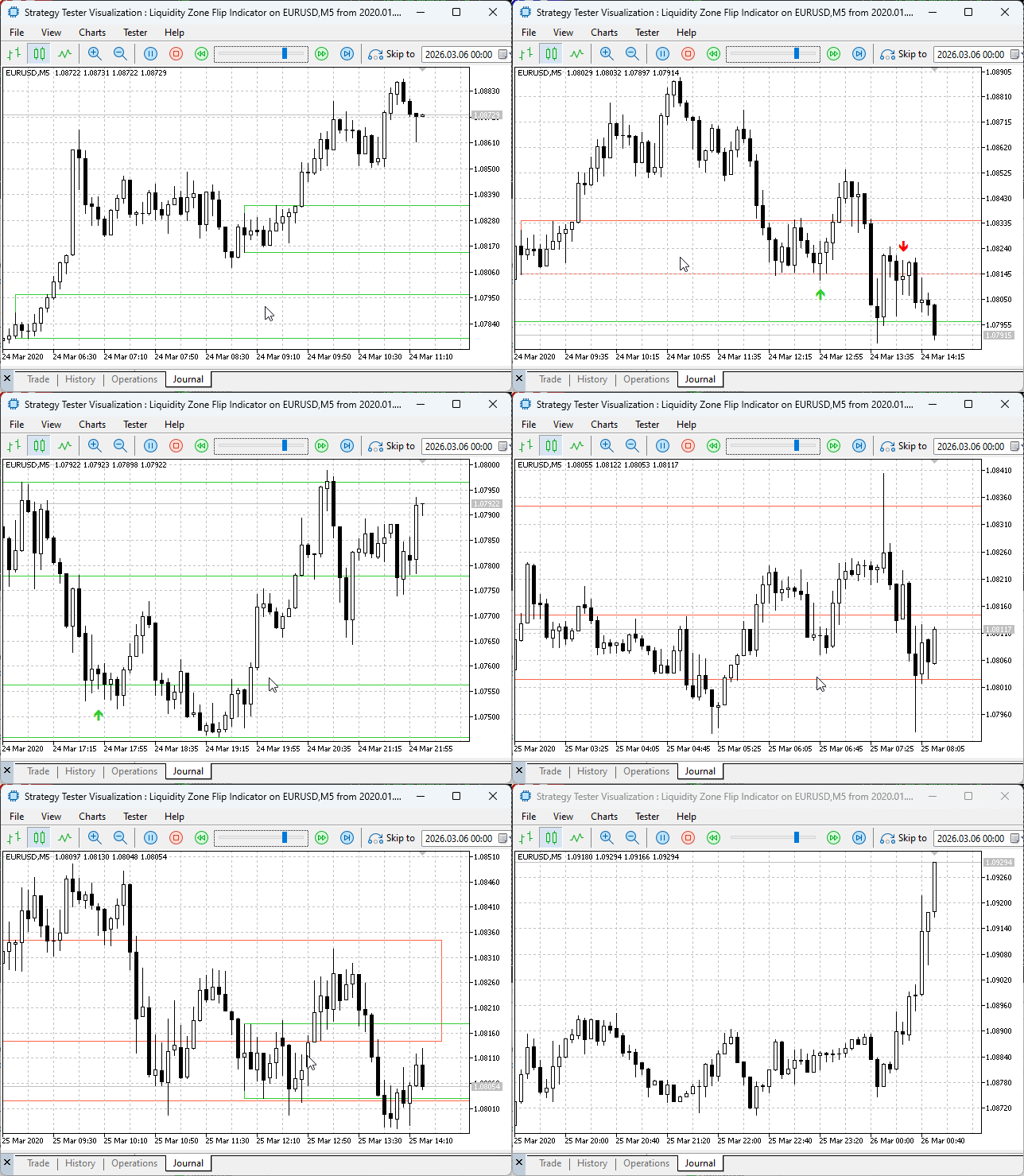
Fig. 3. Liquidity Zone Flip Indicator—Strategy Tester Visualization
Conclusion
In this article, we successfully designed, implemented, and tested an MQL5 indicator that identifies liquidity zones on higher timeframes using base‑impulse patterns and dynamically flips those zones when price breaks out impulsively—changing their roles from supply to demand and vice versa.
The key achievement is the dynamic zone-flip mechanism, which represents a significant advancement over static tools. When a red supply zone was broken impulsively to the upside, its color flipped to green demand, and vice versa. This visual feedback, observed repeatedly during our EURUSD test (M5 chart with M30 zone detection), provided immediate, intuitive confirmation of structural shifts that might otherwise go unnoticed. Traders can see at a glance when a setup no longer holds and when a new opportunity is forming.
The automated detection eliminates subjective manual drawing, while persistent storage ensures flipped zones survive higher timeframe refreshes. Reaction signals based on candlestick patterns turn the indicator into a complete trading system component.
What was once a static liquidity map now becomes a living representation of market structure, adapting continuously to price action and giving traders unprecedented insight into institutional order flow. Future enhancements could include multi‑timeframe confluence detection or integration with volume‑based confirmation, but the current version already provides a robust foundation for liquidity‑based trading.
Key Lessons
| Key Lessons | Description: |
|---|---|
| Structure design for data persistence. | Using a custom struct (LiquidityZone) to encapsulate all zone properties enables clean organization of persistent data across indicator ticks and allows for easy expansion with new features. |
| Dynamic array management with backward iteration: | Removing elements from an array while iterating requires backward loops to prevent index shifting issues; this pattern is essential for clean removal of expired zones. |
| Duplicate prevention using unique identifiers: | Checking for existing start_time values before adding new zones prevents duplication when HTF updates run multiple times, a critical pattern for any system that updates external data sources. |
| Object naming conventions for graphical elements: | Creating unique object names using timestamps (LiqZone_starttime_expirytime) allows for precise deletion and management of individual chart objects without affecting other drawings. |
| Series array orientation simplifies indexing. | Setting arrays as series (ArraySetAsSeries with true) makes index 0 represent the most recent bar, significantly simplifying calculations and improving code readability. |
| State tracking with boolean flags: | Using triggered flags within zones prevents duplicate signals and alerts, a simple but powerful pattern for managing event-based systems without complex history tracking. |
| Modular function decomposition: | Breaking pattern recognition into separate functions (BullishEngulfing, BearishPinBar, etc.) creates reusable, testable components that can be easily extended with new patterns. |
| Multi-timeframe data handling: | Copying data from higher timeframes within an indicator requires careful buffer management and periodic updates only when new HTF bars appear to optimize performance. |
| Parameter-driven design for flexibility: | Exposing key thresholds as input parameters (RatioMultiplier, ViolationMultiplier) allows users to adapt the indicator without code changes and enables systematic optimization. |
| Alert throttling prevents notification fatigue. | Storing the last alert time and comparing it with the current bar time ensures alerts fire only once per bar, a critical usability feature for live trading systems. |
Attachments
| File Name | Version | Type | Description |
|---|---|---|---|
| LiquidityZoneFlipIndicator.mq5 | 4.00 | Source Code | Complete MQL5 source code with zone-flip logic, including liquidity zone detection, dynamic zone-flipping, reaction signals, and expiry management. |
Warning: All rights to these materials are reserved by MetaQuotes Ltd. Copying or reprinting of these materials in whole or in part is prohibited.
This article was written by a user of the site and reflects their personal views. MetaQuotes Ltd is not responsible for the accuracy of the information presented, nor for any consequences resulting from the use of the solutions, strategies or recommendations described.

 Creating Custom Indicators in MQL5 (Part 9): Order Flow Footprint Chart with Price Level Volume Tracking
 MQL5 Trading Tools (Part 25): Expanding to Multiple Distributions with Interactive Switching
 Battle Royale Optimizer (BRO)
 Neural Networks in Trading: Dual Clustering of Multivariate Time Series (Final Part)

- Free trading apps
- Over 8,000 signals for copying
- Economic news for exploring financial markets
You agree to website policy and terms of use