

MetaTrader 5 and the MQL5 Economic Calendar: How to Turn News into a Reproducible Trading System
 6 350
6 350
 9
9

Introduction
The main problems of the modern news trader are fragmented toolset and the lack of a systematic, algorithmic trading workflow. It is pretty difficult to split your attention between your internet browser (browsing news sites) and your trading terminal while making trades.
A news trader's workflow looks like this: Quickly open the news calendar in your web browser and check for any changes in events → Quickly evaluate upcoming events and decide what and how to trade → Go to the MetaTrader 5 terminal – either place pending orders or sit at the terminal and wait for the news release to make a decision. In this scenario, the trader often experiences a loss of context, which leads to delays in reacting to news, which in turn leads to losses.
Do you want news trading to work like an engineering problem — with clear rules, repeatable results, and automated testing? The purpose of this article is to demonstrate the working architecture of a news layer for MetaTrader 5: a single data source, proper use of the calendar API, a filtering and caching mechanism, export of historical events to a resource for the tester, and automatic switching between Live and Tester — so that the same code produces deterministic results in both real time and historical data.

Fig. 1. The main problem of a manual trader is the tool fragmentation
Manual news trading is obsolete.
First, a news strategy that depends on external factors cannot be tested. Half of success in trading is related to testing the strategy’s performance on history. The inability to test a strategy leads to subjectivity in the decisions made. The strategy will remain a hypothesis, and you will spend a lot of time – months and even years – testing it.
Secondly, manual trading is very difficult to scale. Try to scale a business that is unstable and generates irregular profits. Expanding it can only make the problems worse. If there is no clear structure, systematization and optimization, then thinking about scaling is useless.
Thirdly, delays in reaction to news are major pain points of manual trading. Imagine you are a FOREX trader and you are trading on Non Farm Payrolls (NFP). NFP data is typically released once a month. You got distracted and missed the NFP losing the opportunity to make money. This is a familiar situation for many traders.
Conclusion: automation is the only path to reproducible news trading.

Fig. 2. A robot is always faster
Built-in economic calendar in MetaTrader 5: A single source of information
To algorithmize news trading — and therefore make historical testing possible — use our company's unique product — an economic calendar built into MetaTrader 5 with access to news via the MQL5 API. This is what will transform your news trading from an improvisation into a verifiable algorithmic process. Both current events in real time and historical events are available for offline testing.
Table 1:
What makes the calendar built into MetaTrader 5 unique:
| Parameter | |
|---|---|
| Access speed | <100 ms — after loading news into the terminal |
| Integration | Native — at the terminal core level + MQL-API |
| Test | Fully supported - after downloading news to the terminal (access in the tester via files, resources, or SQLite) |
| Reliability | High |
MetaTrader 5 has an excellent strategy tester — fast, multi-asset, and capable of using computers on local and global networks for testing and optimization. Try running your news trading system on historical data. This might change your trading approach for the better.
MetaTrader 5 economic calendar functions: An MQL5 API overview
The transition from manual to algorithmic analysis begins with understanding the data architecture. In MQL5, the economic calendar is not just a table, but a structured database accessible through a native API. We will explore how to correctly query events, the difference between Event and Value, and why time synchronization is essential for a successful strategy.
The core of the MQL5 calendar consists of several key functions, each one solving its own task. It is important to understand that there is no universal function that provides all Economic Calendar data at once. A combined approach is required.
- CalendarValueHistory — main tool for initial loading. Allows getting an array of event values for a specified time interval. This is the "heavy artillery" used during the initialization of the EA to fill the cache with historical data or data for the week ahead.
- CalendarValueLast — main function for EAs working in real time. Returns only changed or new values since the last request (via the change_id mechanism). This allows saving traffic and server resources by not requesting the entire data array at each tick.
- CalendarEventByCountry — get descriptions of all events in the country. Returns a list of event descriptions for a specific country specified by code according to ISO 3166-1 alpha-2. Necessary for building filters (for example, show only events for "US" (USA), "RU" (Russia), "CA" (Canada), etc.).
- CalendarEventByCurrency — get descriptions of all events by currency. Returns a list of event descriptions for a specific currency specified by code ("USD", "EUR", etc.).
- CalendarCountryById — get country properties by 'id'.
- CalendarEventById — get event properties by 'id'.
- CalendarValueById — get a specific value by 'id'.
Data structures: What does the calendar MQL5 API return?
All economic calendar API functions return either an array of structures or a variable with a single structure. Let us list the structures and their fields in full.
Event descriptions - used in the CalendarEventById, CalendarEventByCountry and CalendarEventByCurrency functions:
struct MqlCalendarEvent
  {
   ulong                               id;                    // event ID
   ENUM_CALENDAR_EVENT_TYPE            type;                  // event type from the ENUM_CALENDAR_EVENT_TYPE enumeration
   ENUM_CALENDAR_EVENT_SECTOR          sector;                // sector an event is related to
   ENUM_CALENDAR_EVENT_FREQUENCY       frequency;             // event frequency (periodicity)
   ENUM_CALENDAR_EVENT_TIMEMODE        time_mode;             // event time mode
   ulong                               country_id;            // country ID
   ENUM_CALENDAR_EVENT_UNIT            unit;                  // economic indicator value's unit of measure
   ENUM_CALENDAR_EVENT_IMPORTANCE      importance;            // event importance
   ENUM_CALENDAR_EVENT_MULTIPLIER      multiplier;            // economic indicator value multiplier
   uint                                digits;                // number of decimal places
   string                              source_url;            // URL of a source where an event is published
   string                              event_code;            // event code
   string                              name;                  // event text name in the terminal language (in the current terminal encoding)
  };
Country descriptions — used in the CalendarCountryById and CalendarCountries functions:
struct MqlCalendarCountry
  {
   ulong                               id;                    // country ID (ISO 3166-1)
   string                              name;                  // country text name (in the current terminal encoding)
   string                              code;                  // country code name (ISO 3166-1 alpha-2)
   string                              currency;              // country currency code
   string                              currency_symbol;       // country currency symbol
   string                              url_name;              // country name used in the mql5.com website URL
  };
Event values - used in the CalendarValueById, CalendarValueHistoryByEvent, CalendarValueHistory, CalendarValueLastByEvent and CalendarValueLast functions.
struct MqlCalendarValue
  {
   ulong                               id;                    // value ID
   ulong                               event_id;              // event ID
   datetime                            time;                  // event date and time
   datetime                            period;                // event reporting period
   int                                 revision;              // revision of the published indicator relative to the reporting period
   long                                actual_value;          // actual value in ppm or LONG_MIN if the value is not set
   long                                prev_value;            // previous value in ppm or LONG_MIN if the value is not set
   long                                revised_prev_value;    // revised previous value in ppm or LONG_MIN if the value is not set
   long                                forecast_value;        // forecast value in ppm or LONG_MIN if the value is not set
   ENUM_CALENDAR_EVENT_IMPACT          impact_type;           // potential impact on the currency rate
   //--- functions for checking the values
   bool                         HasActualValue(void) const;   // returns 'true' if actual_value is set
   bool                         HasPreviousValue(void) const; // returns 'true' if prev_value is set
   bool                         HasRevisedValue(void) const;  // returns 'true' if revised_prev_value is set
   bool                         HasForecastValue(void) const; // returns 'true' if forecast_value is set
   //--- functions for getting values
   double                       GetActualValue(void) const;   // return actual_value or nan if the value is not set
   double                       GetPreviousValue(void) const; // return prev_value or nan if the value is not set
   double                       GetRevisedValue(void) const;  // returns revised_prev_value or nan if the value is not set
   double                       GetForecastValue(void) const; // returns forecast_value or nan if the value is not set
  };
Note:
Note that the MqlCalendarValue structure provides methods for checking and getting values from the actual actual_value, forecast_value, prev_value and revised_prev_value fields. The listed fields may not have values - for example, the actual_value field may be empty because the news item has not yet been released. The best way to get values is to do the check and get the values using the methods of the structure itself.
The structures are related to each other by the following relationships:
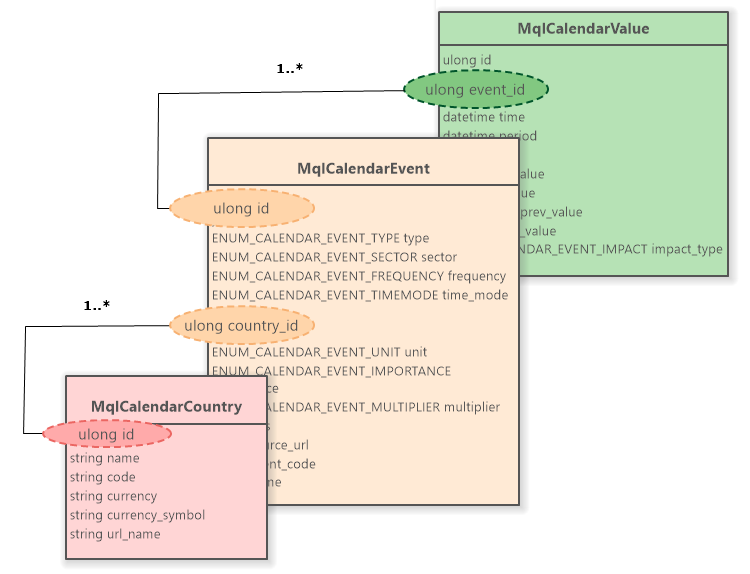
Fig. 3. Calendar structure relations
The MqlCalendarCountry structure is linked with MqlCalendarEvent via a country ID. The relationship form is "one-to-many" (1..*).
The MqlCalendarEvent structure is linked with MqlCalendarValue via an event ID. The relationship form is "one-to-many" (1..*).
News release time and server time
All functions for working with the economic calendar use the TimeTradeServer() trade server time. This means that the time in the MqlCalendarValue structure and the time inputs in the CalendarValueHistoryByEvent() and CalendarValueHistory() functions are set in a trade server timezone, rather than a user's local time.
No conversion is required: MqlCalendarValue::period event time can be directly compared with the time obtained when calling the TimeCurrent() or TimeTradeServer() functions. In the tester, the TimeTradeServer() function returns a model time identical to the time in the historical data. The logic for working with time windows ("30 minutes before the news") works the same in real time and in history. If the broker takes into account the transition to summer/winter time, the calendar automatically adjusts to this transition.
Practical example — getting a list of events for today (the current day):
//+------------------------------------------------------------------+
//| Get calendar values for the current day                          |
//+------------------------------------------------------------------+
void GetTodayUSD_Events()
 {
//--- define the period boundaries in server time
  datetime server_now = TimeTradeServer();
  datetime day_start  = server_now - (server_now % 86400);
  datetime day_end    = day_start + 86400;

  MqlCalendarValue    values[];
  MqlCalendarEvent    event;
  MqlCalendarCountry  country;

//--- request values only for USD
  if(CalendarValueHistory(values, day_start, day_end, NULL, "USD"))
   {
    Print("  Events received for USD: ", ArraySize(values));

    //--- iterate over the array of values
    for(int i = 0; i < ArraySize(values); i++)
     {
      //--- get event description
      if(CalendarEventById(values[i].event_id, event))
      {
        //--- get country description
        if(CalendarCountryById(event.country_id, country))
        {
          Print("✅ Event #", i);
          Print("Event ID:       ", values[i].event_id);

          Print("Event name: ", event.name);
          Print("Sector:           ", event.sector);
          Print("Source:         ", event.source_url);

          Print("Country name:  ", country.name);
          Print("Country URL:       ", country.url_name);

          Print("Time:            ", TimeToString(values[i].time, TIME_DATE | TIME_SECONDS));
          Print("Impact:          ", values[i].impact_type);

          // CHECK AND OUTPUT VALUES
          if(values[i].HasActualValue())
            Print("Actual:             ", values[i].GetActualValue());

          if(values[i].HasRevisedValue())
            Print("Revised:     ", values[i].GetRevisedValue());

          if(values[i].HasForecastValue())
            Print("Forecast:          ", values[i].GetForecastValue());

          if(values[i].HasPreviousValue())
            Print("Previous:       ", values[i].GetPreviousValue());
        }
      }
     }
   }
  else
   {
    int error = GetLastError();
    if(error == 0)
     {
      Print("❌ CalendarValueHistory: No Events");
     }
    else
     {
      Print("❌ Error CalendarValueHistory: ", error);
     }
   }
 }
//+------------------------------------------------------------------+
The function displays a list of events for the USD currency for the current day and the contents of the main fields of the structures retrieved via the calendar's MQL API. The full script code is contained in the GetTodayEvents-S.mq5 attached to the article.
The function operation results can be seen in the Toolbox\Experts tab of the MetaTrader 5 terminal. We see that two events were received for USD. At the time of the request, these events had not yet occurred (the news had not been released). Therefore, the MqlCalendarValue::actual_value field does not contain a value — the HasActualValue() function returns 'false'.
For these event types, the MqlCalendarValue::forecast_value field checked by the HasForecastValue() is absent (contains no value). For other events, all four fields (prev_value, actual_value, forecast_value and revised_prev_value) may be missing.
Received events for USD: 2
✅ Event #0
Event ID: 840220005
Event name: 3-month treasury bills auction
Sector: 1
Source: https://home.treasury.gov/
Country name: USA
Country URL: united-states
Time: 2026.04.20 18:30:00
Impact: 0
Previous: 3.62
✅ Event #1
Event ID: 840220006
Event name: 6-month treasury bills auction
Sector: 1
Source: https://home.treasury.gov/
Country name: USA
Country URL: united-states
Time: 2026.04.20 18:30:00
Impact: 0
Previous: 3.61
Explanations for the provided code:
First, we obtain an array of values for all events in a given time range with the "USD" currency filter. In a loop, we go through the array of values and request the event description by the MqlCalendarValue::event_id event ID using the CalendarEventById() function. Then we request a country description by ID MqlCalendarEvent::country_id using the CalendarCountryById() function.
If the CalendarValueHistory() function returns 'false', but GetLastError() returns zero (no error), this indicates that there are no events with requested settings.
Error handling and limits when working with the calendar
Working with remote data always carries the risk of connection interruptions or access restrictions. Calendar functions return false or 0 on failure. To understand the reason, it is necessary to use GetLastError(). The documentation highlights a separate group of errors for the calendar module.
Error codes:
- ERR_CALENDAR_TIMEOUT (code 5200) — server response waiting time has expired. Network failure or server overload. Solution: Repeat the request after a pause of 5...10 seconds.
- ERR_CALENDAR_NO_DATA (code 5201) — calendar data has not yet been loaded. The calendar is initialized asynchronously. Solution: Wait 1...2 seconds and repeat.
- ERR_CALENDAR_INVALID_DATE (code 5202) — invalid date range. Code error (for example, the start date is greater than the end date). Solution: Correct the logic, repeating the request is useless.
- ERR_CALENDAR_INVALID_COUNTRY (code 5203) — unknown country/currency code. Error in request parameters. Solution: Check the code (for example, "US" instead of "USA").
- ERR_CALENDAR_TOO_MANY_REQUESTS (code 5204) — request limit exceeded. Critical error. Solution: Increase the interval between requests.
Request rate limitation:
The servers, to which the MetaTrader 5 terminal connects, protect the infrastructure from overload. If the EA calls CalendarValueHistory() on every tick or in a loop without delays, the server returns the error 5204 and temporarily blocks access to the calendar for your terminal. Best practice: load data once at startup in OnInit() for the required period.
For real-time updates, use CalendarValueLast() while storing the returned change_id variable — this allows receiving only changes, rather than the entire data array. Update the data on a timer in OnTimer() at intervals of no more than 5–10 minutes.
Let's look at some examples of solutions to problems that may arise when loading a calendar:
When you start the terminal (cold start) and the EA, the calendar is not ready immediately. Data is loaded from the server in the background. If we call the CalendarValueHistory() function in the very first line of OnInit(), you will most likely get error 5201 — no data. It is necessary to implement a readiness polling mechanism with an exponential or fixed timeout.
Practical example — calendar data loading function with error handling:
//+------------------------------------------------------------------+
//| Calendar loading function                                        |
//+------------------------------------------------------------------+
bool LoadCalendar(MqlCalendarValue& values[], const datetime from, const datetime to, const string country_code = NULL, const string currency = NULL, const int max_retries = 5)
 {
  int retry_count = 0;

  while(retry_count < max_retries)
   {
    ResetLastError();
    //--- download attempt
    if(CalendarValueHistory(values, from, to, country_code, currency))
      return true; // Success

    int error = GetLastError();

    //--- in case of "No data" (5201) or "Timeout" (5200) error — wait and repeat
    if(error == 5201 || error == 5200)
     {
      retry_count++;
      Sleep(1000); // 1 second pause before repeating
      continue;
     }

    //--- if the error is critical (for example, an invalid date), interrupt the download immediately
    Print("❌ Critical Calendar Error: ", error);
    return false;
   }

  Print("❌ Failed to load calendar after ", max_retries, " attempts.");
  return false;
 }
//+------------------------------------------------------------------+
Explanations for the provided code:
Take into account the possibility of "No data" (5201) and "Timeout" (5200) errors. These are fixable errors. Handle them making 1...5 second pause and requesting the data again. If any unrecoverable errors occur, stop the download immediately. Unrecoverable errors include invalid dates, incorrect currency or country codes, etc. Find the full script code in the GetTodayEvents-S.mq5 file attached to this article.
To avoid limits and ensure maximum reaction speed, in OnTimer(), we should use the change_id mechanism. At startup, load the full history of events and remember the last change_id. In the timer, request only new data using the CalendarValueLast() function. The server will return only what has changed (or 'false' if there are no changes), without wasting resources on transmitting old data.
Practical example — calendar data update function with error handling:
//+------------------------------------------------------------------+
//| Timer: incremental update                                        |
//+------------------------------------------------------------------+
void OnTimer()
 {
  if(!is_initialized)
    return;

  MqlCalendarValue updates[];
  ResetLastError();

//--- API automatically updates last_change_id by reference
  if(!CalendarValueLast(last_change_id, updates,
                        (InpCountryCode == "") ? NULL : InpCountryCode,
                        (InpCurrency    == "") ? NULL : InpCurrency))
   {
    int err = GetLastError();
    // 0 = SUCCESS/NO_NEW_DATA, 5402 = ERR_CALENDAR_NO_CHANGES
    if(err != 0 && err != 5402)
      Print("🔴️ CalendarValueLast error: ", err);
    return;
   }

  int cnt = ArraySize(updates);
  if(cnt == 0)
    return;

  Print("🟢 Received ", cnt, " updates. New change_id: ", last_change_id);
  if(InpPrintChanges)
    ArrayPrint(updates);
  SyncCache(updates);
 }
//+------------------------------------------------------------------+
//| Cache synchronization                                            |
//+------------------------------------------------------------------+
void SyncCache(const MqlCalendarValue &updates[])
 {
  int upd_cnt  = ArraySize(updates);
  int cache_sz = ArraySize(calendar_cache);

  for(int u = 0; u < upd_cnt; u++)
   {
    bool found = false;
    for(int c = 0; c < cache_sz; c++)
     {
      if(calendar_cache[c].id == updates[u].id)
       {
        calendar_cache[c] = updates[u];
        found = true;
        break;
       }
     }
    if(!found)
     {
      ArrayResize(calendar_cache, cache_sz + 1);
      calendar_cache[cache_sz] = updates[u];
      cache_sz++;
      total_events++;
     }
   }
 }
//+------------------------------------------------------------------+
Explanations for the given code:
Incremental updating of events occurs through the event handler from the OnTimer() timer. The calendar API CalendarValueLast() function is called — if new events appear, they update the appropriate elements in the previously loaded MqlCalendarValue structure array and output data to the terminal journal. If such an event is not found in the loaded array, it is added to the array.
The full script code is contained in CalendarEventMonitor-EA.mq5, attached to the article.
Filtering Events: From general to specific
Why filter:
The economic calendar publishes 60-90 events daily. It is like listening to a constant stream of hundreds of minor indicators, holidays, and official speeches that have no immediate impact on the market. Trading on each of them is a surefire way to overtrading and losing your deposit. The task of a news algorithmic trader is to leave 3-5 events that really move the market.
Filtering in algorithmic news trading is equivalent to increasing the signal-to-noise ratio to a level suitable for automated decision making. In the MQL5 calendar API, this process is implemented as a multi-level sieve system the MqlCalendarEvent and MqlCalendarValue structure arrays pass through.
Filtering criteria:
The market reacts not to the news release itself, but to the deviation of the actual data from the forecast and the level of macroeconomic influence. Low impact events (MqlCalendarValue::impact_type < 3) are often ignored by trading algorithms and market makers.
Without filtering you get:
- False triggers of the strategy on secondary statistics;
- Trading during periods of wide spread without volatility;
- Overloading the EA's logic with unnecessary checks.
The goal of filtering is to reduce the data flow by 90%, leaving only high-impact events (ENUM_CALENDAR_EVENT_IMPORTANCE::CALENDAR_IMPORTANCE_HIGH) for the target currency selected by the trader in a given time window.
Let's look at how to build a reliable filter that will operate equally reliably in both real-time and test mode.
Multi-level filtration system:
The "raw" event data downloaded from the terminal is like unprocessed ore: it contains thousands of entries, ranging from insignificant statistical reports to holidays that offer no benefit to the algorithmic strategy.
To turn this data stream into a clean signal, we need a multi-level filtering system. Event filtering acts as a "sieve" through which the raw data passes, leaving at the output only those events that meet the specified criteria: currency, importance, code, and time window.
An effective filter should have a hierarchical structure: starting from an initial, rough cutoff by geography and ending with fine-tuning by time window.
An important feature of the news MQL5-API — MqlCalendarValue structure does not contain currency_id and country_id fields. It only stores event_id, time, indicator values and influence type. How does this affect filtration?
Currency filtering is performed at the API request level. When you call CalendarValueHistory(..., NULL, "USD"), the terminal itself discards everything except USD. The array you receive is already filtered by currency. Therefore, there is no need to check currency_id in real time — it is enough to filter by time, importance and forecast presence/significance.
Level 1: Currency filter
The first barrier is the event geography. While trading EURUSD, the EA should only react to events that affect the Eurozone (EUR) and the USA (USD). Filtering comes down to requesting events with the currency codes of the traded instrument. For cross rates (e.g. "GBPJPY"), we need to request events for both currencies ("GBP" and "JPY") and "USD".
Level 2: Event importance
All pieces of news have varying importance in terms of their impact on the economy — in fact, on prices. The Consumer Price Index (CPI) can move the market by 100 points, while the ZEW consumer confidence index can only move it by 10.
MQL5-API uses the ENUM_CALENDAR_EVENT_IMPORTANCE enumeration for setting the importance degree:
enum ENUM_CALENDAR_EVENT_IMPORTANCE
{
   CALENDAR_IMPORTANCE_NONE,      // importance level is not set
   CALENDAR_IMPORTANCE_LOW,       // low importance
   CALENDAR_IMPORTANCE_MODERATE,  // medium importance
   CALENDAR_IMPORTANCE_HIGH       // high importance
};
News EAs should ignore everything below HIGH to avoid false positives on low liquidity news.
Level 3: Event code
Even among events of high importance there are exceptions. For example, an ECB or IMF speech may be marked as important, but it is algorithmically more difficult to process than the publication of specific figures. Therefore, we need sorting by event code: MqlCalendarEvent::event_code field contains a unique ID (for example, "NONFARM", "CPI", "GDP"). We select only events with economic figures, not polls and speeches.
Only after passing the first three levels of verification is the event copied into the resulting array and used in trading.

Fig. 4. Multi-level filtering is the key to success in news trading
After the first three levels of filtering, After the first three filtering levels, the EA checks whether the event falls within the configured time window. This occurs while the trading EA is running.
Level 4: Time window
The final stage is checking relevance. We do not need news that will come out in a month now. The news that came out yesterday has already been processed by the market. Therefore, an event is considered active if TimeCurrent() falls within the interval: the specified time before the news release and the specified time after the release. Typically, the following settings are used: 15–30 minutes before the release – for closing positions and 60 minutes after – for analyzing volatility and price movement direction.
MQL5 binary resources: Moving events to offline testing for efficient caching
A problem with testing in news-based algorithmic trading is that the strategy tester does not have internet access. This solution speeds up testing and protects against non-deterministic factors, but it creates a problem for testing news-based strategies.
If the EA in the tester calls the CalendarValueHistory() function, it gets an error and an empty array. To test the strategy, we need to embed historical news data into the .ex5 executable file. For this we use the option with MQL5 binary resources. Why this particular option? This is the fastest way to access structured data - access speed is limited only by the performance of the computer's file system.
Let's look at how to transform the MqlCalendarValue[] array into a compact binary file and how to embed it into the code so that the tester reads data from RAM at lightning speed. The first step is to create an exporter script that will download the current data from the calendar and save it to a binary file.
Practical example — a script for exporting events to a binary file:
The full script code is in the ExportCalendarForTester.mq5 file attached to the article.
Step 1: Assembling and filtering the array
We will not store all world events in the resource. At the stage of exporting to a binary file, we apply the same filters as in the EA: currency, importance and event type. The script inputs specify the list of currencies, the time interval for loading events, event codes, and the minimum importance.
List of event codes (InpEventCodes parameter) is empty by default - this means that all event types are loaded. We can narrow this filter. For example, only "non-farms" - then the list of codes will be "NONFARM".
The InpUseCommonDir flag specifies where to save the binary file: true — save to the shared folder for all client terminals "\Terminal\Common\Files".
//--- input parameters
input string                          InpCurrencies     = "USD";
input datetime                        InpDateFrom       = D'2025.01.01';
input datetime                        InpDateTo         = 0;
input string                          InpEventCodes     = "";
input ENUM_CALENDAR_EVENT_IMPORTANCE  InpMinImportance  = CALENDAR_IMPORTANCE_HIGH;
input string                          InpOutputFile     = "calendar_test_res.bin";
input bool                            InpUseCommonDir   = true;
The part of the script that loads and filters events with the values specified in the inputs is shown below:
  Print("🔄 Calendar export:");
  Print("----------------------------------");
  Print("Filtering options:");
  Print(" 🟨 Interval = ", InpDateFrom, " — ", InpDateTo);
  Print(" 🟨 Currencies = ", InpCurrencies, "\n 🟨 Event Codes = ", InpEventCodes, "\n 🟨 Min Importance = ", EnumToString(InpMinImportance));
  Print("----------------------------------");

//--- initialize filter by currencies
  ArrayResize(currencies, 0);
  if(InpCurrencies == "")
    return;
  StringSplit(InpCurrencies, ',', currencies);
  currencies_size = ArraySize(currencies);
  for(int i = 0; i < currencies_size; i++)
    StringToUpper(currencies[i]);

//--- initialize the filter by event codes
  ArrayResize(event_codes, 0);
  if(InpEventCodes != "")
    StringSplit(InpEventCodes, ',', event_codes);
  event_codes_Size = ArraySize(event_codes);

//--- load calendar values with the CURRENCY FILTER (if specified)
  if(currencies_size > 0)
   {
    ArrayResize(values_size, currencies_size);
    ArrayFill(values_size, 0, currencies_size, 0);

    for(int i = 0; i < currencies_size; i++)
     {
      if(LoadCalendar(raw_values, InpDateFrom, InpDateTo, "", currencies[i]))
       {
        raw_values_size = ArraySize(raw_values);
        //--- load events with an IMPORTANCE AND EVENT CODE FILTER
        for(int k = 0; k < raw_values_size; k++)
         {
          //--- get event description
          if(CalendarEventById(raw_values[k].event_id, event))
           {
            //--- take indicators only
            if(event.type != CALENDAR_TYPE_INDICATOR)
              continue;                                   // nothing else to filter

            //--- check by IMPORTANCE
            if(event.importance < InpMinImportance)
              continue;                                   // nothing else to filter

            //--- check by EVENT CODE (if specified)
            if(event_codes_Size > 0)
             {
              bool code_allowed = false;
              for(int c = 0; c < event_codes_Size; c++)
               {
                StringToUpper(event.event_code);
                if(StringFind(event.event_code, event_codes[c]) >= 0)
                 {
                  code_allowed = true;
                  break;
                 }
               }
              if(code_allowed == false)
                continue;
             }

            //--- replenish the array of filtered events
            int event_index = ArraySize(values);
            ArrayResize(values, event_index + 1);
            values[event_index] = raw_values[k];
            values_size[i]++;
           }
         }
        Print("✅ Received values BY CURRENCY \"", currencies[i], "\": ", raw_values_size, " → Of these, filtered: ", values_size[i]);
       }
      else
       {
        int error = GetLastError();
        if(error == 0)
          Print("⚠ LoadCalendar Info: No Events for ", currencies[i]);
        else
          Print("❌ LoadCalendar Error: ", error, " for ", currencies[i]);
        return;                                     // nothing else to filter
       }
     }
   }
Explanations for the provided code:
- The values_size[] array stores the number of filtered events for each currency code specified in the inputs.
- The zero value of MQL5 datetime type corresponds to the date of 1970.01.01 00:00:00.
- Additional filtering occurs by event type. Only ENUM_CALENDAR_EVENT_TYPE::CALENDAR_TYPE_INDICATOR type events are sorted — these are economic events (not speeches, but numbers). All other pieces of news are cut off. This is done by validation at the very beginning of filtering:
//--- take only indicators
if(event.type != CALENDAR_TYPE_INDICATOR)
  continue;                                   // Nothing else to filter
Let's run the script with different sets of filtering parameters and see how quickly the event loading/filtering script works. It is clear that the speed depends on the power of the computer and the speed of connection to the data servers via Internet. Nevertheless, we will conduct a stress test. The results are presented below.
All possible USD events of high importance — throughout all available history:
13:59:43.724 🔄 Calendar export:
13:59:43.724 ----------------------------------
13:59:43.724 Filtering options:
13:59:43.724 🟨 Interval = 1970.01.01 00:00:00 — 1970.01.01 00:00:00
13:59:43.724 🟨 Currencies = USD
13:59:43.724 🟨 Event Codes =
13:59:43.724 🟨 Min Importance = CALENDAR_IMPORTANCE_HIGH
13:59:43.724 ----------------------------------
13:59:45.511 ✅ Received values BY CURRENCY "USD": 53346 → Of these, filtered: 9009
13:59:45.511 ----------------------------------
13:59:45.513 ✅ Saved: USD_calendar_test_res.bin Size: 1153152 bytes (9009 events)
Time of obtaining the array of filtered values (MqlCalendarValue structures): 1.80 sec (0.20 ms / per filtration).
All possible USD, EUR and JPY of high importance — throughout all available history:
14:03:08.724 🔄 Calendar export:
14:03:08.724 ----------------------------------
14:03:08.724 Filtering options:
14:03:08.724 🟨 Interval = 1970.01.01 00:00:00 — 1970.01.01 00:00:00
14:03:08.724 🟨 Currencies = USD,EUR,JPY
14:03:08.724 🟨 Event Codes =
14:03:08.724 🟨 Min Importance = CALENDAR_IMPORTANCE_HIGH
14:03:08.724 ----------------------------------
14:03:10.488 ✅ Received values BY CURRENCY "USD": 53346 → Of these, filtered: 9009
14:03:10.947 ✅ Received values BY CURRENCY "EUR": 45139 → Of these, filtered: 1102
14:03:11.404 ✅ Received values BY CURRENCY "JPY": 18907 → Of these, filtered: 937
14:03:11.404 ----------------------------------
14:03:11.406 ✅ Saved: USD_calendar_test_res.bin Size: 1153152 bytes (9009 events)
14:03:11.407 ✅ Saved: EUR_calendar_test_res.bin Size: 141056 bytes (1102 events)
14:03:11.408 ✅ Saved: JPY_calendar_test_res.bin Size: 119936 bytes (937 events)
Time of obtaining the array of filtered values (MqlCalendarValue structures): 2.68 sec (0.24 ms / per filtration).
NFP events ("non-farms") by USD of high importance — throughout all available history:
14:07:22.203 ----------------------------------
14:07:22.203 Filtering options:
14:07:22.203 🟨 Interval = 1970.01.01 00:00:00 — 1970.01.01 00:00:00
14:07:22.203 🟨 Currencies = USD
14:07:22.203 🟨 Event Codes = NONFARM
14:07:22.203 🟨 Min Importance = CALENDAR_IMPORTANCE_HIGH
14:07:22.203 ----------------------------------
14:07:22.290 ✅ Received values BY CURRENCY "USD": 53346 → Of these, filtered: 473
14:07:22.290 ----------------------------------
14:07:22.291 ✅ Saved: USD_calendar_test_res.bin Size: 60544 bytes (473 events)
Time of obtaining the array of filtered values (MqlCalendarValue structures): 0.09 sec (0.18 ms / per filtration).
Remarks:
- It is not necessary to specify the entire event code in the filter. It is sufficient to specify a unique part of the string containing the code. For example, for "non-farms", the full code is "NONFARM-PAYROLLS — specifying "NONFARM" is enough.
- When running a real-time trading system in the MetaTrader 5 terminal, it is unlikely that we will need to download all events for the entire period. Typically, current events are downloaded for the day and the week ahead. Therefore, loading time in the news EA algorithm can be neglected.
Step 2: Export the event array to a binary file
The SaveToBinary function saves filtered events to a binary file. The number of files is equal to the number of currency codes specified in the inputs - each currency is exported to its own binary file. The file name begins with the currency code prefix. For example, "USD_calendar_test_res.bin". This way we get a one-to-one correspondence between the currency code and the list of events for it.
//+------------------------------------------------------------------+ //| Save an array to a binary file | //+------------------------------------------------------------------+ void SaveToBinary(MqlCalendarValue &values[], const int &vls_size[], const string filename, const string ¤cies[]) { if(ArraySize(values) == 0) { Print("⚠️ Nothing to save"); return; } Print("----------------------------------"); int offset = 0; for(int i = 0; i < ArraySize(vls_size); i++) { int file_handle = FileOpen(currencies[i] + "_" + filename, FILE_WRITE | FILE_BIN | (InpUseCommonDir ? FILE_COMMON : 0)); if(file_handle == INVALID_HANDLE) { Print("❌ FileSave failed: ", GetLastError()); return; } FileWriteArray(file_handle, values, offset, vls_size[i]); FileFlush(file_handle); FileClose(file_handle); Print("✅ Saved: ", currencies[i] + "_" + filename, " Size: ", vls_size[i] * sizeof(MqlCalendarValue), " bytes", " (", vls_size[i], " events)"); offset += vls_size[i]; } }
After successfully running the script for exporting events to binary files, messages like the following one appear in the Experts tab of MetaTrader 5:
14:28:42.077 ----------------------------------
14:28:42.078 ✅ Saved: USD_calendar_test_res.bin Size: 58240 bytes (455 events)
14:28:42.079 ✅ Saved: EUR_calendar_test_res.bin Size: 7680 bytes (60 events)
Step 3: Compiling the resource into the EA
After launching the ExportCalendarForTester.mq5 script in MQL5/Files/, the USD_calendar_test_res.bin and EUR_calendar_test_res.bin files appear. Now they need to be "embedded" into the EA. At the beginning of the EA file (after the #property directives), add one (if you are using a file for one currency) or several lines of the following type:
// Embed the binary file as a static resource at the compilation stage
#resource "\\Files\\USD_calendar_test_res.bin" as MqlCalendarValue USD_res_calendar_data[]
#resource "\\Files\\EUR_calendar_test_res.bin" as MqlCalendarValue EUR_res_calendar_data[]
Note:
- Path to #resource is specified relative to the MQL5/Files/ folder. The \\Files\\ prefix is obligatory.
- When compiling the EA, messages like the following should appear in the Errors tab of MetaEditor:
- 'USD_calendar_test_res.bin' as 'const MqlCalendarValue USD_res_calendar_data[455]'
- 'EUR_calendar_test_res.bin' as 'const MqlCalendarValue EUR_res_calendar_data[60]'
When starting the EA, the structures of events saved during the export stage are stored in the USD_res_calendar_data[] and EUR_res_calendar_data[] arrays.
Integration into the EA: Automatic mode switching
The goal is to make the same EA code work both in real time and in the tester, automatically selecting the data source. The MQLInfoInteger(MQL_TESTER) function returns 'true' if the EA is running in the Strategy Tester or Optimizer.
//+------------------------------------------------------------------+
//| Initialization: select a data source                             |
//+------------------------------------------------------------------+
int OnInit()
 {
  Print("🔄 Initializing the news module:");

//--- initialize filter by currencies
  ArrayResize(currencies, 0);
  if(InpCurrencies == "")
    return INIT_FAILED;
  StringSplit(InpCurrencies, ',', currencies);
  currencies_size = ArraySize(currencies);
  for(int i = 0; i < currencies_size; i++)
    StringToUpper(currencies[i]);

//--- initialize the filter by event codes
  ArrayResize(event_codes, 0);
  if(InpEventCodes != "")
    StringSplit(InpEventCodes, ',', event_codes);
  event_codes_Size = ArraySize(event_codes);

//--- define the execution environment
  bool is_tester = MQLInfoInteger(MQL_TESTER) || MQLInfoInteger(MQL_OPTIMIZATION) || MQLInfoInteger(MQL_VISUAL_MODE);
  if(is_tester)
   {
    //--- TESTER MODE: Load from resource
    if(!LoadFromResource())
     {
      Print("❌ ERROR: Failed to load calendar from resource");
      return INIT_FAILED;
     }
    is_live_mode = false;
    Print("⚠️ Mode: TESTER (data from resource)");
   }
  else
   {
    //--- LIVE MODE: Load from API
    if(!LoadFromCalendarAPI())
     {
      int error = GetLastError();
      Print("❌ ERROR: Failed to load calendar from API - ", error);
      return INIT_FAILED;
     }
    is_live_mode = true;

    Print("⚠️ Mode: LIVE (data from API)");
   }

  return INIT_SUCCEEDED;
 }
Explanations for the provided code:
The main check is done in the OnInit() EA initialization event handler:
   //--- define the execution environment
   bool is_tester = MQLInfoInteger(MQL_TESTER) || MQLInfoInteger(MQL_OPTIMIZATION) || MQLInfoInteger(MQL_VISUAL_MODE);
   if(is_tester)
    {
      //--- TESTER MODE: Load from resource
      if(!LoadFromResource())
       {
        ...
       }
    }
   else
    {
      //--- LIVE MODE: Load from API
      if(!LoadFromCalendarAPI())
       {
        ...
       }
    }
Explanations for the provided code:
We determine which mode the running MQL5 program (here it is our EA) is operating in. We are interested in the following flags:
- MQL_TESTER — flag of the launched program running in the tester;
- MQL_OPTIMIZATION — flag of the launched program during optimization;
- MQL_VISUAL_MODE — flag of the launched program in visual testing mode.
14:42:18.894 🔄 Initializing news module:
14:42:18.905 ✅ Events from Server Loaded: 455 events for: USD
14:42:18.914 ✅ Events from Server Loaded: 60 events for: EUR
14:42:18.914 ⚠️ Mode: LIVE (data from API)
Validating the data transformation chain: Events → Binary File → Compile to Resource → Get events from resource
All that remains is to check the retrieval of events in the tester and ensure that they completely match the list received in real time. This will confirm the possibility of automatic testing and optimizing news trading algorithms.
To do this, add the output of events received from the server/downloaded from the resource to the terminal/strategy tester log. The full text file of ImportTesterLog.txt with the tester run results is attached below. Below is a fragment of the log file - the beginning and end of the array of events for each currency code.
Single run result in the strategy tester, in visual mode:
16:48:22.527 InpCurrencies=USD,EUR
16:48:22.527 InpDateFrom=1735689600
16:48:22.527 InpDateTo=1767225600
16:48:22.527 InpEventCodes=
16:48:22.527 InpMinImportance=3
16:48:22.546 🔄 Initializing news module:
16:48:22.546 ✅ Events from Resource Loaded: 455 events for: USD
16:48:22.546 ✅ Event #0
16:48:22.546 ID: 230215
16:48:22.546 Event ID: 840140001
16:48:22.546 Time: 2025.01.02 16:30:00
16:48:22.546 Impact: CALENDAR_IMPACT_POSITIVE
16:48:22.546 Revision: 0
16:48:22.546 Actual: 211.0
16:48:22.546 Revised: 220.0
16:48:22.546 Forecast: 219.0
16:48:22.546 Previous: 219.0
16:48:22.546 ✅ Event #1
16:48:22.546 ID: 230641
16:48:22.546 Event ID: 840500001
16:48:22.546 Time: 2025.01.02 17:45:00
16:48:22.546 Impact: CALENDAR_IMPACT_NEGATIVE
16:48:22.546 Revision: 3
16:48:22.546 Actual: 49.4
16:48:22.546 Forecast: 50.5
16:48:22.546 Previous: 49.7
...
16:48:22.553 ✅ Event #453
16:48:22.553 ID: 274419
16:48:22.553 Event ID: 840510001
16:48:22.553 Time: 2025.12.30 17:45:00
16:48:22.553 Impact: CALENDAR_IMPACT_POSITIVE
16:48:22.553 Revision: 0
16:48:22.553 Actual: 43.5
16:48:22.553 Forecast: 42.4
16:48:22.553 Previous: 36.3
16:48:22.553 ✅ Event #454
16:48:22.553 ID: 274484
16:48:22.553 Event ID: 840140001
16:48:22.553 Time: 2025.12.31 16:30:00
16:48:22.553 Impact: CALENDAR_IMPACT_POSITIVE
16:48:22.553 Revision: 0
16:48:22.553 Actual: 199.0
16:48:22.553 Revised: 215.0
16:48:22.553 Forecast: 227.0
16:48:22.553 Previous: 214.0
...
16:48:22.553 ✅ Events from Resource Loaded: 60 events for: EUR
16:48:22.553 ✅ Event #0
16:48:22.553 ID: 231322
16:48:22.553 Event ID: 999030013
16:48:22.553 Time: 2025.01.07 13:00:00
16:48:22.553 Impact: CALENDAR_IMPACT_NA
16:48:22.553 Revision: 1
16:48:22.553 Actual: 2.4
16:48:22.553 Forecast: 2.4
16:48:22.553 Previous: 2.2
16:48:22.553 ✅ Event #1
16:48:22.553 ID: 187384
16:48:22.553 Event ID: 999040007
16:48:22.553 Time: 2025.01.08 13:00:00
16:48:22.553 Impact: CALENDAR_IMPACT_POSITIVE
16:48:22.553 Revision: 0
16:48:22.553 Actual: 21.0
16:48:22.553 Revised: 17.8
16:48:22.553 Forecast: 15.7
16:48:22.553 Previous: 17.7
...
16:48:22.555 ✅ Event #58
16:48:22.555 ID: 204746
16:48:22.555 Event ID: 999010006
16:48:22.555 Time: 2025.12.18 16:15:00
16:48:22.555 Impact: CALENDAR_IMPACT_NA
16:48:22.555 Revision: 0
16:48:22.555 Actual: 2.0
16:48:22.555 Previous: 2.0
16:48:22.555 ✅ Event #59
16:48:22.555 ID: 204762
16:48:22.555 Event ID: 999010007
16:48:22.555 Time: 2025.12.18 16:15:00
16:48:22.555 Impact: CALENDAR_IMPACT_NA
16:48:22.555 Revision: 0
16:48:22.555 Actual: 2.15
16:48:22.555 Previous: 2.15
16:48:22.555 ⚠️ Mode: TESTER (data from resource)
It is clear that all event arrays loaded from the resource in about 10 ms, which is not surprising — the resource is built into the EA's code and loads along with it when testing starts.
The same run (start) of an expert in Live mode in the MetaTrader 5 terminal produces a similar log file with a list of loaded events. The full LoadLiveLog.txt file with the results of Live loading is attached to the article. Below is a fragment of the log file - the beginning and end of the array of events for each currency code.
Results of Live download of events from the server:
17:27:25.250 🔄 Initializing news module:
17:27:25.258 ✅ Received values BY CURRENCY "USD": 3589 → Of these, filtered: 455
17:27:25.258 ✅ Events from Server Loaded: 455 events for: USD
17:27:25.258 ✅ Event #0
17:27:25.258 ID: 230215
17:27:25.258 Event ID: 840140001
17:27:25.258 Time: 2025.01.02 16:30:00
17:27:25.258 Impact: CALENDAR_IMPACT_POSITIVE
17:27:25.258 Revision: 0
17:27:25.258 Actual: 211.0
17:27:25.258 Revised: 220.0
17:27:25.258 Forecast: 219.0
17:27:25.258 Previous: 219.0
17:27:25.258 ✅ Event #1
17:27:25.258 ID: 230641
17:27:25.258 Event ID: 840500001
17:27:25.258 Time: 2025.01.02 17:45:00
17:27:25.258 Impact: CALENDAR_IMPACT_NEGATIVE
17:27:25.258 Revision: 3
17:27:25.258 Actual: 49.4
17:27:25.258 Forecast: 50.5
17:27:25.258 Previous: 49.7
...
17:27:25.288 ✅ Event #453
17:27:25.288 ID: 274419
17:27:25.288 Event ID: 840510001
17:27:25.288 Time: 2025.12.30 17:45:00
17:27:25.288 Impact: CALENDAR_IMPACT_POSITIVE
17:27:25.288 Revision: 0
17:27:25.288 Actual: 43.5
17:27:25.288 Forecast: 42.4
17:27:25.288 Previous: 36.3
17:27:25.288 ✅ Event #454
17:27:25.288 ID: 274484
17:27:25.288 Event ID: 840140001
17:27:25.288 Time: 2025.12.31 16:30:00
17:27:25.288 Impact: CALENDAR_IMPACT_POSITIVE
17:27:25.288 Revision: 0
17:27:25.288 Actual: 199.0
17:27:25.288 Revised: 215.0
17:27:25.288 Forecast: 227.0
17:27:25.288 Previous: 214.0
17:27:25.301 ✅ Received values BY CURRENCY "EUR": 3116 → Of these, filtered: 0
17:27:25.301 ✅ Events from Server Loaded: 60 events for: EUR
17:27:25.301 ✅ Event #0
17:27:25.301 ID: 231322
17:27:25.301 Event ID: 999030013
17:27:25.301 Time: 2025.01.07 13:00:00
17:27:25.301 Impact: CALENDAR_IMPACT_NA
17:27:25.301 Revision: 1
17:27:25.301 Actual: 2.4
17:27:25.301 Forecast: 2.4
17:27:25.301 Previous: 2.2
17:27:25.301 ✅ Event #1
17:27:25.301 ID: 187384
17:27:25.301 Event ID: 999040007
17:27:25.301 Time: 2025.01.08 13:00:00
17:27:25.301 Impact: CALENDAR_IMPACT_POSITIVE
17:27:25.301 Revision: 0
17:27:25.301 Actual: 21.0
17:27:25.301 Revised: 17.8
17:27:25.301 Forecast: 15.7
17:27:25.301 Previous: 17.7
...
17:27:25.303 ✅ Event #58
17:27:25.303 ID: 204746
17:27:25.303 Event ID: 999010006
17:27:25.303 Time: 2025.12.18 16:15:00
17:27:25.303 Impact: CALENDAR_IMPACT_NA
17:27:25.303 Revision: 0
17:27:25.303 Actual: 2.0
17:27:25.303 Previous: 2.0
17:27:25.303 ✅ Event #59
17:27:25.303 ID: 204762
17:27:25.303 Event ID: 999010007
17:27:25.303 Time: 2025.12.18 16:15:00
17:27:25.303 Impact: CALENDAR_IMPACT_NA
17:27:25.303 Revision: 0
17:27:25.303 Actual: 2.15
17:27:25.303 Previous: 2.15
17:27:25.303 ⚠️ Mode: LIVE (data from API)
A full download with filtering and logging takes about 50 ms — still fast enough to ignore the download/filtering time of events. Comparing the two log files, we see that the list of events is completely identical in both the number of events and the value of the fields. Data transformation chain validation completed successfully.
Analysis of typical mistakes and false expectations
Let's look at the six most common mistakes developers make when integrating the MQL5 economic calendar. Each of them has been tested in real life and could cost someone their lost deposit.
1. " The calendar predicts movement"
False expectation:
If news with HIGH importance is released and the actual outcome differs significantly from the forecast, the price is guaranteed to move in the direction of the deviation. Simply buy if actual > forecast for the base currency.
Reality:
The economic calendar is a data source, not a trading signal generator. It tells you what happened, but not how the market will react. Why might the price go against "obvious" logic?
- The market priced in expectations days before publication. At the very moment the news is released, "selling the news" occurs.
- Strong inflation data during a period of central bank policy tightening can strengthen the currency, but during a period of easing, it can trigger a sell-off due to fears of overheating.
- The news may be good, but if the previous value is revised downwards, the overall signal becomes ambiguous.
- The simultaneous release of data for multiple currencies creates crossover effects that cannot be interpreted linearly.
The correct approach is to use the calendar as a volatility filter, not as an entry trigger:
//--- instead of
if(actual > forecast)
 OrderSend(...);

//--- use:
if(IsHighImpactNewsComingSoon(30))
 {
   //--- reduce the position size or temporarily suspend trading
   ReduceRiskExposure();
 }
2. "All HIGH events are equally important"
False expectation:
The importance == CALENDAR_IMPORTANCE_HIGH field means that the event is guaranteed to move the market by 50+ pips. We can trade all such news using the same algorithm.
Reality:
Specific values in the ENUM_CALENDAR_EVENT_IMPORTANCE enumeration is a subjective assessment by the calendar editors, not a quantitative metric of market impact. For example, let's take two events labeled HIGH, but with different market significance.
The first event, Non-Farm Payrolls (USA) produces a volatility response of 80–150 points, as it is a key employment indicator and influences Fed policy. The second event, the Manufacturing PMI (Eurozone), gives a response of 10–30 points, since it is a narrow-sector indicator and is secondary for the ECB.
The correct approach is to supplement the importance filtering with a list of priority event codes:
//--- a list of events that are really worth reacting to
bool IsGoodEvent(const string event_code)
 {
   static const string tier1_codes[] =
   {
      "NONFARM", "CPI", "GDP", "RATE", "FOMC", "ECB_RATE",
      "RETAIL_SALES", "UNEMPLOYMENT", "PMI_MANUFACTURING"
   };

   for(int i = 0; i < ArraySize(tier1_codes); i++)
      if(StringFind(event_code, tier1_codes[i]) != -1)
         return true;
   return false;
 }

//--- use in filter
if(event.importance == CALENDAR_IMPORTANCE_HIGH && IsGoodEvent(event.event_code))
 {
   //--- handle only truly significant news
 }
Recommendation:
Create your own event ranking based on historical volatility analysis — more reliable than any preset label.
3. "Used TimeLocal() instead of TimeTradeServer()
False expectation:
Event time in the MqlCalendarValue::time structure is specified in my local time zone (or UTC), so I can compare it with TimeLocal() or TimeGMT().
Reality:
All economic calendar functions return the time in the trade server's time zone (TimeTradeServer()). This is an architectural decision that eliminates the need for manual conversion, but requires discipline from the developer.
The consequences of this error are serious - if your server is in the EET time zone (UTC+2) and you use TimeLocal() (e.g. MSK, UTC+3), you will be checking events with a 1 hour offset. The EA may miss the news or, conversely, react to it after the fact.
The right approach is to always use TimeTradeServer() for all time comparisons:
//--- WRONG — risk of desynchronization
datetime now = TimeLocal();
if(event.time - now < 1800)
 { ... }

//--- RIGHT — guaranteed synchronization
datetime now = TimeTradeServer();
if(event.time - now < 1800)
 { ... }

//--- in the tester, TimeTradeServer() returns the model time, so the logic works identically to live
Recommendation:
Add the output of TimeToString(TimeTradeServer(), TIME_MINUTES) to the debug log and compare it with the event time - they should match without conversion.
4. "Did not consider the fact that event fields can be empty"
False expectation:
The actual_value, forecast_value and other fields always contain correct numeric values. We can safely divide them by 1,000,000 and compare.
Reality:
According to the documentation, the numeric fields of the MqlCalendarValue structure store values multiplied by one million or the LONG_MIN constant if no value is specified. What happens if we ignore the check:
//--- error
double actual = values[i].actual_value / 1000000.0; // if actual_value == LONG_MIN, result: -9223372036.854776

if(actual > forecast) // comparison with a "garbage" number causes a false alarm
  OpenBuy();
The right approach is to use the built-in methods of the MqlCalendarValue structure to safely obtain values:
//--- the right approach is built-in methods
if(values[i].HasActualValue() && values[i].HasForecastValue())
 {
  double actual = values[i].GetActualValue();
  double forecast = values[i].GetForecastValue();

  if(!MathIsNaN(actual) && !MathIsNaN(forecast))
   {
    double deviation = actual - forecast;
    // ... analysis logic
   }
 }
//+------------------------------------------------------------------+
Note:
GetActualValue(), GetForecastValue() and other functions return NaN if there is no data. Always check the result via MathIsValidNumber() or MathIsNaN() before using it in calculations.
5. "Call Calendar API functions in OnTick()"
False expectation:
To always have up-to-date data, I will call CalendarValueHistory() on every tick. This ensures that the EA does not miss any breaking news".
Reality:
The calendar functions operate via a remote server to which MetaTrader 5 connects, and have strict request rate limits. Calling OnTick() (which can fire dozens of times per second) will cause problems:
- Error 5204 (ERR_CALENDAR_TOO_MANY_REQUESTS) — temporary blocking of access to the calendar.
- Execution delays - a network request in the trading cycle increases slippage.
- Excessive traffic - downloading the same data repeatedly.
//--- global variables
MqlCalendarValue calendar_cache[];
bool cache_initialized = false;
long last_change_id = 0;

//+------------------------------------------------------------------+
int OnInit()
 {
//--- initial history loading (once at startup)
  datetime from = TimeCurrent() - 7 * 86400;
  datetime to = TimeCurrent() + 30 * 86400;

  if(CalendarValueHistory(calendar_cache, from, to, "USD"))
   {
    cache_initialized = true;
   }

//--- set a timer for periodic updates (no more than 5-10 minutes)
  EventSetTimer(300);
  return INIT_SUCCEEDED;
 }
//+------------------------------------------------------------------+
void OnTimer()
 {
  if(!cache_initialized)
    return;

  MqlCalendarValue updates[];

//--- only request changes since the last update
  if(CalendarValueLast(last_change_id, updates, "USD") > 0)
   {
    if(ArraySize(updates) > 0)
     {
      //--- merge new data with the cache
      MergeUpdates(calendar_cache, updates);
      last_change_id = updates[ArraySize(updates) - 1].change_id;
     }
   }
 }
//+------------------------------------------------------------------+
void OnTick()
 {
//--- work only with local cache - no network delays
  if(cache_initialized)
    ProcessNewsSignals(calendar_cache);
 }
Recommendation:
OnTick() should only work with local data. Network requests - only in OnInit(), OnTimer() or by user event.
6. "Forgot to recompile the expert to test on new events"
False expectation:
I have updated the calendar_test_res.bin resource file in the Files folder, now the tester will automatically see the new events. There is no need to recompile the EA.
Reality:
The #resource directive embeds data into the .ex5 executable file at compile time. Changes to the external .bin file are not picked up dynamically — the EA continues to use the version of the resource that was compiled at build time.
Error symptoms:
- The tester log does not include events added to the resource after the last compilation.
- The strategy "does not see" important news, although it is in the file.
- The test results are different from expectations, although the code is logically correct.
The correct approach is to always recompile the EA after updating the resource:
//--- at the beginning of the EA file
#resource "\\Files\\USD_calendar_test_res.bin" as MqlCalendarValue USD_res_calendar_data[]

//--- after USD_calendar_test_res.bin update:
// 1. Save changes to the resource file.
// 2. Press F7 in MetaEditor (or Compile in the menu).
// 3. Make sure there are no errors in the compilation log.
// 4. Run the test again.
Recommendation:
Add resource version output (e.g. hash or last update date) to the compilation log to visually monitor the relevance of the data in .ex5.
Remarks:
The errors discussed in this section arise not from a lack of knowledge of MQL5 syntax, but from a simplified understanding of the nature of economic data (indicators). Anyone who learns to avoid these six mistakes will receive not just working code, but a stable trading system capable of adapting to market changes and the requirements of economic regulators. It is this approach that distinguishes an amateur from a professional in algorithmic trading.
Conclusion
The economic calendar in the MetaTrader 5 terminal is a powerful tool. But like any tool, it requires understanding the context, discipline in use, and consideration of the platform limitations.
We have considered a specific implementation and usage structure for the news API for the EA in MetaTrader 5. The article provides a set of practical elements that, taken together, transform manual news trading into a reproducible module:
- understanding the calendar API (Event vs Value, MqlCalendarEvent/MqlCalendarValue structures, server time);
- safe loading and updating methods (CalendarValueHistory for initial loading, CalendarValueLast + change_id for incremental updates);
- handling typical errors and observing request limits;
- multi-level filtering by currency, importance, event code and time windows to reduce noise and leave 3-5 significant events;
- a mechanism for exporting filtered data to a binary resource and automatic switching of the data source "real time" ↔ "strategy tester", ensuring identical behavior in real time and in backtesting.
Module readiness criteria: events for the specified period are loaded successfully; incremental updates work via change_id without exceeding limits; in the tester, EA reads the resource and produces the same decisions as in Live with identical input data.
Recommended next steps: implement the exporter, hardcode the .bin into #resource, test the OnInit/OnTimer update logic, and run controlled backtests (e.g., "do not trade for 30 minutes / resume after 60 minutes" scenario).
This will allow you to move from hypotheses to a testable, scalable news trading system. Developing news EAs is not just programming; it is building a bridge between macroeconomic theory and market practice.
Recommended resources for an in-depth study of the MetaTrader 5 Calendar API functions and their use in news trading:
- Documentation — Economic calendar functions;
- Article Trading with the MQL5 Economic Calendar (Part 1): Mastering the Functions of the MQL5 Economic Calendar;
- Article Trading with the MQL5 Economic Calendar (Part 7): Preparing for Strategy Testing with Resource-Based News Event Analysis;
- Article Trading with the MQL5 Economic Calendar (Part 8): Optimizing News-Driven Backtesting with Smart Event Filtering and Targeted Logs;
- Article MQL5 Cookbook – Economic Calendar.
List of files attached to the article:
| File Name | Description |
|---|---|
| CalendarEventMonitor-EA.mq5 | Test script code for testing the calendar data update function |
| ExportCalendarForTester-S.mq5 | The code of a test script for checking the export of events with specified filters to a binary file |
| GetTodayEvents-S.mq5 | The code of a test script for checking the retrieval of events for the current day |
| ImportCalendarValidation-EA.mq5 | The code of a test EA for checking the news retrieval in the strategy tester from a resource |
| ImportTesterLog.txt | Results of a single run of the ImportCalendarValidation-EA.mq5 EA in the tester in visual mode |
| LoadLiveLog.txt | Results of Live loading of events in the ImportCalendarValidation-EA.mq5 EA |
Translated from Russian by MetaQuotes Ltd.
Original article: https://www.mql5.com/ru/articles/22196
Warning: All rights to these materials are reserved by MetaQuotes Ltd. Copying or reprinting of these materials in whole or in part is prohibited.

 Event-Driven Architecture in MQL5: How to Turn an Expert Advisor into a Full-Fledged Trading System
 MetaTrader 5 Machine Learning Blueprint (Part 14): Transaction Cost Modeling for Triple-Barrier Labels in MQL5
 MetaTrader 5 Machine Learning Blueprint (Part 15): How to Calibrate Profit-Taking and Stop-Loss Targets from Synthetic Data
 MQL5 Trading Tools (Part 30): Class-Based Tool Palette Sidebar

- Free trading apps
- Over 8,000 signals for copying
- Economic news for exploring financial markets
You agree to website policy and terms of use
and why quotes (in general all time stamps) are not kept for example in UTC ?
why dealers' ticks have different numerical representation of one and the same countdown of time
philosophical question :-) it's the way it's done, though it's wrong and causes problems on the spot.
ZЫ. so "historical news" is better to take from other sources.
And never need to "analyse the history of clock translation" - it's all there, it's a function of OS or system libraries. Google tzdata
how many bicycles can be made, and crooked ones at that
Previously, the calendar was adjusted to the current time zone taking into account DST, i.e. in summer function requests return time stamps, for example, in the UTC+3 zone, and a request for the same history section in winter will get events with stamps in the UTC+2 zone if the server switches to DST and back.
ZЫ. so "historical news" is better to take from other sources.
And you should never "analyse the history of clock translation" yourself - it's all there, it's a function of OS or system libraries. Google tzdata
how many bicycles can be made, and crooked ones at that
Other sources will not solve the problem, because it is buried in the way quotes are stored in MT5.
Show your straight bicycle first, and then give advice.
The main problems of the modern news trader are fragmented toolset and the lack of a systematic, algorithmic trading workflow. It is pretty difficult to split your attention between your internet browser (browsing news sites) and your trading terminal while making trades.
A news trader's workflow looks like this: Quickly open the news calendar in your web browser and check for any changes in events → Quickly evaluate upcoming events and decide what and how to trade → Go to the MetaTrader 5 terminal – either place pending orders or sit at the terminal and wait for the news release to make a decision. In this scenario, the trader often experiences a loss of context, which leads to delays in reacting to news, which in turn leads to losses.
Do you want news trading to work like an engineering problem — with clear rules, repeatable results, and automated testing? The purpose of this article is to demonstrate the working architecture of a news layer for MetaTrader 5: a single data source, proper use of the calendar API, a filtering and caching mechanism, export of historical events to a resource for the tester, and automatic switching between Live and Tester — so that the same code produces deterministic results in both real time and historical data.
Yeah, this is a real pain point for news trading.
Switching between browser, calendar, and terminal breaks focus and slows reactions a lot. Having a unified workflow or system that pulls the news directly into the trading environment would definitely make execution faster and more consistent.
The idea of turning it into a structured, repeatable “engineering-style” setup with testing and automation actually makes a lot of sense for avoiding emotional or delayed decisions.