

Creating Custom Indicators in MQL5 (Part 9): Order Flow Footprint Chart with Price Level Volume Tracking
 7 535
7 535
 0
0

Introduction
Candlestick charts show where price went, but not who controlled each level. Without order flow data, you cannot see whether buyers or sellers dominated a specific price. You also miss whether a move was genuine or on low volume, or where real absorption and aggression happened inside each bar. This article is for MetaQuotes Language 5 (MQL5) developers and algorithmic traders looking to build a footprint chart indicator that exposes the volume activity inside every candle.
In our previous article (Part 8), we enhanced the hybrid Time Price Opportunity market profile indicator in MQL5 by adding volume data to calculate the point of control, value areas, and volume-weighted average price with customizable highlights. In Part 9, we build an order flow footprint chart indicator that tracks tick-by-tick volume at quantized price levels, separates buying and selling activity into bid versus ask and delta display modes, and renders volume-colored text on a canvas overlay alongside trend line candles that update in real time. We will cover the following topics:
- Decoding the Footprint Chart - What Price Levels Reveal About Market Participation
- Implementation in MQL5
- Backtesting
- Conclusion
By the end, you'll have a functional MQL5 footprint chart indicator that reveals volume distribution across price levels inside every bar, ready for customization — let's dive in!
Decoding the Footprint Chart - What Price Levels Reveal About Market Participation
A footprint chart records traded volume at each price level inside a bar, splitting it into ask volume for buying activity and bid volume for selling activity, so instead of a single candle body, we see a stack of price rows each carrying its own volume signature. Delta is the difference between ask and bid volume at each level. A strongly positive delta indicates buying pressure, while a strongly negative delta indicates selling pressure or absorption. When you stack these rows across multiple bars, patterns emerge that are invisible on a standard candlestick chart: levels where volume clustered heavily often act as future reference points, while levels with almost no volume represent price areas the market moved through quickly with little interest.

In live trading, use the delta column to identify where aggressive buyers or sellers stepped in — a bar with a high positive delta near a support level confirms buying conviction, making it a stronger candidate for a long entry. Watch for delta divergence where price makes a new high, but the delta weakens, signaling that buying aggression is fading and a reversal may follow. High total volume rows inside a bar often mark the point of control for that bar — price tends to return to these levels on retracements. In bid versus ask mode, look for diagonal imbalances where the ask volume at one level significantly outweighs the bid volume at the level directly below it, indicating stacked buying pressure that can propel the price higher. Conversely, dominant bid volume stacked diagonally below ask volume signals selling pressure. Use low-volume nodes inside bars to identify areas where price may accelerate through on a revisit, as the market showed little interest there the first time.
We will build the indicator in stages: defining two display modes for bid versus ask and delta views, quantizing incoming tick prices into configurable price level bins, and accumulating volume into a structured array of bar footprints. We will then compute maximum values per bar for color scaling, sort price levels from high to low, and render the results as colored volume text on a canvas overlay alongside trend line candles that update responsively to chart zoom, scroll, and resize events. In brief, here is a visual representation of what we intend to build.

Implementation in MQL5
Defining Enumerations, Inputs, Structures, and Global Variables
To lay the foundation for the footprint chart, we need to establish the display modes the indicator supports, the user-configurable parameters that control its appearance and behavior, the data structures that will hold volume information at each price level, and the global state variables that track chart geometry and tick-by-tick progression across the indicator's lifetime.
//+------------------------------------------------------------------+
//|                                   OrderFlow FootPrint PART 1.mq5 |
//|                           Copyright 2026, Allan Munene Mutiiria. |
//|                                   https://t.me/Forex_Algo_Trader |
//+------------------------------------------------------------------+
#property copyright "Copyright 2026, Allan Munene Mutiiria."
#property link      "https://t.me/Forex_Algo_Trader"
#property version   "1.00"
#property indicator_chart_window

#property indicator_buffers 0
#property indicator_plots   0

#include <Canvas\Canvas.mqh>

//+------------------------------------------------------------------+
//| Enums                                                            |
//+------------------------------------------------------------------+
enum FootprintDisplayMode
  {
   BID_VS_ASK, // Bid vs Ask
   DELTA       // Delta
  };

//+------------------------------------------------------------------+
//| Inputs                                                           |
//+------------------------------------------------------------------+
input group "Settings"
input FootprintDisplayMode displayMode          = DELTA; // Display Mode
input int                  ticksPerPriceLevel   = 5;     // Ticks Per Price Level
input int                  maxBarsToRender      = 50;    // Max Bars to Display
input int                  priceLevelFontSize   = 11;    // Price Level Font Size
input bool                 useStrictPricePositions = true; // Strict Price Positions (no spreading)

input group "Colors"
input color upColor1      = 0x8d8d8d; // Up Color 1 (weakest)
input color upColor2      = 0x6b8bb6; // Up Color 2
input color upColor3      = 0x5289d3; // Up Color 3
input color upColor4      = 0x2e7de6; // Up Color 4
input color upColor5      = 0x0077ff; // Up Color 5 (strongest)
input color downColor1    = 0x8d8d8d; // Down Color 1 (weakest)
input color downColor2    = 0xb87b6c; // Down Color 2
input color downColor3    = 0xd46d53; // Down Color 3
input color downColor4    = 0xec5732; // Down Color 4
input color downColor5    = 0xfe3300; // Down Color 5 (strongest)
input color volumeColor1  = 0x636363; // Volume Color 1 (weakest)
input color volumeColor2  = 0x858585; // Volume Color 2
input color volumeColor3  = 0xa3a3a3; // Volume Color 3
input color volumeColor4  = 0xc9c9c9; // Volume Color 4
input color volumeColor5  = 0x000000; // Volume Color 5 (strongest)
input color candleWickColor = 0x666666; // Candle Wick Color

//+------------------------------------------------------------------+
//| Structures                                                       |
//+------------------------------------------------------------------+
struct FootprintPriceLevel
  {
   double price;      // Price at this level
   double upVolume;   // Accumulated buy volume
   double downVolume; // Accumulated sell volume
  };

struct BarFootprintData
  {
   datetime           time;                    // Bar open time
   FootprintPriceLevel priceLevels[];          // Array of price levels for this bar
   double             totalUpVolume;           // Cumulative buy volume for bar
   double             totalDownVolume;         // Cumulative sell volume for bar
   double             maxDeltaValue;           // Max absolute delta across levels
   double             maxTotalVolumeValue;     // Max combined volume across levels
   double             maxAskValue;             // Max ask volume across levels
   double             maxBidValue;             // Max bid volume across levels
  };

//+------------------------------------------------------------------+
//| Global Variables                                                 |
//+------------------------------------------------------------------+
BarFootprintData barFootprints[];        // Array of all stored bar footprints
string           objectPrefix          = "OrderFlowFootprint_"; // Prefix for all chart objects
double           priceLevelStep        = 0;    // Computed tick-based price level step

CCanvas          mainCanvas;                   // Main rendering canvas object
int              currentChartWidth     = 0;    // Last known chart width in pixels
int              currentChartHeight    = 0;    // Last known chart height in pixels
int              currentChartScale     = 0;    // Last known chart scale value
int              firstVisibleBarIndex  = 0;    // Index of the leftmost visible bar
int              visibleBarsCount      = 0;    // Number of bars currently visible
double           minVisiblePrice       = 0.0;  // Bottom of visible price range
double           maxVisiblePrice       = 0.0;  // Top of visible price range
int              currentFontSize       = 10;   // Active font size for rendering

datetime         lastBarTime           = 0;    // Time of the last processed bar
double           lastClosePrice        = 0.0;  // Close price from the previous tick
long             lastTickVolume        = 0;    // Tick volume from the previous tick
bool             lastTradeAtAsk        = true; // Whether the last trade hit the ask
int              currentBarIndex       = -1;   // Index into barFootprints for the current bar

static datetime  lastRedrawTime        = 0;    // Timestamp of the most recent canvas redraw
We start the implementation by including the Canvas library to enable bitmap-based rendering directly on the chart. We then define the "FootprintDisplayMode" enumeration with two values: "BID_VS_ASK" to show raw bid and ask volumes side by side at each price level, and "DELTA" to show the net difference between buying and selling activity alongside the total volume, giving the user a choice between granular and summarized views.
The input section is organized into two groups. Under settings, we declare "displayMode" defaulting to "DELTA", "ticksPerPriceLevel" to control how many ticks wide each price row is, "maxBarsToRender" to limit memory usage by capping stored bars, "priceLevelFontSize" for text sizing on the canvas, and "useStrictPricePositions" to toggle whether overlapping price labels are spread apart or kept at their exact prices. Under colors, we declare five-step gradient inputs for upward volume, downward volume, and total volume — each ranging from the weakest shade to the strongest — plus a separate "candleWickColor" for the trend line wicks.
For data structures, we define "FootprintPriceLevel" to hold a single price row's data: the price itself, the accumulated buy volume as "upVolume", and the accumulated sell volume as "downVolume". We then define "BarFootprintData" to represent a complete bar's footprint, containing the bar's open time, a dynamic array of "FootprintPriceLevel" entries called "priceLevels", cumulative totals for buying and selling, and four pre-computed maximums — "maxDeltaValue", "maxTotalVolumeValue", "maxAskValue", and "maxBidValue" — which are used later to normalize volumes into color intensity ratios.
In the global variables, we declare "barFootprints" as a dynamic array of "BarFootprintData" to store the full history of processed bars, set the "objectPrefix" string for naming all chart trend line objects, and initialize "priceLevelStep" to zero pending calculation at startup. We declare the "mainCanvas" object of type "CCanvas" for all pixel-level drawing, then track chart geometry with width, height, scale, first visible bar index, visible bar count, and visible price range variables. Finally, we declare tick-state trackers: "lastBarTime" to detect new bars, "lastClosePrice" and "lastTickVolume" to compute volume deltas between ticks, "lastTradeAtAsk" to carry the direction of the last known trade, "currentBarIndex" to point into the footprints array for the active bar, and a static "lastRedrawTime" to record when the canvas was last fully redrawn. With the foundation declared, we now define the helper functions that keep the code modular.
Quantizing Prices and Mapping Volumes to Colors
Before any volume data can be stored or displayed, two problems need solving: raw tick prices must be snapped to discrete, evenly spaced levels so that volumes accumulate into meaningful rows rather than scattering across thousands of floating-point values, and those accumulated volumes must be translated into a color intensity that communicates strength at a glance without the reader having to read every number.
//+------------------------------------------------------------------+
//| Quantize price to level                                          |
//+------------------------------------------------------------------+
double QuantizePriceToLevel(double price)
  {
   //--- Snap the price to the nearest discrete price level and return it
   return MathRound(price / priceLevelStep) * priceLevelStep;
  }

//+------------------------------------------------------------------+
//| Get volume color for up/down direction                           |
//+------------------------------------------------------------------+
color GetVolumeColor(bool isUp, double ratio)
  {
   //--- Select the color tier based on direction and intensity ratio
   if(isUp)
     {
      //--- Return progressively stronger up colors for higher ratios
      if(ratio >= 0.8) return upColor5;
      else if(ratio >= 0.5) return upColor4;
      else if(ratio >= 0.3) return upColor3;
      else if(ratio >= 0.1) return upColor2;
      else return upColor1;
     }
   else
     {
      //--- Return progressively stronger down colors for higher ratios
      if(ratio >= 0.8) return downColor5;
      else if(ratio >= 0.5) return downColor4;
      else if(ratio >= 0.3) return downColor3;
      else if(ratio >= 0.1) return downColor2;
      else return downColor1;
     }
  }

//+------------------------------------------------------------------+
//| Get diagonal volume color for bid/ask imbalance                  |
//+------------------------------------------------------------------+
color GetDiagonalVolumeColor(bool isUp, double ratio)
  {
   //--- Select color tier for diagonal bid/ask imbalance using wider ratio range
   if(isUp)
     {
      //--- Return up color based on ask-to-bid ratio threshold
      if(ratio >= 4)   return upColor5;
      else if(ratio >= 3)   return upColor4;
      else if(ratio >= 2)   return upColor3;
      else if(ratio >= 1.5) return upColor2;
      else return upColor1;
     }
   else
     {
      //--- Return down color based on bid-to-ask ratio threshold
      if(ratio >= 4)   return downColor5;
      else if(ratio >= 3)   return downColor4;
      else if(ratio >= 2)   return downColor3;
      else if(ratio >= 1.5) return downColor2;
      else return downColor1;
     }
  }

//+------------------------------------------------------------------+
//| Get total volume color by intensity ratio                        |
//+------------------------------------------------------------------+
color GetTotalVolumeColor(double ratio)
  {
   //--- Return the volume color tier matching the provided intensity ratio
   if(ratio >= 1)        return volumeColor5;
   else if(ratio >= 0.9) return volumeColor4;
   else if(ratio >= 0.7) return volumeColor3;
   else if(ratio >= 0.3) return volumeColor2;
   else return volumeColor1;
  }
We define the "QuantizePriceToLevel" function to snap any incoming tick price to the nearest discrete price level. It divides the price by "priceLevelStep", rounds the result to the nearest integer using MathRound, then multiplies back by "priceLevelStep", producing a clean grid-aligned price. This is essential because tick prices arrive as continuous floating-point values, and without quantization, every tick would create its own unique level, making the footprint unreadable. By grouping ticks into configurable-width bins, we ensure that all trades within the same price band accumulate into a single row whose volume is meaningful.
Next, we define the "GetVolumeColor" function to map a normalized volume ratio to one of five color tiers for either the upward or downward direction. The ratio passed in represents how large a particular volume value is relative to the bar's maximum, and the function returns progressively stronger colors as the ratio rises through thresholds of 0.1, 0.3, 0.5, and 0.8, reaching the strongest shade at or above 0.8. For upward volume, the tiers map to "upColor1" through "upColor5", and for downward volume to "downColor1" through "downColor5", allowing the reader to instantly spot the most active levels by color intensity alone without reading a single number.
To handle the bid versus ask diagonal imbalance coloring, we define the "GetDiagonalVolumeColor" function, which uses a different ratio scale because it compares volumes across adjacent price levels rather than against a bar-wide maximum. Here, the thresholds are 1.5, 2, 3, and 4, reflecting the fact that a meaningful diagonal imbalance requires one side to be a multiple of the other rather than just a fraction. When the ask volume at a level is at least four times the bid volume at the level directly below it, the strongest up color is returned, signaling stacked buying pressure. The same logic applies in reverse for dominant bid volume, returning the strongest down color to highlight aggressive selling imbalances across adjacent rows. We use the same logic for the total volume color. With the color mapping utilities ready, we now define the helpers that manage price level storage.
Managing Price Levels - Lookup, Update, Sorting, and Maximum Value Computation
For the footprint to accumulate volume correctly across ticks, we need a set of utility functions that can find an existing price level within a bar, insert a new one if it does not exist yet, keep the levels ordered from high to low for top-down rendering, and maintain up-to-date maximum values across all levels so that color scaling ratios remain accurate after every tick.
//+------------------------------------------------------------------+
//| Get price level index in footprint                               |
//+------------------------------------------------------------------+
int GetPriceLevelIndex(BarFootprintData &footprint, double price)
  {
   //--- Get the total number of price levels stored
   int size = ArraySize(footprint.priceLevels);
   //--- Search linearly for a level matching the given price
   for(int i = 0; i < size; i++)
     {
      //--- Use half-point tolerance to account for floating-point imprecision
      if(MathAbs(footprint.priceLevels[i].price - price) < _Point / 2)
         return i;
     }
   //--- Return sentinel value indicating the level was not found
   return -1;
  }

//+------------------------------------------------------------------+
//| Update or insert price level volume                              |
//+------------------------------------------------------------------+
void UpdatePriceLevel(BarFootprintData &footprint, double price, double upVolumeToAdd, double downVolumeToAdd)
  {
   //--- Look up existing level index for the given price
   int index = GetPriceLevelIndex(footprint, price);

   if(index == -1)
     {
      //--- Append a new level since none exists at this price
      int size = ArraySize(footprint.priceLevels);
      ArrayResize(footprint.priceLevels, size + 1);
      //--- Populate the newly allocated level entry
      footprint.priceLevels[size].price      = price;
      footprint.priceLevels[size].upVolume   = upVolumeToAdd;
      footprint.priceLevels[size].downVolume = downVolumeToAdd;
     }
   else
     {
      //--- Accumulate volume into the existing level
      footprint.priceLevels[index].upVolume   += upVolumeToAdd;
      footprint.priceLevels[index].downVolume += downVolumeToAdd;
     }
  }

//+------------------------------------------------------------------+
//| Sort price levels in descending order                            |
//+------------------------------------------------------------------+
void SortPriceLevelsDescending(BarFootprintData &footprint)
  {
   //--- Get total levels count for iteration bounds
   int size = ArraySize(footprint.priceLevels);
   //--- Apply bubble sort descending by price
   for(int i = 0; i < size - 1; i++)
     {
      for(int j = 0; j < size - i - 1; j++)
        {
         //--- Swap adjacent levels if lower price precedes higher
         if(footprint.priceLevels[j].price < footprint.priceLevels[j + 1].price)
           {
            //--- Store current level in temporary variable
            FootprintPriceLevel temp      = footprint.priceLevels[j];
            footprint.priceLevels[j]      = footprint.priceLevels[j + 1];
            footprint.priceLevels[j + 1]  = temp;
           }
        }
     }
  }

//+------------------------------------------------------------------+
//| Compute max values across all price levels                       |
//+------------------------------------------------------------------+
void ComputeMaxValues(BarFootprintData &footprint)
  {
   //--- Reset all max tracking fields before recalculation
   footprint.maxDeltaValue        = 0.0;
   footprint.maxTotalVolumeValue  = 0.0;
   footprint.maxAskValue          = 0.0;
   footprint.maxBidValue          = 0.0;

   //--- Get total levels count for loop bounds
   int size = ArraySize(footprint.priceLevels);
   for(int i = 0; i < size; i++)
     {
      //--- Compute absolute delta and combined volume for this level
      double delta = MathAbs(footprint.priceLevels[i].upVolume - footprint.priceLevels[i].downVolume);
      double total = footprint.priceLevels[i].upVolume + footprint.priceLevels[i].downVolume;

      //--- Update each max field if the current level exceeds the stored value
      footprint.maxDeltaValue       = MathMax(footprint.maxDeltaValue, delta);
      footprint.maxTotalVolumeValue = MathMax(footprint.maxTotalVolumeValue, total);
      footprint.maxAskValue         = MathMax(footprint.maxAskValue, footprint.priceLevels[i].upVolume);
      footprint.maxBidValue         = MathMax(footprint.maxBidValue, footprint.priceLevels[i].downVolume);
     }
  }
Here, we define the "GetPriceLevelIndex" function to search a bar's "priceLevels" array for an entry matching a given price. Rather than testing for exact floating-point equality, which would fail due to precision rounding, it checks whether the absolute difference between the stored price and the incoming price is smaller than half a point using MathAbs, returning the matching index if found or -1 as a sentinel value indicating no match exists.
Building on that, we implement the "UpdatePriceLevel" function to either insert a new level or accumulate volume into an existing one. It calls "GetPriceLevelIndex" first, and if the result is -1, it resizes the "priceLevels" array by one with ArrayResize and populates the new slot with the incoming price, up volume, and down volume. If a matching level already exists, it simply adds the incoming volumes to the existing "upVolume" and "downVolume" fields, ensuring that every tick hitting the same quantized price row contributes to the same accumulating total rather than creating a duplicate entry.
To prepare the levels for correct top-down canvas rendering, we define the "SortPriceLevelsDescending" function, which applies a bubble sort over the "priceLevels" array, comparing adjacent entries and swapping them using a temporary "FootprintPriceLevel" variable whenever a lower price precedes a higher one. After sorting, the highest price level always sits at index zero, matching the top-to-bottom visual layout of the footprint on the chart.
Finally, we define the "ComputeMaxValues" function to scan all levels in a bar and update the four maximum fields stored in the "BarFootprintData" structure. It resets "maxDeltaValue", "maxTotalVolumeValue", "maxAskValue", and "maxBidValue" to zero before the loop, then for each level computes the absolute delta using "MathAbs" and the combined total, updating each maximum with MathMax where the current level exceeds the stored value. These maximums are what the color functions use as denominators when normalizing individual level volumes into ratios, so recomputing them after every tick ensures that color intensities always reflect the full distribution of volume within the bar at that moment. With price level management complete, we now define the functions that locate footprints and convert chart coordinates to canvas pixels.
Locating Footprints and Converting Chart Coordinates to Canvas Pixels
Before anything can be drawn on the canvas, we need functions that can locate a stored bar footprint by its timestamp, determine how wide each bar is in pixels at the current zoom level, and convert bar indices and price values into the exact pixel coordinates the canvas renderer expects.
//+------------------------------------------------------------------+
//| Get bar footprint index by time                                  |
//+------------------------------------------------------------------+
int GetBarFootprintIndex(datetime barTime)
  {
   //--- Get total footprints count for search bounds
   int size = ArraySize(barFootprints);
   //--- Scan for a footprint whose time matches the requested bar
   for(int i = 0; i < size; i++)
     {
      if(barFootprints[i].time == barTime)
         return i;
     }
   //--- Return sentinel indicating no match was found
   return -1;
  }

//+------------------------------------------------------------------+
//| Get bar width in pixels for given chart scale                    |
//+------------------------------------------------------------------+
int GetBarWidth(int chartScale)
  {
   //--- Compute pixel width as 2^scale and return it
   return (int)MathPow(2.0, chartScale);
  }

//+------------------------------------------------------------------+
//| Convert bar index to canvas X coordinate                         |
//+------------------------------------------------------------------+
int BarToXCoordinate(int barIndex)
  {
   //--- Calculate horizontal position relative to first visible bar
   return (firstVisibleBarIndex - barIndex) * GetBarWidth(currentChartScale);
  }

//+------------------------------------------------------------------+
//| Convert price to canvas Y coordinate                             |
//+------------------------------------------------------------------+
int PriceToYCoordinate(double price)
  {
   //--- Guard against zero price range to avoid division by zero
   if(maxVisiblePrice - minVisiblePrice == 0.0) return 0;
   //--- Map price linearly onto the canvas height and return the pixel row
   return (int)MathRound(currentChartHeight * (maxVisiblePrice - price) / (maxVisiblePrice - minVisiblePrice));
  }
We define the "GetBarFootprintIndex" function to scan the "barFootprints" array for an entry whose time field matches the requested bar time, returning its index if found or -1 if no match exists. This lookup is called during every canvas redraw to pair each visible bar with its stored footprint data before rendering.
To determine how wide each bar should appear on the canvas, we implement the "GetBarWidth" function, which computes the pixel width as 2 raised to the power of the current chart scale using the MathPow function. This mirrors how MetaTrader 5 internally sizes bars at each zoom level — scale 0 produces a one-pixel-wide bar, scale 1 produces two pixels, scale 2 produces four, and so on — so the footprint text columns always align precisely with the underlying chart bars regardless of how far the user has zoomed in or out.
The "BarToXCoordinate" function converts a bar index into a horizontal canvas pixel position by computing the difference between the first visible bar index and the target bar index, then multiplying by the result of "GetBarWidth" at the current scale. Because MetaTrader 5 numbers bars from right to left with the most recent bar at index zero, subtracting the target index from the first visible bar index correctly places older bars to the left and newer bars to the right on the canvas.
Finally, we define the "PriceToYCoordinate" function to map a price value onto a vertical canvas pixel row. It first guards against division by zero when the visible price range is flat, then applies a linear interpolation: the distance of the price below the visible maximum, divided by the total visible range, scaled by the canvas height. The result is rounded to the nearest integer with MathRound, producing the pixel row where that price sits on screen. Together, these four functions form the complete coordinate translation layer that everything in the rendering pipeline depends on. With the coordinate translation layer complete, we now define the two functions that produce everything visible on the chart.
Rendering Candle Trend Lines and Footprint Price Level Labels
With coordinate conversion and data management in place, we now need the two functions that produce everything visible on the chart: one that draws each candle's body and wicks as chart trend line objects anchored to price and time, and one that reads a bar's accumulated footprint data and writes the volume labels for every price level onto the canvas in the correct position, color, and display mode.
//+------------------------------------------------------------------+
//| Render candle body and wicks as trend line objects               |
//+------------------------------------------------------------------+
void RenderCandleWithTrendLines(int barIndex, datetime barTime)
  {
   //--- Fetch OHLC prices for the given bar
   double openPrice  = iOpen(_Symbol,  _Period, barIndex);
   double closePrice = iClose(_Symbol, _Period, barIndex);
   double highPrice  = iHigh(_Symbol,  _Period, barIndex);
   double lowPrice   = iLow(_Symbol,   _Period, barIndex);

   //--- Choose body color based on bullish or bearish close
   color bodyColor = closePrice >= openPrice ? upColor5 : downColor5;

   //--- Build unique object name for the candle body
   string bodyObjectName = objectPrefix + "Body_" + TimeToString(barTime);
   if(ObjectFind(0, bodyObjectName) < 0)
     {
      //--- Create the body trend object when it does not yet exist
      ObjectCreate(0, bodyObjectName, OBJ_TREND, 0, barTime, openPrice, barTime, closePrice);
      ObjectSetInteger(0, bodyObjectName, OBJPROP_RAY_RIGHT,  false);
      ObjectSetInteger(0, bodyObjectName, OBJPROP_SELECTABLE, false);
      ObjectSetInteger(0, bodyObjectName, OBJPROP_HIDDEN,     true);
     }
   //--- Apply body styling and updated OHLC coordinates
   ObjectSetInteger(0, bodyObjectName, OBJPROP_COLOR, bodyColor);
   ObjectSetInteger(0, bodyObjectName, OBJPROP_WIDTH, 3);
   ObjectSetDouble(0,  bodyObjectName, OBJPROP_PRICE, 0, openPrice);
   //--- Offset doji close by one point so the trend line has non-zero length
   ObjectSetDouble(0,  bodyObjectName, OBJPROP_PRICE, 1,
                   closePrice == openPrice ? closePrice + _Point : closePrice);

   //--- Build unique object name for the upper wick
   string upperWickObjectName = objectPrefix + "UpperWick_" + TimeToString(barTime);
   if(ObjectFind(0, upperWickObjectName) < 0)
     {
      //--- Create the upper wick trend object from high to top of body
      ObjectCreate(0, upperWickObjectName, OBJ_TREND, 0,
                   barTime, highPrice, barTime, MathMax(openPrice, closePrice));
      ObjectSetInteger(0, upperWickObjectName, OBJPROP_RAY_RIGHT,  false);
      ObjectSetInteger(0, upperWickObjectName, OBJPROP_SELECTABLE, false);
      ObjectSetInteger(0, upperWickObjectName, OBJPROP_HIDDEN,     true);
     }
   //--- Apply wick styling and updated price coordinates
   ObjectSetInteger(0, upperWickObjectName, OBJPROP_COLOR, candleWickColor);
   ObjectSetInteger(0, upperWickObjectName, OBJPROP_WIDTH, 1);
   ObjectSetDouble(0,  upperWickObjectName, OBJPROP_PRICE, 0, highPrice);
   ObjectSetDouble(0,  upperWickObjectName, OBJPROP_PRICE, 1, MathMax(openPrice, closePrice));

   //--- Build unique object name for the lower wick
   string lowerWickObjectName = objectPrefix + "LowerWick_" + TimeToString(barTime);
   if(ObjectFind(0, lowerWickObjectName) < 0)
     {
      //--- Create the lower wick trend object from low to bottom of body
      ObjectCreate(0, lowerWickObjectName, OBJ_TREND, 0,
                   barTime, lowPrice, barTime, MathMin(openPrice, closePrice));
      ObjectSetInteger(0, lowerWickObjectName, OBJPROP_RAY_RIGHT,  false);
      ObjectSetInteger(0, lowerWickObjectName, OBJPROP_SELECTABLE, false);
      ObjectSetInteger(0, lowerWickObjectName, OBJPROP_HIDDEN,     true);
     }
   //--- Apply wick styling and updated price coordinates
   ObjectSetInteger(0, lowerWickObjectName, OBJPROP_COLOR, candleWickColor);
   ObjectSetInteger(0, lowerWickObjectName, OBJPROP_WIDTH, 1);
   ObjectSetDouble(0,  lowerWickObjectName, OBJPROP_PRICE, 0, lowPrice);
   ObjectSetDouble(0,  lowerWickObjectName, OBJPROP_PRICE, 1, MathMin(openPrice, closePrice));
  }

//+------------------------------------------------------------------+
//| Render footprint labels for a single bar                         |
//+------------------------------------------------------------------+
void RenderFootprint(int footprintIndex, int barIndex, datetime barTime, int ratesTotal)
  {
   //--- Validate footprint index before accessing the array
   if(footprintIndex < 0 || footprintIndex >= ArraySize(barFootprints)) return;

   //--- Get total price levels for this footprint
   int size = ArraySize(barFootprints[footprintIndex].priceLevels);
   //--- Skip rendering if no levels have been collected yet
   if(size == 0) return;

   //--- Prepare display price array mirroring the sorted levels
   double displayPrices[];
   ArrayResize(displayPrices, size);

   //--- Copy raw level prices into display array
   for(int j = 0; j < size; j++)
     {
      displayPrices[j] = barFootprints[footprintIndex].priceLevels[j].price;
     }

   if(!useStrictPricePositions)
     {
      //--- Spread overlapping price labels when strict positioning is disabled
      for(int j = 1; j < size; j++)
        {
         //--- Calculate vertical distance between adjacent labels
         double priceDiff = displayPrices[j - 1] - displayPrices[j];
         //--- Push label down if it would overlap the one above
         if(priceDiff < priceLevelFontSize * _Point && priceDiff >= 0)
           {
            displayPrices[j] = displayPrices[j - 1] - priceLevelFontSize * _Point;
           }
        }
     }

   //--- Declare text and color arrays for left and right column labels
   string leftTexts[];
   color  leftColors[];
   string rightTexts[];
   color  rightColors[];
   ArrayResize(leftTexts,   size);
   ArrayResize(leftColors,  size);
   ArrayResize(rightTexts,  size);
   ArrayResize(rightColors, size);

   //--- Populate label text and color for each price level
   for(int j = 0; j < size; j++)
     {
      double upVolume   = barFootprints[footprintIndex].priceLevels[j].upVolume;
      double downVolume = barFootprints[footprintIndex].priceLevels[j].downVolume;

      if(displayMode == DELTA)
        {
         //--- Compute signed delta and total volume for delta display mode
         double deltaValue = upVolume - downVolume;
         double total      = upVolume + downVolume;

         //--- Default delta color to weakest down shade
         color deltaColor = downColor1;
         if(barFootprints[footprintIndex].maxDeltaValue > 0 && total > 0)
           {
            //--- Derive delta color from signed delta relative to bar maximum
            deltaColor = GetVolumeColor(
                           deltaValue >= 0,
                           MathAbs(deltaValue) / barFootprints[footprintIndex].maxDeltaValue);
           }

         //--- Default total volume color to weakest shade
         color totalColor = volumeColor1;
         if(barFootprints[footprintIndex].maxTotalVolumeValue > 0)
           {
            //--- Derive total volume color from ratio to bar maximum
            totalColor = GetTotalVolumeColor(total / barFootprints[footprintIndex].maxTotalVolumeValue);
           }

         //--- Format delta with explicit sign and total as plain integer
         leftTexts[j]   = StringFormat("%+.0f", deltaValue);
         leftColors[j]  = deltaColor;
         rightTexts[j]  = StringFormat("%.0f", total);
         rightColors[j] = totalColor;
        }
      else
        {
         //--- Display raw bid volume on left and ask volume on right
         leftTexts[j]   = StringFormat("%.0f", downVolume);
         leftColors[j]  = downColor1;
         rightTexts[j]  = StringFormat("%.0f", upVolume);
         rightColors[j] = upColor1;
        }
     }

   if(displayMode == BID_VS_ASK)
     {
      //--- Apply diagonal imbalance coloring across adjacent levels in bid/ask mode
      for(int j = 0; j < size - 1; j++)
        {
         //--- Get ask volume at current level and bid volume at level below
         double higherAsk = barFootprints[footprintIndex].priceLevels[j].upVolume;
         double lowerBid  = barFootprints[footprintIndex].priceLevels[j + 1].downVolume;

         //--- Highlight ask if it meets the significance threshold
         if(barFootprints[footprintIndex].maxAskValue > 0 &&
            higherAsk / barFootprints[footprintIndex].maxAskValue >= 0.3)
           {
            //--- Compute ask-to-bid ratio and color accordingly
            double ratio    = higherAsk / (lowerBid + 0.0001);
            rightColors[j]  = GetDiagonalVolumeColor(true, ratio);
           }

         //--- Highlight bid if it meets the significance threshold
         if(barFootprints[footprintIndex].maxBidValue > 0 &&
            lowerBid / barFootprints[footprintIndex].maxBidValue >= 0.3)
           {
            //--- Compute bid-to-ask ratio and color accordingly
            double ratio       = lowerBid / (higherAsk + 0.0001);
            leftColors[j + 1]  = GetDiagonalVolumeColor(false, ratio);
           }
        }
     }

   //--- Configure the canvas font before drawing labels
   mainCanvas.FontSet("Consolas", priceLevelFontSize, FW_NORMAL);

   //--- Compute horizontal layout anchors for this bar
   int centerX  = BarToXCoordinate(barIndex);
   int barWidth = GetBarWidth(currentChartScale);
   int gap      = MathMax(1, barWidth / 4);
   int xLeft    = centerX - gap;
   int xRight   = centerX + gap;

   //--- Draw left and right labels for every price level
   for(int j = 0; j < size; j++)
     {
      double displayPrice = displayPrices[j];
      //--- Convert the display price to a vertical canvas pixel position
      int yPosition = PriceToYCoordinate(displayPrice);

      //--- Draw the left column label right-aligned at the gap boundary
      mainCanvas.TextOut(xLeft,  yPosition, leftTexts[j],
                         ColorToARGB(leftColors[j],  255), TA_RIGHT | TA_VCENTER);
      //--- Draw the right column label left-aligned at the gap boundary
      mainCanvas.TextOut(xRight, yPosition, rightTexts[j],
                         ColorToARGB(rightColors[j], 255), TA_LEFT  | TA_VCENTER);
     }

   //--- Draw the candle body and wicks on top of the footprint labels
   RenderCandleWithTrendLines(barIndex, barTime);
  }
We define the "RenderCandleWithTrendLines" function to draw a bar's open-high-low-close structure using three OBJ_TREND chart objects — one for the body, one for the upper wick, and one for the lower wick. We fetch the bar's prices using iOpen, "iClose", iHigh, and "iLow", then choose the body color from "upColor5" or "downColor5" depending on whether the close is above or below the open. For each object, we build a unique name by combining "objectPrefix" with a descriptor and the bar time converted via TimeToString, check with ObjectFind whether it already exists, and create it with ObjectCreate only if it does not, setting "OBJPROP_RAY_RIGHT" to false, "OBJPROP_SELECTABLE" to false, and OBJPROP_HIDDEN to true so the objects stay clean and non-interactive.
We then apply color and width properties on every call, regardless of whether the object was just created or already existed, so that updates to price or color are always reflected. One important edge case is handled for doji candles, where open equals close — in that situation, the trend line would have zero length and become invisible, so we offset the close price by one point to give the object a minimal but renderable length. The upper wick runs from the high down to the higher of open and close using "MathMax", and the lower wick runs from the low up to the lower of open and close using "MathMin", both styled in "candleWickColor" at width 1.
The "RenderFootprint" function handles all the label rendering for a single bar. After validating the footprint index and confirming that at least one price level exists, we copy the sorted level prices into a separate "displayPrices" array. If "useStrictPricePositions" is false, we walk through adjacent entries and push any label that would visually overlap the one above it downward by "priceLevelFontSize" times "_Point", preventing text from stacking on top of itself at high zoom levels without disturbing the underlying data prices.
We then prepare four parallel arrays — "leftTexts", "leftColors", "rightTexts", and "rightColors" — and populate them per level depending on the active display mode. In "DELTA" mode, the left column shows the signed delta formatted with an explicit plus or minus sign using StringFormat, colored by "GetVolumeColor" with the absolute delta normalized against the bar's "maxDeltaValue", while the right column shows the total volume colored by "GetTotalVolumeColor" normalized against "maxTotalVolumeValue". In "BID_VS_ASK" mode, the left column shows raw down volume and the right shows raw up volume, both initially set to their weakest color shades.
For "BID_VS_ASK" mode, an additional diagonal imbalance pass runs after the initial color assignment. It walks adjacent level pairs and checks whether the ask volume at the upper level or the bid volume at the lower level is significant enough — at least 30 percent of its bar-wide maximum — to warrant imbalance coloring. When the threshold is met, it computes the ratio of one side to the other with a small epsilon added to the denominator to prevent division by zero, then calls "GetDiagonalVolumeColor" to override the color for that specific label, highlighting the stacked pressure pattern visually.
With all text and color arrays ready, we set the canvas font to Consolas at "priceLevelFontSize" using FontSet, compute the horizontal center of the bar with "BarToXCoordinate", derive a gap from a quarter of the bar width, and position the left and right column anchors symmetrically around that center. For each level, we convert the display price to a canvas pixel row with "PriceToYCoordinate" and call TextOut twice — once right-aligned at the left anchor for the left column, and once left-aligned at the right anchor for the right column — both vertically centered at that row.
Finally, we call "RenderCandleWithTrendLines" to draw the candle on top of the labels, completing the full visual output for that bar. With all individual bar rendering logic defined, we now need a single function that orchestrates a complete canvas refresh — clearing the previous frame, walking every bar currently visible on the chart, locating its stored footprint data, and rendering it in the correct screen position before pushing the finished frame to the display.
//+------------------------------------------------------------------+
//| Redraw entire canvas for all visible bars                        |
//+------------------------------------------------------------------+
void RedrawCanvas(int ratesTotal)
  {
   //--- Skip rendering if canvas dimensions are not yet valid
   if(currentChartWidth <= 0 || currentChartHeight <= 0) return;

   //--- Declare buffers for OHLC and time data needed during rendering
   double   highs[], lows[];
   datetime times[];

   //--- Abort if bar data cannot be fully retrieved
   if(CopyHigh(_Symbol, _Period, 0, ratesTotal, highs) != ratesTotal) return;
   if(CopyLow(_Symbol,  _Period, 0, ratesTotal, lows)  != ratesTotal) return;
   if(CopyTime(_Symbol, _Period, 0, ratesTotal, times)  != ratesTotal) return;

   //--- Clear the canvas to fully transparent before redrawing
   uint defaultColor = 0;
   mainCanvas.Erase(defaultColor);

   //--- Iterate over every visible bar and render its footprint
   for(int i = 0; i < visibleBarsCount; i++)
     {
      //--- Map visible slot index back to an absolute bar index
      int barIndex = firstVisibleBarIndex - i;
      if(barIndex < 0 || barIndex >= ratesTotal) continue;

      //--- Convert bar index to the chronological buffer position
      int      bufferIndex = ratesTotal - 1 - barIndex;
      datetime barTime     = times[bufferIndex];

      //--- Look up the stored footprint data for this bar
      int footprintIndex = GetBarFootprintIndex(barTime);
      if(footprintIndex < 0) continue;

      //--- Render labels and candle for this bar
      RenderFootprint(footprintIndex, barIndex, barTime, ratesTotal);
     }

   //--- Push the completed canvas frame to the screen
   mainCanvas.Update();
  }
We define the "RedrawCanvas" function to handle a full canvas repaint from scratch on every triggered redraw. We first guard against rendering before the canvas has valid dimensions, then fetch the complete high, low, and time series for all bars using CopyHigh, "CopyLow", and CopyTime, aborting immediately if any copy returns fewer values than expected, since rendering with incomplete data would produce misaligned results. We clear the entire canvas to be fully transparent by calling Erase with a zero color value, ensuring no leftover pixels from the previous frame bleed into the new one.
We then loop over every visible bar slot from zero up to "visibleBarsCount", converting each slot index into an absolute bar index by subtracting from "firstVisibleBarIndex". Any bar index that falls outside the valid data range is skipped. We convert the bar index to a chronological buffer position by subtracting from "ratesTotal" minus one, retrieve the corresponding bar time from the "times" array, and pass it to "GetBarFootprintIndex" to locate the matching stored footprint. If no footprint exists for that bar yet, we skip it and move on. For bars with valid footprint data, we call "RenderFootprint," which draws the volume labels and candle objects for that bar at the correct canvas position. Once all visible bars have been processed, we call Update on the canvas to push the completed frame to the screen in a single operation, keeping the display consistent and free of partial-render flickering. With the full rendering pipeline defined, we now wire everything together starting with the initialization event handler.
Wiring the Initialization Event Handler
Before any tick data can be processed or any pixel drawn, the indicator needs to compute its price grid step, prepare its data storage, capture the current chart dimensions, and create the canvas overlay that will host all footprint rendering for the lifetime of the indicator.
//+------------------------------------------------------------------+
//| Initialize custom indicator                                      |
//+------------------------------------------------------------------+
int OnInit()
  {
   //--- Set short name displayed on the chart
   IndicatorSetString(INDICATOR_SHORTNAME, "Order Flow: Footprint - Part 1");
   //--- Compute the price granularity from ticks-per-level input
   priceLevelStep = ticksPerPriceLevel * _Point;
   //--- Clear the footprints array on fresh load
   ArrayResize(barFootprints, 0);

   //--- Capture initial chart dimensions for canvas sizing
   currentChartWidth  = (int)ChartGetInteger(0, CHART_WIDTH_IN_PIXELS);
   currentChartHeight = (int)ChartGetInteger(0, CHART_HEIGHT_IN_PIXELS);

   //--- Build the bitmap canvas that overlays the chart
   string canvasName = "OrderFlowFootprint_Canvas";
   if(!mainCanvas.CreateBitmapLabel(0, 0, canvasName, 0, 0, currentChartWidth, currentChartHeight, COLOR_FORMAT_ARGB_NORMALIZE))
     {
      //--- Report canvas failure and abort initialization
      Print("Failed to create canvas");
      return(INIT_FAILED);
     }

   return(INIT_SUCCEEDED);
  }
In the OnInit event handler, we set the indicator's short name using IndicatorSetString so it appears correctly on the chart panel. We then compute "priceLevelStep" by multiplying "ticksPerPriceLevel" by _Point, producing the minimum price distance that separates one footprint row from the next — this value drives the "QuantizePriceToLevel" function and therefore determines the granularity of the entire volume distribution. We reset "barFootprints" to an empty state with ArrayResize to ensure no stale data persists if the indicator is reloaded without restarting the terminal.
We capture the current chart dimensions by reading CHART_WIDTH_IN_PIXELS and CHART_HEIGHT_IN_PIXELS with ChartGetInteger, storing them in "currentChartWidth" and "currentChartHeight" so the canvas is sized to fit the chart exactly from the first frame. We then create the bitmap overlay by calling CreateBitmapLabel on "mainCanvas", passing the canvas name, position at the chart origin, and the captured dimensions with normalized ARGB color format. If the canvas fails to create, we print an error message and return "INIT_FAILED" to abort cleanly. On success, we return INIT_SUCCEEDED, leaving the indicator ready to receive its first calculation call. Upon compilation, the initialized canvas renders as follows.

With the canvas ready, we now define the tick processing logic that drives all volume analysis and canvas updates.
Processing Ticks, Managing Bar Boundaries, and Driving Canvas Redraws in the Calculation Event Handler
The calculation event handler is where all the live data flow happens — detecting when a new bar opens, allocating and initializing its footprint record, trimming the oldest bars when memory limits are reached, attributing each tick's volume increment to the correct price side, updating the quantized price level, and deciding when the canvas needs to be redrawn based on volume changes or chart geometry shifts.
//+------------------------------------------------------------------+
//| Calculate custom indicator values on each tick                   |
//+------------------------------------------------------------------+
int OnCalculate(const int rates_total,
                const int prev_calculated,
                const datetime &time[],
                const double &open[],
                const double &high[],
                const double &low[],
                const double &close[],
                const long &tick_volume[],
                const long &volume[],
                const int &spread[])
  {
   //--- Require at least two bars for meaningful processing
   if(rates_total < 2) return 0;

   //--- Retrieve the open time of the forming bar
   datetime currentBarTime = time[rates_total - 1];
   //--- Detect a bar boundary by comparing against the last known bar time
   bool isNewBar = (currentBarTime != lastBarTime);

   if(isNewBar)
     {
      //--- Append a fresh footprint record for the newly opened bar
      int newSize = ArraySize(barFootprints);
      ArrayResize(barFootprints, newSize + 1);
      currentBarIndex = newSize;

      //--- Initialize all fields of the new footprint entry
      barFootprints[currentBarIndex].time               = currentBarTime;
      barFootprints[currentBarIndex].totalUpVolume      = 0;
      barFootprints[currentBarIndex].totalDownVolume    = 0;
      barFootprints[currentBarIndex].maxDeltaValue      = 0;
      barFootprints[currentBarIndex].maxTotalVolumeValue = 0;
      barFootprints[currentBarIndex].maxAskValue        = 0;
      barFootprints[currentBarIndex].maxBidValue        = 0;
      ArrayResize(barFootprints[currentBarIndex].priceLevels, 0);

      if(newSize > maxBarsToRender * 2)
        {
         //--- Trim oldest entries when the array grows beyond the render budget
         int toRemove = newSize - maxBarsToRender;
         for(int j = 0; j < toRemove; j++)
           {
            //--- Build time string to find related chart objects for deletion
            string timeString = TimeToString(barFootprints[j].time);
            ObjectsDeleteAll(0, objectPrefix + "Body_"      + timeString);
            ObjectsDeleteAll(0, objectPrefix + "UpperWick_" + timeString);
            ObjectsDeleteAll(0, objectPrefix + "LowerWick_" + timeString);
           }
         //--- Remove the corresponding footprint records from the front of the array
         ArrayRemove(barFootprints, 0, toRemove);
         //--- Shift the current bar index to reflect the removal offset
         currentBarIndex -= toRemove;
        }

      //--- Commit new bar time and seed the close price from the open
      lastBarTime    = currentBarTime;
      lastClosePrice = open[rates_total - 1];
      lastTickVolume = 0;
     }

   //--- Abort processing if the current bar index is out of bounds
   if(currentBarIndex < 0 || currentBarIndex >= ArraySize(barFootprints)) return rates_total;

   //--- Compute volume increment since the last tick
   double volumeDiff = (double)(tick_volume[rates_total - 1] - lastTickVolume);
   //--- Advance the stored tick volume to the current tick
   lastTickVolume = tick_volume[rates_total - 1];

   //--- Flag whether data changed this tick, triggering a redraw
   bool dataChanged = false;

   if(volumeDiff > 0)
     {
      //--- Mark data as dirty so the canvas will be refreshed
      dataChanged = true;

      double currentClose = close[rates_total - 1];
      double upDiff       = 0.0;
      double downDiff     = 0.0;

      if(currentClose > lastClosePrice)
        {
         //--- Price moved up, attribute full volume increment to ask side
         upDiff         = volumeDiff;
         lastTradeAtAsk = true;
        }
      else if(currentClose < lastClosePrice)
        {
         //--- Price moved down, attribute full volume increment to bid side
         downDiff       = volumeDiff;
         lastTradeAtAsk = false;
        }
      else
        {
         //--- Price unchanged, carry volume to whichever side traded last
         if(lastTradeAtAsk) upDiff   = volumeDiff;
         else               downDiff = volumeDiff;
        }

      //--- Persist the close price for comparison on the next tick
      lastClosePrice = currentClose;

      //--- Snap the current close to its discrete price level
      double quantizedPrice = QuantizePriceToLevel(currentClose);
      //--- Accumulate the volume split into the matching price level
      UpdatePriceLevel(barFootprints[currentBarIndex], quantizedPrice, upDiff, downDiff);

      //--- Update the bar's cumulative up and down volume totals
      barFootprints[currentBarIndex].totalUpVolume   += upDiff;
      barFootprints[currentBarIndex].totalDownVolume += downDiff;

      //--- Recompute normalization maximums after the volume update
      ComputeMaxValues(barFootprints[currentBarIndex]);
      //--- Re-sort levels so the highest prices render at the top
      SortPriceLevelsDescending(barFootprints[currentBarIndex]);
     }

   //--- Track whether chart geometry has changed this tick
   bool hasChartChanged = false;

   //--- Sample current chart geometry for comparison
   int    newChartWidth       = (int)ChartGetInteger(0, CHART_WIDTH_IN_PIXELS);
   int    newChartHeight      = (int)ChartGetInteger(0, CHART_HEIGHT_IN_PIXELS);
   int    newChartScale       = (int)ChartGetInteger(0, CHART_SCALE);
   int    newFirstVisibleBar  = (int)ChartGetInteger(0, CHART_FIRST_VISIBLE_BAR);
   int    newVisibleBars      = (int)ChartGetInteger(0, CHART_VISIBLE_BARS);
   double newMinPrice         = ChartGetDouble(0, CHART_PRICE_MIN, 0);
   double newMaxPrice         = ChartGetDouble(0, CHART_PRICE_MAX, 0);

   if(newChartWidth != currentChartWidth || newChartHeight != currentChartHeight)
     {
      //--- Resize the canvas bitmap to match the new window dimensions
      mainCanvas.Resize(newChartWidth, newChartHeight);
      currentChartWidth  = newChartWidth;
      currentChartHeight = newChartHeight;
      hasChartChanged    = true;
     }

   if(newChartScale      != currentChartScale      ||
      newFirstVisibleBar != firstVisibleBarIndex    ||
      newVisibleBars     != visibleBarsCount        ||
      newMinPrice        != minVisiblePrice         ||
      newMaxPrice        != maxVisiblePrice)
     {
      //--- Sync all viewport state variables with the current chart values
      currentChartScale    = newChartScale;
      firstVisibleBarIndex = newFirstVisibleBar;
      visibleBarsCount     = newVisibleBars;
      minVisiblePrice      = newMinPrice;
      maxVisiblePrice      = newMaxPrice;
      hasChartChanged      = true;
     }

   //--- Redraw the canvas whenever geometry, new bars, or volume data changed
   datetime currentTime = TimeCurrent();
   if(hasChartChanged || rates_total > prev_calculated || dataChanged)
     {
      RedrawCanvas(rates_total);
      //--- Record the redraw timestamp for potential throttling use
      lastRedrawTime = currentTime;
     }

   //--- Trigger a chart refresh to display the updated canvas overlay
   ChartRedraw(0);

   return rates_total;
  }
In the OnCalculate event handler, we first guard against insufficient data by returning zero if fewer than two bars are available. We read the forming bar's open time from the last element of the "time" array and compare it against "lastBarTime" to detect a bar boundary. When a new bar is detected, we resize "barFootprints" by one, set "currentBarIndex" to the new slot, and initialize all its fields — time, cumulative volumes, maximum trackers, and an empty "priceLevels" array — to clean starting values. We then check whether the array has grown beyond twice "maxBarsToRender", and if so, compute how many entries to remove from the front, delete their associated body, upper wick, and lower wick chart objects using ObjectsDeleteAll with the time-based name prefix, remove the records with ArrayRemove, and adjust "currentBarIndex" downward by the removal count to keep it pointing at the correct entry. We then commit the new bar time to "lastBarTime", seed "lastClosePrice" from the bar's open price so the first tick of the new bar has a valid reference point, and reset "lastTickVolume" to zero.
After the new bar block, we compute the volume increment for the current tick by subtracting "lastTickVolume" from the current "tick_volume" value, then advance "lastTickVolume" to the current value. If the increment is positive, we set "dataChanged" to true and determine how to split the volume between the ask and bid sides: if the current close is above "lastClosePrice," the full increment goes to "upDiff," and "lastTradeAtAsk" is set to true; if it is below, the full increment goes to "downDiff," and "lastTradeAtAsk" is set to false; if the price is unchanged, we carry the volume to whichever side traded last using "lastTradeAtAsk" as the tiebreaker. We update "lastClosePrice" to the current close, quantize it with "QuantizePriceToLevel", and pass the result along with the volume split to "UpdatePriceLevel" to accumulate into the correct price row. We then add the increments to the bar's cumulative totals, call "ComputeMaxValues" to refresh the normalization denominators, and call "SortPriceLevelsDescending" to keep the levels in top-down order for rendering.
We then sample the current chart geometry — width, height, scale, first visible bar, visible bar count, minimum price, and maximum price — comparing each against the stored values. If the canvas dimensions changed, we call "Resize" on "mainCanvas" and update the stored width and height. If any other geometry value changed, we sync all the viewport state variables and set "hasChartChanged" to true. Finally, if "hasChartChanged" is true, if new bars have been added since the last call as indicated by "rates_total" exceeding "prev_calculated", or if "dataChanged" is true, we call "RedrawCanvas" to repaint the full overlay and record the time in "lastRedrawTime". We finish every call with ChartRedraw to push the updated canvas to the screen and return "rates_total" to confirm all bars have been processed. With the tick processing complete, two final event handlers remain — one to clean up resources and one to handle chart navigation events.
Releasing Resources and Handling Chart Change Events
Two final event handlers complete the indicator: one that cleans up all allocated resources when the indicator is removed, and one that catches user-driven chart interactions such as scrolling, zooming, and resizing so the canvas redraws immediately in response rather than waiting for the next tick.
//+------------------------------------------------------------------+
//| Deinitialize custom indicator                                    |
//+------------------------------------------------------------------+
void OnDeinit(const int reason)
  {
   //--- Release the canvas bitmap resource
   mainCanvas.Destroy();
   //--- Remove all chart objects created by this indicator
   ObjectsDeleteAll(0, objectPrefix);
   //--- Force chart refresh after cleanup
   ChartRedraw(0);
  }

//+------------------------------------------------------------------+
//| Handle chart events                                              |
//+------------------------------------------------------------------+
void OnChartEvent(const int id, const long &lparam, const double &dparam, const string &sparam)
  {
   if(id == CHARTEVENT_CHART_CHANGE)
     {
      //--- Redraw when the user scrolls, zooms, or resizes the chart
      RedrawCanvas(Bars(_Symbol, _Period));
     }
  }
In the OnDeinit event handler, we call Destroy on "mainCanvas" to release the bitmap label and free the associated memory, then use ObjectsDeleteAll with "objectPrefix" to remove every trend line object the indicator created for candle bodies and wicks across all rendered bars. We finish with ChartRedraw to force the chart to refresh and confirm that all visual elements have been cleared cleanly from the display.
In the OnChartEvent event handler, we check whether the incoming event ID matches CHARTEVENT_CHART_CHANGE, which fires whenever the user scrolls the chart horizontally, changes the zoom level, or resizes the terminal window. When that event is detected, we call "RedrawCanvas," passing the current bar count retrieved with Bars, to trigger a full canvas repaint using the updated viewport geometry. This ensures that the footprint labels and candle objects always stay correctly aligned with the chart after any navigation action, without requiring a new tick to arrive first. With that, the implementation is complete. What remains is testing the system, covered in the next section.
Backtesting
We did the testing, and below is the compiled visualization in a single Graphics Interchange Format (GIF) image.
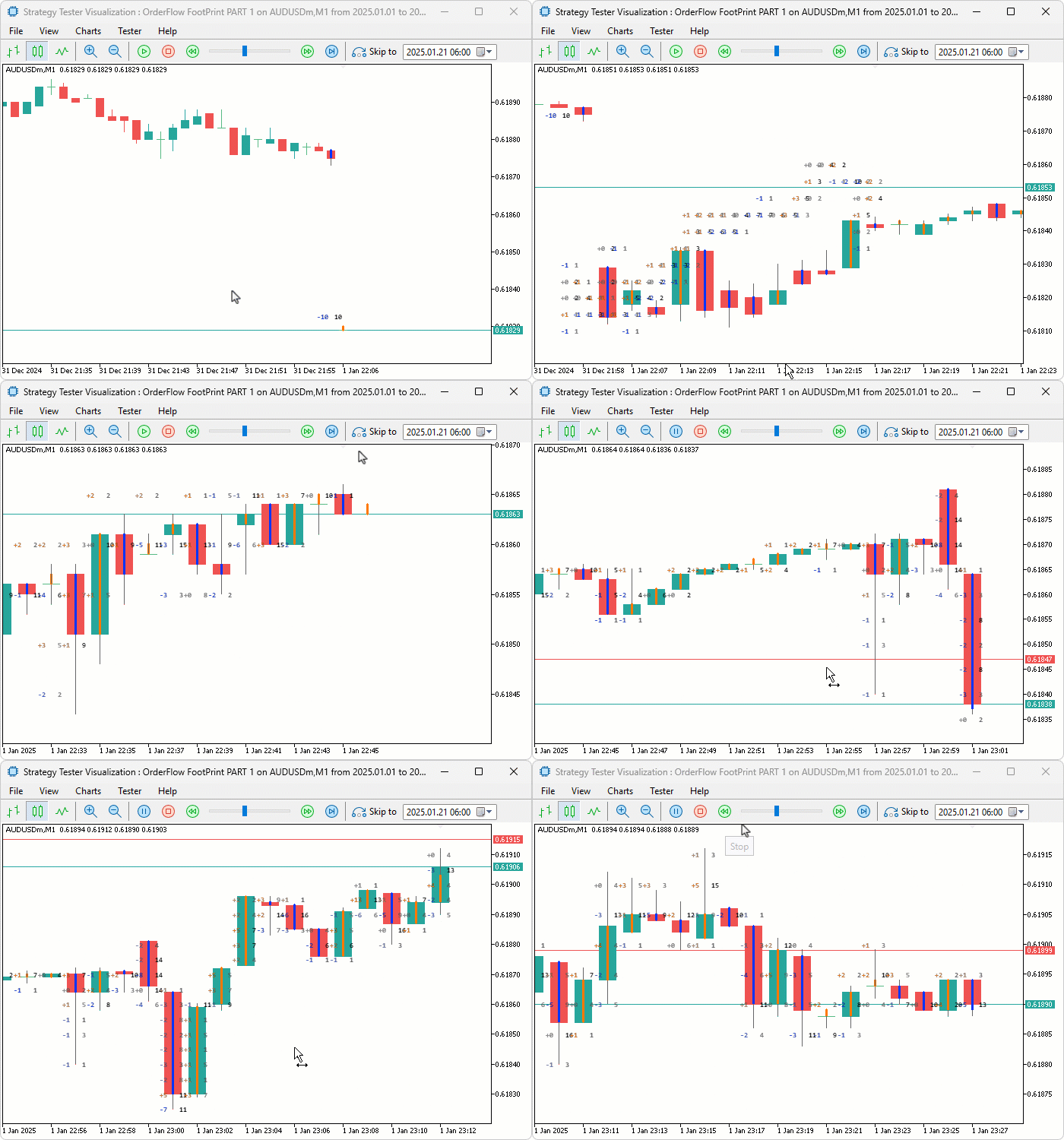
During testing, the footprint labels updated correctly on every tick with volume accumulating into the right price level rows, the delta coloring shifted from weak to strong shades as volume concentration at specific levels increased, and the canvas realigned instantly with the correct bar positions whenever the chart was scrolled or zoomed without waiting for a new tick to arrive.
Conclusion
In conclusion, we have built a footprint chart indicator in MQL5 that tracks tick-by-tick volume at quantized price levels, separates buying and selling activity into bid versus ask and delta display modes, and renders volume-colored labels on a canvas overlay alongside trend line candles that update in real time.
The implementation covered price level quantization and volume accumulation into a structured footprint array, max value computation for color normalization, descending price level sorting, coordinate conversion from bar index and price to canvas pixels, and a chart-responsive redraw system that reacts to scroll, zoom, resize, and new tick events. After the article, you will be able to:
- Read the delta column on each bar to identify where buying or selling aggression was strongest at specific price levels, using a high positive delta near support as confirmation for long entries and a high negative delta near resistance as confirmation for short entries
- Switch to bid versus ask mode and scan for diagonal imbalances where ask volume at one level significantly outweighs bid volume at the level directly below it, treating stacked imbalances as directional pressure zones that price is likely to follow
- Identify price levels with the highest total volume inside a bar as that bar's point of control, and use revisits to those levels on subsequent bars as high-probability reference points for entries, exits, and stop placement
In the next part, we will enhance this footprint chart by adding a per-bar volume sentiment information box above each candle displaying the net delta, total volume, and buy and sell percentages with rounded corners, configurable transparency, and delta-intensity color coding.
Warning: All rights to these materials are reserved by MetaQuotes Ltd. Copying or reprinting of these materials in whole or in part is prohibited.
This article was written by a user of the site and reflects their personal views. MetaQuotes Ltd is not responsible for the accuracy of the information presented, nor for any consequences resulting from the use of the solutions, strategies or recommendations described.

 Battle Royale Optimizer (BRO)
 From Novice to Expert: Detecting Liquidity Zone Flips Using MQL5
 MetaTrader 5 Machine Learning Blueprint (Part 9): Integrating Bayesian HPO into the Production Pipeline
 MQL5 Trading Tools (Part 25): Expanding to Multiple Distributions with Interactive Switching

- Free trading apps
- Over 8,000 signals for copying
- Economic news for exploring financial markets
You agree to website policy and terms of use