

MetaTrader 5 Machine Learning Blueprint (Part 9): Integrating Bayesian HPO into the Production Pipeline
 2 896
2 896
 2
2

Table of Contents
- What Changed and Why
- Architecture: Two Training Paths, One Pipeline
- Primary and Secondary Model Detection
- The Fitted Preprocessor
- The Reworked train_model Method
- _train_model_optuna in Detail
- The Refit Path and Bagging
- The Optuna Visualization Report
- Live Monitoring with optuna-dashboard
- Sample Weight Computation in the Optuna Path
- Caching Integration
- The Bid/Ask Long-Short Pipeline
- LearnedStrategy: Bridging the Two Stages
- model_params Configuration
- Practical Considerations
- Conclusion
- Attached Files
Introduction
Part 8 built the Optuna HPO system in isolation: the objective function, the pruner, the orchestrator, and the visualization suite. This article integrates that system into the production pipeline from Part 7. The result is a single ModelDevelopmentPipeline class that runs either the original clf_hyper_fit backend (GridSearchCV / RandomizedSearchCV) or the new Optuna backend, controlled by a single flag in model_params.
Beyond the core HPO integration, seven additional topics are covered:
- The pipeline now detects whether it is training a primary directional model or a secondary meta-labeling model by checking whether side is present in the events DataFrame. This flag gates rolling meta-features and artifact naming.
- The fitted preprocessor: DropConstantFeatures and DropDuplicateFeatures are now stored and prepended to best_model, making inference self-contained.
- Sequential bootstrapping: a bagging_sequential flag routes the post-HPO ensemble step to SequentiallyBootstrappedBaggingClassifier in both training paths.
- An Optuna visualization report: four interactive Plotly charts and a baseline comparison PNG are saved automatically after every Optuna run.
- Live monitoring via optuna-dashboard.
- A bid/ask long-short companion pipeline.
- LearnedStrategy, a BaseStrategy subclass that wraps a trained primary model so it can generate side predictions for a secondary pipeline's labeling step.
Important prerequisite — feature importance research must come first. The pipeline described in this article assumes that the feature set passed to feature_config has already been validated and curated. Running HPO on a poorly-constructed feature set does not solve the underlying problem — it optimizes the hyperparameters of a noisy or leaking model, producing results that look good in-sample and fail out-of-sample. Feature importance analysis is a substantial challenge. It requires separating signal features from look-ahead-biased and redundant ones. The techniques required (MDI, MDA, SFI, clustered importance) and how they integrate with the purged cross-validation framework of this series will be the subject of dedicated future articles. Do not run this pipeline until feature importance research on your candidate features is complete.
What Changed and Why
The original ModelDevelopmentPipeline.train_model calls clf_hyper_fit, which wraps GridSearchCV or RandomizedSearchCV. Sample weights flow in as a pre-computed array, scoring uses those same weights, and the best pipeline is returned directly. This works, but it has three limitations that the Optuna integration resolves.
Limitation 1: Weight scheme is fixed before HPO. In the sklearn path, get_optimal_sample_weight selects the best weighting scheme before HPO begins. The weight scheme and model hyperparameters are therefore optimized sequentially rather than jointly. A configuration that only performs well with return-attribution weights might be eliminated because uniqueness happened to be selected first.
Limitation 2: No early stopping. GridSearchCV and RandomizedSearchCV evaluate every fold for every trial. With expensive PurgedKFold evaluations on several years of tick data, this wastes compute on configurations that are clearly inferior after fold 1.
Limitation 3: No persistent study. A crashed run discards all completed trials.
The Optuna path resolves all three: weight scheme, decay, and linearity are sampled jointly with model hyperparameters inside _WeightedEstimator; HyperbandPruner eliminates unpromising trials after the first fold; and SQLite storage means a re-run resumes from the last completed trial.
Several structural changes accompanied this integration. _WeightedEstimator has been extracted from model_development.py into weighted_estimator.py, removing the circular import with optuna_hyper_fit.py. File management utilities have been extracted into file_manager.py. The pipeline now detects primary versus secondary model automatically. The fitted column-dropping preprocessor is a permanent part of best_model. A bagging_sequential flag routes post-HPO ensembling to SequentiallyBootstrappedBaggingClassifier. And LearnedStrategy bridges the two training stages.
Architecture: Two Training Paths, One Pipeline
The reworked pipeline contains a single dispatch in train_model:
if self.model_params.get('use_optuna', False):
    self._train_model_optuna()
else:
    self._train_model_sklearn()

# Prepend the fitted preprocessor so best_model.predict(raw_features) is self-contained.
self.best_model = Pipeline([('preprocessor', self.preprocessor), *self.best_model.steps])
self.best_model = set_pipeline_params(self.best_model, n_jobs=-1)
self.completed_steps['model_training'] = True
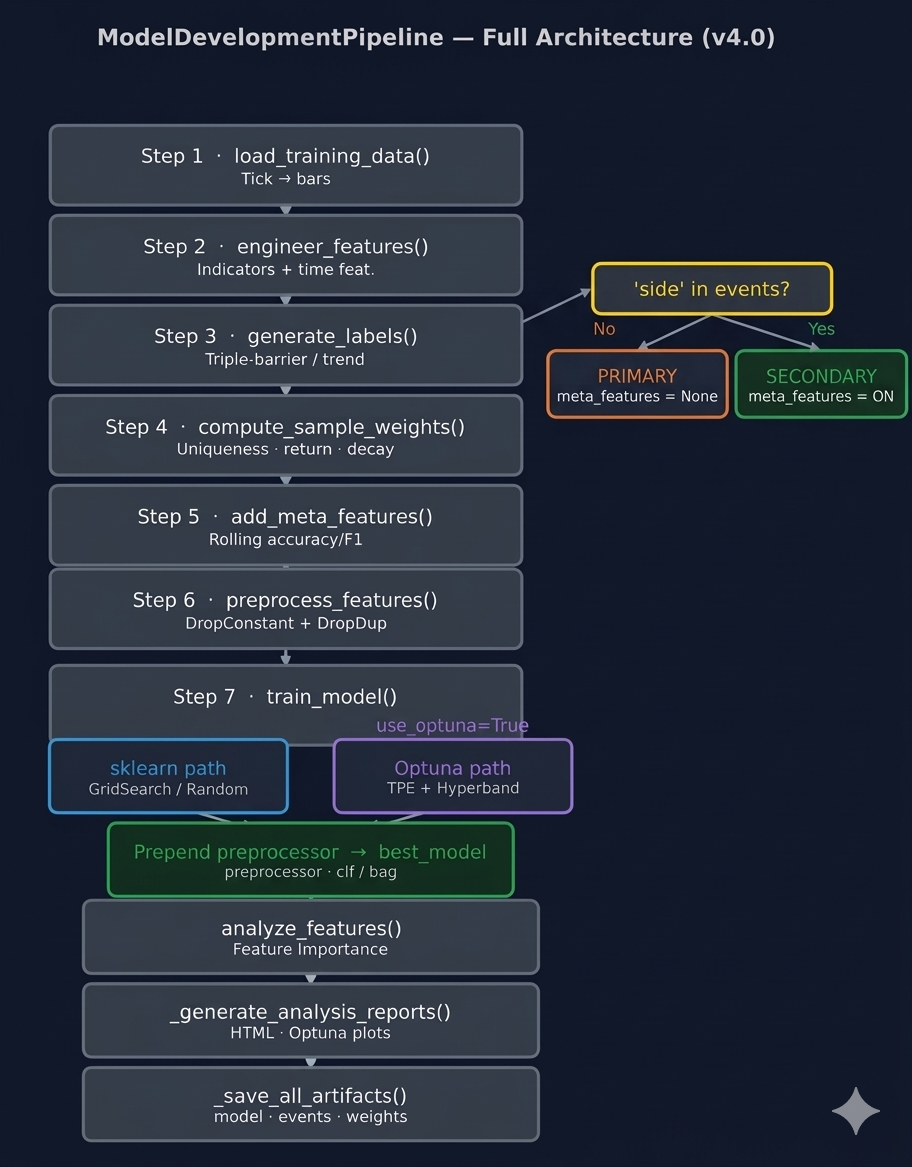
Fig. 1 — ModelDevelopmentPipeline v4.0 architecture. Steps 1–6 run identically in both paths. The is_primary branch at Step 3 gates meta-feature computation. The HPO dispatch at Step 7 routes to either backend; the post-dispatch block prepends the fitted preprocessor to best_model in both cases.
Everything upstream and downstream of train_model is identical in both paths. Both paths must honor the same output contract. self.best_model must be a fitted sklearn Pipeline whose first step is the column-dropping preprocessor. self.cv_results must contain at least best_params, best_score, and cv_results (in scikit-learn cv_results_ format).
Primary and Secondary Model Detection
The pipeline identifies which type of model it is training by inspecting whether side is present in the events DataFrame — exactly the signal the labeling code uses internally. Reading the labeling source makes this concrete.
In triple_barrier.py, get_events() explicitly drops the side column when no side_prediction is supplied:
# Primary model path: side_prediction is None
if side_prediction is None:
    side = pd.Series(1.0, index=target.index)
    events = events.drop('side', axis=1)   # ← side absent
else:
    side = side_prediction.reindex(target.index)
    # side retained: secondary / meta-labeling model
And in get_bins(), the presence of side determines the label space and the meta-labeling path:
if 'side' in events:
    out_df['ret'] *= events['side']              # meta-labeling: bin ∈ {0, 1}
    out_df.loc[out_df['ret'].values <= 0, 'bin'] = 0
    out_df['side'] = events['side'].astype('int8')
else:
    # primary: bin ∈ {-1, 0, 1}, direction from price action
trend_scanning_labels() never produces a side column — it always generates primary labels with bin ∈ {-1, 0, 1}. The complete rule is:
32Labeling call | side in events? | bin space | Model type | |
|---|---|---|---|---|
| 1. | Triple barrier, side_prediction=None | No | {-1, 0, 1} | Primary |
| 2. | Triple barrier, side_prediction provided | Yes | {0, 1} | Secondary |
| 3. | Trend scanning | No | {-1, 0, 1} | Primary |
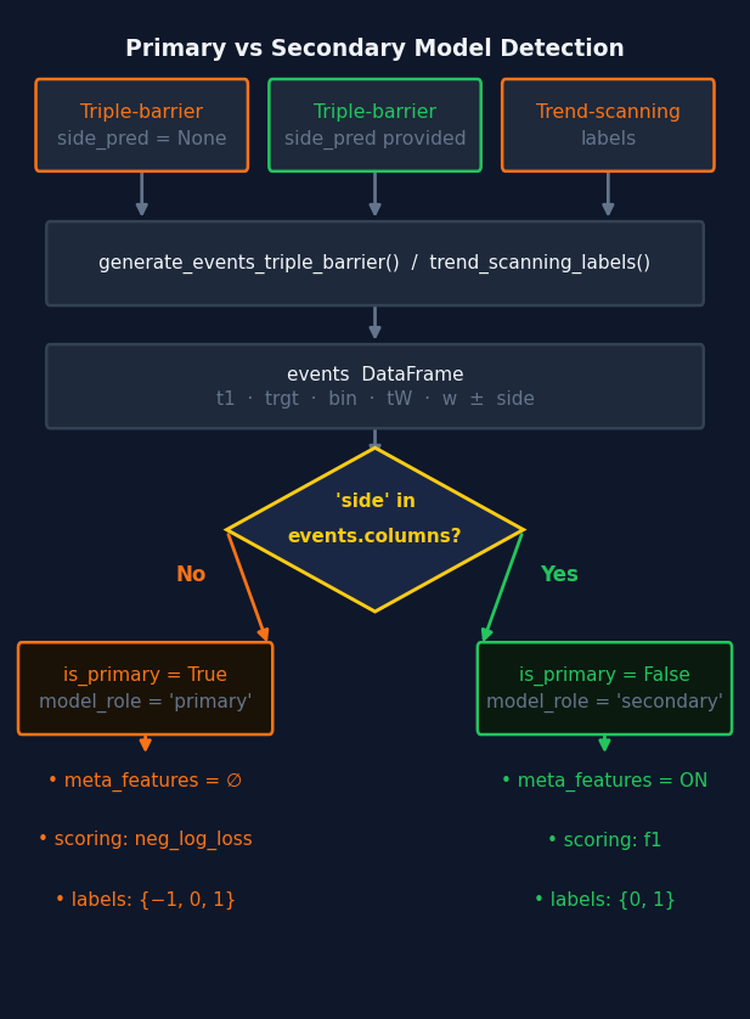
Fig. 2 — Primary/secondary detection flow. The sole discriminator is whether side is present in the events DataFrame after the labeling step — the same signal the labeling code uses internally. The flag gates meta-feature computation and artifact naming for the rest of the run.
The pipeline sets self.is_primary immediately after generate_labels(). It also writes model_role into the config dict so it is included in the artifact directory hash and the training summary:
def generate_labels(self):
    self.events = generate_events_triple_barrier(
        self.bar_data, self.strategy, self.target_config, **self.label_config
    )
    self.is_primary = 'side' not in self.events.columns
    self.config['model_role'] = 'primary' if self.is_primary else 'secondary'
    logger.info(
        f"Model role: {self.config['model_role']} | "
        f"Label space: {sorted(self.events['bin'].unique().astype('int8'))}"
    )
    logger.info(f"Average uniqueness: ({self.events['tW'].mean():.4f})")
    self.completed_steps['label_generation'] = True
Rolling meta-features are skipped for primary models because there is no prior model whose performance can be tracked — the concept is self-referential and only meaningful when evaluating whether a primary model's signals deserve to be acted on:
def add_meta_features(self):
    if self.is_primary:
        self.meta_features = pd.DataFrame(index=self.events.index)
        logger.info('Primary model — rolling meta-features skipped.')
    else:
        self.meta_features = calculate_rolling_metrics(self.events, self.sample_weight)
    self.completed_steps['meta_features'] = True
And preprocess_features() skips the inner join when meta_features is empty — joining against an empty DataFrame would produce zero rows:
if self.meta_features.empty:
    combined = self.features.dropna()
else:
    combined = self.features.join(self.meta_features, how='inner').dropna()
The Fitted Preprocessor
The previous pipeline fitted DropConstantFeatures and DropDuplicateFeatures in preprocess_features() and discarded the fitted objects. Only preprocessed_features was retained; best_model had no memory of which columns were dropped during training. This creates a silent failure path at inference time. A RandomForestClassifier trained on 47 features raises no error when given 52 features — it accesses columns by integer position and produces predictions for the wrong variables without warning. The fix is to store the fitted preprocessor and prepend it to best_model after training. preprocess_features() now stores self.preprocessor:
def preprocess_features(self):
    if self.meta_features.empty:
        combined = self.features.dropna()
    else:
        combined = self.features.join(self.meta_features, how='inner').dropna()

    # Store the fitted preprocessor. It is prepended to best_model in train_model
    # so that inference applies exactly the same column selection as training.
    self.preprocessor = Pipeline([
        ('dcf', DropConstantFeatures()),
        ('ddf', DropDuplicateFeatures()),
    ])
    self.preprocessed_features = self.preprocessor.fit_transform(combined)
    self.events = self.events.loc[self.preprocessed_features.index]
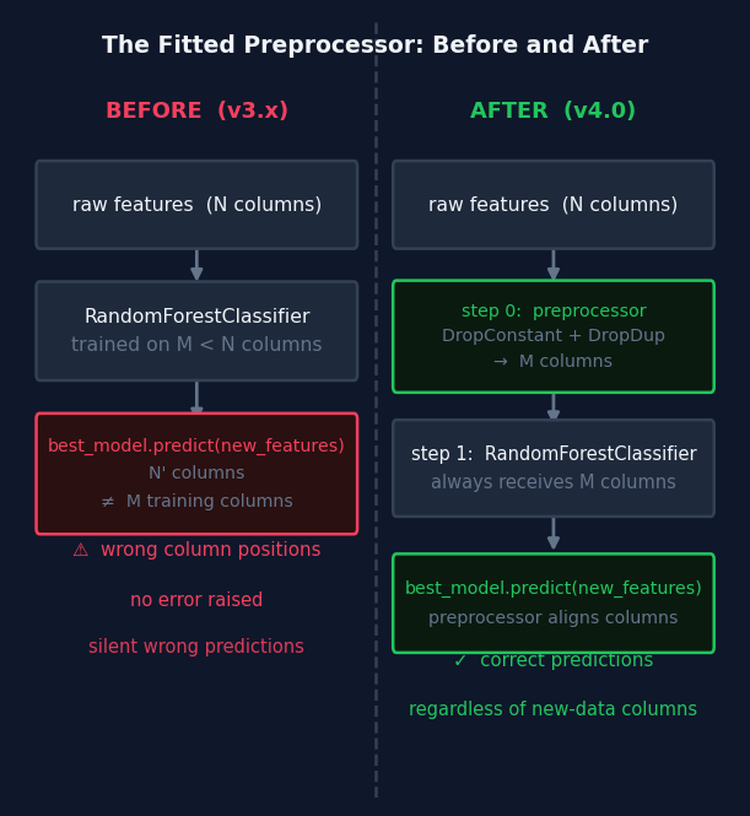
Fig. 3 — Before v4.0, best_model contained only the classifier. New data with a different column set caused silent mispredictions because sklearn uses integer position access. After v4.0, the fitted preprocessor is step 0 of best_model and enforces the training-time column set at every subsequent prediction.
After the HPO dispatch, train_model() prepends it:
self.best_model = Pipeline([
    ('preprocessor', self.preprocessor),
    *self.best_model.steps,
])
The saved model now has the structure preprocessor → clf (or preprocessor → bag). Calling best_model.predict(raw_features) at inference time enforces the same column selection as training. This is required for LearnedStrategy.generate_signals()(Section 13) and for the ONNX export.
_get_feature_names() simplifies as a result — no pipeline introspection is needed since preprocessed_features is already the authoritative post-preprocessing column set:
def _get_feature_names(self):
    if self.preprocessed_features is None:
        return []
    return self.preprocessed_features.columns.tolist()
The Reworked train_model Method
Three pre-dispatch decisions are worth noting explicitly.
First, when bagging_n_estimators is zero and the base classifier is a RandomForestClassifier, max_samples is added to param_grid as a scipy.stats.uniform distribution bounded by average label uniqueness. This makes the bootstrap sample fraction a tunable hyperparameter rather than a fixed value. DecisionTreeClassifier is a single tree with no bootstrap step and has no max_samples parameter — including it in the guard was an error in earlier versions that produced a silent no-op.
Second, bagging_max_samples is resolved to average label uniqueness when the caller leaves it as None. This is done in train_model() because self.events['tW'] is available at this point and the resolution must apply uniformly to both training paths.
Third, the post-dispatch block prepends the fitted preprocessor and restores n_jobs=-1.
def train_model(self):
    self.model_params['pipe_clf'] = make_custom_pipeline(self.model_params['pipe_clf'])
    pipe = clone(self.model_params['pipe_clf'])

    bagging_n_estimators = self.model_params.get('bagging_n_estimators', 0)

    if bagging_n_estimators > 0:
        if self.model_params.get('bagging_max_samples') is None:
            av_uniqueness = self.events['tW'].mean().round(2)
            self.model_params['bagging_max_samples'] = av_uniqueness
            logger.info(f"bagging_max_samples set to average uniqueness ({av_uniqueness:.4f})")
    elif isinstance(pipe.steps[-1][-1], RandomForestClassifier):
        # Add max_samples as a searchable hyperparameter bounded by uniqueness.
        # DecisionTreeClassifier has no bootstrap step and no max_samples parameter.
        av_uniqueness = self.events['tW'].mean().round(2)
        self.model_params['param_grid']['max_samples'] = uniform(av_uniqueness, 1 - av_uniqueness)

    self.model_params['pipe_clf'] = pipe

    if self.model_params.get('use_optuna', False):
        self._train_model_optuna()
    else:
        self._train_model_sklearn()

    self.best_model = Pipeline([
        ('preprocessor', self.preprocessor),
        *self.best_model.steps,
    ])
    self.best_model = set_pipeline_params(self.best_model, n_jobs=-1)
    self.completed_steps['model_training'] = True
Both dispatch targets — _train_model_sklearn and _train_model_optuna — take no arguments. Each reads the pipeline and configuration from self.model_params directly. _train_model_sklearn uses inspect.signature to filter model_params down to the keys accepted by clf_hyper_fit_cached, preventing unexpected keyword arguments. When bagging_sequential=True, it strips the bagging keys so clf_hyper_fit returns the plain tuned pipeline, then calls _apply_sequential_bagging post-HPO with self.sample_weight:
def _train_model_sklearn(self):
    bagging_sequential = self.model_params.get('bagging_sequential', False)
    bagging_n = self.model_params.get('bagging_n_estimators', 0)
    sample_weight_train = self.sample_weight.loc[self.events.index]
    sample_weight_score = self.events['w'].loc[sample_weight_train.index]

    # Filter to keys accepted by clf_hyper_fit_cached via signature introspection.
    included = inspect.signature(clf_hyper_fit_cached).parameters.keys()
    params = {k: v for k, v in self.model_params.items() if k in included}

    if bagging_sequential and bagging_n > 0:
        params['bagging_n_estimators'] = 0
        tuned_pipeline, self.cv_results = clf_hyper_fit_cached(
            features=self.preprocessed_features, labels=self.events['bin'],
            t1=self.events['t1'], **params,
            sample_weight_train=sample_weight_train,
            sample_weight_score=sample_weight_score,
        )
        self.best_model = self._apply_sequential_bagging(
            self.preprocessed_features, self.events['bin'],
            tuned_pipeline, sample_weight=sample_weight_train,
        )
    else:
        self.best_model, self.cv_results = clf_hyper_fit_cached(
            features=self.preprocessed_features, labels=self.events['bin'],
            t1=self.events['t1'], **params,
            sample_weight_train=sample_weight_train,
            sample_weight_score=sample_weight_score,
        )
_train_model_optuna in Detail
The method takes no arguments — it reads the pipeline and search space from self.model_params. It translates model_params keys, auto-derives study_name and db_path, computes the scoring metric from the label space, runs the study with refit=True, then dispatches to one of three post-study paths based on bagging_sequential and bagging_n_estimators.
Parameter filtering uses inspect.signature to extract the keys accepted by optimize_trading_model. This means any new parameter added to the function signature in a future version will flow through automatically without modifying this method:
def _train_model_optuna(self):
    X, y = self.preprocessed_features, self.events['bin']
    base_clf = self.model_params['pipe_clf'].steps[-1][1]
    metric = 'f1' if set(y.unique()) == {0, 1} else 'neg_log_loss'

    # Filter model_params to keys accepted by optimize_trading_model.
    included = inspect.signature(optimize_trading_model).parameters.keys()
    opt_params = {'metric': metric}
    for k, v in self.model_params.items():
        if k == 'param_grid':
            opt_params['param_distributions'] = v
        elif k in included:
            opt_params[k] = v

    config_hash = self.file_paths['base_dir'].name
    study_config_hash = self._get_study_config_hash()

    opt_params['study_name'] = (
        f"{self.strategy.get_strategy_name()}"
        f"_{self.symbol}"
        f"_{self.data_config.get('bar_type', 'unk')}"
        f"_{self.data_config.get('bar_size', 'unk')}"
        f"_{config_hash}"
        f"_s{study_config_hash}"
    )

    db_path: Path = self.file_paths['db_path']
    db_path.parent.mkdir(parents=True, exist_ok=True)
    opt_params['db_path'] = f"sqlite:///{db_path.resolve()}"
    opt_params['reports_path'] = self.file_paths['reports'] / "trials"
    callbacks = [check_for_overfitting, print_best_trial]

    # Attempt auto-launch of optuna-dashboard in a background thread.
    try:
        from .dashboard import launch_optuna_dashboard
        launch_optuna_dashboard(storage=opt_params['db_path'], timeout=60)
    except Exception as e:
        logger.error(e)

    # ── Run the study (refit=True: handled internally) ───────────────────
    self.study, cv_results_df = optimize_trading_model(
        classifier=base_clf, X=X, y=y, events=self.events,
        data_index=self.bar_data.index,
        refit=True,
        callbacks=callbacks,
        **opt_params,
    )

    logger.info(
        f"Optuna complete. Best score: {self.study.best_value:.4f} | "
        f"Best params: {self.study.best_params}"
    )
    best_estimator = make_custom_pipeline(self.study.best_estimator_.base_estimator)

    bagging_sequential   = self.model_params.get('bagging_sequential', False)
    bagging_n_estimators = self.model_params.get('bagging_n_estimators', 0)
    bagging_max_samples  = self.model_params.get('bagging_max_samples', 1.0)
    bagging_max_features = self.model_params.get('bagging_max_features', 1.0)
    n_jobs               = self.model_params.get('n_jobs', -1)
    random_state         = self.model_params.get('random_state', None)

    if bagging_sequential and bagging_n_estimators > 0:
        self.best_model = self._apply_sequential_bagging(
            X, y, best_estimator,
            sample_weight=self.study.best_estimator_.sample_weight_,
        )
    elif bagging_n_estimators > 0:
        base_est = set_pipeline_params(best_estimator, n_jobs=1)
        bag = BaggingClassifier(
            estimator=MyPipeline(base_est.steps),
            n_estimators=int(bagging_n_estimators),
            max_samples=bagging_max_samples, max_features=bagging_max_features,
            n_jobs=n_jobs, random_state=random_state,
        )
        bag.fit(X, y, sample_weight=self.study.best_estimator_.sample_weight_)
        self.best_model = Pipeline([('bag', bag)])
    else:
        self.best_model = best_estimator

    pruner_type = self.model_params.get('pruner_type', 'hyperband')
    self.cv_results = {
        'best_params':        self.study.best_params,
        'best_score':         self.study.best_value,
        'cv_results':         cv_results_df,
        'scoring':            metric,
        'search_method':      'optuna',
        'pruner_type':        pruner_type,
        'n_trials_completed': len([t for t in self.study.trials
                                     if t.state.name == 'COMPLETE']),
        'n_trials_pruned':    len([t for t in self.study.trials
                                     if t.state.name == 'PRUNED']),
    }
The study name encodes every experiment dimension: strategy, symbol, bar type, bar size, and full config hash. A final segment _s{study_config_hash} captures the bagging configuration, base model type, and search space structure via a short MD5 hash. This hash is computed by _get_study_config_hash(), which hashes a dict of bagging parameters, the classifier's class name and fixed parameters, and the sorted keys of param_grid. Any structural change — adding a parameter to the search space, switching from standard to sequential bagging, or changing the base classifier — produces a new study name, preventing Optuna from resuming a study whose parameter space is incompatible with the current run. Distribution bound changes are intentionally excluded from the hash because Optuna handles them gracefully within the same study.
Note that n_splits is not passed as an explicit keyword argument. It flows through opt_params via the inspect.signature loop because optimize_trading_model accepts it as a named parameter. The pipeline attribute is self.n_splits, set from model_params['n_splits'] in __init__.
The Refit Path and Bagging
refit=True
optimize_trading_model is called with refit=True. After the study completes, the library calls FinancialModelSuggester.apply_from_params internally with the winning trial's parameter dict, constructs the correct _WeightedEstimator, and fits it on the full dataset. The result is attached to study.best_estimator_ along with sample_weight_ — the final computed weights with the optimal scheme and decay applied. apply_from_params is the deterministic counterpart to suggest_and_apply: everything stochastically sampled during search is exactly reconstructed for the final fit.
Standard Bagging
Standard bagging requires unwrapping _WeightedEstimator. BaggingClassifier draws bootstrap samples via NumPy integer indexing, which strips the pandas index. _WeightedEstimator.fit aligns weights via .loc[] and therefore requires the index; otherwise alignment fails silently. The solution: extract the already-computed optimal weights from study.best_estimator_.sample_weight_ and pass them explicitly to BaggingClassifier.fit, using a plain MyPipeline([("clf", RF)]) as the base estimator. One bag.fit call is sufficient.
Sequential Bagging
When bagging_sequential=True, _apply_sequential_bagging is called instead. Sequential bootstrapping draws samples proportionally to average label uniqueness rather than uniformly. Because triple-barrier labels overlap in time, a standard bootstrap repeatedly resamples the same concurrent labels together, producing correlated bags. Sequential bootstrapping reduces this redundancy, yielding a less correlated ensemble for the same number of estimators — a direct application of the uniqueness-weighting principle from Part 5.
After fitting, the method converts the SequentiallyBootstrappedBaggingClassifier into a standard BaggingClassifier for ONNX compatibility. skl2onnx does not have a converter for SequentiallyBootstrappedBaggingClassifier since it is not part of scikit-learn. The conversion copies all fitted state — estimators_, estimators_features_, classes_, and n_features_in_ — from the sequential bagger into a standard BaggingClassifier shell. Sequential bootstrapping only affects how training samples are drawn; prediction is identical between the two classes. The fitted estimators are the same objects, not copies, so no information is lost:
def _apply_sequential_bagging(self, X, y, tuned_pipeline, sample_weight=None):
    bagging_n       = self.model_params.get('bagging_n_estimators', 0)
    bagging_samples = self.model_params.get('bagging_max_samples', 1.0)
    bagging_feats   = self.model_params.get('bagging_max_features', 1.0)
    random_state    = self.model_params.get('random_state', 1)

    base_est = set_pipeline_params(tuned_pipeline, n_jobs=1)

    seq_bag = SequentiallyBootstrappedBaggingClassifier(
        estimator=MyPipeline(base_est.steps),
        n_estimators=int(bagging_n),
        max_samples=bagging_samples, max_features=bagging_feats,
        samples_info_sets=self.events['t1'],
        price_bars_index=self.bar_data.index,
        random_state=random_state,
    )

    if sample_weight is not None:
        seq_bag.fit(X, y, sample_weight=sample_weight)
    else:
        seq_bag.fit(X, y)

    # ── Convert to standard BaggingClassifier for ONNX compatibility ─────
    standard_bag = BaggingClassifier(
        estimator=MyPipeline(base_est.steps),
        n_estimators=len(seq_bag.estimators_),
        max_samples=1.0,
        max_features=seq_bag.max_features,
        bootstrap=seq_bag.bootstrap,
        bootstrap_features=seq_bag.bootstrap_features,
        random_state=random_state,
        n_jobs=seq_bag.n_jobs,
    )
    standard_bag.estimators_ = seq_bag.estimators_
    standard_bag.estimators_features_ = seq_bag.estimators_features_
    standard_bag.classes_ = getattr(seq_bag, 'classes_', np.array(sorted(y.unique())))
    standard_bag.n_classes_ = len(standard_bag.classes_)
    standard_bag.n_features_in_ = X.shape[1]

    return Pipeline([('seq_bag', standard_bag)])
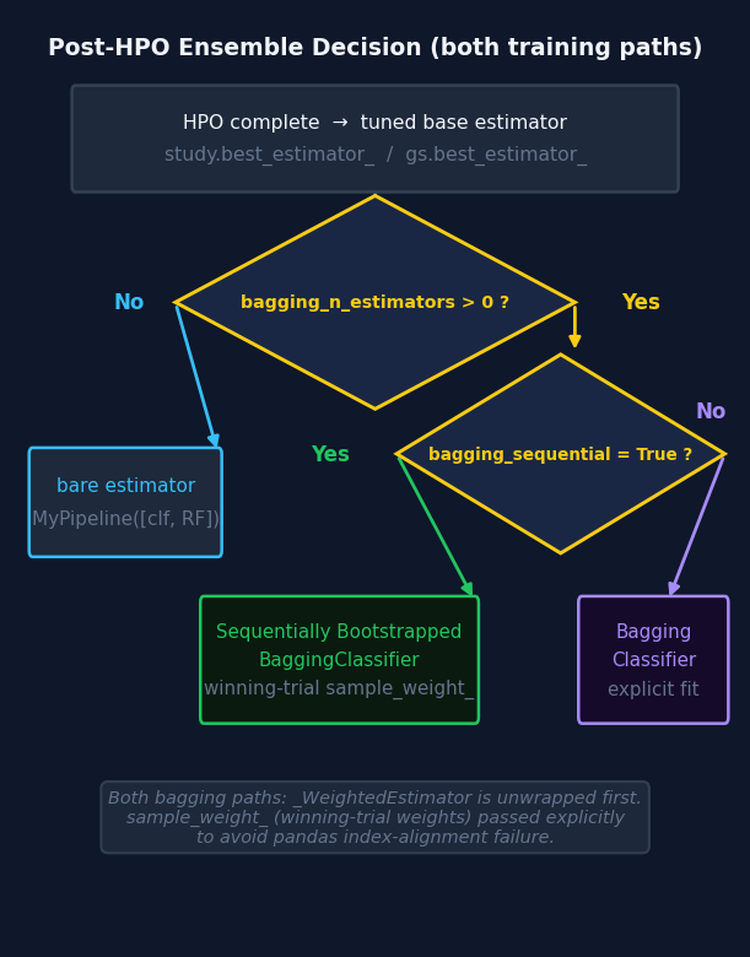
Fig. 4 — Post-HPO ensemble decision tree, shared by both training paths. HPO always tunes the base classifier without any ensemble wrapper. The ensemble type is resolved after the study completes. In both bagging branches, _WeightedEstimator is unwrapped and the winning trial's weights are passed explicitly.
In the sklearn path, when bagging_sequential=True, the bagging keys are stripped from the clf_hyper_fit call so it returns the plain tuned pipeline. _apply_sequential_bagging is then called with self.sample_weight. HPO always tunes the base classifier without an ensemble wrapper, regardless of which bagging variant is requested.
The Optuna Visualization Report
When the Optuna path is used, _generate_analysis_reports() calls _generate_optuna_report() after the standard hyperparameter markdown report and training summary. The method produces a self-contained HTML file at file_paths['reports'] / 'optuna_study_report.html' with four interactive Plotly charts, and saves a fifth static plot as a companion PNG.
32Chart | What it answers | |
|---|---|---|
| 1. | plot_optimization_history | Did the TPE sampler converge? A flat plateau by trial 20–30 suggests the budget was sufficient; a still-improving curve at the budget limit suggests more trials are needed. |
| 2. | plot_intermediate_values | Makes the pruner's decisions visible. Each line is one trial; lines ending before all folds were evaluated were pruned. Fold 1 being the dominant pruning point is normal — HyperbandPruner's aggressive bracket is working. |
| 3. | plot_param_importances | Which hyperparameters drove score variance? fANOVA ranks each parameter. Parameters near the bottom can be fixed to their best value and removed from subsequent searches to reduce the effective search space. |
| 4. | plot_parallel_coordinate | Shows parameter interactions. One line per completed trial, colored by score. Converging lines identify the high-scoring region; parallel non-converging lines indicate an insensitive parameter. |
| 5. | plot_model_vs_baseline (PNG) | The best trial's fold-by-fold scores against the entropy-based naive baseline. Shaded area shows where the model demonstrates economic edge. Uses return-attribution weights to compute the baseline, consistent with the scoring criterion used during the study. |
All four HTML plots share the pipeline's dark theme and use plotly.io.to_html with include_plotlyjs='cdn' — a single portable file with no local asset dependencies. Each plot is wrapped in a try/except so a failed import or an insufficient trial count does not interrupt the pipeline:
def _generate_analysis_reports(self):
    try:
        if self.cv_results and 'cv_results' in self.cv_results:
            cv_df = pd.DataFrame(self.cv_results['cv_results'])
            generate_complete_hyperparameter_report(
                cv_results=cv_df, strategy_config=self.config,
                output_dir=self.file_paths['reports']
            )
        self._generate_training_summary_html()
        if self.study is not None:
            self._generate_optuna_report()
    except Exception as e:
        logger.warning(f"Report generation failed: {e}")
Live Monitoring with optuna-dashboard
Because db_path is always populated from the pipeline's file-path registry, the study is always persisted in SQLite. optuna-dashboard can therefore be pointed at the database before the study starts and will update in real time as trials complete — no pipeline code changes required. The dashboard reads directly from the SQLite file and does not need a connection to the running Python process.
The pipeline attempts to auto-launch optuna-dashboard in a background thread immediately before the study begins. This is handled by a launch_optuna_dashboard helper imported from dashboard.py. If the import or launch fails — for example because optuna-dashboard is not installed or the port is already in use — the error is logged and the study proceeds normally. The dashboard can always be started manually in a separate terminal instead:
pip install optuna-dashboard

# In a separate terminal while the pipeline runs
optuna-dashboard sqlite:////absolute/path/to/Models/BollingerBand/optuna_studies.db
The dashboard complements optuna_study_report.html. The report is a post-run snapshot. The dashboard is a live view with a real-time trial timeline (useful for parallel workers) and intermediate-value plots that update after each fold.
The database sits at the strategy level of the artifact tree, so all experiments for a strategy appear in the same dashboard view.
Sample Weight Computation in the Optuna Path
compute_sample_weights (Step 4) runs in both paths. Three things depend on self.sample_weight independent of HPO: meta-features (Step 5, secondary model only) use it for rolling weighted performance metrics; the training summary displays the best weighting scheme; and the weights are saved to disk so a re-run can skip weight computation entirely.
The weights computed by get_optimal_sample_weight are never passed to the Optuna HPO system. _WeightedEstimator computes its own weights internally from events and data_index on each trial, because the weight scheme is a searchable hyperparameter that varies between trials. The two weight series are independent and must not be confused.
Caching Integration
The two persistence systems operate at different layers and must remain separated. Steps 1–5 are decorated with @cacheable() or @cv_cacheable. A re-run after a code change in optimize_trading_model reloads preprocessed features, events, and weights from the joblib cache and only re-runs the training step. The Optuna SQLite study stores completed trials; a re-run with the same auto-derived names resumes from the last completed trial. The combination means no compute is repeated at either layer after any interruption.
Do not wrap optimize_trading_model in a @cacheable decorator. It would freeze the study at a single snapshot and break the crash-recovery guarantee on every subsequent run.
model_params = {
    'pipe_clf':             RandomForestClassifier(n_jobs=1, random_state=42),
    'param_grid':           FinancialModelSuggester.get_search_space('random_forest'),
    'n_splits':             5,
    'use_optuna':           True,
    'n_trials':             150,
    'timeout':              7200,
    'pruner_type':          'hyperband',
    'bagging_n_estimators': 100,
    'bagging_sequential':   True,   # SequentiallyBootstrappedBaggingClassifier post-HPO
    'bagging_max_samples':  None,   # auto-resolved to events['tW'].mean() in train_model
    'bagging_max_features': 1.0,
    'random_state':         42,
    # study_name and db_path are auto-derived.
}
The Bid/Ask Long-Short Pipeline
Why Separate Models for Each Side
Standard triple-barrier labeling treats long and short entries symmetrically. In execution they are not: a long entry executes at the ask, a short at the bid. The spread is a transaction cost paid at entry and exit. A signal that appears profitable on mid-prices may lose money on one side when execution prices are used. Training on execution-realistic prices makes this cost visible to the labeler and therefore to the model.
BidAskLongShortPipeline
BidAskLongShortPipeline wraps two ModelDevelopmentPipeline instances configured with price='ask' and price='bid' respectively. It loads bars once with price='bid_ask', splits into ask bars for the long pipeline and bid bars for the short pipeline, generates events separately for each side and filters to the matching direction, then runs the standard Steps 4–7 independently for each sub-pipeline.
from afml.production.dual_model_development import BidAskLongShortPipeline

pipeline = BidAskLongShortPipeline(
    strategy=strategy, data_config=data_config,
    feature_config=feature_config, target_config=target_config,
    label_config=label_config, model_params=model_params,
    base_dir='Models/BidAsk',
)
results = pipeline.run()

spread = results['spread_stats']
print(f"Mean spread: {spread['spread_mean']:.5f} ({spread['spread_bps']:.2f} bps)")
print(f"Long  CV: {results['combined_metrics']['long_cv_score']:.4f}")
print(f"Short CV: {results['combined_metrics']['short_cv_score']:.4f}")
If the short model's CV score falls materially below the long model's, the bid-ask spread is consuming the short-side edge and that direction should not be traded at current spread levels.
LearnedStrategy: Bridging the Two Stages
The two-stage workflow requires a way to connect the output of a primary pipeline run to the input of a secondary pipeline's labeling step. LearnedStrategy provides that connection by wrapping a fitted primary pipeline as a BaseStrategy.
When a LearnedStrategy instance is passed as the strategy argument to a secondary ModelDevelopmentPipeline, the labeling step calls generate_signals() to obtain side predictions. These are passed to triple_barrier_labels as side_prediction, which causes get_events() to retain side in the events DataFrame and get_bins() to enter the meta-labeling path. The secondary pipeline's is_primary flag is therefore False, rolling meta-features are computed, and the artifact directory carries model_role='secondary'.
from afml.strategies.learned_strategy import LearnedStrategy

# ── Stage 1: primary model ────────────────────────────────────────────────
primary_pipeline = ModelDevelopmentPipeline(
    strategy=BollingerBandStrategy(window=20, std=1.5),
    data_config=data_config, feature_config=feature_config,
    target_config=target_config, label_config=label_config,
    model_params=primary_model_params,
)
primary_pipeline.run()

# ── Wrap the trained model as a strategy ─────────────────────────────────
learned = LearnedStrategy.from_pipeline(primary_pipeline)

# ── Stage 2: secondary model ──────────────────────────────────────────────
secondary_pipeline = ModelDevelopmentPipeline(
    strategy=learned,              # generate_signals() provides side predictions
    data_config=data_config,
    feature_config=feature_config,
    target_config=target_config,
    label_config=secondary_label_config,
    model_params=secondary_model_params,
)
secondary_pipeline.run()
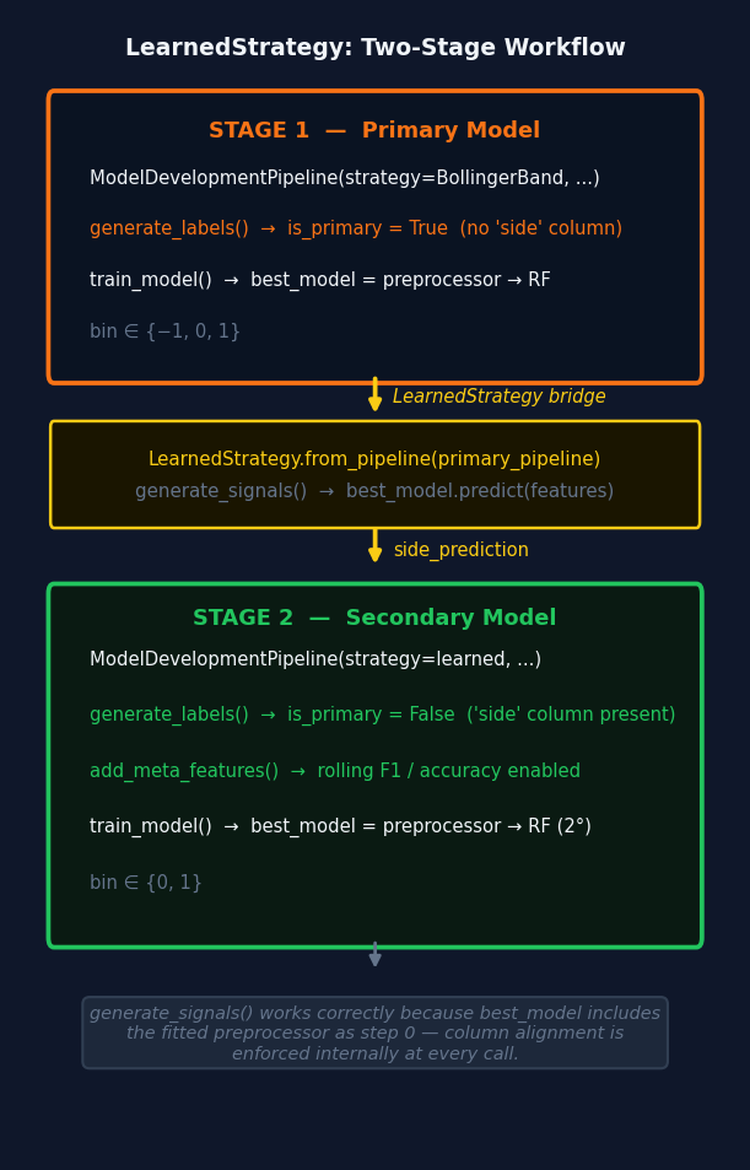
Fig. 5 — The two-stage workflow. LearnedStrategy.from_pipeline() converts a fitted primary pipeline directly into a BaseStrategy. The secondary pipeline's generate_labels() calls generate_signals(), which calls best_model.predict() — the preprocessor inside best_model ensures column alignment without any external preprocessing step.
generate_signals() applies feature_config['func'] to the bar data and calls fitted_pipeline.predict(). Because the primary pipeline's best_model now includes the fitted preprocessor as step 0, column alignment is handled internally — the same column set selected at training time is enforced at inference time. Without the preprocessor inside best_model, generate_signals() would produce predictions using the wrong columns whenever a constant or duplicate feature appeared in new data but not in the training set.
One constraint applies: LearnedStrategy wraps primary models only. A secondary pipeline's best_model was trained on features including rolling meta-features — columns derived from a prior model's performance — which cannot be reproduced at inference time without that prior model in scope. from_pipeline() raises ValueError if pipeline.is_primary is False.
The label 0 (vertical barrier reached during primary training) is mapped to 1 in generate_signals(). The primary model's role is only to provide direction — the secondary model decides whether to act on each signal. A side value of 0 is not meaningful in that context.
To support reconstruction without loading the full model, the strategy object is saved as a standalone cloudpickle artifact alongside the model joblib. _save_all_artifacts calls self.file_manager.save_object(self.strategy, "strategy") so that a LearnedStrategy can be reloaded independently of the pipeline that produced it.
model_params Configuration
The full set of keys recognized by the Optuna path is documented below. study_name and db_path are auto-derived and no longer user-facing.
32Key | Type | Default | Description | |
|---|---|---|---|---|
| 1. | use_optuna | bool | False | Switch to Optuna HPO backend. |
| 2. | pipe_clf | estimator or Pipeline | — | Base classifier or pipeline. When use_optuna=True, the last step's estimator is extracted and passed to FinancialModelSuggester. |
| 3. | param_grid | dict | {} | Search space. Accepts lists, scipy.stats distributions, or range objects. Renamed to param_distributions internally. Use FinancialModelSuggester.get_search_space() for curated defaults. When the base classifier is RandomForestClassifier and bagging is not active, max_samples is added automatically as a uniform distribution bounded by average label uniqueness. |
| 4. | n_splits | int | 5 | Number of PurgedKFold splits. Also sets HyperbandPruner's max_resource. Forwarded to optimize_trading_model via signature introspection. |
| 5. | n_trials | int | 100 | Trial budget. Stops when reached or when timeout elapses. |
| 6. | timeout | int | 3600 | Wall-clock timeout in seconds. Second stopping criterion. |
| 7. | pruner_type | str | 'hyperband' | hyperband (recommended) or median (TradingModelPruner with entropy baseline). See Part 8 for bracket mechanics. |
| 8. | bagging_n_estimators | int | 0 | Number of bags. 0 disables bagging. Ensemble is built post-HPO from the tuned base classifier. |
| 9. | bagging_sequential | bool | False | When True and bagging_n_estimators > 0, uses SequentiallyBootstrappedBaggingClassifier post-HPO instead of standard BaggingClassifier. The fitted ensemble is converted to a standard BaggingClassifier for ONNX compatibility. Recommended when triple-barrier labels have high concurrency (low average uniqueness). HPO always tunes the base classifier without the ensemble wrapper. |
| 10. | bagging_max_samples | float or None | None | Fraction of samples per bag. If left as None and bagging is active, train_model replaces it with events['tW'].mean() at runtime. Set an explicit float to override. |
| 11. | bagging_max_features | float | 1.0 | Fraction of features drawn per bag. |
| 12. | random_state | int | None | Seeds the TPESampler, the base classifier's random_state, and the bagging ensemble for reproducibility. |
Practical Considerations
Accessing study plots after a run. The four-chart HTML report is saved automatically to file_paths['reports'] / 'optuna_study_report.html'. self.study also holds the completed study object for in-process access. To reload a previous study from the database:
import optuna

db_uri = f"sqlite:///{pipeline.file_paths['db_path'].resolve()}"
study  = optuna.load_study(study_name=pipeline.study.study_name, storage=db_uri)
# study_name format: StrategyName_Symbol_BarType_BarSize_ConfigHash_sStudyHash
# e.g. BollingerBand_EURUSD_tick_M1_a3f7c912_s4b2e1f
Feature importance unwrapping.best_model is now preprocessor → clf/bag. The last step is the classifier. The correct unwrapping sequence handles all model shapes:
from afml.production.weighted_estimator import _WeightedEstimator

clf = self.best_model.steps[-1][1]

if isinstance(clf, SequentiallyBootstrappedBaggingClassifier):
    importances = np.mean([
        est.steps[-1][1].feature_importances_ for est in clf.estimators_
    ], axis=0)
elif isinstance(clf, BaggingClassifier):
    importances = np.mean([
        est.steps[-1][1].feature_importances_ for est in clf.estimators_
    ], axis=0)
elif isinstance(clf, _WeightedEstimator):
    importances = clf.base_estimator.feature_importances_
else:
    importances = clf.feature_importances_
Note that isinstance(clf, _WeightedEstimator) is used rather than hasattr(clf, 'base_estimator'). BaggingClassifier also exposes a base_estimator attribute (its unfitted template), so the hasattr check produces a false positive. The import from weighted_estimator is required — this is the same import the pipeline's analyze_features() method uses internally.
ONNX export and MyPipeline.skl2onnx only recognizes sklearn.pipeline.Pipeline. MyPipeline is a subclass that adds sample-weight passthrough — a training-time concern with no ONNX representation. Before ONNX conversion, _convert_mypipeline_for_onnx() recursively replaces every MyPipeline instance inside the fitted pipeline with a standard Pipeline, preserving all fitted state. This handles three nesting patterns: a pipeline step that is directly a MyPipeline, a BaggingClassifier whose estimator template is a MyPipeline, and fitted estimators_ inside a BaggingClassifier that are MyPipeline instances. The preprocessor step is also stripped before conversion because DropConstantFeatures and DropDuplicateFeatures have no ONNX operator mapping. Apply self.preprocessor.transform() as a standalone step before passing data to the deployed ONNX model.
When use_optuna=False is still correct. Optuna's TPE sampler needs at least 20–30 completed trials before its model of the objective surface outperforms random search. For search spaces with fewer than three parameters and fast fitting times, use_optuna=False with rnd_search_iter=0 produces deterministic results with no SQLite overhead.
Parallel workers.RDBStorage is configured with timeout=30 and pool_pre_ping=True, so multiple processes can point at the same database simultaneously. Set n_jobs=1 inside the classifier and rely on process-level parallelism to avoid thread oversubscription.
Conclusion
The reworked ModelDevelopmentPipeline unifies both HPO backends behind a single interface. The fitted preprocessor is now a permanent part of best_model, making inference self-contained and enabling safe cross-stage signal generation via LearnedStrategy.
Primary/secondary detection is automatic. If side is present in the events DataFrame, the run is treated as secondary; otherwise it is primary. This choice determines meta-feature computation, the expected label space, and the recorded model_role in the artifact directory. LearnedStrategy converts a primary pipeline output directly into a BaseStrategy, bridging the two training stages without manual configuration. The key enabler is that best_model now includes the preprocessor: generate_signals() calls fitted_pipeline.predict() and the column selection is handled internally, regardless of what the feature function produces on new data.
Sequential bootstrapping is available via bagging_sequential=True. HPO always tunes the base classifier without an ensemble wrapper; the ensemble is applied post-HPO in a single shared method used by both training paths. The fitted SequentiallyBootstrappedBaggingClassifier is converted to a standard BaggingClassifier for ONNX compatibility — sequential bootstrapping only affects how training samples are drawn, so prediction behavior is identical.
After every Optuna run, four interactive Plotly charts are saved to a self-contained HTML report alongside the existing markdown and summary reports. The dashboard URI is logged at study start for live monitoring in a separate terminal, complementing the static post-run report. The pipeline also attempts to auto-launch optuna-dashboard via a background thread.
Set export_onnx=True to use the ONNX export pipeline for deploying trained models in MetaTrader 5. Before conversion, _convert_mypipeline_for_onnx() replaces all MyPipeline instances with standard sklearn Pipeline objects and the preprocessor step is stripped. Apply the preprocessor as a standalone transform when feeding data to the deployed ONNX model.
Attached Files
The table below describes every file attached to this article.
32File | Module | Role in this article | Key dependencies | |
|---|---|---|---|---|
| 1. | model_development.py | afml.production | Central pipeline. Adds use_optuna dispatch, primary/secondary detection via is_primary, meta-feature gating, fitted preprocessor stored and prepended to best_model, bagging_sequential routing to _apply_sequential_bagging with post-fit conversion to standard BaggingClassifier for ONNX, _convert_mypipeline_for_onnx for ONNX export, study config hashing via _get_study_config_hash, and _generate_optuna_report() with five visualization outputs. Pipeline version 4.0. | optuna_hyper_fit.py, weighted_estimator.py, file_manager.py, unified_cache_system.py, plotly |
| 2. | learned_strategy.py | afml.strategies | New module. LearnedStrategy(BaseStrategy) wraps a fitted primary pipeline so its predictions can serve as side_prediction in a secondary pipeline's labeling step. from_pipeline() validates that the source is a primary model. generate_signals() relies on the preprocessor being inside best_model for column-safe inference. Maps label 0 to 1 for triple-barrier compatibility. | model_development.py, trading_strategies.py |
| 3. | weighted_estimator.py | afml.production | Standalone module. _WeightedEstimator extracted from model_development.py to eliminate the circular import with optuna_hyper_fit.py. Adds missing imports and a runtime check that the base estimator accepts sample_weight. | optimized_attribution.py, scikit-learn, numpy, pandas |
| 4. | optuna_hyper_fit.py | afml.cross_validation | Updated from Part 8. Imports _WeightedEstimator from weighted_estimator.py. optimize_trading_model now accepts callbacks and reports_path. create_study receives the RDBStorage object so timeout and pool settings are applied. Logs the optuna-dashboard command at study start. | weighted_estimator.py, cross_validation.py, optuna ≥ 3.0, scikit-learn ≥ 1.3 |
| 5. | file_manager.py | afml.production | Standalone module. ConfigPathGenerator and ModelFileManager extracted from utils.py. get_standard_file_paths adds a db_path entry at the strategy level (Models/StrategyName/optuna_studies.db). | model_export.py, pandas, cloudpickle |
| 6. | dual_model_development.py | afml.production | Companion pipeline training separate models on ask prices for long entries and bid prices for short entries. Computes bar-level spread statistics to quantify execution-price asymmetry between the two models. | model_development.py, pandas, loguru |
| 7. | cross_validation.py | afml.cross_validation | Unchanged from Part 5. Provides PurgedKFold used by both training paths and the objective function. | scikit-learn, pandas, numpy |
| 8. | unified_cache_system.py | afml.cache | Unchanged from Part 6. Caches Steps 1–5 so that a re-run after an interrupted Optuna study reloads preprocessing from cache rather than recomputing it. | joblib, loguru, scikit-learn, pandas, scipy |
Warning: All rights to these materials are reserved by MetaQuotes Ltd. Copying or reprinting of these materials in whole or in part is prohibited.
This article was written by a user of the site and reflects their personal views. MetaQuotes Ltd is not responsible for the accuracy of the information presented, nor for any consequences resulting from the use of the solutions, strategies or recommendations described.

 Neural Networks in Trading: Adaptive Detection of Market Anomalies (DADA)
 Battle Royale Optimizer (BRO)
 Building a Research-Grounded Grid EA in MQL5: Why Most Grid EAs Fail and What Taranto Proved
 Creating Custom Indicators in MQL5 (Part 9): Order Flow Footprint Chart with Price Level Volume Tracking

- Free trading apps
- Over 8,000 signals for copying
- Economic news for exploring financial markets
You agree to website policy and terms of use
Thank you