Report By Magic Number

4.83

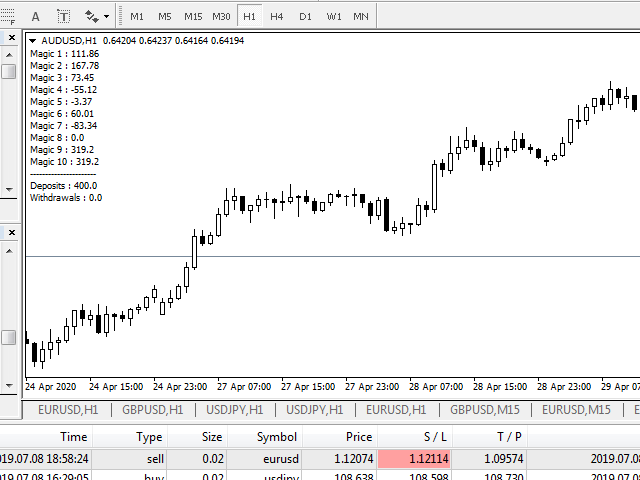
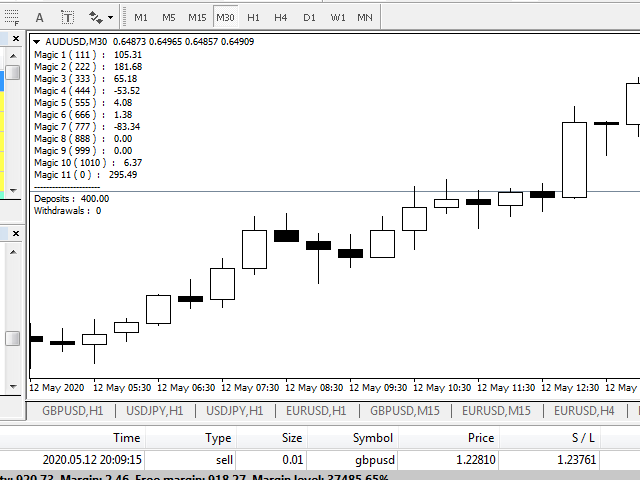
Having more expert advisors running on the same account , eventually leads us to the question , which one of them are winners , or which are dragging down the account ? With this in mind I created this simple utility for displaying profits or losses taken by each expert advisor over time .

This utility can be run as an expert advisor and can display up to 10 magic number results  . If the inputs are left to zero , the results displayed are from the manually placed orders . It also displays deposits and withdrawals , so that we know where we started from .

The utility takes into account only closed trades and it can be used even if the market is closed .

Prefferably , run it on a symbol that you don't execute trades on and without the chart grid , for better visuallity .
Reviews 9
Marco
534
Marco 2025.11.19 16:33 
 

A++

It's just missing to hide non used EAs rows,to show a table with 20 fields is unnecessary if you just require to track 3 or 5 magic numbers

Inakis Srl
705
Enrico De Landerset 2024.09.27 21:22 
 

excellent! he added a feature that Mt4 should have natively!

Artem Belan
175
Artem Belan 2023.06.08 17:19 
 

Very good and useful EA for testing several EAs on one account. It's a pity that the EA will no longer be updated by the author.

Recommended products
Add indicator "Symbol Name Drawer " on chart. Indicator creates text object with name of current symbol. You can change symbols on chart and indicator automatically changes text. Free to use. Simple tool. If you have any suggestion you can write me about it in comments. I try to improve this tool in future versions. Thanks for using my indicator. If you want to order something special in mql4 or mql5 message.
FREE
Magic Supply Demand Indicator works on all products and timeframes. It is a new formula, and   the very new features are two zone strength functions adjustable by user input!   This is a great advantage in trading. When you learn how to use the proprietary features such as the zone strength with   min X-factor of price travel away, you will be able to tell whether the zone is strong or not. The supply and demand zones are used as an alert trigger.   You can use popup alert with sound on MetaTra
FREE
Night Scalper EA Lite
Robots4Forex Ltd
2.33 (3)
The Night Scalper EA Lite is a fully automated Expert Advisor that trades at night and relies on price reversion. The EA trades using market orders and has the option to use time averaging to improve performance. This EA works best on EURUSD using the M5 timeframe, but will also work on AUDUSD, GBPUSD, NZDUSD, USDCAD, USDCHF and likely many more. A VPS is advisable when trading this system and a low spread and commission based broker is best. Check the comments for back test results and optimiz
FREE
Master the Forex Market with Powerful Currency Analysis! LIVE MONITORING OF SIGNAL USING CCY POWER Take your forex trading to the next level with a comprehensive and fully customizable tool designed to analyze currency trends, identify strong and weak currencies , and enhance your decision-making process. Key Features: Multi-Timeframe Analysis Analyze currency strength from short-term (1-minute) scalping to long-term (1-month) trends—adaptable to any trading style. Customizable Ca
FREE
Market Profile 3
Hussien Abdeltwab Hussien Ryad
3 (2)
Market Profile 3 MetaTrader 4 indicator  — is a classic Market Profile implementation that can show the price density over time, outlining the most important price levels, value area, and control value of a given trading session. This indicator can be attached to timeframes between M1 and D1 and will show the Market Profile for daily, weekly, monthly, or even intraday sessions. Lower timeframes offer higher precision. Higher timeframes are recommended for better visibility. It is also possible t
FREE
Harvest FX
Sayan Vandenhout
4.56 (9)
Harvest FX USES THE TREND WAVE INDICATOR AND IT CAN IDENTIFY THE BEGINNING AND THE END OF A NEW WAVE TREND MOVEMENT. AS AN OSCILLATOR, THE INDICATOR IDENTIFIES THE OVERBOUGHT AND OVERSOLD ZONES. IT WORKS GREAT TO CATCH THE SHORT TERM PRICE REVERSALS AND USES A MARTINGALE STRATEGY TO CLOSE ALL TRADES IN PROFIT. USE DEFAULT SETTINGS ON H1 OR HIGHER TIME FRAME ON ANY PAIR FOR MORE ACCURATE TRADES WHY THIS EA : Smart entries calculated by 3 great strategies The EA can be run on even a $30000 a
FREE
Vanexio
Sayan Vandenhout
VANEXIO USES THE TREND WAVE INDICATOR AND IT CAN IDENTIFY THE BEGINNING AND THE END OF A NEW WAVE TREND MOVEMENT. AS AN OSCILLATOR, THE INDICATOR IDENTIFIES THE OVERBOUGHT AND OVERSOLD ZONES. IT WORKS GREAT TO CATCH THE SHORT TERM PRICE REVERSALS AND USES A MARTINGALE STRATEGY TO CLOSE ALL TRADES IN PROFIT. USE DEFAULT SETTINGS ON H1 OR HIGHER TIME FRAME ON ANY PAIR FOR MORE ACCURATE TRADES WHY THIS EA : Smart entries calculated by 5 great strategies The EA can be run on even a $20000 acco
FREE
FFx MACD
Eric Venturi-Bloxs
4.2 (5)
The purpose of this new version of the MT4 standard indicator provided in your platform is to display in a sub-window multiple timeframes of the same indicator. See the example shown in the picture below. But the display isn’t like a simple MTF indicator. This is the real display of the indicator on its timeframe. Here's the options available in the FFx indicator: Select the timeframes to be displayed (M1 to Monthly) Define the width (number of bars) for each timeframe box Alert pop up/sound/ema
FREE
FFx Momentum
Eric Venturi-Bloxs
4 (1)
The purpose of this new version of the MT4 standard indicator provided in your platform is to display in a sub-window multiple timeframes of the same indicator. See the example shown in the picture below. But the display isn’t like a simple MTF indicator. This is the real display of the indicator on its timeframe. Here's the options available in the FFx indicator: Select the timeframes to be displayed (M1 to Monthly) Define the width (number of bars) for each timeframe box Alert pop up/sound/ema
FREE
Vanda FX
Sayan Vandenhout
5 (2)
Vanda FX USES THE TREND WAVE INDICATOR AND IT CAN IDENTIFY THE BEGINNING AND THE END OF A NEW WAVE TREND MOVEMENT. AS AN OSCILLATOR, THE INDICATOR IDENTIFIES THE OVERBOUGHT AND OVERSOLD ZONES. IT WORKS GREAT TO CATCH THE SHORT TERM PRICE REVERSALS AND USES A MARTINGALE STRATEGY TO CLOSE ALL TRADES IN PROFIT. USE DEFAULT SETTINGS ON H1 OR HIGHER TIME FRAME ON ANY PAIR FOR MORE ACCURATE TRADES WHY THIS EA : Smart entries calculated by 4 great strategies The EA can be run on even a $20000 acc
FREE
FFx Stochastic
Eric Venturi-Bloxs
4.6 (5)
The purpose of this new version of the MT4 standard indicator provided in your platform is to display in a sub-window multiple timeframes of the same indicator. See the example shown in the picture below. But the display isn’t like a simple MTF indicator. This is the real display of the indicator on its timeframe. Here's the options available in the FFx indicator: Select the timeframes to be displayed (M1 to Monthly) Define the width (number of bars) for each timeframe box Alert pop up/sound/ema
FREE
Lot Calculate
Maksim Neimerik
This simple but useful script calculates the lot in % of the deposit. It is indispensable for risk management. There is only one customizable parameter: MaxRisk - risk in % for lot calculation. The product works as a standard script. Launch it once on an appropriate chart and start trading using the calculated lot value. Genious is simplicity! Happy trading!
FREE
Highlights trading sessions on the chart The demo version only works on the AUDNZD chart!!! The full version of the product is available at: (*** to be added ***) Trading Session Indicator displays the starts and ends of four trading sessions: Pacific, Asian, European and American. the ability to customize the start/end of sessions; the ability to display only selected sessions; works on M1-H2 timeframes; The following parameters can be configured in the indicator: TIME_CORRECTION = Correct
FREE
This indicator calculates average speed of moving average indicator. Here is parameters: BarsToProcess - indicator calculating period; MaPeriod - period of Moving Average indicator; AveragingPeriod - period (MA values) of the basis of which the average value is calculated; MA_Method, MA_Apply_to - using to set MA indicator parameters; Thats all! Good luck.
FREE
Have you ever wondered which currency is the strongest at any particular time? Or which currency pair is trending the most. Well, the currency strength meter helps with just that.  It compares  USD ,  EUR ,  AUD ,  CHF ,  GBP ,  CAD  and  NZD  depending on the timeline you have chosen in settings, and ranks them on the number of pips each has moved compared to the rest. N/B:   All currency charts of the above pairs must have loaded. You can do this by highlighting all major and minor currencies
FREE
Implied Trader
Ciprian Ghebanoaei
Implied Trader   is a fully automatic, professional trading robot designed specifically for the foreign exchange market   AUDCAD M30 timeframe. Parameter configuration is not necessary for EA. Only the size of the lot you intend to use needs to be chosen. 0.1 is the suggested lot size for a $2000 account. You can raise the lot size correspondingly if your account has more money. It has an intelligent algorithm that recognizes the trend. On the basis of the trend direction, the expert places orde
FREE
Profitstat free
Tonny Obare
4 (2)
Profitstat is a free indicator that scans your history and displays it on the chart. The free version shows the number of trades and profit made on the current and previous day. The data is updated instantly as soon as a trade closes. Simply attach it to any chart and it gives the account data irrespective of the chart currency nor timeframe.
FREE
FFx ParabolicSAR
Eric Venturi-Bloxs
4.67 (3)
The purpose of this new version of the MT4 standard indicator provided in your platform is to display in a sub-window multiple timeframes of the same indicator. See the example shown in the picture below. But the display isn’t like a simple MTF indicator. This is the real display of the indicator on its timeframe. Here's the options available in the FFx indicator: Select the timeframes to be displayed (M1 to Monthly) Define the width (number of bars) for each timeframe box Alert pop up/sound/ema
FREE
LT Automated Support Resistance Screener is a level indicator or a support resistance indicator that can be used to determine the level of support and resistance values. This indicator is free and easy to used in the Metatrader 4 platform which is built using the MQL4 programming language. Support resistance indicator is an important indicator that is often to used, but it is not available on the MT4 platform. This indicator can be used for all markets like forex, indices, gold etc and all time
FREE
IceFX TradeInfo
Norbert Mereg
4.77 (44)
IceFX’s TradeInfo is an utility indicator which displays the most important information of the current account and position. Displayed information: Information about the current account (Balance, Equity, Free Margin). Current spread, current drawdown (DD), planned profit, expected losses, etc. Number of open position(s), volume (LOT), profit. Today’s and yesterday’s range. Remaining time to the next candle. Last day profit information (with integrated IceFX ProfitInfo indicator). Risk-based LOT
FREE
Screener Breakout Congestion
CARLO FINANCIAL SOFTWARE TECHNOLOGY LLC
5 (2)
Screener Breakout Congestion: Have you ever missed a trading opportunity because you were not looking at the chart of that market in that specific time frame? Here is this screener to help you identify congestion breakouts in the markets you want to follow in the different time frames required. Once you have identified the markets (forex, indices, CDF) and the different time frames (1M, 5M, 15M, 30M, 1H, 4H, Daily), the screener is represented by several buttons that change colour when the conge
FREE
Indicators are professional data statistics, position orders, historical order analysis->>>>>> <This version is in Chinese -> English version please move> Necessary for traders: tools and indicators Waves automatically calculate indicators, channel trend trading Perfect trend-wave automatic calculation channel calculation , MT4 Perfect trend-wave automatic calculation channel calculation , MT5 Local Trading copying Easy And Fast Copy , MT4 Easy And Fast Copy , MT5 Local Trading copying For DEMO
FREE
FFx Force Index
Eric Venturi-Bloxs
5 (1)
The purpose of this new version of the MT4 standard indicator provided in your platform is to display in a sub-window multiple timeframes of the same indicator. See the example shown in the picture below. But the display isn’t like a simple MTF indicator. This is the real display of the indicator on its timeframe. Here's the options available in the FFx indicator: Select the timeframes to be displayed (M1 to Monthly) Define the width (number of bars) for each timeframe box Alert pop up/sound/ema
FREE
Auto SL TP
Henry Lee Taylor
3.25 (4)
Number one rule to investing is to protect your capital. Never worry about trading without stop loss or take profit with Auto S/L T/P. Auto S/L T/P will automatically  add your preset default stop loss and take profit to any order on the chart it's installed. Be sure to enable auto trading in order for the EA to work. Entering a trade on the go from your mobile is breeze with Auto S/L T/P running on the chart on your desktop. Just enter a trade and your default stop loss and take profit will be
FREE
This innovative indicator for measuring the strength of currencies from INFINITY is an indispensable assistant for scalpers and traders trading for a long time. The system for analyzing the Strength / weakness of currencies has long been known and used in the market by the world's leading traders. Any arbitrage trading is not complete without this analysis. Our indicator easily determines the strength of the base currencies in relation to each other. It displays line charts for all or the curren
FREE
Traditional MACD MT4
Daniel Lewis
4.58 (55)
MACD indicator in MetaTrader 4/5 looks different than MACD does in most other charting software. That is because the MetaTrader 4/5 version of MACD displays the MACD line as a histogram when it is traditionally displayed as a line. Additionally, the MetaTrader 4/5 version computes the Signal line using an SMA, while according to MACD definition it is supposed to be an EMA. The MetaTrader 4/5 version also does not compute a true MACD Histogram (the difference between the MACD/Signal lines). This
FREE
如果产品有任何问题或者您需要在此产品上添加功能,请联系我 Contact/message me if you encounter any issue using the product or need extra feature to add on the base version. PA Touching Alert is a tool to free you from watching price to touch certain critical price level all day alone. With this tool, you can set two price levels: upper price and lower price, which should be greater than/ less than the current price respectively. Then once price touches the upper price or lower price, alert and/or notification would be sent
FREE
FFx Fractals
Eric Venturi-Bloxs
4.5 (2)
The purpose of this new version of the MT4 standard indicator provided in your platform is to display in a sub-window multiple timeframes of the same indicator. See the example shown in the picture below. But the display isn’t like a simple MTF indicator. This is the real display of the indicator on its timeframe. Here's the options available in the FFx indicator: Select the timeframes to be displayed (M1 to Monthly) Define the width (number of bars) for each timeframe box Alert pop up/sound/ema
FREE
Follow The Line
Oliver Gideon Amofa Appiah
3.94 (16)
FOLLOW THE LINE GET THE FULL VERSION HERE: https://www.mql5.com/en/market/product/36024 This indicator obeys the popular maxim that: "THE TREND IS YOUR FRIEND" It paints a GREEN line for BUY and also paints a RED line for SELL.  It gives alarms and alerts of all kinds. IT DOES NOT REPAINT and can be used for all currency pairs and timeframes. Yes, as easy and simple as that. Even a newbie can use it to make great and reliable trades. NB: For best results, get my other premium indicators for more
FREE
Zigzag Extremum points
Oleg Popov
4.81 (32)
New version 8.00 is available. In this version, I tried to take into account the wishes of the user. Each of you can also take part in the improvement of this advisor. In the default settings, the adviser opens trades when the extremum point is broken       standard indicator       Zigzag. When the upper point of the zigzag extremum is broken, it opens a buy deal, and when the lower point of the zigzag extremum is broken, it opens a sell deal. In addition to the standard ZigZag indicator, which
FREE
Buyers of this product also purchase
Local Trade Copier EA MT4
Juvenille Emperor Limited
4.96 (109)
Experience exceptionally  fast trade copying with the Local Trade Copier EA MT4 . With its easy 1-minute setup, this trade copier allows you to copy trades between multiple MetaTrader terminals on the same Windows computer or Windows VPS with lightning-fast copying speeds of under 0.5 seconds. Whether you're a beginner or a professional trader, the Local Trade Copier EA MT4 offers a wide range of options to customize it to your specific needs. It's the ultimate solution for anyone looking to inc
Trade Assistant MT4
Evgeniy Kravchenko
4.42 (193)
It helps to calculate the risk per trade, the easy installation of a new order, order management with partial closing functions, trailing stop of 7 types and other useful functions. Additional materials and instructions Installation instructions   -   Application instructions   -   Trial version of the application for a demo account Line function -   shows on the chart the Opening line, Stop Loss, Take Profit. With this function it is easy to set a new order and see its additional characteris
Forex Trade Manager MT4
InvestSoft
4.98 (433)
Welcome to Trade Manager MT4 - the ultimate   risk management tool   designed to make trading more intuitive, precise, and efficient. This is not just an order placement tool; it's a comprehensive solution for seamless trade planning, position management, and enhanced control over risk. Whether you're a beginner taking your first steps, an advanced trader, or a scalper needing rapid executions, Trade Manager MT4 adapts to your needs, offering flexibility across all markets, from forex and indice
TradePanel MT4
Alfiya Fazylova
4.85 (93)
Trade Panel is a multi-functional trading assistant. The app contains over 50 trading functions for manual trading and allows you to automate most trading tasks. Before making a purchase, you can test the demo version on a demo account. Download the trial version of the application for a demonstration account: https://www.mql5.com/en/blogs/post/750865 . Full instructions here . Trade. Allows you to perform trading operations in one click: Open pending orders and positions with automatic risk cal
Exp COPYLOT CLIENT for MT4
Vladislav Andruschenko
4.65 (66)
Trade copier for MetaTrader 4.   It copies forex trades, positions, and orders from any accounts. It is one of the best trade copiers   MT4-MT4, MT5 - MT4   for the   COPYLOT MT4   version (or   MT4 - MT5 MT5 - MT5   for the   COPYLOT MT5   version).        MT5 version Full Description +DEMO +PDF   How To Buy    How To Install     How to get Log Files    How To Test and Optimize    All products from Expforex Copier  version for      MetaTrader 5  terminal ( МТ5 - МТ5, МТ4 - МТ5 )-  Copylot Cli
ManHedger MT4
Peter Mueller
5 (1)
THIS EA IS A SEMI-AUTO EA, IT NEEDS USER INPUT. Manual & Test Version Please TEST this product before   BUYING  and watch my video about it. Contact me for user support or bug reports, or if you want the MT5 version! MT5 Version I do not guarantee any profits or financial success using this EA. With this Expert Advisor, you can: Implement your own   Zone Recovery   strategy to capitalize on trending markets. Create   Grid   trading strategies, to profit from ranging markets. Place orders easil
Copy Cat More Trade Copier MT4 is not just a simple local trade copier; it is a complete risk management and execution framework designed for today’s trading challenges. From prop firm challenges to personal portfolio management, it adapts to every situation with its blend of robust execution, capital protection, flexible configuration, and advanced trade handling. The copier works in both   Master (sender) and Slave (receiver)   modes, with real-time synchronization of market and pending orders
Trade copier MT4
Alfiya Fazylova
4.58 (33)
Trade Copier is a professional utility designed to copy and synchronize trades between trading accounts. Copying occurs from the account / terminal of the supplier to the account / terminal of the recipient, which are installed on the same computer or VPS . Before buying, you can test the demo version on a demo account. Demo version here . Full instruction here . Main functionality and benefits: Supports copying MT4> MT4, MT4> MT5, MT5> MT4, including MT5 netting accounts. * Supports copying Dem
MT4 Professional Copy Trading System (MT4 Edition) The MT4 Professional Copy Trading System is an industrial-grade, ultra-fast LOCAL Trade Copier , designed for professional traders, signal providers, and institutional-style multi-account management. Industrial LOCAL Architecture (Faster, More Stable) This is a true LOCAL copier , designed to operate when terminals are hosted in the same Windows environment (same PC or the same Windows VPS instance). Key advantages: Ultra-fast synchronization
VirtualTradePad mt4 Extra
Vladislav Andruschenko
4.86 (59)
Trading Panel for trading in 1 click.  Working with positions and orders!  Trading from the chart or the keyboard. Using our trading panel, you can trade in one click from the chart and perform trading operations 30 times faster than the standard MetaTrader control. Automatic calculations of parameters and functions that make life easier for a trader and help a trader conduct their trading activities much faster and more conveniently. Graphic tips and full information on trade deals on the chart
The product will copy all telegram signal to MT4   ( which you are member  ) , also it can work as remote copier.  Easy to set up, copy order instant, can work with almost signal formats, image signal, s upport to translate other language to English Work with all type of channel or group, even channel have "Restrict Saving Content", work with  multi channel, multi MT5 Work as remote copier: with signal have ticket number, it will copy exactly via ticket number. Support to backtest signal. How to
Trading History MT4
Siarhei Vashchylka
5 (9)
Trading History - A program for trading and money management on the history of quotes in stratagy tester. It can work with pending and immediate orders, and is equipped with trailing stop, breakeven and take profit functions. Very good for training and testing different strategies. Manual (Be sure to read before purchasing) Advantages 1. Allows you to test any trading strategy in the shortest possible time 2. An excellent simulator for trading training. You can gain months of trading experience
Riskless Pyramid
Snapdragon Systems Ltd
5 (1)
Introduction This powerful MT4 trade mangement EA offers a way potentially to aggressively multiply trade profits in a riskfree manner. Once a trade has been entered with a defined stoploss and take profit target then the EA will add three pyramid add-on trades in order to increase the overall level of profit. The user sets the total combined profit target to be gained if everything works out. This can be specified either as a multiple of the original trade profit or as a total dollar amount. Fo
EchoTrade Telegram to MT4 Copier
Perpetual Chinemerem Vincent
5 (2)
EchoTrade Telegram to MT5 Copier Seamless, Instant, and Reliable Signal Copying - Direct from Telegram to MetaTrader 4! The product does not run in the strategy tester but you can get free trial version   here  for testing before purchase. Tired of manually executing trades from Telegram signals? EchoTrade automates the process, instantly copying trades from any Telegram channel or group directly into your MT5 account—accurately, efficiently, and without delay. Key Features: Universal Compatib
Exp4 Duplicator
Vladislav Andruschenko
4.5 (22)
The Expert Advisor repeats trades and positions a preset number of times on your account  MetaTrader 4 . It copies all deals opened manually or by another Expert Advisor. Copies positions and increases the lot from positions ! Increases the lot of other EAs. The following functions are supported: custom lot for copied trades, copying Stop Loss, Take Profit, use of trailing stop.        MT5 version Full Description +DEMO +PDF   How To Buy    How To Install       How to get Log Files     How To
MicroScalp Signal Finder Multi-Symbol, Multi-Timeframe Smart Money Scalping Signal Scanner for MetaTrader 5 Scalping requires precision timing and multi-layered analysis across multiple instruments — a task nearly impossible to perform manually in real time. Tracking market structure, order blocks, fair value gaps, liquidity sweeps, and momentum confirmations simultaneously across several symbols demands automation. MicroScalp Signal Finder (MSF) scans up to 20 symbols simultaneously across five
Trend Line Optimizer
Evgenii Aksenov
4.11 (19)
This is an automatic parameter optimizer for the   Trend Line PRO   indicator Easily and quickly you will select the optimal parameters for your favorite Trend Line PRO indicator.  Optimization takes only a few seconds. The optimizer allows you to find the best parameters for each pair and period: Amplitude, TP1-TP3, StopLoss, as well as values for Time Filter and HTF Filter on the selected history section (Days)  To optimize different timeframes, you need a different range of history: M5-M15
CloseIfProfitorLoss with Trailing
Vladislav Andruschenko
4.87 (31)
Closing positions in MetaTrader 4 upon reaching the total profit/loss with the profit trailing function. You can enable the Virtual stops (Separate Order) , Calculating and closing for BUY and SELL positions separately (Separate BUY SELL) , Closing and calculating all symbols or the current symbol only (All Symbols) , Enable trailing for profit ( Trailing Profit) Close on total profit and loss in deposit currency, points, or % of the balance. The application is designed for use on any account t
Trade Dashboard MT4
Fatemeh Ameri
4.96 (52)
Tired of complex order placement and manual calculations? Trade Dashboard is your solution. With its user-friendly interface, placing orders becomes effortless, by a single click, you can open trades, set stop loss and take profit levels, manage trade lot size, and calculate risk to reward ratios, allowing you to only focus on your strategy. Say goodbye to manual calculations and streamline your trading experience with Trade Dashboard. Download  Demo Version  right now. You can find  Details of
Crystal Trade Manager PRO – Advanced MT4 Risk & Trade Control System Overview Free :- https://www.mql5.com/en/market/product/150632 Crystal Trade Manager PRO (CTM) is a fully–featured trade execution and risk management utility for MetaTrader 4. It is built for traders who require disciplined execution, strong risk protection, and intelligent automation on MT4. The system manages risk, protects equity, enforces daily limits, automates SL/TP logic, and provides a fast one-click trade panel with p
Eezeorder 2
Tawanda Tinarwo
5 (2)
NEW VERSION!  NB: IF YOU ARE USING A VERY HIGH RESOLUTION MACHINE AND THE EA DISPLAY LOOKS TOO SMALL, CONTACT ME SO I CAN HELP YOU. Open Multiple Trades on MT4 in 1 click at one price. Enter the Lot size Specify the number of trades you want to open Choose whether you want TP SL or Trailing Stop Once you are done, click Buy or Sell Open Multiple Pending Orders on MT4 in 1 click at one price. Enter the Lot size Specify the gap from the current price, where you want to place the pending order Spe
Auto Trade Copier
Vu Trung Kien
4.76 (84)
Auto Trade Copier is designed to copy trades to multiple MT4, MT5 and cTrader accounts/terminals with 100% accuracy. The provider and receiver accounts must be on the same PC/VPS. With this tool, you can copy trades to receiver accounts on the same PC/VPS. All trading actions will be copied from provider to receiver perfectly. This version can be used on MT4 accounts only. For MT5 accounts, you must use Auto Trade Copier for MT5 . Reference: - For MT4 receiver, please download Trade Receiver Fre
MT4 to Telegram Signal Provider   turns your trading account into a signal provider. Every trade action, whether manual, by EA or from your phone, is instantly sent as a message to Telegram. You can fully customize the format or use a ready-made template for quick setup. [ Demo ] [ Manual ] [ MT5 Version ] [ Discord Version ]  New: [ Telegram To MT5 ] Setup A step by step user guide is available. Key Features Ability to customize order details sent to subscribers You can create a tiered subs
Equity Protect Pro: Your Comprehensive Account Protection Expert for Worry-Free Trading If you're looking for features like account protection, equity protection, portfolio protection, multi-strategy protection, profit protection, profit harvesting, trading security, risk control programs, automatic risk control, automatic liquidation, conditional liquidation, scheduled liquidation, dynamic liquidation, trailing stop loss, one-click close, one-click liquidation, and one-click restore, Equity P
Basket EA MT4
Juvenille Emperor Limited
5 (5)
Basket EA MT4 is a powerful profit-harvesting tool and a comprehensive account protection system, all combined into a simple and easy-to-use solution. Its core purpose is to give you complete control over your trading account’s overall profit and loss by managing all open positions at the basket level, rather than individually. The EA offers a full range of basket-level features, including take profit, stop loss, break even, and trailing stop loss. These can be configured as a percentage of your
Automate your Trendsurfer trailing stop management - day and night With this Expert Advisor for Metatrader 4 you save time, avoid mistakes and trade more relaxed - specially developed for the Trendsurfer trading system. Always the right stop loss Fully automatic Simple to use Saves you time How it works 1. download the Expert Advisor and install it in Metatrader 4 (I will give you instructions on how to do this) 2. define your stop-loss rule 3. run your computer or VPS - the Expert Advisor
The product will copy all  Discord  signal   to MT4   ( which you are member  ) , also it can work as remote copier.  Easy to set up. Work with almost signal formats, support to translate other language to English Work with multi channel, multi MT4. Work with Image signal. Copy order instant, auto detect symbol. Work as remote copier: with signal have ticket number, it will copy exactly via ticket number. How to setup and guide: Let read all details about setup and download Discord To MetaTrader
Take a Break
Eric Emmrich
5 (31)
News filter, equity guard & session control for all your EAs — one tool, full protection Take a Break has evolved from a basic news filter into a comprehensive account protection solution . It pauses your other Expert Advisors during news events or based on custom filters. When trading resumes, it automatically restores your entire chart setup , including all EA settings. Why traders choose Take a Break One news filter for all your EAs — no more relying on individual built-in filters that may o
Trading Special – 40% OFF Advanced Trade Manager – The Ultimate All-in-One Solution for Faster, Smarter, and Safer Manual Trading. Transform your manual trading with NextGen Trade Manager AI – the professional on-chart panel that combines instant execution, visual trade planning, and powerful risk management into one intuitive tool. Execute orders, manage risk, and protect profits faster than ever before, all without leaving your chart. Perfect for all traders looking to enhance their precisi
Alert Msg to Market Order
Nguyen Quoc Hung
5 (4)
This EA is fully automated , it is built based on  the method of catching the pop-up Alert event and Open Market Orders (BUY/SELL) . Download trial version here:  https://www.mql5.com/en/blogs/post/751340 ***NOTE:   It is recommended to remove the available filter settings, only install the filter for your indicator. Parameters of the EA: -------- <EA Settings> -------- Magic Number:   The identifying (magic) number of the currently selected order. Allow Open trade:   Enable/ Disable Open Trade
More from author
Tops Scalper
Catalin Zachiu
4.2 (10)
The robot places BuyStop/SellStop orders at a short distance from key price levels , trying to take advantage of the triggering of stops or pending orders accumulated at those levels . It is highly recommended to use a low slippage , low spread broker , fast computer or vps and low latency trading  server for the robot to manage to work correctly . Trades may be also managed by profit or loss in currency  canceling TakeProfit , StopLoss , TrailStop by setting them to 0 and BreakEven by setting t
Report By Magic MT5
Catalin Zachiu
5 (1)
Having more expert advisors running on the same account , eventually leads us to the question , which one of them are winners , or which are dragging down the account ? With this in mind I created this simple utility for displaying profits or losses taken by each expert advisor over time . This utility can be run as an expert advisor and can display up to 9 magic number results  . If the inputs are left to zero , the results displayed are from the manually placed orders . It also displays deposi


FREE
Scalping indicator with alerts : EU Scalp indicator is a combination of two working sets , first one is preset to work against the direction of the price movement and the second one is working on the direction of the price movement , based on the probability of price swings or breakouts that occure at important trade levels . The default settings are optimized for the   EurUsd pair M5 Timeframe ,  more settings can be found in the "Comments" section at first comment . Lot zise recommandation is
FREE
GapRevScalper
Catalin Zachiu
This is a simple but potentialy effective if used right , based on trades opened if gaps occur between candles . The input values for the gap sizes are measured in points . The last gap between two candles and also the time of the gap is displayed on the chart comment . Not all brokers might be suitable for this trading robot . The testing and optimization are based on MQL 5 price history . It also has Smart Lot management function that increases lot size on wining trades and decreases lot size
This system is a long term scalper with a 200 Point profit target . It opens an order following the direction of the price movement after a trading level is breached and the breach is large , following the momentum of the price movement . The order is closed using Macd indicator if it isn't closed with profit .        The best results are on the EUR/USD pair on the H1 timeframe  . The system also has a "lot" management function and I recommend not risking more than 1% of the account equi
HitAndRun
Catalin Zachiu
The system is a combination of two strategies , one complementing the other .Main strategy uses virtual trade lines in order to open it's orders and the other strategy opens one or multiple orders for achieving profit if the price moves out of a predefined range . Virtual trade lines are also based on trade channel , also having the possibility to place trades over or under the computed channel line . The same channel is also used for the second strategy , but other trade conditions are add
HR RSI Scalper
Catalin Zachiu
The Ultimate Scalping Trading Robot , RSI Scalper , offers precision, profit, and loss recovery, making it ideal for traders seeking high performance. This powerful scalping Expert Advisor (EA) is designed for speed, precision, and intelligent risk management, transforming trades into strategic wins through its adaptive lot-sizing system, integrated loss recovery, and time-controlled strategy. It excels in fast and efficient scalping , optimized for quick market movements and securing profits w
Level Harvester
Catalin Zachiu
The robot places pending or market orders at key price levels and closes orders , or the basket of orders  when the profit target is reached .If the profit target is not reached by the first opened order it makes use of the power of accumulation , it accumulates orders untill the profit target is reached .         Profit Factor is calculated using lot size , for 0.01 lots the profit should be 1$ if the Profit Factor is set to 1, 10$ for 0.1 lots ,100$ for 1 lot and so on .Profit Factor and
This is a four strategy in one EA , but two of them have the same closing conditions if the Profit Target or Stop Loss is not reached , Strategy 2 and 3. The first strategy places Buystop/Sellstop orders at key price levels with small stops and closes by implemented indicator,after a certain number of bars or Take Profit function.The user may choose what option for closing may preffer . Close by Macd Offset parameter closes the order by Macd only after the number of bars for the open order h
Tops RangeR
Catalin Zachiu
The expert places limit orders above or bellow key price levels (support and resistance) trying to buy lower and sell higher than the key price levels and when the total sum of buy orders, in currency or the total sum of sell orders reaches the profit factor or the maximum loss factor allowed the EA closes all opened orders. The LotMultiplier parameter multiplies lot size in accordance with floating loss and it also influences the Profit Factor parameter and Max Loss Factor parameter. If you don
The expert closes all open and pending orders if a certain profit target or loss is achieved . The orders may be selected by all symbols , by magic , by symbol or by magic and symbol . The expert also has a Testing Mode only for demo testing and visualisaton which must be set to false when using live  , because with Testing Mode set to true , the expert opens orders . If you don't want it to open orders , set Testing Mode to "false".  The expert takes into consideration commissions and swaps too
Lite Expo
Catalin Zachiu
This expert advisor is built mainly for  EUR/USD pair H1 timeframe . It is a very simple robot that sells on bull candle and buys on bear candle . If the profit is not reached after the first buy order or sell order , then the expert is preset to wait for a number of candles to form  , then it starts to open orders again , cummulating the orders in order to achieve profit .Lot size is slightly increased after a certain number of orders if the profit target is not reached . Profit may be input in
Seven AM
Catalin Zachiu
5 (2)
The EA places pending buystop and sellstop every day at 7 am in order to catch the possible breakout upward or downward for the day to come . If the orders aren't triggered they are deleted in the evening right before midnight . The default setting uses 1000 point stop and take profit and the EA has a martingale lot amplification factor wich can be enabled or disabled by the input parameter . Default setting : EurUsd , H1 timeframe . Use on H1 timeframe , forex major pairs : EurUsd , GbpUsd , Au
The expert places pending orders around important trade levels and if they are activated whithin the input validity of the order they may be closed by Take Profit , Stop Loss , by implemented indicators (Williams Percent Range , Bollinger Bands , Momentum) or by the number of candles passed since the order has opened . It also has BreakEven , TrailStop and AutoLot management functions . Preferred pair : USD/JPY ; Timeframe : H1 ;
The expert uses Linear Weighted Moving Average to place pending stop orders , in combination with Dark Cloud Cover and Piercing Line candle formations . The closing of the orders is done using the newly formed highs or lows of the price .        The EA is made for long term trading and it is built specially for EUR/USD pair . Recomended TIMEFRAME H1 . Pair EUR/USD . Parameters : Lots-for fixed lot size . Manage Lot- true/false; Risk Percent - if Manage Lot is set to true ; StopLoss / Take
SR Doji EurUsd
Catalin Zachiu
This expert uses suport and resistance in combination with ATR to place pending orders at those levels . For closing it uses Doji candle pattern or the closing at the end of the day . It is mainly built for the EUR/USD pair , M 15 Timeframe . Every position has Stop Loss and Take Profit , does not use grid , martingale or other dangerous trading methods . The expert also has Trail Stop and Breakeven functions for users who want to use them .  Recommended on : EUR/USD only - M 15  Timeframe .
BreakOut Grid
Catalin Zachiu
This expert is a combination between a grid and a scalper and it uses a grid of ten pending orders , five for long and five for short , with a 500 point spacing between them with a 100 point scalp target. It has three working modes , first , the entry by level , the expert starts operation when the price aproaches an important trade level ( a former resistance or support) , second , the entry by time , launches the expert at a specific time (input by user) and the third type is continuous operat
Hammer SS
Catalin Zachiu
This expert places pending stop orders using the Hammer and Shooting Star candle patterns at trade levels calculated using highest and lowest price from the last 40 candles combined with Bar Range . It is a long term expert and is especially made for the GPB/USD pair  , M 15 timeframe . All positions have Stop Loss and Take Profit and the option to be closed at the end of the day . Lot size may be fixed or % of the account equity .The expert also has TrailStop and BreakEven functions . TakeProfi
Neural Links
Catalin Zachiu
5 (1)
The expert is built using three lairs of neurons for each side , long/short and they are all conditioned by a complementary one which is used as a filter . The trading direction is reset if the first lair of neurons give an oposite signal . The expert is mainly built for the EUR\USD , GBP\USD pairs , M15 timeframe .  All settings are available in the "Comments" section in Post #1. The default set has a slightly rised level of risk , for a safer setting the "Use_Rescovery " parameter may be set t
EU Scalp
Catalin Zachiu
5 (2)
The expert is a combination of two strategies , first one is preset to work against the direction of the price movement and the second one is working on it , based on the probability of price breakouts or swings that occure at important trade levels . The default settings are optimized for the EurUsd pair M15 Timeframe and the expert can be easily optimized using just "Open Price" mode because the opening and closing of trades take place only on new candle open (can be modified by setting "Trade
The expert is based on two moving averages , one of them is used for opening orders and the other one is used for closing , each of them having separate settings . The   "Twist"   comes from the fact that for closing the orders , the classic condition is not used , if a closing signal appears , the EA has the capability to skip the first or several closing conditions and so the chances for increased profit rises . The expert also has a buit-in recovery mode with a maximum of ten steps , in which
S Winger
Catalin Zachiu
S Winger is an expert advisor that uses former highs and lows combined with the MACD indicator in order to place its trades . The expert waits until a certain trade level is breached , then the MACD indicator is used for confirmation of the next trade to be opened .The default set uses the account currency ( made for USD , but may work with other account currencies also , if profit and max loss parameters are ajusted ) . If profit is not achieved from first trade , the expert will open more trad
Tribute Scalper
Catalin Zachiu
2.33 (3)
The expert analizes the price movement continuously and if specific movement is detected it places pending orders very close (using the default settings) to the price , using small stops and trailstop for taking profit . No martingale or lot size increase is used . Tribute Scalper is mainly based on the possible  mean return of the price when fast price movements occure. BuyStop or SellStop orders are placed shortly behind the price , taking into account that usualy fast price movement up , may
Exo Scalper
Catalin Zachiu
Enter a Novel Phase of Forex Trading with the Exo Scalper Introducing the Exo Scalper, a technologically advanced forex trading solution meticulously crafted for major currency pairs. This innovative trading algorithm integrates a customizable price channel strategy with the analytical capabilities of the MACD indicator, facilitating data-driven precision in trade execution. Innovative Strategy Fusion: The Exo Scalper seamlessly combines a customizable price channel strategy with the analytic
CandleWave
Catalin Zachiu
CandleWave : Surfing the Financial Tides Introduction Are you a trader seeking the ultimate edge? Look no further than CandleWave, your strategic co-pilot for navigating the unpredictable waters of the financial markets. This expert advisor (EA) combines the ancient wisdom of Japanese candlesticks with modern analytics, creating a powerful synergy that could redefine your trading game. Features Moving Average Mastery The simple moving average (SMA) acts as your compass, guiding you through the
Pico Scalper
Catalin Zachiu
Pico Scalper is an expert advisor that uses customizable support and resistance price values for opening new trades. The support and resistance levels can be customized by selecting the number of candles ("Level" parameter) from which the expert gets the highest and the lowest price values. The highest and the lowest values of the price are drawn by the expert on the chart as blue and red lines and these levels change when the Stochastic indicator dictates it.  The Stochastic indicator period ca
This expert places pending stop orders using the Hammer and Shooting Star candle patterns at trade levels calculated using highest and lowest price from the last 40 candles combined with Bar Range . It is a long term expert and is especially made for the GPB/USD pair  , M 15 timeframe . All positions have Stop Loss and Take Profit and the option to be closed at the end of the day . Lot size may be fixed or % of the account balance . If Risk Percent parameter is left to zero  , the EA will use th
This expert uses suport and resistance in combination with ATR to place pending orders at those levels . For closing it uses Doji candle pattern or the closing at the end of the day . It is mainly built for the EUR/USD pair , M 15 Timeframe . Every position has Stop Loss and Take Profit , does not use grid , martingale or other dangerous trading methods . Test it with the Risk Percent parameter set to 4 and see what it can do. EUR/USD only - M 15  Timeframe .
The expert is based on two moving averages , one of them is used for opening orders and the other one is used for closing , each of them having separate settings . The "Twist" comes from the fact that for closing the orders , the classic condition is not used , if a closing signal appears , the EA has the capability to skip the first or several closing conditions and so the chances for increased profit rises . The expert also has a buit-in recovery mode with a maximum of ten steps , in which , l
Assembled 3i
Catalin Zachiu
3 standard indicators are used within this expert advisor and all their parameters are configurable and optimizable .  The default settings are set for the GbpUsd pair on M15 timeframe , more settings can be found in #Post 1 in the Comments section of the product . Results are obtained using the combined power of the 3 standard indicators ( MACD , Moving Average and Stochastic ) by using diferrent decision power of the indicators and optimized values of each indicator setting . Only one order at
Filter:
Geoff Greaves
86
Geoff Greaves 2026.02.06 13:47 
 

User didn't leave any comment to the rating

Marco
534
Marco 2025.11.19 16:33 
 

A++

It's just missing to hide non used EAs rows,to show a table with 20 fields is unnecessary if you just require to track 3 or 5 magic numbers

Inakis Srl
705
Enrico De Landerset 2024.09.27 21:22 
 

excellent! he added a feature that Mt4 should have natively!

Artem Belan
175
Artem Belan 2023.06.08 17:19 
 

Very good and useful EA for testing several EAs on one account. It's a pity that the EA will no longer be updated by the author.

Di Muro Donato Angelo Adolfo
229
Di Muro Donato Angelo Adolfo 2022.08.21 06:44 
 

simple and nice

Jan Andrjuchin
265
Jan Andrjuchin 2021.11.20 01:05 
 

perfect thank you!

marciosiedel
134
marciosiedel 2020.08.30 18:11 
 

Muito bom EA ajuda em muito na apuração dos lucros de cada EA , SHOW. Catalin excelente profissional.

Hafizul Hamdi
413
Hafizul Hamdi 2020.05.12 11:07 
 

Alat yang cukup membantu dalam mengevaluasi kinerja masing-masing EA.

Terima kasih Catalin. ini ide luar biasa.

Ahmed Sarıkaya
2724
Ahmed Sarıkaya 2020.05.07 14:44 
 

User didn't leave any comment to the rating

Reply to review