Report By Magic Number

4.83

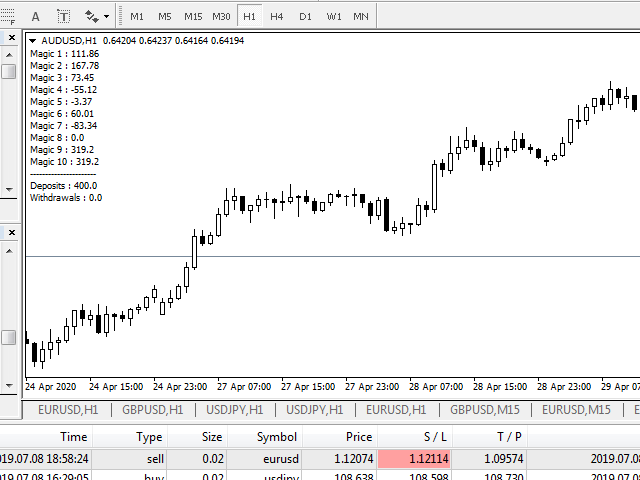
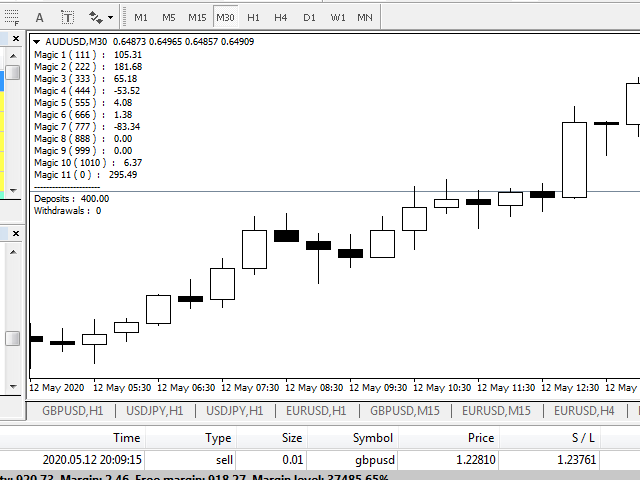
Having more expert advisors running on the same account , eventually leads us to the question , which one of them are winners , or which are dragging down the account ? With this in mind I created this simple utility for displaying profits or losses taken by each expert advisor over time .

This utility can be run as an expert advisor and can display up to 10 magic number results  . If the inputs are left to zero , the results displayed are from the manually placed orders . It also displays deposits and withdrawals , so that we know where we started from .

The utility takes into account only closed trades and it can be used even if the market is closed .

Prefferably , run it on a symbol that you don't execute trades on and without the chart grid , for better visuallity .
리뷰 8
Marco
507
Marco 2025.11.19 16:33 
 

A++

It's just missing to hide non used EAs rows,to show a table with 20 fields is unnecessary if you just require to track 3 or 5 magic numbers

Inakis Srl
724
Enrico De Landerset 2024.09.27 21:22 
 

excellent! he added a feature that Mt4 should have natively!

Artem Belan
175
Artem Belan 2023.06.08 17:19 
 

Very good and useful EA for testing several EAs on one account. It's a pity that the EA will no longer be updated by the author.

추천 제품
Add indicator "Symbol Name Drawer " on chart. Indicator creates text object with name of current symbol. You can change symbols on chart and indicator automatically changes text. Free to use. Simple tool. If you have any suggestion you can write me about it in comments. I try to improve this tool in future versions. Thanks for using my indicator. If you want to order something special in mql4 or mql5 message.
FREE
Magic Supply Demand Indicator works on all products and timeframes. It is a new formula, and   the very new features are two zone strength functions adjustable by user input!   This is a great advantage in trading. When you learn how to use the proprietary features such as the zone strength with   min X-factor of price travel away, you will be able to tell whether the zone is strong or not. The supply and demand zones are used as an alert trigger.   You can use popup alert with sound on MetaTra
FREE
After purchasing the Tpx Dash Supply Demand indicator, you must download this indicator which will link and feed market data to the Tpx Dash Supply Demand indicator and will provide all Supply Demand price signals, ATR Stop, VAH and VAL, trend values ​​with the ADX, and POC prices and locations in the market. Just download it and Dash will locate the indicator to retrieve the information!
FREE
Night Scalper EA Lite
Robots4Forex Ltd
2.33 (3)
The Night Scalper EA Lite is a fully automated Expert Advisor that trades at night and relies on price reversion. The EA trades using market orders and has the option to use time averaging to improve performance. This EA works best on EURUSD using the M5 timeframe, but will also work on AUDUSD, GBPUSD, NZDUSD, USDCAD, USDCHF and likely many more. A VPS is advisable when trading this system and a low spread and commission based broker is best. Check the comments for back test results and optimiz
FREE
Master the Forex Market with Powerful Currency Analysis! LIVE MONITORING OF SIGNAL USING CCY POWER Take your forex trading to the next level with a comprehensive and fully customizable tool designed to analyze currency trends, identify strong and weak currencies , and enhance your decision-making process. Key Features: Multi-Timeframe Analysis Analyze currency strength from short-term (1-minute) scalping to long-term (1-month) trends—adaptable to any trading style. Customizable Ca
FREE
Market Profile 3
Hussien Abdeltwab Hussien Ryad
3 (2)
Market Profile 3 MetaTrader 4 indicator  — is a classic Market Profile implementation that can show the price density over time, outlining the most important price levels, value area, and control value of a given trading session. This indicator can be attached to timeframes between M1 and D1 and will show the Market Profile for daily, weekly, monthly, or even intraday sessions. Lower timeframes offer higher precision. Higher timeframes are recommended for better visibility. It is also possible t
FREE
Harvest FX
Sayan Vandenhout
4.56 (9)
Harvest FX USES THE TREND WAVE INDICATOR AND IT CAN IDENTIFY THE BEGINNING AND THE END OF A NEW WAVE TREND MOVEMENT. AS AN OSCILLATOR, THE INDICATOR IDENTIFIES THE OVERBOUGHT AND OVERSOLD ZONES. IT WORKS GREAT TO CATCH THE SHORT TERM PRICE REVERSALS AND USES A MARTINGALE STRATEGY TO CLOSE ALL TRADES IN PROFIT. USE DEFAULT SETTINGS ON H1 OR HIGHER TIME FRAME ON ANY PAIR FOR MORE ACCURATE TRADES WHY THIS EA : Smart entries calculated by 3 great strategies The EA can be run on even a $30000 a
FREE
Unlock your trading potential with Momentum Master , the smart indicator designed to help you navigate the markets with confidence. This powerful tool provides clear, actionable signals by combining the strengths of multiple proven indicators. Say goodbye to guesswork and hello to precision trading. Momentum Master is more than just a signal provider; it's your personal market analyst. It uses a unique combination of Moving Averages (EMA 34 & 55) to identify the trend, MACD for trade confirmatio
FREE
(Google 번역) 이 지표는 Worden Brothers, Inc 에서 개발한 원본 " TSV(Time Segmented Volume) "를 기반으로 합니다. 그러나 여기에 몇 가지 기능을 추가했습니다. 원본에서 사용하는 기본 종가만 사용하는 대신 적용할 가격을 선택할 수 있습니다. 실제 범위를 기반으로 하는 가상 볼륨을 포함하거나 볼륨 가중치를 전혀 적용하지 않는 등 사용할 볼륨 가중치를 선택할 수도 있습니다. (Original text) This indicator is based on the original “ Time Segmented Volume (TSV) ” developed by Worden Brothers, Inc . However, I added an extra few features to this one. One can choose the price to be applied, instead of only having the default close price us
FREE
Vanexio
Sayan Vandenhout
VANEXIO USES THE TREND WAVE INDICATOR AND IT CAN IDENTIFY THE BEGINNING AND THE END OF A NEW WAVE TREND MOVEMENT. AS AN OSCILLATOR, THE INDICATOR IDENTIFIES THE OVERBOUGHT AND OVERSOLD ZONES. IT WORKS GREAT TO CATCH THE SHORT TERM PRICE REVERSALS AND USES A MARTINGALE STRATEGY TO CLOSE ALL TRADES IN PROFIT. USE DEFAULT SETTINGS ON H1 OR HIGHER TIME FRAME ON ANY PAIR FOR MORE ACCURATE TRADES WHY THIS EA : Smart entries calculated by 5 great strategies The EA can be run on even a $20000 acco
FREE
FFx MACD
Eric Venturi-Bloxs
4.2 (5)
The purpose of this new version of the MT4 standard indicator provided in your platform is to display in a sub-window multiple timeframes of the same indicator. See the example shown in the picture below. But the display isn’t like a simple MTF indicator. This is the real display of the indicator on its timeframe. Here's the options available in the FFx indicator: Select the timeframes to be displayed (M1 to Monthly) Define the width (number of bars) for each timeframe box Alert pop up/sound/ema
FREE
FFx Momentum
Eric Venturi-Bloxs
4 (1)
The purpose of this new version of the MT4 standard indicator provided in your platform is to display in a sub-window multiple timeframes of the same indicator. See the example shown in the picture below. But the display isn’t like a simple MTF indicator. This is the real display of the indicator on its timeframe. Here's the options available in the FFx indicator: Select the timeframes to be displayed (M1 to Monthly) Define the width (number of bars) for each timeframe box Alert pop up/sound/ema
FREE
Vanda FX
Sayan Vandenhout
5 (2)
Vanda FX USES THE TREND WAVE INDICATOR AND IT CAN IDENTIFY THE BEGINNING AND THE END OF A NEW WAVE TREND MOVEMENT. AS AN OSCILLATOR, THE INDICATOR IDENTIFIES THE OVERBOUGHT AND OVERSOLD ZONES. IT WORKS GREAT TO CATCH THE SHORT TERM PRICE REVERSALS AND USES A MARTINGALE STRATEGY TO CLOSE ALL TRADES IN PROFIT. USE DEFAULT SETTINGS ON H1 OR HIGHER TIME FRAME ON ANY PAIR FOR MORE ACCURATE TRADES WHY THIS EA : Smart entries calculated by 4 great strategies The EA can be run on even a $20000 acc
FREE
Advisor for manual and automatic trading on the trend lines of the Bollinger Bands indicator. The Expert Advisor draws trend lines from the middle band for a specified number of candles. You may be interested in my other products: https://www.mql5.com/ru/users/vypchela/seller Comments are welcome!  Recommended Broker . This Expert Advisor is available only on the MQL5 website! Options: Magic Number is a magic number. Profit - take profit Stop - stop loss. Lot - risk Limit - the maximum allowed
FREE
FFx Stochastic
Eric Venturi-Bloxs
4.6 (5)
The purpose of this new version of the MT4 standard indicator provided in your platform is to display in a sub-window multiple timeframes of the same indicator. See the example shown in the picture below. But the display isn’t like a simple MTF indicator. This is the real display of the indicator on its timeframe. Here's the options available in the FFx indicator: Select the timeframes to be displayed (M1 to Monthly) Define the width (number of bars) for each timeframe box Alert pop up/sound/ema
FREE
This simple but useful script calculates the lot in % of the deposit. It is indispensable for risk management. There is only one customizable parameter: MaxRisk - risk in % for lot calculation. The product works as a standard script. Launch it once on an appropriate chart and start trading using the calculated lot value. Genious is simplicity! Happy trading!
FREE
Highlights trading sessions on the chart The demo version only works on the AUDNZD chart!!! The full version of the product is available at: (*** to be added ***) Trading Session Indicator displays the starts and ends of four trading sessions: Pacific, Asian, European and American. the ability to customize the start/end of sessions; the ability to display only selected sessions; works on M1-H2 timeframes; The following parameters can be configured in the indicator: TIME_CORRECTION = Correct
FREE
This indicator calculates average speed of moving average indicator. Here is parameters: BarsToProcess - indicator calculating period; MaPeriod - period of Moving Average indicator; AveragingPeriod - period (MA values) of the basis of which the average value is calculated; MA_Method, MA_Apply_to - using to set MA indicator parameters; Thats all! Good luck.
FREE
Have you ever wondered which currency is the strongest at any particular time? Or which currency pair is trending the most. Well, the currency strength meter helps with just that.  It compares  USD ,  EUR ,  AUD ,  CHF ,  GBP ,  CAD  and  NZD  depending on the timeline you have chosen in settings, and ranks them on the number of pips each has moved compared to the rest. N/B:   All currency charts of the above pairs must have loaded. You can do this by highlighting all major and minor currencies
FREE
Implied Trader
Ciprian Ghebanoaei
Implied Trader   is a fully automatic, professional trading robot designed specifically for the foreign exchange market   AUDCAD M30 timeframe. Parameter configuration is not necessary for EA. Only the size of the lot you intend to use needs to be chosen. 0.1 is the suggested lot size for a $2000 account. You can raise the lot size correspondingly if your account has more money. It has an intelligent algorithm that recognizes the trend. On the basis of the trend direction, the expert places orde
FREE
Profitstat is a free indicator that scans your history and displays it on the chart. The free version shows the number of trades and profit made on the current and previous day. The data is updated instantly as soon as a trade closes. Simply attach it to any chart and it gives the account data irrespective of the chart currency nor timeframe.
FREE
FFx ParabolicSAR
Eric Venturi-Bloxs
4.67 (3)
The purpose of this new version of the MT4 standard indicator provided in your platform is to display in a sub-window multiple timeframes of the same indicator. See the example shown in the picture below. But the display isn’t like a simple MTF indicator. This is the real display of the indicator on its timeframe. Here's the options available in the FFx indicator: Select the timeframes to be displayed (M1 to Monthly) Define the width (number of bars) for each timeframe box Alert pop up/sound/ema
FREE
LT Automated Support Resistance Screener is a level indicator or a support resistance indicator that can be used to determine the level of support and resistance values. This indicator is free and easy to used in the Metatrader 4 platform which is built using the MQL4 programming language. Support resistance indicator is an important indicator that is often to used, but it is not available on the MT4 platform. This indicator can be used for all markets like forex, indices, gold etc and all time
FREE
IceFX TradeInfo
Norbert Mereg
4.77 (44)
IceFX’s TradeInfo is an utility indicator which displays the most important information of the current account and position. Displayed information: Information about the current account (Balance, Equity, Free Margin). Current spread, current drawdown (DD), planned profit, expected losses, etc. Number of open position(s), volume (LOT), profit. Today’s and yesterday’s range. Remaining time to the next candle. Last day profit information (with integrated IceFX ProfitInfo indicator). Risk-based LOT
FREE
Screener Breakout Congestion
CARLO FINANCIAL SOFTWARE TECHNOLOGY LLC
5 (2)
Screener Breakout Congestion: Have you ever missed a trading opportunity because you were not looking at the chart of that market in that specific time frame? Here is this screener to help you identify congestion breakouts in the markets you want to follow in the different time frames required. Once you have identified the markets (forex, indices, CDF) and the different time frames (1M, 5M, 15M, 30M, 1H, 4H, Daily), the screener is represented by several buttons that change colour when the conge
FREE
Indicators are professional data statistics, position orders, historical order analysis->>>>>> <This version is in Chinese -> English version please move> Necessary for traders: tools and indicators Waves automatically calculate indicators, channel trend trading Perfect trend-wave automatic calculation channel calculation , MT4 Perfect trend-wave automatic calculation channel calculation , MT5 Local Trading copying Easy And Fast Copy , MT4 Easy And Fast Copy , MT5 Local Trading copying For DEMO
FREE
FFx Force Index
Eric Venturi-Bloxs
5 (1)
The purpose of this new version of the MT4 standard indicator provided in your platform is to display in a sub-window multiple timeframes of the same indicator. See the example shown in the picture below. But the display isn’t like a simple MTF indicator. This is the real display of the indicator on its timeframe. Here's the options available in the FFx indicator: Select the timeframes to be displayed (M1 to Monthly) Define the width (number of bars) for each timeframe box Alert pop up/sound/ema
FREE
Auto SL TP
Henry Lee Taylor
2.67 (3)
Number one rule to investing is to protect your capital. Never worry about trading without stop loss or take profit with Auto S/L T/P. Auto S/L T/P will automatically  add your preset default stop loss and take profit to any order on the chart it's installed. Be sure to enable auto trading in order for the EA to work. Entering a trade on the go from your mobile is breeze with Auto S/L T/P running on the chart on your desktop. Just enter a trade and your default stop loss and take profit will be
FREE
Traditional MACD MT4
Daniel Lewis
4.58 (55)
MACD indicator in MetaTrader 4/5 looks different than MACD does in most other charting software. That is because the MetaTrader 4/5 version of MACD displays the MACD line as a histogram when it is traditionally displayed as a line. Additionally, the MetaTrader 4/5 version computes the Signal line using an SMA, while according to MACD definition it is supposed to be an EMA. The MetaTrader 4/5 version also does not compute a true MACD Histogram (the difference between the MACD/Signal lines). This
FREE
如果产品有任何问题或者您需要在此产品上添加功能,请联系我 Contact/message me if you encounter any issue using the product or need extra feature to add on the base version. PA Touching Alert is a tool to free you from watching price to touch certain critical price level all day alone. With this tool, you can set two price levels: upper price and lower price, which should be greater than/ less than the current price respectively. Then once price touches the upper price or lower price, alert and/or notification would be sent
FREE
이 제품의 구매자들이 또한 구매함
Local Trade Copier EA MT4
Juvenille Emperor Limited
4.96 (104)
Local Trade Copier EA MT4 를 사용하여 매우 빠른 거래 복사 경험을 해보세요. 1분 안에 간편하게 설정할 수 있으며, 이 거래 복사기를 사용하면 Windows 컴퓨터 또는 Windows VPS에서 여러 개의 MetaTrader 터미널 간에 거래를 0.5초 미만의 초고속 복사 속도로 복사할 수 있습니다. 초보자든 전문가든 Local Trade Copier EA MT4 는 다양한 옵션을 제공하여 사용자의 특정 요구에 맞게 맞춤 설정할 수 있습니다. 이는 수익 잠재력을 높이려는 모든 사람을 위한 최고의 솔루션입니다. 지금 사용해보시고 이것이 왜 시장에서 가장 빠르고 쉬운 무역용 복사기인지 알아보세요! 팁: 여기 에서 데모 계정에서 Local Trade Copier EA MT4 데모 버전을 다운로드하여 사용해 볼 수 있습니다. 다운로드한 무료 데모 파일을 MT4 >> File >> Open Data Folder >> MQL4 >> Experts 폴더에 붙여넣고 터미널
Trade Assistant MT4
Evgeniy Kravchenko
4.42 (192)
거래당 위험 계산, 라인을 사용한 손쉬운 신규 주문, 부분 청산 기능을 통한 주문 관리, 7가지 유형의 트레일링 스탑 및 기타 유용한 기능을 제공합니다. 추가 자료 및 지침 설치 지침 - 애플리케이션 지침 - 데모 계정용 애플리케이션 평가판 라인 기능       - 차트에 개시선, 손절매, 차익실현을 표시합니다. 이 기능을 사용하면 새로운 주문을 쉽게 하고 개봉 전에 추가 특성을 볼 수 있습니다. 위기 관리       -       위험 계산 기능은 설정된 위험과 손절매 주문의 크기를 고려하여 새 주문의 볼륨을 계산합니다. 이를 통해 손절매 크기를 설정하고 동시에 설정된 위험을 존중할 수 있습니다. 로트 계산 버튼 - 위험 계산을 활성화/비활성화합니다. 필요한 위험 값은 위험 필드에 0에서 100 사이의 백분율 또는 예금 통화로 설정됩니다. 설정 탭에서 위험 계산 옵션을 선택합니다. $ 통화, % 잔액, % 지분, % 자유 마진, % 사용자 정의, % AB 이전 일, % AB
Trade Manager EA에 오신 것을 환영합니다. 이 도구는 거래를 보다 직관적이고 정확하며 효율적으로 만들기 위해 설계된 궁극적인 리스크 관리 도구 입니다. 단순한 주문 실행 도구가 아닌, 원활한 거래 계획, 포지션 관리 및 리스크 제어를 위한 종합 솔루션입니다. 초보자부터 고급 트레이더, 빠른 실행이 필요한 스캘퍼에 이르기까지 Trade Manager EA는 외환, 지수, 상품, 암호화폐 등 다양한 시장에서 유연성을 제공합니다. Trade Manager EA를 사용하면 복잡한 계산은 이제 과거의 일이 됩니다. 시장을 분석하고 진입, 손절 및 익절 수준을 차트의 수평선으로 표시한 후 리스크를 설정하면, Trade Manager가 이상적인 포지션 크기를 즉시 계산하고 SL 및 TP 값을 실시간으로 표시합니다. 모든 거래가 간편하게 관리됩니다. 주요 기능: 포지션 크기 계산기 : 정의된 리스크에 따라 거래 크기를 즉시 결정합니다. 간단한 거래 계획 : 진입, 손절, 익절을 위한
TradePanel MT4
Alfiya Fazylova
4.84 (89)
Trade Panel은 다기능 거래 보조원입니다. 이 애플리케이션에는 수동 거래를 위한 50개 이상의 거래 기능이 포함되어 있으며 대부분의 거래 작업을 자동화할 수 있습니다. 전략 테스터에서는 애플리케이션이 작동하지 않습니다. 구매하기 전에 데모 계정에서 데모 버전을 테스트할 수 있습니다. 데모 버전 여기 . 전체 지침 여기 . 거래. 한 번의 클릭으로 거래 작업을 수행할 수 있습니다: 자동 위험 계산을 통해 지정가 주문 및 포지션을 엽니다. 한 번의 클릭으로 여러 주문과 포지션을 열 수 있습니다. 주문 그리드를 엽니다. 그룹별 대기 주문 및 포지션을 마감합니다. 포지션 반전(매수 청산 후 매도 개시 또는 매도 청산 후 매수 개시). 포지션 고정(매수 포지션과 매도 포지션의 양을 동일하게 하는 추가 포지션 개설). 한 번의 클릭으로 모든 포지션을 부분 청산합니다. 모든 포지션의 이익실현과 손절매를 동일한 가격 수준으로 설정합니다. 모든 포지션에 대한 손절매를 해당 포지션의 손익 분기
The product will copy all telegram signal to MT4   ( which you are member  ) , also it can work as remote copier.  Easy to set up, copy order instant, can work with almost signal formats, image signal, s upport to translate other language to English Work with all type of channel or group, even channel have "Restrict Saving Content", work with  multi channel, multi MT5 Work as remote copier: with signal have ticket number, it will copy exactly via ticket number. Support to backtest signal. How to
Ultimate Extractor - Professional Trading Analytics for MT4 Ultimate Extractor transforms your MetaTrader 4 trading history into actionable insights with comprehensive analytics, interactive charts, and real-time performance tracking. Ability to combine multiple accounts and MT4 and MT5 into a single dashboard. What It Does Automatically analyzes your MT4 trading history across all Expert Advisors and generates detailed HTML reports with interactive visualizations. Tracks live performance metric
Trade copier MT4
Alfiya Fazylova
4.55 (31)
Trade Copier는 거래 계정 간의 거래를 복사하고 동기화하도록 설계된 전문 유틸리티입니다. 복사는 공급자의 계정/단말기에서 동일한 컴퓨터 또는 vps에 설치된 수신자의 계정/단말기로 발생합니다. 구매하기 전에 데모 계정에서 데모 버전을 테스트할 수 있습니다. 데모 버전 여기 . 전체 지침 여기 . 주요 기능 및 이점: 복사기는 "МТ4> МТ4", "МТ4> МТ5", "МТ5> МТ4" 복사를 지원합니다. 복사기는 데모 계정 > 실 계정, 실 계정 > 데모 계정, 데모 계정 > 데모 계정 및 실제 계정 > 실 계정 복사를 지원합니다. 복사기는 읽기 전용 암호가 적용된 투자자 계정에서 복사를 지원합니다. 하나의 공급자 터미널은 여러 수신 터미널로 트랜잭션을 보낼 수 있고 하나의 수신 터미널은 여러 공급자 터미널에서 트랜잭션을 수신할 수 있습니다. 복사기는 귀하 또는 귀하의 고문이 거래하는 동일한 터미널에서 작동할 수 있습니다. 높은 복사 속도(0.5초 미만). 복사기에는 간편
복사기->편리하고 빠른 인터페이스 상호작용으로 사용자가 바로 사용 가능       ->>>> Windows 컴퓨터 또는 VPS Windows에서 사용하는 것이 좋습니다. 특징: 다양하고 개인화된 복사 거래 설정: 1. 다양한 신호 소스에 대해 다양한 로트 모드를 설정할 수 있습니다. 2. 다양한 신호 소스를 포워드 및 리버스 복사 거래에 대해 설정할 수 있습니다. 3. 신호는 주석으로 설정할 수 있습니다. 4. 계약 로트에 따라 로트를 교정할지 여부 다양하고 개인화된 복사 주문 설정 2: 1. 다양한 품종에 대해 다양한 로트 모드를 설정할 수 있습니다. 2. 정방향 및 역방향 복사 주문에 대해 다양한 품종을 설정할 수 있습니다. 3. 주석으로 신호를 설정할 수 있습니다. 4. 계약 로트에 따라 로트를 교정할지 여부 댓글 필터링, MAGIC 필터링, 시그널 로트 필터링, 로컬 제품 필터링 근무시간 설정 역동기화 SLAVE 닫힘 주문 바인딩 기능: 모든 주문은 설정된 신호 소스 주문
MT4 to Telegram Signal Provider 는 사용하기 쉽고 완전히 사용자 정의가 가능한 도구로, 텔레그램으로 신호를 보내어 계정을 신호 제공자로 변환할 수 있습니다. 메시지 형식은 완전히 사용자 정의가 가능합니다! 그러나 간단한 사용을 위해 미리 정의된 템플릿을 선택하고 메시지의 특정 부분을 활성화하거나 비활성화할 수도 있습니다. [ 데모 ]  [ 매뉴얼 ] [ MT5 버전 ] [ 디스코드 버전 ] [ 텔레그램 채널 ]  New: [ Telegram To MT5 ] 설정 단계별 사용자 가이드 가 제공됩니다. 텔레그램 API에 대한 지식이 필요 없으며, 개발자가 필요한 모든 것을 제공합니다. 주요 기능 구독자에게 보낸 주문 세부 정보를 사용자 정의할 수 있는 기능 예를 들어 브론즈, 실버, 골드와 같은 계층 구독 모델을 만들 수 있습니다. 골드 구독은 모든 신호 등을 받게 됩니다. ID, 심볼 또는 코멘트별 주문 필터링 주문이 실행된 차트의 스크린샷을 포함 보낸
Copy Cat More Trade Copier MT4 (복사 고양이 MT4) 는 단순한 로컬 트레이드 카피어가 아니라, 오늘날의 거래 환경을 위해 설계된 완전한 리스크 관리 및 실행 프레임워크입니다. Prop Firm 챌린지부터 개인 계좌 관리까지, 강력한 실행력, 자본 보호, 유연한 설정, 고급 거래 처리 기능을 통해 모든 상황에 적응합니다. 이 카피어는 Master(송신자) 와 Slave(수신자) 모드 모두에서 작동하며, 실시간으로 시장가/지정가 주문, 거래 수정, 부분 청산, Close By 작업을 동기화합니다. 데모 및 실계좌 모두 호환되며, 거래용 비밀번호 또는 투자자 비밀번호로도 사용할 수 있습니다. Persistent Trade Memory 기술을 통해 EA, 터미널, VPS가 재시작되더라도 거래가 복원됩니다. 여러 Master와 Slave를 동시에 관리할 수 있으며, 브로커 간 차이는 접두사/접미사 자동 감지 또는 심볼 매핑으로 처리됩니다. 매뉴얼/설정: Copy C
News Filter EA: Advanced Algo Trading Assistant News Filter EA is an advanced algo trading assistant designed to enhance your trading experience. By using the   News Filter EA , you can integrate a Forex economic news filter into your existing expert advisor, even if you do not have access to its source code. In addition to the news filter, you can also specify   trading days   and   hours   for your expert. The News Filter EA also includes   risk management   and   equity protection   features
Exp COPYLOT CLIENT for MT4
Vladislav Andruschenko
4.69 (65)
MetaTrader 4용 트레이드 복사기.       모든 계정의 외환 거래, 포지션, 주문을 복사합니다. 그것은 최고의 무역 복사기 중 하나입니다       MT4 - MT4, MT5 - MT4       위해       카피롯 MT4       버전(또는       MT4 -  MT5   MT5 - MT5       위해       카피롯 MT5       버전). MT5 버전 전체 설명   +DEMO +PDF 구입 방법 설치하는 방법     로그 파일을 얻는 방법     테스트 및 최적화 방법     Expforex의 모든 제품 복사기   버전         MetaTrader 5   터미널 (   МТ5 - МТ5, МТ4 - МТ5   ) -   Copylot Client MT5 고유한 복사 알고리즘은 마스터 계정에서 고객 계정으로 모든 거래를 정확하게 복사합니다. 이 제품은 또한 높은 작동 속도에서 높은 오류 처리로 유명합니다. 강력한 기능 세트. 프로그램은 여러 터
Trade Dashboard MT4
Fatemeh Ameri
4.96 (53)
Tired of complex order placement and manual calculations? Trade Dashboard is your solution. With its user-friendly interface, placing orders becomes effortless, by a single click, you can open trades, set stop loss and take profit levels, manage trade lot size, and calculate risk to reward ratios, allowing you to only focus on your strategy. Say goodbye to manual calculations and streamline your trading experience with Trade Dashboard. Download  Demo Version  right now. You can find  Details of
Risk/Reward Tool은 MetaTrader 4에서 거래를 계획, 시각화 및 실행하는 방식을 혁신하도록 설계된 전문가급 Expert Advisor입니다. 정밀한 리스크 관리를 중시하는 재량 트레이더이든, 거래 설정을 시각적으로 테스트해야 하는 전략 개발자이든, 이 도구는 우아하고 직관적인 인터페이스에서 필요한 모든 것을 제공합니다. 기본적인 포지션 계산기와 달리, Risk/Reward Tool은 시각적 거래 계획을 즉각적인 실행 기능, 실시간 손익 모니터링 및 포괄적인 거래 관리 기능과 결합합니다. 이 도구는 MT4 전략 테스터와 완전히 호환되어 실제 자본을 위험에 빠뜨리지 않고 거래 전략을 연습하고 접근 방식을 개선할 수 있습니다. 도구의 전체 매뉴얼은 여기에서 확인할 수 있습니다: https://www.mql5.com/en/blogs/post/766244 MT5 version:  https://www.mql5.com/en/market/product/158601 주요 기능
Draw Agent는 모든 차트 분석, 낙서, 메모 등을 만들고 관리할 수 있는 아름답고 혁신적인 방법으로 설계되었습니다. 이 도구는 차트 공간을 칠판으로 취급하고 손으로 그리는 자유 그리기 방법을 제공합니다. 이 자유형 그리기 도구를 사용하면 차트에서 이벤트를 표시하거나 강조 표시하기 위해 MT4/MT5 차트에 그릴 수 있습니다. Elliott 파동을 손으로 작성하거나, 차트에 선을 긋거나, 차트에 아이디어를 설명하려는 경우   유용한 도구입니다. 클라이언트를 위한 라이브 웨비나를 실행하거나 사람들에게 스크린샷 또는 차트 파일을 배포하는 경우 특히 유용합니다. 또한. Draw Agent 설치 및 입력 가이드 EA 추가 URL(   http://autofxhub.com   ) MT4/MT5 터미널(스크린샷 참조)   에 대한 알림을 받으려면   . MT4 버전   https://www.mql5.com/en/market/product/14929 MT5 버전   https://www.
TPSpro Trade PRO
Roman Podpora
4.67 (6)
주어진 손절매 수준에 따라 포지션 규모 또는 위험을 즉시 계산할 수 있는 도구는 전문 트레이더와 초보 트레이더 모두에게 필수적입니다. TRADE PRO 거래 유틸리티는 빠르고 정확한 계산을 제공하여 시간적 제약이 있고 변동성이 큰 시장 상황에서 의사 결정을 내리는 데 도움을 줍니다. MT5 버전        /   추가 설치 자재 주요 기능: 독창적이고, 간결하며, 효과적입니다. 메인 거래 패널을 여는 독특하고 편리한 방법: 차트 오른쪽에 마우스 커서를 올려놓고 원하는 방향을 클릭하여 선물 주문을 하세요. 시장가 주문을 빠르게 설정할 수 있습니다. TRADE PRO를 사용하여 잔액 또는 자본 대비 백분율로 위험 수준을 설정하거나 특정 위험 금액을 지정할 수 있습니다. 차트에서 손절매 수준을 시각적으로 정의하면 도구가 각 통화 쌍에 대한 최적의 포지션 크기를 자동으로 계산합니다. 또한 지정된 위험-보상 비율을 기반으로 목표 수익(익절)을 자동으로 설정할 수 있습니다. 총 위험을 분
Fast Trade MT4
Alexey Valeev
4.8 (5)
This trading panel has been developed for fast and comfortable operation of the financial markets. It is equipped with the necessary functions for manual and semi-automated trading. Due to the presence of the order trailing feature, trailing stop and automatic closure by equity, profit, time. You can use it to automate your trading system. All you have to do is open a position and set the parameters for maintenance, everything else will be handled by the EA. If you want to limit your losses, set
DFGX Dashboard
Tsvetan Tsvetanov
5 (2)
Take your trading to the next level with DFGX - our second generation Dynamic Fibonacci Grid. This new, powerful and easy to use application is specially designed and optimized for contrarian intraday trading, scalping and news trading on the Forex market. This system is the ideal solution for active professional traders and scalpers who are looking for innovative ways to optimize their strategy. The system also provides excellent opportunity for new traders who want to learn to trade in a syste
Trade Manager MT4 DaneTrades
Levi Dane Benjamin
4.09 (11)
거래 관리자는 위험을 자동으로 계산하는 동시에 거래를 빠르게 시작하고 종료하는 데 도움을 줍니다. 과잉 거래, 복수 거래 및 감정 거래를 방지하는 데 도움이 되는 기능이 포함되어 있습니다. 거래를 자동으로 관리할 수 있으며 계정 성과 지표를 그래프로 시각화할 수 있습니다. 이러한 기능은 이 패널을 모든 수동 거래자에게 이상적으로 만들고 MetaTrader 4 플랫폼을 향상시키는 데 도움이 됩니다. 다중 언어 지원. MT5 버전  |  사용자 가이드 + 데모 트레이드 매니저는 전략 테스터에서 작동하지 않습니다. 데모를 보려면 사용자 가이드로 이동하세요. 위기 관리 % 또는 $를 기준으로 위험 자동 조정 고정 로트 크기 또는 거래량과 핍을 기반으로 한 자동 로트 크기 계산을 사용하는 옵션 RR, Pips 또는 Price를 사용한 손익분기점 손실 설정 추적 중지 손실 설정 목표 달성 시 모든 거래를 자동으로 마감하는 최대 일일 손실률(%)입니다. 과도한 손실로부터 계정을 보호하고 과도한
Take a Break
Eric Emmrich
5 (31)
The most advanced news filter on MQL market - free demo available Take a Break has transformed from a basic news filter into a comprehensive account protection solution. It seamlessly pauses any other Expert Advisors during news events or based on your custom filters, all while safeguarding your EA settings - restoring them automatically when trading resumes for complete peace of mind. Typical use cases: A single news filter for all your EAs. Stop trading during news/high volatility (+ close all
Multi Copy
Kaijun Wang
5 (1)
복사기->편리하고 빠른 인터페이스 상호작용으로 사용자가 바로 사용 가능       ->>>> Windows 컴퓨터 또는 VPS Windows에서 사용하는 것이 좋습니다. 기본 기능: 복사 거래의 일반적인 상호작용 속도는 0.5초 미만입니다. 신호 소스를 자동으로 감지하고 신호 소스 계정 목록을 표시합니다. 심볼 자동 매칭, 다양한 플랫폼에서 일반적으로 사용되는 거래 심볼의 95%(다른 접미사와 같은 특수한 경우)가 자동으로 매칭되며, 기본적으로 수동 설정이 필요하지 않으며 심볼 매핑 테이블을 두 번 클릭하여 해당 심볼을 변경할 수 있습니다. (매핑 테이블에는 빠른 심볼 검색 기능이 있습니다) 4가지 lot 계산 모드(1. 승수 2. 고정 lot 3. 적응형 위험 4. 신호   적응형 위험   ) 특수 로트 모드: 로트 크기는 손절매 자본 위험에 따라 계산될 수 있습니다.(손절매가 너무 작을 수 있고 계산된 로트 크기가 너무 클 수 있으므로 주의해서 사용하세요) 다중 플랫폼, 다중 신
News Dashboard MT4
Taras Slobodyanik
4.5 (8)
This dashboard displaying current news from ForexFactory.com (calendar FFC) and from the Investing.com website . You can sort news by impact and by country, and display them on the chart with one click. By holding down the 'Ctrl' key, you can select several different 'currencies' or 'impacts' to sort. Also, this utility shows not only the forecast, but also the actual values ​​after they appear on the site. You can set a separate notification for each news. You can read the news using your EA
Trading History MT4
Siarhei Vashchylka
5 (9)
Trading History - A program for trading and money management on the history of quotes in stratagy tester. It can work with pending and immediate orders, and is equipped with trailing stop, breakeven and take profit functions. Very good for training and testing different strategies. Manual (Be sure to read before purchasing) Advantages 1. Allows you to test any trading strategy in the shortest possible time 2. An excellent simulator for trading training. You can gain months of trading experience
수동 거래를 개선하세요: 빠르고 정확한 자동화된 위험 관리를 위한 Trade Manager Assistant 제공된 무료 데모 버전을 사용하여 전체 설정 지침을 받고 Trade Manager Assistant의 기능을 살펴보세요. 자세한 내용은   https://www.mql5.com/blogs/post/758625를   참조하세요.       . 수동 거래에는 신중한 분석과 빠른 결정이 필요하지만, 거래 매개변수와 관련된 실행 오류, 불일치 및 혼란의 위험으로 인해 수익이 감소하고 불필요한 스트레스가 발생할 수 있습니다. 트레이딩 관리자 어시스턴트를 소개합니다. 이 필수 어시스턴트는 수동 트레이딩 프로세스를 간소화하고 차트에 정밀성, 통제력, 자동화된 효율성을 제공합니다. 느린 실행이나 잘못된 계산으로 인한 거래 손실과 작별하세요. 귀하의 보조 사업 관리자는 전문적인 속도와 정확성으로 귀하의 업무를 완료할 수 있도록 도와드리므로, 중요한 행정 업무를 우리가 처리하는 동안 귀하는
Averaging Helper
Sergey Batudayev
5 (2)
평균화 도우미 - 이러한 종류의 거래 도우미 도구는 두 가지 기술을 사용하여 이전에는 수익성이 없었던 포지션의 평균을 맞추는 데 도움이 됩니다. 표준 평균화 추세에 따라 포지션을 이후 오픈하여 헤지 이 유틸리티는 매수 및 매도 포지션 모두 여러 방향의 여러 미결제 포지션을 한 번에 정리할 수 있습니다   . 예를 들어, 하나는 매도 포지션이고 다른 하나는 매수 포지션인데, 두 포지션 모두 수익이 없거나, 하나는 수익이 없고 하나는 수익이지만 수익이 충분하지 않은 경우, 두 포지션의 평균을 계산하여 더 높은 수익률로 거래를 마감하려는 경우, 이 유틸리티는 평균화 도우미(Averaging Helper)를 사용하는 데 도움이 될 것입니다. 평균화 도우미 유틸리티를 사용하면 다음 포지션의 크기, 주문 가격, 포지션을 평균화하고 지정한 이익 실현 크기에 맞춰 포지션을 마감하는 방향을 자동으로 계산할 수 있습니다. 이 유틸리티는 매수 및 매도 버튼을 사용하여 포지션을 오픈할 수 있도록 지원합니
With this Expert Advisor, you can seamlessly integrate various channel, arrow, and reversal indicators. It offers the flexibility to use all popular channel trading strategies, while also providing powerful tools to customize your trading conditions and risk management system.   The Expert Advisor opens orders when the price crosses the channel boundaries. Multiple crossing conditions are available for customization: Price touches boundary on re-entry into the channel Price touches boundary on
Basket EA MT4
Juvenille Emperor Limited
5 (5)
Basket EA MT4 는 강력한 수익 실현 도구이자 종합적인 계좌 보호 시스템을 하나의 간편하고 사용하기 쉬운 솔루션으로 결합한 제품입니다. 이 EA의 핵심 목적은 계좌 내 모든 개별 포지션을 묶음(Basket) 단위로 관리하여, 계좌 전체의 손익을 완전히 통제할 수 있도록 하는 것입니다. Take Profit, Stop Loss, Break Even(손익분기점), Trailing Stop과 같은 묶음(purpose) 수준의 기능을 제공하며, 이를 계좌 잔고의 퍼센트, 고정 통화 금액 또는 해당 거래들의 평균 포인트로 설정할 수 있습니다. 이러한 유연성은 트레이더가 자신만의 리스크 및 수익 전략을 맞춤 설정할 수 있도록 해줍니다. 또한 Basket EA MT4 는 Magic Number, 심볼, 또는 댓글 등을 기반으로 특정 거래를 관리 대상에서 제외하거나 포함시키는 지능형 거래 필터링을 지원합니다. 이를 통해 원하는 거래만 EA의 관리 대상이 되도록 보장할 수 있습니다. 추가
Equity Protect Pro: 안심 거래를 위한 종합 계좌 보호 전문가 계좌 보호, 자산 보호, 포트폴리오 보호, 다중 전략 보호, 수익 보호, 수익 확보, 거래 보안, 위험 관리 프로그램, 자동 위험 관리, 자동 청산, 조건부 청산, 예약 청산, 동적 청산, 추적 손절매, 원클릭 종료, 원클릭 청산, 원클릭 복원 등의 기능을 찾고 있다면 Equity Protect Pro가 바로 필요한 프로그램입니다. 설정이 간편하고 사전 설정된 조건이 충족되면 모든 차트를 닫을 수 있으며 신호 구독 취소도 지원합니다(이는 모든 거래 프로그램도 중지됨을 의미합니다). 이 시점에서 새로운 주문이 생성되지 않으며 최종적으로 모든 주문이 종료되어 예상치 못한 손실을 효과적으로 방지하고 안심하고 거래할 수 있습니다. Equity Protect Pro Demo Version for yo u to test   Equity Protect Pro MT4 Demo.ex4 Equity Protect Pro M
VirtualTradePad mt4 Extra
Vladislav Andruschenko
4.86 (58)
한 번의 클릭으로 거래할 수 있는 거래 패널.   위치 및 주문 작업!   차트 또는 키보드에서 거래. 거래 패널을 사용하면 차트에서 클릭 한 번으로 거래하고 표준 MetaTrader 컨트롤보다 30배 빠르게 거래 작업을 수행할 수 있습니다. 거래자의 삶을 더 쉽게 만들고 거래자가 훨씬 빠르고 편리하게 거래 활동을 수행할 수 있도록 도와주는 매개변수 및 기능의 자동 계산. 차트의 무역 거래에 대한 그래픽 팁 및 전체 정보. MT5 버전 전체 설명   +DEMO +PDF 구입 방법 설치하는 방법     로그 파일을 얻는 방법     테스트 및 최적화 방법     Expforex의 모든 제품 열기 및 닫기, 반전 및 잠금, 부분 닫기/오토로트. 가상/실제 손절매/이익 실현/후행 정지/손익분기점, 주문 그리드 .... MetaТrader 4   의 주요 요청 거래 제어판   : 구매, 판매, 구매 중지, 구매 제한, 판매 중지, 판매 제한, 닫기, 삭제, 수정, 후행 중지, 손절매,
Drawdown Manager MT4 는 MetaTrader 4용으로 설계된 강력한 전문가 어드바이저로, 자산 보호 도구로서 거래를 관리하고 트레이딩 계좌를 안전하게 보호합니다. 이 유틸리티 도구는 프로프 트레이딩 회사들을 위해 특별히 개발되었으며, 고급 리스크 관리 기능을 통해 트레이딩 경험을 향상시키고 투자를 안전하게 보호합니다. 거래를 실행하지 않고 트레이딩 활동을 모니터링하고 제어하며, 자본 보호와 계좌 성과 최적화에 중점을 둡니다. 참고 : Drawdown Manager MT4 데모 버전을 데모 계좌에서 다운로드하여 테스트하세요 여기 . MT5 버전은 여기에서 다운로드할 수 있습니다: Drawdown Manager MT5 MT4 전체 버전은 여기에서 다운로드할 수 있습니다: Drawdown Manager MT4 자세한 문서는 여기에서 확인하세요: 상세 설정 가이드 기능: 일반 설정: 거래 식별을 위한 매직 넘버, 고정 손실 금액 또는 백분율 기반 제한 등 리스크 전략에 맞춘
제작자의 제품 더 보기
전문가는 특정 이익 목표 또는 손실이 달성되면 모든 미결 주문과 대기 주문을 마감합니다. 순서는 모든 기호, 마술, 기호 또는 마술과 기호에 의해 선택될 수 있습니다. 전문가는 또한 데모 테스트 및 시각화를 위한 테스트 모드만 가지고 있으며 라이브를 사용할 때 false로 설정해야 합니다. 테스트 모드를 true로 설정하면 전문가가 주문을 개시하기 때문입니다. 주문을 개시하지 않으려면 테스트 모드를 'false'로 설정하세요. 전문가는 커미션과 스왑도 고려합니다. 매직 넘버 설정은 매직(다른 EA에서 개설) 또는 기호 및 매직을 통해 주문을 마감하려는 경우에 사용됩니다. 단지 기호에만 사용하려면 사용하려는 기호 차트에서 EA를 실행해야 하며 기호로 모두 닫기를 true로 설정하고 다른 설정을 false로 설정해야 합니다. 기호 및 매직을 사용한 마감의 경우 EA는 관리하려는 차트 기호에서 실행되어야 합니다. 모든 기호에 대해 EA는 모든 차트에서 실행될 수 있습니다.
Eu Scalp Indi
Catalin Zachiu
알림이 있는 스캘핑 표시기: EU Scalp 지표는 두 가지 작업 세트의 조합으로, 첫 번째는 가격 움직임의 방향에 대해 작동하도록 사전 설정되어 있고 두 번째는 중요한 무역 수준 . 기본 설정은 EurUsd 쌍 M5 Timeframe에 최적화되어 있습니다. 더 많은 설정은 첫 번째 댓글의 "코멘트" 섹션에서 찾을 수 있습니다. 예상 결과와 거래 수준 값을 얻으려면 Lot zise 권장 사항이 차트에 표시됩니다. 거래 수준도 차트에 선으로 표시됩니다. 표시기는 가격이 활성 거래 수준 중 하나에 도달하고 화살표가 매수(파란색) 또는 매도(빨간색)를 나타내며 주문이 마감되어야 할 때 경고를 보내도록 미리 설정되어 있습니다. 주문 알림은 새 양초가 나타나고 거래 수준이 마지막 양초 본문에 의해 위반된 경우에만 활성화됩니다. 이 지표와 같이 일하는 전문 고문은 추가 최적화 또는 실시간 거래에 사용할 수 있는 내 판매자 프로필에서 찾을 수 있습니다. EU Scalp 지표는 파일이
FREE
Report By Magic MT5
Catalin Zachiu
5 (1)
Having more expert advisors running on the same account , eventually leads us to the question , which one of them are winners , or which are dragging down the account ? With this in mind I created this simple utility for displaying profits or losses taken by each expert advisor over time . This utility can be run as an expert advisor and can display up to 9 magic number results  . If the inputs are left to zero , the results displayed are from the manually placed orders . It also displays deposi
FREE
GapRevScalper
Catalin Zachiu
양초 사이에 간격이 발생할 경우 열린 거래를 기반으로 하는 이 방법은 간단하지만 올바르게 사용하면 잠재적으로 효과적입니다. 간격 크기에 대한 입력 값은 포인트 단위로 측정됩니다. 두 양초 사이의 마지막 간격과 간격 시간이 차트 주석에 표시됩니다. 모든 브로커가 이 거래 로봇에 적합한 것은 아닙니다. 테스트 및 최적화는 MQL 5 가격 기록을 기반으로 합니다. 또한, 거래 성사 시 로트 크기를 늘리고 손실 거래 시 로트 크기를 줄이는 스마트 로트 관리 기능과 다른 EA 주문과 차별화되는 매직 넘버를 갖추고 있습니다. 자정 가격 격차를 필터링하기 위해 스프레드와 시간 필터도 마련되어 있습니다. 기본 설정: EurUsd M15 기간.     대체 설정은 '댓글' 섹션에서 찾을 수 있습니다. 양초 사이에 간격이 발생할 경우 열린 거래를 기반으로 하는 이 방법은 간단하지만 올바르게 사용하면 잠재적으로 효과적입니다. 간격 크기에 대한 입력 값은 포인트 단위로 측정됩니다. 두 양초 사이
This system is a long term scalper with a 200 Point profit target . It opens an order following the direction of the price movement after a trading level is breached and the breach is large , following the momentum of the price movement . The order is closed using Macd indicator if it isn't closed with profit .        The best results are on the EUR/USD pair on the H1 timeframe  . The system also has a "lot" management function and I recommend not risking more than 1% of the account equi
HitAndRun
Catalin Zachiu
이 시스템은 두 가지 전략의 조합으로, 하나는 다른 하나를 보완합니다. 기본 전략은 가상 거래 라인을 사용하여 주문을 열고 다른 전략은 가격이 미리 정의된 범위를 벗어날 경우 이익을 달성하기 위해 하나 또는 여러 개의 주문을 엽니다. 가상 거래 라인은 또한 거래 채널을 기반으로 하며 계산된 채널 라인 위 또는 아래에 거래를 할 가능성도 있습니다. 동일한 채널이 두 번째 전략에도 사용되지만 거래를 시작하기 위해 다른 거래 조건이 추가됩니다. 두 번째 전략의 경우 가격이 채널 밖으로 이동한 후 MACD 표시기가 거래 조건을 확인하는 데 사용됩니다. 버전 4.4부터 기본 설정이 더 나은 것으로 변경되었으며, 원래 기본 설정, 수정된 설정(4.3에서 4.4로) 및 버전 4.4에 대한 기타 추가 설정은 게시물 #89의 "댓글" 섹션에서 찾을 수 있습니다. 쌍: EUR/USD. 기간: M 15 . 매개변수: 매직 - 매직 넘버 . 로트 - 사용 로트 크기가 고정되어 있고 자동 로트
HR RSI Scalper
Catalin Zachiu
최고의 스캘핑 트레이딩 로봇인 RSI 스캘퍼는 정밀성, 수익률, 손실률 회복 기능을 제공하여 높은 성과를 추구하는 트레이더에게 이상적입니다. 이 강력한 스캘핑 전문가 자문(EA)은 속도, 정밀성, 그리고 지능적인 위험 관리를 위해 설계되었으며, 적응형 랏 사이징 시스템, 통합 손실 회복, 그리고 시간 관리 전략을 통해 거래를 전략적 수익으로 전환합니다. 빠르고 효율적인 스캘핑에 탁월하며, 빠른 시장 변동에 최적화되어 정확한 타이밍으로 수익을 확보합니다. EA는 스마트한 위험 관리 기능을 통해 노출을 조절하고 손실을 자동으로 복구하여 자본을 보호합니다. 특히, 고점 거래 조건에서만 작동하여 불필요한 변동성 노출을 제거합니다. RSI 신호를 활용하는 모멘텀 기반 진입 전략은 최적의 순간에 시장 기회를 포착합니다. 15분 단위의 EUR/USD에 맞춰 설계되었지만, 다른 통화쌍에 대한 설정도 가능합니다(다른 설정은 "코멘트" 섹션에서 확인하실 수 있습니다). 획기적인 기능 중에는 손실
Level Harvester
Catalin Zachiu
로봇은 주요 가격 수준에서 보류 주문이나 시장가 주문을 넣고, 이익 목표에 도달하면 주문 또는 주문 바스켓을 청산합니다. 첫 번째 청산 주문으로 이익 목표에 도달하지 못하면, 누적 주문 기능을 사용하여 이익 목표에 도달할 때까지 주문을 누적합니다. 이익 계수는 랏 크기를 사용하여 계산됩니다. 0.01랏의 경우, 이익 계수를 1로 설정하면 이익은 $1, 0.1랏의 경우 $10, 1랏의 경우 $100 등입니다. 이익 계수와 손실 계수는 랏 크기와 상관 관계가 있습니다. EA는 시장가 주문을 시작할 때("가상 드라이브" 사용) 스프레드 필터와 청산 주문을 위한 별도의 스프레드 필터를 내장하고 있습니다. 청산 주문 스프레드 필터는 스프레드가 평소보다 클 때, 자정이나 주말에 조기 청산되는 것을 방지할 수 있습니다. 가상 드라이브 모드는 보류 주문 대신 시장가 주문을 사용하며, 거래 레벨은 해당 종목의 차트에 표시됩니다. 이 모드를 사용하면 새로운 캔들이 형성되기 시작할 때만 시장가
This is a four strategy in one EA , but two of them have the same closing conditions if the Profit Target or Stop Loss is not reached , Strategy 2 and 3. The first strategy places Buystop/Sellstop orders at key price levels with small stops and closes by implemented indicator,after a certain number of bars or Take Profit function.The user may choose what option for closing may preffer . Close by Macd Offset parameter closes the order by Macd only after the number of bars for the open order h
Tops Scalper
Catalin Zachiu
4.2 (10)
로봇은 주요 가격 수준에서 가까운 거리에 BuyStop/SellStop 주문을 배치하여 해당 수준에서 누적된 정지 또는 보류 주문의 트리거를 활용하려고 합니다. 로봇이 올바르게 작동하도록 관리하려면 미끄러짐이 적고 스프레드가 낮은 브로커, 빠른 컴퓨터 또는 VPS 및 지연 시간이 짧은 거래 서버를 사용하는 것이 좋습니다. 거래는 TakeProfit, StopLoss, TrailStop을 0으로 설정하여 통화로 손익을 취소하고 BreakEven을 매개변수를 false로 설정하여 통화로 손익을 관리할 수도 있습니다. 거래를 관리하기 위해 통화로 손익만 사용합니다. EA는 통화로 이익 또는 통화로 최대 손실에 도달하면 모든 미결 주문을 닫습니다. 최신 설정 파일은 "댓글" 섹션의 게시물 #216 에서 찾을 수 있습니다. 추천 페어: EurUsd , GbpUsd . 기간: H1. 매개변수: Lots - Lot 크기가 고정되어 있고 자동 Lot 관리가 사용되지 않는 경우 Lot
Tops RangeR
Catalin Zachiu
전문가는 주요 가격 수준(지지 및 저항) 위 또는 아래에 제한 주문을 내어 주요 가격 수준보다 낮은 가격에 매수하고 주요 가격 수준보다 높은 가격에 매도하려고 시도하며, 매수 주문의 총합, 통화 또는 매도 주문의 총합이 이익 계수 또는 허용된 최대 손실 계수에 도달하면 EA는 모든 미결 주문을 마감합니다. LotMultiplier 매개변수는 플로팅 손실에 따라 로트 크기를 곱하고 이익 계수 매개변수와 최대 손실 계수 매개변수에도 영향을 미칩니다. "Lot Multiplier"를 사용하지 않으려면 "Use_Lot_Multiplier" 매개변수를 false로 설정합니다. 다른 통화 쌍에 대한 대체 설정 파일은 "Comments" 섹션에서 찾을 수 있습니다. 기본 매개변수 설정: EurGbp. 기간: H1. 매개변수: LotSize - 계정 잔액의 크기에 따라 수동으로 또는 자동으로 설정할 수 있습니다. SellOffSet , BuyOffSet - 포인트로 설정, 하이 레벨
Lite Expo
Catalin Zachiu
이 전문가 고문은 주로 EUR/USD 쌍 H1 기간을 위해 만들어졌습니다. 황소 캔들에 팔고 곰 캔들에 사는 아주 간단한 로봇입니다. 첫 번째 매수 주문 또는 매도 주문 후에 이익에 도달하지 않으면 전문가는 많은 양초가 형성될 때까지 기다리도록 사전 설정되어 있으며, 그 다음 다시 주문을 열기 시작하여 이익을 달성하기 위해 주문을 누적합니다. 로트 크기는 수익 목표에 도달하지 못한 경우 일정 수의 주문 후에 약간 증가합니다. 이익은 통화로 입력될 수 있으며 스왑 및 커미션도 고려합니다. 이익 매개변수는 로트 크기와 연결됩니다. 예를 들어 로트 크기가 0.03이고 "이익" 매개변수가 1로 설정되면 마감 이익은 3$가 됩니다. "이후 증가" 매개변수는 전문가가 이익을 달성하기 위해 로트 크기를 늘리기 시작할 때까지 얼마나 많은 주문을 열 것인지를 결정합니다. "매수 건너뛰기" 및 "매도 건너뛰기" 매개변수는 전문가가 첫 번째 매수 또는 매도 후 대기한 다음 지정된 이익을 목표로
Seven AM
Catalin Zachiu
5 (2)
EA는 앞으로의 상승 또는 하락 가능성을 포착하기 위해 매일 오전 7시에 매수 정지 및 매도 정지를 보류합니다. 주문이 실행되지 않으면 자정 직전 저녁에 삭제됩니다. 기본 설정은 1000포인트 정지 및 이익 실현을 사용하며 EA에는 입력 매개변수에 의해 활성화 또는 비활성화될 수 있는 마틴게일 로트 증폭 계수가 있습니다. 기본 설정: EurUsd, H1 기간. H1 기간, 외환 주요 쌍에 사용: EurUsd, GbpUsd, AudUsd, UsdJpy, UsdCad, UsdChf. 최신 설정은 '댓글' 섹션에서 확인할 수 있습니다. EA는 앞으로의 상승 또는 하락 가능성을 포착하기 위해 매일 오전 7시에 매수 정지 및 매도 정지를 보류합니다. 주문이 실행되지 않으면 자정 직전 저녁에 삭제됩니다. 기본 설정은 1000포인트 정지 및 이익 실현을 사용하며 EA에는 입력 매개변수에 의해 활성화 또는 비활성화될 수 있는 마틴게일 로트 증폭 계수가 있습니다. 기본 설정: EurUsd
The expert places pending orders around important trade levels and if they are activated whithin the input validity of the order they may be closed by Take Profit , Stop Loss , by implemented indicators (Williams Percent Range , Bollinger Bands , Momentum) or by the number of candles passed since the order has opened . It also has BreakEven , TrailStop and AutoLot management functions . Preferred pair : USD/JPY ; Timeframe : H1 ;
The expert uses Linear Weighted Moving Average to place pending stop orders , in combination with Dark Cloud Cover and Piercing Line candle formations . The closing of the orders is done using the newly formed highs or lows of the price .        The EA is made for long term trading and it is built specially for EUR/USD pair . Recomended TIMEFRAME H1 . Pair EUR/USD . Parameters : Lots-for fixed lot size . Manage Lot- true/false; Risk Percent - if Manage Lot is set to true ; StopLoss / Take
SR Doji EurUsd
Catalin Zachiu
This expert uses suport and resistance in combination with ATR to place pending orders at those levels . For closing it uses Doji candle pattern or the closing at the end of the day . It is mainly built for the EUR/USD pair , M 15 Timeframe . Every position has Stop Loss and Take Profit , does not use grid , martingale or other dangerous trading methods . The expert also has Trail Stop and Breakeven functions for users who want to use them .  Recommended on : EUR/USD only - M 15  Timeframe .


BreakOut Grid
Catalin Zachiu
This expert is a combination between a grid and a scalper and it uses a grid of ten pending orders , five for long and five for short , with a 500 point spacing between them with a 100 point scalp target. It has three working modes , first , the entry by level , the expert starts operation when the price aproaches an important trade level ( a former resistance or support) , second , the entry by time , launches the expert at a specific time (input by user) and the third type is continuous operat
Hammer SS
Catalin Zachiu
This expert places pending stop orders using the Hammer and Shooting Star candle patterns at trade levels calculated using highest and lowest price from the last 40 candles combined with Bar Range . It is a long term expert and is especially made for the GPB/USD pair  , M 15 timeframe . All positions have Stop Loss and Take Profit and the option to be closed at the end of the day . Lot size may be fixed or % of the account equity .The expert also has TrailStop and BreakEven functions . TakeProfi
Neural Links
Catalin Zachiu
5 (1)
전문가는 긴/짧은 각 면에 대해 3개의 뉴런 층을 사용하여 구축되며 필터로 사용되는 보완적인 뉴런에 의해 모두 조절됩니다. 첫 번째 뉴런 계층이 반대 신호를 보내면 거래 방향이 재설정됩니다. 전문가는 주로 EUR\USD , GBP\USD 쌍, M15 기간을 위해 제작되었습니다. 모든 설정은 게시물 #1의 "댓글" 섹션에서 사용할 수 있습니다. 기본 세트는 위험 수준이 약간 높아졌습니다. 보다 안전한 설정을 위해 "Use_Rescovery" 매개변수를 "false"로 설정할 수 있습니다. Lot 크기는 수동으로 입력하거나 "Risk_Ratio" 매개변수를 조정하여 "Auto_Lot" 기능을 사용할 수 있습니다. "Auto_Lot"을 사용하면 회수 비율을 유지하기 위해 계정 자본이 증가하면 로트 크기가 증가하고 자본이 감소하더라도 감소하지 않습니다. 뉴런 은신처는 "Lairs_Affinity" 및 "Threshold_Value" 매개변수의 영향을 받습니다. 첫째, "Lairs_
EU Scalp
Catalin Zachiu
5 (2)
전문가는 두 가지 전략을 결합한 것입니다. 첫 번째 전략은 가격 움직임의 방향에 반대하도록 미리 설정되어 있고 두 번째 전략은 중요한 거래 수준에서 발생하는 가격 돌파 또는 변동 가능성을 기반으로 전략을 수행하는 것입니다. 기본 설정은 EurUsd 쌍 M15 시간대에 최적화되어 있으며 거래 개시 및 청산은 새 캔들 오픈 시에만 발생하기 때문에 전문가는 "공개 가격" 모드를 사용하여 쉽게 최적화할 수 있습니다("새 캔들 거래 설정으로 수정 가능) " 매개변수를 "false"로 변경). Lot zise는 계정 잔액 규모에 따라 고정(수동) 또는 자동으로 계산될 수 있습니다. 자동 로트 크기를 사용하는 경우 "Keep Higher Lot" 매개변수가 "true"로 설정되어 있으면 로트 크기가 낮아지지 않습니다. 손익계수는 로트 규모에 따라 계산됩니다. 전문가는 또한 인출액이 계좌 잔고의 특정 퍼센트(사용자가 미리 설정한 50%로 입력)보다 커지면 안전 기능을 내장하고 있습니다.
전문가 는 두 개의 이동 평균 을 기반 으로 합니다 . 그 중 하나 는 시작 주문 에 사용되고 다른 하나 는 청산 에 사용 되며 각각 은 별도 의 설정 을 가지고 있습니다 . "트위스트"는 주문을 마감할 때 고전적인 조건이 사용되지 않는다는 사실에서 비롯됩니다. 마감 신호가 나타나면 EA가 첫 번째 또는 여러 마감 조건을 건너뛸 수 있으므로 이익 증가 가능성이 높아집니다. 전문가는 또한 최대 10단계의 기본 복구 모드를 가지고 있습니다. 이 모드에서는 각 잠재적 손실 후에 로트 크기를 늘리거나 줄일 수 있으며 모두 구성 및 최적화할 수 있습니다. 복구는 사용자가 활성화하거나 비활성화할 수도 있습니다. 기본 설정은 Eur/Usd H1 기간에 대해 구축되었으며 추가 설정은 "코멘트" 섹션의 첫 번째 코멘트에서 찾을 수 있습니다. Auto_Lot 기능 사용 - 계정 잔고가 초기 계정 잔고보다 작더라도 로트 크기가 줄어들지 않음(전문가 최초 시작 시 사용) ; 로트 크기 계산(자동
S Winger
Catalin Zachiu
S Winger 는 거래 를 하기 위해 MACD 지표 와 결합된 이전 고점 및 저점 을 사용 하는 전문 고문 입니다 . 전문가는 특정 거래 수준이 위반될 때까지 기다린 다음 MACD 표시기를 사용하여 다음 거래가 열릴지 확인합니다. 기본 설정은 계정 통화를 사용합니다(USD로 만들어졌지만 이익이 있는 경우 다른 계정 통화에서도 작동할 수 있음) 및 최대 손실 매개변수가 조정됨). 첫 번째 거래에서 이익을 얻지 못하면 전문가는 이익이 달성될 때까지 가장 가능성 있는 가격 반전 수준에서 더 많은 거래를 열 것입니다. 권장 쌍: EUR/USD ; 기간: H1 ; 로트 크기는 수동 또는 자동일 수 있습니다. 자동 로트 크기를 선택한 경우 주문과 잠재적 이익 간의 비율을 유지하기 위해 "KeepHigherLot" 매개변수가 "true"로 설정되어 있으면 로트 크기가 낮아지지 않습니다. 자동 로트 계산을 재설정하려면 전문가를 다시 시작해야 합니다. 자동 로트 모드에서 통화의 이익과 최대
Tribute Scalper
Catalin Zachiu
2.33 (3)
전문가는 가격 움직임을 지속적으로 분석하고 특정 움직임이 감지되면 가격에 매우 가까운(기본 설정 사용) 보류 주문을 배치하고 이익을 얻기 위해 작은 스탑과 트레일스톱을 사용합니다. 마틴게일 또는 로트 크기 증가는 사용되지 않습니다. Tribute Scalper는 주로 빠른 가격 변동이 발생할 때 가격의 가능한 평균 수익을 기반으로 합니다. BuyStop 또는 SellStop 주문은 일반적으로 빠른 가격 움직임이 더 작은 빠른 하락 움직임을 가질 수 있음을 고려하여 가격 바로 뒤에 배치됩니다. 대기 시간이 짧고 스프레드가 작은 브로커는 최상의 결과에 이상적입니다. 권장 기간: M1; 권장 쌍: EurUsd, US30, GBP 쌍. 전문가는 가격 움직임을 지속적으로 분석하고 특정 움직임이 감지되면 가격에 매우 가까운(기본 설정 사용) 보류 주문을 배치하고 이익을 얻기 위해 작은 스탑과 트레일스톱을 사용합니다. 마틴게일 또는 로트 크기 증가는 사용되지 않습니다. Tribute
Exo Scalper
Catalin Zachiu
Exo Scalper와 함께 Forex 트레이딩의 미래를 시작하세요 게임의 규칙을 다시 쓰는 혁신인 Exo Scalper로 외환 거래의 다음 장을 열어보세요. 주요 외환 거래 쌍을 위해 제작된 이 특별한 거래 로봇은 정교함과 전략을 결합하여 전례 없는 수익의 문을 엽니다. **혁신적인 전략 융합**: 맞춤형 가격 채널 전략과 MACD 지표의 인텔리전스를 매끄럽게 혼합하는 로봇을 상상해 보세요. Exo Scalper는 데이터 중심의 정확성과 확신을 가지고 거래를 실행할 수 있도록 해줍니다. **성공 거래 잠금 해제**: 초기 진입 신호를 Exo Scalper로 외환 트레이딩의 새로운 단계를 시작하세요 주요 통화 쌍을 위해 세심하게 제작된 기술적으로 진보된 외환 거래 솔루션인 Exo Scalper를 소개합니다. 이 혁신적인 거래 알고리즘은 사용자 정의 가능한 가격 채널 전략과 MACD 지표의 분석 기능을 통합하여 거래 실행 시 데이터 중심의 정확성을 촉진합니다. 혁
CandleWave
Catalin Zachiu
CandleWave: 금융 조류 서핑 소개 당신은 최고의 우위를 추구하는 트레이더이신가요? 예측할 수 없는 금융 시장의 흐름을 헤쳐나가기 위한 전략적 부조종사인 CandleWave보다 더 나은 것은 없습니다. 이 전문 자문(EA)은 일본 캔들스틱의 고대 지혜와 현대 분석을 결합하여 다음과 같은 강력한 시너지 효과를 창출합니다. 당신의 트레이딩 게임을 재정의해보세요. 특징 이동 평균 숙달 단순 이동 평균(SMA)은 나침반 역할을 하며 시장의 폭풍우 속에서 여러분을 안내합니다. 추세의 정점에 오르거나 추세 반전을 예상하는 경우 SMA는 혼란 속에서도 명확성을 제공합니다. 작동 방식은 다음과 같습니다. 추세 타기: SMA가 위쪽으로 기울어지면 강세 추세를 나타냅니다. CandleWave는 조류에 맞춰 자신있게 파도를 탈 수 있도록 해줍니다. 반전 스포팅: 하향 기울기 SMA는 잠재적인 추세 반전을 암시합니다. CandleWave는 바람이 바뀔 때 돛을 조정할 준비가 되어
Pico Scalper
Catalin Zachiu
Pico Scalper는 사용자 정의 가능한 지원 및 저항 가격 값을 사용하여 새로운 거래를 시작하는 전문가 자문사입니다. 지원 및 저항 수준은 전문가가 가장 높은 가격 값과 가장 낮은 가격 값을 얻는 캔들 수("레벨" 매개변수)를 선택하여 사용자 정의할 수 있습니다. 가격의 가장 높은 값과 가장 낮은 값은 차트에서 파란색과 빨간색 선으로 전문가가 그리며 이러한 수준은 확률적 지표가 지시할 때 변경됩니다. 확률적 지표 기간과 거래 수준의 변화에 ​​영향을 미치는 수준도 사용자 정의할 수 있습니다. 새로운 주문은 마지막 캔들이 그려진 지원 또는 저항 수준 위 또는 아래에서 마감될 때만 열립니다. 역전 - 거래는 또한 추세 시작에서 반대 추세로 역전될 수 있습니다. 확립된 지원 및 저항 거래 수준에서 스윙합니다. 손절매 및 이익 실현 값은 가상 값이며 새 캔들이 열릴 때만 작동합니다. 가상이 아닌 트레일링 스톱도 새 캔들이 열릴 때만 작동합니다. 최적화 - 전문가가 새로 오픈
This expert places pending stop orders using the Hammer and Shooting Star candle patterns at trade levels calculated using highest and lowest price from the last 40 candles combined with Bar Range . It is a long term expert and is especially made for the GPB/USD pair  , M 15 timeframe . All positions have Stop Loss and Take Profit and the option to be closed at the end of the day . Lot size may be fixed or % of the account balance . If Risk Percent parameter is left to zero  , the EA will use th
This expert uses suport and resistance in combination with ATR to place pending orders at those levels . For closing it uses Doji candle pattern or the closing at the end of the day . It is mainly built for the EUR/USD pair , M 15 Timeframe . Every position has Stop Loss and Take Profit , does not use grid , martingale or other dangerous trading methods . Test it with the Risk Percent parameter set to 4 and see what it can do. EUR/USD only - M 15  Timeframe .
The expert is based on two moving averages , one of them is used for opening orders and the other one is used for closing , each of them having separate settings . The "Twist" comes from the fact that for closing the orders , the classic condition is not used , if a closing signal appears , the EA has the capability to skip the first or several closing conditions and so the chances for increased profit rises . The expert also has a buit-in recovery mode with a maximum of ten steps , in which , l
Assembled 3i
Catalin Zachiu
3 standard indicators are used within this expert advisor and all their parameters are configurable and optimizable .  The default settings are set for the GbpUsd pair on M15 timeframe , more settings can be found in #Post 1 in the Comments section of the product . Results are obtained using the combined power of the 3 standard indicators ( MACD , Moving Average and Stochastic ) by using diferrent decision power of the indicators and optimized values of each indicator setting . Only one order at
필터:
Marco
507
Marco 2025.11.19 16:33 
 

A++

It's just missing to hide non used EAs rows,to show a table with 20 fields is unnecessary if you just require to track 3 or 5 magic numbers

Inakis Srl
724
Enrico De Landerset 2024.09.27 21:22 
 

excellent! he added a feature that Mt4 should have natively!

Artem Belan
175
Artem Belan 2023.06.08 17:19 
 

Very good and useful EA for testing several EAs on one account. It's a pity that the EA will no longer be updated by the author.

Di Muro Donato Angelo Adolfo
212
Di Muro Donato Angelo Adolfo 2022.08.21 06:44 
 

simple and nice

Jan Andrjuchin
264
Jan Andrjuchin 2021.11.20 01:05 
 

perfect thank you!

marciosiedel
134
marciosiedel 2020.08.30 18:11 
 

Muito bom EA ajuda em muito na apuração dos lucros de cada EA , SHOW. Catalin excelente profissional.

Hafizul Hamdi
413
Hafizul Hamdi 2020.05.12 11:07 
 

Alat yang cukup membantu dalam mengevaluasi kinerja masing-masing EA.

Terima kasih Catalin. ini ide luar biasa.

Ahmed Sarıkaya
2724
Ahmed Sarıkaya 2020.05.07 14:44 
 

사용자가 평가에 대한 코멘트를 남기지 않았습니다

리뷰 답변