Zigzag Extremum points

4.82

New version 8.00 is available.
In this version, I tried to take into account the wishes of the user. Each of you can also take part in the improvement of this advisor.

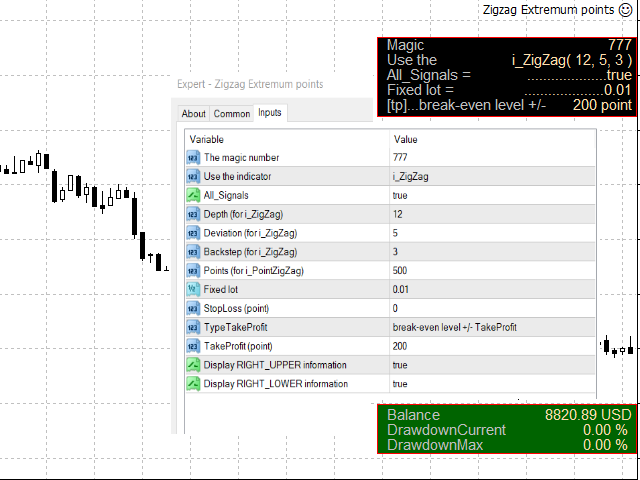
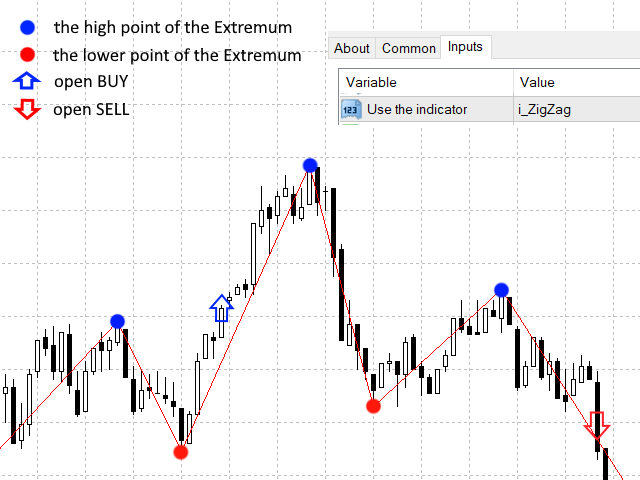
In the default settings, the adviser opens trades when the extremum point is broken   standard indicator   Zigzag.

When the upper point of the zigzag extremum is broken, it opens a buy deal, and when the lower point of the zigzag extremum is broken, it opens a sell deal.
In addition to the standard ZigZag indicator, which is available in the terminal, it is possible to use   Point Zig Zag indicator .

Looking for an Expert Advisor for real trading?  Take a look here: https://www.mql5.com/en/market/product/122585?source=Site+Profile+Seller
The "Red Blue Lines" Expert Advisor has active monitoring on a live account.

Variables.

  1. Spread (maximum allowed)   - the maximum allowable spread for trading.

  2. MaxNumber Trades   - the maximum allowable number of transactions.

  3. startHOUR, startMINUTE, stopHOUR, stopMINUTE - time to open "Start" orders.

  4. The magic number   Advisor identification number.

  5. This is used to start - choose a strategy for the adviser from the proposed one:
    5.1   (#5)i_ZigZag   - standard indicator   zigzag,   available in the terminal.   The EA opens trades when the extremum point is broken   standard indicator   Zigzag.

    5.2   (#6) i_PointZigZag   - author's custom indicator. Requires terminal installation. To test the adviser, it is enough to install the demo version of the indicator. The description of the strategy can be found in the description of the "Point ZigZag" indicator ( post#5 ).

    5.3   (#7) i_PointZigZag   - author's custom indicator. Requires terminal installation. To test the adviser, it is enough to install the demo version of the indicator.   The description of the strategy can be found in the description of the "Point ZigZag" indicator ( post#6 ). An important condition for this strategy to work is setting   HighPoints (for   Start   )   should be more customization   Points (for   start   )   .

    5.4 (#70)_Canal   - start trading on the breakdown of the reversal levels of the "Point Zig Zag" indicator (it requires installation in the terminal ). If the market reverses and the price breaks through the opposite reversal level of the Point Zig Zag indicator, a Channel is created.   The description of the strategy can be found in the description of the indicator   " Point ZigZag" (post#).

    5.5 (#77)_Canal   - start of trading, when EA is turned on, two orders are opened (buy and sell), subsequently a Channel is created according to the reversal levels of the "Point Zig Zag" indicator   ( t requires installation in the terminal ) .
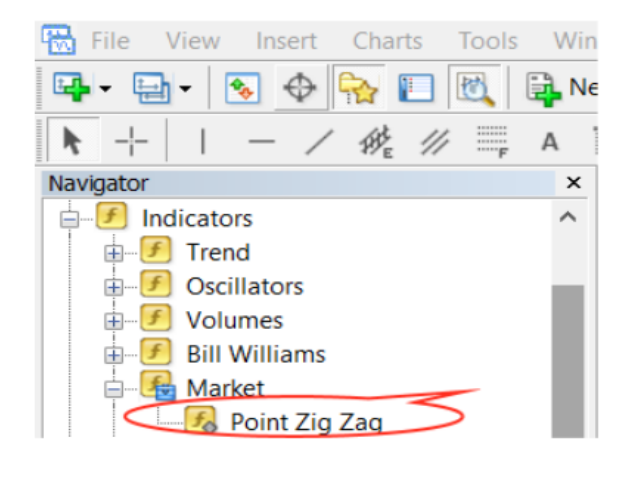
    Attention! After installing the indicator   i_PointZigZag     check the installation location: MQL4 > Indicators > Market > Point Zig Zag.ex4 (see screenshot).
  6. Trend filter MA (for Start) - ( false\true)   filter by MA indicator. If "Trend filter MA (for Start)   = TRUE",   and MA above the price, the EA only sells. If the MA is below the price, the EA only buys.   This trend filter is not used if the input variable "This is used to start = (#77)_Canal" is enabled in the EA.
    6.1 MA_timeframe (for Trend filter MA) - settings for the MA indicator (timeframe )
    6.2 MA_period (for Trend filter MA)   - settings for the MA indicator (period)
    6.3 MA_method (for Trend filter MA) - settings for the MA indicator (method).

  7. Filter 4_lines_MA (for Start) - filter by four lines of the MA indicator, the filter works only if the "Point Zig Zag" indicator is present.   This trend filter is not used if the input variable "This is used to start = (#77)_Canal" is enabled in the EA.
    _No   - the filter is not used;
    _Trend   - trend trading,
    conditions for buying MA1 > MA2 > MA3 > MA4;
    conditions for selling MA1 < MA2 < MA3 < MA4;
    _Anti-Trend   - trading against the trend (trading on a rollback, or from overbought / oversold zones),
    buy conditions MA1 < MA2 < MA3 < MA4;
    selling conditions MA1 > MA2 > MA3 > MA4 ;

    7.1 MA1_timeframe (for "Filter 4_lines_MA")   -   settings for the MA1 indicator (timeframe)
    7.2   MA1_period (for "Filter 4_lines_MA")   -   settings for the MA1 indicator (period)
    7.3   MA1_method (for "Filter 4_lines_MA")   -   settings for the MA1 indicator (method).

    7.4 MA2_timeframe (for "Filter 4_lines_MA")   -   settings for the MA2 indicator (timeframe)
    7.5   MA2_period (for "Filter 4_lines_MA")   -   settings for the MA2 indicator (period)
    7.6   MA2_method (for "Filter 4_lines_MA")   -   settings for the MA2 indicator (method).

    7.7 MA3_timeframe (for "Filter 4_lines_MA")   -   settings for the MA3 indicator (timeframe)
    7.8   MA3_period (for "Filter 4_lines_MA")   -   settings for the MA3 indicator (period)
    7.9   MA3_method (for "Filter 4_lines_MA")   -   settings for the MA3 indicator (method).

    7.10 MA4_timeframe (for "Filter 4_lines_MA")   -   settings for the MA4 indicator (timeframe)
    7.11   MA4_period (for "Filter 4_lines_MA")   -   settings for the MA4 indicator (period)
    7.12   MA4_method (for "Filter 4_lines_MA")   -   settings for the MA4 indicator (method).

  8. All_Signals   -
    If "All_Signals = false"   then entry into the market is allowed only if there is no open deal.
    For example, if there is an open buy trade in the market, then a new buy trade will not be opened even if there is a signal to open a buy trade.
    If "All_Signals = true" then entry to the market is allowed even if there are open deals.
    For example, if the market has an open buy deal, then a new buy deal will be opened with each new signal to open a buy deal.

  9. Depth (for i_ZigZag)   - standard indicator setting   zigzag. Used only in strategy   (#5)i_ZigZag .

  10. Deviation (for i_ZigZag) - standard indicator setting   zigzag.   Used only in strategy   (#5)i_ZigZag .

  11. Backstep (for i_ZigZag) - standard indicator setting   zigzag.     Used only in strategy   (#5)i_ZigZag .

  12. HighPoints (for   Start)  - senior indicator setting   Point Zig Zag. If you plan to use this setting, then it must be greater than the "Points (for Start)" variable.   If you do not plan to use this setting, then it should be equal to the "Points (for Start)" variable.   The minimum size in points between the two closest   ZigZag extremum.

  13. Points (for   start )   -   indicator setting   Point Zig Zag. The minimum size in points between the two closest   ZigZag extremum.

  14. Fixed lot - the size of the traded volume.

  15. Lot as a % of the Balance(0.0=OFF) -   auto calculation of the lot size (for the initial/starting order) as a percentage of the account balance.
    If you are going to use automatic lot calculation, then you need to set the desired value (as a percentage).
    If you are going to use a fixed lot size (for the initial / starting order), then you need to set
    input variable "Lot as a % of the Balance(0.0=OFF)=0.0".

  16. StopLoss (point)   - loss ratio for each trade in points .

  17. TrailingStop_S -
    _ False - not used;
    _Simple   - simple trailing stop with settings ( Start Trailing ,   step trailing );
    _ISAR   -    trailing stop on the Parabolic SAR indicator with settings ( iSAR_timeframe ,   iSAR_step ,   iSAR_maximum ).

  18. Start Trailing (for TrailingStop_Simple) -   number of points (point) to start trailing stop   (for TrailingStop_Simple)   .

  19. Step Trailing (for TrailingStop_Simple) - step in trailing stop points   (for TrailingStop_Simple)   .

  20. iSAR_timeframe(for TrailingStop_iSAR) -   parabolic SAR indicator setting (for TrailingStop_iSAR)

  21. iSAR_step(for TrailingStop_iSAR)   -   indicator setting   Parabolic SAR   (for TrailingStop_iSAR)

  22. iSAR_maximum(for TrailingStop_iSAR) -   parabolic SAR indicator setting   (for TrailingStop_iSAR)

  23. TypeTakeProfit-   select the type [tp] for the adviser from the proposed one:
    2 2.1   standard   -   [tp]   is set for each transaction at a distance equal to the value of the variable   Take Profit (point) .

    22.2   total take profit   - sum of all   [tp]   (one type of trade) is equal to   variable value   Take Profit (point) .

    22.3   break-even level +/- TakeProfit   - to the breakeven level of open trades   (one type of trade)    added   variable value   Take Profit (point) .

  24. TakeProfit (point) - profit level in points.

  25. Closing profit - closing a deal after reaching a certain profit margin
    24.1   no   -   not used;
    24.2   joint buy and sell   -   joint calculation of BUY and SELL profits,   closing on the total total profit (BUY profit + SELL profit).
    24.3   Individual to buy or sell   -   separate calculation of profit for BUY and SELL, closing depending on your profit.

  26. Profit target(money) - profit target in money for " Closing profit ".

  27. Target per day - True/False,
    If   True, the EA will trade until it reaches the target (value) set in the "Profit target per day(money)" variable   ". When reaching the target, EA will close all open trades and will not open new trades until the next day.
    If   False, then the EA does not use this feature.

  28. Profit target per day(money) - profit target per day.

  29. UseCanal   - false\true

  30. Daily 200 SMA(trend filter for Canal) -
  31. Continuation of the channel-
    30.1   along the initial price boundaries   -   continuation of the channel along the initial price boundaries;
    30.2   on the signal from the indicator   -   continuation of the channel on a signal from the indicator.

  32. Points (for Canal)   -   indicator setting   Point Zig Zag for the Channel.

  33. Ratio_B_C   - the ratio of the breakeven level and the size of the Channel. The minimum value is 0.01.

  34. TakeProfit target(for Canal)   - profit target in points, if the "(#70)_Canal" or "(#77)_Canal" strategy is used.

  35. Allowed number of Canal positions (for Canal)   - allowable number of positions Channel.

  36. Display RIGHT_UPPER information -

    information about the settings in the upper right corner of the screen:

      • true - display;
      • false - DO NOT display.

  37. Display RIGHT_LOWER information -
    additional information in the lower right corner of the screen:
    • true - display;
    • false - DO NOT display.

  38. openpriceonly     -

    used to speed up the test, only in the tester with the "only open prices" test model :

      • true - used;
      • false - NOT used.


    If you like this Expert Advisor, then you can support the author with a kind review or purchase of the " i_PointZigZag " indicator.

Don't miss anything interesting, add me as a friend.


Reviews 43
tagil1963
124
tagil1963 2026.09.01 07:58 

!!!

Gaetano Natale
38
Gaetano Natale 2025.03.28 22:43 

Ti auguro una lunga vita

Victor Alfonso Molina Botello
2273
Victor Alfonso Molina Botello 2024.04.03 20:41 

Hello Oleg, Could you arrange for him to close the real operation with the next opposite? thank you

Recommended products
Free automatic Fibonacci is an indicator that automatically plots a Fibonacci retracement based on the number of bars you select on the BarsToScan setting in the indicator. The Fibonacci is automatically updated in real time as new highest and lowest values appears amongst the selected bars. You can select which level values to be displayed in the indicator settings. You can also select the color of the levels thus enabling the trader to be able to attach the indicator several times with differe
FREE
High Low Open Close MT4
Alexandre Borela
4.81 (21)
If you like this project, leave a 5 star review. This indicator draws the open, high, low and closing prices for the specified period and it can be adjusted for a specific timezone. These are important levels looked by many institutional and professional traders and can be useful for you to know the places where they might be more active. The available periods are: Previous Day. Previous Week. Previous Month. Previous Quarter. Previous year. Or: Current Day. Current Week. Current Month. Current
FREE
Эксперт  MACD_LevelTrader создан для торговле валютной пары XAUUSD. Данная версия это наработки того, что можно извлечь  из  индикатора MACD и Moving Average.   Важно перед тестированием изменить настройку с 1000 на 5000                       Offset in points UP from SMA200 for sell            5000                       Offset in points DOWN from SMA200 for buy        5000   Тайм фрейм  М5. Два варианта логики, П араметр  true=вход по уровню  MACD + SMA200, false=вход по MACD  Тестируйте на демо
FREE
Simple RSI Forex Trading Strategy
Victor Manuel Valderrama Zamora
2.5 (2)
Diversify the risk in your trading account by combining our Expert Advisors. Build your own custom trading system here:   Simple Forex Trading Strategies The expert advisor opens trades when RSI indicator enter in oversold or overbought areas. The Stop Loss, Take Profit, and Trailing Stop are calculated based on the ATR indicator. The recommended currency pair is EURGBP and the recommended timeframe to operate and to do backtests is H4. This Expert Advisor can be profitable in any TimeFrame an
FREE
Automated Timeframe cycling with Symbols centered.  Force every timeframe onto one clock window, so the story you see on Daily is the same story you are slicing on H4, H1, and M1.  Traders usually flip timeframes and lose the span. A Daily chart shows a few weeks, then M15 shows a few hours, and the eye treats them as different markets. TASSERACT locks the window to N bars of the highest enabled timeframe — default 10 Daily — and maps every lower timeframe to that same stretch. You stay inside o
FREE
Follow The Line
Oliver Gideon Amofa Appiah
3.94 (16)
FOLLOW THE LINE GET THE FULL VERSION HERE: https://www.mql5.com/en/market/product/36024 This indicator obeys the popular maxim that: "THE TREND IS YOUR FRIEND" It paints a GREEN line for BUY and also paints a RED line for SELL.  It gives alarms and alerts of all kinds. IT DOES NOT REPAINT and can be used for all currency pairs and timeframes. Yes, as easy and simple as that. Even a newbie can use it to make great and reliable trades. NB: For best results, get my other premium indicators for more
FREE
Vanexio
Sayan Vandenhout
VANEXIO USES THE TREND WAVE INDICATOR AND IT CAN IDENTIFY THE BEGINNING AND THE END OF A NEW WAVE TREND MOVEMENT. AS AN OSCILLATOR, THE INDICATOR IDENTIFIES THE OVERBOUGHT AND OVERSOLD ZONES. IT WORKS GREAT TO CATCH THE SHORT TERM PRICE REVERSALS AND USES A MARTINGALE STRATEGY TO CLOSE ALL TRADES IN PROFIT. USE DEFAULT SETTINGS ON H1 OR HIGHER TIME FRAME ON ANY PAIR FOR MORE ACCURATE TRADES WHY THIS EA : Smart entries calculated by 5 great strategies The EA can be run on even a $20000 acco
FREE
OrderBlock TS Roman
Vladislav Vlastovskii
4 (6)
Индикатор строит блоки заказов (БЗ) по торговой системе (ТС) Романа. Поиск блоков осуществляется одновременно на двух таймфремах: текущем и старшем (определяемым в настройках). Для оптимизации и игнорирования устаревших блоков в настройках задается ограничение количества дней в пределах которых осуществляется поиск блоков. Блоки строятся по правилам ТС состоящем из трех шагов: какую свечу вынесли (что?); какой свечой вынесли (чем?); правило отрисовки (как?).
FREE
Macd Martin
Roman Yablonskiy
2.5 (2)
Double Breakout   is an automatic expert advisor with two separate strateges that uses martingale. The MACD indicator with adjustable parameters is used as inputs for each flow of orders. The specified takeprofit and stoploss levels are used to exit the position.  General recommendation The minimum recommended deposit is 1000 cents. Spread is recommended not more than 3 points. It is better to use trend currency pairs. The martingale parameter can be set from 0.1 to any value. When martingale i
FREE
PZ Goldfinch Scalper EA
PZ TRADING SLU
2.7 (44)
This is the latest iteration of my famous scalper, Goldfinch EA, published for the first time almost a decade ago. It scalps the market on sudden volatility expansions that take place in short periods of time: it assumes and tries to capitalize of inertia in price movement after a sudden price acceleration. This new version has been simplified to allow the trader use the optimization feature of the tester easily to find the best trading parameters. [ Installation Guide | Update Guide | Troublesh
FREE
Smart FVG Indicator MT4   delivers professional Fair Value Gap (FVG) detection, monitoring, and alerting directly on your charts. It combines   ATR-based filtering   with structure-aware logic to remove noise, adapt to liquidity, and keep only the most relevant imbalances for precise decisions. Key Advantages Accurate FVG detection:   Identifies genuine inefficiencies, not just simple candle gaps. ATR-based precision:   Adaptive sensitivity filters out low-quality signals across markets and time
FREE
Email Drawdown Alert
Roman Starostin
5 (12)
Free informative Indicator-helper. It'll be usefull for traders who trade many symbols or using grid systems (Averaging or Martingale). Indicator counts drawdown as percent and currency separate. It has a number of settings: Count deposite drawdown according equity value and send e-mail or notifications to user if DD more than set; Sending e-mail when max open orders reached; Shows price and remaining pips amount before MarginCall on current chart and Account generally; Display summary trade lot
FREE
Trendline indicator
David Muriithi
2 (1)
Are you tired of drawing trendlines every time you're analyzing charts? Or perhaps you would like more consistency in your technical analysis. Then this is for you. This indicator will draw trend lines automatically when dropped on a chart. How it works Works similar to standard deviation channel found on mt4 and mt5. It has 2 parameters: 1. Starting Bar 2. Number of bars for calculation The   starting bar   is the bar which drawing of the trend lines will begin, while the   number of bars for c
FREE
PZ Penta O MT4
PZ TRADING SLU
2.33 (3)
The Penta-O is a 6-point retracement harmonacci pattern which usually precedes big market movements. Penta-O patterns can expand and repaint quite a bit. To make things easier this indicator implements a twist: it waits for a donchian breakout in the right direction before signaling the trade. The end result is an otherwise repainting indicator with a very reliable trading signal. The donchian breakout period is entered as an input. [ Installation Guide | Update Guide | Troubleshooting | FAQ | A
FREE
This innovative indicator for measuring the strength of currencies from INFINITY is an indispensable assistant for scalpers and traders trading for a long time. The system for analyzing the Strength / weakness of currencies has long been known and used in the market by the world's leading traders. Any arbitrage trading is not complete without this analysis. Our indicator easily determines the strength of the base currencies in relation to each other. It displays line charts for all or the curren
FREE
Double HMA lines MTF
Pavel Zamoshnikov
5 (2)
This is a multi-timeframe version of the popular Hull Moving Average (HMA). The Double HMA MTF Light indicator combines two timeframes on a single chart. The HMA of the higher timeframe defines the trend, and the HMA of the current timeframe defines short-term price movements. The indicator is freely distributed and hasn't audio signals or messages. Its main function is the visualization of price movements. If you need advanced functionality of the HMA multi-timeframe indicator (information ab
FREE
Pivot Point Fibo RSJ is an indicator that traces the support and resistance lines of the day using Fibonacci rates. This spectacular indicator creates up to 7 levels of support and resistance through Pivot Point using Fibonacci rates. It is fantastic how the prices respect each level of this support and resistance, where it is possible to perceive possible entry/exit points of an operation. Features Up to 7 levels of support and 7 levels of resistance Set the colors of the levels individually
FREE
Rainbow MT4
Jamal El Alama
Rainbow MT4 is a technical indicator based on Moving average with period 34 and very easy to use. When price crosses above MA and MA changes color to green, it’s a signal to buy. When price crosses below MA and MA changes color to red, it’s a signal to sell. The Expert advisor ( Rainbow EA MT4) based on Rainbow MT4 indicator, as you can see in the short video below is now available here .
FREE
Lycan MT4
Leo Carlo Bermudez
Lycan MT4 is an automated Scalping system optimized for  XAUUSD (GOLD)  on the MetaTrader platform. The EA does not use grid or martingale recovery methods. It applies volatility-based stop loss protection and rule-based filters (spread, news, and session) to select scalp trade opportunities using confirmed breakout strength, rather than relying on high-frequency or recovery-based entries. Core Principle: No Grid, No Martingale, Dual Scalp Strategy System Lycan does not add to losing positions
FREE
Harvest FX
Sayan Vandenhout
4.56 (9)
Harvest FX USES THE TREND WAVE INDICATOR AND IT CAN IDENTIFY THE BEGINNING AND THE END OF A NEW WAVE TREND MOVEMENT. AS AN OSCILLATOR, THE INDICATOR IDENTIFIES THE OVERBOUGHT AND OVERSOLD ZONES. IT WORKS GREAT TO CATCH THE SHORT TERM PRICE REVERSALS AND USES A MARTINGALE STRATEGY TO CLOSE ALL TRADES IN PROFIT. USE DEFAULT SETTINGS ON H1 OR HIGHER TIME FRAME ON ANY PAIR FOR MORE ACCURATE TRADES WHY THIS EA : Smart entries calculated by 3 great strategies The EA can be run on even a $30000 a
FREE
Vanda FX
Sayan Vandenhout
5 (2)
Vanda FX USES THE TREND WAVE INDICATOR AND IT CAN IDENTIFY THE BEGINNING AND THE END OF A NEW WAVE TREND MOVEMENT. AS AN OSCILLATOR, THE INDICATOR IDENTIFIES THE OVERBOUGHT AND OVERSOLD ZONES. IT WORKS GREAT TO CATCH THE SHORT TERM PRICE REVERSALS AND USES A MARTINGALE STRATEGY TO CLOSE ALL TRADES IN PROFIT. USE DEFAULT SETTINGS ON H1 OR HIGHER TIME FRAME ON ANY PAIR FOR MORE ACCURATE TRADES WHY THIS EA : Smart entries calculated by 4 great strategies The EA can be run on even a $20000 acc
FREE
Market Profile 3
Hussien Abdeltwab Hussien Ryad
3 (2)
Market Profile 3 MetaTrader 4 indicator  — is a classic Market Profile implementation that can show the price density over time, outlining the most important price levels, value area, and control value of a given trading session. This indicator can be attached to timeframes between M1 and D1 and will show the Market Profile for daily, weekly, monthly, or even intraday sessions. Lower timeframes offer higher precision. Higher timeframes are recommended for better visibility. It is also possible t
FREE
Trend Analizer Bot
Pavel Predein
4.67 (3)
Automatic trading Advisor .This is a free version of the expert Advisor "Trend Analyzer Pro" https://www.mql5.com/ru/market/product/42792.В the robot is based on 2 strategies: at the intersection of moving averages and Bollinger bands indicator .In the paid version, three strategies are available, which increases profitability several times .Designed for the EURUSD H1 currency pair.It is possible to use it on other tools after optimization.Test only on tick data. ** Does not use such dangerous
FREE
Wise Men Indicator demo
Bohdan Kasyanenko
3 (2)
The indicator displays signals according to the strategy of Bill Williams on the chart. Demo version of the indicator has the same features as the paid, except that it can work only on a demo account . Signal "First Wise Man" is formed when there is a divergent bar with angulation.  Bullish divergent bar - with lower minimum and closing price in the upper half. Bearish divergent bar - higher maximum and the closing price at the bottom half. Angulation is formed when all three lines of Alligator
FREE
Traditional MACD MT4
Daniel Lewis
4.59 (56)
MACD indicator in MetaTrader 4/5 looks different than MACD does in most other charting software. That is because the MetaTrader 4/5 version of MACD displays the MACD line as a histogram when it is traditionally displayed as a line. Additionally, the MetaTrader 4/5 version computes the Signal line using an SMA, while according to MACD definition it is supposed to be an EMA. The MetaTrader 4/5 version also does not compute a true MACD Histogram (the difference between the MACD/Signal lines). This
FREE
Quantum Falcon Signal Free is a smart visual trading indicator for MetaTrader 4 designed for Forex and Gold traders. The indicator combines: • Trend analysis • RSI momentum confirmation • MACD momentum filtering • ATR volatility filtering • Higher timeframe confirmation • Smart exit signal detection Main Features: • Smart Buy and Sell signals • Exit Buy / Exit Sell alerts • Real-time dashboard on chart • Professional candle arrows • Multi-timeframe trend confirmation • ATR market volatility filt
FREE
SX Supply Demand Zones accurately identifies and draws high-probability Supply and Demand zones using a sophisticated algorithm. Unlike traditional indicators that clutter your chart, this indicator is designed with a focus on performance and a clean user experience. New Unique Feature: Interactive Legend System What truly sets this indicator apart from everything else is the Interactive Control Legend. You have a professional dashboard directly on your chart that allows you to: Show/Hide: Ins

FREE
Proftrader Free
Alexander Nikolaev
4 (3)
This Expert Advisor analyzes the last candles and determines whether there will be a reversal or a large correction. Also, the readings of some indicators are analyzed (their parameters can be adjusted). Is a free version of Proftrader . Unlike the full version, in the free version of the adviser the initial lot cannot be higher than 0.1, trading pair only EURUSD and also it has fewer configurable parameters. Input parameters Lots - lot size (at 0, the lot will be calculated from the percentage
FREE
EA Scalping Expert
Gerard Valldosera Gomez
3 (1)
This is a fully automated scalping Expert Advisor that can be run successfully using EURUSD currency pair at H1 timeframe. This EA can't run in the same account. If you want an Expert Advisor that trades daily this is not because it requires patience to wait for a few days or weeks on the right opportunity for it to trade. It takes advantage of the volatility of the price movement.
FREE
Moving Along USES THE TREND WAVE INDICATOR AND IT CAN IDENTIFY THE BEGINNING AND THE END OF A NEW WAVE TREND MOVEMENT. AS AN OSCILLATOR, THE INDICATOR IDENTIFIES THE OVERBOUGHT AND OVERSOLD ZONES. IT WORKS GREAT TO CATCH THE SHORT TERM PRICE REVERSALS AND USES A MARTINGALE STRATEGY TO CLOSE ALL TRADES IN PROFIT. USE DEFAULT SETTINGS ON M15 OR HIGHER TIME FRAME ON ANY PAIR FOR MORE ACCURATE TRADES WHY THIS EA : Smart entries calculated by 5 great strategies The EA can be run on even a $2000
FREE
Buyers of this product also purchase
The Gold Reaper MT4
Profalgo Limited
4.61 (33)
PROP FIRM READY! ( download  SETFILE ) LAUNCH PROMO: Only a few copies left at current price! Final price: 990$ Get 1 EA for free (for 3 trade accounts) -> contact me after purchase Ultimate Combo Deal   ->   click here JOIN PUBLIC GROUP:   Click here Live Signal LATEST MANUAL Welcome to the Gold Reaper! Build on the very succesfull Goldtrade Pro, this EA has been designed to run on multiple timeframes at the same time, and has the option to set the trade frequency from very conservative to e
AI Golden Life MT4
MQL TOOLS SL
5 (1)
AI GOLDEN LIFE is a professional AI-powered trading system developed exclusively for XAUUSD (Gold) on the H1 timeframe. It represents a new generation of automated Gold trading, combining advanced technical analysis, intelligent market filtering, adaptive trade management, and innovative geopolitical risk protection. Unlike traditional scalping systems that focus on rapid market fluctuations, AI GOLDEN LIFE operates on the H1 timeframe , analyzing broader market structures, price action, moment
Scalping Robot Pro MT4
MQL TOOLS SL
4.29 (17)
Scalping Robot Pro is a  professional trading system  designed specifically for fast and precise scalping on XAUUSD using the M1 timeframe. The system is built to capture short term market movements with accurate execution and controlled risk management. It focuses on real time price behavior, momentum shifts, short term volatility, and selective grid based trade management techniques to identify high probability  trading opportunities  in the gold market. Scalping Robot Pro is optimized for tra
Tokyo EA mt4
Vasiliy Strukov
5 (10)
The Tokyo  EA is a trend-following trading system designed to identify changes in market direction and automatically trade confirmed bullish and bearish signals.  The EA enters at the opening of the next candle after a buy or sell arrow from the Tokyo Indicator and will trade in a grid/martingale strategy.  This EA is suitable for any currency pair and any time frame, however it performs exceptionally well on strong trending instruments such as xauusd on the M15 time frame. Real-time results can
AW Recovery EA
AW Trading Software Limited
4.35 (84)
The Expert Advisor is a system designed to recover unprofitable positions. The author's algorithm locks a losing position, splits it into many separate parts, and closes each of them separately. Easy setup, delayed launch in case of drawdown, locking, disabling other Expert Advisors, averaging with trend filtering and partial closing of a losing position are built into one tool. It is the use of closing losses in parts that allows you to reduce losses with a lower deposit load, which ensures saf
Waka Waka EA
Valeriia Mishchenko
4.25 (48)
8+ years of live track record with +12,000% account growth: Live performance MT 5 version can be found here Waka Waka is the advanced grid system which already works on real accounts for years. Instead of fitting the system to reflect historical data (like most people do) it was designed to exploit existing market inefficiencies. Therefore it is not a simple "hit and miss" system which only survives by using grid. Instead it uses real market mechanics to its advantage to make profit Supported cu
Big Forex Players MT4
MQL TOOLS SL
4.63 (43)
We proudly present our cutting-edge robot, the  Big Forex Players EA  designed to maximize your trading potential, minimize emotional trading, and make smarter decisions powered by cutting-edge technology. The whole system in this EA took us many months to build, and then we spent a lot of time testing it. This unique EA includes three distinct strategies that can be used independently or in together. The robot receives the positions of the  biggest Banks  (positions are sent from our database t
BioBot
Andriy Sydoruk
Here is the corrected and adapted description for your BioBot scalping system in English , fully aligned with the actual input parameters from your code: BioBot Scalping System Description BioBot is a high-performance automated scalping trading system designed for trading various financial instruments (currency pairs, metals, etc.), primarily on M1 – M15 timeframes. Optimizing BioBot just once (for example, over a one-month period) is sufficient to deliver strong results on a forward period sev
Fortune MT4
Shane Lee
5 (3)
Real Trading Account LIVE SIGNAL 100K:   https://www.mql5.com/en/signals/2388151 Real Trading Account  LIVE SIGNAL 3K:  https://www.mql5.com/en/signals/2363526 Check Out All Our Products :   Click Here Fortune is an automated breakout Expert Advisor for MetaTrader 4 & 5, developed primarily for XAUUSD. The EA identifies potential breakout and breakdown zones based on recent market structure, then manages each trade according to the risk percentage set by the user. Every position is opened wit
Xyron Edge MT4
Ahmad Sidik
3 (2)
Xyron Edge is a Professional breakout Expert Advisor (EA) designed to trade market structures by utilizing swing high and swing low levels. The EA places pending orders above resistance areas and below support areas to capture breakout movements while maintaining controlled risk management. --------- EA Setting & Preset :  EA Input Settings Guide Live Signal :  https://www.mql5.com/en/signals/2395361 --------- Key Features Fully automated trading Dynamic support and resistance detection Pen
Btcusd Consensus mt4
Leonid Arkhipov
5 (1)
MEET BTCUSD CONSENSUS MY NEW PROJECT FOR BITCOIN I wanted to create something more serious for BTCUSD than just another EA built around a couple of indicators. That is why there is not just one strategy and not just one signal here. Inside BTCUSD Consensus there are 5 individually trained models and 1360 decision trees . D LONG • D SHORT • U LONG • U SHORT • SELL META Each model has its own task, its own training and its own optimization. Before entering the market, the EA also identifies the
Trend Radar — Expert Advisor for MetaTrader 4 Overview Trend Radar is an Expert Advisor (EA) for MetaTrader 4 that opens trades based on a proprietary price-channel analysis model, filtered by slope angle and corridor width. The EA combines clear signal logic with flexible risk management and full control over every stage of trade management — from entry to trailing stop. How It Works Channel analysis. The EA builds a price channel from the last SignalBarCount bars and determines its overall dir
Quantum Scalperr Gold
Ignacio Agustin Mene Franco
Quantum Scalper GOLD v2.00 High-Precision Scalping for XAUUSD (Gold) Quantum Scalper GOLD is an advanced and fully automated Expert Advisor designed exclusively for trading XAUUSD (Gold) on the M5 timeframe. Key Features: Intelligent Hybrid Strategy: Combines RSI signals (overbought/overbold detection), Envelopes (volatility filter), and a real-time trained MLP Neural Network using price, EMA, MACD, and ATR features. Dynamic Risk Management: Adaptive Stop Loss based on ATR, intelligent traili
PolyGold Scalper MT4
Connor Michael Woodson
PolyGold Scalper is a short-term scalping system for XAUUSD that can make trading decisions based on integration with Polymarket API. Live Signal: CLICK HERE All trading is done within MetaTrader and does not require API keys or a Polymarket account. The chart includes a panel that mirrors the data feed from Polymarket and refreshes every few seconds. The EA only enters single-shot positions and manages them without the use of grid or martingale. Exits are based on a dynamic virtual stop loss an
The Gold Space MT4
Ayush V Jain
5 (1)
Version 3 is live now. LIVE SIGNAL REACHED 250% on Version 2 and market shifted. Live Signal of Version 3 on Vantage Version 3 Live signal https://www.mql5.com/en/signals/2393691 Join telegram group   https://t.me/+UaALtDiYMb4xYTk1 The Gold Space v3 – Built on a New Engine The Gold Space v3 is a complete rebuild of our XAUUSD breakout system. It runs on a new engine designed around one idea: place fewer, cleaner orders and manage every trade with discipline. The New Engine Virtual levels: Every
AW Double Grids EA
AW Trading Software Limited
4.5 (8)
Advisor AW Double Grids MT4 - is an aggressive, fully automated grid advisor, with an information trading panel and simple setup. The strategy consists of simultaneous two-way work, multiplying the volume of one direction. Built-in automatic lot calculation, various variations of increasing the volume of positions, and other functions are implemented. Instructions ->  HERE  /  Problem solving ->  HERE  / MT5 version ->  HERE How the advisor trades: AW Double Grids conducts two-way trading with
Fortress MT4
Shane Lee
5 (2)
Real Trading Account LIVE SIGNAL 100K:   https://www.mql5.com/en/signals/2388151 Real Trading Account  LIVE SIGNAL 1K:  https://www.mql5.com/en/signals/2378166 Check Out All Our Products :   Click Here Fortress is an automated breakout Expert Advisor for MetaTrader 4 & 5, developed primarily for XAUUSD. The EA utilizes multiple confirmation algorithms and internal strategies to identify optimal breakout points at key support and resistance levels. Position sizing and trade frequency automatic
AW Prime Oscillator EA
AW Trading Software Limited
AW Prime Oscillator EA is an Expert Advisor that trades on AW Prime Oscillator indicator signals. The fast oscillator line gives entries at the overbought and oversold levels, while the slow line sets the trend and filters out counter-trend signals. The signal is read once per bar from the closed bar and is not redrawn. The order opens on the next bar. TakeProfit is virtual, measured from the breakeven of the side's whole basket rather than the first order price, so averaging orders move the tar
EA Gold Stuff
Vasiliy Strukov
4.7 (1095)
EA Gold Stuff is an Expert Advisor designed specifically for trading gold. The operation is based on opening orders using the Gold Stuff indicator, thus the EA works according to the "Trend Follow" strategy, which means following the trend. Real-time results can be viewed  here . Contact me immediately after the purchase to get personal bonus!  You can get a free copy of our Strong Support and Trend Scanner indicator, please pm. me! Settings  and manual   here  Please note that I do not sell my
Gold Trade Pro
Profalgo Limited
4.61 (23)
LAUNCH PROMO: Only a few copies left at current price! Final price: 990$ Get 1 EA for free (for 2 trade accounts) -> contact me after purchase Ultimate Combo Deal -> click here New live signal:   https://www.mql5.com/en/signals/2084890 Live Signal high risk :  https://www.mql5.com/en/signals/2242498 Live Signal Set Prop Firm Set JOIN PUBLIC GROUP:   Click here Parameter overview Gold Trade Pro joins the club of Gold trading EA's, but with one big difference: this is a real trading strategy.
Apex Gold MT4
Dmitriq Evgenoeviz Ko
Apex Gold Advisor: Accuracy and Efficiency for MT4 In the fast-paced world of forex trading, where every second and every pip counts, Apex Gold Advisor stands out as a tool designed to provide high accuracy of market entries. Designed specifically for the MetaTrader 4 (MT4) platform, this advisor is a powerful solution for traders looking to maximize their profitability while minimizing risk. the full list for your convenience is available https://www.mql5.com/ru/users/pants-dmi/seller Apex G
Mirror EA mt4
Vasiliy Strukov
5 (3)
Mirror EA is an automated trading system developed to execute trades based on the SmaSRS196 indicator which is a combination of the Simple Moving Average (SMA) and the Relative Strength Index (RSI), utilizing a 96-period optimization framework.  The EA continuously analyzes market conditions to identify high-probability trading opportunities by confirming trend direction with the SMA while using RSI to detect momentum strength and potential overbought or oversold conditions.  The EA will sell u
ToTheMoon MT4
Daniel Moraes Da Silva
5 (1)
ONE OF THE FEW ROBOTS WITH A SIGNAL HISTORY OF MORE THAN 3 YEARS AND AMONG THE TOP 10.   LINK TO MY ROBOTS AND SIGNAL PRESETS: In my profile there is a link to download the PRESETS that I use in my SIGNALS, you can download and Backtest for free, there are explanations in the my WebSite. https://www.mql5.com/en/users/tec_daniel   LINK TO OTHER ROBOT VERSIONS: MT4:  https://www.mql5.com/en/market/product/97963 MT5:  https://www.mql5.com/en/market/product/97962   SOME EXAMPLES OF SIGNALS ON “mql5.
Trend Catcher Exp
Ramil Minniakhmetov
5 (2)
Trend Catcher EA analyzes market price movements, using the author’s proprietary and customized adaptive trend-analysis indicators.   It identifies the true market direction by filtering out short-term noise and focusing on underlying momentum strength, volatility expansion, and price structure behavior.   By combining the smoothing and trend-filtering capabilities of special customized indicators such as moving averages, RSI, and volatility filters, the EA can automatically execute trades based
EA Sweet Dreams
Vasiliy Strukov
5 (1)
EA Sweet Dreams is a trend following trading system powered based on my own indicator.  It follows a martingale grid strategy.  This EA is suitable for any currency pair and any time frame, however it performs exceptionally well on strong trending instruments such as xauusd on the M15 time frame. Real-time results can be viewed  here . Contact me immediately after the purchase to get personal bonus!  You can get a free copy of our Strong Support and Trend Scanner indicator, please pm. me! Settin
Adaptive Gold Scalper Important Pre-notice: This strategy requires a long period of practical verification, and favorable trading returns cannot be guaranteed in the short run. Traders must select brokers with ultra-low order latency, minimal slippage and zero/low stop level requirement; poor broker conditions will lead to disastrous trading results. I have over 14 years of professional trading experience.   With proper brokerage conditions and sufficient running time, this fully automated scalp
NewsSpeed
Anatoliy Lukanin
Written for currency pairs: GBPUSD, USDJPY, XAUUSD There is a built-in function to return the stop to its place after slipping, an example of slipping in the last screenshot., in a similar situation, the function tries to return the stop to the place indicated when placing the order. The number of transactions in the strategy tester, demo account, real account is almost the same, the result depends on: the size of the spread, slippage, Stop Level and the speed of execution of the broker. Availab
THE MARKET CHANGES. EUR MACHINE PRO CHANGES WITH IT. Not one strategy for every situation. Not one signal. Not one fixed set of rules. EUR MACHINE PRO first determines what kind of market it is dealing with, and only then decides which trading logic should be used. Range? Trend? Calm market? High volatility? Different market conditions activate different models, different entry logic and different trade management. This is what many traditional Expert Advisors are missing: they continue applyin
Quantum King MT4
Bogdan Ion Puscasu
5 (6)
Quantum King EA — Intelligent Power, Refined for Every Trader IMPORTANT! After the purchase please send me a private message to receive the installation manual and the setup instructions. Special Launch Price Live Signal:   CLICK HERE MT5 version : CLICK HERE Quantum King channel:   Click Here ***Buy Quantum King MT4 and you could get Quantum Queen X or Quantum Athena X or Quantum Commander or Quantum Emperor or Quantum Baron or Quantum OmniGold or Quantum StarMan for free !*** Ask in
Eagle Gold Scalper V2
Soolmaz Baramakeh
5 (1)
Price Update Notice Current price: 79$ until October 23, 2026. After this date, the price will increase to 119$. Get it now at the current price. Explanation of how the " Eagle Gold Scalper_V2" Expert Advisor trades. 1 - This is a scalping-style trading Expert Advisor. This Expert Advisor makes trading decisions based on market movement speed, an analysis of candlestick behavior, and the power of the Heiken Ashi system. 2 - It is an excellent choice for trading gold TimeFrame M1 & M5. 3
More from author
New version 3.00 is available.   In this version, I tried to take into account the wishes of the user. The EA opens trades when the ZigZag extremum point is broken, if before that   RSI   moved to overbought or oversold levels. When breaking through the upper point of the ZigZag extremum and if before that   RSI   moved to the oversold level     - The adviser opens a deal to buy. And when the lower point of the zigzag extremum is broken   and if before   RSI   moved to the level   overbought  
FREE
Point Zig Zag
Oleg Popov
4.43 (7)
The indicator is a polyline (ZigZag segment) that tracks and connects the extreme points of the chart price that are at least a specified size apart from each other in points on the price scale. The one and only setting is the minimum size (in points) of a ZigZag segment. The indicator displays levels to determine a possible trend reversal: level    "LevelForUp" -  the breaking of this level determines the possible reversal of the trend up (to buy); level     " LevelForDown   " -  the breaking o
Averager NEW
Oleg Popov
4 (7)
Expert Advisor Features trailing profit in the deposit currency (Trailing Stop Money) closing by a profit or loss in the deposit currency opening orders at a specified time managing positions opened manually or by another Expert Advisor calculating initial lot based on the current balance limiting the maximum lot volume choosing trading type several types and methods of averaging visually displays the current breakeven price, draws horizontal lines "Line break even BUY"-blue, "Line break even S
FREE
Filter:
tagil1963
124
tagil1963 2026.09.01 07:58 

!!!

[Deleted] 2025.06.23 03:50 

User didn't leave any comment to the rating

[Deleted] 2025.04.29 03:12 

User didn't leave any comment to the rating

Gaetano Natale
38
Gaetano Natale 2025.03.28 22:43 

Ti auguro una lunga vita

[Deleted] 2025.03.11 05:06 

User didn't leave any comment to the rating

javier Valderrama
21
javier Valderrama 2024.09.18 21:43 

User didn't leave any comment to the rating

Victor Alfonso Molina Botello
2273
Victor Alfonso Molina Botello 2024.04.03 20:41 

Hello Oleg, Could you arrange for him to close the real operation with the next opposite? thank you

Oleg Popov
26322
Reply from developer Oleg Popov 2024.04.04 06:08
Thanks for the question. Probably not, rather than yes. I replied in more detail in your personal messages.
Zhong Liang Zhao
440
Zhong Liang Zhao 2024.02.21 11:52 

Good EA, clear thinking, you can set your own trading strategy, and the author does a lot of details are very detailed, perfect! I hope it pays off.chzz18025278939@qq.com

AscendCapital
2364
AscendCapital 2024.02.17 17:28 

User didn't leave any comment to the rating

lllvvv999 吕
39
lllvvv999 吕 2023.11.09 21:38 

can you tell me 8613356000373

5013407953
59
5013407953 2023.11.09 05:55 

Great EA ever.. it works like Pro. please Oleg. I'll be looking ahead for your response on the settings that will enable the EA to perform daily.. Thanks for the wonderful work.

L.Verschoor
194
L.Verschoor 2023.11.06 11:02 

Very good

IATradingScalping
3165
IATradingScalping 2023.10.25 00:19 

Excelente EAs muy simple de usarlo , buenos resultados ,muy recomendable ,le hice pruebas en M15 y da buen resultado en ICM

cha
24
cha 2023.10.07 04:32 

I just start running this EA and I like how it places the order sometime hedging both directions. Nice setup TP. It seems pretty reliable.

Ran Wishko
158
Ran Wishko 2023.10.02 10:29 

Does this EA works on a demo? opened on 1hr EA active but NO trades?!?! anyone knows why? the author is not responding.

Oleg Popov
26322
Reply from developer Oleg Popov 2023.10.02 11:29
The Expert Advisor works both on demo accounts and on real accounts. The frequency of entering the market depends on the EA settings.
If you use the entry strategy (# 5), then the Expert Advisor opens deals when the extremum point of the standard ZigZag indicator is broken. The settings for the ZigZag indicator can be changed in the Expert Advisor settings.
Sergei Makarevich
9375
Sergei Makarevich 2023.08.09 16:19 

Отличный бот и правильное видение разработчика! Респект!!!

pat1998hk
24
pat1998hk 2023.07.28 03:48 

There are many settings, can you show us some set files? Thanks

im6yafd
145
im6yafd 2023.07.26 14:20 

Hi M. Oleg ! congratulations for this finely crafted algorithmic program.wishing to move forward, although the results are already very good, my question is: for the use of the channel, we must use your indicator if I understood correctly. thank you for confirming and if you have a SET on this subject I am a taker.... To read you 👍

Alessio
291
Alessio 2023.07.14 20:56 

I am running this EA with the authors indicator point zig zag. I am having good results. The author help us with his indicator. Zigzag terminal normal indicator does not work good. Better buy low cost 30 USD authors Indicator for good results. Thanks Oleg. Well Done.

Bastiaan
35
Bastiaan 2023.07.06 19:15 

Using this bot this week voor the first time. I think it is a very good robot. I have ask the builder for preset files. Stil waiting for his answer.

123
Reply to review