Daedal
- Indicators
-
Iurii Tokman
 Veda http://ytg.com.ua resource - the author works for automation of trade on the forex market - advisers, experts will, trading robots, indicators, trading strategies, scripts, functions and libraries.
 - Version: 1.0
- Activations: 5
A Captivating Glimpse into the Market: The Instant State Indicator
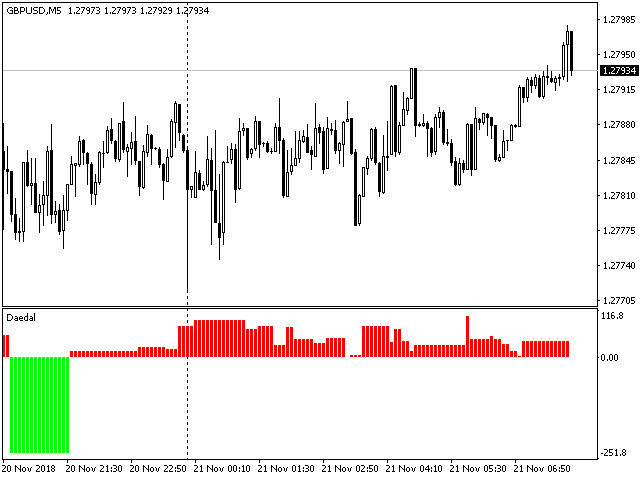
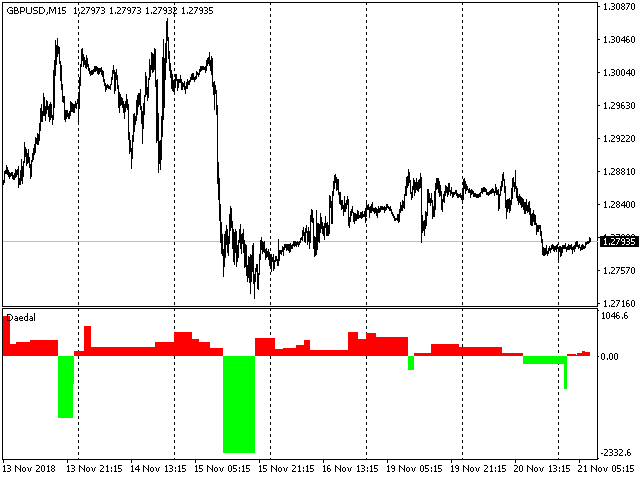
Unlock a powerful tool for graphical analysis that instantly reveals the current state of the market! This indicator, elegantly positioned in a separate lower window, acts like a seasoned analyst, clearly signaling the phase the price is in. Its primary value lies in its ability to proactively warn of potential trend reversals, providing traders with a valuable opportunity for timely entry into profitable positions.
Flexible Settings:
The indicator features an intuitive bar_limit setting. Set your desired number of recent bars for the indicator to display, allowing you to focus on the current market picture. Setting the value to 0 will encompass the entire available price history, providing broader context.
Trading and Market Analysis Methods Using the Instant State Indicator:
-
Identifying Market Phase: The primary application of the indicator is the visual determination of the current market phase. The indicator can display various states, such as:
- Uptrend: Signaling a dominant upward price movement.
- Downtrend: Indicating a prevailing downward price movement.
- Sideways (Flat): Displaying a consolidation period where the price moves within a horizontal range without a clear direction.
- Overbought/Oversold (Potential Reversal Zones): The indicator may highlight extreme values suggesting a possible trend change.
-
Trend Confirmation: Use the indicator to confirm the direction of an existing trend identified by other analysis methods (e.g., moving averages, trend lines). For example, enter a long position only when the indicator shows an "Uptrend" phase and the price is above an ascending moving average.
-
Identifying Reversal Points: One of the key capabilities is identifying potential reversal points. A change in the indicator's phase (e.g., from "Uptrend" to "Overbought" or "Sideways") can be an early signal of a possible change in price direction. However, it's crucial to remember that this is only a potential signal and requires confirmation from other tools.
Building a Trading Strategy Based on the Instant State Indicator:
-
Defining Core Rules:
- Buy Signal: When the indicator changes phase from "Sideways" or "Oversold" to "Uptrend".
- Sell Signal: When the indicator changes phase from "Sideways" or "Overbought" to "Downtrend".
- Filters: Use additional conditions to filter out false signals (see the section on combining with other indicators).
- Risk Management: Define position size, stop-loss, and take-profit levels for each trade.
-
Backtesting: Thoroughly test the developed strategy on historical data to evaluate its effectiveness and determine optimal parameters.
-
Regular Adjustment: The market is constantly changing, so periodically review and adapt your trading strategy.
Recommendations for Use with Other Indicators:
To increase the accuracy of signals and filter out false positives, it is recommended to combine the instant state indicator with other technical analysis tools:
- Trend Indicators (Moving Averages, MACD): Use them to confirm the direction of the trend identified by the state indicator. For example, enter a long position only when the indicator shows an "Uptrend" and the price is above a long-term moving average.
- Oscillators (RSI, Stochastic): Help identify overbought and oversold zones, especially useful when analyzing the "Sideways" phase or for confirming potential reversals shown by the state indicator.
- Volume: Analyzing volume can confirm the strength of the trend shown by the state indicator. Increasing volume during an "Uptrend" phase strengthens the bullish signal.
- Candlestick Patterns: Combine signals from the state indicator with reversal patterns (e.g., Doji, Engulfing) for more accurate entry point identification.
Use in Automated Trading:
The instant state indicator can be integrated into trading robots (algorithmic trading systems) to automate the decision-making process. To do this:
- Clearly define the conditions for opening and closing positions based on the indicator's phases and, if necessary, signals from other indicators.
- Program the trading robot according to the developed rules.
- Conduct thorough testing and optimization of the robot on historical data and in demo account conditions before using it on a live trading account.
- Account for the risk of slippage and order execution delays in automated trading.
Remember: No indicator is perfect and guarantees 100% profitable trades. The instant state indicator is a valuable analysis tool, but it should be used in conjunction with other methods and risk management strategies to achieve consistent trading results.