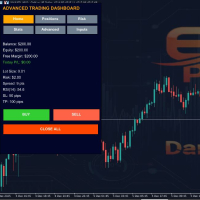
Apex Trading Dashboard PRO
- Utilities
- Cedric Landry Shema
- Version: 1.20
Apex Trading Dashboard PRO is a professional trading panel with advanced risk management, real-time analytics, and fast trade execution. Easily manage stop loss, take profit, lot sizes, and daily risk limits from one intuitive dashboard. Perfect for traders seeking precision, discipline, and full control over their trades.
Key Features
- Advanced Trade Panel: Execute buy/sell orders, close positions, and manage trades instantly.
- Risk Management: Control risk per trade, maximum daily risk, drawdown limits, and trailing stops.
- Flexible Lot Calculation: Automatically calculates lot size based on account balance, equity, free margin, or fixed dollar risk.
- Customizable Stop Loss and Take Profit: Set default SL/TP or adjust for individual trades.
- Real-Time Analytics: Track account balance, equity, free margin, P/L, open positions, and risk exposure.
- User-Friendly Interface: Clean, TradingView-style panel with configurable colors, labels, and buttons.
- Alerts: Receive notifications for drawdowns, RSI overbought/oversold conditions, or risk limit breaches.
- Inputs Tab: Quickly adjust SL, TP, risk percentage, fixed lot size, and lot calculation method without code edits.
- Units/Lots Toggle: Switch between standard lot size or units for precision trading or prop firm compliance.
Input Parameters Explained
Risk Management Settings
- RiskPercent: Percentage of account to risk per trade (default 1%).
- MaxDailyRisk: Maximum total daily risk (%). Trading stops if exceeded.
- MaxDrawdown: Maximum account drawdown (%). Trading stops if reached.
- DefaultSL: Default stop loss in pips.
- DefaultTP: Default take profit in pips.
- RiskRewardRatio: Automatic calculation of TP based on SL × risk-reward ratio.
- MaxPositions: Maximum number of open trades allowed simultaneously.
- UseTrailingStop: Enable or disable automated trailing stop.
- TrailingStop: Initial trailing stop distance in pips.
- TrailingStep: Step distance for trailing stop adjustment.
Risk Calculation Method
- RiskCalcMethod: Choose how risk is calculated:
- RISK_BALANCE_PERCENT – Based on account balance.
- RISK_EQUITY_PERCENT – Based on account equity.
- RISK_FREE_MARGIN_PERCENT – Based on free margin.
- RISK_FIXED_DOLLAR – Fixed dollar amount per trade.
- LotCalcMethod: Defines how lot size is calculated:
- LOT_RISK_BASED – Lot size determined by selected risk method.
- LOT_FIXED – Uses fixed lot size.
- LOT_EQUITY_PERCENT – Lot based on equity percentage.
- LOT_FREE_MARGIN_PERCENT – Lot based on free margin percentage.
- FixedLotSize: Lot size used if LotCalcMethod = LOT_FIXED.
- UseUnitsInsteadOfLots: If true, converts lot size into units.
Alert Settings
· EnableAlerts: Enable or disable alerts.
· RSI_Period: RSI period used for alerts.
· RSI_Overbought / RSI_Oversold: Thresholds for RSI-based alerts.
· AlertOnDrawdown: Alerts when drawdown or risk limits are breached.