Slippage Analyzer Utility MT5
- Utilities
-
AL MOOSAWI ABDULLAH JAFFER BAQER
 To trade successfully we need to go through the proven path that others had gone and reached!
Here are 17 quotes from such successful investors:
1- Limit your size in any position so that fear does not become the prevailing instinct guiding your judgment.
Joe Vidich - Version: 4.10
- Updated: 29 October 2026
- Activations: 5
FIND OUT HOW MUCH YOUR BROKER'S FILLS REALLY COST YOU, IN POINTS AND IN MONEY
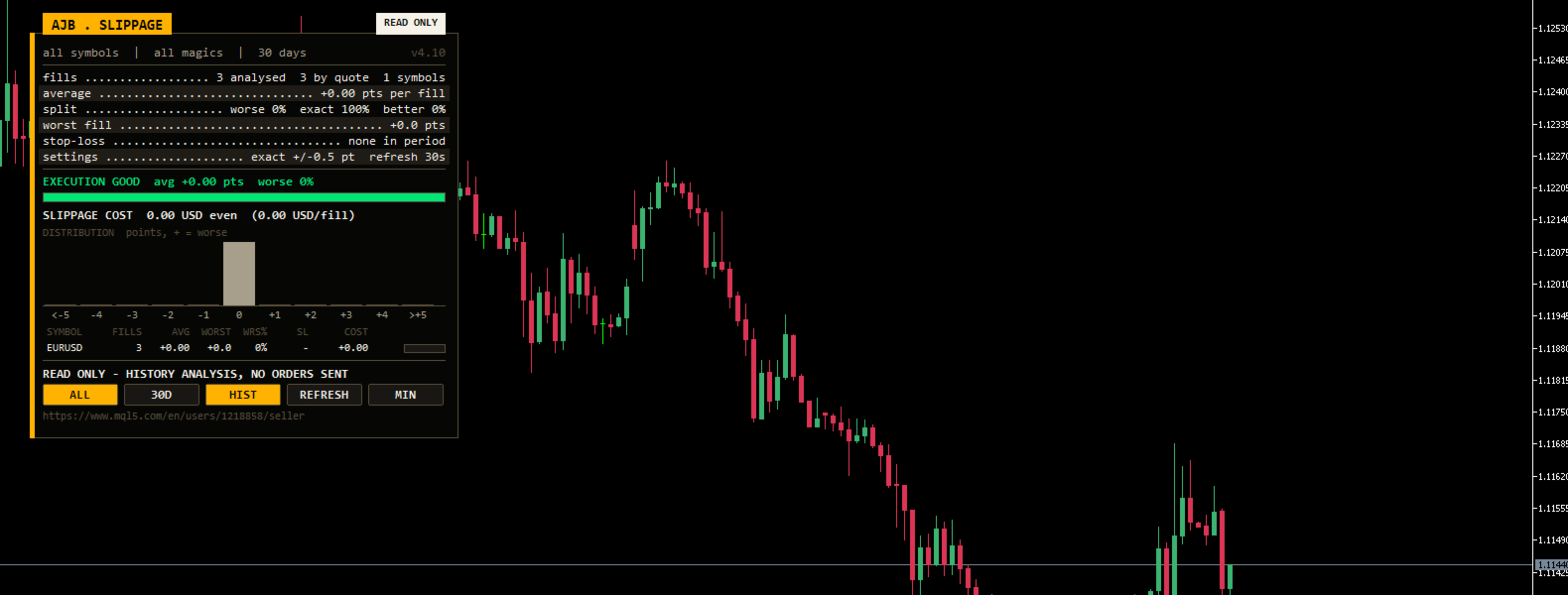
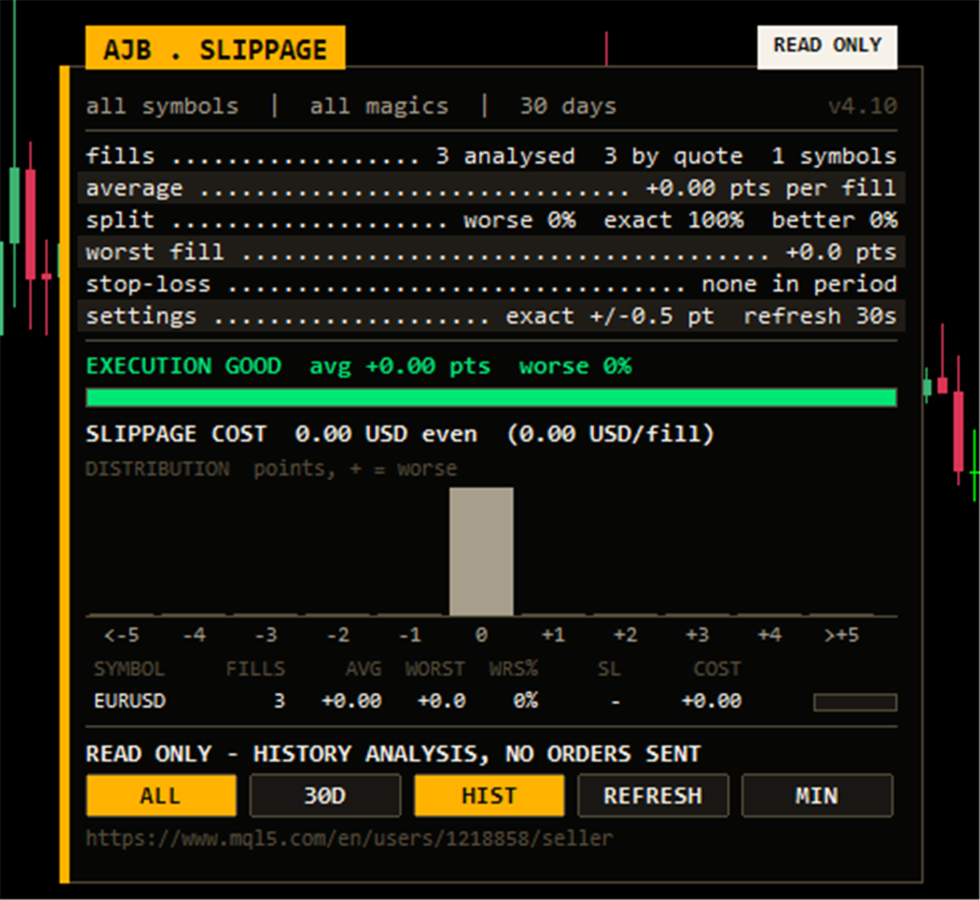
Slippage Analyzer Utility MT5 reads your account history and compares the price you asked for with the price you actually got. It does this for every market order, pending order, stop loss and take profit. You get one verdict, a histogram, a table per symbol, and a new line that turns all of it into money in your account currency.
Test it free first: run the free demo in the MetaTrader 5 Strategy Tester in visual mode. Place a few trades by hand on the tester chart and watch the panel count every fill as it happens. Then attach it to your live or demo chart, where it reads your real history.
- Average slippage per fill in points, and the share of fills that came out worse, exact or better.
- NEW: slippage cost in money. What slippage took from you, or gave back, in total, per fill and per symbol.
- NEW: market fills on market-execution accounts are measured too, using the quote at the moment the order was sent.
- A histogram from -5 to +5 points shows whether bad fills are rare or a habit.
- A symbol table with fills, average, worst fill, worse share, stop-loss slippage and cost.
- Read only. It never places, modifies or closes an order. The right side of the chart stays clear.
START HERE
- Attach it to any chart. The symbol and timeframe do not matter, because it reads the account history and not the candles.
- Check the verdict: the EXECUTION row says GOOD, FAIR or POOR within a second.
- Look at the cost row: SLIPPAGE COST shows the money involved, so you can compare it with your commission.
- Testing an EA? Enter its magic number in InpMagicFilter to see only that EA's fills. Use 0 for manual trades only.
- Comparing brokers? Attach it on both accounts with the same history window and put the two panels side by side.
WHY THIS NUMBER MATTERS
Spread and commission are printed on every broker's website. Slippage is not. It happens quietly in the moment between your click and the fill. Half a point here and one point on a stop loss there do not look like much. Over hundreds of trades they can cost as much as a commission plan, and they decide whether a scalping or news strategy can work at a given broker. Most traders never measure it. This utility does.
HOW IT MEASURES, STEP BY STEP
1. Collecting. Every refresh, it selects the deals of the last InpDays days. Balance operations and close-by deals are skipped, because they have no requested price. Your symbol scope and magic filter are applied here.
2. Finding the requested price. For pending orders, stop losses and take profits this is the order's trigger price. Market-execution accounts store no requested price for market orders, and older versions skipped those fills. Now the utility uses the bid or ask at the millisecond the order was sent. The fills row shows how many were measured this way.
3. Scoring. Slippage is the difference in points, with a plus sign when the fill was worse for you. A buy filled higher or a sell filled lower counts as worse. Anything within InpTolerancePts counts as exact.
4. Pricing. Each fill's slippage is multiplied by the symbol's tick value and the deal volume. The result is the money that slippage took or gave back. The tick value is the current one, so for cross pairs the figure is a close estimate.
HOW TO READ THE PANEL
The card sits in the top-left corner and leaves the price scale and the right side of the chart free. A gold tab names the tool, and a READ ONLY pill confirms that it does not trade. The sub line shows the scope, the magic filter and the history window.
- fills: how many fills were analysed, how many by quote, and how many symbols.
- average: mean slippage per fill in points. Near zero is what you want.
- split: percentage of fills that were worse, exact and better.
- worst fill: the single worst fill in the period.
- stop-loss: slippage on stop-loss fills only. This is often where it hurts most.
- EXECUTION verdict: GOOD up to +0.25 points on average, FAIR up to +1, POOR above that. The bar under it fills with the share of exact or better fills.
- SLIPPAGE COST: the money total, marked paid, saved or even, plus the amount per fill.
- Histogram: green bars for better fills, red for worse, grey for exact.
- Symbol table: the most traded symbols first. The small bar on each row shows the worse share.
Five buttons: ALL / SYMBOL switches the scope, the days button steps through 7, 30, 90 and 365 days, HIST shows or hides the histogram, REFRESH recalculates now, and MIN / MAX collapses the card. You can drag the card by its header. It sizes itself to its text and shrinks on small charts.
EVERY INPUT EXPLAINED
Analysis
- InpDays: days of history to analyse, from 1 to 3650 (30). The days button changes it live.
- InpAllSymbols: all symbols on the account (true), or only the chart symbol (false).
- InpRefreshSec: how often the panel recalculates, in seconds; the minimum is 5 (30).
- InpMagicFilter: -1 covers all fills, 0 covers manual trades only, and any other number covers that EA only (-1).
- InpTolerancePts: slippage within plus or minus this many points counts as exact (0.5).
Display
- X_Offset, Y_Offset: distance of the panel from its corner in pixels (30, 30).
- InpCorner: chart corner for the panel (top left).
- InpAutoFit: shrink font and rows so the panel always fits the chart (on).
- InpStartCompact: start collapsed (off).
- InpShowHistogram: show the distribution histogram (on). The HIST button switches it live.
QUESTIONS TRADERS ASK
Does it need my trades to be open? No. It works only from closed history, so it is useful right after you attach it.
Why does a symbol show zero fills? Either there were no trades in the window, or the price ticks for the moment of an old market order are no longer available on the server. Try a shorter window or press REFRESH once the history has loaded.
Will it slow my terminal? No. Quotes it looks up are cached, the timer is light, and in a non-visual backtest nothing is drawn. It needs no DLLs and writes no files.
HONEST EXPECTATIONS
This tool measures. It does not improve your fills by itself. What it gives you is proof: a clear number to take to your broker, a fair way to compare two accounts, and an early warning when a strategy's edge is going into execution costs. Results depend on how many trades are in the window, so a handful of fills says less than a few hundred.
If Slippage Analyzer Utility MT5 shows you something you had not seen before, an honest review saying what helped and what is missing is very welcome. Feedback from real traders decides what we build next.