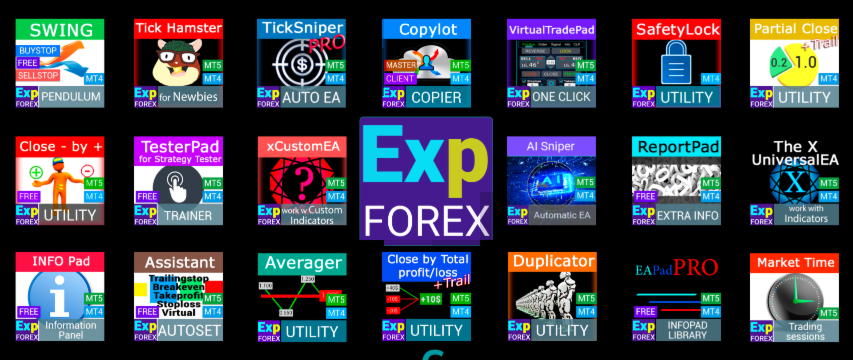
All utilities and trading Expert Advisors from www.expforex.com

Expert Advisors, trading panels, trade copiers, risk-control utilities, and free tools for MetaTrader 4 and MetaTrader 5.
This page is a practical navigation guide for my main programs, product pages, demo downloads, full instructions, and video materials. Use it as a quick starting point before testing or installing any product from the MQL5 Market.
Products | Blog | Website |
Start here: installation from MQL5 MarketYou can install, purchase, update, and activate Expert Advisors directly from the MetaTrader terminal or from the MQL5 website. |
Quick Navigation
| Automatic trading | Manual trading and control | Copying, reporting, utilities |
| AI Sniper, TickSniper, TickHamster, THE X, xCustomEA, Averager, Swing | VirtualTradePad, Assistant, CloseIfProfitorLoss, Close Minus by Plus, SafetyLock | COPYLOT, Duplicator, ExtraReportPad, InfoPad, Market Time Pad, TesterPad, EA PAD PRO |
Premium and Professional Products
Below are the main Expert Advisors, trading panels, trade copiers, and position-management utilities. Before using any program on a real account, test it on a demo account, study the settings, and check broker trading conditions.
1. Exp – AI SniperAutomatic Expert Advisor | |||||||||||
| | A smart automatic Expert Advisor for MetaTrader, created for traders who want a structured trading robot with clear settings, documentation, and a practical testing workflow.
| ||||||||||


| Video guide
|
2. VirtualTradePadProfessional trading panel | |||||||||||
| | A professional chart trading cockpit for manual and semi-automatic order management. It helps open, manage, modify, and close trades directly from the chart.
| ||||||||||


| Video guide
|
3. COPYLOTProfessional trade copier | |||||||||||||||||
| | A professional trade copier for copying trades between MetaTrader terminals. It is designed for multi-account operation, master/client workflows, and controlled trade synchronization.
| ||||||||||||||||


| Video guide
|
4. TickSniperHigh-speed tick scalper | |||||||||||||
| | A tick-based scalping Expert Advisor focused on quote flow, speed, spread behavior, and broker-condition evaluation.
| ||||||||||||


| Video guide
|
5. TickHamsterAutomatic Expert Advisor | |||||||||||||
| | A compact automatic Expert Advisor for practical testing and simple operation. It is designed for users who prefer a clean start and a guided workflow.
| ||||||||||||


| Video guide
|
6. THE XUniversal Expert Advisor | |||||||||||||||
| | A universal automatic Expert Advisor for MetaTrader based on standard indicators. It is suitable for building, testing, and optimizing indicator-based trading logic.
| ||||||||||||||


| Video guide
|
7. xCustomEAExpert Advisor on custom indicators | |||||||||||||||
| | A universal trading advisor for working with custom indicators in MetaTrader. It helps build Expert Advisor logic around external/custom indicator signals.
| ||||||||||||||


| Video guide
|
8. DuplicatorTrade duplication utility | |||||||||||||
| | A utility that repeats trades a preset number of times on your account. It is useful when you need controlled duplication of positions, orders, and trading signals.
| ||||||||||||


| Video guide
|
9. AveragerAveraging and position-series manager | |||||||||||||
| | A position-management Expert Advisor for opening additional positions with the trend or against the trend, with basket management and trailing control.
| ||||||||||||


| Video guide
|
10. CloseIfProfitorLossProfit and loss control utility | |||||||||||||
| | A utility for closing positions based on total profit or total loss, including profit trailing and account-level position control.
| ||||||||||||


| Video guide
|
11. SafetyLock PROProtective lock / hedge utility | |||||||||||
| | A protective utility for MetaTrader 4 that can place opposite safety orders to help manage sudden market movement against an existing position.
| ||||||||||

| Video guide
|
Free and Additional Tools
These tools are useful for trade management, reporting, visual testing, market time monitoring, and building your own Expert Advisor interfaces.
AssistantAutomatic Real/Virtual Stop Loss, Take Profit, trailing stop, and breakeven management. | |||||||
| |
| ||||||


| Video guide
|
TesterPadSimulator and trainer for the MetaTrader Strategy Tester. | |||||||
| |
| ||||||


| Video guide
|
ExtraReportPadProfessional trading account report and analysis utility. | |||||||
| |
| ||||||


| Video guide
|
Close Minus by PlusCloses unprofitable positions by finding and closing profitable positions. | |||||||
| |
| ||||||


| Video guide
|
Market Time PadDisplays the current time of the main world markets and the current trading session. | |||||
| |
| ||||


| Video guide
|
EA PAD PROLibrary for adding an information panel to your own Expert Advisor. | |||||||
| |
| ||||||


| Video guide
|
Risk WarningTrading Forex, CFDs, stocks, indices, metals, cryptocurrencies, and other financial instruments involves risk. Expert Advisors, utilities, and panels are tools for automation and management; they do not guarantee profit and cannot remove market risk. Always test any Expert Advisor on a demo account first. Use conservative lot sizes, check broker conditions, and avoid aggressive settings if you do not fully understand the strategy logic. |
Support and questionsPlease write all questions about my programs in the Comments section on the product page you purchased. Reviews are for rating the product. Comments are for support, logs, settings, screenshots, and technical questions. |
SEO Tags
MetaTrader, MetaTrader 4, MetaTrader 5, MQL5 Market, Expert Advisor, Forex robot, trading panel, trade copier, COPYLOT, VirtualTradePad, TickSniper, TickHamster, AI Sniper, THE X, xCustomEA, Averager, CloseIfProfitorLoss, SafetyLock, trading utility, Forex automation, trade management, position management, demo testing, strategy tester.