

Creating Custom Indicators in MQL5 (Part 5): WaveTrend Crossover Evolution Using Canvas for Fog Gradients, Signal Bubbles, and Risk Management
 3 513
3 513
 0
0

Introduction
In our previous article (Part 4), we developed a Smart WaveTrend Crossover indicator in MetaQuotes Language 5 (MQL5) utilizing dual oscillators—one for signals and one for trend filtering—to generate crossover-based buy and sell alerts with optional trend confirmation. In Part 5, we enhance the WaveTrend Crossover indicator with canvas-based drawing for fog gradient overlays, signal boxes that detect breakouts, customizable buy and sell bubbles or triangles for visual alerts, and integrated risk management through dynamic take-profit and stop-loss levels. This evolution adds advanced visuals like gradient fog for market context, alongside options for trend filtering, box extensions, and calculations via candle multipliers or percentages, displayed with lines and tables. We will cover the following topics:
- Understanding the Enhanced Canvas-Based WaveTrend Crossover Framework with Visual and Risk Features
- Implementation in MQL5
- Backtesting
- Conclusion
By the end, you’ll have a functional MQL5 indicator for enhanced WaveTrend crossovers with visual and risk elements, ready for customization—let’s dive in!
Understanding the Enhanced Canvas-Based WaveTrend Crossover Framework with Visual and Risk Features
The enhanced canvas-based WaveTrend crossover framework builds on the core momentum oscillator by incorporating visual overlays and risk tools to provide us with a more immersive and practical trading interface. It maintains dual WaveTrend configurations—a sensitive one for detecting crossovers that signal potential entries and a slower one for filtering trends—while adding breakout detection through signal boxes that form around crossover points and close on price breaches, indicating confirmed momentum shifts. Fog gradients overlay the chart to visually represent trend strength with fading transparency, helping us gauge market context at a glance, alongside customizable signals displayed as bubbles with labels or simple triangles for clear buy and sell alerts.
In a bullish setup, a crossover upward on the signal oscillator, optionally confirmed by an uptrend on the slower oscillator, initiates a box around the bar's range; upon an upward breakout from the box, a buy signal triggers if it aligns with the box direction, with visuals emphasizing the opportunity. Conversely, in a bearish setup, a downward crossover forms a box, and a downward breakout generates a sell signal under matching conditions, allowing us to act on reversals or continuations with reduced noise. Risk management is integrated by calculating take-profit and stop-loss levels based on average candle sizes or percentage moves, displayed dynamically to aid in position sizing and exit planning. This way, we are able to tell the hit rate.
We will leverage the MQL5 Canvas library for rendering fog gradients that interpolate between bars for smooth trend visualization, track signal boxes to detect and close on breakouts with optional extensions using average candle multipliers, offer flexible signal types like labeled bubbles for enhanced readability, and compute risk levels with user-defined modes for take-profit and stop-loss, all while ensuring efficient redraws on chart changes. In brief, here is a visual representation of our objectives.

Implementation in MQL5
To begin the enhancements implementation, we will first need to adjust the indicator's internal buffers to accommodate additional data storage for the extra features that we will be adding.
//+------------------------------------------------------------------+
//|                           1. Smart WaveTrend Crossover PART2.mq5 |
//|                           Copyright 2026, Allan Munene Mutiiria. |
//|                                   https://t.me/Forex_Algo_Trader |
//+------------------------------------------------------------------+
#property copyright "Copyright 2026, Allan Munene Mutiiria."
#property link "https://t.me/Forex_Algo_Trader"
#property version "1.00"

#property indicator_chart_window
#property indicator_buffers 28
#property indicator_plots 3
#property indicator_label1 "Colored Candles"
#property indicator_type1 DRAW_COLOR_CANDLES
#property indicator_color1 clrTeal, clrRed
#property indicator_style1 STYLE_SOLID
#property indicator_width1 1
#property indicator_label2 "Buy Signals"
#property indicator_type2 DRAW_ARROW
#property indicator_color2 clrForestGreen
#property indicator_style2 STYLE_SOLID
#property indicator_width2 1
#property indicator_label3 "Sell Signals"
#property indicator_type3 DRAW_ARROW
#property indicator_color3 clrOrangeRed
#property indicator_style3 STYLE_SOLID
#property indicator_width3 1
Here, we just increase the indicator buffers from 23 to 28 to handle the extra calculations for the added features. We have highlighted the specific changes for the lines with the changes for clarity. The next thing that we do is include the Canvas library for custom drawing on the chart. It's needed to enable advanced graphical elements like fog gradients, custom boxes, and labels, which aren't supported by standard MQL5 plotting functions, enhancing the visual representation of signals and trends. Here is the approach we used to achieve that.
#include <Canvas/Canvas.mqh>
We include the canvas library with "#include <Canvas/Canvas.mqh>", which provides classes and functions for custom graphical drawing on the chart, enabling us to render advanced visuals like fog gradients, boxes, and labels programmatically without relying on standard plot types. The next thing we will need to do is add more input parameters for more enhanced control from the interface.
input group "Signal Settings"
input bool use_trend_filter = true;        // Use Trend Filter for Boxes?

enum signal_options {
   Triangles,                              // Triangles
   Labels_Buy_Sell                         // Labels Buy Sell
};
input signal_options signal_type = Labels_Buy_Sell; // Signal Type
input color signal_buy_col = clrForestGreen; // Buy Signal Color
input color signal_sell_col = clrOrangeRed; // Sell Signal Color
input bool show_only_matching = true;      // Show Only Matching Signals?
input bool use_box_multiplier = false;     // Extend Box by Average Candle Size?
input double box_multiplier = 1.0;         // Box Extension Multiplier
input int base_offset = 10;                // Base Signal Offset from Candle

input group "Box Settings"
input color box_bull_fill = clrBlue;       // Box Bull Fill Color
input color box_bear_fill = clrGold;       // Box Bear Fill Color
input int box_fill_transp = 80;            // Box Fill Transparency (0-100)

input group "Fog"
input bool show_fog = true;                // Fog
input double offset_mult = 0.7;            // Fog Height × Avg Candle
input int base_transp = 80;                // Base Transparency
input int transp_inc = 4;                  // Transparency Increment

input group "Risk Management"
input bool showTPSL = true;                // Show TP/SL Levels

enum tp_sl_modes {
   Candle_Multiplier,                      // Candle Multiplier
   Percentage                              // Percentage
};
input tp_sl_modes tpSlMode = Candle_Multiplier; // TP/SL Calculation Mode
input int tp_sl_length = 50;               // Average Candle Length Period
input double tp1Multiplier = 2.0;          // TP1×
input double tp2Multiplier = 3.0;          // TP2×
input double tp3Multiplier = 4.0;          // TP3×
input double slMultiplier = 2.0;           // SL×
input double tp1Percent = 2.0;             // TP1 %
input double tp2Percent = 3.0;             // TP2 %
input double tp3Percent = 4.0;             // TP3 %
input double slPercent = 1.5;              // SL %
We continue defining user inputs in grouped sections to allow customization of advanced features. In the "Signal Settings" group, we provide a boolean input defaulting to true for applying trend filtering to box-based signals, followed by the "signal_options" enumeration with choices "Triangles" for arrow displays or "Labels_Buy_Sell" for textual bubbles, set by default to the latter to determine signal visualization type. We also include color inputs for buy and sell signals, defaulting to forest green and orange red, a boolean enabled by default to show only signals matching the box direction, another boolean disabled by default for extending boxes using average candle sizes, a double multiplier set to 1.0 for that extension, and an integer offset of 10 for positioning signals relative to candles.
Next, under the "Box Settings" group, we add color inputs for bullish and bearish box fills, defaulting to blue and gold, along with an integer for fill transparency ranging from 0 to 100, set at 80 to control the opacity of drawn boxes. For the "Fog" group, we include a boolean enabled by default to display fog overlays, a double multiplier of 0.7 to scale fog height based on average candle size, an integer base transparency of 80, and an increment of 4 for gradual transparency changes in the gradient effect. Finally, in the "Risk Management" group, we offer a boolean enabled by default to show take-profit and stop-loss levels, the "tp_sl_modes" enumeration with options "Candle_Multiplier" or "Percentage" defaulting to the former for calculation methods, an integer period of 50 for averaging candle lengths, and double values for multipliers or percentages on three take-profit levels and one stop-loss, such as 2.0 for the first take-profit multiplier and 1.5 for the stop-loss percentage, enabling us to tailor risk parameters.
We will then extend the global buffers to include the average candle sizes, which are needed for new features like box extensions, fog height, and TP/SL calculations, which rely on volatility measures to scale visuals and levels dynamically.
double avg_candle_size[]; //--- Average candle size buffer
With that done, we will need to extend the global variables to handle canvas objects, chart properties for dynamic rendering, redraw timestamp, structs for storing box and signal data, arrays to hold them, line/table names for TP/SL, extension period, object prefix, and font size. We need these to manage custom drawings, track visible chart areas for optimization, store persistent data for boxes/signals, and handle TP/SL visuals, enabling efficient redrawing and scaling.
//+------------------------------------------------------------------+
//| Global variables                                                 |
//+------------------------------------------------------------------+
CCanvas obj_Canvas;           //--- Canvas object

int currentChartWidth = 0;    //--- Current chart width
int currentChartHeight = 0;   //--- Current chart height
int currentChartScale = 0;    //--- Current chart scale
int firstVisibleBarIndex = 0; //--- First visible bar index
int visibleBarsCount = 0;     //--- Visible bars count
double minPrice = 0.0;        //--- Minimum price
double maxPrice = 0.0;        //--- Maximum price

static datetime lastRedrawTime = 0; //--- Last redraw time

//+------------------------------------------------------------------+
//| Box information structure                                        |
//+------------------------------------------------------------------+
struct BoxInfo {
   datetime left_time;        // Store left time
   datetime right_time;       // Store right time
   double   top;              // Store top price
   double   bottom;           // Store bottom price
   int      dir;              // Store direction
};
BoxInfo all_boxes[];          //--- All boxes array

//+------------------------------------------------------------------+
//| Signal information structure                                     |
//+------------------------------------------------------------------+
struct SignalInfo {
   datetime time;             // Store signal time
   int      dir;              // Store signal direction
};
SignalInfo all_signals[];     //--- All signals array

string slLine = "SL_Line";    //--- SL line name
string tp1Line = "TP1_Line";  //--- TP1 line name
string tp2Line = "TP2_Line";  //--- TP2 line name
string tp3Line = "TP3_Line";  //--- TP3 line name
string tpSlTableObjects[11];  //--- TP/SL table objects

long extendSeconds = PeriodSeconds() * 100; //--- Extend seconds

string objPrefix = "SWTC_";   //--- Object prefix

int current_font_size;        //--- Current font size
Here, we declare global variables to manage the indicator's state and custom visuals, starting with an instance of the CCanvas class named "obj_Canvas" to handle canvas-based drawing operations throughout the program. We then set up integer variables to track the current chart's width, height, scale, first visible bar index, and count of visible bars, along with double variables for the minimum and maximum prices on the visible chart area, enabling dynamic adjustments during redraws. A static datetime variable "lastRedrawTime" is initialized to zero to record the timestamp of the most recent canvas update, helping optimize redraw frequency.
We define the "BoxInfo" structure to store details for each signal box, including left and right timestamps, top and bottom prices, and a direction integer, and create an array "all_boxes" to hold multiple such structures for managing breakout boxes.
Similarly, we create the "SignalInfo" structure with fields for timestamp and direction, and an array "all_signals" to maintain a list of generated signals for display purposes. We initialize string variables for naming take-profit and stop-loss lines, such as "SL_Line" for the stop-loss, and an array "tpSlTableObjects" of size 11 to reference objects in the risk management table. A long variable "extendSeconds" is set using PeriodSeconds multiplied by 100 to define an extension period for certain visual elements. Finally, we establish a string prefix "SWTC_" for object names to avoid naming conflicts, and an integer "current_font_size" to dynamically adjust text sizes based on chart scale. We will then define some helper functions for the objects' visualization.
//+------------------------------------------------------------------+
//| Darken color                                                     |
//+------------------------------------------------------------------+
color DarkenColor(color c, double factor = 0.5) {
   uchar r = uchar((c & 0xFF) * factor);         //--- Compute red component
   uchar g = uchar(((c >> 8) & 0xFF) * factor);  //--- Compute green component
   uchar b = uchar(((c >> 16) & 0xFF) * factor); //--- Compute blue component
   return (color)((b << 16) | (g << 8) | r);     //--- Return darkened color
}

//+------------------------------------------------------------------+
//| Draw rectangle label                                             |
//+------------------------------------------------------------------+
bool drawRectangleLabel(string objectName, int xDistance, int yDistance, int xSize, int ySize, color rectColor, int borderType = BORDER_FLAT, bool back = true) {
   bool objectExists = (ObjectFind(0, objectName) >= 0);                //--- Check if object exists
   if (!objectExists) {                                                 //--- Handle new object
      if (!ObjectCreate(0, objectName, OBJ_RECTANGLE_LABEL, 0, 0, 0)) { //--- Create rectangle label
         Print("Failed to create ", objectName);                        //--- Log failure
         return false;                                                  //--- Return failure
      }
   }
   ObjectSetInteger(0, objectName, OBJPROP_XDISTANCE, xDistance);       //--- Set x distance
   ObjectSetInteger(0, objectName, OBJPROP_YDISTANCE, yDistance);       //--- Set y distance
   ObjectSetInteger(0, objectName, OBJPROP_XSIZE, xSize);               //--- Set x size
   ObjectSetInteger(0, objectName, OBJPROP_YSIZE, ySize);               //--- Set y size
   ObjectSetInteger(0, objectName, OBJPROP_COLOR, rectColor);           //--- Set color
   ObjectSetInteger(0, objectName, OBJPROP_BORDER_TYPE, borderType);    //--- Set border type
   ObjectSetInteger(0, objectName, OBJPROP_BACK, back);                 //--- Set background
   ObjectSetInteger(0, objectName, OBJPROP_SELECTABLE, false);          //--- Disable selectable
   ObjectSetInteger(0, objectName, OBJPROP_SELECTED, false);            //--- Disable selected
   return true;                                                         //--- Return success
}

//+------------------------------------------------------------------+
//| Draw label                                                       |
//+------------------------------------------------------------------+
bool drawLabel(string objectName, int xDistance, int yDistance, string text, color labelColor) {
   bool objectExists = (ObjectFind(0, objectName) >= 0);                //--- Check if object exists
   if (!objectExists) {                                                 //--- Handle new object
      if (!ObjectCreate(0, objectName, OBJ_LABEL, 0, 0, 0)) {           //--- Create label
         Print("Failed to create ", objectName);                        //--- Log failure
         return false;                                                  //--- Return failure
      }
   }
   ObjectSetInteger(0, objectName, OBJPROP_XDISTANCE, xDistance);       //--- Set x distance
   ObjectSetInteger(0, objectName, OBJPROP_YDISTANCE, yDistance);       //--- Set y distance
   ObjectSetString(0, objectName, OBJPROP_TEXT, text);                  //--- Set text
   ObjectSetInteger(0, objectName, OBJPROP_COLOR, labelColor);          //--- Set color
   ObjectSetInteger(0, objectName, OBJPROP_FONTSIZE, 10);               //--- Set font size
   ObjectSetString(0, objectName, OBJPROP_FONT, "Arial");               //--- Set font
   ObjectSetInteger(0, objectName, OBJPROP_BACK, false);                //--- Disable background
   ObjectSetInteger(0, objectName, OBJPROP_SELECTABLE, false);          //--- Disable selectable
   ObjectSetInteger(0, objectName, OBJPROP_SELECTED, false);            //--- Disable selected
   return true;                                                         //--- Return success
}
We define the "DarkenColor" function to create a darker shade of a given color by taking an input color and an optional factor defaulting to 0.5, extracting its red, green, and blue components through bitwise operations like "& 0xFF" for red, right shift by 8 and "& 0xFF" for green, and right shift by 16 and "& 0xFF" for blue, then multiplying each by the factor, casting to uchar, and recombining them into a new color value using left shifts and bitwise OR.
Next, we create the "drawRectangleLabel" function to handle drawing or updating a rectangle label on the chart, first checking if the object exists with ObjectFind and creating it via ObjectCreate with type OBJ_RECTANGLE_LABEL if not, logging a failure message using Print and returning false on error; otherwise, we set properties like x and y distances, sizes, color, border type defaulting to BORDER_FLAT, background flag defaulting to true, and disable selectability and selection before returning true.
Similarly, we implement the "drawLabel" function for text labels, verifying existence with "ObjectFind" and creating via "ObjectCreate" with type OBJ_LABEL if needed, printing an error and returning false if creation fails, then configuring x and y distances, text content, color, font size to 10, font to Arial, disabling background, selectability, and selection, and returning true on success. Now, in the initialization, we will need to bind the new buffer for the calculations of the new average candle sizes. Also, we will need to initialize the canvas and set the table labels.
//+------------------------------------------------------------------+
//| Initialize indicator                                             |
//+------------------------------------------------------------------+
int OnInit() {
   IndicatorSetString(INDICATOR_SHORTNAME, "Smart WaveTrend Crossover"); //--- Set short name

   PlotIndexSetInteger(1, PLOT_ARROW, 233);                              //--- Set buy arrow symbol
   PlotIndexSetInteger(1, PLOT_SHOW_DATA, signal_type == Triangles);     //--- Set buy visibility
   PlotIndexSetInteger(1, PLOT_LINE_COLOR, 0, signal_buy_col);           //--- Set buy color

   PlotIndexSetInteger(2, PLOT_ARROW, 234);                              //--- Set sell arrow symbol
   PlotIndexSetInteger(2, PLOT_SHOW_DATA, signal_type == Triangles);     //--- Set sell visibility
   PlotIndexSetInteger(2, PLOT_LINE_COLOR, 0, signal_sell_col);          //--- Set sell color

   SetIndexBuffer(23, avg_candle_size, INDICATOR_CALCULATIONS);          //--- Bind avg candle size

   currentChartWidth = (int)ChartGetInteger(0, CHART_WIDTH_IN_PIXELS);   //--- Get chart width
   currentChartHeight = (int)ChartGetInteger(0, CHART_HEIGHT_IN_PIXELS); //--- Get chart height

   string canvas_name = "SWTC_Canvas";                                   //--- Set canvas name
   if (!obj_Canvas.CreateBitmapLabel(0, 0, canvas_name, 0, 0, currentChartWidth, currentChartHeight, COLOR_FORMAT_ARGB_NORMALIZE)) { //--- Create canvas
      Print("Failed to create canvas");                                  //--- Log failure
      return(INIT_FAILED);                                               //--- Return failure
   }

   tpSlTableObjects[0] = objPrefix + "Table_Frame";                      //--- Set table frame
   tpSlTableObjects[1] = objPrefix + "Table_Level";                      //--- Set table level
   tpSlTableObjects[2] = objPrefix + "Table_Price";                      //--- Set table price
   tpSlTableObjects[3] = objPrefix + "Table_TP1";                        //--- Set TP1 label
   tpSlTableObjects[4] = objPrefix + "Table_TP1_Price";                  //--- Set TP1 price
   tpSlTableObjects[5] = objPrefix + "Table_TP2";                        //--- Set TP2 label
   tpSlTableObjects[6] = objPrefix + "Table_TP2_Price";                  //--- Set TP2 price
   tpSlTableObjects[7] = objPrefix + "Table_TP3";                        //--- Set TP3 label
   tpSlTableObjects[8] = objPrefix + "Table_TP3_Price";                  //--- Set TP3 price
   tpSlTableObjects[9] = objPrefix + "Table_SL";                         //--- Set SL label
   tpSlTableObjects[10] = objPrefix + "Table_SL_Price";                  //--- Set SL price

   current_font_size = 10;                                               //--- Initialize font size

   return(INIT_SUCCEEDED);                                               //--- Return success
}
In the OnInit event handler, we configure additional properties for the indicator by setting its short name using IndicatorSetString, which we have changed for commonality. For the buy signals plot, we specify the arrow symbol as 233 with PlotIndexSetInteger as before, but toggle its visibility based on whether the signal type is "Triangles" since we will draw the signal bubbles differently from the canvas, and apply the user-defined buy color. Similarly, for the sell signals plot, we set the arrow to 234, control visibility the same way, and assign the sell color. We bind the average candle size buffer to index 23 as a calculation buffer to support fog and box extensions.
We retrieve the current chart dimensions using ChartGetInteger for width and height to initialize the canvas properly. We define a canvas name and create a bitmap label on it via the "CreateBitmapLabel" method of the canvas object, specifying the subwindow, position, size, and color format "COLOR_FORMAT_ARGB_NORMALIZE"; if creation fails, we log an error with Print and return INIT_FAILED. We populate the table objects array with prefixed names for the risk management display elements, such as the frame, labels for levels and prices, and specific entries for take-profits and stop-loss. We initialize the font size variable to 10 for text rendering. Finally, we return INIT_SUCCEEDED to confirm successful setup. We get the following outcome upon initialization.

From the image, we can see that we have initialized the canvas, ready for our drawing. What we need to do next is draw the canvas objects, but to make our drawing easier and straightforward, we will define some helper functions to specifically draw the boxes and the right prices for the trade levels, which we will fill the table with.
//+------------------------------------------------------------------+
//| Draw right price label                                           |
//+------------------------------------------------------------------+
bool drawRightPrice(string objectName, datetime lineTime, double linePrice, color lineColor, ENUM_LINE_STYLE lineStyle = STYLE_SOLID, int lineWidth = 1) {
   bool objectExists = (ObjectFind(0, objectName) >= 0);           //--- Check if object exists
   if (!objectExists) {                                            //--- Handle new object
      if (!ObjectCreate(0, objectName, OBJ_ARROW_RIGHT_PRICE, 0, lineTime, linePrice)) { //--- Create right price
         Print("Failed to create ", objectName);                   //--- Log failure
         return false;                                             //--- Return failure
      }
   } else {                                                        //--- Handle existing object
      ObjectSetInteger(0, objectName, OBJPROP_TIME, 0, lineTime);  //--- Set time
      ObjectSetDouble(0, objectName, OBJPROP_PRICE, 0, linePrice); //--- Set price
   }

   ObjectSetInteger(0, objectName, OBJPROP_COLOR, lineColor);      //--- Set color
   ObjectSetInteger(0, objectName, OBJPROP_WIDTH, lineWidth);      //--- Set width
   ObjectSetInteger(0, objectName, OBJPROP_STYLE, lineStyle);      //--- Set style
   ObjectSetInteger(0, objectName, OBJPROP_FONTSIZE, 10);          //--- Set font size
   ObjectSetString(0, objectName, OBJPROP_FONT, "Arial");          //--- Set font
   ObjectSetInteger(0, objectName, OBJPROP_BACK, false);           //--- Disable background
   ObjectSetInteger(0, objectName, OBJPROP_SELECTABLE, false);     //--- Disable selectable
   ObjectSetInteger(0, objectName, OBJPROP_SELECTED, false);       //--- Disable selected
   ChartRedraw(0);                                                 //--- Redraw chart
   return true;                                                    //--- Return success
}

//+------------------------------------------------------------------+
//| Update font sizes                                                |
//+------------------------------------------------------------------+
void UpdateFontSizes() {
   long scale = 0;                                                 //--- Initialize scale
   if (ChartGetInteger(0, CHART_SCALE, 0, scale)) {                //--- Get chart scale
      current_font_size = (int)(8 + scale * 1.5);                  //--- Compute font size
      current_font_size = MathMax(8, MathMin(18, current_font_size)); //--- Clamp font size
      ChartRedraw(0);                                              //--- Redraw chart
   }
}

//+------------------------------------------------------------------+
//| Convert bar width                                                |
//+------------------------------------------------------------------+
int BarWidth(int chartScale) {
   return (int)MathPow(2.0, chartScale);                           //--- Return bar width
}

//+------------------------------------------------------------------+
//| Convert shift to x                                               |
//+------------------------------------------------------------------+
int ShiftToX(int bar_index) {
   return (firstVisibleBarIndex - bar_index) * BarWidth(currentChartScale); //--- Return x position
}

//+------------------------------------------------------------------+
//| Convert price to y                                               |
//+------------------------------------------------------------------+
int PriceToY(double price) {
   if (maxPrice - minPrice == 0.0) return 0;                       //--- Handle zero range
   return (int)MathRound(currentChartHeight * (maxPrice - price) / (maxPrice - minPrice)); //--- Return y position
}

//+------------------------------------------------------------------+
//| Draw box on canvas                                               |
//+------------------------------------------------------------------+
void DrawBoxOnCanvas(int x_left, int y_top, int x_right, int y_bottom, color fillColor, int fillTransp) {
   int x1 = MathMin(x_left, x_right);                              //--- Set min x
   int x2 = MathMax(x_left, x_right);                              //--- Set max x
   int y1 = MathMin(y_top, y_bottom);                              //--- Set min y
   int y2 = MathMax(y_top, y_bottom);                              //--- Set max y

   uchar alpha_fill = (uchar)(255 * (100 - fillTransp) / 100);     //--- Compute fill alpha
   uint argb_fill = ColorToARGB(fillColor, alpha_fill);            //--- Get fill ARGB
   obj_Canvas.FillRectangle(x1, y1, x2, y2, argb_fill);            //--- Fill rectangle

   color borderColor = DarkenColor(fillColor, 0.7);                //--- Get border color
   uint argb_border = ColorToARGB(borderColor, 255);               //--- Get border ARGB

   obj_Canvas.LineAA(x1, y1, x2, y1, argb_border);                 //--- Draw top border
   obj_Canvas.LineAA(x1, y1 + 1, x2, y1 + 1, argb_border);         //--- Draw top inner

   obj_Canvas.LineAA(x1, y2, x2, y2, argb_border);                 //--- Draw bottom border
   obj_Canvas.LineAA(x1, y2 - 1, x2, y2 - 1, argb_border);         //--- Draw bottom inner

   obj_Canvas.LineAA(x1, y1, x1, y2, argb_border);                 //--- Draw left border
   obj_Canvas.LineAA(x1 + 1, y1, x1 + 1, y2, argb_border);         //--- Draw left inner

   obj_Canvas.LineAA(x2, y1, x2, y2, argb_border);                 //--- Draw right border
   obj_Canvas.LineAA(x2 - 1, y1, x2 - 1, y2, argb_border);         //--- Draw right inner
}
First, we create the "drawRightPrice" function to draw or update a right-aligned price label on the chart, checking for existence with ObjectFind and creating it using ObjectCreate with type OBJ_ARROW_RIGHT_PRICE if not present, logging an error via "Print" and returning false on failure; for existing objects, we adjust time and price properties, then set color, width, style defaulting to "STYLE_SOLID", font size to 10, font to "Arial", and disable background, selectability, and selection before redrawing the chart with ChartRedraw and returning true. Next, we define the "UpdateFontSizes" function to dynamically adjust text sizes by retrieving the chart scale via ChartGetInteger, computing a new font size as 8 plus 1.5 times the scale, clamping it between 8 and 18 using MathMax and MathMin, and triggering a chart redraw.
We implement the "BarWidth" function to calculate the pixel width of bars based on the chart scale, returning 2 raised to the power of the scale with MathPow cast to an integer. The "ShiftToX" function converts a bar index to an x-coordinate on the canvas by multiplying the difference from the first visible bar by the bar width. Similarly, "PriceToY" maps a price value to a y-coordinate, handling zero range by returning 0, otherwise computing the proportional position from max to min price using MathRound and scaling by chart height.
Finally, we develop the "DrawBoxOnCanvas" function to render a filled rectangle with borders on the canvas, determining min and max coordinates with "MathMin" and "MathMax", calculating fill alpha from transparency, converting colors to ARGB format using ColorToARGB, filling the area with "FillRectangle", deriving a darker border color via "DarkenColor", and drawing anti-aliased lines for outer and inner borders on all sides using "LineAA". "AA" means anti-aliased, in case you are wondering why we chose that. It helps smooth jagged, stair-stepped edges on lines. See below an image to help understand better.

From the image, you can see why we chose the anti-aliasing approach: smooth lines. We can now move on to using these functions in the indicator calculations and visualizations. First, we want the tabled trade levels remain on the chart, so we will need to make them static between calls unless explicitly changed on new signals.
//+------------------------------------------------------------------+
//| Calculate indicator values                                       |
//+------------------------------------------------------------------+
int OnCalculate(const int rates_total,
                const int prev_calculated,
                const datetime &time[],
                const double &open[],
                const double &high[],
                const double &low[],
                const double &close[],
                const long &tick_volume[],
                const long &volume[],
                const int &spread[]) {
   static int last_dir = 0;                      //--- Last direction
   static double last_sl = 0.0;                  //--- Last SL
   static double last_tp1 = 0.0;                 //--- Last TP1
   static double last_tp2 = 0.0;                 //--- Last TP2
   static double last_tp3 = 0.0;                 //--- Last TP3
   static datetime last_signal_time = 0;         //--- Last signal time

   if (prev_calculated == 0) {                   //--- Handle initial calc

      //--- Existing initializations

      ArrayInitialize(avg_candle_size, EMPTY_VALUE); //--- Init avg candle
      ArrayInitialize(buyArrowBuf, EMPTY_VALUE); //--- Init buy arrows
      ArrayInitialize(sellArrowBuf, EMPTY_VALUE); //--- Init sell arrows

      ArrayResize(all_boxes, 0);                 //--- Clear boxes
      ArrayResize(all_signals, 0);               //--- Clear signals

      last_dir = 0;                              //--- Reset direction
      last_sl = 0.0;                             //--- Reset SL
      last_tp1 = 0.0;                            //--- Reset TP1
      last_tp2 = 0.0;                            //--- Reset TP2
      last_tp3 = 0.0;                            //--- Reset TP3
      last_signal_time = 0;                      //--- Reset signal time
   }
}
We declare static variables within the OnCalculate event handler to preserve state across recalculations, including an integer for the last signal direction, doubles for the most recent stop-loss and three take-profit levels, and a datetime for the last signal timestamp, ensuring continuity for risk management displays. When "prev_calculated" is zero, signaling the first calculation or a full reset, we extend the initialization by setting the average candle size buffer and arrow buffers to EMPTY_VALUE via ArrayInitialize, resize the boxes and signals arrays to zero with ArrayResize to clear any prior data, and reset all static variables to their initial states like zero or 0.0 for a clean start. To trigger canvas updates only when necessary, we add a redraw flag as follows.
bool new_signal_redraw = false; //--- New redraw flag
In the calculation loop, we will need to include the average candle size calculation logic to handle volatility as follows.
double sum_co = 0;                         //--- Init sum
int cnt_co = 0;                            //--- Init count
for (int k = 0; k < 50; k++) {             //--- Loop candles
   if (i - k < 0) break;                   //--- Skip invalid
   sum_co += MathAbs(close[i - k] - open[i - k]); //--- Accumulate
   cnt_co++;                               //--- Increment
}
if (cnt_co > 0) avg_candle_size[i] = sum_co / cnt_co; //--- Set average
else avg_candle_size[i] = MathAbs(close[i] - open[i]); //--- Set default
Within the loop, initialize a double sum variable to zero and an integer count to zero, then loop over the past 50 bars starting from the current index backward; for each valid bar, we add the absolute body size calculated as the difference between close and open using MathAbs to the sum and increment the count, breaking early if the index becomes negative. If the count is positive, we set the average candle size for the current bar by dividing the sum by the count; otherwise, we default it to the absolute body size of the current bar alone.
We will also need to replace the arrow placement with the box and event logic to replace immediate arrow placement with box creation on crosses, breakout detection for events, array limiting, and conditional signal handling (arrows or labels). We need this to introduce range boxes that persist until a breakout, filtering signals based on direction, and supporting alternative display types, providing more contextual trade signals.
//--- BEFORE

// buyArrowBuf[i] = EMPTY_VALUE;              //--- Reset buy arrow
// sellArrowBuf[i] = EMPTY_VALUE;             //--- Reset sell arrow
// if (signal_bull_cross[i] == 1 && (!use_trend_filter || trend_is_bull[i] == 1)) { //--- Check buy condition
//    buyArrowBuf[i] = low[i] - _Point * base_offset; //--- Place buy arrow
// }
// if (signal_bear_cross[i] == 1 && (!use_trend_filter || trend_is_bear[i] == 1)) { //--- Check sell condition
//    sellArrowBuf[i] = high[i] + _Point * base_offset; //--- Place sell arrow
// }

//--- AFTER

double box_top = use_box_multiplier ? high[i] + avg_candle_size[i] * box_multiplier : high[i]; //--- Set top
double box_bottom = use_box_multiplier ? low[i] - avg_candle_size[i] * box_multiplier : low[i]; //--- Set bottom

if (signal_bull_cross[i] == 1 && (!use_trend_filter || trend_is_bull[i] == 1)) { //--- Check bull signal
   BoxInfo b;                              //--- Create box
   b.left_time = time[i];                  //--- Set left
   b.right_time = 0;                       //--- Set right
   b.top = box_top;                        //--- Set top
   b.bottom = box_bottom;                  //--- Set bottom
   b.dir = 1;                              //--- Set dir
   ArrayResize(all_boxes, ArraySize(all_boxes) + 1); //--- Resize boxes
   all_boxes[ArraySize(all_boxes) - 1] = b; //--- Add box
}

if (signal_bear_cross[i] == 1 && (!use_trend_filter || trend_is_bear[i] == 1)) { //--- Check bear signal
   BoxInfo b;                              //--- Create box
   b.left_time = time[i];                  //--- Set left
   b.right_time = 0;                       //--- Set right
   b.top = box_top;                        //--- Set top
   b.bottom = box_bottom;                  //--- Set bottom
   b.dir = -1;                             //--- Set dir
   ArrayResize(all_boxes, ArraySize(all_boxes) + 1); //--- Resize boxes
   all_boxes[ArraySize(all_boxes) - 1] = b; //--- Add box
}

bool buy_event = false;                    //--- Buy event flag
bool sell_event = false;                   //--- Sell event flag

for (int j = ArraySize(all_boxes) - 1; j >= 0; j--) { //--- Loop boxes
   if (all_boxes[j].right_time == 0) {     //--- Check active
      if (close[i] > all_boxes[j].top) {   //--- Check break up
         if (!show_only_matching || all_boxes[j].dir == 1) buy_event = true; //--- Set buy
         all_boxes[j].right_time = time[i]; //--- Close box
      }
      if (close[i] < all_boxes[j].bottom) { //--- Check break down
         if (!show_only_matching || all_boxes[j].dir == -1) sell_event = true; //--- Set sell
         all_boxes[j].right_time = time[i]; //--- Close box
      }
   }
}

while (ArraySize(all_boxes) > 500) {       //--- Limit boxes
   bool removed = false;                   //--- Removed flag
   for (int j = 0; j < ArraySize(all_boxes); j++) { //--- Loop to remove
      if (all_boxes[j].right_time != 0) {  //--- Check closed
         ArrayRemove(all_boxes, j, 1);     //--- Remove box
         removed = true;                   //--- Set removed
         break;                            //--- Exit loop
      }
   }
   if (!removed) break;                    //--- No more to remove
}

if (signal_type == Triangles) {            //--- Check triangles
   if (buy_event) {                        //--- Handle buy
      buyArrowBuf[i] = low[i] - _Point * base_offset; //--- Set arrow
   }
   if (sell_event) {                       //--- Handle sell
      sellArrowBuf[i] = high[i] + _Point * base_offset; //--- Set arrow
   }
} else {                                   //--- Handle labels
   if (buy_event) {                        //--- Handle buy
      SignalInfo s;                        //--- Create signal
      s.time = time[i];                    //--- Set time
      s.dir = 1;                           //--- Set dir
      ArrayResize(all_signals, ArraySize(all_signals) + 1); //--- Resize signals
      all_signals[ArraySize(all_signals) - 1] = s; //--- Add signal
      new_signal_redraw = (i == rates_total - 1); //--- Set redraw
   }
   if (sell_event) {                       //--- Handle sell
      SignalInfo s;                        //--- Create signal
      s.time = time[i];                    //--- Set time
      s.dir = -1;                          //--- Set dir
      ArrayResize(all_signals, ArraySize(all_signals) + 1); //--- Resize signals
      all_signals[ArraySize(all_signals) - 1] = s; //--- Add signal
      new_signal_redraw = (i == rates_total - 1); //--- Set redraw
   }
}

while (ArraySize(all_signals) > 500) {     //--- Limit signals
   ArrayRemove(all_signals, 0, 1);         //--- Remove oldest
}
We determine the top and bottom boundaries for potential signal boxes by setting them to the bar's high and low, or extending them if enabled by adding or subtracting the average candle size multiplied by the box multiplier for an added buffer around the price range. When a bullish crossover is detected and meets the trend filter condition, we instantiate a "BoxInfo" structure, populate its fields with the current time as left, zero for right to mark it active, the calculated top and bottom prices, and direction as 1 for bull, then expand the "all_boxes" array using ArrayResize with ArraySize plus one, and append the new structure to the end. Likewise, for a bearish crossover under similar conditions, we create another "BoxInfo" instance, set the fields accordingly with direction as -1 for bear, resize the array, and add it.
We initialize boolean flags for buy and sell events to false, then iterate backward through the "all_boxes" array starting from the last index; for each active box where right time is zero, we check if the current close exceeds the top for an upward breakout, setting the buy event to true if it matches the direction or matching is disabled, and close the box by assigning the current time to right time. Similarly, if the close falls below the bottom for a downward breakout, we set the sell event if appropriate and close the box. To manage array size, while "all_boxes" exceeds 500 elements, we scan from the start to find and remove the first closed box with ArrayRemove, setting a flag on success and breaking if removed, or exiting the loop if no more can be cleared.
If the signal type is "Triangles", on a buy event, we place the buy arrow below the low by the offset times _Point, and on a sell event above the high, similarly. Otherwise, for label types, on a buy event, we create a "SignalInfo" structure, set its time to current and direction to 1, resize "all_signals" and add it, then flag a redraw if this is the last bar; we do the equivalent for sell events with direction -1. Finally, while "all_signals" surpasses 500, we trim the oldest entry from the beginning with the "ArrayRemove" function. With these, we are all set to draw the canvas. Let us start with the fog. We will house the logic in a function for modularity.
//+------------------------------------------------------------------+
//| Redraw canvas                                                    |
//+------------------------------------------------------------------+
void Redraw(int rates_total) {
   if (currentChartWidth <= 0 || currentChartHeight <= 0) return; //--- Handle invalid size

   double h[], l[], c[], acs[], th[];            //--- Declare arrays
   datetime t[];                                 //--- Declare time

   if (CopyHigh(_Symbol, _Period, 0, rates_total, h) != rates_total) return;  //--- Copy high
   if (CopyLow(_Symbol, _Period, 0, rates_total, l) != rates_total) return;   //--- Copy low
   if (CopyClose(_Symbol, _Period, 0, rates_total, c) != rates_total) return; //--- Copy close
   if (CopyTime(_Symbol, _Period, 0, rates_total, t) != rates_total) return;  //--- Copy time

   ArrayCopy(acs, avg_candle_size, 0, 0, rates_total); //--- Copy avg size
   ArrayCopy(th, trend_hist, 0, 0, rates_total); //--- Copy hist

   uint default_color = 0;                       //--- Default color
   obj_Canvas.Erase(default_color);              //--- Erase canvas

   current_font_size = (int)(10 + currentChartScale * 1.5);         //--- Compute font
   current_font_size = MathMax(10, MathMin(24, current_font_size)); //--- Clamp font

   if (show_fog) {                               //--- Check fog
      int total = visibleBarsCount;              //--- Set total
      int previousX = -1;                        //--- Prev x
      double previous_hl2 = 0.0;                 //--- Prev hl2
      double previous_offset = 0.0;              //--- Prev offset
      int previous_dir = 0;                      //--- Prev dir
      color previous_fog_color = clrNONE;        //--- Prev color

      for (int i = 0; i < total; i++) {                         //--- Loop visible
         int bar_index = firstVisibleBarIndex - i;              //--- Compute index
         if (bar_index < 0 || bar_index >= rates_total) continue; //--- Skip invalid

         int x = ShiftToX(bar_index);                           //--- Get x
         if (x >= currentChartWidth) continue;                  //--- Skip offscreen

         int buffer_index = rates_total - 1 - bar_index;        //--- Compute buffer
         double hl2 = (h[buffer_index] + l[buffer_index]) / 2.0; //--- Compute hl2
         double offset_val = acs[buffer_index] * offset_mult;   //--- Compute offset
         int dir = th[buffer_index] >= 0 ? -1 : 1;              //--- Set dir
         color fog_color = th[buffer_index] >= 0 ? col_up : col_dn; //--- Set color

         if (previousX != -1 && x > previousX) {                //--- Check previous
            double deltaX = x - previousX;                      //--- Compute delta
            int endColumn = MathMin(x, currentChartWidth - 1);  //--- Set end

            for (int column = previousX + 1; column <= endColumn; column++) { //--- Loop columns
               double t_val = (column - previousX) / deltaX;     //--- Compute t
               double interp_hl2 = previous_hl2 + t_val * (hl2 - previous_hl2); //--- Interp hl2
               double interp_offset = previous_offset + t_val * (offset_val - previous_offset); //--- Interp offset
               int interp_dir = previous_dir;                    //--- Interp dir
               color interp_fog_color = previous_fog_color;      //--- Interp color

               double full_offset = 6.0 * interp_offset;         //--- Full offset
               double edge_price = interp_hl2 + interp_dir * full_offset; //--- Edge price

               int slow_y = PriceToY(interp_hl2);                //--- Slow y
               int fast_y = PriceToY(edge_price);                //--- Fast y

               int upperY = MathMin(slow_y, fast_y);             //--- Upper y
               int lowerY = MathMax(slow_y, fast_y);             //--- Lower y
               upperY = MathMax(0, upperY);                      //--- Clamp upper
               lowerY = MathMin(currentChartHeight - 1, lowerY); //--- Clamp lower

               double height_pixels = MathAbs(slow_y - fast_y);  //--- Height
               if (height_pixels == 0.0) continue;               //--- Skip zero

               double total_inc = transp_inc * 6.0;              //--- Total inc

               for (int row = upperY; row <= lowerY; row++) {                 //--- Loop rows
                  double distanceFromSlow_pixels = MathAbs(row - slow_y);     //--- Distance
                  double gradientFraction = distanceFromSlow_pixels / height_pixels; //--- Fraction
                  double transp = base_transp + total_inc * gradientFraction; //--- Transp
                  if (transp > 100.0) transp = 100.0;                         //--- Clamp transp

                  uchar alpha = (uchar)(255 * (100 - transp) / 100.0);        //--- Alpha
                  uint argb = ColorToARGB(interp_fog_color, alpha);           //--- ARGB
                  obj_Canvas.PixelSet(column, row, argb);                     //--- Set pixel
               }
            }
         }

         previousX = x;                             //--- Update prev x
         previous_hl2 = hl2;                        //--- Update prev hl2
         previous_offset = offset_val;              //--- Update prev offset
         previous_dir = dir;                        //--- Update prev dir
         previous_fog_color = fog_color;            //--- Update prev color
      }
   }

   obj_Canvas.Update();                          //--- Update canvas
}
In the "Redraw" function, we first verify if the current chart width or height is positive, returning early if either is zero or negative to avoid invalid operations. We declare local arrays for highs, lows, closes, average candle sizes, trend histograms, and times, then populate them by copying symbol data using CopyHigh, "CopyLow", "CopyClose", and CopyTime from the start to the total rates, exiting if any copy does not match the expected count. We transfer data from the average candle size and trend histogram buffers to their local arrays via ArrayCopy for use in rendering. We clear the canvas to a default color of 0 with the "Erase" method to prepare for fresh drawing. We calculate the current font size as 10 plus 1.5 times the chart scale, then clamp it between 10 and 24 using MathMax and MathMin for consistent text rendering.
If fog display is enabled, we set the loop total to the number of visible bars and initialize previous tracking variables for x-position, hl2 price, offset, direction, and color. We iterate over each visible bar from left to right: compute the bar index as first visible minus the loop counter, skipping if out of bounds or the corresponding rates index is invalid; obtain the x-coordinate with "ShiftToX" and skip if it exceeds the chart width; derive the buffer index as total rates minus one minus bar index, calculate hl2 as the midpoint of high and low, offset value as average candle size times the multiplier, direction as -1 if trend histogram is non-negative or 1 otherwise, and fog color based on the histogram sign using user-defined up or down colors.
If a previous x exists and the current x is greater, we determine the pixel delta and set the end column to the minimum of current x or chart width minus one; then loop over intermediate columns: interpolate a t factor as the relative position in the delta, linearly interpolate hl2 and offset between previous and current, retain previous direction and color; compute a full offset as 6 times the interpolated offset and derive an edge price by adding it scaled by direction to interpolated hl2; convert interpolated hl2 and edge to y-coordinates with "PriceToY"; establish upper and lower y as the min and max of those coordinates, clamping upper to at least 0 and lower to at most chart height minus one with MathMax and "MathMin"; calculate pixel height as the absolute difference in y, skipping the row loop if zero; derive total increment as transparency increment times 6.
For each row from upper to lower y: compute the pixel distance from the slow y (hl2 position), derive a gradient fraction as distance over height; calculate transparency as base plus total increment times fraction, clamping to 100 maximum; convert to alpha as uchar of 255 times (100 minus transparency) over 100; obtain ARGB color with ColorToARGB using interpolated fog color and alpha; set the pixel at the column and row with the PixelSet function. We update the previous variables with current values after processing each bar. Finally, we refresh the canvas display using "Update" to apply all drawn elements. To clearly see the progress, we will call this function at the end, after major updates in the calculation event handler, to redraw using the new information.
bool hasChartChanged = false;                                         //--- Change flag
int newChartWidth = (int)ChartGetInteger(0, CHART_WIDTH_IN_PIXELS);   //--- Get new width
int newChartHeight = (int)ChartGetInteger(0, CHART_HEIGHT_IN_PIXELS); //--- Get new height
int newChartScale = (int)ChartGetInteger(0, CHART_SCALE);             //--- Get new scale
int newFirstVisibleBar = (int)ChartGetInteger(0, CHART_FIRST_VISIBLE_BAR); //--- Get new first bar
int newVisibleBars = (int)ChartGetInteger(0, CHART_VISIBLE_BARS);     //--- Get new visible
double newMinPrice = ChartGetDouble(0, CHART_PRICE_MIN, 0);           //--- Get new min
double newMaxPrice = ChartGetDouble(0, CHART_PRICE_MAX, 0);           //--- Get new max

if (newChartWidth != currentChartWidth || newChartHeight != currentChartHeight) { //--- Check size change
   obj_Canvas.Resize(newChartWidth, newChartHeight);                  //--- Resize canvas
   currentChartWidth = newChartWidth;          //--- Update width
   currentChartHeight = newChartHeight;        //--- Update height
   hasChartChanged = true;                     //--- Set changed
}

if (newChartScale != currentChartScale || newFirstVisibleBar != firstVisibleBarIndex || newVisibleBars != visibleBarsCount ||
    newMinPrice != minPrice || newMaxPrice != maxPrice) { //--- Check other changes
   currentChartScale = newChartScale;          //--- Update scale
   firstVisibleBarIndex = newFirstVisibleBar;  //--- Update first bar
   visibleBarsCount = newVisibleBars;          //--- Update visible
   minPrice = newMinPrice;                     //--- Update min
   maxPrice = newMaxPrice;                     //--- Update max
   hasChartChanged = true;                     //--- Set changed
}

datetime currentTime = TimeCurrent();         //--- Get current time
if (hasChartChanged || rates_total > prev_calculated || new_signal_redraw) { //--- Check redraw
   Redraw(rates_total);                        //--- Call redraw
   lastRedrawTime = currentTime;               //--- Update time
}

ChartRedraw(0);                               //--- Redraw chart
In the OnCalculate event handler, we initialize a boolean flag to track if the chart has changed, then retrieve updated chart properties such as new width and height using ChartGetInteger with CHART_WIDTH_IN_PIXELS and "CHART_HEIGHT_IN_PIXELS", the new scale with CHART_SCALE, first visible bar with "CHART_FIRST_VISIBLE_BAR", visible bars count with "CHART_VISIBLE_BARS", and minimum and maximum prices via ChartGetDouble using "CHART_PRICE_MIN" and CHART_PRICE_MAX. If the new width or height differs from the current values, we resize the canvas object with the "Resize" method passing in the new dimensions, update the global width and height variables, and set the change flag to true.
Likewise, if the scale, first visible bar, visible bars count, minimum price, or maximum price has changed, we refresh the corresponding global variables and set the flag to true. We obtain the current server time with TimeCurrent, then check if the flag is true, or if new bars have been added by comparing rates_total to prev_calculated, or if a new signal requires redrawing; if any condition holds, we invoke the "Redraw" function with the total rates and update the last redraw timestamp. Finally, we force a chart refresh using ChartRedraw to ensure all updates are visible. When we load it into the chart, we see the following outcome.

From the image, we can see that we have the fog ready set based on the candles' range. We now need to render the boxes. We will house the logic in the same redrawing function unconditionally.
for (int j = 0; j < ArraySize(all_boxes); j++) { //--- Loop boxes
   int left_bar = iBarShift(_Symbol, _Period, all_boxes[j].left_time); //--- Get left bar
   int x_left = ShiftToX(left_bar);              //--- Get left x
   int x_right;                                  //--- Declare right x

   if (all_boxes[j].right_time == 0) {           //--- Check active
      x_right = currentChartWidth - 1;           //--- Set to end
   } else {                                      //--- Handle closed
      int right_bar = iBarShift(_Symbol, _Period, all_boxes[j].right_time); //--- Get right bar
      x_right = ShiftToX(right_bar);             //--- Get right x
   }

   int y_top = PriceToY(all_boxes[j].top);       //--- Get top y
   int y_bottom = PriceToY(all_boxes[j].bottom); //--- Get bottom y

   color fill_col = all_boxes[j].dir == 1 ? box_bull_fill : box_bear_fill;       //--- Set fill

   DrawBoxOnCanvas(x_left, y_top, x_right, y_bottom, fill_col, box_fill_transp); //--- Draw box
}
To draw the boxes, we loop through each entry in the "all_boxes" array using ArraySize to determine the total count, processing from index 0 to the end. For each box, we retrieve the left bar index with iBarShift passing the symbol, period, and the box's left time to convert the timestamp to a bar position, then compute the left x-coordinate on the canvas via "ShiftToX".
We declare a variable for the right x-coordinate; if the box's right time is zero, indicating it's still active, we set the right x to the chart width minus one to extend it to the edge; otherwise, for closed boxes, we obtain the right bar index similarly with "iBarShift" and calculate its x-position using "ShiftToX". We convert the box's top and bottom prices to y-coordinates with "PriceToY", select the fill color based on the direction—using the bullish fill if direction is 1 or bearish if -1—, and invoke "DrawBoxOnCanvas" with the computed x and y positions, chosen color, and transparency to render the box visually on the canvas. We get the following outcome.

We can see the boxes are drawn perfectly. What now remains is the most crucial part, where we need to draw the signal bubbles conditionally when selected. We use the following logic to achieve that.
if (signal_type == Labels_Buy_Sell) {                             //--- Check labels
   for (int j = 0; j < ArraySize(all_signals); j++) {             //--- Loop signals
      int bar = iBarShift(_Symbol, _Period, all_signals[j].time); //--- Get bar
      if (bar > firstVisibleBarIndex || bar < firstVisibleBarIndex - visibleBarsCount) continue; //--- Skip off view

      int x = ShiftToX(bar);                                      //--- Get x
      int buffer_index = rates_total - 1 - bar;                   //--- Get buffer
      double price = (all_signals[j].dir == 1) ? l[buffer_index] : h[buffer_index]; //--- Set price
      int y = PriceToY(price);                                    //--- Get y

      string text = (all_signals[j].dir == 1) ? "BUY" : "SELL";   //--- Set text
      color bg_col = (all_signals[j].dir == 1) ? signal_buy_col : signal_sell_col; //--- Set bg
      color border_col = DarkenColor(bg_col, 0.5);                //--- Set border
      color text_col = clrWhite;                                  //--- Set text color

      obj_Canvas.FontSet("Arial Bold", (uint)current_font_size, FW_BOLD); //--- Set font
      int text_width = obj_Canvas.TextWidth(text);                //--- Get width
      int text_height = obj_Canvas.TextHeight(text);              //--- Get height

      int padding_width = 6 + current_font_size / 3;              //--- Compute width pad
      int padding_height = 4 + current_font_size / 4;             //--- Compute height pad

      int rect_width = text_width + padding_width;                //--- Set rect width
      int rect_height = text_height + padding_height;             //--- Set rect height
      int label_offset = base_offset + currentChartScale;         //--- Set offset
      int tri_base = 6 + currentChartScale * 2;                   //--- Set tri base
      tri_base = (tri_base / 2) * 2;                              //--- Ensure even
      int tri_height = (int)(tri_base * 0.5);                     //--- Set tri height

      int x_rect = x - rect_width / 2;                            //--- Set rect x
      int y_rect = (all_signals[j].dir == 1) ? y + label_offset : y - rect_height - label_offset; //--- Set rect y

      uchar alpha = (uchar)(255 * (100 - 20) / 100);              //--- Set alpha
      uint argb_fill = ColorToARGB(bg_col, alpha);                //--- Get fill
      obj_Canvas.FillRectangle(x_rect, y_rect, x_rect + rect_width, y_rect + rect_height, argb_fill); //--- Fill rect

      uint argb_border = ColorToARGB(border_col, 255);            //--- Get border
      obj_Canvas.LineAA(x_rect, y_rect, x_rect + rect_width, y_rect, argb_border); //--- Draw top
      obj_Canvas.LineAA(x_rect + rect_width, y_rect, x_rect + rect_width, y_rect + rect_height, argb_border); //--- Draw right
      obj_Canvas.LineAA(x_rect + rect_width, y_rect + rect_height, x_rect, y_rect + rect_height, argb_border); //--- Draw bottom
      obj_Canvas.LineAA(x_rect, y_rect + rect_height, x_rect, y_rect, argb_border); //--- Draw left

      int x_center = x_rect + rect_width / 2;     //--- Set center
      if (all_signals[j].dir == 1) {              //--- Handle buy
         int tri_left = x_center - tri_base / 2;  //--- Set left
         int tri_right = x_center + tri_base / 2; //--- Set right
         int tri_tip_y = y_rect - tri_height;     //--- Set tip
         obj_Canvas.FillTriangle(tri_left, y_rect, tri_right, y_rect, x_center, tri_tip_y, argb_fill); //--- Fill tri
         obj_Canvas.LineAA(tri_left, y_rect, x_center, tri_tip_y, argb_border); //--- Draw left slant
         obj_Canvas.LineAA(tri_right, y_rect, x_center, tri_tip_y, argb_border); //--- Draw right slant
      } else {                                    //--- Handle sell
         int tri_bottom_y = y_rect + rect_height; //--- Set bottom
         int tri_left = x_center - tri_base / 2;  //--- Set left
         int tri_right = x_center + tri_base / 2; //--- Set right
         int tri_tip_y = tri_bottom_y + tri_height; //--- Set tip
         obj_Canvas.FillTriangle(tri_left, tri_bottom_y, tri_right, tri_bottom_y, x_center, tri_tip_y, argb_fill); //--- Fill tri
         obj_Canvas.LineAA(tri_left, tri_bottom_y, x_center, tri_tip_y, argb_border); //--- Draw left slant
         obj_Canvas.LineAA(tri_right, tri_bottom_y, x_center, tri_tip_y, argb_border); //--- Draw right slant
      }

      int text_x = x_rect + rect_width / 2;   //--- Set text x
      int text_y = y_rect + rect_height / 2;  //--- Set text y
      uint argb_text = ColorToARGB(text_col, 255); //--- Get text ARGB
      obj_Canvas.TextOut(text_x, text_y, text, argb_text, TA_CENTER | TA_VCENTER); //--- Draw text
   }
}
First, we check if the signal type is "Labels_Buy_Sell" to render textual bubbles, then loop through each entry in the "all_signals" array using ArraySize for the count. For each signal, we convert its timestamp to a bar index with iBarShift passing the symbol and period, skipping the iteration if the bar is outside the visible range by comparing to the first visible index and the visible bars count. We compute the x-coordinate using "ShiftToX", derive the buffer index as total rates minus one minus the bar, set the reference price to the low for buy signals (direction 1) or high for sells, and convert that price to y with "PriceToY". We determine the label text as "BUY" or "SELL" based on direction, select the background color from user inputs accordingly, derive a border color by darkening the background with "DarkenColor" at 0.5 factor, and set text color to white.
We configure the canvas font via "FontSet" to "Arial Bold" with the current font size and bold flag, measure the text dimensions using "TextWidth" and "TextHeight", calculate padding for width and height based on font size, and derive rectangle dimensions by adding padding to text sizes. We set a label offset combining base offset and chart scale, compute a triangle base as 6 plus twice the scale, and ensure it's even by integer division and multiplication, then set triangle height to half the base cast to int. We center the rectangle x by subtracting half its width from the signal x, position y offset above or below based on direction, calculate a fill alpha as uchar of 255 times (100 minus 20) over 100 for 80% opacity, obtain ARGB fill color with ColorToARGB, and fill the rectangle area using FillRectangle. We get ARGB for the border, then draw anti-aliased lines with LineAA for the top, right, bottom, and left edges of the rectangle.
For buy signals, we calculate triangle points with left and right offset from the center by half the base below the rectangle, tip y above by the height, fill the triangle using FillTriangle with the ARGB fill, and draw the slanted sides with "LineAA". This is now not new to you. You understand why we chose this and not the standard one. For sell signals, we position the triangle points with the bottom at the rectangle's bottom, left, and right similarly, tip below by height, fill it, and draw the slants. Finally, we center the text x and y within the rectangle, convert the text color to ARGB, and output the text with TextOut using center and vertical center alignment flags. Upon compilation, we get the following outcome.

We can see we now have the signals in bubbles. What we now need to do is compute the stop-loss and take-profit levels.
if (showTPSL && (buy_event || sell_event) && i == rates_total - 1) { //--- Check TP/SL
   int lastSignal = buy_event ? 1 : -1;     //--- Set signal
   double lastClose = close[i];             //--- Set close
   double sum_range = 0;                    //--- Init sum
   int cnt_range = 0;                       //--- Init count
   for (int k = 0; k < tp_sl_length; k++) { //--- Loop range
      if (i - k < 0) break;                 //--- Skip invalid
      sum_range += high[i - k] - low[i - k]; //--- Accumulate
      cnt_range++;                          //--- Increment
   }
   double avgRange = (cnt_range > 0) ? sum_range / cnt_range : 0; //--- Compute avg

   double sl_val = (lastSignal == 1) ?
                   (tpSlMode == Candle_Multiplier ? lastClose - avgRange * slMultiplier : lastClose * (1 - slPercent / 100)) :
                   (tpSlMode == Candle_Multiplier ? lastClose + avgRange * slMultiplier : lastClose * (1 + slPercent / 100)); //--- Compute SL

   double tp1_val = (lastSignal == 1) ?
                    (tpSlMode == Candle_Multiplier ? lastClose + avgRange * tp1Multiplier : lastClose * (1 + tp1Percent / 100)) :
                    (tpSlMode == Candle_Multiplier ? lastClose - avgRange * tp1Multiplier : lastClose * (1 - tp1Percent / 100)); //--- Compute TP1

   double tp2_val = (lastSignal == 1) ?
                    (tpSlMode == Candle_Multiplier ? lastClose + avgRange * tp2Multiplier : lastClose * (1 + tp2Percent / 100)) :
                    (tpSlMode == Candle_Multiplier ? lastClose - avgRange * tp2Multiplier : lastClose * (1 - tp2Percent / 100)); //--- Compute TP2

   double tp3_val = (lastSignal == 1) ?
                    (tpSlMode == Candle_Multiplier ? lastClose + avgRange * tp3Multiplier : lastClose * (1 + tp3Percent / 100)) :
                    (tpSlMode == Candle_Multiplier ? lastClose - avgRange * tp3Multiplier : lastClose * (1 - tp3Percent / 100)); //--- Compute TP3

   last_dir = lastSignal;                  //--- Update dir
   last_sl = sl_val;                       //--- Update SL
   last_tp1 = tp1_val;                     //--- Update TP1
   last_tp2 = tp2_val;                     //--- Update TP2
   last_tp3 = tp3_val;                     //--- Update TP3
   last_signal_time = time[i];             //--- Update time
   new_signal_redraw = true;               //--- Set redraw
}

if (i == rates_total - 1) {                //--- Check last bar
   static bool last_buy = false;           //--- Last buy
   static bool last_sell = false;          //--- Last sell

   if (buy_event && !last_buy) {           //--- Handle new buy
      Alert("WaveTrend BUY " + _Symbol + " @" + DoubleToString(close[i], _Digits)); //--- Alert buy
      last_buy = true;                     //--- Set last buy
      new_signal_redraw = true;            //--- Set redraw
   } else last_buy = buy_event;            //--- Update last buy

   if (sell_event && !last_sell) {         //--- Handle new sell
      Alert("WaveTrend SELL " + _Symbol + " @" + DoubleToString(close[i], _Digits)); //--- Alert sell
      last_sell = true;                    //--- Set last sell
      new_signal_redraw = true;            //--- Set redraw
   } else last_sell = sell_event;          //--- Update last sell
}
Here, we check if take-profit and stop-loss display is enabled, a buy or sell event has occurred, and we're processing the last bar in the rates; if so, we determine the signal direction as 1 for buy or -1 for sell, capture the current close price, then initialize a sum and count to zero and loop over the past bars up to the tp_sl_length, skipping invalid indices, accumulating the high-low range in the sum and incrementing the count.
We compute the average range by dividing the sum by the count if positive, defaulting to zero otherwise. Depending on the signal direction and the selected "tpSlMode" from the "Candle_Multiplier" or "Percentage" enumeration, we calculate the stop-loss value: for buys in multiplier mode as close minus average range times slMultiplier, or in percentage as close times (1 minus slPercent over 100), and inversely for sells adding or multiplying (1 plus slPercent over 100). We perform similar conditional calculations for the three take-profit values, using the respective multipliers or percentages, adjusting addition or subtraction based on direction.
We update the static last direction, stop-loss, take-profits, and signal time with these values, and set the redraw flag to true for refreshing visuals. Additionally, if it's the last bar, we use static booleans to track previous buy and sell states; for a new buy event not previously flagged, we trigger an Alert with a message concatenating "WaveTrend BUY", the symbol, "@", and the close price formatted to the symbol's digits via DoubleToString, set the last buy to true, and enable redraw; otherwise, update the last buy flag. We handle sell events analogously with an alert for "WaveTrend SELL", updating the last sell flag and setting redraw if new. This will give us the alerts when there is a signal, as shown below.

To visualize the levels on the chart, we adopt the following logic.
if (showTPSL) {                               //--- Check TP/SL
   if (last_dir == 0) {                       //--- Handle no dir
      ObjectDelete(0, slLine);                //--- Delete SL
      ObjectDelete(0, tp1Line);               //--- Delete TP1
      ObjectDelete(0, tp2Line);               //--- Delete TP2
      ObjectDelete(0, tp3Line);               //--- Delete TP3
      for (int i = 0; i < ArraySize(tpSlTableObjects); i++) { //--- Loop table
         ObjectDelete(0, tpSlTableObjects[i]); //--- Delete object
      }
   } else {                                   //--- Handle dir
      datetime extension_time = last_signal_time; //--- Set time
      color tp_color = (last_dir == 1) ? col_up : col_dn; //--- Set TP color
      color sl_color = (last_dir == 1) ? col_dn : col_up; //--- Set SL color

      drawRightPrice(slLine, extension_time, last_sl, sl_color, STYLE_SOLID, 2); //--- Draw SL
      drawRightPrice(tp1Line, extension_time, last_tp1, tp_color, STYLE_SOLID, 1); //--- Draw TP1
      drawRightPrice(tp2Line, extension_time, last_tp2, tp_color, STYLE_SOLID, 1); //--- Draw TP2
      drawRightPrice(tp3Line, extension_time, last_tp3, tp_color, STYLE_SOLID, 1); //--- Draw TP3

      currentChartWidth = (int)ChartGetInteger(0, CHART_WIDTH_IN_PIXELS); //--- Update width
      drawRectangleLabel(tpSlTableObjects[0], currentChartWidth - 150, 20, 120, 120, clrGray, BORDER_FLAT, true); //--- Draw frame
      drawLabel(tpSlTableObjects[1], currentChartWidth - 140, 30, "Level", clrBlack); //--- Draw level
      drawLabel(tpSlTableObjects[2], currentChartWidth - 80, 30, "Price", clrBlack); //--- Draw price
      drawLabel(tpSlTableObjects[3], currentChartWidth - 140, 50, "TP1", tp_color); //--- Draw TP1
      drawLabel(tpSlTableObjects[4], currentChartWidth - 80, 50, DoubleToString(last_tp1, _Digits), tp_color); //--- Draw TP1 price
      drawLabel(tpSlTableObjects[5], currentChartWidth - 140, 70, "TP2", tp_color); //--- Draw TP2
      drawLabel(tpSlTableObjects[6], currentChartWidth - 80, 70, DoubleToString(last_tp2, _Digits), tp_color); //--- Draw TP2 price
      drawLabel(tpSlTableObjects[7], currentChartWidth - 140, 90, "TP3", tp_color); //--- Draw TP3
      drawLabel(tpSlTableObjects[8], currentChartWidth - 80, 90, DoubleToString(last_tp3, _Digits), tp_color); //--- Draw TP3 price
      drawLabel(tpSlTableObjects[9], currentChartWidth - 140, 110, "SL", sl_color); //--- Draw SL
      drawLabel(tpSlTableObjects[10], currentChartWidth - 80, 110, DoubleToString(last_sl, _Digits), sl_color); //--- Draw SL price
   }
}
We check if the take-profit and stop-loss display is enabled; if so, and the last direction is zero, indicating no active signal, we remove all associated objects by calling ObjectDelete on the stop-loss and take-profit lines, then loop through the table objects array using ArraySize to delete each one individually. Otherwise, for an active direction, we set an extension time to the last signal timestamp, select take-profit color as the up color for buys or down for sells, and stop-loss color as the opposite; we then invoke "drawRightPrice" to render the stop-loss line with solid style and width 2, and each take-profit line with solid style and width 1, all at the extension time with their respective prices and colors.
We refresh the current chart width via ChartGetInteger with CHART_WIDTH_IN_PIXELS, draw the table frame using "drawRectangleLabel" positioned 150 pixels from the right edge at y 20 with size 120 by 120, gray color, flat border, and background enabled; then place labels with "drawLabel" for headers "Level" and "Price" in black, and for each take-profit and stop-loss with their labels like "TP1" and formatted prices using DoubleToString with the symbol's digits, colored accordingly, at specific offsets from the right edge. You can adjust this per your preferences. Upon compilation, we now get the rendered levels.

We can see the levels are completely rendered in the canvas when allowed. What now remains is taking care of the chart changes so it seamlessly updates as the user changes the chart. We will use the OnChartEvent event handler to detect the chart changes.
//+------------------------------------------------------------------+
//| Handle chart event                                               |
//+------------------------------------------------------------------+
void OnChartEvent(const int id, const long &lparam, const double &dparam, const string &sparam) {
   if (id == CHARTEVENT_CHART_CHANGE) {          //--- Check change
      Redraw(Bars(_Symbol, _Period));            //--- Redraw
      UpdateFontSizes();                         //--- Update fonts
   }
}
In the OnChartEvent event handler, we process incoming parameters, including the event id, a long value, a double value, and a string, to detect and react to user interactions with the chart. If the ID equals CHARTEVENT_CHART_CHANGE, signifying adjustments such as zooming, panning, or resizing, we trigger a refresh by calling the "Redraw" function with the total bar count retrieved via "Bars" using the current symbol and timeframe, and also execute "UpdateFontSizes" to recalibrate text elements for optimal visibility. Additionally, we will need to delete the chart objects when we remove the indicator from the chart.
//+------------------------------------------------------------------+
//| Deinitialize indicator                                           |
//+------------------------------------------------------------------+
void OnDeinit(const int reason) {
   obj_Canvas.Destroy();                         //--- Destroy canvas

   ArrayResize(all_boxes, 0);                    //--- Clear boxes
   ArrayResize(all_signals, 0);                  //--- Clear signals

   ObjectDelete(0, slLine);                      //--- Delete SL line
   ObjectDelete(0, tp1Line);                     //--- Delete TP1 line
   ObjectDelete(0, tp2Line);                     //--- Delete TP2 line
   ObjectDelete(0, tp3Line);                     //--- Delete TP3 line

   for (int i = 0; i < ArraySize(tpSlTableObjects); i++) { //--- Loop through table objects
      ObjectDelete(0, tpSlTableObjects[i]);      //--- Delete object
   }

   ChartRedraw(0);                               //--- Redraw chart
}
In the OnDeinit event handler, we clean up resources upon indicator removal by first destroying the canvas object with its Destroy method to release graphical elements. We resize the "all_boxes" and "all_signals" arrays to zero using ArrayResize to clear stored data and free memory. We remove the stop-loss and take-profit lines by calling ObjectDelete on each named line object. We then loop through the table objects array based on its size from ArraySize, deleting each one with "ObjectDelete" to eliminate the risk management display. Finally, we invoke ChartRedraw to refresh the chart and reflect all deletions. With all that done, we have achieved our objectives. The thing that remains is backtesting the program, and that is handled in the next section.
Backtesting
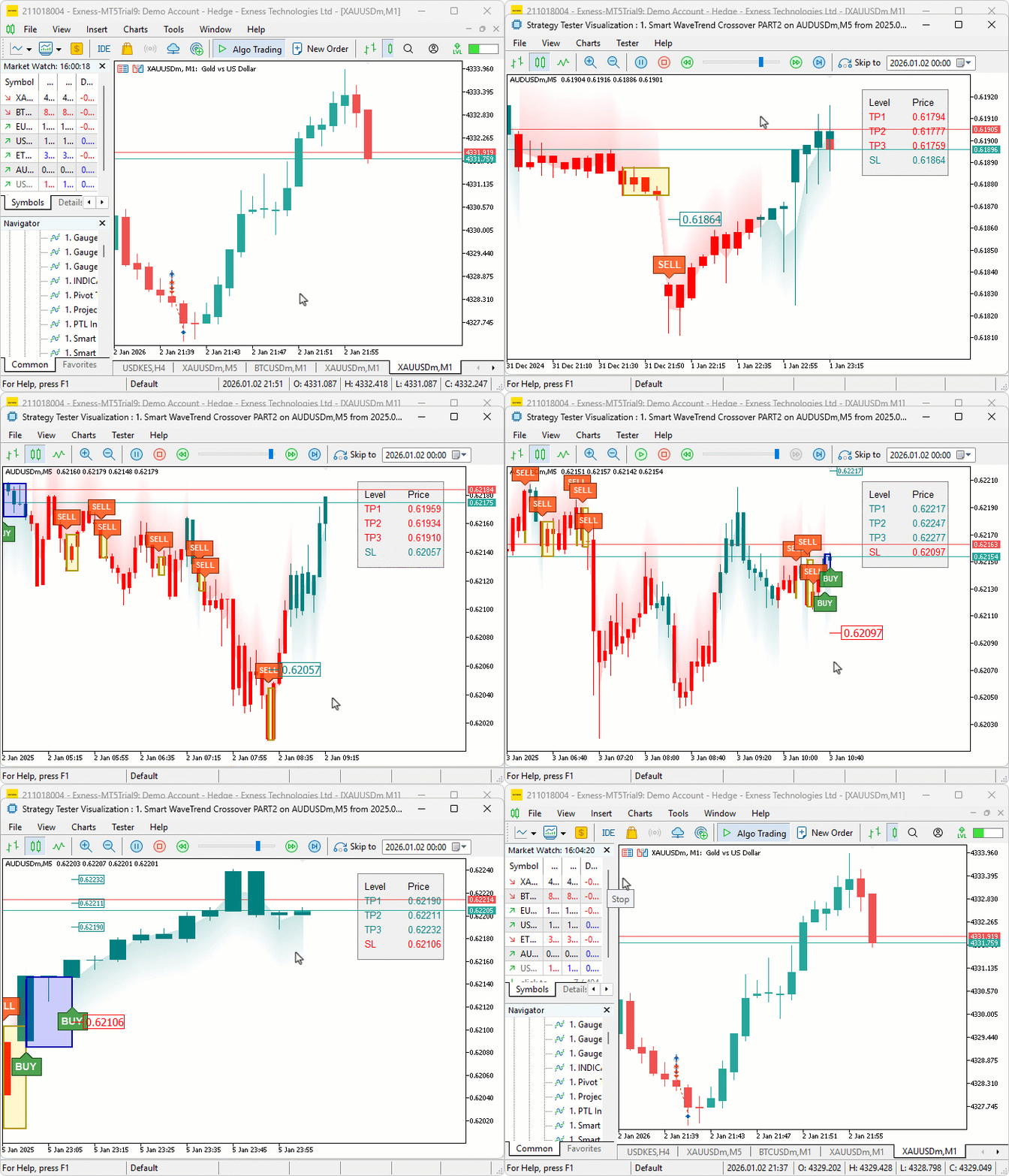
We did the testing, and below is the compiled visualization in a single Graphics Interchange Format (GIF) bitmap image format.
Conclusion
In conclusion, we’ve enhanced the WaveTrend Crossover indicator in MQL5 with canvas-based drawing for fog gradient overlays, signal boxes that detect breakouts, customizable buy and sell bubbles or triangles for visual alerts, and integrated risk management through dynamic take-profit and stop-loss levels. This upgrade incorporates advanced visuals like gradient fog for market context, alongside options for trend filtering, box extensions, and calculations via candle multipliers or percentages, displayed with lines and tables. This configuration provides us with immersive tools for momentum shifts, trend analysis, and risk assessment. With this enhanced WaveTrend crossover indicator, you’re equipped to leverage visual and risk features for better trading insights, ready for further optimization in your trading journey. Happy trading!
Warning: All rights to these materials are reserved by MetaQuotes Ltd. Copying or reprinting of these materials in whole or in part is prohibited.
This article was written by a user of the site and reflects their personal views. MetaQuotes Ltd is not responsible for the accuracy of the information presented, nor for any consequences resulting from the use of the solutions, strategies or recommendations described.

 Python-MetaTrader 5 Strategy Tester (Part 03): MetaTrader 5-Like Trading Operations — Handling and Managing
 Price Action Analysis Toolkit Development (Part 55): Designing a CPI Mini-Candle Overlay for Intra-bar Pressure
 Developing a multi-currency Expert Advisor (Part 24): Adding a new strategy (II)
 Introduction to MQL5 (Part 35): Mastering API and WebRequest Function in MQL5 (IX)

- Free trading apps
- Over 8,000 signals for copying
- Economic news for exploring financial markets
You agree to website policy and terms of use