

Formulating Dynamic Multi-Pair EA (Part 7): Cross-Pair Correlation Mapping for Real-Time Trade Filtering
 3 030
3 030
 0
0

Table of Contents:
Introduction
You launch a multi-pair EA and, at first glance, everything appears perfectly structured: each symbol generates clean signals, entries are precise, and the logic performs exactly as designed. Yet once trades begin stacking across multiple instruments, an uncomfortable pattern emerges. What looked like diversification turns into concentrated exposure. The EA opens positions on pairs that historically move together, effectively duplicating risk. When correlations tighten—as they often do during volatility spikes—drawdowns accelerate, not because the signals were wrong individually, but because the portfolio became structurally imbalanced. The issue is no longer signal accuracy; it is relationship awareness.
This is precisely where Part 7 introduces a structural shift in thinking. Instead of evaluating each pair in isolation, we embed real-time cross-pair correlation mapping directly into the decision engine. Before any trade is executed, the EA now evaluates how that position interacts with existing exposure across the trading universe. If the new signal increases correlated risk or conflicts with the broader directional structure, it can be filtered out. While Part 6 concentrated on execution efficiency—optimizing spread sensitivity and cost ranking—this section elevates the framework to portfolio-level intelligence. The priority moves from cost efficiency alone to directional harmony, exposure cohesion, and dynamic risk control across the entire multi-pair ecosystem.
System Overview and Understanding
Our EA system is designed as a centralized portfolio engine that monitors, evaluates, and trades multiple symbols from a single coordinated framework. Instead of treating each pair independently, the system maintains structured symbol data, synchronized price inputs, and a shared decision pipeline that processes signals, execution filters, and risk parameters collectively. This architecture enables consistent logic application across all instruments while maintaining flexibility for symbol-specific metrics such as volatility, spread conditions, and signal strength.
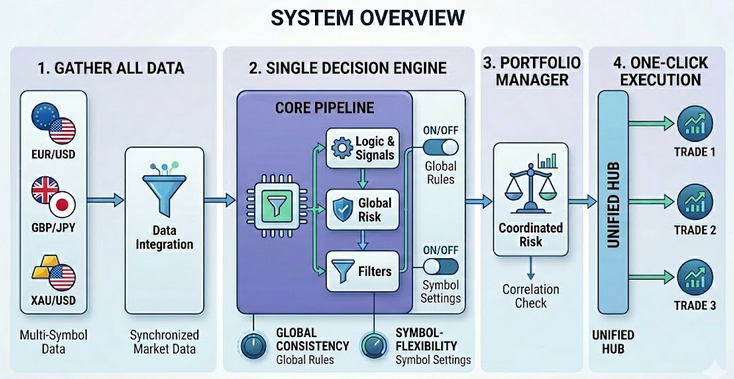
At its core, the EA integrates real-time cross-pair correlation mapping to enhance trade filtering and portfolio balance. Before executing new positions, the system evaluates statistical relationships between symbols to prevent redundant exposure and reduce compounded directional risk. By combining structured symbol management, matrix-based correlation indexing, and dynamic filtering within the OnTick cycle, the EA operates not just as a trade generator, but as a portfolio-aware decision engine that continuously adapts to evolving inter-market relationships.
Getting Started
//+------------------------------------------------------------------+
//|                                       Cross-Pair Correlation.mq5 |
//|                        GIT under Copyright 2025, MetaQuotes Ltd. |
//|                     https://www.mql5.com/en/users/johnhlomohang/ |
//+------------------------------------------------------------------+
#property copyright "GIT under Copyright 2025, MetaQuotes Ltd."
#property link      "https://www.mql5.com/en/users/johnhlomohang/"
#property version   "1.00"

#include <Trade\Trade.mqh>
#include <Trade\PositionInfo.mqh>

CTrade trade;
CPositionInfo posInfo;

//--- Input parameters
input string Symbols                = "XAUUSD,GBPUSD,USDJPY,USDZAR"; // Symbols to monitor (comma separated)
input ENUM_TIMEFRAMES CorrTimeframe = PERIOD_M15;                    // Timeframe for correlation
input int CorrelationPeriod         = 100;                           // Bars for correlation calculation
input double CorrelationThreshold   = 0.7;                           // Strong correlation threshold
input double MaxCorrelationExposure = 1.5;                           // Max net correlated exposure

//--- Signal parameters (simple MA crossover)
input ENUM_TIMEFRAMES SignalTimeframe = PERIOD_M15;                  // Timeframe for signal
input int    BiasLookbackBars         = 20;
input double BiasThreshold            = 0.001;                       // 0.1%
input int FastMAPeriod                = 10;                          // Fast MA period
input int SlowMAPeriod                = 30;                          // Slow MA period

//--- Trade execution
input double LotSize                  = 0.1;                         // Fixed lot size
input int    StopLoss_Pips            = 30;                          // Stop Loss in pips
input int    TakeProfit_Pips          = 60;                          // Take Profit in pips
input int    MagicNumber              = 123456;                      // EA magic number
input int    Slippage                 = 30;                          // Slippage in points

//--- Optional features
input bool   UseHeatmap                = false;                      // Draw correlation heatmap (optional)
Getting started, we establish the foundational structure and configuration of the EA system by importing the necessary trading classes (CTrade for execution and CPositionInfo for position tracking) and defining all core input parameters that control system behavior. We begin by specifying the list of symbols to monitor, the timeframe and lookback period for computing cross-pair correlations, and thresholds that determine when correlations are considered strong and when overall correlated exposure becomes excessive. This ensures the EA operates with portfolio awareness from the outset.
We then define the signal-generation logic using a moving average crossover framework enhanced by a directional bias filter, along with complete trade execution settings including lot size, stop-loss, take-profit, slippage, and magic number for position identification. We also include an option for visualization control of the correlation heatmap.
//+------------------------------------------------------------------+
//| Symbol Data Structure                                            |
//+------------------------------------------------------------------+
struct SymbolData
  {
   string name;
   double close[];
  };

//+------------------------------------------------------------------+
//| Global vars                                                      |
//+------------------------------------------------------------------+
int        m_numSymbols;
SymbolData m_symbols[];
double     m_correlationMatrix[];
datetime   m_lastBarTime;
bool       m_correlationValid;

int        m_fastMA[];
int        m_slowMA[];
datetime   m_lastSignalBar[];

//+------------------------------------------------------------------+
//| Expert initialization function                                   |
//+------------------------------------------------------------------+
int OnInit()
  {
   //--- Ensure current chart symbol is included
   string list = Symbols;

   if(StringFind(list,_Symbol) < 0)
      list = list + "," + _Symbol;

   //--- Split symbol list
   string parts[];
   int num = StringSplit(list,',',parts);

   if(num <= 0)
     {
      Print("No symbols specified!");
      return(INIT_FAILED);
     }

   m_numSymbols = num;

   //--- Resize containers
   ArrayResize(m_symbols,m_numSymbols);

   for(int i=0; i<m_numSymbols; i++)
     {
      string sym = parts[i];
      StringTrimRight(sym);

      if(!SymbolSelect(sym,true))
        {
         Print("Failed to select symbol: ",sym);
         return(INIT_FAILED);
        }

      m_symbols[i].name = sym;

      //--- Resize close buffer
      ArrayResize(m_symbols[i].close,CorrelationPeriod);
      ArraySetAsSeries(m_symbols[i].close,true);
     }

   ArrayResize(m_correlationMatrix,m_numSymbols*m_numSymbols);
   ArrayResize(m_fastMA,m_numSymbols);
   ArrayResize(m_slowMA,m_numSymbols);
   ArrayResize(m_lastSignalBar,m_numSymbols);

   //--- Create MA handles
   for(int i=0; i<m_numSymbols; i++)
     {
      m_fastMA[i] = iMA(m_symbols[i].name,
                        SignalTimeframe,
                        FastMAPeriod,
                        0,
                        MODE_SMA,
                        PRICE_CLOSE);

      m_slowMA[i] = iMA(m_symbols[i].name,
                        SignalTimeframe,
                        SlowMAPeriod,
                        0,
                        MODE_SMA,
                        PRICE_CLOSE);

      if(m_fastMA[i]==INVALID_HANDLE || m_slowMA[i]==INVALID_HANDLE)
        {
         Print("Failed to create MA handle for ",m_symbols[i].name);
         return(INIT_FAILED);
        }

      m_lastSignalBar[i] = 0;
     }

   m_lastBarTime      = 0;
   m_correlationValid = false;

   EventSetTimer(60);

   trade.SetExpertMagicNumber(MagicNumber);

   Print("Multi-Pair Correlation EA initialized with ",m_numSymbols," symbols.");

   return(INIT_SUCCEEDED);
  }
This section defines a structured data model for the EA through the SymbolData struct, which encapsulates each symbol’s name and its dedicated close-price buffer used for correlation calculations. By organizing symbol-related data into a structure and storing multiple instances inside the m_symbols[] array, the EA adopts a scalable, object-like design that cleanly separates per-symbol data from global system logic. Supporting this architecture are several global arrays and state variables, including a flattened one-dimensional correlation matrix, moving average handles for signal generation, per-symbol signal timing controls, and flags that track whether the correlation data is current and valid.
Inside OnInit(), the EA dynamically prepares its multi-symbol environment. It first ensures the chart’s current symbol is included in the monitored list, then parses the comma-separated input string into individual symbols. Each symbol is validated and selected via SymbolSelect(), after which its internal close-price buffer is resized and configured as a time series array for proper indexing. At the same time, the EA resizes the flattened correlation matrix to accommodate all symbol pair combinations (n × n) and prepares arrays that will later store indicator handles and signal timing data. This dynamic resizing allows the EA to scale automatically depending on how many symbols the user specifies.
The last portion of initialization creates the fast and slow-moving average indicator handles for each symbol using iMA(), enabling independent signal generation across the portfolio. It also initializes state control variables such as m_lastBarTime and m_correlationValid, sets a timer to trigger periodic correlation recalculation, and assigns the expert’s magic number for trade identification.
//+------------------------------------------------------------------+
//| Expert deinitialization function                                 |
//+------------------------------------------------------------------+
void OnDeinit(const int reason)
  {
   //--- Release MA handles
   for(int i=0; i<m_numSymbols; i++)
     {
      if(m_fastMA[i]!=INVALID_HANDLE)
         IndicatorRelease(m_fastMA[i]);

      if(m_slowMA[i]!=INVALID_HANDLE)
         IndicatorRelease(m_slowMA[i]);
     }

   EventKillTimer();
  }

//+------------------------------------------------------------------+
//| Expert tick function                                             |
//+------------------------------------------------------------------+
void OnTick()
  {
   if(IsNewBar())
     {
      UpdateCorrelationMatrix();
      m_correlationValid = true;
     }

   for(int i=0; i<m_numSymbols; i++)
     {
      string sym = m_symbols[i].name;
      datetime currBar = iTime(sym,SignalTimeframe,0);

      if(currBar != m_lastSignalBar[i])
        {
         int signal = CheckSignal(i);

         if(signal != 0)
           {
            if(IsTradeAllowed(i,signal))
               ExecuteTrade(i,signal);
           }

         m_lastSignalBar[i] = currBar;
        }
     }
  }

//+------------------------------------------------------------------+
//| Timer function                                                   |
//+------------------------------------------------------------------+
void OnTimer()
  {
   if(!m_correlationValid)
      UpdateCorrelationMatrix();
  }
The OnDeinit() function ensures proper resource cleanup when the EA is removed or the platform is shut down. It loops through all monitored symbols and safely releases the moving average indicator handles using IndicatorRelease(), preventing memory leaks and freeing terminal resources. It also stops the timer with EventKillTimer(), ensuring no background events continue running after the EA is deactivated. This structured shutdown process keeps the system efficient and avoids leftover indicator or timer processes that could affect performance.
The OnTick() function is the core execution engine of the EA. It first checks whether a new master bar has formed and, if so, updates the cross-pair correlation matrix to maintain real-time portfolio awareness. Then, for each symbol, it detects the formation of a new signal bar to avoid repeated processing within the same candle. When a new bar is detected, the EA evaluates trading signals, verifies whether the trade is allowed based on correlation and exposure filters, and executes the trade if conditions are satisfied. The OnTimer() function serves as a safety mechanism, ensuring the correlation matrix is refreshed if it hasn’t been updated, reinforcing the system’s reliability and synchronization across symbols.
//+------------------------------------------------------------------+
//| Helper function to get index in flattened matrix                 |
//+------------------------------------------------------------------+
int CorrIndex(int i,int j)
  {
   return(i*m_numSymbols + j);
  }

//+------------------------------------------------------------------+
//| Update close prices for all symbols                              |
//+------------------------------------------------------------------+
void UpdateClosePrices()
  {
   for(int i=0; i<m_numSymbols; i++)
     {
      if(CopyClose(m_symbols[i].name,
                   CorrTimeframe,
                   0,
                   CorrelationPeriod,
                   m_symbols[i].close) <= 0)
        {
         Print("Failed to copy close for ",m_symbols[i].name);
        }
     }
  }

//+------------------------------------------------------------------+
//| Calculate Pearson correlation between two arrays                 |
//+------------------------------------------------------------------+
double CalculateCorrelation(double &x[],double &y[],int length)
  {
   double sumX=0,sumY=0,sumXY=0,sumX2=0,sumY2=0;

   for(int i=0; i<length; i++)
     {
      sumX  += x[i];
      sumY  += y[i];
      sumXY += x[i]*y[i];
      sumX2 += x[i]*x[i];
      sumY2 += y[i]*y[i];
     }

   double numerator   = length*sumXY - sumX*sumY;
   double denominator = MathSqrt((length*sumX2 - sumX*sumX) *
                                 (length*sumY2 - sumY*sumY));

   if(denominator == 0)
      return(0);

   return(numerator/denominator);
  }

//+------------------------------------------------------------------+
//| Update the entire correlation matrix                             |
//+------------------------------------------------------------------+
void UpdateCorrelationMatrix()
 {
   UpdateClosePrices();

   for(int i = 0; i < m_numSymbols; i++)
    {
      for(int j = 0; j < m_numSymbols; j++)
       {
         if(i == j)
          {
            m_correlationMatrix[CorrIndex(i,j)] = 1.0;
            continue;
          }

         double corr = CalculateCorrelation(
                        m_symbols[i].close,
                        m_symbols[j].close,
                        CorrelationPeriod);

         m_correlationMatrix[CorrIndex(i,j)] = corr;
       }
    }

   //--- Optional heatmap drawing
   if(UseHeatmap)
      DrawHeatmap();
 }

//+------------------------------------------------------------------+
//| Get symbol index by name                                         |
//+------------------------------------------------------------------+
int GetSymbolIndex(string sym)
 {
   for(int i = 0; i < m_numSymbols; i++)
    {
      if(m_symbols[i].name == sym)
         return(i);
    }
   return(-1);
 }
This section provides the mathematical and structural backbone of the EA’s cross-pair correlation engine. The CorrIndex() helper function converts two-dimensional matrix coordinates (i, j) into a one-dimensional array index, allowing the correlation matrix to be stored efficiently as a flattened array. UpdateClosePrices() then retrieves the latest close prices for each monitored symbol using CopyClose(), ensuring that all correlation calculations are based on synchronized and up-to-date market data. The CalculateCorrelation() function implements the Pearson correlation formula manually, computing the statistical relationship between two price series by aggregating sums, cross-products, and squared values before applying the normalized correlation equation.
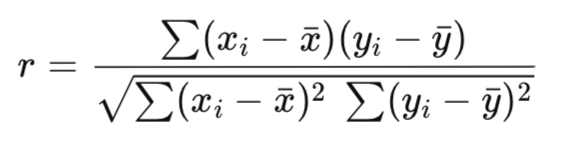
The UpdateCorrelationMatrix() function ties everything together by first refreshing price data, then looping through all symbol pairs to compute and store their correlations in the flattened matrix. Diagonal elements are set to 1.0 to represent perfect self-correlation, while off-diagonal elements are calculated dynamically using the Pearson function. If enabled, the heatmap visualization is updated immediately after recalculation, keeping the graphical representation aligned with the latest statistics. The GetSymbolIndex() provides a simple lookup utility that maps a symbol name to its internal array position, enabling efficient interaction between trade logic, exposure control, and the correlation matrix.
//+------------------------------------------------------------------+
//| Get bias (bullish/bearish) for a symbol based on price change    |
//+------------------------------------------------------------------+
int GetBias(int idx)
 {
   //--- Safety checks
   if(idx < 0 || idx >= m_numSymbols)
      return(0);

   if(BiasLookbackBars >= CorrelationPeriod)
      return(0);

   if(m_symbols[idx].close[BiasLookbackBars] == 0.0)
      return(0);

   double curr = m_symbols[idx].close[0];
   double prev = m_symbols[idx].close[BiasLookbackBars];

   if(prev == 0.0)
      return(0);

   double change = (curr - prev) / prev;

   if(change > BiasThreshold)
      return(1);   // Bullish

   if(change < -BiasThreshold)
      return(-1);  // Bearish

   return(0);
 }

//+------------------------------------------------------------------+
//| Check if a trade is allowed based on correlation rules           |
//+------------------------------------------------------------------+
bool IsTradeAllowed(int index, int signal)
 {
   string sym = m_symbols[index].name;

   //--- Already in position?
   if(PositionSelect(sym))
      return(false);

   if(!m_correlationValid)
      return(false);

   //--- Convert signal to direction
   ENUM_ORDER_TYPE direction;
   if(signal == 1)
      direction = ORDER_TYPE_BUY;
   else if(signal == -1)
      direction = ORDER_TYPE_SELL;
   else
      return(false);

   return(PassesCorrelationFilter(index, direction));
 }

//+------------------------------------------------------------------+
//| Generate trading signal (MA crossover)                           |
//+------------------------------------------------------------------+
int CheckSignal(int index)
 {
   double fast[], slow[];
   ArrayResize(fast, 2);
   ArrayResize(slow, 2);

   ArraySetAsSeries(fast, true);
   ArraySetAsSeries(slow, true);

   if(CopyBuffer(m_fastMA[index], 0, 0, 2, fast) < 2) return 0;
   if(CopyBuffer(m_slowMA[index], 0, 0, 2, slow) < 2) return 0;

   //--- Buy crossover: fast MA crosses above slow MA
   if(fast[1] <= slow[1] && fast[0] > slow[0])
      return(1);

   //--- Sell crossover: fast MA crosses below slow MA
   if(fast[1] >= slow[1] && fast[0] < slow[0])
      return(-1);

   return(0);
 }
In this section, we introduce directional filtering and trade validation logic within the EA. The GetBias() function determines whether a symbol exhibits a bullish or bearish tendency by measuring percentage price change over a defined lookback period. It includes safety checks to prevent invalid indexing or division errors, then compares the calculated change against a configurable threshold. If price appreciation exceeds the threshold, the function returns a bullish signal (1); if depreciation exceeds it negatively, it returns bearish (-1); otherwise, it remains neutral (0). This bias mechanism helps the EA incorporate broader directional context beyond short-term crossover signals.
The IsTradeAllowed() function acts as a protective gatekeeper before any execution occurs. It blocks trades if a position already exists on the symbol, if the correlation matrix is outdated, or if the signal is invalid. Once basic validation passes, it converts the signal into an order direction and forwards the decision to the correlation filter for portfolio-level exposure control. Meanwhile, CheckSignal() generates entry signals using a classic moving average crossover approach by comparing the most recent and previous values of fast and slow MAs. Together, these functions ensure that trades are not only technically triggered but also contextually validated within both directional and portfolio-aware frameworks.
//+------------------------------------------------------------------+
//| Calculate pip size for different instruments                     |
//+------------------------------------------------------------------+
double CalculatePipSize(string symbol)
 {
   int digits = (int)SymbolInfoInteger(symbol, SYMBOL_DIGITS);
   double point = SymbolInfoDouble(symbol, SYMBOL_POINT);

   //--- Detect pip size automatically
   if(StringFind(symbol, "JPY") != -1)              // JPY pairs
      return((digits == 3) ? point * 10 : point);
   else if(StringFind(symbol, "XAU") != -1 || StringFind(symbol, "GOLD") != -1)  // Metals
      return(0.10);
   else if(StringFind(symbol, "BTC") != -1 || StringFind(symbol, "ETH") != -1)   // Cryptos
      return(point * 100.0);
   else if(StringFind(symbol, "US") != -1 && digits <= 2)                         // Indices (e.g. US30)
      return(point);
   else
      return((digits == 3 || digits == 5) ? point * 10 : point);                   // Default Forex
 }

//+------------------------------------------------------------------+
//| Execute a trade (market order) with SL/TP                        |
//+------------------------------------------------------------------+
void ExecuteTrade(int index, int signal)
 {
   string sym = m_symbols[index].name;
   double pipSize = CalculatePipSize(sym);
   double price, slPrice, tpPrice;

   if(signal == 1) // BUY
    {
      price = SymbolInfoDouble(sym, SYMBOL_ASK);
      slPrice = price - StopLoss_Pips * pipSize;
      tpPrice = price + TakeProfit_Pips * pipSize;
      if(trade.Buy(LotSize, sym, price, slPrice, tpPrice, "Correlation Filter EA"))
         Print("BUY executed on ", sym, " SL: ", DoubleToString(slPrice, _Digits), " TP: ", DoubleToString(tpPrice, _Digits));
      else
         Print("BUY failed on ", sym, " Error: ", GetLastError());
    }
   else if(signal == -1) // SELL
    {
      price = SymbolInfoDouble(sym, SYMBOL_BID);
      slPrice = price + StopLoss_Pips * pipSize;
      tpPrice = price - TakeProfit_Pips * pipSize;
      if(trade.Sell(LotSize, sym, price, slPrice, tpPrice, "Correlation Filter EA"))
         Print("SELL executed on ", sym, " SL: ", DoubleToString(slPrice, _Digits), " TP: ", DoubleToString(tpPrice, _Digits));
      else
         Print("SELL failed on ", sym, " Error: ", GetLastError());
    }
 }

//+------------------------------------------------------------------+
//| Correlation filter logic                                         |
//+------------------------------------------------------------------+
bool PassesCorrelationFilter(int symbolIndex, ENUM_ORDER_TYPE direction)
 {
   for(int j = 0; j < m_numSymbols; j++)
    {
      if(j == symbolIndex)
         continue;

      double corr = m_correlationMatrix[CorrIndex(symbolIndex, j)];

      if(MathAbs(corr) >= CorrelationThreshold)
       {
         //--- Check if correlated symbol already has open position
         if(PositionSelect(m_symbols[j].name))
          {
            ENUM_POSITION_TYPE posType = (ENUM_POSITION_TYPE)PositionGetInteger(POSITION_TYPE);

            //--- Same direction stacking
            if(corr > 0)
             {
               if((direction == ORDER_TYPE_BUY && posType == POSITION_TYPE_BUY) ||
                  (direction == ORDER_TYPE_SELL && posType == POSITION_TYPE_SELL))
                {
                  Print("Blocked by positive correlation with ", m_symbols[j].name);
                  return(false);
                }
             }

            //--- Inverse stacking
            if(corr < 0)
             {
               if((direction == ORDER_TYPE_BUY && posType == POSITION_TYPE_SELL) ||
                  (direction == ORDER_TYPE_SELL && posType == POSITION_TYPE_BUY))
                {
                  Print("Blocked by inverse correlation with ", m_symbols[j].name);
                  return(false);
                }
             }
          }
       }
    }

   return(true);
 }
This section of code handles trade execution, risk sizing, and portfolio-aware filtering, forming the core of the EA’s real-time decision engine. The CalculatePipSize() function determines the correct pip value for each instrument type, accounting for differences across Forex pairs, JPY crosses, metals, cryptocurrencies, and indices. By adjusting pip calculations based on symbol conventions, the EA ensures that stop-loss and take-profit levels are applied accurately, maintaining consistent risk control across diverse markets.
The ExecuteTrade() function implements market orders with dynamically calculated stop-loss and take-profit levels using the pip size from CalculatePipSize(). It differentiates between BUY and SELL signals, calculates the appropriate entry, SL, and TP prices, and executes the trade using the CTrade class. Each execution is logged with detailed feedback, including whether the order succeeded or failed, and prints the calculated SL/TP levels for transparency, ensuring both operational and risk visibility for the trader.
The PassesCorrelationFilter() function integrates portfolio-level risk management by checking whether a new trade would violate correlation exposure rules. For each symbol, it compares the current signal with all other open positions using the precomputed correlation matrix. Trades are blocked if highly correlated symbols already have positions in the same or inverse direction, depending on the correlation sign. This mechanism prevents redundant or compounding exposure, ensuring that trades are executed only when they maintain balanced risk across the multi-symbol portfolio, effectively aligning individual signals with overall portfolio safety.
//+------------------------------------------------------------------+
//| Convert symbol name to short display format                      |
//+------------------------------------------------------------------+
string GetDisplayName(string symbol)
 {
   //--- If symbol contains "USD", replace it with "$"
   //--- Examples: XAUUSD -> XAU$, GBPUSD -> GBP$, USDJPY -> $JPY, USDZAR -> $ZAR
   int pos = StringFind(symbol, "USD");
   if(pos >= 0)
    {
      if(pos == 0)  // USD at beginning
         return("$" + StringSubstr(symbol, 3));
      else          // USD at end
         return(StringSubstr(symbol, 0, pos) + "$");
    }
   return(symbol); // fallback
 }

//+------------------------------------------------------------------+
//| Draw a correlation heatmap with row and column labels            |
//+------------------------------------------------------------------+
void DrawHeatmap()
 {
   ObjectsDeleteAll(0, "CorrHeatmap_");

   string objName = "CorrHeatmap_";

   int cellSize = 45;                // Slightly larger for clean spacing
   int startX   = 90;               // More left margin for row labels
   int startY   = 60;

   int half = cellSize / 2;

   //==============================
   // COLUMN LABELS (TOP)
   //==============================
   for(int j = 0; j < m_numSymbols; j++)
    {
      string label = objName + "col_" + IntegerToString(j);
      string dispName = GetDisplayName(m_symbols[j].name);

      ObjectCreate(0, label, OBJ_LABEL, 0, 0, 0);

      ObjectSetInteger(0, label, OBJPROP_XDISTANCE,
                       startX + j * cellSize + half);

      ObjectSetInteger(0, label, OBJPROP_YDISTANCE,
                       startY - half);

      ObjectSetInteger(0, label, OBJPROP_ANCHOR, ANCHOR_CENTER);

      ObjectSetString(0, label, OBJPROP_TEXT, dispName);
      ObjectSetInteger(0, label, OBJPROP_COLOR, clrBlue);
      ObjectSetInteger(0, label, OBJPROP_FONTSIZE, 10);
    }

   //==============================
   // ROW LABELS (LEFT)
   //==============================
   for(int i = 0; i < m_numSymbols; i++)
    {
      string label = objName + "row_" + IntegerToString(i);
      string dispName = GetDisplayName(m_symbols[i].name);

      ObjectCreate(0, label, OBJ_LABEL, 0, 0, 0);

      ObjectSetInteger(0, label, OBJPROP_XDISTANCE,
                       startX - half);

      ObjectSetInteger(0, label, OBJPROP_YDISTANCE,
                       startY + i * cellSize + half);

      ObjectSetInteger(0, label, OBJPROP_ANCHOR, ANCHOR_CENTER);

      ObjectSetString(0, label, OBJPROP_TEXT, dispName);
      ObjectSetInteger(0, label, OBJPROP_COLOR, clrBlue);
      ObjectSetInteger(0, label, OBJPROP_FONTSIZE, 10);
    }

   //==============================
   // CORRELATION MATRIX
   //==============================
   for(int i = 0; i < m_numSymbols; i++)
    {
      for(int j = 0; j < m_numSymbols; j++)
       {
         string label = objName + IntegerToString(i) + "_" + IntegerToString(j);

         double corr = m_correlationMatrix[CorrIndex(i, j)];
         string text = DoubleToString(corr, 2);

         ObjectCreate(0, label, OBJ_LABEL, 0, 0, 0);

         ObjectSetInteger(0, label, OBJPROP_XDISTANCE,
                          startX + j * cellSize + half);

         ObjectSetInteger(0, label, OBJPROP_YDISTANCE,
                          startY + i * cellSize + half);

         ObjectSetInteger(0, label, OBJPROP_ANCHOR, ANCHOR_CENTER);

         ObjectSetString(0, label, OBJPROP_TEXT, text);
         ObjectSetInteger(0, label, OBJPROP_FONTSIZE, 10);

         //--- Color coding
         if(corr > 0.7)
            ObjectSetInteger(0, label, OBJPROP_COLOR, clrLime);
         else if(corr < -0.7)
            ObjectSetInteger(0, label, OBJPROP_COLOR, clrRed);
         else
            ObjectSetInteger(0, label, OBJPROP_COLOR, clrBlack);
       }
    }
 }
//+------------------------------------------------------------------+
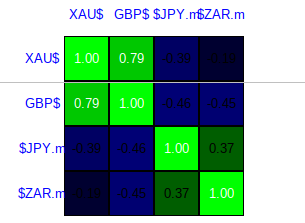
Here, we focus on providing a clear and visually intuitive representation of the cross-pair correlations through a heatmap interface. The GetDisplayName() function simplifies symbol names by replacing "USD" with the "$" sign for readability, creating concise labels like XAU$ or $JPY. These display names are used as both row and column headers in the heatmap, making it easy to identify symbols at a glance. The labels are carefully positioned and centered relative to the matrix cells, ensuring alignment with the correlation values displayed.
The DrawHeatmap() function itself constructs a full matrix visualization by iterating over all symbol pairs. For each cell, it draws a background rectangle whose color intensity dynamically reflects the magnitude and direction of the correlation: green for positive correlations, red for negative, and light gray for neutral. Over each colored cell, the actual numeric correlation value is displayed, with text color adjusted for contrast based on the correlation. This dual representation of color and numeric value allows traders to quickly assess relationships between symbols while maintaining precise, readable information, effectively turning raw statistical data into an actionable visual tool.
Back Test Results
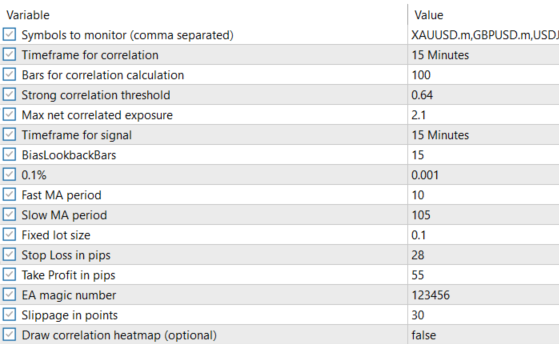
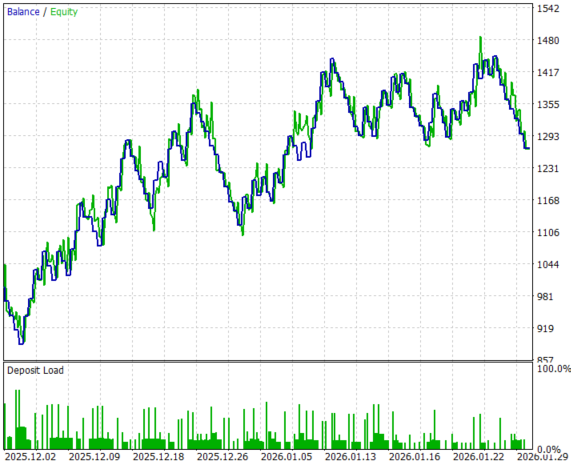
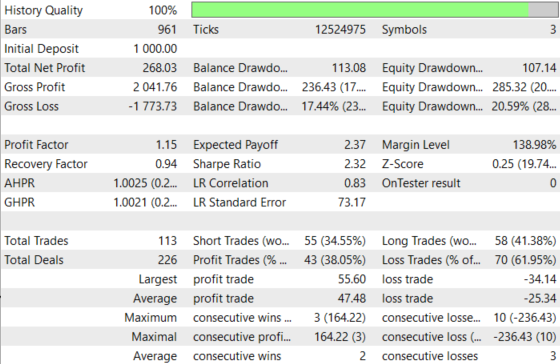
The testing was conducted across roughly a 2-month testing window from 01 December 2025 to 30 January 2026, with the following settings:
Now the equity curve and the backtest results:
Conclusion
We have moved far beyond a “regular” multi-pair signal generator and transformed the system into a true portfolio-level decision engine. Symbol data is synchronized across instruments, price buffers are managed structurally, and a real-time Pearson correlation matrix is continuously rebuilt and injected directly into the final execution layer. The key evolution is not just calculation—it is integration. Correlation is no longer something observed externally; it now actively participates in the last checkpoint before any order reaches the market.
The result is a scalable EA framework where instruments can be added seamlessly, correlations are recalculated on every new bar (or timer event) to reflect current market statistics, and every MA crossover signal must pass through a portfolio exposure filter. Trades are blocked when strong positive correlation would amplify existing directional risk, and also when strong negative correlation would create hidden mirror exposure against an already open position. The heatmap adds an immediate visual confirmation layer, ensuring transparency and confidence that the matrix updates and thresholds behave as intended.
The bottom line: you now have a structured method for embedding correlation-based exposure control directly into a multi-pair EA, achieving smoother and more controlled portfolio behavior. Instead of manually monitoring shifting intermarket relationships—or discovering correlation risk only after drawdown appears—the system proactively manages structural risk in real time, addressing one of the most common failure points of multi-pair trading in live market conditions.
Warning: All rights to these materials are reserved by MetaQuotes Ltd. Copying or reprinting of these materials in whole or in part is prohibited.
This article was written by a user of the site and reflects their personal views. MetaQuotes Ltd is not responsible for the accuracy of the information presented, nor for any consequences resulting from the use of the solutions, strategies or recommendations described.

 The MQL5 Standard Library Explorer (Part 9): Using ALGLIB to Filter Excessive MA Crossover Signals
 Neural Networks in Trading: Integrating Chaos Theory into Time Series Forecasting (Attraos)
 Neural Networks in Trading: Integrating Chaos Theory into Time Series Forecasting (Final Part)
 Price Action Analysis Toolkit Development (Part 63): Automating Rising and Falling Wedge Detection in MQL5

- Free trading apps
- Over 8,000 signals for copying
- Economic news for exploring financial markets
You agree to website policy and terms of use