

Creating Custom Indicators in MQL5 (Part 4): Smart WaveTrend Crossover with Dual Oscillators
 4 991
4 991
 0
0

Introduction
In our previous article (Part 3), we developed a multi-gauge indicator in MetaQuotes Language 5 (MQL5) with enhancements for sector and round styles, allowing dynamic visualization of multiple data points through customizable gauge displays and color-coded sectors. In Part 4, we develop a Smart WaveTrend Crossover indicator utilizing dual oscillators—one for signals and one for trend filtering—to generate crossover-based buy and sell alerts with optional trend confirmation. This indicator colors candles by trend direction, plots arrow signals on crossovers, and supports customizable parameters for length and visual style. We will cover the following topics:
By the end, you’ll have a functional MQL5 indicator for WaveTrend crossovers, ready for customization—let’s dive in!
Understanding the Smart WaveTrend Crossover Framework
The Smart WaveTrend Crossover framework relies on the WaveTrend oscillator, a momentum-based tool that measures overbought and oversold conditions using smoothed price averages. This helps us identify potential reversals or continuations in market momentum. It computes a source price from highs, lows, and closes, then applies exponential moving averages to create two lines: a faster oscillating line and a slower smoothed line. Crossovers between these lines signal buying or selling opportunities. By using dual WaveTrend configurations—one with shorter periods for sensitive signal generation and another with longer periods for overall trend detection—we can combine quick entry cues with broader market context. This helps filter out false signals in choppy conditions.
In a bullish setup, we look for the faster line to cross above the slower line on the signal oscillator. This indicates building upward momentum, especially when it aligns with an uptrend from the slower oscillator. In a bearish setup, the faster line crossing below the slower line suggests downward momentum. Ideally, this is confirmed by a downtrend on the slower oscillator to avoid counter-trend trades. This approach enables us to capitalize on momentum shifts while respecting the prevailing trend. Additional visuals, such as colored candles, highlight trend direction, and arrows mark precise signal points.
We plan to calculate the WaveTrend values separately for signals and trends using customizable lengths for channels, averages, and moving averages, detect crossovers on the signal side, and apply an optional trend filter to ensure signals match the trend direction. We will incorporate visual elements such as candle coloring based on trend state and offset arrows for buy or sell indications, creating a comprehensive system that provides clear, actionable insights for momentum trading. In brief, here is a visual representation of our objectives.

Implementation in MQL5
To create the indicator in MQL5, just open the MetaEditor, go to the Navigator, locate the Indicators folder, click on the "New" tab, and follow the prompts to create the file. Once it is created, in the coding environment, we will define the indicator properties and settings, such as the number of buffers, plots, and individual line properties, such as the color, width, and label.
//+------------------------------------------------------------------+
//|                           1. Smart WaveTrend Crossover PART1.mq5 |
//|                           Copyright 2026, Allan Munene Mutiiria. |
//|                                   https://t.me/Forex_Algo_Trader |
//+------------------------------------------------------------------+
#property copyright "Copyright 2026, Allan Munene Mutiiria."
#property link "https://t.me/Forex_Algo_Trader"
#property version "1.00"

#property indicator_chart_window
#property indicator_buffers 23
#property indicator_plots 3
#property indicator_label1 "Colored Candles"
#property indicator_type1 DRAW_COLOR_CANDLES
#property indicator_color1 clrTeal, clrRed
#property indicator_style1 STYLE_SOLID
#property indicator_width1 1
#property indicator_label2 "Buy Signals"
#property indicator_type2 DRAW_ARROW
#property indicator_color2 clrForestGreen
#property indicator_style2 STYLE_SOLID
#property indicator_width2 1
#property indicator_label3 "Sell Signals"
#property indicator_type3 DRAW_ARROW
#property indicator_color3 clrOrangeRed
#property indicator_style3 STYLE_SOLID
#property indicator_width3 1
We start by configuring the indicator to display directly on the main chart window using "#property indicator_chart_window", ensuring it overlays price data without opening a separate subwindow. We then allocate a total of 23 buffers with "#property indicator_buffers 23" to hold all necessary data arrays for calculations and visuals, and specify 3 plots with "#property indicator_plots 3" to define the visible elements on the chart.
For the first plot, we label it "Colored Candles" and set its type to DRAW_COLOR_CANDLES to render price bars with dynamic colors, using "clrTeal" for bullish and "clrRed" for bearish, styled as solid with a width of 1. The second plot is labeled "Buy Signals" with type "DRAW_ARROW", colored clrForestGreen, solid style, and width 1, to mark potential entry points visually. Similarly, the third plot, labeled "Sell Signals", uses DRAW_ARROW type, "clrOrangeRed" color, solid style, and width 1, for indicating sell opportunities. We now define some inputs to control the indicator.
//+------------------------------------------------------------------+
//| Inputs                                                           |
//+------------------------------------------------------------------+
input group "Colors"
input color col_up = clrTeal;                // Bull Color
input color col_dn = clrRed;                 // Bear Color

input group "WaveTrend Settings for Signals"
input int wt_channel_len = 5;                // Signal Channel Length
input int wt_average_len = 10;               // Signal Average Length
input int wt_ma_len = 4;                     // Signal MA Length

input group "WaveTrend Settings for Trend"
input int wt_trend_channel_len = 10;         // Trend Channel Length
input int wt_trend_average_len = 100;        // Trend Average Length
input int wt_trend_ma_len = 10;              // Trend MA Length

input group "Signal Settings"
input bool use_trend_filter = true;          // Use Trend Filter?
input color signal_buy_col = clrForestGreen; // Buy Signal Color
input color signal_sell_col = clrOrangeRed;  // Sell Signal Color
input int base_offset = 10;                  // Base Signal Offset from Candle

input group "Visual Settings"
input bool color_candles = true;             // Color Candles by Trend?
Here, we organize the user inputs into logical groups using "input group" to make the configuration more intuitive in the indicator's settings dialog. First, under the "Colors" group, we allow us to select the color for bullish trends, defaulting to teal, and for bearish trends, defaulting to red, which will be applied to candle coloring. Next, in the "WaveTrend Settings for Signals" group, we provide integer inputs for the signal oscillator's channel length set to 5, average length to 10, and moving average length to 4, enabling customization of the sensitivity for generating crossover signals.
Then, the "WaveTrend Settings for Trend" group includes similar integer inputs but with longer defaults: channel length at 10, average length at 100, and moving average length at 10, tailored for detecting the broader market trend. In the "Signal Settings" group, we include a boolean option enabled by default to use trend filtering, along with color selections for buy signals defaulting to forest green and sell signals to orange-red, plus an integer for the base offset from candles set to 10 points, controlling signal arrow placement. Finally, the "Visual Settings" group offers a boolean input, enabled by default, to color candles based on the detected trend, giving users control over whether to apply dynamic candle visuals. Upon compilation, we get the following input section.

With that, we can now define some global variables for the indicator buffers and helper functions to be used globally.
//+------------------------------------------------------------------+
//| Buffers                                                          |
//+------------------------------------------------------------------+
double esa_signal[];          //--- Signal ESA buffer
double d_signal[];            //--- Signal D buffer
double ci_signal[];           //--- Signal CI buffer
double wt1_signal[];          //--- Signal WT1 buffer
double wt2_signal[];          //--- Signal WT2 buffer
double signal_hist[];         //--- Signal histogram buffer
double signal_bull_cross[];   //--- Signal bull cross buffer
double signal_bear_cross[];   //--- Signal bear cross buffer

double esa_trend[];           //--- Trend ESA buffer
double d_trend[];             //--- Trend D buffer
double ci_trend[];            //--- Trend CI buffer
double wt1_trend[];           //--- Trend WT1 buffer
double wt2_trend[];           //--- Trend WT2 buffer
double trend_hist[];          //--- Trend histogram buffer
double trend_is_bull[];       //--- Trend bull indicator buffer
double trend_is_bear[];       //--- Trend bear indicator buffer

double openBuf[];             //--- Open price buffer
double highBuf[];             //--- High price buffer
double lowBuf[];              //--- Low price buffer
double closeBuf[];            //--- Close price buffer
double candleColorBuf[];      //--- Candle color buffer
double buyArrowBuf[];         //--- Buy arrow buffer
double sellArrowBuf[];        //--- Sell arrow buffer

//+------------------------------------------------------------------+
//| Calculate EMA manually                                           |
//+------------------------------------------------------------------+
double CalcEMA(double prev, double val, int period) {
   if (period < 1) return val;              //--- Handle invalid period
   double alpha = 2.0 / (period + 1);       //--- Compute alpha factor
   return alpha * val + (1 - alpha) * prev; //--- Return EMA value
}
We declare a series of double arrays to serve as buffers for holding intermediate and final data during indicator calculations. These include buffers for the signal WaveTrend components, such as those for exponential smoothing averages, differences, channel indices, and the two main lines used in crossover detection, along with histogram and crossover flags for bullish and bearish signals. Similarly, we set up parallel buffers for the trend WaveTrend, covering its own smoothing, differences, indices, lines, histogram, and boolean flags to identify bull or bear trends. Additionally, we allocate buffers for price data to redraw candles with colors, including open, high, low, close, and a color index buffer, as well as separate buffers for plotting buy and sell arrows at signal points.
To support the WaveTrend computations, we define the "CalcEMA" function, which manually calculates an exponential moving average by first checking for invalid periods and returning the value directly if so, then computing an alpha smoothing factor as 2.0 divided by the period plus one, and finally applying it to blend the current value with the previous EMA for a smoothed result. We will use the function when doing the computations per tick, but for now, let us initialize the indicator using the following approach.
//+------------------------------------------------------------------+
//| Initialize indicator                                             |
//+------------------------------------------------------------------+
int OnInit() {
   IndicatorSetInteger(INDICATOR_DIGITS, _Digits);   //--- Set indicator digits
   IndicatorSetString(INDICATOR_SHORTNAME, "Smart WaveTrend Crossover PART1"); //--- Set short name

   SetIndexBuffer(0, openBuf, INDICATOR_DATA);       //--- Bind open buffer
   SetIndexBuffer(1, highBuf, INDICATOR_DATA);       //--- Bind high buffer
   SetIndexBuffer(2, lowBuf, INDICATOR_DATA);        //--- Bind low buffer
   SetIndexBuffer(3, closeBuf, INDICATOR_DATA);      //--- Bind close buffer
   SetIndexBuffer(4, candleColorBuf, INDICATOR_COLOR_INDEX); //--- Bind color buffer
   PlotIndexSetInteger(0, PLOT_SHOW_DATA, color_candles); //--- Set candle visibility

   SetIndexBuffer(5, buyArrowBuf, INDICATOR_DATA);   //--- Bind buy arrow buffer
   SetIndexBuffer(6, sellArrowBuf, INDICATOR_DATA);  //--- Bind sell arrow buffer
   PlotIndexSetInteger(1, PLOT_ARROW, 233);          //--- Set buy arrow symbol
   PlotIndexSetInteger(1, PLOT_SHOW_DATA, true);     //--- Enable buy arrow display
   PlotIndexSetInteger(1, PLOT_DRAW_BEGIN, 0);       //--- Set buy draw begin
   PlotIndexSetInteger(1, PLOT_LINE_COLOR, 0, signal_buy_col); //--- Set buy color

   PlotIndexSetInteger(2, PLOT_ARROW, 234);          //--- Set sell arrow symbol
   PlotIndexSetInteger(2, PLOT_SHOW_DATA, true);     //--- Enable sell arrow display
   PlotIndexSetInteger(2, PLOT_DRAW_BEGIN, 0);       //--- Set sell draw begin
   PlotIndexSetInteger(2, PLOT_LINE_COLOR, 0, signal_sell_col); //--- Set sell color

   SetIndexBuffer(7, esa_signal, INDICATOR_CALCULATIONS);  //--- Bind signal ESA
   SetIndexBuffer(8, d_signal, INDICATOR_CALCULATIONS);    //--- Bind signal D
   SetIndexBuffer(9, ci_signal, INDICATOR_CALCULATIONS);   //--- Bind signal CI
   SetIndexBuffer(10, wt1_signal, INDICATOR_CALCULATIONS); //--- Bind signal WT1
   SetIndexBuffer(11, wt2_signal, INDICATOR_CALCULATIONS); //--- Bind signal WT2
   SetIndexBuffer(12, signal_hist, INDICATOR_CALCULATIONS); //--- Bind signal hist
   SetIndexBuffer(13, signal_bull_cross, INDICATOR_CALCULATIONS); //--- Bind bull cross
   SetIndexBuffer(14, signal_bear_cross, INDICATOR_CALCULATIONS); //--- Bind bear cross

   SetIndexBuffer(15, esa_trend, INDICATOR_CALCULATIONS); //--- Bind trend ESA
   SetIndexBuffer(16, d_trend, INDICATOR_CALCULATIONS);   //--- Bind trend D
   SetIndexBuffer(17, ci_trend, INDICATOR_CALCULATIONS);  //--- Bind trend CI
   SetIndexBuffer(18, wt1_trend, INDICATOR_CALCULATIONS); //--- Bind trend WT1
   SetIndexBuffer(19, wt2_trend, INDICATOR_CALCULATIONS); //--- Bind trend WT2
   SetIndexBuffer(20, trend_hist, INDICATOR_CALCULATIONS); //--- Bind trend hist
   SetIndexBuffer(21, trend_is_bull, INDICATOR_CALCULATIONS); //--- Bind trend bull
   SetIndexBuffer(22, trend_is_bear, INDICATOR_CALCULATIONS); //--- Bind trend bear

   return(INIT_SUCCEEDED);                                 //--- Return success
}
In the OnInit event handler, we configure the indicator's properties by setting the display digits to match the symbol's precision with IndicatorSetInteger and assigning a short name using IndicatorSetString for easy identification in the platform. We bind the price-related buffers for open, high, low, and close to the initial plot indices as data types, and attach the color buffer as a color index to support dynamic candle rendering, while controlling the plot's visibility via PlotIndexSetInteger based on user preference. For the arrow plots, we link the buy and sell arrow buffers to their respective indices, define arrow symbols with specific codes like 233 for buys and 234 for sells, enable display from the chart's start, and apply custom colors using the "PlotIndexSetInteger" function. You can use any codes of your choosing from the MQL5 Wingdings as below.
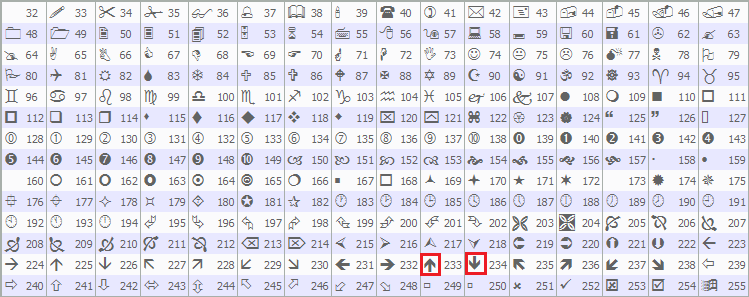
We then associate all calculation buffers for the signal and trend WaveTrend elements—covering smoothing averages, differences, indices, lines, histograms, crossovers, and trend indicators—to higher indices as non-visible calculation data. To wrap up, we return INIT_SUCCEEDED to signal that initialization completed without issues. Now, we just need to do our computations on every tick when needed. First, we will initialize the buffers for all the bars if it is the first time we are loading the indicator for all the candles, and then later on, do the necessary computations.
//+------------------------------------------------------------------+
//| Calculate indicator values                                       |
//+------------------------------------------------------------------+
int OnCalculate(const int rates_total,
                const int prev_calculated,
                const datetime &time[],
                const double &open[],
                const double &high[],
                const double &low[],
                const double &close[],
                const long &tick_volume[],
                const long &volume[],
                const int &spread[]) {
   int start = prev_calculated - 1;               //--- Set start index
   if (start < 0) start = 0;                      //--- Adjust invalid start

   if (prev_calculated == 0) {                    //--- Handle initial calculation
      ArrayInitialize(esa_signal, EMPTY_VALUE);   //--- Init signal ESA
      ArrayInitialize(d_signal, EMPTY_VALUE);     //--- Init signal D
      ArrayInitialize(ci_signal, EMPTY_VALUE);    //--- Init signal CI
      ArrayInitialize(wt1_signal, EMPTY_VALUE);   //--- Init signal WT1
      ArrayInitialize(wt2_signal, EMPTY_VALUE);   //--- Init signal WT2
      ArrayInitialize(signal_hist, EMPTY_VALUE);  //--- Init signal hist
      ArrayInitialize(signal_bull_cross, 0);      //--- Init bull cross
      ArrayInitialize(signal_bear_cross, 0);      //--- Init bear cross

      ArrayInitialize(esa_trend, EMPTY_VALUE);    //--- Init trend ESA
      ArrayInitialize(d_trend, EMPTY_VALUE);      //--- Init trend D
      ArrayInitialize(ci_trend, EMPTY_VALUE);     //--- Init trend CI
      ArrayInitialize(wt1_trend, EMPTY_VALUE);    //--- Init trend WT1
      ArrayInitialize(wt2_trend, EMPTY_VALUE);    //--- Init trend WT2
      ArrayInitialize(trend_hist, EMPTY_VALUE);   //--- Init trend hist
      ArrayInitialize(trend_is_bull, 0);          //--- Init trend bull
      ArrayInitialize(trend_is_bear, 0);          //--- Init trend bear

      ArrayInitialize(buyArrowBuf, EMPTY_VALUE);  //--- Init buy arrows
      ArrayInitialize(sellArrowBuf, EMPTY_VALUE); //--- Init sell arrows
   }

   return(rates_total);                           //--- Return total rates
}
In the OnCalculate event handler, we receive parameters including the total number of bars, previously calculated bars, and arrays for time, prices, volumes, and spreads to process new data efficiently. We determine the starting index for calculations by setting it to one less than the previously calculated value, and adjust it to zero if it falls below zero to avoid invalid indexing.
When the indicator is first loaded or recalculated from scratch, indicated by prev_calculated being zero, we initialize all buffers using ArrayInitialize: setting signal and trend component buffers like those for exponential smoothing, differences, indices, lines, histograms to EMPTY_VALUE, crossover and trend flag buffers to zero, and arrow buffers to "EMPTY_VALUE" for a clean start. Finally, we return the total number of rates to signal the end of this calculation cycle. We can now loop via the bars and do our computations. Here is the approach we used to achieve that.
for (int i = start; i < rates_total; i++) {   //--- Loop through bars
   double src_wt = (high[i] + low[i] + close[i]) / 3.0; //--- Compute source

   if (i == 0) {                               //--- Handle first bar signal
      esa_signal[i] = src_wt;                  //--- Set initial ESA
      d_signal[i] = MathAbs(src_wt - esa_signal[i]); //--- Set initial D
      double denom_signal = 0.015 * d_signal[i]; //--- Compute denominator
      ci_signal[i] = (denom_signal != 0.0) ? (src_wt - esa_signal[i]) / denom_signal : 0.0; //--- Set CI
      wt1_signal[i] = ci_signal[i];            //--- Set initial WT1
      wt2_signal[i] = wt1_signal[i];           //--- Set initial WT2
   } else {                                    //--- Handle subsequent bars
      esa_signal[i] = CalcEMA(esa_signal[i-1], src_wt, wt_channel_len); //--- Update ESA
      d_signal[i] = CalcEMA(d_signal[i-1], MathAbs(src_wt - esa_signal[i]), wt_channel_len); //--- Update D
      double denom_signal = 0.015 * d_signal[i]; //--- Compute denominator
      ci_signal[i] = (denom_signal != 0.0) ? (src_wt - esa_signal[i]) / denom_signal : 0.0; //--- Update CI
      wt1_signal[i] = CalcEMA(wt1_signal[i-1], ci_signal[i], wt_average_len); //--- Update WT1
      wt2_signal[i] = 0;                       //--- Reset WT2
      int cnt_ma = 0;                          //--- Init MA count
      for (int k = 0; k < wt_ma_len; k++) {    //--- Loop for MA
         if (i - k < 0) break;                 //--- Skip invalid index
         wt2_signal[i] += wt1_signal[i - k];   //--- Accumulate WT1
         cnt_ma++;                             //--- Increment count
      }
      if (cnt_ma > 0) wt2_signal[i] /= cnt_ma; //--- Average WT2
   }

   signal_hist[i] = wt1_signal[i] - wt2_signal[i]; //--- Compute signal hist
   signal_bull_cross[i] = (wt1_signal[i] > wt2_signal[i] && (i == 0 || wt1_signal[i-1] <= wt2_signal[i-1])) ? 1 : 0; //--- Detect bull cross
   signal_bear_cross[i] = (wt1_signal[i] < wt2_signal[i] && (i == 0 || wt1_signal[i-1] >= wt2_signal[i-1])) ? 1 : 0; //--- Detect bear cross

   double src_wt_trend = src_wt;              //--- Set trend source
   if (i == 0) {                              //--- Handle first bar trend
      esa_trend[i] = src_wt_trend;            //--- Set initial ESA
      d_trend[i] = MathAbs(src_wt_trend - esa_trend[i]); //--- Set initial D
      double denom_trend = 0.015 * d_trend[i]; //--- Compute denominator
      ci_trend[i] = (denom_trend != 0.0) ? (src_wt_trend - esa_trend[i]) / denom_trend : 0.0; //--- Set CI
      wt1_trend[i] = ci_trend[i];             //--- Set initial WT1
      wt2_trend[i] = wt1_trend[i];            //--- Set initial WT2
   } else {                                   //--- Handle subsequent bars
      esa_trend[i] = CalcEMA(esa_trend[i-1], src_wt_trend, wt_trend_channel_len); //--- Update ESA
      d_trend[i] = CalcEMA(d_trend[i-1], MathAbs(src_wt_trend - esa_trend[i]), wt_trend_channel_len); //--- Update D
      double denom_trend = 0.015 * d_trend[i]; //--- Compute denominator
      ci_trend[i] = (denom_trend != 0.0) ? (src_wt_trend - esa_trend[i]) / denom_trend : 0.0; //--- Update CI
      wt1_trend[i] = CalcEMA(wt1_trend[i-1], ci_trend[i], wt_trend_average_len); //--- Update WT1
      wt2_trend[i] = 0;                       //--- Reset WT2
      int cnt_ma_trend = 0;                   //--- Init MA count
      for (int k = 0; k < wt_trend_ma_len; k++) { //--- Loop for MA
         if (i - k < 0) break;                //--- Skip invalid index
         wt2_trend[i] += wt1_trend[i - k];    //--- Accumulate WT1
         cnt_ma_trend++;                      //--- Increment count
      }
      if (cnt_ma_trend > 0) wt2_trend[i] /= cnt_ma_trend; //--- Average WT2
   }

   trend_hist[i] = wt1_trend[i] - wt2_trend[i]; //--- Compute trend hist
   trend_is_bull[i] = (wt1_trend[i] > wt2_trend[i]) ? 1 : 0; //--- Set bull trend
   trend_is_bear[i] = (wt1_trend[i] < wt2_trend[i]) ? 1 : 0; //--- Set bear trend

   if (color_candles) {                       //--- Check candle coloring
      openBuf[i] = open[i];                   //--- Set open
      highBuf[i] = high[i];                   //--- Set high
      lowBuf[i] = low[i];                     //--- Set low
      closeBuf[i] = close[i];                 //--- Set close
      candleColorBuf[i] = trend_is_bull[i] == 1 ? 0 : 1; //--- Set color index
   }

   buyArrowBuf[i] = EMPTY_VALUE;              //--- Reset buy arrow
   sellArrowBuf[i] = EMPTY_VALUE;             //--- Reset sell arrow
   if (signal_bull_cross[i] == 1 && (!use_trend_filter || trend_is_bull[i] == 1)) { //--- Check buy condition
      buyArrowBuf[i] = low[i] - _Point * base_offset; //--- Place buy arrow
   }
   if (signal_bear_cross[i] == 1 && (!use_trend_filter || trend_is_bear[i] == 1)) { //--- Check sell condition
      sellArrowBuf[i] = high[i] + _Point * base_offset; //--- Place sell arrow
   }
}
Here, we loop through each bar from the starting index to the total rates available, calculating the source price as the average of the high, low, and close for that bar to serve as the input for both WaveTrend oscillators.
For the signal WaveTrend, on the first bar we initialize the exponential smoothing average directly from the source, compute the absolute difference for the deviation buffer using the MathAbs function, derive a denominator by multiplying the deviation by 0.015, and set the channel index by dividing the difference between source and smoothing average by the denominator if non-zero, otherwise zero; we then set both main lines to the channel index value. For subsequent bars, we update the exponential smoothing average using "CalcEMA" with the previous value, source, and channel length, refresh the deviation with another "CalcEMA" on the absolute difference from "MathAbs" and same length, recalculate the denominator, update the channel index similarly, smooth the first main line with "CalcEMA" using the average length, and compute the second main line by averaging the recent first line values over the moving average length via a nested loop that accumulates and divides while skipping invalid indices.
We then derive the signal histogram as the difference between the two main signal lines, flag a bullish crossover if the first line is above the second and was not in the prior bar (or on the first bar), and flag a bearish crossover if the first is below the second and was not previously. Repeating a similar process for the trend WaveTrend using the same source, we handle the first bar by initializing its exponential smoothing, deviation with "MathAbs", denominator, channel index, and both main lines identically, but with trend-specific parameters for subsequent bars: updating via "CalcEMA" with trend channel and average lengths, and averaging the second line over the trend moving average length in a nested loop. We compute the trend histogram as the difference between its main lines, set the bull trend flag to 1 if the first line is above the second, and the bear trend flag to 1 if below.
If candle coloring is enabled, we copy the bar's open, high, low, and close to their buffers and assign a color index of 0 for bull trends or 1 for bear trends. Finally, we reset the buy and sell arrow buffers to EMPTY_VALUE, then place a buy arrow below the low by the base offset multiplied by _Point if a bullish signal cross occurred and either no trend filter is used or the trend is bull, and similarly place a sell arrow above the high if a bearish cross happened with matching conditions. Upon compilation, we get the following outcome.
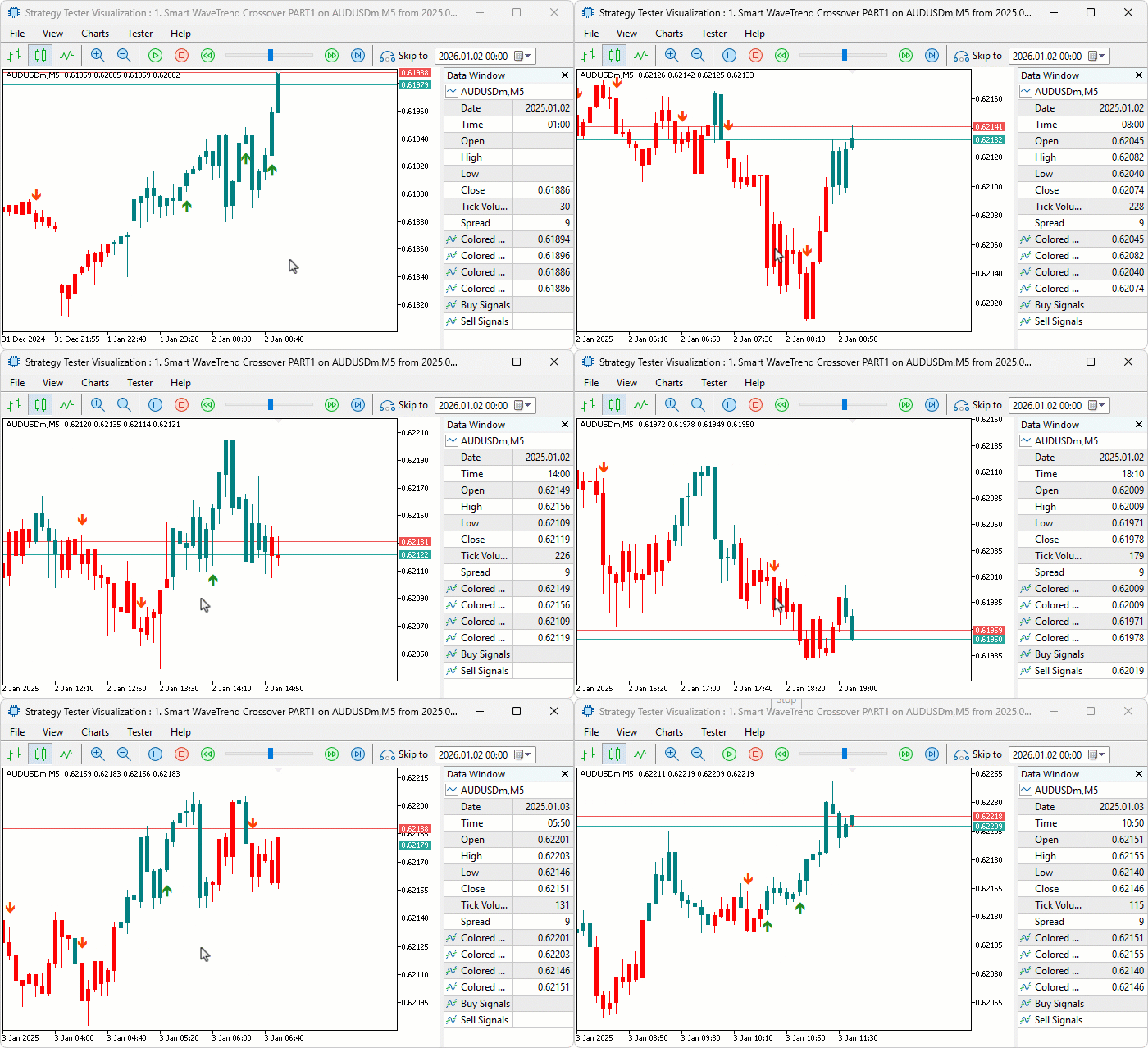
From the visualization, we can see that we calculate the indicator, draw the colored candles, and set the indicator buffers, hence achieving our objectives. The thing that remains is backtesting the program, and that is handled in the next section.
Backtesting
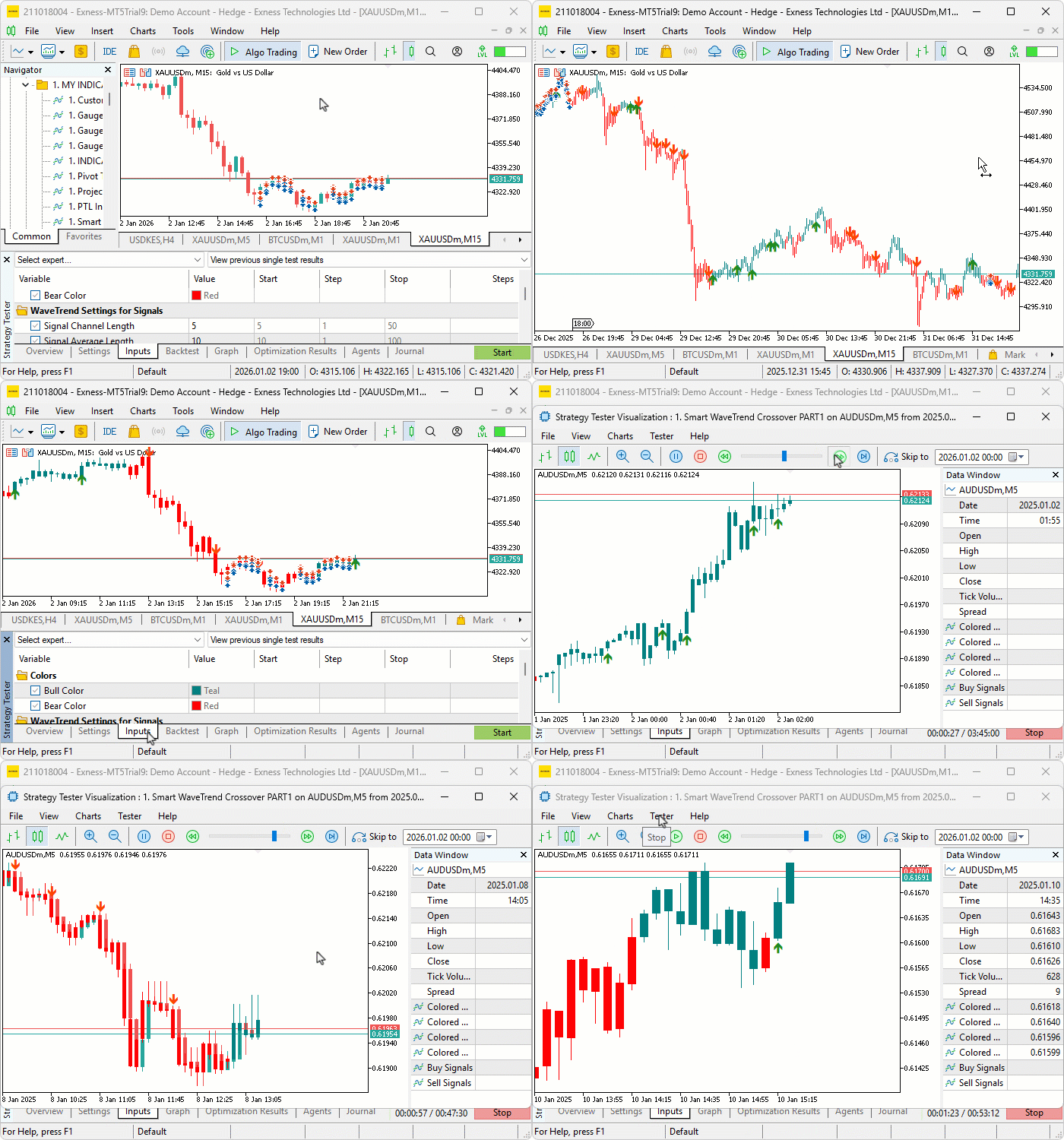
We did the testing, and below is the compiled visualization in a single Graphics Interchange Format (GIF) bitmap image format.
Conclusion
In conclusion, we’ve developed a Smart WaveTrend Crossover indicator in MQL5 that employs dual WaveTrend oscillators—one for crossover signals and another for trend filtering—with customizable parameters for channel, average, and moving average lengths. The indicator applies trend-based coloring to candles, generates buy and sell arrow signals on crossovers, and incorporates options for trend confirmation along with visual adjustments like colors and offsets. This configuration delivers visual indicators for momentum shifts aligned with broader trends.
In the next part, we will enhance the indicator with advanced visual elements, including signal boxes, fog overlays for trend visualization, customizable buy/sell labels, and integrated take-profit and stop-loss displays for better risk management, as shown below. Stay tuned.

Warning: All rights to these materials are reserved by MetaQuotes Ltd. Copying or reprinting of these materials in whole or in part is prohibited.
This article was written by a user of the site and reflects their personal views. MetaQuotes Ltd is not responsible for the accuracy of the information presented, nor for any consequences resulting from the use of the solutions, strategies or recommendations described.

 Introduction to MQL5 (Part 34): Mastering API and WebRequest Function in MQL5 (VIII)
 Fibonacci in Forex (Part I): Examining the Price-Time Relationship
 Forex arbitrage trading: A simple synthetic market maker bot to get started
 Neural Networks in Trading: Two-Dimensional Connection Space Models (Chimera)

- Free trading apps
- Over 8,000 signals for copying
- Economic news for exploring financial markets
You agree to website policy and terms of use