

Developing a multi-currency Expert Advisor (Part 24): Adding a new strategy (II)
 2 775
2 775
 19
19

Introduction
We resume our work we started in the previous article. Let us remind you that after dividing the entire project code into the library and project parts, we decided to check how we can move on from the SimpleVolumes model trading strategy to another one. What do we need to do for this? How easy will it be? It goes without saying that it was necessary to write a class for a new trading strategy. But then some unobvious complications arose.
They were connected precisely with the desire to ensure that the library part could be independent from the project part. If we had decided to break this newly introduced rule, there would have been no difficulty. However, a way was eventually found to both preserve code separation and enable the integration of the new trading strategy. This required changes to the library files of the project, although not very large in volume, but significant in meaning.
As a result, we were able to compile and run the optimization of the first stage EA with a new strategy called SimpleCandles. The next steps were to get it working with the auto optimization conveyor. For the previous strategy, we developed the CreateProject.mq5 EA, which made it possible to create a task optimization database for execution on the conveyor. In the EA parameters, we could specify which trading instruments (symbols) and timeframes we wanted to optimize, the names of the EA stages, and other necessary information. If the optimization database did not exist before, it was created automatically.
Let's see how to make it work with the new trading strategy now.
Mapping out the path
We will start the main work by analyzing the CreateProject.mq5 EA code. Our goal will be to identify code that is the same, or nearly the same, across different projects. This code can be separated into a library section, splitting it into several separate files if necessary. We will leave the part of the code that will be different for different projects in the project section and describe what changes will need to be made to it.
But first, let's fix a discovered error that occurs when saving tester pass information to the optimization database, refine the macros for organizing cycles, and look at how to add new parameters to a previously developed trading strategy.
Fixes in CDatabase
In recent articles, we have started using relatively short testing intervals for optimization projects. Instead of intervals lasting 5 years or more, we began to take intervals lasting several months. This was due to the fact that our main task was to test the operation of the auto optimization conveyor mechanism, and reducing the interval allowed us to significantly reduce the time of an individual test pass, and therefore the overall optimization time.
To save information about passes to the optimization database, each test agent (local, remote, or cloud) sends it as part of a data frame to the terminal where the optimization process is running. In this terminal, after the optimization starts, an additional instance of the optimized EA is launched in a special mode – the data frame collection mode. This instance is not launched in the tester, but on a separate terminal chart. It will receive and save all information coming from test agents.
Although the code for the event handler for the arrival of new dataframes from test agents does not contain asynchronous operations, during optimization, messages about database insertion errors related to the database being locked by another operation began to appear. This error was relatively rare. However, several dozens out of several thousands runs ultimately failed to add their results to the optimization database.
It appears that the cause of these errors is the increasing number of situations where multiple test agents simultaneously complete a run and send a dataframe to the EA in the main terminal. And this EA tries to insert a new entry into the database faster than the previous insert operation can be completed on the database side.
To fix this, we will add a separate handler for this category of errors. If the cause of the error is precisely the database or table being locked by another operation, then we simply need to repeat the unsuccessful operation after some time. If after a certain number of attempts to reinsert data, the same error occurs again, then attempts should be stopped.
For insertion, we use the CDatabase::ExecuteTransaction() method, so let's make the following changes to it. Add the request execution attempt counter to the method arguments. If an error of this kind occurs, pause for a random number of milliseconds (0 - 50) and call the same function with an increased attempt counter value.
//+------------------------------------------------------------------+
//| Execute multiple DB queries in one transaction                   |
//+------------------------------------------------------------------+
bool CDatabase::ExecuteTransaction(string &queries[], int attempt = 0) {
// Open a transaction
   DatabaseTransactionBegin(s_db);

   s_res = true;
// Send all execution requests
   FOREACH(queries, {
      s_res &= DatabaseExecute(s_db, queries[i]);
      if(!s_res) break;
   });

// If an error occurred in any request, then
   if(!s_res) {
      // Cancel transaction
      DatabaseTransactionRollback(s_db);
      if((_LastError == ERR_DATABASE_LOCKED || _LastError == ERR_DATABASE_BUSY) && attempt < 20) {
         PrintFormat(__FUNCTION__" | ERROR: ERR_DATABASE_LOCKED. Repeat Transaction in DB [%s]",
                     s_fileName);
         Sleep(rand() % 50);
         ExecuteTransaction(queries, attempt + 1);

      } else {
         // Report it
         PrintFormat(__FUNCTION__" | ERROR: Transaction failed in DB [%s], error code=%d",
                     s_fileName, _LastError);
      }

   } else {
      // Otherwise, confirm transaction
      DatabaseTransactionCommit(s_db);
      //PrintFormat(__FUNCTION__" | Transaction done successfully");
   }
   return s_res;
}
Just in case, let's make the same changes to the CDatabase::Execute() method for executing an SQL query without a transaction.
Another small change that will be useful to us in the future was to add a static boolean variable to the CDatabase class. It will remember that an error occurred while executing requests:
//+------------------------------------------------------------------+
//| Class for handling the database                                  |
//+------------------------------------------------------------------+
class CDatabase {
   // ...
   static bool       s_res;         // Query execution result

public:
   static int        Id();          // Database connection handle
   static bool       Res();         // Query execution result

   // ...
};

bool   CDatabase::s_res      =  true;
Save the changes made to the Database/Database.mqh file in the library folder.
Fixes in Macros.h
Let's mention one change that has been long overdue. As you might remember, we created the FOREACH(A, D) macro to simplify the writing of the headers of loops that should iterate over all the values in a certain array:
#define FOREACH(A, D) { for(int i=0, im=ArraySize(A);i<im;i++) {D;} }
Here A is an array name, while D is a loop body. This implementation had a drawback in that it was impossible to properly track the step-by-step execution of the code inside the loop body when debugging. Although this was rarely required, it was very inconvenient. One day, while browsing the documentation, I saw another way to implement a similar macro. The macro only specified the loop header, and the body was moved outside the macro. However, there was one more parameter that specified the name of the loop variable.
In our previous implementation, the name of the loop variable (the array element index) was fixed (i), and this did not cause any problems anywhere. Even in the place where a double loop was needed, it was possible to get by with the same names due to the different scopes of these indices. Therefore, the new implementation also received a fixed index name. The only parameter passed is the name of the array to be iterated over in the loop:
#define FOREACH(A) for(int i=0, im=ArraySize(A);i<im;i++)
To switch to the new version, it was necessary to make changes in all places where this macro was used. For example:
//+------------------------------------------------------------------+
//| OnTick event handler                                             |
//+------------------------------------------------------------------+
void CAdvisor::Tick(void) {
// Call OnTick handling for all strategies
   //FOREACH(m_strategies, m_strategies[i].Tick();)
   FOREACH(m_strategies) m_strategies[i].Tick();
}
Along with this macro, we added another one that provides the creation of a loop header. In the macro, each element of the A array is placed into the E array (which should be announced in advance) one by one. Before the loop header, the first element of the array, if it exists, is placed into this variable. As a loop variable we will use a variable with a name consisting of the i letter and E variable name. In the third part of the loop header, we increment the loop variable, while the E variable receives the value of the A array element with an increased index. Taking an index by modulo of the number of array elements allows us to avoid going beyond the array bounds on the last iteration of the loop:
#define FOREACH_AS(A, E) if(ArraySize(A)) E=A[0]; \
   for(int i##E=0, im=ArraySize(A);i##E<im;E=A[++i##E%im])
Save the changes to the Utils/Macros.h file in the library folder.
Add a parameter to a trading strategy
Like almost all the code, the implementation of a trading strategy is also subject to change. If these changes concern the change in the composition of the input parameters of a single instance of a trading strategy, then it will be necessary to make edits not only to the trading strategy class, but also to some other places. Let's look at an example to see what needs to be done for this.
Let's assume that we decide to add a maximum spread parameter to the trading strategy. Its use will consist in the fact that if at the moment of receiving a signal to open a position the current spread exceeds the value set in this parameter, then the position will not open.
To begin with, we will add an input to the first stage EA, through which we can set this value when running the tester. Then, in the initialization string forming function, add substitution of the new parameter value to the initialization string:
//+------------------------------------------------------------------+
//| 4. Strategy inputs                                               |
//+------------------------------------------------------------------+
sinput string     symbol_              = "";    // Symbol
sinput ENUM_TIMEFRAMES period_         = PERIOD_CURRENT;   // Timeframe for candles

input group "===  Opening signal parameters"
input int         signalSeqLen_        = 6;     // Number of unidirectional candles
input int         periodATR_           = 0;    // ATR period (if 0, then TP/SL in points)

input group "===  Pending order parameters"
input double      stopLevel_           = 25000;  // Stop Loss (in ATR fraction or points)
input double      takeLevel_           = 3630;   // Take Profit (in ATR fraction or points)

input group "===  Money management parameters"
input int         maxCountOfOrders_    = 9;     // Max number of simultaneously open orders
input int         maxSpread_           = 10;    // Max acceptable spread (in points)

//+------------------------------------------------------------------+
//| 5. Strategy initialization string generation function            |
//|    from the inputs                                               |
//+------------------------------------------------------------------+
string GetStrategyParams() {
   return StringFormat(
             "class CSimpleCandlesStrategy(\"%s\",%d,%d,%d,%.3f,%.3f,%d,%d)",
             (symbol_ == "" ? Symbol() : symbol_), period_,
             signalSeqLen_, periodATR_, stopLevel_, takeLevel_,
             maxCountOfOrders_, maxSpread_
          );
}
The initialization string now contains one more parameter than before. So the next change will be to add the new property of the class and read the values from the initialization string in the constructor into it:
//+------------------------------------------------------------------+
//| Trading strategy using unidirectional candlesticks               |
//+------------------------------------------------------------------+
class CSimpleCandlesStrategy : public CVirtualStrategy {
protected:
   // ...

   //---  Money management parameters
   int               m_maxCountOfOrders;  // Max number of simultaneously open positions
   int               m_maxSpread;         // Max acceptable spread (in points)

   // ...

};

//+------------------------------------------------------------------+
//| Constructor                                                      |
//+------------------------------------------------------------------+
CSimpleCandlesStrategy::CSimpleCandlesStrategy(string p_params) {
// Read the parameters from the initialization string
   m_params = p_params;
   m_symbol = ReadString(p_params);
   m_timeframe = (ENUM_TIMEFRAMES) ReadLong(p_params);
   m_signalSeqLen = (int) ReadLong(p_params);
   m_periodATR = (int) ReadLong(p_params);
   m_stopLevel = ReadDouble(p_params);
   m_takeLevel = ReadDouble(p_params);
   m_maxCountOfOrders = (int) ReadLong(p_params);
   m_maxSpread = (int) ReadLong(p_params);

   // ...
}
Now the new parameter can be used as we wish in the methods of the trading strategy class. Based on its purpose, the following code can be added to the position open signal receiving method.
//+------------------------------------------------------------------+
//| Signal for opening pending orders                                |
//+------------------------------------------------------------------+
int CSimpleCandlesStrategy::SignalForOpen() {
// By default, there is no signal
   int signal = 0;

   MqlRates rates[];
// Copy the quote values (candles) to the destination array.
// To check the signal we need m_signalSeqLen of closed candles and the current candle,
// so in total m_signalSeqLen + 1
   int res = CopyRates(m_symbol, m_timeframe, 0, m_signalSeqLen + 1, rates);

// If the required number of candles has been copied
   if(res == m_signalSeqLen + 1) {
      signal = 1; // buy signal

      // Go through all closed candles
      for(int i = 1; i <= m_signalSeqLen; i++) {
         // If at least one upward candle occurs, cancel the signal
         if(rates[i].open < rates[i].close ) {
            signal = 0;
            break;
         }
      }

      if(signal == 0) {
         signal = -1; // otherwise, sell signal

         // Go through all closed candles
         for(int i = 1; i <= m_signalSeqLen; i++) {
            // If at least one downward candle occurs, cancel the signal
            if(rates[i].open > rates[i].close ) {
               signal = 0;
               break;
            }
         }
      }
   }

// If there is a signal, then
   if(signal != 0) {
      // If the current spread is greater than the maximum allowed, then
      if(rates[0].spread > m_maxSpread) {
         PrintFormat(__FUNCTION__" | IGNORE %s Signal, spread is too big (%d > %d)",
                     (signal > 0 ? "BUY" : "SELL"),
                     rates[0].spread, m_maxSpread);
         signal = 0; // Cancel the signal
      }
   }

   return signal;
}
Similarly, we can add other new parameters to trading strategies or get rid of parameters that have become unnecessary.
Analyzing CreateProject.mq5
Let's start analyzing the CreateProject.mq5 project creation EA code. In its initialization function, we have already split the code into separate functions. The purpose of each is clear from the name:
//+------------------------------------------------------------------+
//| Expert initialization function                                   |
//+------------------------------------------------------------------+
int OnInit() {
// Connect to the database
   DB::Connect(fileName_);

// Create a project
   CreateProject(projectName_,
                 projectVersion_,
                 StringFormat("%s - %s",
                              TimeToString(fromDate_, TIME_DATE),
                              TimeToString(toDate_, TIME_DATE)
                             )
                );
// Create project stages
   CreateStages();

// Creating jobs and tasks
   CreateJobs();

// Queueing the project for execution
   QueueProject();

// Close the database
   DB::Close();

// Successful initialization
   return(INIT_SUCCEEDED);
}
This division is not very convenient, because the selected functions turned out to be quite cumbersome and solve quite different problems. For example, in the CreateJobs() function, we pre-process input data, generate parameter templates for jobs, insert information into the database, and then perform similar actions to create optimization tasks in the database. It would be better if it were the other way around: the functions were simpler and solved one small problem.
To use the new strategy in the current implementation, we would need to change the template of the first stage parameters, and possibly also the number of tasks with optimization criteria for it. The first stage parameter template for the previous trading strategy was specified in the paramsTemplate1 global variable :
// Template of optimization parameters at the first stage
string paramsTemplate1 =
   "; ===  Open signal parameters\n"
   "signalPeriod_=212||12||40||240||Y\n"
   "signalDeviation_=0.1||0.1||0.1||2.0||Y\n"
   "signaAddlDeviation_=0.8||0.1||0.1||2.0||Y\n"
   "; ===  Pending order parameters\n"
   "openDistance_=10||0||10||250||Y\n"
   "stopLevel_=16000||200.0||200.0||20000.0||Y\n"
   "takeLevel_=240||100||10||2000.0||Y\n"
   "ordersExpiration_=22000||1000||1000||60000||Y\n"
   "; ===  Capital management parameters\n"
   "maxCountOfOrders_=3||3||1||30||N\n";
Fortunately, it was the same for all first stage optimization jobs. But this may not always be the case. For example, in the new strategy, we included the symbol values and the timeframe the strategy should work on into the parameters. This means that in different first stage optimization jobs created for different symbols and timeframes, the parameters template will have variable parts. However, to set their values, you will need to delve into the depths of the task creation function code and make changes to it. Then it will no longer be possible to take it to the library section.
In addition, our optimization project creation EA now creates a project with three fixed stages. We arrived at this simple set of stages during the development, although we tried adding other stages (see for example, part 18 and part 19). Additional steps did not show any significant improvement in the final result, although this may not be the case for other trading strategies. Therefore, if we move the current code into the library part, we will not be able to change the composition of the stages in the future, if we wish.
So, as much as we would like to get by with a little effort, it is still better to do some serious refactoring work on this code now than to put it off until later. Let's try to split the project creation EA code into several classes. The classes will be moved to the library section, and in the project section we will use them to create projects with the desired composition of stages and their content. At the same time, this will also serve as a template for the future display of information about the conveyor progress.
To begin, we tried to write what the final code might look like. This preliminary version remained virtually unchanged until the final version was released. Only specific parameter compositions have been added to method calls. Therefore, let's see what the new version of the initialization function for the optimization project creation EA looks like. To avoid distraction by small details, the arguments of the methods are not shown:
//+------------------------------------------------------------------+
//| Expert initialization function                                   |
//+------------------------------------------------------------------+
int OnInit() {
// Create an optimization project object for the given database
   COptimizationProject p;

// Create a new project in the database
   p.Create(...);


// Add the first stage
   p.AddStage(...);

// Adding the first stage jobs
   p.AddJobs(...);

// Add tasks for the first stage jobs
   p.AddTasks(...);


// Add the second stage
   p.AddStage(...);

// Add the second stage jobs
   p.AddJobs(...);

// Add tasks for the second stage jobs
   p.AddTasks(...);


// Add the third stage
   p.AddStage(...);

// Add the third stage job
   p.AddJobs(...);

// Add a task for the third stage job
   p.AddTasks(...);


// Put the project in the execution queue
   p.Queue();

// Delete the EA
   ExpertRemove();

// Successful initialization
   return(INIT_SUCCEEDED);
}
With this code structure, we can easily add new stages and flexibly change their parameters. But for now we only see one new class that we will definitely need — the COptimizationProject optimization project class. Let's look at its code.
COptimizationProject class
While developing this class, it quickly became clear that we would need separate classes for all the types of entities that we store in the optimization database. So next come the COptimizationStage classes for the project stages, COptimizationJob for the project stage jobs and COptimizationTask for the tasks of each project stage job.
Since the objects of these classes are, in essence, a representation of entries from various tables of the optimization database, the composition of the class fields will repeat the composition of the fields of the corresponding tables. In addition to these fields, we will add other fields and methods to these classes that are necessary to perform the tasks assigned to them.
For now, we will make all properties and methods of the created classes public for simplicity. Each class will have its own method for creating a new entry in the optimization database. In the future, we will add methods for changing an existing entry and reading an entry from the database, since we will not need it when creating the project.
Instead of the previously used tester parameter templates, we will create separate functions that will return already filled parameters according to the template. This way the parameter templates will move inside these functions. These functions will take a project pointer as a parameter and will be able to use it to access the required project information to be substituted into the template. We will move the declaration of these functions to the project section, and in the library section we will declare only a new type - a pointer to the function of the following type:
// Create a new type - a pointer to a string generation function
// for optimization job parameters (job) accepting the pointer
// to the optimization project object as an argument
typedef string (*TJobsTemplateFunc)(COptimizationProject*);
Thanks to this, we will be able to use the stages parameters generation functions in the COptimizationProject class. They do not exist yet, but in the future, in the design part, we will definitely have to add them.
Here is what the description of this class looks like:
//+------------------------------------------------------------------+
//| Optimization project class                                       |
//+------------------------------------------------------------------+
class COptimizationProject {
public:
   string            m_fileName;    // Database name

   // Properties stored directly in the database
   ulong             id_project;    // Project ID
   string            name;          // Name
   string            version;       // Version
   string            description;   // Description
   string            status;        // Status

   // Arrays of all stages, jobs and tasks
   COptimizationStage* m_stages[];  // Project stages
   COptimizationJob*   m_jobs[];    // Jobs of all project stages
   COptimizationTask*  m_tasks[];   // Tasks of all jobs of project stages

   // Properties for the current state of the project creation
   string            m_symbol;      // Current symbol
   string            m_timeframe;   // Current timeframe

   COptimizationStage* m_stage;     // Last created stage (current stage)
   COptimizationJob*   m_job;       // Last created job (current job)
   COptimizationTask*  m_task;      // Last created task (current task)

   // Methods
                     COptimizationProject(string p_fileName);  // Constructor
                    ~COptimizationProject();                   // Destructor

   // Create a new project in the database
   COptimizationProject* COptimizationProject::Create(string p_name,
         string p_version = "", string p_description = "", string p_status = "Done");

   void              Insert();   // Insert an entry into the database
   void              Update();   // Update an entry in the database

   // Add a new stage to the database
   COptimizationProject* AddStage(COptimizationStage* parentStage, string stageName,
                                  string stageExpertName,
                                  string stageSymbol, string stageTimeframe,
                                  int stageOptimization, int stageModel,
                                  datetime stageFromDate, datetime stageToDate,
                                  int stageForwardMode, datetime stageForwardDate,
                                  int stageDeposit = 10000, string stageCurrency = "USD",
                                  int stageProfitInPips = 0, int stageLeverage = 200,
                                  int stageExecutionMode = 0, int stageOptimizationCriterion = 7,
                                  string stageStatus = "Done");

   // Add new jobs to the database for the specified symbols and timeframes
   COptimizationProject* AddJobs(string p_symbols, string p_timeframes,
                                 TJobsTemplateFunc p_templateFunc);
   COptimizationProject* AddJobs(string &p_symbols[], string &p_timeframes[],
                                 TJobsTemplateFunc p_templateFunc);

   // Add new tasks to the database for the specified optimization criteria
   COptimizationProject* AddTasks(string p_criterions);
   COptimizationProject* AddTasks(string &p_criterions[]);

   void              Queue();    // Put the project in the execution queue

   // Convert a string name to a timeframe
   static ENUM_TIMEFRAMES   StringToTimeframe(string s);
};
At the beginning are the properties that are directly stored in the optimization database in the projects table. Next come arrays of all project stages, jobs and tasks, and then properties for the current state of the project creation.
Since this class currently has only one task (creating a project in the optimization database), we immediately connect to the required database in the constructor and open a transaction. The completion of this transaction will occur in the destructor. This is where the CDatabase::s_res static class field comes in handy. Its value can be used to determine whether any error occurred when inserting entries into the optimization database when creating a project. If there were no errors, the transaction is confirmed, otherwise it is canceled. Also, memory for created dynamic objects is freed in the destructor.
//+------------------------------------------------------------------+
//| Constructor                                                      |
//+------------------------------------------------------------------+
COptimizationProject::COptimizationProject(string p_fileName) :
   m_fileName(p_fileName), id_project(0) {
// Connect to the database
   if (DB::Connect(m_fileName)) {
      // Start a transaction
      DatabaseTransactionBegin(DB::Id());
   }
}

//+------------------------------------------------------------------+
//| Destructor                                                       |
//+------------------------------------------------------------------+
COptimizationProject::~COptimizationProject() {
// If no errors occurred, then
   if(DB::Res()) {
      // Confirm the transaction
      DatabaseTransactionCommit(DB::Id());
   } else {
      // Otherwise, cancel the transaction
      DatabaseTransactionRollback(DB::Id());
   }
// Close connection to the database
   DB::Close();

// Delete created task, job, and stage objects
   FOREACH(m_tasks)  {
      delete m_tasks[i];
   }
   FOREACH(m_jobs)   {
      delete m_jobs[i];
   }
   FOREACH(m_stages) {
      delete m_stages[i];
   }
}
The methods for adding jobs and tasks are declared in two variants. In the first one, the lists of symbols, timeframes and criteria are passed to them in string parameters, separated by commas. Inside the method, these strings are converted into arrays of values and substituted as arguments when calling the second version of the method, which accepts arrays.
Here are the methods for adding jobs:
//+------------------------------------------------------------------+
//| Add new jobs to the database for the specified                   |
//| symbols and timeframes in strings                                |
//+------------------------------------------------------------------+
COptimizationProject* COptimizationProject::AddJobs(string p_symbols, string p_timeframes,
                                                    TJobsTemplateFunc p_templateFunc) {
// Array of symbols for strategies
   string symbols[];
   StringReplace(p_symbols, ";", ",");
   StringSplit(p_symbols, ',', symbols);

// Array of timeframes for strategies
   string timeframes[];
   StringReplace(p_timeframes, ";", ",");
   StringSplit(p_timeframes, ',', timeframes);

   return AddJobs(symbols, timeframes, p_templateFunc);
}

//+------------------------------------------------------------------+
//| Add new jobs to the database for the specified                   |
//| symbols and timeframes in arrays                                 |
//+------------------------------------------------------------------+
COptimizationProject* COptimizationProject::AddJobs(string &p_symbols[], string &p_timeframes[],
                                                    TJobsTemplateFunc p_templateFunc) {
   // For each symbol
   FOREACH_AS(p_symbols, m_symbol) {
      // For each timeframe
      FOREACH_AS(p_timeframes, m_timeframe) {
         // Get the parameters for work for a given symbol and timeframe
         string params = p_templateFunc(&this);

         // Create a new job object
         m_job = new COptimizationJob(0, m_stage, m_symbol, m_timeframe, params);

         // Insert it into the optimization database
         m_job.Insert();

         // Add it to the array of all jobs
         APPEND(m_jobs, m_job);

         // Add it to the array of current stage jobs
         APPEND(m_stage.jobs, m_job);
      }
   }

   return &this;
}
The third argument is the pointer to the function for creating optimization parameters for stage EAs.
COptimizationStage class
This class description has many properties compared to other classes, but this is only due to the fact that there are multiple fields in the stages table of the optimization database. For each of them, there is a corresponding property in this class. Also note that the pointer to the project object (which includes this stage) and the pointer to the previous stage object are passed to the stage constructor. For the first stage there is no previous one, so we will pass NULL for it in this parameter.
//+------------------------------------------------------------------+
//| Optimization stage class                                         |
//+------------------------------------------------------------------+
class COptimizationStage {
public:
   ulong             id_stage;
   ulong             id_project;
   ulong             id_parent_stage;
   string            name;
   string            expert;
   string            symbol;
   string            period;
   int               optimization;
   int               model;
   datetime          from_date;
   datetime          to_date;
   int               forward_mode;
   datetime          forward_date;
   int               deposit;
   string            currency;
   int               profit_in_pips;
   int               leverage;
   int               execution_mode;
   int               optimization_criterion;
   string            status;

   COptimizationProject* project;
   COptimizationStage* parent_stage;
   COptimizationJob* jobs[];

                     COptimizationStage(ulong p_idStage, COptimizationProject* p_project,
                      COptimizationStage* parentStage,
                      string p_name, string p_expertName,
                      string p_symbol = "GBPUSD", string p_timeframe = "H1",
                      int p_optimization = 0, int p_model = 0,
                      datetime p_fromDate = 0, datetime p_toDate = 0,
                      int p_forwardMode = 0, datetime p_forwardDate = 0,
                      int p_deposit = 10000, string p_currency = "USD",
                      int p_profitInPips = 0, int p_leverage = 200,
                      int p_executionMode = 0, int p_optimizationCriterion = 7,
                      string p_status = "Done") :
                     id_stage(p_idStage),
                     project(p_project),
                     id_project(!!p_project ? p_project.id_project : 0),
                     parent_stage(parentStage),
                     id_parent_stage(!!parentStage ? parentStage.id_stage : 0),
                     name(p_name), expert(p_expertName), symbol(p_symbol),
                     period(p_timeframe), optimization(p_optimization), model(p_model),
                     from_date(p_fromDate), to_date(p_toDate), forward_mode(p_forwardMode),
                     forward_date(p_forwardDate), deposit(p_deposit), currency(p_currency),
                     profit_in_pips(p_profitInPips), leverage(p_leverage),
                     execution_mode(p_executionMode),
                     optimization_criterion(p_optimizationCriterion), status(p_status) {}

   // Create a stage in the database
   void              Insert();
};

//+------------------------------------------------------------------+
//| Create a stage in the database                                   |
//+------------------------------------------------------------------+
void COptimizationStage::Insert() {
   string query = StringFormat("INSERT INTO stages VALUES("
                               "%s,"  // id_stage
                               "%I64u," // id_project
                               "%s,"    // id_parent_stage
                               "'%s',"  // name
                               "'%s',"  // expert
                               "'%s',"  // symbol
                               "'%s',"  // period
                               "%d,"    // optimization
                               "%d,"    // model
                               "'%s',"  // from_date
                               "'%s',"  // to_date
                               "%d,"    // forward_mode
                               "%s,"    // forward_date
                               "%d,"    // deposit
                               "'%s',"  // currency
                               "%d,"    // profit_in_pips
                               "%d,"    // leverage
                               "%d,"    // execution_mode
                               "%d,"    // optimization_criterion
                               "'%s'"   // status
                               ");",
                               (id_stage == 0 ? "NULL" : (string) id_stage), // id_stage
                               id_project,                           // id_project
                               (id_parent_stage == 0 ?
                                "NULL" : (string) id_parent_stage),  // id_parent_stage
                               name,                            // name
                               expert,                          // expert
                               symbol,                          // symbol
                               period,                          // period
                               optimization,                    // optimization
                               model,                           // model
                               TimeToString(from_date, TIME_DATE),  // from_date
                               TimeToString(to_date, TIME_DATE),    // to_date
                               forward_mode,                    // forward_mode
                               (forward_mode == 4 ?
                                "'" + TimeToString(forward_date, TIME_DATE) + "'"
                                : "NULL"),                      // forward_date
                               deposit,                         // deposit
                               currency,                        // currency
                               profit_in_pips,                  // profit_in_pips
                               leverage,                        // leverage
                               execution_mode,                  // execution_mode
                               optimization_criterion,          // optimization_criterion
                               status                           // status
                              );
   PrintFormat(__FUNCTION__" | %s", query);
   id_stage = DB::Insert(query);
}
The actions performed in the constructor and in the method of inserting a new entry into the stages table is very simple: remember the passed argument values in the object properties and use them to form an SQL query to insert an entry into the desired optimization database table.
COptimizationJob class
This class is identical in structure to the COptimizationStage class. The constructor remembers the parameters, while the Insert() method inserts a new row into the jobs table in the optimization database. Also, the pointer to the stage object (which is to include the current job object) is passed to each job object during creation.
//+------------------------------------------------------------------+
//| Optimization job class                                           |
//+------------------------------------------------------------------+
class COptimizationJob {
public:
   ulong             id_job;     // job ID
   ulong             id_stage;   // stage ID
   string            symbol;     // Symbol
   string            timeframe;  // Timeframe
   string            params;     // Optimizer operation parameters
   string            status;     // Status

   COptimizationStage* stage;    // Stage a job belongs to
   COptimizationTask* tasks[];   // Array of tasks related to the job

   // Constructor
                     COptimizationJob(ulong p_jobId, COptimizationStage* p_stage,
                    string p_symbol, string p_timeframe,
                    string p_params, string p_status = "Done");

   // Create a job in the database
   void              Insert();
};

//+------------------------------------------------------------------+
//| Constructor                                                      |
//+------------------------------------------------------------------+
COptimizationJob::COptimizationJob(ulong p_jobId,
                                   COptimizationStage* p_stage,
                                   string p_symbol, string p_timeframe,
                                   string p_params, string p_status = "Done") :
   id_job(p_jobId),
   stage(p_stage),
   id_stage(!!p_stage ? p_stage.id_stage : 0),
   symbol(p_symbol),
   timeframe(p_timeframe),
   params(p_params),
   status(p_status) {}

//+------------------------------------------------------------------+
//| Create a job in the database                                     |
//+------------------------------------------------------------------+
void COptimizationJob::Insert() {
// Request to create a second stage job for a given symbol and timeframe
   string query = StringFormat("INSERT INTO jobs "
                               " VALUES (NULL,%I64u,'%s','%s','%s','%s');",
                               id_stage, symbol, timeframe, params, status);
   id_job = DB::Insert(query);
   PrintFormat(__FUNCTION__" | %s -> %I64u", query, id_job);
}
The last remaining COptimizationTask class is constructed in the same way, so I will not provide its code here.
Re-writing CreateProject.mq5
Let's return to the CreateProject.mq5 file and look at its main parameters. This file is located in the project section, so for each individual project we can specify the required default parameter values in it so as not to change them at startup.
First of all, we specify the name of the optimization database:
input string fileName_ = "article.17328.db.sqlite"; // - Optimization database file
In the next group of parameters, we specify the comma-separated symbols and timeframes the first and second stages of the EA optimization will be performed on:
input string  symbols_ = "GBPUSD,EURUSD,EURGBP";     // - Symbols
input string  timeframes_ = "H1,M30";                // - Timeframes
With this selection, six jobs will be created for each of the possible combinations of three symbols and two timeframes.
Next comes the selection of the interval, over which optimization will take place:
input group "::: Project parameters - Optimization interval"
input datetime fromDate_ = D'2022-09-01';             // - Start date
input datetime toDate_ = D'2023-01-01';               // - End date
In the account parameters group, we select the main symbol that will be used in the third stage, when the EA will work with several symbols in the tester. Its selection becomes important if among the symbols there are those, for which trading continues on weekends (for example, crypto currencies). In this case, we need to select this one as the main one, since otherwise, during the tester run, it will not generate ticks on all weekends.
input group "::: Project parameters - Account"
input string   mainSymbol_ = "GBPUSD";                // - Main symbol
input int      deposit_ = 10000;                      // - Initial deposit
In the first stage parameters group, the name of the first stage EA is specified, although it may remain the same. Next, we specify the optimization criteria that will be used for each job in the first stage. These are just numbers separated by commas. The value of 6 corresponds to the user optimization criterion.
input group "::: Stage 1. Search"
input string   stage1ExpertName_ = "Stage1.ex5";      // - Stage EA
input string   stage1Criterions_ = "6,6,6";           // - Optimization criteria for tasks
In this case, we specified the user criterion three times, so each job will contain three optimization problems with the specified criterion.
In the second stage parameters group, we have added the ability to specify all the values of the second stage EA parameters, and not just the name and number of strategies in the group. These parameters influence the selection of the first stage passes, whose parameters will be used to select groups in the second stage.
input group "::: Stage 2. Grouping"
input string   stage2ExpertName_ = "Stage2.ex5";      // - Stage EA
input string   stage2Criterion_  = "6";               // - Optimization criterion for tasks
//input bool     stage2UseClusters_= false;           // - Use clustering?
input double   stage2MinCustomOntester_ = 500;        // - Min value of norm. profit
input uint     stage2MinTrades_  = 20;                // - Min number of trades
input double   stage2MinSharpeRatio_ = 0.7;           // - Min Sharpe ratio
input uint     stage2Count_      = 8;                 // - Number of strategies in the group
For example, if stage2MinTrades_ =20 only those individual trading strategy instances that completed at least 20 trades in the first stage will be able to join the group. The stage2UseClusters_ parameter has been commented out for now as we are not currently using clustering of the second stage results. Therefore, it should be substituted with false.
We also added some things to the third stage parameters group. In addition to the name of the third stage EA (which also does not need to be changed when changing projects), two parameters have been added that control the formation of the name of the final EA's database. In the final EA itself, this name is formed in the CVirtualAdvisor::FileName() function according to the following template:
<Project name>-<Magic>.test.db.sqlite // To run in the tester
<Project name>-<Magic>.db.sqlite      // To run on a trading account
Therefore, the third stage EA uses the same template. <Project name> is replaced with projectName_, while <Magic> with stage3Magic_. The stage3Tester_ parameter is responsible for adding the ".test" suffix.
input group "::: Stage 3. Result"
input string   stage3ExpertName_ = "Stage3.ex5";      // - Stage EA
input ulong    stage3Magic_      = 27183;             // - Magic
input bool     stage3Tester_     = true;              // - For the tester?
In principle, it would be possible to create one parameter that would simply indicate the full name of the final EA database. After completing the third stage, the resulting file of this database can be safely renamed as desired before further use.
Now we just need to create functions for generating parameters for stage EAs using given templates. Since we are using three stages, we will need three functions.
For the first stage, the function will look like this:
// Template of optimization parameters at the first stage
string paramsTemplate1(COptimizationProject *p) {
   string params = StringFormat(
                      "symbol_=%s\n"
                      "period_=%d\n"
                      "; ===  Open signal parameters\n"
                      "signalSeqLen_=4||2||1||8||Y\n"
                      "periodATR_=21||7||2||48||Y\n"
                      "; ===  Pending order parameters\n"
                      "stopLevel_=2.34||0.01||0.01||5.0||Y\n"
                      "takeLevel_=4.55||0.01||0.01||5.0||Y\n"
                      "; ===  Capital management parameters\n"
                      "maxCountOfOrders_=15||1||1||30||Y\n",
                      p.m_symbol, p.StringToTimeframe(p.m_timeframe));
   return params;
}
It is based on the optimization parameters of the first stage EA copied from the strategy tester with the desired ranges for iterating over individual input parameters set. This string is filled with the values of the symbol and timeframe, for which a job object is created in the project at the time this function is called. For example, if for a certain timeframe it is necessary to use other ranges of inputs to be iterated over, then this logic can be implemented in this function.
When moving to another project with a different trading strategy, this function should be replaced with another one, written for the new trading strategy and its set of inputs.
For the second and third stages, we also implemented these functions in the CreateProject.mq5 file. However, when moving to another project, they most likely will not have to be changed. But let's not take them to the library section right away. Let them stay here for now:
// Template of optimization parameters for the second stage
string paramsTemplate2(COptimizationProject *p) {

   // Find the parent job ID for the current job
   // by matching the symbol and timeframe at the current and parent stages
   int i;
   SEARCH(p.m_stage.parent_stage.jobs,
          (p.m_stage.parent_stage.jobs[i].symbol == p.m_symbol
           && p.m_stage.parent_stage.jobs[i].timeframe == p.m_timeframe),
          i);

   ulong parentJobId = p.m_stage.parent_stage.jobs[i].id_job;
   string params = StringFormat(
                      "idParentJob_=%I64u\n"
                      "useClusters_=%s\n"
                      "minCustomOntester_=%f\n"
                      "minTrades_=%u\n"
                      "minSharpeRatio_=%.2f\n"
                      "count_=%u\n",
                      parentJobId,
                      (string) false, //(string) stage2UseClusters_,
                      stage2MinCustomOntester_,
                      stage2MinTrades_,
                      stage2MinSharpeRatio_,
                      stage2Count_
                   );
   return params;
}

// Template of optimization parameters at the third stage
string paramsTemplate3(COptimizationProject *p) {
   string params = StringFormat(
                      "groupName_=%s\n"
                      "advFileName_=%s\n"
                      "passes_=\n",
                      StringFormat("%s_v.%s_%s",
                                   p.name, p.version, TimeToString(toDate_, TIME_DATE)),
                      StringFormat("%s-%I64u%s.db.sqlite",
                                   p.name, stage3Magic_, (stage3Tester_ ? ".test" : "")));
   return params;
}
Next comes the code for the initialization function, which does all the work and removes the EA from the chart before finishing. Let's show it now with the parameters of the called functions:
//+------------------------------------------------------------------+
//| Expert initialization function                                   |
//+------------------------------------------------------------------+
int OnInit() {
// Create an optimization project object for the given database
   COptimizationProject p(fileName_);

// Create a new project in the database
   p.Create(projectName_, projectVersion_,
            StringFormat("%s - %s",
                         TimeToString(fromDate_, TIME_DATE),
                         TimeToString(toDate_, TIME_DATE)));


// Add the first stage
   p.AddStage(NULL, "First", stage1ExpertName_, mainSymbol_, "H1", 2, 2,
              fromDate_, toDate_, 0, 0, deposit_);

// Adding the first stage jobs
   p.AddJobs(symbols_, timeframes_, paramsTemplate1);

// Add tasks for the first stage jobs
   p.AddTasks(stage1Criterions_);


// Add the second stage
   p.AddStage(p.m_stages[0], "Second", stage2ExpertName_, mainSymbol_, "H1", 2, 2,
              fromDate_, toDate_, 0, 0, deposit_);

// Add the second stage jobs
   p.AddJobs(symbols_, timeframes_, paramsTemplate2);

// Add tasks for the second stage jobs
   p.AddTasks(stage2Criterion_);


// Add the third stage
   p.AddStage(p.m_stages[1], "Save to library", stage3ExpertName_, mainSymbol_,
              "H1", 0, 2, fromDate_, toDate_, 0, 0, deposit_);

// Add the third stage job
   p.AddJobs(mainSymbol_, "H1", paramsTemplate3);

// Add a task for the third stage job
   p.AddTasks("0");


// Put the project in the execution queue
   p.Queue();

// Delete the EA
   ExpertRemove();

// Successful initialization
   return(INIT_SUCCEEDED);
}
This part of the code also does not need to be changed when moving to another project, unless we want to change the composition of the auto optimization conveyor stages. Over time, we will improve it, too. For example, the code currently contains numeric constants that should be replaced with named constants for better readability. If it turns out that this code really does not need any changes, then we will move it to the library section.
So, the EA for creating optimization projects in the database is ready. Now let's create stage EAs.
Stage EAs
We have already implemented Stage1.mq5 in the previous article, so now we have made changes to it related only to the addition of the new maxSpread_ parameter into the trading strategy. These changes have already been discussed above.
// 1. Define a constant with the EA name
#define  __NAME__ "SimpleCandles" + MQLInfoString(MQL_PROGRAM_NAME)

// 2. Connect the required strategy
#include "Strategies/SimpleCandlesStrategy.mqh";

// 3. Connect the general part of the first stage EA from the Advisor library
#include <antekov/Advisor/Experts/Stage1.mqh>

//+------------------------------------------------------------------+
//| 4. Strategy inputs                                               |
//+------------------------------------------------------------------+
sinput string     symbol_              = "";    // Symbol
sinput ENUM_TIMEFRAMES period_         = PERIOD_CURRENT;   // Timeframe for candles

input group "===  Opening signal parameters"
input int         signalSeqLen_        = 6;     // Number of unidirectional candles
input int         periodATR_           = 0;     // ATR period (if 0, then TP/SL in points)

input group "===  Pending order parameters"
input double      stopLevel_           = 25000; // Stop Loss (in ATR fraction or points)
input double      takeLevel_           = 3630;  // Take Profit (in ATR fraction or points)

input group "===  Money management parameters"
input int         maxCountOfOrders_    = 9;     // Max number of simultaneously open orders
input int         maxSpread_           = 10;    // Max acceptable spread (in points)


//+------------------------------------------------------------------+
//| 5. Strategy initialization string generation function            |
//|    from the inputs                                               |
//+------------------------------------------------------------------+
string GetStrategyParams() {
   return StringFormat(
             "class CSimpleCandlesStrategy(\"%s\",%d,%d,%d,%.3f,%.3f,%d,%d)",
             (symbol_ == "" ? Symbol() : symbol_), period_,
             signalSeqLen_, periodATR_, stopLevel_, takeLevel_,
             maxCountOfOrders_, maxSpread_
          );
}
In the second and third stage EAs, we only need to define the __NAME__ constant with the unique EA name and connect the file or files of the trading strategies used. The rest of the code will be taken from the included library file of the corresponding stage. Here is what the code for the second stage EA might look like Stage2.mq5:
// 1. Define a constant with the EA name
#define  __NAME__ "SimpleCandles" + MQLInfoString(MQL_PROGRAM_NAME)

// 2. Connect the required strategy
#include "Strategies/SimpleCandlesStrategy.mqh";

#include <antekov/Advisor/Experts/Stage2.mqh>
and the third stage Stage3.mq5:
// 1. Define a constant with the EA name
#define  __NAME__ "SimpleCandles" + MQLInfoString(MQL_PROGRAM_NAME)

// 2. Connect the required strategy
#include "Strategies/SimpleCandlesStrategy.mqh";

#include <antekov/Advisor/Experts/Stage3.mqh>
Final EA
In the final EA, we only need to add the connection to the strategy used. We do not need to declare the __NAME__ constant here, since in this case both the constant and the function for generating the initialization string will be declared in the included file from the library part. In the code below, we have shown in the comments what the EA name and the function for generating the initialization string look like in this case:
// 1. Define a constant with the EA name
//#define  __NAME__ MQLInfoString(MQL_PROGRAM_NAME)

// 2. Connect the required strategy
#include "Strategies/SimpleCandlesStrategy.mqh";

#include <antekov/Advisor/Experts/Expert.mqh>

//+------------------------------------------------------------------+
//| Function for generating the strategy initialization string       |
//| from the default inputs (if no name was specified).              |
//| Import the initialization string from the EA database            |
//| by the strategy group ID                                         |
//+------------------------------------------------------------------+
//string GetStrategyParams() {
//// Take the initialization string from the new library for the selected group
//// (from the EA database)
//   string strategiesParams = CVirtualAdvisor::Import(
//                                CVirtualAdvisor::FileName(__NAME__, magic_),
//                                groupId_
//                             );
//
//// If the strategy group from the library is not specified, then we interrupt the operation
//   if(strategiesParams == NULL && useAutoUpdate_) {
//      strategiesParams = "";
//   }
//
//   return strategiesParams;
//}
If we suddenly want to change something from this, then it is enough to remove the comments from this code and make the necessary edits to it.
Thus, in the project part we will have the following files:
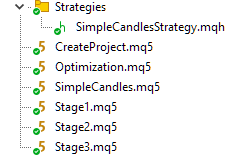
Let's compile all the files of the project part so that for each file with the extension of mq5 a file with the extension of ex5 is created.
Putting it all together
Step 1: Creating a project
Drag the CreateProject.ex5 EA to any chart in the terminal (this EA does not need to be run in the tester!). In the EA source code, we have already tried to specify the current values for all inputs, so you can simply click OK in the dialog.
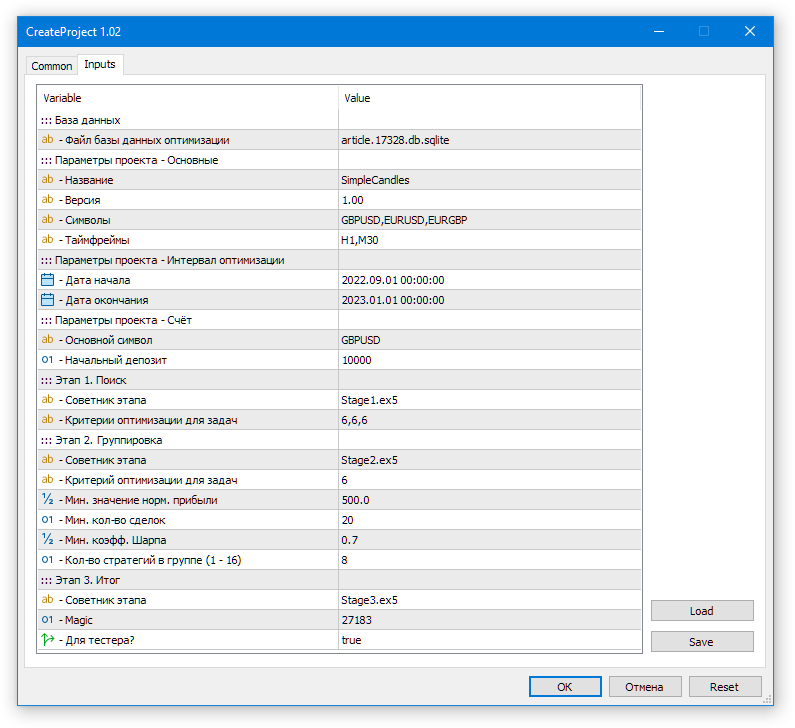
Fig. 1. Launching the project creation EA in the optimization database
As a result, we will have the article.17328.db.sqlite file with the optimization database.
Step 2: Start of optimization
Drag the Optimization.ex5 EA (this EA also does not need to be run in the tester!) to any chart. In the dialog that opens, enable the use of the DLL, and ensure that we have specified the correct optimization database name:
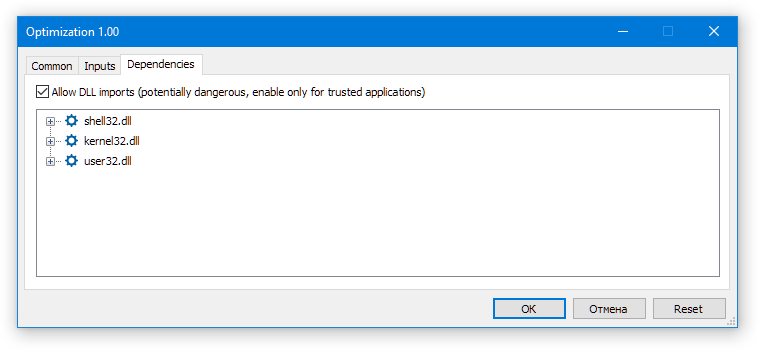
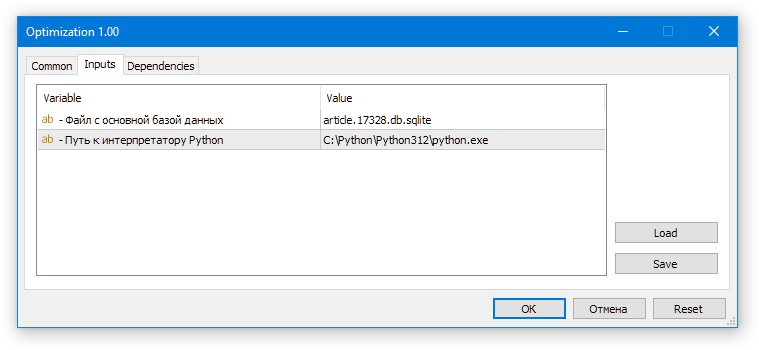
Fig. 2. Launching the auto optimization EA
If all is well, we should see something like this: in the tester, the optimization of the first stage EA starts on the first symbol-timeframe pair, while we will see the following on the chart with the Optimization.ex5 EA: "Total tasks in queue: ..., Current Task ID: ...".
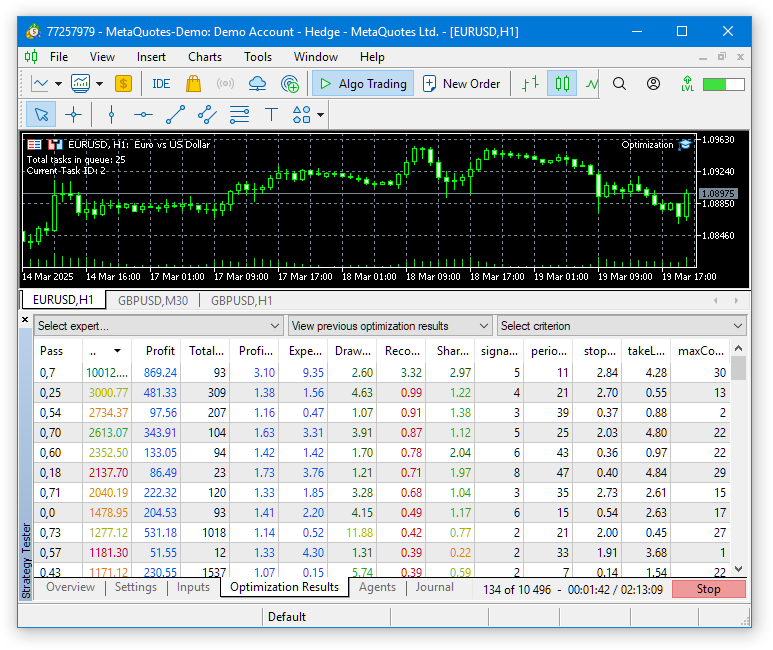
Fig. 3. Auto optimization EA operation.
Next, you should wait for some time until all optimization tasks are completed. This time can be quite significant if the testing interval is long and the number of symbols and timeframes is large. With the current default settings on 33 agents, the entire process took about four hours.
At the last stage of the conveyor, optimization is no longer performed, but a single pass of the third stage EA is launched. As a result, a file with the database of the final EA is created. Since we chose the project name "SimpleCandles" when creating the project, while the magic number is 27183 and stage3Tester_=true, then a file named SimpleCandles-27183.test.db.sqlite will be created in the shared terminal.
Step 3: Launching the final EA in the tester
Let's try running the final EA in the tester. Since its code is now completely taken from the library part, the default parameter values are defined there as well. Therefore, when we launch the SimpleCandles.ex5 EA in the tester without changing the values of the inputs, it will use the last added strategy group (groupId_= 0) with auto updates enabled (useAutoUpdate_= true) from the database named SimpleCandles-27183.test.db.sqlite (SimpleCandles EA file name plus the default magic number magic_= 27183 and plus ".test" suffix due to running in the tester).
Unfortunately, we have not yet created any special tools that allow us to view existing strategy group IDs in the final EA's database. We can only open the database itself in any SQLite editor and view them in the strategy_groups table.
However, if only one optimization project was created and run once, then only one strategy group with ID 1 will appear in the final EA database. Therefore, it makes no difference whether we specify a specific groupId_= 1 or leave groupId_= 0 from the point of view of group selection. In any case, the only existing group will be loaded. If we run the same project again (this can be done by changing the project status directly in the database) or create another similar one and run it, then new strategy groups will appear in the final EA's database. In this case, different groups will be used for different groupId_ parameter values.
Auto update enable parameter (useAutoUpdate_= true) also requires our attention. Even though there is only one group, this parameter affects the operation of the final EA. This is manifested in the fact that when auto update is enabled, only those strategy groups whose appearance date is less than the current simulated date can be loaded for work.
This means that if we run the final advisor on the same interval that we used for optimization (2022.09.01 - 2023.01.01), then our only strategy group will not be loaded, since it has the formation date of 2023.01.01. Therefore, we need to either turn off auto updates (useAutoUpdate_= false) and specify the specific ID of the trading strategy group used (groupId_= 1) in the inputs when launching the final EA, or select another interval located after the end date of the optimization interval.
In general, until we have finally chosen which strategies will be used in the final EA and have not set the goal of testing them for the feasibility of periodic re-optimization, this parameter can be set to false and specify the specific ID of the trading strategy group being used.
The last set of important parameters is responsible for what database name the final EA will use. In its default settings, the magic number is the same as the one we specified in the settings when creating the project. We also made the name of the final EA file match the name of the project. When creating the project, the stage3Tester_ parameter value was equal to true, so the file name of the created database of the final EA will be SimpleCandles-27183.test.db.sqlite. It completely matches the one the final SimpleCandles.ex5 EA will use.
Let's look at the results of running the final EA on the optimization interval:
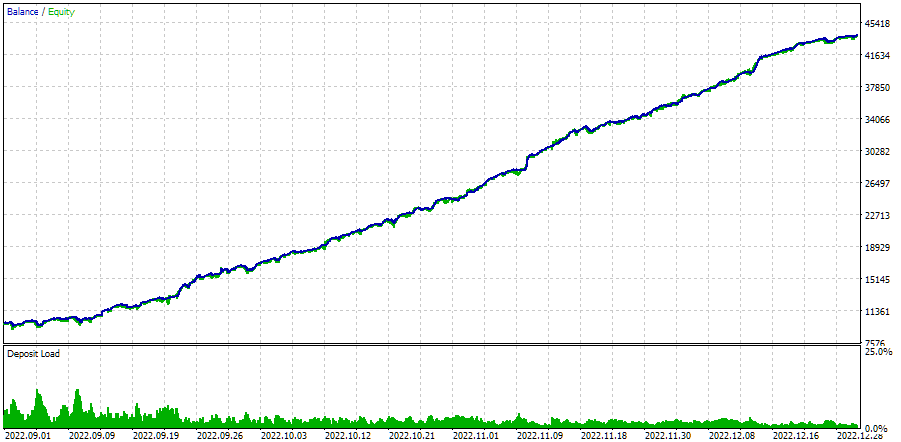
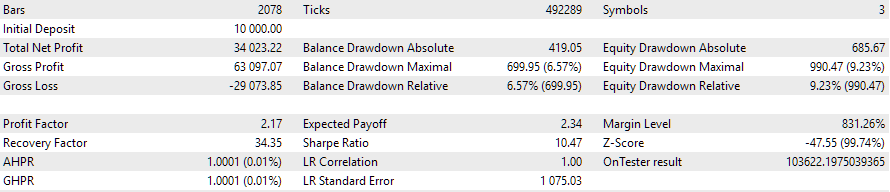
Fig. 4. The auto optimization EA operation on the interval 2022.09.01 - 2023.01.01
If we run it on some other time interval, the results will most likely not be as pretty:
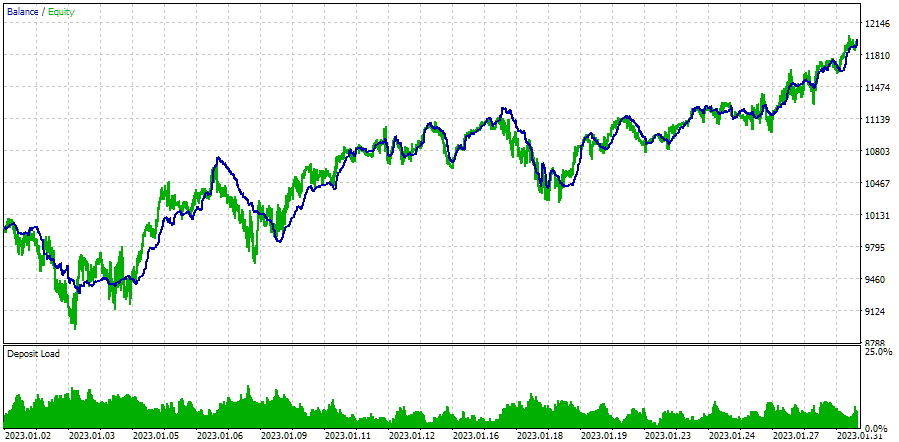
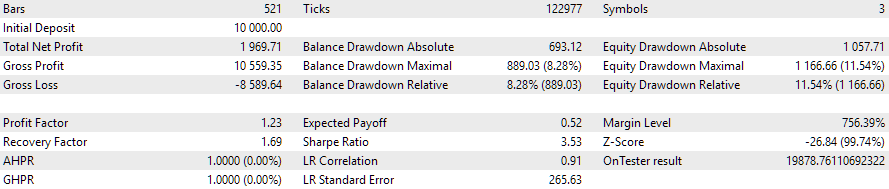
Fig. 5. The auto optimization EA operation on the interval 2023.01.01 - 2023.02.01
We took the interval of one month immediately after the optimization interval as an example. Indeed, the drawdown slightly exceeded the expected value of 10%, and the normalized profit decreased by about five times. Is it possible to re-run the optimization for the last three months and get a similar picture of the EA's behavior over the next month? This question remains open for now.
Step 4: Launching the final EA on a trading account
To run the final EA on a trading account, we will need to adjust the name of the resulting database file. We should remove the ".test" suffix from it. In other words, we simply rename and copy SimpleCandles-27183.test.db.sqlite to SimpleCandles-27183.db.sqlite. Its location remains the same - in the common terminal folder.
Drag and drop the final SimpleCandles.ex5 EA to any terminal chart. In the inputs, we might leave everything with the default values, since we are quite satisfied with loading the last group of strategies, and the current date will obviously be greater than the creation date of this group.
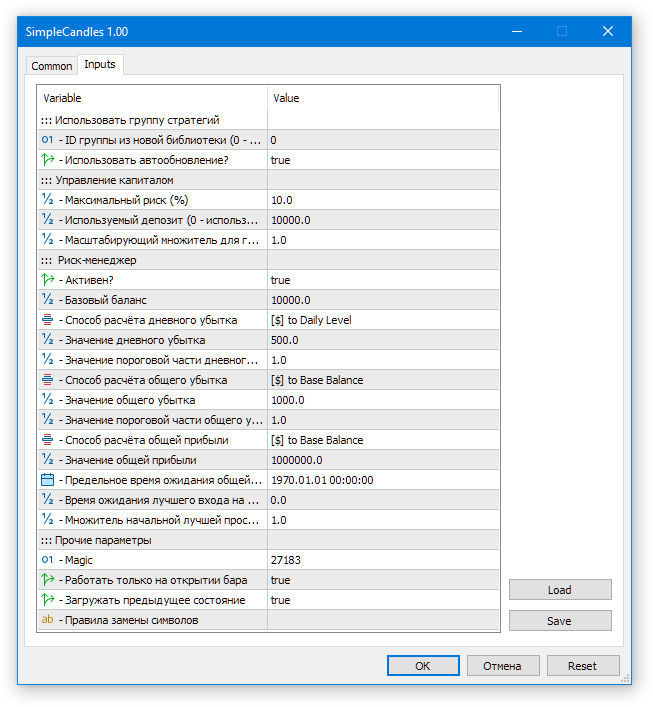
Fig. 6. Default inputs for the final EA
While preparing the article, the finalized EA was tested on a demo account for about a week and showed the following results:
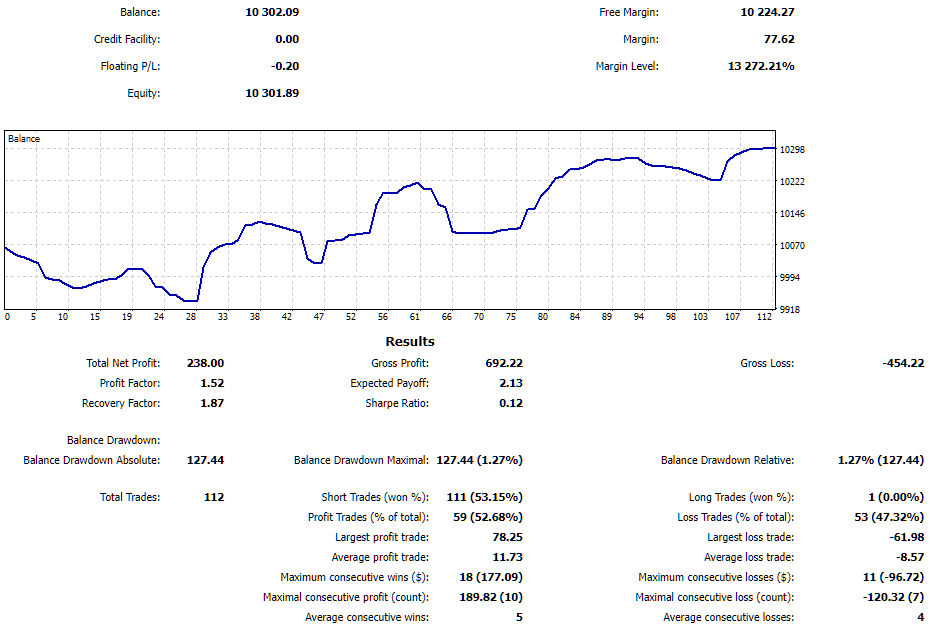
Fig. 7. Results of the final EA operation on the trading account
It was a pretty good week for the EA. With the drawdown of 1.27%, the profit was about 2%. The EA restarted a couple of times due to a computer reboot, but successfully restored information about open virtual positions and continued working.
Conclusion
Let's see what we got. We have finally put together the results of a fairly lengthy development process into something that resembles a coherent system. The resulting tool for organizing auto optimization and testing of trading strategies allows for significant improvements in the testing results of even simple trading strategies through diversification across different trading instruments.
It also allows for a significant reduction in the number of operations that require manual intervention to achieve the same goals. Now there is no need to track the completion of yet another optimization before launching the next one, no need to think about how to save intermediate optimization results and how to then integrate them into a trading EA. Instead, we can focus directly on developing the logic behind our trading strategies.
Of course, there is still a lot that can be done to improve and make this tool more convenient. The idea of a fully-fledged web interface that manages not only the creation, launch, and monitoring of running optimization projects, but also the operation of EAs running in various terminals and viewing their statistics remains in the distant future. This is a very large task, but, looking back, the same can be said about the task that today has already received a more or less complete solution.
Thank you for your attention! See you soon!
Important warning
All results presented in this article and all previous articles in the series are based only on historical testing data and are not a guarantee of any profit in the future. The work within this project is of a research nature. All published results can be used by anyone at their own risk.
Archive contents
| # | Name | Version | Description | Recent changes |
|---|---|---|---|---|
| MQL5/Experts/Article.17328 | Project working folder | |||
| 1 | CreateProject.mq5 | 1.02 | EA script for creating a project with stages, jobs and optimization tasks. | Part 25 |
| 2 | Optimization.mq5 | 1.00 | EA for projects auto optimization | Part 23 |
| 3 | SimpleCandles.mq5 | 1.01 | Final EA for parallel operation of several groups of model strategies. The parameters will be taken from the built-in group library. | Part 25 |
| 4 | Stage1.mq5 | 1.02 | Trading strategy single instance optimization EA (stage 1) | Part 25 |
| 5 | Stage2.mq5 | 1.01 | Trading strategies instances group optimization EA (stage 2) | Part 25 |
| 6 | Stage3.mq5 | 1.01 | The EA that saves a generated standardized group of strategies to an EA database with a given name. | Part 25 |
| MQL5/Experts/Article.17328/Strategies | Project strategies folder | |||
| 7 | SimpleCandlesStrategy.mqh | 1.01 | SimpleCandles trading strategy class | Part 25 |
| MQL5/Include/antekov/Advisor/Base | Base classes other project classes inherit from | |||
| 8 | Advisor.mqh | 1.04 | EA base class | Part 10 |
| 9 | Factorable.mqh | 1.05 | Base class of objects created from a string | Part 24 |
| 10 | FactorableCreator.mqh | 1.00 | Part 24 | |
| 11 | Interface.mqh | 1.01 | Basic class for visualizing various objects | Part 4 |
| 12 | Receiver.mqh | 1.04 | Base class for converting open volumes into market positions | Part 12 |
| 13 | Strategy.mqh | 1.04 | Trading strategy base class | Part 10 |
| MQL5/Include/antekov/Advisor/Database | Files for handling all types of databases used by project EAs | |||
| 14 | Database.mqh | 1.12 | Class for handling the database | Part 25 |
| 15 | db.adv.schema.sql | 1.00 | Final EA's database structure | Part 22 |
| 16 | db.cut.schema.sql | 1.00 | Structure of the truncated optimization database | Part 22 |
| 17 | db.opt.schema.sql | 1.05 | Optimization database structure | Part 22 |
| 18 | Storage.mqh | 1.01 | Class for handling the Key-Value storage for the final EA in the EA database | Part 23 |
| MQL5/Include/antekov/Advisor/Experts | Files with common parts of used EAs of different type | |||
| 19 | Expert.mqh | 1.22 | The library file for the final EA. Group parameters can be taken from the EA database | Part 23 |
| 20 | Optimization.mqh | 1.04 | Library file for the EA that manages the launch of optimization tasks | Part 23 |
| 21 | Stage1.mqh | 1.19 | Library file for the single instance trading strategy optimization EA (Stage 1) | Part 23 |
| 22 | Stage2.mqh | 1.04 | Library file for the EA optimizing a group of trading strategy instances (Stage 2) | Part 23 |
| 23 | Stage3.mqh | 1.04 | Library file for the EA saving a generated standardized group of strategies to an EA database with a given name. | Part 23 |
| MQL5/Include/antekov/Advisor/Optimization | Classes responsible for auto optimization | |||
| 24 | OptimizationJob.mqh | 1.00 | Optimization project stage job class | Part 25 |
| 25 | OptimizationProject.mqh | 1.00 | Optimization project class | Part 25 |
| 26 | OptimizationStage.mqh | 1.00 | Optimization project stage class | Part 25 |
| 27 | OptimizationTask.mqh | 1.00 | Optimization task class (creation) | Part 25 |
| 28 | Optimizer.mqh | 1.03 | Class for the project auto optimization manager | Part 22 |
| 29 | OptimizerTask.mqh | 1.03 | Optimization task class (conveyor) | Part 22 |
| MQL5/Include/antekov/Advisor/Strategies | Examples of trading strategies used to demonstrate how the project works | |||
| 30 | HistoryStrategy.mqh | 1.00 | Class of the trading strategy for replaying the history of deals | Part 16 |
| 31 | SimpleVolumesStrategy.mqh | 1.11 | Class of trading strategy using tick volumes | Part 22 |
| MQL5/Include/antekov/Advisor/Utils | Auxiliary utilities, macros for code reduction | |||
| 32 | ExpertHistory.mqh | 1.00 | Class for exporting trade history to file | Part 16 |
| 33 | Macros.mqh | 1.06 | Useful macros for array operations | Part 25 |
| 34 | NewBarEvent.mqh | 1.00 | Class for defining a new bar for a specific symbol | Part 8 |
| 35 | SymbolsMonitor.mqh | 1.00 | Class for obtaining information about trading instruments (symbols) | Part 21 |
| MQL5/Include/antekov/Advisor/Virtual | Classes for creating various objects united by the use of a system of virtual trading orders and positions | |||
| 36 | Money.mqh | 1.01 | Basic money management class | Part 12 |
| 37 | TesterHandler.mqh | 1.07 | Optimization event handling class | Part 23 |
| 38 | VirtualAdvisor.mqh | 1.10 | Class of the EA handling virtual positions (orders) | Part 24 |
| 39 | VirtualChartOrder.mqh | 1.01 | Graphical virtual position class | Part 18 |
| 40 | VirtualHistoryAdvisor.mqh | 1.00 | Trade history replay EA class | Part 16 |
| 41 | VirtualInterface.mqh | 1.00 | EA GUI class | Part 4 |
| 42 | VirtualOrder.mqh | 1.09 | Class of virtual orders and positions | Part 22 |
| 43 | VirtualReceiver.mqh | 1.04 | Class for converting open volumes to market positions (receiver) | Part 23 |
| 44 | VirtualRiskManager.mqh | 1.05 | Risk management class (risk manager) | Part 24 |
| 45 | VirtualStrategy.mqh | 1.09 | Class of a trading strategy with virtual positions | Part 23 |
| 46 | VirtualStrategyGroup.mqh | 1.03 | Class of trading strategies group(s) | Part 24 |
| 47 | VirtualSymbolReceiver.mqh | 1.00 | Symbol receiver class | Part 3 |
Translated from Russian by MetaQuotes Ltd.
Original article: https://www.mql5.com/ru/articles/17328
Warning: All rights to these materials are reserved by MetaQuotes Ltd. Copying or reprinting of these materials in whole or in part is prohibited.
This article was written by a user of the site and reflects their personal views. MetaQuotes Ltd is not responsible for the accuracy of the information presented, nor for any consequences resulting from the use of the solutions, strategies or recommendations described.

 Build a Remote Forex Risk Management System in Python
 Python-MetaTrader 5 Strategy Tester (Part 03): MetaTrader 5-Like Trading Operations — Handling and Managing
 Larry Williams Market Secrets (Part 6): Measuring Volatility Breakouts Using Market Swings
 Creating Custom Indicators in MQL5 (Part 5): WaveTrend Crossover Evolution Using Canvas for Fog Gradients, Signal Bubbles, and Risk Management

- Free trading apps
- Over 8,000 signals for copying
- Economic news for exploring financial markets
You agree to website policy and terms of use
First of all, I'd like to know what language this is in.
It's Korean. Your browser doesn't show it for some reason.
It's Korean. Your browser doesn't show it for some reason.
Exactly. I didn't post anything in this thread on that day, 2025.07.08 from the word go. If you follow that link to the thread, it shows a post with a different date. It's probably also my browser's fault that your remaining programmers can't keep up.
Exactly. I didn't post anything in this thread on that day, 2025.07.08 from the word go. If you follow this link to the thread, it shows a post with a different date. It's probably also my browser's fault that your remaining programmers can't keep up.
Thanks for your persistence, fixed it.
Thanks for your persistence, corrected.
Sorry for the persistence, I don't see a fix. The link still leads to a strange message that I did not write. Well, even if we assume that I wrote it, why is there no message in Russian next to it? Or do you think that if I can't learn English, I learnt Korean and I'm having fun....
That's the difference in one discussion in different languages.
This is from the link.
This is the Russian translation.
And this is what's in the Russian version of the article.
So which language was I trying to write in????
It's all just one topic. And if you look at the other ones, you'll find messages of strange origin in languages I never dreamed of.
I may have overreacted. I found only one other similar message, in English and probably a real translation.
Please delete the above message in all language versions and it will probably be corrected. Maybe not completely like last time.......
Forum on trading, automated trading systems and testing trading strategies
Discussion of the article "Developing a multicurrency Expert Advisor (Part 25): Plugging in a new strategy (II)"
Rashid Umarov, 2025.07.06 14:04
Thank you, we will figure it out.
We have already solved this problem, but it seems not to be completely solved.