

MQL5 Trading Tools (Part 21): Adding Cyberpunk Theme to Regression Graphs
 4 936
4 936
 0
0

Introduction
You rely on standard regression graphs for pair analysis, but they feel static and uninspiring during extended sessions, making it hard to stay focused on correlations or spot trends amid monotonous visuals, especially in low-light environments where glare reduces readability. Basic displays lack dynamic elements to highlight key data points or maintain engagement, leading to overlooked insights in volatile markets. This article is for MetaQuotes Language 5 (MQL5) developers and algorithmic traders seeking to add immersive themes to graphing tools for better visualization.
In our previous article (Part 20), we created a canvas-based graphing tool in MQL5 for statistical correlation and linear regression analysis between two symbols, with draggable and resizable features. In Part 21, we enhance this tool by adding a cyberpunk theme mode featuring neon glows, animations, holographic borders, and futuristic elements. This dual-theme system includes toggling via button, dynamic backgrounds with stars, and neon visuals for immersive pair analysis. We will cover the following topics:
- Cyberpunk Theming for Enhanced Regression Visualization
- Implementation in MQL5
- Backtesting
- Conclusion
By the end, you’ll have a themed regression graph blending standard and cyberpunk styles—let’s dive in!
Cyberpunk Theming for Enhanced Regression Visualization
The cyberpunk theming enhances regression visualization by incorporating neon glows, animated pulses, holographic borders, and dynamic grids, transforming standard graphs into immersive, futuristic displays that engage us while maintaining analytical accuracy. It uses color blending, alpha compositing, and timer-based animations to create effects like glowing lines, twinkling backgrounds, and glass-morphism panels, ideal for night-mode trading or stylistic preferences.
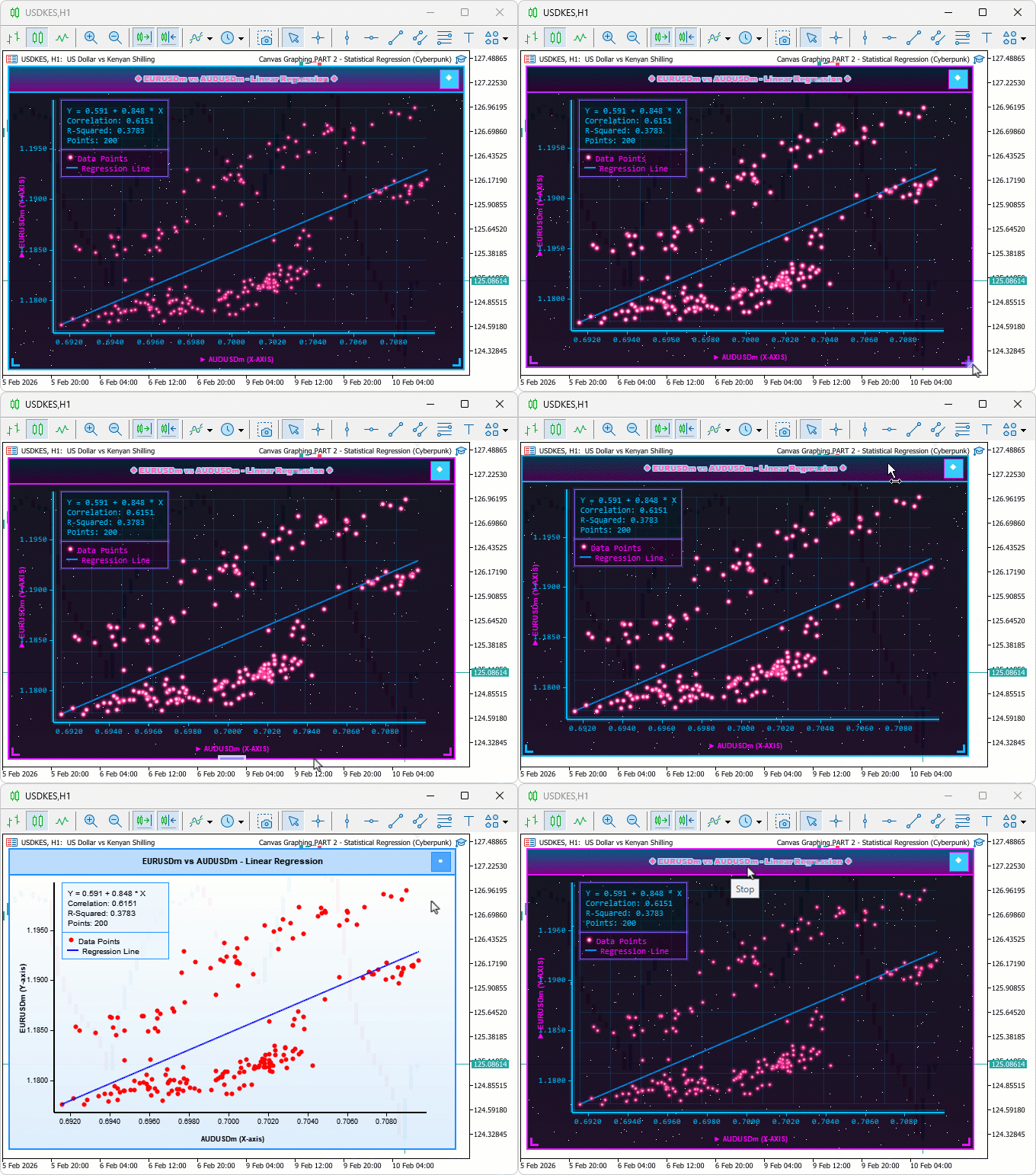
This theme mode toggles via a button, offering dual functionality with standard views for versatile market pair analysis. We will add theme toggling with animations via timer, render cyberpunk elements like neon points and glowing borders using blending, while adapting standard functions for dual-mode compatibility. In brief, here is a visual representation of our objectives.
Implementation in MQL5
To enhance the program in MQL5, we will need to add new global variables and inputs to adapt to the new improvements and themes we will be adding.
Extending Inputs and Globals for Theme Management
To support the new cyberpunk features, we introduce inputs for glow control and globals for colors, flags, and animation tracking.
//+------------------------------------------------------------------+
//|  Canvas Graphing PART 2 - Statistical Regression (Cyberpunk).mq5 |
//|                           Copyright 2026, Allan Munene Mutiiria. |
//|                                   https://t.me/Forex_Algo_Trader |
//+------------------------------------------------------------------+
#property copyright "Copyright 2026, Allan Munene Mutiiria."
#property link "https://t.me/Forex_Algo_Trader"
#property version "1.00"
#property strict
#property description "Dual Theme Regression: Standard & Cyberpunk Modes"

//+------------------------------------------------------------------+
//| Inputs                                                           |
//+------------------------------------------------------------------+
input group "=== CYBERPUNK MODE SETTINGS ==="
input double             glowIntensity = 0.8;           // Glow Intensity (0-1)

//+------------------------------------------------------------------+
//| Global Variables                                                 |
//+------------------------------------------------------------------+
bool isCyberpunkThemeEnabled = false;                   // Initialize cyberpunk theme flag
int themeToggleButtonX = 0;                             // Initialize theme button X
int themeToggleButtonY = 0;                             // Initialize theme button Y
const int THEME_TOGGLE_BUTTON_SIZE = 25;                // Set theme toggle button size

const color CYBER_PRIMARY_COLOR = C'0,191,255';         // Set cyber primary color
const color CYBER_SECONDARY_COLOR = C'255,0,255';       // Set cyber secondary color
const color CYBER_DATA_POINTS_COLOR = C'255,50,150';    // Set cyber data points color
const color CYBER_REGRESSION_COLOR = C'0,150,255';      // Set cyber regression color

int currentAnimationFrame = 0;                          // Initialize animation frame
We start by adding a new input group "=== CYBERPUNK MODE SETTINGS ===" with "glowIntensity" as a double ranging from 0 to 1, defaulting to 0.8, to control the strength of glow effects in the cyberpunk theme. Next, we declare global variables for theme management: "isCyberpunkThemeEnabled" initialized to false as a flag to toggle modes; "themeToggleButtonX" and "themeToggleButtonY" set to 0 for button positioning; a constant "THEME_TOGGLE_BUTTON_SIZE" at 25 pixels for its dimensions. We define cyberpunk-specific colors using the C'...' notation: "CYBER_PRIMARY_COLOR" as a bright cyan C'0,191,255', "CYBER_SECONDARY_COLOR" as magenta C'255,0,255', "CYBER_DATA_POINTS_COLOR" as pink C'255,50,150', and "CYBER_REGRESSION_COLOR" as blue C'0,150,255', providing vibrant, thematic palettes.
You can choose any other color complexion that is appealing to you; we just thought this was an arbitrary option for the demonstration. Finally, we initialize "currentAnimationFrame" to 0 for tracking animation progress in dynamic effects. The next thing we will do is create a helper function to blend colors smoothly in the cyberpunk mode, so we don't have a flat color.
Implementing Color Blending Utility
To enable dynamic effects like glows and gradients, we define a function for interpolating between two colors.
//+------------------------------------------------------------------+
//| Blend colors                                                     |
//+------------------------------------------------------------------+
color BlendColors(color color1, color color2, double ratio)
  {
   //--- Extract color1 red
   uchar r1 = (uchar)((color1 >> 16) & 0xFF);
   //--- Extract color1 green
   uchar g1 = (uchar)((color1 >> 8) & 0xFF);
   //--- Extract color1 blue
   uchar b1 = (uchar)(color1 & 0xFF);

   //--- Extract color2 red
   uchar r2 = (uchar)((color2 >> 16) & 0xFF);
   //--- Extract color2 green
   uchar g2 = (uchar)((color2 >> 8) & 0xFF);
   //--- Extract color2 blue
   uchar b2 = (uchar)(color2 & 0xFF);

   //--- Blend red
   uchar r = (uchar)(r1 * (1.0 - ratio) + r2 * ratio);
   //--- Blend green
   uchar g = (uchar)(g1 * (1.0 - ratio) + g2 * ratio);
   //--- Blend blue
   uchar b = (uchar)(b1 * (1.0 - ratio) + b2 * ratio);

   //--- Return blended color
   return (r << 16) | (g << 8) | b;
  }
Here, we implement the "BlendColors" function to create smooth color transitions for cyberpunk effects, extracting RGB components from two input colors using bit shifts, then blending each channel by weighting with (1 - ratio) for the first and ratio for the second, and recombining into a new color value for dynamic gradients or animations. Think of this like a magic mixer for colors. You give it two colors and say, "mix them this much" (ratio like 0.5 for half-half), and it makes a new color. In the cyber mode, we will use it to create smooth, glowing effects, like blending blue and pink to make purple lights. Without it, colors would be flat; with it, everything will look smoother and more professional. Next, we will add a theme toggle button in the header so that it allows us to toggle between the themes easily.
Adding Theme Toggle Button
To allow mode switching, we render a button in the header and center the regression line for balance.
//--- Adjust line drawing for centering in drawRegressionPlot
//--- Draw line
mainCanvas.LineAA(lineStartScreenX, lineStartScreenY + w - regressionLineWidth/2,
  lineEndScreenX, lineEndScreenY + w - regressionLineWidth/2, argbLine);

//+------------------------------------------------------------------+
//| Draw theme toggle button                                         |
//+------------------------------------------------------------------+
void drawThemeToggleButton()
  {
   //--- Compute button X
   themeToggleButtonX = currentWidthPixels - THEME_TOGGLE_BUTTON_SIZE - 8;
   //--- Compute button Y
   themeToggleButtonY = (HEADER_BAR_HEIGHT - THEME_TOGGLE_BUTTON_SIZE) / 2;

   //--- Declare button color
   color buttonColor;
   //--- Check cyber mode
   if (isCyberpunkThemeEnabled)
     {
      //--- Set cyber color
      buttonColor = isHoveringThemeButton ? LightenColor(CYBER_PRIMARY_COLOR, 0.3) : CYBER_PRIMARY_COLOR;
     }
   else
     {
      //--- Set standard color
      buttonColor = isHoveringThemeButton ? LightenColor(themeColor, 0.3) : themeColor;
     }

   //--- Get button ARGB
   uint argbButton = ColorToARGB(buttonColor, 200);
   //--- Get border ARGB
   uint argbBorder = ColorToARGB(isCyberpunkThemeEnabled ? CYBER_SECONDARY_COLOR : themeColor, 255);

   //--- Fill button
   mainCanvas.FillRectangle(themeToggleButtonX, themeToggleButtonY,
     themeToggleButtonX + THEME_TOGGLE_BUTTON_SIZE,
     themeToggleButtonY + THEME_TOGGLE_BUTTON_SIZE, argbButton);

   //--- Draw border
   mainCanvas.Rectangle(themeToggleButtonX, themeToggleButtonY,
     themeToggleButtonX + THEME_TOGGLE_BUTTON_SIZE,
     themeToggleButtonY + THEME_TOGGLE_BUTTON_SIZE, argbBorder);

   //--- Set icon font
   mainCanvas.FontSet("Arial Black", 16);
   //--- Get text ARGB
   uint argbText = ColorToARGB(clrWhite, 255);
   //--- Set icon text
   string iconText = isCyberpunkThemeEnabled ? "◆" : "●";
   //--- Draw icon
   mainCanvas.TextOut(themeToggleButtonX + THEME_TOGGLE_BUTTON_SIZE/2, themeToggleButtonY + 3,
     iconText, argbText, TA_CENTER);
  }
First, we modify the 'drawRegressionPlot' function so the regression line is vertically centered. This is done by adjusting the Y positions in the loop for width. Subtract half the line width 'regressionLineWidth/2' from both the start and end screen Y positions. This ensures balanced thickness around the calculated path when drawing with 'LineAA'. Before, the thick line might look off-center, like a lopsided road. Subtracting half the width centers it perfectly. It's a small fix, but makes the line look neat and professional, like straightening a picture on the wall.
Next, we implement the 'drawThemeToggleButton' function. This function renders a toggle button in the header for switching modes. It computes its position as bottom-right with a margin and selects a color based on the theme and hover state. For dynamism, it uses 'LightenColor.' The function fills a rectangle with semi-transparent ARGB, draws a border with theme-specific color, and sets bold 'Arial Black' font. It then centers a square icon for cyberpunk or a circular icon for standard in white ARGB with the TextOut method. You could use icons from the Wingdings characters as before. However, we chose this for a simple, techy feel. Next, we render the cyberpunk visualization. Let us start with the main canvas overlay.
Rendering Cyberpunk Background and Borders
To establish the theme's foundation, we create starry gradients and animated holographic frames.
//+------------------------------------------------------------------+
//| Draw cyberpunk background                                        |
//+------------------------------------------------------------------+
void drawCyberpunkBackground()
  {
   //--- Set top color
   color topColor = C'10,10,25';
   //--- Set bottom color
   color bottomColor = C'20,5,30';

   //--- Compute alpha
   uchar alphaChannel = (uchar)(255 * backgroundOpacityLevel);

   //--- Loop over rows
   for (int y = HEADER_BAR_HEIGHT; y < currentHeightPixels; y++)
     {
      //--- Compute factor
      double factor = (double)(y - HEADER_BAR_HEIGHT) / (currentHeightPixels - HEADER_BAR_HEIGHT);
      //--- Blend row color
      color rowColor = BlendColors(topColor, bottomColor, factor);
      //--- Get ARGB
      uint argbColor = ColorToARGB(rowColor, alphaChannel);

      //--- Loop over columns
      for (int x = 0; x < currentWidthPixels; x++)
        {
         //--- Check for star
         if (MathRand() % 800 == 0)
           {
            //--- Compute brightness
            uchar brightness = (uchar)(100 + MathRand() % 155);
            //--- Get star color
            uint starColor = ColorToARGB(C'255,255,255', brightness);
            //--- Blend star
            blendPixelSet(mainCanvas, x, y, starColor);
           }
         else
           {
            //--- Blend normal
            blendPixelSet(mainCanvas, x, y, argbColor);
           }
        }
     }
  }

//+------------------------------------------------------------------+
//| Draw holographic border                                          |
//+------------------------------------------------------------------+
void drawHolographicBorder()
  {
   //--- Compute phase
   double phase = (currentAnimationFrame % 360) * M_PI / 180.0;
   //--- Compute glow factor
   double glowFactor = (MathSin(phase) + 1.0) * 0.5;

   //--- Blend border color
   color borderColor = BlendColors(CYBER_PRIMARY_COLOR, CYBER_SECONDARY_COLOR, glowFactor);

   //--- Loop for glow layers
   for (int i = 0; i < 3; i++)
     {
      //--- Compute alpha
      uchar alpha = (uchar)(80 * glowIntensity * (3 - i) / 3.0);
      //--- Get glow color
      uint glowColor = ColorToARGB(borderColor, alpha);

      //--- Draw top glow
      for (int x = i; x < currentWidthPixels - i; x++)
        {
         //--- Blend pixel
         blendPixelSet(mainCanvas, x, i, glowColor);
        }
      //--- Draw bottom glow
      for (int x = i; x < currentWidthPixels - i; x++)
        {
         //--- Blend pixel
         blendPixelSet(mainCanvas, x, currentHeightPixels - 1 - i, glowColor);
        }
      //--- Draw left glow
      for (int y = i; y < currentHeightPixels - i; y++)
        {
         //--- Blend pixel
         blendPixelSet(mainCanvas, i, y, glowColor);
        }
      //--- Draw right glow
      for (int y = i; y < currentHeightPixels - i; y++)
        {
         //--- Blend pixel
         blendPixelSet(mainCanvas, currentWidthPixels - 1 - i, y, glowColor);
        }
     }

   //--- Get border ARGB
   uint argbBorder = ColorToARGB(borderColor, 255);
   //--- Draw outer border
   mainCanvas.Rectangle(0, 0, currentWidthPixels - 1, currentHeightPixels - 1, argbBorder);
   //--- Draw inner border
   mainCanvas.Rectangle(1, 1, currentWidthPixels - 2, currentHeightPixels - 2, argbBorder);

   //--- Draw corner accents
   drawCornerAccents(borderColor);
  }

//+------------------------------------------------------------------+
//| Draw corner accents                                              |
//+------------------------------------------------------------------+
void drawCornerAccents(color accentColor)
  {
   //--- Get accent ARGB
   uint argbAccent = ColorToARGB(accentColor, 255);
   //--- Set accent size
   int accentSize = 15;

   //--- Loop for top-left
   for (int i = 0; i < 3; i++)
     {
      //--- Draw horizontal
      mainCanvas.Line(5, 5 + i, accentSize, 5 + i, argbAccent);
      //--- Draw vertical
      mainCanvas.Line(5 + i, 5, 5 + i, accentSize, argbAccent);
     }

   //--- Loop for top-right
   for (int i = 0; i < 3; i++)
     {
      //--- Draw horizontal
      mainCanvas.Line(currentWidthPixels - accentSize - 1, 5 + i, currentWidthPixels - 6, 5 + i, argbAccent);
      //--- Draw vertical
      mainCanvas.Line(currentWidthPixels - 6 - i, 5, currentWidthPixels - 6 - i, accentSize, argbAccent);
     }

   //--- Loop for bottom-left
   for (int i = 0; i < 3; i++)
     {
      //--- Draw horizontal
      mainCanvas.Line(5, currentHeightPixels - 6 - i, accentSize, currentHeightPixels - 6 - i, argbAccent);
      //--- Draw vertical
      mainCanvas.Line(5 + i, currentHeightPixels - accentSize - 1, 5 + i, currentHeightPixels - 6, argbAccent);
     }

   //--- Loop for bottom-right
   for (int i = 0; i < 3; i++)
     {
      //--- Draw horizontal
      mainCanvas.Line(currentWidthPixels - accentSize - 1, currentHeightPixels - 6 - i, currentWidthPixels - 6, currentHeightPixels - 6 - i, argbAccent);
      //--- Draw vertical
      mainCanvas.Line(currentWidthPixels - 6 - i, currentHeightPixels - accentSize - 1, currentWidthPixels - 6 - i, currentHeightPixels - 6, argbAccent);
     }
  }
For the cyberpunk frame, we implement the "drawCyberpunkBackground" function to create a dark, starry gradient for the cyberpunk theme, setting top as deep blue-black C'10,10,25' and bottom as purple-black C'20,5,30', computing alpha from opacity, then looping rows to blend colors with "BlendColors", and randomly adding white stars via MathRand % 800 == 0 with varying brightness, blending all with "blendPixelSet" for a cosmic effect.
Next, we create "drawHolographicBorder" for animated glowing edges, calculating sine-based phase from "currentAnimationFrame" for pulsation, blending primary and secondary cyber colors for dynamic border, then layering glows with decreasing alpha in loops for top/bottom/left/right, drawing main borders with Rectangle, and calling "drawCornerAccents" for enhancements. In "drawCornerAccents", we convert accent color to ARGB, set size to 15, and loop three times to draw short horizontal and vertical lines at each corner (top-left, top-right, bottom-left, bottom-right) using Line, forming bracket-like accents for a techy frame. We will now need to draw a futuristic header.
Drawing Futuristic Header
To cap the top, we render a gradient header with glowing text and animations.
//+------------------------------------------------------------------+
//| Draw futuristic header                                           |
//+------------------------------------------------------------------+
void drawFuturisticHeader()
  {
   //--- Compute phase
   double phase = (currentAnimationFrame % 360) * M_PI / 180.0;
   //--- Compute anim factor
   double animFactor = (MathSin(phase) + 1.0) * 0.5;

   //--- Loop over header rows
   for (int y = 0; y < HEADER_BAR_HEIGHT; y++)
     {
      //--- Compute grad factor
      double gradFactor = (double)y / HEADER_BAR_HEIGHT;

      //--- Declare header color
      color headerColor;
      //--- Check dragging
      if (isDraggingCanvas)
        {
         //--- Blend dragged
         headerColor = BlendColors(DarkenColor(CYBER_PRIMARY_COLOR, 0.7), DarkenColor(CYBER_SECONDARY_COLOR, 0.7), gradFactor);
        }
      //--- Check hovering
      else if (isHoveringHeader)
        {
         //--- Blend hovered
         headerColor = BlendColors(DarkenColor(CYBER_PRIMARY_COLOR, 0.5), DarkenColor(CYBER_SECONDARY_COLOR, 0.5), gradFactor);
        }
      else
        {
         //--- Blend normal
         headerColor = BlendColors(DarkenColor(CYBER_PRIMARY_COLOR, 0.8), DarkenColor(CYBER_SECONDARY_COLOR, 0.8), gradFactor);
        }

      //--- Get header ARGB
      uint argbHeader = ColorToARGB(headerColor, 255);

      //--- Loop over columns
      for (int x = 0; x < currentWidthPixels; x++)
        {
         //--- Set pixel
         mainCanvas.PixelSet(x, y, argbHeader);
        }
     }

   //--- Blend border
   color borderColor = BlendColors(CYBER_PRIMARY_COLOR, CYBER_SECONDARY_COLOR, animFactor);
   //--- Get border ARGB
   uint argbBorder = ColorToARGB(borderColor, 255);
   //--- Draw outer
   mainCanvas.Rectangle(0, 0, currentWidthPixels - 1, HEADER_BAR_HEIGHT, argbBorder);
   //--- Draw inner
   mainCanvas.Rectangle(1, 1, currentWidthPixels - 2, HEADER_BAR_HEIGHT - 1, argbBorder);

   //--- Set title font
   mainCanvas.FontSet("Arial Black", titleFontSize);

   //--- Format title
   string titleText = StringFormat("◆ %s vs %s - Linear Regression ◆", secondarySymbol, primarySymbol);

   //--- Get glow ARGB
   uint glowColor = ColorToARGB(CYBER_PRIMARY_COLOR, (uchar)(120 * glowIntensity));
   //--- Loop for glow Y
   for (int offsetY = -1; offsetY <= 1; offsetY++)
     {
      //--- Loop for glow X
      for (int offsetX = -1; offsetX <= 1; offsetX++)
        {
         //--- Skip center
         if (offsetX == 0 && offsetY == 0) continue;
         //--- Draw glow text
         mainCanvas.TextOut(currentWidthPixels / 2 + offsetX, (HEADER_BAR_HEIGHT - titleFontSize) / 2 + offsetY,
           titleText, glowColor, TA_CENTER);
        }
     }

   //--- Set text color
   uint textColor = ColorToARGB(C'255,105,180', 255);
   //--- Draw title
   mainCanvas.TextOut(currentWidthPixels / 2, (HEADER_BAR_HEIGHT - titleFontSize) / 2,
     titleText, textColor, TA_CENTER);
  }
Here, we implement the "drawFuturisticHeader" function to render an animated, gradient header for the cyberpunk theme, starting by calculating a phase from "currentAnimationFrame" using sine for pulsating effects, and an animation factor normalized between 0 and 1. Next, we loop over header rows to compute a vertical gradient factor, blend darkened cyber primary and secondary colors based on state (dragging, hovering, or default) with "BlendColors" and "DarkenColor", convert to ARGB, and set each pixel row-wise with PixelSet for dynamic shading.
To add borders, we blend primary and secondary colors with the animation factor, draw outer and inner rectangles using Rectangle in the blended ARGB. We set bold "Arial Black" font with FontSet, format the title with symbols and pair names using StringFormat, then create a glow effect by drawing offset texts in a 3x3 grid (skipping center) with low-opacity cyber primary ARGB, and overlay the main title in hot pink ARGB centered with the TextOut method. The next thing we will need to do is draw the cyberpunk regression plot, but first, we will need to have some helper functions for rendering the grid and the data points.
Drawing Cyberpunk Grid and Neon Points
To layer the plot, we add animated grids and glowing data markers.
//+------------------------------------------------------------------+
//| Draw cyberpunk grid                                              |
//+------------------------------------------------------------------+
void drawCyberpunkGrid(int startX, int startY, int width, int height)
  {
   //--- Set grid spacing
   int gridSpacing = 40;
   //--- Compute phase
   double phase = (currentAnimationFrame % 120) * M_PI / 60.0;
   //--- Compute alpha
   uchar gridAlpha = (uchar)(30 + 15 * MathSin(phase));

   //--- Set grid color
   color gridColor = CYBER_PRIMARY_COLOR;
   //--- Get grid ARGB
   uint argbGrid = ColorToARGB(gridColor, gridAlpha);

   //--- Loop vertical lines
   for (int x = startX; x < startX + width; x += gridSpacing)
     {
      //--- Loop over height
      for (int y = startY; y < startY + height; y++)
        {
         //--- Blend grid pixel
         blendPixelSet(mainCanvas, x, y, argbGrid);
        }
     }

   //--- Loop horizontal lines
   for (int y = startY; y < startY + height; y += gridSpacing)
     {
      //--- Loop over width
      for (int x = startX; x < startX + width; x++)
        {
         //--- Blend grid pixel
         blendPixelSet(mainCanvas, x, y, argbGrid);
        }
     }
  }

//+------------------------------------------------------------------+
//| Draw neon point                                                  |
//+------------------------------------------------------------------+
void drawNeonPoint(int centerX, int centerY, int radius, color pointColor)
  {
   //--- Loop for glow
   for (int glowRadius = radius + 4; glowRadius > radius; glowRadius--)
     {
      //--- Compute alpha
      uchar glowAlpha = (uchar)(80 * glowIntensity * (radius + 4 - glowRadius) / 4.0);
      //--- Get glow color
      uint glowColor = ColorToARGB(pointColor, glowAlpha);
      //--- Draw glow circle
      drawCirclePoint(centerX, centerY, glowRadius, glowColor);
     }

   //--- Get point ARGB
   uint argbPoint = ColorToARGB(pointColor, 255);
   //--- Draw point circle
   drawCirclePoint(centerX, centerY, radius, argbPoint);

   //--- Get center ARGB
   uint argbCenter = ColorToARGB(C'255,255,255', 200);
   //--- Draw center circle
   drawCirclePoint(centerX, centerY, radius - 1, argbCenter);
  }
We implement the "drawCyberpunkGrid" function to create an animated grid overlay for the plot area in cyberpunk mode, setting spacing to 40 pixels, computing a phase from "currentAnimationFrame" for sine-based pulsation, and varying alpha between 30 and 45 for a subtle glow. Next, we use the cyber primary color, convert to ARGB with dynamic alpha, then loop to draw vertical lines every spacing by blending full height pixels with "blendPixelSet", and horizontal lines similarly across width, adding a futuristic matrix-like background without overwhelming the data. This grid will help enhance the thematic immersion through low-opacity blending, ensuring it integrates seamlessly with other elements. You can leave it if you don't want it, though.
To add neon effects, we create the "drawNeonPoint" function for data points, looping outward from radius +4 down to radius+1 to draw concentric glow circles with decreasing alpha scaled by "glowIntensity", using "drawCirclePoint" (assuming a base circle drawer) in the point color ARGB. We then draw the core point at full radius and opacity, followed by a smaller inner circle in semi-transparent white C'255,255,255' at 200 alpha for highlight, producing a pulsing, sci-fi visualization that stands out in dark themes. Again, color selection can be modified. We just used arbitrary values for the demonstration. We can now use these helper functions to render the cyberpunk plots.
Rendering Cyberpunk Regression Plot
To display the core analysis, we adapt the plot with grids, axes, ticks, lines, and points in cyberpunk style.
//+------------------------------------------------------------------+
//| Draw regression plot cyberpunk                                   |
//+------------------------------------------------------------------+
void drawRegressionPlotCyberpunk()
  {
   //--- Return if no data
   if (!dataLoadedSuccessfully) return;

   //--- Set plot left
   int plotAreaLeft = 60;
   //--- Set plot right
   int plotAreaRight = currentWidthPixels - 40;
   //--- Set plot top
   int plotAreaTop = HEADER_BAR_HEIGHT + 10;
   //--- Set plot bottom
   int plotAreaBottom = currentHeightPixels - 50;

   //--- Set draw left
   int drawAreaLeft = plotAreaLeft + plotPadding;
   //--- Set draw right
   int drawAreaRight = plotAreaRight - plotPadding;
   //--- Set draw top
   int drawAreaTop = plotAreaTop + plotPadding;
   //--- Set draw bottom
   int drawAreaBottom = plotAreaBottom - plotPadding;

   //--- Compute plot width
   int plotWidth = drawAreaRight - drawAreaLeft;
   //--- Compute plot height
   int plotHeight = drawAreaBottom - drawAreaTop;

   //--- Return if invalid
   if (plotWidth <= 0 || plotHeight <= 0) return;

   //--- Init min X
   double minX = primaryClosePrices[0];
   //--- Init max X
   double maxX = primaryClosePrices[0];
   //--- Init min Y
   double minY = secondaryClosePrices[0];
   //--- Init max Y
   double maxY = secondaryClosePrices[0];

   //--- Get data points
   int dataPoints = ArraySize(primaryClosePrices);
   //--- Loop over points
   for (int i = 1; i < dataPoints; i++)
     {
      //--- Update min X
      if (primaryClosePrices[i] < minX) minX = primaryClosePrices[i];
      //--- Update max X
      if (primaryClosePrices[i] > maxX) maxX = primaryClosePrices[i];
      //--- Update min Y
      if (secondaryClosePrices[i] < minY) minY = secondaryClosePrices[i];
      //--- Update max Y
      if (secondaryClosePrices[i] > maxY) maxY = secondaryClosePrices[i];
     }

   //--- Compute range X
   double rangeX = maxX - minX;
   //--- Compute range Y
   double rangeY = maxY - minY;

   //--- Set min range X
   if (rangeX == 0) rangeX = 1;
   //--- Set min range Y
   if (rangeY == 0) rangeY = 1;

   //--- Draw grid
   drawCyberpunkGrid(drawAreaLeft, drawAreaTop, plotWidth, plotHeight);

   //--- Set axis color
   color axisColor = CYBER_PRIMARY_COLOR;
   //--- Get axis ARGB
   uint argbAxis = ColorToARGB(axisColor, 255);

   //--- Get glow ARGB
   uint glowColor = ColorToARGB(axisColor, (uchar)(60 * glowIntensity));
   //--- Loop for glow
   for (int g = 1; g <= 2; g++)
     {
      //--- Draw Y glow
      for (int y = plotAreaTop; y <= plotAreaBottom; y++)
        {
         //--- Blend left glow
         blendPixelSet(mainCanvas, plotAreaLeft - g - 1, y, glowColor);
         //--- Blend right glow
         blendPixelSet(mainCanvas, plotAreaLeft + g + 1, y, glowColor);
        }
      //--- Draw X glow
      for (int x = plotAreaLeft; x <= plotAreaRight; x++)
        {
         //--- Blend bottom glow
         blendPixelSet(mainCanvas, x, plotAreaBottom + g + 1, glowColor);
         //--- Blend top glow
         blendPixelSet(mainCanvas, x, plotAreaBottom - g - 1, glowColor);
        }
     }

   //--- Loop for thick Y-axis
   for (int thick = 0; thick < 2; thick++)
     {
      //--- Draw Y-axis line
      mainCanvas.Line(plotAreaLeft - thick, plotAreaTop, plotAreaLeft - thick, plotAreaBottom, argbAxis);
     }

   //--- Loop for thick X-axis
   for (int thick = 0; thick < 2; thick++)
     {
      //--- Draw X-axis line
      mainCanvas.Line(plotAreaLeft, plotAreaBottom + thick, plotAreaRight, plotAreaBottom + thick, argbAxis);
     }

   //--- Set tick font
   mainCanvas.FontSet("Consolas", axisLabelFontSize);
   //--- Get tick label ARGB
   uint argbTickLabel = ColorToARGB(CYBER_PRIMARY_COLOR, 255);

   //--- Declare Y ticks
   double yTickValues[];
   //--- Compute Y ticks
   int numYTicks = calculateOptimalTicks(minY, maxY, plotHeight, yTickValues);

   //--- Loop over Y ticks
   for (int i = 0; i < numYTicks; i++)
     {
      //--- Get Y value
      double yValue = yTickValues[i];
      //--- Skip out of range
      if (yValue < minY || yValue > maxY) continue;

      //--- Compute Y pos
      int yPos = drawAreaBottom - (int)((yValue - minY) / rangeY * plotHeight);

      //--- Draw tick
      mainCanvas.Line(plotAreaLeft - 5, yPos, plotAreaLeft, yPos, argbAxis);

      //--- Format label
      string yLabel = formatTickLabel(yValue, rangeY);
      //--- Draw label
      mainCanvas.TextOut(plotAreaLeft - 8, yPos - axisLabelFontSize/2, yLabel, argbTickLabel, TA_RIGHT);
     }

   //--- Declare X ticks
   double xTickValues[];
   //--- Compute X ticks
   int numXTicks = calculateOptimalTicks(minX, maxX, plotWidth, xTickValues);

   //--- Loop over X ticks
   for (int i = 0; i < numXTicks; i++)
     {
      //--- Get X value
      double xValue = xTickValues[i];
      //--- Skip out of range
      if (xValue < minX || xValue > maxX) continue;

      //--- Compute X pos
      int xPos = drawAreaLeft + (int)((xValue - minX) / rangeX * plotWidth);

      //--- Draw tick
      mainCanvas.Line(xPos, plotAreaBottom, xPos, plotAreaBottom + 5, argbAxis);

      //--- Format label
      string xLabel = formatTickLabel(xValue, rangeX);
      //--- Draw label
      mainCanvas.TextOut(xPos, plotAreaBottom + 7, xLabel, argbTickLabel, TA_CENTER);
     }

   //--- Compute start Y
   double lineStartY = regressionIntercept + regressionSlope * minX;
   //--- Compute end Y
   double lineEndY = regressionIntercept + regressionSlope * maxX;

   //--- Set start screen X
   int lineStartScreenX = drawAreaLeft;
   //--- Compute start screen Y
   int lineStartScreenY = drawAreaBottom - (int)((lineStartY - minY) / rangeY * plotHeight);
   //--- Set end screen X
   int lineEndScreenX = drawAreaRight;
   //--- Compute end screen Y
   int lineEndScreenY = drawAreaBottom - (int)((lineEndY - minY) / rangeY * plotHeight);

   //--- Get line ARGB
   uint argbLine = ColorToARGB(CYBER_REGRESSION_COLOR, 255);
   //--- Loop for width
   for (int w = 0; w < regressionLineWidth; w++)
     {
      //--- Draw line
      mainCanvas.LineAA(lineStartScreenX, lineStartScreenY + w - regressionLineWidth/2,
                                  lineEndScreenX, lineEndScreenY + w - regressionLineWidth/2, argbLine);
     }

   //--- Compute pulse phase
   double pulsePhase = (currentAnimationFrame % 60) * M_PI / 30.0;
   //--- Compute pulse factor
   double pulseFactor = (MathSin(pulsePhase) + 1.0) * 0.3 + 0.7;
   //--- Compute point size
   int effectivePointSize = (int)(dataPointSize * pulseFactor);

   //--- Loop over points
   for (int i = 0; i < dataPoints; i++)
     {
      //--- Compute screen X
      int screenX = drawAreaLeft + (int)((primaryClosePrices[i] - minX) / rangeX * plotWidth);
      //--- Compute screen Y
      int screenY = drawAreaBottom - (int)((secondaryClosePrices[i] - minY) / rangeY * plotHeight);

      //--- Draw neon point
      drawNeonPoint(screenX, screenY, effectivePointSize, CYBER_DATA_POINTS_COLOR);
     }

   //--- Set axis label font
   mainCanvas.FontSet("Arial Bold", labelFontSize);
   //--- Get axis label ARGB
   uint argbAxisLabel = ColorToARGB(CYBER_SECONDARY_COLOR, 255);

   //--- Set X label
   string xAxisLabel = "► " + primarySymbol + " (X-AXIS)";
   //--- Draw X label
   mainCanvas.TextOut(currentWidthPixels / 2, currentHeightPixels - 20, xAxisLabel, argbAxisLabel, TA_CENTER);

   //--- Set Y label
   string yAxisLabel = "► " + secondarySymbol + " (Y-AXIS)";
   //--- Set vertical angle
   mainCanvas.FontAngleSet(900);
   //--- Draw Y label
   mainCanvas.TextOut(12, currentHeightPixels / 2, yAxisLabel, argbAxisLabel, TA_CENTER);
   //--- Reset angle
   mainCanvas.FontAngleSet(0);
  }
Here, we implement the "drawRegressionPlotCyberpunk" function to visualize the regression in cyberpunk mode, first returning if no data, then setting plot and draw areas with padding, computing widths/heights, and exiting if invalid. Next, we determine min/max for X (primary) and Y (secondary) by iterating prices, adjust zero ranges to 1, call "drawCyberpunkGrid" for background grid, set axis to cyber primary ARGB, add glow layers with "blendPixelSet" around Y/X axes for depth, and draw thickened lines using Line in loops. To label, we set "Consolas" font with cyber primary ARGB, compute Y ticks, loop to draw short lines and right-aligned formatted labels via "formatTickLabel"; similarly for X with centered bottom labels.
For the line, we calculate start/end Y using regression parameters, map to screen positions, use cyber regression ARGB, and draw anti-aliased segments with LineAA centered by half-width adjustment in a loop. To enhance points, we compute a pulsing phase from "currentAnimationFrame" with sine, scale factor 0.7-1.0, loop data to position screens, and render with "drawNeonPoint" in cyber points color for animated glow. Finally, we set bold "Arial Bold" font with cyber secondary ARGB for labels, add hardcoded arrow prefixes for flair, again we used this for simplicity, center X at bottom, rotate Y to 900 with FontAngleSet for vertical, and reset angle, completing the thematic plot. On compilation, this will give us something as follows.

With that done, we can add the panels and legends for this cyberpunk theme.
//+------------------------------------------------------------------+
//| Draw glass morphism stats panel                                  |
//+------------------------------------------------------------------+
void drawGlassMorphismStatsPanel()
  {
   //--- Set panel X
   int panelX = statsPanelX;
   //--- Set panel Y
   int panelY = HEADER_BAR_HEIGHT + statsPanelY;
   //--- Set panel width
   int panelWidth = statsPanelWidth;
   //--- Set panel height
   int panelHeight = statsPanelHeight;

   //--- Compute bg color
   color panelBgColor = DarkenColor(CYBER_PRIMARY_COLOR, 0.85);
   //--- Set alpha
   uchar bgAlpha = 120;
   //--- Get panel bg ARGB
   uint argbPanelBg = ColorToARGB(panelBgColor, bgAlpha);

   //--- Loop over rows
   for (int y = panelY; y <= panelY + panelHeight; y++)
     {
      //--- Loop over columns
      for (int x = panelX; x <= panelX + panelWidth; x++)
        {
         //--- Blend bg pixel
         blendPixelSet(mainCanvas, x, y, argbPanelBg);
        }
     }

   //--- Blend border
   color borderColor = BlendColors(CYBER_PRIMARY_COLOR, CYBER_SECONDARY_COLOR, 0.5);
   //--- Get border ARGB
   uint argbBorder = ColorToARGB(borderColor, 255);

   //--- Get glow ARGB
   uint glowColor = ColorToARGB(borderColor, (uchar)(60 * glowIntensity));
   //--- Loop for glow
   for (int g = 1; g <= 2; g++)
     {
      //--- Draw top glow
      for (int x = panelX - g; x <= panelX + panelWidth + g; x++)
        {
         //--- Blend pixel
         blendPixelSet(mainCanvas, x, panelY - g, glowColor);
        }
      //--- Draw bottom glow
      for (int x = panelX - g; x <= panelX + panelWidth + g; x++)
        {
         //--- Blend pixel
         blendPixelSet(mainCanvas, x, panelY + panelHeight + g, glowColor);
        }
      //--- Draw left glow
      for (int y = panelY - g; y <= panelY + panelHeight + g; y++)
        {
         //--- Blend pixel
         blendPixelSet(mainCanvas, panelX - g, y, glowColor);
        }
      //--- Draw right glow
      for (int y = panelY - g; y <= panelY + panelHeight + g; y++)
        {
         //--- Blend pixel
         blendPixelSet(mainCanvas, panelX + panelWidth + g, y, glowColor);
        }
     }

   //--- Draw top border
   for (int x = panelX; x <= panelX + panelWidth; x++)
     {
      //--- Blend border pixel
      blendPixelSet(mainCanvas, x, panelY, argbBorder);
      //--- Blend bottom border
      blendPixelSet(mainCanvas, x, panelY + panelHeight, argbBorder);
     }
   //--- Draw left and right borders
   for (int y = panelY; y <= panelY + panelHeight; y++)
     {
      //--- Blend left
      blendPixelSet(mainCanvas, panelX, y, argbBorder);
      //--- Blend right
      blendPixelSet(mainCanvas, panelX + panelWidth, y, argbBorder);
     }

   //--- Set stats font
   mainCanvas.FontSet("Consolas", panelFontSize);
   //--- Get text ARGB
   uint argbText = ColorToARGB(CYBER_PRIMARY_COLOR, 255);

   //--- Set text Y
   int textY = panelY + 8;
   //--- Set line spacing
   int lineSpacing = panelFontSize;

   //--- Format equation
   string equationText = StringFormat("Y = %.3f + %.3f * X", regressionIntercept, regressionSlope);
   //--- Draw equation
   mainCanvas.TextOut(panelX + 8, textY, equationText, argbText, TA_LEFT);
   //--- Update Y
   textY += lineSpacing;

   //--- Format correlation
   string correlationText = StringFormat("Correlation: %.4f", correlationCoefficient);
   //--- Draw correlation
   mainCanvas.TextOut(panelX + 8, textY, correlationText, argbText, TA_LEFT);
   //--- Update Y
   textY += lineSpacing;

   //--- Format R-squared
   string rSquaredText = StringFormat("R-Squared: %.4f", rSquared);
   //--- Draw R-squared
   mainCanvas.TextOut(panelX + 8, textY, rSquaredText, argbText, TA_LEFT);
   //--- Update Y
   textY += lineSpacing;

   //--- Format points
   string dataPointsText = StringFormat("Points: %d", ArraySize(primaryClosePrices));
   //--- Draw points
   mainCanvas.TextOut(panelX + 8, textY, dataPointsText, argbText, TA_LEFT);
  }

//+------------------------------------------------------------------+
//| Draw glass morphism legend                                       |
//+------------------------------------------------------------------+
void drawGlassMorphismLegend()
  {
   //--- Set legend X
   int legendX = statsPanelX;
   //--- Set legend Y
   int legendY = HEADER_BAR_HEIGHT + statsPanelY + statsPanelHeight;
   //--- Set legend width
   int legendWidth = statsPanelWidth;
   //--- Set legend height
   int legendHeightThis = legendHeight;

   //--- Compute bg color
   color legendBgColor = DarkenColor(CYBER_SECONDARY_COLOR, 0.85);
   //--- Set alpha
   uchar bgAlpha = 120;
   //--- Get legend bg ARGB
   uint argbLegendBg = ColorToARGB(legendBgColor, bgAlpha);

   //--- Loop over rows
   for (int y = legendY; y <= legendY + legendHeightThis; y++)
     {
      //--- Loop over columns
      for (int x = legendX; x <= legendX + legendWidth; x++)
        {
         //--- Blend bg pixel
         blendPixelSet(mainCanvas, x, y, argbLegendBg);
        }
     }

   //--- Blend border
   color borderColor = BlendColors(CYBER_SECONDARY_COLOR, CYBER_PRIMARY_COLOR, 0.5);
   //--- Get border ARGB
   uint argbBorder = ColorToARGB(borderColor, 255);

   //--- Get glow ARGB
   uint glowColor = ColorToARGB(borderColor, (uchar)(60 * glowIntensity));
   //--- Loop for glow
   for (int g = 1; g <= 2; g++)
     {
      //--- Draw top and bottom glow
      for (int x = legendX - g; x <= legendX + legendWidth + g; x++)
        {
         //--- Blend top
         blendPixelSet(mainCanvas, x, legendY - g, glowColor);
         //--- Blend bottom
         blendPixelSet(mainCanvas, x, legendY + legendHeightThis + g, glowColor);
        }
      //--- Draw left and right glow
      for (int y = legendY - g; y <= legendY + legendHeightThis + g; y++)
        {
         //--- Blend left
         blendPixelSet(mainCanvas, legendX - g, y, glowColor);
         //--- Blend right
         blendPixelSet(mainCanvas, legendX + legendWidth + g, y, glowColor);
        }
     }

   //--- Draw top and bottom borders
   for (int x = legendX; x <= legendX + legendWidth; x++)
     {
      //--- Blend top
      blendPixelSet(mainCanvas, x, legendY, argbBorder);
      //--- Blend bottom
      blendPixelSet(mainCanvas, x, legendY + legendHeightThis, argbBorder);
     }
   //--- Draw left and right borders
   for (int y = legendY; y <= legendY + legendHeightThis; y++)
     {
      //--- Blend left
      blendPixelSet(mainCanvas, legendX, y, argbBorder);
      //--- Blend right
      blendPixelSet(mainCanvas, legendX + legendWidth, y, argbBorder);
     }

   //--- Set legend font
   mainCanvas.FontSet("Consolas", panelFontSize);
   //--- Get text ARGB
   uint argbText = ColorToARGB(CYBER_SECONDARY_COLOR, 255);

   //--- Set item Y
   int itemY = legendY + 10;
   //--- Set line spacing
   int lineSpacing = panelFontSize;

   //--- Draw neon point
   drawNeonPoint(legendX + 12, itemY, dataPointSize, CYBER_DATA_POINTS_COLOR);
   //--- Draw data label
   mainCanvas.TextOut(legendX + 22, itemY - 4, "Data Points", argbText, TA_LEFT);
   //--- Update Y
   itemY += lineSpacing;

   //--- Get line color
   uint argbLineColor = ColorToARGB(CYBER_REGRESSION_COLOR, 255);
   //--- Loop to draw line
   for (int i = 0; i < 15; i++)
     {
      //--- Blend line pixel
      blendPixelSet(mainCanvas, legendX + 7 + i, itemY, argbLineColor);
      //--- Blend below pixel
      blendPixelSet(mainCanvas, legendX + 7 + i, itemY + 1, argbLineColor);
     }
   //--- Draw line label
   mainCanvas.TextOut(legendX + 27, itemY - 4, "Regression Line", argbText, TA_LEFT);
  }
First, we implement the "drawGlassMorphismStatsPanel" function to create a semi-transparent, glowing stats overlay for the cyberpunk theme, positioning it from inputs with an offset from the header, darkening the cyber primary color with "DarkenColor" for the background, setting a low alpha of 120, and blending the area pixel-by-pixel using "blendPixelSet" for a frosted glass effect. Next, we blend border color from cyber primary and secondary with "BlendColors", prepare ARGB, add outer glow layers by expanding loops around the panel edges with decreasing intensity, then draw top/bottom/left/right borders by blending lines. We set "Consolas" font with FontSet, use cyber primary ARGB for text, initialize Y with padding and spacing from font size, format and draw equation, correlation, R-squared, and points count with StringFormat and "TextOut" left-aligned, updating Y each line for vertical stacking.
Similarly, for "drawGlassMorphismLegend", we position below stats with matching width, darken the cyber secondary for background, blend the fill, apply an identical border blending, and glow expansion. We draw top/bottom/left/right borders, set Consolas font with cyber secondary ARGB text, draw a neon point icon at adjusted position using "drawNeonPoint" in cyber points color, add "Data Points" label, update Y; then blend a short horizontal line segment (15 pixels wide, 2 high) in cyber regression color, and label "Regression Line" for visual key. For the neon resize indicator, we use the following approach.
Drawing Neon Resize Indicator
To guide resizing, we render highlighted grips with glows.
//+------------------------------------------------------------------+
//| Draw neon resize indicator                                       |
//+------------------------------------------------------------------+
void drawNeonResizeIndicator()
  {
   //--- Blend indicator color
   color indicatorColor = BlendColors(CYBER_PRIMARY_COLOR, CYBER_SECONDARY_COLOR, 0.5);
   //--- Get indicator ARGB
   uint argbIndicator = ColorToARGB(indicatorColor, 200);

   //--- Get glow ARGB
   uint glowColor = ColorToARGB(indicatorColor, (uchar)(100 * glowIntensity));

   //--- Check corner
   if (hoverResizeMode == RESIZE_CORNER || activeResizeMode == RESIZE_CORNER)
     {
      //--- Compute corner X
      int cornerX = currentWidthPixels - resizeGripSize;
      //--- Compute corner Y
      int cornerY = currentHeightPixels - resizeGripSize;

      //--- Loop for glow
      for (int g = 1; g <= 3; g++)
        {
         //--- Loop Y glow
         for (int y = cornerY - g; y < currentHeightPixels + g; y++)
           {
            //--- Loop X glow
            for (int x = cornerX - g; x < currentWidthPixels + g; x++)
              {
               //--- Blend glow
               blendPixelSet(mainCanvas, x, y, glowColor);
              }
           }
        }

      //--- Fill corner
      mainCanvas.FillRectangle(cornerX, cornerY, currentWidthPixels - 1, currentHeightPixels - 1, argbIndicator);

      //--- Set line color
      uint lineColor = ColorToARGB(C'255,255,255', 255);
      //--- Loop for lines
      for (int i = 0; i < 4; i++)
        {
         //--- Compute offset
         int offset = i * 3;
         //--- Draw diagonal
         mainCanvas.Line(cornerX + offset, currentHeightPixels - 1,
                                  currentWidthPixels - 1, cornerY + offset, lineColor);
        }
     }

   //--- Check right
   if (hoverResizeMode == RESIZE_RIGHT_EDGE || activeResizeMode == RESIZE_RIGHT_EDGE)
     {
      //--- Compute indicator Y
      int indicatorY = currentHeightPixels / 2 - 15;
      //--- Loop for glow
      for (int g = 1; g <= 3; g++)
        {
         //--- Fill glow
         mainCanvas.FillRectangle(currentWidthPixels - 3 - g, indicatorY - g,
                                          currentWidthPixels - 1 + g, indicatorY + 30 + g, glowColor);
        }
      //--- Fill indicator
      mainCanvas.FillRectangle(currentWidthPixels - 3, indicatorY,
                                       currentWidthPixels - 1, indicatorY + 30, argbIndicator);
     }

   //--- Check bottom
   if (hoverResizeMode == RESIZE_BOTTOM_EDGE || activeResizeMode == RESIZE_BOTTOM_EDGE)
     {
      //--- Compute indicator X
      int indicatorX = currentWidthPixels / 2 - 15;
      //--- Loop for glow
      for (int g = 1; g <= 3; g++)
        {
         //--- Fill glow
         mainCanvas.FillRectangle(indicatorX - g, currentHeightPixels - 3 - g,
           indicatorX + 30 + g, currentHeightPixels - 1 + g, glowColor);
        }
      //--- Fill indicator
      mainCanvas.FillRectangle(indicatorX, currentHeightPixels - 3,
        indicatorX + 30, currentHeightPixels - 1, argbIndicator);
     }
  }
We implement the "drawNeonResizeIndicator" function to provide visual cues for resizing in cyberpunk mode, starting by blending cyber primary and secondary colors with "BlendColors" for the indicator, converting to ARGB at 200 alpha, and preparing a glow variant at 100 times intensity scaled alpha. For corner resize (hover or active), we compute bottom-right position from grip size, add multi-layer glow by looping to fill expanded areas around the corner with "blendPixelSet", then fill the grip square using FillRectangle, and draw four offset diagonal lines in full white ARGB with "Line" for a striped effect.
Next, for the right edge, we center a vertical indicator Y, apply a glow by filling slightly widened and offset rectangles in loops, followed by the main fill. Similarly, for the bottom edge, center horizontal indicator X, add glow fills, and complete with the primary indicator rectangle. This neon styling with glows will enhance interactivity, making resize areas pop in the dark cyberpunk theme through layered blending for depth. We can now consistently call and create our plots using the following logic.
//+------------------------------------------------------------------+
//| Render visualization                                             |
//+------------------------------------------------------------------+
void renderVisualization()
  {
   //--- Check cyberpunk mode
   if (isCyberpunkThemeEnabled)
     {
      //--- Render cyberpunk
      renderCyberpunkTheme();
     }
   else
     {
      //--- Render standard
      renderStandardTheme();
     }
  }

//+------------------------------------------------------------------+
//| Render standard theme                                            |
//+------------------------------------------------------------------+
void renderStandardTheme()
  {
   //--- Erase canvas
   mainCanvas.Erase(0);

   //--- Check background fill
   if (enableBackgroundFill)
     {
      //--- Draw gradient
      drawGradientBackground();
     }

   //--- Draw border
   drawCanvasBorder();
   //--- Draw header
   drawHeaderBar();
   //--- Draw toggle button
   drawThemeToggleButton();
   //--- Draw plot
   drawRegressionPlot();

   //--- Check show stats
   if (showStatistics)
     {
      //--- Draw stats panel
      drawStatisticsPanel();
      //--- Draw legend
      drawLegend();
     }

   //--- Check resize hover
   if (isHoveringResizeZone && enableResizing)
     {
      //--- Draw indicator
      drawResizeIndicator();
     }

   //--- Update canvas
   mainCanvas.Update();
  }

//+------------------------------------------------------------------+
//| Render cyberpunk theme                                           |
//+------------------------------------------------------------------+
void renderCyberpunkTheme()
  {
   //--- Erase canvas
   mainCanvas.Erase(0);

   //--- Draw cyber background
   drawCyberpunkBackground();
   //--- Draw holographic border
   drawHolographicBorder();
   //--- Draw futuristic header
   drawFuturisticHeader();
   //--- Draw toggle button
   drawThemeToggleButton();
   //--- Draw cyber plot
   drawRegressionPlotCyberpunk();

   //--- Check show stats
   if (showStatistics)
     {
      //--- Draw glass stats
      drawGlassMorphismStatsPanel();
      //--- Draw glass legend
      drawGlassMorphismLegend();
     }

   //--- Check resize hover
   if (isHoveringResizeZone && enableResizing)
     {
      //--- Draw neon indicator
      drawNeonResizeIndicator();
     }

   //--- Update canvas
   mainCanvas.Update();
  }
Here, we implement the "renderVisualization" function to conditionally render the graph based on the theme mode, checking "isCyberpunkThemeEnabled" to call "renderCyberpunkTheme" for futuristic effects or "renderStandardTheme" for classic display, allowing seamless switching without redundant code. In "renderStandardTheme", we erase the canvas with Erase, optionally draw a gradient background if enabled, add borders, header bar, theme toggle button, the main regression plot, and if "showStatistics" is true, include stats panel and legend; if hovering, resize and enable, add indicator, then update with the Update method.
Similarly, "renderCyberpunkTheme" erases, draws a cyber background, holographic border, futuristic header, toggle button, cyber plot, glass-morphism stats and legend if shown, and neon resize indicator if applicable, followed by update, ensuring thematic consistency through specialized functions. This will now render the visualization conditionally, based on the selected theme, but we will need to set a timer for animations. Animations rely on a timer setup to refresh frames periodically, keeping effects fluid in cyberpunk mode.
Setting Up Timer for Animations
//+------------------------------------------------------------------+
//| Initialize expert                                                |
//+------------------------------------------------------------------+
int OnInit()
  {
   //--- Render visualization
   renderVisualization();

   //--- Enable mouse events
   ChartSetInteger(0, CHART_EVENT_MOUSE_MOVE, true);
   //--- Redraw chart
   ChartRedraw();

   //--- Set timer for animations
   EventSetMillisecondTimer(50);

   //--- Return success
   return(INIT_SUCCEEDED);
  }

//+------------------------------------------------------------------+
//| Deinitialize expert                                              |
//+------------------------------------------------------------------+
void OnDeinit(const int reason)
  {
   //--- Kill timer
   EventKillTimer();
   //--- Destroy canvas
   mainCanvas.Destroy();
   //--- Redraw chart
   ChartRedraw();
  }

//+------------------------------------------------------------------+
//| Handle timer                                                     |
//+------------------------------------------------------------------+
void OnTimer()
  {
   //--- Check cyberpunk enabled
   if (isCyberpunkThemeEnabled)
     {
      //--- Increment frame
      currentAnimationFrame++;
      //--- Reset frame
      if (currentAnimationFrame > 360) currentAnimationFrame = 0;
      //--- Render
      renderVisualization();
      //--- Redraw chart
      ChartRedraw();
     }
  }
We begin in the OnInit event handler by extending prior logic to include animation support, calling "renderVisualization" for initial display, enabling mouse move events, redrawing the chart, and setting a 50-millisecond timer using EventSetMillisecondTimer to drive periodic updates, before returning INIT_SUCCEEDED. Next, in OnDeinit, we kill the timer with EventKillTimer to stop animations, destroy the canvas, and redraw the chart for cleanup.
To handle animations, we implement the OnTimer event, checking if cyberpunk mode is enabled, incrementing "currentAnimationFrame" and resetting at 360 for looping, then re-rendering the visualization with "renderVisualization" and redrawing the chart to apply frame-based changes like pulses or glows. Just that. Finally, recall that we added an extra button in the header that we need to recognize on hover. We will extend its logic to include it in the chart event handler.
Handling Theme Toggle in Events
To respond to clicks, we extend the event handler for button detection.
//+------------------------------------------------------------------+
//| Handle chart event                                               |
//+------------------------------------------------------------------+
void OnChartEvent(const int id, const long &lparam, const double &dparam, const string &sparam)
  {
   //--- Check mouse move
   if (id == CHARTEVENT_MOUSE_MOVE)
     {
      //--- Set mouse X
      int mouseX = (int)lparam;
      //--- Set mouse Y
      int mouseY = (int)dparam;
      //--- Set mouse state
      int mouseState = (int)sparam;

      //--- Store prev canvas hover
      bool previousHoverState = isHoveringCanvas;
      //--- Store prev header hover
      bool previousHeaderHoverState = isHoveringHeader;
      //--- Store prev resize hover
      bool previousResizeHoverState = isHoveringResizeZone;
      //--- Store prev theme hover
      bool previousThemeButtonHover = isHoveringThemeButton;

      //--- Update canvas hover
      isHoveringCanvas = (mouseX >= currentPositionX && mouseX <= currentPositionX + currentWidthPixels &&
        mouseY >= currentPositionY && mouseY <= currentPositionY + currentHeightPixels);

      //--- Update header hover
      isHoveringHeader = isMouseOverHeaderBar(mouseX, mouseY);
      //--- Update theme hover
      isHoveringThemeButton = isMouseOverThemeButton(mouseX, mouseY);
      //--- Update resize hover
      isHoveringResizeZone = isMouseInResizeZone(mouseX, mouseY, hoverResizeMode);

      //--- Check if redraw needed
      bool needRedraw = (previousHoverState != isHoveringCanvas ||
        previousHeaderHoverState != isHoveringHeader ||
        previousResizeHoverState != isHoveringResizeZone ||
        previousThemeButtonHover != isHoveringThemeButton);

      //--- Check button press
      if (mouseState == 1 && previousMouseButtonState == 0)
        {
         //--- Check theme button
         if (isHoveringThemeButton)
           {
            //--- Toggle theme
            isCyberpunkThemeEnabled = !isCyberpunkThemeEnabled;
            //--- Render
            renderVisualization();
            //--- Redraw chart
            ChartRedraw();
           }
         //--- Check drag start
         else if (enableDragging && isHoveringHeader && !isHoveringResizeZone)
           {
            //--- Set dragging
            isDraggingCanvas = true;
            //--- Set start X
            dragStartX = mouseX;
            //--- Set start Y
            dragStartY = mouseY;
            //--- Set canvas X
            canvasStartX = currentPositionX;
            //--- Set canvas Y
            canvasStartY = currentPositionY;
            //--- Disable scroll
            ChartSetInteger(0, CHART_MOUSE_SCROLL, false);
            //--- Set redraw
            needRedraw = true;
           }
         //--- Check resize start
         else if (isHoveringResizeZone)
           {
            //--- Set resizing
            isResizingCanvas = true;
            //--- Set active mode
            activeResizeMode = hoverResizeMode;
            //--- Set start X
            resizeStartX = mouseX;
            //--- Set start Y
            resizeStartY = mouseY;
            //--- Set initial width
            resizeInitialWidth = currentWidthPixels;
            //--- Set initial height
            resizeInitialHeight = currentHeightPixels;
            //--- Disable scroll
            ChartSetInteger(0, CHART_MOUSE_SCROLL, false);
            //--- Set redraw
            needRedraw = true;
           }
        }
      //--- Check drag
      else if (mouseState == 1 && previousMouseButtonState == 1)
        {
         //--- Handle drag
         if (isDraggingCanvas)
           {
            //--- Handle drag
            handleCanvasDrag(mouseX, mouseY);
           }
         //--- Handle resize
         else if (isResizingCanvas)
           {
            //--- Handle resize
            handleCanvasResize(mouseX, mouseY);
           }
        }
      //--- Check button release
      else if (mouseState == 0 && previousMouseButtonState == 1)
        {
         //--- Check active
         if (isDraggingCanvas || isResizingCanvas)
           {
            //--- Reset dragging
            isDraggingCanvas = false;
            //--- Reset resizing
            isResizingCanvas = false;
            //--- Reset mode
            activeResizeMode = NO_RESIZE;
            //--- Enable scroll
            ChartSetInteger(0, CHART_MOUSE_SCROLL, true);
            //--- Set redraw
            needRedraw = true;
           }
        }

      //--- Check redraw
      if (needRedraw)
        {
         //--- Render
         renderVisualization();
         //--- Redraw chart
         ChartRedraw();
        }

      //--- Update last X
      lastMouseX = mouseX;
      //--- Update last Y
      lastMouseY = mouseY;
      //--- Update prev state
      previousMouseButtonState = mouseState;
     }
  }
To handle the theme button toggle, we extend the OnChartEvent handler to incorporate it alongside existing interactions, starting by checking for CHARTEVENT_MOUSE_MOVE, extracting mouse coordinates and state, storing previous hovers including the new theme button, and updating flags for canvas, header with "isMouseOverHeaderBar", theme button via "isMouseOverThemeButton", and resize zone using "isMouseInResizeZone", then determining if redraw is needed from any hover change.
On mouse down (state 1, prev 0), we first check if hovering the theme button and toggle "isCyberpunkThemeEnabled", re-render with "renderVisualization", and redraw the chart; otherwise, handle dragging if enabled and hovering header without resize by setting flags, capturing starts, disabling scroll, flagging redraw; or initiate resizing if in zone by setting mode, initials, and disabling scroll. While held (state 1, prev 1), we call "handleCanvasDrag" for dragging or "handleCanvasResize" for resizing. On release (state 0, prev 1), reset flags and mode, enable scroll, flag redraw. If redraw needed, invoke the "renderVisualization" and ChartRedraw functions. Finally, update the last mouse positions and the previous state for continuity. We have highlighted the specific changes for clarity. Upon compilation, we get the following outcome.

From the visualization, we can see that we have enhanced the regression plot by adding a cyberpunk theme, hence achieving our objectives. What now remains is testing the workability of the system, and that is handled in the preceding section.
Backtesting
We did the testing, and below is the compiled visualization in a single Graphics Interchange Format (GIF) bitmap image format.
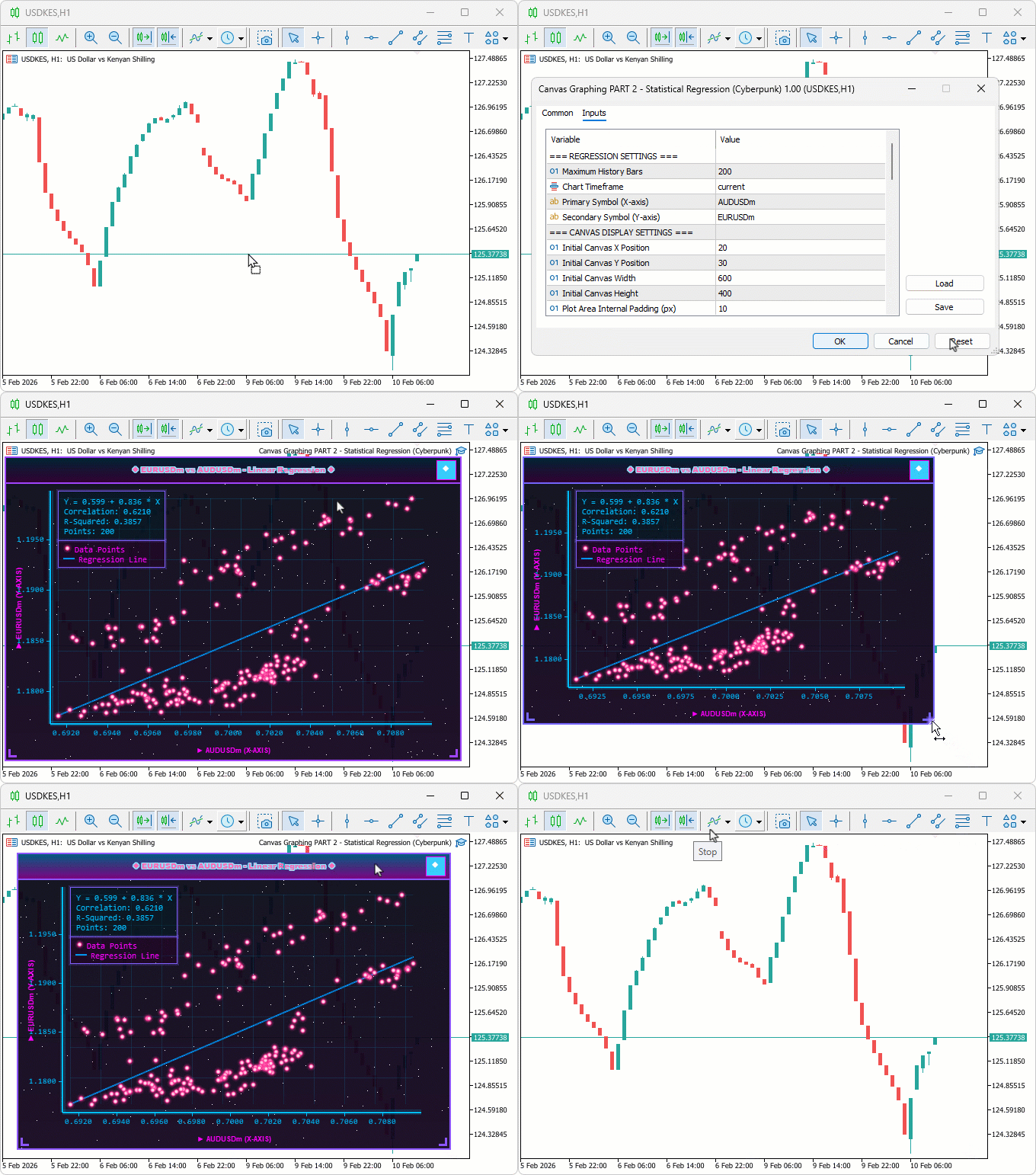
During testing, theme toggles switched modes instantly without lag, neon glows highlighted data points for clearer outlier detection, and animations pulsed in sync with frame updates maintaining smooth performance.
Conclusion
In conclusion, we’ve enhanced the regression graphing tool in MQL5 by adding a cyberpunk theme mode with neon glows, animations, and holographic effects for immersive visualization. We integrated theme toggling, dynamic backgrounds with stars, glowing borders, and neon points/lines, while maintaining standard mode compatibility. This dual-theme system elevates pair analysis with futuristic aesthetics, supporting real-time updates and interactions for engaging trading insights. After the article, you will be able to:
- Toggle themes on charts for adapted visibility in different lighting
- Use neon points to spot correlation deviations quickly
- Apply pulsing lines as visual cues for slope strength in pair trades
In the preceding parts, we will explore the graphing of statistical distribution models and plotting them via bar graphs. Keep tuned!
Warning: All rights to these materials are reserved by MetaQuotes Ltd. Copying or reprinting of these materials in whole or in part is prohibited.
This article was written by a user of the site and reflects their personal views. MetaQuotes Ltd is not responsible for the accuracy of the information presented, nor for any consequences resulting from the use of the solutions, strategies or recommendations described.

 Overcoming Accessibility Challenges in MQL5 Trading Tools (Part II): Enabling EA Voice Using a Python Text-to-Speech Engine
 Price Action Analysis Toolkit Development (Part 62): Building an Adaptive Parallel Channel Detection and Breakout System in MQL5
 Price Action Analysis Toolkit Development (Part 63): Automating Rising and Falling Wedge Detection in MQL5
 Statistical Arbitrage Through Cointegrated Stocks (Final): Data Analysis with Specialized Database

- Free trading apps
- Over 8,000 signals for copying
- Economic news for exploring financial markets
You agree to website policy and terms of use