

Automating Trading Strategies in MQL5 (Part 41): Candle Range Theory (CRT) – Accumulation, Manipulation, Distribution (AMD)
 39 094
 7
7

Introduction
In our previous article (Part 40), we developed a Fibonacci Retracement trading system in MetaQuotes Language 5 (MQL5) that calculated retracement levels using either daily candle ranges or lookback arrays, identified bullish or bearish setups, triggered entries on price crossings of specified levels, and included optional closures on new Fib calculations. In Part 41, we develop a Candle Range Theory (CRT) trading system incorporating Accumulation, Manipulation, and Distribution (AMD) phases.
This system identifies accumulation ranges on a specified timeframe, detects breaches with optional manipulation depth filtering, confirms reversals through bar closures for entry trades in the distribution phase, supports dynamic or static stop-loss and take-profit calculations based on risk-reward ratios, includes optional trailing stops and position limits per direction for risk management, and visualizes phases with colored rectangles, levels, and text labels on the chart. We will cover the following topics:
By the end, you’ll have a functional MQL5 strategy for Candle Range Theory trading with AMD phases, ready for customization—let’s dive in!
Understanding the Candle Range Theory (CRT) Framework
The Candle Range Theory (CRT) is a price action strategy that focuses on identifying key phases within a candle's range to capture high-probability reversal trades. It breaks down market movements into three core phases: accumulation, where price consolidates within a defined range often signaling institutional buildup; manipulation, where price briefly breaches the range extremes to trap traders and shake out weak positions; and distribution, where the true directional move unfolds after a confirmed reversal back into the range. This approach leverages the idea that significant breaches are often false moves designed to create liquidity, followed by a strong counter-move in the opposite direction.
In a positive (bullish) range setup, we look for an upward-closing candle range, anticipate a downward breach as manipulation to raid stops below the low, and enter a buy trade upon reversal back above the low with confirmation, expecting an upward distribution. Conversely, in a negative (bearish) range setup, we identify a downward-closing candle range, watch for an upward breach as manipulation above the high, and initiate a sell trade on reversal back below the high, aiming for downward distribution. By incorporating filters like minimum manipulation depth and bar-based reversal confirmation, we can avoid low-quality setups and focus on those with stronger conviction. Have a look below at a CRT setup sample.

Our plan is to define accumulation ranges on a user-specified timeframe. We will detect breaches and validate manipulation depth against a percentage threshold if this option is enabled. We also confirm reversals through a set number of closing bars on a confirmation timeframe. Trades are executed with limits on positions per direction. We apply dynamic or static stop-loss and take-profit levels based on risk-reward ratios. After a profit threshold is reached, we can incorporate optional trailing stops. All phases are visualized with on-chart rectangles, levels, and labels for intuitive monitoring. In brief, here is a visual representation of our objectives.

Implementation in MQL5
To create the program in MQL5, open the MetaEditor, go to the Navigator, locate the Experts folder, click on the "New" tab, and follow the prompts to create the file. Once it is made, in the coding environment, we will need to declare some input parameters and global variables that we will use throughout the program.
//+------------------------------------------------------------------+
//|                                   CRT Candle Range Theory EA.mq5 |
//|                           Copyright 2025, Allan Munene Mutiiria. |
//|                                   https://t.me/Forex_Algo_Trader |
//+------------------------------------------------------------------+
#property copyright "Copyright 2025, Allan Munene Mutiiria."
#property link      "https://t.me/Forex_Algo_Trader"
#property version   "1.00"

#include <Trade\Trade.mqh>
//+------------------------------------------------------------------+
//| Enums                                                            |
//+------------------------------------------------------------------+
enum SLTP_Method {                                                // Define SL/TP method enum
   Dynamic_Method = 0,                                            // Dynamic based on breach extreme
   Static_Method  = 1                                             // Static based on fixed points
};

enum TrailingTypeEnum {                                           // Define trailing type enum
   Trailing_None   = 0,                                           // None
   Trailing_Points = 1                                            // By Points
};

//+------------------------------------------------------------------+
//| Input Parameters                                                 |
//+------------------------------------------------------------------+
input ENUM_TIMEFRAMES RangeTF = PERIOD_H4;                        // Timeframe for Range Definition
input double TradeVolume = 0.01;                                  // Trade Volume Size
input double RR_Ratio = 1.3;                                      // Risk to Reward Ratio
input SLTP_Method SLTP_Approach = Static_Method;                  // SL/TP Calculation Method
input int SL_Points = 100;                                        // SL Points (for Static Method)
input TrailingTypeEnum TrailingType = Trailing_None;              // Trailing Stop Type
input double Trailing_Stop_Points = 30.0;                         // Trailing Stop in Points
input double Min_Profit_To_Trail_Points = 50.0;                   // Min Profit to Start Trailing in Points
input int UniqueID = 123456789;                                   // Unique Trade Identifier
input int MaxPositionsDir = 1;                                    // Max Positions per Direction
input ENUM_TIMEFRAMES ConfirmTF = PERIOD_CURRENT;                 // Confirmation Timeframe (for bar closures)
input int ConfirmBars = 1;                                        // Bars to Confirm Reversal on Close (0 to disable)
input bool UseManipFilter = true;                                 // Use Manipulation Depth Filter
input double MinManipPct = 5.0;                                   // Min Manipulation % of Range (if filter enabled)
input double DistribProjPct = 50.0;                               // Distribution Projection % of Range Duration
We begin the implementation by including the trade library with "#include <Trade\Trade.mqh>". This library provides essential classes and functions for trade operations. Next, we define enumerations to categorize user-configurable options. We create the "SLTP_Method" enum with values "Dynamic_Method" for dynamic stop-loss and take-profit calculation based on the breach extreme, and "Static_Method" for fixed points. We also define the "TrailingTypeEnum" enum. "Trailing_None" disables trailing stops, and "Trailing_Points" enables trailing by a set number of points. These will allow flexible risk management configurations.
We then declare a series of input parameters that users can adjust via the Expert Advisor properties dialog. These include "RangeTF" to specify the timeframe for defining the accumulation range, "TradeVolume" for setting the lot size of each trade, "RR_Ratio" to determine the risk-to-reward ratio, "SLTP_Approach" to select the stop-loss and take-profit method using the previously defined enum, and the rest, which are self-explanatory. These inputs will make the system adaptable to different market conditions and user preferences. On compilation, we should get the following input sets.

With that done, we can define some global variables that we'll use throughout the program.
//+------------------------------------------------------------------+
//| Global Variables                                                 |
//+------------------------------------------------------------------+
CTrade obj_Trade;                                                 //--- Trade object
datetime prevRangeTime = 0;                                       //--- Previous range time
double rangeMax = 0.0;                                            //--- Range maximum
double rangeMin = 0.0;                                            //--- Range minimum
bool positiveDirection = false;                                   //--- Positive direction flag
bool rangeBreached = false;                                       //--- Range breached flag
double breachPoint = 0.0;                                         //--- Breach point
string maxLevelObj = "RangeMaxLevel";                             //--- Max level object name
string minLevelObj = "RangeMinLevel";                             //--- Min level object name
string maxTextObj = "CRT_High_Text";                              //--- CRT high text object
string minTextObj = "CRT_Low_Text";                               //--- CRT low text object
bool tradedSetup = false;                                         //--- Traded setup flag
datetime breachTime = 0;                                          //--- Breach time
datetime lastConfirmTime = 0;                                     //--- Last confirm time
We proceed by declaring global variables that will be used across the program to maintain state and manage the CRT logic. We instantiate the "obj_Trade" object from the CTrade class to handle all trade-related operations, such as opening and modifying positions. We then define variables for tracking the accumulation range: "prevRangeTime" to store the timestamp of the previous range candle, "rangeMax" and "rangeMin" to hold the high and low prices of the current range, and "positiveDirection" as a boolean flag to indicate if the range candle closed positively (bullish) or negatively (bearish). Additional flags and values include "rangeBreached" to signal when a breach occurs, "breachPoint" to record the extreme price level during manipulation, and "tradedSetup" to prevent multiple trades on the same setup.
We also set up string variables for chart object names, such as "maxLevelObj" and "minLevelObj" for horizontal lines marking the range extremes, and "maxTextObj" and "minTextObj" for text labels identifying CRT highs and lows. Finally, we include "breachTime" to timestamp the start of the manipulation phase and "lastConfirmTime" to track the last confirmation bar time, ensuring the system can monitor timing-sensitive events effectively. We are all set. We'll begin by setting the magic number in the OnInit event handler for trades.
//+------------------------------------------------------------------+
//| EA Start Function                                                |
//+------------------------------------------------------------------+
int OnInit() {
   obj_Trade.SetExpertMagicNumber(UniqueID);                      //--- Set magic number
   return(INIT_SUCCEEDED);                                        //--- Return success
}
In the OnInit event handler, which is executed when the Expert Advisor starts or is attached to a chart, we configure the trade object by calling "obj_Trade.SetExpertMagicNumber" with the "UniqueID" input, which assigns a unique identifier to all trades opened by the program for easy filtering and management. Finally, we return INIT_SUCCEEDED to confirm that the initialization was successful and the program is ready to operate. We will proceed to define some helper functions that we will need for rendering the labels and levels on the chart for visualization. Here is the logic we used to achieve that.
//+------------------------------------------------------------------+
//| Render Horizontal Level                                          |
//+------------------------------------------------------------------+
void RenderLevel(string objName, double levelVal, color levelClr, string levelDesc) {
   ObjectDelete(ChartID(), objName);                                //--- Delete object
   ObjectCreate(ChartID(), objName, OBJ_HLINE, 0, 0, levelVal);     //--- Create hline
   ObjectSetInteger(ChartID(), objName, OBJPROP_COLOR, levelClr);   //--- Set color
   ObjectSetInteger(ChartID(), objName, OBJPROP_STYLE, STYLE_DOT);  //--- Set style
   ObjectSetString(ChartID(), objName, OBJPROP_TOOLTIP, levelDesc); //--- Set tooltip
   ChartRedraw(ChartID());                                          //--- Redraw chart
}

//+------------------------------------------------------------------+
//| Render Text Label                                                |
//+------------------------------------------------------------------+
void RenderText(string objName, datetime timeVal, double priceVal, string textStr, color textClr, int anchorVal) {
   ObjectDelete(ChartID(), objName);                                 //--- Delete object
   ObjectCreate(ChartID(), objName, OBJ_TEXT, 0, timeVal, priceVal); //--- Create text
   ObjectSetString(ChartID(), objName, OBJPROP_TEXT, textStr);       //--- Set text
   ObjectSetInteger(ChartID(), objName, OBJPROP_COLOR, textClr);     //--- Set color
   ObjectSetInteger(ChartID(), objName, OBJPROP_ANCHOR, anchorVal);  //--- Set anchor
   ObjectSetInteger(ChartID(), objName, OBJPROP_FONTSIZE, 10);       //--- Set fontsize
   ChartRedraw(ChartID());                                           //--- Redraw chart
}
First, we define the "RenderLevel" function to draw or update a horizontal line on the chart representing key price levels, such as range maxima or minima. It takes parameters for the object name, price level value, color, and description. Inside the function, we first delete any existing object with the same name using ObjectDelete to avoid duplicates, then create a new horizontal line object with ObjectCreate specifying OBJ_HLINE as the type and positioning it at the given price level. We set its color with ObjectSetInteger and OBJPROP_COLOR, apply a dotted style via "OBJPROP_STYLE" and STYLE_DOT, add a tooltip description through "OBJPROP_TOOLTIP", and finally redraw the chart with ChartRedraw to display the changes immediately.
Similarly, we create the "RenderText" function to place or update text labels on the chart for annotations like phase identifiers. This function accepts parameters for the object name, time, and price coordinates, text string, color, and anchor point. We begin by removing any prior instance of the object with "ObjectDelete", followed by creating a new text object using "ObjectCreate" with "OBJ_TEXT" as the type at the specified time and price. We configure the text content via ObjectSetString and OBJPROP_TEXT, set the color with "ObjectSetInteger" and "OBJPROP_COLOR", define the anchor position using "OBJPROP_ANCHOR", adjust the font size to 10 through "OBJPROP_FONTSIZE", and conclude by redrawing the chart with "ChartRedraw" to ensure the label appears correctly. Armed with these functions, we can define the range and visualize it on the chart in the OnTick event handler.
//+------------------------------------------------------------------+
//| Tick Processing Function                                         |
//+------------------------------------------------------------------+
void OnTick() {
   double currBid = SymbolInfoDouble(_Symbol, SYMBOL_BID);        //--- Get current bid
   double currAsk = SymbolInfoDouble(_Symbol, SYMBOL_ASK);        //--- Get current ask
   datetime currRangeTime = iTime(_Symbol, RangeTF, 0);           //--- Get current range time
   if (currRangeTime != prevRangeTime) {                          //--- Check new range
      prevRangeTime = currRangeTime;                              //--- Update prev time
      double prevMax = iHigh(_Symbol, RangeTF, 1);                //--- Get prev high
      double prevMin = iLow(_Symbol, RangeTF, 1);                 //--- Get prev low
      double prevStart = iOpen(_Symbol, RangeTF, 1);              //--- Get prev open
      double prevEnd = iClose(_Symbol, RangeTF, 1);               //--- Get prev close
      rangeMax = prevMax;                                         //--- Set range max
      rangeMin = prevMin;                                         //--- Set range min
      positiveDirection = (prevEnd > prevStart);                  //--- Set direction
      rangeBreached = false;                                      //--- Reset breached
      breachPoint = positiveDirection ? rangeMin : rangeMax;      //--- Set breach point
      tradedSetup = false;                                        //--- Reset traded
      breachTime = 0;                                             //--- Reset breach time
      lastConfirmTime = 0;                                        //--- Reset confirm time
      RenderLevel(maxLevelObj, rangeMax, clrOrange, "Range Max"); //--- Render max level
      RenderLevel(minLevelObj, rangeMin, clrPurple, "Range Min"); //--- Render min level
      // Add text labels for current CRT High and Low
      datetime labelTime = currRangeTime;                         //--- Set label time
      RenderText(maxTextObj, labelTime, rangeMax, "CRT High", clrOrange, ANCHOR_RIGHT_LOWER); //--- Render high text
      RenderText(minTextObj, labelTime, rangeMin, "CRT Low", clrPurple, ANCHOR_RIGHT_UPPER);  //--- Render low text
      // Draw background rectangle for the accumulation phase (range candle) with fill true
      string rangeRectObj = "RangeRectangle_" + IntegerToString(currRangeTime);               //--- Range rect name
      datetime rangeStartTime = iTime(_Symbol, RangeTF, 1);                                   //--- Get start time
      datetime rangeEndTime = currRangeTime;                                                  //--- Set end time
      ObjectCreate(ChartID(), rangeRectObj, OBJ_RECTANGLE, 0, rangeStartTime, rangeMax, rangeEndTime, rangeMin); //--- Create rect
      color rectClr = positiveDirection ? clrLightGreen : clrLightPink;                       //--- Set rect color
      ObjectSetInteger(ChartID(), rangeRectObj, OBJPROP_COLOR, rectClr);                      //--- Set color
      ObjectSetInteger(ChartID(), rangeRectObj, OBJPROP_FILL, true);                          //--- Set fill
      ObjectSetInteger(ChartID(), rangeRectObj, OBJPROP_BACK, true);                          //--- Set back
      ObjectSetInteger(ChartID(), rangeRectObj, OBJPROP_STYLE, STYLE_SOLID);                  //--- Set style
      ChartRedraw(ChartID());                                                                 //--- Redraw chart
   }
}
In the OnTick event handler, we start by retrieving the current bid price with SymbolInfoDouble using SYMBOL_BID and assigning it to "currBid", and similarly for the ask price with SYMBOL_ASK into "currAsk". We then fetch the timestamp of the most recent bar on the range timeframe via iTime at shift 0, storing it in "currRangeTime". If this timestamp differs from "prevRangeTime", indicating a new range bar, we update "prevRangeTime", and gather the previous bar's high with iHigh at shift 1 into "prevMax", low with "iLow" into "prevMin", open with "iOpen" into "prevStart", and close with iClose into "prevEnd". We set the range boundaries by assigning "rangeMax" to the high and "rangeMin" to the low, determining "positiveDirection" as true if the close exceeds the open for a bullish setup, resetting "rangeBreached" to false, initializing "breachPoint" to the minimum for positive or maximum for negative directions, clearing "tradedSetup", and zeroing out "breachTime" and "lastConfirmTime".
For visualization, we invoke "RenderLevel" to draw the maximum level with orange color and "Range Max" description, and the minimum with purple and "Range Min". We add labels by setting "labelTime" to the current range time, then calling "RenderText" for "CRT High" in orange, anchored right-lower at the max, and "CRT Low" in purple, anchored right-upper at the min. To highlight the accumulation phase, we create a unique rectangle name by combining "RangeRectangle_" with the converted current range time string. We get the previous bar's start time via "iTime" at shift 1 into "rangeStartTime", set "rangeEndTime" to the current time, and create the rectangle with ObjectCreate using OBJ_RECTANGLE spanning the time and price range. We choose light green for positive or light pink for negative directions, apply the color, enable filling, set it as background, use a solid style, and redraw the chart to reflect the updates. It is always a good programming practice to compile your program on every milestone to see the objectives' achievement. In our case, we get the following outcome.

We can see we have set the ranges successfully. We can proceed to determine breaches and trade the setups.
if (rangeMax == 0.0 || rangeMin == 0.0) return;                //--- Return if no range
bool justBreached = false;                                     //--- Init just breached
if (positiveDirection && currBid <= rangeMin) {                //--- Check positive breach
   if (!rangeBreached) {                                       //--- Check not breached
      rangeBreached = true;                                    //--- Set breached
      justBreached = true;                                     //--- Set just breached
      breachTime = TimeCurrent();                              //--- Set breach time
   }
   breachPoint = MathMin(breachPoint, currBid);                //--- Update breach point
} else if (!positiveDirection && currBid >= rangeMax) {        //--- Check negative breach
   if (!rangeBreached) {                                       //--- Check not breached
      rangeBreached = true;                                    //--- Set breached
      justBreached = true;                                     //--- Set just breached
      breachTime = TimeCurrent();                              //--- Set breach time
   }
   breachPoint = MathMax(breachPoint, currBid);                //--- Update breach point
}
if (rangeBreached && !tradedSetup) {                           //--- Check breached and not traded
   // Check for confirmed reversal on bar closures
   bool reversalConfirmed = false;                              //--- Init confirmed
   if (ConfirmBars == 0) {                                      //--- Check no confirm
      reversalConfirmed = true;                                 //--- Set confirmed
   } else {                                                     //--- Else
      datetime currConfirmTime = iTime(_Symbol, ConfirmTF, 0);  //--- Get confirm time
      if (currConfirmTime != lastConfirmTime) {                 //--- Check new confirm
         lastConfirmTime = currConfirmTime;                     //--- Update last confirm
         int confirmedCount = 0;                                //--- Init count
         for (int i = 1; i <= ConfirmBars; i++) {               //--- Iterate bars
            double confirmClose = iClose(_Symbol, ConfirmTF, i); //--- Get close
            if (positiveDirection && confirmClose > rangeMin) { //--- Check positive
               confirmedCount++;                                //--- Increment count
            } else if (!positiveDirection && confirmClose < rangeMax) { //--- Check negative
               confirmedCount++;                                //--- Increment count
            }
         }
         if (confirmedCount >= ConfirmBars) {                   //--- Check confirmed
            reversalConfirmed = true;                           //--- Set confirmed
         }
      }
   }
   // Calculate manipulation depth for filter
   bool manipSufficient = true;                                 //--- Init sufficient
   double rangeSize = rangeMax - rangeMin;                      //--- Calc range size
   double manipDepth = positiveDirection ? (rangeMin - breachPoint) : (breachPoint - rangeMax); //--- Calc depth
   double manipPct = (manipDepth / rangeSize) * 100.0;          //--- Calc percent
   if (UseManipFilter) {                                        //--- Check filter
      if (manipPct < MinManipPct) {                             //--- Check insufficient
         manipSufficient = false;                               //--- Set insufficient
      }
   }
   bool justEntered = false;                                    //--- Init entered
   datetime entryTime = 0;                                      //--- Init entry time
   double entryPrice = 0.0;                                     //--- Init entry price
   double gainTarget = 0.0;                                     //--- Init target
   if (reversalConfirmed && manipSufficient) {                  //--- Check confirmed and sufficient
      if (positiveDirection && currBid > rangeMin && ActivePositions(POSITION_TYPE_BUY) < MaxPositionsDir) { //--- Check buy entry
         double lossStop;                                       //--- Init SL
         if (SLTP_Approach == Dynamic_Method) {                 //--- Check dynamic
            lossStop = NormalizeDouble(breachPoint, _Digits);   //--- Set SL
            double riskDistance = currAsk - breachPoint;        //--- Calc risk
            gainTarget = NormalizeDouble(currAsk + riskDistance * RR_Ratio, _Digits); //--- Set TP
         } else {                                               //--- Static
            lossStop = NormalizeDouble(currAsk - SL_Points * _Point, _Digits); //--- Set SL
            gainTarget = NormalizeDouble(currAsk + SL_Points * RR_Ratio * _Point, _Digits); //--- Set TP
         }
         if (obj_Trade.Buy(TradeVolume, _Symbol, currAsk, lossStop, gainTarget, "CRT Positive Entry")) { //--- Open buy
            if (obj_Trade.ResultRetcode() == TRADE_RETCODE_DONE) { //--- Check success
               Print("Positive Signal: Range raided below min, reversed back in (confirmed). Entry at ", DoubleToString(currAsk, _Digits),
                     " SL at ", DoubleToString(lossStop, _Digits), " TP at ", DoubleToString(gainTarget, _Digits)); //--- Log entry
               Print("Debug: Accumulation Range: ", DoubleToString(rangeSize / _Point, 0), " points. Manipulation Depth: ", DoubleToString(manipDepth / _Point, 0), " points (", DoubleToString(manipPct, 2), "% of range)"); //--- Log debug
               string markerName = "EntryMarker_" + IntegerToString(TimeCurrent()); //--- Marker name
               ObjectCreate(ChartID(), markerName, OBJ_ARROW, 0, TimeCurrent(), currBid); //--- Create marker
               ObjectSetInteger(ChartID(), markerName, OBJPROP_ARROWCODE, 233); //--- Set code
               ObjectSetInteger(ChartID(), markerName, OBJPROP_COLOR, clrBlue); //--- Set color
               ObjectSetInteger(ChartID(), markerName, OBJPROP_ANCHOR, ANCHOR_BOTTOM); //--- Set anchor
               tradedSetup = true;                                 //--- Set traded
               justEntered = true;                                 //--- Set entered
               entryTime = TimeCurrent();                          //--- Set entry time
               entryPrice = currAsk;                               //--- Set entry price
            }
         }
      } else if (!positiveDirection && currBid < rangeMax && ActivePositions(POSITION_TYPE_SELL) < MaxPositionsDir) { //--- Check sell entry
         double lossStop;                                       //--- Init SL
         if (SLTP_Approach == Dynamic_Method) {                 //--- Check dynamic
            lossStop = NormalizeDouble(breachPoint, _Digits);   //--- Set SL
            double riskDistance = breachPoint - currBid;        //--- Calc risk
            gainTarget = NormalizeDouble(currBid - riskDistance * RR_Ratio, _Digits); //--- Set TP
         } else {                                               //--- Static
            lossStop = NormalizeDouble(currBid + SL_Points * _Point, _Digits); //--- Set SL
            gainTarget = NormalizeDouble(currBid - SL_Points * RR_Ratio * _Point, _Digits); //--- Set TP
         }
         if (obj_Trade.Sell(TradeVolume, _Symbol, currBid, lossStop, gainTarget, "CRT Negative Entry")) { //--- Open sell
            if (obj_Trade.ResultRetcode() == TRADE_RETCODE_DONE) { //--- Check success
               Print("Negative Signal: Range raided above max, reversed back in (confirmed). Entry at ", DoubleToString(currBid, _Digits),
                     " SL at ", DoubleToString(lossStop, _Digits), " TP at ", DoubleToString(gainTarget, _Digits)); //--- Log entry
               Print("Debug: Accumulation Range: ", DoubleToString(rangeSize / _Point, 0), " points. Manipulation Depth: ", DoubleToString(manipDepth / _Point, 0), " points (", DoubleToString(manipPct, 2), "% of range)"); //--- Log debug
               string markerName = "EntryMarker_" + IntegerToString(TimeCurrent()); //--- Marker name
               ObjectCreate(ChartID(), markerName, OBJ_ARROW, 0, TimeCurrent(), currAsk); //--- Create marker
               ObjectSetInteger(ChartID(), markerName, OBJPROP_ARROWCODE, 234); //--- Set code
               ObjectSetInteger(ChartID(), markerName, OBJPROP_COLOR, clrRed); //--- Set color
               ObjectSetInteger(ChartID(), markerName, OBJPROP_ANCHOR, ANCHOR_TOP); //--- Set anchor
               tradedSetup = true;                                 //--- Set traded
               justEntered = true;                                 //--- Set entered
               entryTime = TimeCurrent();                          //--- Set entry time
               entryPrice = currBid;                               //--- Set entry price
            }
         }
      }
   }
}
Continuing in the tick function, we first verify if the range is properly defined by checking if "rangeMax" or "rangeMin" is zero, returning early if so to avoid processing invalid states. We initialize a boolean "justBreached" to false for tracking new breaches. For a positive direction setup, if the current bid is at or below the range minimum and the range hasn't been breached yet, we set "rangeBreached" to true, mark "justBreached" as true, and record the breach time with the TimeCurrent function. We then update "breachPoint" to the lower of its current value or the bid using the MathMin function. Similarly, for negative directions, we do the same.
If a breach has occurred and no trade has been placed for this setup, we proceed to confirm the reversal. We initialize "reversalConfirmed" to false; if no confirmation bars are required via "ConfirmBars" being zero, we set it to true immediately. Otherwise, we fetch the latest bar time on the confirmation timeframe with iTime at shift zero into "currConfirmTime", and if it's new compared to "lastConfirmTime", we update the last time and count confirming closes: looping from shift one to "ConfirmBars", we get each close price with iClose, incrementing a counter if closes are above the minimum for positive setups or below the maximum for negative. If the count meets or exceeds "ConfirmBars", we confirm the reversal. Next, we assess manipulation sufficiency, starting with "manipSufficient" as true. We calculate the range size as the difference between maximum and minimum, manipulation depth as the distance from the range edge to the breach point (subtracting for positive, adding for negative), and percentage by dividing depth by size times 100. If the filter is enabled via "UseManipFilter" and the percentage falls below "MinManipPct", we set sufficiency to false.
Next, we prepare entry variables and initialize them. If both reversal is confirmed and manipulation is sufficient, we check buy entry conditions for positive directions—if the bid exceeds the minimum and buy positions from "ActivePositions" with POSITION_TYPE_BUY are below "MaxPositionsDir", we calculate the entry levels. The "ActivePositions" function is a helper function we defined to modularize the code and return our active positions. See its implementation below.
//+------------------------------------------------------------------+
//| Count Active Positions by Type                                   |
//+------------------------------------------------------------------+
int ActivePositions(ENUM_POSITION_TYPE posType) {
   int total = 0;                                                 //--- Init total
   for (int pos = PositionsTotal() - 1; pos >= 0; pos--) {        //--- Iterate positions
      if (PositionGetSymbol(pos) == _Symbol && PositionGetInteger(POSITION_MAGIC) == UniqueID && PositionGetInteger(POSITION_TYPE) == posType) { //--- Check position
         total++;                                                 //--- Increment total
      }
   }
   return total;                                                  //--- Return total
}
The function is straightforward. We've added comments for clarity. Back to the logic, we attempt to open a buy order using "obj_Trade.Buy" with volume, symbol, ask, stop-loss, take-profit, and a comment. If successful per "ResultRetcode" equaling TRADE_RETCODE_DONE, we print log messages for the signal and debug info on range and depth, create an entry marker arrow with "ObjectCreate" using OBJ_ARROW at current time and bid, setting arrow code 233, blue color, and bottom anchor, then flag "tradedSetup" and "justEntered" true, and record entry time and price. MQL5 offers the arrow codes from the Wingdings font that you can choose your desired as below.
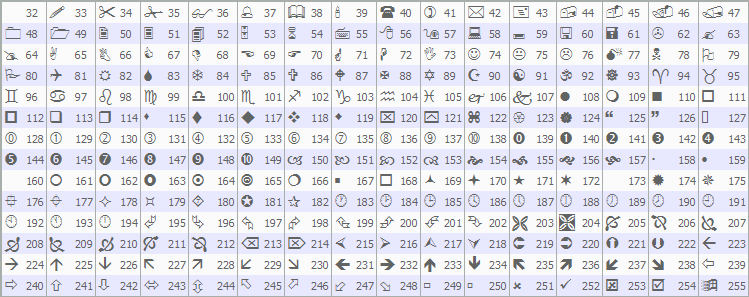
For negative directions, we mirror the logic: check if bid is below maximum and sell positions below limit, compute stop-loss dynamically as normalized breach point with risk from breach to bid, and take-profit subtracting risk times ratio, or statically adding "SL_Points" times point to bid for stop-loss and subtracting for take-profit. Open a sell with "obj_Trade.Sell" using bid, and on success, log similarly, draw a marker with code 234, red color, and top anchor, updating flags and entry details accordingly. Upon compilation, we get the following outcome.

From the image, we can see that we can confirm trades when there are confirmations. What we need to do is visualize the levels for clarity when trading, so we can visually track what is really happening.
// If just entered trade, draw manipulation rectangle, distribution, and labels (including accumulation)
if (justEntered) {                                             //--- Check entered
   string setupSuffix = IntegerToString(prevRangeTime);        //--- Setup suffix
   // Label the range as Accumulation phase (now only for complete setups)
   string accumTextUnique = "AccumText_" + setupSuffix;        //--- Accum text name
   double accumPrice = (rangeMax + rangeMin) / 2;              //--- Accum price
   datetime labelTime = prevRangeTime;                         //--- Label time
   RenderText(accumTextUnique, labelTime, accumPrice, "Accumulation", clrBlue, ANCHOR_RIGHT); //--- Render accum text
   // Calculate the manipulation extreme using candle highs/lows between currRangeTime and entryTime
   int startBar = iBarShift(_Symbol, PERIOD_CURRENT, prevRangeTime); //--- Start bar
   int endBar = iBarShift(_Symbol, PERIOD_CURRENT, entryTime); //--- End bar
   if (startBar < 0 || endBar < 0) return;                     //--- Return invalid
   if (startBar < endBar) { int temp = startBar; startBar = endBar; endBar = temp; } //--- Swap if needed
   int barCount = startBar - endBar + 1;                       //--- Calc bar count
   double manipExtreme;                                        //--- Init manip extreme
   double manipStartPrice = positiveDirection ? rangeMin : rangeMax; //--- Manip start
   if (positiveDirection) {                                    //--- Check positive
      int lowestBar = iLowest(_Symbol, PERIOD_CURRENT, MODE_LOW, barCount, endBar); //--- Get lowest
      manipExtreme = iLow(_Symbol, PERIOD_CURRENT, lowestBar); //--- Set extreme
   } else {                                                    //--- Negative
      int highestBar = iHighest(_Symbol, PERIOD_CURRENT, MODE_HIGH, barCount, endBar); //--- Get highest
      manipExtreme = iHigh(_Symbol, PERIOD_CURRENT, highestBar); //--- Set extreme
   }
   // Draw manipulation rectangle (border only) from CRT end to signal time
   string manipRectObj = "ManipRectangle_" + setupSuffix;      //--- Manip rect name
   double topPrice = MathMax(manipStartPrice, manipExtreme);   //--- Top price
   double bottomPrice = MathMin(manipStartPrice, manipExtreme); //--- Bottom price
   ObjectCreate(ChartID(), manipRectObj, OBJ_RECTANGLE, 0, prevRangeTime, topPrice, entryTime, bottomPrice); //--- Create rect
   ObjectSetInteger(ChartID(), manipRectObj, OBJPROP_COLOR, clrBlue); //--- Set color
   ObjectSetInteger(ChartID(), manipRectObj, OBJPROP_FILL, false); //--- Set no fill
   ObjectSetInteger(ChartID(), manipRectObj, OBJPROP_BACK, true); //--- Set back
   ObjectSetInteger(ChartID(), manipRectObj, OBJPROP_STYLE, STYLE_DOT); //--- Set style
   ObjectSetInteger(ChartID(), manipRectObj, OBJPROP_WIDTH, 2); //--- Set width
   ChartRedraw(ChartID());                                     //--- Redraw chart
   // Add manipulation text label at breach time
   string manipTextUnique = "ManipText_" + setupSuffix;        //--- Manip text name
   int anchorManip = positiveDirection ? ANCHOR_RIGHT_UPPER : ANCHOR_RIGHT_LOWER; //--- Manip anchor
   RenderText(manipTextUnique, breachTime, manipExtreme, "Manipulation", clrBlue, anchorManip); //--- Render manip text
   // Label and draw distribution
   string distribTextUnique = "DistribText_" + setupSuffix;    //--- Distrib text name
   color distribClr = positiveDirection ? clrGreen : clrRed;   //--- Distrib color
   int anchor = positiveDirection ? ANCHOR_LEFT_LOWER : ANCHOR_LEFT_UPPER; //--- Distrib anchor
   RenderText(distribTextUnique, entryTime, entryPrice, "Distribution", distribClr, anchor); //--- Render distrib text
   // Draw border rectangle (fill false) for distribution phase (% of range duration)
   string distribRectObj = "DistribRectangle_" + setupSuffix;  //--- Distrib rect name
   datetime rangeStartTime = iTime(_Symbol, RangeTF, 1);       //--- Range start
   datetime rangeEndTime = prevRangeTime;                      //--- Range end
   long duration = rangeEndTime - rangeStartTime;              //--- Calc duration
   double projFactor = MathMax(DistribProjPct / 100.0, 0.01);  //--- Proj factor
   datetime projEndTime = entryTime + (datetime)(duration * projFactor); //--- Proj end
   double topDistrib = MathMax(entryPrice, gainTarget);        //--- Top distrib
   double bottomDistrib = MathMin(entryPrice, gainTarget);     //--- Bottom distrib
   ObjectCreate(ChartID(), distribRectObj, OBJ_RECTANGLE, 0, entryTime, topDistrib, projEndTime, bottomDistrib); //--- Create rect
   ObjectSetInteger(ChartID(), distribRectObj, OBJPROP_COLOR, distribClr); //--- Set color
   ObjectSetInteger(ChartID(), distribRectObj, OBJPROP_FILL, false); //--- Set no fill
   ObjectSetInteger(ChartID(), distribRectObj, OBJPROP_BACK, true); //--- Set back
   ObjectSetInteger(ChartID(), distribRectObj, OBJPROP_STYLE, STYLE_SOLID); //--- Set style
   ObjectSetInteger(ChartID(), distribRectObj, OBJPROP_WIDTH, 2); //--- Set width
   ChartRedraw(ChartID());                                     //--- Redraw chart
}
Here, if a trade has just been entered, as indicated by "justEntered" being true, we proceed to visualize the remaining phases. We create a unique suffix for object names using IntegerToString on "prevRangeTime". For the accumulation label, we generate a unique text name by appending the suffix to "AccumText_", calculate the midpoint price as the average of the range maximum and minimum, set the label time to "prevRangeTime", and call "RenderText" to place "Accumulation" in blue at the right anchor. To determine the manipulation extreme, we convert times to bar indices with "iBarShift" for start at "prevRangeTime" and end at "entryTime", returning early if invalid. We ensure start is greater than end by swapping if necessary, compute the bar count, and set "manipStartPrice" to the range minimum for positive or maximum for negative directions. For positive, we find the lowest bar with "iLowest" using "MODE_LOW" over the count from the end bar, getting the low price via iLow; for negative, we use iHighest with MODE_HIGH and iHigh for the extreme.
We then draw the manipulation rectangle by creating a unique name with the suffix appended to "ManipRectangle_", determining top and bottom prices as the max and min of start and extreme using MathMax and "MathMin", and creating it with ObjectCreate as OBJ_RECTANGLE spanning from the previous range time at the top to the entry time at the bottom. We set its color to blue, disable filling, place it in the background, apply a dotted style with a width of 2, and redraw the chart. Next, we add a manipulation label with a unique name suffixed to "ManipText_", choosing an upper-right anchor for positive or lower-right for negative, and render "Manipulation" in blue at breach time and extreme price. For distribution, we create a label name with a suffix on "DistribText_", select green for positive or red for negative color, set the lower-left anchor for positive or the upper-left for negative, and render "Distribution" at entry time and price. Finally, we draw the distribution rectangle using a similar logic, and redraw the chart. Here is the outcome.

From the image, we can see that we have added the manipulation and distribution phases for clarity. What now remains is managing the positions that move in our favour by adding a trailing stop logic. We will house that in a function as well.
//+------------------------------------------------------------------+
//| Apply Points Trailing Stop                                       |
//+------------------------------------------------------------------+
void ApplyPointsTrailing() {
   double point = _Point;                                         //--- Get point
   for (int i = PositionsTotal() - 1; i >= 0; i--) {              //--- Iterate positions
      if (PositionGetTicket(i) > 0) {                             //--- Check ticket
         if (PositionGetString(POSITION_SYMBOL) == _Symbol && PositionGetInteger(POSITION_MAGIC) == UniqueID) { //--- Check symbol magic
            double sl = PositionGetDouble(POSITION_SL);              //--- Get SL
            double tp = PositionGetDouble(POSITION_TP);              //--- Get TP
            double openPrice = PositionGetDouble(POSITION_PRICE_OPEN); //--- Get open
            ulong ticket = PositionGetInteger(POSITION_TICKET);      //--- Get ticket
            if (PositionGetInteger(POSITION_TYPE) == POSITION_TYPE_BUY) { //--- Check buy
               double newSL = NormalizeDouble(SymbolInfoDouble(_Symbol, SYMBOL_BID) - Trailing_Stop_Points * point, _Digits); //--- Calc new SL
               if (newSL > sl && SymbolInfoDouble(_Symbol, SYMBOL_BID) - openPrice > Min_Profit_To_Trail_Points * point) { //--- Check conditions
                  obj_Trade.PositionModify(ticket, newSL, tp);       //--- Modify position
               }
            } else if (PositionGetInteger(POSITION_TYPE) == POSITION_TYPE_SELL) { //--- Check sell
               double newSL = NormalizeDouble(SymbolInfoDouble(_Symbol, SYMBOL_ASK) + Trailing_Stop_Points * point, _Digits); //--- Calc new SL
               if (newSL < sl && openPrice - SymbolInfoDouble(_Symbol, SYMBOL_ASK) > Min_Profit_To_Trail_Points * point) { //--- Check conditions
                  obj_Trade.PositionModify(ticket, newSL, tp);       //--- Modify position
               }
            }
         }
      }
   }
}

//--- Call the function per tick in the "OnTick" event handler

if (TrailingType == Trailing_Points && PositionsTotal() > 0) { //--- Check trailing
   ApplyPointsTrailing();                                      //--- Apply trailing
}
We define the "ApplyPointsTrailing" function to manage trailing stop-loss adjustments based on points when enabled. We start by assigning the symbol's point value to "point" using _Point. We then loop backward through all open positions with PositionsTotal to avoid index issues during modifications, checking each ticket's validity with the PositionGetTicket function. For positions matching our symbol via PositionGetString with POSITION_SYMBOL and magic number through "PositionGetInteger" with "POSITION_MAGIC", we retrieve the current stop-loss with "PositionGetDouble" and "POSITION_SL", take-profit with "POSITION_TP", open price via "POSITION_PRICE_OPEN", and ticket number with "POSITION_TICKET". For buy positions identified by "POSITION_TYPE_BUY", we calculate a new stop-loss by subtracting "Trailing_Stop_Points" times point from the current bid obtained via SymbolInfoDouble with SYMBOL_BID, normalizing it to the symbol's digits. If this new value exceeds the existing stop-loss and the profit (bid minus open) surpasses "Min_Profit_To_Trail_Points" times point, we modify the position using "obj_Trade.PositionModify" with the new stop-loss and unchanged take-profit.
Similarly, for sell positions with POSITION_TYPE_SELL, we compute the new stop-loss, and if it's below the current stop-loss and profit (open minus ask) meets the minimum threshold, we update the position accordingly. Finally, within the "OnTick" function, if "TrailingType" equals "Trailing_Points" and there are open positions per "PositionsTotal", we invoke "ApplyPointsTrailing" to apply these adjustments on each tick. We now need to take care of the objects we have created by deleting them on de-initialization.
//+------------------------------------------------------------------+
//| EA Stop Function                                                 |
//+------------------------------------------------------------------+
void OnDeinit(const int code) {
   ObjectDelete(ChartID(), maxLevelObj);                          //--- Delete max level
   ObjectDelete(ChartID(), minLevelObj);                          //--- Delete min level
   ObjectDelete(ChartID(), maxTextObj);                           //--- Delete max text
   ObjectDelete(ChartID(), minTextObj);                           //--- Delete min text
   // Clean dynamic rects and texts
   ObjectsDeleteAll(ChartID(), "RangeRectangle_", OBJ_RECTANGLE); //--- Delete range rects
   ObjectsDeleteAll(ChartID(), "ManipRectangle_", OBJ_RECTANGLE); //--- Delete manip rects
   ObjectsDeleteAll(ChartID(), "DistribRectangle_", OBJ_RECTANGLE); //--- Delete distrib rects
   ObjectsDeleteAll(ChartID(), "AccumText_", OBJ_TEXT);           //--- Delete accum texts
   ObjectsDeleteAll(ChartID(), "ManipText_", OBJ_TEXT);           //--- Delete manip texts
   ObjectsDeleteAll(ChartID(), "DistribText_", OBJ_TEXT);         //--- Delete distrib texts
}
In the OnDeinit event handler, which is executed when the program is removed from the chart or shut down, we start by individually deleting static chart objects using ObjectDelete with the current chart identifier from ChartID: the maximum level horizontal line via "maxLevelObj", the minimum level with "minLevelObj", the CRT high text label through "maxTextObj", and the CRT low text with "minTextObj".
To handle dynamically created objects, we employ ObjectsDeleteAll to remove all matching items on the chart: all rectangles prefixed with "RangeRectangle_" of type OBJ_RECTANGLE for accumulation phases, similarly for "ManipRectangle_" to clear manipulation borders, and "DistribRectangle_" for distribution projections; then all text objects starting with "AccumText_" of type OBJ_TEXT for accumulation labels, "ManipText_" for manipulation annotations, and "DistribText_" for distribution markers. This ensures a complete cleanup without leaving residual visuals. Upon compilation, we get the following outcome when the trailing stop is enabled.

From the image, we can see that we manage the positions by applying trailing stops when needed, hence achieving our objectives. The thing that remains is backtesting the program, and that is handled in the next section.
Backtesting
After thorough backtesting, we have the following results.
Backtest graph:

Backtest report:

Conclusion
In conclusion, we’ve developed a Candle Range Theory (CRT) trading system in MQL5 that identifies accumulation ranges on a specified timeframe, detects breaches with manipulation depth filtering, confirms reversals through bar closures, and executes trades in the distribution phase with dynamic or static stop-loss and take-profit based on risk-reward ratios.
Disclaimer: This article is for educational purposes only. Trading carries significant financial risks, and market volatility may result in losses. Thorough backtesting and careful risk management are crucial before deploying this program in live markets.
With this Candle Range Theory strategy incorporating Accumulation, Manipulation, and Distribution (AMD) phases, you’re equipped to trade reversal opportunities, ready for further optimization in your trading journey. Happy trading!
Warning: All rights to these materials are reserved by MetaQuotes Ltd. Copying or reprinting of these materials in whole or in part is prohibited.
This article was written by a user of the site and reflects their personal views. MetaQuotes Ltd is not responsible for the accuracy of the information presented, nor for any consequences resulting from the use of the solutions, strategies or recommendations described.

 Price Action Analysis Toolkit Development (Part 51): Revolutionary Chart Search Technology for Candlestick Pattern Discovery
 Automating Black-Scholes Greeks: Advanced Scalping and Microstructure Trading
 Analytical Volume Profile Trading (AVPT): Liquidity Architecture, Market Memory, and Algorithmic Execution
 Overcoming The Limitation of Machine Learning (Part 7): Automatic Strategy Selection

- Free trading apps
- Over 8,000 signals for copying
- Economic news for exploring financial markets
You agree to website policy and terms of use
Thanks, it looks interesting.
You did not explain how the beginning of each new accumulation phase is detected.
That's the candle ranges as visualized.
That's the candle ranges as visualized.
This does not answer the question - how do you find the beginning of the accumulation phase (each and every, because the phase occurs again and again on different sections of the chart). It is about time, not a range of prices. It is not about visualization as well.