

Swing Extremes and Pullbacks in MQL5 (Part 1): Developing a Multi-Timeframe Indicator
 8 210
8 210
 4
4

Table of contents:
Introduction
Previously, we developed Swing Extremes and the Pullback Indicator by systematically identifying swing highs and swing lows within lower-timeframe price action. The approach focused on mapping short-term structural shifts—higher highs, lower lows, pullbacks, and momentum pauses—to anticipate potential reversals before they became obvious on higher timeframes. By combining swing detection logic with pullback validation rules, we created a framework that transformed raw LTF volatility into a structured, readable model of market behavior.
Now, the next step is to fully automate the indicator by embedding this structural logic directly into code. This involves algorithmically defining valid swing points, filtering out noise, confirming pullbacks through rule-based conditions, and dynamically updating structure in real time. Through automation, the system will continuously scan and interpret LTF market structure without manual intervention, providing objective, consistent, and faster reversal anticipation—ultimately enhancing execution precision and decision-making efficiency.
Automation Overview
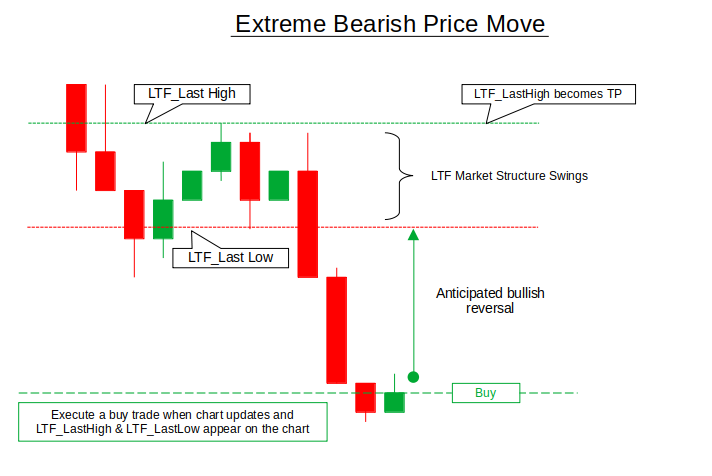
From an automation perspective, the extreme bearish move is converted into a precise rule-based execution model. When price aggressively trades below the LTF’s last low and the chart updates, the system evaluates whether both LTF_LastHigh and LTF_LastLow are positioned above the current market price—confirming structural displacement beneath the recent range. Once these conditions are met, the logic interprets the move as exhaustion rather than continuation and automatically executes a buy trade. The system then inherits LTF_LastHigh as the take-profit level, targeting a mean reversion back toward prior structure. This removes discretion entirely: the trade is triggered strictly by structural imbalance and predefined thresholds, ensuring consistent execution whenever bearish expansion becomes statistically stretched.
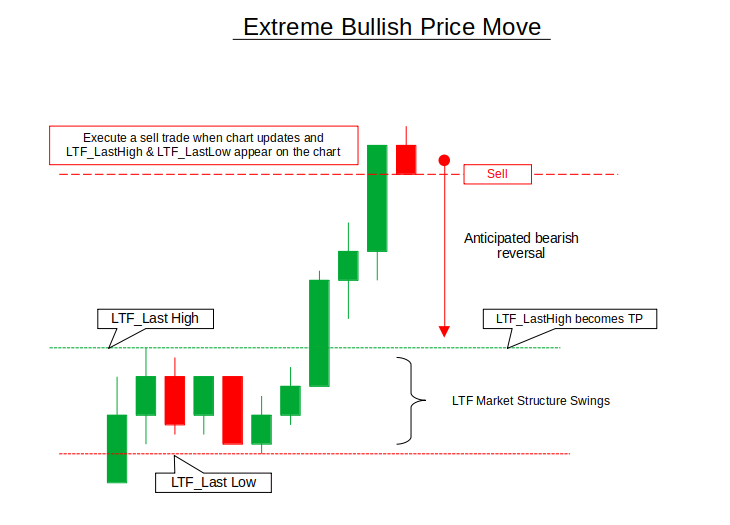
Conversely, during an extreme bullish move, automation applies the inverse logic. When price accelerates above the LTF last high and the chart updates, the algorithm checks whether both LTF_LastHigh and LTF_LastLow are now below the current market price—confirming upward structural overextension. Once validated, the system automatically executes a sell trade, recognizing that price has displaced beyond its recent structural bounds. In this case, LTF_LastLow is inherited as the take-profit level, positioning the trade for a pullback toward prior structure.
Getting Started
//+------------------------------------------------------------------+
//|                                          Auto Swing Extremes.mq5 |
//|                                  Copyright 2025, MetaQuotes Ltd. |
//|                                             https://www.mql5.com |
//+------------------------------------------------------------------+
#property copyright "Copyright 2025, MetaQuotes Ltd."
#property link      "https://www.mql5.com"
#property version   "1.00"

#include <Trade/Trade.mqh>
CTrade trade;

//+------------------------------------------------------------------+
//| Input Parameters                                                 |
//+------------------------------------------------------------------+
input ENUM_TIMEFRAMES HTF = PERIOD_H1;      // Higher Timeframe
input ENUM_TIMEFRAMES LTF = PERIOD_M5;      // Lower Timeframe
input int             SwingBars = 3;        // Bars for swing detection
input double          RiskPercent = 1.0;    // Risk per trade (%)
input int             Stop_Loss = 2000;     // StopLoss
input bool            Visualize = true;     // Show swing points & structure

//+------------------------------------------------------------------+
//| Swing Point Structure                                            |
//+------------------------------------------------------------------+
struct SwingPoint
{
   datetime          time;
   double            price;
   int               type;     // 1 = High, -1 = Low
   int               barIndex;

   void Reset()
   {
      time = 0;
      price = 0.0;
      type = 0;
      barIndex = 0;
   }
};
Getting started, we initialize the trading environment by including <Trade/Trade.mqh> and creating a CTrade object, which provides a structured way to execute and manage trades programmatically. We then define key input parameters that control the system’s behavior: the higher timeframe (HTF) and lower timeframe (LTF) for multi-timeframe structure analysis, the number of SwingBars used to detect valid swing highs and lows, the percentage of account risk per trade, a fixed stop-loss value, and a visualization toggle to optionally display structural elements on the chart. These inputs make the system configurable, allowing the strategy to adapt to different market conditions, symbols, and trader preferences without modifying the core logic.
We then establish a SwingPoint structure to formally represent market structure in code. This struct stores the swing’s timestamp, price level, type (1 for swing high and -1 for swing low), and its bar index location, effectively encapsulating all essential data required to track structural turning points. The included Reset() function ensures that a swing point can be cleared and reused safely, maintaining data integrity during updates. By organizing swing information into a structured object, we lay the foundation for automated market structure detection.
//+------------------------------------------------------------------+
//| Market Structure States                                          |
//+------------------------------------------------------------------+
enum STRUCTURE_STATE
{
   STRUCT_NEUTRAL,
   STRUCT_BULLISH,
   STRUCT_BEARISH
};

//+------------------------------------------------------------------+
//| Global Variables                                                 |
//+------------------------------------------------------------------+
SwingPoint htf_lastHigh, htf_prevHigh;
SwingPoint htf_lastLow, htf_prevLow;
SwingPoint ltf_lastHigh, ltf_prevHigh;
SwingPoint ltf_lastLow, ltf_prevLow;

STRUCTURE_STATE htfBias = STRUCT_NEUTRAL;
STRUCTURE_STATE ltfStructure = STRUCT_NEUTRAL;

datetime lastHtfUpdate = 0;
datetime lastLtfUpdate = 0;

// Track last traded swing to avoid multiple entries on same swing
datetime lastBuySwingTime = 0;
datetime lastSellSwingTime = 0;
double lastBuySwingPrice = 0;
double lastSellSwingPrice = 0;

//+------------------------------------------------------------------+
//| Expert initialization function                                   |
//+------------------------------------------------------------------+
int OnInit()
{
   // Validate timeframe combination
   if(PeriodSeconds(HTF) <= PeriodSeconds(LTF))
   {
      Alert("HTF must be higher than LTF!");
      return INIT_PARAMETERS_INCORRECT;
   }

   // Initialize swing points
   htf_lastHigh.Reset(); htf_prevHigh.Reset();
   htf_lastLow.Reset(); htf_prevLow.Reset();
   ltf_lastHigh.Reset(); ltf_prevHigh.Reset();
   ltf_lastLow.Reset(); ltf_prevLow.Reset();

   // Initialize trade tracking
   lastBuySwingTime = 0;
   lastSellSwingTime = 0;
   lastBuySwingPrice = 0;
   lastSellSwingPrice = 0;

   // Initial structure detection
   UpdateHTFStructure();
   UpdateLTFStructure();

   return INIT_SUCCEEDED;
}
In this section we define the structural logic framework that governs the strategy’s directional interpretation. The STRUCTURE_STATE enum establishes three possible market conditions—neutral, bullish, and bearish—allowing both higher timeframe (HTF) bias and lower timeframe (LTF) structure to be clearly classified at any given moment. Global SwingPoint variables are declared to track both the most recent and previous highs and lows for HTF and LTF, enabling comparison between consecutive structural points (e.g., higher highs or lower lows). Additional state variables such as htfBias and ltfStructure store the active structural direction, while timestamps (lastHtfUpdate, lastLtfUpdate) ensure structure is updated only when new bars form, maintaining efficiency and preventing redundant recalculations.
Trade control safeguards are also built into the global scope to prevent duplicate entries from the same swing level. By storing lastBuySwingTime, lastSellSwingTime, and their corresponding prices, the system avoids executing multiple trades on identical structural signals. Inside OnInit(), the program first validates that the selected HTF is genuinely higher than the LTF, enforcing proper multi-timeframe hierarchy. It then resets all swing structures and trade-tracking variables to ensure a clean startup state. It then performs an initial structural scan via UpdateHTFStructure() and UpdateLTFStructure(), synchronizing the system with current market conditions before live execution begins.
//+------------------------------------------------------------------+
//| Expert deinitialization function                                 |
//+------------------------------------------------------------------+
void OnDeinit(const int reason)
{
   // Clean up objects
   ObjectsDeleteAll(0, "MS_");
   ChartRedraw();
}

//+------------------------------------------------------------------+
//| Expert tick function                                             |
//+------------------------------------------------------------------+
void OnTick()
{
   static datetime lastLtfBar = 0;
   datetime currentLtfBar = iTime(_Symbol, LTF, 0);

   // Process on new LTF bar
   if(currentLtfBar != lastLtfBar)
   {
      lastLtfBar = currentLtfBar;

      // Update HTF bias if needed (on new HTF bar)
      if(TimeCurrent() - lastHtfUpdate >= PeriodSeconds(HTF))
      {
         UpdateHTFStructure();
         lastHtfUpdate = TimeCurrent();
      }

      // Store previous LTF structure for comparison
      STRUCTURE_STATE prevLtfStructure = ltfStructure;

      // Update LTF structure
      UpdateLTFStructure();

      // Check for structure breaks
      CheckStructureBreak();

      // Try to execute trades if structure changed or conditions met
      if(ltfStructure != prevLtfStructure ||
         (ltf_lastHigh.price > 0 && ltf_lastLow.price > 0))
      {
         TryExecuteTrade();
      }

      // Update visualization
      if(Visualize) UpdateVisualization();
   }
}
Here the code manages both cleanup and real-time execution flow of the Expert Advisor. In OnDeinit(), all chart objects prefixed with "MS_" are removed to ensure that any structure-related drawings are cleared when the EA is detached, followed by a chart redraw for visual consistency. In OnTick(), the system processes logic strictly on the formation of a new lower timeframe (LTF) bar by comparing timestamps, preventing redundant calculations on every tick. When a new bar forms, it conditionally updates the higher timeframe (HTF) bias if sufficient time has passed, refreshes the LTF structure, checks for structure breaks, and compares the previous and current structure states. If a structural shift occurs—or valid swing data exists—it attempts trade execution through TryExecuteTrade(). If visualization is enabled, it updates chart drawings to reflect the latest structural state, ensuring synchronized logic and visual feedback.
//+------------------------------------------------------------------+
//| Update Higher Timeframe Structure                                |
//+------------------------------------------------------------------+
void UpdateHTFStructure()
{
   // Get HTF data
   MqlRates htfRates[];
   ArraySetAsSeries(htfRates, true);
   CopyRates(_Symbol, HTF, 0, 100, htfRates);

   if(ArraySize(htfRates) < SwingBars * 2 + 1) return;

   // Detect swing points on HTF
   for(int i = SwingBars; i < ArraySize(htfRates) - SwingBars; i++)
   {
      bool isHigh = true;
      bool isLow = true;

      // Check if current bar is swing high
      for(int j = 1; j <= SwingBars; j++)
      {
         if(htfRates[i].high <= htfRates[i-j].high ||
            htfRates[i].high <= htfRates[i+j].high)
         {
            isHigh = false;
         }

         if(htfRates[i].low >= htfRates[i-j].low ||
            htfRates[i].low >= htfRates[i+j].low)
         {
            isLow = false;
         }
      }

      // Update swing highs
      if(isHigh)
      {
         htf_prevHigh = htf_lastHigh;
         htf_lastHigh.time = htfRates[i].time;
         htf_lastHigh.price = htfRates[i].high;
         htf_lastHigh.type = 1;
         htf_lastHigh.barIndex = i;
      }

      // Update swing lows
      if(isLow)
      {
         htf_prevLow = htf_lastLow;
         htf_lastLow.time = htfRates[i].time;
         htf_lastLow.price = htfRates[i].low;
         htf_lastLow.type = -1;
         htf_lastLow.barIndex = i;
      }
   }

   // Update HTF bias
   htfBias = DetectStructure(htf_lastHigh, htf_prevHigh, htf_lastLow, htf_prevLow);
}

//+------------------------------------------------------------------+
//| Update Lower Timeframe Structure                                 |
//+------------------------------------------------------------------+
void UpdateLTFStructure()
{
   // Get LTF data
   MqlRates ltfRates[];
   ArraySetAsSeries(ltfRates, true);
   CopyRates(_Symbol, LTF, 0, 100, ltfRates);

   if(ArraySize(ltfRates) < SwingBars * 2 + 1) return;

   // Detect swing points on LTF
   for(int i = SwingBars; i < ArraySize(ltfRates) - SwingBars; i++)
   {
      bool isHigh = true;
      bool isLow = true;

      // Check if current bar is swing high
      for(int j = 1; j <= SwingBars; j++)
      {
         if(ltfRates[i].high <= ltfRates[i-j].high ||
            ltfRates[i].high <= ltfRates[i+j].high)
         {
            isHigh = false;
         }

         if(ltfRates[i].low >= ltfRates[i-j].low ||
            ltfRates[i].low >= ltfRates[i+j].low)
         {
            isLow = false;
         }
      }

      // Update swing highs
      if(isHigh)
      {
         ltf_prevHigh = ltf_lastHigh;
         ltf_lastHigh.time = ltfRates[i].time;
         ltf_lastHigh.price = ltfRates[i].high;
         ltf_lastHigh.type = 1;
         ltf_lastHigh.barIndex = i;
      }

      // Update swing lows
      if(isLow)
      {
         ltf_prevLow = ltf_lastLow;
         ltf_lastLow.time = ltfRates[i].time;
         ltf_lastLow.price = ltfRates[i].low;
         ltf_lastLow.type = -1;
         ltf_lastLow.barIndex = i;
      }
   }

   // Update LTF structure
   ltfStructure = DetectStructure(ltf_lastHigh, ltf_prevHigh, ltf_lastLow, ltf_prevLow);
}
The UpdateHTFStructure() function analyzes higher timeframe price data to identify valid swing highs and swing lows based on the defined SwingBars parameter. It retrieves the most recent 100 HTF candles, ensures sufficient data exists, and then scans each eligible bar to determine whether it qualifies as a structural extreme. A bar is classified as a swing high if its high is greater than the highs of surrounding bars within the specified range, and as a swing low if its low is lower than neighboring lows. When a new swing is confirmed, the previous swing is preserved, and the latest one is updated with its time, price, type, and index. After processing all candidates, the function determines the overall higher timeframe bias (bullish, bearish, or neutral) by comparing the most recent and previous swing highs and lows using DetectStructure().
The UpdateLTFStructure() function mirrors this logic on the lower timeframe, applying the same swing detection process to more granular price data. It evaluates each bar within the allowed range, confirms structural highs and lows using symmetrical comparisons, and updates the stored LTF swing variables accordingly. By maintaining both the most recent and prior swing points, the system can determine whether the market is forming higher highs, lower lows, or transitioning into a structural shift. The final step assigns the updated LTF structural state using DetectStructure(), ensuring that trade logic and reversal detection operate on continuously refreshed and objectively defined market structure across both timeframes.
//+------------------------------------------------------------------+
//| Detect Market Structure                                          |
//+------------------------------------------------------------------+
STRUCTURE_STATE DetectStructure(SwingPoint &lastHigh, SwingPoint &prevHigh,
                                SwingPoint &lastLow, SwingPoint &prevLow)
{
   // Need at least two highs and two lows
   if(lastHigh.price == 0 || prevHigh.price == 0 ||
      lastLow.price == 0 || prevLow.price == 0)
      return STRUCT_NEUTRAL;

   bool isHigherHigh = lastHigh.price > prevHigh.price;
   bool isHigherLow = lastLow.price > prevLow.price;
   bool isLowerLow = lastLow.price < prevLow.price;
   bool isLowerHigh = lastHigh.price < prevHigh.price;

   if(isHigherHigh && isHigherLow)
      return STRUCT_BULLISH;

   if(isLowerLow && isLowerHigh)
      return STRUCT_BEARISH;

   return STRUCT_NEUTRAL;
}
The DetectStructure() function determines the current market structure by comparing the most recent and previous swing highs and lows. It first ensures that sufficient swing data exists—requiring at least two confirmed highs and two confirmed lows—otherwise it returns a neutral state. The function then evaluates structural progression: if the latest high is greater than the previous high and the latest low is greater than the previous low, the market is classified as bullish (higher highs and higher lows). Conversely, if the latest low is lower than the previous low and the latest high is lower than the previous high, the structure is considered bearish (lower lows and lower highs). If neither condition is fully satisfied, the function defaults to a neutral state, indicating consolidation or structural transition.
//+------------------------------------------------------------------+
//| New Sell Condition                                               |
//+------------------------------------------------------------------+
bool CheckSellCondition()
{
   // Need valid LTF swing points
   if(ltf_lastHigh.price == 0 || ltf_lastLow.price == 0)
      return false;

   // Get current price
   double currentPrice = SymbolInfoDouble(_Symbol, SYMBOL_BID);

   // Check if price is above both last high and last low
   bool priceAboveHigh = currentPrice > ltf_lastHigh.price;
   bool priceAboveLow = currentPrice > ltf_lastLow.price;

   // Check if this is a new swing (not already traded)
   bool isNewSwing = (ltf_lastHigh.time != lastSellSwingTime) ||
                     (ltf_lastHigh.price != lastSellSwingPrice);

   return (priceAboveHigh && priceAboveLow && isNewSwing);
}

//+------------------------------------------------------------------+
//| New Buy Condition                                                |
//+------------------------------------------------------------------+
bool CheckBuyCondition()
{
   // Need valid LTF swing points
   if(ltf_lastLow.price == 0)
      return false;

   // Get current price
   double currentPrice = SymbolInfoDouble(_Symbol, SYMBOL_ASK);

   // Check if price is below last low
   bool priceBelowLow = currentPrice < ltf_lastLow.price;

   // Check if this is a new swing (not already traded)
   bool isNewSwing = (ltf_lastLow.time != lastBuySwingTime) ||
                     (ltf_lastLow.price != lastBuySwingPrice);

   return (priceBelowLow && isNewSwing);
}

//+------------------------------------------------------------------+
//| Execute trade                                                    |
//+------------------------------------------------------------------+
void ExecuteTrade(ENUM_ORDER_TYPE tradeType, string symbol)
{
   // Get current price
   double price = (tradeType == ORDER_TYPE_BUY)
                  ? SymbolInfoDouble(symbol, SYMBOL_ASK)
                  : SymbolInfoDouble(symbol, SYMBOL_BID);
   price = NormalizeDouble(price, _Digits);

   // Calculate stop loss
   double sl = CalculateSL(tradeType == ORDER_TYPE_BUY);
   sl = NormalizeDouble(sl, _Digits);

   // Calculate take profit based on your requirements
   double tp = 0;
   if(tradeType == ORDER_TYPE_BUY)
   {
      // For Buy: TP at next structure level (last high)
      tp = (ltf_lastHigh.price > 0) ? ltf_lastHigh.price : price + (MathAbs(price - sl) * 2);
   }
   else if(tradeType == ORDER_TYPE_SELL) // ORDER_TYPE_SELL
   {
      // For Sell: TP at last low (as requested)
      tp = (ltf_lastLow.price > 0) ? ltf_lastLow.price : price - (MathAbs(price - sl) * 2);
   }
   tp = NormalizeDouble(tp, _Digits);

   // Ensure TP is valid (not too close to entry)
   double minDistance = SymbolInfoDouble(symbol, SYMBOL_TRADE_TICK_SIZE) * 10;
   if(MathAbs(price - tp) < minDistance)
   {
      Print("TP too close to entry, adjusting...");
      if(tradeType == ORDER_TYPE_BUY)
         tp = price + (MathAbs(price - sl) * 2);
      else
         tp = price - (MathAbs(price - sl) * 2);
   }

   // Calculate lot size based on risk
   double volume = CalculateLotSize(price, sl);

   // Ensure volume is within valid range
   double volume_step = SymbolInfoDouble(symbol, SYMBOL_VOLUME_STEP);
   double volume_min = SymbolInfoDouble(symbol, SYMBOL_VOLUME_MIN);
   double volume_max = SymbolInfoDouble(symbol, SYMBOL_VOLUME_MAX);

   // Normalize volume to step size
   volume = floor(volume / volume_step) * volume_step;
   volume = MathMax(volume, volume_min);
   volume = MathMin(volume, volume_max);

   // Prepare trade comment
   string comment = StringFormat("MS_%s_%s",
      (tradeType == ORDER_TYPE_BUY) ? "BUY" : "SELL",
      TimeToString(TimeCurrent(), TIME_DATE|TIME_MINUTES));

   // Execute trade using CTrade
   bool success = trade.PositionOpen(symbol, tradeType, volume, price, sl, tp, comment);

   if(success)
   {
      // Update swing tracking to avoid multiple entries
      if(tradeType == ORDER_TYPE_BUY)
      {
         lastBuySwingTime = ltf_lastLow.time;
         lastBuySwingPrice = ltf_lastLow.price;
      }
      else
      {
         lastSellSwingTime = ltf_lastHigh.time;
         lastSellSwingPrice = ltf_lastHigh.price;
      }

      Print(StringFormat("Trade Opened: %s | Price: %.5f | SL: %.5f | TP: %.5f | Lots: %.2f",
         (tradeType == ORDER_TYPE_BUY) ? "BUY" : "SELL",
         price, sl, tp, volume));
   }
   else
   {
      Print("Trade failed: ", trade.ResultRetcodeDescription());
   }
}

//+------------------------------------------------------------------+
//| Try Execute Trade                                                |
//+------------------------------------------------------------------+
void TryExecuteTrade()
{
   // Check if position already exists
   if(PositionSelect(_Symbol))
   {
      Print("Position already exists, waiting for closure...");
      return;
   }

   // For Sell positions: Price above both last high and last low
   if(CheckSellCondition())
   {
      // Optional: Check HTF bias filter
      if(htfBias == STRUCT_BEARISH || htfBias == STRUCT_NEUTRAL)
      {
         Print("SELL condition met: Price above LTF high and low");
         OpenSell();
         return;
      }
   }

   // For Buy positions: Price below last low
   if(CheckBuyCondition())
   {
      // Optional: Check HTF bias filter
      if(htfBias == STRUCT_BULLISH || htfBias == STRUCT_NEUTRAL)
      {
         Print("BUY condition met: Price below LTF low");
         OpenBuy();
         return;
      }
   }
}
The CheckSellCondition() and CheckBuyCondition() functions define the structural triggers for trade entry based on lower timeframe (LTF) displacement. For a sell setup, the system first ensures valid swing data exists, then checks whether the current bid price is above both the last LTF swing high and swing low—indicating bullish overextension beyond recent structure. It also verifies that this swing has not already been traded by comparing stored swing time and price values, preventing duplicate entries. Similarly, the buy condition confirms that price has dropped below the last LTF swing low, signaling bearish exhaustion. It also validates that the swing is new before returning true. Together, these conditions transform structural extremes into objective, rule-based entry signals while enforcing one-trade-per-swing discipline.
The ExecuteTrade() function handles full trade construction and risk management. It determines the correct entry price (ask for buys, bid for sells), calculates stop loss via a separate function, and assigns take profit dynamically based on structure—using the last LTF high as TP for buy trades and the last LTF low as TP for sell trades. If structural TP levels are unavailable or too close to the entry price, the system defaults to a risk-to-reward fallback calculation. Position sizing is computed according to account risk percentage, then normalized to broker constraints such as minimum, maximum, and step size volume requirements. The trade is executed using the CTrade object, and upon success, the relevant swing details are stored to prevent repeated entries on the same structural level.
And then, the TryExecuteTrade() acts as the decision gatekeeper. It first checks whether a position is already open on the symbol, avoiding overlapping trades. If no position exists, it evaluates sell conditions (price above both last high and low) and optionally filters them using the higher timeframe bias—allowing trades only when HTF structure aligns or is neutral. If satisfied, it triggers a sell order. It then evaluates buy conditions (price below the last low), again optionally filtered by HTF bias favoring bullish or neutral structure. This layered process ensures that trades are executed only when structural displacement, swing freshness, and broader market bias collectively align, reinforcing disciplined, structure-driven automation.
//+------------------------------------------------------------------+
//| Check Structure Break                                            |
//+------------------------------------------------------------------+
void CheckStructureBreak()
{
   MqlRates current[];
   ArraySetAsSeries(current, true);
   CopyRates(_Symbol, LTF, 0, 1, current);

   if(ArraySize(current) < 1) return;

   // Bullish structure break
   if(ltfStructure == STRUCT_BULLISH && current[0].close < ltf_lastLow.price)
   {
      ResetLTFStructure();
   }

   // Bearish structure break
   if(ltfStructure == STRUCT_BEARISH && current[0].close > ltf_lastHigh.price)
   {
      ResetLTFStructure();
   }
}

//+------------------------------------------------------------------+
//| Reset LTF Structure                                              |
//+------------------------------------------------------------------+
void ResetLTFStructure()
{
   ltf_lastHigh.Reset();
   ltf_prevHigh.Reset();
   ltf_lastLow.Reset();
   ltf_prevLow.Reset();
   ltfStructure = STRUCT_NEUTRAL;

   // Also reset trade tracking
   lastBuySwingTime = 0;
   lastSellSwingTime = 0;
   lastBuySwingPrice = 0;
   lastSellSwingPrice = 0;
}

//+------------------------------------------------------------------+
//| Update Visualization                                             |
//+------------------------------------------------------------------+
void UpdateVisualization()
{
   ObjectsDeleteAll(0, "MS_");

   // Draw HTF swing points
   if(htf_lastHigh.price > 0)
      DrawSwingPoint(htf_lastHigh, "HTF_High", clrRed, HTF);

   if(htf_prevHigh.price > 0)
      DrawSwingPoint(htf_prevHigh, "HTF_PrevHigh", clrRed, HTF);

   if(htf_lastLow.price > 0)
      DrawSwingPoint(htf_lastLow, "HTF_Low", clrBlue, HTF);

   if(htf_prevLow.price > 0)
      DrawSwingPoint(htf_prevLow, "HTF_PrevLow", clrBlue, HTF);

   // Draw LTF swing points
   if(ltf_lastHigh.price > 0)
      DrawSwingPoint(ltf_lastHigh, "LTF_High", clrOrange, LTF);

   if(ltf_prevHigh.price > 0)
      DrawSwingPoint(ltf_prevHigh, "LTF_PrevHigh", clrOrange, LTF);

   if(ltf_lastLow.price > 0)
      DrawSwingPoint(ltf_lastLow, "LTF_Low", clrGreen, LTF);

   if(ltf_prevLow.price > 0)
      DrawSwingPoint(ltf_prevLow, "LTF_PrevLow", clrGreen, LTF);

   // Draw current price lines for reference
   double currentBid = SymbolInfoDouble(_Symbol, SYMBOL_BID);
   double currentAsk = SymbolInfoDouble(_Symbol, SYMBOL_ASK);

   CreateHorizontalLine("Current_Bid", currentBid, clrYellow, STYLE_DASH);
   CreateHorizontalLine("Current_Ask", currentAsk, clrYellow, STYLE_DASH);

   // Draw trade condition zones
   if(ltf_lastHigh.price > 0)
      CreateHorizontalLine("Sell_Zone_Min", ltf_lastHigh.price, clrRed, STYLE_SOLID);

   if(ltf_lastLow.price > 0)
   {
      CreateHorizontalLine("Buy_Zone_Max", ltf_lastLow.price, clrBlue, STYLE_SOLID);
      CreateHorizontalLine("Sell_TP_Level", ltf_lastLow.price, clrGreen, STYLE_DOT);
   }

   // Draw structure labels
   DrawStructureLabels();
}
Here the code monitors the integrity of the lower timeframe (LTF) market structure and automatically resets it if a structural break occurs. The CheckStructureBreak() function retrieves the latest LTF candle and compares its close price against the current structural extremes. If the market is in a bullish structure and the price closes below the last swing low, it signals a breakdown, triggering ResetLTFStructure(). Conversely, if the market is bearish and the price closes above the last swing high, the structure is also reset. The ResetLTFStructure() function clears all LTF swing points, sets the structure state to neutral, and resets trade tracking variables, ensuring that subsequent logic only considers fresh structural formations.
The UpdateVisualization() function provides a clear, real-time visual representation of both higher and lower timeframe swings, current price, and key trade zones. It first removes any existing objects with the "MS_" prefix, then draws all relevant swing points for HTF and LTF using color-coded markers. Current bid and ask prices are displayed with dashed yellow lines for reference, while trade zones such as sell and buy levels, as well as take-profit levels, are drawn with solid or dotted lines.
//+------------------------------------------------------------------+
//| Draw Swing Point                                                 |
//+------------------------------------------------------------------+
void DrawSwingPoint(SwingPoint &sp, string name, color clr, ENUM_TIMEFRAMES tf)
{
   ObjectCreate(0, "MS_" + name, OBJ_ARROW, 0, sp.time, sp.price);
   ObjectSetInteger(0, "MS_" + name, OBJPROP_ARROWCODE, sp.type == 1 ? 218 : 217);
   ObjectSetInteger(0, "MS_" + name, OBJPROP_COLOR, clr);
   ObjectSetInteger(0, "MS_" + name, OBJPROP_WIDTH, 3);
   ObjectSetString(0, "MS_" + name, OBJPROP_TOOLTIP,
                  StringFormat("%s: %.5f", sp.type == 1 ? "High" : "Low", sp.price));
}

//+------------------------------------------------------------------+
//| Draw Structure Labels                                            |
//+------------------------------------------------------------------+
void DrawStructureLabels()
{
   string biasText = "HTF Bias: ";
   switch(htfBias)
   {
      case STRUCT_BULLISH: biasText += "BULLISH"; break;
      case STRUCT_BEARISH: biasText += "BEARISH"; break;
      default: biasText += "NEUTRAL"; break;
   }

   string ltfText = "LTF Structure: ";
   switch(ltfStructure)
   {
      case STRUCT_BULLISH: ltfText += "HH+HL"; break;
      case STRUCT_BEARISH: ltfText += "LL+LH"; break;
      default: ltfText += "NEUTRAL"; break;
   }

   // Current trade conditions
   string conditionText = "";
   if(CheckBuyCondition())
      conditionText = "BUY Condition: ACTIVE (Price < LTF Low)";
   else if(CheckSellCondition())
      conditionText = "SELL Condition: ACTIVE (Price > LTF High & Low)";
   else
      conditionText = "No Trade Condition Met";

   // Create label objects
   CreateLabel("MS_BiasLabel", biasText, 10, 20, clrDarkOrange);
   CreateLabel("MS_LTFLabel", ltfText, 10, 40, clrDarkOrange);
   CreateLabel("MS_ConditionLabel", conditionText, 10, 60,
               (CheckBuyCondition() || CheckSellCondition()) ? clrLime : clrGray);

   // Display LTF swing prices
   if(ltf_lastHigh.price > 0)
      CreateLabel("MS_LTFHighLabel", StringFormat("LTF High: %.5f", ltf_lastHigh.price), 10, 80, clrOrange);

   if(ltf_lastLow.price > 0)
      CreateLabel("MS_LTFLowLabel", StringFormat("LTF Low: %.5f", ltf_lastLow.price), 10, 100, clrGreen);
}

//+------------------------------------------------------------------+
//| Create Text Label                                                |
//+------------------------------------------------------------------+
void CreateLabel(string name, string text, int x, int y, color clr)
{
   ObjectCreate(0, "MS_" + name, OBJ_LABEL, 0, 0, 0);
   ObjectSetString(0, "MS_" + name, OBJPROP_TEXT, text);
   ObjectSetInteger(0, "MS_" + name, OBJPROP_XDISTANCE, x);
   ObjectSetInteger(0, "MS_" + name, OBJPROP_YDISTANCE, y);
   ObjectSetInteger(0, "MS_" + name, OBJPROP_COLOR, clr);
   ObjectSetInteger(0, "MS_" + name, OBJPROP_FONTSIZE, 10);
}

//+------------------------------------------------------------------+
//| Create Horizontal Line                                           |
//+------------------------------------------------------------------+
void CreateHorizontalLine(string name, double price, color clr, ENUM_LINE_STYLE style)
{
   ObjectCreate(0, "MS_" + name, OBJ_HLINE, 0, 0, price);
   ObjectSetInteger(0, "MS_" + name, OBJPROP_COLOR, clr);
   ObjectSetInteger(0, "MS_" + name, OBJPROP_STYLE, style);
   ObjectSetInteger(0, "MS_" + name, OBJPROP_WIDTH, 1);
}
In this code section, the system provides comprehensive visualization of the market structure and trade conditions on the chart. The DrawSwingPoint() function marks swing highs and lows with arrows, color-coded for clarity, and includes tooltips showing the exact price and type (high or low). DrawStructureLabels() supplements this by displaying textual information about the higher timeframe (HTF) bias, the current lower timeframe (LTF) structure, and active trade conditions, giving traders a quick overview of market context. The labels also highlight the LTF swing high and low prices, helping visualize potential reversal zones and supporting immediate decision-making.
To support these visual elements, the CreateLabel() and CreateHorizontalLine() helper functions standardize the creation of text labels and horizontal reference lines. Labels are positioned at specific screen coordinates with customizable colors and font sizes, while horizontal lines indicate key price levels such as current bid/ask, swing highs/lows, and trade zones. Together, these functions transform raw structural data into a clear, actionable visual framework, allowing traders to see both market extremes and potential trading opportunities directly on the chart in real time.
Back Test Results
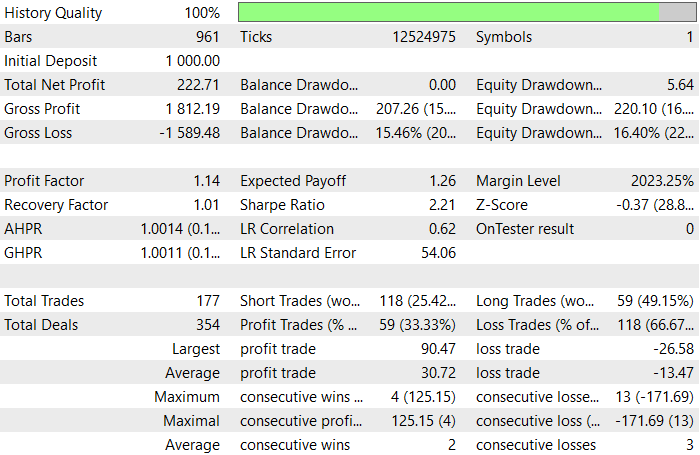
The back-testing was evaluated on the H1 timeframe across a 2-month testing window (01 December 2025 to 31 January 2026), with the default settings: 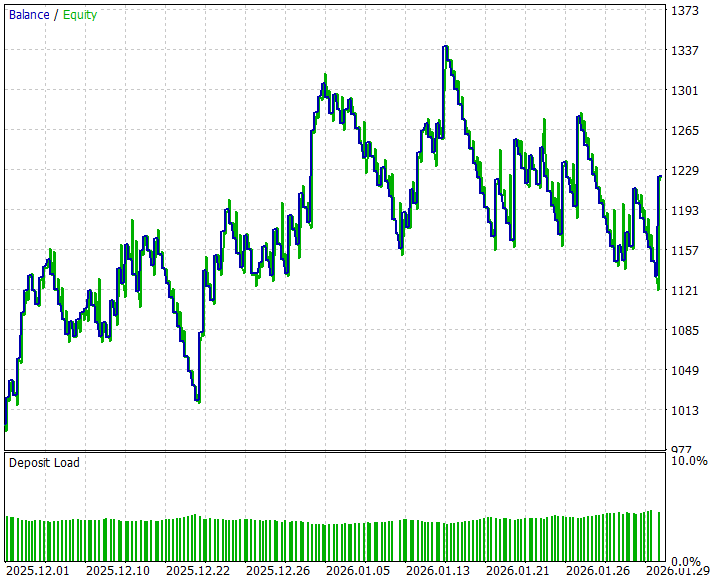
Conclusion
In summary, we automated the Swing Extremes and Pullback Indicator by translating lower and higher timeframe market structure into a fully programmatic system. The automation detects swing highs and lows on both HTF and LTF, continuously monitors price action for structural breaks, and identifies overextended moves that signal potential reversals. Rules for executing trades were embedded, including conditions such as buying when the price closes below the last LTF low or selling when the price moves above both the last LTF high and low, with take-profit levels inherited from relevant swing points. Visualization functions were also automated, allowing real-time charting of swings, trade zones, and market bias labels, giving an immediate, structured view of the market without manual analysis.
In conclusion, this automation streamlines the decision-making process, reducing emotional bias and manual oversight by objectively executing trades based on structural extremes. Traders can rely on the system to monitor multiple timeframes simultaneously, spot potential pullbacks or reversals early, and execute trades with pre-calculated risk and profit targets. By providing both automated execution and intuitive visual feedback, the tool enhances efficiency, consistency, and clarity, making trading easier, faster, and more disciplined.
Warning: All rights to these materials are reserved by MetaQuotes Ltd. Copying or reprinting of these materials in whole or in part is prohibited.
This article was written by a user of the site and reflects their personal views. MetaQuotes Ltd is not responsible for the accuracy of the information presented, nor for any consequences resulting from the use of the solutions, strategies or recommendations described.

 From Novice to Expert: Extending a Liquidity Strategy with Trend Filters
 Creating Custom Indicators in MQL5 (Part 8): Adding Volume Integration for Deeper Market Profile Analysis
 Larry Williams Market Secrets (Part 12): Context Based Trading of Smash Day Reversals
 MQL5 Trading Tools (Part 20): Canvas Graphing with Statistical Correlation and Regression Analysis

- Free trading apps
- Over 8,000 signals for copying
- Economic news for exploring financial markets
You agree to website policy and terms of use
How do we get this indicator
your EAs fail because of the logics on how the concept you are coding .