

Risk Management (Part 5): Integrating the Risk Management System into an Expert Advisor
 4 478
4 478
 0
0

- Introduction
- Improvements to the Order Blocks indicator
- Creating an Expert Advisor and defining its parameters
- Declaring global variables
- OnInit function
- OnTick and OnTradeTransaction functions
- OnDeinit function
- Testing
- Conclusion
Introduction
Welcome to the final part of our risk management series. In this article, we will explore how using the risk management system changes results: whether it makes a difference at all, the pros and cons of a dynamic approach to risk management, and when it makes the most sense.
We will answer these questions by creating a simple Expert Advisor that uses the Order Blocks indicator described in previous risk management articles.
Let’s start by optimizing this indicator, which will enable faster and more efficient backtests and make it easier to optimize the Expert Advisor.
We will also walk through the step-by-step process of creating an Expert Advisor, defining its parameters, and integrating key events such as OnTradeTransaction, which should only be handled within that function.
Finally, we will answer the questions raised in this article by running four tests of the Expert Advisor with different parameter combinations. This way, we will compare trading with and without loss and profit limits and assess when dynamic risk management is most effective.
Improvements to the Order Blocks indicator
We will start by optimizing the Order Blocks indicator. Its performance used to leave much to be desired. After analyzing it, I noticed opportunities to improve performance by optimizing candle data processing and removing unnecessary loops.
1. Optimizing the loop for detecting order blocks
In the indicator’s first loop, we will reduce the number of iterations because we do not need to iterate over all candles on every update. When the indicator loads, the prev_calculated parameter of OnCalculate is 0. This parameter essentially indicates how many candles have already been calculated. Since no candles have been calculated on the first run, the prev_calculated value is equal to 0. Therefore, on the first calculation, the loop will iterate over candles from Rango_universal_busqueda down to candle 6; when prev_calculated is greater than 0, it will check only candle 6.
int inicio = prev_calculated == 0 ? Rango_universal_busqueda : 6;

    for(int i = inicio  ; i  > 5  ; i--)
     {
      //----

     }
2. Searching for mitigation in order blocks
To determine whether an order block has been mitigated (i.e., whether price reached or exceeded the block level), we improved two functions: one for bullish blocks and one for bearish blocks. Both functions were simplified by using only candle highs and lows.
Mitigation in a bullish order block
datetime  mitigados_alcsitas(double price, const double &lowArray[], const  datetime &Time[], datetime start, datetime end)
 {
  int startIndex = iBarShift(_Symbol, PERIOD_CURRENT, start);
  int endIndex = iBarShift(_Symbol, PERIOD_CURRENT, end);

  NormalizeDouble(price, _Digits);
  for(int i = startIndex - 2 ; i >= endIndex + 1 ; i--)
   {
    if(price > lowArray[i])
     {
      return Time[i]; //si encuentra que si hubo retorna el tiempo de la vela donde hubo la mitigacion
      Print("el orderblock tuvo mitigaciones", TimeToString(end));
     }
   }

  return 0; //En caso no se haya encontrado  niguna mitigacion retorna 0
 }
Mitigation in a bearish order block
//+------------------------------------------------------------------+
datetime  mitigado_bajista(double price, const  double &highArray[], const datetime &Time[], datetime start, datetime end)
 {
  int startIndex = iBarShift(_Symbol, PERIOD_CURRENT, start);
  int endIndex = iBarShift(_Symbol, PERIOD_CURRENT, end);
  NormalizeDouble(price, _Digits);
  for(int i = startIndex - 2 ; i >= endIndex + 1 ; i--)
   {
    if(highArray[i] > price)
     {
      return Time[i]; //retorna el time de la vela encontrada
     }
   }
  return 0; // no se mitigo hasta el momento
 }
In both functions, we use candle highs and lows directly to reduce the number of parameters and slightly reduce loop execution time.
In addition, we applied these changes to the esOb_mitigado_array_... functions, which used to call iOpen, iClose, and similar functions. This was not required because, e.g., if a candle closes below the order block level, its low is also below that level. Therefore, we can simplify the mitigation check by relying only on the low or the high, depending on the block type.
Bullish order block
//+------------------------------------------------------------------+
datetime esOb_mitigado_array_alcista(OrderBlocks &newblock, datetime end)
 {
  int endIndex = iBarShift(_Symbol, PERIOD_CURRENT, end);
  NormalizeDouble(newblock.price2, _Digits);
  for(int i = 0 ; i <  endIndex - 2  ; i++)
   {
    double low = iLow(_Symbol, PERIOD_CURRENT, i);
    if(newblock.price2 >= low)
     {
      newblock.mitigated = true;
      newblock.time2 = iTime(_Symbol, _Period, i);
      return newblock.time2; //retorna el time de la vela encontrada
     }
   }
  return 0; // no se mitigo hasta el momento
 }
Bearish order block
//+------------------------------------------------------------------+
datetime esOb_mitigado_array_bajista(OrderBlocks &newblock, datetime end)
 {
  int endIndex = iBarShift(_Symbol, PERIOD_CURRENT, end);
  NormalizeDouble(newblock.price2, _Digits);
  for(int i = 0 ; i <  endIndex - 2  ; i++)
   {
    double high = iHigh(_Symbol, PERIOD_CURRENT, i);
    if(high >= newblock.price2)
     {
      newblock.mitigated = true;
      newblock.time2 = iTime(_Symbol, _Period, i);
      return newblock.time2;
     }
   }
  return 0; // no se mitigo hasta el momento
 }
3. Template functions for adding elements to an array
We added several template functions that are more efficient for inserting elements into an array. Previously, we created special-purpose functions that accepted only one specific type. For example, to add an Order_Blocks structure, we had to write a separate function.
Template functions allow performing the same operation with different types. In our case, we created a function to add an element to an array.
template <typename S>
bool AddArray(S &Array[], const S &Value)
 {
  for(int i = 0 ; i < ArraySize(Array) ; i++)
   {
    if(Array[i].name == Value.name)
      return false;
   }
  ArrayResize(Array, Array.Size() + 1);
  Array[Array.Size() - 1] = Value;
  return true;
 }

template <typename X>
void AddArrayNoVerification(X &array[], const X &value)
 {
  ArrayResize(array, array.Size() + 1);
  array[array.Size() - 1] = value;
 }
4. Template function for removing an element by name
Now let’s create a template function for removing an element by name. This means the array we work with must be a struct or class with a public member "name". This function removes an element based on the targetName parameter, which is useful for clearing unneeded elements from the array of mitigated order blocks.
template<typename T>
bool DeleteArrayBiName(T &array[], const string targetName)
 {
  int size = ArraySize(array);
  int index = -1;

// Buscar el índice y desplazar elementos en un solo bucle
  for(int i = 0; i < size; i++)
   {
    if(array[i].name == targetName)
     {
      index = i;
     }
    if(index != -1 && i < size - 1)
     {
      array[i] = array[i + 1]; // Desplaza los elementos
     }
   }

  if(index == -1)
    return false;

  if(size > 1)
    ArrayResize(array, size - 1);
  else
    ArrayFree(array); // Si el array tenía solo un elemento, se libera completamente

  return true;
 }
5. New functionality for "removing" order blocks
In previous versions, when an order block was mitigated, its name was stored in an auxiliary array while the block itself remained in the main array. With this improvement, only the name of the mitigated order block is stored in the auxiliary array, while the block itself is completely removed from the main array.
Bearish order blocks
    static bool buscar_obb = true;
    static datetime time_b = 0;
    string curr_elimiandor_obb[];

    for(int i = 0; i < ArraySize(ob_bajistas); i++)
     {
      datetime mitigadoTime = esOb_mitigado_array_bajista(ob_bajistas[i], ob_bajistas[i].time1);

      if(ob_bajistas[i].mitigated == false)
       {
        if(ObjectFind(ChartID(), ob_bajistas[i].name) < 0)
         {
          RectangleCreate(ChartID(), ob_bajistas[i].name, 0, ob_bajistas[i].time1, ob_bajistas[i].price1,
                          time[0], ob_bajistas[i].price2, Color_Order_Block_Bajista, Witdth_order_block, Fill_order_block, Back_order_block, STYLE_SOLID);
          sellOrderBlockBuffer[iBarShift(_Symbol, _Period, ob_bajistas[i].time1)] = ob_bajistas[i].price2;
         }
        else
          ObjectMove(ChartID(), ob_bajistas[i].name, 1, time[0], ob_bajistas[i].price2);
       }
      else
       {
        Alert("El order block bajista esta siendo mitigado: ", TimeToString(ob_bajistas[i].time1));
        AddArrayNoVerification(pricetwo_eliminados_obb, ob_bajistas[i].name);
        AddArrayNoVerification(curr_elimiandor_obb, ob_bajistas[i].name);

        if(buscar_obb == true)
         {
          time_b = iTime(_Symbol, _Period, 0);
          buscar_obb = false;
         }
       }
     }

    for(int i = 0; i < ArraySize(curr_elimiandor_obb) ; i++)
     {
      DeleteArrayBiName(ob_bajistas, curr_elimiandor_obb[i]);
     }
Bullish order blocks
    static bool buscar_oba = true;
    static datetime time_a = 0;
    string curr_elimiandor_oba[];

    for(int i = 0; i < ArraySize(ob_alcistas); i++)
     {
      datetime mitigadoTime = esOb_mitigado_array_alcista(ob_alcistas[i], ob_alcistas[i].time1);

      if(ob_alcistas[i].mitigated == false)
       {
        if(ObjectFind(ChartID(), ob_alcistas[i].name) < 0)
         {
          RectangleCreate(ChartID(), ob_alcistas[i].name, 0, ob_alcistas[i].time1, ob_alcistas[i].price1,
                          time[0], ob_alcistas[i].price2, Color_Order_Block_Alcista, Witdth_order_block, Fill_order_block, Back_order_block, STYLE_SOLID);
          buyOrderBlockBuffer[iBarShift(_Symbol, _Period, ob_alcistas[i].time1)] = ob_alcistas[i].price2;
         }
        else
          ObjectMove(ChartID(), ob_alcistas[i].name, 1, time[0], ob_alcistas[i].price2); //por el contrario si si existe el objeto lo unico que haremos es actulizarlo al tiempo actual usando el punto de anclaje 1
       }
      else
       {
        Alert("El order block alcista esta siendo mitigado: ", TimeToString(ob_alcistas[i].time1));
        AddArrayNoVerification(pricetwo_eliminados_oba, ob_alcistas[i].name);
        AddArrayNoVerification(curr_elimiandor_oba, ob_alcistas[i].name);

        if(buscar_oba == true)
         {
          buscar_oba = false;
          time_a = iTime(_Symbol, _Period, 1);
         }
       }
     }

    for(int i = 0; i < ArraySize(curr_elimiandor_oba) ; i++)
     {
      DeleteArrayBiName(ob_alcistas, curr_elimiandor_oba[i]);
     }
6. Function for deleting objects
When deleting objects from the chart, a few changes are required. Previously, we stored mitigated order block names in an array to avoid processing them again. We have now implemented a new function that removes these order blocks from the main array. For this reason, mitigated order block names must be stored in auxiliary arrays so they can be removed from the chart later.
Below is the Delete_Objects function, modified to iterate through the auxiliary arrays and delete their contents as well:
void Eliminar_Objetos()
 {
  ObjectsDeleteAll(0, "ENTRY", -1, -1);
  for(int i = 0; i < ArraySize(pricetwo_eliminados_oba) ; i++) ObjectDelete(0,pricetwo_eliminados_oba[i]);
  for(int i = 0; i < ArraySize(pricetwo_eliminados_obb) ; i++) ObjectDelete(0,pricetwo_eliminados_obb[i]);
  for(int i = 0; i < ArraySize(ob_alcistas) ; i++) ObjectDelete(0,ob_alcistas[i].name);
  for(int i = 0; i < ArraySize(ob_bajistas) ; i++) ObjectDelete(0,ob_bajistas[i].name);

  ArrayFree(pricetwo_eliminados_oba);
  ArrayFree(pricetwo_eliminados_obb);
 }
7. Using predefined arrays
The logic was optimized by using predefined arrays that MQL provides in OnCalculate. Now we will use these arrays to calculate order blocks. The key candle data are "open," "close," "high," "low," and "tick_volume".
This approach makes it easier to manage and interpret the data when working with order blocks.
    ArraySetAsSeries(open, true);
    ArraySetAsSeries(close, true);
    ArraySetAsSeries(high, true);
    ArraySetAsSeries(low, true);
    ArraySetAsSeries(time, true);
    ArraySetAsSeries(tick_volume, true);
    ArraySetAsSeries(atr, true);
Creating an Expert Advisor and defining its parameters
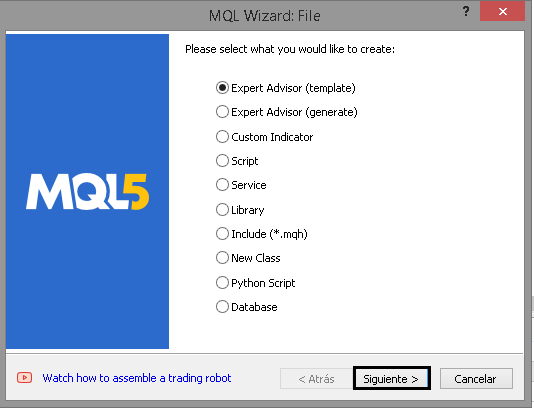
Let’s start by creating an Expert Advisor:
1. Create an Expert Advisor from a template:
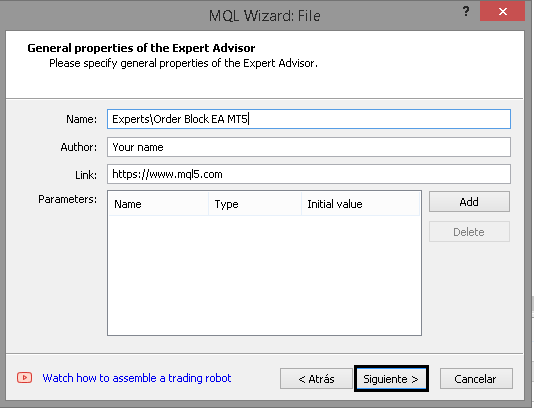
2. Specify the name and author:
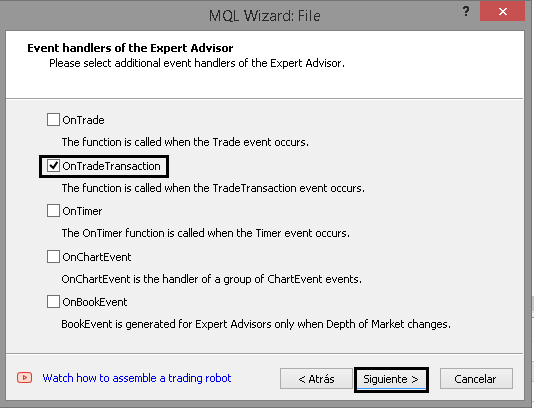
3. Select only the OnTradeTransaction event:
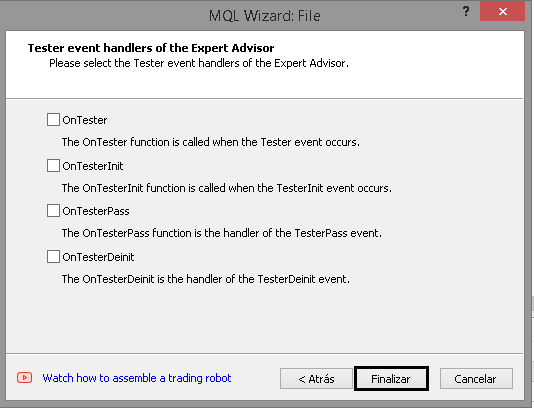
4. Finish:
Next, we will create the parameters required for the Expert Advisor to work correctly. Let’s start with the general parameters of the Expert Advisor, such as the magic number and default settings already used in the Order Blocks indicator.
1. General parameters
Before setting the general parameters, we will define an enum with the take profit and stop loss types used by the indicator; they will match the ones in the indicator.
enum ENUM_TP_SL_STYLE
 {
  ATR = 0,
  POINT = 1
 };
Below is a brief explanation of each added parameter:
-
Magic: Magic number that identifies the Expert Advisor’s trades, allowing you to distinguish them from others.
-
timeframe_order_block: Sets the timeframe used to detect order blocks (Order Blocks).
-
Rango_universal_busqueda: Number of candles to look back when the Expert Advisor searches for potential order blocks.
-
Witdth_order_block: Sets the line (border) thickness of rectangles that represent order blocks.
-
Back_order_block and Fill_order_block: Graphic parameters for drawing the background and fill of the rectangle that represents each order block.
-
Color_Order_Block_Bassist and Color_Order_Block_Bullish: Colors for bearish and bullish order blocks, respectively.
-
tp_sl_style: Method for calculating take profit and stop loss (ATR or points).
-
Atr_Multiplier_1 and Atr_Multiplier_2: Multipliers used with the ATR method.
-
TP_POINT and SL_POINT: Take profit and stop loss values when using the POINT method.
sinput group "--- Order Block EA settings ---"
input ulong Magic = 545244; //Magic number
input ENUM_TIMEFRAMES timeframe_order_block = PERIOD_M5; //Order block timeframe

sinput group "-- Order Block --"
input int  Rango_universal_busqueda = 500; //search range of order blocks
input int  Witdth_order_block = 1; //Width order block

input bool Back_order_block = true; //Back order block?
input bool Fill_order_block = true; //Fill order block?

input color Color_Order_Block_Bajista = clrRed; //Bearish order block color
input color Color_Order_Block_Alcista = clrGreen; //Bullish order block color

sinput group "-- Strategy --"
input ENUM_TP_SL_STYLE tp_sl_style = POINT;//tp and sl style

sinput group "- ATR "
input double Atr_Multiplier_1 = 1.5;//Atr multiplier 1
input double Atr_Multiplier_2 = 2.0;//Atr multiplier 2

sinput group "- POINT "
input int TP_POINT = 1000; //TL in Points
input int SL_POINT = 1000; //SL in Points
2. Risk management parameters
Continuing the Expert Advisor parameter list, let’s define the ones used for risk management. General parameters:
-
Lote_Type: Determines whether to use a dynamic lot (based on per-trade risk management) or a fixed lot.
-
lot: Lot size used when Lote_Type is set to "Fixed".
-
risk_mode: Allows you to choose whether the account is personal or a PropFirm account (e.g., propfirm_ftmo).
-
get_mode: Determines how lot size is calculated. It uses the stop loss value and adjusts lot size based on per-trade risk.
-
prop_firm_balance: If an FTMO account (or another prop firm with similar rules) is used, determines the initial account balance. As explained in previous articles, this parameter is used to calculate the maximum per-trade loss and maximum daily loss.
input ENUM_LOTE_TYPE Lote_Type = Dinamico; //Lote Type
input double lote = 0.1; //lot size (only for fixed lot)
input ENUM_MODE_RISK_MANAGEMENT risk_mode = personal_account;//type of risk management mode
input ENUM_GET_LOT get_mode = GET_LOT_BY_STOPLOSS_AND_RISK_PER_OPERATION; //How to get the lot
input double prop_firm_balance = 1000; //If risk mode is Prop Firm FTMO, then put your ftmo account balance
3. Parameters for maximum loss (daily, weekly, and total)
Now let’s define parameters for controlling maximum loss (ML), maximum weekly loss (MWL), and maximum daily loss (MDL). Each of these limits is based on three variables that determine how the loss limit is calculated and applied:
-
percentage_or_money_..._input: Represents a percentage or a monetary amount, depending on the selected calculation mode. If the value is set to 0, the loss limit is not used.
-
mode_calculation_...: Indicates whether the parameter is evaluated as a percentage or a monetary amount.
-
applied_percentages_...: Determines the base to which the percentage is applied (e.g., balance, account profit, and so on).
sinput group "- ML/Maxium loss/Maxima perdida -"
input double percentage_or_money_ml_input = 0; //percentage or money (0 => not used ML)
input ENUM_RISK_CALCULATION_MODE mode_calculation_ml = percentage; //Mode calculation Max Loss
input ENUM_APPLIED_PERCENTAGES applied_percentages_ml = Balance; //ML percentage applies to:

sinput group "- MWL/Maximum weekly loss/Perdida maxima semanal -"
input double percentage_or_money_mwl_input  = 0; //percentage or money (0 => not used MWL)
input ENUM_RISK_CALCULATION_MODE mode_calculation_mwl = percentage; //Mode calculation Max weekly Loss
input ENUM_APPLIED_PERCENTAGES applied_percentages_mwl = Balance;//MWL percentage applies to:

sinput group "- MDL/Maximum  daily loss/Perdida maxima diaria -"
input double percentage_or_money_mdl_input  = 0; //percentage or money (0 => not used MDL)
input ENUM_RISK_CALCULATION_MODE mode_calculation_mdl = percentage; //Mode calculation Max daily loss
input ENUM_APPLIED_PERCENTAGES applied_percentages_mdl = Balance;//MDL percentage applies to:
4. GMLPO: maximum per-trade risk
Continuing the Expert Advisor parameter setup, let’s configure the maximum per-trade loss. This section is more complex because it includes more than three parameters; as mentioned earlier, it also introduces dynamic risk.
4.1 General GMLPO parameters
Let’s start by defining the five main parameters for dynamic risk. This includes three parameters already used for maximum daily, weekly, and total loss, plus two additional parameters. The latter allow you to configure how often the system checks whether per-trade risk needs to be adjusted and which dynamic risk configuration type to use. Additional enums used:
//--- Enumeration of the types of dynamic operational risk
enum ENUM_OF_DYNAMIC_MODES_OF_GMLPO
 {
  DYNAMIC_GMLPO_FULL_CUSTOM, //Customisable dynamic risk per operation
  DYNAMIC_GMLPO_FIXED_PARAMETERS,//Risk per operation with fixed parameters
  NO_DYNAMIC_GMLPO //No dynamic risk for risk per operation
 };
//--- Enumeration to determine when to review a decrease in the initial balance to modify the risk per operation
enum ENUM_REVISION_TYPE
 {
  REVISION_ON_CLOSE_POSITION, //Check GMLPO only when closing positions
  REVISION_ON_TICK //Check GMLPO on all ticks
 };
sinput group "- GMLPO/Gross maximum loss per operation/Porcentaje a arriesgar por operacion -"
input ENUM_OF_DYNAMIC_MODES_OF_GMLPO mode_gmlpo = DYNAMIC_GMLPO_FULL_CUSTOM; //Select GMLPO mode:
input ENUM_REVISION_TYPE revision_type_gmlpo = REVISION_ON_CLOSE_POSITION; //Type revision
input double percentage_or_money_gmlpo_input  = 1.0; //percentage or money (0 => not used GMLPO)
input ENUM_RISK_CALCULATION_MODE mode_calculation_gmlpo = percentage; //Mode calculation Max Loss per operation
input ENUM_APPLIED_PERCENTAGES applied_percentages_gmlpo = Balance;//GMPLO percentage applies to:
- mode_gmlpo: Determines whether per-trade risk is dynamic. Select one of the dynamic risk configuration modes. If dynamic risk is not used, select NO_DYNAMIC_GMLPO.
- revision_type_gmlpo: Indicates when account equity is checked to adjust per-trade risk: when a position closes or on every market tick.
- percentage_or_money_gmlpo_input: Percentage or monetary amount used as the base for determining per-trade risk. If the value is set to 0, the GMLPO function is not activated.
- mode_calculation_gmlpo: Determines whether percentage_or_money_gmlpo_input is interpreted as a percentage or a fixed monetary amount.
- applied_percentages_gmlpo: Sets the base (e.g., Balance or Equity) used to calculate the percentage when that calculation mode is selected.
Note: Each enum used here, already described in previous articles, provides more detail on how risk is calculated internally.
4.2 Dynamic GMLPO settings
As mentioned earlier, there are two modes for configuring dynamic risk: a fully customizable mode and a fixed-parameter mode. In the previous article, I explained why we made this choice. In short, the problem with using strings as parameters is that they cannot be optimized, which makes it harder to find the best dynamic risk parameters. Therefore, we implemented an enum to address this problem.
4.2.1 Configurable dynamic GMLPO
In this mode, the user specifies at what percentage decrease in balance the risk must change and what the new per-trade risk value will be. This mode provides maximum flexibility, although it is based on strings, which prevents optimization.
sinput group "-- Optional GMLPO settings, Dynamic GMLPO"
sinput group "--- Full customizable dynamic GMLPO"
input string note1 = "subtracted from your total balance to establish a threshold.";  //This parameter determines a specific percentage that will be
input string str_percentages_to_be_reviewed = "2,5,7,9"; //percentages separated by commas.
input string note2 = "a new risk level will be triggered on your future trades: "; //When the current balance (equity) falls below this threshold
input string str_percentages_to_apply = "1,0.7,0.5,0.33"; //percentages separated by commas.
input string note3 = "0 in both parameters => do not use dynamic risk in gmlpo"; //Note:
-
str_percentages_to_be_reviewed: Contains a list of percentages, sorted in ascending order, that define the threshold at which per-trade risk changes. By default, the values "2,5,7,9" are set. This means that when account profit, expressed as a percentage, falls below 2%, the risk is adjusted to the matching value and the first value in str_percentages_to_apply (1) is applied.
-
str_percentages_to_apply Contains the new risk percentages to which per-trade risk will be adjusted.
4.2.2 Dynamic GMLPO with fixed parameters
If you prefer to configure dynamic risk through fixed parameters, there is a separate section in the Expert Advisor settings. Its behavior is similar to the configurable mode, but in this case you can set up to four parameters. If you do not need all four and only want to use three, simply enter two zeros in the fields that will not be used. For example, if only three "modifiers" are used in section "-- 4 --", the two remaining parameters must be set to 0.
sinput group "--- Fixed dynamic GMLPO with parameters"
sinput group "- 1 -"
input string note1_1 = "subtracted from your total balance to establish a threshold.";  //This parameter determines a specific percentage that will be
input double inp_balance_percentage_to_activate_the_risk_1 = 2.0; //percentage 1 that will be exceeded to modify the risk separated by commas
input string note2_1 = "a new risk level will be triggered on your future trades: "; //When the current balance (equity) falls below this threshold
input double inp_percentage_to_be_modified_1 = 1.0;//new percentage 1 to which the gmlpo is modified
sinput group "- 2 -"
input double inp_balance_percentage_to_activate_the_risk_2 = 5.0;//percentage 2 that will be exceeded to modify the risk separated by commas
input double inp_percentage_to_be_modified_2 = 0.7;//new percentage 2 to which the gmlpo is modified
sinput group "- 3 -"
input double inp_balance_percentage_to_activate_the_risk_3 = 7.0;//percentage 3 that will be exceeded to modify the risk separated by commas
input double inp_percentage_to_be_modified_3 = 0.5;//new percentage 3 to which the gmlpo is modified
sinput group "- 4 -"
input double inp_balance_percentage_to_activate_the_risk_4 = 9.0;//percentage 4 that will be exceeded to modify the risk separated by commas
input double inp_percentage_to_be_modified_4 = 0.33;//new percentage 4  1 to which the gmlpo is modified
5. Maximum daily profit (MDP)
To complete the list of risk control parameters, the Maximum Daily Profit (MDP) parameter is added. It includes three common parameters for all maximum loss/profit limits, plus a new mdp_is_strict parameter. This parameter indicates whether the "maximum profit per trade" check mode is enabled.
If mdp_is_strict is false, it means that regardless of any losses during the day, it is enough to exceed the MDP value. For example, if the profit target is 10 USD and 4 USD is lost during the day, then 5 USD is earned, this is considered exceeding the maximum profit per trade. On the other hand, what happens if the value of mdp_is_strict is true? This means that you must not only reach the target profit level but also recover all daily losses before the profit counts as exceeding MDP. For example, if the target is 10 USD and 5 USD has been lost, you must first recover that 5 USD and then earn an additional 10 USD.
sinput group "- MDP/Maximum daily profit/Maxima ganancia diaria -"
input bool mdp_is_strict = true; //MDP is strict?
input double percentage_or_money_mdp_input = 0; //percentage or money (0 => not used MDP)
input ENUM_RISK_CALCULATION_MODE mode_calculation_mdp = percentage; //Mode calculation Max Daily Profit
input ENUM_APPLIED_PERCENTAGES applied_percentages_mdp = Balance;//MDP percentage applies to:
6. Trading session
To avoid trading during periods of low volatility or at inappropriate times, an option to define a trading session has been added.
If the current time is within the specified range, the Expert Advisor will execute trades; otherwise, no trading will occur.
sinput group "--- Session ---"
input         char hora_inicio = 16;//start hour to operate (0-23)
input         char min_inicio = 30;//start minute to operate (0-59)
input         char hora_fin = 18;//end hour to operate (1-23)
input         char min_fin =0;//end minute to operate (0-59)
Full list of parameters:
sinput group "--- Order Block EA settings ---"
input ulong Magic = 545244; //Magic number
input ENUM_TIMEFRAMES timeframe_order_block = PERIOD_M5; //Order block timeframe

sinput group "-- Order Block --"
input int  Rango_universal_busqueda = 500; //search range of order blocks
input int  Witdth_order_block = 1; //Width order block

input bool Back_order_block = true; //Back order block?
input bool Fill_order_block = true; //Fill order block?

input color Color_Order_Block_Bajista = clrRed; //Bearish order block color
input color Color_Order_Block_Alcista = clrGreen; //Bullish order block color

sinput group "-- Strategy --"
input ENUM_TP_SL_STYLE tp_sl_style = POINT;//tp and sl style

sinput group "- ATR "
input double Atr_Multiplier_1 = 1.5;//Atr multiplier 1
input double Atr_Multiplier_2 = 2.0;//Atr multiplier 2

sinput group "- POINT "
input int TP_POINT = 1000; //TL in Points
input int SL_POINT = 1000; //SL in Points

sinput group "--- Risk Management ---"
input ENUM_LOTE_TYPE Lote_Type = Dinamico; //Lote Type
input double lote = 0.1; //lot size (only for fixed lot)
input ENUM_MODE_RISK_MANAGEMENT risk_mode = personal_account;//type of risk management mode
input ENUM_GET_LOT get_mode = GET_LOT_BY_STOPLOSS_AND_RISK_PER_OPERATION; //How to get the lot
input double prop_firm_balance = 1000; //If risk mode is Prop Firm FTMO, then put your ftmo account balance

sinput group "- ML/Maxium loss/Maxima perdida -"
input double percentage_or_money_ml_input = 0; //percentage or money (0 => not used ML)
input ENUM_RISK_CALCULATION_MODE mode_calculation_ml = percentage; //Mode calculation Max Loss
input ENUM_APPLIED_PERCENTAGES applied_percentages_ml = Balance; //ML percentage applies to:

sinput group "- MWL/Maximum weekly loss/Perdida maxima semanal -"
input double percentage_or_money_mwl_input  = 0; //percentage or money (0 => not used MWL)
input ENUM_RISK_CALCULATION_MODE mode_calculation_mwl = percentage; //Mode calculation Max weekly Loss
input ENUM_APPLIED_PERCENTAGES applied_percentages_mwl = Balance;//MWL percentage applies to:

sinput group "- MDL/Maximum  daily loss/Perdida maxima diaria -"
input double percentage_or_money_mdl_input  = 0; //percentage or money (0 => not used MDL)
input ENUM_RISK_CALCULATION_MODE mode_calculation_mdl = percentage; //Mode calculation Max daily loss
input ENUM_APPLIED_PERCENTAGES applied_percentages_mdl = Balance;//MDL percentage applies to:

sinput group "- GMLPO/Gross maximum loss per operation/Porcentaje a arriesgar por operacion -"
input ENUM_OF_DYNAMIC_MODES_OF_GMLPO mode_gmlpo = DYNAMIC_GMLPO_FULL_CUSTOM; //Select GMLPO mode:
input ENUM_REVISION_TYPE revision_type_gmlpo = REVISION_ON_CLOSE_POSITION; //Type revision
input double percentage_or_money_gmlpo_input  = 1.0; //percentage or money (0 => not used GMLPO)
input ENUM_RISK_CALCULATION_MODE mode_calculation_gmlpo = percentage; //Mode calculation Max Loss per operation
input ENUM_APPLIED_PERCENTAGES applied_percentages_gmlpo = Balance;//GMPLO percentage applies to:

sinput group "-- Optional GMLPO settings, Dynamic GMLPO"
sinput group "--- Full customizable dynamic GMLPO"
input string note1 = "subtracted from your total balance to establish a threshold.";  //This parameter determines a specific percentage that will be
input string str_percentages_to_be_reviewed = "2,5,7,9"; //percentages separated by commas.
input string note2 = "a new risk level will be triggered on your future trades: "; //When the current balance (equity) falls below this threshold
input string str_percentages_to_apply = "1,0.7,0.5,0.33"; //percentages separated by commas.
input string note3 = "0 in both parameters => do not use dynamic risk in gmlpo"; //Note:

sinput group "--- Fixed dynamic GMLPO with parameters"
sinput group "- 1 -"
input string note1_1 = "subtracted from your total balance to establish a threshold.";  //This parameter determines a specific percentage that will be
input double inp_balance_percentage_to_activate_the_risk_1 = 2.0; //percentage 1 that will be exceeded to modify the risk separated by commas
input string note2_1 = "a new risk level will be triggered on your future trades: "; //When the current balance (equity) falls below this threshold
input double inp_percentage_to_be_modified_1 = 1.0;//new percentage 1 to which the gmlpo is modified
sinput group "- 2 -"
input double inp_balance_percentage_to_activate_the_risk_2 = 5.0;//percentage 2 that will be exceeded to modify the risk separated by commas
input double inp_percentage_to_be_modified_2 = 0.7;//new percentage 2 to which the gmlpo is modified
sinput group "- 3 -"
input double inp_balance_percentage_to_activate_the_risk_3 = 7.0;//percentage 3 that will be exceeded to modify the risk separated by commas
input double inp_percentage_to_be_modified_3 = 0.5;//new percentage 3 to which the gmlpo is modified
sinput group "- 4 -"
input double inp_balance_percentage_to_activate_the_risk_4 = 9.0;//percentage 4 that will be exceeded to modify the risk separated by commas
input double inp_percentage_to_be_modified_4 = 0.33;//new percentage 4  1 to which the gmlpo is modified

sinput group "- MDP/Maximum daily profit/Maxima ganancia diaria -"
input bool mdp_is_strict = true; //MDP is strict?
input double percentage_or_money_mdp_input = 0; //percentage or money (0 => not used MDP)
input ENUM_RISK_CALCULATION_MODE mode_calculation_mdp = percentage; //Mode calculation Max Daily Profit
input ENUM_APPLIED_PERCENTAGES applied_percentages_mdp = Balance;//MDP percentage applies to:

sinput group "--- Session ---"
input         char hora_inicio = 16;//start hour to operate (0-23)
input         char min_inicio = 30;//start minute to operate (0-59)
input         char hora_fin = 18;//end hour to operate (1-23)
input         char min_fin =0;//end minute to operate (0-59)
Declaration of global variables
In this section, various global variables will be created to manage risks and the trading activities of the Expert Advisor.
1. CTrade and CRiskManagement objects
To carry out trading operations, we will include our Risk_Management.mqh library, which has been developed throughout this article series. In addition, an object of the CTrade type will be declared.
#include  <Risk_Management.mqh>
CTrade trade;
Then an instance of the CRiskManagement class is created and the parameters required by the constructor are set:
CRiskManagemet risk(mdp_is_strict, get_mode, Magic, risk_mode, prop_firm_balance);
2. Variables for storing indicator descriptors
To visualize the Expert Advisor decision-making process, we will introduce two variables to store indicator descriptors: one— for the Order Blocks indicator and the other— for the EMA.
//--- Handles
int order_block_indicator_handle;
int hanlde_ma;
3. Arrays for storing TP and SL values
To store the values copied from the Order Blocks indicator buffers, four arrays will be created:
double tp1[];
double tp2[];
double sl1[];
double sl2[];
4. Variables for previous closes (daily, weekly, and Order Blocks timeframe)
The Expert Advisor needs to store the timestamp, that is, the closing time of the last daily, weekly, or specific candle of the timeframe where an order block was detected:
//---
datetime TiempoBarraApertua;
datetime TiempoBarraApertua_1;
datetime prev_vela;
5. Boolean variable for enabling/disabling trading activity
To control whether the Expert Advisor can operate after certain profit or loss limits are exceeded, a boolean variable will be created that indicates whether trading is allowed (true) or not (false):
//---
bool opera = true;
6. Variables for storing the start and end of the trading session
Finally, variables are defined to mark the start and end of the session during which buy or sell signals are searched for:
datetime start_sesion;
datetime end_sesion;
OnInit function
In this section, we will set up everything required for the Expert Advisor to work correctly. We declare and set the parameters of the Order Blocks indicator, initialize its descriptor and the EMA, and finally configure the risk management system.
1. Creating an MqlParam array for the Order Blocks indicator
The first step is to prepare an array of parameters, each one corresponding to an indicator setting. Using the MqlParam structure, these parameters can be passed to the IndicatorCreate() function in an ordered way:
//---
  MqlParam param[17];

  param[0].type = TYPE_STRING;
  param[0].string_value = "::Indicators\\Order_Block_Indicador_New_Part_2";

  param[1].type = TYPE_STRING;
  param[1].string_value = "--- Order Block Indicator settings ---";

  param[2].type = TYPE_STRING;
  param[2].string_value = "-- Order Block --";

  param[3].type = TYPE_INT;
  param[3].integer_value = Rango_universal_busqueda;

  param[4].type = TYPE_INT;
  param[4].integer_value = Witdth_order_block;

  param[5].type = TYPE_BOOL;
  param[5].integer_value = Back_order_block;

  param[6].type = TYPE_BOOL;
  param[6].integer_value = Fill_order_block;

  param[7].type = TYPE_COLOR;
  param[7].integer_value = Color_Order_Block_Bajista;

  param[8].type = TYPE_COLOR;
  param[8].integer_value = Color_Order_Block_Alcista;

  param[9].type = TYPE_STRING;
  param[9].string_value = "-- Strategy --";

  param[10].type = TYPE_INT;
  param[10].integer_value = tp_sl_style;

  param[11].type = TYPE_STRING;
  param[11].string_value = "- ATR";

  param[12].type = TYPE_DOUBLE;
  param[12].double_value = Atr_Multiplier_1;

  param[13].type = TYPE_DOUBLE;
  param[13].double_value = Atr_Multiplier_2;

  param[14].type = TYPE_STRING;
  param[14].string_value = "- POINT";

  param[15].type = TYPE_INT;
  param[15].integer_value = TP_POINT;

  param[16].type = TYPE_INT;
  param[16].integer_value = SL_POINT;
The param[] array indices correspond to each parameter required for the Order Blocks indicator to operate.
2. Creating and validating indicator descriptors
After the array is filled, the IndicatorCreate() function is used to obtain the descriptor of the Order Blocks indicator. In addition, an EMA descriptor is created, which serves as an additional guide in the entry and exit strategy.
//---
  order_block_indicator_handle = IndicatorCreate(_Symbol, timeframe_order_block, IND_CUSTOM, ArraySize(param), param);
  hanlde_ma = iMA(_Symbol, timeframe_order_block, 30, 0, MODE_EMA, PRICE_CLOSE);
  trade.SetExpertMagicNumber(Magic);

  if(order_block_indicator_handle == INVALID_HANDLE)
   {
    Print("The order blocks indicator is not available last error: ", _LastError);
    return INIT_FAILED;
   }

  if(hanlde_ma == INVALID_HANDLE)
   {
    Print("The ema indicator is not available latest error: ", _LastError);
    return INIT_FAILED;
   }
3. Adding indicators to the chart
To simplify debugging and visual monitoring, you can add the indicators directly to the chart. This step is optional; however, seeing the objects on the chart makes it easier to verify that the parameters and visualization are correct.
  ChartIndicatorAdd(0, 0, order_block_indicator_handle);
  ChartIndicatorAdd(0, 0, hanlde_ma);
4. Risk management setup
Configure the CRiskManagement object, which is responsible for applying loss and profit limits and calculating the ideal lot size.
//---
  risk.SetPorcentages(percentage_or_money_mdl_input, percentage_or_money_mwl_input, percentage_or_money_gmlpo_input
                      , percentage_or_money_ml_input, percentage_or_money_mdp_input);
  risk.SetEnums(mode_calculation_mdl, mode_calculation_mwl, mode_calculation_gmlpo, mode_calculation_ml, mode_calculation_mdp);
  risk.SetApplieds(applied_percentages_mdl, applied_percentages_mwl, applied_percentages_gmlpo, applied_percentages_ml, applied_percentages_mdp);
Dynamic GMLPO configuration
Depending on the selected configuration mode (fixed or fully customizable), per-trade risk values are set.
  if(mode_gmlpo == DYNAMIC_GMLPO_FIXED_PARAMETERS)
   {
    string percentages_to_activate, risks_to_be_applied;
    SetDynamicGMLPOUsingFixedParameters(inp_balance_percentage_to_activate_the_risk_1, inp_balance_percentage_to_activate_the_risk_2, inp_balance_percentage_to_activate_the_risk_3
                                        , inp_balance_percentage_to_activate_the_risk_4, inp_percentage_to_be_modified_1, inp_percentage_to_be_modified_2, inp_percentage_to_be_modified_3, inp_percentage_to_be_modified_4
                                        , percentages_to_activate, risks_to_be_applied);
    risk.SetDynamicGMLPO(percentages_to_activate, risks_to_be_applied, revision_type_gmlpo);
   }
  else
    if(mode_gmlpo == DYNAMIC_GMLPO_FULL_CUSTOM)
      risk.SetDynamicGMLPO(str_percentages_to_be_reviewed, str_percentages_to_apply, revision_type_gmlpo);
The SetDynamicGMLPOUsingFixedParameters() function converts fixed parameters (inp_balance_percentage_to_activate_the_risk_X and inp_percentage_to_be_modified_X) into strings. This function is very simple: essentially, it creates strings by concatenating variable values converted to string.
void SetDynamicGMLPOUsingFixedParameters(
  double _balance_percentage_to_activate_the_risk_1, double _balance_percentage_to_activate_the_risk_2, double _balance_percentage_to_activate_the_risk_3, double _balance_percentage_to_activate_the_risk_4,
  double _percentage_to_be_modified_1, double _percentage_to_be_modified_2, double _percentage_to_be_modified_3, double _percentage_to_be_modified_4,
  string &percentages_to_activate, string &risks_to_be_applied)
 {
  percentages_to_activate = DoubleToString(_balance_percentage_to_activate_the_risk_1) + "," + DoubleToString(_balance_percentage_to_activate_the_risk_2) + "," + DoubleToString(_balance_percentage_to_activate_the_risk_3)
                            + "," + DoubleToString(_balance_percentage_to_activate_the_risk_4);
  risks_to_be_applied = DoubleToString(_percentage_to_be_modified_1) + "," + DoubleToString(_percentage_to_be_modified_2) + "," + DoubleToString(_percentage_to_be_modified_3)
                        + "," + DoubleToString(_percentage_to_be_modified_4);
 }
5. Setting up the TP/SL array for the Order Blocks indicator
Finally, arrays are configured to store Order Blocks indicator data sequentially:
//---
  ArraySetAsSeries(tp1, true);
  ArraySetAsSeries(tp2, true);
  ArraySetAsSeries(sl1, true);
  ArraySetAsSeries(sl2, true);
OnTick and OnTradeTransaction functions
The OnTick and OnTradeTransaction functions are fundamental to any trading system. In our case, OnTick is used to check whether loss limits are exceeded, detect new daily and weekly candles (and so on), and execute signals based on Order Blocks indicator data.
1. Checking for a new day and week, session setup
In OnTick, the first step is to determine whether a new day or a new week has started. This is done by comparing the datetime of the most recent bar for the daily (PERIOD_D1) and weekly (PERIOD_W1) timeframes.
During the daily candle check, the "opera" variable is reset to true (which indicates whether trading is allowed). In addition, the OnNewDay function of the "risk" object is called, and the trading session time for the current day is calculated.
//---
  if(TiempoBarraApertua != iTime(_Symbol, PERIOD_D1, 0))
   {
    opera = true;
    risk.OnNewDay();
    start_sesion = HoraYMinutoADatetime(hora_inicio,min_inicio);
    end_sesion = HoraYMinutoADatetime(hora_fin,min_fin);

    if(TiempoBarraApertua_1 != iTime(_Symbol, PERIOD_W1, 0))
     {
      risk.OnNewWeek();
      TiempoBarraApertua_1 = iTime(_Symbol, PERIOD_W1, 0);
     }

    TiempoBarraApertua = iTime(_Symbol, PERIOD_D1, 0);
   }
Note: HoraYMinutoADatetime(int hora, int minuto) converts the hours and minutes set in the input parameters into a datetime variable.
datetime HoraYMinutoADatetime(int hora, int minuto) {
  MqlDateTime tm;
  TimeCurrent(tm);
// Asigna la hora y el minuto deseado
  tm.hour = hora;
  tm.min = minuto;
  tm.sec = 0; // Puedes ajustar los segundos si es necesario
  return StructToTime(tm);;
}
2. Checks and logic on each new candle of the Order Blocks timeframe
The next step is to check whether a new bar has formed on the timeframe set for the Order Blocks indicator. After a new candle is detected, indicator buffers are copied to obtain TP and SL values. Next, SL is set for lot size calculation, and a buy or sell order is executed based on the signal.
 if(prev_vela != iTime(_Symbol, timeframe_order_block, 0))
   {
    CopyBuffer(order_block_indicator_handle, 2, 0, 5, tp1);
    CopyBuffer(order_block_indicator_handle, 3, 0, 5, tp2);
    CopyBuffer(order_block_indicator_handle, 4, 0, 5, sl1);
    CopyBuffer(order_block_indicator_handle, 5, 0, 5, sl2);

    if(tp1[0] > 0 && tp2[0]  > 0 && sl1[0] > 0 &&  sl2[0] > 0)
     {
      if(tp2[0] > sl2[0] && risk.GetPositionsTotal() == 0)  //compras
       {
        double ASK = NormalizeDouble(SymbolInfoDouble(_Symbol, SYMBOL_ASK), _Digits);
        risk.SetStopLoss(ASK - sl1[0]);
        double lot = (Lote_Type == Dinamico ? risk.GetLote(ORDER_TYPE_BUY) : lote);

        if(lot > 0.0)
          trade.Buy(lot, _Symbol, ASK, sl1[0], tp1[0], "Order Block EA Buy");
       }
      else
        if(sl2[0] > tp2[0] && risk.GetPositionsTotal() == 0)  //venta
         {
          double BID = NormalizeDouble(SymbolInfoDouble(_Symbol, SYMBOL_BID), _Digits);
          risk.SetStopLoss(sl1[0] - BID);
          double lot = (Lote_Type == Dinamico ? risk.GetLote(ORDER_TYPE_SELL) : lote);

          if(lot > 0.0)
            trade.Sell(lot, _Symbol, BID, sl1[0], tp1[0], "Order Block EA Sell");
         }
     }

    prev_vela = iTime(_Symbol, timeframe_order_block, 0);
   }
Note: risk.GetPositionsTotal() limits the number of trades that can be open at the same time. This example checks that there are no open positions before placing a new order.
Values sl1 and tp1 are used, but tp2 can also be used to set a different ratio, e.g., 1:2, depending on the parameter settings.
3. Final risk management check
At the end of each OnTick, the code checks whether loss or profit limits have been exceeded. If the limits are exceeded, all positions opened by the Expert Advisor are closed, and the value of the "opera" variable is set to false.
 risk.OnTickEvent();

  if(risk.ML_IsSuperated(CLOSE_POSITION_AND_EQUITY)  == true)
   {
    if(risk_mode == propfirm_ftmo)
     {
      Print("The expert advisor lost the funding test");
      ExpertRemove();
     }
    else
     {
      risk.CloseAllPositions();
      Print("Maximum loss exceeded now");
      opera = false;
     }
   }

  if(risk.MDL_IsSuperated(CLOSE_POSITION_AND_EQUITY) == true)
   {
    risk.CloseAllPositions();
    Print("Maximum daily loss exceeded now");
    opera = false;
   }

  if(risk.MDP_IsSuperated(CLOSE_POSITION_AND_EQUITY) == true)
   {
    risk.CloseAllPositions();
    Print("Excellent Maximum daily profit achieved");
    opera = false;
   }
Note: Additional checks can be added to monitor other loss types, such as maximum weekly loss.
 if(risk.MWL_IsSuperated(CLOSE_POSITION_AND_EQUITY) == true)
   {
    risk.CloseAllPositions();
    Print("The maximum weekly loss has been exceeded");
    opera = false;
    extra = false;
   }
4. OnTradeTransaction event
Finally, to receive position open, close, or modification events, the OnTradeTransaction function is implemented. This function calls the relevant method of the risk management class to handle these events.
//+------------------------------------------------------------------+
//| TradeTransaction function                                        |
//+------------------------------------------------------------------+
void OnTradeTransaction(const MqlTradeTransaction& trans,
                        const MqlTradeRequest& request,
                        const MqlTradeResult& result)
 {
  risk.OnTradeTransactionEvent(trans);
 }
OnDeinit function
The OnDeinit function is called right before the Expert Advisor is removed from or disconnected from the chart. At this stage, the ideal solution is to free all resources and remove any indicators or objects added during runtime to keep the chart clean and avoid memory leaks.
Below is an example of how to perform this cleanup.
//+------------------------------------------------------------------+
//| Expert deinitialization function                                 |
//+------------------------------------------------------------------+
void OnDeinit(const int reason)
 {
//---
  ChartIndicatorDelete(0, 0, ChartIndicatorName(0, 0, GetMovingAverageIndex()));
  ChartIndicatorDelete(0, 0, "Order Block Indicator");

  if(hanlde_ma != INVALID_HANDLE)
    IndicatorRelease(hanlde_ma);

  if(order_block_indicator_handle != INVALID_HANDLE)
    IndicatorRelease(order_block_indicator_handle);

 }
Finding and removing the Exponential Moving Average (EMA) from the chart
To remove a Moving Average indicator, you first need to find its name, i.e., the one shown on the chart’s Indicators tab. Sometimes the only way to do this is to iterate over indicator names and search for the full name or part of it.
//+------------------------------------------------------------------+
//| Extra Functions                                                  |
//+------------------------------------------------------------------+
int GetMovingAverageIndex(long chart_id = 0)
 {
  int total_indicators = ChartIndicatorsTotal(chart_id, 0);
  for(int i = 0; i < total_indicators; i++)
   {
    string indicator_name = ChartIndicatorName(chart_id, 0, i);
    if(StringFind(indicator_name, "MA") >= 0)  return i;
   }
  return -1;
 }
//+------------------------------------------------------------------+
ChartIndicatorsTotal(chart_id, 0): Returns the total number of indicators attached to the chart’s main window.
ChartIndicatorName(chart_id, 0, i): Returns the name of each indicator in the chart’s main window.
StringFind(indicator_name, "MA"): Checks whether the name contains "MA" (this can be "EMA", "MA", and so on). If a match is found, the function returns the index.
Once you have the index in the indicator list, you can use the name to remove the indicator with ChartIndicatorDelete.
Releasing indicator descriptors
Calling IndicatorRelease() ensures the indicator is fully released from memory, especially for custom indicators or when their data is accessed through descriptors. If this is not done, residual data may remain in memory after the Expert Advisor is closed.- handle_ma: Descriptor of the Exponential Moving Average (EMA).
- order_block_indicator_handle: Descriptor of the Order Blocks indicator.
Testing
Finally, we will test this Expert Advisor and evaluate the pros and cons of using the risk management system.
Our first backtest will use data from the past year.
The testing period ranges from 2024.01.01 to 2025.03.28.
- Symbol: Gold
- Timeframe: M5
- Model: Execution on each tick based on real ticks
- Leverage: 1:100
Settings:
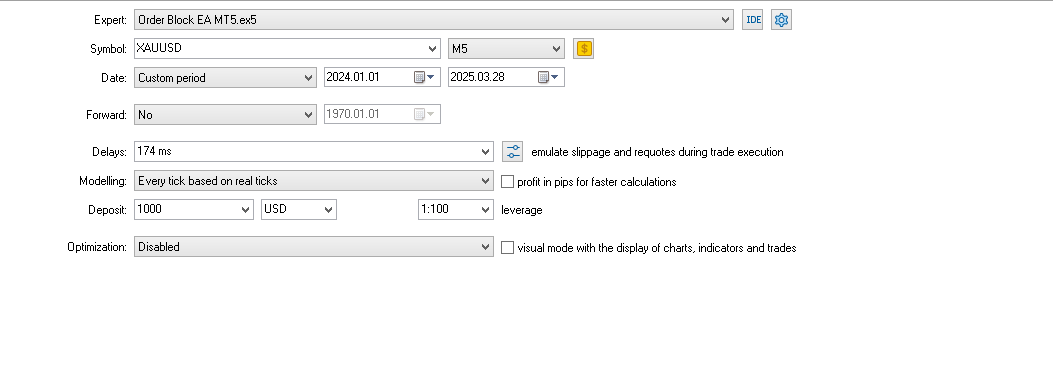
Chart:
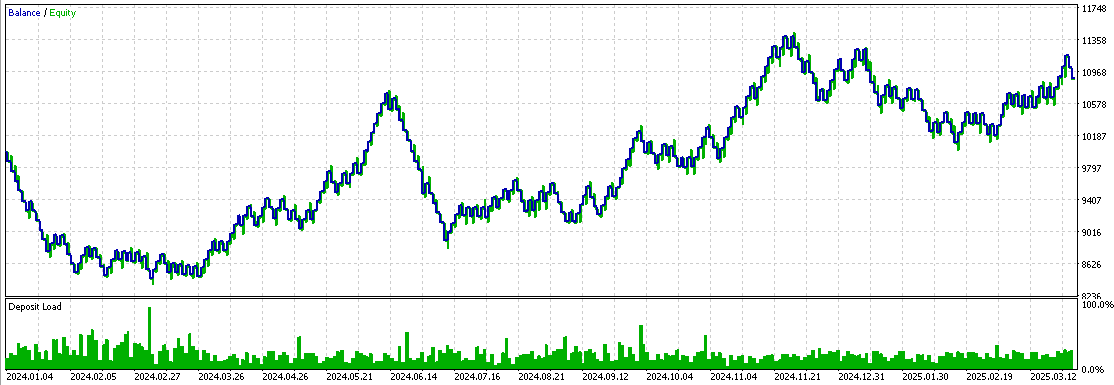
Backtest 1
Note: Remember that this backtest was not optimized.
Now we will optimize the Expert Advisor. Here are the results:
- New timeframe: M3
- Parameters used: maximum daily profit and maximum daily loss.
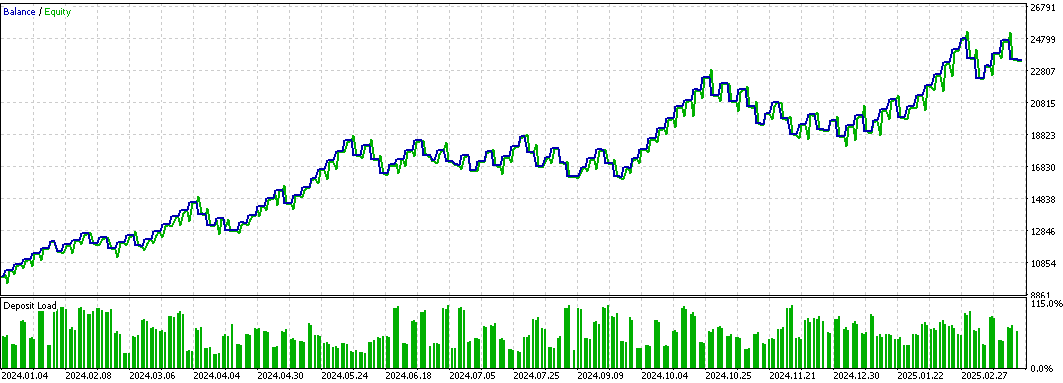
Backtest 2
We optimized trading time, maximum loss, maximum profit, per-trade risk, the ATR multiplier, and the timeframe, ideally 3 minutes.
Note: In both backtests, ATR was used to calculate stop loss and take profit.
Finally, to show that risk management can affect backtest results, we will remove the maximum daily loss and maximum profit parameters while keeping the rest.
Here is the chart:
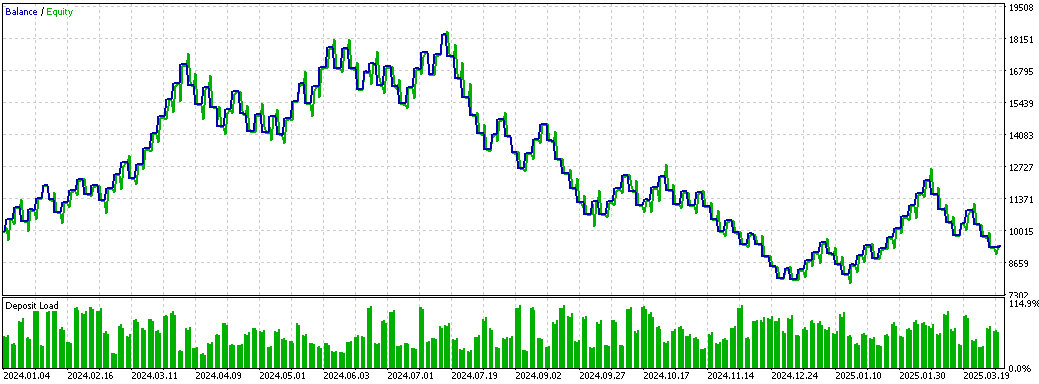
Backtest 3
As you can see, the backtest 3 chart shows faster initial growth, but it is later affected by various factors and begins to decline. In contrast, the backtest 2 chart shows smooth, steady growth without pronounced peaks. This suggests that setting a profit limit can prevent excessive trading and protect you from losing streaks and unexpected situations. Meanwhile, the maximum loss limit helps cap potential losses that may occur, e.g., during a losing streak. The maximum daily loss limit can help bring the Expert Advisor back to break-even.
We will run the final test using the same parameters as in backtest 3, but with one difference: dynamic risk will be activated when the account starts showing negative results.
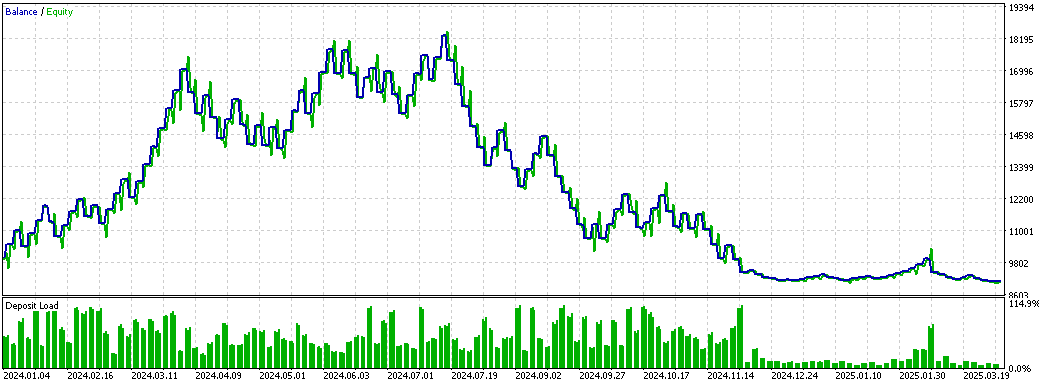
Backtest 4
You can see that when the account profit percentage is negative, per-trade risk drops sharply, limiting potential losses. There are two main differences between backtests 3 and 4:
- Profitable streak
During backtest 3, not only were losses recovered during a profitable streak, but the account also increased by 10%. For a funding check, this scenario would lead to losses because the balance would drop to about $8,600. In contrast, in backtest 4, even with a profitable streak, the account remained near the initial level ($10,000) without achieving meaningful growth.
- Recovery after losses
In backtest 4, recovering losses usually takes more time and more trades. The advantage of dynamic risk is that even during a funding check, the account is better protected and the minimum balance is maintained at around $9,086.
These results suggest that dynamic risk is preferable for prop firms because it significantly limits the potential losses the Expert Advisor can generate. However, on a regular account, dynamic risk can increase recovery time, which is not an issue for a prop firm where the goal is account management rather than quick profits.
Conclusion
In this article, we implemented a risk management system in an Expert Advisor based on the Order Blocks indicator. As you can see, using profit and loss limits – and using dynamic risk – leads to noticeably different results. In the final part of the article, we illustrated how the system works and demonstrated the effectiveness of the protective mechanisms in action.
Files used or updated in this article:
| File name | Type | Description |
|---|---|---|
| Risk_Management.mqh | .mqh (include file) | The main file contains common functions and the CRiskManagement class implementation, which is responsible for risk management in the system. This file defines and extends all functions related to profit and loss management. |
| Order_Block_Indicador_New_Part_2.mq5 | .mq5 | File containing the Order Blocks indicator code. |
| Order Block EA MT5.mq5 | .mq5 | File containing the Order Blocks Expert Advisor code. |
| Set 1% Risk.set | .set | Settings used for backtest 1. |
| Set Order Block EA.set | .set | Settings used in backtest 2, with daily maximum loss and profit limits. |
| Set Dynamic Risk.set | .set | Settings used for the dynamic risk test (backtest 3), without daily loss and profit limits. |
| Set No Dynamic Risk.set | .set | Settings used without dynamic risk (backtest 4), also without daily loss and profit limits. |
Translated from Spanish by MetaQuotes Ltd.
Original article: https://www.mql5.com/es/articles/17640
Warning: All rights to these materials are reserved by MetaQuotes Ltd. Copying or reprinting of these materials in whole or in part is prohibited.
This article was written by a user of the site and reflects their personal views. MetaQuotes Ltd is not responsible for the accuracy of the information presented, nor for any consequences resulting from the use of the solutions, strategies or recommendations described.

 Market Simulation (Part 12): Sockets (VI)
 Automating Market Memory Zones Indicator: Where Price is Likely to Return
 Using the MQL5 Economic Calendar for News Filtering (Part 1): Implementing Pre- and Post-News Windows in MQL5
 Introduction to MQL5 (Part 40): Beginner Guide to File Handling in MQL5 (II)

- Free trading apps
- Over 8,000 signals for copying
- Economic news for exploring financial markets
You agree to website policy and terms of use