

Automating Trading Strategies in MQL5 (Part 40): Fibonacci Retracement Trading with Custom Levels
 19 656
 4
4

Introduction
In our previous article (Part 39), we developed a Statistical Mean Reversion system in MetaQuotes Language 5 (MQL5) that analyzed price data for moments like mean, variance, skewness, kurtosis, and Jarque-Bera statistics, generated reversion signals based on confidence intervals with adaptive thresholds and higher timeframe confirmation, managed trades with equity-based sizing, trailing stops, partial closes, and time-based exits, while providing an on-chart dashboard for real-time monitoring. In Part 40, we develop a Fibonacci Retracement trading system with custom levels.
This system calculates retracement levels using either daily candle ranges or lookback arrays, identifies bullish or bearish setups based on close vs. open, triggers entries on price crossings of specified levels like 50% or 61.8% with max trades limits, includes optional closures on new Fib calculations, points-based trailing stops after a profit threshold, and SL/TP buffers as range percentages. We will cover the following topics:
By the end, you’ll have a functional MQL5 strategy for Fibonacci retracement trading, ready for customization—let’s dive in!
Understanding the Fibonacci Retracement Strategy
The Fibonacci retracement strategy identifies potential support and resistance levels by applying key ratios derived from the Fibonacci sequence to a prior price swing, helping traders anticipate pullbacks in trending markets where price is likely to reverse or continue after retracing a portion of the move.
For a bullish setup, after an upward swing from low to high, retracement levels like 50% or 61.8% act as potential buy zones during pullbacks, expecting a bounce back upward; for a bearish setup, following a downward swing from high to low, these levels serve as sell zones during upward corrections, anticipating a resumption of the downtrend.
We enhance entries by confirming crossings at these levels, apply buffers to trade levels based on the swing range for risk adjustment, limit trades per level to avoid overexposure, and incorporate trailing stops to protect profits as price moves favorably, while optionally closing positions on new Fib calculations for fresh setups. By combining these elements, we can target reversal points within trends. Have a look below at a bearish retracement setup sample we could have.

Our plan is to calculate Fib levels using daily candles or lookback arrays, which you can switch with any of your designated strategy, determine bullish/bearish direction from close vs. open, trigger entries on crossings of custom ratios like 50% or 61.8%, or any that you want, these are the arbitrary levels we thought are most significant and common; with max trades limits, set SL/TP with optional range-based buffers, enable points trailing after a profit threshold, close on new Fibs if chosen, and visualize with colored objects and info labels, building a flexible system for retracement trading.
Implementation in MQL5
To create the program in MQL5, open the MetaEditor, go to the Navigator, locate the Experts folder, click on the "New" tab, and follow the prompts to create the file. Once it is made, in the coding environment, we will need to declare some input parameters and global variables that we will use throughout the program.
//+------------------------------------------------------------------+
//|                                 Fibonacci Retracement Ratios.mq5 |
//|                           Copyright 2025, Allan Munene Mutiiria. |
//|                                   https://t.me/Forex_Algo_Trader |
//+------------------------------------------------------------------+
#property copyright "Copyright 2025, Allan Munene Mutiiria."
#property link      "https://t.me/Forex_Algo_Trader"
#property version   "1.00"
#property strict

#include <Trade\Trade.mqh>                                        // For trade execution

//+------------------------------------------------------------------+
//| Enums                                                            |
//+------------------------------------------------------------------+
enum CloseOnNewEnum {                                             // Define enum for closing on new Fibonacci
   CloseOnNew_No  = 0,                                            // No
   CloseOnNew_Yes = 1                                             // Yes
};
enum TrailingTypeEnum {                                           // Define enum for trailing stop types
   Trailing_None   = 0,                                           // None
   Trailing_Points = 2                                            // By Points
};

//+------------------------------------------------------------------+
//| Input Parameters                                                 |
//+------------------------------------------------------------------+
input bool   UseDailyApproach     = true;                         // Use daily candle (true) or array (false)
input string fibLevelsStr         = "50,61.8";                    // Comma-separated Fib levels for entry (e.g., 50,61.8)
input int    maxTradesPerLevel    = 1;                            // Max trades per level per Fib period (0=unlimited)
input CloseOnNewEnum CloseOnNewFib = CloseOnNew_No;               // Close trades on new Fib calc
input TrailingTypeEnum TrailingType = Trailing_None;              // Trailing Stop Type
input double Trailing_Stop_Pips   = 30.0;                         // Trailing Stop in Pips (for Points type)
input double Min_Profit_To_Trail_Pips = 50.0;                     // Min Profit to Start Trailing in Pips
input int    LookbackSize         = 100;                          // Number of candles for array approach
input double LotSize              = 0.1;                          // Trade lot size
input int    MagicNumber          = 12345;                        // Magic number for trades
input bool   IncludeCurrentBar    = false;                        // Include current bar in array calcs for updates
input double SlBufferPercent      = 0.0;                          // SL buffer percent of range (0=no buffer)
input double TpBufferPercent      = 0.0;                          // TP buffer percent of range (0=no buffer)
We begin by including the "Trade" library with "#include <Trade\Trade.mqh>" to enable order execution and position management functions. We define two enumerations for user options: "CloseOnNewEnum" with values "CloseOnNew_No" for not closing trades on new Fib calculations and "CloseOnNew_Yes" to do so, and "TrailingTypeEnum" offering "Trailing_None" to disable trailing or "Trailing_Points" for points-based adjustment.
Next, we set up input parameters for customization. "UseDailyApproach" defaults to true for daily candle ranges or false for array-based lookbacks, "fibLevelsStr" as "50,61.8" allows comma-separated retracement levels for entries, "maxTradesPerLevel" at 1 limits trades per level per period (0 for unlimited), "CloseOnNewFib" uses the enum to decide closures on recalcs, and "TrailingType" selects the trailing mode.
For trailing details, "Trailing_Stop_Pips" at 30.0 sets the distance, "Min_Profit_To_Trail_Pips" at 50.0 sets the profit threshold to start. "LookbackSize" at 100 defines candles for array mode, "LotSize" at 0.1 for position sizing, "MagicNumber" as 12345 to identify trades, "IncludeCurrentBar" as false to optionally add the forming bar in calcs, and "SlBufferPercent" plus "TpBufferPercent" both at 0.0 for range-based adjustments to stops and profits (higher values add buffers). When you compile, you get this set of inputs.

With the inputs, we can proceed to create some global variables that we will use throughout the program.
//+------------------------------------------------------------------+
//| Global Variables                                                 |
//+------------------------------------------------------------------+
CTrade obj_Trade;                                                 //--- Trade object
int    barsTotal;                                                 //--- For daily approach
#define FIB_OBJ "Fibonacci Retracement"                           //--- Define Fibonacci object name
// Persistent variables for both approaches
static double storedEntryLvls[];                                  //--- Array of entry levels
static int    storedTradesCount[];                                //--- Trades count per level
static double storedSl = 0.0;                                     //--- Stored stop loss
static double storedTp = 0.0;                                     //--- Stored take profit
static string storedInfo = "";                                    //--- Stored information string
static bool   storedIsBullish = false;                            //--- Stored bullish flag
static double fibLevels[];                                        //--- Parsed Fibonacci levels (original order)
static string lastShownInfo = "";                                 //--- To detect changes and avoid unnecessary updates
// For array approach
static bool   fibCalculated = false;                              //--- Fibonacci calculated flag
static double currentHigh = 0.0;                                  //--- Current high
static double currentLow = 0.0;                                   //--- Current low
static string fibName = "Fib_Array";                              //--- Fibonacci name for array
Next, we declare global variables starting with "obj_Trade" as a CTrade instance for handling orders, "barsTotal" to track daily bars in the daily approach, and define "FIB_OBJ" as "Fibonacci Retracement" for the main Fib object name. For persistence across both daily and array methods, we use static arrays like "storedEntryLvls[]" to hold calculated entry prices, "storedTradesCount[]" for per-level trade counts, doubles "storedSl" and "storedTp" initialized to 0.0 for stop loss and take profit, "storedInfo" as an empty string for display text, "storedIsBullish" as false to flag direction, "fibLevels[]" for parsed ratios, and "lastShownInfo" as empty to detect info changes and minimize redraws.
Specifically for the array approach, static "fibCalculated" starts as false to indicate if levels are set, "currentHigh" and "currentLow" at 0.0 to store extremes for breach checks, and "fibName" as "Fib_Array" for the object identifier. With that, we're all set to begin the implementation logic. We will start with the OnInit event handler to initialize the logic.
//+------------------------------------------------------------------+
//| Expert initialization function                                   |
//+------------------------------------------------------------------+
int OnInit() {
   obj_Trade.SetExpertMagicNumber(MagicNumber);                   //--- Set magic number for trade object
   // Force initial calculation for daily approach
   barsTotal = 0;                                                 //--- Ensure first tick updates
   // Parse fibLevelsStr into fibLevels array (from MQL5 docs: StringSplit)
   string tempLevels[];                                           //--- Temporary levels array
   ushort commaSep = StringGetCharacter(",", 0);                  //--- Get comma separator
   int numLevels = StringSplit(fibLevelsStr, commaSep, tempLevels); //--- Split string into levels
   ArrayResize(fibLevels, numLevels);                             //--- Resize fibLevels array
   for (int i = 0; i < numLevels; i++) {                          //--- Iterate through levels
      fibLevels[i] = StringToDouble(tempLevels[i]);               //--- Convert to double
   }
   ArrayResize(storedEntryLvls, numLevels);                       //--- Resize storedEntryLvls
   ArrayResize(storedTradesCount, numLevels);                     //--- Resize storedTradesCount
   // Clean up old labels
   ObjectsDeleteAll(0, "InfoLabel_", -1, OBJ_LABEL);              //--- Delete all info labels
   lastShownInfo = "";                                            //--- Reset last shown info
   // Clean up old Fib object for array
   ObjectDelete(0, fibName);                                      //--- Delete Fibonacci object
   fibCalculated = false;                                         //--- Reset calculated flag
   return(INIT_SUCCEEDED);                                        //--- Return success
}
In the OnInit event handler, we configure the trade object by calling "obj_Trade.SetExpertMagicNumber" with "MagicNumber" to identify our orders. For the daily approach, we set "barsTotal" to 0 to ensure an initial update on the first tick. We parse "fibLevelsStr" into the "fibLevels" array by splitting the string on commas using StringSplit with StringGetCharacter for the separator, storing temporary strings in "tempLevels", resizing "fibLevels" to the count, and converting each to a double via StringToDouble in a loop. We then resize "storedEntryLvls" and "storedTradesCount" to match the number of levels for tracking.
To clean up, we delete all info labels with ObjectsDeleteAll specifying prefix "InfoLabel_" and type OBJ_LABEL, reset "lastShownInfo" to empty, remove any old Fib object named "fibName" using ObjectDelete, and set "fibCalculated" to false. Finally, we return INIT_SUCCEEDED to indicate successful setup. We can now move on to the tick event handler and define our first logic to get everything on track. We will use the daily signal approach.
//+------------------------------------------------------------------+
//| Expert tick function                                             |
//+------------------------------------------------------------------+
void OnTick() {
   if (UseDailyApproach) {                                        //--- Check daily approach
      // Daily approach logic remains the same
      int bars = iBars(_Symbol, PERIOD_D1);                       //--- Get daily bars
      if (barsTotal != bars && TimeCurrent() > StringToTime("00:05")) { //--- Check new bar
         barsTotal = bars;                                        //--- Update bars total
         ObjectDelete(0, FIB_OBJ);                                //--- Delete Fib object
         double openPrice = iOpen(_Symbol, PERIOD_D1, 1);         //--- Get open price
         double closePrice = iClose(_Symbol, PERIOD_D1, 1);       //--- Get close price
         double high = iHigh(_Symbol, PERIOD_D1, 1);              //--- Get high
         double low = iLow(_Symbol, PERIOD_D1, 1);                //--- Get low
         datetime startingTime = iTime(_Symbol, PERIOD_D1, 1);    //--- Get start time
         datetime endingTime = iTime(_Symbol, PERIOD_D1, 0) - 1;  //--- Get end time
         double range = high - low;                               //--- Calc range
         storedIsBullish = (closePrice > openPrice);              //--- Set bullish flag
         string levelsList = "";                                  //--- Init levels list
         for (int i = 0; i < ArraySize(fibLevels); i++) {         //--- Iterate levels
            storedTradesCount[i] = 0;                             //--- Reset count
            if (storedIsBullish) {                                //--- Check bullish
               storedEntryLvls[i] = NormalizeDouble(high - range * fibLevels[i] / 100, _Digits); //--- Calc entry
            } else {                                              //--- Handle bearish
               storedEntryLvls[i] = NormalizeDouble(low + range * fibLevels[i] / 100, _Digits); //--- Calc entry
            }
            levelsList += DoubleToString(fibLevels[i], 1) + ": " + DoubleToString(storedEntryLvls[i], _Digits) + "\n"; //--- Add to list
         }
         if (storedIsBullish) {                                   //--- Check bullish
            // Bullish: Fibo from low to high for correct 0% at high, 100% at low, green
            ObjectCreate(0, FIB_OBJ, OBJ_FIBO, 0, startingTime, low, endingTime, high); //--- Create Fib
            ObjectSetInteger(0, FIB_OBJ, OBJPROP_COLOR, clrGreen); //--- Set color
            for (int i = 0; i < ObjectGetInteger(0, FIB_OBJ, OBJPROP_LEVELS); i++) { //--- Iterate levels
               ObjectSetInteger(0, FIB_OBJ, OBJPROP_LEVELCOLOR, i, clrGreen); //--- Set level color
            }
            storedSl = NormalizeDouble(low - range * (SlBufferPercent / 100), _Digits); //--- Calc SL
            storedTp = NormalizeDouble(high + range * (TpBufferPercent / 100), _Digits); //--- Calc TP
            storedInfo = "Daily Approach - Bullish\n" +           //--- Set info
                         "Open: " + DoubleToString(openPrice, _Digits) + "\n" +
                         "Close: " + DoubleToString(closePrice, _Digits) + "\n" +
                         "Buy Entries:\n" + levelsList +
                         "SL: " + DoubleToString(storedSl, _Digits) + "\n" +
                         "TP: " + DoubleToString(storedTp, _Digits);
            Print("New daily bar: Bullish Fibonacci levels calculated. Entries: ", levelsList); //--- Log
         } else {                                                 //--- Handle bearish
            // Bearish: Fibo from high to low for correct 0% at low, 100% at high, red
            ObjectCreate(0, FIB_OBJ, OBJ_FIBO, 0, startingTime, high, endingTime, low); //--- Create Fib
            ObjectSetInteger(0, FIB_OBJ, OBJPROP_COLOR, clrRed);  //--- Set color
            for (int i = 0; i < ObjectGetInteger(0, FIB_OBJ, OBJPROP_LEVELS); i++) { //--- Iterate levels
               ObjectSetInteger(0, FIB_OBJ, OBJPROP_LEVELCOLOR, i, clrRed); //--- Set level color
            }
            storedSl = NormalizeDouble(high + range * (SlBufferPercent / 100), _Digits); //--- Calc SL
            storedTp = NormalizeDouble(low - range * (TpBufferPercent / 100), _Digits); //--- Calc TP
            storedInfo = "Daily Approach - Bearish\n" +           //--- Set info
                         "Open: " + DoubleToString(openPrice, _Digits) + "\n" +
                         "Close: " + DoubleToString(closePrice, _Digits) + "\n" +
                         "Sell Entries:\n" + levelsList +
                         "SL: " + DoubleToString(storedSl, _Digits) + "\n" +
                         "TP: " + DoubleToString(storedTp, _Digits);
            Print("New daily bar: Bearish Fibonacci levels calculated. Entries: ", levelsList); //--- Log
         }
      }
   }
   // Redraw chart objects
   ChartRedraw();                                                 //--- Redraw chart
}
In the OnTick event handler, if "UseDailyApproach" is enabled, we retrieve the count of daily bars using iBars with _Symbol and the PERIOD_D1 macro. When a new daily bar forms and the current time exceeds 00:05 via TimeCurrent and StringToTime, we update "barsTotal", remove any existing Fib object with "ObjectDelete" on "FIB_OBJ", and fetch the previous daily bar's open from iOpen, close via "iClose", high with iHigh, low using "iLow", along with start and end times adjusted by subtracting 1 second for proper drawing. We compute the range as high minus low, set "storedIsBullish" true if close exceeds open, then loop through "fibLevels" size from ArraySize to reset "storedTradesCount[i]" to zero, calculate normalized entry levels with "NormalizeDouble" (subtracting range times level percent from high for bullish, adding to low for bearish), and build a "levelsList" string for display.
For bullish cases, we create a Fib object named "FIB_OBJ" as OBJ_FIBO anchored from low at start time to high at end, set its color to green with ObjectSetInteger on OBJPROP_COLOR, and loop over levels count from "ObjectGetInteger" with "OBJPROP_LEVELS" to apply green to each via "OBJPROP_LEVELCOLOR"; compute "storedSl" below low by buffer percent of range, "storedTp" above high similarly, format "storedInfo" with approach type, open/close, entries list, trade levels, and log the calculation. For bearish, mirror the process: anchor Fib from high to low, use red colors, set SL above high and TP below low, update info accordingly, and log. We conclude by refreshing visuals with the ChartRedraw function. It is always a good programming practice to compile and test your code on every milestone to ensure you are all good. We get the following when we compile.

From the image, we can see that we calculate the range, determine direction, and add to draw the respective Fibonacci object. We now need to track and open the respective positions whenever we retrace to the designated levels. Here is the logic we used to achieve that.
//+------------------------------------------------------------------+
//| Display info using labels without flicker                        |
//+------------------------------------------------------------------+
void ShowLabels(string info) {
   if (info == lastShownInfo) return;                             //--- Skip if no change
   lastShownInfo = info;                                          //--- Update last info
   // Split info into lines
   string lines[];                                                //--- Lines array
   ushort nlSep = StringGetCharacter("\n", 0);                    //--- Get newline sep
   int numLines = StringSplit(info, nlSep, lines);                //--- Split into lines
   int y = 10;                                                    //--- Starting Y
   for (int i = 0; i < numLines; i++) {                           //--- Iterate lines
      string name = "InfoLabel_" + IntegerToString(i);            //--- Label name
      if (ObjectFind(0, name) < 0) {                              //--- Check exists
         ObjectCreate(0, name, OBJ_LABEL, 0, 0, 0);               //--- Create label
         ObjectSetInteger(0, name, OBJPROP_CORNER, CORNER_LEFT_UPPER); //--- Set corner
         ObjectSetInteger(0, name, OBJPROP_XDISTANCE, 10);        //--- Set X distance
         ObjectSetInteger(0, name, OBJPROP_FONTSIZE, 8);          //--- Set font size
      }
      ObjectSetInteger(0, name, OBJPROP_YDISTANCE, y);            //--- Set Y distance
      ObjectSetString(0, name, OBJPROP_TEXT, lines[i]);           //--- Set text
      y += 15;                                                    //--- Increment Y
   }
   // Delete extra labels if numLines decreased
   for (int i = numLines; ; i++) {                                //--- Iterate extras
      string name = "InfoLabel_" + IntegerToString(i);            //--- Label name
      if (ObjectFind(0, name) < 0) break;                         //--- Break if none
      ObjectDelete(0, name);                                      //--- Delete label
   }
}

// Display info every tick using labels (but only update if changed)
ShowLabels(storedInfo);                                           //--- Show labels
// Entry logic: Checked every tick using stored levels (no existing position)
if (PositionsTotal() == 0) {                                      //--- Check no positions
   double close1 = iClose(_Symbol, _Period, 1);                   //--- Get close 1
   double close2 = iClose(_Symbol, _Period, 2);                   //--- Get close 2
   for (int i = 0; i < ArraySize(storedEntryLvls); i++) {         //--- Iterate levels
      // Only enter on levels 0 < fib <=100 (retracements), ignore 0/100/extensions for entry
      if (fibLevels[i] <= 0 || fibLevels[i] > 100.0) continue;    //--- Skip invalid
      if ((maxTradesPerLevel == 0 || storedTradesCount[i] < maxTradesPerLevel) && //--- Check count
          ((storedIsBullish && close1 > storedEntryLvls[i] && close2 <= storedEntryLvls[i]) || //--- Buy cross
           (!storedIsBullish && close1 < storedEntryLvls[i] && close2 >= storedEntryLvls[i]))) { //--- Sell cross
         string levelStr = DoubleToString(fibLevels[i], 1);       //--- Level string
         ulong ticket = 0;                                        //--- Init ticket
         if (storedIsBullish) {                                   //--- Check buy
            Print("Buy signal triggered at ", close1, " crossing level ", levelStr, " (", storedEntryLvls[i], ")"); //--- Log
            obj_Trade.Buy(LotSize, _Symbol, 0, storedSl, storedTp, "Fibo Buy at " + levelStr); //--- Open buy
            ticket = obj_Trade.ResultDeal();                      //--- Get deal
         } else {                                                 //--- Handle sell
            Print("Sell signal triggered at ", close1, " crossing level ", levelStr, " (", storedEntryLvls[i], ")"); //--- Log
            obj_Trade.Sell(LotSize, _Symbol, 0, storedSl, storedTp, "Fibo Sell at " + levelStr); //--- Open sell
            ticket = obj_Trade.ResultDeal();                      //--- Get deal
         }
         storedTradesCount[i]++;                                  //--- Increment count
         break;                                                   //--- Break loop
      }
   }
}
First, we define the "ShowLabels" function to display strategy info on the chart using labels without unnecessary redraws, taking a string "info" and returning early if it matches "lastShownInfo" to avoid flicker, otherwise updating "lastShownInfo". We split "info" into "lines" array via StringSplit on newline from StringGetCharacter, then loop through "numLines" to create or update labels named "InfoLabel_" plus index with ObjectFind to check existence; if new, use ObjectCreate as OBJ_LABEL with upper-left corner, X distance 10, and font size 8. We set Y distance incrementally, starting from 10 by adding 15 each time, and text to "lines[i]" with "ObjectSetString" on "OBJPROP_TEXT". To clean up extras if lines decrease, we loop from "numLines" upward, deleting any remaining labels with ObjectDelete until none are found via the "ObjectFind" function.
Then, in the tick function just below the logic we defined earlier on, we call the function with "storedInfo" every tick to update the display only on changes. For entry logic, if no positions exist from PositionsTotal equaling zero, we fetch prior closes with iClose at shifts 1 and 2, then loop over "storedEntryLvls" size from "ArraySize", skipping levels outside 0 to 100 for true retracements. If trades allowed (unlimited or under "maxTradesPerLevel") and a crossing occurs—close1 above level and close2 at or below for bullish buys, or close1 below and close2 at or above for bearish sells—we format "levelStr" with DoubleToString rounded to one decimal, initialize a ticket, log the signal, open a buy or sell via "obj_Trade.Buy" or "Sell" with "LotSize", symbol, market price 0, "storedSl", "storedTp", and comment including level, capture the deal result, increment "storedTradesCount[i]", and break to avoid multiple entries per tick. Upon compilation, we get the following outcome.

Now that we can confirm entries on the daily approach logic, let us move on to the other approach. We actually chose two logics for this project just to show you how you can switch any of this or customize it to any of your desired approaches for trading. Since this array approach is dynamic to give more signals, we want to do the analysis just once, and as long as the price is between the previous setup, we wait. We only do analysis after a breach of the previous setup, typically the price coming out of the 0 to 100 levels. Note that there are more levels beyond 100. So we will need a function to signal the breach.
//+------------------------------------------------------------------+
//| Check if price breaches the current Fib extremes                 |
//+------------------------------------------------------------------+
bool IsBreach() {
   if (!fibCalculated) return false;                              //--- Return false if not calculated
   double bid = SymbolInfoDouble(_Symbol, SYMBOL_BID);            //--- Get bid price
   if (storedIsBullish) {                                         //--- Check bullish
      // For bullish, 0% is high, 100% is low
      return (bid > currentHigh || bid < currentLow);             //--- Check breach
   } else {                                                       //--- Handle bearish
      // For bearish, 0% is low, 100% is high
      return (bid > currentLow || bid < currentHigh);             //--- Check breach
   }
}
Here, we implement the "IsBreach" function to detect if the current bid price from SymbolInfoDouble with SYMBOL_BID has broken beyond the stored Fib extremes, returning false early if "fibCalculated" is not true. For bullish setups where 0% is at high and 100% at low, we check if bid exceeds "currentHigh" or falls below "currentLow"; for bearish with reversed anchors, verify if bid goes above "currentLow" or under "currentHigh", triggering recalcs in array mode when true. Good. We can now include our array approach, which is just identical to the daily approach.
else {                                                          //--- Array approach
   // Array approach: Calculate only when not calculated or breached
   if (!fibCalculated || IsBreach()) {                          //--- Check recalc
      if (fibCalculated) {                                      //--- Check calculated
         // Invalidate and forget previous
         ObjectDelete(0, fibName);                              //--- Delete Fib
         fibCalculated = false;                                 //--- Reset flag
      }
      int startShift = IncludeCurrentBar ? 0 : 1;               //--- Set start shift
      int copyCount = IncludeCurrentBar ? LookbackSize : LookbackSize; //--- Set copy count
      double high[], low[];                                     //--- High and low arrays
      ArraySetAsSeries(high, true);                             //--- Set as series
      ArraySetAsSeries(low, true);                              //--- Set as series
      if (CopyHigh(_Symbol, _Period, startShift, copyCount, high) <= 0) return; //--- Copy high
      if (CopyLow(_Symbol, _Period, startShift, copyCount, low) <= 0) return; //--- Copy low
      int highestCandle = ArrayMaximum(high, 0, copyCount);     //--- Get highest
      int lowestCandle = ArrayMinimum(low, 0, copyCount);       //--- Get lowest
      MqlRates pArray[];                                        //--- Rates array
      ArraySetAsSeries(pArray, true);                           //--- Set as series
      int pData = CopyRates(_Symbol, _Period, startShift, copyCount, pArray); //--- Copy rates
      if (pData <= 0) return;                                   //--- Check data
      double highVal = pArray[highestCandle].high;              //--- Get high val
      double lowVal = pArray[lowestCandle].low;                 //--- Get low val
      double range = highVal - lowVal;                          //--- Calc range
      int oldestShift = IncludeCurrentBar ? (LookbackSize - 1) : LookbackSize; //--- Oldest shift
      double openCandle = iOpen(_Symbol, _Period, oldestShift); //--- Get open
      double closeCandle = iClose(_Symbol, _Period, IncludeCurrentBar ? 0 : 1); //--- Get close
      storedIsBullish = (closeCandle > openCandle);             //--- Set bullish
      string levelsList = "";                                   //--- Init list
      for (int i = 0; i < ArraySize(fibLevels); i++) {          //--- Iterate levels
         storedTradesCount[i] = 0;                              //--- Reset count
         if (storedIsBullish) {                                 //--- Check bullish
            storedEntryLvls[i] = NormalizeDouble(highVal - range * fibLevels[i] / 100, _Digits); //--- Calc entry
         } else {                                               //--- Handle bearish
            storedEntryLvls[i] = NormalizeDouble(lowVal + range * fibLevels[i] / 100, _Digits); //--- Calc entry
         }
         levelsList += DoubleToString(fibLevels[i], 1) + ": " + DoubleToString(storedEntryLvls[i], _Digits) + "\n"; //--- Add to list
      }
      if (storedIsBullish) {                                    //--- Check bullish
         // Bullish: Anchor from low to high
         datetime time1 = pArray[lowestCandle].time;            //--- Time1
         double price1 = lowVal;                                //--- Price1
         datetime time2 = pArray[highestCandle].time;           //--- Time2
         double price2 = highVal;                               //--- Price2
         ObjectCreate(0, fibName, OBJ_FIBO, 0, time1, price1, time2, price2); //--- Create Fib
         ObjectSetInteger(0, fibName, OBJPROP_COLOR, clrGreen); //--- Set color
         for (int i = 0; i < ObjectGetInteger(0, fibName, OBJPROP_LEVELS); i++) { //--- Iterate levels
            ObjectSetInteger(0, fibName, OBJPROP_LEVELCOLOR, i, clrGreen); //--- Set level color
         }
         storedSl = NormalizeDouble(lowVal - range * (SlBufferPercent / 100), _Digits); //--- Calc SL
         storedTp = NormalizeDouble(highVal + range * (TpBufferPercent / 100), _Digits); //--- Calc TP
         storedInfo = "Array Approach - Bullish\n" +            //--- Set info
                      "Array Open: " + DoubleToString(openCandle, _Digits) + "\n" +
                      "Array Close: " + DoubleToString(closeCandle, _Digits) + "\n" +
                      "Buy Entries:\n" + levelsList +
                      "SL: " + DoubleToString(storedSl, _Digits) + "\n" +
                      "TP: " + DoubleToString(storedTp, _Digits);
      } else {                                                  //--- Handle bearish
         // Bearish: Anchor from high to low
         datetime time1 = pArray[highestCandle].time;           //--- Time1
         double price1 = highVal;                               //--- Price1
         datetime time2 = pArray[lowestCandle].time;            //--- Time2
         double price2 = lowVal;                                //--- Price2
         ObjectCreate(0, fibName, OBJ_FIBO, 0, time1, price1, time2, price2); //--- Create Fib
         ObjectSetInteger(0, fibName, OBJPROP_COLOR, clrRed);   //--- Set color
         for (int i = 0; i < ObjectGetInteger(0, fibName, OBJPROP_LEVELS); i++) { //--- Iterate levels
            ObjectSetInteger(0, fibName, OBJPROP_LEVELCOLOR, i, clrRed); //--- Set level color
         }
         storedSl = NormalizeDouble(highVal + range * (SlBufferPercent / 100), _Digits); //--- Calc SL
         storedTp = NormalizeDouble(lowVal - range * (TpBufferPercent / 100), _Digits); //--- Calc TP
         storedInfo = "Array Approach - Bearish\n" +            //--- Set info
                      "Array Open: " + DoubleToString(openCandle, _Digits) + "\n" +
                      "Array Close: " + DoubleToString(closeCandle, _Digits) + "\n" +
                      "Sell Entries:\n" + levelsList +
                      "SL: " + DoubleToString(storedSl, _Digits) + "\n" +
                      "TP: " + DoubleToString(storedTp, _Digits);
      }
      currentHigh = storedIsBullish ? highVal : lowVal;         //--- Set current high
      currentLow = storedIsBullish ? lowVal : highVal;          //--- Set current low
      fibCalculated = true;                                     //--- Set calculated
   }
   // Display info using labels (but only update if changed)
   ShowLabels(storedInfo);                                        //--- Show labels
   // Entry logic: Checked every tick using stored levels (no existing position)
   if (PositionsTotal() == 0) {                                   //--- Check no positions
      double close1 = iClose(_Symbol, _Period, 1);                //--- Get close 1
      double close2 = iClose(_Symbol, _Period, 2);                //--- Get close 2
      for (int i = 0; i < ArraySize(storedEntryLvls); i++) {      //--- Iterate levels
         if (fibLevels[i] <= 0 || fibLevels[i] > 100.0) continue; //--- Skip invalid
         if ((maxTradesPerLevel == 0 || storedTradesCount[i] < maxTradesPerLevel) && //--- Check count
             ((storedIsBullish && close1 > storedEntryLvls[i] && close2 <= storedEntryLvls[i]) || //--- Buy cross
              (!storedIsBullish && close1 < storedEntryLvls[i] && close2 >= storedEntryLvls[i]))) { //--- Sell cross
            string levelStr = DoubleToString(fibLevels[i], 1);     //--- Level string
            ulong ticket = 0;                                      //--- Init ticket
            if (storedIsBullish) {                                 //--- Check buy
               Print("Buy signal triggered (Array) at ", close1, " crossing level ", levelStr, " (", storedEntryLvls[i], ")"); //--- Log
               obj_Trade.Buy(LotSize, _Symbol, 0, storedSl, storedTp, "Fibo Buy Array at " + levelStr); //--- Open buy
               ticket = obj_Trade.ResultDeal();                        //--- Get deal
            } else {                                               //--- Handle sell
               Print("Sell signal triggered (Array) at ", close1, " crossing level ", levelStr, " (", storedEntryLvls[i], ")"); //--- Log
               obj_Trade.Sell(LotSize, _Symbol, 0, storedSl, storedTp, "Fibo Sell Array at " + levelStr); //--- Open sell
               ticket = obj_Trade.ResultDeal();                        //--- Get deal
            }
            storedTradesCount[i]++;                                //--- Increment count
            break;                                                 //--- Break loop
         }
      }
   }
}
We use the array approach for non-daily mode. Fib levels are recalculated only if not yet done or if "IsBreach" finds a price breakout. If already set, we delete the old Fib object using ObjectDelete on "fibName" and reset "fibCalculated" to false. Start shift and copy count depend on "IncludeCurrentBar": use 0 and full lookback if true; use 1 and only completed bars if false. High and low arrays are set as series with ArraySetAsSeries and filled using the CopyHigh and CopyLow functions. If these fail, we return early. We then find the highest and lowest candles with ArrayMaximum and "ArrayMinimum" from index 0 to count.
To get precise values and times, we copy rates into "pArray" with CopyRates, returning if insufficient data, then extract "highVal" from the high candle's high and "lowVal" from the low candle's low, computing range as their difference. For direction, fetch open at the oldest shift with iOpen and close at the recent shift via iClose, setting "storedIsBullish" if close exceeds open. Loop through "fibLevels" size from ArraySize to reset counts, calculate normalized entries (subtract range percent from "highVal" for bullish, add to "lowVal" for bearish), and assemble "levelsList" for info. For drawing and trading, we use a similar approach to the daily mode. Upon compilation, we get the following outcome.

We can see that we use the array approach and initiate positions. What now remains is managing the positions by closing them when we have new signals and trailing the ones that move in our favour.
//+------------------------------------------------------------------+
//| Close all positions with matching magic and symbol               |
//+------------------------------------------------------------------+
void CloseAllPositions() {
   for (int i = PositionsTotal() - 1; i >= 0; i--) {              //--- Iterate positions reverse
      if (PositionGetTicket(i) > 0 && PositionGetInteger(POSITION_MAGIC) == MagicNumber && PositionGetString(POSITION_SYMBOL) == _Symbol) { //--- Check position
         obj_Trade.PositionClose(PositionGetTicket(i));                //--- Close position
      }
   }
}

//+------------------------------------------------------------------+
//| Apply Points Trailing Stop (from reference)                      |
//+------------------------------------------------------------------+
void ApplyPointsTrailing() {
   double point = _Point;                                         //--- Get point value
   for (int i = PositionsTotal() - 1; i >= 0; i--) {              //--- Iterate positions reverse
      if (PositionGetTicket(i) > 0) {                             //--- Check valid ticket
         if (PositionGetString(POSITION_SYMBOL) == _Symbol && PositionGetInteger(POSITION_MAGIC) == MagicNumber) { //--- Check symbol and magic
            double sl = PositionGetDouble(POSITION_SL);              //--- Get SL
            double tp = PositionGetDouble(POSITION_TP);              //--- Get TP
            double openPrice = PositionGetDouble(POSITION_PRICE_OPEN); //--- Get open price
            ulong ticket = PositionGetInteger(POSITION_TICKET);      //--- Get ticket
            if (PositionGetInteger(POSITION_TYPE) == POSITION_TYPE_BUY) { //--- Check buy
               double newSL = NormalizeDouble(SymbolInfoDouble(_Symbol, SYMBOL_BID) - Trailing_Stop_Pips * point, _Digits); //--- Calc new SL
               if (newSL > sl && SymbolInfoDouble(_Symbol, SYMBOL_BID) - openPrice > Min_Profit_To_Trail_Pips * point) { //--- Check conditions
                  obj_Trade.PositionModify(ticket, newSL, tp);           //--- Modify position
               }
            } else if (PositionGetInteger(POSITION_TYPE) == POSITION_TYPE_SELL) { //--- Check sell
               double newSL = NormalizeDouble(SymbolInfoDouble(_Symbol, SYMBOL_ASK) + Trailing_Stop_Pips * point, _Digits); //--- Calc new SL
               if (newSL < sl && openPrice - SymbolInfoDouble(_Symbol, SYMBOL_ASK) > Min_Profit_To_Trail_Pips * point) { //--- Check conditions
                  obj_Trade.PositionModify(ticket, newSL, tp);           //--- Modify position
               }
            }
         }
      }
   }
}
These are the functions that we need to achieve the management logic. We just need to call them respectively where needed.
//+------------------------------------------------------------------+
//| Expert tick function                                             |
//+------------------------------------------------------------------+
void OnTick() {
   // Points trailing can run anytime
   if (TrailingType == Trailing_Points && PositionsTotal() > 0) { //--- Check trailing
      ApplyPointsTrailing();                                      //--- Apply trailing
   }
   //--- call where necessary
         if (CloseOnNewFib == CloseOnNew_Yes) {                   //--- Check close on new
            CloseAllPositions();                                  //--- Close positions
         }
}
We call the functions in the tick function where necessary. What now needs to be done is to delete the objects that we have created when terminating the chart as follows.
//+------------------------------------------------------------------+
//| Expert deinitialization function                                 |
//+------------------------------------------------------------------+
void OnDeinit(const int reason) {
   ObjectsDeleteAll(0, "InfoLabel_", -1, OBJ_LABEL);              //--- Delete all info labels
   ObjectDelete(0, FIB_OBJ);                                      //--- Delete daily Fibonacci
   ObjectDelete(0, fibName);                                      //--- Delete array Fibonacci
}
In the OnDeinit function, we remove all info labels with the ObjectsDeleteAll function specifying prefix "InfoLabel_" and type OBJ_LABEL across all subwindows, then delete the daily Fib object via "ObjectDelete" on "FIB_OBJ" and the array one on "fibName" to clear visuals. Upon compilation, we get the following outcome.
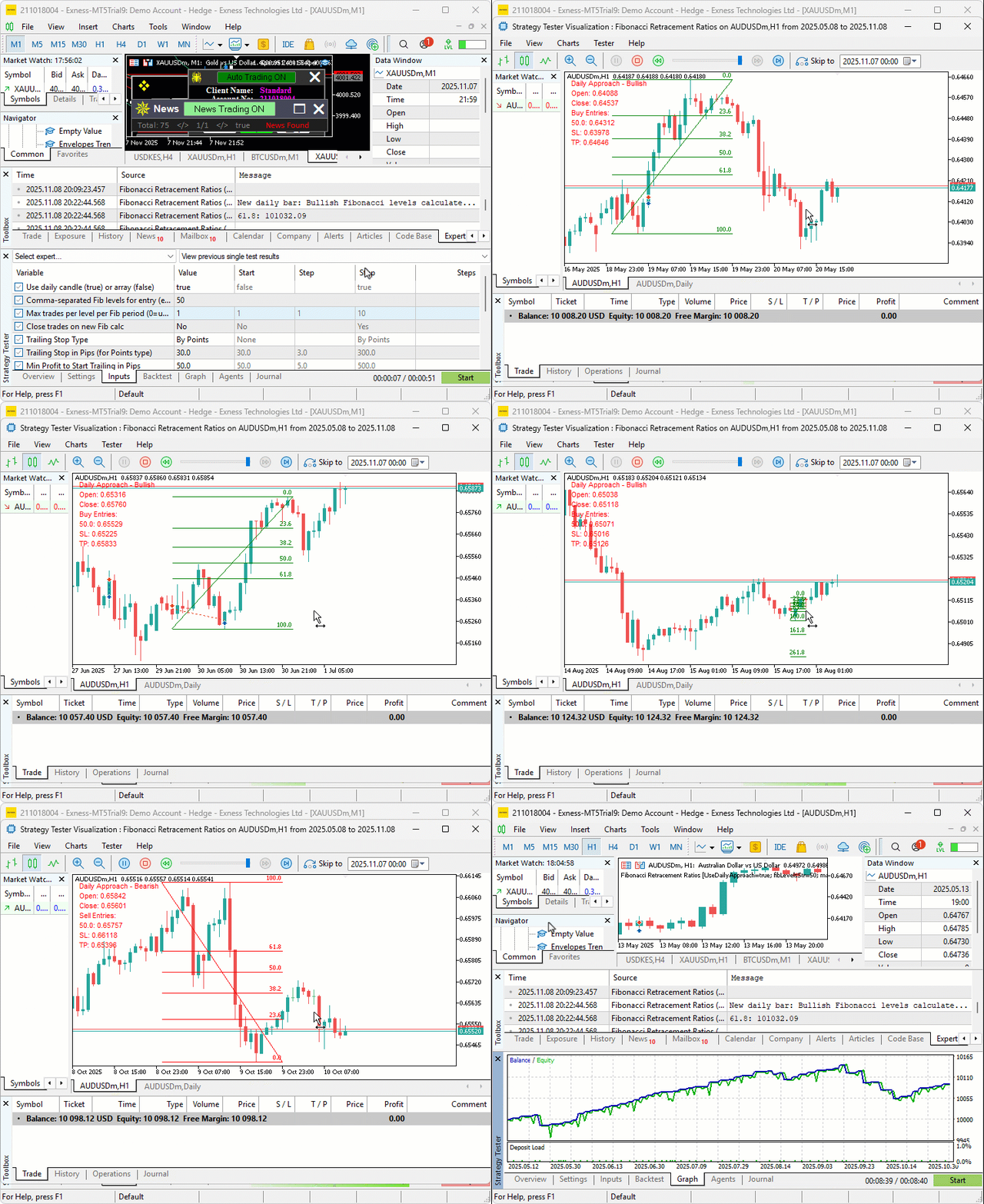
We can see that we manage the positions by default by applying trailing stops when needed, hence achieving our objectives. The thing that remains is backtesting the program, and that is handled in the next section.
Backtesting
After thorough backtesting, we have the following results.
Backtest graph:

Backtest report:

Conclusion
In conclusion, we’ve developed a Fibonacci retracement trading system in MQL5 that calculates levels using daily candles or lookback arrays, identifies bullish or bearish setups from close versus open, executes buys or sells on crossings of custom ratios with trade limits per level, applies optional closures on recalcs, points-based trailing stops after a profit threshold, and entry levels with range buffers, complemented by on-chart visuals and information labels.
Disclaimer: This article is for educational purposes only. Trading carries significant financial risks, and market volatility may result in losses. Thorough backtesting and careful risk management are crucial before deploying this program in live markets.
With this Fibonacci retracement strategy, you’re equipped to trade pullback opportunities effectively, ready for further optimization in your trading journey. Happy trading!
Warning: All rights to these materials are reserved by MetaQuotes Ltd. Copying or reprinting of these materials in whole or in part is prohibited.
This article was written by a user of the site and reflects their personal views. MetaQuotes Ltd is not responsible for the accuracy of the information presented, nor for any consequences resulting from the use of the solutions, strategies or recommendations described.

 Market Simulation (Part 06): Transferring Information from MetaTrader 5 to Excel
 Self Optimizing Expert Advisors in MQL5 (Part 17): Ensemble Intelligence
 Price Action Analysis Toolkit Development (Part 50): Developing the RVGI, CCI and SMA Confluence Engine in MQL5
 Markets Positioning Codex in MQL5 (Part 1): Bitwise Learning for Nvidia

- Free trading apps
- Over 8,000 signals for copying
- Economic news for exploring financial markets
You agree to website policy and terms of use
wow this so good I am using this is my trading strategy perfect thanks for this
This so Amazing Just to apply what I learned in Campus to my Trading Strategies, Can we do one on Geometric Brownian Motion Too and also Calculus