

Using the MQL5 Economic Calendar for News Filtering (Part 1): Implementing Pre- and Post-News Windows in MQL5
 6 077
6 077
 8
8

Common and Uncommon Problems
Most news filters for trading robots do only one thing — block new trades during news releases. That is not enough.
During major economic releases, the market often experiences:
- sudden price spikes,
- spread expansion,
- slippage,
- stop-loss hunting wicks.
Open positions remain exposed, which can completely destroy a strategy’s statistical edge.
Additional issues include:
- Prop firm compliance — strict time windows before and after specific news events must be respected.
- Currency relevance — not all news affects all symbols; filtering must be currency-aware.
- Strategy instability during news — stops are often triggered by spread widening rather than real price movement.
- State loss after EA or VPS restart — many implementations fail to preserve trade logic during interruptions.
- No testing mode — difficult to validate behavior without live news events.
The Solution
The solution is to build a structured news filter using the native MQL5 Economic Calendar.
The system:
- evaluates news relevance based on the symbol’s currencies,
- filters by importance level,
- applies configurable pre- and post-news buffers,
- blocks new trade entries during active news windows,
- optionally closes positions before high-impact events,
- correctly detects news window start and end transitions.
Instead of a simple on/off switch, this becomes a risk-aware mechanism.
Article Scope
This is Part 1 of a news-aware trading system for MQL5.
This article covers:
- detecting news by importance level,
- mapping events to symbols based on currency logic,
- defining pre- and post-news windows,
- blocking new trade entries,
- closing positions before high-impact events.
Advanced stop-management and state recovery mechanisms will be covered separately to keep the implementation focused and practical.
Below is a workflow diagram that summarizes how the news filter behaves in this article.
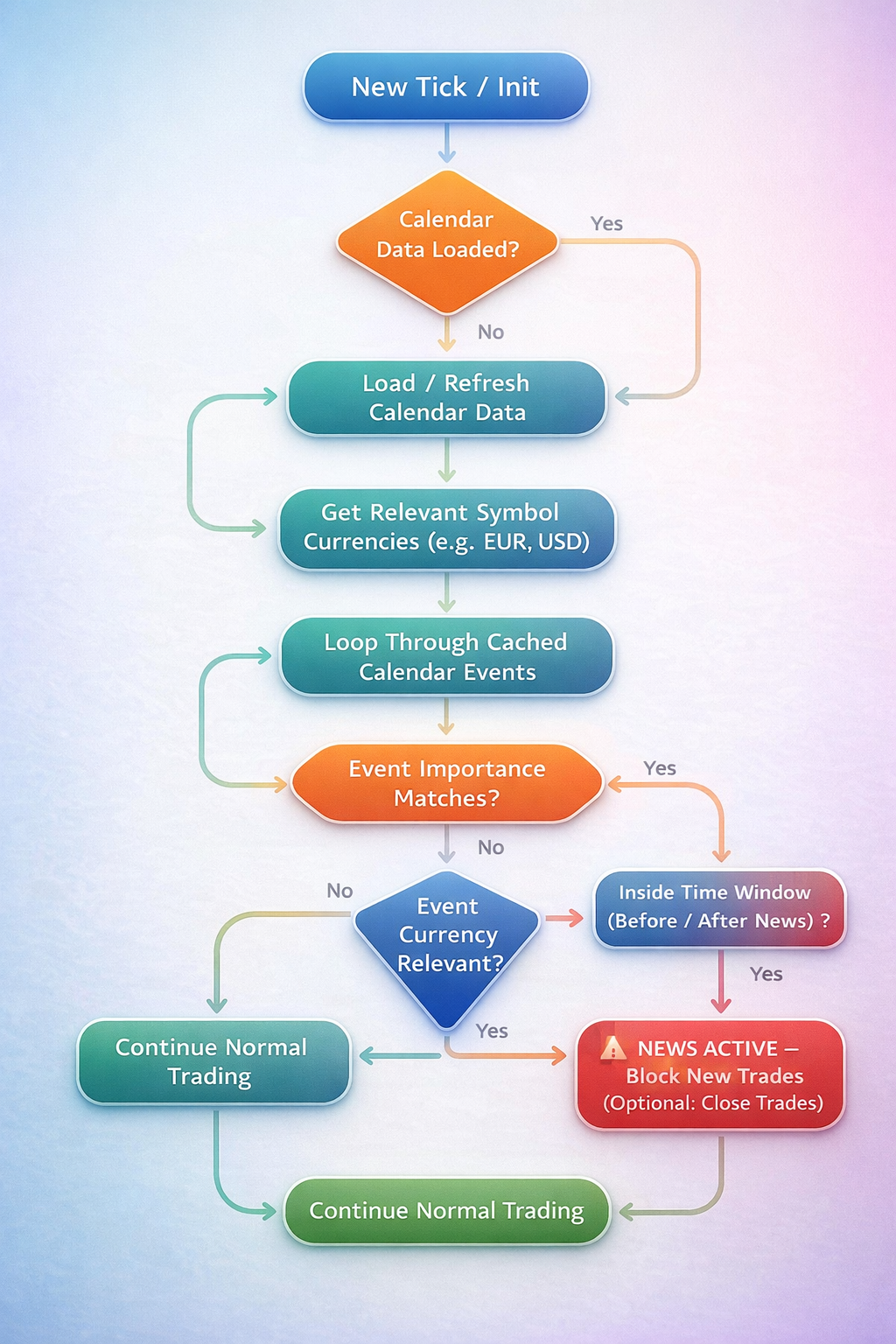
The MQL5 Calendar: The approach used in this article and why it is necessary
In the past, traders have had to rely on web requests to external websites for services to get news data. this is slow, unreliable, and difficult to backtest accurately. Today MQL5 offers the MqlCalendar functions, allowing us to pull economic data directly from the terminal.
This method is superior for speed since there are no HTTP requests; data is fetched from a local cache, backtesting the news events can be simulated to trigger manually and more accurately for testing on past data than an external service, and reliability since there are no broken links or API changes and other issues to worry about.
Limitations and Design Considerations
This implementation is designed to be lightweight, deterministic, and compatible with the MQL5 native economic calendar. As a result, several limitations and assumptions must be clearly stated.- The news filter loads calendar events within a rolling 24-hour window. This design minimizes repeated calendar queries and improves runtime performance, but it also means that events beyond the next 24 hours are not preloaded; the calendar cache must be refreshed periodically to remain accurate.
- Exploratory symbol-to-currency mapping. Symbol relevance is determined using heuristic rules such as base and quote currency extraction for FX symbols and keyword-based detection for indices, metals, and commodities. While this works for standard broker naming conventions, it is not guaranteed to cover all custom symbols. For this reason, a manual currency override input is provided to handle edge cases or proprietary symbol formats.
- All time comparisons are performed using the trading server's current time. The MQL5 economic calendar events are also time-stamped relative to the server environment, but discrepancies may still occur due to broker server time-zone differences, daylight saving transitions, and historical testing conditions. For this reason, pre- and post-news buffer windows are configurable rather than fixed.
- This implementation relies entirely on the broker-provided MQL5 economic calendar. If the broker does not provide certain events, countries, or importance levels accurately, those events cannot be detected by the filter. The system is therefore only as complete as the underlying calendar data provided by the broker.
Understanding Time Windows
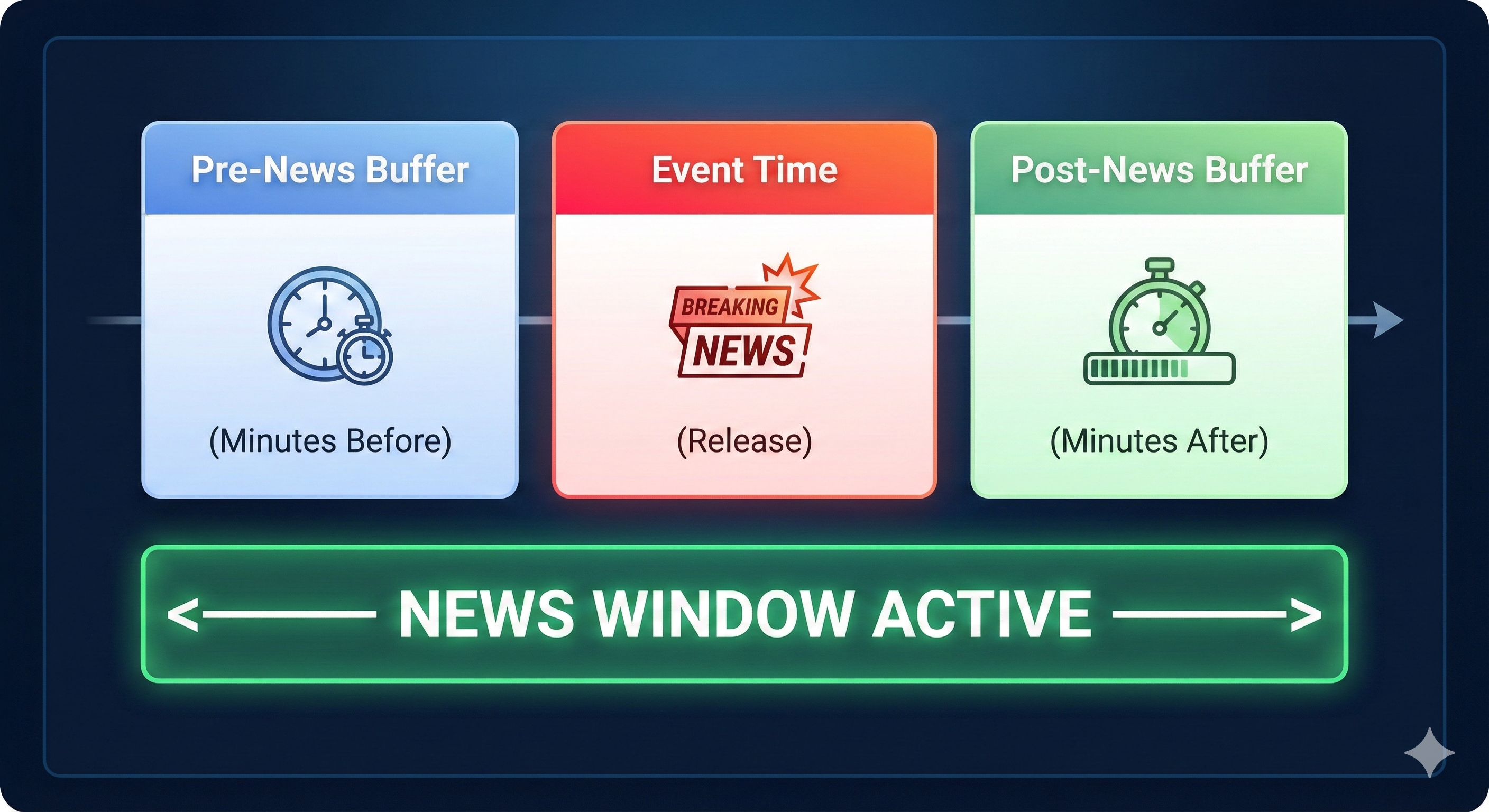
The news filter does not react only to the exact release time of an event. Instead, it defines a configurable buffer window around the event to account for pre-release volatility and post-release market instability. The window consists of a pre-news buffer (minutes before the event), the actual news event release time, and a post-news buffer (minutes after the event). Any time that falls within this combined window is treated as an active news period.
Below is an image showing how the news window works.
Implementation
Step 1: Defining the core structures
Before we can detect or react to economic news, we must first decide how news data will be stored and how the system will track whether a news window is active.
Many beginner implementations attempt to check for news events directly on every tick without organizing the data properly which quickly leads to unnecessary CPU usage, repeated calculations, and confusing logic that becomes difficult to maintain or extend. To avoid these issues, we begin by defining simple and well-scoped data structures that serve two fundamental purposes:- Storing economic calendar events retrieved from MetaTrader
- Tracking whether the trading system is currently inside a news-restricted period
Using the MQL5 Economic Calendar Structure
MetaTrader 5 provides a built-in structure called MqlCalendarValue.
This structure contains all essential information related to an economic event, including the scheduled time of the event, the associated currency, the impact level (low, moderate, or high), and the actual, forecast, and previous values.
Rather than defining a custom structure for economic events, we rely on this built-in type to ensure compatibility with the MQL5 Economic Calendar and to reduce the risk of implementation errors.
We store calendar data in an array that will later represent all relevant events for the current trading day.
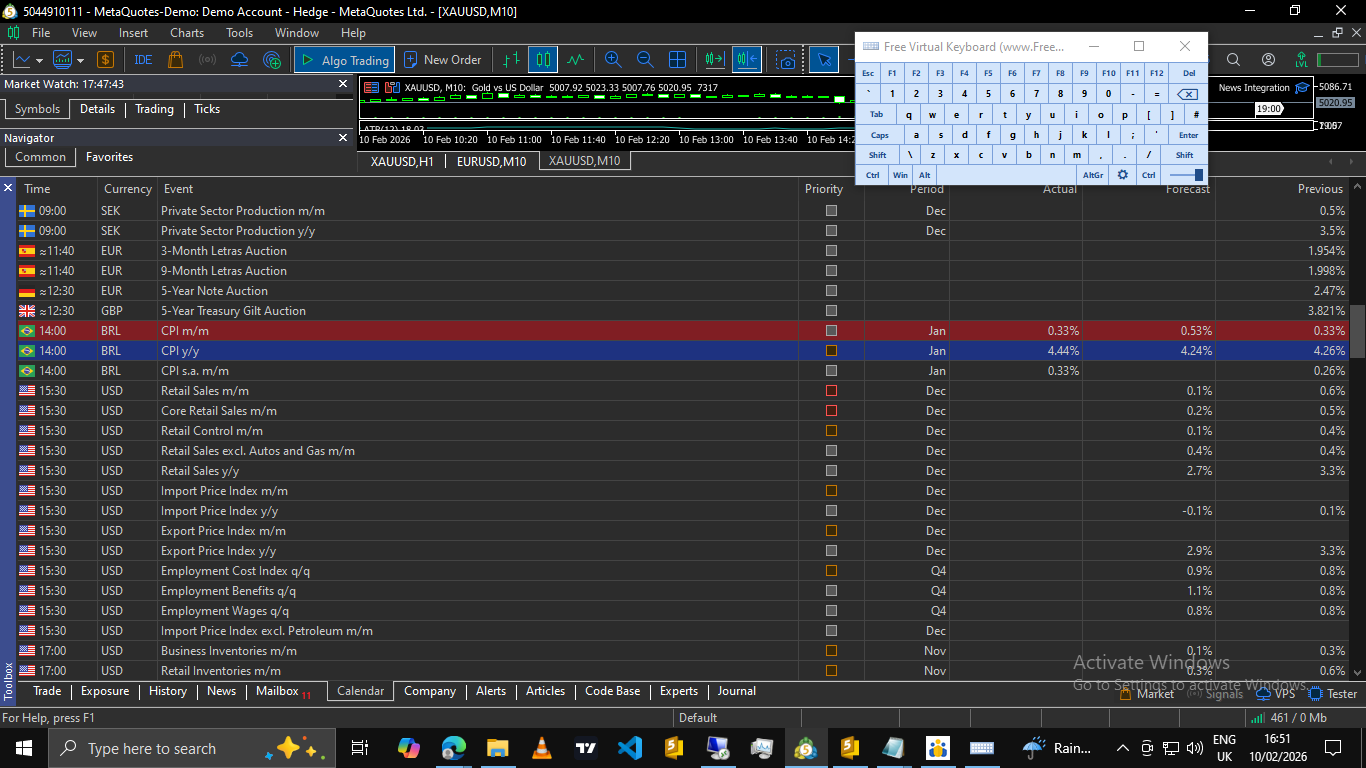
Scenarios and expected behavior
The following illustrates how the news filter is expected to behave across different symbols and economic events. This assumes that the economic calendar contains a matching event and the configured time window is active. The below illustrations are examples and do not show every possible scenario that covers what the filter does.
| Symbol | Event Currency | Event Importance | Within News Window | Expected Result |
|---|---|---|---|---|
| EURUSD | EUR or USD | High (Red) | Yes | New trades blocked |
| EURUSD | EUR or USD | High | No | Trading allowed |
| EURUSD | EUR or USD | Low (Grey) | Yes | If low is not enabled, trading blocked if not trading allowed |
| EURUSD | GBP | High or Low or Moderate | Yes | Trading allowed |
| GOLD | USD | High | Yes | New trades blocked |
| US100 | USD | Moderate(Yellow) | Yes | News trades blocked(if moderate enabled) |
| GBPJPY | GBP or JPY | High | No | Trading allowed |
| AUDUSD | AUD or USD | High | After Window | Trading allowed |
In each case the decision is based solely on currency relevance and time-window alignment. If any event currency matches the symbol's relevant currencies and the current time falls within the configured buffer window, the news filter enters an active state.
For strategy tester manual validation, the testing inputs can be used to simulate specific event times. This allows the news window to be triggered deterministically without relying on live calendar data.
Understanding Symbol Currency Relevance
Economic news events are linked to currencies, not to tradable symbols. To determine whether a given event is relevant, the system derives a set of currencies associated with the currently traded symbol and compares them against the event's reported currency.
For the standard FX symbols, the base and quote currencies are extracted differently from the symbol name (for example, EURUSD is EUR and USD).
For indices, metals, and commodities, predetermined keyword heuristics are used to associate the symbol with its most influential currency (for example, GOLD is USD, and GER40 is EUR).
If a symbol does not match any known pattern, a manual currency override can be provided in the inputs to explicitly define which currency should be monitored. An economic event is considered relevant if its currency matches at least one of the symbol's associated currencies.
Practical step
Tracking the News State
A news filter should not repeatedly re-evaluate the same information on every tick.
To prevent this, we introduce a simple state flag that allows the system to remember whether it is currently operating inside a news-restricted window.
In addition, a timestamp is used to track when calendar data was last loaded. This makes it possible to refresh calendar information only when necessary, instead of querying it continuously.
This approach helps to reduce CPU usage, improve execution efficiency, keep the logic predictable and easy to follow, and provide clear logging and debugging.
At the end of this step, the Expert Advisor has no functional news logic yet, but it has a clean and scalable structure that future steps will build upon.
//+------------------------------------------------------------------+
//|                                      News Filter Integration.mq5 |
//|                                                    soloharbinger |
//+------------------------------------------------------------------+
#property copyright "soloharbinger"
#property link      ""
#property version   "1.01"

#include <Trade/Trade.mqh>

//===================================================================
// GLOBAL VARIABLES                                                 |
//===================================================================
MqlCalendarValue TodayEvents[];    // Stores calendar events for the trading day

datetime lastCalendarLoad = 0;     // TimeStamp of the last calendar update into our above value

CTrade trade;                      // Ctrade instance for order management

//+------------------------------------------------------------------+
//| Expert initialization function                                   |
//+------------------------------------------------------------------+
int OnInit()
  {
//---
   Print("News Filter Demo initialized");
//---
   return(INIT_SUCCEEDED);
  }
//+------------------------------------------------------------------+
//| Expert deinitialization function                                 |
//+------------------------------------------------------------------+
void OnDeinit(const int reason)
  {
//---
  }
//+------------------------------------------------------------------+
//| Expert tick function                                             |
//+------------------------------------------------------------------+
void OnTick()
  {
//---
// News detection logics will be implemented in the next steps
  }
//+------------------------------------------------------------------+
Step 2: Loading and Caching Economic Calendar Events
Once the basic data structures are in place, the next challenge is how to obtain economic news data efficiently.
The MQL5 Economic Calendar contains thousands of events spanning multiple years. Searching through the entire calendar on every tick would be extremely inefficient and unnecessary. Such an approach wastes CPU resources and can slow down an Expert Advisor significantly, especially when running multiple instances.
To avoid this, we introduce a controlled loading mechanism that retrieves only the events we actually need.
Why caching is necessary
Economic news events do not change every second; they are scheduled in advance, and they can be reused across many ticks. Because of this, it makes no sense to repeatedly query the calendar data on every price update.
Instead, we load calendar events once during initialization and periodically, after a defined time interval, to account for sudden changes in market data releases or events.
The retrieved data is stored in the TodayEvents[] array, where it can be reused by later logic without additional overhead.
Defining the Event Loading Period
For this article, we define a rolling 24-hour period, which is from the current server time to 24 hours into the future.
This window is wide enough to capture pre-session news, intraday events, and late-session or overnight releases. The exact window length can be adjusted, but 24 hours provides a clear and beginner-friendly starting point.
The Load Calendar Event Function
We encapsulate the calendar retrieval logic inside a dedicated function.
This keeps the code organized and prevents calendar logic from being scattered throughout the EA.
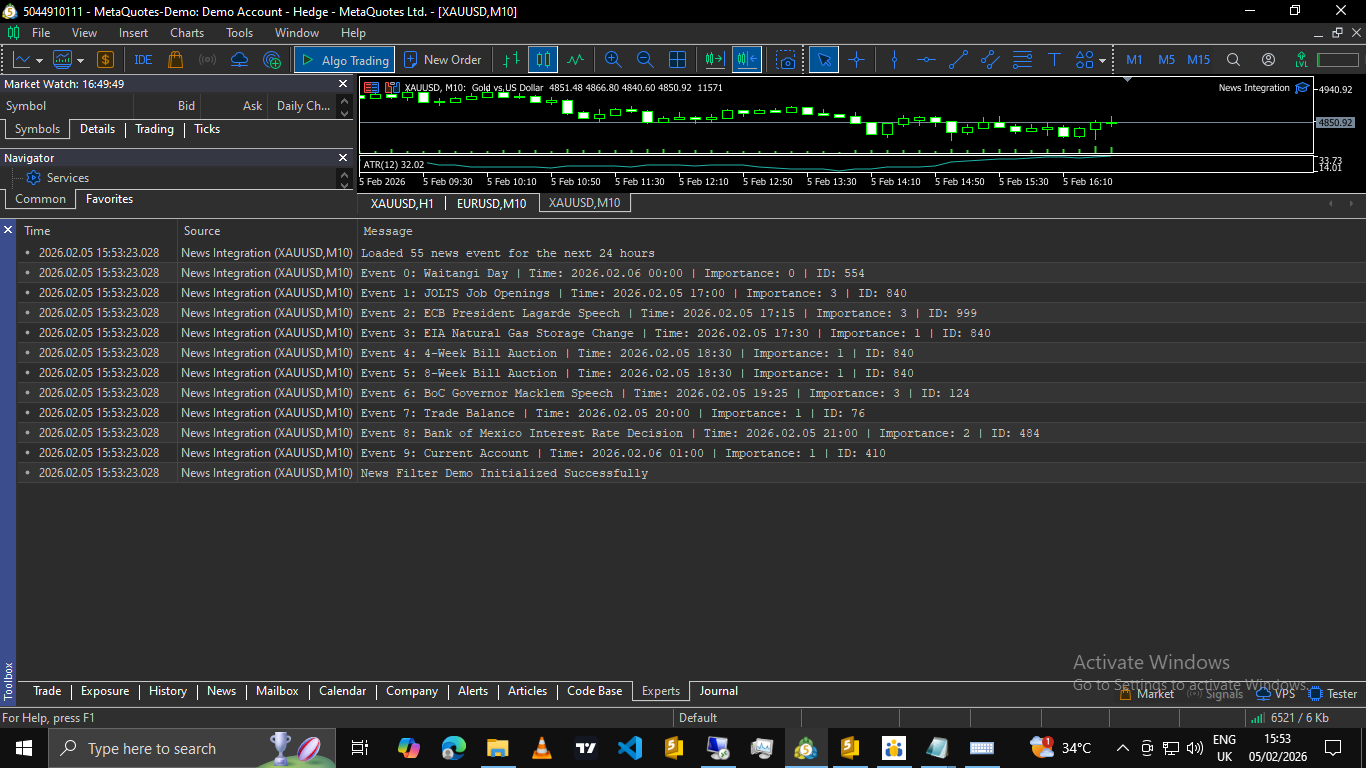
The function checks whether the calendar was recently loaded, skips reloading if the cached data is still valid, queries the Economic Calendar for the defined time range, and stores the results in the TodayEvents[] array.
At this stage, no filtering is applied yet. We are only collecting raw event data.
//===================================================================
// Load calendar (24-hour horizon)
//===================================================================
void LoadTodayCalendarEvents()
  {
   datetime now = TimeCurrent();
   datetime fromTime = now;
   datetime toTime = now + 24 * 3600;    // Load next 24 hours


   ArrayFree(TodayEvents);
   int count = CalendarValueHistory(TodayEvents, fromTime, toTime);
   PrintFormat("Loaded %d calendar records for the next 24 hours.", count);


   if(count <= 0)
     {
      // Still update timestamp to prevent constant reloading attempts
      lastCalendarLoad = now;
      return;
     }

// Debug: print first few events for verification
   for(int i = 0; i < MathMin(count, 5); i++)
     {
      MqlCalendarEvent ev;
      if(CalendarEventById(TodayEvents[i].event_id, ev))
        {
         PrintFormat("Event %d: %s | Time: %s | Importance: %d",
                     i, ev.name, TimeToString(TodayEvents[i].time), ev.importance);
        }
     }

   lastCalendarLoad = now;
  }
Step 3: Smart Currency Filtering
A common frustration with basic news filters is irrelevant blocking.
For example, if an Expert Advisor is trading EURUSD, it should not stop trading simply because there is a high-impact news release related to the Australian Dollar (AUD). Unfortunately, many simplistic implementations treat all news as equally dangerous, which results in missed trading opportunities and unnecessary downtime.
To solve this, we introduce smart currency filtering.
The goal of this step is simple: Only react to news events that are actually relevant to the symbol being traded.
Why Currency Filtering Matters
Every economic news event is associated with a specific country and currency.
At the same time, every trading symbol is affected by one or more underlying currencies.
If we do not match these two correctly:
- The EA may pause trading when it should not, or worse, ignore news that actually affects the symbol.
A news filter must therefore answer two questions:
- which currencies does this trading symbol depend on, and which currency does this news event belong to?
Only when both match should the event be considered relevant.
Extracting Relevant Currencies From the Trading Symbol
We start by determining which currencies affect the current symbol.
For standard Forex pairs, this is straightforward; the first three letters represent the base currency, and the next three letters represent the quote currency.
For example:
- EURUSD → EUR and USD, or GBPJPY → GBP and JPY.
However, not all instruments follow this format.
Indices, metals, and commodities often require special handling.
To keep the system flexible, we encapsulate this logic inside a function called GetRelevantCurrencies().
This function automatically extracts base and quote currencies for forex pairs, applies simple keyword detection for indices and commodities, allows a manual override when automatic detection is not sufficient, and the function returns a comma-separated list of currencies relevant to the symbol.
//===================================================================
// Helper: Return CSV list of relevant currencies for symbol
//===================================================================
string GetRelevantCurrencies(string symbol)
  {
// 1. Check Manual Override
   if(StringLen(SymbolCurrencyOverride) > 0)
     {
      return SymbolCurrencyOverride;
     }

   string upper = symbol;
   StringToUpper(upper);


// 2. Standard Forex Pair Logic (e.g. EURUSD -> EUR,USD)
   if(StringLen(symbol) == 6)
     {
      string baseCurr = StringSubstr(upper, 0, 3);
      string quoteCurr = StringSubstr(upper, 3, 3);
      return baseCurr + "," + quoteCurr;
     }

// 3. Heuristics for Indices/Commodities
   if(StringFind(upper, "GER") != -1 || StringFind(upper, "DE40") != -1 || StringFind(upper, "DAX") != -1)
      return "EUR";
   if(StringFind(upper, "UK") != -1 || StringFind(upper, "FTSE") != -1)
      return "GBP";
   if(StringFind(upper, "US30") != -1 || StringFind(upper, "DJ") != -1)
      return "USD";
   if(StringFind(upper, "SPX") != -1 || StringFind(upper, "US500") != -1)
      return "USD";
   if(StringFind(upper, "NAS") != -1 || StringFind(upper, "US100") != -1)
      return "USD";
   if(StringFind(upper, "XAU") != -1 || StringFind(upper, "GOLD") != -1)
      return "USD";
   if(StringFind(upper, "XAG") != -1 || StringFind(upper, "SILVER") != -1)
      return "USD";
   if(StringFind(upper, "OIL") != -1 || StringFind(upper, "WTI") != -1 || StringFind(upper, "BRENT") != -1)
      return "USD";
   if(StringFind(upper, "JPN") != -1 || StringFind(upper, "NIK") != -1)
      return "JPY";
   if(StringFind(upper, "AUD") != -1)
      return "AUD";
   if(StringFind(upper, "CAD") != -1)
      return "CAD";
   if(StringFind(upper, "NZD") != -1)
      return "NZD";
   if(StringFind(upper, "CHF") != -1)
      return "CHF";
   if(StringFind(upper, "EUR") != -1)
      return "EUR";
   if(StringFind(upper, "GBP") != -1)
      return "GBP";
   if(StringFind(upper, "JPY") != -1)
      return "JPY";

// Fallback: if we can't guess, return nothing (safe mode)
   return "";
  }
At this point, the EA knows which currencies matter for the current symbol, but it still does not know which currency a news event belongs to.
We solve this next.
Determining the Currency of a News Event.
Economic calendar entries do not directly store a currency code such as “USD” or “EUR”; instead, each event is linked to a country ID. To obtain the event’s currency, we must retrieve the event’s country information and read the currency associated with that country.
MQL5 provides a direct and reliable way to do this using CalendarCountryById().
We encapsulate this logic in a helper function called GetCurrencyFromEventDirect().
//===================================================================
// Utility: Get currency from calendar event (via Country ID)
//===================================================================
string GetCurrencyFromEventDirect(const MqlCalendarEvent &ev)
  {
   MqlCalendarCountry country;
   if(CalendarCountryById(ev.country_id, country))
     {
      return country.currency; // Returns "USD", "EUR", etc.
     }
   return "";
  }
This function allows us to convert
a calendar event into a concrete currency code such as USD, EUR, or GBP.
What We Have Achieved So Far
By the end of this step, the EA can determine which currencies affect the current symbol, the EA can determine which currency a news event belongs to, and the foundation is in place to ignore irrelevant news events.
No trade-blocking logic has been applied yet.
At this stage, the system still does nothing disruptive; it simply understands relevance, which is important for any intelligent news filter.Next we combine cached calendar events (Step 2) and relevant symbol currencies (Step 3) to detect whether a relevant event is currently active. This is when we create time windows and impact filtering.
Step 4: Detecting and Avoiding Relevant News Events
Now that we can load and cache economic calendar events (Step 2) and identify which currencies are relevant for the trading symbol (Step 3), we can then ask if there is relevant economic news affecting this symbol right now. At this stage, the Expert Advisor only detects news and the minutes to avoid around news time.
High-Level Detection Rules
A news event is considered relevant only if the event occurs within the cached calendar data, the event’s importance level matches our filter settings, the event’s currency matches one of the symbol’s relevant currencies, and the current time falls inside the defined pre-news and post-news window.
Only when all four conditions are true does the function report that news is active.
Reloading Calendar Data Safely
Before scanning events, we ensure the calendar data is still valid.
Calendar data is reloaded only when it has never been loaded before or the cached data is older than a defined interval (for example, 6 hours).
This prevents unnecessary calls to the calendar functions on every tick and missing a new update to the news.
Detection function below
//===================================================================
// Core Detection Logic
// Returns true if 'now' is inside a news window for the specific symbol
//===================================================================
bool isUpcomingNews(const string symbol)
  {
   datetime now = TimeCurrent();

// A. Cache Management
   if(lastCalendarLoad == 0 || (now - lastCalendarLoad) > (datetime)CacheReloadHours * 3600)
     {
      LoadTodayCalendarEvents();
     }

   if(ArraySize(TodayEvents) == 0)
      return false;


// B. Testing Simulation
   if(EnableNewsTesting)
     {
      if(TestNewsNow)
         return true;
      datetime t = StringToTime(TestNewsTime);
      if(t > 0)
        {
         datetime start = t - TestNewsDuration * 60;
         datetime end   = t + TestNewsDuration * 60;
         if(now >= start && now <= end)
            return true;
        }
     }

// C. Optimization: Prepare Currency List OUTSIDE the loop
   string relevant = GetRelevantCurrencies(symbol);
   if(StringLen(relevant) == 0)
      return false;

   string currencyArray[];
   int currencyCount = StringSplit(relevant, ',', currencyArray);
   for(int k = 0; k < currencyCount; k++)
     {
      StringTrimLeft(currencyArray[k]);
      StringTrimRight(currencyArray[k]);
      StringToUpper(currencyArray[k]);
     }

// D. Event Scan
   for(int i = 0; i < ArraySize(TodayEvents); i++)
     {
      MqlCalendarEvent ev;
      // Retrieve event details from ID
      if(!CalendarEventById(TodayEvents[i].event_id, ev))
         continue;

      // 1. Importance Filter
      bool okImportance = false;
      switch(NewsImportanceMode)
        {
         case NEWS_HIGH_ONLY:
            okImportance = (ev.importance == CALENDAR_IMPORTANCE_HIGH);
            break;
         case NEWS_MODERATE_ONLY:
            okImportance = (ev.importance == CALENDAR_IMPORTANCE_MODERATE);
            break;
         case NEWS_HIGH_AND_MODERATE:
            okImportance = (ev.importance == CALENDAR_IMPORTANCE_HIGH || ev.importance == CALENDAR_IMPORTANCE_MODERATE);
            break;
        }
      if(!okImportance)
         continue;

      // 2. Currency Relevance Filter
      string eventCurrency = GetCurrencyFromEventDirect(ev);
      if(StringLen(eventCurrency) == 0)
         continue;

      bool affect = false;
      for(int j = 0; j < currencyCount; j++)
        {
         if(eventCurrency == currencyArray[j])
           {
            affect = true;
            break;
           }
        }
      if(!affect)
         continue;

      // 3. Time Window Check
      datetime eventTime = TodayEvents[i].time;
      datetime windowStart = eventTime - (NewsMinutesBefore * 60);
      datetime windowEnd   = eventTime + (NewsMinutesAfter * 60);

      if(now >= windowStart && now <= windowEnd)
        {
         // Optional: Print once per detection to avoid log spam
         static string lastDetectedKey = "";
         string key = ev.name + "|" + TimeToString(eventTime);
         if(key != lastDetectedKey)
           {
            PrintFormat("NEWS: %s | Time: %s | Currency: %s", ev.name, TimeToString(eventTime), eventCurrency);
            lastDetectedKey = key;
           }
         return true;
        }
     }

   return false;
  }
Simplifying Detection for the EA
To keep the rest of the whole Expert Advisor clean and readable, we wrap the detection logic in a simple interface function.
This ensures that detection logic remains centralized.
// Wrapper for external calls
bool IsNewsTime(string symbol)
  {
   return isUpcomingNews(symbol);
  }
At this stage, other parts of EA that the news filter is needed, we can safely do something like
if(IsNewsTime(_Symbol))
{
// Detect News
}
Step 5: Blocking Trade Entries During News Windows
At this stage, the Expert Advisor can already detect relevant economic news events accurately. The final step of Part 1 is to use this detection logic to block new trade entries during a defined time window before and after news events.This approach aligns perfectly with prop firm requirements, where the most common restriction is “No new trades may be opened during high-impact news.”
Importantly, existing trades are not modified in any way; the system simply prevents new entries while the new conditions are active.
Why We Block Entries Only (For Part 1)
Blocking trade entries is the simplest and safest form of news protection, easy to understand for beginners, compatible with prop firm rules, and non-invasive to existing strategies.
By limiting Part 1 to entry blocking only, we ensure that there are no unintended side effects, no trade corruption, and a clean foundation for more advanced behavior later.
Important: Required Inputs for a Complete News Filter
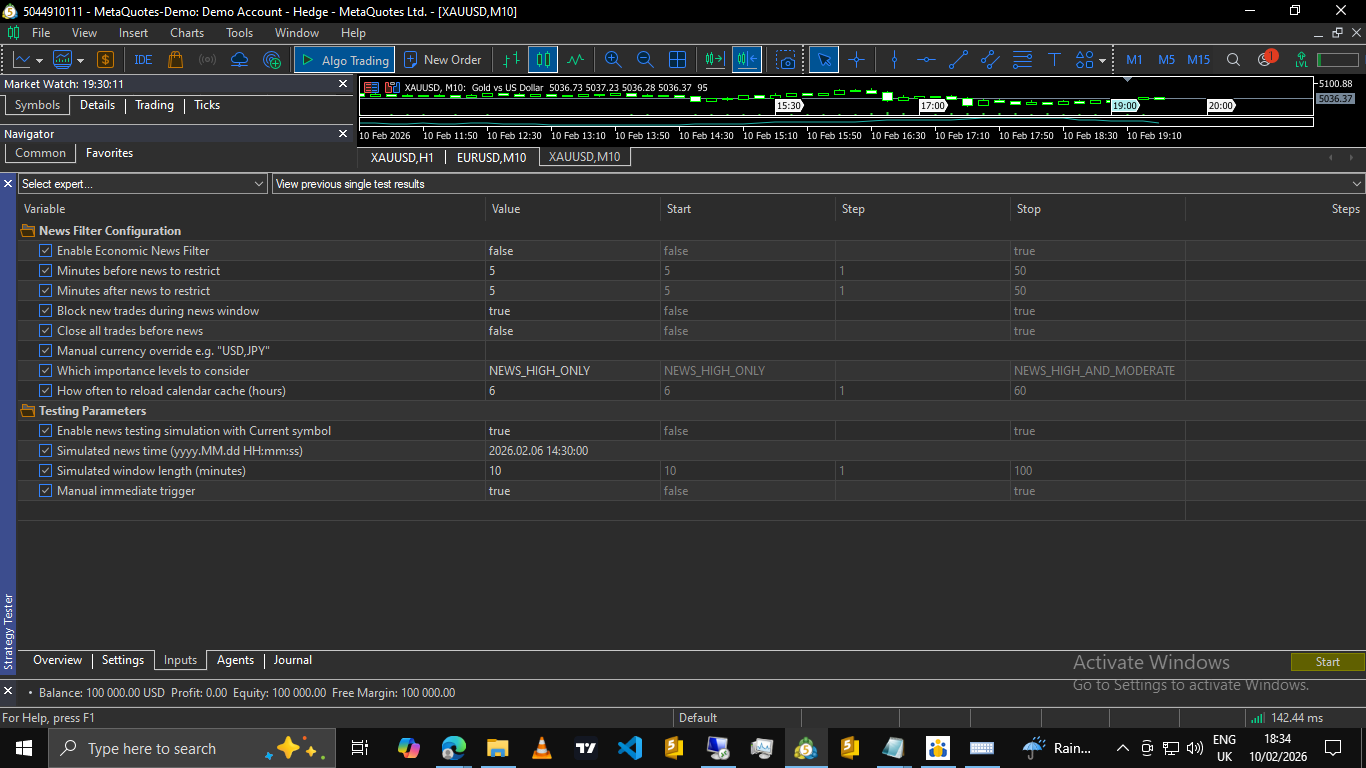
To make the news filter configurable and usable across different trading styles and prop firms, we introduce a small set of inputs.
These inputs control whether the news filter is enabled, which news importance levels are considered, and how many minutes before and after news trading should be blocked.
//===================================================================
// INPUTS
//===================================================================
input group "News Filter Configuration"
input bool   EnableNewsFilter = false;                           // Enable Economic News Filter
input int    NewsMinutesBefore = 5;                              // Minutes before news to restrict
input int    NewsMinutesAfter = 5;                               // Minutes after news to restrict
input bool   RestrictNewTradesDuringNews = true;                 // Block new trades during news window
input bool   CloseOpenTradesBeforeHighImpactNews = false;        // Close all trades before news
input string SymbolCurrencyOverride = "";                        // Manual currency override e.g. "USD,JPY"
enum ENUM_NEWS_IMPORTANCE_MODE
  {
   NEWS_HIGH_ONLY = 0,
   NEWS_MODERATE_ONLY,
   NEWS_HIGH_AND_MODERATE
  };
input ENUM_NEWS_IMPORTANCE_MODE NewsImportanceMode = NEWS_HIGH_ONLY; // Importance levels

// Cache reload interval
input int CacheReloadHours = 6;                                  // Reload calendar cache (hours)


// News Testing helpers (Simple simulation for Part 1 demonstration)
input group "Testing Parameters"
input bool EnableNewsTesting = false;                             // Enable news testing simulation with Current symbol
input string TestNewsTime = "2025.12.15 14:30:00";                // Simulated news time (yyyy.MM.dd HH:mm:ss)
input int TestNewsDuration = 10;                                  // Simulated window length (minutes)
input bool TestNewsNow = false;                                   // Manual immediate trigger
These inputs allow the EA to adapt easily to different prop firm rules, conservative or aggressive trading styles, and broker-specific volatility behavior.
| Inputs Name | Uses/ Purposes |
|---|---|
| Enable Economic News Filter | Enables or disables the news filter for the EA entirely |
| Minutes before News to restrict | Defines how many minutes before the news event the filter becomes active |
| Minutes after News to restrict | Defines how many minutes after the news event the filter remains active |
| Block new trades during news window | Block opening new trades while the news window is active |
| Close all trades before news | Close existing position when a relevant news window begins |
| Manual currency override | Manually specifies currency to monitor when automatic detection is insufficient (leave blank when automatic detection is working) |
| Importance level | Select which news importance levels are considered (High, Moderate or both) |
| Reload Calendar Cache | Controls how often calendar data is refreshed |
| Enable News testing simulation | Enables manual news trigger only |
| Simulated News time | Specifies the simulated news event time in any yyyy/mm/dd hh/mm/ss in the past |
| Simulated news window length [minutes] | Defines the active window length for simulated news event |
| Manual immediate trigger | Immediately triggers a simulated news window for testing |
Using Detection Logic to Block Trades
With detection already implemented in Step 4, blocking trades becomes trivial. Instead of embedding the news logic inside trade functions, we use a single gate condition before opening any new position.
This keeps the trading logic clean and readable.
//===================================================================
// Check if new trades are allowed (Main Filter Gate)
//===================================================================
bool CanOpenNewTrade(string symbol)
  {
   if(!EnableNewsFilter)
      return true;
   if(!RestrictNewTradesDuringNews)
      return true;

   if(IsNewsTime(symbol))
     {
      return false; // Block trade
     }

   return true;
  }
This function answers one simple question:
- Is it safe to open a new trade right now?
Applying the Gate in Trade Logic
Wherever your EA normally opens trades, you simply add this check at the top, for example:
if(!CanOpenNewTrade(_Symbol))
{
   // News window active — do not open new trades
   return;
}

// Normal trade entry logic continues here
With this check in place, trade entry logic remains clean and centralized.
Optional: Close All Trades Before News Window
This below snippet allows the Expert Advisor to close all trades for the symbol once the pre-news restriction window begins.
The snippet makes use of the same detection logic already implemented.
The input of this function is already in the above-provided inputs.
//===================================================================
// CloseAllTradesForSymbol
// Implements safe reverse iteration and CTrade closing
//===================================================================
void CloseAllTradesForSymbol(string symbol)
  {
// Iterate backward to safely close multiple positions
   for(int i = PositionsTotal() - 1; i >= 0; i--)
     {
      ulong ticket = PositionGetTicket(i);
      if(ticket == 0)
         continue;

      if(!PositionSelectByTicket(ticket))
         continue;

      // Filter by symbol
      if(PositionGetString(POSITION_SYMBOL) != symbol)
         continue;

      // Close Logic
      bool closed = trade.PositionClose(ticket);

      if(closed)
        {
         PrintFormat("Closed position #%d on %s due to news.", ticket, symbol);
        }
      else
        {
         PrintFormat("Failed to close #%d. Error: %d", ticket, GetLastError());
        }
     }
  }
Trigger Logic [inside onTick()]
//===================================================================
// OnTick
//===================================================================
void OnTick()
  {
// Static latch to ensure we don't try to close trades multiple times per window
   static bool tradesClosedForThisNewsWindow = false;

// 2. Main News Logic
   if(EnableNewsFilter)
     {
      bool isNews = IsNewsTime(_Symbol);

      // Feature: Close open trades before news if enabled
      if(CloseOpenTradesBeforeHighImpactNews && isNews)
        {
         if(!tradesClosedForThisNewsWindow)
           {
            Print("News window started -> Closing open trades.");
            CloseAllTradesForSymbol(_Symbol);
            tradesClosedForThisNewsWindow = true; // Latch
           }
        }
      else
         if(!isNews)
           {
            // Reset latch when we are out of the news window
            tradesClosedForThisNewsWindow = false;
           }
     }
  }
What this adds
- Closes trades before volatility hits.
- It uses existing detection logic.
- Fires once per news window.
- Fully optional [set input to true or false].
- Prop firm friendly.
- In part 2 we will implement a stop-loss and take-profit temporary removal and placement around a restricted news window to preserve strategy edge and avoid premature exits.
Closing Part 1
At this point, we have built a working news filter that is efficient, symbol-aware, prop-firm compliant, beginner-friendly, ready for blocking entries, and ready for trade closure.
Part 1 can stand entirely on its own.
Conclusion
In this article, we built a complete and functional news filter system in MQL5, starting from first principles and ending with a practical solution.
Rather than relying on hard-coded times or web request-based news blocking, the system was designed around the MQL5 Economic Calendar, with careful attention to performance, relevance, and clarity. Calendar events are loaded efficiently, cached logically, filtered by importance, and matched only to currencies that actually affect the traded symbol.
By separating news detection from trade enforcement, the logic remains easy to understand, easy to test, and easy to extend. The final result is a clean entry-blocking mechanism that prevents new trades during configurable pre-news and post-news windows, with an optional rule to close open positions before news volatility begins.
This approach is especially well-suited for prop firm trading environments, where the most common requirement is simply to avoid opening trades during restricted news periods. Without modifying open positions or interfering with trade management, and this is why in part 2 we work on temporarily removing stops only on the news restriction window so that they don't get tapped or modified during news time, hence breaking a rule, and even closing trades early can disrupt strategy flow. Overall, the system provides compliance and protection while remaining strategy agnostic.
More importantly, everything I have implemented in this article is fully usable on its own. Part 1 delivers a complete news filter that can be dropped into any Expert Advisor and immediately used to enforce news-based trade restrictions.
In the next part of this series, we will build on this foundation to explore more advanced behavior during news events, such as trade management control and additional protection mechanisms.
The system presented here already solves the core problem in a clean way.
Warning: All rights to these materials are reserved by MetaQuotes Ltd. Copying or reprinting of these materials in whole or in part is prohibited.
This article was written by a user of the site and reflects their personal views. MetaQuotes Ltd is not responsible for the accuracy of the information presented, nor for any consequences resulting from the use of the solutions, strategies or recommendations described.

 Market Simulation (Part 13): Sockets (VII)
 Market Simulation (Part 12): Sockets (VI)
 Introduction to MQL5 (Part 41): Beginner Guide to File Handling in MQL5 (III)
 Risk Management (Part 5): Integrating the Risk Management System into an Expert Advisor

- Free trading apps
- Over 8,000 signals for copying
- Economic news for exploring financial markets
You agree to website policy and terms of use
Please answer questions about this article here, not in private messages. This is exactly what this topic is for.
ofcourse, he asked in private first and i thought to reply there too.
Jamshid asked why the upcoming news events printed and shown in this image is not in line with Forex Factory's current news events
my reply:
That output was the current Economic news calendar at the time of my writing, I printed a few news from inside the cached calendar for debug purposes just to see if my cached calendar is correct and workingIf you are to compile the code from your end and drop the expert on your chart you will also get about 5 current upcoming news events on your expert tab just to see that the cached events are working.
Ofcourse it will be different since my time of writing and any other subsequent time will be different!
Another reason why it could be different is that forex factory and MQL5 are not exactly the same, there are some differences in importance level and sometimes MQL5 has a bit more number of low impact or medium news
Great Work.
Amazing series of Articles.
Literally what all algo traders, trading at Eval prop firms need for their Expert Advisors.
I hope everyone who uses it at least makes a comment.
Another reason why it could be different is that forex factory and MQL5 are not exactly the same, there are some differences in importance level and sometimes MQL5 has a bit more number of low impact or medium news
Forum on trading, automated trading systems and testing trading strategies
Libraries: Calendar
fxsaber, 2024.03.21 09:49
Unfortunately, you can't trust the current Calendar.
Here is the omission of an important CHF news in the list of events and the corresponding market reaction to it.
And this is another calendar, where the news is present.
Great Work.
Amazing series of Articles.
Literally what all algo traders, trading at Eval prop firms need for their Expert Advisors.
I hope everyone who uses it at least makes a comment.