

MQL5交易工具(第二部分):为交互式交易助手添加动态视觉反馈
 563
563
 2
2

概述
在系列文章的第一部分中,我们使用MetaQuotes Language 5(MQL5)为MetaTrader 5平台开发了一款交易助手工具,旨在简化待处理订单的挂单操作。如今,我们通过引入动态视觉反馈机制进一步升级该工具的交互性。新增功能包括可拖拽控制面板、悬停导航特效,以及实时订单验证系统,确保交易参数精准匹配市场行情。本文将通过以下子主题展开论述:
这些章节将助力我们打造响应更迅速、操作更直观、用户体验更友好的交易工具。
提升交互性的概念优化方案
我们致力于通过增强直观性与适应性来升级交易助手工具。首先引入可自由定位在交易图表上的拖拽式控制面板。这种灵活性使我们能够根据工作流程定制界面,无论是同时管理多个图表,还是专注于单一交易策略。此外,我们将集成悬停效果:当鼠标划过按钮或图表元素时,系统会即时高亮显示,通过视觉反馈简化导航流程并降低操作失误率。
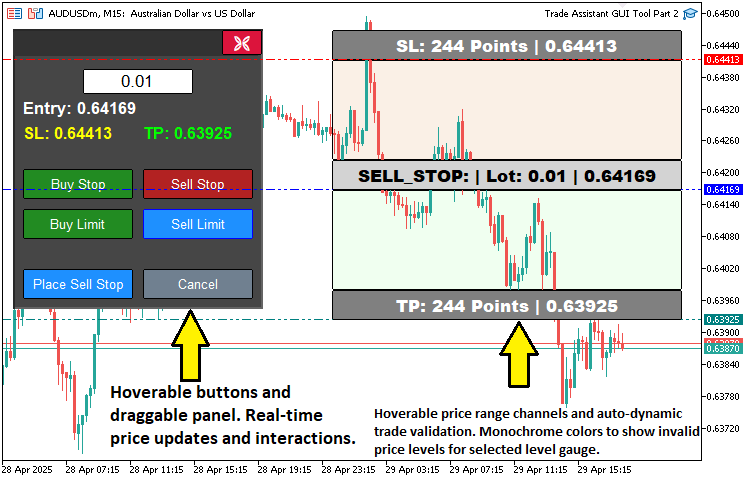
实时订单验证是另一项核心改进,它会在执行前确保入场价、止损价和止盈价与当前市场价格保持逻辑一致性。该功能通过防止无效交易配置增强操作信心,在保持系统简洁性的同时提升参数精度。这些优化将共同构建一个响应迅速、以用户为中心的决策支持工具,为后续风险管理等高级功能奠定基础。简言之,下图展示了我们的目标成果:
在MQL5中的实现
为实现MQL5中的开发目标,我们需首先定义以下附加面板对象、拖拽及交互确认变量,用于追踪用户与面板或价格工具的交互行为。
// Control panel object names
#define PANEL_BG        "PANEL_BG"        //--- Define constant for panel background object name
#define PANEL_HEADER    "PANEL_HEADER"    //--- Define constant for panel header object name
#define LOT_EDIT        "LOT_EDIT"        //--- Define constant for lot size edit field object name
#define PRICE_LABEL     "PRICE_LABEL"     //--- Define constant for price label object name
#define SL_LABEL        "SL_LABEL"        //--- Define constant for stop-loss label object name
#define TP_LABEL        "TP_LABEL"        //--- Define constant for take-profit label object name
#define BUY_STOP_BTN    "BUY_STOP_BTN"    //--- Define constant for buy stop button object name
#define SELL_STOP_BTN   "SELL_STOP_BTN"   //--- Define constant for sell stop button object name
#define BUY_LIMIT_BTN   "BUY_LIMIT_BTN"   //--- Define constant for buy limit button object name
#define SELL_LIMIT_BTN  "SELL_LIMIT_BTN"  //--- Define constant for sell limit button object name
#define PLACE_ORDER_BTN "PLACE_ORDER_BTN" //--- Define constant for place order button object name
#define CANCEL_BTN      "CANCEL_BTN"      //--- Define constant for cancel button object name
#define CLOSE_BTN       "CLOSE_BTN"       //--- Define constant for close button object name

// Variables for dragging panel
bool panel_dragging   = false;            //--- Flag to track if panel is being dragged
int  panel_drag_x     = 0,
     panel_drag_y     = 0;                //--- Mouse coordinates when drag starts
int  panel_start_x    = 0,
     panel_start_y    = 0;                //--- Panel coordinates when drag starts

// Button and rectangle hover states
bool buy_stop_hovered    = false;         //--- Buy Stop button hover state
bool sell_stop_hovered   = false;         //--- Sell Stop button hover state
bool buy_limit_hovered   = false;         //--- Buy Limit button hover state
bool sell_limit_hovered  = false;         //--- Sell Limit button hover state
bool place_order_hovered = false;         //--- Place Order button hover state
bool cancel_hovered      = false;         //--- Cancel button hover state
bool close_hovered       = false;         //--- Close button hover state
bool header_hovered      = false;         //--- Header hover state
bool rec1_hovered        = false;         //--- REC1 (TP) hover state
bool rec3_hovered        = false;         //--- REC3 (Entry) hover state
bool rec5_hovered        = false;         //--- REC5 (SL) hover state
我们通过定义实现面板拖拽与悬停效果的核心变量,着手开始实现交易工具的交互性优化功能(基于MetaTrader 5界面)。首先使用#define指令创建常量"PANEL_HEADER",用于标识控制面板的标题栏区域,该区域将作为可拖拽操作区。为支持拖拽功能,我们声明以下变量:布尔型标识"panel_dragging"用于追踪面板是否正在被移动;整型变量"panel_drag_x"和"panel_drag_y"记录鼠标开始拖拽时的坐标位置;整型变量"panel_start_x"和"panel_start_y"存储面板初始位置,用于计算拖拽过程中的新坐标。
我们同时引入布尔变量管理各按钮与图表矩形的悬停状态,包括用于各按钮和面板标题的"buy_stop_hovered"、"sell_stop_hovered"、"buy_limit_hovered"、"sell_limit_hovered"、"place_order_hovered"、"cancel_hovered"、"close_hovered"和 "header_hovered",以及用于对于止盈、入场和止损矩形状态的 "rec1_hovered"、"rec3_hovered"和"rec5_hovered"。 这些变量将实时检测鼠标悬停状态,触发颜色变化等视觉反馈,从而优化工具界面的导航与交互体验。接下来,我们需要获取价格工具数值并进行交易验证。
//+------------------------------------------------------------------+
//| Check if order setup is valid                                    |
//+------------------------------------------------------------------+
bool isOrderValid() {
   if(!tool_visible) return true;                                     //--- No validation needed if tool is not visible
   double current_price = SymbolInfoDouble(Symbol(), SYMBOL_BID);     //--- Get current bid price
   double entry_price   = Get_Price_d(PR_HL);                         //--- Get entry price
   double sl_price      = Get_Price_d(SL_HL);                         //--- Get stop-loss price
   double tp_price      = Get_Price_d(TP_HL);                         //--- Get take-profit price

   if(selected_order_type == "BUY_STOP") {
      //--- Buy Stop: Entry must be above current price, TP above entry, SL below entry
      if(entry_price <= current_price || tp_price <= entry_price || sl_price >= entry_price) {
         return false;
      }
   }
   else if(selected_order_type == "SELL_STOP") {
      //--- Sell Stop: Entry must be below current price, TP below entry, SL above entry
      if(entry_price >= current_price || tp_price >= entry_price || sl_price <= entry_price) {
         return false;
      }
   }
   else if(selected_order_type == "BUY_LIMIT") {
      //--- Buy Limit: Entry must be below current price, TP above entry, SL below entry
      if(entry_price >= current_price || tp_price <= entry_price || sl_price >= entry_price) {
         return false;
      }
   }
   else if(selected_order_type == "SELL_LIMIT") {
      //--- Sell Limit: Entry must be above current price, TP below entry, SL above entry
      if(entry_price <= current_price || tp_price >= entry_price || sl_price <= entry_price) {
         return false;
      }
   }
   return true;                                                       //--- Order setup is valid
}
在此阶段,我们通过"isOrderValid"函数实现订单实时验证功能,确保交易配置与市场条件动态匹配。首先检查"tool_visible"状态,如果为false则直接返回true跳过验证(工具未激活时无需校验)。通过SYMBOL_BID的SymbolInfoDouble函数获取当前市场价格,并调用"Get_Price_d"函数分别获取入场价("entry_price")、止损价("sl_price")和止盈价("tp_price"),对应参数类型为"PR_HL"、"SL_HL"和"TP_HL"。
对于买入止损单("BUY_STOP"),检验"entry_price"是否高于"current_price","tp_price"是否高于"entry_price","sl_price"是否低于"entry_price";对于卖出止损单("SELL_STOP"),检验"entry_price"是否低于"current_price","tp_price"是否低于"entry_price","sl_price"是否高于"entry_price";对于买入限价单("BUY_LIMIT"),检验"entry_price"是否低于"current_price","tp_price"是否高于"entry_price","sl_price"是否低于"entry_price";对于卖出限价单("SELL_LIMIT"),检验"entry_price"是否高于"current_price","tp_price"是否低于"entry_price","sl_price"是否高于"entry_price"。如果任一条件不满足则返回false(无效配置),全部通过则返回true(有效配置)。之后我们根据订单有效性更新矩形的显示颜色。
//+------------------------------------------------------------------+
//| Update rectangle colors based on order validity and hover        |
//+------------------------------------------------------------------+
void updateRectangleColors() {
   if(!tool_visible) return;                                                             //--- Skip if tool is not visible
   bool is_valid = isOrderValid();                                                       //--- Check order validity

   if(!is_valid) {
      //--- Gray out REC1 and REC5 if order is invalid, with hover effect
      ObjectSetInteger(0, REC1, OBJPROP_BGCOLOR, rec1_hovered ? C'100,100,100' : clrGray);
      ObjectSetInteger(0, REC5, OBJPROP_BGCOLOR, rec5_hovered ? C'100,100,100' : clrGray);
   }
   else {
      //--- Restore original colors based on order type and hover state
      if(selected_order_type == "BUY_STOP" || selected_order_type == "BUY_LIMIT") {
         ObjectSetInteger(0, REC1, OBJPROP_BGCOLOR, rec1_hovered ? C'0,100,0'   : clrGreen); //--- TP rectangle (dark green on hover)
         ObjectSetInteger(0, REC5, OBJPROP_BGCOLOR, rec5_hovered ? C'139,0,0'   : clrRed);   //--- SL rectangle (dark red on hover)
      }
      else {
         ObjectSetInteger(0, REC1, OBJPROP_BGCOLOR, rec1_hovered ? C'0,100,0'   : clrGreen); //--- TP rectangle (dark green on hover)
         ObjectSetInteger(0, REC5, OBJPROP_BGCOLOR, rec5_hovered ? C'139,0,0'   : clrRed);   //--- SL rectangle (dark red on hover)
      }
   }

   ObjectSetInteger(0, REC3, OBJPROP_BGCOLOR, rec3_hovered ? C'105,105,105' : clrLightGray); //--- Entry rectangle (darker gray on hover)
   ChartRedraw(0);                                                                          //--- Redraw chart
}
我们通过实现 "updateRectangleColors"函数,根据订单有效性和悬停状态动态更新图表矩形颜色,强化工具的视觉反馈机制。当"tool_visible"为false时,我们跳过处理,首先调用"isOrderValid"函数验证订单有效性,随后使用ObjectSetInteger函数设置矩形颜色:如果订单无效,则"REC1"(止盈)和"REC5"(止损)设置为灰色("clrGray"或悬停时为C'100,100,100');如果订单有效,则买入止损/买入限价/卖出订单设置为绿色/红色("clrGreen"/"clrRed"或悬停时为C'0,100,0'/C'139,0,0'),"REC3" (入场点) 始终设置为浅灰色("clrLightGray"或悬停时为C'105,105,105'),最后调用ChartRedraw刷新图表显示。
此后,我们需要按照如下方式获取按钮的悬停状态:
//+------------------------------------------------------------------+
//| Update button and header hover state                             |
//+------------------------------------------------------------------+
void updateButtonHoverState(int mouse_x, int mouse_y) {
   // Define button names and their properties
   string buttons[] = {BUY_STOP_BTN, SELL_STOP_BTN, BUY_LIMIT_BTN, SELL_LIMIT_BTN, PLACE_ORDER_BTN, CANCEL_BTN, CLOSE_BTN};
   bool hover_states[] = {buy_stop_hovered, sell_stop_hovered, buy_limit_hovered, sell_limit_hovered, place_order_hovered, cancel_hovered, close_hovered};
   color normal_colors[] = {clrForestGreen, clrFireBrick, clrForestGreen, clrFireBrick, clrDodgerBlue, clrSlateGray, clrCrimson};
   color hover_color = clrDodgerBlue;                      //--- Bluish color for hover
   color hover_border = clrBlue;                           //--- Bluish border for hover

   for(int i = 0; i < ArraySize(buttons); i++) {
      int x = (int)ObjectGetInteger(0, buttons[i], OBJPROP_XDISTANCE);
      int y = (int)ObjectGetInteger(0, buttons[i], OBJPROP_YDISTANCE);
      int width = (int)ObjectGetInteger(0, buttons[i], OBJPROP_XSIZE);
      int height = (int)ObjectGetInteger(0, buttons[i], OBJPROP_YSIZE);

      bool is_hovered = (mouse_x >= x && mouse_x <= x + width && mouse_y >= y && mouse_y <= y + height);

      if(is_hovered && !hover_states[i]) {
         // Mouse entered button
         ObjectSetInteger(0, buttons[i], OBJPROP_BGCOLOR, hover_color);
         ObjectSetInteger(0, buttons[i], OBJPROP_BORDER_COLOR, hover_border);
         hover_states[i] = true;
      }
      else if(!is_hovered && hover_states[i]) {
         // Mouse left button
         ObjectSetInteger(0, buttons[i], OBJPROP_BGCOLOR, normal_colors[i]);
         ObjectSetInteger(0, buttons[i], OBJPROP_BORDER_COLOR, clrBlack);
         hover_states[i] = false;
      }
   }

   // Update header hover state
   int header_x = (int)ObjectGetInteger(0, PANEL_HEADER, OBJPROP_XDISTANCE);
   int header_y = (int)ObjectGetInteger(0, PANEL_HEADER, OBJPROP_YDISTANCE);
   int header_width = (int)ObjectGetInteger(0, PANEL_HEADER, OBJPROP_XSIZE);
   int header_height = (int)ObjectGetInteger(0, PANEL_HEADER, OBJPROP_YSIZE);

   bool is_header_hovered = (mouse_x >= header_x && mouse_x <= header_x + header_width && mouse_y >= header_y && mouse_y <= header_y + header_height);

   if(is_header_hovered && !header_hovered) {
      ObjectSetInteger(0, PANEL_HEADER, OBJPROP_BGCOLOR, C'030,030,030'); //--- Darken header
      header_hovered = true;
   }
   else if(!is_header_hovered && header_hovered) {
      ObjectSetInteger(0, PANEL_HEADER, OBJPROP_BGCOLOR, C'050,050,050'); //--- Restore header color
      header_hovered = false;
   }

   // Update tool rectangle hover states
   if(tool_visible) {
      int x1 = (int)ObjectGetInteger(0, REC1, OBJPROP_XDISTANCE);
      int y1 = (int)ObjectGetInteger(0, REC1, OBJPROP_YDISTANCE);
      int width1 = (int)ObjectGetInteger(0, REC1, OBJPROP_XSIZE);
      int height1 = (int)ObjectGetInteger(0, REC1, OBJPROP_YSIZE);

      int x3 = (int)ObjectGetInteger(0, REC3, OBJPROP_XDISTANCE);
      int y3 = (int)ObjectGetInteger(0, REC3, OBJPROP_YDISTANCE);
      int width3 = (int)ObjectGetInteger(0, REC3, OBJPROP_XSIZE);
      int height3 = (int)ObjectGetInteger(0, REC3, OBJPROP_YSIZE);

      int x5 = (int)ObjectGetInteger(0, REC5, OBJPROP_XDISTANCE);
      int y5 = (int)ObjectGetInteger(0, REC5, OBJPROP_YDISTANCE);
      int width5 = (int)ObjectGetInteger(0, REC5, OBJPROP_XSIZE);
      int height5 = (int)ObjectGetInteger(0, REC5, OBJPROP_YSIZE);

      bool is_rec1_hovered = (mouse_x >= x1 && mouse_x <= x1 + width1 && mouse_y >= y1 && mouse_y <= y1 + height1);
      bool is_rec3_hovered = (mouse_x >= x3 && mouse_x <= x3 + width3 && mouse_y >= y3 && mouse_y <= y3 + height3);
      bool is_rec5_hovered = (mouse_x >= x5 && mouse_x <= x5 + width5 && mouse_y >= y5 && mouse_y <= y5 + height5);

      if(is_rec1_hovered != rec1_hovered || is_rec3_hovered != rec3_hovered || is_rec5_hovered != rec5_hovered) {
         rec1_hovered = is_rec1_hovered;
         rec3_hovered = is_rec3_hovered;
         rec5_hovered = is_rec5_hovered;
         updateRectangleColors();                            //--- Update colors based on hover state
      }
   }

   // Update hover state variables
   buy_stop_hovered = hover_states[0];
   sell_stop_hovered = hover_states[1];
   buy_limit_hovered = hover_states[2];
   sell_limit_hovered = hover_states[3];
   place_order_hovered = hover_states[4];
   cancel_hovered = hover_states[5];
   close_hovered = hover_states[6];

   ChartRedraw(0);                                           //--- Redraw chart
}
我们通过实现"updateButtonHoverState"函数管理按钮与图表元素的悬停效果,显著提升工具的交互性。我们定义以下数组:按钮名称"buttons"(从"BUY_STOP_BTN"到"CLOSE_BTN")、悬停状态"hover_states"(对应各个按钮的悬停标识,从"buy_stop_hovered"到"close_hovered")、默认颜色 "normal_colors"(存储各按钮的初始颜色值),以及表示悬停状态的悬停背景色"normal_colors"(clrDodgerBlue)和悬停边框色"hover_border"("clrBlue")。
针对各个按钮,我们使用ObjectGetInteger函数获取按钮的位置坐标和尺寸,检查鼠标坐标"mouse_x"和"mouse_y"是否落在按钮区域内,并且使用ObjectSetInteger更新"OBJPROP_BGCOLOR"和"OBJPROP_BORDER_COLOR"为"hover_color"或"normal_colors",并同步更新"hover_states"标识。
对于"PANEL_HEADER",我们同样检查其悬停状态,通过ObjectSetInteger设置悬停时背景加深为 "C'030,030,030'",而离开时恢复为 "C'050,050,050'"。当"tool_visible"为true时,我们检查"REC1"、"REC3"、"REC5"的边界,更新对应的"rec1_hovered"、"rec3_hovered"、"rec5_hovered"标识,如果状态发生变化,则调用"updateRectangleColors"刷新矩形颜色。我们将"buy_stop_hovered"到"close_hovered"的所有悬停标识与"hover_states"同步,并调用ChartRedraw重绘图表。随后,我们在OnChartEvent事件处理器中调用这些函数,即可实现实时更新。
//+------------------------------------------------------------------+ //| Expert onchart event function | //+------------------------------------------------------------------+ void OnChartEvent( const int id, //--- Event ID const long& lparam, //--- Long parameter (e.g., x-coordinate for mouse) const double& dparam, //--- Double parameter (e.g., y-coordinate for mouse) const string& sparam //--- String parameter (e.g., object name) ) { if(id == CHARTEVENT_OBJECT_CLICK) { //--- Handle object click events // Handle order type buttons if(sparam == BUY_STOP_BTN) { //--- Check if Buy Stop button clicked selected_order_type = "BUY_STOP"; //--- Set order type to Buy Stop showTool(); //--- Show trading tool update_Text(PLACE_ORDER_BTN, "Place Buy Stop"); //--- Update place order button text updateRectangleColors(); //--- Update rectangle colors } else if(sparam == SELL_STOP_BTN) { //--- Check if Sell Stop button clicked selected_order_type = "SELL_STOP"; //--- Set order type to Sell Stop showTool(); //--- Show trading tool update_Text(PLACE_ORDER_BTN, "Place Sell Stop"); //--- Update place order button text updateRectangleColors(); //--- Update rectangle colors } else if(sparam == BUY_LIMIT_BTN) { //--- Check if Buy Limit button clicked selected_order_type = "BUY_LIMIT"; //--- Set order type to Buy Limit showTool(); //--- Show trading tool update_Text(PLACE_ORDER_BTN, "Place Buy Limit"); //--- Update place order button text updateRectangleColors(); //--- Update rectangle colors } else if(sparam == SELL_LIMIT_BTN) { //--- Check if Sell Limit button clicked selected_order_type = "SELL_LIMIT"; //--- Set order type to Sell Limit showTool(); //--- Show trading tool update_Text(PLACE_ORDER_BTN, "Place Sell Limit"); //--- Update place order button text updateRectangleColors(); //--- Update rectangle colors } else if(sparam == PLACE_ORDER_BTN) { //--- Check if Place Order button clicked if(isOrderValid()) { placeOrder(); //--- Execute order placement deleteObjects(); //--- Delete tool objects showPanel(); //--- Show control panel } else { Print("Cannot place order: Invalid price setup for ", selected_order_type); } } else if(sparam == CANCEL_BTN) { //--- Check if Cancel button clicked deleteObjects(); //--- Delete tool objects showPanel(); //--- Show control panel } else if(sparam == CLOSE_BTN) { //--- Check if Close button clicked deleteObjects(); //--- Delete tool objects deletePanel(); //--- Delete control panel ChartSetInteger(0, CHART_EVENT_MOUSE_MOVE, false); //--- Disable mouse move events } ObjectSetInteger(0, sparam, OBJPROP_STATE, false); //--- Reset button state click ChartRedraw(0); //--- Redraw chart } if(id == CHARTEVENT_MOUSE_MOVE) { //--- Handle mouse move events int MouseD_X = (int)lparam; //--- Get mouse x-coordinate int MouseD_Y = (int)dparam; //--- Get mouse y-coordinate int MouseState = (int)sparam; //--- Get mouse state // Update button and rectangle hover states updateButtonHoverState(MouseD_X, MouseD_Y); // Handle panel dragging int header_xd = (int)ObjectGetInteger(0, PANEL_HEADER, OBJPROP_XDISTANCE); int header_yd = (int)ObjectGetInteger(0, PANEL_HEADER, OBJPROP_YDISTANCE); int header_xs = (int)ObjectGetInteger(0, PANEL_HEADER, OBJPROP_XSIZE); int header_ys = (int)ObjectGetInteger(0, PANEL_HEADER, OBJPROP_YSIZE); if(prevMouseState == 0 && MouseState == 1) { //--- Mouse button down if(MouseD_X >= header_xd && MouseD_X <= header_xd + header_xs && MouseD_Y >= header_yd && MouseD_Y <= header_yd + header_ys) { panel_dragging = true; //--- Start dragging panel_drag_x = MouseD_X; //--- Store mouse x-coordinate panel_drag_y = MouseD_Y; //--- Store mouse y-coordinate panel_start_x = header_xd; //--- Store panel x-coordinate panel_start_y = header_yd; //--- Store panel y-coordinate ChartSetInteger(0, CHART_MOUSE_SCROLL, false); //--- Disable chart scrolling } } if(panel_dragging && MouseState == 1) { //--- Dragging panel int dx = MouseD_X - panel_drag_x; //--- Calculate x displacement int dy = MouseD_Y - panel_drag_y; //--- Calculate y displacement panel_x = panel_start_x + dx; //--- Update panel x-position panel_y = panel_start_y + dy; //--- Update panel y-position // Update all panel objects' positions ObjectSetInteger(0, PANEL_BG, OBJPROP_XDISTANCE, panel_x); ObjectSetInteger(0, PANEL_BG, OBJPROP_YDISTANCE, panel_y); ObjectSetInteger(0, PANEL_HEADER, OBJPROP_XDISTANCE, panel_x); ObjectSetInteger(0, PANEL_HEADER, OBJPROP_YDISTANCE, panel_y+2); ObjectSetInteger(0, CLOSE_BTN, OBJPROP_XDISTANCE, panel_x + 209); ObjectSetInteger(0, CLOSE_BTN, OBJPROP_YDISTANCE, panel_y + 1); ObjectSetInteger(0, LOT_EDIT, OBJPROP_XDISTANCE, panel_x + 70); ObjectSetInteger(0, LOT_EDIT, OBJPROP_YDISTANCE, panel_y + 40); ObjectSetInteger(0, PRICE_LABEL, OBJPROP_XDISTANCE, panel_x + 10); ObjectSetInteger(0, PRICE_LABEL, OBJPROP_YDISTANCE, panel_y + 70); ObjectSetInteger(0, SL_LABEL, OBJPROP_XDISTANCE, panel_x + 10); ObjectSetInteger(0, SL_LABEL, OBJPROP_YDISTANCE, panel_y + 95); ObjectSetInteger(0, TP_LABEL, OBJPROP_XDISTANCE, panel_x + 130); ObjectSetInteger(0, TP_LABEL, OBJPROP_YDISTANCE, panel_y + 95); ObjectSetInteger(0, BUY_STOP_BTN, OBJPROP_XDISTANCE, panel_x + 10); ObjectSetInteger(0, BUY_STOP_BTN, OBJPROP_YDISTANCE, panel_y + 140); ObjectSetInteger(0, SELL_STOP_BTN, OBJPROP_XDISTANCE, panel_x + 130); ObjectSetInteger(0, SELL_STOP_BTN, OBJPROP_YDISTANCE, panel_y + 140); ObjectSetInteger(0, BUY_LIMIT_BTN, OBJPROP_XDISTANCE, panel_x + 10); ObjectSetInteger(0, BUY_LIMIT_BTN, OBJPROP_YDISTANCE, panel_y + 180); ObjectSetInteger(0, SELL_LIMIT_BTN, OBJPROP_XDISTANCE, panel_x + 130); ObjectSetInteger(0, SELL_LIMIT_BTN, OBJPROP_YDISTANCE, panel_y + 180); ObjectSetInteger(0, PLACE_ORDER_BTN, OBJPROP_XDISTANCE, panel_x + 10); ObjectSetInteger(0, PLACE_ORDER_BTN, OBJPROP_YDISTANCE, panel_y + 240); ObjectSetInteger(0, CANCEL_BTN, OBJPROP_XDISTANCE, panel_x + 130); ObjectSetInteger(0, CANCEL_BTN, OBJPROP_YDISTANCE, panel_y + 240); ChartRedraw(0); //--- Redraw chart } if(MouseState == 0) { //--- Mouse button released if(panel_dragging) { panel_dragging = false; //--- Stop dragging ChartSetInteger(0, CHART_MOUSE_SCROLL, true); //--- Re-enable chart scrolling } } if(tool_visible) { //--- Handle tool movement int XD_R1 = (int)ObjectGetInteger(0, REC1, OBJPROP_XDISTANCE); //--- Get REC1 x-distance int YD_R1 = (int)ObjectGetInteger(0, REC1, OBJPROP_YDISTANCE); //--- Get REC1 y-distance int XS_R1 = (int)ObjectGetInteger(0, REC1, OBJPROP_XSIZE); //--- Get REC1 x-size int YS_R1 = (int)ObjectGetInteger(0, REC1, OBJPROP_YSIZE); //--- Get REC1 y-size int XD_R2 = (int)ObjectGetInteger(0, REC2, OBJPROP_XDISTANCE); //--- Get REC2 x-distance int YD_R2 = (int)ObjectGetInteger(0, REC2, OBJPROP_YDISTANCE); //--- Get REC2 y-distance int XS_R2 = (int)ObjectGetInteger(0, REC2, OBJPROP_XSIZE); //--- Get REC2 x-size int YS_R2 = (int)ObjectGetInteger(0, REC2, OBJPROP_YSIZE); //--- Get REC2 y-size int XD_R3 = (int)ObjectGetInteger(0, REC3, OBJPROP_XDISTANCE); //--- Get REC3 x-distance int YD_R3 = (int)ObjectGetInteger(0, REC3, OBJPROP_YDISTANCE); //--- Get REC3 y-distance int XS_R3 = (int)ObjectGetInteger(0, REC3, OBJPROP_XSIZE); //--- Get REC3 x-size int YS_R3 = (int)ObjectGetInteger(0, REC3, OBJPROP_YSIZE); //--- Get REC3 y-size int XD_R4 = (int)ObjectGetInteger(0, REC4, OBJPROP_XDISTANCE); //--- Get REC4 x-distance int YD_R4 = (int)ObjectGetInteger(0, REC4, OBJPROP_YDISTANCE); //--- Get REC4 y-distance int XS_R4 = (int)ObjectGetInteger(0, REC4, OBJPROP_XSIZE); //--- Get REC4 x-size int YS_R4 = (int)ObjectGetInteger(0, REC4, OBJPROP_YSIZE); //--- Get REC4 y-size int XD_R5 = (int)ObjectGetInteger(0, REC5, OBJPROP_XDISTANCE); //--- Get REC5 x-distance int YD_R5 = (int)ObjectGetInteger(0, REC5, OBJPROP_YDISTANCE); //--- Get REC5 y-distance int XS_R5 = (int)ObjectGetInteger(0, REC5, OBJPROP_XSIZE); //--- Get REC5 x-size int YS_R5 = (int)ObjectGetInteger(0, REC5, OBJPROP_YSIZE); //--- Get REC5 y-size if(prevMouseState == 0 && MouseState == 1 && !panel_dragging) { //--- Check for mouse button down, avoid dragging conflict mlbDownX1 = MouseD_X; //--- Store mouse x-coordinate for REC1 mlbDownY1 = MouseD_Y; //--- Store mouse y-coordinate for REC1 mlbDownXD_R1 = XD_R1; //--- Store REC1 x-distance mlbDownYD_R1 = YD_R1; //--- Store REC1 y-distance mlbDownX2 = MouseD_X; //--- Store mouse x-coordinate for REC2 mlbDownY2 = MouseD_Y; //--- Store mouse y-coordinate for REC2 mlbDownXD_R2 = XD_R2; //--- Store REC2 x-distance mlbDownYD_R2 = YD_R2; //--- Store REC2 y-distance mlbDownX3 = MouseD_X; //--- Store mouse x-coordinate for REC3 mlbDownY3 = MouseD_Y; //--- Store mouse y-coordinate for REC3 mlbDownXD_R3 = XD_R3; //--- Store REC3 x-distance mlbDownYD_R3 = YD_R3; //--- Store REC3 y-distance mlbDownX4 = MouseD_X; //--- Store mouse x-coordinate for REC4 mlbDownY4 = MouseD_Y; //--- Store mouse y-coordinate for REC4 mlbDownXD_R4 = XD_R4; //--- Store REC4 x-distance mlbDownYD_R4 = YD_R4; //--- Store REC4 y-distance mlbDownX5 = MouseD_X; //--- Store mouse x-coordinate for REC5 mlbDownY5 = MouseD_Y; //--- Store mouse y-coordinate for REC5 mlbDownXD_R5 = XD_R5; //--- Store REC5 x-distance mlbDownYD_R5 = YD_R5; //--- Store REC5 y-distance if(MouseD_X >= XD_R1 && MouseD_X <= XD_R1 + XS_R1 && //--- Check if mouse is within REC1 bounds MouseD_Y >= YD_R1 && MouseD_Y <= YD_R1 + YS_R1) { movingState_R1 = true; //--- Enable REC1 movement ChartSetInteger(0, CHART_MOUSE_SCROLL, false); //--- Disable chart scrolling } if(MouseD_X >= XD_R3 && MouseD_X <= XD_R3 + XS_R3 && //--- Check if mouse is within REC3 bounds MouseD_Y >= YD_R3 && MouseD_Y <= YD_R3 + YS_R3) { movingState_R3 = true; //--- Enable REC3 movement ChartSetInteger(0, CHART_MOUSE_SCROLL, false); //--- Disable chart scrolling } if(MouseD_X >= XD_R5 && MouseD_X <= XD_R5 + XS_R5 && //--- Check if mouse is within REC5 bounds MouseD_Y >= YD_R5 && MouseD_Y <= YD_R5 + YS_R5) { movingState_R5 = true; //--- Enable REC5 movement ChartSetInteger(0, CHART_MOUSE_SCROLL, false); //--- Disable chart scrolling } } if(movingState_R1) { //--- Handle REC1 (TP) movement bool canMove = false; //--- Flag to check if movement is valid if(selected_order_type == "BUY_STOP" || selected_order_type == "BUY_LIMIT") { //--- Check for buy orders if(YD_R1 + YS_R1 < YD_R3) { //--- Ensure TP is above entry for buy orders canMove = true; //--- Allow movement ObjectSetInteger(0, REC1, OBJPROP_YDISTANCE, mlbDownYD_R1 + MouseD_Y - mlbDownY1); //--- Update REC1 y-position ObjectSetInteger(0, REC2, OBJPROP_YDISTANCE, YD_R1 + YS_R1); //--- Update REC2 y-position ObjectSetInteger(0, REC2, OBJPROP_YSIZE, YD_R3 - (YD_R1 + YS_R1)); //--- Update REC2 y-size } } else { //--- Handle sell orders if(YD_R1 > YD_R3 + YS_R3) { //--- Ensure TP is below entry for sell orders canMove = true; //--- Allow movement ObjectSetInteger(0, REC1, OBJPROP_YDISTANCE, mlbDownYD_R1 + MouseD_Y - mlbDownY1); //--- Update REC1 y-position ObjectSetInteger(0, REC4, OBJPROP_YDISTANCE, YD_R3 + YS_R3); //--- Update REC4 y-position ObjectSetInteger(0, REC4, OBJPROP_YSIZE, YD_R1 - (YD_R3 + YS_R3)); //--- Update REC4 y-size } } if(canMove) { //--- If movement is valid datetime dt_TP = 0; //--- Variable for TP time double price_TP = 0; //--- Variable for TP price int window = 0; //--- Chart window ChartXYToTimePrice(0, XD_R1, YD_R1 + YS_R1, window, dt_TP, price_TP); //--- Convert chart coordinates to time and price ObjectSetInteger(0, TP_HL, OBJPROP_TIME, dt_TP); //--- Update TP horizontal line time ObjectSetDouble(0, TP_HL, OBJPROP_PRICE, price_TP); //--- Update TP horizontal line price update_Text(REC1, "TP: " + DoubleToString(MathAbs((Get_Price_d(TP_HL) - Get_Price_d(PR_HL)) / _Point), 0) + " Points | " + Get_Price_s(TP_HL)); //--- Update REC1 text update_Text(TP_LABEL, "TP: " + Get_Price_s(TP_HL)); //--- Update TP label text } updateRectangleColors(); //--- Update rectangle colors ChartRedraw(0); //--- Redraw chart } if(movingState_R5) { //--- Handle REC5 (SL) movement bool canMove = false; //--- Flag to check if movement is valid if(selected_order_type == "BUY_STOP" || selected_order_type == "BUY_LIMIT") { //--- Check for buy orders if(YD_R5 > YD_R4) { //--- Ensure SL is below entry for buy orders canMove = true; //--- Allow movement ObjectSetInteger(0, REC5, OBJPROP_YDISTANCE, mlbDownYD_R5 + MouseD_Y - mlbDownY5); //--- Update REC5 y-position ObjectSetInteger(0, REC4, OBJPROP_YDISTANCE, YD_R3 + YS_R3); //--- Update REC4 y-position ObjectSetInteger(0, REC4, OBJPROP_YSIZE, YD_R5 - (YD_R3 + YS_R3)); //--- Update REC4 y-size } } else { //--- Handle sell orders if(YD_R5 + YS_R5 < YD_R3) { //--- Ensure SL is above entry for sell orders canMove = true; //--- Allow movement ObjectSetInteger(0, REC5, OBJPROP_YDISTANCE, mlbDownYD_R5 + MouseD_Y - mlbDownY5); //--- Update REC5 y-position ObjectSetInteger(0, REC2, OBJPROP_YDISTANCE, YD_R5 + YS_R5); //--- Update REC2 y-position ObjectSetInteger(0, REC2, OBJPROP_YSIZE, YD_R3 - (YD_R5 + YS_R5)); //--- Update REC2 y-size } } if(canMove) { //--- If movement is valid datetime dt_SL = 0; //--- Variable for SL time double price_SL = 0; //--- Variable for SL price int window = 0; //--- Chart window ChartXYToTimePrice(0, XD_R5, YD_R5 + YS_R5, window, dt_SL, price_SL); //--- Convert chart coordinates to time and price ObjectSetInteger(0, SL_HL, OBJPROP_TIME, dt_SL); //--- Update SL horizontal line time ObjectSetDouble(0, SL_HL, OBJPROP_PRICE, price_SL); //--- Update SL horizontal line price update_Text(REC5, "SL: " + DoubleToString(MathAbs((Get_Price_d(PR_HL) - Get_Price_d(SL_HL)) / _Point), 0) + " Points | " + Get_Price_s(SL_HL)); //--- Update REC5 text update_Text(SL_LABEL, "SL: " + Get_Price_s(SL_HL)); //--- Update SL label text } updateRectangleColors(); //--- Update rectangle colors ChartRedraw(0); //--- Redraw chart } if(movingState_R3) { //--- Handle REC3 (Entry) movement ObjectSetInteger(0, REC3, OBJPROP_XDISTANCE, mlbDownXD_R3 + MouseD_X - mlbDownX3); //--- Update REC3 x-position ObjectSetInteger(0, REC3, OBJPROP_YDISTANCE, mlbDownYD_R3 + MouseD_Y - mlbDownY3); //--- Update REC3 y-position ObjectSetInteger(0, REC1, OBJPROP_XDISTANCE, mlbDownXD_R1 + MouseD_X - mlbDownX1); //--- Update REC1 x-position ObjectSetInteger(0, REC1, OBJPROP_YDISTANCE, mlbDownYD_R1 + MouseD_Y - mlbDownY1); //--- Update REC1 y-position ObjectSetInteger(0, REC2, OBJPROP_XDISTANCE, mlbDownXD_R2 + MouseD_X - mlbDownX2); //--- Update REC2 x-position ObjectSetInteger(0, REC2, OBJPROP_YDISTANCE, mlbDownYD_R2 + MouseD_Y - mlbDownY2); //--- Update REC2 y-position ObjectSetInteger(0, REC4, OBJPROP_XDISTANCE, mlbDownXD_R4 + MouseD_X - mlbDownX4); //--- Update REC4 x-position ObjectSetInteger(0, REC4, OBJPROP_YDISTANCE, mlbDownYD_R4 + MouseD_Y - mlbDownY4); //--- Update REC4 y-position ObjectSetInteger(0, REC5, OBJPROP_XDISTANCE, mlbDownXD_R5 + MouseD_X - mlbDownX5); //--- Update REC5 x-position ObjectSetInteger(0, REC5, OBJPROP_YDISTANCE, mlbDownYD_R5 + MouseD_Y - mlbDownY5); //--- Update REC5 y-position datetime dt_PRC = 0, dt_SL1 = 0, dt_TP1 = 0; //--- Variables for time double price_PRC = 0, price_SL1 = 0, price_TP1 = 0; //--- Variables for price int window = 0; //--- Chart window ChartXYToTimePrice(0, XD_R3, YD_R3 + YS_R3, window, dt_PRC, price_PRC); //--- Convert REC3 coordinates to time and price ChartXYToTimePrice(0, XD_R5, YD_R5 + YS_R5, window, dt_SL1, price_SL1); //--- Convert REC5 coordinates to time and price ChartXYToTimePrice(0, XD_R1, YD_R1 + YS_R1, window, dt_TP1, price_TP1); //--- Convert REC1 coordinates to time and price ObjectSetInteger(0, PR_HL, OBJPROP_TIME, dt_PRC); //--- Update entry horizontal line time ObjectSetDouble(0, PR_HL, OBJPROP_PRICE, price_PRC); //--- Update entry horizontal line price ObjectSetInteger(0, TP_HL, OBJPROP_TIME, dt_TP1); //--- Update TP horizontal line time ObjectSetDouble(0, TP_HL, OBJPROP_PRICE, price_TP1); //--- Update TP horizontal line price ObjectSetInteger(0, SL_HL, OBJPROP_TIME, dt_SL1); //--- Update SL horizontal line time ObjectSetDouble(0, SL_HL, OBJPROP_PRICE, price_SL1); //--- Update SL horizontal line price update_Text(REC1, "TP: " + DoubleToString(MathAbs((Get_Price_d(TP_HL) - Get_Price_d(PR_HL)) / _Point), 0) + " Points | " + Get_Price_s(TP_HL)); //--- Update REC1 text update_Text(REC3, selected_order_type + ": | Lot: " + DoubleToString(lot_size, 2) + " | " + Get_Price_s(PR_HL)); //--- Update REC3 text update_Text(REC5, "SL: " + DoubleToString(MathAbs((Get_Price_d(PR_HL) - Get_Price_d(SL_HL)) / _Point), 0) + " Points | " + Get_Price_s(SL_HL)); //--- Update REC5 text update_Text(PRICE_LABEL, "Entry: " + Get_Price_s(PR_HL)); //--- Update entry label text update_Text(SL_LABEL, "SL: " + Get_Price_s(SL_HL)); //--- Update SL label text update_Text(TP_LABEL, "TP: " + Get_Price_s(TP_HL)); //--- Update TP label text updateRectangleColors(); //--- Update rectangle colors ChartRedraw(0); //--- Redraw chart } if(MouseState == 0) { //--- Check if mouse button is released movingState_R1 = false; //--- Disable REC1 movement movingState_R3 = false; //--- Disable REC3 movement movingState_R5 = false; //--- Disable REC5 movement ChartSetInteger(0, CHART_MOUSE_SCROLL, true); //--- Enable chart scrolling } } prevMouseState = MouseState; //--- Update previous mouse state } }
鉴于我们已定义OnChartEvent函数,现聚焦于新增交互功能的增强逻辑实现,包括面板拖拽、悬停状态更新及订单有效性验证。针对CHARTEVENT_OBJECT_CLICK,调用"updateRectangleColors"函数,根据订单有效性更新关联矩形的可视化效果,从而扩展"BUY_STOP_BTN"、"SELL_STOP_BTN"、"BUY_LIMIT_BTN"和"SELL_LIMIT_BTN"的按钮点击处理,对于"PLACE_ORDER_BTN",我们额外增加"isOrderValid"函数进行校验,如果订单无效,则通过Print记录错误信息,并防止交易出错,如下图所示:
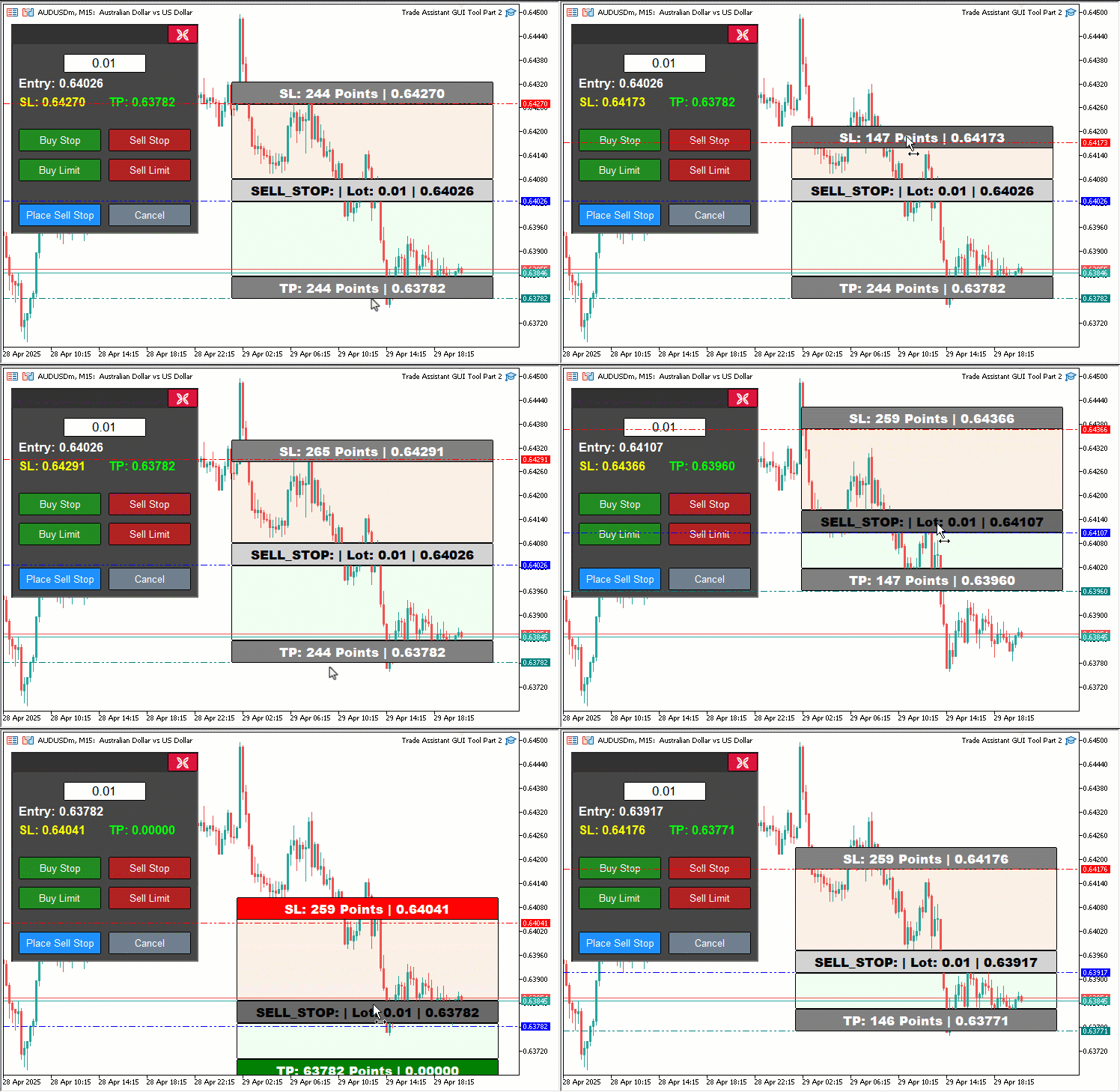
我们还会在点击操作后引入“updateButtonHoverState”函数,以刷新悬停效果,并使用“lparam”和“dparam”来获取鼠标坐标。对于CHARTEVENT_MOUSE_MOVE,我们通过检查鼠标点击是否位于“PANEL_HEADER”(通过ObjectGetInteger函数获取)范围内来添加面板拖动功能。如果满足在此范围内,则将“panel_dragging”设置为true,将坐标存储在“panel_drag_x”、“panel_drag_y”、“panel_start_x”和“panel_start_y”中,并使用ChartSetInteger函数禁用图表滚动。
在拖动过程中(“panel_dragging”为true且"MouseState"为1时),我们计算位移量(“dx”、“dy”),更新“panel_x”和“panel_y”的坐标值,并使用 ObjectSetInteger重新定位所有的面板对象(如“PANEL_BG”、“PANEL_HEADER”、“CLOSE_BTN”、“LOT_EDIT”等),随后调用ChartRedraw更新图表显示。当鼠标释放时,我们重置“panel_dragging”,并重新启用图表滚动功能。为确保矩形(如“REC1”、“REC3”、“REC5”)的拖动操作不与面板拖动产生冲突,我们通过检查“!panel_dragging”条件来避免这种情况,并在“movingState_R1”、“movingState_R5”和“movingState_R3”状态下调用“updateRectangleColors”更新矩形颜色,以反映其悬停和有效性状态。
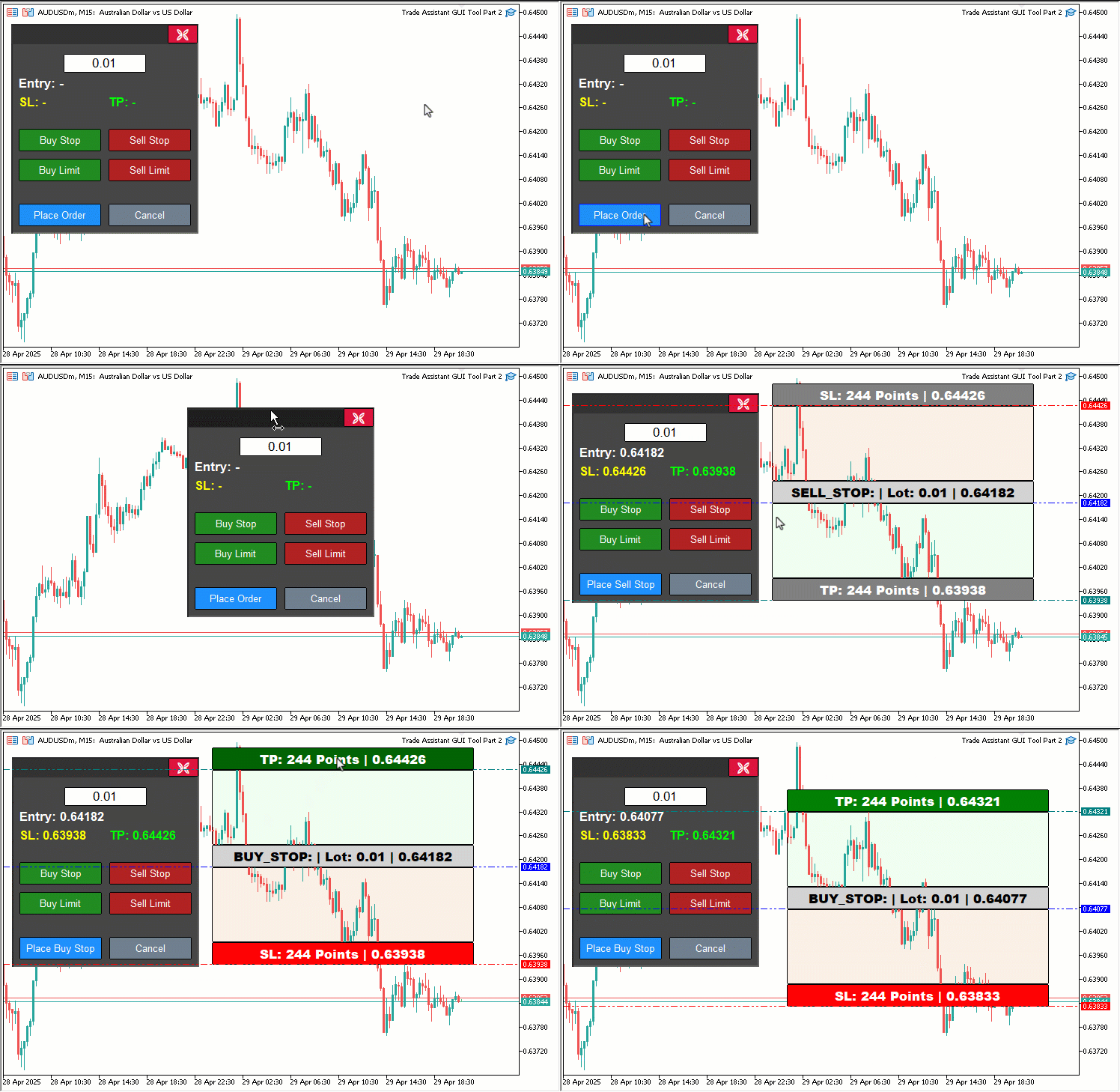
我们已高亮显示了一些关键代码段,以供您参考。可视化展示如下:
此外,由于我们已经使用了标题面板对象,其创建方法如下:
//+------------------------------------------------------------------+
//| Create control panel                                             |
//+------------------------------------------------------------------+
void createControlPanel() {
   // Background rectangle
   ObjectCreate(0, PANEL_BG, OBJ_RECTANGLE_LABEL, 0, 0, 0);                   //--- Create panel background rectangle
   ObjectSetInteger(0, PANEL_BG, OBJPROP_XDISTANCE, panel_x);                 //--- Set background x-position
   ObjectSetInteger(0, PANEL_BG, OBJPROP_YDISTANCE, panel_y);                 //--- Set background y-position
   ObjectSetInteger(0, PANEL_BG, OBJPROP_XSIZE, 250);                         //--- Set background width
   ObjectSetInteger(0, PANEL_BG, OBJPROP_YSIZE, 280);                         //--- Set background height
   ObjectSetInteger(0, PANEL_BG, OBJPROP_BGCOLOR, C'070,070,070');            //--- Set background color
   ObjectSetInteger(0, PANEL_BG, OBJPROP_BORDER_COLOR, clrWhite);             //--- Set border color
   ObjectSetInteger(0, PANEL_BG, OBJPROP_BACK, false);                        //--- Set background to foreground

   // Header rectangle (inside panel)

   createButton(PANEL_HEADER,"",panel_x+2,panel_y+2,250-4,28-3,clrBlue,C'050,050,050',12,C'050,050,050',false);

   createButton(CLOSE_BTN, CharToString(203), panel_x + 209, panel_y + 1, 40, 25, clrWhite, clrCrimson, 12, clrBlack, false, "Wingdings"); //--- Create close button

//---

}
在“createControlPanel”函数中,我们使用“createButton”函数在工具的控制面板上添加一个名为“PANEL_HEADER”的按钮,该按钮的位置为“panel_x+2”、“panel_y+2”,尺寸为246x25,样式设置为蓝色文本(clrBlue)、深灰色背景/边框(“C'050,050,050'”),且不显示标签,以便在OnChartEvent事件中实现面板拖动功能。另外,我们需要执行的操作是参照如下方式销毁该面板:
//+------------------------------------------------------------------+
//| Delete control panel objects                                     |
//+------------------------------------------------------------------+
void deletePanel() {
   ObjectDelete(0, PANEL_BG);        //--- Delete panel background
   ObjectDelete(0, PANEL_HEADER);    //--- Delete panel header
   ObjectDelete(0, LOT_EDIT);        //--- Delete lot edit field
   ObjectDelete(0, PRICE_LABEL);     //--- Delete price label
   ObjectDelete(0, SL_LABEL);        //--- Delete SL label
   ObjectDelete(0, TP_LABEL);        //--- Delete TP label
   ObjectDelete(0, BUY_STOP_BTN);    //--- Delete Buy Stop button
   ObjectDelete(0, SELL_STOP_BTN);   //--- Delete Sell Stop button
   ObjectDelete(0, BUY_LIMIT_BTN);   //--- Delete Buy Limit button
   ObjectDelete(0, SELL_LIMIT_BTN);  //--- Delete Sell Limit button
   ObjectDelete(0, PLACE_ORDER_BTN); //--- Delete Place Order button
   ObjectDelete(0, CANCEL_BTN);      //--- Delete Cancel button
   ObjectDelete(0, CLOSE_BTN);       //--- Delete Close button
   ChartRedraw(0);                   //--- Redraw chart
}
在此阶段,我们对“deletePanel”函数进行更新,以确保工具的控制面板能够通过移除所有关联对象(包括我们最近新增的标题栏)得到妥善地清理。我们使用ObjectDelete函数从MetaTrader 5图表中移除以下对象:面板背景(“PANEL_BG”)、新添加的标题栏(“PANEL_HEADER”)、手数输入框(“LOT_EDIT”)、标签(“PRICE_LABEL”、“SL_LABEL”、“TP_LABEL”)以及按钮(“BUY_STOP_BTN”、“SELL_STOP_BTN”、“BUY_LIMIT_BTN”、“SELL_LIMIT_BTN”、“PLACE_ORDER_BTN”、“CANCEL_BTN”、“CLOSE_BTN”)。
最后,我们调用ChartRedraw函数刷新图表,确保删除操作后界面保持整洁。此外,在显示工具时,我们还需要考虑悬停效果,以确保其保持突出性。
//+------------------------------------------------------------------+
//| Show control panel                                               |
//+------------------------------------------------------------------+
void showPanel() {
   // Ensure panel is in foreground
   ObjectSetInteger(0, PANEL_BG,        OBJPROP_BACK, false); //--- Show panel background
   ObjectSetInteger(0, PANEL_HEADER,    OBJPROP_BACK, false); //--- Show panel header
   ObjectSetInteger(0, LOT_EDIT,        OBJPROP_BACK, false); //--- Show lot edit field
   ObjectSetInteger(0, PRICE_LABEL,     OBJPROP_BACK, false); //--- Show price label
   ObjectSetInteger(0, SL_LABEL,        OBJPROP_BACK, false); //--- Show SL label
   ObjectSetInteger(0, TP_LABEL,        OBJPROP_BACK, false); //--- Show TP label
   ObjectSetInteger(0, BUY_STOP_BTN,    OBJPROP_BACK, false); //--- Show Buy Stop button
   ObjectSetInteger(0, SELL_STOP_BTN,   OBJPROP_BACK, false); //--- Show Sell Stop button
   ObjectSetInteger(0, BUY_LIMIT_BTN,   OBJPROP_BACK, false); //--- Show Buy Limit button
   ObjectSetInteger(0, SELL_LIMIT_BTN,  OBJPROP_BACK, false); //--- Show Sell Limit button
   ObjectSetInteger(0, PLACE_ORDER_BTN, OBJPROP_BACK, false); //--- Show Place Order button
   ObjectSetInteger(0, CANCEL_BTN,      OBJPROP_BACK, false); //--- Show Cancel button
   ObjectSetInteger(0, CLOSE_BTN,       OBJPROP_BACK, false); //--- Show Close button

   // Reset button hover states
   buy_stop_hovered     = false;
   sell_stop_hovered    = false;
   buy_limit_hovered    = false;
   sell_limit_hovered   = false;
   place_order_hovered  = false;
   cancel_hovered       = false;
   close_hovered        = false;
   header_hovered       = false;

   // Reset button colors
   ObjectSetInteger(0, BUY_STOP_BTN,    OBJPROP_BGCOLOR,       clrForestGreen);
   ObjectSetInteger(0, BUY_STOP_BTN,    OBJPROP_BORDER_COLOR,  clrBlack);
   ObjectSetInteger(0, SELL_STOP_BTN,   OBJPROP_BGCOLOR,       clrFireBrick);
   ObjectSetInteger(0, SELL_STOP_BTN,   OBJPROP_BORDER_COLOR,  clrBlack);
   ObjectSetInteger(0, BUY_LIMIT_BTN,   OBJPROP_BGCOLOR,       clrForestGreen);
   ObjectSetInteger(0, BUY_LIMIT_BTN,   OBJPROP_BORDER_COLOR,  clrBlack);
   ObjectSetInteger(0, SELL_LIMIT_BTN,  OBJPROP_BGCOLOR,       clrFireBrick);
   ObjectSetInteger(0, SELL_LIMIT_BTN,  OBJPROP_BORDER_COLOR,  clrBlack);
   ObjectSetInteger(0, PLACE_ORDER_BTN, OBJPROP_BGCOLOR,       clrDodgerBlue);
   ObjectSetInteger(0, PLACE_ORDER_BTN, OBJPROP_BORDER_COLOR,  clrBlack);
   ObjectSetInteger(0, CANCEL_BTN,      OBJPROP_BGCOLOR,       clrSlateGray);
   ObjectSetInteger(0, CANCEL_BTN,      OBJPROP_BORDER_COLOR,  clrBlack);
   ObjectSetInteger(0, CLOSE_BTN,       OBJPROP_BGCOLOR,       clrCrimson);
   ObjectSetInteger(0, CLOSE_BTN,       OBJPROP_BORDER_COLOR,  clrBlack);
   ObjectSetInteger(0, PANEL_HEADER,    OBJPROP_BGCOLOR,       C'050,050,050');

   // Reset panel state
   update_Text(PRICE_LABEL,     "Entry: -");        //--- Reset entry label text
   update_Text(SL_LABEL,        "SL: -");           //--- Reset SL label text
   update_Text(TP_LABEL,        "TP: -");           //--- Reset TP label text
   update_Text(PLACE_ORDER_BTN, "Place Order");     //--- Reset Place Order button text
   selected_order_type = "";                        //--- Clear selected order type
   tool_visible        = false;                     //--- Hide tool
   ChartSetInteger(0, CHART_EVENT_MOUSE_MOVE, true); //--- Ensure mouse move events are enabled
   ChartRedraw(0);                                   //--- Redraw chart
}
我们对“showPanel”函数进行优化,以管理工具控制面板的显示与状态重置,同时整合新引入的“PANEL_HEADER”及悬停状态管理功能,从而提升工具的交互性。首先,我们使用ObjectSetInteger函数将面板背景(“PANEL_BG”)、新添加的标题栏(“PANEL_HEADER”)、手数输入框(“LOT_EDIT”)、价格相关标签(“PRICE_LABEL”、“SL_LABEL”、“TP_LABEL”)以及所有按钮(“BUY_STOP_BTN”、“SELL_STOP_BTN”、“BUY_LIMIT_BTN”、“SELL_LIMIT_BTN”、“PLACE_ORDER_BTN”、“CANCEL_BTN”、“CLOSE_BTN”)的OBJPROP_BACK属性设置为false,确保这些面板元素均显示在图表的前景层。
为保持界面整洁且可预测,我们通过将布尔变量“buy_stop_hovered”、“sell_stop_hovered”、“buy_limit_hovered”、“sell_limit_hovered”、“place_order_hovered”、“cancel_hovered”、“close_hovered”及“header_hovered”均重置为false,来清除所有残留的悬停效果,确保面板显示时无任何悬停状态遗留。
随后,我们使用“ObjectSetInteger”函数将按钮和标题栏的默认视觉外观恢复为原始颜色:将“BUY_STOP_BTN”和“BUY_LIMIT_BTN”的OBJPROP_BGCOLOR设置为“clrForestGreen”,将“SELL_STOP_BTN”和“SELL_LIMIT_BTN”设置为"clrFireBrick",将“PLACE_ORDER_BTN”设置为“clrDodgerBlue”,将“CANCEL_BTN”设置为“clrSlateGray”,将“CLOSE_BTN”设置为“clrCrimson”,并将“PANEL_HEADER”设置为深灰色(“C'050,050,050'”)。
我们还将所有按钮的OBJPROP_BORDER_COLOR设置为“clrBlack”,以确保它们呈现一致的非悬停状态外观。
为了重置面板的功能状态,我们调用“update_Text”函数,将“PRICE_LABEL”设置为“Entry: -”、“SL_LABEL”设置为“SL: -”、“TP_LABEL”设置为“TP: -”,并将“PLACE_ORDER_BTN”设置为“Place Order”(下单),以清除任何先前的交易设置信息。我们清空“selected_order_type”变量,确保没有预先选中的订单类型,将“tool_visible”设置为false,以隐藏图表工具,并使用ChartSetInteger函数启用CHART_EVENT_MOUSE_MOVE事件,确保面板已准备好进行悬停和拖动交互。
最后,我们调用ChartRedraw函数刷新图表,使面板呈现默认状态,为下一次交互做好充分准备。编译后,结果如下:
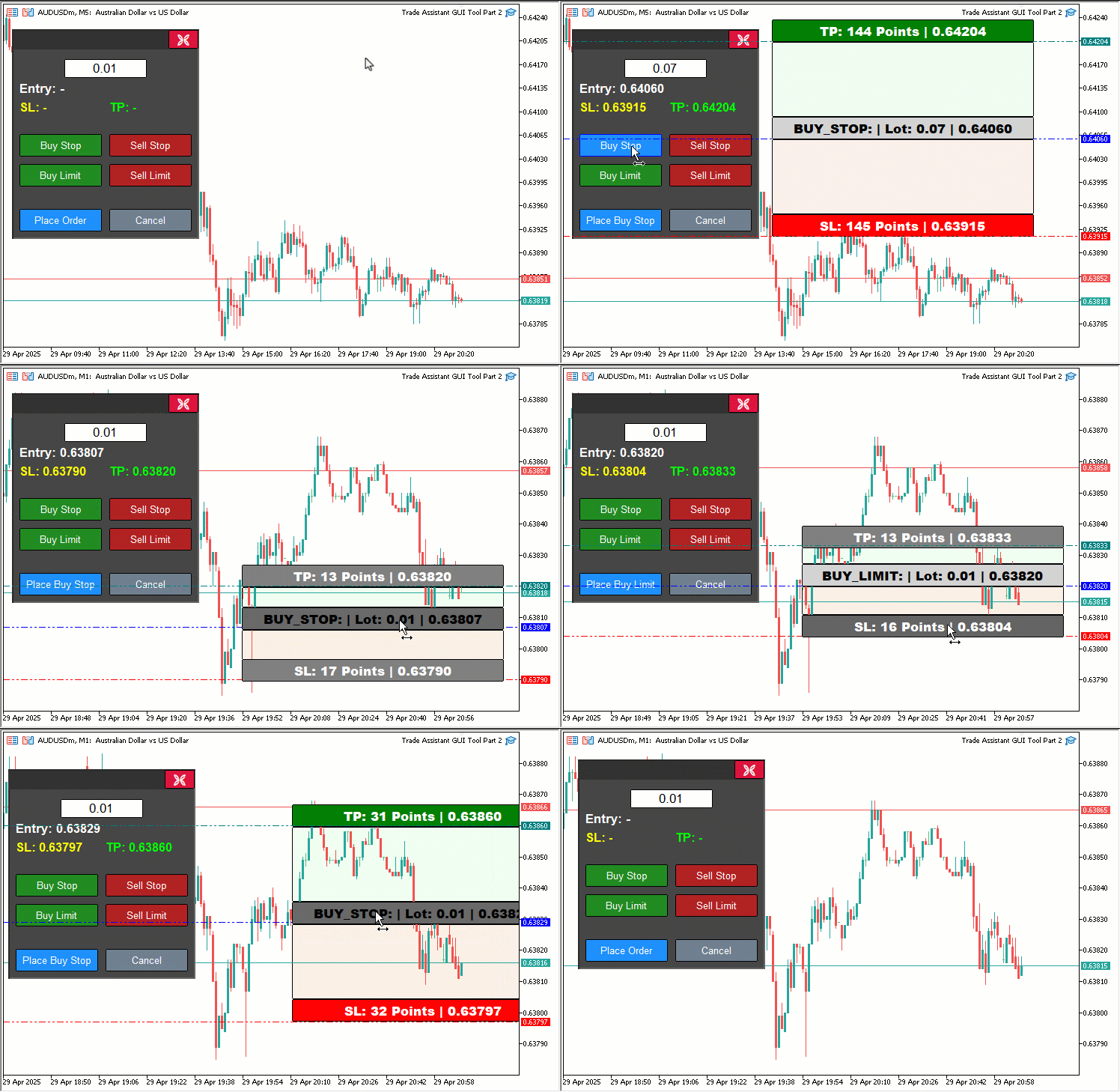
由可视化效果可见,我们能够通过价格工具动态验证订单,并在价格超出范围时改变其颜色,从而提醒用户。此外,我们还可以动态拖动面板和价格工具,当鼠标悬停在按钮上时,能够获取其范围,并根据按钮范围动态改变颜色,从而实现我们的目标。接下来,只需测试项目的交互性即可,这部分内容在前文所述章节中体现。
回测
我们已完成测试,以下是整合后的可视化结果,以单一的图形交换格式(GIF)位图图像形式呈现。
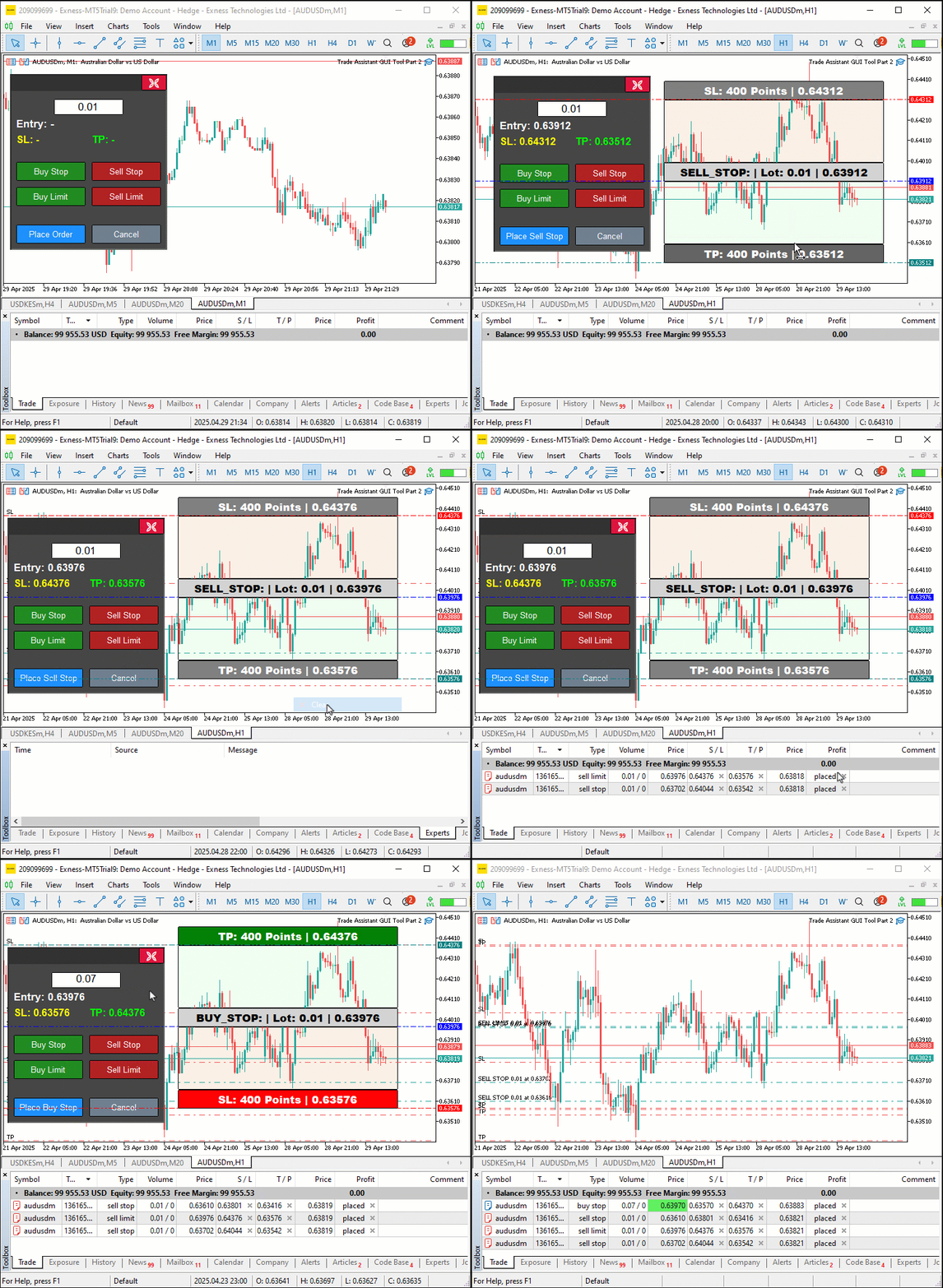
结论
总体而言,我们在MQL5中对交易助手工具进行了功能优化,添加了动态视觉反馈功能,包括可拖动面板、悬停效果以及实时订单验证,使我们的挂单操作更加直观且精准。我们展示了这些改进措施的设计与实现过程,并通过针对自身交易需求进行的全面回测,确保了其可靠性。您可以根据自己的交易风格定制这款工具,从而显著提高在交易图表中体现的下单效率。
本文由MetaQuotes Ltd译自英文
原文地址: https://www.mql5.com/en/articles/17972
注意: MetaQuotes Ltd.将保留所有关于这些材料的权利。全部或部分复制或者转载这些材料将被禁止。
本文由网站的一位用户撰写,反映了他们的个人观点。MetaQuotes Ltd 不对所提供信息的准确性负责,也不对因使用所述解决方案、策略或建议而产生的任何后果负责。

 MQL5开发专属调试与性能分析工具(第一部分):高级日志记录
 MQL5 简介(第 16 部分):利用技术图表形态构建 EA 交易
 从新手到专家:自动几何分析系统
 您应当知道的 MQL5 向导技术(第 56 部分):比尔·威廉姆斯(Bill Williams)分形

我发现一个bug, 当tp或者sl紧贴在entry的边缘之后, 它就不能再移动了,这是一个大BUG,作者是否已经发现这个问题了?

我发现了一个错误,当 tp 或 sl 接近输入的边缘时,它无法进一步移动,这是一个很大的错误,作者发现这个问题了吗?