

MQL5交易工具(第一部分):构建交互式可视化挂单交易助手工具
 943
943
 2
2

概述
开发高效的交易工具对于简化复杂的外汇交易任务至关重要,然而设计能够提升决策效率的直观界面仍是一大挑战。如果能打造一款可视化交互工具,在MetaTrader 5中实现简化版挂单操作的流程,将会如何?本文将介绍一款基于MetaQuotes Language 5(MQL5)定制的智能交易系统(EA)——交易助手工具,通过图形化精准控制与用户友好型操作界面,助力交易者高效执行买入/卖出止损单与限价单。我们将按以下顺序展开说明:
到本文结束时,您将全面掌握该工具的开发与测试方法,为后续高级功能迭代奠定基础。
交易助手工具的概念设计和目标
我们的目标是开发一款交易助手工具,通过简化外汇交易中的挂单流程,为用户提供流畅高效的操作体验。该工具将设计为直接集成于MetaTrader 5的图形用户界面(GUI),通过直观的控制面板支持设置买入止损、卖出止损、买入限价和卖出限价订单。我们的界面设计包含订单类型选择按钮和手数输入框。我们强调可视化交互,允许用户通过拖拽图表上的交互元素直接定义入场价、止损和止盈水平,并实时显示价格层级及点差差异,提供即时反馈。
我们的核心目标是确保工具的易用性与响应速度。其界面将采用响应式设计,支持精准调整价格水平,并通过单键确认订单,最大限度减少设置时间。此外,我们将增加取消订单和关闭界面选项,使用户能快速适应市场变化。通过打造兼具视觉吸引力与响应速度的工具,我们旨在提升决策效率、降低挂单错误率,并为未来扩展(如高级风险管理功能)提供基础框架,这些增强功能将在后续版本中逐步实现。简言之,以下是我们对该工具的愿景:
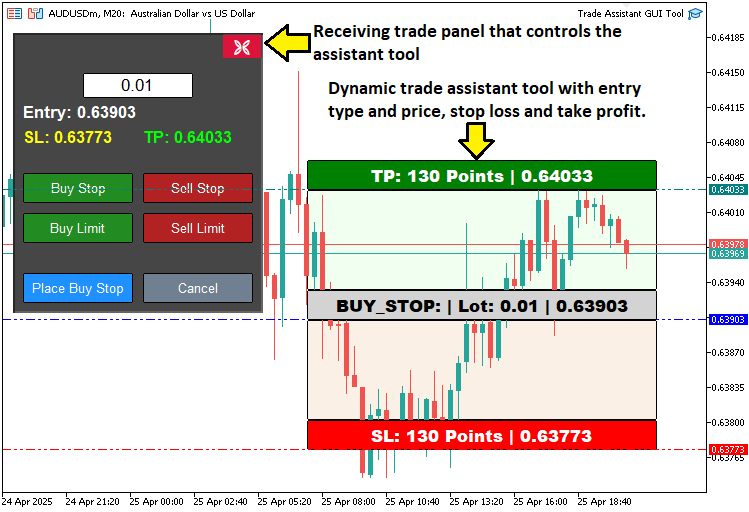
在MQL5中的实现
在MQL5中开发该程序时,我们需按以下步骤进行:首先定义程序基础数据,接着声明对象名称常量,最后引入支持交易活动的库文件。
//+------------------------------------------------------------------+
//|                                         TRADE ASSISTANT GUI TOOL |
//|      Copyright 2025, ALLAN MUNENE MUTIIRIA. #@Forex Algo-Trader. |
//|                           https://youtube.com/@ForexAlgo-Trader? |
//+------------------------------------------------------------------+
#property copyright "Copyright 2025, ALLAN MUNENE MUTIIRIA. #@Forex Algo-Trader"
#property link      "https://youtube.com/@ForexAlgo-Trader?"
#property version   "1.00"

#include <Trade/Trade.mqh> //--- Include the Trade library for trading operations

// Control panel object names
#define PANEL_BG       "PANEL_BG"         //--- Define constant for panel background object name
#define LOT_EDIT       "LOT_EDIT"         //--- Define constant for lot size edit field object name
#define PRICE_LABEL    "PRICE_LABEL"      //--- Define constant for price label object name
#define SL_LABEL       "SL_LABEL"         //--- Define constant for stop-loss label object name
#define TP_LABEL       "TP_LABEL"         //--- Define constant for take-profit label object name
#define BUY_STOP_BTN   "BUY_STOP_BTN"     //--- Define constant for buy stop button object name
#define SELL_STOP_BTN  "SELL_STOP_BTN"    //--- Define constant for sell stop button object name
#define BUY_LIMIT_BTN  "BUY_LIMIT_BTN"    //--- Define constant for buy limit button object name
#define SELL_LIMIT_BTN "SELL_LIMIT_BTN"   //--- Define constant for sell limit button object name
#define PLACE_ORDER_BTN "PLACE_ORDER_BTN" //--- Define constant for place order button object name
#define CANCEL_BTN     "CANCEL_BTN"       //--- Define constant for cancel button object name
#define CLOSE_BTN      "CLOSE_BTN"        //--- Define constant for close button object name

#define REC1 "REC1" //--- Define constant for rectangle 1 (TP) object name
#define REC2 "REC2" //--- Define constant for rectangle 2 object name
#define REC3 "REC3" //--- Define constant for rectangle 3 (Entry) object name
#define REC4 "REC4" //--- Define constant for rectangle 4 object name
#define REC5 "REC5" //--- Define constant for rectangle 5 (SL) object name

#define TP_HL "TP_HL" //--- Define constant for take-profit horizontal line object name
#define SL_HL "SL_HL" //--- Define constant for stop-loss horizontal line object name
#define PR_HL "PR_HL" //--- Define constant for price (entry) horizontal line object name

double Get_Price_d(string name) { return ObjectGetDouble(0, name, OBJPROP_PRICE); }                          //--- Function to get price as double for an object
string Get_Price_s(string name) { return DoubleToString(ObjectGetDouble(0, name, OBJPROP_PRICE), _Digits); } //--- Function to get price as string with proper digits
string update_Text(string name, string val) { return (string)ObjectSetString(0, name, OBJPROP_TEXT, val); }  //--- Function to update text of an object

int
   xd1, yd1, xs1, ys1, //--- Variables for rectangle 1 position and size
   xd2, yd2, xs2, ys2, //--- Variables for rectangle 2 position and size
   xd3, yd3, xs3, ys3, //--- Variables for rectangle 3 position and size
   xd4, yd4, xs4, ys4, //--- Variables for rectangle 4 position and size
   xd5, yd5, xs5, ys5; //--- Variables for rectangle 5 position and size

// Control panel variables
bool tool_visible = false;       //--- Flag to track if trading tool is visible
string selected_order_type = ""; //--- Variable to store selected order type
double lot_size = 0.01;          //--- Default lot size for trades
CTrade obj_Trade;                //--- Trade object for executing trading operations
int panel_x = 10, panel_y = 30;  //--- Panel position coordinates
在此阶段,我们将为交易助手工具奠定基础,通过定义核心组件、变量及函数,实现其图形化界面与交易功能。首先,我们引入Trade.mqh库文件,该库提供"CTrade"类,用于执行交易操作(如挂单设置)。随后,我们使用##define预处理指令定义一系列常量,为GUI元素分配唯一标识名称,例如:"PANEL_BG"用于设置控制面板背景,LOT_EDIT作为手数输入框,"BUY_STOP_BTN"和SELL_STOP_BTN"作为订单类型选择按钮,以此类推。
我们实现了三个实用函数,用于管理图表对象属性: "Get_Price_d"函数以double类型获取对象价格;"Get_Price_s"函数通过DoubleToString函数将价格转换为带指定小数位数的字符串格式;"update_Text"函数使用 ObjectSetString函数更新对象文本,显示实时价格信息。
"xs1"为处理交互式矩形("REC1"至"REC5")的定位与尺寸,我们为每个矩形声明了整型变量组(如"xd1"、"yd1"、"xs1"、"ys1"),分别表示其在图表中的X轴偏移量、Y轴偏移量、宽度和高度。
最后,我们定义了控制面板的核心变量:"tool_visible"为布尔型,用于跟踪工具的显示状态;"selected_order_type"为字符串型,存储用户选择的订单类型;"lot_size"为双精度型,初始化为0.01,表示交易手数;"obj_Trade"为CTrade对象,用于执行交易操作;"panel_x"、"panel_y"为整型,设置控制面板在图表中的坐标位置为(10, 30)。
上述元素共同构建了工具交互界面与交易功能的结构骨架。接下来,我们将进入控制面板的开发阶段,但首先需要实现一个自定义按钮创建函数。
//+------------------------------------------------------------------+
//| Create button                                                    |
//+------------------------------------------------------------------+
bool createButton(string objName, string text, int xD, int yD, int xS, int yS,
                  color clrTxt, color clrBG, int fontsize = 12,
                  color clrBorder = clrNONE, bool isBack = false, string font = "Calibri") {
   ResetLastError();                                                               //--- Reset last error code
   if(!ObjectCreate(0, objName, OBJ_BUTTON, 0, 0, 0)) {                            //--- Create button object
      Print(__FUNCTION__, ": Failed to create Btn: Error Code: ", GetLastError()); //--- Print error message
      return false;                                                                //--- Return failure
   }
   ObjectSetInteger(0, objName, OBJPROP_XDISTANCE, xD);             //--- Set button x-position
   ObjectSetInteger(0, objName, OBJPROP_YDISTANCE, yD);             //--- Set button y-position
   ObjectSetInteger(0, objName, OBJPROP_XSIZE, xS);                 //--- Set button width
   ObjectSetInteger(0, objName, OBJPROP_YSIZE, yS);                 //--- Set button height
   ObjectSetInteger(0, objName, OBJPROP_CORNER, CORNER_LEFT_UPPER); //--- Set button corner
   ObjectSetString(0, objName, OBJPROP_TEXT, text);                 //--- Set button text
   ObjectSetInteger(0, objName, OBJPROP_FONTSIZE, fontsize);        //--- Set font size
   ObjectSetString(0, objName, OBJPROP_FONT, font);                 //--- Set font
   ObjectSetInteger(0, objName, OBJPROP_COLOR, clrTxt);             //--- Set text color
   ObjectSetInteger(0, objName, OBJPROP_BGCOLOR, clrBG);            //--- Set background color
   ObjectSetInteger(0, objName, OBJPROP_BORDER_COLOR, clrBorder);   //--- Set border color
   ObjectSetInteger(0, objName, OBJPROP_BACK, isBack);              //--- Set background/foreground
   ObjectSetInteger(0, objName, OBJPROP_STATE, false);              //--- Reset button state
   ObjectSetInteger(0, objName, OBJPROP_SELECTABLE, false);         //--- Disable selection
   ObjectSetInteger(0, objName, OBJPROP_SELECTED, false);           //--- Disable selected state

   ChartRedraw(0); //--- Redraw chart
   return true;    //--- Return success
}
我们定义了"createButton"函数,用于为工具创建可自定义样式的按钮。该函数接受以下参数:"objName"为按钮对象的名称;"text"为按钮上显示的标签文本;"xD"、"yD"为按钮在图表中的X轴/Y轴坐标位置;"xS"、"yS"为按钮的宽度/高度尺寸;"clrTxt"、"clrBG"为按钮的文本颜色和背景颜色;fontsize为字体大小(默认值为12);"clrBorder"为边框颜色(默认值为"clrNONE",即无边框);"isBack"判断是否为背景按钮(默认值为false);"font"为字体类型(默认值为"Calibri")。
我们使用ResetLastError函数清除错误代码,随后调用ObjectCreate函数创建一个OBJ_BUTTON类型的对象。如果创建失败,则通过Print函数输出当前函数名(__FUNCTION__)和错误代码(GetLastError)以记录错误日志,并返回false。
成功创建对象后,我们使用ObjectSetInteger和ObjectSetString函数设置其属性(如位置、尺寸、颜色),禁用状态交互和选中效果,并调用ChartRedraw函数刷新图表,最终返回true。此方法可实现交互式按钮的创建。我们进而构建完整的控制面板功能。
//+------------------------------------------------------------------+
//| Create control panel                                             |
//+------------------------------------------------------------------+
void createControlPanel() {
   // Background rectangle
   ObjectCreate(0, PANEL_BG, OBJ_RECTANGLE_LABEL, 0, 0, 0);        //--- Create panel background rectangle
   ObjectSetInteger(0, PANEL_BG, OBJPROP_XDISTANCE, panel_x);      //--- Set background x-position
   ObjectSetInteger(0, PANEL_BG, OBJPROP_YDISTANCE, panel_y);      //--- Set background y-position
   ObjectSetInteger(0, PANEL_BG, OBJPROP_XSIZE, 250);              //--- Set background width
   ObjectSetInteger(0, PANEL_BG, OBJPROP_YSIZE, 280);              //--- Set background height
   ObjectSetInteger(0, PANEL_BG, OBJPROP_BGCOLOR, C'070,070,070'); //--- Set background color
   ObjectSetInteger(0, PANEL_BG, OBJPROP_BORDER_COLOR, clrWhite);  //--- Set border color
   ObjectSetInteger(0, PANEL_BG, OBJPROP_BACK, false);             //--- Set background to foreground

   createButton(CLOSE_BTN, CharToString(203), panel_x + 209, panel_y + 1, 40, 25, clrWhite, clrCrimson, 12, C'070,070,070', false, "Wingdings"); //--- Create close button

   // Lot size input
   ObjectCreate(0, LOT_EDIT, OBJ_EDIT, 0, 0, 0); //--- Create lot size edit field
   ObjectSetInteger(0, LOT_EDIT, OBJPROP_XDISTANCE, panel_x + 70); //--- Set edit field x-position
   ObjectSetInteger(0, LOT_EDIT, OBJPROP_YDISTANCE, panel_y + 40); //--- Set edit field y-position
   ObjectSetInteger(0, LOT_EDIT, OBJPROP_XSIZE, 110);              //--- Set edit field width
   ObjectSetInteger(0, LOT_EDIT, OBJPROP_YSIZE, 25);               //--- Set edit field height
   ObjectSetString(0, LOT_EDIT, OBJPROP_TEXT, "0.01");             //--- Set default lot size text
   ObjectSetInteger(0, LOT_EDIT, OBJPROP_COLOR, clrBlack);         //--- Set text color
   ObjectSetInteger(0, LOT_EDIT, OBJPROP_BGCOLOR, clrWhite);       //--- Set background color
   ObjectSetInteger(0, LOT_EDIT, OBJPROP_BORDER_COLOR, clrBlack);  //--- Set border color
   ObjectSetInteger(0, LOT_EDIT, OBJPROP_ALIGN, ALIGN_CENTER);     //--- Center text
   ObjectSetString(0, LOT_EDIT, OBJPROP_FONT, "Arial");            //--- Set font
   ObjectSetInteger(0, LOT_EDIT, OBJPROP_FONTSIZE, 13);            //--- Set font size
   ObjectSetInteger(0, LOT_EDIT, OBJPROP_BACK, false);             //--- Set to foreground

   // Entry price label
   ObjectCreate(0, PRICE_LABEL, OBJ_LABEL, 0, 0, 0);                  //--- Create entry price label
   ObjectSetInteger(0, PRICE_LABEL, OBJPROP_XDISTANCE, panel_x + 10); //--- Set label x-position
   ObjectSetInteger(0, PRICE_LABEL, OBJPROP_YDISTANCE, panel_y + 70); //--- Set label y-position
   ObjectSetInteger(0, PRICE_LABEL, OBJPROP_XSIZE, 230);              //--- Set label width
   ObjectSetString(0, PRICE_LABEL, OBJPROP_TEXT, "Entry: -");         //--- Set default text
   ObjectSetString(0, PRICE_LABEL, OBJPROP_FONT, "Arial Bold");       //--- Set font
   ObjectSetInteger(0, PRICE_LABEL, OBJPROP_FONTSIZE, 13);            //--- Set font size
   ObjectSetInteger(0, PRICE_LABEL, OBJPROP_COLOR, clrWhite);         //--- Set text color
   ObjectSetInteger(0, PRICE_LABEL, OBJPROP_ALIGN, ALIGN_CENTER);     //--- Center text
   ObjectSetInteger(0, PRICE_LABEL, OBJPROP_BACK, false); //--- Set to foreground

   // SL and TP labels
   ObjectCreate(0, SL_LABEL, OBJ_LABEL, 0, 0, 0);                  //--- Create stop-loss label
   ObjectSetInteger(0, SL_LABEL, OBJPROP_XDISTANCE, panel_x + 10); //--- Set label x-position
   ObjectSetInteger(0, SL_LABEL, OBJPROP_YDISTANCE, panel_y + 95); //--- Set label y-position
   ObjectSetInteger(0, SL_LABEL, OBJPROP_XSIZE, 110);              //--- Set label width
   ObjectSetString(0, SL_LABEL, OBJPROP_TEXT, "SL: -");            //--- Set default text
   ObjectSetString(0, SL_LABEL, OBJPROP_FONT, "Arial Bold");       //--- Set font
   ObjectSetInteger(0, SL_LABEL, OBJPROP_FONTSIZE, 12);            //--- Set font size
   ObjectSetInteger(0, SL_LABEL, OBJPROP_COLOR, clrYellow);        //--- Set text color
   ObjectSetInteger(0, SL_LABEL, OBJPROP_ALIGN, ALIGN_CENTER);     //--- Center text
   ObjectSetInteger(0, SL_LABEL, OBJPROP_BACK, false);             //--- Set to foreground

   ObjectCreate(0, TP_LABEL, OBJ_LABEL, 0, 0, 0);                   //--- Create take-profit label
   ObjectSetInteger(0, TP_LABEL, OBJPROP_XDISTANCE, panel_x + 130); //--- Set label x-position
   ObjectSetInteger(0, TP_LABEL, OBJPROP_YDISTANCE, panel_y + 95);  //--- Set label y-position
   ObjectSetInteger(0, TP_LABEL, OBJPROP_XSIZE, 110);               //--- Set label width
   ObjectSetString(0, TP_LABEL, OBJPROP_TEXT, "TP: -");             //--- Set default text
   ObjectSetString(0, TP_LABEL, OBJPROP_FONT, "Arial Bold");        //--- Set font
   ObjectSetInteger(0, TP_LABEL, OBJPROP_FONTSIZE, 12);             //--- Set font size
   ObjectSetInteger(0, TP_LABEL, OBJPROP_COLOR, clrLime);           //--- Set text color
   ObjectSetInteger(0, TP_LABEL, OBJPROP_ALIGN, ALIGN_CENTER);      //--- Center text
   ObjectSetInteger(0, TP_LABEL, OBJPROP_BACK, false);              //--- Set to foreground

   // Order type buttons
   createButton(BUY_STOP_BTN, "Buy Stop", panel_x + 10, panel_y + 140, 110, 30, clrWhite, clrForestGreen, 10, clrBlack, false, "Arial");    //--- Create Buy Stop button
   createButton(SELL_STOP_BTN, "Sell Stop", panel_x + 130, panel_y + 140, 110, 30, clrWhite, clrFireBrick, 10, clrBlack, false, "Arial");   //--- Create Sell Stop button
   createButton(BUY_LIMIT_BTN, "Buy Limit", panel_x + 10, panel_y + 180, 110, 30, clrWhite, clrForestGreen, 10, clrBlack, false, "Arial");  //--- Create Buy Limit button
   createButton(SELL_LIMIT_BTN, "Sell Limit", panel_x + 130, panel_y + 180, 110, 30, clrWhite, clrFireBrick, 10, clrBlack, false, "Arial"); //--- Create Sell Limit button

   // Place Order and Cancel buttons
   createButton(PLACE_ORDER_BTN, "Place Order", panel_x + 10, panel_y + 240, 110, 30, clrWhite, clrDodgerBlue, 10, clrBlack, false, "Arial"); //--- Create Place Order button
   createButton(CANCEL_BTN, "Cancel", panel_x + 130, panel_y + 240, 110, 30, clrWhite, clrSlateGray, 10, clrBlack, false, "Arial");           //--- Create Cancel button
}
在此阶段,我们定义"createControlPanel"函数,用于构建交易助手工具的GUI主面板。首先,我们使用ObjectCreate函数创建一个名为"PANEL_BG"的背景矩形,类型为OBJ_RECTANGLE_LABEL,其位置由变量"panel_x"和"panel_y"指定(默认值为10和30),尺寸为250×280像素,背景色为深灰色(C'070,070,070'),边框为白色("clrWhite"),并设置前景层(将OBJPROP_BACK设置为false)。
随后,我们调用"createButton"函数在右上角添加一个关闭按钮("CLOSE_BTN"),显示为"Wingdings"字体中的叉号符号(字符203),样式为深红色(crimson)。输入参数的定义参考MQL5官方文档,您可根据需求自定义符号或样式。
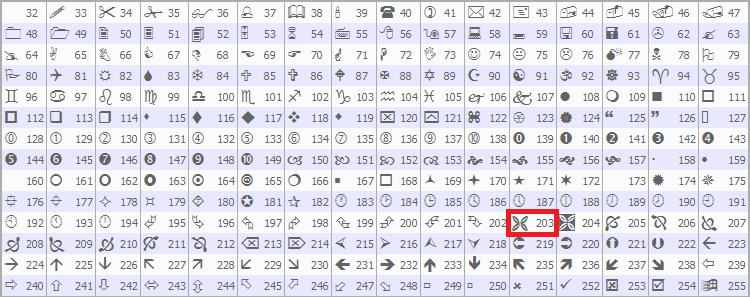
对于手数输入框,我们使用ObjectCreate函数创建一个类型为OBJ_EDIT的编辑框(对象名为"LOT_EDIT"),位置为"panel_x + 70"(X坐标)、"panel_y + 40"(Y坐标),尺寸为 110×25 像素,初始值为 "0.01"。通过 ObjectSetInteger和ObjectSetString函数设置样式:黑色文本、白色背景,并使用居中对齐的Arial字体。
我们使用"ObjectCreate"函数创建三个标签,用于显示交易信息:"PRICE_LABEL"位于"panel_x + 10"、 "panel_y + 70",宽度230像素,默认文本为"Entry: -",用于显示入场价格;"SL_LABEL"位于"panel_x + 10"、"panel_y + 95",文本颜色为黄色,默认文本为"SL: -",用于显示止损价格;"TP_LABEL"位于"panel_x + 130"、"panel_y + 95",文本颜色为石灰绿,默认文本为"TP: -",用于显示止盈价格。所有标签均使用粗体Arial字体,居中对齐。
最后,我们使用"createButton"函数添加以下订单类型按钮和操作按钮——"BUY_STOP_BTN"和"SELL_STOP_BTN",位置为"panel_y + 140",颜色分别为绿色和红色;"BUY_LIMIT_BTN"和"SELL_LIMIT_BTN",位置为"panel_y + 180",颜色分别为绿色和红色;"PLACE_ORDER_BTN"和"CANCEL_BTN"位置为"panel_y + 240",颜色分别为蓝色和灰色,所有按钮统一尺寸为110×30像素,字体为Arial。此设置构成了我们工具的交互式控制面板。我们可以调用OnInit事件处理器中的函数来初始化面板。
//+------------------------------------------------------------------+
//| Expert initialization function                                   |
//+------------------------------------------------------------------+
int OnInit() {

// Create control panel
   createControlPanel();   //--- Call function to create the control panel
   ChartRedraw(0);         //--- Redraw chart to display panel
   return(INIT_SUCCEEDED); //--- Return successful initialization
}
在OnInit事件处理器中,我们调用"createControlPanel"函数构建GUI,完成控制面板的初始化,包括按钮、标签和输入框等交互元素的布局。随后,调用ChartRedraw函数强制刷新图表,确保控制面板能够立即显示在界面上。最后,返回INIT_SUCCEEDED,显示初始化流程成功完成。编译后,我们得到以下输出。
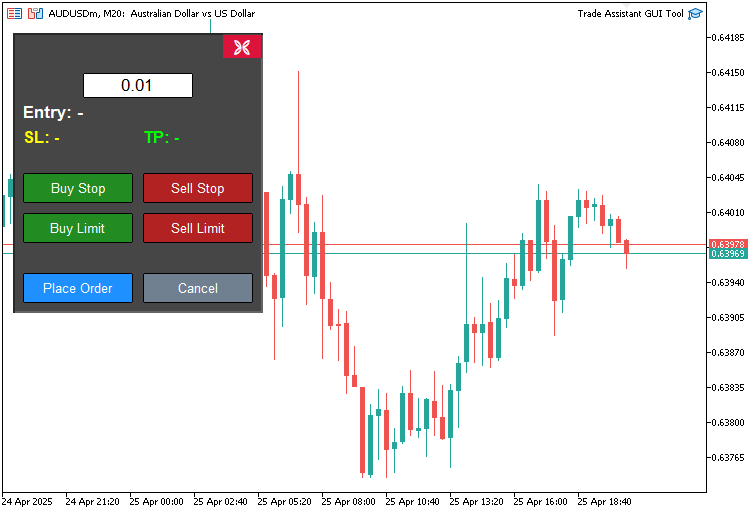
由图可见,我们已经成功地构建了控制面板。接下来需要开发的是辅助面板,其核心功能是动态获取图表价格数据,并自动填充至控制面板的对应字段中,同时基于实时价格执行交易操作。这就需要解决图表坐标系与屏幕像素坐标系的转换问题。但您无需担心,我们已经有了完整方案。接下来,我们将添加事件监听器,当与控制按钮交互时,这些监听器会调用相应的函数。
//+------------------------------------------------------------------+
//| Expert onchart event function                                    |
//+------------------------------------------------------------------+
void OnChartEvent(
   const int id,         //--- Event ID
   const long& lparam,   //--- Long parameter (e.g., x-coordinate for mouse)
   const double& dparam, //--- Double parameter (e.g., y-coordinate for mouse)
   const string& sparam  //--- String parameter (e.g., object name)
) {
   if(id == CHARTEVENT_OBJECT_CLICK) {     //--- Handle object click events
      // Handle order type buttons
      if(sparam == BUY_STOP_BTN) {         //--- Check if Buy Stop button clicked
         selected_order_type = "BUY_STOP"; //--- Set order type to Buy Stop
      }
   }
}
在此阶段,我们通过实现OnChartEvent事件处理器来捕获用户与交易工具的交互行为。该函数接收以下参数:"id"为事件类型标识符;"lparam"为整型数据(如X轴坐标);"dparam"为双精度型数据(如Y轴坐标);"sparam"为字符串型数据(如对象名称)。我们通过判断"id"是否等于CHARTEVENT_OBJECT_CLICK,来检测用户是否点击了对象,如果"sparam"参数值为"BUY_STOP_BTN",则将全局变量"selected_order_type"设置为 "BUY_STOP",以此记录用户选择了买入限价单。当上述条件满足时,需调用一个函数来可视化工具状态。
//+------------------------------------------------------------------+
//| Show main tool                                                   |
//+------------------------------------------------------------------+
void showTool() {
   // Hide panel
   ObjectSetInteger(0, PANEL_BG, OBJPROP_BACK, false);        //--- Hide panel background
   ObjectSetInteger(0, LOT_EDIT, OBJPROP_BACK, false);        //--- Hide lot edit field
   ObjectSetInteger(0, PRICE_LABEL, OBJPROP_BACK, false);     //--- Hide price label
   ObjectSetInteger(0, SL_LABEL, OBJPROP_BACK, false);        //--- Hide SL label
   ObjectSetInteger(0, TP_LABEL, OBJPROP_BACK, false);        //--- Hide TP label
   ObjectSetInteger(0, BUY_STOP_BTN, OBJPROP_BACK, false);    //--- Hide Buy Stop button
   ObjectSetInteger(0, SELL_STOP_BTN, OBJPROP_BACK, false);   //--- Hide Sell Stop button
   ObjectSetInteger(0, BUY_LIMIT_BTN, OBJPROP_BACK, false);   //--- Hide Buy Limit button
   ObjectSetInteger(0, SELL_LIMIT_BTN, OBJPROP_BACK, false);  //--- Hide Sell Limit button
   ObjectSetInteger(0, PLACE_ORDER_BTN, OBJPROP_BACK, false); //--- Hide Place Order button
   ObjectSetInteger(0, CANCEL_BTN, OBJPROP_BACK, false);      //--- Hide Cancel button
   ObjectSetInteger(0, CLOSE_BTN, OBJPROP_BACK, false);       //--- Hide Close button

   // Create main tool 150 pixels from the right edge
   int chart_width = (int)ChartGetInteger(0, CHART_WIDTH_IN_PIXELS); //--- Get chart width
   int tool_x = chart_width - 400 - 50;                              //--- Calculate tool x-position (400 is REC1 width, 50 is margin)

   if(selected_order_type == "BUY_STOP" || selected_order_type == "BUY_LIMIT") { //--- Check for buy orders
      // Buy orders: TP at top, entry in middle, SL at bottom
      createButton(REC1, "", tool_x, 20, 350, 30, clrWhite, clrGreen, 13, clrBlack, false, "Arial Black"); //--- Create TP rectangle

      xd1 = (int)ObjectGetInteger(0, REC1, OBJPROP_XDISTANCE); //--- Get REC1 x-distance
      yd1 = (int)ObjectGetInteger(0, REC1, OBJPROP_YDISTANCE); //--- Get REC1 y-distance
      xs1 = (int)ObjectGetInteger(0, REC1, OBJPROP_XSIZE);     //--- Get REC1 x-size
      ys1 = (int)ObjectGetInteger(0, REC1, OBJPROP_YSIZE);     //--- Get REC1 y-size

      xd2 = xd1;       //--- Set REC2 x-distance
      yd2 = yd1 + ys1; //--- Set REC2 y-distance
      xs2 = xs1;       //--- Set REC2 x-size
      ys2 = 100;       //--- Set REC2 y-size

      xd3 = xd2;       //--- Set REC3 x-distance
      yd3 = yd2 + ys2; //--- Set REC3 y-distance
      xs3 = xs2;       //--- Set REC3 x-size
      ys3 = 30;        //--- Set REC3 y-size

      xd4 = xd3;       //--- Set REC4 x-distance
      yd4 = yd3 + ys3; //--- Set REC4 y-distance
      xs4 = xs3;       //--- Set REC4 x-size
      ys4 = 100;       //--- Set REC4 y-size

      xd5 = xd4;       //--- Set REC5 x-distance
      yd5 = yd4 + ys4; //--- Set REC5 y-distance
      xs5 = xs4;       //--- Set REC5 x-size
      ys5 = 30;        //--- Set REC5 y-size
   }
   else { //--- Handle sell orders
      // Sell orders: SL at top, entry in middle, TP at bottom
      createButton(REC5, "", tool_x, 20, 350, 30, clrWhite, clrRed, 13, clrBlack, false, "Arial Black"); //--- Create SL rectangle

      xd5 = (int)ObjectGetInteger(0, REC5, OBJPROP_XDISTANCE); //--- Get REC5 x-distance
      yd5 = (int)ObjectGetInteger(0, REC5, OBJPROP_YDISTANCE); //--- Get REC5 y-distance
      xs5 = (int)ObjectGetInteger(0, REC5, OBJPROP_XSIZE);     //--- Get REC5 x-size
      ys5 = (int)ObjectGetInteger(0, REC5, OBJPROP_YSIZE);     //--- Get REC5 y-size

      xd2 = xd5;       //--- Set REC2 x-distance
      yd2 = yd5 + ys5; //--- Set REC2 y-distance
      xs2 = xs5;       //--- Set REC2 x-size
      ys2 = 100;       //--- Set REC2 y-size

      xd3 = xd2;       //--- Set REC3 x-distance
      yd3 = yd2 + ys2; //--- Set REC3 y-distance
      xs3 = xs2;       //--- Set REC3 x-size
      ys3 = 30;        //--- Set REC3 y-size

      xd4 = xd3;       //--- Set REC4 x-distance
      yd4 = yd3 + ys3; //--- Set REC4 y-distance
      xs4 = xs3;       //--- Set REC4 x-size
      ys4 = 100;       //--- Set REC4 y-size

      xd1 = xd4;       //--- Set REC1 x-distance
      yd1 = yd4 + ys4; //--- Set REC1 y-distance
      xs1 = xs4;       //--- Set REC1 x-size
      ys1 = 30;        //--- Set REC1 y-size
   }

   datetime dt_tp = 0, dt_sl = 0, dt_prc = 0;        //--- Variables for time
   double price_tp = 0, price_sl = 0, price_prc = 0; //--- Variables for price
   int window = 0;                                   //--- Chart window

   ChartXYToTimePrice(0, xd1, yd1 + ys1, window, dt_tp, price_tp);   //--- Convert REC1 coordinates to time and price
   ChartXYToTimePrice(0, xd3, yd3 + ys3, window, dt_prc, price_prc); //--- Convert REC3 coordinates to time and price
   ChartXYToTimePrice(0, xd5, yd5 + ys5, window, dt_sl, price_sl);   //--- Convert REC5 coordinates to time and price

   createHL(TP_HL, dt_tp, price_tp, clrTeal);   //--- Create TP horizontal line
   createHL(PR_HL, dt_prc, price_prc, clrBlue); //--- Create entry horizontal line
   createHL(SL_HL, dt_sl, price_sl, clrRed);    //--- Create SL horizontal line

   if(selected_order_type == "BUY_STOP" || selected_order_type == "BUY_LIMIT") {                              //--- Check for buy orders
      createButton(REC2, "", xd2, yd2, xs2, ys2, clrWhite, clrHoneydew, 12, clrBlack, true);                  //--- Create REC2
      createButton(REC3, "", xd3, yd3, xs3, ys3, clrBlack, clrLightGray, 13, clrBlack, false, "Arial Black"); //--- Create REC3
      createButton(REC4, "", xd4, yd4, xs4, ys4, clrWhite, clrLinen, 12, clrBlack, true);                     //--- Create REC4
      createButton(REC5, "", xd5, yd5, xs5, ys5, clrWhite, clrRed, 13, clrBlack, false, "Arial Black");       //--- Create REC5
   }
   else { //--- Handle sell orders
      createButton(REC2, "", xd2, yd2, xs2, ys2, clrWhite, clrHoneydew, 12, clrBlack, true);                  //--- Create REC2
      createButton(REC3, "", xd3, yd3, xs3, ys3, clrBlack, clrLightGray, 13, clrBlack, false, "Arial Black"); //--- Create REC3
      createButton(REC4, "", xd4, yd4, xs4, ys4, clrWhite, clrLinen, 12, clrBlack, true);                     //--- Create REC4
      createButton(REC1, "", xd1, yd1, xs1, ys1, clrWhite, clrGreen, 13, clrBlack, false, "Arial Black");     //--- Create REC1
   }

   update_Text(REC1, "TP: " + DoubleToString(MathAbs((Get_Price_d(TP_HL) - Get_Price_d(PR_HL)) / _Point), 0) + " Points | " + Get_Price_s(TP_HL)); //--- Update REC1 text
   update_Text(REC3, selected_order_type + ": | Lot: " + DoubleToString(lot_size, 2) + " | " + Get_Price_s(PR_HL));                                //--- Update REC3 text
   update_Text(REC5, "SL: " + DoubleToString(MathAbs((Get_Price_d(PR_HL) - Get_Price_d(SL_HL)) / _Point), 0) + " Points | " + Get_Price_s(SL_HL)); //--- Update REC5 text
   update_Text(PRICE_LABEL, "Entry: " + Get_Price_s(PR_HL)); //--- Update entry label text
   update_Text(SL_LABEL, "SL: " + Get_Price_s(SL_HL));       //--- Update SL label text
   update_Text(TP_LABEL, "TP: " + Get_Price_s(TP_HL));       //--- Update TP label text

   tool_visible = true;                              //--- Set tool visibility flag
   ChartSetInteger(0, CHART_EVENT_MOUSE_MOVE, true); //--- Enable mouse move events
   ChartRedraw(0);                                   //--- Redraw chart
}
为了显示图表价格工具界面,我们实现"showTool"函数,其核心逻辑为隐藏主控制面板。具体通过ObjectSetInteger函数将以下对象的OBJPROP_BACK属性设置为false,使得一些对象在图表中被隐藏,如"PANEL_BG", "LOT_EDIT"、"PRICE_LABEL"、"SL_LABEL"、"TP_LABEL"、"BUY_STOP_BTN"、"SELL_STOP_BTN"、"BUY_LIMIT_BTN"、"SELL_LIMIT_BTN"、"PLACE_ORDER_BTN"、"CANCEL_BTN"和"CLOSE_BTN"。
我们通过ChartGetInteger函数获取图表的CHART_WIDTH_IN_PIXELS(宽度像素值),并据此计算工具的 X 轴位置,将"tool_x"设置为距离图表右边缘450像素的位置。对于“BUY_STOP”或“BUY_LIMIT”订单,我们使用“createButton”函数在"tool_x"、y=20处创建绿色350×30的"REC1"(止盈),并通过“ObjectGetInteger”获取坐标到变量"xd1"、"yd1"、"xs1"、"ys1";随后垂直排列“REC2”至“REC5”(止盈、入场点、止损),分别设置"xd2"至"xd5"、"yd2"至"yd5"、"xs2"至"xs5"、"ys2"至"ys5"。
对于卖出订单,我们创建红色的“REC5”(止损),并将“REC2”排列为“REC1”(止损,入场点,止盈)。
我们声明这些变量:存储时间的"dt_tp"、"dt_sl"和"dt_prc";存储价格的"price_tp"、"price_sl"和"price_prc";表示图表窗口的"window",并使用ChartXYToTimePrice函数将“REC1”、“REC3”和“REC5”的坐标转换为对应的时间和价格。随后调用"createHL"函数绘制:青绿色的TP_HL(止盈水平线);蓝色的PR_HL(入场水平线);红色的SL_HL(止损水平线)。
根据"selected_order_type",我们使用"createButton"创建剩余的矩形区域(对于买入订单,创建"REC2"、"REC3"、"REC4"和"REC5";对于卖出订单,创建"REC2"、"REC3"、"REC4"和"REC1"),并为其分配适当的颜色。 随后使用"update_Text"函数更新以下内容:"REC1"、"REC3"、"REC5"、"PRICE_LABEL"、"SL_LABEL"和"TP_LABEL",通过"Get_Price_d"、"Get_Price_s"、DoubleToString和MathAbs计算价格差值,完成文本更新。
最后,我们将"tool_visible"设置为true,通过 ChartSetInteger启用鼠标事件,并调用ChartRedraw以显示该工具。为绘制水平线,我们使用以下函数:
//+------------------------------------------------------------------+
//| Create horizontal line                                           |
//+------------------------------------------------------------------+
bool createHL(string objName, datetime time1, double price1, color clr) {
   ResetLastError();                                                              //--- Reset last error code
   if(!ObjectCreate(0, objName, OBJ_HLINE, 0, time1, price1)) {                   //--- Create horizontal line
      Print(__FUNCTION__, ": Failed to create HL: Error Code: ", GetLastError()); //--- Print error message
      return false; //--- Return failure
   }
   ObjectSetInteger(0, objName, OBJPROP_TIME, time1);             //--- Set line time
   ObjectSetDouble(0, objName, OBJPROP_PRICE, price1);            //--- Set line price
   ObjectSetInteger(0, objName, OBJPROP_COLOR, clr);              //--- Set line color
   ObjectSetInteger(0, objName, OBJPROP_BACK, false);             //--- Set to foreground
   ObjectSetInteger(0, objName, OBJPROP_STYLE, STYLE_DASHDOTDOT); //--- Set line style

   ChartRedraw(0); //--- Redraw chart
   return true;    //--- Return success
}
在此阶段,我们仅创建OBJ_HLINE对象,并像之前创建按钮的函数那样设置必要的对象参数。另外,我们需要一个如下所示的函数来显示面板。
//+------------------------------------------------------------------+
//| Show control panel                                               |
//+------------------------------------------------------------------+
void showPanel() {
   // Show panel
   ObjectSetInteger(0, PANEL_BG, OBJPROP_BACK, false);        //--- Show panel background
   ObjectSetInteger(0, LOT_EDIT, OBJPROP_BACK, false);        //--- Show lot edit field
   ObjectSetInteger(0, PRICE_LABEL, OBJPROP_BACK, false);     //--- Show price label
   ObjectSetInteger(0, SL_LABEL, OBJPROP_BACK, false);        //--- Show SL label
   ObjectSetInteger(0, TP_LABEL, OBJPROP_BACK, false);        //--- Show TP label
   ObjectSetInteger(0, BUY_STOP_BTN, OBJPROP_BACK, false);    //--- Show Buy Stop button
   ObjectSetInteger(0, SELL_STOP_BTN, OBJPROP_BACK, false);   //--- Show Sell Stop button
   ObjectSetInteger(0, BUY_LIMIT_BTN, OBJPROP_BACK, false);   //--- Show Buy Limit button
   ObjectSetInteger(0, SELL_LIMIT_BTN, OBJPROP_BACK, false);  //--- Show Sell Limit button
   ObjectSetInteger(0, PLACE_ORDER_BTN, OBJPROP_BACK, false); //--- Show Place Order button
   ObjectSetInteger(0, CANCEL_BTN, OBJPROP_BACK, false);      //--- Show Cancel button
   ObjectSetInteger(0, CLOSE_BTN, OBJPROP_BACK, false);       //--- Show Close button

   // Reset panel state
   update_Text(PRICE_LABEL, "Entry: -");              //--- Reset entry label text
   update_Text(SL_LABEL, "SL: -");                    //--- Reset SL label text
   update_Text(TP_LABEL, "TP: -");                    //--- Reset TP label text
   update_Text(PLACE_ORDER_BTN, "Place Order");       //--- Reset Place Order button text
   selected_order_type = "";                          //--- Clear selected order type
   tool_visible = false;                              //--- Hide tool
   ChartSetInteger(0, CHART_EVENT_MOUSE_MOVE, false); //--- Disable mouse move events
   ChartRedraw(0);                                    //--- Redraw chart
}
我们定义"showPanel"函数显示控制面板。通过ObjectSetInteger将一些对象的"OBJPROP_BACK"属性设置为false,使得它们可见,这些对象包括:"PANEL_BG"、"LOT_EDIT"、"PRICE_LABEL"、"SL_LABEL"、"TP_LABEL"、"BUY_STOP_BTN"、"SELL_STOP_BTN"、"BUY_LIMIT_BTN"、"SELL_LIMIT_BTN"、"PLACE_ORDER_BTN"、"CANCEL_BTN"和"CLOSE_BTN"。
我们通过"update_Text"函数重置状态:将"PRICE_LABEL"设置为"Entry: -";将"SL_LABEL"设置为"SL: -";将"TP_LABEL"设置为 "TP: -";将"PLACE_ORDER_BTN"设置为"Place Order",之后清空"selected_order_type",将"tool_visible" 设置为false,通过ChartSetInteger禁用鼠标事件,并且调用 ChartRedraw更新图表。
要删除工具和面板,我们通过调用ObjectDelete函数,分别删除对应的对象。
//+------------------------------------------------------------------+
//| Delete main tool objects                                         |
//+------------------------------------------------------------------+
void deleteObjects() {
   ObjectDelete(0, REC1);  //--- Delete REC1 object
   ObjectDelete(0, REC2);  //--- Delete REC2 object
   ObjectDelete(0, REC3);  //--- Delete REC3 object
   ObjectDelete(0, REC4);  //--- Delete REC4 object
   ObjectDelete(0, REC5);  //--- Delete REC5 object
   ObjectDelete(0, TP_HL); //--- Delete TP horizontal line
   ObjectDelete(0, SL_HL); //--- Delete SL horizontal line
   ObjectDelete(0, PR_HL); //--- Delete entry horizontal line
   ChartRedraw(0);         //--- Redraw chart
}

//+------------------------------------------------------------------+
//| Delete control panel objects                                     |
//+------------------------------------------------------------------+
void deletePanel() {
   ObjectDelete(0, PANEL_BG);        //--- Delete panel background
   ObjectDelete(0, LOT_EDIT);        //--- Delete lot edit field
   ObjectDelete(0, PRICE_LABEL);     //--- Delete price label
   ObjectDelete(0, SL_LABEL);        //--- Delete SL label
   ObjectDelete(0, TP_LABEL);        //--- Delete TP label
   ObjectDelete(0, BUY_STOP_BTN);    //--- Delete Buy Stop button
   ObjectDelete(0, SELL_STOP_BTN);   //--- Delete Sell Stop button
   ObjectDelete(0, BUY_LIMIT_BTN);   //--- Delete Buy Limit button
   ObjectDelete(0, SELL_LIMIT_BTN);  //--- Delete Sell Limit button
   ObjectDelete(0, PLACE_ORDER_BTN); //--- Delete Place Order button
   ObjectDelete(0, CANCEL_BTN);      //--- Delete Cancel button
   ObjectDelete(0, CLOSE_BTN);       //--- Delete Close button
   ChartRedraw(0);                   //--- Redraw chart
}
当用户点击相应按钮时,我们通过以下函数执行下单操作。
//+------------------------------------------------------------------+
//| Place order based on selected type                               |
//+------------------------------------------------------------------+
void placeOrder() {
   double price = Get_Price_d(PR_HL);               //--- Get entry price
   double sl = Get_Price_d(SL_HL);                  //--- Get stop-loss price
   double tp = Get_Price_d(TP_HL);                  //--- Get take-profit price
   string symbol = Symbol();                        //--- Get current symbol
   datetime expiration = TimeCurrent() + 3600 * 24; //--- Set 24-hour order expiration

   // Validate lot size
   if(lot_size <= 0) {                       //--- Check if lot size is valid
      Print("Invalid lot size: ", lot_size); //--- Print error message
      return;                                //--- Exit function
   }

   // Validate prices
   if(price <= 0 || sl <= 0 || tp <= 0) {                                                          //--- Check if prices are valid
      Print("Invalid prices: Entry=", price, ", SL=", sl, ", TP=", tp, " (all must be positive)"); //--- Print error message
      return;                                                                                      //--- Exit function
   }

   // Validate price relationships based on order type
   if(selected_order_type == "BUY_STOP" || selected_order_type == "BUY_LIMIT") {                     //--- Check for buy orders
      if(sl >= price) {                                                                              //--- Check if SL is below entry
         Print("Invalid SL for ", selected_order_type, ": SL=", sl, " must be below Entry=", price); //--- Print error message
         return;                                                                                     //--- Exit function
      }
      if(tp <= price) {                                                                              //--- Check if TP is above entry
         Print("Invalid TP for ", selected_order_type, ": TP=", tp, " must be above Entry=", price); //--- Print error message
         return;                                                                                     //--- Exit function
      }
   }
   else if(selected_order_type == "SELL_STOP" || selected_order_type == "SELL_LIMIT") {              //--- Check for sell orders
      if(sl <= price) {                                                                              //--- Check if SL is above entry
         Print("Invalid SL for ", selected_order_type, ": SL=", sl, " must be above Entry=", price); //--- Print error message
         return;                                                                                     //--- Exit function
      }
      if(tp >= price) {                                                                              //--- Check if TP is below entry
         Print("Invalid TP for ", selected_order_type, ": TP=", tp, " must be below Entry=", price); // AMPK--- Print error message
         return;                                                                                     //--- Exit function
      }
   }
   else {                                                 //--- Handle invalid order type
      Print("Invalid order type: ", selected_order_type); //--- Print error message
      return;                                             //--- Exit function
   }

   // Place the order
   if(selected_order_type == "BUY_STOP") {                                                              //--- Handle Buy Stop order
      if(!obj_Trade.BuyStop(lot_size, price, symbol, sl, tp, ORDER_TIME_DAY, expiration)) {             //--- Attempt to place Buy Stop order
         Print("Buy Stop failed: Entry=", price, ", SL=", sl, ", TP=", tp, ", Error=", GetLastError()); //--- Print error message
      }
      else {                                                                //--- Order placed successfully
         Print("Buy Stop placed: Entry=", price, ", SL=", sl, ", TP=", tp); //--- Print success message
      }
   }
   else if(selected_order_type == "SELL_STOP") {                                                         //--- Handle Sell Stop order
      if(!obj_Trade.SellStop(lot_size, price, symbol, sl, tp, ORDER_TIME_DAY, expiration)) {             //--- Attempt to place Sell Stop order
         Print("Sell Stop failed: Entry=", price, ", SL=", sl, ", TP=", tp, ", Error=", GetLastError()); //--- Print error message
      }
      else {                                                                 //--- Order placed successfully
         Print("Sell Stop placed: Entry=", price, ", SL=", sl, ", TP=", tp); //--- Print success message
      }
   }
   else if(selected_order_type == "BUY_LIMIT") {                                                         //--- Handle Buy Limit order
      if(!obj_Trade.BuyLimit(lot_size, price, symbol, sl, tp, ORDER_TIME_DAY, expiration)) {             //--- Attempt to place Buy Limit order
         Print("Buy Limit failed: Entry=", price, ", SL=", sl, ", TP=", tp, ", Error=", GetLastError()); //--- Print error message
      }
      else {                                                                 //--- Order placed successfully
         Print("Buy Limit placed: Entry=", price, ", SL=", sl, ", TP=", tp); //--- Print success message
      }
   }
   else if(selected_order_type == "SELL_LIMIT") {                                                         //--- Handle Sell Limit order
      if(!obj_Trade.SellLimit(lot_size, price, symbol, sl, tp, ORDER_TIME_DAY, expiration)) {             //--- Attempt to place Sell Limit order
         Print("Sell Limit failed: Entry=", price, ", SL=", sl, ", TP=", tp, ", Error=", GetLastError()); //--- Print error message
      }
      else {                                                                  //--- Order placed successfully
         Print("Sell Limit placed: Entry=", price, ", SL=", sl, ", TP=", tp); //--- Print success message
      }
   }
}
我们通过实现"placeOrder"函数来执行工具中的挂单操作,具体步骤如下:首先调用"Get_Price_d"函数分别获取入场价格("price")、止损("sl")和止盈("tp"),参数分别对应 "PR_HL"、"SL_HL"和"TP_HL";接着使用Symbol函数获取当前交易品种;最后通过TimeCurrent函数设置挂单的24小时有效期。
我们验证手数("lot_size") 是否大于 0,并检查"price"、"sl"和"tp是否为正值。如果任一参数无效,则通过Print函数输出错误信息并终止操作。对于买入止损("BUY_STOP")或买入限价("BUY_LIMIT") 订单,我们需确保"sl"低于"price",且"tp"高于"price";而对于卖出止损(SELL_STOP)或卖出限价(SELL_LIMIT)订单,则需确保"sl"高于"price",且"tp"低于"price"。如果条件不满足,同样通过"Print"记录错误并退出。如果订单类型("selected_order_type")无效,则通过"Print"输出错误信息。
随后,我们调用"obj_Trade"的挂单方法(如"BuyStop"、"SellStop"、"BuyLimit"或"SellLimit")来提交订单,并通过"Print"函数记录操作结果。如果下单失败,则使用GetLastError获取错误代码并输出错误详情。基于上述函数,我们可以在界面按钮的点击事件中调用它们,示例代码如下:
if(id == CHARTEVENT_OBJECT_CLICK) {                    //--- Handle object click events
   // Handle order type buttons
   if(sparam == BUY_STOP_BTN) {                        //--- Check if Buy Stop button clicked
      selected_order_type = "BUY_STOP";                //--- Set order type to Buy Stop
      showTool();                                      //--- Show trading tool
      update_Text(PLACE_ORDER_BTN, "Place Buy Stop");  //--- Update place order button text
   }
   else if(sparam == SELL_STOP_BTN) {                  //--- Check if Sell Stop button clicked
      selected_order_type = "SELL_STOP";               //--- Set order type to Sell Stop
      showTool();                                      //--- Show trading tool
      update_Text(PLACE_ORDER_BTN, "Place Sell Stop"); //--- Update place order button text
   }
   else if(sparam == BUY_LIMIT_BTN) {                  //--- Check if Buy Limit button clicked
      selected_order_type = "BUY_LIMIT";               //--- Set order type to Buy Limit
      showTool();                                      //--- Show trading tool
      update_Text(PLACE_ORDER_BTN, "Place Buy Limit"); //--- Update place order button text
   }
   else if(sparam == SELL_LIMIT_BTN) {                 //--- Check if Sell Limit button clicked
      selected_order_type = "SELL_LIMIT";              //--- Set order type to Sell Limit
      showTool();                                      //--- Show trading tool
      update_Text(PLACE_ORDER_BTN, "Place Sell Limit");//--- Update place order button text
   }
   else if(sparam == PLACE_ORDER_BTN) {                //--- Check if Place Order button clicked
      placeOrder();                                    //--- Execute order placement
      deleteObjects();                                 //--- Delete tool objects
      showPanel();                                     //--- Show control panel
   }
   else if(sparam == CANCEL_BTN) {                     //--- Check if Cancel button clicked
      deleteObjects();                                 //--- Delete tool objects
      showPanel();                                     //--- Show control panel
   }
   else if(sparam == CLOSE_BTN) {                      //--- Check if Close button clicked
      deleteObjects();                                 //--- Delete tool objects
      deletePanel();                                   //--- Delete control panel
   }
   ObjectSetInteger(0, sparam, OBJPROP_STATE, false);  //--- Reset button state
   ChartRedraw(0);                                     //--- Redraw chart
}
编译后,呈现如下效果:
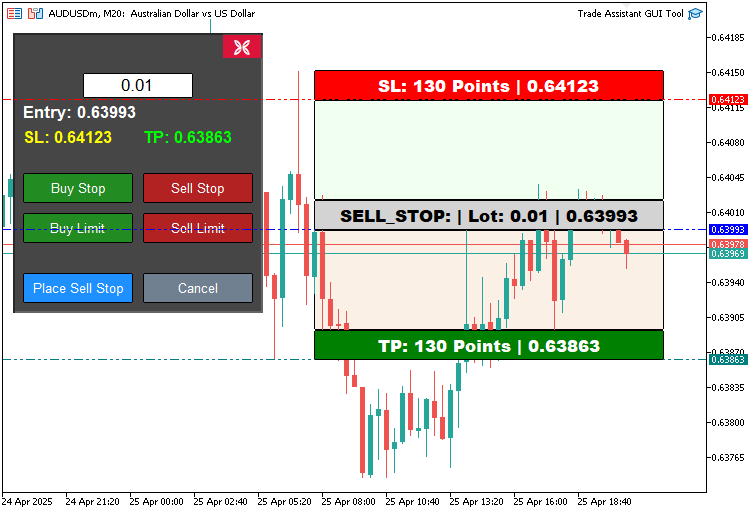
由图可见,我们能够动态地创建对应的价格图表工具。接下来我们需实现的功能是:使工具具备交互性,即允许用户通过拖拽操作在图表上自由移动该工具。为此,我们需在OnChartEvent事件处理器中实现以下逻辑:
//+------------------------------------------------------------------+
//| Chart event handler                                              |
//+------------------------------------------------------------------+
int prevMouseState = 0; //--- Variable to track previous mouse state

int mlbDownX1 = 0, mlbDownY1 = 0, mlbDownXD_R1 = 0, mlbDownYD_R1 = 0; //--- Variables for mouse down coordinates for REC1
int mlbDownX2 = 0, mlbDownY2 = 0, mlbDownXD_R2 = 0, mlbDownYD_R2 = 0; //--- Variables for mouse down coordinates for REC2
int mlbDownX3 = 0, mlbDownY3 = 0, mlbDownXD_R3 = 0, mlbDownYD_R3 = 0; //--- Variables for mouse down coordinates for REC3
int mlbDownX4 = 0, mlbDownY4 = 0, mlbDownXD_R4 = 0, mlbDownYD_R4 = 0; //--- Variables for mouse down coordinates for REC4
int mlbDownX5 = 0, mlbDownY5 = 0, mlbDownXD_R5 = 0, mlbDownYD_R5 = 0; //--- Variables for mouse down coordinates for REC5

bool movingState_R1 = false; //--- Flag for REC1 movement state
bool movingState_R3 = false; //--- Flag for REC3 movement state
bool movingState_R5 = false; //--- Flag for REC5 movement state
首先,我们为OnChartEvent函数定义一组变量,以实现交易辅助工具中的拖放功能。"prevMouseState"用于追踪鼠标状态变化,"mlbDownX1"、"mlbDownY1"、"mlbDownXD_R1"、"mlbDownYD_R1"(类似于REC2至REC5变量)在鼠标点击时存储"REC1"(止盈)、"REC3"(入场点)和"REC5"(止损)的初始与矩形区域边界坐标。布尔标识"movingState_R1"、"movingState_R3"、"movingState_R5"标记这些矩形是否正在被拖动。借助这些控制变量,我们即可定义价格工具的移动逻辑。
if(id == CHARTEVENT_MOUSE_MOVE && tool_visible) { //--- Handle mouse move events when tool is visible
   int MouseD_X = (int)lparam; //--- Get mouse x-coordinate
   int MouseD_Y = (int)dparam; //--- Get mouse y-coordinate
   int MouseState = (int)sparam; //--- Get mouse state

   int XD_R1 = (int)ObjectGetInteger(0, REC1, OBJPROP_XDISTANCE); //--- Get REC1 x-distance
   int YD_R1 = (int)ObjectGetInteger(0, REC1, OBJPROP_YDISTANCE); //--- Get REC1 y-distance
   int XS_R1 = (int)ObjectGetInteger(0, REC1, OBJPROP_XSIZE);     //--- Get REC1 x-size
   int YS_R1 = (int)ObjectGetInteger(0, REC1, OBJPROP_YSIZE);     //--- Get REC1 y-size

   int XD_R2 = (int)ObjectGetInteger(0, REC2, OBJPROP_XDISTANCE); //--- Get REC2 x-distance
   int YD_R2 = (int)ObjectGetInteger(0, REC2, OBJPROP_YDISTANCE); //--- Get REC2 y-distance
   int XS_R2 = (int)ObjectGetInteger(0, REC2, OBJPROP_XSIZE);     //--- Get REC2 x-size
   int YS_R2 = (int)ObjectGetInteger(0, REC2, OBJPROP_YSIZE);     //--- Get REC2 y-size

   int XD_R3 = (int)ObjectGetInteger(0, REC3, OBJPROP_XDISTANCE); //--- Get REC3 x-distance
   int YD_R3 = (int)ObjectGetInteger(0, REC3, OBJPROP_YDISTANCE); //--- Get REC3 y-distance
   int XS_R3 = (int)ObjectGetInteger(0, REC3, OBJPROP_XSIZE);     //--- Get REC3 x-size
   int YS_R3 = (int)ObjectGetInteger(0, REC3, OBJPROP_YSIZE);     //--- Get REC3 y-size

   int XD_R4 = (int)ObjectGetInteger(0, REC4, OBJPROP_XDISTANCE); //--- Get REC4 x-distance
   int YD_R4 = (int)ObjectGetInteger(0, REC4, OBJPROP_YDISTANCE); //--- Get REC4 y-distance
   int XS_R4 = (int)ObjectGetInteger(0, REC4, OBJPROP_XSIZE);     //--- Get REC4 x-size
   int YS_R4 = (int)ObjectGetInteger(0, REC4, OBJPROP_YSIZE);     //--- Get REC4 y-size

   int XD_R5 = (int)ObjectGetInteger(0, REC5, OBJPROP_XDISTANCE); //--- Get REC5 x-distance
   int YD_R5 = (int)ObjectGetInteger(0, REC5, OBJPROP_YDISTANCE); //--- Get REC5 y-distance
   int XS_R5 = (int)ObjectGetInteger(0, REC5, OBJPROP_XSIZE);     //--- Get REC5 x-size
   int YS_R5 = (int)ObjectGetInteger(0, REC5, OBJPROP_YSIZE);     //--- Get REC5 y-size

   if(prevMouseState == 0 && MouseState == 1) { //--- Check for mouse button down
      mlbDownX1 = MouseD_X; //--- Store mouse x-coordinate for REC1
      mlbDownY1 = MouseD_Y; //--- Store mouse y-coordinate for REC1
      mlbDownXD_R1 = XD_R1; //--- Store REC1 x-distance
      mlbDownYD_R1 = YD_R1; //--- Store REC1 y-distance

      mlbDownX2 = MouseD_X; //--- Store mouse x-coordinate for REC2
      mlbDownY2 = MouseD_Y; //--- Store mouse y-coordinate for REC2
      mlbDownXD_R2 = XD_R2; //--- Store REC2 x-distance
      mlbDownYD_R2 = YD_R2; //--- Store REC2 y-distance

      mlbDownX3 = MouseD_X; //--- Store mouse x-coordinate for REC3
      mlbDownY3 = MouseD_Y; //--- Store mouse y-coordinate for REC3
      mlbDownXD_R3 = XD_R3; //--- Store REC3 x-distance
      mlbDownYD_R3 = YD_R3; //--- Store REC3 y-distance

      mlbDownX4 = MouseD_X; //--- Store mouse x-coordinate for REC4
      mlbDownY4 = MouseD_Y; //--- Store mouse y-coordinate for REC4
      mlbDownXD_R4 = XD_R4; //--- Store REC4 x-distance
      mlbDownYD_R4 = YD_R4; //--- Store REC4 y-distance

      mlbDownX5 = MouseD_X; //--- Store mouse x-coordinate for REC5
      mlbDownY5 = MouseD_Y; //--- Store mouse y-coordinate for REC5
      mlbDownXD_R5 = XD_R5; //--- Store REC5 x-distance
      mlbDownYD_R5 = YD_R5; //--- Store REC5 y-distance

      if(MouseD_X >= XD_R1 && MouseD_X <= XD_R1 + XS_R1 && //--- Check if mouse is within REC1 bounds
         MouseD_Y >= YD_R1 && MouseD_Y <= YD_R1 + YS_R1) {
         movingState_R1 = true;                            //--- Enable REC1 movement
      }
      if(MouseD_X >= XD_R3 && MouseD_X <= XD_R3 + XS_R3 && //--- Check if mouse is within REC3 bounds
         MouseD_Y >= YD_R3 && MouseD_Y <= YD_R3 + YS_R3) {
         movingState_R3 = true;                            //--- Enable REC3 movement
      }
      if(MouseD_X >= XD_R5 && MouseD_X <= XD_R5 + XS_R5 && //--- Check if mouse is within REC5 bounds
         MouseD_Y >= YD_R5 && MouseD_Y <= YD_R5 + YS_R5) {
         movingState_R5 = true;                            //--- Enable REC5 movement
      }
   }
   if(movingState_R1) {                                                                        //--- Handle REC1 (TP) movement
      ChartSetInteger(0, CHART_MOUSE_SCROLL, false);                                           //--- Disable chart scrolling
      bool canMove = false;                                                                    //--- Flag to check if movement is valid
      if(selected_order_type == "BUY_STOP" || selected_order_type == "BUY_LIMIT") {            //--- Check for buy orders
         if(YD_R1 + YS_R1 < YD_R3) {                                                           //--- Ensure TP is above entry for buy orders
            canMove = true;                                                                    //--- Allow movement
            ObjectSetInteger(0, REC1, OBJPROP_YDISTANCE, mlbDownYD_R1 + MouseD_Y - mlbDownY1); //--- Update REC1 y-position
            ObjectSetInteger(0, REC2, OBJPROP_YDISTANCE, YD_R1 + YS_R1);                       //--- Update REC2 y-position
            ObjectSetInteger(0, REC2, OBJPROP_YSIZE, YD_R3 - (YD_R1 + YS_R1));                 //--- Update REC2 y-size
         }
      }
      else {                                                                                   //--- Handle sell orders
         if(YD_R1 > YD_R3 + YS_R3) {                                                           //--- Ensure TP is below entry for sell orders
            canMove = true;                                                                    //--- Allow movement
            ObjectSetInteger(0, REC1, OBJPROP_YDISTANCE, mlbDownYD_R1 + MouseD_Y - mlbDownY1); //--- Update REC1 y-position
            ObjectSetInteger(0, REC4, OBJPROP_YDISTANCE, YD_R3 + YS_R3);                       //--- Update REC4 y-position
            ObjectSetInteger(0, REC4, OBJPROP_YSIZE, YD_R1 - (YD_R3 + YS_R3));                 //--- Update REC4 y-size
         }
      }

      if(canMove) {           //--- If movement is valid
         datetime dt_TP = 0;  //--- Variable for TP time
         double price_TP = 0; //--- Variable for TP price
         int window = 0;      //--- Chart window

         ChartXYToTimePrice(0, XD_R1, YD_R1 + YS_R1, window, dt_TP, price_TP); //--- Convert chart coordinates to time and price
         ObjectSetInteger(0, TP_HL, OBJPROP_TIME, dt_TP);                      //--- Update TP horizontal line time
         ObjectSetDouble(0, TP_HL, OBJPROP_PRICE, price_TP);                   //--- Update TP horizontal line price

         update_Text(REC1, "TP: " + DoubleToString(MathAbs((Get_Price_d(TP_HL) - Get_Price_d(PR_HL)) / _Point), 0) + " Points | " + Get_Price_s(TP_HL)); //--- Update REC1 text
         update_Text(TP_LABEL, "TP: " + Get_Price_s(TP_HL));                                                                                             //--- Update TP label text
      }

      ChartRedraw(0); //--- Redraw chart
   }

   if(movingState_R5) {                                                                        //--- Handle REC5 (SL) movement
      ChartSetInteger(0, CHART_MOUSE_SCROLL, false);                                           //--- Disable chart scrolling
      bool canMove = false;                                                                    //--- Flag to check if movement is valid
      if(selected_order_type == "BUY_STOP" || selected_order_type == "BUY_LIMIT") {            //--- Check for buy orders
         if(YD_R5 > YD_R4) {                                                                   //--- Ensure SL is below entry for buy orders
            canMove = true;                                                                    //--- Allow movement
            ObjectSetInteger(0, REC5, OBJPROP_YDISTANCE, mlbDownYD_R5 + MouseD_Y - mlbDownY5); //--- Update REC5 y-position
            ObjectSetInteger(0, REC4, OBJPROP_YDISTANCE, YD_R3 + YS_R3);                       //--- Update REC4 y-position
            ObjectSetInteger(0, REC4, OBJPROP_YSIZE, YD_R5 - (YD_R3 + YS_R3));                 //--- Update REC4 y-size
         }
      }
      else {                                                                                   //--- Handle sell orders
         if(YD_R5 + YS_R5 < YD_R3) {                                                           //--- Ensure SL is above entry for sell orders
            canMove = true;                                                                    //--- Allow movement
            ObjectSetInteger(0, REC5, OBJPROP_YDISTANCE, mlbDownYD_R5 + MouseD_Y - mlbDownY5); //--- Update REC5 y-position
            ObjectSetInteger(0, REC2, OBJPROP_YDISTANCE, YD_R5 + YS_R5);                       //--- Update REC2 y-position
            ObjectSetInteger(0, REC2, OBJPROP_YSIZE, YD_R3 - (YD_R5 + YS_R5));                 //--- Update REC2 y-size
         }
      }

      if(canMove) {           //--- If movement is valid
         datetime dt_SL = 0;  //--- Variable for SL time
         double price_SL = 0; //--- Variable for SL price
         int window = 0;      //--- Chart window

         ChartXYToTimePrice(0, XD_R5, YD_R5 + YS_R5, window, dt_SL, price_SL); //--- Convert chart coordinates to time and price
         ObjectSetInteger(0, SL_HL, OBJPROP_TIME, dt_SL);                      //--- Update SL horizontal line time
         ObjectSetDouble(0, SL_HL, OBJPROP_PRICE, price_SL);                   //--- Update SL horizontal line price

         update_Text(REC5, "SL: " + DoubleToString(MathAbs((Get_Price_d(PR_HL) - Get_Price_d(SL_HL)) / _Point), 0) + " Points | " + Get_Price_s(SL_HL)); //--- Update REC5 text
         update_Text(SL_LABEL, "SL: " + Get_Price_s(SL_HL));                                                                                             //--- Update SL label text
      }

      ChartRedraw(0); //--- Redraw chart
   }

   if(movingState_R3) {                                                                  //--- Handle REC3 (Entry) movement
      ChartSetInteger(0, CHART_MOUSE_SCROLL, false);                                     //--- Disable chart scrolling
      ObjectSetInteger(0, REC3, OBJPROP_XDISTANCE, mlbDownXD_R3 + MouseD_X - mlbDownX3); //--- Update REC3 x-position
      ObjectSetInteger(0, REC3, OBJPROP_YDISTANCE, mlbDownYD_R3 + MouseD_Y - mlbDownY3); //--- Update REC3 y-position

      ObjectSetInteger(0, REC1, OBJPROP_XDISTANCE, mlbDownXD_R1 + MouseD_X - mlbDownX1); //--- Update REC1 x-position
      ObjectSetInteger(0, REC1, OBJPROP_YDISTANCE, mlbDownYD_R1 + MouseD_Y - mlbDownY1); //--- Update REC1 y-position

      ObjectSetInteger(0, REC2, OBJPROP_XDISTANCE, mlbDownXD_R2 + MouseD_X - mlbDownX2); //--- Update REC2 x-position
      ObjectSetInteger(0, REC2, OBJPROP_YDISTANCE, mlbDownYD_R2 + MouseD_Y - mlbDownY2); //--- Update REC2 y-position

      ObjectSetInteger(0, REC4, OBJPROP_XDISTANCE, mlbDownXD_R4 + MouseD_X - mlbDownX4); //--- Update REC4 x-position
      ObjectSetInteger(0, REC4, OBJPROP_YDISTANCE, mlbDownYD_R4 + MouseD_Y - mlbDownY4); //--- Update REC4 y-position

      ObjectSetInteger(0, REC5, OBJPROP_XDISTANCE, mlbDownXD_R5 + MouseD_X - mlbDownX5); //--- Update REC5 x-position
      ObjectSetInteger(0, REC5, OBJPROP_YDISTANCE, mlbDownYD_R5 + MouseD_Y - mlbDownY5); //--- Update REC5 y-position

      datetime dt_PRC = 0, dt_SL1 = 0, dt_TP1 = 0;        //--- Variables for time
      double price_PRC = 0, price_SL1 = 0, price_TP1 = 0; //--- Variables for price
      int window = 0;                                     //--- Chart window

      ChartXYToTimePrice(0, XD_R3, YD_R3 + YS_R3, window, dt_PRC, price_PRC); //--- Convert REC3 coordinates to time and price
      ChartXYToTimePrice(0, XD_R5, YD_R5 + YS_R5, window, dt_SL1, price_SL1); //--- Convert REC5 coordinates to time and price
      ChartXYToTimePrice(0, XD_R1, YD_R1 + YS_R1, window, dt_TP1, price_TP1); //--- Convert REC1 coordinates to time and price

      ObjectSetInteger(0, PR_HL, OBJPROP_TIME, dt_PRC);    //--- Update entry horizontal line time
      ObjectSetDouble(0, PR_HL, OBJPROP_PRICE, price_PRC); //--- Update entry horizontal line price

      ObjectSetInteger(0, TP_HL, OBJPROP_TIME, dt_TP1);    //--- Update TP horizontal line time
      ObjectSetDouble(0, TP_HL, OBJPROP_PRICE, price_TP1); //--- Update TP horizontal line price

      ObjectSetInteger(0, SL_HL, OBJPROP_TIME, dt_SL1);    //--- Update SL horizontal line time
      ObjectSetDouble(0, SL_HL, OBJPROP_PRICE, price_SL1); //--- Update SL horizontal line price

      update_Text(REC1, "TP: " + DoubleToString(MathAbs((Get_Price_d(TP_HL) - Get_Price_d(PR_HL)) / _Point), 0) + " Points | " + Get_Price_s(TP_HL)); //--- Update REC1 text
      update_Text(REC3, selected_order_type + ": | Lot: " + DoubleToString(lot_size, 2) + " | " + Get_Price_s(PR_HL));                                //--- Update REC3 text
      update_Text(REC5, "SL: " + DoubleToString(MathAbs((Get_Price_d(PR_HL) - Get_Price_d(SL_HL)) / _Point), 0) + " Points | " + Get_Price_s(SL_HL)); //--- Update REC5 text
      update_Text(PRICE_LABEL, "Entry: " + Get_Price_s(PR_HL));                                                                                       //--- Update entry label text
      update_Text(SL_LABEL, "SL: " + Get_Price_s(SL_HL));                                                                                             //--- Update SL label text
      update_Text(TP_LABEL, "TP: " + Get_Price_s(TP_HL));                                                                                             //--- Update TP label text

      ChartRedraw(0); //--- Redraw chart
   }

   if(MouseState == 0) {                            //--- Check if mouse button is released
      movingState_R1 = false;                       //--- Disable REC1 movement
      movingState_R3 = false;                       //--- Disable REC3 movement
      movingState_R5 = false;                       //--- Disable REC5 movement
      ChartSetInteger(0, CHART_MOUSE_SCROLL, true); //--- Enable chart scrolling
   }
   prevMouseState = MouseState;                     //--- Update previous mouse state
}
在此阶段,我们扩展OnChartEvent函数,以便在"tool_visible"为true且事件"id"为CHARTEVENT_MOUSE_MOVE时,能够处理鼠标移动以实现图表对象的拖拽操作。我们从参数"lparam"、"dparam"和"sparam"中提取鼠标坐标"MouseD_X"、"MouseD_Y"及鼠标状态"MouseState",并通过ObjectGetInteger函数获取矩形区域(如"REC1"的"XD_R1"、"YD_R1"、"XS_R1"、"YS_R1",类似于"REC2"至"REC5")的位置与尺寸信息。
当检测到鼠标点击事件(从"prevMouseState"的0变为"MouseState"的1)时,我们将当前鼠标坐标存储至"mlbDownX1"、"mlbDownY1",并将矩形区域的位置保存至"mlbDownXD_R1"、"mlbDownYD_R1"("REC2"至"REC5"同理);如果点击位置位于"REC1"、"REC3" 或 "REC5"的边界范围内,则将对应的拖拽状态标识"movingState_R1"、"movingState_R3"或"movingState_R5"设置为true。
当"movingState_R1"(止盈)激活时,通过ChartSetInteger禁用图表滚动,验证止盈位是否符合交易类型(如果为"BUY_STOP"或"BUY_LIMIT"买入订单,则止盈价格需高于入场价,反之,如果为卖出订单,则止盈价格需低于入场价),使用 ObjectSetInteger更新"REC1"和"REC2"/"REC4"矩形位置与尺寸,通过ChartXYToTimePrice将像素坐标转换为价格值,并调用ObjectSetDouble更新"TP_HL"(止盈水平线),再调用 "update_Text"函数,结合"Get_Price_d"(获取双精度价格)、"Get_Price_s"(格式化价格字符串)、DoubleToString(数值转字符串)和 MathAbs(计算绝对值)刷新界面文本。
类似地,对于"movingState_R5"(止损),我们调整"REC5"和"REC4"/"REC2"矩形位置与尺寸,更新"SL_HL",刷新界面文本。针对"movingState_R3"(入场点),我们移除所有矩形,并更新"PR_HL"、"TP_HL"、"SL_HL"和界面文本。
当鼠标释放("MouseState"值为0)时,我们重置"movingState"标识位、启用图表滚动功能,并更新"prevMouseState"变量,最后调用ChartRedraw函数刷新图表以呈现变更。最后需要说明的是,在移除程序时需彻底删除所有对象,并在价格变动时更新手数以反映用户修改——尽管这部分功能非必需,但可以保留。
//+------------------------------------------------------------------+
//| Expert deinitialization function                                 |
//+------------------------------------------------------------------+
void OnDeinit(const int reason) {
   deleteObjects(); //--- Delete tool objects
   deletePanel();   //--- Delete control panel objects
}

//+------------------------------------------------------------------+
//| Expert tick function                                             |
//+------------------------------------------------------------------+
void OnTick() {
   // Update lot size from edit field
   string lot_text = ObjectGetString(0, LOT_EDIT, OBJPROP_TEXT); //--- Get lot size text from edit field
   double new_lot = StringToDouble(lot_text);                    //--- Convert lot size text to double
   if(new_lot > 0) lot_size = new_lot;                           //--- Update lot size if valid
}
在此,我们为工具实现两个核心事件处理器:OnDeinit和OnTick。在OnDeinit函数中(每当将EA从图表移除时触发),我们调用"deleteObjects"函数删除图表对象(如"REC1"至"REC5"、"TP_HL"、"SL_HL"和"PR_HL"),并通过"deletePanel"函数移除控制面板对象(如"PANEL_BG"、"LOT_EDIT"以及"BUY_STOP_BTN"等按钮),确保程序退出时界面干净无残留。
在每次价格变动时触发的OnTick函数中,我们使用ObjectGetString函数从"LOT_EDIT"字段中提取文本内容,并通过StringToDouble函数将其转换为双精度类型,如果转换后的"new_lot"值为正数,则更新"lot_size"变量,确保工具的手数与用户输入保持同步。
编译后,我们得到以下输出。
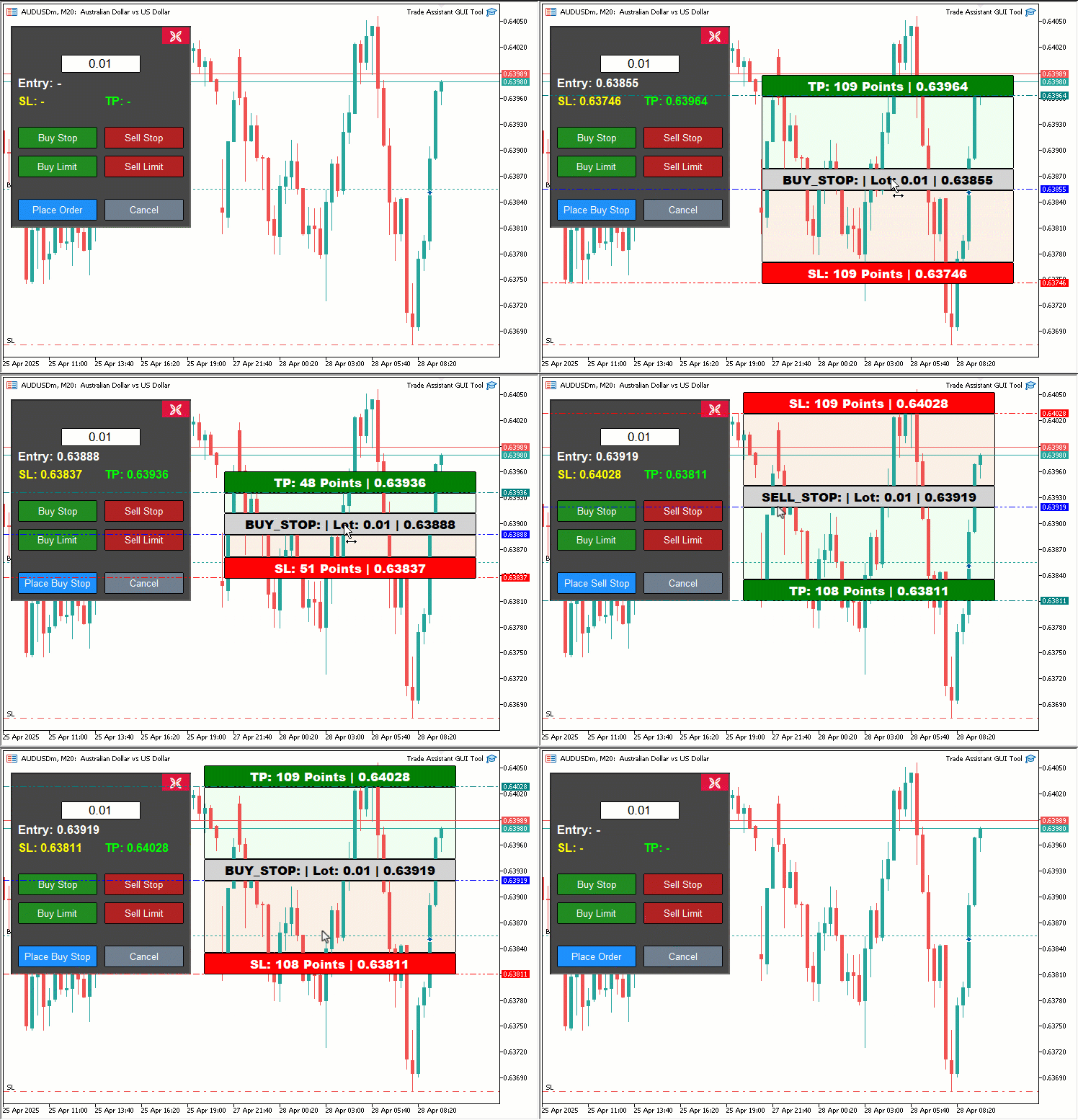
由可视化结果可见:当点击任意交易按钮时,系统会生成对应的交易价格工具;拖动该工具时,价格会实时更新,并同步显示在交易面板中,待用户点击“下单”按钮后,系统将根据当前价格动态地执行相应的交易。由此验证了我们已达成核心目标,后续仅需通过面板测试确保其运行良好——相关内容将在下一章节详述。
回测
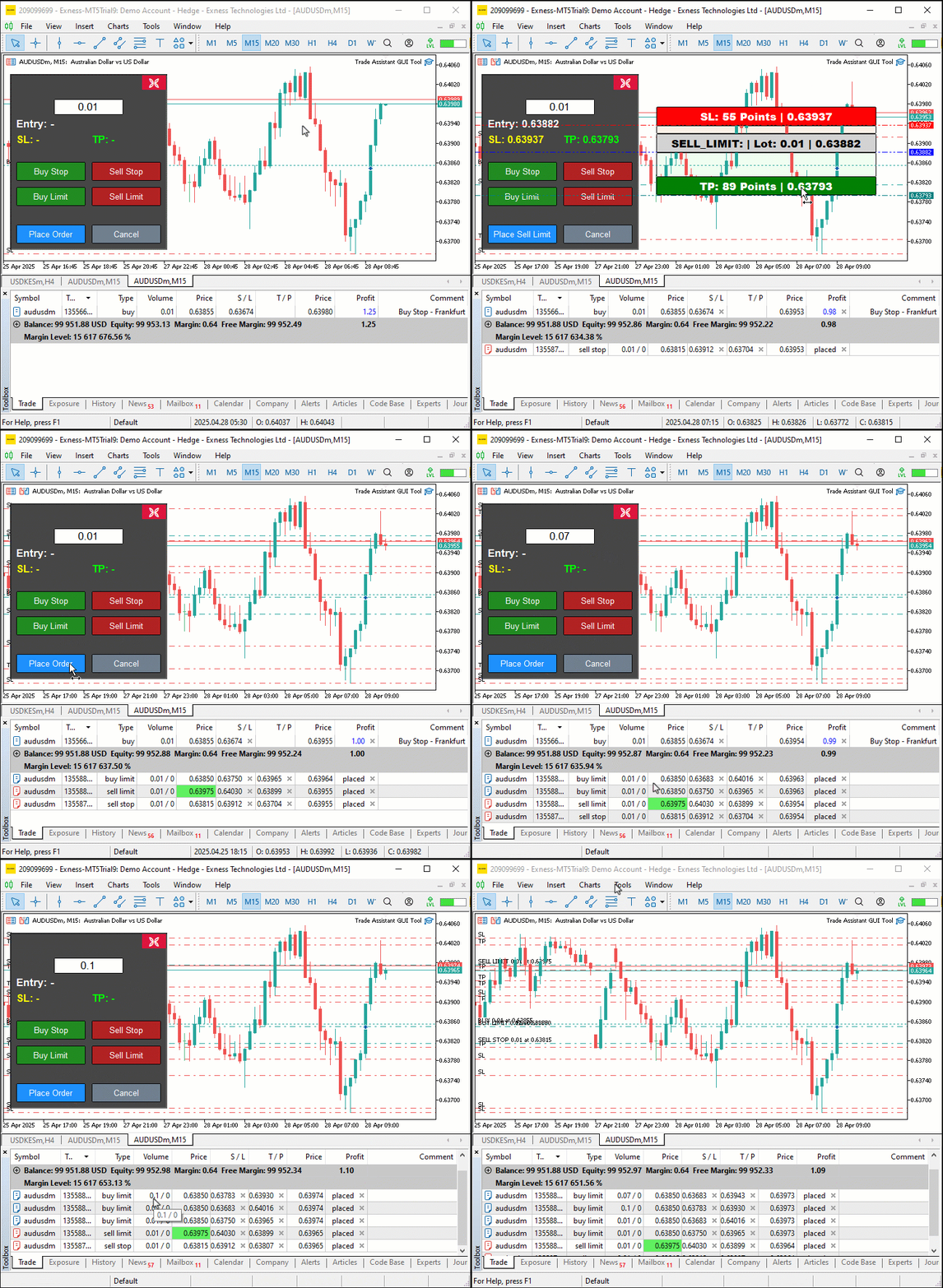
我们已完成测试,以下是整合后的可视化结果,以单张图形交换格式(GIF)位图图像形式呈现。
结论
总而言之,我们基于MQL5开发了一款交互式交易助手工具,将视觉精准性与直观操作相结合,优化了挂单的放置流程。我们演示了如何设计对用户友好的图形界面(GUI),并通过"createControlPanel"和"placeOrder"等函数实现核心功能,同时通过结构化编码与严格验证确保工具的可靠性。您可根据个人交易风格自定义该工具,从而显著提升订单放置效率。敬请期待后续内容,我们将介绍更先进的功能,如风险管理与可拖拽面板。请您持续关注。
本文由MetaQuotes Ltd译自英文
原文地址: https://www.mql5.com/en/articles/17931
注意: MetaQuotes Ltd.将保留所有关于这些材料的权利。全部或部分复制或者转载这些材料将被禁止。
本文由网站的一位用户撰写,反映了他们的个人观点。MetaQuotes Ltd 不对所提供信息的准确性负责,也不对因使用所述解决方案、策略或建议而产生的任何后果负责。

 突破机器学习的局限(第一部分):缺乏可互操作的度量指标

 MQL5 中的高级订单执行算法:TWAP、VWAP 和冰山订单
 您应当知道的 MQL5 向导技术(第 55 部分):配备优先经验回放的 SAC

新文章 MQL5交易工具(第一部分):构建交互式可视化挂单交易助手工具已发布:
作者:Allan Munene Mutiiria
Bratt Generator 让创意文本设计变得简单而有趣。对于希望自己的文字以大胆的风格和简洁、用户友好的体验脱颖而出的人来说,这是一款非常有用的工具。