

MQL5 中的交易策略自动化(第十五部分):可视化价格行为的谐波形态模式
 1 689
1 689
 4
4

引言
在上一篇文章(第十四部分)中,我们开发了一种交易分层策略,结合了指数平滑移动平均线(MACD)和相对强弱指标(RSI),并运用统计方法在趋势市场中动态调整仓位规模。现在,在第十五部分中,我们将专注于自动化密码(Cypher)谐波形态——这是一种基于斐波那契比率的反转形态,我们将开发一个EA,用于在 MQL5中检测、可视化并交易这一结构。我们将涵盖以下主题:
完成本文后,您将获得一个功能完备的程序,能够识别密码形态,在图表上以清晰的视觉效果进行标注,并以精准的方式执行交易——让我们开始吧!
理解密码形态的结构
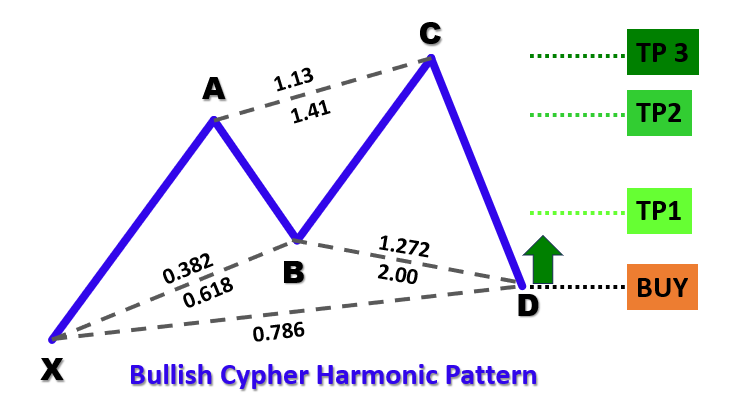
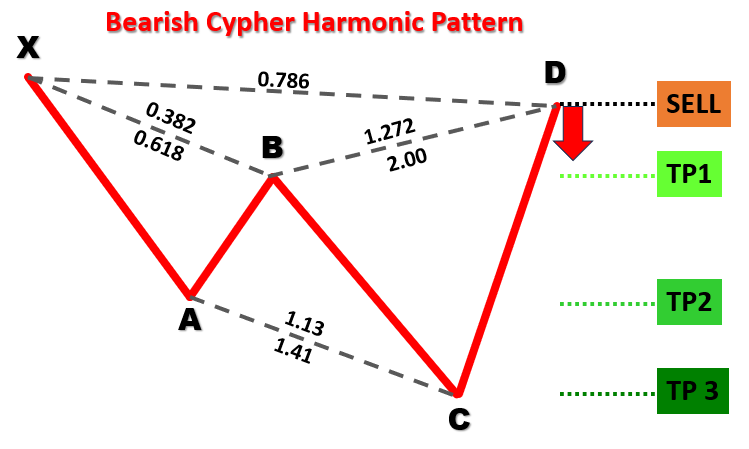
密码形态是一种由五个关键摆动点——X、A、B、C 和 D——定义的谐波交易形态,分为两种形式:看涨形态和看跌形态。在看涨密码形态中,结构形成"低-高-低-高-低"的序列,其中点 X 是摆动低点,点 A 是摆动高点,点 B 是摆动低点,点 C 是摆动高点,点 D 是摆动低点(且 D 低于 X)。相反,看跌密码形态形成"高-低-高-低-高"的序列,其中点 X 是摆动高点,点 D 位于 X 之上。以下是可视化形态类型。
看涨密码谐波形态:
看跌密码谐波形态:
为了识别这些形态,我们采用以下结构化方法:
- 定义 XA 脚:从点 X 到点 A 的初始移动为形态设定了参考距离,并确定方向(看涨形态为向上,看跌形态为向下)。
- 建立 AB 脚:对于两种形态类型,点 B 应该回撤 XA 移动的 38.2% 至 61.8% 之间,确认对初始移动的适度修正。
- 分析 BC 脚:它应延伸 AB 脚的 127.2% 至 141.4% 之间,确保在最后一脚之前出现强劲的反向移动。
- 设定 CD 脚:最后一脚应回撤 XC 移动(从 X 到 C)的约 78.6%,标记潜在的反转区域。
通过应用这些几何和基于斐波那契的标准,我们的交易系统将系统地识别历史价格数据中有效的密码形态。一旦确认形态,程序将在图表上可视化该结构,使用标注的三角形、趋势线以及点 X、A、B、C 和 D 的标签,以及交易位置。这种设置能够根据计算得出的入场位、止损位和止盈位实现自动交易执行,利用形态对市场反转的预测能力。
在MQL5中的实现
要在 MQL5 中创建程序,请打开MetaEditor,转到“导航器”窗口,找到“指标”文件夹,点击“新建”选项卡,然后按照提示创建文件。文件创建完成后,在代码编环境下,我们需要声明一些将在整个程序中使用的全局变量。
//+------------------------------------------------------------------+
//|                        Copyright 2025, Forex Algo-Trader, Allan. |
//|                                 "https://t.me/Forex_Algo_Trader" |
//+------------------------------------------------------------------+
#property copyright "Forex Algo-Trader, Allan"
#property link      "https://t.me/Forex_Algo_Trader"
#property version   "1.00"
#property description "This EA trades based on Cypher Strategy with visualization"
#property strict //--- Forces strict coding rules to catch errors early

//--- Include the Trade library from MQL5 to handle trading operations like buying and selling
#include <Trade\Trade.mqh>
//--- Create an instance (object) of the CTrade class to use for placing trades
CTrade obj_Trade;

//--- Input parameters let the user customize the EA without editing the code
input int    SwingHighCount    = 5;      // How many bars to check on the left to find a swing point (high or low)
input int    SwingLowCount     = 5;      // How many bars to check on the right to confirm a swing point
input double FibonacciTolerance = 0.10;  // Allowed error margin (10%) for Fibonacci ratios in the pattern
input double TradeVolume       = 0.01;   // Size of the trade (e.g., 0.01 lots is small for testing)
input bool   TradingEnabled    = true;   // True = EA can trade; False = only visualize patterns

//--- Define the Cypher pattern rules as a comment for reference
//--- Bullish Cypher: X (low), A (high), B (low), C (high), D (low)
//---   XA > 0; AB = 0.382-0.618 XA; BC = 1.272-1.414 AB; CD = 0.786 XC; D < X
//--- Bearish Cypher: X (high), A (low), B (high), C (low), D (high)
//---   XA > 0; AB = 0.382-0.618 XA; BC = 1.272-1.414 AB; CD = 0.786 XC; D > X

//--- Define a structure (like a custom data type) to store swing point info
struct SwingPoint {
   datetime TimeOfSwing;    //--- When the swing happened (date and time of the bar)
   double   PriceAtSwing;   //--- Price at the swing (high or low)
   bool     IsSwingHigh;    //--- True = swing high; False = swing low
};

//--- Create a dynamic array to hold all detected swing points
SwingPoint SwingPoints[];
在这里,我们通过包含 “Trade.mqh” 库来启用交易操作,并创建一个名为 “obj_Trade” 的 “CTrade” 类实例用于执行交易,从而启动密码形态交易系统的 MQL5 实现。
我们定义了 input 参数——用于摆动点检测的 “SwingHighCount” 和 “SwingLowCount”(均为 5)、用于斐波那契比率灵活性的 “FibonacciTolerance”(0.10)、用于交易规模的 “TradeVolume”(0.01 手),以及用于切换交易功能的 “TradingEnabled”(true)——允许用户进行自定义。
定义 “SwingPoint” 结构体,其中包含 “TimeOfSwing”(datetime,日期时间)、“PriceAtSwing”(double,双精度浮点数)和 “IsSwingHigh”(boolean,布尔值)用于存储摆动点详细信息,动态数组 “SwingPoints” 则保存所有检测到的摆动点以进行形态分析。
接下来,我们可以定义辅助函数,帮助我们在图表上可视化形态。
//+------------------------------------------------------------------+
//| Helper: Draw a filled triangle                                   |
//+------------------------------------------------------------------+
//--- Function to draw a triangle on the chart to highlight pattern segments
void DrawTriangle(string TriangleName, datetime Time1, double Price1, datetime Time2, double Price2, datetime Time3, double Price3, color LineColor, int LineWidth, bool FillTriangle, bool DrawBehind) {
   //--- Create a triangle object using three points (time, price) on the chart
   if(ObjectCreate(0, TriangleName, OBJ_TRIANGLE, 0, Time1, Price1, Time2, Price2, Time3, Price3)) {
      ObjectSetInteger(0, TriangleName, OBJPROP_COLOR, LineColor);      //--- Set the triangle’s color (e.g., blue or red)
      ObjectSetInteger(0, TriangleName, OBJPROP_STYLE, STYLE_SOLID);    //--- Use a solid line style
      ObjectSetInteger(0, TriangleName, OBJPROP_WIDTH, LineWidth);      //--- Set the line thickness
      ObjectSetInteger(0, TriangleName, OBJPROP_FILL, FillTriangle);    //--- Fill the triangle with color if true
      ObjectSetInteger(0, TriangleName, OBJPROP_BACK, DrawBehind);      //--- Draw behind candles if true
   }
}
在这里,我们实现 “DrawTriangle” 函数,通过在 MetaTrader 5 图表上绘制填充三角形来增强密码形态的可视化,突出显示形态的特定段落,帮助交易者更好地理解。该函数接受多个参数来定义三角形的外观和位置:“TriangleName”(string,字符串)为对象提供唯一标识符;“Time1”、“Time2” 和 “Time3”(datetime,日期时间)指定三角形三个顶点的时间坐标;“Price1”、“Price2” 和 “Price3”(double,双精度浮点数)则设置相应的价格水平。
其他参数包括 “LineColor”(color,颜色)用于确定轮廓颜色(例如:看涨形态用蓝色,看跌形态用红色)、“LineWidth”(int,整数)用于设置三角形边框的粗细、“FillTriangle”(bool,布尔值)用于决定是否用颜色填充三角形,以及 “DrawBehind”(bool,布尔值)用于控制三角形是否渲染在蜡烛图后方,以避免遮挡价格数据。
在函数内部,我们使用 ObjectCreate 函数在图表上创建三角形对象,将对象类型指定为 OBJ_TRIANGLE,并传入三个点的时间和价格坐标。函数在继续配置属性之前会检查对象是否成功创建。
如果创建成功,我们多次调用 ObjectSetInteger 函数来设置三角形的属性:OBJPROP_COLOR 赋值 “LineColor”,“OBJPROP_STYLE” 设置为 “STYLE_SOLID” 以实现实线轮廓,“OBJPROP_WIDTH” 应用 “LineWidth” 值,“OBJPROP_FILL” 使用 “FillTriangle” 布尔值来启用或禁用填充,而 OBJPROP_BACK 则使用 “DrawBehind” 布尔值来确保当其为 true 时三角形显示在K线图后方。
现在我们可以通过相同的逻辑定义其余的辅助函数。
//+------------------------------------------------------------------+
//| Helper: Draw a trend line                                        |
//+------------------------------------------------------------------+
//--- Function to draw a straight line between two points on the chart
void DrawTrendLine(string LineName, datetime StartTime, double StartPrice, datetime EndTime, double EndPrice, color LineColor, int LineWidth, int LineStyle) {
   //--- Create a trend line object connecting two points (start time/price to end time/price)
   if(ObjectCreate(0, LineName, OBJ_TREND, 0, StartTime, StartPrice, EndTime, EndPrice)) {
      ObjectSetInteger(0, LineName, OBJPROP_COLOR, LineColor);      //--- Set the line color
      ObjectSetInteger(0, LineName, OBJPROP_STYLE, LineStyle);      //--- Set line style (e.g., solid or dashed)
      ObjectSetInteger(0, LineName, OBJPROP_WIDTH, LineWidth);      //--- Set line thickness
      ObjectSetInteger(0, LineName, OBJPROP_BACK, true);
   }
}

//+------------------------------------------------------------------+
//| Helper: Draw a dotted trend line                                 |
//+------------------------------------------------------------------+
//--- Function to draw a horizontal dotted line (e.g., for entry or take-profit levels)
void DrawDottedLine(string LineName, datetime StartTime, double LinePrice, datetime EndTime, color LineColor) {
   //--- Create a horizontal line from start time to end time at a fixed price
   if(ObjectCreate(0, LineName, OBJ_TREND, 0, StartTime, LinePrice, EndTime, LinePrice)) {
      ObjectSetInteger(0, LineName, OBJPROP_COLOR, LineColor);      //--- Set the line color
      ObjectSetInteger(0, LineName, OBJPROP_STYLE, STYLE_DOT);      //--- Use dotted style
      ObjectSetInteger(0, LineName, OBJPROP_WIDTH, 1);              //--- Thin line
   }
}

//+------------------------------------------------------------------+
//| Helper: Draw anchored text label (for pivots and levels)         |
//+------------------------------------------------------------------+
//--- Function to place text labels (e.g., "X" or "TP1") on the chart
void DrawTextLabel(string LabelName, string LabelText, datetime LabelTime, double LabelPrice, color TextColor, int FontSize, bool IsAbove) {
   //--- Create a text object at a specific time and price
   if(ObjectCreate(0, LabelName, OBJ_TEXT, 0, LabelTime, LabelPrice)) {
      ObjectSetString(0, LabelName, OBJPROP_TEXT, LabelText);          //--- Set the text to display
      ObjectSetInteger(0, LabelName, OBJPROP_COLOR, TextColor);        //--- Set text color
      ObjectSetInteger(0, LabelName, OBJPROP_FONTSIZE, FontSize);      //--- Set text size
      ObjectSetString(0, LabelName, OBJPROP_FONT, "Arial Bold");       //--- Use bold Arial font
      //--- Position text below if it’s a high point, above if it’s a low point
      ObjectSetInteger(0, LabelName, OBJPROP_ANCHOR, IsAbove ? ANCHOR_BOTTOM : ANCHOR_TOP);
      ObjectSetInteger(0, LabelName, OBJPROP_ALIGN, ALIGN_CENTER);     //--- Center the text
   }
}
在这里,我们实现 “DrawTrendLine” 函数,使用 “LineName”(字符串)、“StartTime”、“EndTime”(日期时间)、“StartPrice”、“EndPrice”(双精度浮点数)、“LineColor”(颜色)、“LineWidth”(整数)和 “LineStyle”(整数)等参数,在图表上绘制连接密码形态摆动点的直线。我们使用 ObjectCreate 函数创建 “OBJ_TREND” 趋势线,如果创建成功,则使用 ObjectSetInteger 设置 “OBJPROP_COLOR”、“OBJPROP_STYLE”、“OBJPROP_WIDTH” 和 “OBJPROP_BACK”(true),使线条显示在K线图后方。
“DrawDottedLine” 函数为交易位绘制水平虚线,使用 “LineName”(字符串)、“StartTime”、“EndTime”(日期时间)、“LinePrice”(双精度浮点数)和 “LineColor”(颜色)等参数。我们使用 ObjectCreate 在固定价格处创建 OBJ_TREND 对象,并使用 ObjectSetInteger 设置 “OBJPROP_COLOR”、“OBJPROP_STYLE” 为 “STYLE_DOT”,“OBJPROP_WIDTH” 为 1,作为细微的标记。
“DrawTextLabel” 函数为摆动点或交易位放置文本标签,接受 “LabelName”、“LabelText”(字符串)、“LabelTime”(日期时间)、“LabelPrice”(双精度浮点数)、“TextColor”(颜色)、“FontSize”(整数)和 “IsAbove”(布尔值)等参数。我们使用 ObjectCreate 创建 OBJ_TEXT 对象,并使用 ObjectSetString 设置 “OBJPROP_TEXT” 和 “OBJPROP_FONT”(“Arial Bold”),使用 ObjectSetInteger 设置 “OBJPROP_COLOR”、“OBJPROP_FONTSIZE”、“OBJPROP_ANCHOR”(“ANCHOR_BOTTOM” 或 “ANCHOR_TOP”)和 “OBJPROP_ALIGN”(ALIGN_CENTER),以确保标注清晰可见。
有了这些变量和函数,我们可以进入 OnTick 事件处理程序,开始形态识别。但是,由于我们不需要在每个 tick 上处理任何内容,因此需要定义一个逻辑,使我们能够每根 K 线处理一次识别。
//+------------------------------------------------------------------+
//| Expert tick function                                             |
//+------------------------------------------------------------------+
//--- Main function that runs every time a new price tick arrives
void OnTick() {
   //--- Use a static variable to track the last bar’s time so we only process new bars
   static datetime LastProcessedBarTime = 0;
   //--- Get the time of the second-to-last bar (latest complete bar)
   datetime CurrentBarTime = iTime(_Symbol, _Period, 1);
   //--- If no new bar has formed, exit to avoid over-processing
   if(CurrentBarTime == LastProcessedBarTime)
      return;
   LastProcessedBarTime = CurrentBarTime;  //--- Update to the current bar
}
在 OnTick 事件处理程序中,该程序作为 MetaTrader 5 平台上每当有新价格 tick 到达时执行的主事件处理程序,我们声明一个静态变量 “LastProcessedBarTime” 来跟踪最后处理过的 K 线时间戳,确保函数仅处理新 K 线以优化性能。
使用 iTime 函数,我们获取倒数第二根 K 线(最新的完整 K 线)的时间,并将其存储在 “CurrentBarTime” 中。然后,我们将 “CurrentBarTime” 与 “LastProcessedBarTime” 进行比较,以检查是否形成了新 K 线;如果两者相等,我们使用 return 语句退出函数,避免重复处理。
如果检测到新 K 线,我们将 “LastProcessedBarTime” 更新为 “CurrentBarTime”,允许函数继续执行后续逻辑,分析价格数据并检测密码形态。接下来,我们需要定义将帮助定义摆动点位的变量。
//--- Clear the SwingPoints array to start fresh each time
ArrayResize(SwingPoints, 0);
//--- Get the total number of bars on the chart
int TotalBars = Bars(_Symbol, _Period);
int StartBarIndex = SwingHighCount;         //--- Start checking swings after SwingHighCount bars
int EndBarIndex = TotalBars - SwingLowCount; //--- Stop before the last SwingLowCount bars
我们使用 ArrayResize 函数将 “SwingPoints” 数组的大小设置为 0 来清空该数组,确保每次新 K 线开始时都有一个全新的起点来存储新的摆动点。然后,我们使用 Bars 函数获取图表上 K 线的总数,并将结果存储在 “TotalBars” 中,该变量定义了要分析的历史数据范围。
为了聚焦于与摆动点检测相关的 K 线,我们将 “StartBarIndex” 设置为 “SwingHighCount” 的值,标记开始检查摆动点的最早 K 线,并将 “EndBarIndex” 计算为 “TotalBars” 减去 “SwingLowCount”,确保我们在最后几根 K 线之前停止,为确认摆动点预留足够的数据。
有了这些设置,我们可以循环遍历并收集摆动点数据。
//--- Loop through bars to find swing highs and lows (swing points)
for(int BarIndex = EndBarIndex - 1; BarIndex >= StartBarIndex; BarIndex--) {
   bool IsSwingHigh = true;   //--- Assume it’s a high until proven otherwise
   bool IsSwingLow = true;    //--- Assume it’s a low until proven otherwise
   double CurrentBarHigh = iHigh(_Symbol, _Period, BarIndex); //--- Get the high of this bar
   double CurrentBarLow = iLow(_Symbol, _Period, BarIndex);   //--- Get the low of this bar
   //--- Check bars to the left and right to confirm it’s a swing point
   for(int NeighborIndex = BarIndex - SwingHighCount; NeighborIndex <= BarIndex + SwingLowCount; NeighborIndex++) {
      if(NeighborIndex < 0 || NeighborIndex >= TotalBars || NeighborIndex == BarIndex) //--- Skip invalid bars or current bar
         continue;
      if(iHigh(_Symbol, _Period, NeighborIndex) > CurrentBarHigh) //--- If any bar is higher, not a high
         IsSwingHigh = false;
      if(iLow(_Symbol, _Period, NeighborIndex) < CurrentBarLow)   //--- If any bar is lower, not a low
         IsSwingLow = false;
   }
   //--- If it’s a high or low, store it in the SwingPoints array
   if(IsSwingHigh || IsSwingLow) {
      SwingPoint NewSwing;
      NewSwing.TimeOfSwing = iTime(_Symbol, _Period, BarIndex); //--- Store the bar’s time
      NewSwing.PriceAtSwing = IsSwingHigh ? CurrentBarHigh : CurrentBarLow; //--- Store high or low price
      NewSwing.IsSwingHigh = IsSwingHigh;              //--- Mark as high or low
      int CurrentArraySize = ArraySize(SwingPoints);   //--- Get current array size
      ArrayResize(SwingPoints, CurrentArraySize + 1);  //--- Add one more slot
      SwingPoints[CurrentArraySize] = NewSwing;        //--- Add the swing to the array
   }
}
在这里,我们实现摆动点检测逻辑,以识别密码形态的摆动高点和摆动低点。我们使用 for 循环从 “EndBarIndex - 1” 降序遍历到 “StartBarIndex”,“BarIndex” 跟踪当前 K 线。对于每根 K 线,我们将 “IsSwingHigh” 和 “IsSwingLow” 初始化为 true,假设该 K 线是摆动点,除非被证明不是,然后使用 iHigh 和 iLow 函数获取该 K 线的高点和低点价格,并将其存储在 “CurrentBarHigh” 和 “CurrentBarLow” 中。嵌套的 for 循环检查从 “BarIndex - SwingHighCount” 到 “BarIndex + SwingLowCount” 的相邻 K 线,使用 “NeighborIndex” 跳过无效索引或当前 K 线本身(使用 continue 语句)。
如果任何相邻 K 线的高点超过 “CurrentBarHigh” 或低点低于 “CurrentBarLow”(通过 iHigh 和 iLow),我们将 “IsSwingHigh” 或 “IsSwingLow” 相应地设置为 false。如果任何一个仍然为 true,我们创建一个名为 “NewSwing” 的 “SwingPoint” 实例,将从 iTime 获取的 K 线时间分配给 “TimeOfSwing”,根据 “IsSwingHigh” 将 “PriceAtSwing” 设置为 “CurrentBarHigh” 或 “CurrentBarLow”,并相应设置 “IsSwingHigh”。
然后,我们使用 “ArraySize” 函数获取 “SwingPoints” 的当前大小,使用 ArrayResize 将其扩大一个位置,并将 “NewSwing” 存储在新索引处的 “SwingPoints” 数组中,从而构建用于形态分析的摆动点集合。当我们使用 ArrayPrint(SwingPoints) 函数打印数据时,我们会得到以下结果。
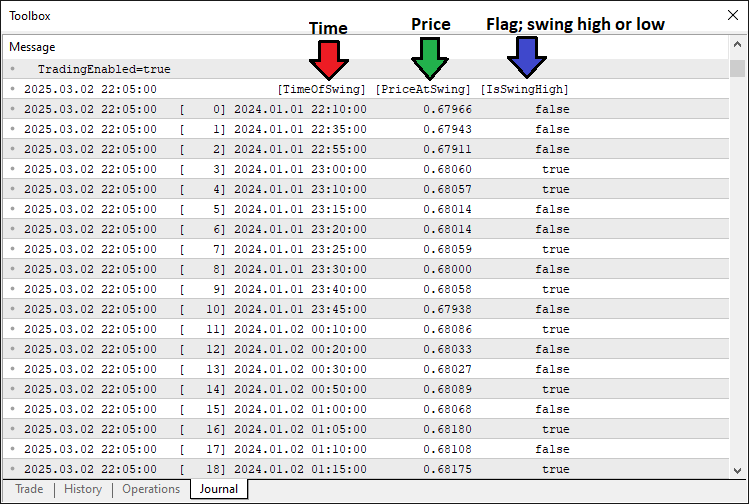
有了这些数据,我们可以提取枢轴点;如果我们有足够的枢轴点,就可以分析并检测形态。以下是我们为实现这一目标而实施的逻辑。
//--- Check if we have enough swing points (need 5 for Cypher: X, A, B, C, D)
int TotalSwingPoints = ArraySize(SwingPoints);
if(TotalSwingPoints < 5)
   return;  //--- Exit if not enough swing points

//--- Assign the last 5 swing points to X, A, B, C, D (most recent is D)
SwingPoint PointX = SwingPoints[TotalSwingPoints - 5];
SwingPoint PointA = SwingPoints[TotalSwingPoints - 4];
SwingPoint PointB = SwingPoints[TotalSwingPoints - 3];
SwingPoint PointC = SwingPoints[TotalSwingPoints - 2];
SwingPoint PointD = SwingPoints[TotalSwingPoints - 1];

//--- Variables to track if we found a pattern and its type
bool PatternFound = false;
string PatternDirection = "";

//--- Check for Bearish Cypher pattern
if(PointX.IsSwingHigh && !PointA.IsSwingHigh && PointB.IsSwingHigh && !PointC.IsSwingHigh && PointD.IsSwingHigh) {
   double LegXA = PointX.PriceAtSwing - PointA.PriceAtSwing;  //--- Calculate XA leg (should be positive)
   if(LegXA > 0) {
      double LegAB = PointB.PriceAtSwing - PointA.PriceAtSwing; //--- AB leg
      double LegBC = PointB.PriceAtSwing - PointC.PriceAtSwing; //--- BC leg
      double LegXC = PointX.PriceAtSwing - PointC.PriceAtSwing; //--- XC leg
      double LegCD = PointD.PriceAtSwing - PointC.PriceAtSwing; //--- CD leg
      //--- Check Fibonacci rules and D > X for bearish
      if(LegAB >= 0.382 * LegXA && LegAB <= 0.618 * LegXA &&
         LegBC >= 1.272 * LegAB && LegBC <= 1.414 * LegAB &&
         MathAbs(LegCD - 0.786 * LegXC) <= FibonacciTolerance * LegXC && PointD.PriceAtSwing > PointX.PriceAtSwing) {
         PatternFound = true;
         PatternDirection = "Bearish";
      }
   }
}
//--- Check for Bullish Cypher pattern
else if(!PointX.IsSwingHigh && PointA.IsSwingHigh && !PointB.IsSwingHigh && PointC.IsSwingHigh && !PointD.IsSwingHigh) {
   double LegXA = PointA.PriceAtSwing - PointX.PriceAtSwing;  //--- Calculate XA leg (should be positive)
   if(LegXA > 0) {
      double LegAB = PointA.PriceAtSwing - PointB.PriceAtSwing; //--- AB leg
      double LegBC = PointC.PriceAtSwing - PointB.PriceAtSwing; //--- BC leg
      double LegXC = PointC.PriceAtSwing - PointX.PriceAtSwing; //--- XC leg
      double LegCD = PointC.PriceAtSwing - PointD.PriceAtSwing; //--- CD leg
      //--- Check Fibonacci rules and D < X for bullish
      if(LegAB >= 0.382 * LegXA && LegAB <= 0.618 * LegXA &&
         LegBC >= 1.272 * LegAB && LegBC <= 1.414 * LegAB &&
         MathAbs(LegCD - 0.786 * LegXC) <= FibonacciTolerance * LegXC && PointD.PriceAtSwing < PointX.PriceAtSwing) {
         PatternFound = true;
         PatternDirection = "Bullish";
      }
   }
}
在这里,我们继续验证 密码形态,通过检查是否存在足够的摆动点,并分析最后五个点以确定形态是否形成。我们使用 ArraySize 函数确定 “SwingPoints” 数组中元素的数量,将其存储在 “TotalSwingPoints” 中;如果 “TotalSwingPoints” 小于 5,则使用 return 语句退出,因为密码形态需要五个点(X、A、B、C、D)。如果存在足够的点,我们从 “SwingPoints” 数组中将最后五个摆动点分别分配给 “PointX”、“PointA”、“PointB”、“PointC” 和 “PointD”,索引范围从 “TotalSwingPoints - 5” 到 “TotalSwingPoints - 1”,其中 “PointD” 是最近的点。
然后,我们将 “PatternFound” 初始化为 false,以跟踪是否检测到有效形态,并将 “PatternDirection” 初始化为空字符串,用于存储形态类型。要检查看跌密码形态,我们验证 “PointX.IsSwingHigh” 为 true,“PointA.IsSwingHigh” 为 false,“PointB.IsSwingHigh” 为 true,“PointC.IsSwingHigh” 为 false,“PointD.IsSwingHigh” 为 true,确保高-低-高-低-高的序列。
如果条件满足,我们计算各脚的长度:“LegXA” 为 “PointX.PriceAtSwing” 减去 “PointA.PriceAtSwing”(看跌形态为正),“LegAB” 为 “PointB.PriceAtSwing” 减去 “PointA.PriceAtSwing”,“LegBC” 为 “PointB.PriceAtSwing” 减去 “PointC.PriceAtSwing”,“LegXC” 为 “PointX.PriceAtSwing” 减去 “PointC.PriceAtSwing”,“LegCD” 为 “PointD.PriceAtSwing” 减去 “PointC.PriceAtSwing”。
我们验证斐波那契比率——确保 “LegAB” 是 “LegXA” 的 38.2% 至 61.8%,“LegBC” 是 “LegAB” 的 127.2% 至 141.4%,“LegCD” 使用 “MathAbs” 函数在 “LegXC” 的 78.6% 的 “FibonacciTolerance” 容差范围内,且 “PointD.PriceAtSwing” 超过 “PointX.PriceAtSwing”——如果所有条件都满足,则将 “PatternFound” 设置为 true,“PatternDirection” 设置为 “Bearish”(看跌)。
对于看涨密码形态,我们检查相反的序列:“PointX.IsSwingHigh” 为 false,“PointA.IsSwingHigh” 为 true,“PointB.IsSwingHigh” 为 false,“PointC.IsSwingHigh” 为 true,“PointD.IsSwingHigh” 为 false。
我们计算 “LegXA” 为 “PointA.PriceAtSwing” 减去 “PointX.PriceAtSwing”(看涨形态为正),“LegAB” 为 “PointA.PriceAtSwing” 减去 “PointB.PriceAtSwing”,“LegBC” 为 “PointC.PriceAtSwing” 减去 “PointB.PriceAtSwing”,“LegXC” 为 “PointC.PriceAtSwing” 减去 “PointX.PriceAtSwing”,“LegCD” 为 “PointC.PriceAtSwing” 减去 “PointD.PriceAtSwing”。
同样的斐波那契检查适用,但要求 “PointD.PriceAtSwing” 低于 “PointX.PriceAtSwing”,如果有效则将 “PatternFound” 更新为 true,“PatternDirection” 更新为 “Bullish”(看涨),从而启用后续的可视化和交易逻辑。如果发现形态,我们可以在图表上对其进行可视化。
//--- If a pattern is found, visualize it and trade
if(PatternFound) {
   //--- Log the pattern detection in the Experts tab
   Print(PatternDirection, " Cypher pattern detected at ", TimeToString(PointD.TimeOfSwing, TIME_DATE|TIME_MINUTES));

   //--- Create a unique prefix for all chart objects using D’s time
   string ObjectPrefix = "CY_" + IntegerToString(PointD.TimeOfSwing);
   //--- Set triangle color: blue for bullish, red for bearish
   color TriangleColor = (PatternDirection == "Bullish") ? clrBlue : clrRed;

   //--- **Visualization Steps**
   //--- 1. Draw two filled triangles to highlight the pattern
   DrawTriangle(ObjectPrefix + "_Triangle1", PointX.TimeOfSwing, PointX.PriceAtSwing, PointA.TimeOfSwing, PointA.PriceAtSwing, PointB.TimeOfSwing, PointB.PriceAtSwing, TriangleColor, 2, true, true);
   DrawTriangle(ObjectPrefix + "_Triangle2", PointB.TimeOfSwing, PointB.PriceAtSwing, PointC.TimeOfSwing, PointC.PriceAtSwing, PointD.TimeOfSwing, PointD.PriceAtSwing, TriangleColor, 2, true, true);
}
当 “PatternFound” 为 true 时,我们继续处理检测到的密码形态的可视化。我们使用 Print 函数在专家日志中记录形态检测,输出 “PatternDirection”,后跟一条消息,表明检测到密码形态,时间由 TimeToString 函数使用 “PointD.TimeOfSwing” 和 “TIME_DATE|TIME_MINUTES” 标志进行格式化,以提高可读性。
为了组织图表对象,我们通过将 “CY_” 与通过 IntegerToString 函数获取的 “PointD.TimeOfSwing” 的字符串表示形式连接起来,创建一个唯一前缀 “ObjectPrefix”,确保每个形态的对象都有独特的名称。然后,我们使用三元运算符设置 “TriangleColor”,根据 “PatternDirection” 为 “Bullish” 形态分配 “clrBlue”(蓝色),为 “Bearish” 形态分配 “clrRed”(红色)。
对于可视化,我们调用 “DrawTriangle” 函数两次:第一次绘制名为 “ObjectPrefix + ‘_Triangle1’” 的三角形,连接 “PointX”、“PointA” 和 “PointB”,使用它们的 “TimeOfSwing” 和 “PriceAtSwing” 值;第二次绘制 “ObjectPrefix + ‘_Triangle2’”,连接 “PointB”、“PointC” 和 “PointD”,两者都使用 “TriangleColor”,线宽为 2,并设置填充和在蜡烛图后方绘制为 true,从而在图表上突出显示形态结构。以下是到目前为止我们实现的效果。
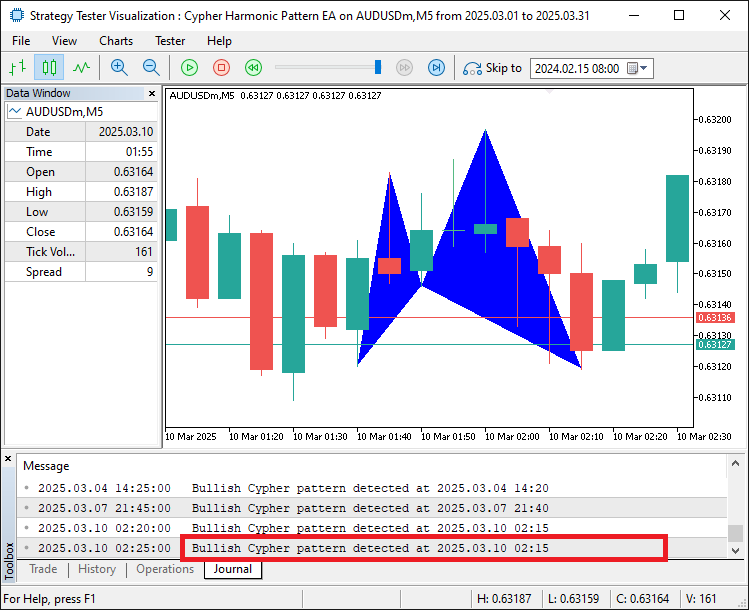
从图像中可以看出,我们能够正确地映射和可视化检测到的形态。现在我们需要继续绘制趋势线,使其在边界范围内完全可见,并为其添加标签,以便更容易识别这些水平。
//--- 2. Draw six trend lines connecting the swing points
DrawTrendLine(ObjectPrefix + "_Line_XA", PointX.TimeOfSwing, PointX.PriceAtSwing, PointA.TimeOfSwing, PointA.PriceAtSwing, clrBlack, 2, STYLE_SOLID);
DrawTrendLine(ObjectPrefix + "_Line_AB", PointA.TimeOfSwing, PointA.PriceAtSwing, PointB.TimeOfSwing, PointB.PriceAtSwing, clrBlack, 2, STYLE_SOLID);
DrawTrendLine(ObjectPrefix + "_Line_BC", PointB.TimeOfSwing, PointB.PriceAtSwing, PointC.TimeOfSwing, PointC.PriceAtSwing, clrBlack, 2, STYLE_SOLID);
DrawTrendLine(ObjectPrefix + "_Line_CD", PointC.TimeOfSwing, PointC.PriceAtSwing, PointD.TimeOfSwing, PointD.PriceAtSwing, clrBlack, 2, STYLE_SOLID);
DrawTrendLine(ObjectPrefix + "_Line_XB", PointX.TimeOfSwing, PointX.PriceAtSwing, PointB.TimeOfSwing, PointB.PriceAtSwing, clrBlack, 2, STYLE_SOLID);
DrawTrendLine(ObjectPrefix + "_Line_BD", PointB.TimeOfSwing, PointB.PriceAtSwing, PointD.TimeOfSwing, PointD.PriceAtSwing, clrBlack, 2, STYLE_SOLID);

//--- 3. Draw labels for each swing point (X, A, B, C, D)
double LabelOffset = 15 * SymbolInfoDouble(_Symbol, SYMBOL_POINT); //--- Offset in points for label placement
DrawTextLabel(ObjectPrefix + "_Label_X", "X", PointX.TimeOfSwing, PointX.PriceAtSwing + (PointX.IsSwingHigh ? LabelOffset : -LabelOffset), clrBlack, 11, PointX.IsSwingHigh);
DrawTextLabel(ObjectPrefix + "_Label_A", "A", PointA.TimeOfSwing, PointA.PriceAtSwing + (PointA.IsSwingHigh ? LabelOffset : -LabelOffset), clrBlack, 11, PointA.IsSwingHigh);
DrawTextLabel(ObjectPrefix + "_Label_B", "B", PointB.TimeOfSwing, PointB.PriceAtSwing + (PointB.IsSwingHigh ? LabelOffset : -LabelOffset), clrBlack, 11, PointB.IsSwingHigh);
DrawTextLabel(ObjectPrefix + "_Label_C", "C", PointC.TimeOfSwing, PointC.PriceAtSwing + (PointC.IsSwingHigh ? LabelOffset : -LabelOffset), clrBlack, 11, PointC.IsSwingHigh);
DrawTextLabel(ObjectPrefix + "_Label_D", "D", PointD.TimeOfSwing, PointD.PriceAtSwing + (PointD.IsSwingHigh ? LabelOffset : -LabelOffset), clrBlack, 11, PointD.IsSwingHigh);

//--- 4. Draw a central label to identify the pattern
datetime CenterTime = (PointX.TimeOfSwing + PointB.TimeOfSwing) / 2;  //--- Middle time between X and B
double CenterPrice = PointD.PriceAtSwing;                            //--- Place it at D’s price level
if(ObjectCreate(0, ObjectPrefix + "_Label_Center", OBJ_TEXT, 0, CenterTime, CenterPrice)) {
   ObjectSetString(0, ObjectPrefix + "_Label_Center", OBJPROP_TEXT, "Cypher"); //--- Label as "Cypher"
   ObjectSetInteger(0, ObjectPrefix + "_Label_Center", OBJPROP_COLOR, clrBlack);
   ObjectSetInteger(0, ObjectPrefix + "_Label_Center", OBJPROP_FONTSIZE, 11);
   ObjectSetString(0, ObjectPrefix + "_Label_Center", OBJPROP_FONT, "Arial Bold");
   ObjectSetInteger(0, ObjectPrefix + "_Label_Center", OBJPROP_ALIGN, ALIGN_CENTER);
}
我们继续进行可视化过程,以在图表上进一步展现密码形态。我们调用 “DrawTrendLine” 函数六次,绘制连接摆动点的黑色实线,每条线都以 “ObjectPrefix” 加上唯一后缀命名(例如 “_Line_XA”)。这些线条分别连接 “PointX” 至 “PointA”、“PointA” 至 “PointB”、“PointB” 至 “PointC”、“PointC” 至 “PointD”、“PointX” 至 “PointB” 以及 “PointB” 至 “PointD”,使用各点相应的 “TimeOfSwing” 和 “PriceAtSwing” 值,线宽为 2,并采用 STYLE_SOLID 样式,以清晰勾勒形态的结构。
接下来,我们为每个摆动点添加文本标签。我们通过 SymbolInfoDouble 函数配合 SYMBOL_POINT 参数获取交易品种的点值,然后将其乘以 15 得到 “LabelOffset”,以便恰当地定位标签。我们调用 “DrawTextLabel” 函数五次,为 “PointX”、“PointA”、“PointB”、“PointC” 和 “PointD” 添加标签,标签名称采用 “ObjectPrefix + ‘_Label_X’” 等格式,文本内容分别为 “X”、“A”、“B”、“C”、“D”。每个标签使用该点的 “TimeOfSwing” 和 “PriceAtSwing”,并根据 “LabelOffset” 进行调整(当 “IsSwingHigh” 为 true 时加上偏移量,为 false 时减去偏移量),颜色设为 “clrBlack”(黑色),字体大小为 11,“IsSwingHigh” 决定标签位于点的上方还是下方。
最后,我们创建一个中央标签来标识形态。我们通过将 “PointX.TimeOfSwing” 与 “PointB.TimeOfSwing” 取平均值来计算 “CenterTime”,并将 “CenterPrice” 设为 “PointD.PriceAtSwing”。我们使用 ObjectCreate 函数在这些坐标处创建一个类型为 “OBJ_TEXT” 的文本对象,名称为 “ObjectPrefix + ‘_Label_Center’”。如果创建成功,我们使用 “ObjectSetString” 将 “OBJPROP_TEXT” 设置为 “密码”,“OBJPROP_FONT” 设置为 “Arial Bold”;使用 ObjectSetInteger 将 “OBJPROP_COLOR” 设置为 “clrBlack”,“OBJPROP_FONTSIZE” 设置为 11,“OBJPROP_ALIGN” 设置为 “ALIGN_CENTER”,从而在图表上清晰地标记该形态。编译后,我们得到以下结果。
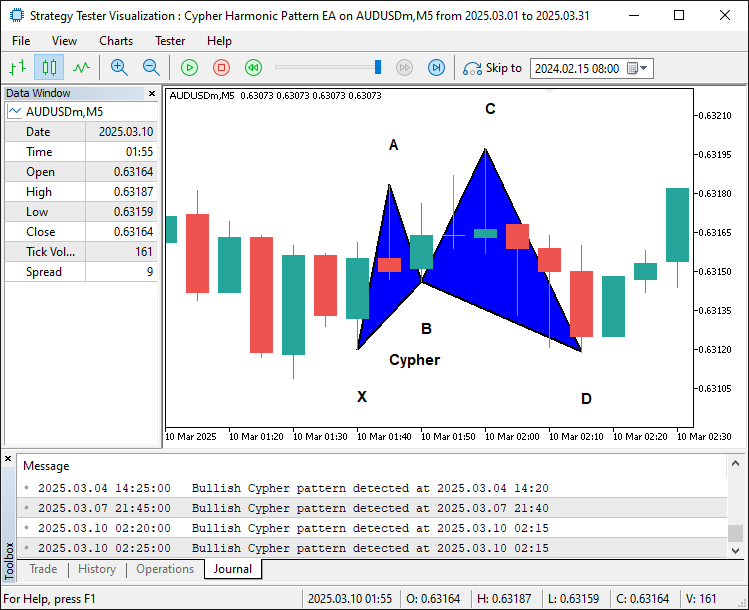
从图像中可以看出,我们已经为形态添加了边框和标签,使其更加直观且易于理解。接下来我们需要做的是确定该形态的交易位置。
//--- 5. Draw trade levels (entry, take-profits) as dotted lines
datetime LineStartTime = PointD.TimeOfSwing;                    //--- Start at D’s time
datetime LineEndTime = PointD.TimeOfSwing + PeriodSeconds(_Period) * 2; //--- Extend 2 bars to the right
double EntryPrice, StopLossPrice, TakeProfitPrice, TakeProfit1Level, TakeProfit2Level, TakeProfit3Level, TradeDistance;
if(PatternDirection == "Bullish") {
   EntryPrice = SymbolInfoDouble(_Symbol, SYMBOL_ASK); //--- Buy at current ask price
   StopLossPrice = PointX.PriceAtSwing;                //--- Stop-loss at X (below entry for bullish)
   TakeProfitPrice = PointC.PriceAtSwing;              //--- Take-profit at C (target level)
   TakeProfit3Level = PointC.PriceAtSwing;             //--- Highest TP at C
   TradeDistance = TakeProfit3Level - EntryPrice;      //--- Distance to TP3
   TakeProfit1Level = EntryPrice + TradeDistance / 3;  //--- First TP at 1/3 of the distance
   TakeProfit2Level = EntryPrice + 2 * TradeDistance / 3; //--- Second TP at 2/3
} else {
   EntryPrice = SymbolInfoDouble(_Symbol, SYMBOL_BID); //--- Sell at current bid price
   StopLossPrice = PointX.PriceAtSwing;                //--- Stop-loss at X (above entry for bearish)
   TakeProfitPrice = PointC.PriceAtSwing;              //--- Take-profit at C
   TakeProfit3Level = PointC.PriceAtSwing;             //--- Lowest TP at C
   TradeDistance = EntryPrice - TakeProfit3Level;      //--- Distance to TP3
   TakeProfit1Level = EntryPrice - TradeDistance / 3;  //--- First TP at 1/3
   TakeProfit2Level = EntryPrice - 2 * TradeDistance / 3; //--- Second TP at 2/3
}

DrawDottedLine(ObjectPrefix + "_EntryLine", LineStartTime, EntryPrice, LineEndTime, clrMagenta); //--- Entry line
DrawDottedLine(ObjectPrefix + "_TP1Line", LineStartTime, TakeProfit1Level, LineEndTime, clrForestGreen); //--- TP1 line
DrawDottedLine(ObjectPrefix + "_TP2Line", LineStartTime, TakeProfit2Level, LineEndTime, clrGreen);      //--- TP2 line
DrawDottedLine(ObjectPrefix + "_TP3Line", LineStartTime, TakeProfit3Level, LineEndTime, clrDarkGreen);  //--- TP3 line

//--- 6. Draw labels for trade levels
datetime LabelTime = LineEndTime + PeriodSeconds(_Period) / 2; //--- Place labels further right
string EntryLabelText = (PatternDirection == "Bullish") ? "BUY (" : "SELL (";
EntryLabelText += DoubleToString(EntryPrice, _Digits) + ")"; //--- Add price to label
DrawTextLabel(ObjectPrefix + "_EntryLabel", EntryLabelText, LabelTime, EntryPrice, clrMagenta, 11, true);

string TP1LabelText = "TP1 (" + DoubleToString(TakeProfit1Level, _Digits) + ")";
DrawTextLabel(ObjectPrefix + "_TP1Label", TP1LabelText, LabelTime, TakeProfit1Level, clrForestGreen, 11, true);

string TP2LabelText = "TP2 (" + DoubleToString(TakeProfit2Level, _Digits) + ")";
DrawTextLabel(ObjectPrefix + "_TP2Label", TP2LabelText, LabelTime, TakeProfit2Level, clrGreen, 11, true);

string TP3LabelText = "TP3 (" + DoubleToString(TakeProfit3Level, _Digits) + ")";
DrawTextLabel(ObjectPrefix + "_TP3Label", TP3LabelText, LabelTime, TakeProfit3Level, clrDarkGreen, 11, true);
在这里,我们继续通过绘制虚线和标签来可视化密码形态的交易位置。我们将 “LineStartTime” 设置为 “PointD.TimeOfSwing”,并利用 PeriodSeconds 函数乘以 2 计算出超出该点两根 K 线的时间,作为 “LineEndTime”,从而定义水平线的时间范围。
对于 “Bullish”(看涨)形态(当 “PatternDirection” 为 “Bullish” 时),我们通过 SymbolInfoDouble 配合 SYMBOL_ASK 获取当前的卖出价作为 “EntryPrice”(入场价),将 “StopLossPrice”(止损价)设为 “PointX.PriceAtSwing”,将 “TakeProfitPrice” 和 “TakeProfit3Level” 设为 “PointC.PriceAtSwing”。然后计算 “TradeDistance” 为 “TakeProfit3Level” 减去 “EntryPrice”,并分别以 “EntryPrice” 加上 “TradeDistance” 的三分之一和三分之二,计算得出 “TakeProfit1Level” 和 “TakeProfit2Level”。
对于看跌形态,我们使用 SYMBOL_BID 作为 “EntryPrice”,类似地设置 “StopLossPrice” 和 “TakeProfit3Level”,计算 “TradeDistance” 为 “EntryPrice” 减去 “TakeProfit3Level”,并从 “EntryPrice” 中减去 “TradeDistance” 的三分之一和三分之二,分别得出 “TakeProfit1Level” 和 “TakeProfit2Level”。
然后,我们调用 “DrawDottedLine” 函数四次来绘制水平线:在 “EntryPrice” 处绘制 “ObjectPrefix + ‘_EntryLine’”,颜色为 “clrMagenta”(洋红色);在 “TakeProfit1Level”、“TakeProfit2Level” 和 “TakeProfit3Level” 处分别绘制 “ObjectPrefix + ‘_TP1Line’”、“ObjectPrefix + ‘_TP2Line’” 和 “ObjectPrefix + ‘_TP3Line’”,颜色依次为 “clrForestGreen”(森林绿)、“clrGreen”(绿色)和 “clrDarkGreen”(深绿色),时间范围从 “LineStartTime” 到 “LineEndTime”。
为了添加标签,我们将 “LabelTime” 设置为 “LineEndTime” 加上使用 “PeriodSeconds” 计算的半根 K 线时长。我们根据 “PatternDirection” 创建 “EntryLabelText”,内容为 "BUY "(买入)或 "SELL "(卖出),并附加上使用 “DoubleToString” 和 “_Digits” 格式化的 “EntryPrice”,然后在 “EntryPrice” 处调用 “DrawTextLabel” 创建 “ObjectPrefix + ‘_EntryLabel’”,颜色为 “clrMagenta”。
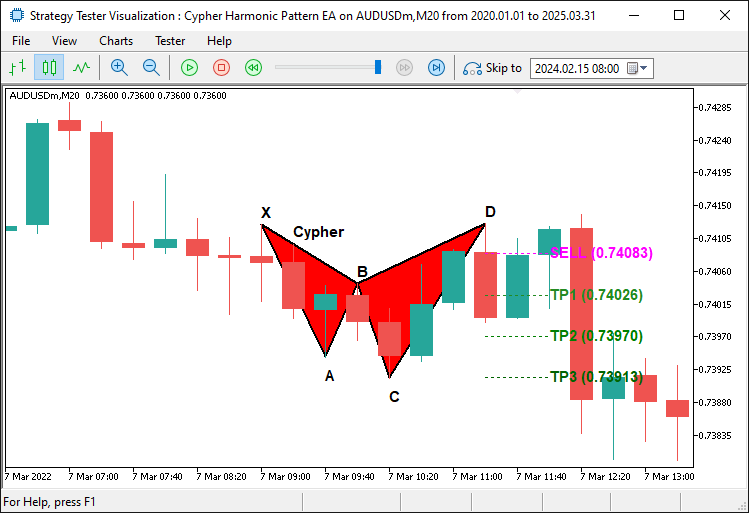
类似地,我们定义 “TP1LabelText”、“TP2LabelText” 和 “TP3LabelText”,分别包含格式化后的 “TakeProfit1Level”、“TakeProfit2Level” 和 “TakeProfit3Level” 价格。我们在各自的水平上为每个标签调用 “DrawTextLabel”,颜色分别为 “clrForestGreen”、“clrGreen” 和 “clrDarkGreen”,字体大小均为 11,且均位于价格上方,从而增强交易位的清晰度。结果如下。
看跌形态:
看涨形态:
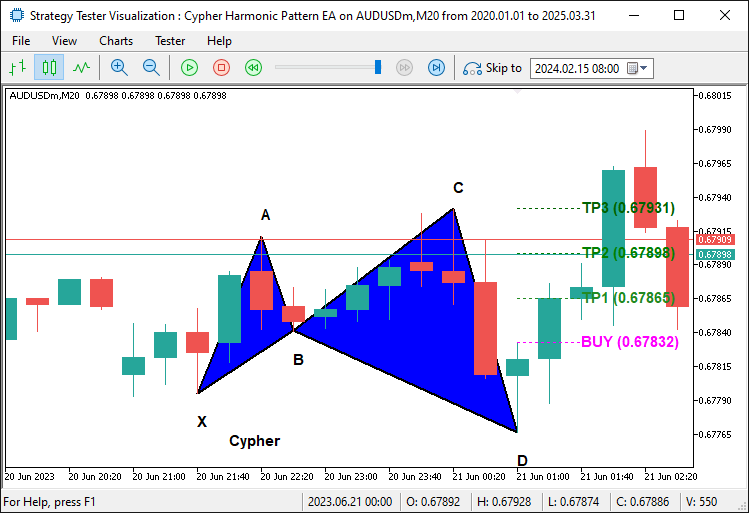
从图像中可以看出,我们已经正确地绘制了交易位置。现在我们需要做的就是启动实际交易仓位,仅此而已。
//--- **Trading Logic**
//--- Check if trading is allowed and no position is already open
if(TradingEnabled && !PositionSelect(_Symbol)) {
   //--- Place a buy or sell order based on pattern type
   bool TradeSuccessful = (PatternDirection == "Bullish") ?
      obj_Trade.Buy(TradeVolume, _Symbol, EntryPrice, StopLossPrice, TakeProfitPrice, "Cypher Buy") :
      obj_Trade.Sell(TradeVolume, _Symbol, EntryPrice, StopLossPrice, TakeProfitPrice, "Cypher Sell");
   //--- Log the result of the trade attempt
   if(TradeSuccessful)
      Print(PatternDirection, " order opened successfully.");
   else
      Print(PatternDirection, " order failed: ", obj_Trade.ResultRetcodeDescription());
}

//--- Force the chart to update and show all drawn objects
ChartRedraw();
在这里,我们实现了交易逻辑,以便在满足条件时执行密码形态的交易。我们检查 “TradingEnabled” 是否为 true,并使用 PositionSelect 函数配合 _Symbol 参数确认当前交易品种没有已开持仓,确保仅在允许交易且不存在冲突持仓时才下单。如果两个条件都满足,我们使用三元运算符根据 “PatternDirection” 下达交易:对于 “Bullish”(看涨)形态,我们调用 “obj_Trade.Buy” 函数,参数为 “TradeVolume”、_Symbol、“EntryPrice”、“StopLossPrice”、“TakeProfitPrice” 和注释 “密码 Buy”;对于看跌形态,我们调用 “obj_Trade.Sell”,使用相同的参数但注释为 “密码 Sell”,并将结果存储在 “TradeSuccessful” 中。
然后,我们使用 Print 函数记录交易结果,如果 “TradeSuccessful” 为 true,则输出 “PatternDirection” 和 “订单成功开仓。”;如果为 false,则输出 “订单失败:” 以及来自 “obj_Trade.ResultRetcodeDescription” 的错误描述。最后,我们调用 ChartRedraw 函数强制 MetaTrader 5 图表更新,确保所有绘制的对象(如三角形、线条和标签)立即对用户可见。
最后,我们只需在移除程序时从图表上删除这些形态。
//+------------------------------------------------------------------+
//| Expert deinitialization function                                 |
//+------------------------------------------------------------------+
//--- Runs when the EA stops (e.g., removed from chart)
void OnDeinit(const int reason) {
   //--- Remove all objects starting with "CY_" (our Cypher pattern objects)
   ObjectsDeleteAll(0, "CY_");
}
在 OnDeinit 事件处理程序中,我们使用 ObjectsDeleteAll 函数删除所有以前缀 “CY_” 开头的图表对象,确保所有与密码形态相关的可视化元素(如三角形、趋势线和标签)都被清除,从而在系统不再活动时保持工作区整洁。编译完成后,我们得到了以下结果。
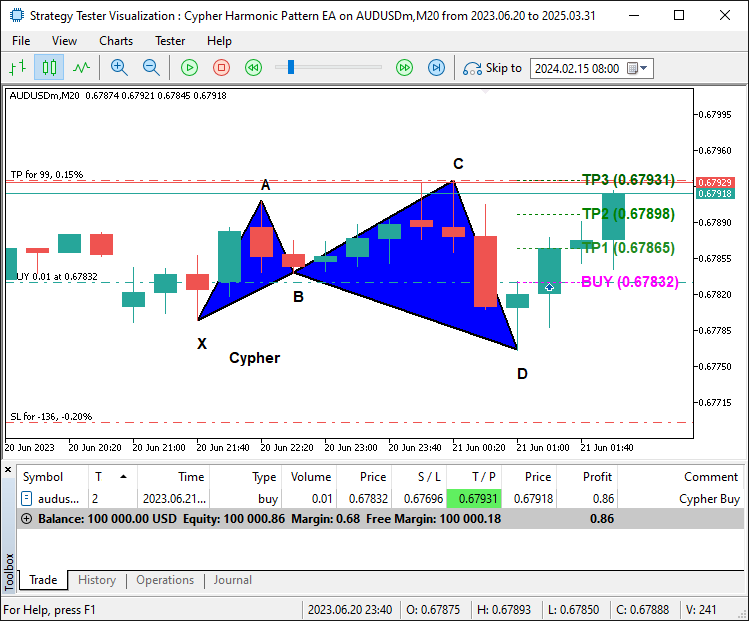
从图像中可以看出,我们已经绘制了密码形态,并且能够在形态确认后相应地进行交易,因此实现了我们识别、绘制和交易该形态的目标。剩下的事情就是对该程序进行回测,这将在下一节中处理。
回测与优化
在初始回测阶段,我们发现了一个关键问题:系统容易出现形态重绘(Repainting)。当密码形态在某根 K 线上看似有效,但随后随着新价格数据的到来而发生变化或消失时,就会发生重绘,这导致交易信号不可靠。这个问题引发了误报,即根据后来被证明无效的形态执行了交易,从而对收益产生负面影响。以下是我们要说明的示例。
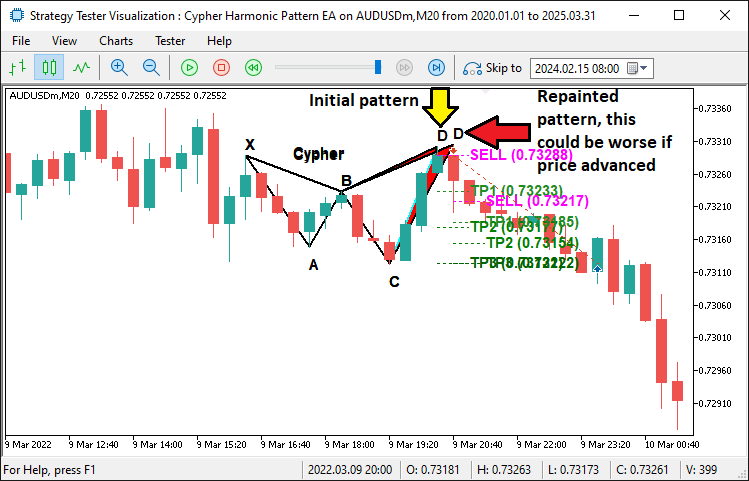
为了解决这个问题,我们实施了形态锁定机制,使用全局变量 “g_patternFormationBar” 和 “g_lockedPatternX” 在检测到形态时锁定形态,并在下一根 K 线上确认,确保 X 摆动点保持一致。这一修复显著减少了重绘现象,后续测试也证实了这一点——形态检测更加稳定,无效交易更少。以下是用于锁定形态的示例代码片段,确保我们等待形态稳定后再进行交易。
//--- If the pattern has changed, update the lock
g_patternFormationBar = CurrentBarIndex;
g_lockedPatternX = PointX.TimeOfSwing;
Print("Cypher pattern has changed; updating lock on bar ", CurrentBarIndex, ". Waiting for confirmation.");
return;
我们添加确认逻辑,始终等待形态被确认并额外保持稳定一根 K 线,从而避免过早进入仓位,之后才发现这仅仅是形态形成的开始。添加形态锁定后,我们可以看到问题已得到解决。
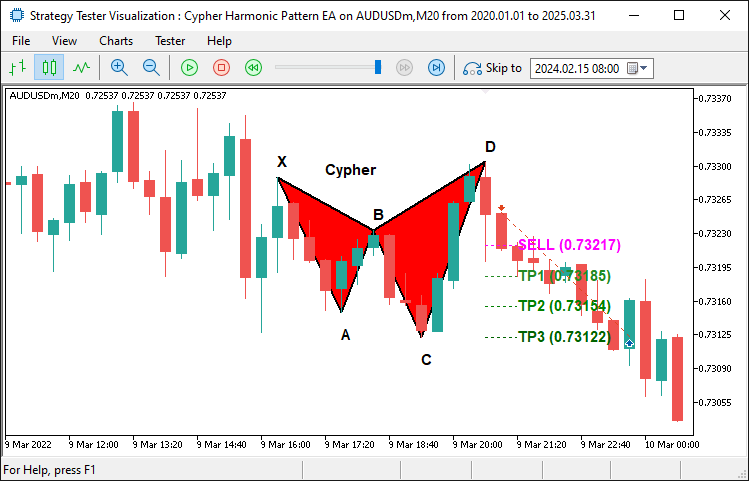
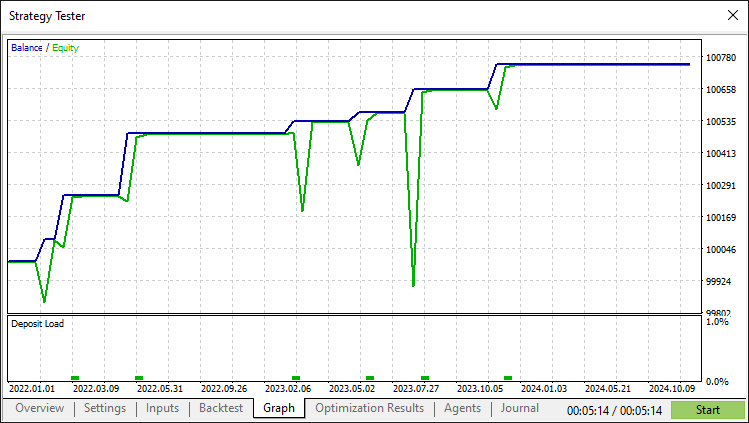
经过修正和全面回测后,我们得到以下结果。
回测结果图形:
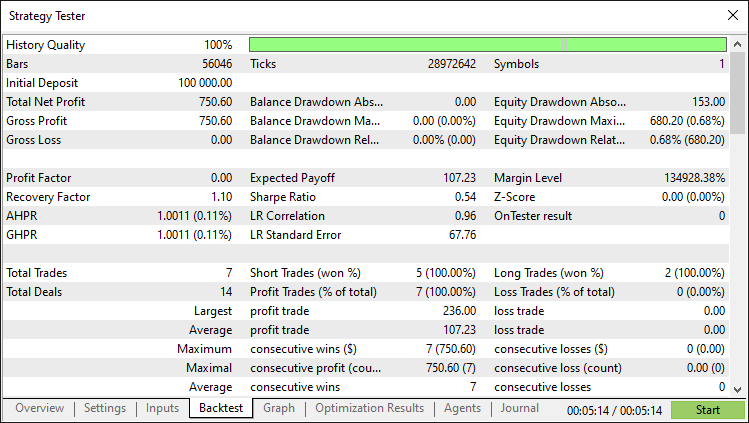
回测报告:
结论
综上所述,我们成功开发了一个能够精准检测和交易密码谐波形态的 MQL5 EA。通过整合摆动点检测、基于斐波那契比率的验证、全面的可视化以及防止重绘的形态锁定机制,我们构建了一个能够动态适应市场环境的稳健系统。
免责声明:本文仅用于教学目的。交易涉及重大的财务风险,市场状况可能不可预测。虽然本文概述的策略为谐波交易提供了结构化的方法,但并不能保证盈利。在实盘环境中部署该程序之前,进行全面回测和恰当的风险管理至关重要。
通过实施这些技术,您可以精进您的谐波形态交易技能,提升您技术分析的能力,并推动您的算法交易策略向前发展。祝您在交易之旅中好运!
本文由MetaQuotes Ltd译自英文
原文地址: https://www.mql5.com/en/articles/17865
注意: MetaQuotes Ltd.将保留所有关于这些材料的权利。全部或部分复制或者转载这些材料将被禁止。
本文由网站的一位用户撰写,反映了他们的个人观点。MetaQuotes Ltd 不对所提供信息的准确性负责,也不对因使用所述解决方案、策略或建议而产生的任何后果负责。

 皇冠同花顺优化(RFO)
 交易中的神经网络:层次化双塔变换器(终篇)

 MQL5 交易工具包(第 8 部分):如何在代码库中实现和使用历史管理 EX5 库

你好,文章写得很好。感谢您的辛勤工作。能分享一下完成的代码文件吗?将其附在文章末尾?
欢迎您的到来。你检查过了吗?谢谢。
感谢您分享这篇文章。实现其他谐波模式的代码非常有用。
当然,欢迎您